You need to enable JavaScript in order to use the AI chatbot tool powered by ChatBot

AI Security Guide: Challenges, Best Practices To Stay Secure in 2026

Share via:
blog-cms-banner-bg
Little-Known Negotiation Hacks to Get the Best Deal on Slack
cta-bg-blogDownload Your Copy

HIPAA Compliance Checklist for 2025

Download PDF

Most AI security issues don’t start with an attack. They start with normal usage that no one is tracking.

A developer pastes an internal API response into Claude to debug an issue. A finance analyst uploads a revenue sheet into ChatGPT to generate a summary.

The output looks useful, so it gets reused in a report or shared with a team. Now that data has left your system and in most cases, no one can answer:

  • what exact data was shared
  • whether it included sensitive fields
  • or where that output was used next

That’s where AI in cyber security​ actually breaks down. In this guide, we’ll highlight the real risks teams face with AI security, the gaps you might miss, and the specific controls you need to stay secure in 2026.

TL;DR

  • AI security focuses on controlling data access, usage, and visibility across real workflows.
  • Most risks come from everyday actions like sharing sensitive data through AI prompts.
  • Key threats include data exposure, over-permissioned access, and shadow AI usage.
  • Best practices include strict data rules, role-based access, and continuous AI monitoring.
  • CloudEagle.ai secures AI usage with real-time visibility, access control, and audit-ready governance.

1. What is AI Security?

AI security is about controlling how AI accesses your data, what it does with it, and whether those actions are visible in real workflows. It’s not just protecting systems but governing how AI behaves inside them.

Most definitions stop at “protecting AI models.” That misses what’s actually happening. In practice, AI security shows up when:

  • Control What Data AI Can Access: Limit which datasets AI can read, process, or generate insights from.
  • Restrict What AI Can Do With That Data: Prevent AI from aggregating, exporting, or sharing sensitive information.
  • Track Every AI Interaction: Capture prompts, outputs, and actions so usage is fully visible.
  • Validate AI Outputs Before Use: Ensure generated insights, code, or summaries are reviewed before decisions.

So AI security isn’t only about protection. It’s about visibility, control, and accountability across every interaction AI has with your systems.

2. What Does AI Security Look Like in Day-to-Day Enterprise Use?

AI security in day-to-day use means controlling what data goes into AI tools, what those tools can access, and how their outputs are used. 

If you zoom into a typical workday, it’s not AI in cyber security​ teams interacting with AI. It’s support, finance, engineering, just trying to move faster.

  • Data Shared Through Prompts During Work: A support agent copies a customer issue from Zendesk into ChatGPT to draft a reply.
  • AI Accessing SaaS Data Through Integrations: AI connected to Google Workspace or Slack reads emails and internal discussions.
  • AI Outputs Used In Business Decisions: Generated summaries or reports are reused without checking how they were created.
  • Permissions Extending To AI Without Review: AI inherits access from users in systems like Salesforce without any revalidation.

None of these actions look risky in isolation. But together, they create a pattern where data moves, decisions are made, and no one has full visibility into what AI actually did.

There’s AI Tools You Didn’t Approve

It’s running. It’s used. It’s invisible to you.
Expose It Now

3. Where Are AI Security Risks Showing Up Right Now?

AI security risks are showing up inside normal workflows where AI touches real data, not in isolated edge cases or experiments. 

If you look closely, these AI in cyber security​ risks don’t come from one system. They appear when AI interacts with tools like Google Workspace, Slack, or Salesforce. These tools pull data, summarize it, or act on it without clear visibility.

A. Sensitive Data Entering Prompts Without Visibility

Sensitive AI cyber security exposure​ starts when real business data is pasted into AI tools during normal work, without any tracking or controls.
sensitive-data-exposing-workflow

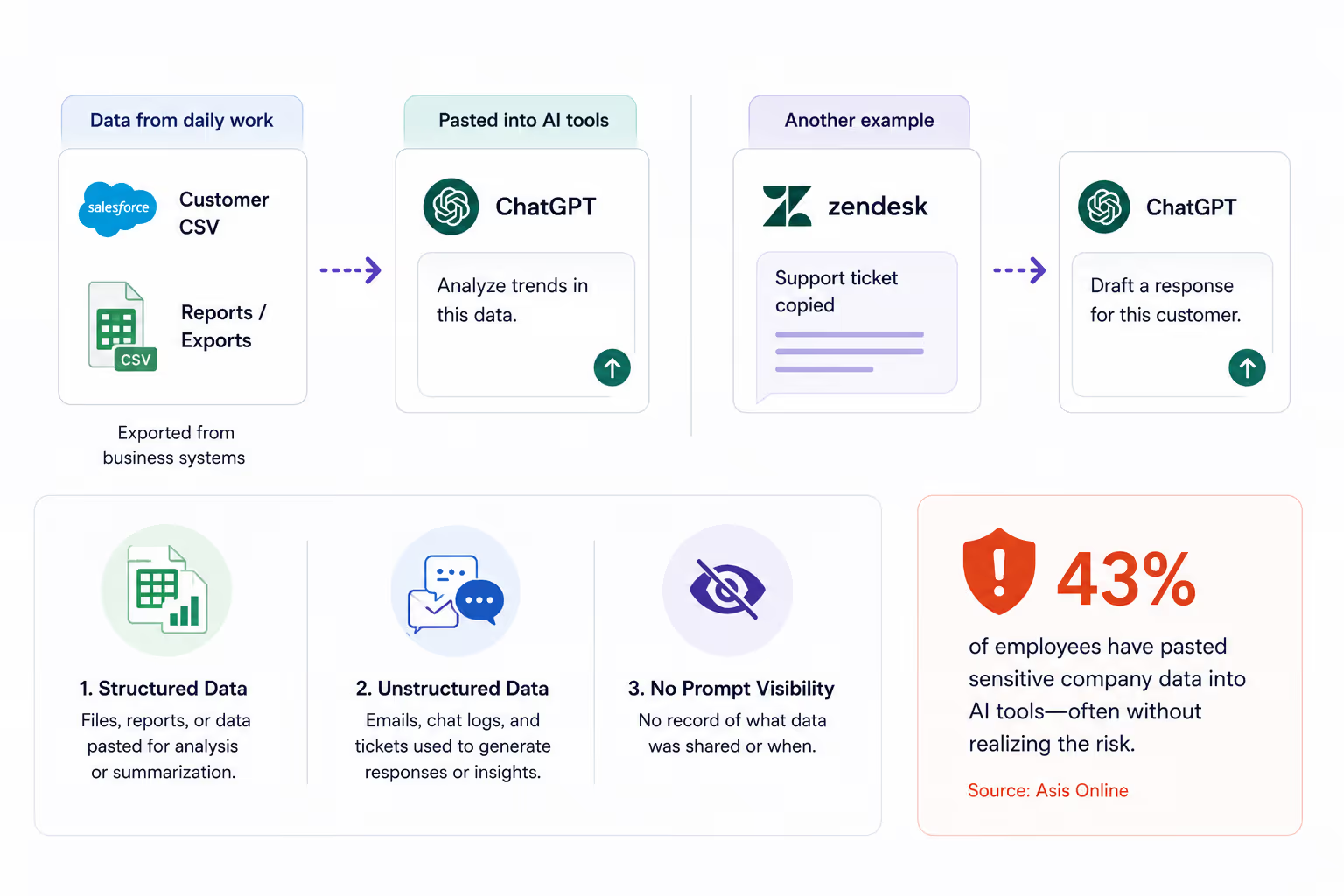
Think about how this usually happens. Someone exports a customer list from Salesforce and drops it into ChatGPT to “analyze trends.” Or a support agent copies a ticket from Zendesk to generate a quick response.

  • Structured Data Shared Through Prompts: CSVs, reports, or queries get pasted directly into AI tools for summarization or analysis.
  • Unstructured Data From Daily Workflows: Emails, chat logs, and support tickets are used to generate responses or insights.
  • No Prompt-Level Logging Or Tracking: There’s often no record of what exact data was shared or when.

This is where the AI security gaps show up. The action is quick, useful, and repeated.

According to Asis Online, 43% of employees have already pasted sensitive AI data security​ into AI tools, often without realizing the risk. 

And that’s the problem with AI cyber security​. It’s not one big mistake. It’s hundreds of small, routine actions that quietly move sensitive data outside your systems.

B. Over-Permissioned Users Accessing AI Features

Privilege creep shows up when AI starts using the same broad access that users already have, but at a much larger scale and speed. What used to take hours now happens in seconds.

A sales ops user with access to multiple objects in Salesforce can now ask AI to “summarize all high-value accounts.” And this is where the main problem with over-permission lies. 

  • AI Expands What Existing Access Can Do: Instead of opening files one by one, users can query entire datasets through AI.
  • Data Aggregation Across Multiple Sources: AI combines emails, documents, and records into a single output.
  • No Revalidation Of Access For AI Workflows: Permissions designed for manual use are reused without considering AI scale.

And over time, this issue compounds. There will be times when these over-permissions will cause severe AI security risks. 

  • Privilege Creep Becomes Immediate Exposure: Access accumulated over months is now usable in a single query.
  • Sensitive Data Surfaces Without Friction: AI removes the effort needed to locate and compile critical AI data security​.
  • No Guardrails On What Can Be Queried: Systems allow broad queries without restricting sensitive combinations.

So what happened ultimately? The access didn’t increase. The impact of that access did and that’s what most enterprises miss. 

C. Shadow AI Usage Outside Approved Environments

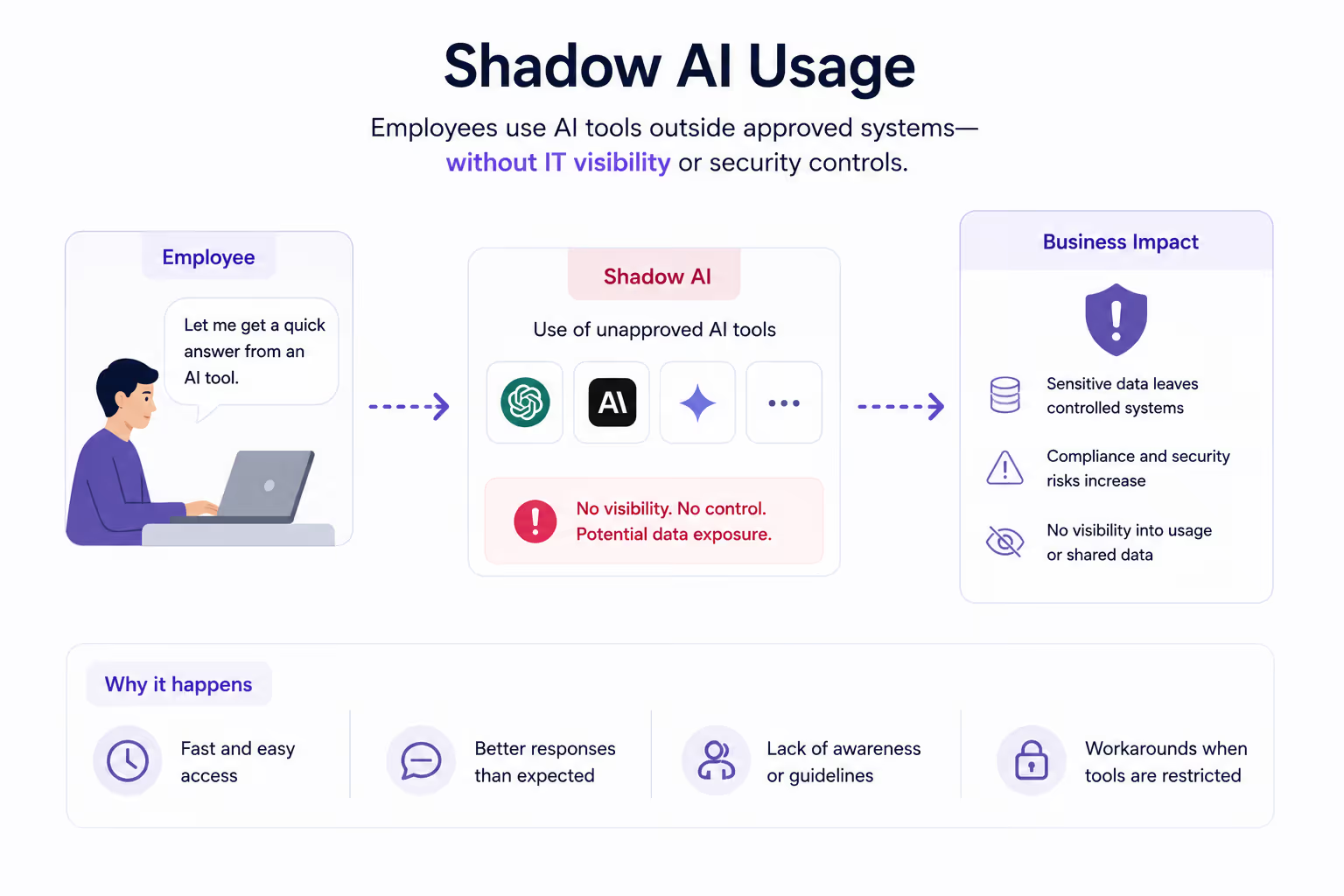
Shadow AI shows up when employees start using AI tools outside approved systems, and no one knows where data is going. It doesn’t start as an AI security decision. It starts as convenience.
shadow ai usage workflows in visual

For instance, this doesn’t look like a violation. It looks like teams trying to move faster with tools like ChatGPT or Claude that are easy to access.

  • AI Tools Used Outside IT Visibility: Teams adopt tools directly without going through AI security or procurement review.
  • No Control Over Data Handling: There’s no way to verify how data is processed, stored, or retained.
  • No Audit Trail For AI Interactions: Organizations cannot trace what data was shared or how outputs were used.

The gap shows up when you try to answer a simple question:

Which AI tools are currently being used across teams, and what data has been shared with them?

If that answer isn’t clear, the risk isn’t theoretical but already active. As Andy Grove, former CEO of Intel said,

“Bad companies are destroyed by crisis. Good companies survive them. Great companies are improved by them.”

The challenge with shadow AI is that the signals appear long before the crisis, but only if you’re actually looking for them.

Shadow Doesn’t Knock. It Spreads

New tools appear. No alerts. No control.
Shut It Down

4. What Best Practices Actually Help You Stay Secure With AI?

Staying relevant with AI security comes down to controlling how AI interacts with your data, users, and systems in real workflows. 

Most teams already have guidelines in place. The issue is that those guidelines don’t always map to what’s actually happening. So instead of thinking in terms of “best practices” as a checklist, it helps to look at what needs to be consistently enforced. 

A. Define Clear Rules for Data Usage in AI Tools

Defining data usage rules means being explicit about what can and cannot be shared with AI tools. You need it down to the type of data, not just general guidelines. 

Picture this. Someone exports a deal pipeline from Salesforce and drops it into ChatGPT to “clean up the summary before a meeting.” It feels harmless because it’s internal data. But that file might include:

  • Customer names and deal values
  • Revenue projections
  • Notes that were never meant to leave the CRM

This is where most AI security policies fall short. They say “don’t share sensitive data,” but don’t define what that actually means in practice.

According to IBM’s Cost of a Data Breach Report, data exposure incidents involving misused or mishandled data remain one of the most common causes of breaches.

Clear, specific rules remove that ambiguity. They make it obvious what’s allowed before someone has to decide in the moment.

B. Apply Role-Based Access to AI Features and Integrations

A marketing manager connects an AI tool to Google Workspace to generate campaign insights.

  • What they expect: The AI will only access marketing documents and campaign data.
  • What actually happens: The AI inherits their full access, including internal docs, shared drives, and unrelated team files.

Now look at a different case. A developer uses an AI assistant connected to GitHub to review code.

  • What they expect: The AI will analyze only the repository they’re working on.
  • What actually happens: It can access multiple repos the developer has permission to, including legacy or sensitive projects.
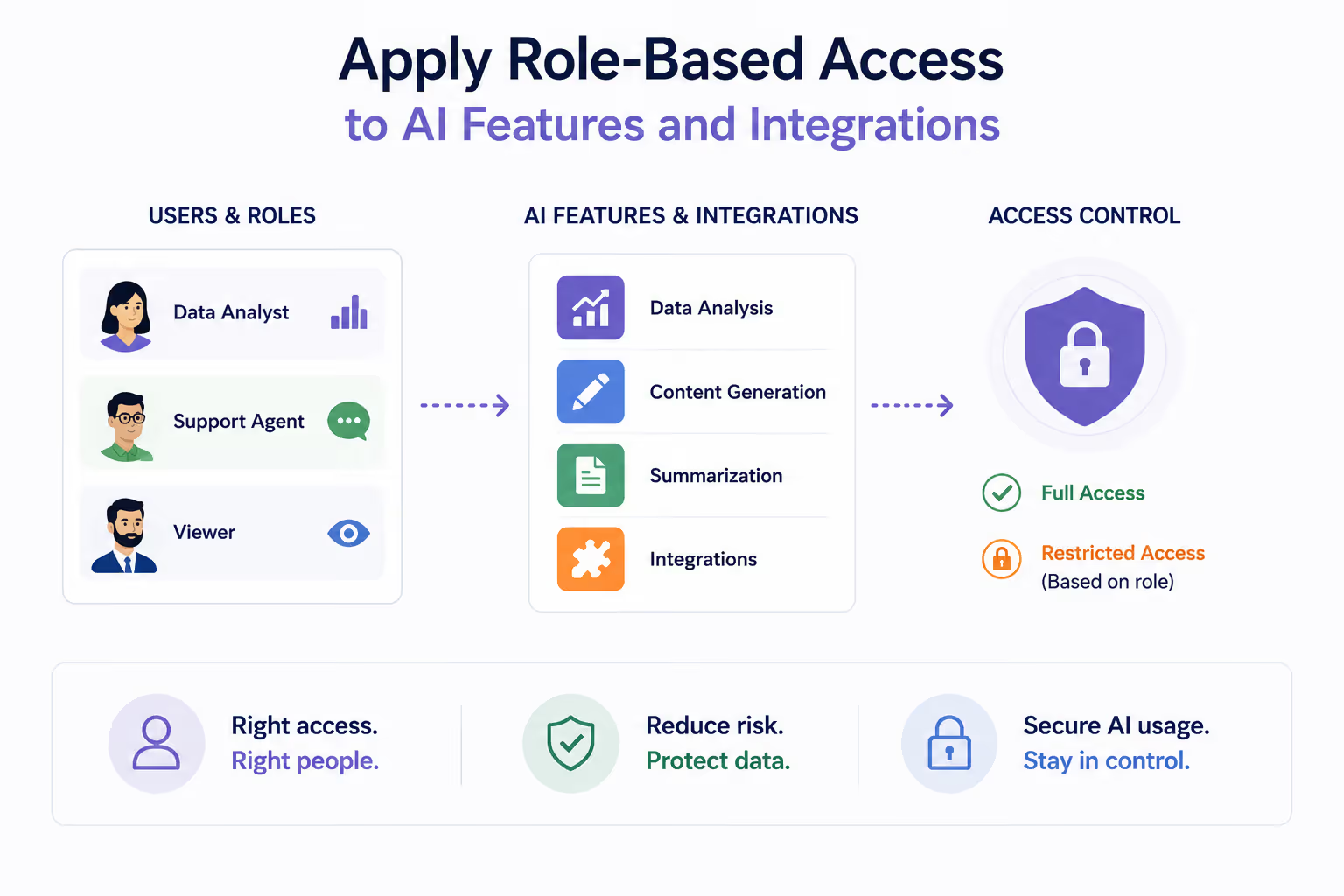
The pattern of AI security failures is the same in all two cases. AI doesn’t create new access. It expands how existing access is used.

  • Scope AI Access Based On Role, Not Just User Permissions: Limit what AI can access even if the user has broader permissions.
  • Restrict Data By Function And Sensitivity: Marketing, finance, and engineering data should not be equally accessible through AI.
  • Separate Human Access From AI Access: Just because a user can view something doesn’t mean AI should process it.
  • Continuously Review Access Boundaries: Update permissions as roles change and AI usage expands.

When role-based access is applied correctly, AI works within defined boundaries instead of amplifying everything a user can see.

C. Monitor AI Usage Continuously, Not Periodically

Monitoring AI usage means tracking how AI is used in real time. For instance, what data is shared, who is using it, and how outputs are applied instead of relying on periodic reviews.

Most teams still treat AI like SaaS audits. They check usage once a quarter or during a review cycle. But AI security doesn’t behave like that. Usage changes daily.

  • Track Prompt-Level Activity Continuously: Capture what data is being entered into tools like ChatGPT or Claude.
  • Monitor Who Is Using AI And How: Identify which teams and roles are actively using AI across workflows.
  • Detect Sudden Changes In Usage Patterns: Spot spikes in activity, new tools being used, or shifts in data types being shared.
  • Maintain Always-On Visibility Across Systems: Ensure AI usage across tools like Google Workspace or Slack is continuously tracked.

This is where most gaps appear. Not because teams don’t monitor but because they monitor too late. AI usage evolves every day. If your visibility doesn’t keep up, your risk grows without you noticing it.

4. How Does CloudEagle.ai Help with AI Security?

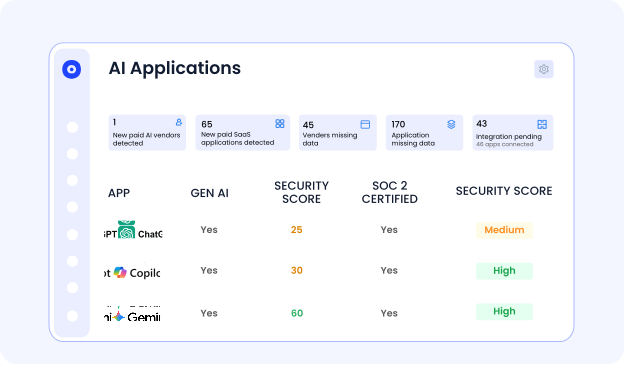
AI security risks are no longer limited to sanctioned tools. They come from how employees access, use, and share data across AI applications like ChatGPT, Microsoft Copilot, and Google Gemini.

Activity is spread across browser sessions, identity systems, and finance tools, making it impossible to secure AI usage through a single control point.

CloudEagle.ai acts as a unified control plane for AI security, combining browser signals, SSO data, and 500+ integrations to detect AI usage, prevent sensitive data exposure, control access, and enforce policies across both sanctioned and shadow AI tools.

A. Discover Shadow AI Across Browser, SSO, and Spend Signals

Most AI security risk starts with tools IT doesn’t even know exist. CloudEagle.ai surfaces every AI application being used across the organization, including shadow tools adopted through browsers or direct signups.

Current Process

Teams rely on scattered logs from browser tools like CrowdStrike or Zscaler, SSO activity, and expense reports. These systems are not connected, so discovery is delayed and incomplete.

Pain Points

Organizations cannot answer basic questions like which AI tools are in use or how many duplicate copilots exist. Shadow AI spreads without review, creating AI security and compliance blind spots.

How We Do It

CloudEagle.ai correlates browser activity from CrowdStrike and Zscaler, identity data from Okta, and financial transactions with its proprietary AI inventory (SaaSMap).

Why We Are Better

Unlike isolated AI security tools, CloudEagle.ai connects usage, identity, and spend signals to detect AI tools at the moment they are adopted.

B. Monitor AI Usage and Adoption Across the Enterprise

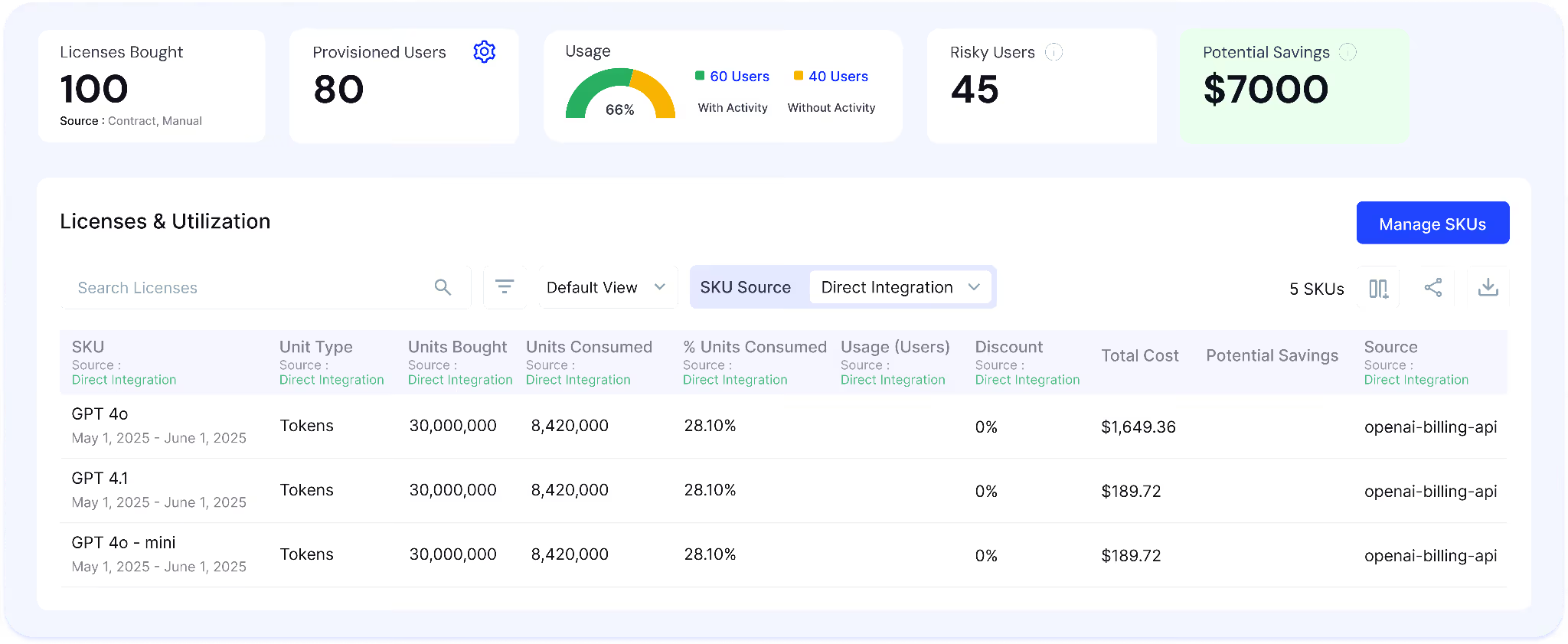
Once AI tools are discovered, teams need to understand how they are used across users, teams, and departments. CloudEagle.ai provides a real-time view of AI adoption, helping teams evaluate usage, value, and risk.

Current Process

Usage data sits across SSO logs, browser tools, and individual app dashboards. Teams manually stitch this data together, which is slow and unreliable.

Pain Points

Organizations cannot determine whether tools like Copilot are delivering value or whether rollout should expand. Usage-based billing also becomes unpredictable.
How We Do It

CloudEagle.ai aggregates usage data from SSO systems, browser logs, and SaaS integrations, mapping user activity, feature usage, and adoption trends across AI tools.

Why We Are Better

Teams get a continuously updated, organization-wide view of AI usage instead of relying on fragmented or delayed reports.

C. Prevent Sensitive Data Exposure with Secure AI Browsing Controls

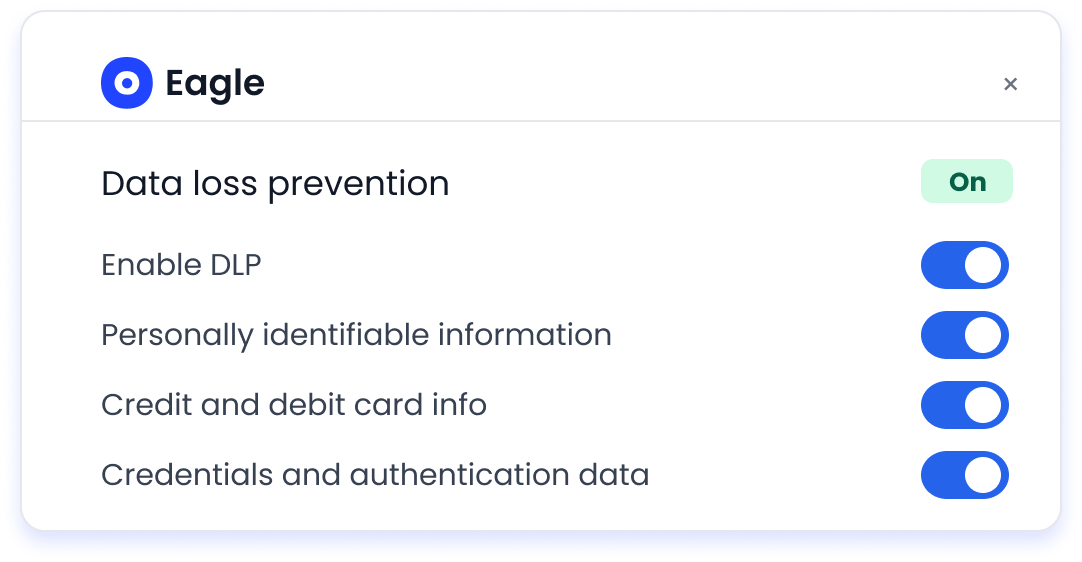
Employees often share sensitive data with AI tools without realizing the SaaS security risk. CloudEagle.ai enforces secure AI usage by monitoring and controlling what data is shared in real time.

Current Process

Employees paste confidential data into AI tools through browsers. Traditional tools like CASBs or firewalls cannot inspect prompt-level interactions.

Pain Points

Sensitive data such as PII, financial records, or proprietary information can be exposed without detection. AI security teams lack visibility into what is being shared with AI vendors.

How We Do It

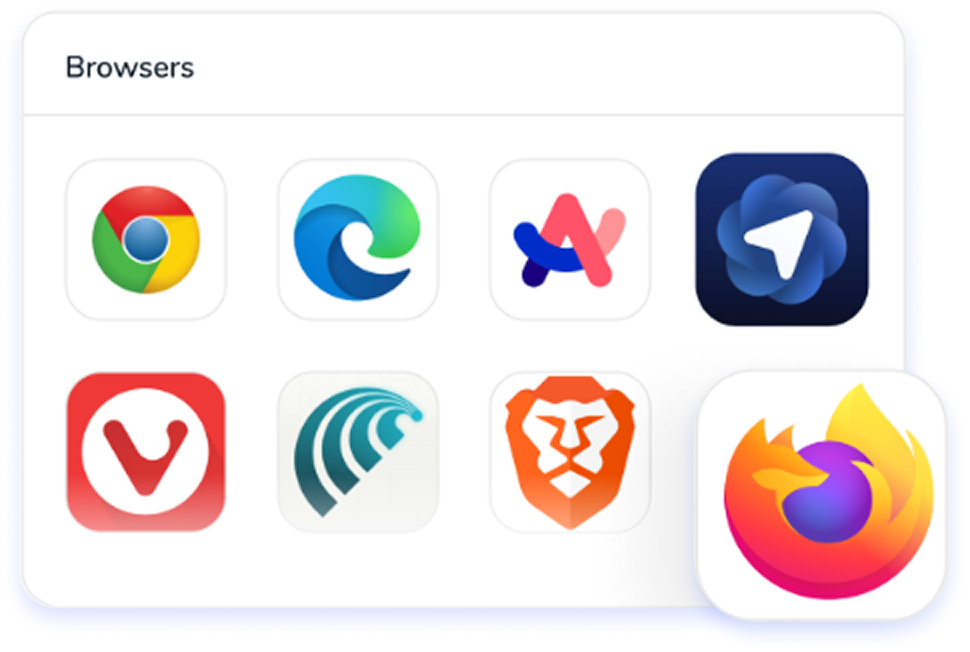
CloudEagle.ai monitors browser-based AI interactions and detects sensitive data before it is sent to AI tools. It can block high-risk inputs, flag potential exposure, and redirect users to approved tools.

Why We Are Better

Unlike traditional DLP solutions, CloudEagle.ai inspects prompt-level activity and applies controls across both sanctioned and shadow AI tools, ensuring protection where AI usage actually happens.

D. Control Access, Identities, and AI Lifecycle Risks

AI security is not just about tools but who has access, what permissions they have, and whether that access is still valid. CloudEagle.ai ensures access is continuously aligned with roles and usage.

Current Process

Access is granted manually and reviewed periodically. Offboarding is not AI-specific, leaving orphaned accounts and active API tokens behind.

Pain Points

Ex-employees retain access, excessive privileges go unnoticed, and API-based access is not governed. This increases both AI security and compliance risk.

How We Do It

CloudEagle.ai correlates identity data from SSO and HRIS systems with AI application access. It identifies orphaned accounts, excessive permissions, inactive users, and unused licenses.

Why We Are Better

Access control becomes continuous and automated across all AI tools, not limited to apps integrated with identity providers.

E. Maintain Audit-Ready AI Security and Compliance

AI security must be provable, not assumed. CloudEagle.ai ensures every AI-related action is logged and audit-ready.

Current Process

Audit evidence is collected manually across systems, taking weeks and often missing critical data.

Pain Points

Organizations cannot demonstrate AI governance clearly to auditors, regulators, or boards.

How We Do It

CloudEagle.ai logs AI usage, access changes, policy enforcement actions, and data-sharing events across all systems, creating a centralized audit trail.

Why We Are Better

Audit readiness becomes continuous, eliminating manual effort and ensuring defensible AI governance.

5. Conclusion

AI security doesn’t break because of one big failure. It breaks through small, everyday actions that no one is tracking closely enough.

A dataset gets pasted into ChatGPT for a quick summary. An AI assistant pulls data from Google Workspace to answer a question. A report generated by AI gets shared without checking the source. 

This is where CloudEagle becomes critical. It helps organizations track AI usage across tools, control access, monitor data exposure, and maintain audit-ready visibility. 

Because at this point, the question isn’t whether AI is being used in your organization. It’s whether you can actually see and control how it’s being used.

6. FAQs

1. What are the 4 types of AI risk?

The four common AI risks are data exposure, model misuse, lack of transparency, and output risk. For example, pasting internal data into ChatGPT can expose sensitive information without visibility or control.

2. What are the 7 types of cyber security?

The seven types typically include network security, application security, cloud security, endpoint security, data security, identity and access management (IAM), and operational security. These work together to protect systems, users, and data.

3. What are two risks of AI?

Two key risks are uncontrolled data sharing and unvalidated outputs. For instance, AI-generated summaries or code may be used without checking accuracy or data sources.

4. What are the top 5 cybersecurity threats?

The top threats include phishing attacks, ransomware, insider threats, credential theft, and data breaches. AI introduces new layers to these risks by accelerating data access and decision-making without proper controls.

Advertisement for a SaaS Subscription Tracking Template with a call-to-action button to download and a partial graphic of a tablet showing charts.Banner promoting a SaaS Agreement Checklist to streamline SaaS management and avoid budget waste with a call-to-action button labeled Download checklist.Blue banner with text 'The Ultimate Employee Offboarding Checklist!' and a black button labeled 'Download checklist' alongside partial views of checklist documents from cloudeagle.ai.Digital ad for download checklist titled 'The Ultimate Checklist for IT Leaders to Optimize SaaS Operations' by cloudeagle.ai, showing checklist pages.Slack Buyer's Guide offer with text 'Unlock insider insights to get the best deal on Slack!' and a button labeled 'Get Your Copy', accompanied by a preview of the guide featuring Slack's logo.Monday Pricing Guide by cloudeagle.ai offering exclusive pricing secrets to maximize investment with a call-to-action button labeled Get Your Copy and an image of the guide's cover.Blue banner for Canva Pricing Guide by cloudeagle.ai offering a guide to Canva costs, features, and alternatives with a call-to-action button saying Get Your Copy.Blue banner with white text reading 'Little-Known Negotiation Hacks to Get the Best Deal on Slack' and a white button labeled 'Get Your Copy'.Blue banner with text 'Little-Known Negotiation Hacks to Get the Best Deal on Monday.com' and a white button labeled 'Get Your Copy'.Blue banner with text 'Little-Known Negotiation Hacks to Get the Best Deal on Canva' and a white button labeled 'Get Your Copy'.Banner with text 'Slack Buyer's Guide' and a 'Download Now' button next to images of a guide titled 'Slack Buyer’s Guide: Features, Pricing & Best Practices'.Digital cover of Monday Pricing Guide with a button labeled Get Your Copy on a blue background.Canva Pricing Guide cover with a button labeled Get Your Copy on a blue gradient background.

Enter your email to
unlock the report

Oops! Something went wrong while submitting the form.
License Count
Benchmark
Per User/Per Year

Enter your email to
unlock the report

Oops! Something went wrong while submitting the form.
License Count
Benchmark
Per User/Per Year

Enter your email to
unlock the report

Oops! Something went wrong while submitting the form.
Notion Plus
License Count
Benchmark
Per User/Per Year
100-500
$67.20 - $78.72
500-1000
$59.52 - $72.00
1000+
$51.84 - $57.60
Canva Pro
License Count
Benchmark
Per User/Per Year
100-500
$74.33-$88.71
500-1000
$64.74-$80.32
1000+
$55.14-$62.34

Enter your email to
unlock the report

Oops! Something went wrong while submitting the form.

Enter your email to
unlock the report

Oops! Something went wrong while submitting the form.
Zoom Business
License Count
Benchmark
Per User/Per Year
100-500
$216.00 - $264.00
500-1000
$180.00 - $216.00
1000+
$156.00 - $180.00

Enter your email to
unlock the report

Oops! Something went wrong while submitting the form.

Get the Right Security Platform To Secure Your Cloud Infrastructure

Please enter a business email
Thank you!
The 2023 SaaS report has been sent to your email. Check your promotional or spam folder.
Oops! Something went wrong while submitting the form.

Access full report

Please enter a business email
Thank you!
The 2023 SaaS report has been sent to your email. Check your promotional or spam folder.
Oops! Something went wrong while submitting the form.

Most AI security issues don’t start with an attack. They start with normal usage that no one is tracking.

A developer pastes an internal API response into Claude to debug an issue. A finance analyst uploads a revenue sheet into ChatGPT to generate a summary.

The output looks useful, so it gets reused in a report or shared with a team. Now that data has left your system and in most cases, no one can answer:

  • what exact data was shared
  • whether it included sensitive fields
  • or where that output was used next

That’s where AI in cyber security​ actually breaks down. In this guide, we’ll highlight the real risks teams face with AI security, the gaps you might miss, and the specific controls you need to stay secure in 2026.

TL;DR

  • AI security focuses on controlling data access, usage, and visibility across real workflows.
  • Most risks come from everyday actions like sharing sensitive data through AI prompts.
  • Key threats include data exposure, over-permissioned access, and shadow AI usage.
  • Best practices include strict data rules, role-based access, and continuous AI monitoring.
  • CloudEagle.ai secures AI usage with real-time visibility, access control, and audit-ready governance.

1. What is AI Security?

AI security is about controlling how AI accesses your data, what it does with it, and whether those actions are visible in real workflows. It’s not just protecting systems but governing how AI behaves inside them.

Most definitions stop at “protecting AI models.” That misses what’s actually happening. In practice, AI security shows up when:

  • Control What Data AI Can Access: Limit which datasets AI can read, process, or generate insights from.
  • Restrict What AI Can Do With That Data: Prevent AI from aggregating, exporting, or sharing sensitive information.
  • Track Every AI Interaction: Capture prompts, outputs, and actions so usage is fully visible.
  • Validate AI Outputs Before Use: Ensure generated insights, code, or summaries are reviewed before decisions.

So AI security isn’t only about protection. It’s about visibility, control, and accountability across every interaction AI has with your systems.

2. What Does AI Security Look Like in Day-to-Day Enterprise Use?

AI security in day-to-day use means controlling what data goes into AI tools, what those tools can access, and how their outputs are used. 

If you zoom into a typical workday, it’s not AI in cyber security​ teams interacting with AI. It’s support, finance, engineering, just trying to move faster.

  • Data Shared Through Prompts During Work: A support agent copies a customer issue from Zendesk into ChatGPT to draft a reply.
  • AI Accessing SaaS Data Through Integrations: AI connected to Google Workspace or Slack reads emails and internal discussions.
  • AI Outputs Used In Business Decisions: Generated summaries or reports are reused without checking how they were created.
  • Permissions Extending To AI Without Review: AI inherits access from users in systems like Salesforce without any revalidation.

None of these actions look risky in isolation. But together, they create a pattern where data moves, decisions are made, and no one has full visibility into what AI actually did.

There’s AI Tools You Didn’t Approve

It’s running. It’s used. It’s invisible to you.
Expose It Now

3. Where Are AI Security Risks Showing Up Right Now?

AI security risks are showing up inside normal workflows where AI touches real data, not in isolated edge cases or experiments. 

If you look closely, these AI in cyber security​ risks don’t come from one system. They appear when AI interacts with tools like Google Workspace, Slack, or Salesforce. These tools pull data, summarize it, or act on it without clear visibility.

A. Sensitive Data Entering Prompts Without Visibility

Sensitive AI cyber security exposure​ starts when real business data is pasted into AI tools during normal work, without any tracking or controls.

sensitive-data-exposing-workflow

Think about how this usually happens. Someone exports a customer list from Salesforce and drops it into ChatGPT to “analyze trends.” Or a support agent copies a ticket from Zendesk to generate a quick response.

  • Structured Data Shared Through Prompts: CSVs, reports, or queries get pasted directly into AI tools for summarization or analysis.
  • Unstructured Data From Daily Workflows: Emails, chat logs, and support tickets are used to generate responses or insights.
  • No Prompt-Level Logging Or Tracking: There’s often no record of what exact data was shared or when.

This is where the AI security gaps show up. The action is quick, useful, and repeated.

According to Asis Online, 43% of employees have already pasted sensitive AI data security​ into AI tools, often without realizing the risk. 

And that’s the problem with AI cyber security​. It’s not one big mistake. It’s hundreds of small, routine actions that quietly move sensitive data outside your systems.

B. Over-Permissioned Users Accessing AI Features

Privilege creep shows up when AI starts using the same broad access that users already have, but at a much larger scale and speed. What used to take hours now happens in seconds.

A sales ops user with access to multiple objects in Salesforce can now ask AI to “summarize all high-value accounts.” And this is where the main problem with over-permission lies. 

  • AI Expands What Existing Access Can Do: Instead of opening files one by one, users can query entire datasets through AI.
  • Data Aggregation Across Multiple Sources: AI combines emails, documents, and records into a single output.
  • No Revalidation Of Access For AI Workflows: Permissions designed for manual use are reused without considering AI scale.

And over time, this issue compounds. There will be times when these over-permissions will cause severe AI security risks. 

  • Privilege Creep Becomes Immediate Exposure: Access accumulated over months is now usable in a single query.
  • Sensitive Data Surfaces Without Friction: AI removes the effort needed to locate and compile critical AI data security​.
  • No Guardrails On What Can Be Queried: Systems allow broad queries without restricting sensitive combinations.

So what happened ultimately? The access didn’t increase. The impact of that access did and that’s what most enterprises miss. 

C. Shadow AI Usage Outside Approved Environments

Shadow AI shows up when employees start using AI tools outside approved systems, and no one knows where data is going. It doesn’t start as an AI security decision. It starts as convenience.

shadow ai usage workflows in visual

For instance, this doesn’t look like a violation. It looks like teams trying to move faster with tools like ChatGPT or Claude that are easy to access.

  • AI Tools Used Outside IT Visibility: Teams adopt tools directly without going through AI security or procurement review.
  • No Control Over Data Handling: There’s no way to verify how data is processed, stored, or retained.
  • No Audit Trail For AI Interactions: Organizations cannot trace what data was shared or how outputs were used.

The gap shows up when you try to answer a simple question:

Which AI tools are currently being used across teams, and what data has been shared with them?

If that answer isn’t clear, the risk isn’t theoretical but already active. As Andy Grove, former CEO of Intel said,

“Bad companies are destroyed by crisis. Good companies survive them. Great companies are improved by them.”

The challenge with shadow AI is that the signals appear long before the crisis, but only if you’re actually looking for them.

Shadow Doesn’t Knock. It Spreads

New tools appear. No alerts. No control.
Shut It Down

4. What Best Practices Actually Help You Stay Secure With AI?

Staying relevant with AI security comes down to controlling how AI interacts with your data, users, and systems in real workflows. 

Most teams already have guidelines in place. The issue is that those guidelines don’t always map to what’s actually happening. So instead of thinking in terms of “best practices” as a checklist, it helps to look at what needs to be consistently enforced. 

A. Define Clear Rules for Data Usage in AI Tools

Defining data usage rules means being explicit about what can and cannot be shared with AI tools. You need it down to the type of data, not just general guidelines. 

Picture this. Someone exports a deal pipeline from Salesforce and drops it into ChatGPT to “clean up the summary before a meeting.” It feels harmless because it’s internal data. But that file might include:

  • Customer names and deal values
  • Revenue projections
  • Notes that were never meant to leave the CRM

This is where most AI security policies fall short. They say “don’t share sensitive data,” but don’t define what that actually means in practice.

According to IBM’s Cost of a Data Breach Report, data exposure incidents involving misused or mishandled data remain one of the most common causes of breaches.

Clear, specific rules remove that ambiguity. They make it obvious what’s allowed before someone has to decide in the moment.

B. Apply Role-Based Access to AI Features and Integrations

A marketing manager connects an AI tool to Google Workspace to generate campaign insights.

  • What they expect: The AI will only access marketing documents and campaign data.
  • What actually happens: The AI inherits their full access, including internal docs, shared drives, and unrelated team files.

Now look at a different case. A developer uses an AI assistant connected to GitHub to review code.

  • What they expect: The AI will analyze only the repository they’re working on.
  • What actually happens: It can access multiple repos the developer has permission to, including legacy or sensitive projects.

The pattern of AI security failures is the same in all two cases. AI doesn’t create new access. It expands how existing access is used.

  • Scope AI Access Based On Role, Not Just User Permissions: Limit what AI can access even if the user has broader permissions.
  • Restrict Data By Function And Sensitivity: Marketing, finance, and engineering data should not be equally accessible through AI.
  • Separate Human Access From AI Access: Just because a user can view something doesn’t mean AI should process it.
  • Continuously Review Access Boundaries: Update permissions as roles change and AI usage expands.

When role-based access is applied correctly, AI works within defined boundaries instead of amplifying everything a user can see.

C. Monitor AI Usage Continuously, Not Periodically

Monitoring AI usage means tracking how AI is used in real time. For instance, what data is shared, who is using it, and how outputs are applied instead of relying on periodic reviews.

Most teams still treat AI like SaaS audits. They check usage once a quarter or during a review cycle. But AI security doesn’t behave like that. Usage changes daily.

  • Track Prompt-Level Activity Continuously: Capture what data is being entered into tools like ChatGPT or Claude.
  • Monitor Who Is Using AI And How: Identify which teams and roles are actively using AI across workflows.
  • Detect Sudden Changes In Usage Patterns: Spot spikes in activity, new tools being used, or shifts in data types being shared.
  • Maintain Always-On Visibility Across Systems: Ensure AI usage across tools like Google Workspace or Slack is continuously tracked.

This is where most gaps appear. Not because teams don’t monitor but because they monitor too late. AI usage evolves every day. If your visibility doesn’t keep up, your risk grows without you noticing it.

4. How Does CloudEagle.ai Help with AI Security?

AI security risks are no longer limited to sanctioned tools. They come from how employees access, use, and share data across AI applications like ChatGPT, Microsoft Copilot, and Google Gemini.

Activity is spread across browser sessions, identity systems, and finance tools, making it impossible to secure AI usage through a single control point.

CloudEagle.ai acts as a unified control plane for AI security, combining browser signals, SSO data, and 500+ integrations to detect AI usage, prevent sensitive data exposure, control access, and enforce policies across both sanctioned and shadow AI tools.

A. Discover Shadow AI Across Browser, SSO, and Spend Signals

Most AI security risk starts with tools IT doesn’t even know exist. CloudEagle.ai surfaces every AI application being used across the organization, including shadow tools adopted through browsers or direct signups.

Current Process

Teams rely on scattered logs from browser tools like CrowdStrike or Zscaler, SSO activity, and expense reports. These systems are not connected, so discovery is delayed and incomplete.

Pain Points

Organizations cannot answer basic questions like which AI tools are in use or how many duplicate copilots exist. Shadow AI spreads without review, creating AI security and compliance blind spots.

How We Do It

CloudEagle.ai correlates browser activity from CrowdStrike and Zscaler, identity data from Okta, and financial transactions with its proprietary AI inventory (SaaSMap).

Why We Are Better

Unlike isolated AI security tools, CloudEagle.ai connects usage, identity, and spend signals to detect AI tools at the moment they are adopted.

B. Monitor AI Usage and Adoption Across the Enterprise

Once AI tools are discovered, teams need to understand how they are used across users, teams, and departments. CloudEagle.ai provides a real-time view of AI adoption, helping teams evaluate usage, value, and risk.

Current Process

Usage data sits across SSO logs, browser tools, and individual app dashboards. Teams manually stitch this data together, which is slow and unreliable.

Pain Points

Organizations cannot determine whether tools like Copilot are delivering value or whether rollout should expand. Usage-based billing also becomes unpredictable.

How We Do It

CloudEagle.ai aggregates usage data from SSO systems, browser logs, and SaaS integrations, mapping user activity, feature usage, and adoption trends across AI tools.

Why We Are Better

Teams get a continuously updated, organization-wide view of AI usage instead of relying on fragmented or delayed reports.

C. Prevent Sensitive Data Exposure with Secure AI Browsing Controls

Employees often share sensitive data with AI tools without realizing the SaaS security risk. CloudEagle.ai enforces secure AI usage by monitoring and controlling what data is shared in real time.

Current Process

Employees paste confidential data into AI tools through browsers. Traditional tools like CASBs or firewalls cannot inspect prompt-level interactions.

Pain Points

Sensitive data such as PII, financial records, or proprietary information can be exposed without detection. AI security teams lack visibility into what is being shared with AI vendors.

How We Do It

CloudEagle.ai monitors browser-based AI interactions and detects sensitive data before it is sent to AI tools. It can block high-risk inputs, flag potential exposure, and redirect users to approved tools.

Why We Are Better

Unlike traditional DLP solutions, CloudEagle.ai inspects prompt-level activity and applies controls across both sanctioned and shadow AI tools, ensuring protection where AI usage actually happens.

D. Control Access, Identities, and AI Lifecycle Risks

AI security is not just about tools but who has access, what permissions they have, and whether that access is still valid. CloudEagle.ai ensures access is continuously aligned with roles and usage.

Current Process

Access is granted manually and reviewed periodically. Offboarding is not AI-specific, leaving orphaned accounts and active API tokens behind.

Pain Points

Ex-employees retain access, excessive privileges go unnoticed, and API-based access is not governed. This increases both AI security and compliance risk.

How We Do It

CloudEagle.ai correlates identity data from SSO and HRIS systems with AI application access. It identifies orphaned accounts, excessive permissions, inactive users, and unused licenses.

Why We Are Better

Access control becomes continuous and automated across all AI tools, not limited to apps integrated with identity providers.

E. Maintain Audit-Ready AI Security and Compliance

AI security must be provable, not assumed. CloudEagle.ai ensures every AI-related action is logged and audit-ready.

Current Process

Audit evidence is collected manually across systems, taking weeks and often missing critical data.

Pain Points

Organizations cannot demonstrate AI governance clearly to auditors, regulators, or boards.

How We Do It

CloudEagle.ai logs AI usage, access changes, policy enforcement actions, and data-sharing events across all systems, creating a centralized audit trail.

Why We Are Better

Audit readiness becomes continuous, eliminating manual effort and ensuring defensible AI governance.

5. Conclusion

AI security doesn’t break because of one big failure. It breaks through small, everyday actions that no one is tracking closely enough.

A dataset gets pasted into ChatGPT for a quick summary. An AI assistant pulls data from Google Workspace to answer a question. A report generated by AI gets shared without checking the source. 

This is where CloudEagle becomes critical. It helps organizations track AI usage across tools, control access, monitor data exposure, and maintain audit-ready visibility. 

Because at this point, the question isn’t whether AI is being used in your organization. It’s whether you can actually see and control how it’s being used.

6. FAQs

1. What are the 4 types of AI risk?

The four common AI risks are data exposure, model misuse, lack of transparency, and output risk. For example, pasting internal data into ChatGPT can expose sensitive information without visibility or control.

2. What are the 7 types of cyber security?

The seven types typically include network security, application security, cloud security, endpoint security, data security, identity and access management (IAM), and operational security. These work together to protect systems, users, and data.

3. What are two risks of AI?

Two key risks are uncontrolled data sharing and unvalidated outputs. For instance, AI-generated summaries or code may be used without checking accuracy or data sources.

4. What are the top 5 cybersecurity threats?

The top threats include phishing attacks, ransomware, insider threats, credential theft, and data breaches. AI introduces new layers to these risks by accelerating data access and decision-making without proper controls.

CloudEagle.ai recognized in the 2025 Gartner® Magic Quadrant™ for SaaS Management Platforms
Download now
gartner chart
5x
Faster employee
onboarding
80%
Reduction in time for
user access reviews
30k
Workflows
automated
$15Bn
Analyzed in
contract spend
$2Bn
Saved in
SaaS spend

Streamline SaaS governance and save 10-30%

Book a Demo with Expert
CTA image
One platform to Manage
all SaaS Products
Learn More