.avif)
%201.svg)


HIPAA Compliance Checklist for 2025

Your CFO opens the quarterly SaaS bill and asks why it's up 23%. You pull the invoice list. Nothing big jumped. Twelve apps added $400 here, $800 there. Marketing has its own design tool now. Two sales teams bought competing call-recording platforms. Someone in product is paying for a Notion workspace you didn't know existed.
This is shadow IT, and it's already in your budget. Gartner predicts 75% of employees will acquire, modify, or create technology outside IT's visibility by 2027, up from 41% in 2022. Every one of those purchases is a line on a budget nobody planned for.
This article breaks down the seven specific places shadow IT is draining your budget right now, how to quantify the bleed, and what actually stops it.
TL;DR
- Shadow IT drains your IT budget through seven leaks: duplicate subscriptions, auto-renewals on orphaned tools, mid-contract true-ups, wasted licenses, breach exposure, productivity friction, and audit cost loadings.
- The root cause is a visibility gap between Finance, IT, and Security data, not employee behavior.
- Use a simple formula combining SaaS spend, expense report sampling, and SSO logs to quantify shadow IT cost.
- Self-service app catalogs, SSO enforcement, and renewal governance cut the bleed without slowing teams down.
- CloudEagle.ai detects 100% of shadow IT instances and turns hidden spend into a controllable line item.
1. The 7 Places Shadow IT Quietly Drains Your IT Budget
Shadow IT doesn't leak budget through one big hole. It leaks through seven smaller ones that compound across renewal cycles. Here's where the money actually goes:
- Duplicate SaaS subscriptions across teams buying the same tool
- Auto-renewals on orphaned apps nobody uses anymore
- Mid-contract true-ups and overage penalties on hidden usage
- Wasted licenses inside sanctioned tools displaced by shadow alternatives
- Breach and compliance fines from unvetted apps holding sensitive data
- The productivity tax of fragmented tooling across departments
- Cyber insurance and audit loadings tied to unknown SaaS exposure
Each one looks small on a monthly invoice. Stacked across hundreds of apps, they're the difference between a clean budget and a 30% overrun.
1. Duplicate subscriptions
The most common leak. Sales buys Gong, RevOps buys Chorus, Marketing buys Otter, and three teams pay for the same transcription capability. With companies running an average of 270 to 364 SaaS applications, duplication is statistically guaranteed without central discovery.
2. Auto-renewals on orphaned tools
Contracts silently extend on apps nobody opens anymore. SaaS pricing often has annual increases built in, which means inefficiency compounds 5 to 15% per year until someone intervenes.
3. Mid-contract true-ups
Usage clauses trigger penalties finance teams never saw coming. A team adds 40 users to a shadow seat-based tool, nobody flags it, and the renewal bill arrives 60% higher than budgeted.
4. Wasted licenses
An indirect shadow IT cost. When Marketing buys a side tool to do what your enterprise CRM already does, the CRM licenses sit underused, and you pay for both. Roughly 30 to 35% of SaaS spend disappears into unused licenses before anyone realizes.
5. Breach and compliance fines
The worst-case version. IBM's Cost of a Data Breach Report found that 1 in 3 data breaches involved shadow IT, with the average breach costing $4.88 million. One unvetted SaaS tool storing customer data can erase years of careful budget planning.
6. Productivity tax
The cost nobody invoices. When five teams use five different project tools, every cross-functional meeting starts with "where is that doc?"
Information gets scattered across Slack, Notion, Asana, Trello, personal drives, and shadow AI tools that nobody centrally manages. Employees waste time switching between systems, recreating work, chasing approvals, and manually syncing updates across disconnected platforms.
The impact compounds fast. A delayed campaign, duplicated reporting, or a missed customer update doesn’t show up as a SaaS invoice, but it still drains budget through lost execution time. In large organizations, fragmented tooling quietly creates thousands of hours of operational drag every year.
7. Insurance and audit loadings
Renewals you'd never connect to shadow IT. Cyber insurers ask for a full SaaS inventory. If you can't produce one, your premium goes up.
Also Read: If you want the categorical view of where shadow IT enters your stack, see The 5 Common SaaS Sources of Shadow IT. It maps the tool types most likely to slip past IT before they hit your budget.

2. Why Shadow IT Is Bleeding Budget Faster Than CIOs Can Track It
Three structural shifts have made shadow IT cost harder to contain than it was two years ago.
Decentralized buying outpaces procurement
Anyone with a company card and a deadline can subscribe to a tool in 90 seconds. By the time IT or finance notices, the renewal is already booked, and the spend is locked in for another year.
Your data sources don't talk to each other
Finance owns the ledger. IT owns the SSO logs. Security owns the vendor questionnaire. None of those alone tells you what shadow IT is costing you. The answer requires reconciling all three, which most teams do once a year if at all.
Shadow AI is layering on top of shadow IT
Gartner predicts more than 40% of organizations will face security or compliance incidents from unauthorized AI tools by 2030. Every employee using ChatGPT, Claude, or a niche AI tool through a personal account is a new shadow IT line on your future budget.
The combination is brutal. Buying has gotten faster, oversight has stayed manual, and a new tool category has arrived before the old one was solved.
3. How CloudEagle.ai Turns Shadow IT From a Budget Leak Into a Line Item You Control
CloudEagle.ai tackles shadow IT through three connected capabilities: discovery to find it, optimization to cut its cost, and a self-service catalog to stop it at the source.
a) Shadow IT Discovery: see every app the moment it enters your stack
Most shadow IT lives outside SSO. Browser-based logins, free-tier signups, and corporate-card purchases never show up in your IT inventory until a renewal invoice or a security incident surfaces them.
CloudEagle.ai automatically detects SaaS applications by analyzing SSO, finance, and browser data across 500+ integrations. Every app, sanctioned or not, appears in a single dashboard with its usage, spend, and approval status. IT and finance get alerts the moment a new unauthorized purchase shows up.
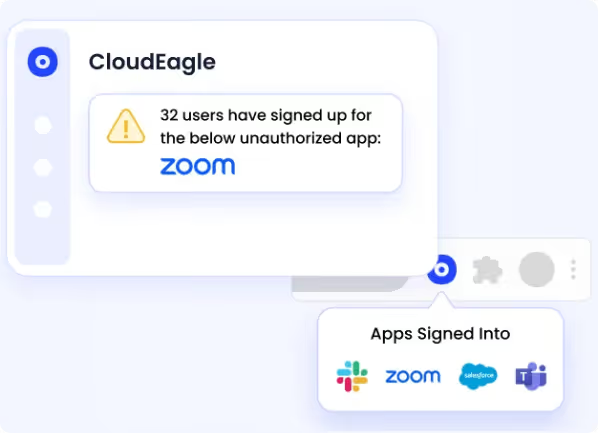
Full SaaS visibility in week one, and shadow IT moves from invisible to inventoried before the next renewal cycle.
b) SaaS Spend Optimization: cut the cost shadow IT has already locked in
Even after you discover shadow IT, the spend is already there. Duplicate apps across teams, premium licenses nobody uses, and auto-renewing tools quietly compound into 30%+ budget overruns.
CloudEagle.ai analyzes your full SaaS portfolio to flag redundant apps, unused licenses, and downgrade opportunities. It surfaces consolidation paths before renewals so procurement can negotiate from real usage data instead of vendor claims.
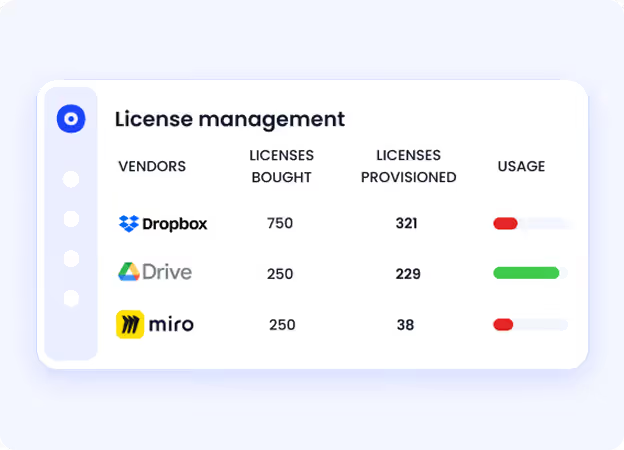
ICEYE used this approach to reclaim significant budget from unused licenses and drive a 90% reduction in manual access reviews.
"We went from spreadsheet-driven access reviews that took months to a fully automated, structured process. CloudEagle gave us complete visibility into users, roles, and permissions, while eliminating delays and reducing risk."
~ Michal Lipinski, Director of IT & Security, ICEYE
c) Self-Service App Catalog: stop shadow IT before it starts
Employees don't go shadow because they want to break the rules. They go shadow because the approved path takes weeks, and a credit card takes 90 seconds. Until that gap closes, shadow IT keeps regenerating, no matter how often you clean it up.
CloudEagle.ai's self-service app catalog shows employees only the apps they're eligible to request, with automated approval workflows through Slack. IT controls visibility by department, sets time-based access that auto-deprovisions after a defined period, and gets a full audit trail on every approval.
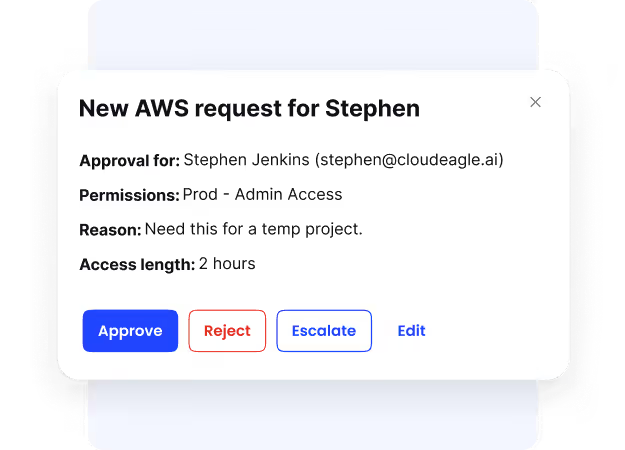
Mean time to resolution on access requests drops by up to 80%, employees stop routing around IT, and the conditions that created shadow IT in the first place disappear.
The pattern across customers is consistent: shadow IT goes from invisible to inventoried in week one, and the budget conversation shifts from "where did this come from?" to "what do we cut next renewal?"
You Can't Cut What You Can't See.


4. How to Quantify What Shadow IT Is Costing You Right Now
Start with a back-of-envelope shadow IT cost formula: take your total annual SaaS spend and multiply it by 0.30. That's the conservative floor for what shadow IT is likely costing you, based on Gartner's range.
The formula is rough on purpose. The real number requires triangulating four data sources:
- Expense reports. Search reimbursements for SaaS keywords like Notion, Loom, Canva, Figma, or Airtable. Sample, don't trust.
- Corporate card statements. Pull every vendor under $500 per month. That's where shadow IT lives.
- SSO and IdP logs. Identify every app that users log into that isn't in your sanctioned inventory.
- Browser and endpoint data. Where SSO doesn't catch it, browser extension data or endpoint telemetry will.
Reconciling those four against your IT-approved app list gives you the real shadow IT footprint. Expense-report sampling alone will undercount by 60% or more, because most shadow tools are billed monthly under $50 and never trigger an expense report at all.
Also Read: To run this properly, use the Shadow IT Assessment Checklist. It walks through the same triangulation across hidden apps, owners, and spending.
5. Stop Shadow IT From Eating Your Budget: Here's What Works
Banning shadow IT doesn't work. Employees will route around it. What works is making the approved path faster than the unapproved one, and putting governance on the spend side.
Four moves consistently cut shadow IT cost:
a) Enforce SSO on every paid app: If a tool can't sit behind SSO, it shouldn't hold company data. SSO enforcement also gives you the logs you need for ongoing discovery.
b) Run a self-service app catalog: Give employees a fast way to request approved tools. Most shadow IT exists because the official path is slower than a credit card. Remove the friction and the behavior changes.
c) Tighten renewal governance: Auto-renewals are where shadow IT spends hardens into next year's budget. Build a renewal calendar with 90-day notice windows and require usage data before any renewal over $10K. Organizations that operationalize renewal controls typically achieve 10 to 15% annual SaaS savings without cutting tools.
d) Make discovery continuous, not annual: A once-a-year audit catches half of what a continuous-discovery tool catches in week one. Shadow IT moves faster than quarterly reviews.
6. FAQs
1. What does "shadow IT" mean?
Shadow IT is any software, cloud service, or device used inside an organization without the IT department's approval. It usually enters through employee credit cards or free signups.
2. What are the benefits of shadow IT?
Employees often adopt shadow IT to move faster than approved procurement allows. The upside is speed and productivity. The downside is hidden spending, security exposure, and compliance gaps.
3. What is the difference between shadow IT and rogue IT?
Shadow IT is usually well-intentioned, with employees solving a workflow problem using unapproved tools. Rogue IT is deliberate circumvention of policy, often by a department running its own infrastructure.
4. What is an example of shadow IT?
A marketing team subscribing to Canva on a corporate card without IT approval, or an engineer using a personal ChatGPT account to process company data, are both examples of shadow IT.
7. The Budget You Can't See Is the One You Can't Cut
Every CFO wants to cut SaaS costs at renewal. Every CIO wants tighter security control. Both goals run into the same wall: you can't manage what you can't see. Shadow IT is the largest invisible line in most enterprise IT budgets, and it keeps growing because the buying side has accelerated while the oversight side hasn't.
The fix isn't a policy memo. It's continuous visibility into every app, every license, and every dollar flowing out of your SaaS stack, connected to the governance controls that act on what you find.
Book a demo with CloudEagle.ai and see your shadow IT footprint in week one.
Shadow IT Grows Every Week You Can't See It


.avif)


.avif)
.avif)




.png)





_.png)

.avif)
.avif)
.avif)


