
%201.svg)


HIPAA Compliance Checklist for 2025

Most security and compliance frameworks, including SOC 2, ISO 27001, and NIST, expect SaaS applications in an enterprise stack to have MFA and SSO controls.
If a SaaS application does not support these standards, it becomes a compliance and endpoint security risk. Most organizations find it challenging to answer a simple question: which SaaS applications lack MFA or SSO support?
As SaaS adoption grows, security teams often rely on outdated spreadsheets and disconnected CASB exports to identify risky, non-compliant applications.
CloudEagle.ai helps security teams overcome this challenge by enabling them to identify SaaS applications lacking MFA or SSO support by combining SaaS inventory visibility with Netskope security intelligence.
In this article, we’ll quickly run you through the process of how you can identify the security controls of SaaS applications using CloudEagle.ai.
TL;DR
- SaaS apps without MFA or SSO create major compliance and security gaps across enterprises.
- Manual tracking of MFA and SSO support becomes impossible as SaaS usage rapidly grows.
- CloudEagle.ai combines SaaS inventory visibility with Netskope intelligence to detect risky apps.
- Teams can centrally review MFA support, SSO availability, security scores, and compliance status.
- CloudEagle.ai automates governance workflows to identify, review, and remediate non-compliant SaaS applications.
1. Why SaaS Applications Without MFA or SSO Are a Compliance Issue?
The compliance risk exists at the vendor level, not just the user level. If a SaaS application does not support MFA or SSO, security teams cannot fully enforce authentication standards regardless of internal policies.
This gap usually appears in two ways.
Apps Without SSO Support
Many SaaS vendors restrict SSO to expensive enterprise plans. Teams then adopt lower-tier plans that rely entirely on local username and password logins.
These applications operate outside identity providers like Okta, Microsoft Entra ID, and Google Workspace, reducing centralized access control and visibility.
Apps Without MFA Support
Second, some SaaS applications simply do not support MFA at all. Users access these tools using passwords alone.
As a result, it directly conflicts with security baselines defined in frameworks like SOC 2, ISO 27001, and NIST.
The challenge grows quickly at scale. Netskope found that enterprise users interact with up to 33 SaaS applications monthly on average, while top users access more than 96 applications every month.
Manual MFA and SSO review this huge becomes difficult to sustain. Security teams need centralized visibility into which SaaS applications create compliance gaps before those SaaS security risks spread.

2. How CloudEagle.ai Detects SaaS Applications Without MFA or SSO Support?
CloudEagle.ai gives security and IT teams a centralized view of every SaaS application in use and whether each application supports MFA and SSO at the vendor level.
The platform combines CloudEagle.ai’s SaaS inventory visibility with Netskop security intelligence, so teams no longer need to manually review spreadsheet audits or CASB exports separately.
A. Deeper SaaS Visibility With Netskope Integration
CloudEagle.ai integrates with Netskope to pull security intelligence for every discovered SaaS application.
Teams can quickly review whether applications support MFA, SSO, compliance certifications, and other critical security controls from one platform.
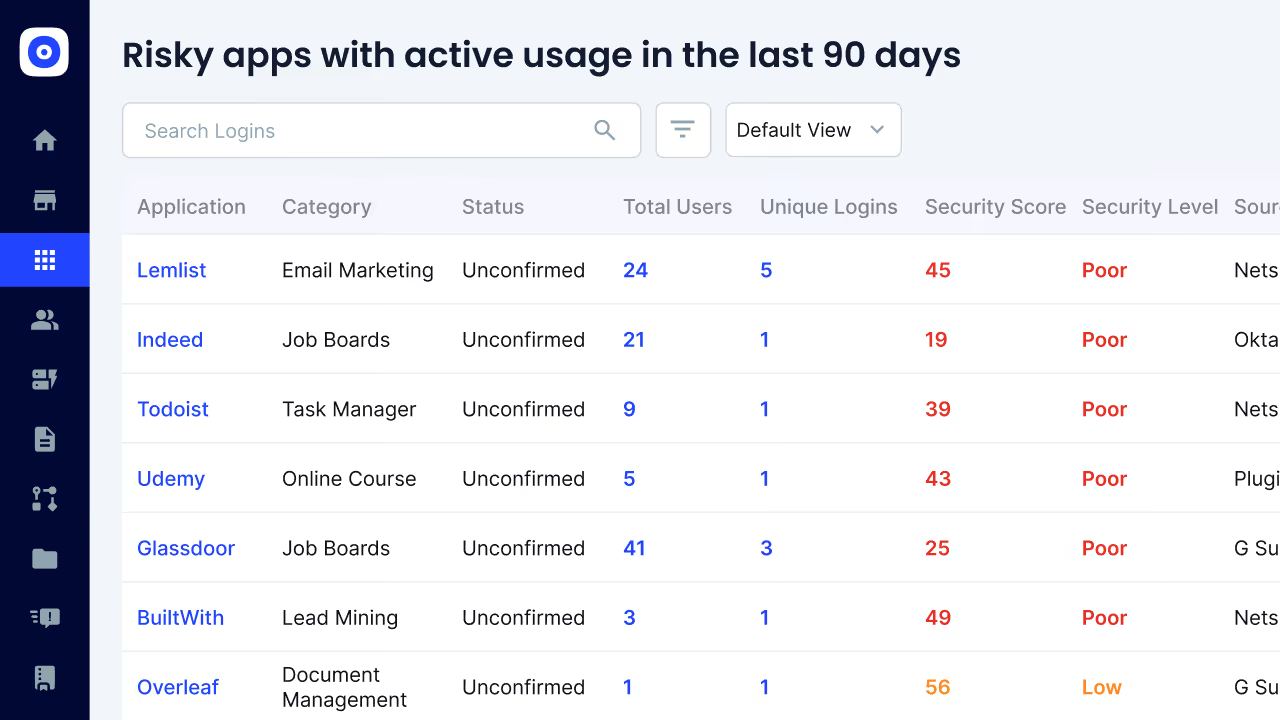
Moreover, CloudEagle.ai correlates Netskope discovery insights with SaaS usage and governance data to surface risky applications faster. Security teams can:
- Discover actively used SaaS applications across managed and unmanaged environments
- View Netskope Cloud Confidence Index™ scores alongside SaaS usage insights
- Review vendor certifications and SSO security gaps centrally
- Identify applications operating outside approved identity workflows
- Correlate SaaS activity with governance and security insights automatically
This helps teams quickly identify SaaS applications lacking MFA or SSO support before those gaps create larger security risks.
B. See Whether an App Supports MFA or SSO at the Vendor Level
CloudEagle.ai surfaces MFA and SSO support directly within the SaaS application inventory, so teams can audit authentication capabilities across the entire SaaS stack without manually reviewing vendor documentation.
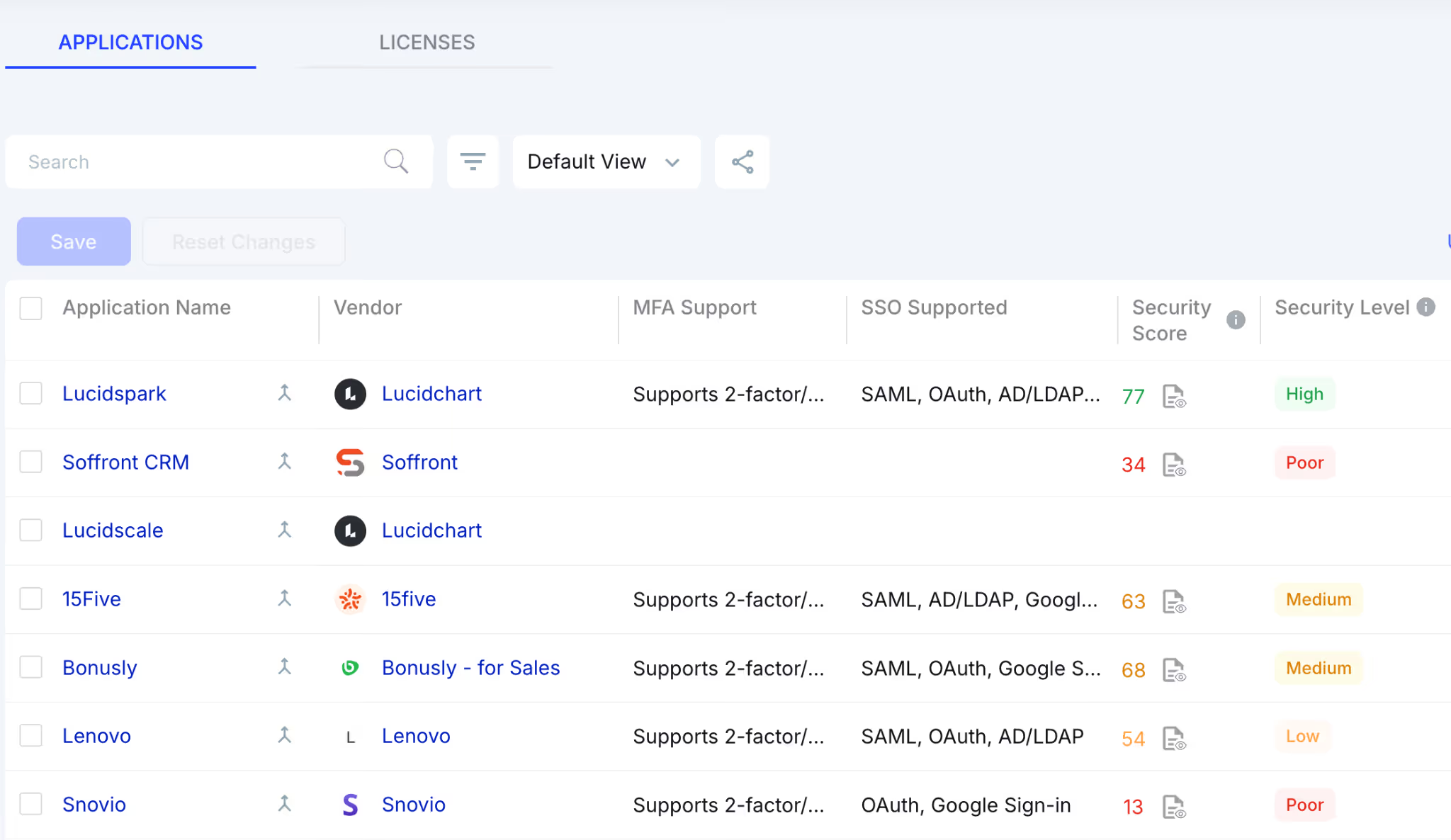
For every application, teams can review:
- MFA Support Status: Does the vendor support MFA?
- SSO Support Availability: Does the application integrate with enterprise identity providers?
- Authentication Methods: Are users accessing the application through SSO or direct credentials?
- Security Score and Risk Level: What is the vendor’s overall security posture?
- Compliance Certifications: Which compliance frameworks has the vendor achieved?
Applications lacking MFA or SSO support can then be flagged for security review, procurement evaluation, vendor negotiation, or replacement planning.
This gives organizations a centralized and auditable view of SaaS authentication risks across the entire application stack.
C. Automated Governance and Remediation Workflows
CloudEagle.ai helps teams automate SaaS governance workflows by correlating SaaS activity, authentication insights, and risk intelligence from a centralized platform. Your teams can:
- Flag Risky Applications Automatically: Detect SaaS tools operating outside approved authentication policies
- Route Apps for Security Review: Escalate unsupported applications to security and procurement teams
- Identify Risky Users Quickly: Surface employees accessing unmanaged or high-risk SaaS applications
- Trigger Remediation Workflows: Strengthen SaaS governance directly from centralized workflows.
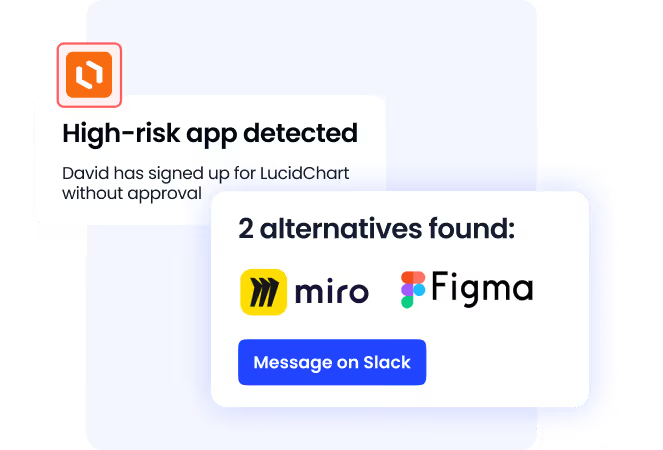
Manual audits across CASB logs, SSO exports, and spreadsheets often delay remediation for weeks. By automating governance workflows, you can strengthen access governance and improve SaaS security posture.
3. Steps to Detect SaaS Applications Without MFA or SSO Support
Here's how security teams use CloudEagle.ai to identify non-compliant SaaS applications in practice:
A. Access the SaaS Applications Dashboard
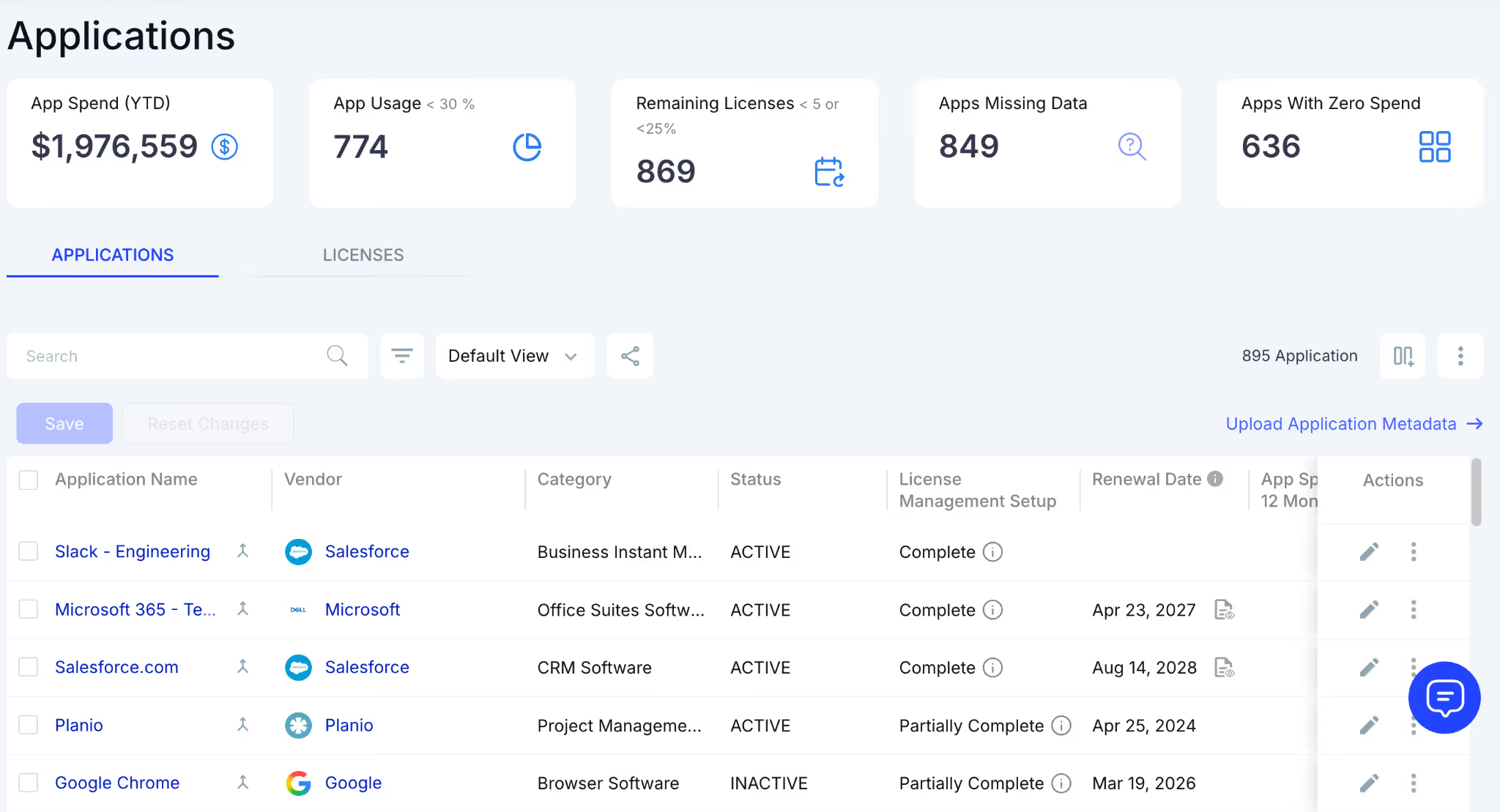
Open the CloudEagle.ai dashboard and navigate to the Applications section. This gives you a centralized view of your complete SaaS application inventory.
B. Review MFA, SSO, and Security Risk Insights
From the dashboard, teams can search applications by name or apply filters for deeper analysis. Security teams can review:
- MFA support status
- SSO support availability
- Security score and security level
- Compliance certifications and risk insights
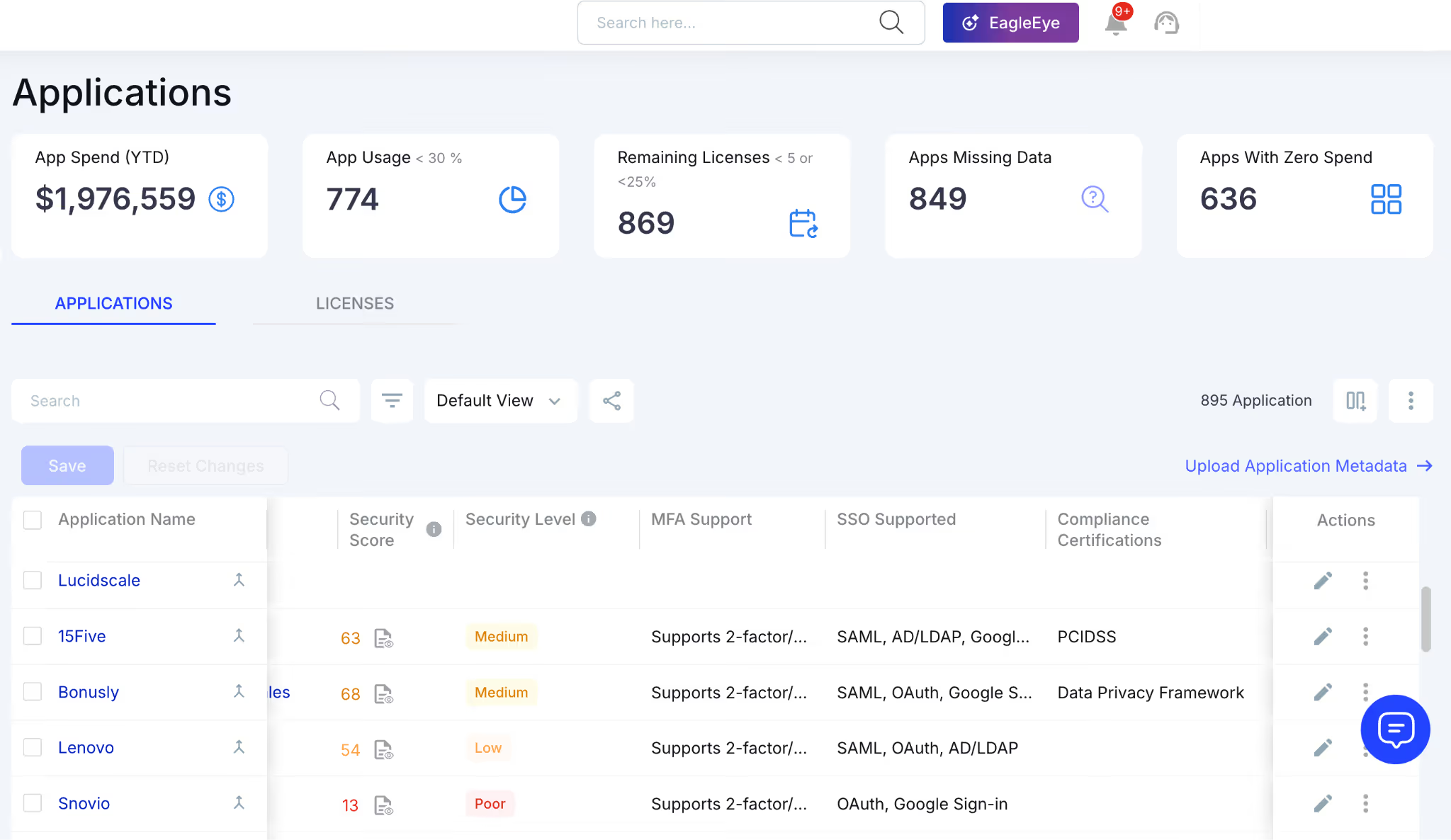
This makes it easier to quickly identify applications operating without approved authentication controls.
C. Open the Application Security Profile
Click on the preferred application and navigate to the Security Profile section. This page provides detailed security information, including authentication capabilities, certifications, and vendor security posture.
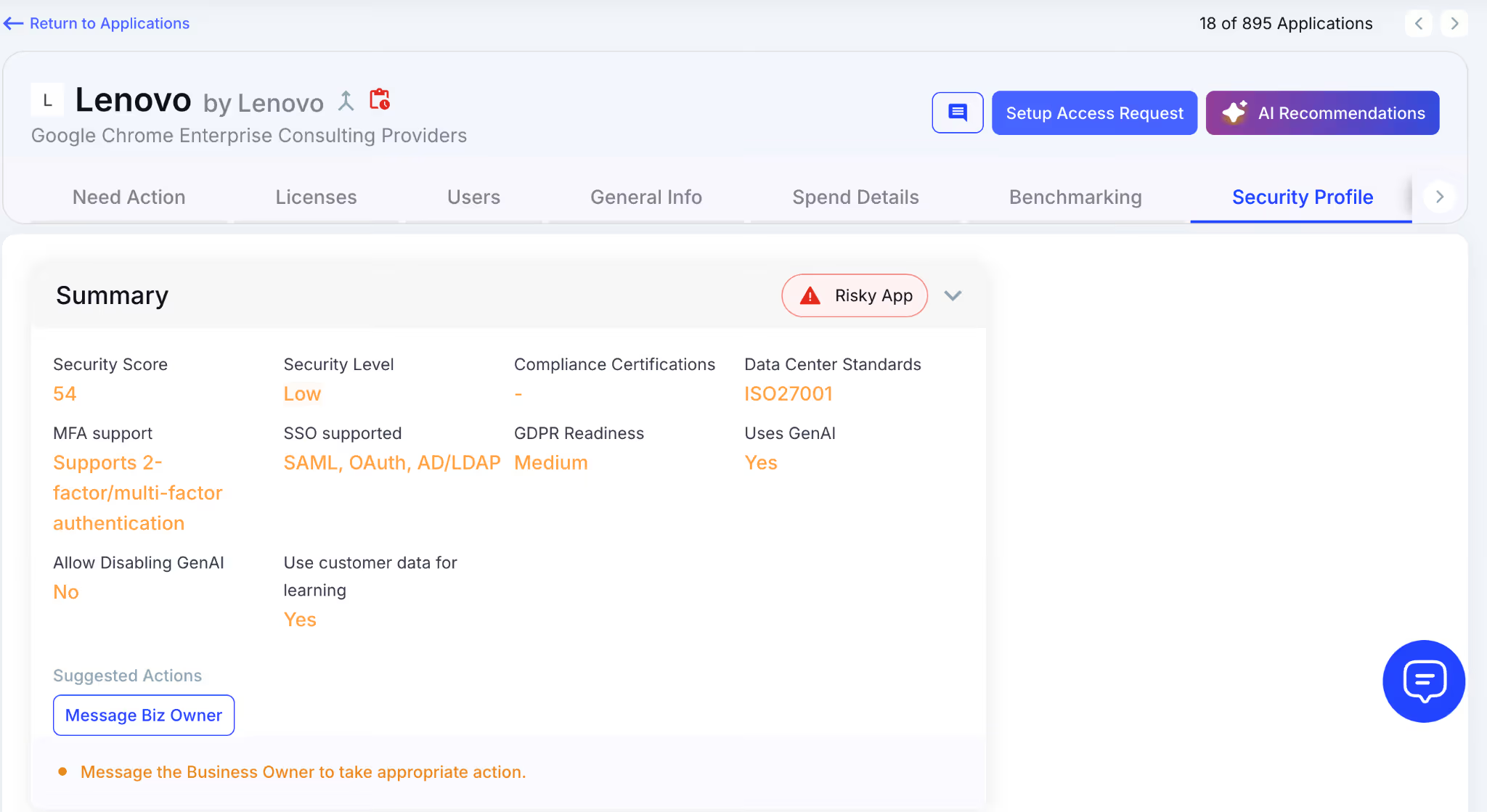
Teams can quickly determine whether the application creates compliance or authentication gaps.
D. Download the Netskope Security Report
Scroll down inside the Security Profile section to access the Netskope security report. Click Download Report to export the findings.
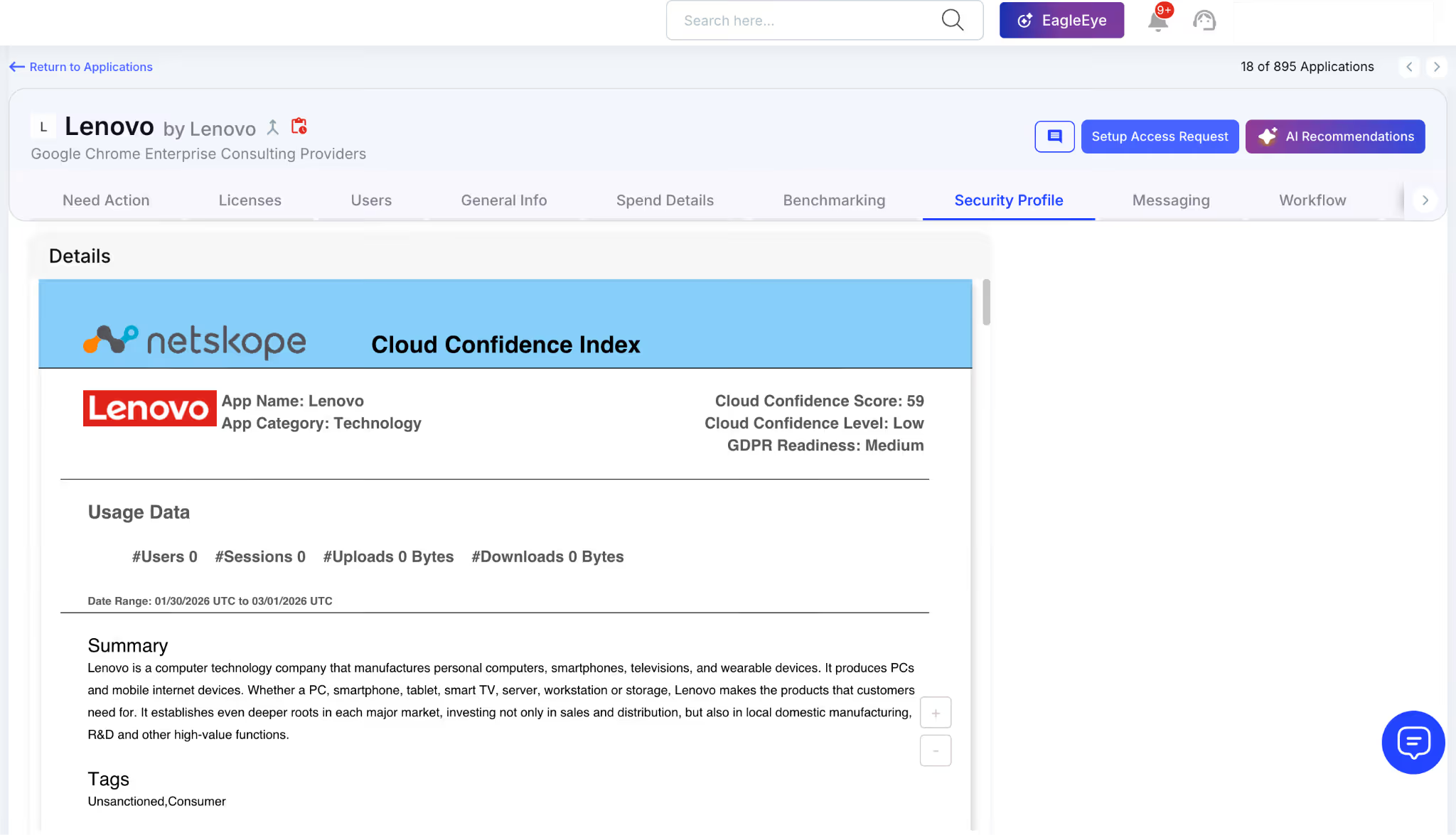
Teams can use the report during compliance audits, vendor reviews, procurement discussions, and internal security assessments.
Do You Know Which Apps Lack MFA?.


4. Conclusion
Applications without MFA or SSO support create direct compliance gaps across SaaS environments. As SaaS adoption grows, manually verifying authentication capabilities becomes difficult to scale.
CloudEagle.ai helps security and IT teams centrally identify which SaaS applications support MFA, SSO, compliance certifications, and other critical security controls using Netskope security intelligence and SaaS inventory visibility.
5. FAQs
1. Can CloudEagle.ai identify SaaS applications that bypass Okta or Microsoft Entra?
Yes. CloudEagle.ai helps security teams identify SaaS applications accessed through direct credentials instead of centralized SSO providers like Okta or Microsoft Entra ID. Teams can review how users authenticate into applications and identify unmanaged login flows.
2. Can CloudEagle.ai detect newly adopted SaaS applications automatically?
Yes. CloudEagle.ai continuously discovers SaaS applications across the environment using integrations like Netskope, helping teams identify newly adopted applications without relying on manual tracking.
3. Can teams filter SaaS applications based on MFA or SSO support?
Yes. Security teams can filter and review applications based on authentication capabilities, making it easier to identify non-compliant SaaS vendors quickly.
4. Can CloudEagle.ai help security and procurement teams work together on SaaS reviews?
Yes. Teams can use shared SaaS inventory insights, security scores, and compliance data during vendor reviews, renewals, and security evaluations.
5. Does CloudEagle.ai support centralized SaaS security reviews across departments?
Yes. CloudEagle.ai centralizes SaaS visibility across IT, security, procurement, and compliance teams, reducing the need for disconnected spreadsheet audits.


.avif)


.avif)
.avif)




.png)





_.png)

.avif)
.avif)
.avif)


