
%201.svg)


HIPAA Compliance Checklist for 2025

According to CloudEagle.ai’s IGA report, over 60% of SaaS apps operate outside IT visibility.
While this may seem harmless, it can actually pose serious risks. With companies using an average of 300 SaaS apps, the rise of shadow IT (unauthorized software used by employees without IT’s knowledge) can lead to significant security, compliance, and resource challenges.
A shadow IT Assessment Checklist is critical for identifying rogue applications and understanding their impact on security and compliance. By proactively assessing shadow IT, IT teams can mitigate risks, improve security, and reduce costs linked to unapproved tools.
Let’s dive into the details.
TL;DR
- This Shadow IT Assessment Checklist helps identify unauthorized software used by employees without IT’s approval, reducing security, compliance, and cost risks.
- A shadow IT risk assessment helps identify hidden apps, reduce security risks, and ensure compliance with industry regulations.
- CloudEagle.ai enables discovery, classification, and management of shadow IT, ensuring better visibility, security, and cost optimization.
- Track key metrics after the assessment: reduction in unapproved apps, security improvements, cost savings, and time saved for IT.
- Regular monitoring and automated governance are essential to prevent shadow IT from reappearing and maintain control over SaaS usage.
1. What Is Shadow IT?
Shadow IT refers to the use of unauthorized technology or software by employees within an organization without the approval of the IT department. This includes apps (like SaaS or cloud tools) and hardware (such as personal devices) used for work tasks.
Employees often turn to these tools to improve productivity, but they may not meet the organization’s security, compliance, or data protection standards. The rise of cloud-based software has made it easier for employees to bypass IT approval, leading to hidden risks like data breaches, non-compliance, and wasted IT resources.
A shadow IT Assessment Checklist is crucial for identifying and managing these risks, providing IT with visibility into unauthorized tools and preventing potential vulnerabilities and additional costs.
Here are some of the common examples of Shadow IT:
- Employee-installed apps: Tools like project management software or communication platforms not approved by IT.
- Cloud storage services: Using Google Drive or Dropbox for work-related files without IT’s oversight.
- Unapproved SaaS tools: Employees subscribing to apps like CRM or finance tools without coordination with IT.
- Personal devices: Employees accessing company data via their own devices (BYOD) without proper security measures.
2. Why Has Shadow IT Accelerated in SaaS-First Companies?
Shadow IT isn’t the result of rebellious employees or careless teams. In SaaS-first companies, it’s often the byproduct of speed.
When your entire operating model is built around agility, cloud tools, and self-serve software, slipping around formal IT processes can feel less like a risk and more like common sense. Here’s what’s fueling the rise:
a. Cloud Tools Are Just… Too Easy
Most SaaS tools are a credit card, email address, or Google sign-in away. Employees don’t need installs, approvals, or tickets. When access friction drops to near zero, unauthorized tools naturally creep in.
b. Autonomy Is Baked Into the Culture
SaaS-first companies empower teams to own outcomes, not just tasks. That freedom often extends to tooling. If a marketer finds an app that speeds up campaigns or an engineer spots a better monitoring tool, they’re incentivized to act fast, not wait.
c. Speed Beats Process (Almost Every Time)
In fast-moving environments, delays cost momentum. When IT approvals take days or even weeks, employees will choose speed over policy to hit deadlines, unblock work, or ship faster.
d. IT Can’t Scale as Fast as SaaS Sprawl
The SaaS ecosystem grows faster than most IT teams can reasonably govern. New tools launch daily, teams expand quickly, and approval queues pile up, creating a gap employees are more than willing to fill themselves.
e. Self-Service Pricing Makes Bypass the Default
Free trials. Freemium plans. Team plans under $20 per user. When software looks “cheap enough” to expense or quietly swipe a card for, it rarely feels like an IT decision, even when it should be.
f. Visibility Ends Where the Cloud Begins
Unlike on-prem software, cloud apps live outside traditional infrastructure. Without dedicated SaaS visibility, IT and Finance often don’t know a tool exists until renewal time or worse, after a security incident.
The result? Shadow IT becomes less about rule-breaking and more about survival in high-velocity SaaS environments. And without the right visibility, it quietly compounds into security risk, budget waste, and forecasting chaos.
3. Why Shadow IT Is a Serious Business Risk
Shadow IT doesn’t announce itself as a problem. It slips in quietly, one tool, one login, one team at a time, until the risks start showing up where it hurts most: security, compliance, and budgets.
Here’s what’s really at stake:
a. Security and Data Privacy Gaps
When teams adopt tools without IT oversight, security standards vary wildly. Sensitive company data may be stored, shared, or processed in apps that lack proper access controls, encryption, or breach-response protocols, creating blind spots attackers love.
b. Compliance Becomes Accidental
Unapproved tools rarely come with guaranteed regulatory alignment. Whether it’s data residency, retention policies, or audit trails, shadow IT can quietly put the business out of compliance, often discovered only during audits, incidents, or customer reviews.
c. SaaS Spend Leaks You Don’t See Until Renewal
Shadow IT fuels duplicated tools, overlapping functionality, and licenses no one remembers buying. The result is slow, silent budget drain, one that surfaces as surprise renewals, inflated SaaS spend, and forecasting misses.
d. Loss of Control Across the Tech Stack
Without full visibility, IT can’t effectively manage licenses, assess risk, or rationalize tools. Governance weakens, standardization slips, and the SaaS stack grows in disconnected, inefficient ways.
4. When Should You Conduct a Shadow IT Assessment?
A Shadow IT assessment is essential when your organization faces specific challenges or changes. Consider conducting an assessment in these scenarios:
a. Rapid Company Growth or Scaling
As your company expands, employees may adopt new tools without IT's knowledge, leading to shadow IT. It's crucial to assess and manage these tools to maintain security and compliance during growth.
b.Increase in Security Incidents or Audit Failures
If your organization experiences more security breaches or fails audits due to unapproved software, it’s time for a shadow IT risk assessment to uncover unauthorized apps and strengthen your security posture.
c. SaaS Sprawl and Uncontrolled Renewals
When SaaS tools become dispersed across departments and renewals are missed, the shadow IT risk increases. Conduct an assessment to gain control of subscriptions and reduce wasted costs.
d.Mergers, Acquisitions, or Remote Workforce Expansion
During mergers or expansions, new systems are often introduced, leading to shadow IT. A thorough assessment ensures seamless integration and compliance across teams, especially with a remote workforce.
4. Shadow IT Assessment Checklist: Step-by-Step Framework
Add Checklist CTA here
Step 1: Discover All Shadow IT Applications
Objective:
Create a complete inventory of all SaaS applications in use, approved and unapproved, across the organization. Uncover hidden access points before they introduce security, compliance, or cost risk.
Challenges:
- Shadow IT bypasses traditional procurement and IT visibility
- SSO, expense, and browser data often live in disconnected systems
- Teams may be unaware they’re using unapproved tools
Step 2: Classify and Categorize Applications
Objective:
Separate business-critical tools from low-value, experimental, or redundant applications. Prioritize apps based on impact, usage, and data exposure.
Challenges:
- Not all shadow IT is inherently bad, context is required
- Lack of usage and ownership data makes prioritization difficult
- Tool sprawl creates duplication across teams
Step 3: Assess Security and Compliance Risk
Objective:
Identify applications that introduce elevated security, privacy, or regulatory risk. Reduce attack surface by understanding access, integrations, and vendor posture.
Challenges:
- Excessive permissions and shared accounts increase exposure
- Limited insight into third-party integrations and OAuth scopes
- Vendors may lack adequate security documentation or certifications
Step 4: Evaluate SaaS Spend
Objective:
Quantify the financial impact of shadow IT and underutilized SaaS tools. Identify immediate savings through license optimization and renewal control.
Challenges:
- Spend is fragmented across cards, invoices, and departments
- Usage data rarely matches license entitlements
- Auto-renewals lock in waste before reviews occur
Step 5: Govern, Consolidate, or Eliminate
Objective:
Bring high-value applications under formal governance while removing unnecessary risk and cost. Simplify the SaaS stack through standardization and consolidation.
Challenges:
- Resistance from teams attached to familiar tools
- Misalignment between IT, security, finance, and procurement
- Poor change management can disrupt productivity
Step 6: Establish Continuous Governance
Objective:
Prevent shadow IT from re-emerging with ongoing visibility and control. Shift from one-time cleanup to a sustainable SaaS governance model.
Challenges:
- Manual reviews don’t scale with SaaS growth
- New tools are adopted faster than policies are enforced
- Lack of a single source of truth causes governance gaps
5. Best Practices for a Successful Shadow IT Assessment
A strong Shadow IT Assessment Checklist isn’t about locking everything down. It’s about creating guardrails that protect the business without slowing teams down. The most effective programs treat shadow IT as a signal, not a violation.
Here’s how to get it right:
a. Don’t Lead With Enforcement, Lead With Curiosity
One of the fastest ways to derail a Shadow IT initiative is to take a “police-only” approach. When assessments focus on punishment, teams go quiet and tools go deeper underground.
Instead, make the process collaborative. Ask teams what tools they’re using and why.
Those answers often reveal real productivity gaps in the approved stack. When IT understands the underlying need, it can recommend secure, compliant alternatives or formally adopt the tools teams already rely on.
b. Protect the Business Without Killing Innovation
Shadow IT exists because people are trying to move faster. That impulse isn’t the enemy, it’s an opportunity.
The goal isn’t to block experimentation, but to channel it responsibly. Give teams room to explore new tools, while requiring security, compliance, and cost checks scale. This balance allows innovation to happen without turning your SaaS environment into an uncontrolled risk surface.
c. Make the “Why” Clear to Business Teams
Shadow IT assessments fail when they feel abstract or IT-centric. Business teams need to understand why this matters, not just that it does.
Explain the real-world impact: data exposure, failed audits, surprise renewals, and wasted spend. When teams see how unauthorized tools affect security and budgets, they’re more likely to partner with IT instead of working around it. Transparency builds trust and cooperation follows.
d. Design for Repeatability, Not One-Time Cleanup
A single Shadow IT assessment is a snapshot. Without follow-through, the problem quietly returns.
Make discovery and review continuous. Automate monitoring through access logs, identity systems, and spend signals so new tools surface early. Treat Shadow IT governance as an ongoing operating discipline, not an annual exercise and you stay ahead of risk instead of chasing it.
6. Key Metrics to Track After a Shadow IT Assessment
Once a shadow IT assessment is complete, tracking key metrics helps measure success and guide future improvements. These metrics show how well your governance process is working:
- Reduction in Unapproved SaaS Applications:
Track the decrease in unauthorized apps after implementing governance measures. A significant reduction indicates that the assessment successfully brought shadow IT under control. - Security Risk and Compliance Improvements:
Measure improvements such as fewer data breaches, stronger access management, and better adherence to regulations like GDPR or HIPAA. - SaaS Cost Savings and Optimization:
Monitor financial benefits from eliminating duplicate apps, reducing unused licenses, and optimizing renewals. - Time Saved for IT and Security Teams:
Track the hours saved through automated processes and reduced manual work, allowing IT teams to focus on strategic initiatives.
7. How CloudEagle.ai Helps with Shadow IT Assessment?
CloudEagle.ai offers a comprehensive solution for managing shadow IT across your organization. Here’s how it helps at every stage of the shadow IT assessment process:
1. Discover Shadow IT Applications
CloudEagle.ai gives you full visibility into the SaaS apps being used in your organization. By integrating with systems like SSO, CASB, and identity providers, it automatically detects unauthorized apps.

It also analyzes expense and invoice data to find any subscriptions that weren’t officially reported. This ensures you never miss a rogue app, even if it's outside the formal IT stack.
2. Classify and Categorize Shadow IT
Once you've discovered shadow IT apps, CloudEagle.ai helps you sort them based on criticality, data sensitivity, and department usage. It helps prioritize which apps are essential, which need further scrutiny, and which should be removed.
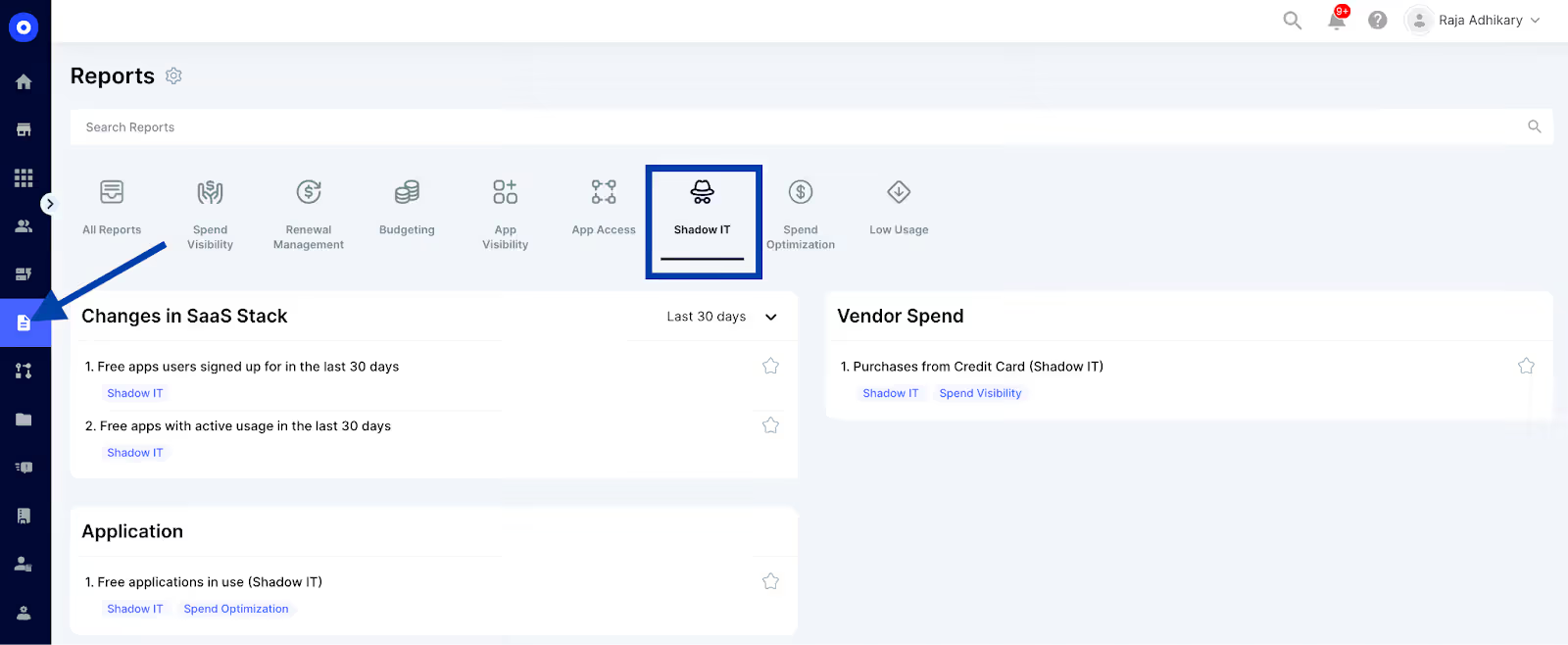
This gives your IT team a clear path for making informed decisions about which apps to keep or eliminate.
3. Assess Security, Risk, and Compliance
CloudEagle.ai helps evaluate the security and compliance of unauthorized apps. It checks vendor security certifications, regulatory compliance, and data protection measures.
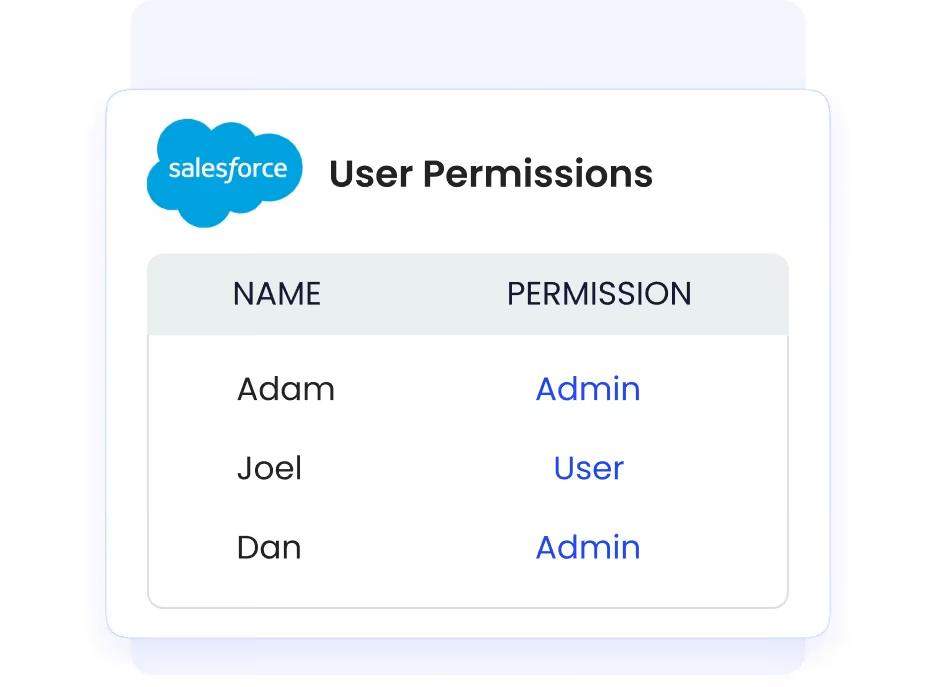
Any gaps or vulnerabilities are flagged, helping you avoid security breaches and compliance issues that could lead to fines or reputational damage.
4. Optimize SaaS Spend and License Usage
CloudEagle.ai provides detailed insights into your SaaS spend by comparing actual usage against the number of licenses purchased. It helps identify shelfware (unused software) and overlapping tools, ensuring you’re not wasting money on redundant or underused apps.
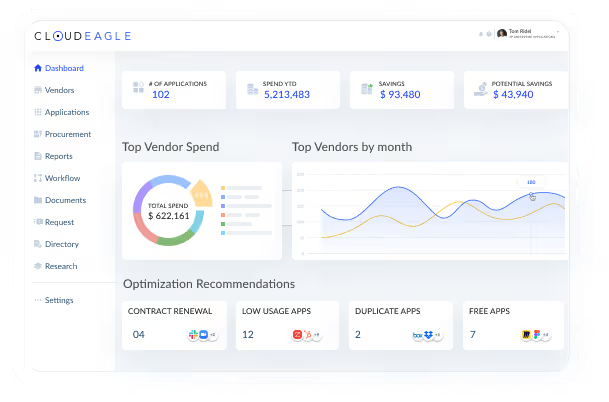
The platform also offers suggestions to consolidate licenses and optimize renewals, resulting in immediate cost savings.
5. Bring Shadow IT Under Governance
CloudEagle.ai allows you to manage shadow IT apps with ease. It automates the approval process, access reviews, and renewal workflows, bringing all apps under formal governance.
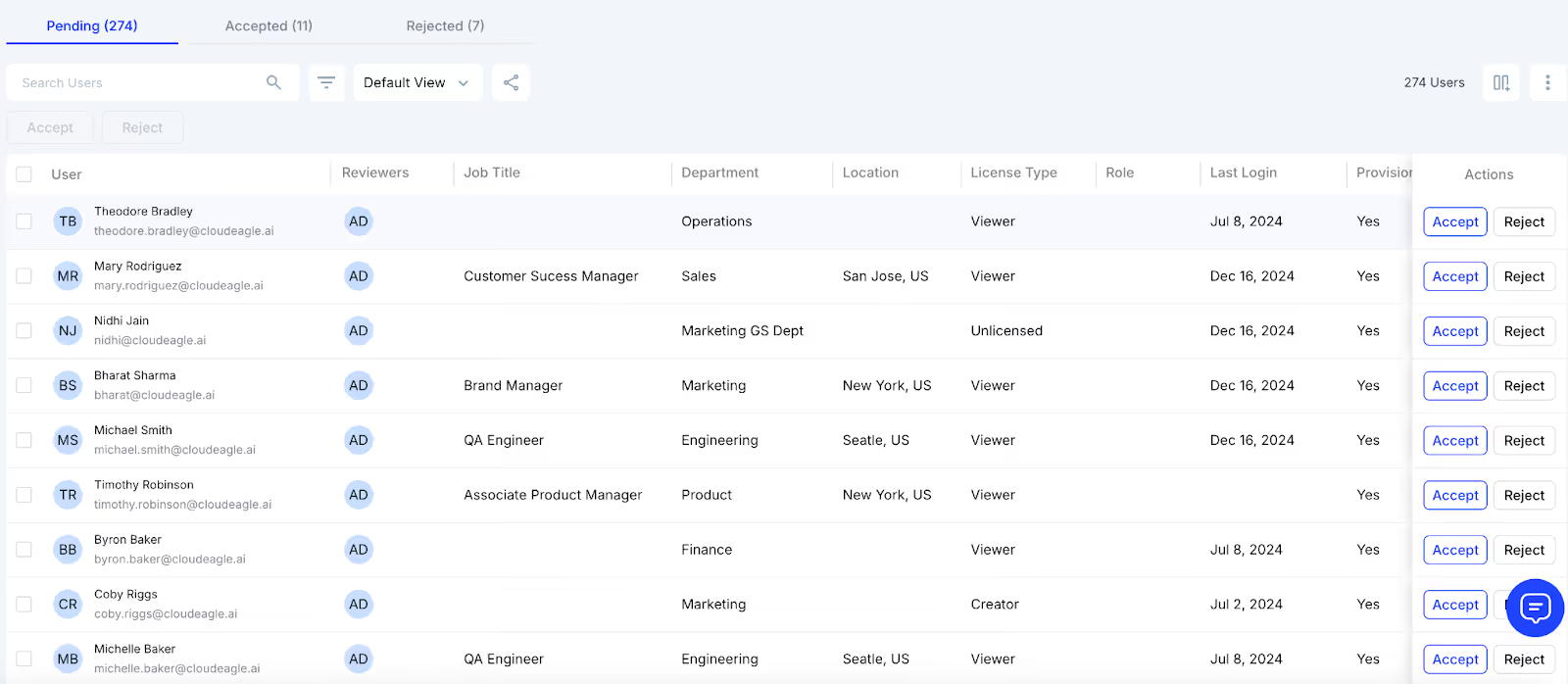
This ensures only approved apps are in use and that security policies are consistently enforced across the organization.
6. Continuous Monitoring and Alerts
To keep shadow IT in check, CloudEagle.ai provides continuous monitoring. It sends real-time alerts whenever new unauthorized apps are detected. Regular reports and dashboards give IT and security teams the data they need to stay on top of their SaaS environment, ensuring your organization remains compliant and secure.
Check out this conversation where Nidhi Jain, CEO of CloudEagle.ai, and Joshua Peskay, 3CPO (CIO, CISO, CPO) at RoundTable Technology, discuss Shadow IT, navigating risks, and innovations in SaaS management.
Conclusion
Managing shadow IT is essential for security, compliance, and cost efficiency. Following a Shadow IT Assessment Checklist helps organizations discover unauthorized tools, assess risk, optimize SaaS spend, and bring apps under governance. Continuous monitoring, cross-team alignment, and repeatable assessments ensure ongoing control while enabling innovation.
How CloudEagle.ai Helps: CloudEagle.ai streamlines shadow IT discovery, classification, risk assessment, and governance. It provides real-time visibility, automates approvals and access reviews, and ensures your SaaS environment stays secure, compliant, and cost-effective.
Get Started Today: Take control of your SaaS stack and reduce shadow IT risks with CloudEagle.ai. Explore CloudEagle.ai and implement your Shadow IT Assessment Checklist effortlessly.
FAQs
1. What is a Shadow IT Assessment Checklist?
A guide to identify, assess, and govern unauthorized apps, ensuring security, compliance, and cost optimization.
2. How can I discover Shadow IT applications in my organization?
Use SSO logs, CASB tools, identity providers, expense reports, browser activity, and employee surveys to find hidden apps.
3. What are the steps involved in a Shadow IT Assessment?
Discover apps, classify by risk, assess security, evaluate spend, govern or remove, and monitor continuously.
4. How do I classify and categorize Shadow IT applications?
Classify by business criticality, data sensitivity, department usage, and redundancy to prioritize governance actions.


.avif)


.avif)
.avif)




.png)








.avif)
.avif)
.avif)


