.avif)
%201.svg)


HIPAA Compliance Checklist for 2025

Here's a scenario most IT teams know too well:
An employee moves from marketing to sales. Two weeks later, they still have admin access to your CMS and design tools. Meanwhile, a new sales rep is waiting on Salesforce access, stuck in an approval queue nobody's watching.
Both situations are visible.
There are tickets, logs, and policies. But connecting the dots and actually acting on them requires someone to notice, prioritize, and manually coordinate across a half-dozen systems.
By the time it's resolved, the risk window has already passed.
Know more about the feature here: CloudEagle.ai Launches EagleEye for Autonomous Enforcement

The Governance Problem No Dashboard Can Fix
AI and SaaS adoption is accelerating faster than governance can keep up. According to Deloitte, 85% of enterprises accelerated AI deployments last year, but only 42% updated their risk and compliance policies to match.
The result: access exposure widens.
Contracts auto-renew as usage drops. Former employees stay provisioned. New AI tools get deployed at the team level with permissions that never go through procurement.
Security, IT, and finance teams can see the signals. Identity data, usage metrics, contract docs, it's all there. What's missing isn't visibility. It's the ability to act on that visibility automatically, at scale, without someone manually stitching it all together. That shift from scripted automation to systems that reason and act is how agentic AI differs from traditional rule-based automation.
That's the gap EagleEye is built to close.
Introducing EagleEye: Governance That Executes Itself
EagleEye is the agentic AI layer inside CloudEagle.ai's SaaS governance platform. It's built on top of how CloudEagle approaches AI governance end to end; connecting identity data, contracts, usage signals, and policies into a single execution layer. It doesn't surface information and wait.
The difference matters more than it sounds.
When an IT admin asks,
"Who still has access to tools they shouldn't?"
That's not a request for a list. It's a request for resolution. EagleEye treats it that way:
"12 users have elevated permissions misaligned with their current roles. 8 require immediate revocation based on compliance policy. 4 need manager approval before adjustment."
Then it acts on that. Deprovisioning, policy updates, exception escalations, and compliance documentation are all tracked through completion. Governance doesn't pause waiting for follow-ups.
"AI is reshaping how enterprises operate, but governance models haven't evolved at the same pace. EagleEye brings autonomous control to SaaS and AI environments, reducing risk, eliminating manual coordination, and helping governance keep up with innovation." — Nidhi Jain, CEO, CloudEagle.ai
EagleEye Sees What Your Team Misses


The Intelligence Layer Underneath: SaaSMap
At the core of EagleEye is SaaSMap, a continuously updated context graph of your entire SaaS and AI ecosystem.
Unlike static asset inventories, SaaSMap traces live relationships between users, applications, access permissions, contracts, usage patterns, and business policies.
It's what lets EagleEye correlate across your identity provider, contract repository, finance platform, and ticketing system simultaneously and act with full context rather than partial information.
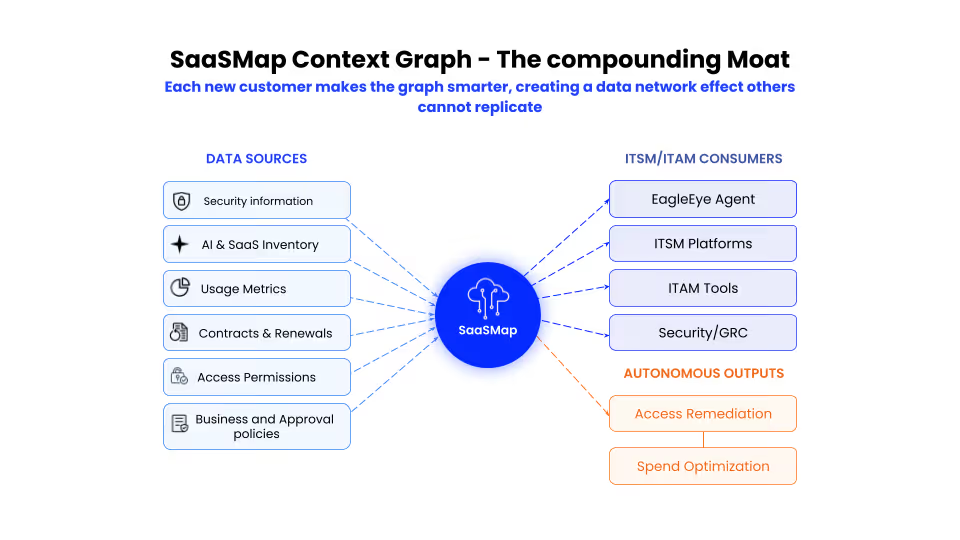
Every connected system makes it smarter.
What Your Leadership Team Can Actually Do With This
Executives typically see governance through periodic reviews: budget approvals, vendor sign-offs, and audit reports. Compliance gaps exist for weeks before leadership sees them. Budget variances show up after spending decisions are made.
EagleEye changes that dynamic:
CFO: "What's our biggest SaaS risk right now?"
"Your security tool has 47 former employees with active admin access: $280K in unused spend and a SOC 2 violation. Deprovisioning workflow initiated."
CIO: "Where do we have overlapping functionality?"
"Your collaboration stack includes Slack, Teams, and Zoom with 60% functional overlap. Teams adoption is growing; Slack usage dropped 40% over six months. Consider consolidating before the next renewal cycle."
CSO (pre-audit): "Are we compliant with access policies?"
"18 violations identified. 12 are auto-remediating through deprovisioning. 6 require exception approvals, routed to department heads."
These aren't reports to interpret. They're operational answers that enable immediate decisions.
From Reactive to Continuous: Governance That Runs in the Background
Most governance tools are reactive by design; they report on what happened, then wait for someone to act. EagleEye flips that model:
- Access drift gets caught in real time, not during quarterly audits
- Renewal decisions don't wait for someone to pull usage reports
- Cross-functional approvals route automatically, with context already attached
- Audit trails maintain themselves as governance operates
And as SaaS complexity grows, more tools, more AI platforms, more access points: EagleEye scales without requiring larger teams or more review cycles.
What Autonomous Control Looks Like at Full Speed
EagleEye is live today. But the agentic foundation it's building opens up capabilities that are just coming into view.
Imagine EagleEye detecting that engineering teams consistently request Tableau access, use it briefly, then revert to Looker and surfacing that insight proactively before the next renewal.
Or imagine a new CVE drops for a tool in your stack: EagleEye identifies affected users, assesses risk, revokes high-risk access, and notifies users with context before your security team finishes reading the report.
That's where agentic AI is going. Not just answering questions, but anticipating what needs attention and acting before issues compound. Of course, that level of autonomy only works when it's governed. See cases where agentic AI systems caused problems instead.
"AI is reshaping how enterprises operate, but governance models haven't evolved at the same pace. EagleEye brings autonomous control to SaaS and AI environments, reducing risk, eliminating manual coordination, and helping governance keep up with innovation." — Nidhi Jain, CEO, CloudEagle.ai
SaaS Governance was Never Meant to Be a Manual Discipline.
Organizations shouldn't need dedicated headcount just to track who has access to what, whether renewals align with usage, or if policies are being followed. That's what a system should handle.
EagleEye is built for organizations that want governance to operate as infrastructure, not as a function that requires constant human oversight.
You set the boundaries and make the strategic calls. EagleEye handles enforcement, compliance, and execution within those guardrails.
Want to see how EagleEye operates in your environment? Book a demo →
EagleEye Sees What Your Team Misses


.avif)


.avif)
.avif)




.png)






.avif)
.avif)
.avif)


