You need to enable JavaScript in order to use the AI chatbot tool powered by ChatBot

How To Monitor and Manage Privileged Access With CloudEagle.ai?

Share via:
blog-cms-banner-bg
Little-Known Negotiation Hacks to Get the Best Deal on Slack
cta-bg-blogDownload Your Copy

HIPAA Compliance Checklist for 2025

Download PDF

Do you know that organizations rely on over 400 SaaS apps for daily operations, making it challenging to control user access across various systems?

CyberArk says an organization's total number of identities is expected to grow by 240% over the next 12 months. Your data could be exposed or misused if you don't manage this well. With more users and devices, ensuring the right people have access is harder.

That's where CloudEagle.ai comes in. It simplifies the process by showing who has access to what, automating governance, and ensuring only authorized employees can reach sensitive data.

In this article, we will help you know how you can monitor and manage privileged access with CloudEagle.ai.

TL;DR

  • CloudEagle.ai continuously monitors app access and conducts automated access reviews, so you're always on top of potential security risks.
  • The platform keeps detailed access logs, making it easy to track and audit who's accessing what and quickly spot unusual or suspicious activity.
  • With CloudEagle.ai, you can set up role-based access control. Only the right people can access the right apps, reducing the risk of unnecessary or excessive access.
  • It automates the process of granting and removing access, so users only have permissions when they need them. This helps prevent leftover access when roles change or people leave.
  • CloudEagle.ai allows users to gain temporary access to privileged roles, automatically removing their access when the time expires, further reducing the chances of over-provisioning.

1. Why Privileged Access Management Fails Without the Right Tool

Here are the challenges organizations face when managing privileged access without the right software:

  • Too much access: Employees and contractors often get more access than they need. Over time, these extra permissions accumulate silently, increasing the chance of mistakes, misuse, and audit failures.
  • Inconsistent management: Without a central system, it's hard to ensure everyone has the right level of access and that security measures stay consistent across platforms.
  • No real-time monitoring: Without continuous visibility, unauthorized access attempts go undetected. Real-time monitoring is the difference between catching a threat early and responding to a breach.
  • Security risks: Privileged accounts are high-value targets for attackers. If not properly managed, they can lead to serious issues like data breaches or unauthorized system changes.
  • Compliance gaps: Most industries require strict access control and tracking. Without proper tooling, staying compliant becomes a scramble that often surfaces in fines, audit findings, or legal exposure.

Permissions Only Grow. Rarely Shrink.

That’s how access turns into exposure.
Cut It Back

2. How CloudEagle.ai Monitors and Manages Privileged Access

CloudEagle.ai consolidates privileged access monitoring and management into a single platform, giving IT and security teams full visibility and control across every SaaS app without the manual overhead.

Here's how each capability works:

A. Real-Time Visibility Across All SaaS Apps

CloudEagle.ai offers a unified dashboard that allows you to monitor privileged access in real time across your entire SaaS stack. You'll get instant insights into who is accessing your organization's apps and data, continuously updated.
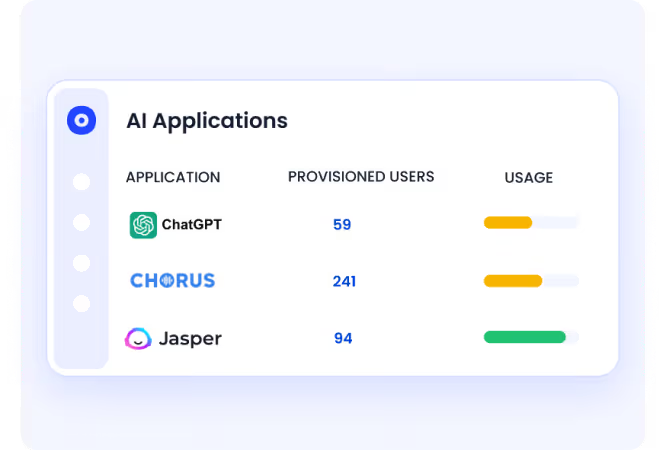
CloudEagle AI application discovery view showing unapproved AI tools detected across SSO logins, finance signals, and browser activity

  • Live access monitoring: See who has privileged access across every connected app, surfaced in real time across users, departments, and entitlement levels.
  • Behavioral anomaly detection: Flags unusual access patterns, including logins at unexpected times or access outside a user's normal scope.
  • Cross-app access breakdown: Surfaces access by user, department, app, and entitlement level in one view.

Learn how Rec Room got complete visibility into its teams' free apps with CloudEagle.ai.

B. Detailed Access Activity Logs

CloudEagle.ai tracks all privileged access activity, maintaining detailed logs that provide a complete history of user actions across every connected app. This helps identify suspicious behavior quickly and ensures full accountability across your SaaS stack.

CloudEagle continuous compliance dashboard showing automatic audit evidence capture for access changes and reviews for SOC 2 and other regulatory requirements

  • Complete user action history: Every privileged access event is recorded, including what was accessed, by whom, when, and from where.
  • Suspicious behavior identification: Patterns that fall outside a user's normal behavior are surfaced automatically, making threats faster to find and contain.
  • Audit-ready documentation: Detailed logs are available on demand for SOC 2, ISO 27001, and other compliance frameworks without a manual export process.

C. Role-Based Access Control

CloudEagle.ai helps you assign users the appropriate level of access based on their job responsibilities through role-based access controls, reducing the risk of excessive or inappropriate access accumulating over time.
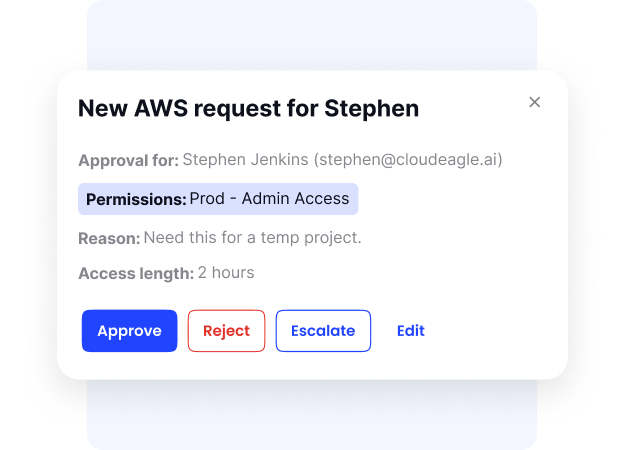
  • Role-driven permissions: Users only see and access what their job function requires, with nothing inherited from previous roles or granted ad hoc.
  • Visibility controls: Privileged roles are restricted to the right people, such as team leads or IT admins, while general roles remain broadly accessible.
  • Consistent policy enforcement: Access rules stay consistent as teams grow, restructure, or onboard contractors, preventing excess permissions from building up over time.

D. Automated Access Provisioning and Deprovisioning

CloudEagle.ai automates granting and removing app access based on user roles and departments, eliminating manual errors and ensuring people have access at the right time.
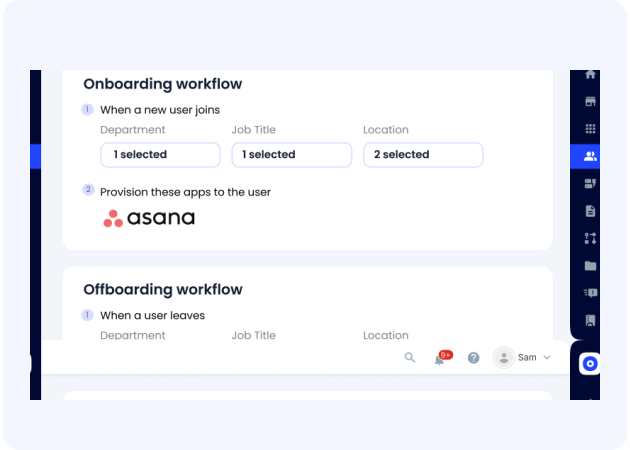
CloudEagle employee onboarding dashboard showing role-based app access automatically provisioned across IDP and non-IDP apps from a single console

  • Automated provisioning: App access is granted immediately when a user joins a team or changes roles, based on department and entitlement rules you configure.
  • Automated deprovisioning: Access is removed instantly when someone offboards or changes roles across every connected app, eliminating orphaned accounts and standing access.
  • Workflow-driven approvals: Different approval policies apply to privileged roles versus general roles, so sensitive access gets the right scrutiny without creating a bottleneck.

See how Remediant streamlined user provisioning and deprovisioning, saving hundreds of hours managing SaaS apps.

E. Time-Based Access Grants for Privileged Roles

CloudEagle.ai allows you to set time-limited access for users performing specific tasks, ensuring privileged access is granted only for the duration it's needed and removed automatically when time is up.
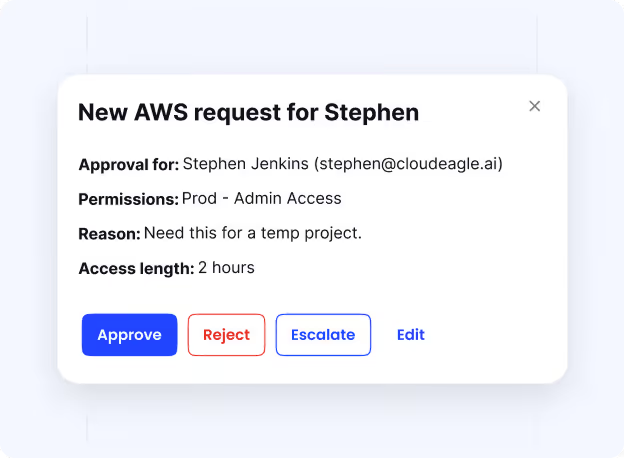
 CloudEagle time-based access controls showing temporary elevated permissions set to expire automatically when project or contractor work ends

  • Configurable access windows: Set durations by hours, days, or weeks for vendors completing a project, contractors on short-term engagements, or internal users needing temporary role elevation.
  • Automatic revocation: Once the window closes, access is removed with no manual follow-up required, with no risk of forgotten permissions staying active after the task is done.
  • Task-scoped grants: Access is tied to specific entitlements or privilege roles, ensuring the scope matches exactly what the task requires.

F. Automated Access Reviews and Least Privilege Enforcement

CloudEagle.ai automates access audits and enforces the least privilege principle to ensure users only hold the minimum permissions their role requires.

CloudEagle automated user access review workflow showing organized reviewer lists, automated reminders, and instant decision logging for faster audit completion

  • Scheduled automated reviews: Access audits are triggered on your defined schedule and routed to the right reviewers with the context needed to make real decisions, not rubber-stamp approvals.
  • Least privilege enforcement: Users whose access has drifted beyond what their role requires are flagged automatically, so corrections happen proactively.
  • Compliance-ready outputs: Every review cycle produces a documented record of who reviewed what, what was approved, and what was revoked.

G. Integration with SSO and IAM Tools

CloudEagle.ai seamlessly integrates with over 500 apps including SSO and identity & access management systems, streamlining user authentication and access control across the organization.

  • 500+ direct integrations: Works natively with Okta, Azure AD, and other SSO and IAM platforms.
  • Unified enforcement: Access workflows, approval routing, and policy enforcement run through your existing IAM infrastructure.
  • Seamless approval workflows: Provisioning, deprovisioning, and privileged access approvals all happen within the systems your team already uses daily.

Would Your Stack Survive An Audit Today?

If you’re unsure, you already have gaps.
Check Now

3. How to Set Up Access Requests Using CloudEagle.ai?

You can set different automations for privileged app access with CloudEagle.ai. However, follow these simple steps outlined below before you get started:

Step 1: Log in to CloudEagle.ai

To set up privileged app access rules, log in to your CloudEagle.ai account and head over to the “Access Management” module.

CloudEagle's dashboard

Step 2: Set up access automation

In the “Access Requests” tab, click “Build Automation” to start setting up your workflows. This feature lets you customize how app access is granted, who approves it, and how it’s monitored.

CloudEagle's Access Management module

Step 3: Configure access settings

In this step, you need to create different settings to customize privileged app access. You can do this by setting the following:

Applications & entitlements: First, you’ll define the app and entitlements. Think about things like license types (Basic, Pro, or Enterprise) and roles (regular users, privileged users, or admins). You can add normal roles as well as privilege roles here which users can request.

CloudEagle's applications and entitlements module

Visibility: Next, set up visibility rules. You can restrict the visibility of privilege roles to people like team leads or IT admins while providing visibility of general roles to everyone. This ensures only the right people—like team leads or IT admins—can see and act on access requests.

Role based access controls

Time-based access: For instance, if a vendor requires access to a critical system for a week to complete a specific task, CloudEagle.ai allows you to grant access for a defined period. Whether it's hours, days, or weeks, access is automatically removed once the task is completed, ensuring that unnecessary permissions are not left active.

Time based access controls

Questions: You can add a short questionnaire for requesters to gather important details upfront, like why the user needs access and for how long. With this information, approvals become faster and more informed, saving everyone time and effort.

Grant access to new applications

Actions: Finally, you can define actions for each request. You can have different approval policies for privileged roles than for general roles. Integrating with tools like Okta makes this process even more seamless.

By using these features, CloudEagle.ai ensures that app access is always secure, efficient, and tailored to your organization’s needs.

For a detailed, step-by-step guide on how to set app access workflows, check out this article on how CloudEagle.ai's app access workflows work?

4. Conclusion

You must control your organization’s SaaS app access to protect its data better. Privileged access allows you to maintain organizational security, compliance, and operational efficiency.

With CloudEagle.ai, executives can reduce risks, boost compliance, and protect critical data, all while making administrative tasks more manageable.

Are you ready to secure your organization’s most valuable assets using CloudEagle.ai for smarter, more efficient privilege access management?

Schedule a demo with CloudEagle.ai to streamline and manage your privileged access today.


Advertisement for a SaaS Subscription Tracking Template with a call-to-action button to download and a partial graphic of a tablet showing charts.Banner promoting a SaaS Agreement Checklist to streamline SaaS management and avoid budget waste with a call-to-action button labeled Download checklist.Blue banner with text 'The Ultimate Employee Offboarding Checklist!' and a black button labeled 'Download checklist' alongside partial views of checklist documents from cloudeagle.ai.Digital ad for download checklist titled 'The Ultimate Checklist for IT Leaders to Optimize SaaS Operations' by cloudeagle.ai, showing checklist pages.Slack Buyer's Guide offer with text 'Unlock insider insights to get the best deal on Slack!' and a button labeled 'Get Your Copy', accompanied by a preview of the guide featuring Slack's logo.Monday Pricing Guide by cloudeagle.ai offering exclusive pricing secrets to maximize investment with a call-to-action button labeled Get Your Copy and an image of the guide's cover.Blue banner for Canva Pricing Guide by cloudeagle.ai offering a guide to Canva costs, features, and alternatives with a call-to-action button saying Get Your Copy.Blue banner with white text reading 'Little-Known Negotiation Hacks to Get the Best Deal on Slack' and a white button labeled 'Get Your Copy'.Blue banner with text 'Little-Known Negotiation Hacks to Get the Best Deal on Monday.com' and a white button labeled 'Get Your Copy'.Blue banner with text 'Little-Known Negotiation Hacks to Get the Best Deal on Canva' and a white button labeled 'Get Your Copy'.Banner with text 'Slack Buyer's Guide' and a 'Download Now' button next to images of a guide titled 'Slack Buyer’s Guide: Features, Pricing & Best Practices'.Digital cover of Monday Pricing Guide with a button labeled Get Your Copy on a blue background.Canva Pricing Guide cover with a button labeled Get Your Copy on a blue gradient background.

Enter your email to
unlock the report

Oops! Something went wrong while submitting the form.
License Count
Benchmark
Per User/Per Year

Enter your email to
unlock the report

Oops! Something went wrong while submitting the form.
License Count
Benchmark
Per User/Per Year

Enter your email to
unlock the report

Oops! Something went wrong while submitting the form.
Notion Plus
License Count
Benchmark
Per User/Per Year
100-500
$67.20 - $78.72
500-1000
$59.52 - $72.00
1000+
$51.84 - $57.60
Canva Pro
License Count
Benchmark
Per User/Per Year
100-500
$74.33-$88.71
500-1000
$64.74-$80.32
1000+
$55.14-$62.34

Enter your email to
unlock the report

Oops! Something went wrong while submitting the form.

Enter your email to
unlock the report

Oops! Something went wrong while submitting the form.
Zoom Business
License Count
Benchmark
Per User/Per Year
100-500
$216.00 - $264.00
500-1000
$180.00 - $216.00
1000+
$156.00 - $180.00

Enter your email to
unlock the report

Oops! Something went wrong while submitting the form.

Get the Right Security Platform To Secure Your Cloud Infrastructure

Please enter a business email
Thank you!
The 2023 SaaS report has been sent to your email. Check your promotional or spam folder.
Oops! Something went wrong while submitting the form.

Access full report

Please enter a business email
Thank you!
The 2023 SaaS report has been sent to your email. Check your promotional or spam folder.
Oops! Something went wrong while submitting the form.

Do you know that organizations rely on over 400 SaaS apps for daily operations, making it challenging to control user access across various systems?

CyberArk says an organization's total number of identities is expected to grow by 240% over the next 12 months. Your data could be exposed or misused if you don't manage this well. With more users and devices, ensuring the right people have access is harder.

That's where CloudEagle.ai comes in. It simplifies the process by showing who has access to what, automating governance, and ensuring only authorized employees can reach sensitive data.

In this article, we will help you know how you can monitor and manage privileged access with CloudEagle.ai.

TL;DR

  • CloudEagle.ai continuously monitors app access and conducts automated access reviews, so you're always on top of potential security risks.
  • The platform keeps detailed access logs, making it easy to track and audit who's accessing what and quickly spot unusual or suspicious activity.
  • With CloudEagle.ai, you can set up role-based access control. Only the right people can access the right apps, reducing the risk of unnecessary or excessive access.
  • It automates the process of granting and removing access, so users only have permissions when they need them. This helps prevent leftover access when roles change or people leave.
  • CloudEagle.ai allows users to gain temporary access to privileged roles, automatically removing their access when the time expires, further reducing the chances of over-provisioning.

1. Why Privileged Access Management Fails Without the Right Tool

Here are the challenges organizations face when managing privileged access without the right software:

  • Too much access: Employees and contractors often get more access than they need. Over time, these extra permissions accumulate silently, increasing the chance of mistakes, misuse, and audit failures.
  • Inconsistent management: Without a central system, it's hard to ensure everyone has the right level of access and that security measures stay consistent across platforms.
  • No real-time monitoring: Without continuous visibility, unauthorized access attempts go undetected. Real-time monitoring is the difference between catching a threat early and responding to a breach.
  • Security risks: Privileged accounts are high-value targets for attackers. If not properly managed, they can lead to serious issues like data breaches or unauthorized system changes.
  • Compliance gaps: Most industries require strict access control and tracking. Without proper tooling, staying compliant becomes a scramble that often surfaces in fines, audit findings, or legal exposure.

Permissions Only Grow. Rarely Shrink.

That’s how access turns into exposure.
Cut It Back

2. How CloudEagle.ai Monitors and Manages Privileged Access

CloudEagle.ai consolidates privileged access monitoring and management into a single platform, giving IT and security teams full visibility and control across every SaaS app without the manual overhead.

Here's how each capability works:

A. Real-Time Visibility Across All SaaS Apps

CloudEagle.ai offers a unified dashboard that allows you to monitor privileged access in real time across your entire SaaS stack. You'll get instant insights into who is accessing your organization's apps and data, continuously updated.

CloudEagle AI application discovery view showing unapproved AI tools detected across SSO logins, finance signals, and browser activity

  • Live access monitoring: See who has privileged access across every connected app, surfaced in real time across users, departments, and entitlement levels.
  • Behavioral anomaly detection: Flags unusual access patterns, including logins at unexpected times or access outside a user's normal scope.
  • Cross-app access breakdown: Surfaces access by user, department, app, and entitlement level in one view.

Learn how Rec Room got complete visibility into its teams' free apps with CloudEagle.ai.

B. Detailed Access Activity Logs

CloudEagle.ai tracks all privileged access activity, maintaining detailed logs that provide a complete history of user actions across every connected app. This helps identify suspicious behavior quickly and ensures full accountability across your SaaS stack.

CloudEagle continuous compliance dashboard showing automatic audit evidence capture for access changes and reviews for SOC 2 and other regulatory requirements

  • Complete user action history: Every privileged access event is recorded, including what was accessed, by whom, when, and from where.
  • Suspicious behavior identification: Patterns that fall outside a user's normal behavior are surfaced automatically, making threats faster to find and contain.
  • Audit-ready documentation: Detailed logs are available on demand for SOC 2, ISO 27001, and other compliance frameworks without a manual export process.

C. Role-Based Access Control

CloudEagle.ai helps you assign users the appropriate level of access based on their job responsibilities through role-based access controls, reducing the risk of excessive or inappropriate access accumulating over time.

  • Role-driven permissions: Users only see and access what their job function requires, with nothing inherited from previous roles or granted ad hoc.
  • Visibility controls: Privileged roles are restricted to the right people, such as team leads or IT admins, while general roles remain broadly accessible.
  • Consistent policy enforcement: Access rules stay consistent as teams grow, restructure, or onboard contractors, preventing excess permissions from building up over time.

D. Automated Access Provisioning and Deprovisioning

CloudEagle.ai automates granting and removing app access based on user roles and departments, eliminating manual errors and ensuring people have access at the right time.

CloudEagle employee onboarding dashboard showing role-based app access automatically provisioned across IDP and non-IDP apps from a single console

  • Automated provisioning: App access is granted immediately when a user joins a team or changes roles, based on department and entitlement rules you configure.
  • Automated deprovisioning: Access is removed instantly when someone offboards or changes roles across every connected app, eliminating orphaned accounts and standing access.
  • Workflow-driven approvals: Different approval policies apply to privileged roles versus general roles, so sensitive access gets the right scrutiny without creating a bottleneck.

See how Remediant streamlined user provisioning and deprovisioning, saving hundreds of hours managing SaaS apps.

E. Time-Based Access Grants for Privileged Roles

CloudEagle.ai allows you to set time-limited access for users performing specific tasks, ensuring privileged access is granted only for the duration it's needed and removed automatically when time is up.

 CloudEagle time-based access controls showing temporary elevated permissions set to expire automatically when project or contractor work ends

  • Configurable access windows: Set durations by hours, days, or weeks for vendors completing a project, contractors on short-term engagements, or internal users needing temporary role elevation.
  • Automatic revocation: Once the window closes, access is removed with no manual follow-up required, with no risk of forgotten permissions staying active after the task is done.
  • Task-scoped grants: Access is tied to specific entitlements or privilege roles, ensuring the scope matches exactly what the task requires.

F. Automated Access Reviews and Least Privilege Enforcement

CloudEagle.ai automates access audits and enforces the least privilege principle to ensure users only hold the minimum permissions their role requires.

CloudEagle automated user access review workflow showing organized reviewer lists, automated reminders, and instant decision logging for faster audit completion

  • Scheduled automated reviews: Access audits are triggered on your defined schedule and routed to the right reviewers with the context needed to make real decisions, not rubber-stamp approvals.
  • Least privilege enforcement: Users whose access has drifted beyond what their role requires are flagged automatically, so corrections happen proactively.
  • Compliance-ready outputs: Every review cycle produces a documented record of who reviewed what, what was approved, and what was revoked.

G. Integration with SSO and IAM Tools

CloudEagle.ai seamlessly integrates with over 500 apps including SSO and identity & access management systems, streamlining user authentication and access control across the organization.

  • 500+ direct integrations: Works natively with Okta, Azure AD, and other SSO and IAM platforms.
  • Unified enforcement: Access workflows, approval routing, and policy enforcement run through your existing IAM infrastructure.
  • Seamless approval workflows: Provisioning, deprovisioning, and privileged access approvals all happen within the systems your team already uses daily.

Would Your Stack Survive An Audit Today?

If you’re unsure, you already have gaps.
Check Now

3. How to Set Up Access Requests Using CloudEagle.ai?

You can set different automations for privileged app access with CloudEagle.ai. However, follow these simple steps outlined below before you get started:

Step 1: Log in to CloudEagle.ai

To set up privileged app access rules, log in to your CloudEagle.ai account and head over to the “Access Management” module.

CloudEagle's dashboard

Step 2: Set up access automation

In the “Access Requests” tab, click “Build Automation” to start setting up your workflows. This feature lets you customize how app access is granted, who approves it, and how it’s monitored.

CloudEagle's Access Management module

Step 3: Configure access settings

In this step, you need to create different settings to customize privileged app access. You can do this by setting the following:

Applications & entitlements: First, you’ll define the app and entitlements. Think about things like license types (Basic, Pro, or Enterprise) and roles (regular users, privileged users, or admins). You can add normal roles as well as privilege roles here which users can request.

CloudEagle's applications and entitlements module

Visibility: Next, set up visibility rules. You can restrict the visibility of privilege roles to people like team leads or IT admins while providing visibility of general roles to everyone. This ensures only the right people—like team leads or IT admins—can see and act on access requests.

Role based access controls

Time-based access: For instance, if a vendor requires access to a critical system for a week to complete a specific task, CloudEagle.ai allows you to grant access for a defined period. Whether it's hours, days, or weeks, access is automatically removed once the task is completed, ensuring that unnecessary permissions are not left active.

Time based access controls

Questions: You can add a short questionnaire for requesters to gather important details upfront, like why the user needs access and for how long. With this information, approvals become faster and more informed, saving everyone time and effort.

Grant access to new applications

Actions: Finally, you can define actions for each request. You can have different approval policies for privileged roles than for general roles. Integrating with tools like Okta makes this process even more seamless.

By using these features, CloudEagle.ai ensures that app access is always secure, efficient, and tailored to your organization’s needs.

For a detailed, step-by-step guide on how to set app access workflows, check out this article on how CloudEagle.ai's app access workflows work?

4. Conclusion

You must control your organization’s SaaS app access to protect its data better. Privileged access allows you to maintain organizational security, compliance, and operational efficiency.

With CloudEagle.ai, executives can reduce risks, boost compliance, and protect critical data, all while making administrative tasks more manageable.

Are you ready to secure your organization’s most valuable assets using CloudEagle.ai for smarter, more efficient privilege access management?

Schedule a demo with CloudEagle.ai to streamline and manage your privileged access today.


CloudEagle.ai recognized in the 2025 Gartner® Magic Quadrant™ for SaaS Management Platforms
Download now
gartner chart
5x
Faster employee
onboarding
80%
Reduction in time for
user access reviews
30k
Workflows
automated
$15Bn
Analyzed in
contract spend
$2Bn
Saved in
SaaS spend

Streamline SaaS governance and save 10-30%

Book a Demo with Expert
CTA image