.avif)
%201.svg)


HIPAA Compliance Checklist for 2025

Shadow IT grows fastest in the places no one is looking. Cisco found that 80% of employees use unsanctioned tools, and IBM reports that 41% acquire technology without IT’s knowledge.
These apps rarely appear in SSO dashboards or access logs. Their first and sometimes only signal is a line item on an expense report or a small recurring charge on a corporate card.
This raises an important question: Can spending data truly reveal the full Shadow IT landscape, or is something smarter required to interpret it?
This article explores how teams try to detect Shadow IT today, why expense-based discovery breaks down, and how CloudEagle uncovers hidden SaaS apps by deeply integrating with company spend systems.
TL;DR
- Most teams try to detect Shadow IT through SSO logs, traffic analysis, surveys, and manual credit card audits but these methods offer partial, delayed visibility.
- Expense-based discovery alone fails because vendor names are masked, free tools don’t appear in spend, and delayed submissions hide early adoption.
- CloudEagle correlates spend, identity, usage, and contract data to detect Shadow IT the moment a tool is accessed or purchased, even during free trials.
- Real-time alerts, user-level attribution, and built-in remediation workflows turn discovery into immediate action across IT, Security, Finance, and Procurement.
- CloudEagle provides continuous, reliable Shadow IT detection that reduces hidden spend, prevents duplicate tools, and strengthens SaaS governance across the organization.
1. How Teams Try to Discover Shadow IT Today?
Shadow IT discovery sounds simple: identify unsanctioned SaaS before it turns into risk. But in practice, most organizations depend on fragmented signals scattered across security tools, finance systems, and manual checks.
Every team sees only part of the picture: security sees traffic logs, IT sees SSO access, finance sees spend, and procurement sees contracts. None of these systems was designed to catch Shadow IT early, especially when adoption begins with free trials or personal credit card purchases.
Here’s what Shadow IT discovery looks like today:
This is the operational reality for most organizations: fragmented visibility, delayed discovery, and heavy manual reconciliation across logs, invoices, and spreadsheets. These methods surface activity only after tools have already spread across teams, making proactive Shadow IT management nearly impossible.
2. Why Expense-based Shadow IT Discovery Breaks Down?
Expense systems became a convenient fallback for detecting unsanctioned SaaS as credit card-based purchasing grew across organizations. They help teams surface charges that look unfamiliar, map vendor names, and occasionally catch tools IT wasn’t aware of.
But expense systems were never designed to detect Shadow IT.
They don’t show you:
- Which employee or team actually adopted the tool
- Whether the app is sanctioned, duplicative, or high-risk
- How widely the tool is being used across departments
- Whether sensitive data has already moved into the app
And they don’t support:
- Real-time visibility into new or free-tier app adoption
- Identification of personal card purchases or team-level buys
- Accurate classification of masked vendor names on statements
- Correlation between spend, users, usage, and access patterns
As a result, discovery only happens after money has been spent.
Small recurring charges go unnoticed.
Free trials evolve into deeply embedded tools long before procurement or security knows they exist. Monthly or quarterly audits surface apps too late: once workflows, data, and dependencies have already formed.
As CIO Dive noted,
“Most businesses likely do not know the extent of shadow IT until they perform audits or gain insight into what’s going on in their network.”
That lack of early visibility creates real risk. Without oversight, there’s no understanding of where data is flowing, who has access, or whether the tool bypasses established security controls. “Shadow IT can open vulnerabilities to a network and enterprise with a lack of IT oversight,” warned Steve McGregory, Director of Application and Threat Intelligence.
And that’s why organizations can’t rely on expense data alone to understand their true SaaS footprint. Identifying Shadow IT early requires more than visibility into charges; it requires intelligence that connects spend, usage, access, and risk together.
3. How CloudEagle Discover Shadow IT Through Spend Integrations?
CloudEagle can discover Shadow IT through deep integrations with company expense and payment systems.
It does this by unifying financial data with identity, usage, and contract records to create a complete, continuously updated view of every application entering the organization.
CloudEagle connects directly to corporate card systems, expense tools, and invoice repositories to ingest transaction-level data. It extracts vendor names from statements and invoices, normalizes masked or ambiguous descriptors, and maps each charge to known SaaS vendors using CloudEagle’s enrichment engine.
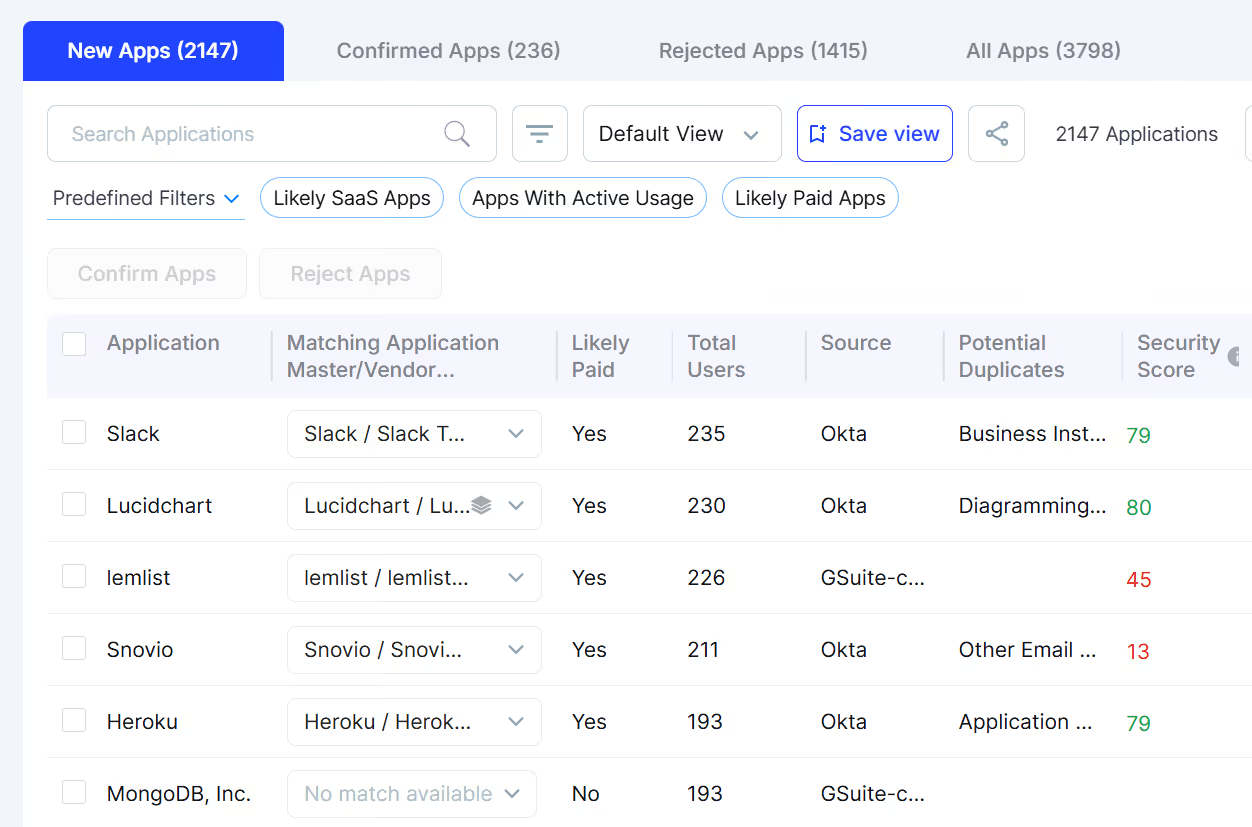
This ensures that software-related spend is identified even when billing descriptors are unclear or routed through parent companies.
From there, CloudEagle correlates spend with:
- SSO and directory logs from Okta, Azure AD, and other IDPs
- Application telemetry and direct usage logs
- Contract and procurement systems
- Browser-based access data
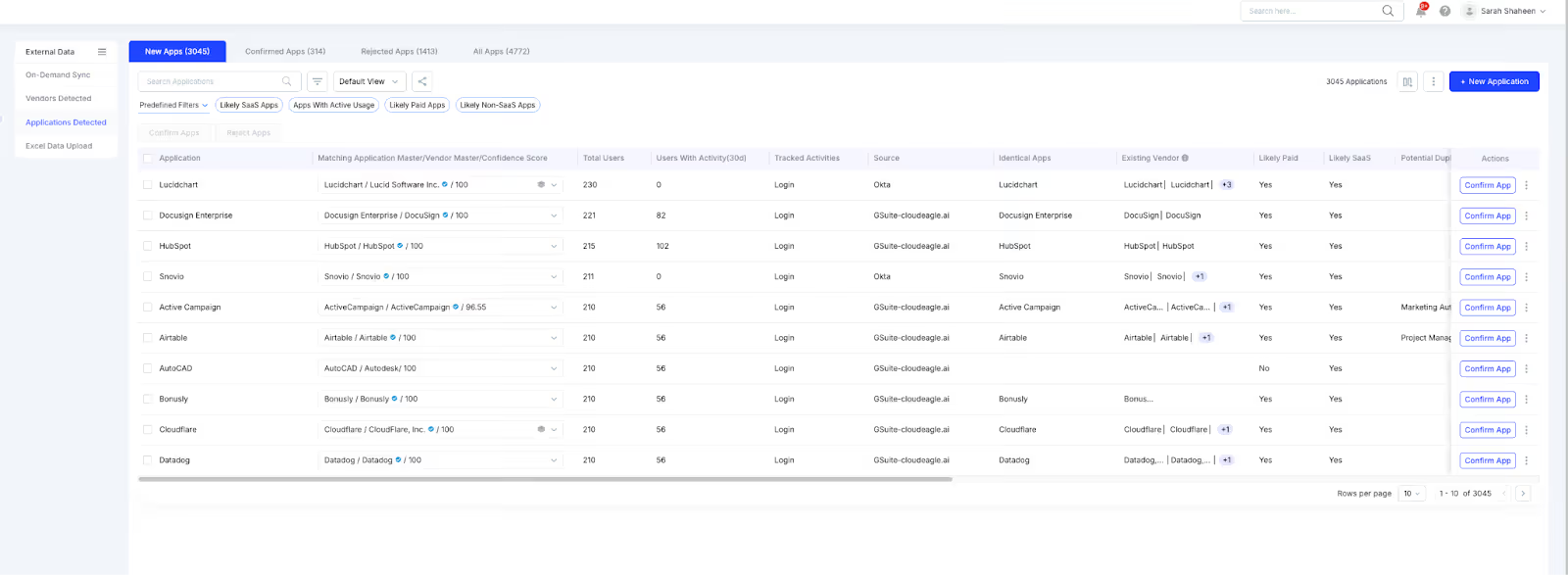
This correlation highlights tools that appear in spend but not in SSO, appear in usage logs but not in procurement, or appear in browser activity without any financial footprint.
It also detects user-level adoption, allowing teams to see exactly who first accessed or paid for an unapproved application.
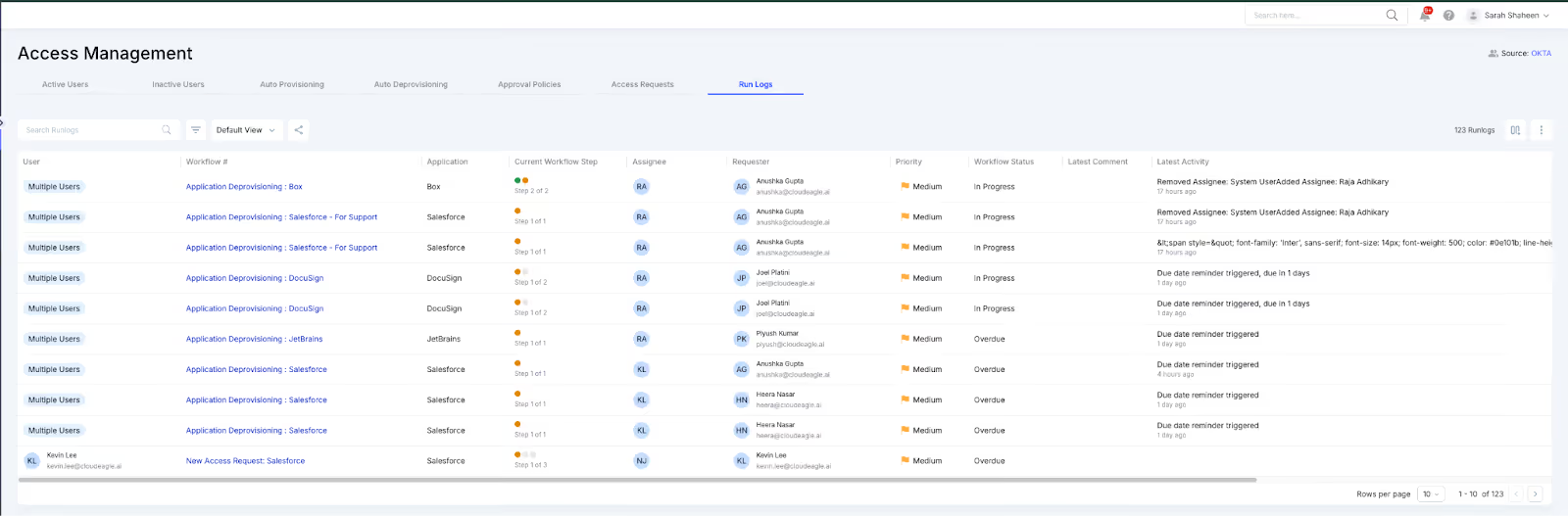
CloudEagle.ai identifies:
- Apps purchased on corporate cards that do not exist in procurement or IT catalogs
- Free or trial tools accessed through browsers before they convert to paid plans
- Vendors absent from the contract repository
- Discrepancies between spend, login activity, and user access
- Personal card purchases submitted for reimbursement
- Early signals that an app is entering the organization, even before spend occurs
When a new or unknown tool is detected, CloudEagle creates real-time alerts, routes them to the appropriate owners, and can automatically generate ITSM tickets.
Validation loops allow teams to confirm, investigate, or dismiss findings, ensuring that the inventory remains accurate over time.
All insights compile into a centralized dashboard, showing sanctioned and unsanctioned applications, department-level adoption, user-level access, risk scoring, and a unified inventory of all spend-driven and usage-driven discoveries.
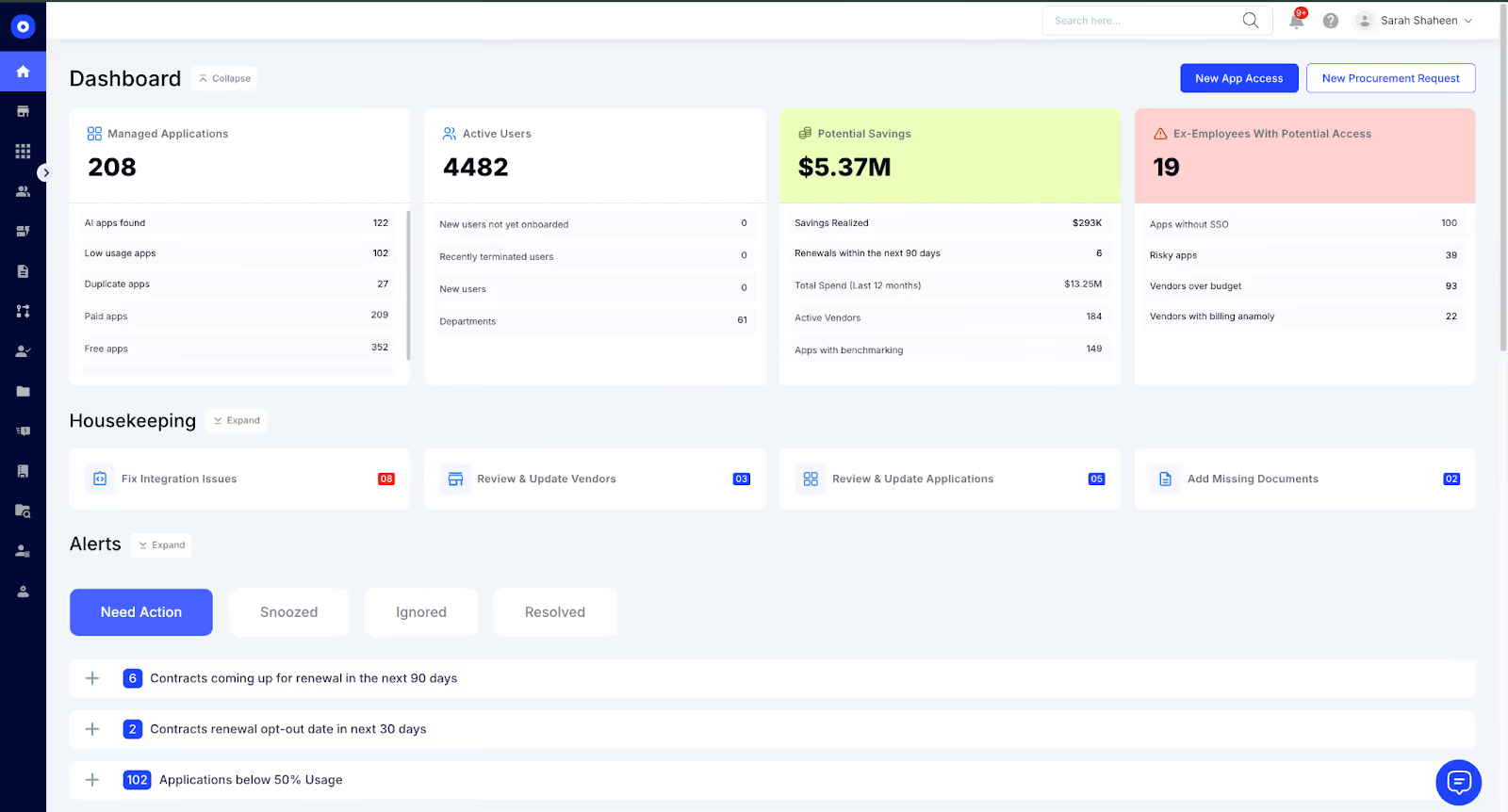
This enables CloudEagle to maintain a complete, continuously updated view of shadow applications across the organization.
CloudEagle’s spend integrations are not standalone; they serve as one input in a broader discovery engine that links transactions with identity, usage, and contracts.
This gives organizations reliable, real-time visibility into Shadow IT from the moment a tool is first accessed or purchased.
4. Why CloudEagle’s Spend-Based Shadow IT Detection is More Reliable Than Traditional Methods?
Expense audits, SSO logs, and firewall reports were never built to keep up with decentralized SaaS buying. They reveal pieces of the problem, often after tools have already spread across teams.
As SaaS adoption accelerates and purchases shift to corporate cards and personal accounts, organizations need a more coordinated, real-time way to understand what’s entering their environment.
CloudEagle transforms spend-based Shadow IT detection from a manual clean-up exercise into a continuous governance layer that strengthens security, purchasing discipline, and operational oversight.
Here’s how CloudEagle steps into this strategic role:
- Visibility beyond financial data: CloudEagle connects expense records with identity logs, usage telemetry, and contract data, revealing which applications entered the organization and who adopted them. This correlation eliminates the blind spots created by siloed systems.
- Detection at the point of entry: Most shadow tools originate through free trials, personal accounts, or small early charges. CloudEagle identifies these signals immediately, allowing teams to evaluate a tool before it spreads or duplicates existing solutions.
- Actionable investigation and remediation: Each detection includes built-in paths for resolution such as validation loops, user outreach, automated workflows, and ITSM ticket creation. This ensures unapproved tools are reviewed and addressed rather than accumulating unnoticed.
- Shared governance across IT, Security, Finance, and Procurement: Shadow IT persists when each function sees only part of the picture. CloudEagle provides a single system of record that consolidates spend, access, and usage, enabling coordinated security policy enforcement and reducing duplicate or uncontracted purchases.
- Continuous monitoring aligned with SaaS velocity: SaaS enters the organization far faster than manual audits can track. CloudEagle ingests new spend and usage data in real time, surfacing shadow tools as soon as they appear, even those outside SSO or formal procurement.
- Reduction of hidden spend and unmanaged SaaS: By mapping every app to users and departments, CloudEagle helps teams eliminate redundant tools, prevent unauthorized purchases, and reduce unmanaged SaaS across the environment. Shadow IT becomes visible, measurable, and governable.
CloudEagle turns Shadow IT discovery from a slow, reactive process into a continuous control that strengthens financial stewardship, security posture, and purchasing discipline.
5. See Shadow IT the Moment It Starts
Shadow IT becomes hard to manage when spend signals, access data, and usage patterns sit in different systems. You now know how early detection changes the entire equation.
CloudEagle brings those signals together, making shadow purchases visible the moment they appear. If you’re ready to turn fragmented discovery into predictable governance, CloudEagle is built for that next step.
Sounds like something you’re looking for? Book a demo today!


.avif)


.avif)
.avif)




.png)





.avif)
.avif)
.avif)


