You need to enable JavaScript in order to use the AI chatbot tool powered by ChatBot

Finding Duplicate Apps and Redundant Spend With CloudEagle.ai

Share via:
blog-cms-banner-bg
Little-Known Negotiation Hacks to Get the Best Deal on Slack
cta-bg-blogDownload Your Copy

HIPAA Compliance Checklist for 2025

Download PDF

Duplicate SaaS apps don’t show up in dashboards. They hide in expense lines, team budgets, and “quick sign-ups,” slowly inflating spend without anyone noticing. One company discovered nine tools doing the same job, all paid for by different teams, without a single renewal ever being reviewed together.

If your spending feels higher than it should be, this is usually why.

This article breaks down why duplicate apps happen, the hidden cost behind them, and how CloudEagle helps you uncover and eliminate redundant spend with certainty.

TL;DR 

  • Companies overspend on SaaS because duplicates hide across teams, cards, contracts, and SSO-untracked tools.
  • Manual methods, such as spreadsheets, surveys, and browser plugins, miss most redundant apps and duplicate licenses.
  • CloudEagle automatically uncovers overlap by combining spend + usage + access + contract data in one place.
  • AI normalization detects duplicates hiding under different names, departments, or purchase paths.
  • Teams eliminate 10-30% SaaS spend by consolidating redundant tools, right-sizing licenses, and preventing duplication.
  • CloudEagle becomes the single source of truth that stops duplicate tools from returning.

1. How Teams Typically Try to Identify Duplicate Apps?

Everyone agrees duplicate SaaS apps waste money, but very few teams have a reliable way to find them. The reality is messy: tools are bought on credit cards, teams adopt apps independently, spreadsheets rarely survive more than a week, and SSO visibility covers only a fraction of the SaaS footprint.

Without a unified source of truth, organizations fall back on manual, outdated, and incomplete methods that surface some duplication but miss most of it.

Here’s what identifying duplicate apps looks like today:

Method What Happens in Reality
Manual review of corporate card statements Teams scan expense reports to spot repeated vendors, team-level purchases, and reimbursements. Data is messy, mislabeled, and scattered across cards.
Asking department heads what tools they use IT sends surveys or emails; responses are inconsistent, incomplete, and outdated. Small purchases, free-to-paid upgrades, and individual sign-ups stay hidden.
Spreadsheet-based app inventories Static sheets become obsolete quickly, don’t capture new signups, and fail to show team-level duplication or usage/spend changes.
Relying on SSO (like Okta) Shows only SSO-connected tools. Misses non-SSO apps, mobile/desktop tools, API-based apps, and credit-card purchases. Doesn’t show financial duplication.
Browser plugins or agent-based tools Captures some browser logins but misses mobile tools, desktop apps, API tools, and anything not installed by employees. Partial visibility at best.
Partial discovery using SaaS dashboards Teams combine SSO logs, expenses, browser plugins, and integrations, but coverage varies, and insights still require manual analysis of license counts and overlaps.

Track Every SaaS Subscription Cleanly

Stop relying on outdated spreadsheets. Use this template to centralize subscriptions, spot duplicates faster, and give Finance a trusted source of truth.

Get Started
CTA Thumbnail

2. The Hidden Costs and Friction Created by Duplicate Apps?

Duplicate SaaS apps aren’t just an operational inconvenience; they quietly increase costs in ways most organizations never track. Teams sign up for the tools they like, swipe credit cards for quick access, or adopt free tools that later convert to paid. And before anyone notices, redundant subscriptions create 10-25% avoidable spend buried inside budgets across the company.

On the surface, these overlaps seem insignificant. Underneath, they inflate SaaS spend, fragment workflows, and multiply access risks, all without delivering any additional value.

The most expensive part? Redundant spending you can’t see.

  • Multiple teams pay for their own Miro, Calendly, Notion, password managers, or call tools.
  • Departments buy competing products for identical functions.
  • Free tools often transition into paid subscriptions across multiple teams without proper oversight.
  • Shadow IT purchases accumulate month over month.

This spend doesn’t show up in dashboards; it hides in scattered budgets and uncoordinated purchases.

But redundant spending is only the beginning. Duplicate apps also create:

1. Fragmented Workflows and Scattered Data

Teams use different tools for the same process, splitting data across platforms and slowing collaboration.

2. Expanded Security and Access Risk

Every additional app introduces:

  • Another identity to govern
  • Another potential breach surface
  • Offboarding gaps
  • Privileged access you don’t know exists

3. More Vendor and Renewal Overhead

Procurement handles multiple renewals, contracts, and approvals for tools that serve the same purpose, doubling admin work.

4. Lost Negotiation Power

Fragmented spend means:

  • No volume discounts
  • No vendor consolidation
  • Paying a premium or retail pricing
  • Weak enterprise leverage during renewal cycles

5. Heavy Manual Reconciliation

Teams rely on spreadsheets, surveys, expense reviews, license checks, and still miss hidden overlaps. 

3. How CloudEagle Automatically Uncovers Duplicate Apps and Overlapping Spend?

Most tools try to detect duplicates by looking at one data source, such as SSO activity, browser plugins, or scattered expense lines. CloudEagle takes a different approach. 

It correlates usage, spend, vendor, contract, and access signals together, surfacing duplicates that normally stay hidden behind mislabeled transactions, unfederated apps, and departmental purchases.

Here’s how CloudEagle does it:

1. SSO Integrations That Uncover Hidden App Overlap

CloudEagle begins by connecting to your identity provider, such as Okta, Azure AD, OneLogin, or any SSO you use, to create the baseline inventory of who is accessing which apps. This exposes unfederated usage gaps, duplicate logins across similar tools, and identities spread thin across apps that serve the same purpose.

SSO gives the first signal of overlap:

  • Multiple tools are used for the same workflow
  • Users accessing competing apps in the same category
  • Parallel adoption of tools outside standard policies

This sets the foundation for deeper discovery.

2. Finance Integrations That Reveal Redundant Purchases

CloudEagle starts where duplication actually shows up, money leaving the company. It integrates directly with corporate cards, ERP systems, billing platforms, and expense tools to capture every subscription payment, whether it comes from a department budget, an employee’s card, or a free trial that quietly converted.

This financial lens exposes:

  • Multiple subscriptions to the same vendor
  • Team-level purchases of identical tools
  • Unapproved SaaS signups that bypass IT
  • Recurring charges hiding under inconsistent descriptions

Together, SSO + finance signals produce a precise, end-to-end map of overlapping spend that single-source tools simply can’t see.
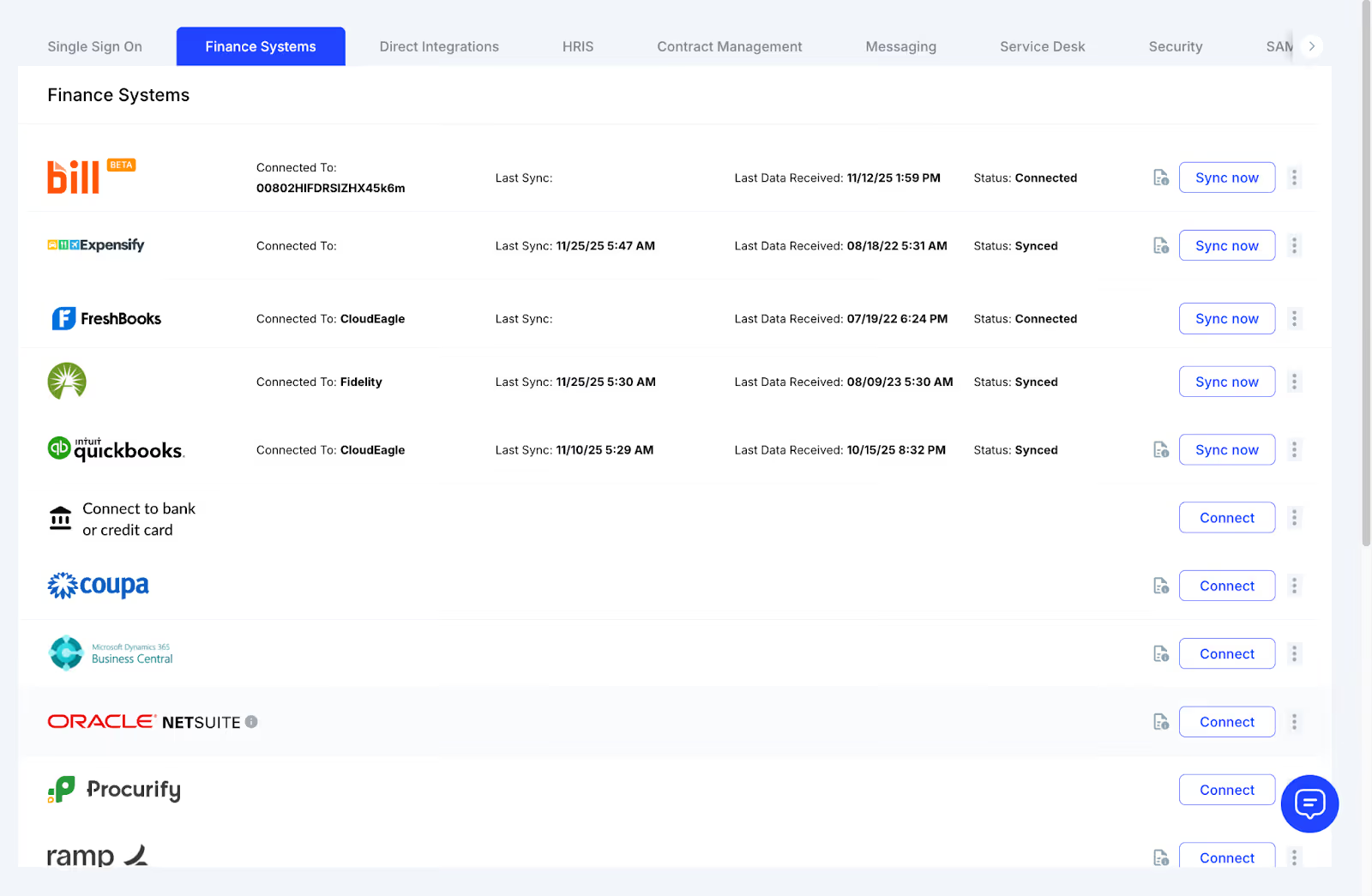
CloudEagle finance systems dashboard showing connected apps like Bill, Expensify, FreshBooks, Fidelity, and QuickBooks with sync status and connection options.

3. Contract & Invoice Intelligence That Surfaces Overlapping Agreements

Finance data shows the payments. Contracts show the commitments. CloudEagle ingests order forms, invoices, agreements, renewal documents, and SKU-level details, then normalizes vendor names to remove inconsistencies.

This allows CloudEagle to surface:

  • Two contracts for the same tool are managed by different teams
  • SKU overlaps across business units
  • Separate terms, pricing, or renewal dates for identical apps
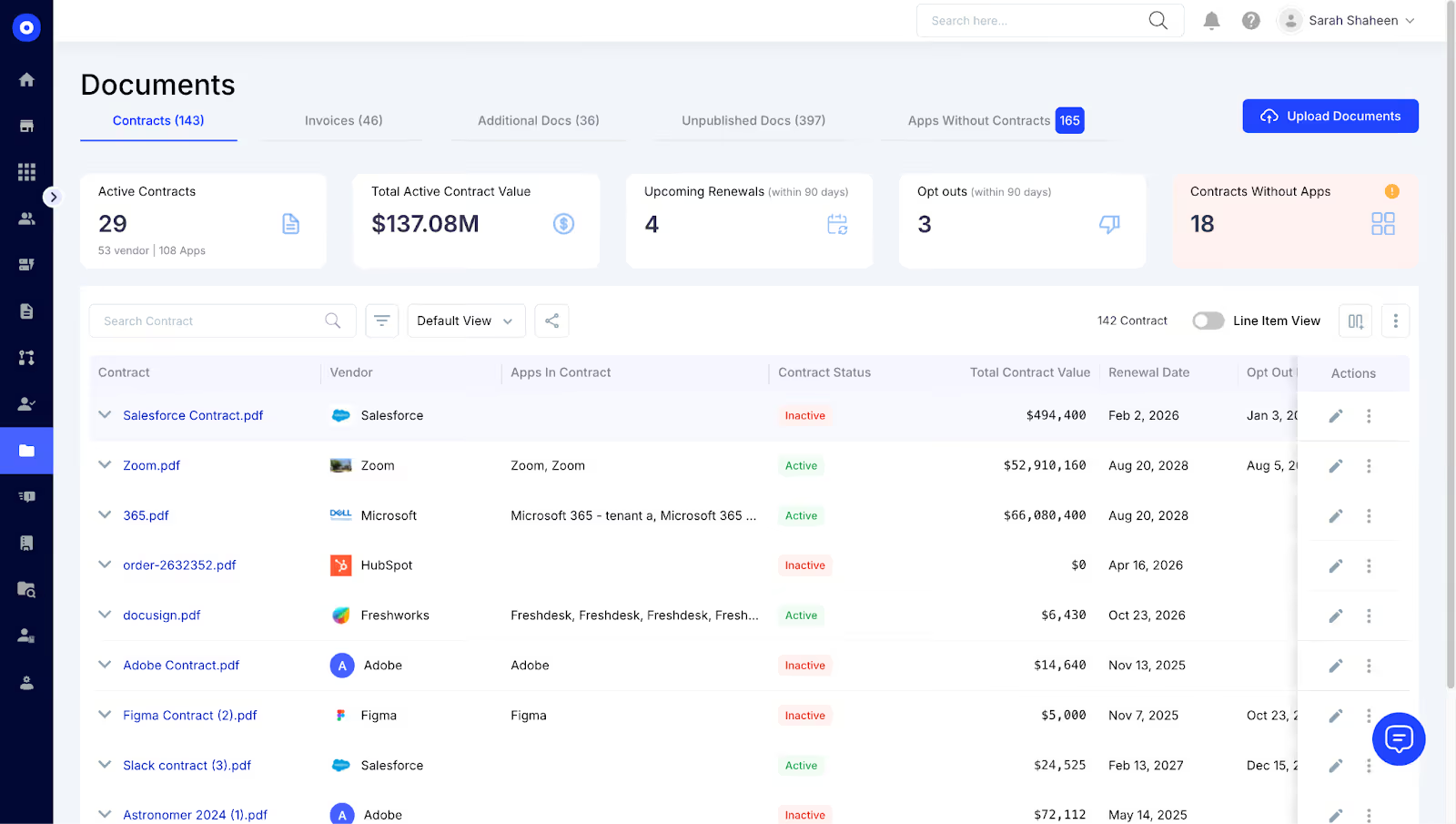
CloudEagle contracts dashboard showing active contracts, total contract value, renewals, opt-outs, and a list of vendor contracts with statuses and values.

This is where many duplicates hide, inside the paperwork. CloudEagle reads it all.

Review Every SaaS Contract Correctly

Avoid hidden commitments, duplicate contracts, and overpriced renewals. Use this checklist to evaluate terms with confidence before you sign.

Get Started
CTA Thumbnail

4. Direct Product 500+ Integrations Exposing Functional Redundancy

Duplicate spend doesn’t always come from paying the same vendor twice. It often comes from different tools doing the same job. CloudEagle.ai connects directly to SaaS applications to identify actual usage, license assignments, and last login details.

This makes it possible to identify:

  • Two project management tools used in parallel
  • Several meeting transcription apps in production
  • Multiple password managers across teams

Instead of relying on what employees say they use, you see what they actually use.

5. AI Normalization That Identifies Apps Hidden Behind Different Names

Vendors appear under different names across systems, such as parent companies, resellers, marketplaces, abbreviations, or regional variants. CloudEagle’s normalization engine resolves these inconsistencies automatically.

This removes blind spots such as:

  • “Adobe Inc.” vs. “Acrobat Pro” vs. “Creative Cloud”
  • Reseller purchases appearing under reseller names
  • Same app purchased via web, marketplace, and corporate card

When naming variations disappear, duplicates become undeniable.

6. Stack Categorization That Groups Tools by Function

CloudEagle organizes every app into functional categories such as collaboration, engineering, sales, security, design, documentation, and more. Once categorized, overlapping tools emerge immediately.

This perspective highlights:

  • Redundant note-taking tools
  • Multiple digital signature platforms
  • Parallel design or prototyping apps
  • Several messaging or video tools in use

This is where cross-team redundancy shows up most clearly.

7. Consolidation Insights and AI Recommendations

Once duplicates appear, CloudEagle.ai. goes a step further. It generates targeted consolidation insights based on spend, usage, access, and contract timelines.

These insights guide decisions like:

  • Which app to standardize across the company
  • Where to merge licenses
  • Which tools show the highest redundancy
  • Where consolidation would deliver the fastest ROI

It’s not just detection; it’s clarity on what to do next.

4. Why CloudEagle Helps You Eliminate Redundant Spend Faster and More Accurately? 

For most organizations, duplicate SaaS spend doesn’t rise to the surface until renewals creep up, budgets tighten, or teams realize they’ve been paying for multiple tools doing the same job. 

Traditional methods, such as SSO logs, browser plugins, spreadsheets, and fragmented finance reports, were never built to give complete clarity.

As SaaS sprawl grows and spending fragments across teams, CloudEagle shifts the process from reactive cost-cutting to proactive, data-backed optimization. Instead of detecting duplicates occasionally, CloudEagle gives continuous visibility into overlapping spend, redundant licenses, and cross-team duplication, before it becomes expensive.

CloudEagle’s impact on duplicate spend identification and optimization:

  • Visibility beyond siloed data sources: By combining spend, usage, access, and contract intelligence, CloudEagle uncovers duplicates that SSO-only, browser-only, or finance-only tools consistently miss. This blended intelligence helps surface overlapping apps, hidden purchases, departmental duplication, and redundant licenses.
  • Coverage that extends beyond SSO: Unlike platforms limited to federated apps, CloudEagle captures desktop tools, mobile apps, free-to-paid conversions, credit-card purchases, unmanaged SaaS, and unfederated tools. This complete coverage reveals the full SaaS footprint, including everything teams purchase outside procurement.
  • Continuous, automated discovery: The platform starts surfacing redundant apps and duplicate commitments within days of integration. Automated data ingestion and AI mapping replace weeks of manual cleanup, accelerating consolidation and savings.
  • Cross-functional alignment: IT, Finance, Procurement, and Security work from a unified system of record. Shared visibility into renewals, spend, usage, and access streamlines decision-making and removes the friction that slows down consolidation efforts.
  • Long-term governance and prevention: CloudEagle doesn’t just identify duplicates; it prevents them from resurfacing. App request workflows, purchase guardrails, renewal approvals tied to usage, and automated alerts ensure new SaaS signups follow a controlled, governed path.
  • Material cost reduction: By consolidating vendors, eliminating redundant tools, right-sizing license assignments, and preventing retail-price renewals, CloudEagle reduces SaaS spend by 10-30% within months. Overlapping license tiers (like E5 + F3) are flagged instantly, turning hidden waste into immediate savings opportunities.

Eliminate License Waste Quickly

Learn how to identify unused, duplicate, and misaligned licenses. This guide helps you right-size your SaaS stack with clarity.

Get Started
CTA Thumbnail

Smarter SaaS Choices Start Here

You now know how easily duplicate apps slip into the stack and how much they drain in hidden spend, overlapping licenses, and tool sprawl. Spotting them early creates instant savings and tighter governance.

When you’re ready to replace spreadsheets and guesswork with real visibility, CloudEagle.ai makes the entire process faster, clearer, and fully automated. It’s the simplest way to cut redundant spend, right-size your stack, and keep every SaaS decision intentional.

Advertisement for a SaaS Subscription Tracking Template with a call-to-action button to download and a partial graphic of a tablet showing charts.Banner promoting a SaaS Agreement Checklist to streamline SaaS management and avoid budget waste with a call-to-action button labeled Download checklist.Blue banner with text 'The Ultimate Employee Offboarding Checklist!' and a black button labeled 'Download checklist' alongside partial views of checklist documents from cloudeagle.ai.Digital ad for download checklist titled 'The Ultimate Checklist for IT Leaders to Optimize SaaS Operations' by cloudeagle.ai, showing checklist pages.Slack Buyer's Guide offer with text 'Unlock insider insights to get the best deal on Slack!' and a button labeled 'Get Your Copy', accompanied by a preview of the guide featuring Slack's logo.Monday Pricing Guide by cloudeagle.ai offering exclusive pricing secrets to maximize investment with a call-to-action button labeled Get Your Copy and an image of the guide's cover.Blue banner for Canva Pricing Guide by cloudeagle.ai offering a guide to Canva costs, features, and alternatives with a call-to-action button saying Get Your Copy.Blue banner with white text reading 'Little-Known Negotiation Hacks to Get the Best Deal on Slack' and a white button labeled 'Get Your Copy'.Blue banner with text 'Little-Known Negotiation Hacks to Get the Best Deal on Monday.com' and a white button labeled 'Get Your Copy'.Blue banner with text 'Little-Known Negotiation Hacks to Get the Best Deal on Canva' and a white button labeled 'Get Your Copy'.Banner with text 'Slack Buyer's Guide' and a 'Download Now' button next to images of a guide titled 'Slack Buyer’s Guide: Features, Pricing & Best Practices'.Digital cover of Monday Pricing Guide with a button labeled Get Your Copy on a blue background.Canva Pricing Guide cover with a button labeled Get Your Copy on a blue gradient background.

Enter your email to
unlock the report

Oops! Something went wrong while submitting the form.
License Count
Benchmark
Per User/Per Year

Enter your email to
unlock the report

Oops! Something went wrong while submitting the form.
License Count
Benchmark
Per User/Per Year

Enter your email to
unlock the report

Oops! Something went wrong while submitting the form.
Notion Plus
License Count
Benchmark
Per User/Per Year
100-500
$67.20 - $78.72
500-1000
$59.52 - $72.00
1000+
$51.84 - $57.60
Canva Pro
License Count
Benchmark
Per User/Per Year
100-500
$74.33-$88.71
500-1000
$64.74-$80.32
1000+
$55.14-$62.34

Enter your email to
unlock the report

Oops! Something went wrong while submitting the form.

Enter your email to
unlock the report

Oops! Something went wrong while submitting the form.
Zoom Business
License Count
Benchmark
Per User/Per Year
100-500
$216.00 - $264.00
500-1000
$180.00 - $216.00
1000+
$156.00 - $180.00

Enter your email to
unlock the report

Oops! Something went wrong while submitting the form.

Get the Right Security Platform To Secure Your Cloud Infrastructure

Please enter a business email
Thank you!
The 2023 SaaS report has been sent to your email. Check your promotional or spam folder.
Oops! Something went wrong while submitting the form.

Access full report

Please enter a business email
Thank you!
The 2023 SaaS report has been sent to your email. Check your promotional or spam folder.
Oops! Something went wrong while submitting the form.

Duplicate SaaS apps don’t show up in dashboards. They hide in expense lines, team budgets, and “quick sign-ups,” slowly inflating spend without anyone noticing. One company discovered nine tools doing the same job, all paid for by different teams, without a single renewal ever being reviewed together.

If your spending feels higher than it should be, this is usually why.

This article breaks down why duplicate apps happen, the hidden cost behind them, and how CloudEagle helps you uncover and eliminate redundant spend with certainty.

TL;DR 

  • Companies overspend on SaaS because duplicates hide across teams, cards, contracts, and SSO-untracked tools.
  • Manual methods, such as spreadsheets, surveys, and browser plugins, miss most redundant apps and duplicate licenses.
  • CloudEagle automatically uncovers overlap by combining spend + usage + access + contract data in one place.
  • AI normalization detects duplicates hiding under different names, departments, or purchase paths.
  • Teams eliminate 10-30% SaaS spend by consolidating redundant tools, right-sizing licenses, and preventing duplication.
  • CloudEagle becomes the single source of truth that stops duplicate tools from returning.

1. How Teams Typically Try to Identify Duplicate Apps?

Everyone agrees duplicate SaaS apps waste money, but very few teams have a reliable way to find them. The reality is messy: tools are bought on credit cards, teams adopt apps independently, spreadsheets rarely survive more than a week, and SSO visibility covers only a fraction of the SaaS footprint.

Without a unified source of truth, organizations fall back on manual, outdated, and incomplete methods that surface some duplication but miss most of it.

Here’s what identifying duplicate apps looks like today:

Method What Happens in Reality
Manual review of corporate card statements Teams scan expense reports to spot repeated vendors, team-level purchases, and reimbursements. Data is messy, mislabeled, and scattered across cards.
Asking department heads what tools they use IT sends surveys or emails; responses are inconsistent, incomplete, and outdated. Small purchases, free-to-paid upgrades, and individual sign-ups stay hidden.
Spreadsheet-based app inventories Static sheets become obsolete quickly, don’t capture new signups, and fail to show team-level duplication or usage/spend changes.
Relying on SSO (like Okta) Shows only SSO-connected tools. Misses non-SSO apps, mobile/desktop tools, API-based apps, and credit-card purchases. Doesn’t show financial duplication.
Browser plugins or agent-based tools Captures some browser logins but misses mobile tools, desktop apps, API tools, and anything not installed by employees. Partial visibility at best.
Partial discovery using SaaS dashboards Teams combine SSO logs, expenses, browser plugins, and integrations, but coverage varies, and insights still require manual analysis of license counts and overlaps.

Track Every SaaS Subscription Cleanly

Stop relying on outdated spreadsheets. Use this template to centralize subscriptions, spot duplicates faster, and give Finance a trusted source of truth.

Get Started
CTA Thumbnail

2. The Hidden Costs and Friction Created by Duplicate Apps?

Duplicate SaaS apps aren’t just an operational inconvenience; they quietly increase costs in ways most organizations never track. Teams sign up for the tools they like, swipe credit cards for quick access, or adopt free tools that later convert to paid. And before anyone notices, redundant subscriptions create 10-25% avoidable spend buried inside budgets across the company.

On the surface, these overlaps seem insignificant. Underneath, they inflate SaaS spend, fragment workflows, and multiply access risks, all without delivering any additional value.

The most expensive part? Redundant spending you can’t see.

  • Multiple teams pay for their own Miro, Calendly, Notion, password managers, or call tools.
  • Departments buy competing products for identical functions.
  • Free tools often transition into paid subscriptions across multiple teams without proper oversight.
  • Shadow IT purchases accumulate month over month.

This spend doesn’t show up in dashboards; it hides in scattered budgets and uncoordinated purchases.

But redundant spending is only the beginning. Duplicate apps also create:

1. Fragmented Workflows and Scattered Data

Teams use different tools for the same process, splitting data across platforms and slowing collaboration.

2. Expanded Security and Access Risk

Every additional app introduces:

  • Another identity to govern
  • Another potential breach surface
  • Offboarding gaps
  • Privileged access you don’t know exists

3. More Vendor and Renewal Overhead

Procurement handles multiple renewals, contracts, and approvals for tools that serve the same purpose, doubling admin work.

4. Lost Negotiation Power

Fragmented spend means:

  • No volume discounts
  • No vendor consolidation
  • Paying a premium or retail pricing
  • Weak enterprise leverage during renewal cycles

5. Heavy Manual Reconciliation

Teams rely on spreadsheets, surveys, expense reviews, license checks, and still miss hidden overlaps. 

3. How CloudEagle Automatically Uncovers Duplicate Apps and Overlapping Spend?

Most tools try to detect duplicates by looking at one data source, such as SSO activity, browser plugins, or scattered expense lines. CloudEagle takes a different approach. 

It correlates usage, spend, vendor, contract, and access signals together, surfacing duplicates that normally stay hidden behind mislabeled transactions, unfederated apps, and departmental purchases.

Here’s how CloudEagle does it:

1. SSO Integrations That Uncover Hidden App Overlap

CloudEagle begins by connecting to your identity provider, such as Okta, Azure AD, OneLogin, or any SSO you use, to create the baseline inventory of who is accessing which apps. This exposes unfederated usage gaps, duplicate logins across similar tools, and identities spread thin across apps that serve the same purpose.

SSO gives the first signal of overlap:

  • Multiple tools are used for the same workflow
  • Users accessing competing apps in the same category
  • Parallel adoption of tools outside standard policies

This sets the foundation for deeper discovery.

2. Finance Integrations That Reveal Redundant Purchases

CloudEagle starts where duplication actually shows up, money leaving the company. It integrates directly with corporate cards, ERP systems, billing platforms, and expense tools to capture every subscription payment, whether it comes from a department budget, an employee’s card, or a free trial that quietly converted.

This financial lens exposes:

  • Multiple subscriptions to the same vendor
  • Team-level purchases of identical tools
  • Unapproved SaaS signups that bypass IT
  • Recurring charges hiding under inconsistent descriptions

Together, SSO + finance signals produce a precise, end-to-end map of overlapping spend that single-source tools simply can’t see.

CloudEagle finance systems dashboard showing connected apps like Bill, Expensify, FreshBooks, Fidelity, and QuickBooks with sync status and connection options.

3. Contract & Invoice Intelligence That Surfaces Overlapping Agreements

Finance data shows the payments. Contracts show the commitments. CloudEagle ingests order forms, invoices, agreements, renewal documents, and SKU-level details, then normalizes vendor names to remove inconsistencies.

This allows CloudEagle to surface:

  • Two contracts for the same tool are managed by different teams
  • SKU overlaps across business units
  • Separate terms, pricing, or renewal dates for identical apps

CloudEagle contracts dashboard showing active contracts, total contract value, renewals, opt-outs, and a list of vendor contracts with statuses and values.

This is where many duplicates hide, inside the paperwork. CloudEagle reads it all.

Review Every SaaS Contract Correctly

Avoid hidden commitments, duplicate contracts, and overpriced renewals. Use this checklist to evaluate terms with confidence before you sign.

Get Started
CTA Thumbnail

4. Direct Product 500+ Integrations Exposing Functional Redundancy

Duplicate spend doesn’t always come from paying the same vendor twice. It often comes from different tools doing the same job. CloudEagle.ai connects directly to SaaS applications to identify actual usage, license assignments, and last login details.

This makes it possible to identify:

  • Two project management tools used in parallel
  • Several meeting transcription apps in production
  • Multiple password managers across teams

Instead of relying on what employees say they use, you see what they actually use.

5. AI Normalization That Identifies Apps Hidden Behind Different Names

Vendors appear under different names across systems, such as parent companies, resellers, marketplaces, abbreviations, or regional variants. CloudEagle’s normalization engine resolves these inconsistencies automatically.

This removes blind spots such as:

  • “Adobe Inc.” vs. “Acrobat Pro” vs. “Creative Cloud”
  • Reseller purchases appearing under reseller names
  • Same app purchased via web, marketplace, and corporate card

When naming variations disappear, duplicates become undeniable.

6. Stack Categorization That Groups Tools by Function

CloudEagle organizes every app into functional categories such as collaboration, engineering, sales, security, design, documentation, and more. Once categorized, overlapping tools emerge immediately.

This perspective highlights:

  • Redundant note-taking tools
  • Multiple digital signature platforms
  • Parallel design or prototyping apps
  • Several messaging or video tools in use

This is where cross-team redundancy shows up most clearly.

7. Consolidation Insights and AI Recommendations

Once duplicates appear, CloudEagle.ai. goes a step further. It generates targeted consolidation insights based on spend, usage, access, and contract timelines.

These insights guide decisions like:

  • Which app to standardize across the company
  • Where to merge licenses
  • Which tools show the highest redundancy
  • Where consolidation would deliver the fastest ROI

It’s not just detection; it’s clarity on what to do next.

4. Why CloudEagle Helps You Eliminate Redundant Spend Faster and More Accurately? 

For most organizations, duplicate SaaS spend doesn’t rise to the surface until renewals creep up, budgets tighten, or teams realize they’ve been paying for multiple tools doing the same job. 

Traditional methods, such as SSO logs, browser plugins, spreadsheets, and fragmented finance reports, were never built to give complete clarity.

As SaaS sprawl grows and spending fragments across teams, CloudEagle shifts the process from reactive cost-cutting to proactive, data-backed optimization. Instead of detecting duplicates occasionally, CloudEagle gives continuous visibility into overlapping spend, redundant licenses, and cross-team duplication, before it becomes expensive.

CloudEagle’s impact on duplicate spend identification and optimization:

  • Visibility beyond siloed data sources: By combining spend, usage, access, and contract intelligence, CloudEagle uncovers duplicates that SSO-only, browser-only, or finance-only tools consistently miss. This blended intelligence helps surface overlapping apps, hidden purchases, departmental duplication, and redundant licenses.
  • Coverage that extends beyond SSO: Unlike platforms limited to federated apps, CloudEagle captures desktop tools, mobile apps, free-to-paid conversions, credit-card purchases, unmanaged SaaS, and unfederated tools. This complete coverage reveals the full SaaS footprint, including everything teams purchase outside procurement.
  • Continuous, automated discovery: The platform starts surfacing redundant apps and duplicate commitments within days of integration. Automated data ingestion and AI mapping replace weeks of manual cleanup, accelerating consolidation and savings.
  • Cross-functional alignment: IT, Finance, Procurement, and Security work from a unified system of record. Shared visibility into renewals, spend, usage, and access streamlines decision-making and removes the friction that slows down consolidation efforts.
  • Long-term governance and prevention: CloudEagle doesn’t just identify duplicates; it prevents them from resurfacing. App request workflows, purchase guardrails, renewal approvals tied to usage, and automated alerts ensure new SaaS signups follow a controlled, governed path.
  • Material cost reduction: By consolidating vendors, eliminating redundant tools, right-sizing license assignments, and preventing retail-price renewals, CloudEagle reduces SaaS spend by 10-30% within months. Overlapping license tiers (like E5 + F3) are flagged instantly, turning hidden waste into immediate savings opportunities.

Eliminate License Waste Quickly

Learn how to identify unused, duplicate, and misaligned licenses. This guide helps you right-size your SaaS stack with clarity.

Get Started
CTA Thumbnail

Smarter SaaS Choices Start Here

You now know how easily duplicate apps slip into the stack and how much they drain in hidden spend, overlapping licenses, and tool sprawl. Spotting them early creates instant savings and tighter governance.

When you’re ready to replace spreadsheets and guesswork with real visibility, CloudEagle.ai makes the entire process faster, clearer, and fully automated. It’s the simplest way to cut redundant spend, right-size your stack, and keep every SaaS decision intentional.

CloudEagle.ai recognized in the 2025 Gartner® Magic Quadrant™ for SaaS Management Platforms
Download now
gartner chart
5x
Faster employee
onboarding
80%
Reduction in time for
user access reviews
30k
Workflows
automated
$15Bn
Analyzed in
contract spend
$2Bn
Saved in
SaaS spend

Recognized as an Industry leader for our AI

CloudEagle.ai is Recognized in the 2024 Gartner® Magic Quadrant™ for SaaS Management Platforms

Recognition highlights CloudEagle’s innovation and leadership in the rapidly evolving SaaS management and procurement space.
Read More
Gartner Magic Quadrant for SaaS Management Platforms showing a chart divided into Challengers and Leaders quadrants with various companies plotted as dots.

CloudEagle.ai Recognized in the GigaOm Radar for SaaS Management Platforms

CloudEagle named a Leader and Outperformer in GigaOm Radar Report, validating its impact in the SaaS management platform landscape.
Read More
gigaom

Everest Group Positions CloudEagle.ai as a Trailblazer in SaaS Management Platforms

CloudEagle recognized as a Trailblazer by Everest Group, showcasing its rapid growth and innovation in SaaS spend and operations management.
Read More
qks

CloudEagle.ai is Recognized in the 2024 Gartner® Magic Quadrant™ for SaaS Management Platforms

Recognition highlights CloudEagle’s innovation and leadership in the rapidly evolving SaaS management and procurement space.
Read More
gartner

Streamline SaaS governance and save 10-30%

Book a Demo with Expert
CTA image
One platform to Manage
all SaaS Products
Learn More