.avif)
%201.svg)


HIPAA Compliance Checklist for 2025

Most teams find out about Shadow IT the wrong way: a failed audit, a surprise renewal, a security incident traced back to an app no one knew existed. By that point, the tool has been live for months, paid for, and connected to company data.
CloudEagle.ai catches it earlier. The moment you log in, the dashboard already shows you every free app in use, every duplicate, and every app that bypassed SSO. Here's exactly how that works, what you see, and what to do with it.
TL;DR
- The CloudEagle dashboard surfaces Shadow IT the second you log in: free apps, duplicate apps, apps not detected via SSO, AI apps, and low-usage apps, all visible without running an audit.
- One click into "Free apps" opens the Shadow IT view with security scores, last activity, source system, and duplicate mapping already triaged for you.
- Under the hood, 500+ integrations feed identity, spend, usage, and device signals into AI-driven correlation and risk scoring.
- Teams that catch Shadow IT early reclaim 10 to 30% of SaaS spend and shrink their audit exposure across SOC 2, GDPR, and HIPAA.
1. It Shows Up on Your Dashboard the Moment You Log In
You don't run a report. You don't request an audit. You open CloudEagle and the answer is already there.
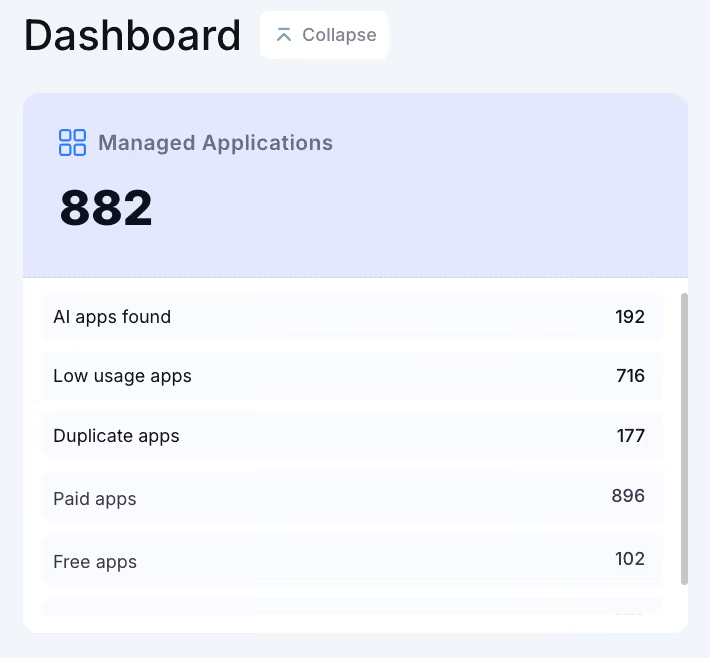
The dashboard surfaces the numbers that matter for Shadow IT immediately:
- 882 managed applications discovered across the organization
- 102 free apps in use, the most common Shadow IT footprint
- 177 duplicate apps running in parallel across teams
- 610 apps not detected via SSO, the apps your IdP can't see
- 192 AI apps found, including the tools employees signed up for last week
- 716 low-usage apps still being paid for or quietly leaking data
None of this required a manual sweep. The dashboard is the audit. And every tile is clickable, which is where detection becomes investigation.
2. One Click In: The Shadow IT View
Click on "Free apps" and you land here.
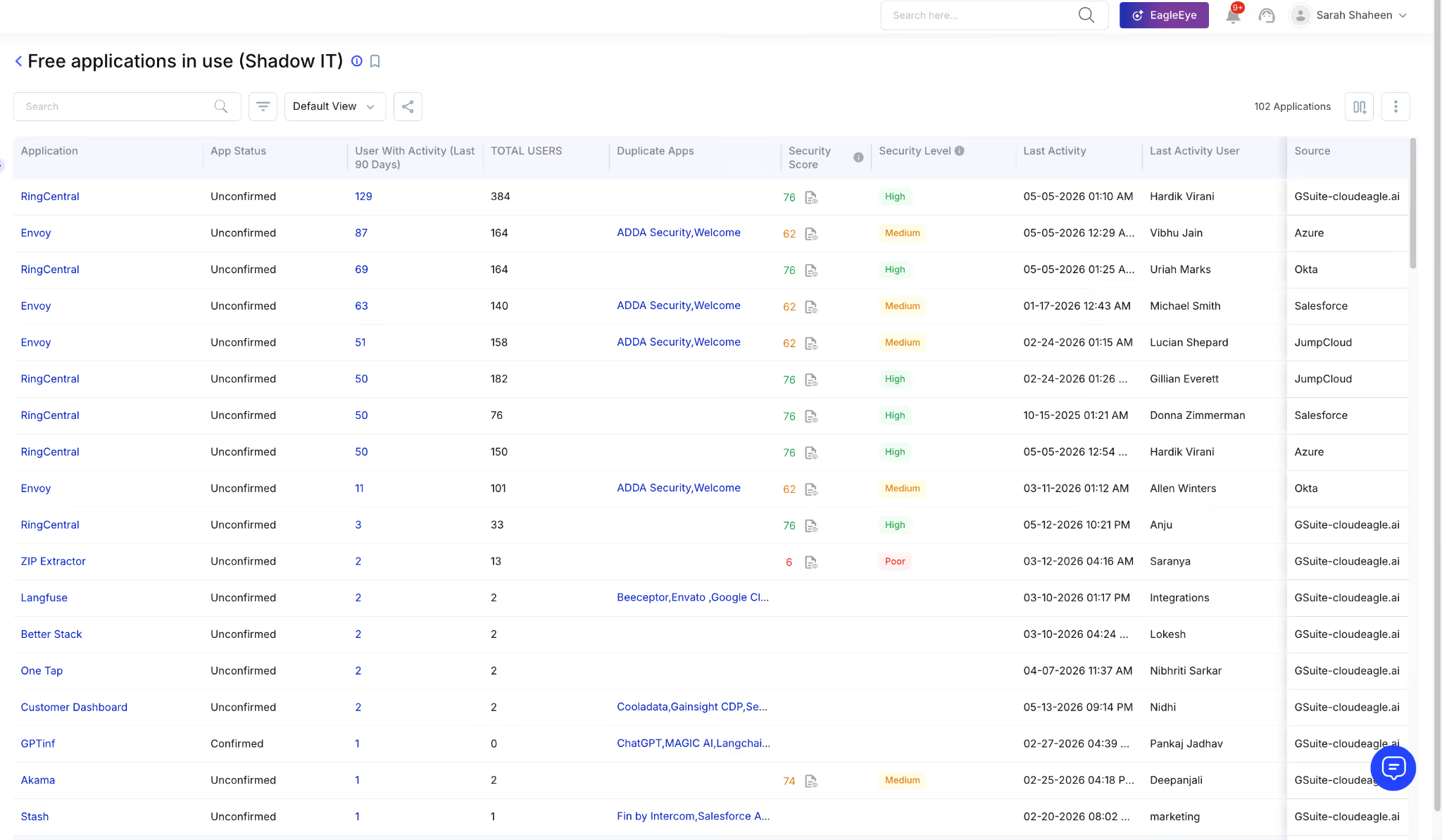
This is the Shadow IT view. 102 applications, every one of them already enriched with the context an IT or security lead needs to act. The columns tell you everything in a single glance:
- Application: the actual tool in use (RingCentral, Envoy, Langfuse, ZIP Extractor, GPTinf)
- App Status: confirmed or unconfirmed, telling you whether IT has already reviewed it
- Users with activity (last 90 days): real usage, not legacy provisioning counts
- Total users: the full exposure footprint
- Duplicate apps: which sanctioned tools does this app overlap with (ADDA Security, Welcome, Beeceptor, Salesforce alternatives, ChatGPT competitors)
- Security score and security level: every app is pre-rated High, Medium, or Poor
- Last activity and last activity user: when it was last touched and by whom
- Source: which system surfaced it (GSuite, Okta, Azure, JumpCloud, Salesforce)
The triage is done before you start triaging. You can see at a glance that ZIP Extractor has a security score of 6 (Poor) and was last used at 04:16 AM by a specific user. You can see Envoy has 164 total users across multiple source systems and overlaps with two sanctioned tools. You can see GPTinf duplicates ChatGPT, MAGIC AI, and Langchain functions, meaning someone is paying for capabilities the company already has.
3. How CloudEagle.ai Surfaces This in the First Place
Now for the mechanics. The dashboard view above is the output. Here's what generates it.
a) 500+ integrations across every system that holds Shadow IT signal
Shadow IT doesn't live in one place. It leaves footprints across SSO logs, finance transactions, HRIS records, MDM agents, browser activity, ITSM tickets, and cloud service logs.
CloudEagle.ai pulls from all of them through 500+ pre-built integrations, including Okta, Azure AD, JumpCloud, GSuite, Salesforce, Netskope, and major ERP and finance platforms.
This is what powers the "Source" column you saw in the Shadow IT view. Every app traces back to the system that exposed it.
b) AI correlation across identity, spend, usage, and device signals
A single signal is noise. The same login from Okta, plus a credit card charge for the same vendor, plus browser activity on a managed device, equals a confirmed app. CloudEagle's AI correlates these signals continuously, catching tools that any one system would miss on its own.
This is critical for non-SCIM apps, free trials, browser extensions, and personal card subscriptions, which are the exact categories that traditional SSO reviews miss.
c) Risk scoring on every discovered app
Every app surfaced gets a security score and a security level, evaluated against data sensitivity, vendor certifications, access scope, and historical incident data. The Poor rating on ZIP Extractor in the view above is not a guess. It's the output of that scoring engine.
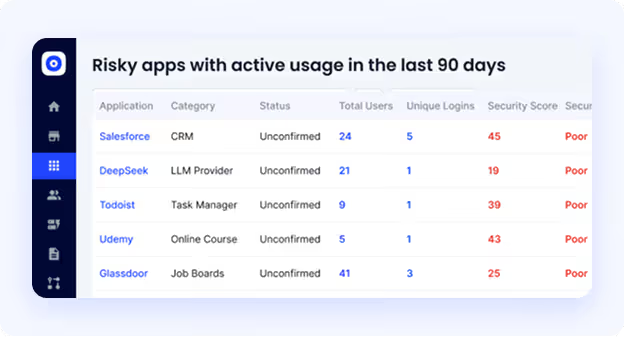
This is what lets a security lead prioritize. You don't get a flat list of 102 apps. You get 102 apps sorted by what to fix first.
d) Real-time alerts when new apps appear
The dashboard is updated continuously, but you don't have to keep checking it. When a new app appears, when usage spikes, or when a risky app gets installed on a managed device, CloudEagle pushes alerts to Slack or email with the user, the tool, the risk score, and the recommended action.

Shadow IT grows quietly. The alerts make sure no one is the last to know.
4. The Cost of Not Catching Shadow IT Early
Every week you don't see a Shadow IT app is a week the risk compounds. The damage shows up in five places:
- Audit failures across SOC 2, GDPR, and HIPAA, where untracked apps mean missing access logs and incomplete vendor disclosures
- 10 to 30% SaaS spend leaks from duplicate subscriptions, redundant tools, and forgotten auto-renewals
- Privilege creep, where ex-employees and role-changers retain access to apps IT never knew they had
- Sensitive data flowing through unvetted vendors, including AI tools that retain prompts and free apps with no DPA
- Procurement leverage is lost, because you can't negotiate enterprise pricing for tools you don't know you're already paying for
According to CloudEagle's IGA Report, nearly 60% of SaaS applications operate outside IT's visibility. Every one of them is one of the five risks above, waiting to surface.

5. From Detection to Control
Catching Shadow IT is step one. CloudEagle closes the loop by giving IT and security teams the controls to act on what they find.
Approved tools can be added to the self-service app catalog so employees stop going around IT to get them. Risky tools can be blocked by policy. Duplicate tools can be consolidated with the application rationalization workflow, where CloudEagle shows which apps to keep and which to retire based on usage and cost.
And when someone leaves the company, automated deprovisioning revokes access across every app, including the ones surfaced through Shadow IT discovery, with full audit logs ready for the next compliance review.
RingCentral used CloudEagle to surface and reclaim time across its license harvesting workflows, saving significant time and cost on what used to be a manual quarterly project.
The result is a closed loop: detection → triage → action → prevention, all from the same dashboard you saw at the top of this article.
Shadow IT Is Growing Faster Than Your Audits Can Catch It.


6. FAQs
1. How does CloudEagle detect Shadow IT differently from SSO logs alone?
CloudEagle correlates SSO data with finance, HRIS, MDM, browser, and ITSM signals through 500+ integrations, catching apps that never touch SSO, including free trials and personal card subscriptions.
2. Can CloudEagle detect AI tools employees are using without approval?
Yes. The dashboard surfaces AI apps as a dedicated category, and the Shadow IT view shows every AI tool in use with security scores, user counts, and duplicate mapping against sanctioned tools.
3. How fast does CloudEagle start catching Shadow IT after deployment?
Discovery begins on day one. Most teams see their first Shadow IT report populated within hours of connecting their core integrations like SSO, finance, and HRIS.
4. Does CloudEagle catch Shadow IT on BYOD or remote devices?
Yes. CloudEagle correlates identity, browser, and spend signals so apps used outside corporate networks or on personal devices still surface in the Shadow IT view.
5. What happens after CloudEagle catches a Shadow IT app?
Teams get instant alerts in Slack or email, a risk score for prioritization, and one-click options to approve, block, deprovision, or consolidate the app from inside the dashboard.


.avif)


.avif)
.avif)




.png)





.avif)
.avif)
.avif)


