
%201.svg)


HIPAA Compliance Checklist for 2025

You're on a fast-moving marketing team, juggling campaigns. To save time, you start using ChatGPT to draft emails and generate ideas. It's fast, it works, and nobody's stopping you.
But your IT and compliance teams don't know you're using it.
That's no longer rare. Microsoft's 2024 Work Trend Index found that 78% of AI users bring their own AI tools to work, and a 2026 survey of 650+ security leaders found that 86% claim a complete AI inventory while 59% admit shadow AI is present. This is the world of shadow AI: powerful, unsanctioned AI tools entering your workplace behind the scenes.
In this guide, you'll learn what shadow AI is, how it differs from shadow IT, why it's a growing compliance risk, and how your team can detect and manage it.
1. What Is Shadow AI?
Shadow AI is the use of any artificial intelligence tool or application by employees without the formal approval or oversight of the IT department.
When an employee starts using an AI-powered app that IT hasn't vetted, for convenience, speed, or lack of alternatives, that's shadow AI.
It's the invisible layer of AI tools running across your departments. It can boost productivity, and it also opens the door to security, compliance, and data privacy problems.
Governing it starts with awareness and requires active policy enforcement and monitoring.
2. How Is Shadow AI Different From Shadow IT?
Shadow IT is the broader term for any tool or system used without IT's knowledge, like a personal Dropbox account or an unsanctioned Trello board. Shadow AI focuses on AI-powered applications that process data, automate tasks, or generate content.
What makes shadow AI riskier
- Shadow AI apps often take in large volumes of sensitive data, because that's how people use them: paste it in, get an answer back.
- They interact with external APIs and machine learning models, so your data leaves your environment.
- Some plans can store inputs or use them to improve models unless you opt out.
- AI features are also switching on inside approved SaaS tools, so shadow AI isn't only a new-app problem.
Shadow AI is the higher-risk, higher-reward cousin of shadow IT: more powerful, and more dangerous when nobody is managing it.
3. How Do You Detect Shadow AI?
Detecting shadow AI is hard because many tools are browser-based and need no installation, which makes them invisible to traditional IT tooling.
Ways your team can uncover it-
- Network Traffic Monitoring: Watch for connections to known AI services like OpenAI, Midjourney, or Jasper.
- Browser and Extension Tracking: Monitor browser activity and extensions that connect to generative AI platforms.
- Expense Reports and Card Data: Check for subscriptions to AI apps like Grammarly Premium or ChatGPT Plus, including ones on personal cards.
- SSO and OAuth Review: Look at which AI apps employees signed into with work credentials or granted access to company data.
- Embedded AI Features: Check which approved SaaS tools have switched on generative AI features.
Another strong method is a SaaS discovery tool that correlates these signals and spots unsanctioned AI usage in seconds. Real-time detection across browser-based tools closes the gap that traditional endpoint security leaves open.
The right mix of technology, finance oversight, and employee outreach lets you find shadow AI before it grows out of control.
4. How Do You Build an Inventory of the AI Tools in Your Portfolio?
Build a Clear Inventory
After detection, list every AI-powered application in use across your organization. Popular tools like ChatGPT or Jasper often run without IT's awareness.
Categorize Tools by Risk Level
Sort the tools by the sensitivity of the data they touch and the compliance risk involved. An AI app that drafts marketing copy carries less risk than one that processes customer financial or health data. That lets your team focus where it matters most.
Talk to Teams About Their Use Cases
Ask why people are using each tool. Many shadow AI apps solve real business problems, so these conversations show you which tools to approve and govern.
Use a Platform to Keep It Current
A SaaS security platform like CloudEagle.ai continuously surfaces new applications as teams adopt them, so the inventory doesn't go stale after the first pass.
5. Why Do Employees Turn to Shadow AI?
Shadow AI is rising because people want to get work done faster, not because they want to break rules.
- Productivity Pressure: AI tools write, summarize, translate, and automate tasks in seconds.
- Lack of Internal Options: If the company doesn't provide approved AI tools, employees find their own.
- Peer Influence: Seeing colleagues succeed with tools like ChatGPT encourages others to follow.
- Little Guidance: Only 39% of AI users have received AI training from their company (Microsoft, 2024).
Picture a support agent who uses an AI tool to write FAQs faster. If it works, the rest of the team follows, even if it bends internal rules.
Employees adopt shadow AI out of necessity, not defiance. Understanding that helps you build discovery that balances control with enablement.

6. What Are the Risks of Shadow AI?
Shadow AI refers to employees using AI tools, models, and applications without the knowledge or approval of their IT or security teams, leaving AI usage outside formal governance and oversight.
Data Privacy Violations
When employees use unsanctioned AI apps, customer data, proprietary documents, and internal communications can be sent to external servers without anyone noticing. Many AI tools process data in the cloud, where it may be stored or used to train models.
That's a serious confidentiality problem, especially when the data includes personally identifiable information (PII) or trade secrets.
- IBM's 2025 Cost of a Data Breach report found that high levels of shadow AI added $670,000 to the average breach cost.
Regulatory Non-Compliance
Using AI tools on sensitive data without approval can violate data protection laws like GDPR, HIPAA, and CCPA. Shadow AI tools bypass the controls those laws require, which raises your exposure to fines, audits, and legal action.
Loss of Intellectual Property (IP)
The terms of service for some AI tools, especially on consumer plans, let the provider use what you enter to improve its models unless you opt out. Proprietary algorithms, product designs, or strategy documents pasted into an unvetted app could end up in that pipeline.
Security Gaps
Shadow AI apps often lack the controls enterprise software needs, like multi-factor authentication, encryption, and detailed audit trails.
- Those gaps are entry points for attackers.
- A poorly secured AI tool can give an attacker a path into your network or let them manipulate sensitive outputs.
7. Why Is Shadow AI a Growing Compliance Risk?
Regulators and auditors care about what happened to the data, not whether the tool was on an approved list. Shadow AI leaves your team unable to answer that question.
What it puts at risk
- GDPR: Personal data sent to an AI vendor you haven't assessed or signed a data processing agreement with, and no record of where it went.
- HIPAA: PHI entered into a tool with no business associate agreement can be an impermissible disclosure under the HIPAA Privacy Rule.
- SOC 2 and ISO 27001: Auditors expect vendor management and access controls. An unapproved AI vendor sits outside both, which leaves an evidence gap.
- EU AI Act: The AI literacy duty in Article 4 has applied since February 2025, and Article 50 transparency obligations took effect on 2 August 2026. The Digital Omnibus pushed high-risk obligations to December 2027, but you can't classify or govern AI you don't know exists.
Why the risk is growing
- Employees are adopting AI faster than policies are written. IBM found that 97% of organizations that reported an AI-related breach lacked proper AI access controls, and 63% had no AI governance policy or were still writing one.
- AI features keep appearing inside approved tools, so the footprint grows without a new purchase or login.
- CloudEagle.ai's own research found that 60% of SaaS and AI apps operate outside IT visibility.
8. How Do You Prevent Shadow AI?
Preventing shadow AI requires organizations to combine continuous AI tool discovery, clear usage policies, and approved alternatives that meet employees’ needs, rather than relying solely on blocking unauthorized tools.
Build a Clear AI Usage Policy
Start with a formal policy that sets expectations. It should include:
- A list of approved AI tools.
- A defined process for requesting and approving new AI applications.
- Clear guidelines on acceptable AI use, aligned with your security and compliance standards.
- Consequences and enforcement measures for unauthorized or risky AI tool use.
Train Employees on AI Risks and Governance
Many employees use shadow AI without understanding the risks. Training on data privacy, compliance requirements, and the dangers of unsanctioned apps closes that gap.
- Run regular workshops, webinars, and newsletters.
- Use real-world shadow AI incidents as examples.
Provide Approved and Secure AI Tools
Approved tools reduce reliance on shadow AI.
- Make vetted AI tools easy to get.
- Make sure they meet your security and compliance standards.
- Connect them to existing workflows so people actually use them.
When teams have safe alternatives, they're less likely to seek risky ones.
Create a Transparent Feedback Loop
Give employees a simple, open way to request new AI apps through an IT service portal or SaaS management platform. Transparency discourages secret tool use and gives IT and Security the context to decide.
Implement Continuous Monitoring and Auditing
Regularly scan your network and SaaS environment for unapproved AI apps.
- Set automated alerts for unapproved tool usage.
- Run periodic audits so you catch shadow AI early.
9. What Challenges Make Shadow AI Hard to Manage?
Shadow AI tools fly under the radar, so identifying, controlling, and securing them is hard. Fast AI innovation, limited visibility, and tight resources make it worse.
- Lack of Visibility: Shadow AI tools operate without IT or Security knowing, which makes detection difficult.
- Rapid Proliferation: New AI apps emerge faster than organizations can evaluate them.
- Data Privacy Risks: Unauthorized AI tools can reach sensitive data, risking leaks and non-compliance.
- Integration Issues: Shadow AI apps may not integrate with existing systems, which creates security gaps.
- Resistance to Governance: Employees may push back on policies that feel like they limit productivity.
- Limited Resources: IT and Security teams often lack the tools or people to monitor every AI app.
- A Fast-Changing Market: Policies and controls are hard to keep current as AI changes.
10. How Does CloudEagle.ai Help Manage Shadow AI?
CloudEagle.ai is an AI Governance, SaaS Security, and Identity Governance platform that helps enterprises govern AI usage, enforce least-privilege access, and reduce SaaS and AI risks across human and non-human identities.
Managing shadow AI takes three things: finding the tools, judging their risk, and controlling their use. Here's how we help your IT and Security team do each one.
Shadow AI Discovery
Before you can manage shadow AI, you have to find it, approved or not. We correlate SSO, finance and credit-card data, browser signals, and firewall logs against a 150,000+ vendor database.
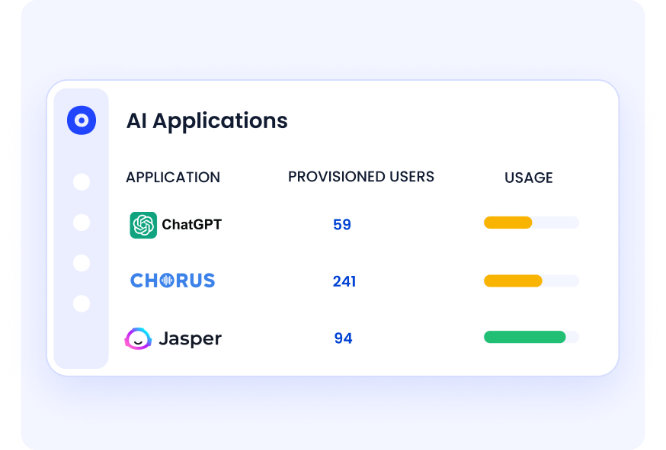
- Find tools bought on personal cards, signed up for on free tiers, or quietly expensed, not just what sits behind SSO.
- Identify GenAI features embedded in SaaS apps you already own.
- Flag inactive licenses and overlapping tools the moment they appear.
One CloudEagle.ai customer found 10,000 ChatGPT installs it had never approved.
AI Risk Scoring
Once a tool is found, your team needs to know how risky it is. We score AI tools and GenAI features on data residency, training data use, and security posture.
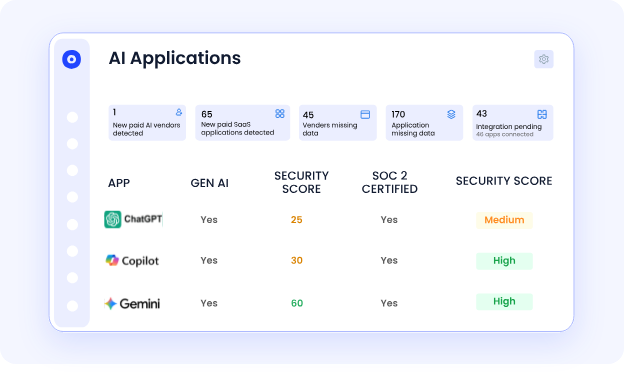
- See which AI tools are high-risk before an auditor asks.
- See which tools train on your company data or process regulated data without approval.
- Prioritize the ones that need attention first.
AI Policy Enforcement
Policy only works where behavior happens. Our lightweight browser extension steps in when an employee tries to use an unapproved AI tool.
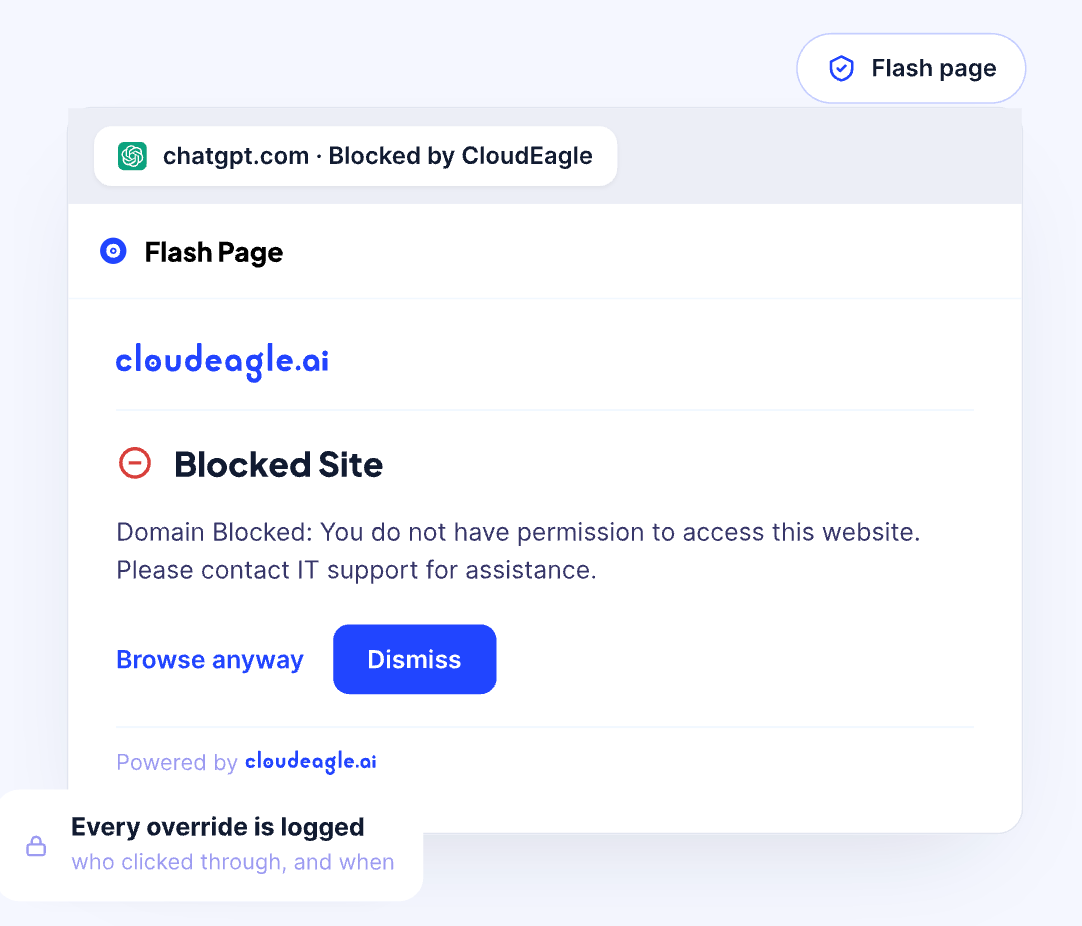
- A real-time flash page redirects the employee to an approved alternative before any company data is entered.
- The default is a soft redirect with an exception request, so you guide people without blocking productivity.
- It helps prevent PHI and PII from entering unapproved tools and detects non-corporate tenant logins.
"Once AI adoption accelerated across teams, visibility alone wasn't enough. We needed clear rules around who could use AI tools, under what conditions, and how those decisions were enforced and reviewed. CloudEagle.ai helped us move from ad-hoc approvals to structured, defensible AI governance."
~ Aditya Khosla, CTO, Iterative Health
AI Usage Control
AI tools bill based on tokens, API calls, and credits rather than traditional seat-based licensing.
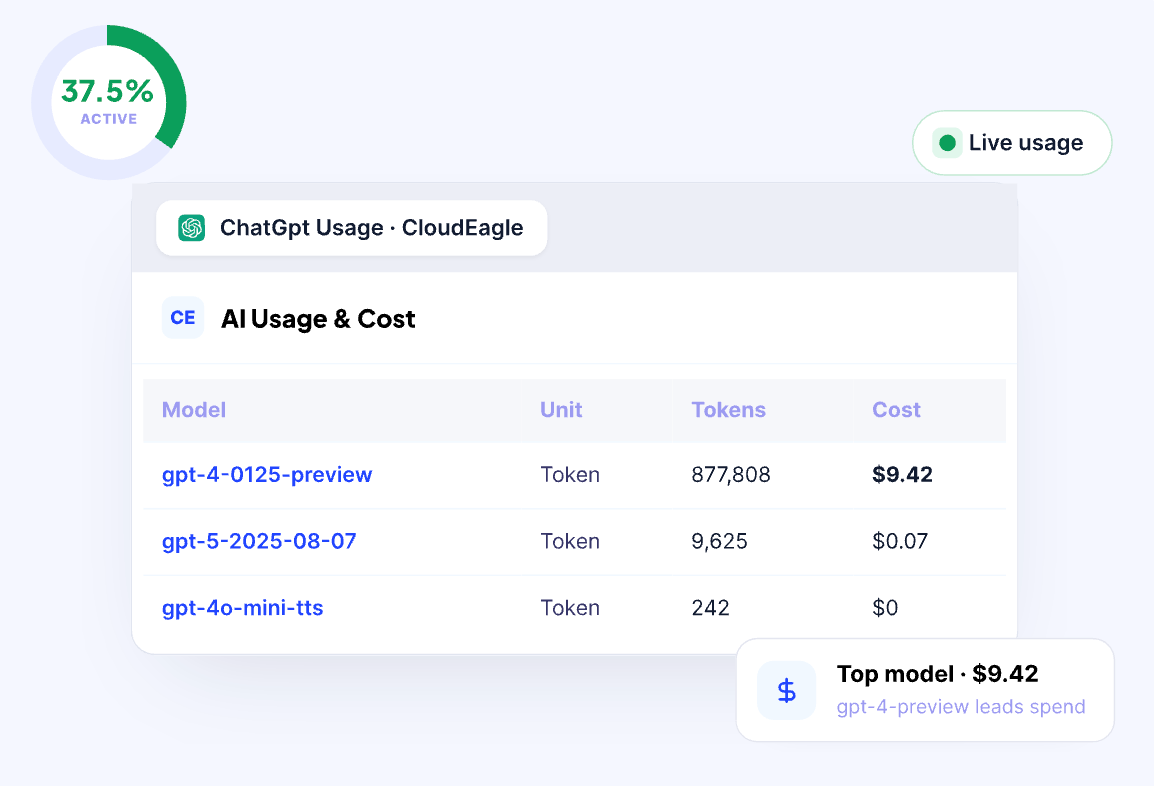
CloudEagle.ai helps organizations track AI consumption by team, user, and tool to understand where usage is concentrated, how costs are distributed, and whether spending stays within defined budgets.
Approval Workflows in Slack and Teams
Employees can request access to AI tools and receive approvals directly in Slack or Microsoft Teams, without switching between systems.
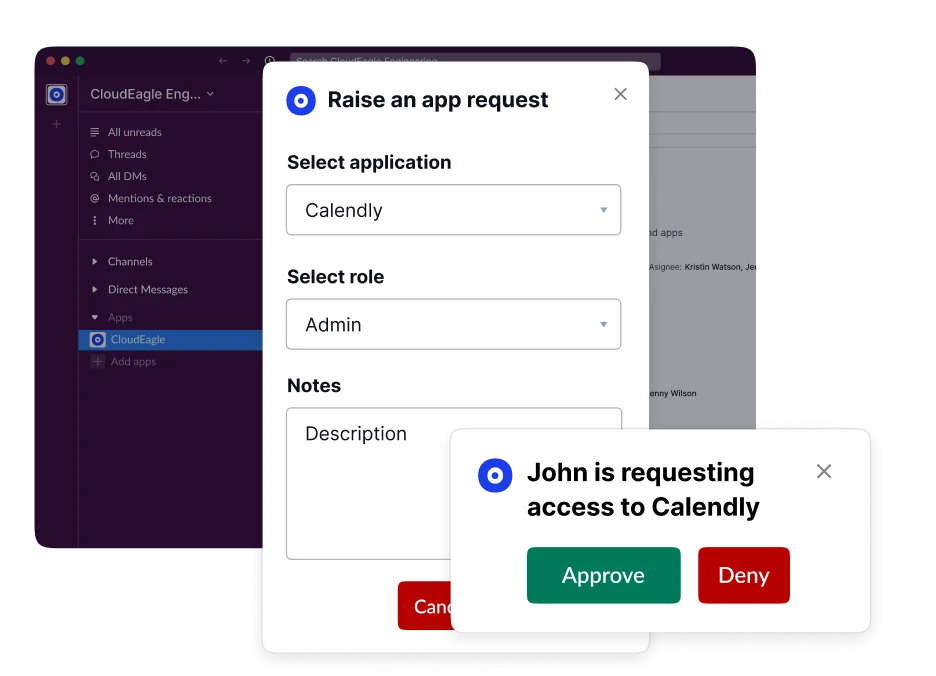
Each request maintains an audit trail, helping IT, security, and procurement teams review tools consistently, assess potential risks, and ensure new AI applications follow organizational policies before adoption.
Discover and Govern Shadow AI Across Your Organization


11. How Do You Turn Shadow AI Risk Into Governed AI Adoption?
Shadow AI is quietly spreading as employees adopt AI tools outside IT's control. It looks harmless, and it creates real risk to data security, compliance, and organizational transparency.
From hidden browser-based tools to enterprise-grade AI apps, the challenge is detection, assessment, and control. Policies alone don't solve it. Your team needs real-time visibility and enforcement that doesn't slow innovation down.
That's what we built CloudEagle.ai to give you: discovery, risk scoring, policy enforcement, and approval workflows across your SaaS and AI tools. Check your exposure with the Shadow AI Risk Assessment Calculator, or book a demo to see what's running in your environment.
Frequently Asked Questions
- Where Do Shadow AI Models Typically Operate?
Shadow AI commonly operates in the browser or on cloud platforms: SaaS-based AI tools, browser extensions, and web APIs that employees can reach without IT oversight. - How Can I Detect Shadow AI in My Organization?
Use SaaS discovery tools that correlate SSO, browser activity, and expense data. If tools like ChatGPT, Jasper, or Grammarly are in use without approval, shadow AI is likely present. - Does Unapproved AI Use Qualify as Shadow AI?
Yes. Any use of AI tools without formal IT or security approval counts, especially when the tool touches sensitive business data. - Are Shadow AI Tools Illegal to Use at Work?
Not inherently. But using AI tools without approval can violate internal policy and lead to non-compliance with laws like GDPR or HIPAA. - What Are Some Common Shadow AI Tools Employees Use?
Typical examples include ChatGPT, Jasper, Grammarly, and Notion AI. They boost productivity but are rarely vetted or approved by IT. - Why Is Shadow AI a Compliance Risk?
Shadow AI sends data to vendors your team hasn't assessed, which can break GDPR and HIPAA obligations, leave gaps in SOC 2 and ISO 27001 evidence, and make it impossible to govern AI under rules like the EU AI Act.
Discover and Govern Shadow AI Across Your Organization


.avif)


.avif)
.avif)




.png)








.avif)
.avif)
.avif)


