You need to enable JavaScript in order to use the AI chatbot tool powered by ChatBot

How Unsanctioned AI Tools Bypass Your Security Stack

Share via:
blog-cms-banner-bg
Little-Known Negotiation Hacks to Get the Best Deal on Slack
cta-bg-blogDownload Your Copy

HIPAA Compliance Checklist for 2025

Download PDF

EY's 2025 Work Reimagined Survey of 15,000 employees across 29 countries found that 23-58% of workers, depending on sector, are bringing their own AI tools to work. That's already happening inside your environment, whether AI usage is officially approved or not.

Now you're trying to answer a basic question: which AI tools are people actually using? 

You open your security stack and realize:

  • Your SSO shows 6 sanctioned AI apps. Finance's credit card statements show 23.
  • You don't know which OAuth grants employees clicked "Allow" on last quarter.
  • You don't know which of your approved SaaS vendors quietly turned on AI features.
  • You definitely don't know what data has already been pasted into a free LLM.

Your CASB, DLP, and SSO are running. None of them flagged this. Unsanctioned AI tools don't break your security stack. They enter through doors your stack was never built to withstand.

TL;DR

  • Unsanctioned AI tools enter through unmanaged browsers, OAuth grants, IDE plugins, and AI baked into approved SaaS, none of which your CASB or SSO can see.
  • 23-58% of employees use their own AI tools at work; shadow AI breaches cost $670,000 more than the average.
  • Traditional discovery covers 40-60% of the unsanctioned AI tools in your environment. AI-aware discovery covers 95%+.
  • Blanket bans push activity to personal devices, where you have zero telemetry.
  • The fix is a discovery layer watching OAuth grants, finance feeds, browser extensions, and integration logs at the same time.

1. Why Your Security Stack Can't See Unsanctioned AI Tools

Your security tools were built around a model that no longer fits. They assume an app gets onboarded, an identity gets provisioned, and a connection routes through a known gateway. AI adoption skips all three.

  • Your CASB sees traffic to known cloud apps. It doesn't have a signature for an LLM that launched last week.
  • Your DLP scans files leaving sanctioned channels. It doesn't read what an employee types into a chat field.
  • Your SWG and proxies see the domain. Block one, employees pivot to another in 30 seconds.
  • Your EDR watches the endpoint. It doesn't parse what a VS Code plugin sends to an inference endpoint.
  • Your SSO and IDP govern apps you've onboarded. Unsanctioned AI tools never entered the funnel.

The visibility gap is what happens when employees adopt apps faster than security teams can review them.

Also read: Shadow AI Is the New Shadow IT: Why It's More Dangerous explains why the risk profile is structurally different from the shadow IT playbook your team already knows.

2. The 5 Doors Unsanctioned AI Tools Walk Through

Five entry paths show up across nearly every mid-market and enterprise environment:

  1. Personal-account browser tab → AI used on a corporate laptop through a personal Google login
  2. OAuth grant → AI plugin authorized through Google or Microsoft consent flow, not your IDP
  3. Corporate-card free trial → AI subscription expensed below the procurement threshold
  4. IDE assistant → AI coding plugin sending source code to a third-party endpoint
  5. AI inside a sanctioned vendor → Approved SaaS app enabling AI features mid-contract
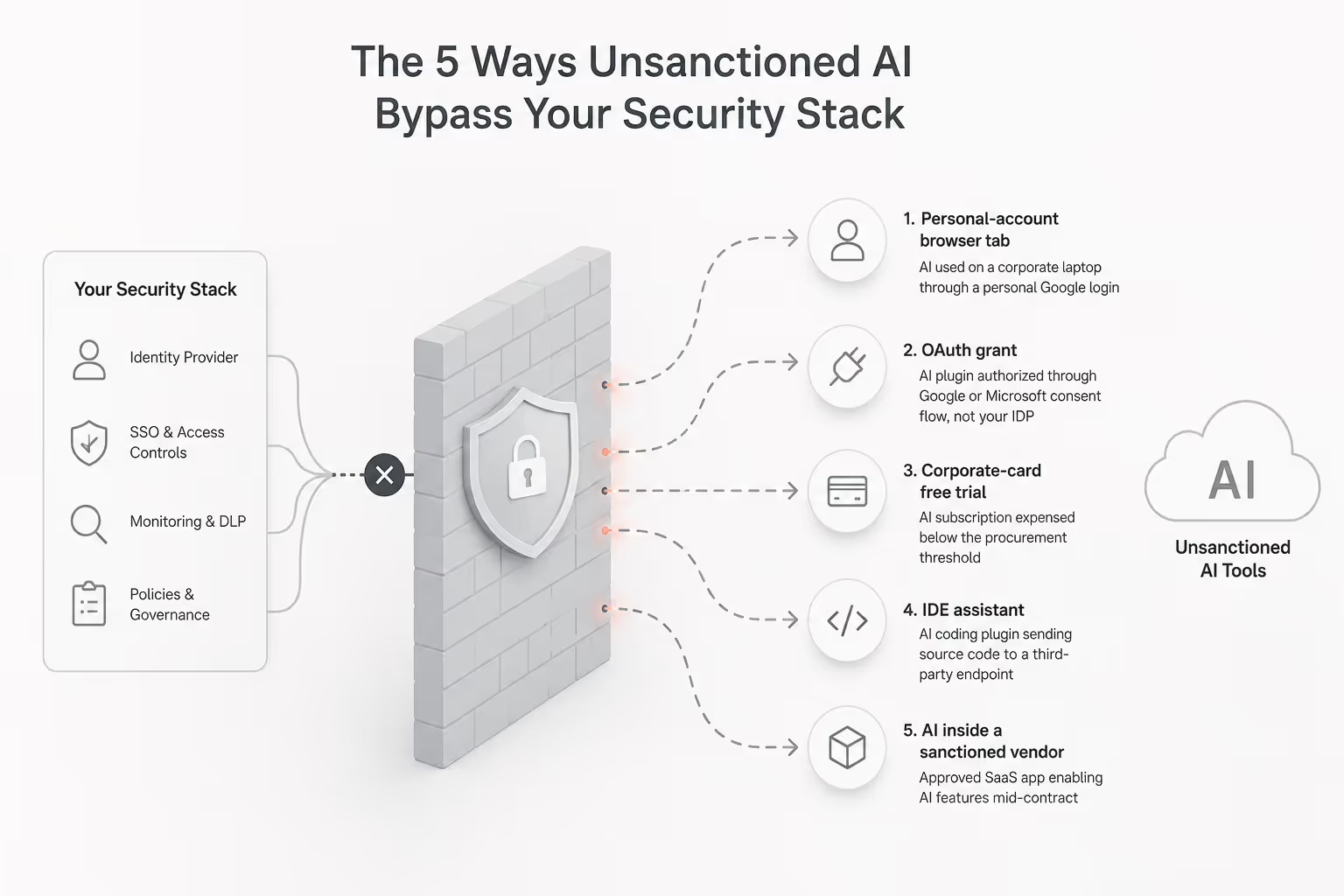
Infographic showing five ways unsanctioned AI bypasses enterprise security stacks, including personal browser usage, OAuth grants, corporate card purchases, AI coding assistants, and AI features embedded inside sanctioned SaaS applications.

Each door bypasses a different control. Closing one doesn't close the others, which is why a single-point tool never solves this.

1. The personal-account browser tab

An employee opens Chrome on a corporate laptop, logs into ChatGPT with a personal Google account, and pastes customer notes into the chat field. Your CASB sees an HTTPS session to a known domain. Your DLP sees no file attachment. No alert fires.

An Enterprise AI and SaaS Data Security Report found 77% of all enterprise LLM access goes to ChatGPT, mostly through personal, unmanaged accounts that bypass enterprise controls.

2. The OAuth grant

A productivity AI plugin asks for read access to Gmail or Microsoft 365. The employee clicks Allow once. The grant persists for months. Because the plugin was authorized through Google or Microsoft's consent flow, your SSO logs nothing.

The same LayerX report found 18% of enterprise employees paste data into GenAI tools, and over 50% of those pastes include corporate information. The OAuth path makes this worse because plugins read the inbox and Drive contents on their own, with no employee in the loop.

3. The corporate-card free trial

Someone spends $19 on an "AI assistant for sales." It never hits procurement, never hits security review. Multiply by 200 employees, and you have a vendor portfolio nobody owns.

4. The IDE assistant

Developers install AI coding plugins in VS Code, JetBrains or Cursor. Source code streams to third-party inference endpoints continuously. EDR doesn't parse plugin telemetry, and code review happens after the code is already in someone else's training pipeline.

5. The AI baked into a sanctioned vendor

A vendor you already approved rolls out AI features mid-contract that send your data to a sub-processor for inference. Your last security review happened before the feature existed, and the change shows up in a release note your team never reads.

Also read: If you need a detection playbook before fixing the gap, How to Identify Shadow AI Risks in Your Enterprise Before a Breach walks through the diagnostic steps in order.

Five Entry Points. Zero Alerts. That's Your Gap.

Use this checklist to find every unsanctioned AI tool right now.
Download Checklist

3. How CloudEagle.ai Closes the Unsanctioned AI Visibility Gap

CloudEagle.ai is an AI-powered SaaS and AI governance platform built for IT, security, finance, and procurement teams. It unifies discovery, identity governance, and vendor risk across your entire SaaS and AI footprint, so unsanctioned AI tools surface in one inventory instead of staying hidden across your stack.

a) Discovery across 500+ integrations

Your CASB sees known cloud domains. Your SSO sees only what you've onboarded. The AI tools entering through personal accounts, expense cards and OAuth consent flows never show up in either. 

CloudEagle.ai pulls signals from SSO, finance, HRIS, browser extensions, firewall logs and direct app APIs at the same time, surfacing every AI tool in use, sanctioned or not, in one real-time inventory.

You would find 60-80 AI apps they didn't know existed within hours of going live, with attribution back to the specific users and departments driving the activity.

b) Continuous OAuth grant monitoring

AI plugins authorized through Google or Microsoft's consent flow never touch your IDP. The grants persist for months with broad read scopes on Gmail and Drive, and no security review until something breaks.

CloudEagle.ai continuously audits OAuth grants across your environment and flags AI-category apps the moment a sensitive permission is granted, instead of waiting for an annual access review.

The outcome: Security teams can revoke high-risk grants in days, not the next audit cycle, closing the OAuth bypass path before it becomes a breach vector.

c) GenAI Risk Score for every vendor

Procurement and security can't tell which AI vendors actually pose data risk. Marketing pages claim SOC 2 and "enterprise-grade security." Contract reviews happen once and never get revisited when the vendor adds AI features mid-term.

CloudEagle.ai generates a GenAI Risk Score for every AI vendor in your stack covering training-data exposure, disable controls, MFA enforcement and compliance certifications, refreshed as vendor posture changes.
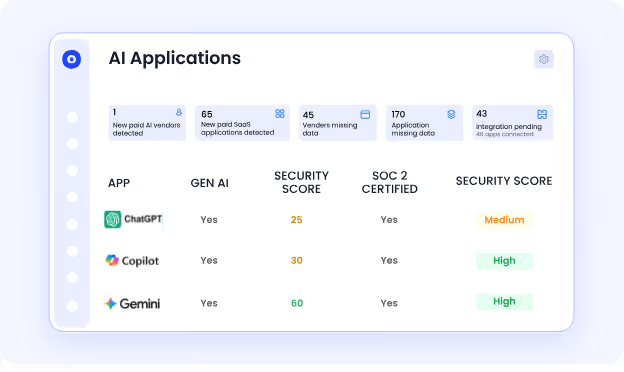
AI application governance dashboard displaying ChatGPT, Copilot, and Gemini with AI usage visibility, vendor security scores, SOC 2 compliance status, and application risk insights.

The outcome: Vendor decisions get made on actual security posture, not marketing claims, and your team gets early warning when an existing vendor's risk profile shifts.

d) Self-service catalog for sanctioned alternatives

Employees go to unsanctioned AI tools because IT approval takes weeks and they have work to do today. Bans push them further underground.

CloudEagle.ai offers a self-service catalog of pre-approved AI and SaaS tools that employees can request directly from Slack, with one-click access provisioning for sanctioned alternatives.
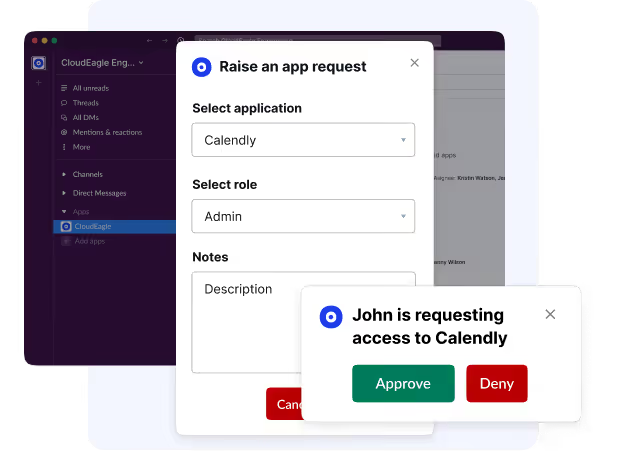
Slack-based SaaS access request workflow allowing users to request application access, approve or deny requests, and automate SaaS provisioning governance for tools like Calendly.

The outcome: Unsanctioned AI usage drops because the sanctioned path is now faster than the unsanctioned one, and IT keeps visibility into every approval.

CloudEagle.ai helped a customer using Workday gain 100% SaaS visibility and identify unsanctioned apps their IT team couldn't track through spreadsheets, the same discovery layer that closes the unsanctioned AI gap.

4. What It Costs When Unsanctioned AI Tools Get In

The financial damage isn't theoretical. According to IBM's Cost of a Data Breach Report, breaches involving shadow AI cost organizations $670,000 more than the average breach, and 97% lacked proper AI access controls at the time.

The exposure stacks across three layers. 

On the regulatory side, a single prompt with PHI triggers HIPAA reporting, EU customer data triggers GDPR fines up to 4% of global revenue, and financial records can trigger SOX-adjacent control failures. 

On the IP side, source code, pricing models, and customer lists enter a vendor's training corpus once submitted to a free tier, with no recall mechanism. Operationally, when the bypass becomes a breach, the response is usually a blanket ban that tanks legitimate AI gains overnight.

Shadow AI Breaches Cost $670K More Than Average.

Get the practices that keep you compliant before the damage is done.
Download Checklist

5. Why Banning Unsanctioned AI Tools Backfires

Banning every AI app feels like the right move. The data says it makes things worse.

A Kiteworks survey found 83% of organizations have no automated controls to prevent sensitive data from entering public AI tools. The other 17% rely on training and written policies that employees skirt around when deadlines hit. An EisnerAmper survey found 28% would use AI at work even if it were banned.

Ban the apps, and the activity moves to personal devices, where you have zero telemetry. The unsanctioned AI tools don't disappear. They just go further underground.

What works is the inverse: stand up a governed AI inventory that meets productivity needs, then enforce policy on what falls outside it.

Also read: The Shadow AI Governance Gap: Why 63% of Enterprises Have No Shadow AI Policy is the right starting point if you don't have a written policy yet.

6. How to Actually Find Unsanctioned AI Tools in Your Stack

The reliable signals are user-level and financial, not network-level. Four to watch:

OAuth grants: Pull every grant across Google Workspace, Microsoft 365, and Slack. Filter for AI-category apps. Most teams find 30+ they didn't know existed.

Financial signals: Expense reports and credit card statements catch self-funded subscriptions that never touched SSO.

Browser and SaaS telemetry: Correlate against an AI vendor catalog that updates faster than your CASBs.

Integration logs: Sanctioned platforms log third-party AI apps reaching into your data. Audit monthly.

Each signal closes a different door. None alone is enough.

Also read: What Tools Detect Shadow AI Usage in Enterprises? compares the categories of tools that focus on this if you're evaluating vendors.

7. FAQs

1. What is an unsanctioned AI tool? 

Any AI app used without formal IT or security approval, including free LLMs, AI plugins, and AI features inside sanctioned apps that were never reviewed.

2. How do unsanctioned AI tools bypass DLP? 

DLP scans files leaving sanctioned channels. Most AI usage happens in chat fields inside a browser, which DLP rarely inspects.

3. Are unsanctioned AI tools the same as shadow AI? 

Closely related. Shadow AI is the broader category. The unsanctioned AI tools are the specific apps driving it.

4. How common is unsanctioned AI usage in enterprises? 

Between 23% and 58% of employees report bringing their own AI tools to work, depending on the sector.

5. Can CASB detect unsanctioned AI tools? 

Only the ones already in its catalog. New LLMs appear before the vendor catalogs update.

6. What's the biggest risk? 

Sensitive data entering vendor training corpora. Once submitted to a free tier, that data cannot be retrieved.

8. Close the Door Before It Closes Your Audit

Every quarter your stack misses these tools is a quarter your data is feeding someone else's model. The fix isn't another point tool. It's a discovery layer built for how AI actually enters your environment.

Book a CloudEagle demo to see every unsanctioned AI tool in your stack within 30 minutes.

Advertisement for a SaaS Subscription Tracking Template with a call-to-action button to download and a partial graphic of a tablet showing charts.Banner promoting a SaaS Agreement Checklist to streamline SaaS management and avoid budget waste with a call-to-action button labeled Download checklist.Blue banner with text 'The Ultimate Employee Offboarding Checklist!' and a black button labeled 'Download checklist' alongside partial views of checklist documents from cloudeagle.ai.Digital ad for download checklist titled 'The Ultimate Checklist for IT Leaders to Optimize SaaS Operations' by cloudeagle.ai, showing checklist pages.Slack Buyer's Guide offer with text 'Unlock insider insights to get the best deal on Slack!' and a button labeled 'Get Your Copy', accompanied by a preview of the guide featuring Slack's logo.Monday Pricing Guide by cloudeagle.ai offering exclusive pricing secrets to maximize investment with a call-to-action button labeled Get Your Copy and an image of the guide's cover.Blue banner for Canva Pricing Guide by cloudeagle.ai offering a guide to Canva costs, features, and alternatives with a call-to-action button saying Get Your Copy.Blue banner with white text reading 'Little-Known Negotiation Hacks to Get the Best Deal on Slack' and a white button labeled 'Get Your Copy'.Blue banner with text 'Little-Known Negotiation Hacks to Get the Best Deal on Monday.com' and a white button labeled 'Get Your Copy'.Blue banner with text 'Little-Known Negotiation Hacks to Get the Best Deal on Canva' and a white button labeled 'Get Your Copy'.Banner with text 'Slack Buyer's Guide' and a 'Download Now' button next to images of a guide titled 'Slack Buyer’s Guide: Features, Pricing & Best Practices'.Digital cover of Monday Pricing Guide with a button labeled Get Your Copy on a blue background.Canva Pricing Guide cover with a button labeled Get Your Copy on a blue gradient background.

Enter your email to
unlock the report

Oops! Something went wrong while submitting the form.
License Count
Benchmark
Per User/Per Year

Enter your email to
unlock the report

Oops! Something went wrong while submitting the form.
License Count
Benchmark
Per User/Per Year

Enter your email to
unlock the report

Oops! Something went wrong while submitting the form.
Notion Plus
License Count
Benchmark
Per User/Per Year
100-500
$67.20 - $78.72
500-1000
$59.52 - $72.00
1000+
$51.84 - $57.60
Canva Pro
License Count
Benchmark
Per User/Per Year
100-500
$74.33-$88.71
500-1000
$64.74-$80.32
1000+
$55.14-$62.34

Enter your email to
unlock the report

Oops! Something went wrong while submitting the form.

Enter your email to
unlock the report

Oops! Something went wrong while submitting the form.
Zoom Business
License Count
Benchmark
Per User/Per Year
100-500
$216.00 - $264.00
500-1000
$180.00 - $216.00
1000+
$156.00 - $180.00

Enter your email to
unlock the report

Oops! Something went wrong while submitting the form.

Get the Right Security Platform To Secure Your Cloud Infrastructure

Please enter a business email
Thank you!
The 2023 SaaS report has been sent to your email. Check your promotional or spam folder.
Oops! Something went wrong while submitting the form.

Access full report

Please enter a business email
Thank you!
The 2023 SaaS report has been sent to your email. Check your promotional or spam folder.
Oops! Something went wrong while submitting the form.

EY's 2025 Work Reimagined Survey of 15,000 employees across 29 countries found that 23-58% of workers, depending on sector, are bringing their own AI tools to work. That's already happening inside your environment, whether AI usage is officially approved or not.

Now you're trying to answer a basic question: which AI tools are people actually using? 

You open your security stack and realize:

  • Your SSO shows 6 sanctioned AI apps. Finance's credit card statements show 23.
  • You don't know which OAuth grants employees clicked "Allow" on last quarter.
  • You don't know which of your approved SaaS vendors quietly turned on AI features.
  • You definitely don't know what data has already been pasted into a free LLM.

Your CASB, DLP, and SSO are running. None of them flagged this. Unsanctioned AI tools don't break your security stack. They enter through doors your stack was never built to withstand.

TL;DR

  • Unsanctioned AI tools enter through unmanaged browsers, OAuth grants, IDE plugins, and AI baked into approved SaaS, none of which your CASB or SSO can see.
  • 23-58% of employees use their own AI tools at work; shadow AI breaches cost $670,000 more than the average.
  • Traditional discovery covers 40-60% of the unsanctioned AI tools in your environment. AI-aware discovery covers 95%+.
  • Blanket bans push activity to personal devices, where you have zero telemetry.
  • The fix is a discovery layer watching OAuth grants, finance feeds, browser extensions, and integration logs at the same time.

1. Why Your Security Stack Can't See Unsanctioned AI Tools

Your security tools were built around a model that no longer fits. They assume an app gets onboarded, an identity gets provisioned, and a connection routes through a known gateway. AI adoption skips all three.

  • Your CASB sees traffic to known cloud apps. It doesn't have a signature for an LLM that launched last week.
  • Your DLP scans files leaving sanctioned channels. It doesn't read what an employee types into a chat field.
  • Your SWG and proxies see the domain. Block one, employees pivot to another in 30 seconds.
  • Your EDR watches the endpoint. It doesn't parse what a VS Code plugin sends to an inference endpoint.
  • Your SSO and IDP govern apps you've onboarded. Unsanctioned AI tools never entered the funnel.

The visibility gap is what happens when employees adopt apps faster than security teams can review them.

Also read: Shadow AI Is the New Shadow IT: Why It's More Dangerous explains why the risk profile is structurally different from the shadow IT playbook your team already knows.

2. The 5 Doors Unsanctioned AI Tools Walk Through

Five entry paths show up across nearly every mid-market and enterprise environment:

  1. Personal-account browser tab → AI used on a corporate laptop through a personal Google login
  2. OAuth grant → AI plugin authorized through Google or Microsoft consent flow, not your IDP
  3. Corporate-card free trial → AI subscription expensed below the procurement threshold
  4. IDE assistant → AI coding plugin sending source code to a third-party endpoint
  5. AI inside a sanctioned vendor → Approved SaaS app enabling AI features mid-contract

Infographic showing five ways unsanctioned AI bypasses enterprise security stacks, including personal browser usage, OAuth grants, corporate card purchases, AI coding assistants, and AI features embedded inside sanctioned SaaS applications.

Each door bypasses a different control. Closing one doesn't close the others, which is why a single-point tool never solves this.

1. The personal-account browser tab

An employee opens Chrome on a corporate laptop, logs into ChatGPT with a personal Google account, and pastes customer notes into the chat field. Your CASB sees an HTTPS session to a known domain. Your DLP sees no file attachment. No alert fires.

An Enterprise AI and SaaS Data Security Report found 77% of all enterprise LLM access goes to ChatGPT, mostly through personal, unmanaged accounts that bypass enterprise controls.

2. The OAuth grant

A productivity AI plugin asks for read access to Gmail or Microsoft 365. The employee clicks Allow once. The grant persists for months. Because the plugin was authorized through Google or Microsoft's consent flow, your SSO logs nothing.

The same LayerX report found 18% of enterprise employees paste data into GenAI tools, and over 50% of those pastes include corporate information. The OAuth path makes this worse because plugins read the inbox and Drive contents on their own, with no employee in the loop.

3. The corporate-card free trial

Someone spends $19 on an "AI assistant for sales." It never hits procurement, never hits security review. Multiply by 200 employees, and you have a vendor portfolio nobody owns.

4. The IDE assistant

Developers install AI coding plugins in VS Code, JetBrains or Cursor. Source code streams to third-party inference endpoints continuously. EDR doesn't parse plugin telemetry, and code review happens after the code is already in someone else's training pipeline.

5. The AI baked into a sanctioned vendor

A vendor you already approved rolls out AI features mid-contract that send your data to a sub-processor for inference. Your last security review happened before the feature existed, and the change shows up in a release note your team never reads.

Also read: If you need a detection playbook before fixing the gap, How to Identify Shadow AI Risks in Your Enterprise Before a Breach walks through the diagnostic steps in order.

Five Entry Points. Zero Alerts. That's Your Gap.

Use this checklist to find every unsanctioned AI tool right now.
Download Checklist

3. How CloudEagle.ai Closes the Unsanctioned AI Visibility Gap

CloudEagle.ai is an AI-powered SaaS and AI governance platform built for IT, security, finance, and procurement teams. It unifies discovery, identity governance, and vendor risk across your entire SaaS and AI footprint, so unsanctioned AI tools surface in one inventory instead of staying hidden across your stack.

a) Discovery across 500+ integrations

Your CASB sees known cloud domains. Your SSO sees only what you've onboarded. The AI tools entering through personal accounts, expense cards and OAuth consent flows never show up in either. 

CloudEagle.ai pulls signals from SSO, finance, HRIS, browser extensions, firewall logs and direct app APIs at the same time, surfacing every AI tool in use, sanctioned or not, in one real-time inventory.

You would find 60-80 AI apps they didn't know existed within hours of going live, with attribution back to the specific users and departments driving the activity.

b) Continuous OAuth grant monitoring

AI plugins authorized through Google or Microsoft's consent flow never touch your IDP. The grants persist for months with broad read scopes on Gmail and Drive, and no security review until something breaks.

CloudEagle.ai continuously audits OAuth grants across your environment and flags AI-category apps the moment a sensitive permission is granted, instead of waiting for an annual access review.

The outcome: Security teams can revoke high-risk grants in days, not the next audit cycle, closing the OAuth bypass path before it becomes a breach vector.

c) GenAI Risk Score for every vendor

Procurement and security can't tell which AI vendors actually pose data risk. Marketing pages claim SOC 2 and "enterprise-grade security." Contract reviews happen once and never get revisited when the vendor adds AI features mid-term.

CloudEagle.ai generates a GenAI Risk Score for every AI vendor in your stack covering training-data exposure, disable controls, MFA enforcement and compliance certifications, refreshed as vendor posture changes.

AI application governance dashboard displaying ChatGPT, Copilot, and Gemini with AI usage visibility, vendor security scores, SOC 2 compliance status, and application risk insights.

The outcome: Vendor decisions get made on actual security posture, not marketing claims, and your team gets early warning when an existing vendor's risk profile shifts.

d) Self-service catalog for sanctioned alternatives

Employees go to unsanctioned AI tools because IT approval takes weeks and they have work to do today. Bans push them further underground.

CloudEagle.ai offers a self-service catalog of pre-approved AI and SaaS tools that employees can request directly from Slack, with one-click access provisioning for sanctioned alternatives.

Slack-based SaaS access request workflow allowing users to request application access, approve or deny requests, and automate SaaS provisioning governance for tools like Calendly.

The outcome: Unsanctioned AI usage drops because the sanctioned path is now faster than the unsanctioned one, and IT keeps visibility into every approval.

CloudEagle.ai helped a customer using Workday gain 100% SaaS visibility and identify unsanctioned apps their IT team couldn't track through spreadsheets, the same discovery layer that closes the unsanctioned AI gap.

4. What It Costs When Unsanctioned AI Tools Get In

The financial damage isn't theoretical. According to IBM's Cost of a Data Breach Report, breaches involving shadow AI cost organizations $670,000 more than the average breach, and 97% lacked proper AI access controls at the time.

The exposure stacks across three layers. 

On the regulatory side, a single prompt with PHI triggers HIPAA reporting, EU customer data triggers GDPR fines up to 4% of global revenue, and financial records can trigger SOX-adjacent control failures. 

On the IP side, source code, pricing models, and customer lists enter a vendor's training corpus once submitted to a free tier, with no recall mechanism. Operationally, when the bypass becomes a breach, the response is usually a blanket ban that tanks legitimate AI gains overnight.

Shadow AI Breaches Cost $670K More Than Average.

Get the practices that keep you compliant before the damage is done.
Download Checklist

5. Why Banning Unsanctioned AI Tools Backfires

Banning every AI app feels like the right move. The data says it makes things worse.

A Kiteworks survey found 83% of organizations have no automated controls to prevent sensitive data from entering public AI tools. The other 17% rely on training and written policies that employees skirt around when deadlines hit. An EisnerAmper survey found 28% would use AI at work even if it were banned.

Ban the apps, and the activity moves to personal devices, where you have zero telemetry. The unsanctioned AI tools don't disappear. They just go further underground.

What works is the inverse: stand up a governed AI inventory that meets productivity needs, then enforce policy on what falls outside it.

Also read: The Shadow AI Governance Gap: Why 63% of Enterprises Have No Shadow AI Policy is the right starting point if you don't have a written policy yet.

6. How to Actually Find Unsanctioned AI Tools in Your Stack

The reliable signals are user-level and financial, not network-level. Four to watch:

OAuth grants: Pull every grant across Google Workspace, Microsoft 365, and Slack. Filter for AI-category apps. Most teams find 30+ they didn't know existed.

Financial signals: Expense reports and credit card statements catch self-funded subscriptions that never touched SSO.

Browser and SaaS telemetry: Correlate against an AI vendor catalog that updates faster than your CASBs.

Integration logs: Sanctioned platforms log third-party AI apps reaching into your data. Audit monthly.

Each signal closes a different door. None alone is enough.

Also read: What Tools Detect Shadow AI Usage in Enterprises? compares the categories of tools that focus on this if you're evaluating vendors.

7. FAQs

1. What is an unsanctioned AI tool? 

Any AI app used without formal IT or security approval, including free LLMs, AI plugins, and AI features inside sanctioned apps that were never reviewed.

2. How do unsanctioned AI tools bypass DLP? 

DLP scans files leaving sanctioned channels. Most AI usage happens in chat fields inside a browser, which DLP rarely inspects.

3. Are unsanctioned AI tools the same as shadow AI? 

Closely related. Shadow AI is the broader category. The unsanctioned AI tools are the specific apps driving it.

4. How common is unsanctioned AI usage in enterprises? 

Between 23% and 58% of employees report bringing their own AI tools to work, depending on the sector.

5. Can CASB detect unsanctioned AI tools? 

Only the ones already in its catalog. New LLMs appear before the vendor catalogs update.

6. What's the biggest risk? 

Sensitive data entering vendor training corpora. Once submitted to a free tier, that data cannot be retrieved.

8. Close the Door Before It Closes Your Audit

Every quarter your stack misses these tools is a quarter your data is feeding someone else's model. The fix isn't another point tool. It's a discovery layer built for how AI actually enters your environment.

Book a CloudEagle demo to see every unsanctioned AI tool in your stack within 30 minutes.

CloudEagle.ai recognized in the 2025 Gartner® Magic Quadrant™ for SaaS Management Platforms
Download now
gartner chart
5x
Faster employee
onboarding
80%
Reduction in time for
user access reviews
30k
Workflows
automated
$15Bn
Analyzed in
contract spend
$2Bn
Saved in
SaaS spend

Streamline SaaS governance and save 10-30%

Book a Demo with Expert
CTA image
One platform to Manage
all SaaS Products
Learn More