AI Governance

How CloudEagle.ai Helps with AI Governance Monitoring

Share via:
Written by:
CloudEagle.ai Team
Reviewed by
Nidhi Jain
Last Updated:
May 11, 2026
blog-cms-banner-bg
Little-Known Negotiation Hacks to Get the Best Deal on Slack
cta-bg-blogDownload Your Copy

HIPAA Compliance Checklist for 2025

Download PDF

Most teams don’t struggle to write AI governance policies. This is mostly because AI governance contextual accuracy​ has improved greatly. They struggle to prove how AI is actually being used across the enterprise.

Ask a simple question: Who used ChatGPT last week, what data was shared, and which outputs were used in workflows? In most enterprises, there’s no single place to answer this.

That’s the gap AI governance monitoring is trying to solve. It’s not about defining rules. It’s about tracking real usage, enforcing controls, and producing audit-ready evidence continuously.

This is where CloudEagle.ai comes in. It helps organizations monitor AI usage across tools, control data exposure, and maintain visibility into how AI interacts with business systems.

In this article, we’ll break down how CloudEagle.ai enables AI governance monitoring, what problems it solves in real workflows, and how teams can move from policy to proof.

Why is AI Governance Monitoring Important?

AI governance monitoring is necessary because AI usage is happening continuously across teams. But most enterprises cannot track or verify it in real time. Policies exist, but usage is not visible.

  • AI Usage Happens Outside Approved Workflows: Employees use tools like ChatGPT or Claude without centralized tracking.
  • No Visibility Into Data Shared With AI: Organizations cannot see what data is entered into prompts or processed by AI tools.
  • Lack Of Audit-Ready Evidence: When auditors ask for AI usage data, teams struggle to produce logs or reports.

For enterprises operating in regulated markets, how the EU AI Act affects enterprise compliance obligations makes that audit-readiness gap harder to ignore. These gaps create operational and AI governance problems. Sameer Gupta, Americas financial services AI leader at EY, said, 

“Leaders can identify where AI adoption is increasing and where productivity gains appear, but proving AI as the main cause remains difficult”.

Policies Exist Without Enforcement

Rules are defined but not applied to real usage.

AI Usage Scales Faster Than Governance

Adoption grows across teams without corresponding controls.

Difficult To Detect Risk Early

Issues like data exposure are identified only after they occur.

AI governance monitoring bridges this gap by turning AI usage into something measurable, visible, and enforceable across the organization.

Your AI Stack Has Uninvited Guests

They’re active. And no one approved them.
Kick Them Out

What Makes AI Governance Monitoring Different From SaaS Monitoring?

AI governance monitoring is different because it tracks what data is shared and how AI behaves inside workflows. 

SaaS monitoring focuses on app usage, while AI monitoring focuses on prompt-level activity, AI usage, data flow, and AI-driven actions. 

  • Tracks Data Inside Interactions, Not Just App Access: SaaS monitoring shows logins to Google Workspace, while AI monitoring captures what data is entered into prompts.
  • Monitors AI-Driven Actions Across Systems: AI can read, summarize, and act on data across tools like Slack and Salesforce.
  • Captures Prompt And Output-Level Activity: It records what was asked, what data was used, and what output was generated.
  • Requires Continuous, Not Periodic Visibility: AI interactions happen in real time and need ongoing monitoring.

This difference is critical because most AI usage is not formally tracked. According to CNBC, most fortune 500 companies track their overall AI usage, highlighting the AI governance problems between SaaS visibility and AI activity.

AI governance monitoring shifts focus from which tools are used to how data flows through AI and how those interactions impact business systems. If you're still working out where AI governance ends and AI security begins, that distinction matters here. Governance covers the visibility and policy layer, while security covers the threat response.

Also Read: 10 Best AI Governance Platforms in 2026

What Risks Can Be Detected Early With Proper AI Governance Monitoring?

Proper AI governance monitoring detects AI risks by capturing prompt-level activity, data access, and AI-driven actions as they happen. This allows teams to identify exposure before it turns into incidents.

In practice, this means seeing what data is being shared, who is using AI, and how outputs are applied across systems. When these signals are visible, patterns of AI governance failure emerge early.

A. Sensitive Data Exposure Through Prompts

A finance analyst pastes a quarterly revenue sheet into ChatGPT to generate a summary for leadership. He thinks why spend so much time on manual effort when it can be automated. 

Business Perspective:

The summary is ready in seconds and saves hours of manual work.

Security Perspective:

That sheet includes confidential revenue numbers and projections now processed outside controlled systems.

Now, let’s consider a support engineer handling a customer issue. He needs something urgent and he’s willing to use Claude AI licenses

Operational Perspective:

They paste a support ticket into Claude to draft a response quickly.

Compliance Perspective:

The ticket contains customer identifiers and issue history that should remain within internal systems.

Nothing appears risky at the moment. Both tasks improve efficiency. But the exposure happens at the point of input. Sensitive data leaves the system through prompts, often without logs, approvals, or visibility.

AI governance monitoring detects this early by identifying what data is being shared in prompts, who is sharing it, and how frequently it occurs across teams.

B. Over-Permissioned Users Accessing AI Features

Over-permissioned users create AI governance monitoring risk when AI tools amplify what they can access, query, and extract from SaaS systems. The issue is not just access, but how AI accelerates data retrieval.

  • Users With Broad Access Across Systems: Employees with wide permissions in tools like Google Workspace or Salesforce can access large datasets via AI.
  • AI Aggregating Data At Scale: AI can combine emails, documents, and records into summarized outputs quickly.
  • No Additional Controls On AI Access: Existing permissions are reused without reassessing risk for AI-driven workflows.
  • Privilege Creep Over Time: Users accumulate access as roles change, increasing exposure when AI is introduced.

And the risks are far too great. As per the Association of Corporate Transurers, at least 71% of employees have retained data access they shouldn’t have done in the first place. 

When over-permissioned users interact with AI, the volume and speed of accessible data increase, making existing access risks more severe.

Must Read: 10 AI Governance Best Practices to Follow

C. Unapproved AI Tools Being Used Across Teams

Unapproved AI tools create AI governance monitoring risk because they operate outside visibility, policies, and security controls. Teams adopt them quickly, but governance does not keep up.

  • Shadow AI Usage Across Departments: Employees use tools like ChatGPT or Claude without IT approval.
  • No Vendor Risk Assessment: Organizations cannot verify how these tools handle, store, or process data.
  • Inconsistent Security Controls: Different teams use different tools with no standardized policies.

As adoption increases across teams, these gaps in AI governance monitoring compound and become harder to control.

  • No Central Inventory Of AI Tools: Security teams lack a clear list of AI tools being used.
  • No Monitoring Or Logging Of Usage: AI interactions are not tracked or audited.
  • Delayed Policy Enforcement: Controls are introduced only after risks are identified.

Without a shadow AI detection platform, organizations lose visibility and control, making it harder to detect risks early or enforce governance.

Invisible Tools. Visible Risk.

That’s the tradeoff you didn’t choose.
Fix It Now

How do you track AI tool usage across departments?

You track AI tool usage across departments by tying every AI signal to a named identity and mapping that identity to a department in your SSO or HR directory. Without that identity join, you end up with a list of AI apps and no owners. McKinsey's State of AI survey found that 88% of organizations now use AI in at least one business function, so most departments need a view of their own.

  1. Build the inventory from several sources: SSO shows sanctioned logins, while card spend and browser signals surface tools bought or used outside IT. In CloudEagle.ai, that inventory is EagleIQ, which correlates all five signals into one list of AI apps.
  2. Resolve personal logins to employees: a chatbot account created with a personal email still runs on a corporate device and browser, so match it to the employee behind it.
  3. Map users to departments: pull department and cost center from directory groups so every EagleIQ record rolls up to Credit Risk, Engineering or Sales.
  4. Attach cost: link card transactions and token usage to the same department view. CloudEagle.ai's Token Usage Tracking already splits consumption by app, team and user.
  5. Review by department: set department-level rules and walk through exceptions with each function's lead on a fixed cadence.

In the fintech example, this is how a security lead might learn that Credit Risk relies on several unapproved chatbots while Engineering's AI spend sits in one coding assistant. 

Teams that track AI tool usage across departments this way can also answer finance's question of which function should own each AI budget line. That makes department views one of the most practical outputs of AI governance monitoring.

How Does CloudEagle.ai Monitor AI Governance Across the Enterprise?

CloudEagle.ai acts as a centralized control plane for enterprise AI governance, bringing together visibility, usage tracking, risk prioritization, and policy enforcement in one system.

CloudEagle continuously monitors every AI interaction across users, applications, and data flows, ensuring AI adoption stays secure, compliant, and cost-efficient at scale.

A. Shadow AI Detection Across Browser, SSO, and Spend Signals

CloudEagle.ai continuously detects all AI tools in use across the organization, including shadow AI adopted outside IT workflows.

Current Process

Teams rely on fragmented signals from CrowdStrike, Zscaler, SSO activity, and expense reports, which are not connected.

Pain Points

Organizations lack visibility into which AI tools are in use, who is using them, and how shadow AI spreads. Duplicate copilots and unapproved tools create security and compliance blind spots.
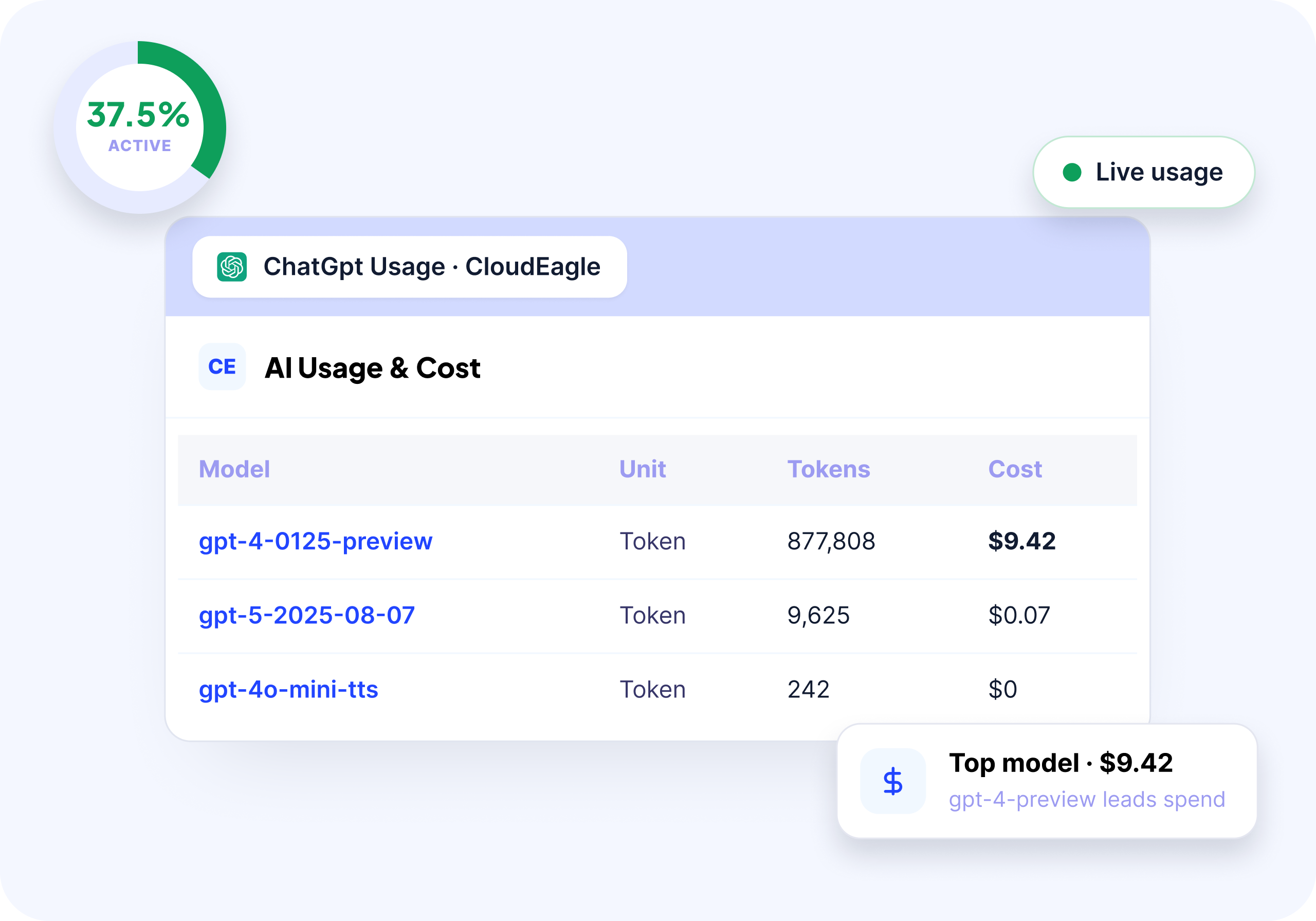
CloudEagle.ai dashboard showing ChatGPT usage and cost, including model-level token usage, costs, and a 37.5% usage metric.

How We Do It

CloudEagle correlates browser activity, identity data from Okta, firewall logs, and financial transactions with its SaaSMap AI inventory to create a unified, real-time AI app inventory.

Why We Are Better

Every AI tool, no matter if they're sanctioned or shadow is discovered instantly, eliminating governance blind spots.

B. AI Usage and Spend Monitoring Across Users, Teams, and Copilots

CloudEagle.ai provides a real-time view of AI usage and spend across users, teams, and applications.

Current Process

Usage data sits across SSO logs, app dashboards, browser activity, and finance systems, while finance often sees spend only after invoices.

Pain Points

Teams cannot evaluate AI ROI or decide whether tools like Copilot should expand. Usage-based billing becomes unpredictable, and duplicate tools increase costs.
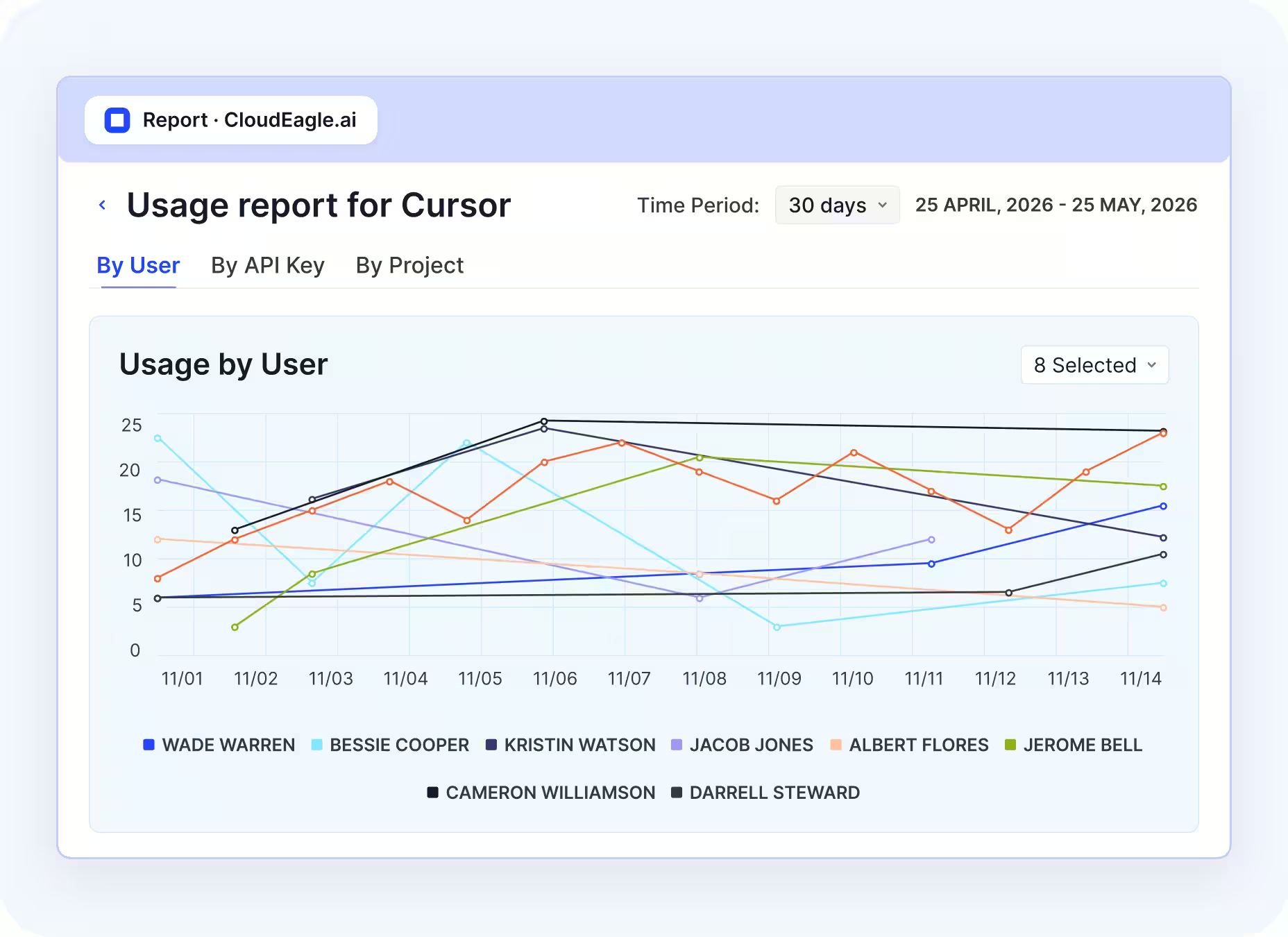
CloudEagle.ai usage report for Cursor showing daily usage trends by eight users over a 30-day period, with usage displayed in a line chart.

How We Do It

CloudEagle aggregates usage and spend data across identity systems, browser signals, SaaS integrations, and finance platforms, mapping adoption by user, team, and feature.

Why We Are Better

Organizations gain a continuous, unified view of AI usage and spend, enabling better rollout and cost decisions.

C. Gen AI Risk Scores to Identify High-Risk Tools and Exposure

CloudEagle.ai assigns contextual Gen AI risk scores to every AI tool based on exposure, usage, and security posture.

Current Process

AI risk is evaluated manually using vendor documentation or one-off reviews, often inconsistently.

Pain Points

Teams cannot identify which tools process sensitive data or introduce compliance risk. Security efforts are spread across both low and high-risk tools.
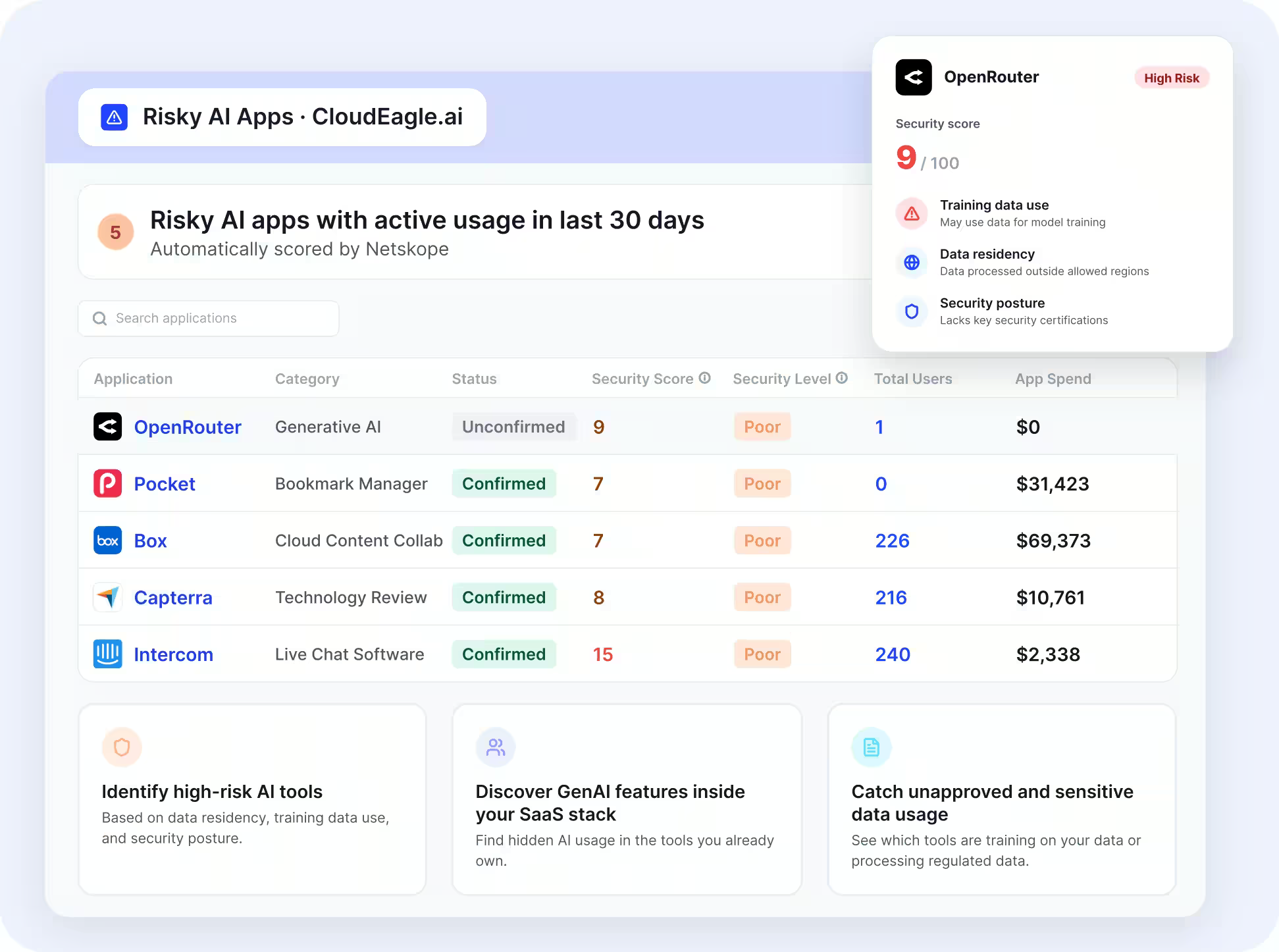
CloudEagle.ai dashboard showing five risky AI apps with active usage in the last 30 days, including security scores, user counts, and app spend. OpenRouter is flagged as high risk with a security score of 9 out of 100.

How We Do It

CloudEagle applies AI risk scoring using signals from browser activity, identity systems, and integrations like Netskope, evaluating data exposure, training behavior, and vendor posture.

Why We Are Better

Security teams prioritize high-impact risks and focus on tools that affect compliance and data security.

Let’s take Lapzo for an example. AI tools entered through IDE plugins, browser extensions, and personal purchases,bypassing SSO and CASB visibility.

CloudEagle.ai uncovered AI apps across SaaS and browser layers, applied consistent GenAI risk scoring, and extended reviews to AI agent tokens.

“We had a sanctioned AI list of 26 vendors. CloudEagle surfaced 115 tools in use in the first ten days, each one scored for data exposure, DPA status, and subprocessor risk. Four of them were processing regulated customer data without a signed agreement. We found the threats before our next audit found them.”
- Pedro Sors, Chief Operating Officer, Lapzo

The result? Within days, 89 unsanctioned AI apps were discovered, 12 high-risk tools were retired, and exposed API tokens were rotated or scope-reduced.

D. DLP for AI: Prevent Sensitive Data Exposure at the Prompt Level

CloudEagle.ai protects sensitive data by monitoring and controlling what is shared with AI tools in real time.

Current Process

Employees input sensitive data into tools like ChatGPT Enterprise, Microsoft Copilot, and Google Gemini through browsers, while traditional DLP tools cannot inspect prompt-level activity.

Pain Points

PII, financial data, and proprietary information can be exposed without detection. Security teams lack visibility into what AI vendors process.
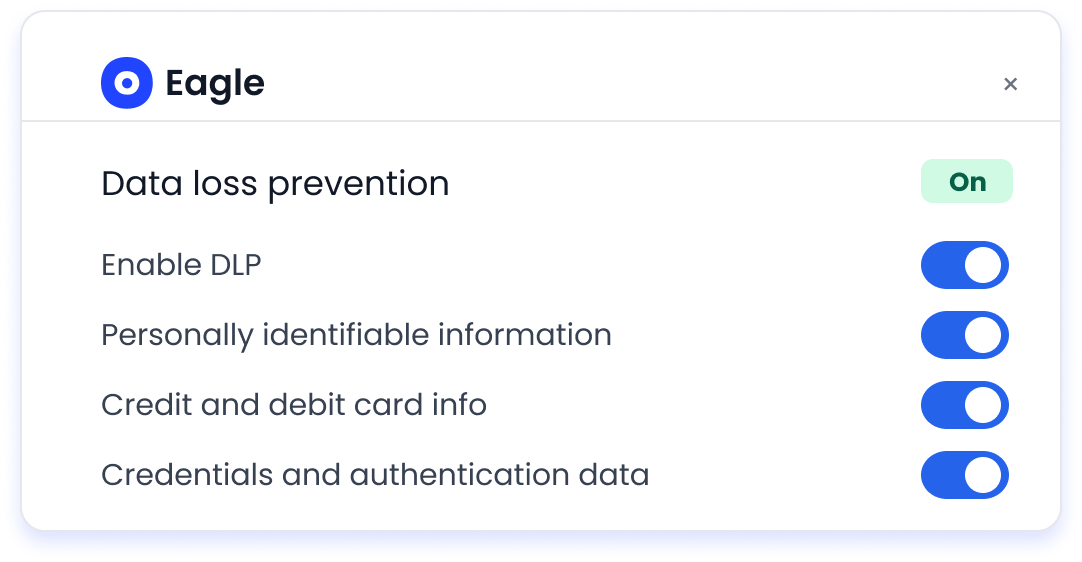
CloudEagle.ai data loss prevention settings showing DLP enabled for personally identifiable information, credit and debit card information, and credentials and authentication data.

How We Do It

CloudEagle inspects AI interactions in real time, detects sensitive data before transmission, and blocks or flags high-risk activity across both sanctioned and shadow tools.
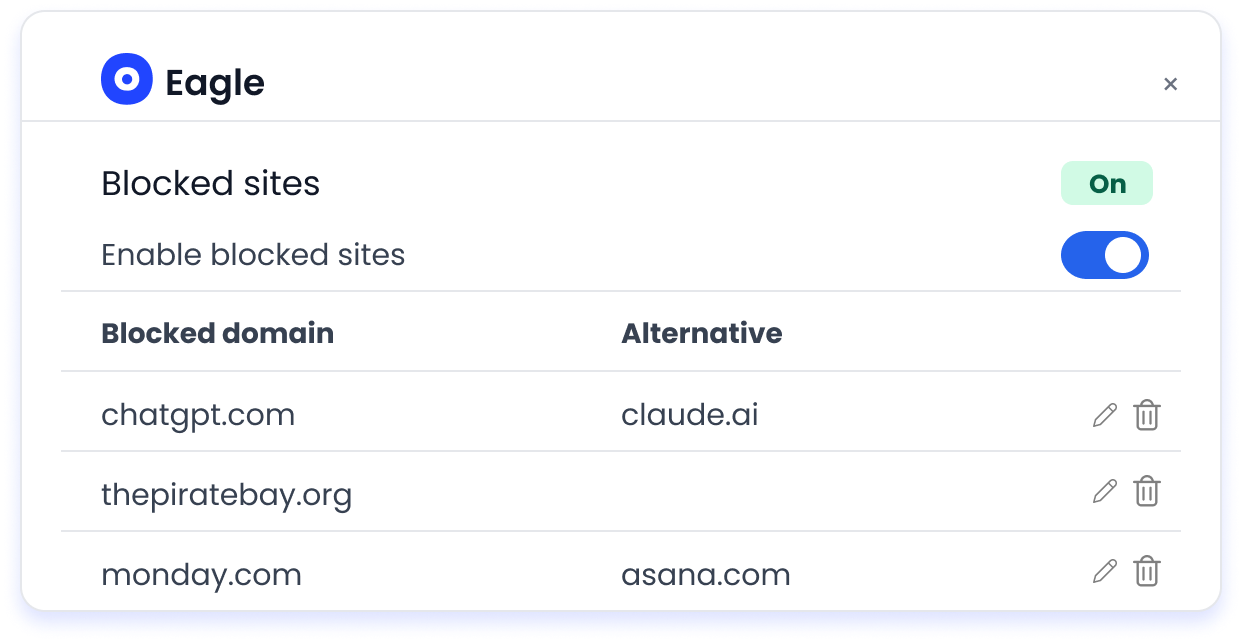
CloudEagle.ai blocked sites settings showing website restrictions for ChatGPT, The Pirate Bay, and Monday.com, with approved alternatives including Claude and Asana.

Why We Are Better

Sensitive data is protected at the point of interaction, reducing exposure and compliance risk.

E. Secure Browser Enforcement with Flash Page Controls for AI Policy Enforcement

CloudEagle.ai enforces AI usage policies in real time through secure browser controls and flash page interventions.

Current Process

Employees access unapproved AI tools directly through browsers, with enforcement happening only after violations occur.

Pain Points

Shadow AI grows unchecked, and employees remain unaware of approved tools, increasing risk and redundant usage.

RingCentral access warning stating that the organization prohibits access to the website because the tool is not approved by IT, with Gemini listed as an approved alternative.

How We Do It

CloudEagle deploys a lightweight browser extension that monitors AI access. When users attempt to access unapproved tools, a flash page intervenes before data is entered, enforcing policy and redirecting users to approved alternatives.

Why We Are Better

AI policies are enforced at the moment of access, reducing shadow AI while maintaining productivity.

What does AI governance telemetry look like in practice?

AI governance telemetry is the raw output of AI governance monitoring: a stream of structured events, each linking an identity, an AI app, an action and a policy outcome. The illustrative event below comes from the fintech scenario.

Field Example value Question it answers
User Credit analyst, corporate SSO ID Who acted?
Department Credit Risk Which team owns it?
AI app Public chatbot, personal login Which tool?
Signal source Browser plugin How was it seen?
Action Paste into prompt What happened?
Content flag Customer account data Was sensitive data involved?
Policy outcome Sensitive content blocked Did the control hold?
Risk score High How risky is the app?

Mature AI monitoring governance treats these events as evidence. Three uses matter most:

  • Audit evidence: Control monitoring for AI governance turns each blocked or allowed event into a dated control test you can hand to auditors.
  • Department reporting: Aggregated events show adoption and violations by function.
  • Spend decisions: Token and license data in the same stream shows which tools earn a renewal, and our guide on how enterprises track AI usage costs and token consumption goes deeper.
Edward Hausauer, Technology Operations Manager at Pioneer Schools, said CloudEagle.ai gives his team visibility into "both the data going in and the usage patterns behind it."

AI governance telemetry is only as reliable as its identity data. Check that every event resolves to a real employee or a named non-human identity.

How do you evaluate AI governance monitoring capability?

Evaluate AI governance monitoring capability by testing whether a platform can find, attribute, meter, and control the AI activity your current stack misses. Run the evaluation on your own data wherever you can.

Test What to ask Red flag
Discovery breadth Which signal sources feed the inventory? SSO only
Browser coverage Can it see or block prompt input? Network logs only
Embedded AI Does it catalog AI inside approved SaaS? Counts the app, ignores the AI
Identity resolution Can it map personal logins to employees? Unattributed usage
Cost metering Is token use split by app, team and user? Invoice totals only
Non-human identities Are agents and API keys covered? Human users only
Risk scoring What is the scoring basis? Undisclosed method

Embedded AI is the row most stacks fail, and our guide to embedded AI discovery covers what good coverage looks like. Strong AI monitoring governance should pass every row here, since each gap maps to a control that already failed for the fintech. When you are ready to compare vendors, our ranking of AI usage control tools lays out the options.

Conclusion

AI governance monitoring is not about tracking tools. It is about understanding how AI interacts with data, users, and systems in real time.

The risks are already present. Sensitive data flows through prompts, over-permissioned users access more data through AI, and unapproved tools operate without visibility. 

The difference between control and exposure comes down to visibility. This is where CloudEagle.ai plays a critical role. It provides centralized visibility into AI usage, enforces policies, and ensures every interaction is logged and auditable.

When AI governance monitoring is implemented effectively, organizations move from reactive compliance to continuous control, making AI adoption both scalable and secure.

FAQs

Can you track AI tool usage by department without a CASB? 

Yes. Correlating SSO, spend, and browser data with HR or directory groups ties each AI event to a department, including every tool a CASB never cataloged or proxied.

What data does AI governance telemetry include? 

AI governance telemetry records the user, department, AI app, signal source, action, sensitive-content flag, and policy outcome for each event, plus token use where available.

How do you attribute AI token spend to a department? 

Meter tokens by user, then roll each user up to a department through SSO or HR groups. That turns one blended AI invoice into a clear per-team cost view for finance.

What is the difference between AI governance monitoring and AI observability? 

AI observability tracks model performance, such as latency and accuracy. AI governance monitoring tracks who uses which AI tools, with what data, and whether policy was followed.

Why do approved SaaS apps still need AI monitoring? 

AI features inside sanctioned apps like Slack can read and summarize data employees already store there. Monitoring shows which AI features are active and who uses them.

What is control monitoring for AI governance? 

It is continuous testing of each AI policy control against real activity, producing dated pass or fail records that auditors and regulators can review on request.

Advertisement for a SaaS Subscription Tracking Template with a call-to-action button to download and a partial graphic of a tablet showing charts.Banner promoting a SaaS Agreement Checklist to streamline SaaS management and avoid budget waste with a call-to-action button labeled Download checklist.Blue banner with text 'The Ultimate Employee Offboarding Checklist!' and a black button labeled 'Download checklist' alongside partial views of checklist documents from cloudeagle.ai.Digital ad for download checklist titled 'The Ultimate Checklist for IT Leaders to Optimize SaaS Operations' by cloudeagle.ai, showing checklist pages.Slack Buyer's Guide offer with text 'Unlock insider insights to get the best deal on Slack!' and a button labeled 'Get Your Copy', accompanied by a preview of the guide featuring Slack's logo.Monday Pricing Guide by cloudeagle.ai offering exclusive pricing secrets to maximize investment with a call-to-action button labeled Get Your Copy and an image of the guide's cover.Blue banner for Canva Pricing Guide by cloudeagle.ai offering a guide to Canva costs, features, and alternatives with a call-to-action button saying Get Your Copy.Blue banner with white text reading 'Little-Known Negotiation Hacks to Get the Best Deal on Slack' and a white button labeled 'Get Your Copy'.Blue banner with text 'Little-Known Negotiation Hacks to Get the Best Deal on Monday.com' and a white button labeled 'Get Your Copy'.Blue banner with text 'Little-Known Negotiation Hacks to Get the Best Deal on Canva' and a white button labeled 'Get Your Copy'.Banner with text 'Slack Buyer's Guide' and a 'Download Now' button next to images of a guide titled 'Slack Buyer’s Guide: Features, Pricing & Best Practices'.Digital cover of Monday Pricing Guide with a button labeled Get Your Copy on a blue background.Canva Pricing Guide cover with a button labeled Get Your Copy on a blue gradient background.

Enter your email to
unlock the report

Oops! Something went wrong while submitting the form.
License Count
Benchmark
Per User/Per Year

Enter your email to
unlock the report

Oops! Something went wrong while submitting the form.
License Count
Benchmark
Per User/Per Year

Enter your email to
unlock the report

Oops! Something went wrong while submitting the form.
Notion Plus
License Count
Benchmark
Per User/Per Year
100-500
$67.20 - $78.72
500-1000
$59.52 - $72.00
1000+
$51.84 - $57.60
Canva Pro
License Count
Benchmark
Per User/Per Year
100-500
$74.33-$88.71
500-1000
$64.74-$80.32
1000+
$55.14-$62.34

Enter your email to
unlock the report

Oops! Something went wrong while submitting the form.

Enter your email to
unlock the report

Oops! Something went wrong while submitting the form.
Zoom Business
License Count
Benchmark
Per User/Per Year
100-500
$216.00 - $264.00
500-1000
$180.00 - $216.00
1000+
$156.00 - $180.00

Enter your email to
unlock the report

Oops! Something went wrong while submitting the form.

Get the Right Security Platform To Secure Your Cloud Infrastructure

Please enter a business email
Thank you!
The 2023 SaaS report has been sent to your email. Check your promotional or spam folder.
Oops! Something went wrong while submitting the form.

Access full report

Please enter a business email
Thank you!
The 2023 SaaS report has been sent to your email. Check your promotional or spam folder.
Oops! Something went wrong while submitting the form.

TL;DR

  • AI governance monitoring is essential to track real AI usage, data sharing, and enforce controls continuously.
  • Unlike SaaS monitoring, it focuses on prompt-level data, AI actions, and real-time interactions.
  • It detects risks like sensitive data exposure, over-permissioned access, and shadow AI early.
  • Continuous monitoring replaces static policies with real-time visibility and audit-ready evidence.
  • CloudEagle.ai enables real-time tracking, risk detection, and full AI governance across the enterprise

Most teams don’t struggle to write AI governance policies. This is mostly because AI governance contextual accuracy​ has improved greatly. They struggle to prove how AI is actually being used across the enterprise.

Ask a simple question: Who used ChatGPT last week, what data was shared, and which outputs were used in workflows? In most enterprises, there’s no single place to answer this.

That’s the gap AI governance monitoring is trying to solve. It’s not about defining rules. It’s about tracking real usage, enforcing controls, and producing audit-ready evidence continuously.

This is where CloudEagle.ai comes in. It helps organizations monitor AI usage across tools, control data exposure, and maintain visibility into how AI interacts with business systems.

In this article, we’ll break down how CloudEagle.ai enables AI governance monitoring, what problems it solves in real workflows, and how teams can move from policy to proof.

Why is AI Governance Monitoring Important?

AI governance monitoring is necessary because AI usage is happening continuously across teams. But most enterprises cannot track or verify it in real time. Policies exist, but usage is not visible.

  • AI Usage Happens Outside Approved Workflows: Employees use tools like ChatGPT or Claude without centralized tracking.
  • No Visibility Into Data Shared With AI: Organizations cannot see what data is entered into prompts or processed by AI tools.
  • Lack Of Audit-Ready Evidence: When auditors ask for AI usage data, teams struggle to produce logs or reports.

For enterprises operating in regulated markets, how the EU AI Act affects enterprise compliance obligations makes that audit-readiness gap harder to ignore. These gaps create operational and AI governance problems. Sameer Gupta, Americas financial services AI leader at EY, said, 

“Leaders can identify where AI adoption is increasing and where productivity gains appear, but proving AI as the main cause remains difficult”.

Policies Exist Without Enforcement

Rules are defined but not applied to real usage.

AI Usage Scales Faster Than Governance

Adoption grows across teams without corresponding controls.

Difficult To Detect Risk Early

Issues like data exposure are identified only after they occur.

AI governance monitoring bridges this gap by turning AI usage into something measurable, visible, and enforceable across the organization.

Your AI Stack Has Uninvited Guests

They’re active. And no one approved them.
Kick Them Out

What Makes AI Governance Monitoring Different From SaaS Monitoring?

AI governance monitoring is different because it tracks what data is shared and how AI behaves inside workflows. 

SaaS monitoring focuses on app usage, while AI monitoring focuses on prompt-level activity, AI usage, data flow, and AI-driven actions. 

  • Tracks Data Inside Interactions, Not Just App Access: SaaS monitoring shows logins to Google Workspace, while AI monitoring captures what data is entered into prompts.
  • Monitors AI-Driven Actions Across Systems: AI can read, summarize, and act on data across tools like Slack and Salesforce.
  • Captures Prompt And Output-Level Activity: It records what was asked, what data was used, and what output was generated.
  • Requires Continuous, Not Periodic Visibility: AI interactions happen in real time and need ongoing monitoring.

This difference is critical because most AI usage is not formally tracked. According to CNBC, most fortune 500 companies track their overall AI usage, highlighting the AI governance problems between SaaS visibility and AI activity.

AI governance monitoring shifts focus from which tools are used to how data flows through AI and how those interactions impact business systems. If you're still working out where AI governance ends and AI security begins, that distinction matters here. Governance covers the visibility and policy layer, while security covers the threat response.

Also Read: 10 Best AI Governance Platforms in 2026

What Risks Can Be Detected Early With Proper AI Governance Monitoring?

Proper AI governance monitoring detects AI risks by capturing prompt-level activity, data access, and AI-driven actions as they happen. This allows teams to identify exposure before it turns into incidents.

In practice, this means seeing what data is being shared, who is using AI, and how outputs are applied across systems. When these signals are visible, patterns of AI governance failure emerge early.

A. Sensitive Data Exposure Through Prompts

A finance analyst pastes a quarterly revenue sheet into ChatGPT to generate a summary for leadership. He thinks why spend so much time on manual effort when it can be automated. 

Business Perspective:

The summary is ready in seconds and saves hours of manual work.

Security Perspective:

That sheet includes confidential revenue numbers and projections now processed outside controlled systems.

Now, let’s consider a support engineer handling a customer issue. He needs something urgent and he’s willing to use Claude AI licenses

Operational Perspective:

They paste a support ticket into Claude to draft a response quickly.

Compliance Perspective:

The ticket contains customer identifiers and issue history that should remain within internal systems.

Nothing appears risky at the moment. Both tasks improve efficiency. But the exposure happens at the point of input. Sensitive data leaves the system through prompts, often without logs, approvals, or visibility.

AI governance monitoring detects this early by identifying what data is being shared in prompts, who is sharing it, and how frequently it occurs across teams.

B. Over-Permissioned Users Accessing AI Features

Over-permissioned users create AI governance monitoring risk when AI tools amplify what they can access, query, and extract from SaaS systems. The issue is not just access, but how AI accelerates data retrieval.

  • Users With Broad Access Across Systems: Employees with wide permissions in tools like Google Workspace or Salesforce can access large datasets via AI.
  • AI Aggregating Data At Scale: AI can combine emails, documents, and records into summarized outputs quickly.
  • No Additional Controls On AI Access: Existing permissions are reused without reassessing risk for AI-driven workflows.
  • Privilege Creep Over Time: Users accumulate access as roles change, increasing exposure when AI is introduced.

And the risks are far too great. As per the Association of Corporate Transurers, at least 71% of employees have retained data access they shouldn’t have done in the first place. 

When over-permissioned users interact with AI, the volume and speed of accessible data increase, making existing access risks more severe.

Must Read: 10 AI Governance Best Practices to Follow

C. Unapproved AI Tools Being Used Across Teams

Unapproved AI tools create AI governance monitoring risk because they operate outside visibility, policies, and security controls. Teams adopt them quickly, but governance does not keep up.

  • Shadow AI Usage Across Departments: Employees use tools like ChatGPT or Claude without IT approval.
  • No Vendor Risk Assessment: Organizations cannot verify how these tools handle, store, or process data.
  • Inconsistent Security Controls: Different teams use different tools with no standardized policies.

As adoption increases across teams, these gaps in AI governance monitoring compound and become harder to control.

  • No Central Inventory Of AI Tools: Security teams lack a clear list of AI tools being used.
  • No Monitoring Or Logging Of Usage: AI interactions are not tracked or audited.
  • Delayed Policy Enforcement: Controls are introduced only after risks are identified.

Without a shadow AI detection platform, organizations lose visibility and control, making it harder to detect risks early or enforce governance.

Invisible Tools. Visible Risk.

That’s the tradeoff you didn’t choose.
Fix It Now

How do you track AI tool usage across departments?

You track AI tool usage across departments by tying every AI signal to a named identity and mapping that identity to a department in your SSO or HR directory. Without that identity join, you end up with a list of AI apps and no owners. McKinsey's State of AI survey found that 88% of organizations now use AI in at least one business function, so most departments need a view of their own.

  1. Build the inventory from several sources: SSO shows sanctioned logins, while card spend and browser signals surface tools bought or used outside IT. In CloudEagle.ai, that inventory is EagleIQ, which correlates all five signals into one list of AI apps.
  2. Resolve personal logins to employees: a chatbot account created with a personal email still runs on a corporate device and browser, so match it to the employee behind it.
  3. Map users to departments: pull department and cost center from directory groups so every EagleIQ record rolls up to Credit Risk, Engineering or Sales.
  4. Attach cost: link card transactions and token usage to the same department view. CloudEagle.ai's Token Usage Tracking already splits consumption by app, team and user.
  5. Review by department: set department-level rules and walk through exceptions with each function's lead on a fixed cadence.

In the fintech example, this is how a security lead might learn that Credit Risk relies on several unapproved chatbots while Engineering's AI spend sits in one coding assistant. 

Teams that track AI tool usage across departments this way can also answer finance's question of which function should own each AI budget line. That makes department views one of the most practical outputs of AI governance monitoring.

How Does CloudEagle.ai Monitor AI Governance Across the Enterprise?

CloudEagle.ai acts as a centralized control plane for enterprise AI governance, bringing together visibility, usage tracking, risk prioritization, and policy enforcement in one system.

CloudEagle continuously monitors every AI interaction across users, applications, and data flows, ensuring AI adoption stays secure, compliant, and cost-efficient at scale.

A. Shadow AI Detection Across Browser, SSO, and Spend Signals

CloudEagle.ai continuously detects all AI tools in use across the organization, including shadow AI adopted outside IT workflows.

Current Process

Teams rely on fragmented signals from CrowdStrike, Zscaler, SSO activity, and expense reports, which are not connected.

Pain Points

Organizations lack visibility into which AI tools are in use, who is using them, and how shadow AI spreads. Duplicate copilots and unapproved tools create security and compliance blind spots.

CloudEagle.ai dashboard showing ChatGPT usage and cost, including model-level token usage, costs, and a 37.5% usage metric.

How We Do It

CloudEagle correlates browser activity, identity data from Okta, firewall logs, and financial transactions with its SaaSMap AI inventory to create a unified, real-time AI app inventory.

Why We Are Better

Every AI tool, no matter if they're sanctioned or shadow is discovered instantly, eliminating governance blind spots.

B. AI Usage and Spend Monitoring Across Users, Teams, and Copilots

CloudEagle.ai provides a real-time view of AI usage and spend across users, teams, and applications.

Current Process

Usage data sits across SSO logs, app dashboards, browser activity, and finance systems, while finance often sees spend only after invoices.

Pain Points

Teams cannot evaluate AI ROI or decide whether tools like Copilot should expand. Usage-based billing becomes unpredictable, and duplicate tools increase costs.

CloudEagle.ai usage report for Cursor showing daily usage trends by eight users over a 30-day period, with usage displayed in a line chart.

How We Do It

CloudEagle aggregates usage and spend data across identity systems, browser signals, SaaS integrations, and finance platforms, mapping adoption by user, team, and feature.

Why We Are Better

Organizations gain a continuous, unified view of AI usage and spend, enabling better rollout and cost decisions.

C. Gen AI Risk Scores to Identify High-Risk Tools and Exposure

CloudEagle.ai assigns contextual Gen AI risk scores to every AI tool based on exposure, usage, and security posture.

Current Process

AI risk is evaluated manually using vendor documentation or one-off reviews, often inconsistently.

Pain Points

Teams cannot identify which tools process sensitive data or introduce compliance risk. Security efforts are spread across both low and high-risk tools.

CloudEagle.ai dashboard showing five risky AI apps with active usage in the last 30 days, including security scores, user counts, and app spend. OpenRouter is flagged as high risk with a security score of 9 out of 100.

How We Do It

CloudEagle applies AI risk scoring using signals from browser activity, identity systems, and integrations like Netskope, evaluating data exposure, training behavior, and vendor posture.

Why We Are Better

Security teams prioritize high-impact risks and focus on tools that affect compliance and data security.

Let’s take Lapzo for an example. AI tools entered through IDE plugins, browser extensions, and personal purchases,bypassing SSO and CASB visibility.

CloudEagle.ai uncovered AI apps across SaaS and browser layers, applied consistent GenAI risk scoring, and extended reviews to AI agent tokens.

“We had a sanctioned AI list of 26 vendors. CloudEagle surfaced 115 tools in use in the first ten days, each one scored for data exposure, DPA status, and subprocessor risk. Four of them were processing regulated customer data without a signed agreement. We found the threats before our next audit found them.”
- Pedro Sors, Chief Operating Officer, Lapzo

The result? Within days, 89 unsanctioned AI apps were discovered, 12 high-risk tools were retired, and exposed API tokens were rotated or scope-reduced.

D. DLP for AI: Prevent Sensitive Data Exposure at the Prompt Level

CloudEagle.ai protects sensitive data by monitoring and controlling what is shared with AI tools in real time.

Current Process

Employees input sensitive data into tools like ChatGPT Enterprise, Microsoft Copilot, and Google Gemini through browsers, while traditional DLP tools cannot inspect prompt-level activity.

Pain Points

PII, financial data, and proprietary information can be exposed without detection. Security teams lack visibility into what AI vendors process.

CloudEagle.ai data loss prevention settings showing DLP enabled for personally identifiable information, credit and debit card information, and credentials and authentication data.

How We Do It

CloudEagle inspects AI interactions in real time, detects sensitive data before transmission, and blocks or flags high-risk activity across both sanctioned and shadow tools.

CloudEagle.ai blocked sites settings showing website restrictions for ChatGPT, The Pirate Bay, and Monday.com, with approved alternatives including Claude and Asana.

Why We Are Better

Sensitive data is protected at the point of interaction, reducing exposure and compliance risk.

E. Secure Browser Enforcement with Flash Page Controls for AI Policy Enforcement

CloudEagle.ai enforces AI usage policies in real time through secure browser controls and flash page interventions.

Current Process

Employees access unapproved AI tools directly through browsers, with enforcement happening only after violations occur.

Pain Points

Shadow AI grows unchecked, and employees remain unaware of approved tools, increasing risk and redundant usage.

RingCentral access warning stating that the organization prohibits access to the website because the tool is not approved by IT, with Gemini listed as an approved alternative.

How We Do It

CloudEagle deploys a lightweight browser extension that monitors AI access. When users attempt to access unapproved tools, a flash page intervenes before data is entered, enforcing policy and redirecting users to approved alternatives.

Why We Are Better

AI policies are enforced at the moment of access, reducing shadow AI while maintaining productivity.

What does AI governance telemetry look like in practice?

AI governance telemetry is the raw output of AI governance monitoring: a stream of structured events, each linking an identity, an AI app, an action and a policy outcome. The illustrative event below comes from the fintech scenario.

Field Example value Question it answers
User Credit analyst, corporate SSO ID Who acted?
Department Credit Risk Which team owns it?
AI app Public chatbot, personal login Which tool?
Signal source Browser plugin How was it seen?
Action Paste into prompt What happened?
Content flag Customer account data Was sensitive data involved?
Policy outcome Sensitive content blocked Did the control hold?
Risk score High How risky is the app?

Mature AI monitoring governance treats these events as evidence. Three uses matter most:

  • Audit evidence: Control monitoring for AI governance turns each blocked or allowed event into a dated control test you can hand to auditors.
  • Department reporting: Aggregated events show adoption and violations by function.
  • Spend decisions: Token and license data in the same stream shows which tools earn a renewal, and our guide on how enterprises track AI usage costs and token consumption goes deeper.
Edward Hausauer, Technology Operations Manager at Pioneer Schools, said CloudEagle.ai gives his team visibility into "both the data going in and the usage patterns behind it."

AI governance telemetry is only as reliable as its identity data. Check that every event resolves to a real employee or a named non-human identity.

How do you evaluate AI governance monitoring capability?

Evaluate AI governance monitoring capability by testing whether a platform can find, attribute, meter, and control the AI activity your current stack misses. Run the evaluation on your own data wherever you can.

Test What to ask Red flag
Discovery breadth Which signal sources feed the inventory? SSO only
Browser coverage Can it see or block prompt input? Network logs only
Embedded AI Does it catalog AI inside approved SaaS? Counts the app, ignores the AI
Identity resolution Can it map personal logins to employees? Unattributed usage
Cost metering Is token use split by app, team and user? Invoice totals only
Non-human identities Are agents and API keys covered? Human users only
Risk scoring What is the scoring basis? Undisclosed method

Embedded AI is the row most stacks fail, and our guide to embedded AI discovery covers what good coverage looks like. Strong AI monitoring governance should pass every row here, since each gap maps to a control that already failed for the fintech. When you are ready to compare vendors, our ranking of AI usage control tools lays out the options.

Conclusion

AI governance monitoring is not about tracking tools. It is about understanding how AI interacts with data, users, and systems in real time.

The risks are already present. Sensitive data flows through prompts, over-permissioned users access more data through AI, and unapproved tools operate without visibility. 

The difference between control and exposure comes down to visibility. This is where CloudEagle.ai plays a critical role. It provides centralized visibility into AI usage, enforces policies, and ensures every interaction is logged and auditable.

When AI governance monitoring is implemented effectively, organizations move from reactive compliance to continuous control, making AI adoption both scalable and secure.

FAQs

Can you track AI tool usage by department without a CASB? 

Yes. Correlating SSO, spend, and browser data with HR or directory groups ties each AI event to a department, including every tool a CASB never cataloged or proxied.

What data does AI governance telemetry include? 

AI governance telemetry records the user, department, AI app, signal source, action, sensitive-content flag, and policy outcome for each event, plus token use where available.

How do you attribute AI token spend to a department? 

Meter tokens by user, then roll each user up to a department through SSO or HR groups. That turns one blended AI invoice into a clear per-team cost view for finance.

What is the difference between AI governance monitoring and AI observability? 

AI observability tracks model performance, such as latency and accuracy. AI governance monitoring tracks who uses which AI tools, with what data, and whether policy was followed.

Why do approved SaaS apps still need AI monitoring? 

AI features inside sanctioned apps like Slack can read and summarize data employees already store there. Monitoring shows which AI features are active and who uses them.

What is control monitoring for AI governance? 

It is continuous testing of each AI policy control against real activity, producing dated pass or fail records that auditors and regulators can review on request.

CloudEagle.ai recognized in the 2025 Gartner® Magic Quadrant™ for SaaS Management Platforms
Download now
gartner chart
5x
Faster employee
onboarding
80%
Reduction in time for
user access reviews
30k
Workflows
automated
$15Bn
Analyzed in
contract spend
$2Bn
Saved in
SaaS spend

Streamline SaaS governance and save 10-30%

Book a Demo with Expert
CTA image