
%201.svg)


HIPAA Compliance Checklist for 2025

Here is a situation that is playing out quietly in finance teams right now.
Someone in engineering requested Claude Team seats six months ago. The request got approved. Seats got provisioned. Half of those developers switched to a different workflow or moved to API access instead. The seats are still active. The renewal is in 30 days. Nobody flagged it.
That is not a hypothetical. That is how Claude AI license waste happens in almost every organization that has rolled out AI tools without a proper AI governance layer. The problem is not the cost of Claude itself. The problem is that AI tool spending tends to grow faster than visibility into how those tools are actually being used.
This guide covers the full picture: how Claude licensing works, what you are actually paying for at each tier, where the waste hides, and how to build a governance program that stops the leak before the next renewal.
TL;DR
- Claude license waste happens when seat types don’t match actual usage, not because the tool is expensive
- Mixing seat types across teams without tracking usage quietly inflates costs over time
- The biggest leaks come from inactive users, underutilized Premium seats, and role mismatches
- A simple governance program with audits, role-based allocation, and quarterly reviews can eliminate most waste
- At scale, manual tracking breaks down, and tools like CloudEagle.ai help automate visibility, optimization, and renewal decisions
1. Claude Licensing Is Not as Simple as It Looks: What Most Teams Get Wrong
Most IT leaders treat Claude like any other SaaS tool. One plan, one price, one renewal date. That assumption starts breaking down the moment you have more than two departments using it.
The difference between Free, Pro, Max, Team, and Enterprise plans, and who actually needs what
Claude has five distinct tiers in 2026, and they are not interchangeable. Putting the wrong person on the wrong plan is one of the fastest ways to either overspend or frustrate users who hit limits constantly.
Why mixing seat types across departments quietly inflates your Claude spend
Anthropic’s flexible Team plan is useful, but it is also how license costs quietly grow when no one is tracking usage.
What typically happens:
- Engineering assigns Premium seats broadly, even to users who do not need Claude Code
- Marketing upgrades one user to Max for a project and never downgrades
- Teams provision seats based on expected usage, not actual usage
Before getting into the cost breakdown, it is worth understanding the broader challenge of managing AI tool spend across your organization. Most teams are dealing with this across multiple tools simultaneously, not just Claude.
Worth a Read: 👉 How Enterprises Can Track Claude, Cursor, and Gemini Spend in One Place
2. Claude AI License Cost Breakdown: What You Are Actually Paying For?
Understanding the pricing structure is the foundation of any governance program. You cannot right-size what you do not understand.
Seat pricing across Standard, Premium, and Enterprise
The Team plan is the most commonly misunderstood tier in Claude's pricing structure.
- Team Standard ($25/user/month)
Core features for non-developers: projects, SSO, integrations, and admin controls. If your organization has not standardized on SSO yet, check the 8 best single sign-on tools with leading options worth considering. - Team Premium ($100/user/month)
Adds Claude Code, Cowork, and higher usage limits. Best suited for active developers. Overkill for most other roles. - Enterprise (custom pricing)
Advanced controls like RBAC, SCIM, audit logs, and compliance features. For teams evaluating Enterprise, Claude Security guide covers what those compliance controls mean in practice.
API token costs vs. subscription seats: when each model makes financial sense
API access is priced per million tokens, not per seat:
Hidden costs: overages, Claude Code add-ons, and premium seat sprawl
The costs that do not show up clearly on the initial invoice:
- Usage overages: When subscription users exhaust their monthly limit, they can pay overage at standard API token rates. On Opus, that gets expensive quickly.
- The 200K token threshold: API calls that exceed 200K input tokens jump from $3/MTok to $6/MTok for input and from $15 to $22.50 for output. Long document workflows can quietly double costs.
- Premium seat sprawl: The easiest path when a developer asks for Claude Code is to upgrade their seat to Premium. Over 12 months, those upgrades compound into a significant unexplained line item.
- Annual commitment lock-in: Team and Enterprise plans are typically annual. Unused seats that auto-renew on annual contracts represent pure waste that is difficult to recover mid-cycle. Make sure you review your key SaaS agreement clauses helps ensure the auto-renewal terms are in your favor.

3. The Unused License Problem: Where Claude Spends Quietly Leaks?
AI tool waste is different from traditional SaaS waste. It moves faster, compounds more quietly, and is harder to detect without the right tooling.
Why SaaS license waste hits AI tools harder than traditional software
With traditional SaaS, unused seats are easy to spot because users stop logging in. With Claude, occasional logins can make users appear active even when they use only a fraction of their seat’s value.
This makes login-based tracking unreliable. Effective governance needs to focus on actual usage depth and whether the seat matches the user’s role.
How to identify inactive Claude seats before the next renewal hits
You are looking for three categories of seats:
- Completely inactive seats where there has been no login or API activity for 30+ days
- Underutilized Premium seats where usage fits Standard-level needs without advanced features
- Role-mismatched seats where access no longer aligns with the user’s current responsibilities
The challenge is scale. Identifying these requires combining usage data, HR context, and manual review, which most teams do not have time for.
The cost of auto-renewal on unused Claude Enterprise seats
Enterprise contracts are annual, so unused seats quietly roll into renewals. For example, 20 unused seats out of 100 at ~$60 each results in about $14,400 in annual waste.
This often compounds, as inflated seat counts carry forward into the next contract without reassessment.
The waste issue is not unique to Claude. It is a pattern that repeats across every AI tool in your stack. Hearing how finance and IT leaders are approaching this problem in practice is worth 20 minutes of your time.
🎙️ Podcast: Optimizing SaaS Spend Management: Strategies from a Finance Director. A direct conversation on how to build a license governance program that keeps spend aligned with actual usage across AI and SaaS tools. 👉 Listen now
4. How CloudEagle.ai Automates Claude License Governance?
Manual license governance works until it does not. As your Claude seat count grows across departments, the spreadsheet approach breaks down. CloudEagle.ai automates the process that most IT teams are currently doing by hand.
How to get real-time visibility into Claude seat utilization across your org
Centralized view across usage and spend
CloudEagle connects to your Claude admin console and financial data to give a live, unified view of seat utilization across the organization. Instead of pulling data from multiple sources, everything is available in one place:
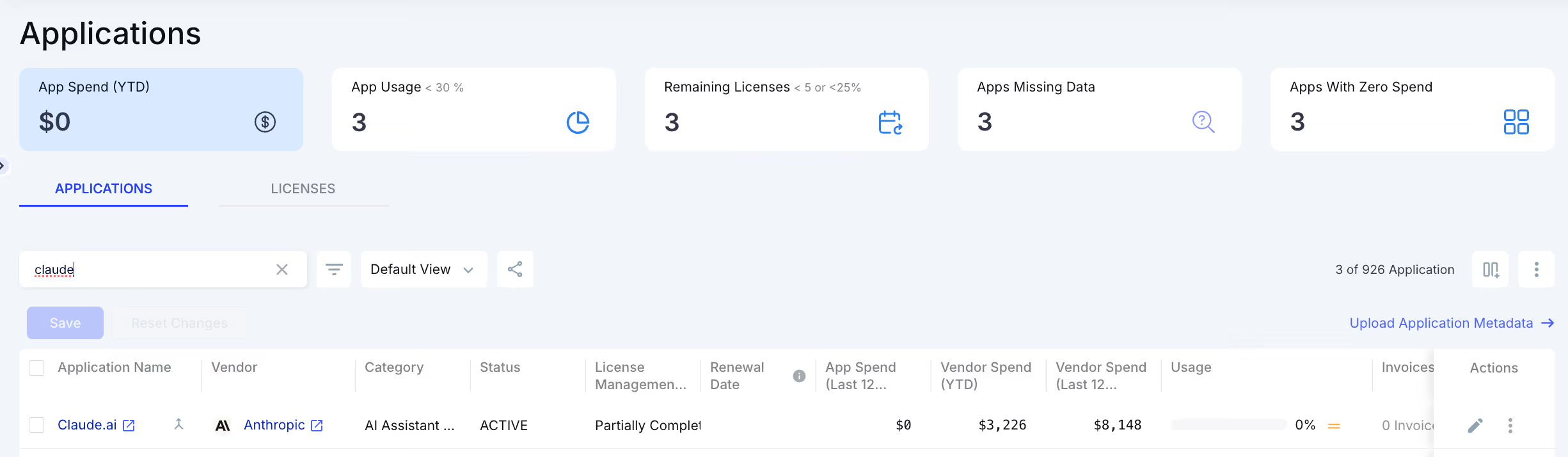
- All Claude seats across departments
- Usage and spending in a single dashboard
- No manual reporting or spreadsheet reconciliation
Visibility into actual usage depth
Claude’s native signals can make occasional users look active. CloudEagle goes deeper by showing how much of each seat’s capacity is actually being used.

This helps you identify:
- Users who log in but barely use their seats
- Premium seats operating at Standard-level usage
- Hidden underutilization is missed by basic reports
Detect mismatched seat allocation early
CloudEagle highlights where seat types do not align with real usage patterns, so you can fix allocation before costs compound.
- Spot over-provisioned Premium seats
- Align seat types with actual role requirements
- Reduce unnecessary upgrades across teams
Using CloudEagle.ai to reclaim unused Claude licenses and right-size renewals
Surface license harvesting opportunities automatically
CloudEagle identifies inactive and underutilized seats and presents them as clear opportunities for action.

- Fully inactive users (30+ days)
- Underutilized or misaligned seats
Actionable insights with full context
Each recommendation includes the data needed to act, without manual analysis.
- Last activity, usage vs. seat tier, and owner details
- Estimated savings from the downgrade or removal
Turn usage data into renewal leverage
CloudEagle gives you precise utilization data for renewals, so you right-size contracts instead of relying on estimates.
If you want to see how this works inside a real environment before booking a call, the product walkthrough covers it without requiring a sales conversation.
🖥️ Product Walkthrough: See exactly how CloudEagle.ai surfaces unused AI licenses, maps seat utilization, and feeds that data into your renewal process. No demo call needed. 👉 See the Product Walkthrough
You Are Probably Renewing More Claude Seats Than You Need


5. How to Build a Claude License Governance Program?
A governance program does not have to be complicated. It needs to be consistent. Here is what that looks like in practice.
1. Conduct a full audit of who has Claude access and at what tier
Start with a complete inventory from your Claude admin console or Team dashboard. For every seat, capture:
- Name and department
- Seat type
- Last active date
- Approximate usage vs. seat capacity
This step usually surfaces inactive users and obvious over-provisioning immediately.
2. Map seat types to actual role requirements, not requests
Most teams assign seats based on requests rather than actual need. Employees ask for Premium because it sounds better, and managers approve because the cost feels manageable.
Define a clear mapping:
- Developers using Claude Code → Premium
- Knowledge workers and analysts → Standard
- Executives → Standard (in most cases)
Everyone should start on Standard and upgrade only when usage justifies it.
3. Define a license request and approval workflow for new seats
Every new Claude seat should go through a simple, consistent workflow:
- What role is this for?
- What is the primary use case?
- Is this Claude Code usage or general use?
- Who is the budget owner?
This does not need to be complex, but without it, seats get provisioned based on urgency rather than need.
4. Set review cadences tied to usage data
Schedule regular reviews where you compare actual usage against your seat roster. Focus on:
- Users inactive for 30+ days
- Seats with low utilization relative to the tier
- Role changes affecting access needs
Quarterly reviews work for most teams. If you are scaling quickly, monthly reviews help maintain tighter control.
5. Establish a process for harvesting and reassigning unused licenses
Once unused or underutilized seats are identified, take action:
- Downgrade to a lower tier
- Remove and reassign licenses
For annual Enterprise contracts, this may not reduce current costs, but it ensures you right-size your next renewal. Maintain a small pool of Standard seats for quick provisioning.
6. Align Claude license spend with your broader SaaS budget cycle
Claude licenses should not be managed in isolation. Organizations building a repeatable governance model will find our overview of the top 10 IT governance frameworks a useful structural reference.
Include them in your broader SaaS review cycle so you can:
- Track usage and spend consistently
- Align renewals with other tools
- Maintain long-term cost control
If your organization does SaaS budget reviews quarterly or annually, Claude spend should feed into that process with the same usage data and renewal timeline visibility that you apply to other major tools.
Conclusion
Claude AI license governance is not a one-time cleanup. It is a program that needs to run consistently alongside your Claude rollout.
The waste in most organizations is not malicious. It is the result of provisioning decisions made without usage data, renewal cycles that auto-execute without review, and seat type choices that made sense at the time but no longer reflect how teams actually work.
The fix is straightforward: audit what you have, map seat types to actual role requirements, build a lightweight request and approval workflow, and review usage data quarterly before every renewal conversation.
For organizations with more than a few dozen Claude seats, doing this manually does not scale. CloudEagle.ai automates the visibility and governance layer so your team is spending time on decisions, not on data collection.
If your Claude renewal is in the next 90 days, now is the right time to understand what you are actually using.
Frequently Asked Questions
1. Can CloudEagle.ai distinguish between Standard and Premium seat utilization patterns for Claude?
CloudEagle.ai maps each Claude seat to its assigned tier and compares actual usage depth against what that tier provides, flagging Premium seats operating at Standard-level activity. This allows IT teams to identify downgrade candidates without relying on self-reporting from users or department heads.
2. How does CloudEagle.ai handle Claude license governance when seats are provisioned by multiple departments independently?
CloudEagle.ai consolidates Claude seat data from the admin console and financial systems into a single view regardless of which department provisioned them. This gives IT a unified picture of total seat counts, spend, and utilization without needing to reconcile data from individual team leads.
3. Can CloudEagle.ai set alerts when a team's Claude spend crosses a defined threshold?
CloudEagle.ai supports configurable spend thresholds at the team or department level, sending alerts when Claude usage or costs approach or exceed a set limit. This allows finance and IT teams to intervene before overage charges or unplanned seat additions inflate the monthly bill.
4. Does CloudEagle.ai help with Claude license right-sizing ahead of an Enterprise contract renewal?
CloudEagle.ai generates a utilization report showing actual seat consumption over the contract period, giving procurement teams the data needed to negotiate the right seat count at renewal. Rather than renewing at headcount, teams can enter negotiations with precise usage evidence.
5. How does CloudEagle.ai track Claude API key usage alongside subscription seats?
CloudEagle.ai surfaces Claude API consumption alongside subscription seat data in the same dashboard, so teams can see the full cost picture across both usage models. This is particularly relevant for organizations that mix API-based internal tools with Team or Enterprise subscriptions across departments.
You Are Probably Renewing More Claude Seats Than You Need


.avif)


.avif)
.avif)




.png)






.avif)
.avif)
.avif)


