
%201.svg)


HIPAA Compliance Checklist for 2025

Zoom started as a simple meeting tool. But now, it’s a maze of licenses, add-ons, and regional plans that can confuse even seasoned IT teams. What once felt straightforward has quietly turned into a puzzle of overlapping seats and surprise renewals.
Finance thinks you’re using 300 licenses. IT swears it’s 500. And somewhere in between, another department quietly bought “Zoom Pro pricing” because it sounded important.
That’s the everyday reality of modern SaaS sprawl, and it’s exactly why CloudEagle.ai exists. It unifies visibility, automates tracking, and helps enterprises take back control of their Zoom app spend before the next billing cycle brings another surprise.
TL;DR
- Zoom licensing is more complex than it looks — tiers, add-ons, and regional purchases create overlaps and confusion across teams.
- Organizations often pay for duplicate or unused licenses, especially when departments buy seats independently or auto-renewals slip by unnoticed.
- Hidden add-ons and inactive accounts boost both spend and security risk, while shared credentials complicate audits and compliance.
- Manual tracking (spreadsheets, siloed reports) leads to errors, making it difficult for finance and IT to see who actually needs what.
- CloudEagle.ai centralizes license visibility, automates usage tracking and reclamation, and guides renewals with real-time benchmarks, eliminating waste and surprise billing.
The Zoom Tangle That Costs More Than You Think
Zoom licenses look simple at first glance: pick a plan, pay a monthly fee, done. But underneath lies a web of tiers, add-ons, and seat types that quietly inflate costs while teams struggle to keep track.
- The Tier Trap: Pro, Business, Enterprise, Education, each tier promises features, meeting limits, and flexibility. But every upgrade brings hidden obligations and surprises, making the “right” plan feel like a moving target.
- Add-On Avalanche: Webinars, Rooms, Large Meetings, each purchased separately. One department might need 500 webinar seats, another 100, and finance ends up reconciling bills that seem designed to confuse.
- Seat-Type Shuffle: Per-user, per-license, lite vs. full-featured, licenses aren’t always created equal. Unused or redundant seats hide in plain sight, quietly draining budgets.
- Geography and Teams Chaos: Some licenses bought regionally, others globally. Teams rarely coordinate purchases, creating overlap, gaps, and unexpected charges.
This combination of tiers, add-ons, and seat types forms a labyrinth that costs more than most organizations realize. CloudEagle.ai gives you visibility into every seat, add-on, and subscription before your budget bleeds.
When License Overlaps Turn into Budget Sinkholes
Zoom pricing is sneaky. What looks like a minor overlap, like redundant SaaS applications across departments, can quietly drain budgets. By the time finance notices, multiple charges have stacked up.
It’s not just about overspending; overlapping licenses create confusion in tracking, reconciliation, and renewal planning. IT teams struggle to know who actually needs access, while procurement is left juggling contracts that don’t align with actual usage.
1. Paying Twice for the Same User Access
It sounds simple: one user, one Zoom license. In reality, enterprises often pay multiple times for the same access without realizing it. The result? Budget leaks and frustrated IT managers trying to reconcile accounts.
- Department Silos: Different teams unknowingly purchase licenses for the same employee.
- Auto-Renewal Overlaps: Renewals kick in while new seats are added, doubling costs.
- Manual Tracking Gaps: Without centralized oversight, duplicate licenses slip through unnoticed.
As IT consultant Michael Osterman notes,
"Organizations waste millions every year simply because no one has a single view of who actually uses which license."
Even a few unnoticed overlaps can quietly add up over time, draining budgets and making forecasting nearly impossible. Recognizing and resolving duplicate access early is key to keeping Zoom app spend under control.
2. Add-Ons That Slip In Without Notice
Zoom login add-ons might appear on your invoices while teams scramble to understand the extra charges. Webinars, Rooms, Large Meetings, and other optional features don’t always come bundled neatly.
Notta revealed that 38% of enterprises admitted they were unaware of hidden SaaS add-on spend until after the invoice arrived.
- Webinar Seats: One department purchases 500, another 100, suddenly you’re paying for 600 seats that may not all be needed.
- Zoom Rooms & Large Meetings: Optional features often get added without cross-team visibility, inflating bills.
- Feature Redundancy: Multiple add-ons may cover overlapping functionality, creating unnecessary spend.
The combination of hidden add-ons and disconnected teams makes it easy for costs to sneak in unnoticed, turning minor upgrades into significant budget surprises.
3. Dashboards That Hide Real Cost Visibility
Many organizations rely on vendor management software to track Zoom login usage and spending, assuming the numbers tell the full story. In reality, these dashboards often aggregate data in ways that obscure inactive users, redundant licenses, or hidden add-ons. Finance sees totals, but critical details get buried.
Without granular insights, IT and procurement teams struggle to identify where money is actually going. Departments may appear under budget on paper, while overlaps and unnecessary purchases silently inflate costs.
The result is a false sense of control. Teams may feel confident reviewing dashboards, yet the real cost picture remains hidden, leaving budgets exposed and decision-making reactive rather than proactive.
The Operational Risks You Don’t See
Just because a Zoom license is active doesn’t mean it’s harmless. Privilege creep and dormant seats can quietly slow workflows and trigger compliance headaches.
You might think everything is running smoothly, until someone can’t access a meeting, approvals stall, or permissions get tangled across teams. Small oversights pile up fast, turning minor glitches into operational headaches.
1. Security Gaps from Inactive Zoom Accounts
Inactive Zoom pricing accounts aren’t being used, so what’s the risk? In reality, dormant accounts are a favorite target for attackers, creating hidden entry points into your organization.
According to a 2023 Ponemon Institute study, 45% of data breaches involved unused or orphaned accounts, highlighting how neglected seats can become serious vulnerabilities.
- Unauthorized Access: Dormant accounts can be hijacked if credentials are exposed.
- Permission Creep: Over time, users may leave teams, but their access lingers, creating gaps in security controls.
- Compliance Risk: Inactive accounts complicate audits and can trigger non-compliance flags.
Even a handful of inactive accounts can expose sensitive meetings, confidential documents, and internal communications.
2. Audit Issues from Shared Credentials
Sharing Zoom login credentials might feel like a shortcut for teams, but it creates a minefield during audits. When multiple users log in under a single account, tracking who did what becomes nearly impossible.
Auditors expect clear trails of activity and accountability. Shared credentials blur these lines, raising red flags and complicating SaaS compliance checks. Even routine reviews can turn into a tedious process of piecing together incomplete information.
The result is increased scrutiny, potential fines, and wasted time for IT and compliance teams. Ensuring each user has their own account keeps audit trails clean, simplifies reporting, and maintains organizational trust.
3. Manual Reconciliation Errors Across Departments
Reconciling Zoom licenses across multiple teams might seem straightforward, until you realize everyone’s using different spreadsheets, reports, and methods. Manual tracking is prone to mistakes, missed renewals, and overlooked overlaps, all of which quietly inflate costs.
According to a 2023 Gartner survey, 42% of enterprises reported financial discrepancies due to manual SaaS reconciliation errors.
- Human Error: Simple data entry mistakes can misreport license counts or usage.
- Delayed Insights: Waiting for monthly or quarterly reconciliations slows corrective actions.
- Cross-Department Misalignment: Different tracking methods between IT, finance, and procurement lead to inconsistent data.
These errors affect budgeting, compliance, and operational efficiency. Automated tracking and centralized visibility are critical to prevent small mistakes from becoming costly problems.
How CloudEagle.ai Brings Zoom License Clarity
Managing Zoom licenses across multiple SSO logs, usage reports, and invoices can quickly become chaotic. Spreadsheets may cover only a handful of core applications, leaving hundreds of others unmonitored.
This fragmented approach leads to unnecessary spending, compliance risks, and missed opportunities for optimization.
CloudEagle.ai provides a centralized, real-time view of all licenses and spending. It automates tracking, usage analysis, and renewals, transforming a disjointed, manual process into an organized, data-driven workflow.
1. Seamless Zoom Admin Console Integration
Manually managing Zoom licenses is slow, error-prone, and frustrating. Creating spreadsheets often takes weeks, and by the time they’re ready, the data may already be outdated, leaving IT teams with an incomplete understanding of subscriptions, usage, and Zoom pricing plans.
Current Process
Organizations typically rely on spreadsheets and siloed systems to track renewals, license counts, and user activity. This approach fragments data, and updates are often outdated before they are reviewed.
Pain Points
Manual entry and delayed updates cause errors and blind spots in visibility of software spend. IT and finance teams lack accurate, real-time insights.
How We Do It
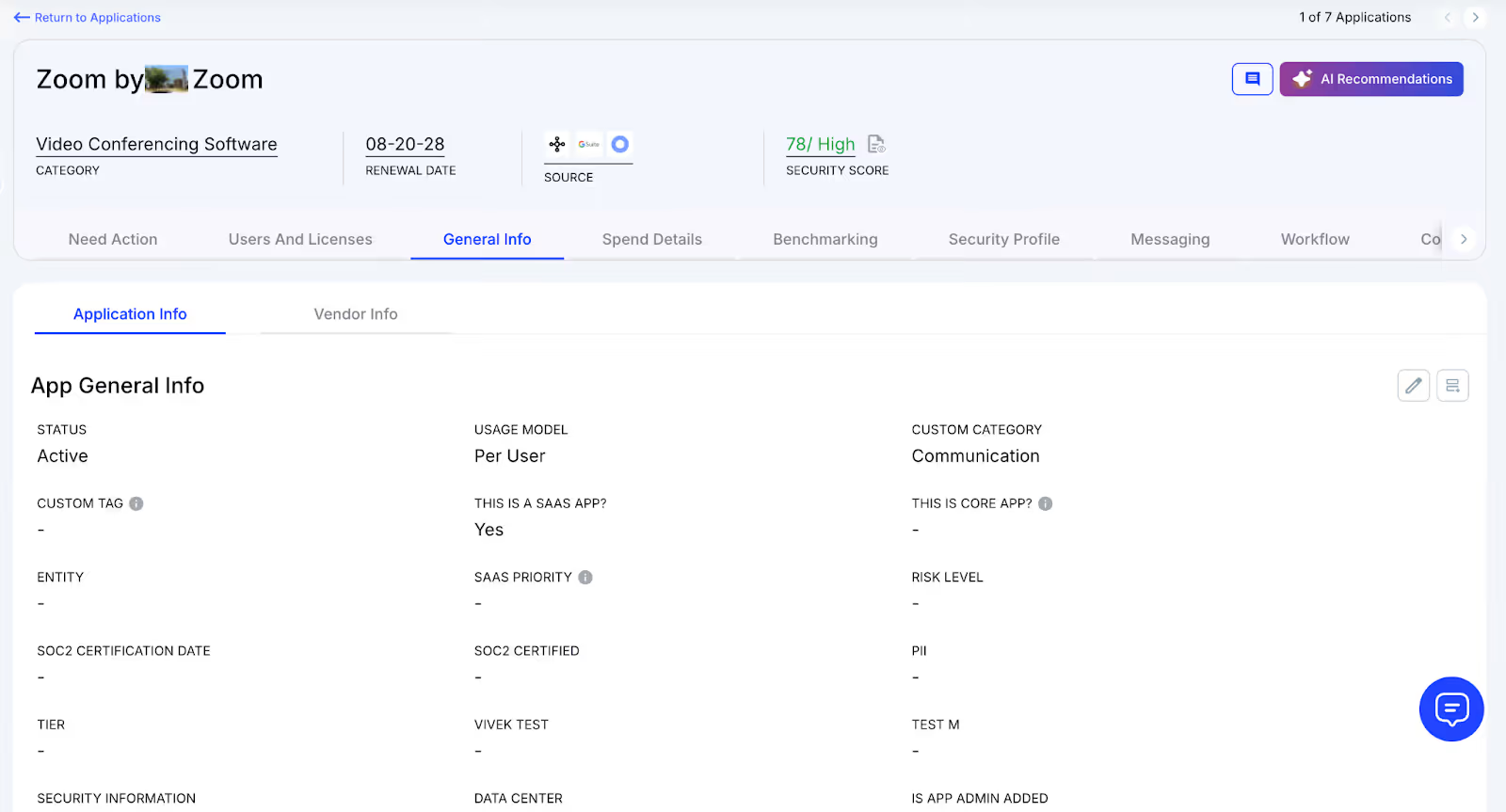
CloudEagle.ai aggregates vendor spend, usage data, and contract metadata from all connected systems in real time. Renewal dates, Zoom costs, and usage are displayed side by side for easy analysis.
Why We Are Better
Onboarding is completed within days. With over 500 integrations and AI-driven metadata extraction, CloudEagle.ai centralizes all license data, keeping it accurate, reliable, and up to date.
2. Real-Time Usage Analytics & Shadow IT Detection
Without centralized oversight, managing Zoom licenses and duplicate apps can become chaotic. Shadow IT often goes unnoticed, and IT teams struggle to identify users accessing redundant applications.
Current Process
Teams sometimes purchase duplicate applications using credit cards or free trials, which quietly convert into paid subscriptions. IT teams face challenges detecting duplicates or hidden usage.
Pain Points
Shadow IT generates untracked Zoom costs and potential security risks. Manually detecting duplicates is time-consuming and often misses overlapping applications.
How We Do It
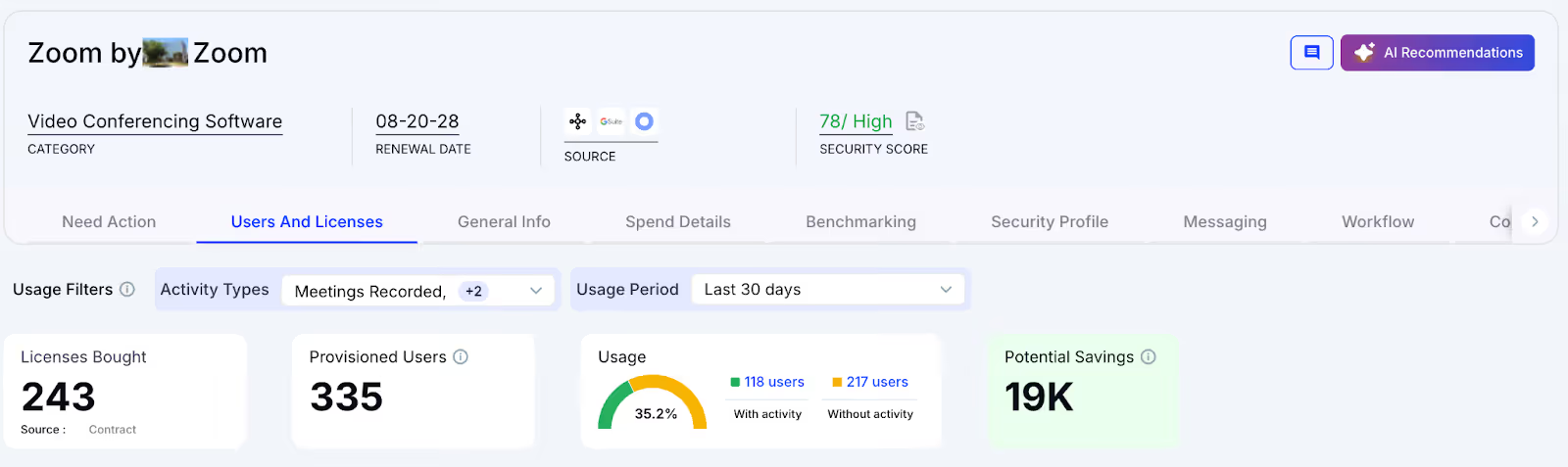
CloudEagle.ai’s AI automatically identifies duplicate and overlapping applications while tracking feature-level usage. Shadow apps are flagged immediately.
Why We Are Better
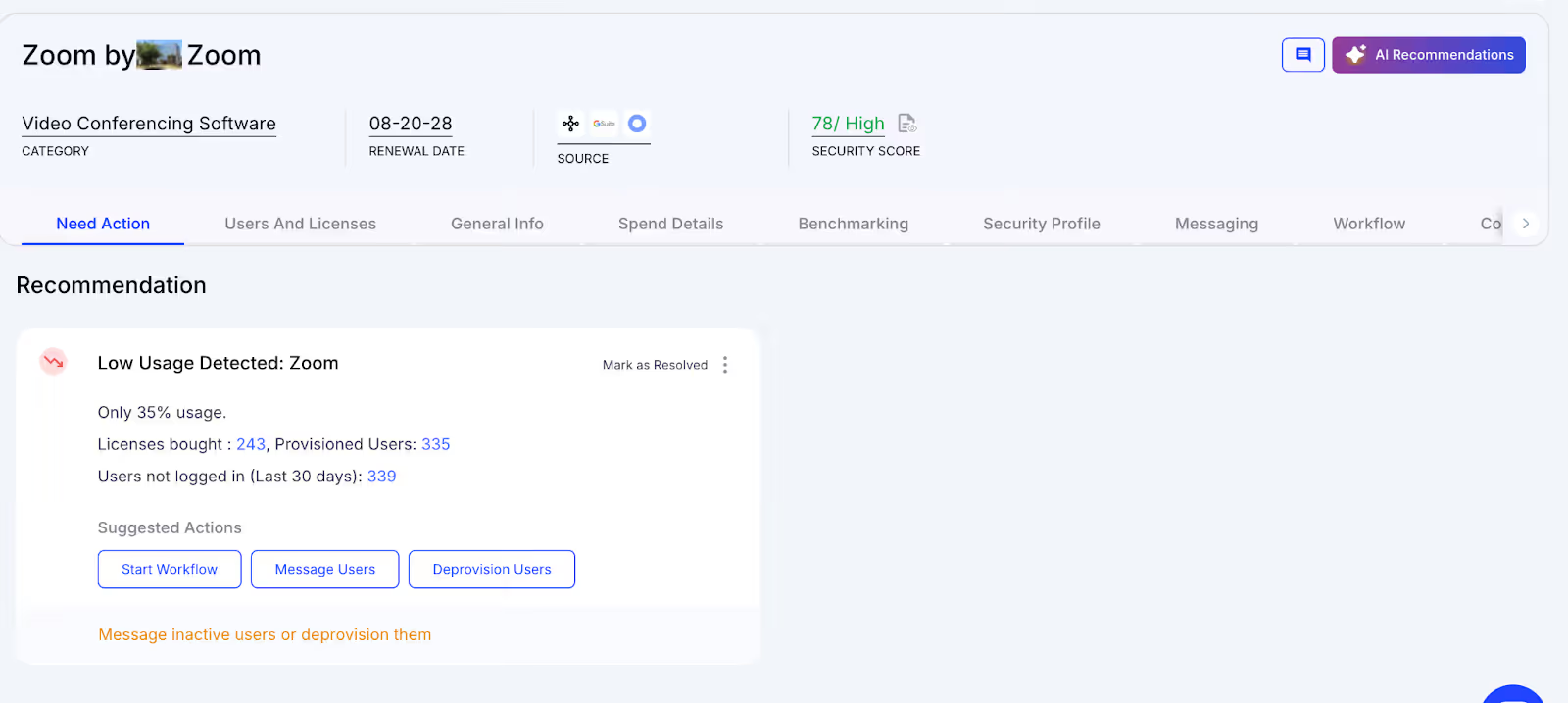
Our AI compares functionality, not just app names. IT teams can automatically email users, trigger workflows, or create ITSM tickets to reclaim licenses and reduce risk.
3. Centralized License Management
Monitoring Zoom licenses across teams can become overwhelming. Many organizations rely on spreadsheets for top applications, manually correlating data from SSO logs, feature usage, and contracts.
Current Process
Most enterprises manage only their core applications in spreadsheets. Data from SSO logs, feature usage, and contracts is combined manually, which slows updates.
Pain Points
Unmanaged applications waste budget, and license reassignment rarely occurs. Renewal tracking is inconsistent, often resulting in missed cost savings.
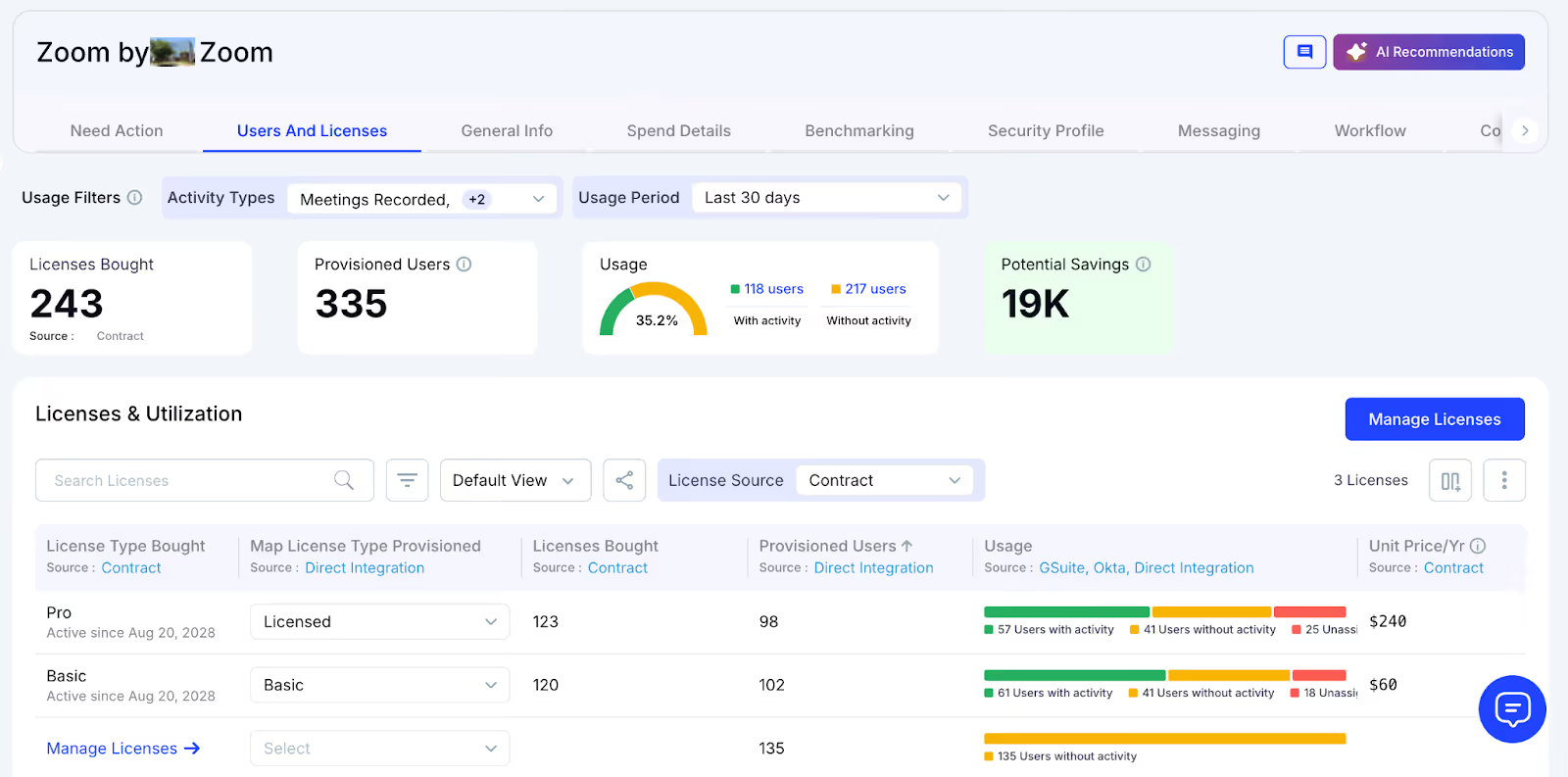
How We Do It
CloudEagle.ai centralizes license management in one platform. Nightly syncs consolidate IDP, contract, and connector data to provide real-time visibility into usage.
Why We Are Better
Automatic updates correlate purchased licenses, users, and feature usage across all applications. Teams can filter by license type and make quick, data-backed decisions.
4. Automated License Harvesting
Unused Zoom licenses silently drive up costs, yet IT teams often lack a systematic process to reclaim them. Manually tracking usage and sending weekly emails to hundreds of users is tedious, error-prone, and time-consuming.
Current Process
IT teams manually email inactive users and update spreadsheets, making the process slow, repetitive, and often skipped.
Pain Points
Inactive licenses remain active, draining budgets and increasing risk. Manual reclamation does not scale efficiently.
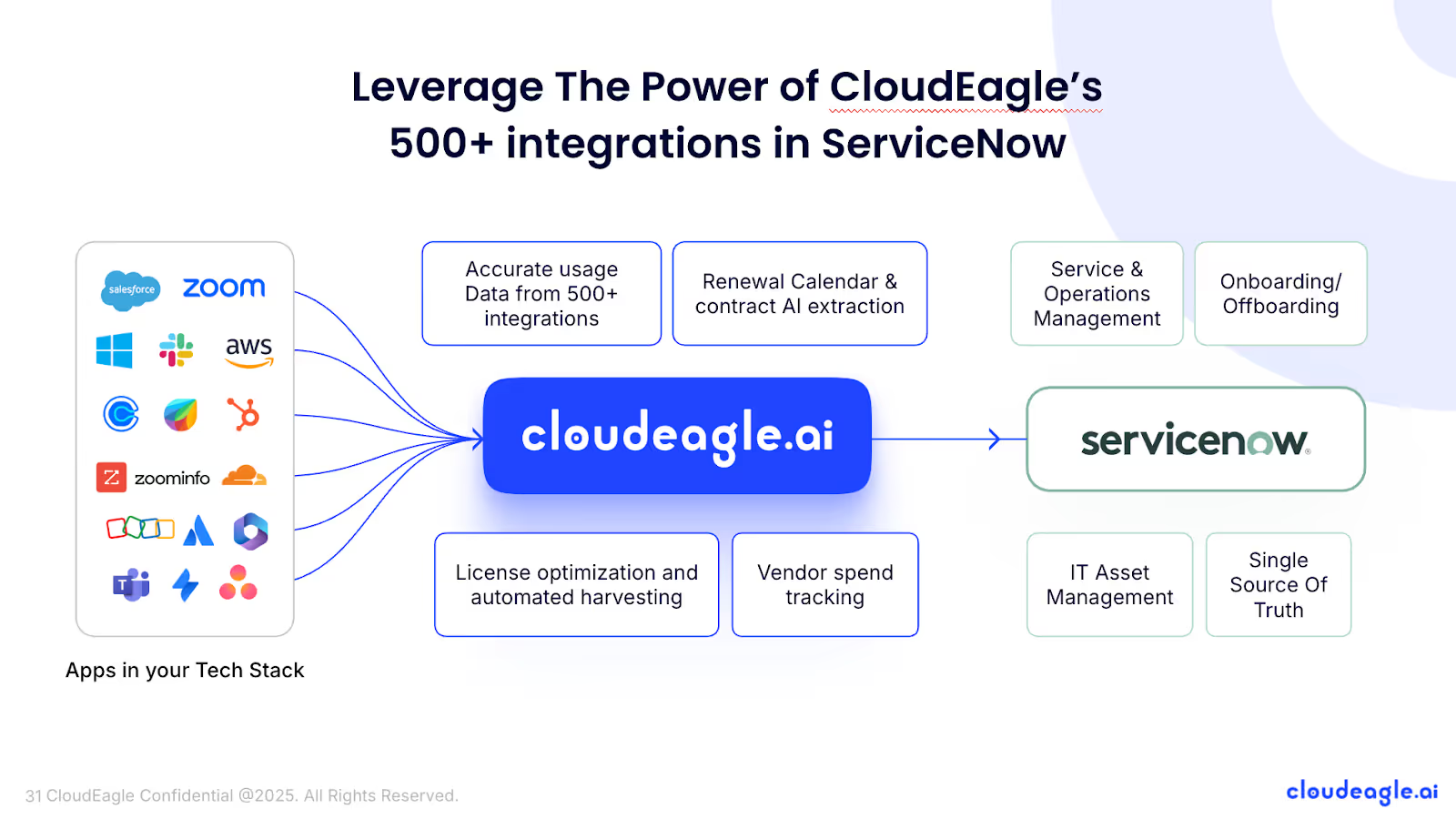
How We Do It
CloudEagle.ai automates license harvesting. Weekly workflows detect inactivity, notify users, and reclaim or downgrade licenses based on usage.
Why We Are Better
Automations run daily or weekly via Okta or Microsoft AD. Licenses are reclaimed instantly, reducing waste, saving time, and maximizing utilization.
5. License Price Benchmarking
CloudEagle.ai’s price benchmarking feature helps organizations get the most value during license renewals. By comparing contracts against industry standards, enterprises can secure competitive rates and avoid overpaying.
Current Process
Procurement teams rely on vendor quotes or outdated deals. Peer comparisons are limited and often do not reflect real market prices.
Pain Points
Teams lack accurate data for negotiations, which can lead to overpayment or unfavorable contract terms.
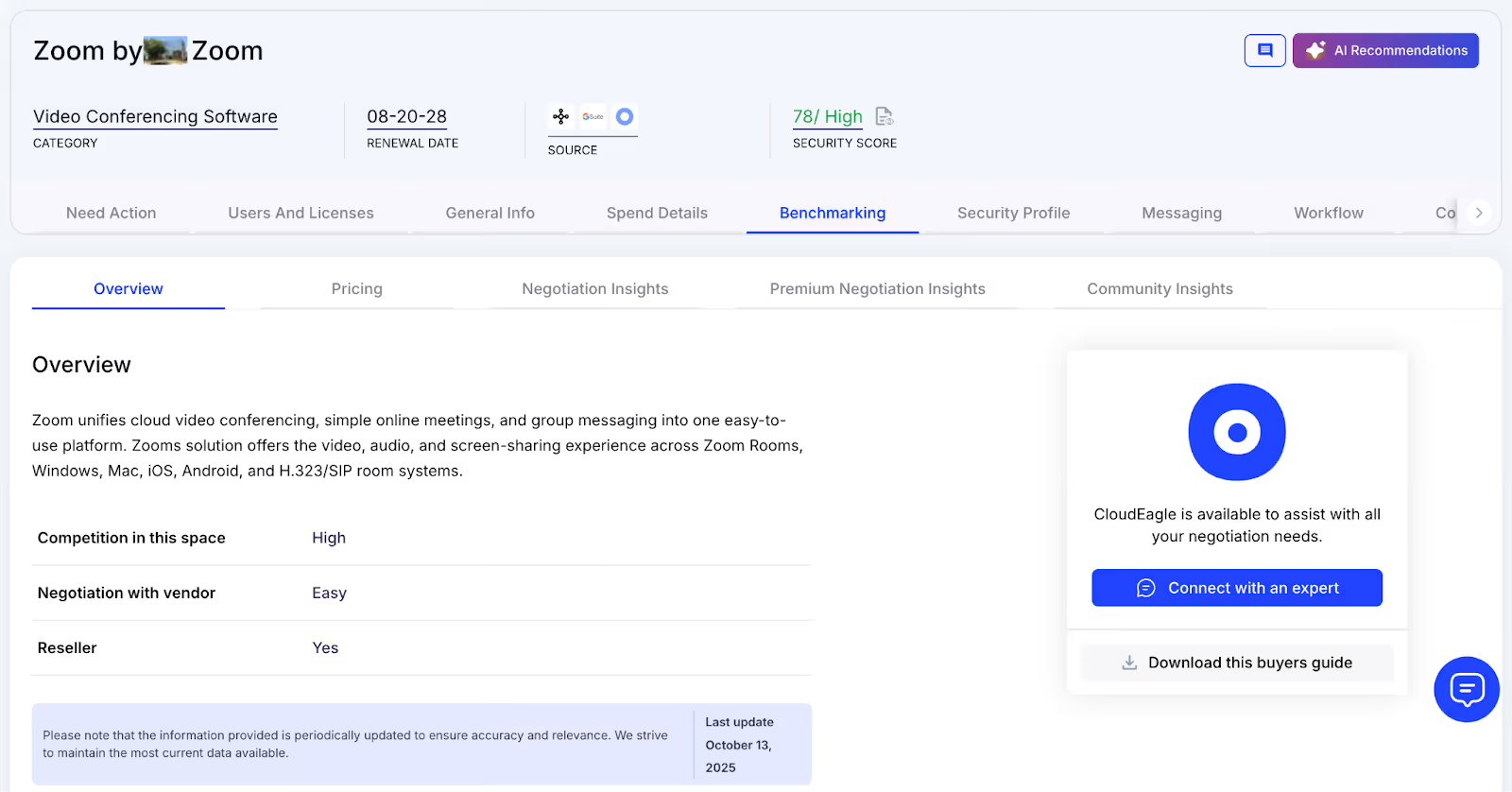
How We Do It
CloudEagle.ai delivers real-time price benchmarks, historical trends, and Zoom buying guides to support data-driven negotiation strategies.
Why We Are Better
Zoom Pricing is detailed by SKU, license tier, and quantity, alongside key negotiation levers, ensuring renewals reflect actual market value.
6. Proactive Renewal Management
CloudEagle.ai offers renewal management with automated workflows triggered by contract dates. From approvals to adjusting Zoom license counts, it ensures smooth management and prevents accidental auto-renewals.
Current Process
Renewals are tracked via spreadsheets and managed through long email chains. Approvals are slow, and auto-renewals often go unnoticed.
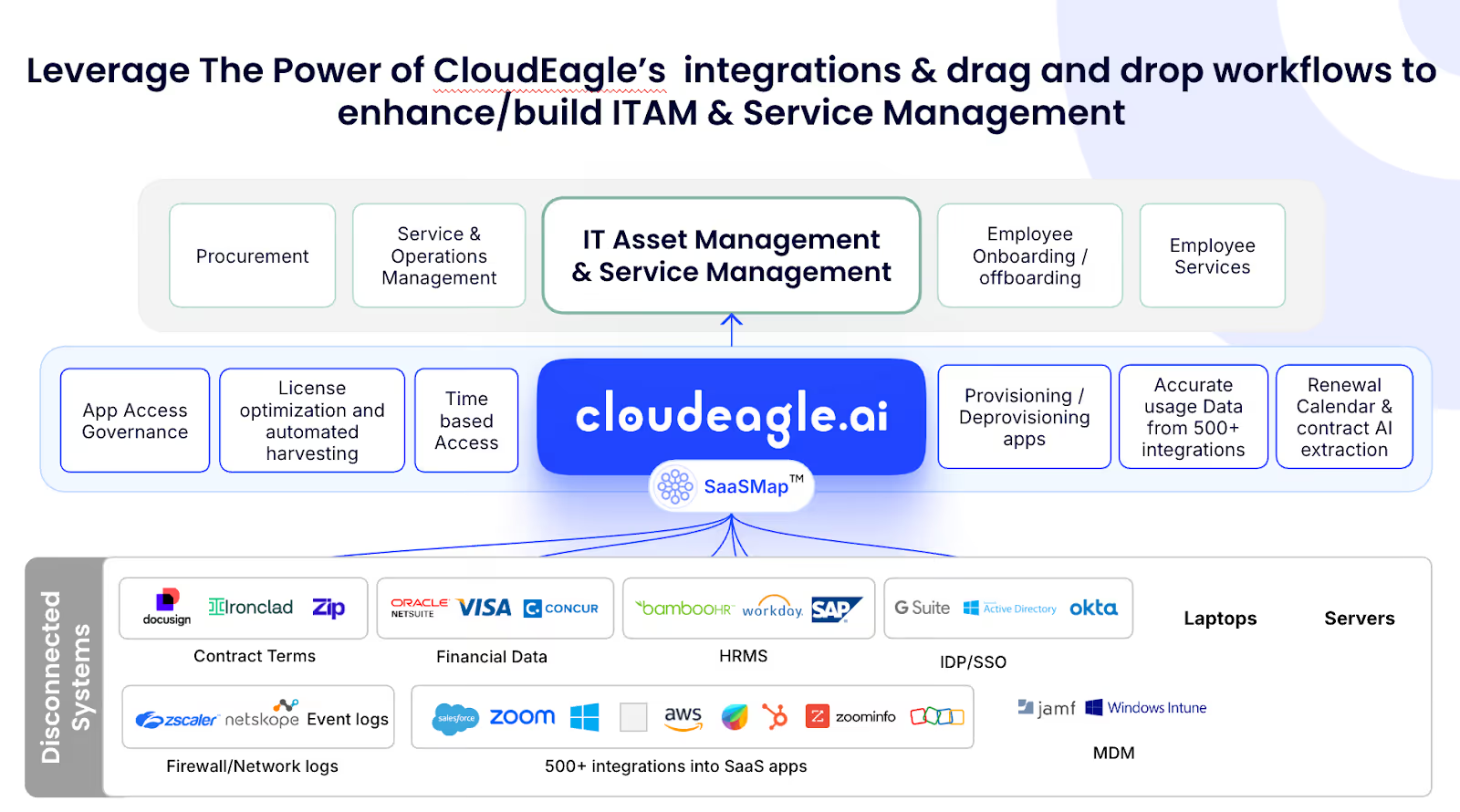
How We Do It
CloudEagle.ai generates a renewal calendar using AI-extracted metadata or integrates with CLMs like Ironclad, Zoom, or Zip. Renewal workflows trigger 90 days before the notice period, assigning tasks to finance, legal, and business owners.
Why We Are Better
Teams receive alerts with usage insights, price benchmarks, and alternative options. Approvals are tracked automatically, preventing missed renewals and unnecessary spend.
7. Leverage Vendor Dashboards
CloudEagle.ai provides vendor dashboards for a complete view of Zoom subscription data. Teams can track license usage, renewal dates, and spending patterns to make informed, data-driven decisions.
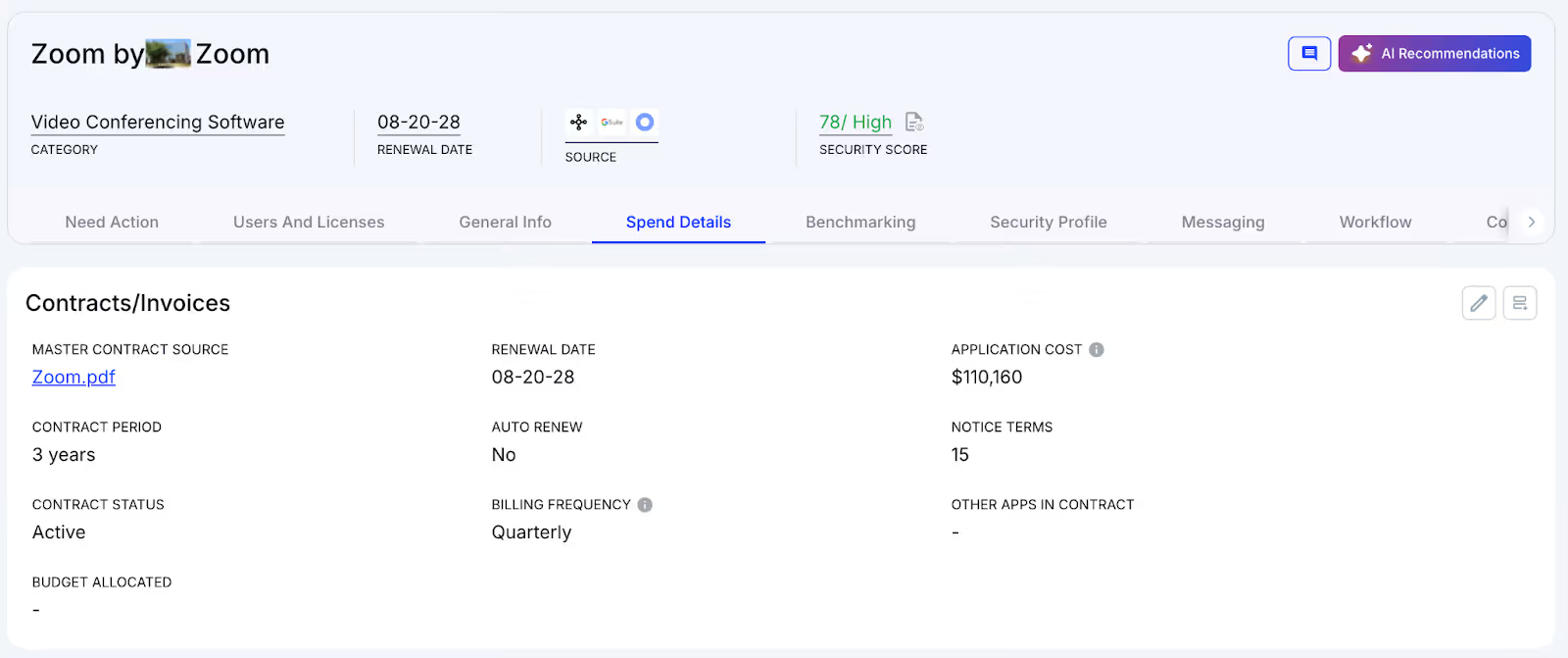
These dashboards reveal overspending and unused licenses, making resource reclamation simple. They also identify usage trends, helping organizations adjust subscriptions proactively and optimize Zoom license costs.
8. Simplified App Access Management
CloudEagle.ai streamlines Zoom access by allowing employees to request licenses directly through the platform or Slack, removing lengthy email chains and manual steps. Managers can review and approve requests in real time, ensuring quick access.
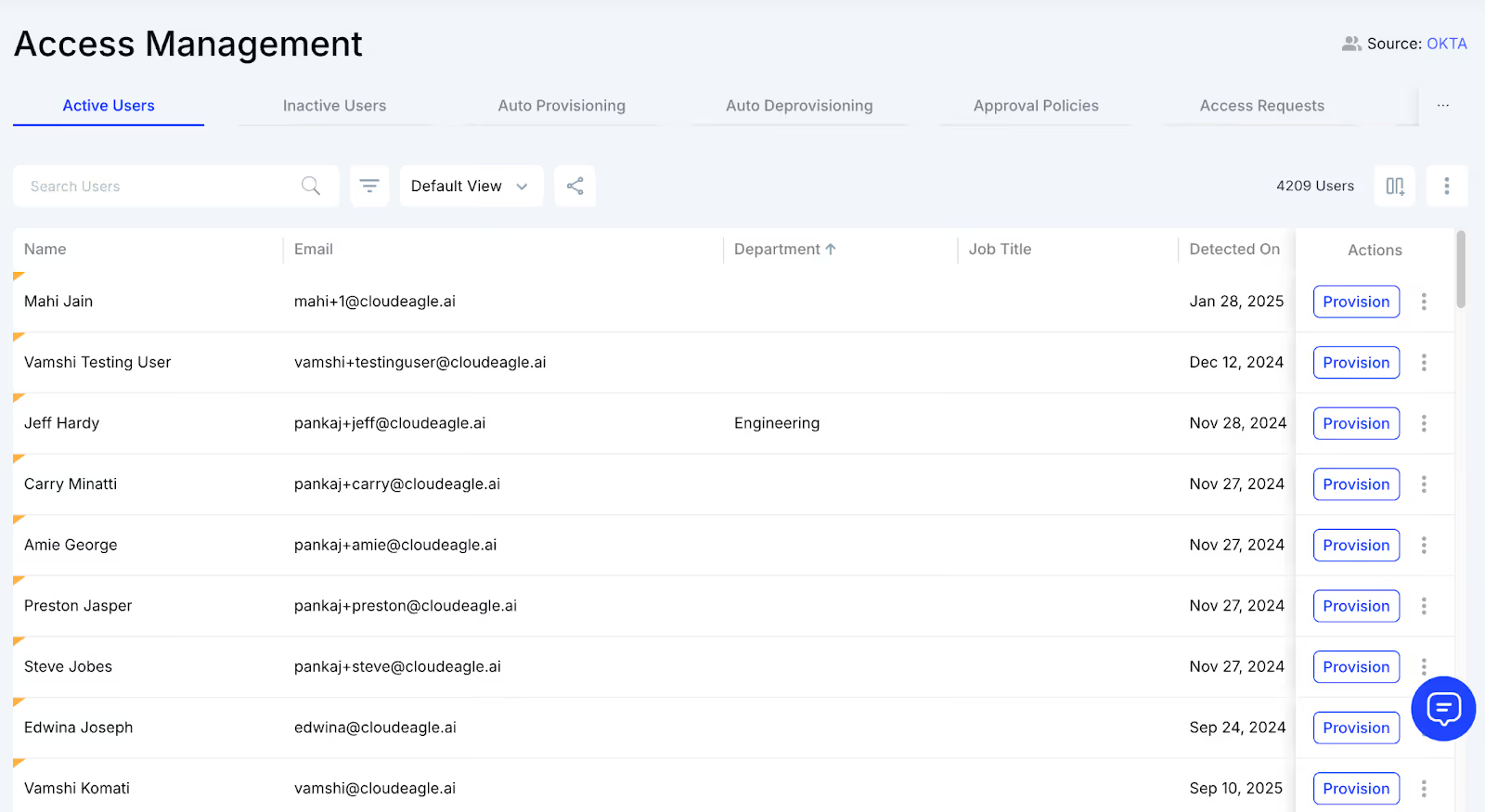
This approach ensures employees receive the correct licenses without delays and eliminates approval bottlenecks. Each access request is logged for transparency and compliance, making app access management efficient while reducing administrative workload.
Conclusion
Without clear visibility, small oversights cascade into bigger issues: manual reconciliations go wrong, audit trails blur, and IT teams spend more time chasing numbers than enabling productivity.
The hidden chaos in license management can quietly derail workflows and drain resources. The solution isn’t luck or lucking out with spreadsheets. It’s smart, centralized management.
CloudEagle.ai gives teams a single source of truth, automates license tracking, flags inactive seats, and streamlines renewals, turning confusion into clarity. So, make every Zoom license count before the hidden costs do.
FAQs
1. How do I manage Zoom licenses?
Use the Zoom Admin Portal to assign, revoke, or reallocate licenses. Track usage, monitor add-ons, and consolidate renewals for better visibility and cost control.
2. How do Zoom licenses work?
Zoom licenses grant users access to meetings, webinars, or rooms. Different tiers and add-ons define features, participant limits, and administrative controls.
3. How to get a Zoom license?
Purchase through the Zoom website or a reseller. Select the plan, assign users, and configure any add-ons or permissions via the Admin Portal.
4. Where can I check my Zoom license?
Log in to your Zoom account and navigate to the Admin > Account Management > Licenses section to view assigned licenses and add-ons.
5. How do I reduce my Zoom license?
Revoke unused or duplicate licenses, downgrade tiers, or remove unnecessary add-ons in the Admin Portal. Regular audits help minimize wasted spend.


.avif)


.avif)
.avif)




.png)






.avif)
.avif)
.avif)


