
%201.svg)


HIPAA Compliance Checklist for 2025

Zoom video conferencing platform is a must-have for many companies, including yours. You can host virtual meetings, webinars, and online collaboration sessions.
While Zoom offers a free plan, it cannot cater to your company’s professional needs. So, you need to upgrade to a paid plan. This is where things get a little tricky, as choosing the right plan will involve various considerations.
Pricing is only half the story.
Once Zoom spreads across teams, the real questions start. Who has admin access? Are the recordings compliant? Are guest users controlled, and AI summaries covered under your retention policy?
This guide breaks down both sides: what Zoom costs and what it takes to govern it at scale, whether you're evaluating plans or trying to reduce risk.
TL;DR
- Zoom offers free and paid plans, with premium options providing unlimited meetings, more participants, better security, and advanced collaboration tools.
- Free Zoom meetings are limited to 40 minutes. Paid plans unlock longer meetings, cloud recording, advanced security, and better collaboration features.
- Use CloudEagle.ai’s price benchmarking and negotiation insights to secure the best price on Zoom plans. Leverage competitive offers, strategic requests, and additional perks.
- If Zoom doesn’t fit your needs, consider Microsoft Teams, Google Meet, Cisco Webex, GoTo Meeting, or BlueJeans for secure and high-quality video conferencing.
- CloudEagle.ai helps you compare real-world pricing, plan negotiations, and optimize your Zoom subscription for the best ROI.
1. Why Zoom Is Everywhere in Your Company?
Zoom is a powerful video conferencing platform that helps you connect with others through virtual meetings. It can improve collaboration and communication between your team members, regardless of your company’s size. Moreover, Zoom pricing plans won’t break the bank.
With Zoom, you can host high-quality video and audio calls, share your screen, and engage with others through chat, breakout rooms, and cloud recordings.
The best part is that Zoom keeps all your communication in one place. Instead of traveling for meetings or getting lost in long email threads, you can instantly connect with colleagues and clients.
A. The Truth About Zoom’s Free Plan
Zoom’s free plan includes unlimited 1-on-1 meetings, group calls up to 100 participants, and basic chat. It works for individuals, but it falls short for business use.
- 40-minute group limit: Every group meeting ends at 40 minutes. For recurring team or client calls, this creates unnecessary disruption.
- No cloud recording: You cannot store recordings in the cloud, removing audit trails and async collaboration.
- No SSO or admin controls: The free tier lacks single sign-on, centralized management, and compliance features, making it unsuitable for governed environments.
- No dedicated support: Support is limited to community forums, which is risky for business-critical usage.
2. Zoom Pricing: How Much Does it Cost and Is it Worth it?
Whether Zoom is worth it depends on your constraints: cost, security, or operational complexity.
List pricing starts at $13.33/user/month (Pro) and $18.32/user/month (Business), billed annually. Monthly billing increases costs by roughly 15 to 20 percent.
Many buyers also ask, how much is Zoom per month after discounts and volume negotiations. The actual Zoom subscription cost depends on seat count, billing cycle, and feature adoption across teams.
- Executives: Business and Enterprise tiers reduce tool sprawl and eliminate workflow friction caused by the free plan’s time limits.
- Security teams: SSO, advanced admin controls, and compliance features are available only in Business and above, making upgrades essential in regulated environments.
- IT operations: Paid plans include stronger SLAs and priority support, reducing ticket volume and downtime risk.
- Procurement: Annual billing improves predictability, but the real savings come from negotiating based on actual feature adoption, not seat counts.
A. What the Price Tag Doesn't Tell You
List pricing is just the starting point. It won’t tell you if your setup is secure, licenses are actually used, or default settings meet compliance requirements.
Two companies can pay the same for Zoom Business and end up in very different places. One runs a locked-down, auditable environment. The other has open recording permissions, ungoverned access, and no offboarding process.
Your plan decides what tools you get. How you configure and manage it decides your real risk.

3. Zoom Plans: What You Pay and What You Get?
Zoom pricing spans four tiers: Free, Pro, Business, and Enterprise. If you're evaluating a Zoom premium tier, focus on governance, security, and admin features rather than just participant limits.
Matching the right plan to the right buyer persona ensures you're not paying Zoom premium pricing for capabilities your users will never adopt:
A. What Free and Pro Plans Leave Exposed
Free and Pro work for small teams. At scale, they create governance blind spots. No SSO, no centralized admin control, no audit logs. If employees spin up accounts on company emails, IT has zero visibility into meetings, recordings, or data location. In regulated industries, that is a compliance risk.
What IT needs to watch for:
- Employees buying Pro licenses on personal cards
- No audit trail for recordings in personal cloud accounts
- No way to revoke access cleanly when someone leaves
B. Business Plan: Where Governance Starts
Business is the first tier where IT gets real control. SSO ties access to your IdP, so offboarding is immediate. Admin dashboards let you enforce recording rules and manage external sharing.
For SOC 2 or HIPAA environments, this is the practical minimum. If you have financial reporting requirements, check SOX 302 vs SOX 404 since Zoom recording and access controls can intersect with IT general controls.
Governance wins at this tier:
- SSO via SAML 2.0 with centralized provisioning
- Admin-controlled recording permissions
- Domain management to bring shadow accounts under visibility
C. Enterprise Plan: Full Control, Higher Stakes
Enterprise unlocks advanced compliance tools, custom retention, and deeper security integrations. But more capability also means more surface area if the configuration is loose.
Governance capabilities here:
- Custom data retention policies for recordings and chat
- Advanced compliance exports for audits and investigations
- Integration with DLP and SIEM tools
- Dedicated support to establish a governance baseline early
4. Zoom Security Risks: What CISOs Aren’t Watching
Zoom is easy to buy. That’s the problem. Teams can purchase licenses without IT, and the risk rarely comes from the product itself. It comes from ungoverned access, untracked licenses, and quiet configuration gaps that build up over time.
Zoom is one vendor among hundreds, which is why SaaS vendor management systems exist to keep access, licenses, and configuration in check across the whole stack.
A. Shadow Zoom: The Procurement Risk You Can’t See
When employees self-purchase Pro or add webinar licenses on a corporate card, IT loses visibility. Recordings sit in personal cloud spaces outside your governance policy.
If that employee leaves, the license and its data can remain active indefinitely.
B. Ex-Employee Access: The Offboarding Gap
Without SSO, available only on Business and above, Zoom accounts are not automatically deactivated during offboarding. Access lives on unless someone manually shuts it down. You can choose from the 8 best single sign-on tools for tying Zoom and the rest of your stack to a single identity provider.
An ex-employee may still access shared recordings, rejoin recurring meetings, or retain host privileges. This is a common control gap when Zoom is not tied to your IdP.
C. Uncontrolled Guest Access and External Sharing
Pro defaults often allow external participants to join with minimal friction. Without enforced waiting rooms, passwords, and domain restrictions, unauthorized guests can enter internal meetings.
In regulated industries, that is both a compliance and reputational risk.
D. AI Companion and Transcript Data: The New Blind Spot
AI Companion generates summaries and transcripts that are stored as meeting artifacts. They carry the same governance obligations as recordings but are often overlooked.
If enabled without IT oversight, confidential content may sit in Zoom’s cloud under default retention rules, with no clear access or lifecycle policy.
What CISOs Should Audit Today
- Are all Zoom accounts connected to your IdP?
- Do any ex-employees still have active licenses?
- Is AI Companion enabled by default?
- Does your retention policy explicitly cover recordings and AI outputs?
- Are webinar host licenses assigned only to active employees?
5. How Can I Tell What Zoom Licenses My Company Actually Has?
This question comes up in almost every Zoom renewal conversation, and the answer is harder than it should be. Most IT and procurement teams assume the Zoom admin console gives them a complete picture. It does not.
A. What the Admin Console Shows and Misses
It reflects licenses under your primary account. That’s it.
It shows:
- Assigned users and roles
- Licenses tied to your main account
It misses:
- Self-purchased accounts on company emails
- Unmanaged sub-accounts
- Add-ons bought via self-serve
In larger orgs, that gap adds up fast.
B. Manual Discovery Doesn’t Scale
You can review expense tools and your IdP. But that’s a snapshot, not control.
The problem:
- New self-purchases happen continuously
- Spending and usage stay disconnected
- Waste hides until renewal
C. What You Actually Need: Automated License Discovery
A platform like CloudEagle.ai continuously discovers all Zoom licenses, including shadow accounts and idle hosts.
It gives you:
- Full license visibility
- Usage is mapped to spend
- Ongoing monitoring, not one-time audits
That’s the difference between cleanup and control.
6. How Much Does Zoom Cost for Premium and Webinars?
Many teams upgrading from the free plan ask how much Zoom costs for business use.
The Zoom premium price increases at the Business and Enterprise tiers due to SSO, advanced admin controls, compliance tools, and higher participant limits.
If you're evaluating events, you may also wonder, how much is Zoom webinars? Zoom webinar costs scale based on host licenses and attendee capacity, typically starting at 500 participants and increasing at higher tiers.
The right plan depends on actual meeting size and feature usage, not maximum limits.
7. Zoom Add-Ons That Quietly Increase Your Bill
Core plans are only part of your total Zoom cost. Add-ons like Events and Webinars often drive the biggest budget surprises.
A. Zoom Events Pricing:
Zoom Events pricing depends on host licenses, attendee capacity (500 to 50,000), and event volume. Costs scale quickly as you move up tiers, so capacity selection matters.
Key cost drivers:
- Multi-session hubs: Useful for conference-style events, but unnecessary for simple webinars.
- Expo and networking features: Sponsor booths and virtual expos increase cost and should align with revenue goals.
- Advanced analytics: Higher tiers unlock deeper engagement reporting. Only justify this if metrics directly influence the pipeline or revenue.
To right-size, review attendance from your last 6 to 12 events. Choose a tier based on typical high attendance, not one-time spikes.
B. Zoom Webinars Pricing:
Zoom Webinar pricing is priced per host and by attendee tier, typically 500, 1,000, 3,000, and 5,000+ participants. Tier selection is the primary cost decision.
Common overspend patterns:
- Tier mismatch: Buying 1,000 seats when the average attendance is 150 to 200.
- Inactive hosts: Paying for organizers who ran zero sessions last quarter.
- Unused premium features: Custom branding and advanced reporting that no one leverages.
Track real attendance and host activity before renewal to eliminate silent waste.
8. Why Most Teams Overpay for Zoom?
Zoom pricing is based on capacity, but actual usage determines the total cost. Many teams overbuy by focusing on seat counts instead of real usage patterns.
Common overspend drivers:
- Tier mismatch: If most meetings are under 60 minutes with small groups, Pro often covers real demand. Upgrading to Business just to remove limits you rarely hit leads to unnecessary spend.
- Unused recording storage: Cloud recording is a frequent upgrade reason, but playback and download rates are often low. Audit storage usage before justifying higher tiers.
- Idle Phone and Room licenses: Zoom Phone and Zoom Rooms are billed separately. Low call volumes or unused conference rooms quietly inflate costs.
- Inactive webinar hosts: Webinar licenses are expensive. Paying for organizers who rarely host sessions creates avoidable waste.
Right-sizing requires analyzing meeting duration, participant counts, recording usage, and host activity, not just login data.
A. Zoom Workplace Pricing
Zoom Workplace bundles meetings, chat, whiteboard, and AI features into one subscription. It can deliver value, but only if teams actively use the added capabilities.
Watch for:
- Tool overlap: If your stack already includes Slack or another VoIP tool, Workplace may duplicate functionality rather than consolidate it.
- Shelfware risk: Bundle discounts look attractive, but unused chat or whiteboard features still increase total subscription cost.
- Governance benefits: Enhanced SSO, admin controls, and reporting can justify upgrades for enterprise environments. Check the top 10 IT governance frameworks to structure those controls beyond any single vendor.
Before upgrading, validate adoption through usage signals like meeting frequency, chat activity, and whiteboard sessions, not just assigned licenses.
9. Zoom Pricing Guide: Streamlining Zoom Purchasing with CloudEagle.ai
A. Price Benchmarking Data
CloudEagle.ai gives you access to an extensive network of experienced SaaS buyers, offering the most up-to-date benchmarking data from over 1 billion transactions.
With CloudEagle.ai’s Zoom benchmarking data, you can gain insights into what other businesses are paying for various Zoom pricing plans.
B. Expert Strategies: Negotiation Tips to Secure the Best Zoom Deal
Here are the expert negotiation tricks you need to keep in mind to secure the most lucrative Zoom deal:
- Prioritize Value Over Price: Negotiation isn’t just about lowering the cost. Focus on securing the best overall deal for your team. Look at the features, flexibility, and services you’ll get with the plan, and ensure it fits your business needs in the long run.
- Seek Additional Perks: Instead of pushing for a price cut, explore other benefits that might be available. For example, request longer trial periods, better payment terms, or complementary services that can add value to your contract.
- Make Strategic Requests: Position your negotiation in a way that highlights how an improved deal benefits both you and the vendor. The Zoom buying guide will drive growth and show your potential for long-term commitment.
- Use Leverage Effectively: Strengthen your position by bringing up competitors' offers, consolidating multiple licenses, or timing your negotiation around renewal periods. These tactics can help you gain leverage and secure better terms.
In the next section, you’ll learn proven negotiation tactics, factors that impact pricing, and how to effectively position your needs to get the best deal.
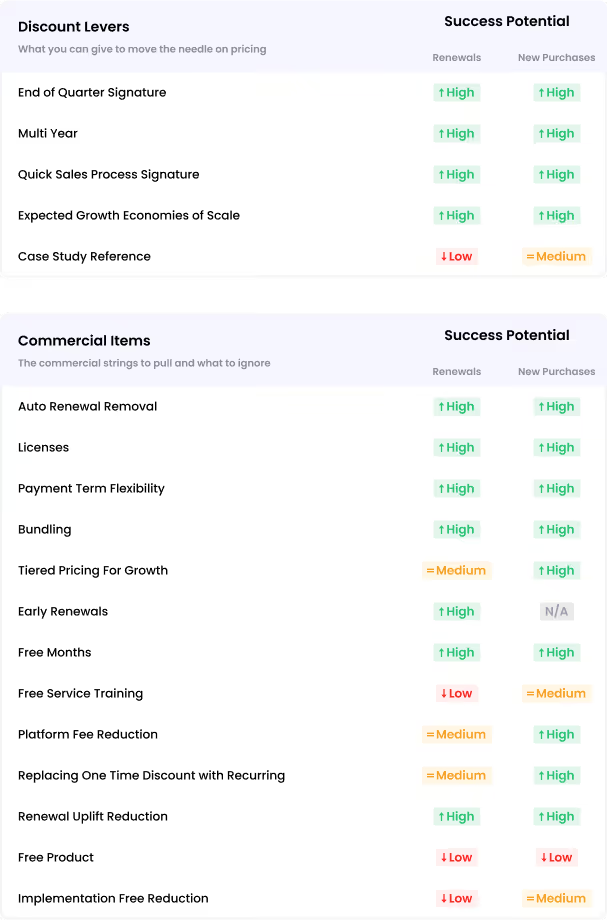
C. Governance as a Negotiation Lever
Most procurement teams negotiate on price. Governance-focused buyers negotiate on terms and often get more.
When renewing or buying Zoom Business or Enterprise, make these asks explicit:
- Data residency commitments
Get written confirmation on where recordings and chat data are stored, especially for EU or regulated deployments. make sure you check key SaaS agreement clauses to know the terms worth scrutinizing before any annual commitment. - Admin onboarding support
Secure dedicated IT onboarding to configure SSO, policies, and compliance controls before go-live. - Compliance documentation
Request the latest SOC 2 Type II report, HIPAA BAA availability, and DPA templates before signing. - Audit log SLAs
Clarify retention periods and response timelines for audit log access during incidents. - AI data processing terms
Confirm whether AI Companion outputs are used for model training and under what conditions.
Tracking those terms and their renewal dates across every agreement is what best contract management tools are built for. These are not add-ons. They are baseline governance controls. If there is pushback, that is a signal, not friction.
D. Dissecting the Data
Are you curious about how much other businesses are paying for different Zoom pricing plans? Download our Zoom buying guide to get valuable insights.
As you can see, only the benchmark for 1-100 license counts is available here. For the full benchmarking data, be sure to grab our complete Zoom pricing guide.
E. Importance of Zoom Benchmarking Data
Here are a few reasons why you need this premium benchmarking data:
- Real-World Pricing Data: You'll gain access to actual data on what companies are paying for Zoom. Unlike public Zoom pricing, CloudEagle.ai’s benchmarking data gives you deeper insights into usage and costs.
- Better Negotiation: With a clear understanding of various pricing models, you'll be equipped to negotiate confidently and ensure you’re not overpaying.
- Accurate Budget Planning: Precise pricing estimates help your procurement and IT teams plan your SaaS spending more effectively.
Thanks to CloudEagle.ai’s unbiased price benchmarking data and in-depth negotiation insights, you’ll secure fair prices during procurement and renewals. You’ll be able to get better deals and maximize your Zoom investment.
F. Premium Negotiation Insights
Why settle for average pricing when you can leverage CloudEagle.ai to negotiate like an expert? With the right insights, you can eliminate unnecessary expenses, unlock exclusive benefits, and maximize the value of your Zoom investment!
Don’t let potential savings slip away. Download our Zoom pricing guide today and learn effective negotiation strategies that have helped other companies save thousands of dollars.
Know the Right Price Before You Buy.


10. Zoom Pricing and Governance: How CIOs and CISOs Can Optimize Together?
Zoom cost overruns and Zoom security gaps usually have the same root cause: licenses that were never tracked, features that were never audited, and access that was never reviewed. The tools to fix both are the same.
A. Discover Hidden and Self-Purchased Licenses
CloudEagle.ai surfaces all Zoom licenses across your organization, including self-purchased accounts that bypass procurement.
Every unauthorized license is both a budget leak and an ungoverned access point.
B. Reclaim Unused Webinar and Phone Licenses
Webinar hosts and Zoom Phone seats are often bought for short-term needs and never removed.
CloudEagle flags idle licenses with usage data so you can reclaim them before renewal instead of funding another unused cycle.
C. Strengthen Access Reviews and Offboarding
Periodic access reviews identify accounts where users have left, changed roles, or stopped using Zoom.
With IdP integration, offboarding becomes automated and enforceable, not a manual checklist
D. Enable Just-in-Time Access for Occasional Hosts
Not every employee needs a persistent host license. For quarterly meetings or rare client calls, standing access creates unnecessary spend.
Just-in-time provisioning assigns licenses when needed and reclaims them automatically, reducing license count without disrupting operations.
11. Zoom Pricing Models: Which Companies Should Use Which Plans?
Zoom offers various pricing plans to suit different needs. Choosing the right plan depends on your company's size, meeting requirements, and collaboration needs.
- Freelancers & Solo Professionals: The Free or Pro Plan is ideal if you work independently and need essential video conferencing tools without a large budget. Pro offers longer meetings and cloud recording for added flexibility.
- Startups & Small Teams (Under 50 Employees): This Zoom pricing is best for growing teams that need unlimited meeting time, basic admin controls, and cloud recording. If you’re hosting regular meetings or small webinars, this plan provides the necessary tools without high costs.
- Mid-Sized Businesses (50-300 Employees): The Business Plan is a great choice if your company requires advanced collaboration features, increased security, and branding options. With support for up to 300 participants, this plan is perfect for teams that hold frequent large meetings.
12. What is the best alternative to Zoom?
Zoom dominates the video conferencing market, but it isn’t perfect. The 40-minute limit on the free plan, add-on costs, and past security concerns have pushed some organizations to explore alternatives.
If you’re evaluating other platforms, here are the strongest contenders:
A. Microsoft Teams
If your business already uses Microsoft 365, Microsoft Teams is a seamless choice. You can chat, make video calls, and share files, all within one platform.
Since it integrates directly with Outlook, Word, Excel, and SharePoint, collaboration becomes effortless. Teams also offers advanced security and compliance tools, ensuring your data stays protected.
B. Google Meet
If you prefer a simple, browser-based solution, Google Meet is a great option. You don’t need to install any software. Just open a link and join the meeting instantly.
Since it’s part of Google Workspace, you can easily schedule meetings through Gmail or Google Calendar. If your team already relies on Google apps, Meet will integrate smoothly into your workflow.
C. Cisco Webex
If security is a top priority for your business, Cisco Webex is worth considering. It provides end-to-end encryption and enterprise-grade security, so you don’t have to worry about sensitive data being compromised.
Webex also includes AI-powered noise removal, interactive whiteboards, and breakout rooms to make your meetings more dynamic. If you regularly host webinars or virtual training sessions, Webex gives you the tools to manage them effectively.
D. CloudTalk
If a large share of your Zoom spend is actually Zoom Phone rather than video meetings, a dedicated calling platform is the better fit. CloudTalk is built for sales and support teams, with international numbers, IVR, call routing, and native CRM integrations.
Before you renew, it's worth checking a detailed Zoom Phone review to see where the calling side falls short and which call-center features a purpose-built system adds.
D. GoTo Meeting
If you need a reliable platform for professional meetings and webinars, GoTo Meeting is a strong alternative. It offers HD video and high-quality audio, ensuring clear communication with your team.
You can record meetings, generate transcripts, and use screen-sharing tools to enhance collaboration. Plus, with its mobile-friendly app, you can join or host meetings from anywhere.
E. BlueJeans
BlueJeans delivers crystal-clear sound with Dolby Voice technology. You’ll experience high-quality video calls with smart meeting analytics and real-time transcription.
With enterprise-level security and encryption, you can confidently host secure meetings. If you need superior audio and video performance, BlueJeans is a great alternative.
Wrapping Up
Zoom is undoubtedly one of the best video conferencing tools for businesses of all sizes. However, its pricing structure can be complex, making it challenging to choose the right plan for your needs.
CloudEagle’s Zoom pricing benchmarking and negotiation insights can help you optimize your SaaS investment. You’ll maximize the value of your Zoom subscription while streamlining the procurement process.
Sign up with CloudEagle today to gain expert negotiation insights and take full control of your SaaS purchasing decisions!
Frequently Asked Questions
1. How does CloudEagle.ai detect self-purchased Zoom accounts that IT never provisioned?
CloudEagle.ai identifies shadow Zoom licenses by analyzing financial transaction data, SSO signals, and browser activity to surface accounts that were created outside the official procurement process. This gives IT a complete and current picture rather than a one-time audit snapshot.
2. Can CloudEagle.ai automatically reclaim idle Zoom webinar host licenses before renewal?
CloudEagle.ai tracks webinar host activity and flags licenses where no sessions have been hosted within a configurable window, creating a reclamation candidate list that procurement teams can act on before the contract renews. This prevents the common pattern of paying for organizer seats that were assigned for a single event and never used again.
3. Does CloudEagle.ai support just-in-time provisioning for Zoom host licenses?
CloudEagle.ai can provision Zoom host access on a time-bound basis, assigning licenses for a specific period and automatically revoking them when the window closes rather than leaving standing access in place. This is particularly useful for organizations where a subset of employees host meetings only quarterly or for specific projects.
4. How does CloudEagle.ai help connect Zoom offboarding to the broader employee lifecycle?
CloudEagle.ai integrates with your identity provider so that when an employee is offboarded, Zoom access is revoked alongside every other SaaS application in the same automated workflow rather than requiring a separate manual step. This closes the ex-employee access gap and produces an auditable deprovisioning record.
5. What Zoom-specific benchmarking data does CloudEagle.ai provide to support renewal negotiations?
CloudEagle.ai surfaces peer pricing benchmarks for Zoom Business and Business Plus tiers, drawn from over $2 billion in analyzed SaaS transactions, showing what organizations of comparable size and seat count are actually paying rather than relying on list pricing.
Know the Right Price Before You Buy.


.avif)


.avif)
.avif)




.png)







.avif)
.avif)
.avif)


