You need to enable JavaScript in order to use the AI chatbot tool powered by ChatBot

Tableau License Management with CloudEagle.ai: Optimize Usage and Cut Costs

Share via:
blog-cms-banner-bg
Little-Known Negotiation Hacks to Get the Best Deal on Slack
cta-bg-blogDownload Your Copy

HIPAA Compliance Checklist for 2025

Download PDF

Optimize Tableau License Usage

Learn how to identify inactive users and reclaim paid seats to reduce Tableau spending.

Download the License Guide
CTA Thumbnail

You know that moment when you open Tableau and think, “We’ve got this data thing figured out”. Until the finance team opens the invoice and asks, “Wait, how much are we paying for visualization again?”. The Tableau license complexity makes it easy to lose track. 

Before you know it, half your seats belong to users who log in once a quarter. And according to Forbes, enterprises waste up to 30% of their analytics tools spent on unused or inactive licenses.

That’s where CloudEagle.ai makes the difference. It reveals which dashboards drive insights and and which just drive tableau license pricing​. By tracking feature-level usage, reclaiming idle seats, and surfacing real utilization data, it helps you cut waste.

TL;DR

  • Tableau licenses drift out of control fast, with Creator and Explorer seats piling up quietly and rarely matching actual usage.
  • Up to 30% of analytics spend is wasted on inactive users, abandoned dashboards, and high-tier licenses held by monthly or quarterly visitors.
  • Shared logins and stale projects hide true engagement, making dashboards look “active” when most usage is superficial or outdated.
  • CloudEagle.ai automates the entire license lifecycle, revealing real usage, detecting shadow IT, reclaiming idle seats, benchmarking pricing, and preventing renewal surprises.
  • Tableau finally stabilizes when usage aligns with licensing, letting teams keep only the seats they need while stopping silent cost creep for good.

Improve Visibility Across Your SaaS Stack

Use these best practices to manage Tableau and other tools with better cost control and governance.

Get the Best Practices
CTA Thumbnail

1. When Did Your Tableau Licenses Start Costing More?

You don’t notice it at first. A few Creators added for a project, an Explorer upgrade “just for this quarter,” and a handful of Viewers who somehow ended up with full application access

Individually, these decisions feel harmless. But somewhere along the way, your Tableau bill stopped matching your actual analytics usage.

  • Creator seats multiply quietly when teams request edit access for a single dashboard.
  • Explorers get over-assigned because “it’s easier than changing permissions later.”
  • Viewers hold premium features even though they only check reports in Monday meetings.
  • Old project teams keep licenses long after the project has been archived

And then one day, finance asks why the analytics budget grew without any new hires. IT checks the admin console and realizes half the “active users” haven’t logged in since the last product launch.

  • Usage logs expose a huge gap between what’s licensed and what’s actually touched.
  • Team reshuffles leave orphan seats assigned to users no one remembers onboarding.
  • Add-on permissions linger because nobody wants to risk breaking a dashboard

And that’s when it becomes clear: the tableau pricing​ didn’t spike overnight. It grew in the background, the same way dashboards do. One layer at a time, until the whole thing looks nothing like what you originally designed.

Streamline Tableau Operations

Follow this checklist to improve license hygiene, reduce waste, and strengthen operational control.

Download the Checklist
CTA Thumbnail

2. Why Are You Still Paying For Tableau Access No One Actually Uses?

Tableau looks healthy the entire time. Dashboards load, workbooks refresh, permissions don’t break. Meanwhile, half your licensed users only log in to check a quarterly report, and Creators haven’t published anything since last year.

A. Dashboards Sitting Abandoned For Entire Quarters

You’d expect dashboards to be seamless. But many of them peak during launch week and then quietly slip into retirement. And yet, the Creator licenses tied to those dashboards? They stay very much alive on your invoice.

  • The Forgotten Favorite: Dashboards that once made big decisions possible but haven’t been opened since last quarter’s performance review.
  • The Former Contributor Seat: Creator licenses still assigned to employees who designed one dashboard months ago and never built another.

A 2023 Forbes enterprise analytics study found that roughly 40% of dashboards remain untouched for 90+ days. That means almost half your Tableau “activity” is happening entirely in the dark.

And once you dig in, the pattern becomes clearer:

  • Stale dashboards continue consuming compute and storage, draining tableau pricing​ without delivering value.
  • Old project workspaces never get archived, leaving pricey licenses tied to dormant assets

What you’re really paying for isn’t insight but inertia. And inertia, in analytics, is expensive.

B. Shared Logins Masking True Engagement Levels

Shared Tableau logins always feel like a shortcut. But that shortcut quietly destroys every trace of who’s actually using the platform. You can’t see engagement, you can’t track adoption, and you definitely can’t justify the license tier.

  • The Blended Identity Problem: Multiple users sharing one Viewer or Explorer seat makes usage logs meaningless.
  • The Invisible Power User: Someone using advanced features through a shared login, masking the fact they need a Creator license.
  • The False Activity Trail: Login spikes look healthy, but you can’t tell if it’s one person or ten people cycling through.

When everyone’s usage is merged into a single identity, your analytics health looks better than it is. The dashboards show activity, but not accountability.

C. Users Logging In Once a Month Holding High-Tier Licenses

You can usually spot it during a routine audit, the handful of users who show up in the logs just once every few weeks. They’re not building dashboards, not exploring data, not editing workbooks… yet they’re holding Creator or Explorer licenses like they’re power analysts.

  • The Monthly Tourist: Logs in to view a single report their manager sends, then disappears for 30 days.
  • The Accidental Creator: Was upgraded during a project last year and never downgraded afterward.
  • The Calendar-Driven User: Only checks dashboards at month-end or quarter-close — nowhere close to daily use.
  • The Inflated Activity Signal: Their rare logins make the usage chart look stable, even though they barely touch the platform.

So the admin console tells you one story “user active”, but the real story is that you’re funding premium access for the digital equivalent of someone poking their head into the office once a month.

3. Who’s Watching All the Inactive Users Hiding Inside Your Tableau Environment?

You run a routine check in the Tableau admin console and stumble on a list of users you barely remember. Some haven’t logged in since the last product launch. A few were contractors from two projects ago. Others have “active” licenses but zero activity.

IT Thinks:

IT assumes the business still needs those seats. No outages, no access requests, no angry Slack messages. So the user list stays untouched. Removing a license always feels riskier than leaving it alone, especially when no one remembers whether someone still “might” need access.

Finance Thinks:

Finance sees a very different picture. They’re staring at a renewal that jumped 15%, with no matching increase in headcount. They ask, “Are all these users still active?” and get an answer nobody loves: “We’re… not entirely sure.”

Inactive users don’t trigger alerts. They don’t break dashboards. They don’t raise red flags. They just quietly absorb 12 months of license fees, blending into the environment like digital wallpaper.

4. How CloudEagle.ai Puts Tableau License Management on Autopilot

Managing Tableau licenses across multiple SSO logs, usage reports, and invoices often turns chaotic. Spreadsheets may track only a few core applications, leaving many others completely unmonitored.

This fragmented method results in unnecessary spending, compliance risks, and missed opportunities for optimization.
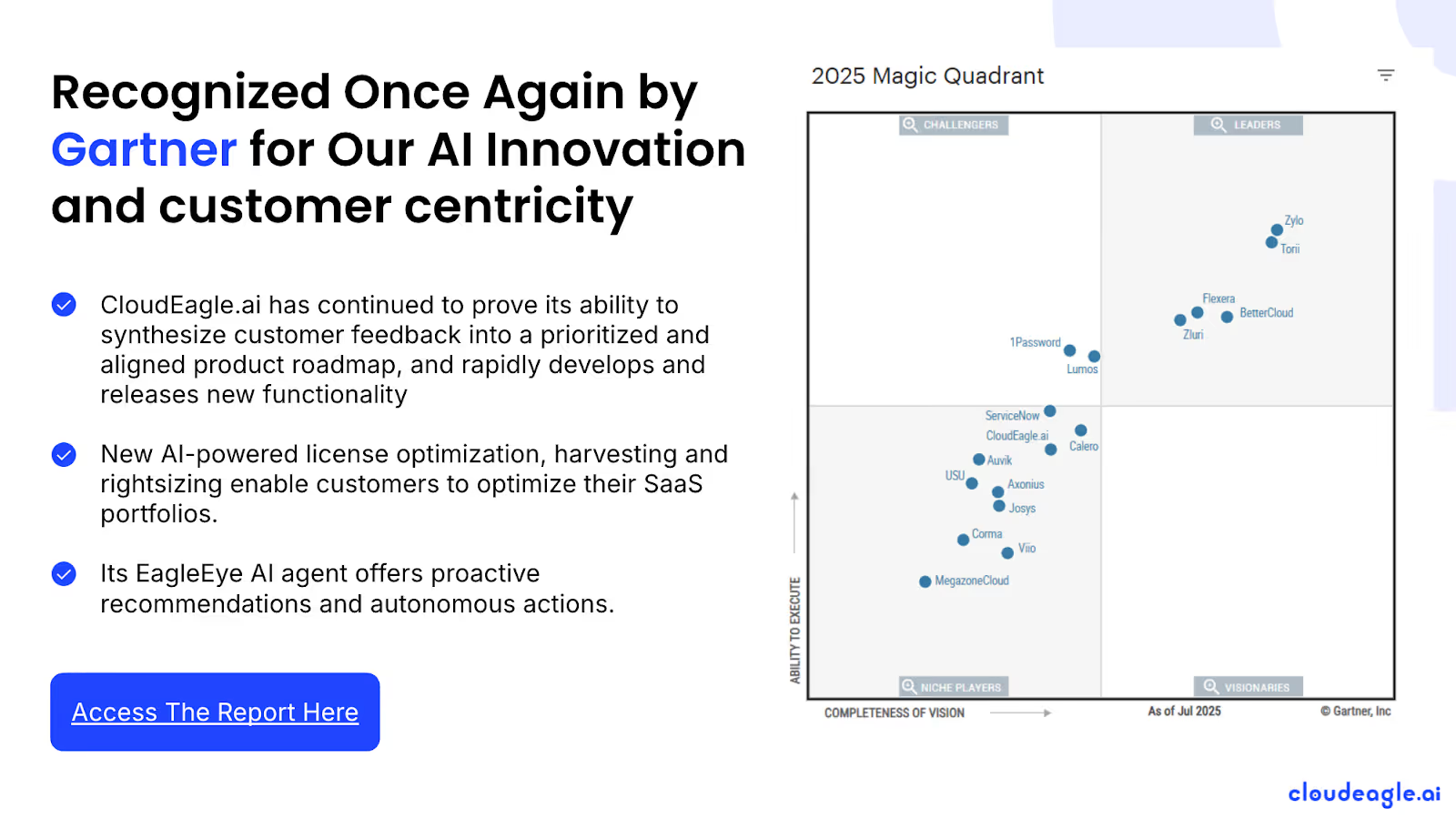
CloudEagle.ai delivers a centralized, real-time overview of all Tableau licensing and spending. It automates tracking, usage analytics, and renewals, transforming a fragmented, manual process into a structured, data-driven workflow.

A. Seamless Tableau Admin Console Integration

Manually handling Tableau licenses is slow, error-prone, and frustrating. Building spreadsheets can take weeks, and by the time they’re ready, data is often outdated, leaving IT teams with incomplete insights on subscriptions, usage, and Tableau pricing plans.

Current Process

Organizations often depend on spreadsheets and disconnected systems to track renewals, license counts, and user activity. This approach fragments data, and updates frequently become outdated before review.

Pain Points

Manual entry and delayed updates lead to errors and blind spots in software spend visibility. IT and finance teams lack accurate, real-time insights.
How We Do It

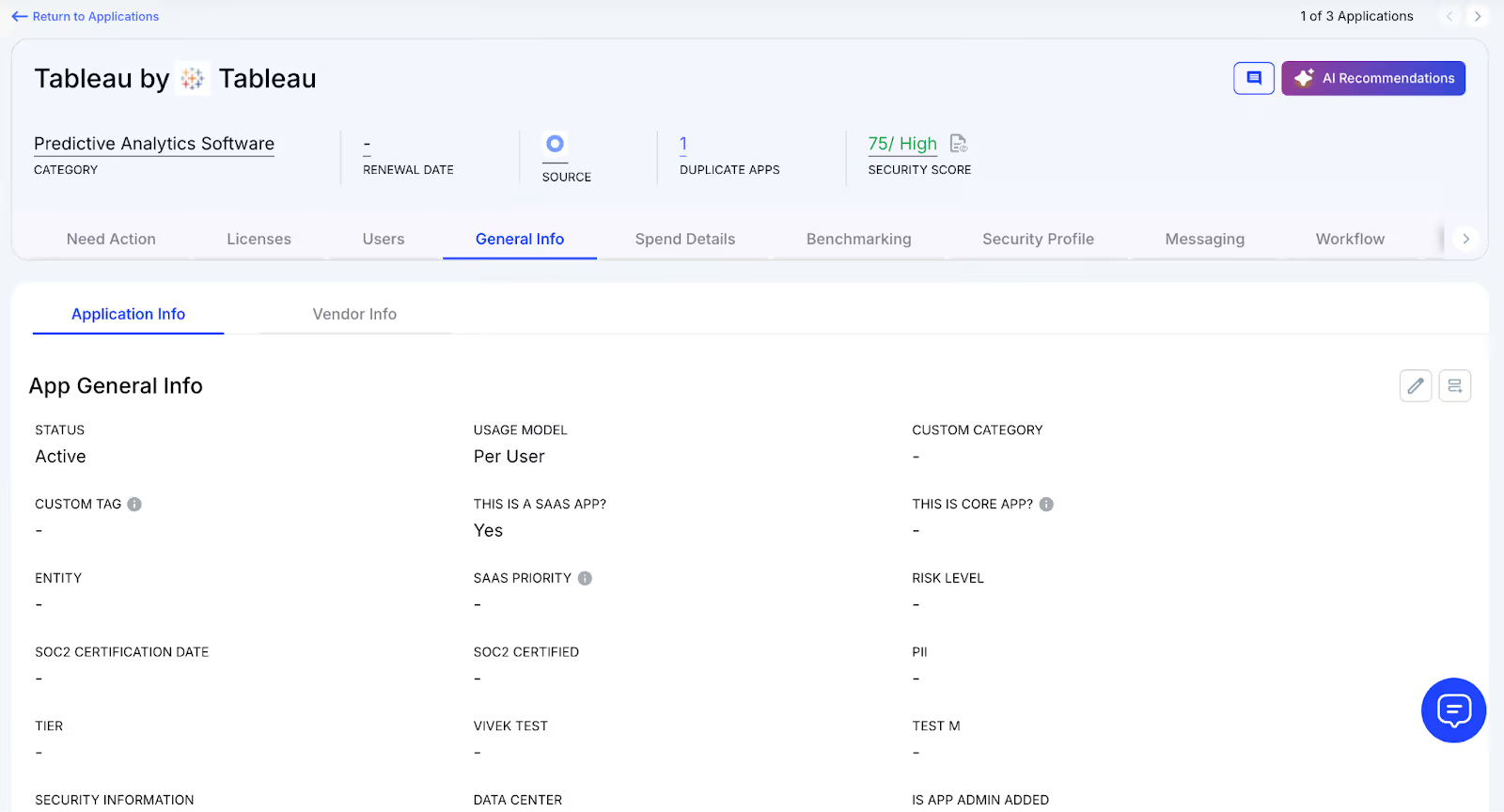
CloudEagle.ai aggregates vendor spend, usage data, and AI metadata extraction from all connected systems in real time. Renewal dates, tableau pricing​, and usage are displayed side by side for easy analysis.

Why We Are Better

Onboarding takes only a few days. With over 500 integrations and AI-driven metadata extraction, CloudEagle.ai centralizes all license data, ensuring it remains accurate, reliable, and up to date.

B. Real-Time Usage Analytics & Shadow IT Detection

Without centralized oversight, Tableau license management and duplicate apps can spiral out of control. Shadow IT often goes unnoticed, making it difficult for IT teams to spot redundant applications.

Current Process

Teams sometimes purchase duplicate applications through credit cards or free trials, which quietly convert into paid subscriptions. Detecting these overlaps manually is challenging.

Pain Points

Shadow IT leads to untracked Tableau pricing and potential security issues. Manually identifying duplicates is labor-intensive and often misses overlapping applications.
How We Do It

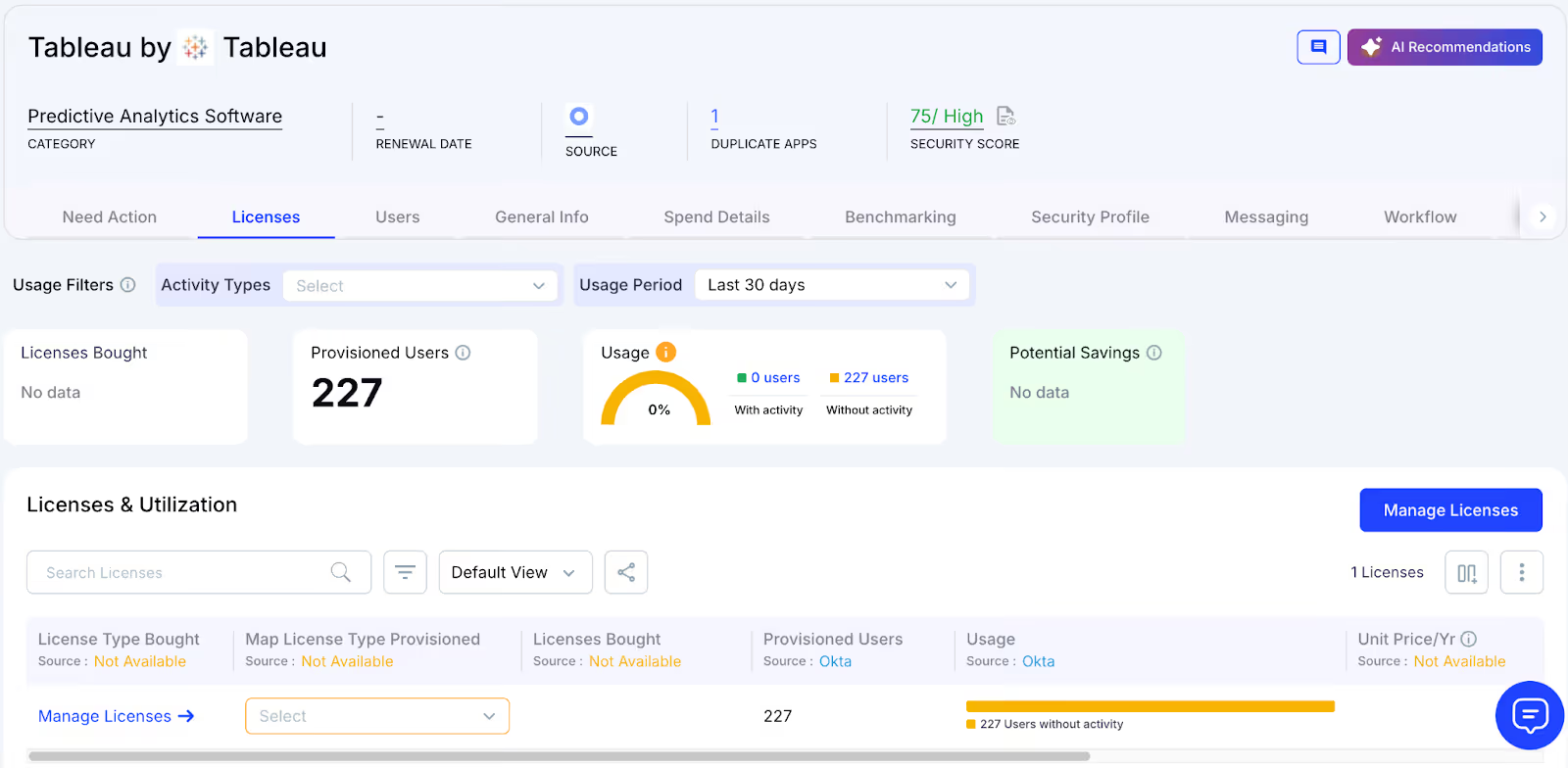
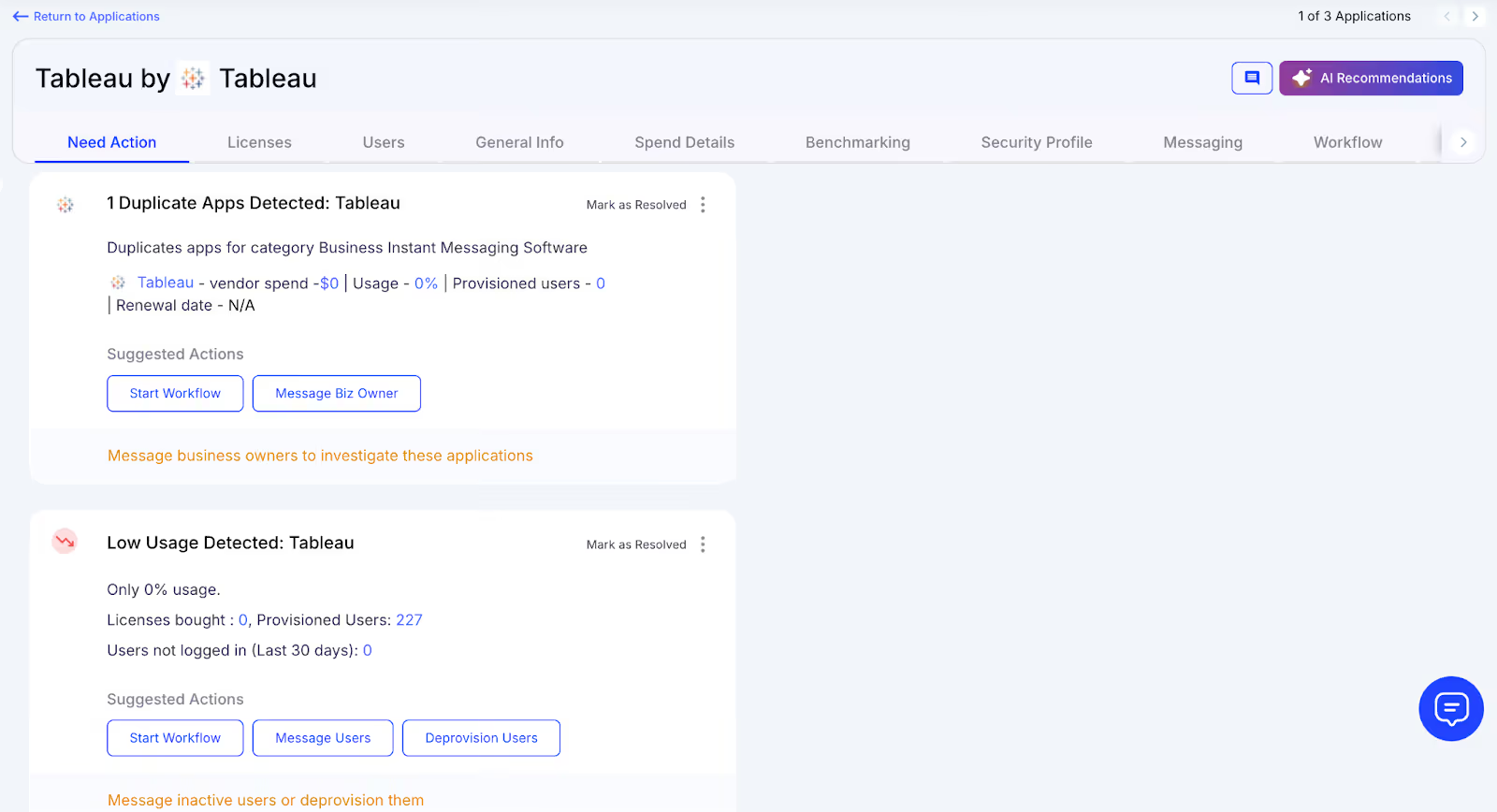
CloudEagle.ai uses AI to automatically detect duplicate and overlapping applications while tracking feature-level usage. Shadow apps are flagged instantly.
Why We Are Better

Our AI evaluates functionality, not just app names. IT teams can automatically email users, trigger workflows, or create ITSM tickets to reclaim licenses and reduce risks.

C. Centralized License Management

Managing Tableau licenses across multiple teams can feel overwhelming. Many enterprises rely on spreadsheets to track top applications while manually consolidating SSO logs, usage, and contract data.

Current Process

Most organizations manage only core apps in spreadsheets, combining SSO logs, feature usage, and contracts manually, slowing updates and accuracy.

Pain Points

Unmonitored applications waste budgets, and license reassignment rarely happens. Renewal tracking is inconsistent, resulting in missed tableau license pricing​ savings.

How We Do It

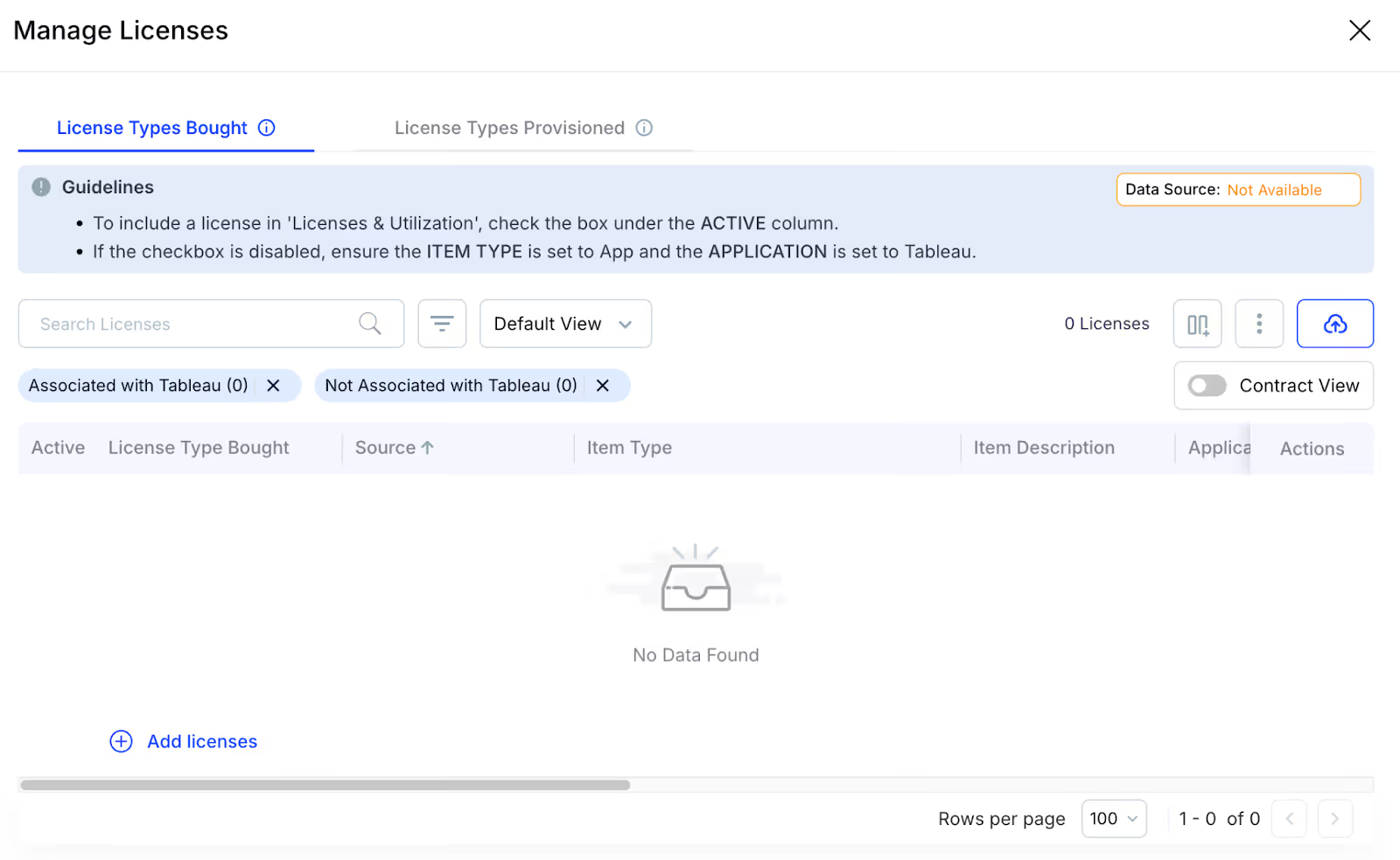
CloudEagle.ai centralizes license management on a single platform. Nightly syncs consolidate IDP, contract, and connector data, offering real-time visibility into usage.

Why We Are Better

Automatic updates correlate purchased licenses, users, and feature usage across all apps. Teams can filter by license type and make fast, data-backed decisions.

D. Automated License Harvesting

Unused Tableau licenses silently inflate tableau pricing​, yet IT teams often lack a systematic way to reclaim them. Manually tracking usage and sending weekly emails to hundreds of users is tedious, error-prone, and time-consuming.

Current Process

IT teams email inactive users manually and update spreadsheets, making the process slow, repetitive, and often skipped.

Pain Points

Inactive licenses remain active, draining budgets and increasing SaaS security risks. Manual reclamation does not scale efficiently.
How We Do It

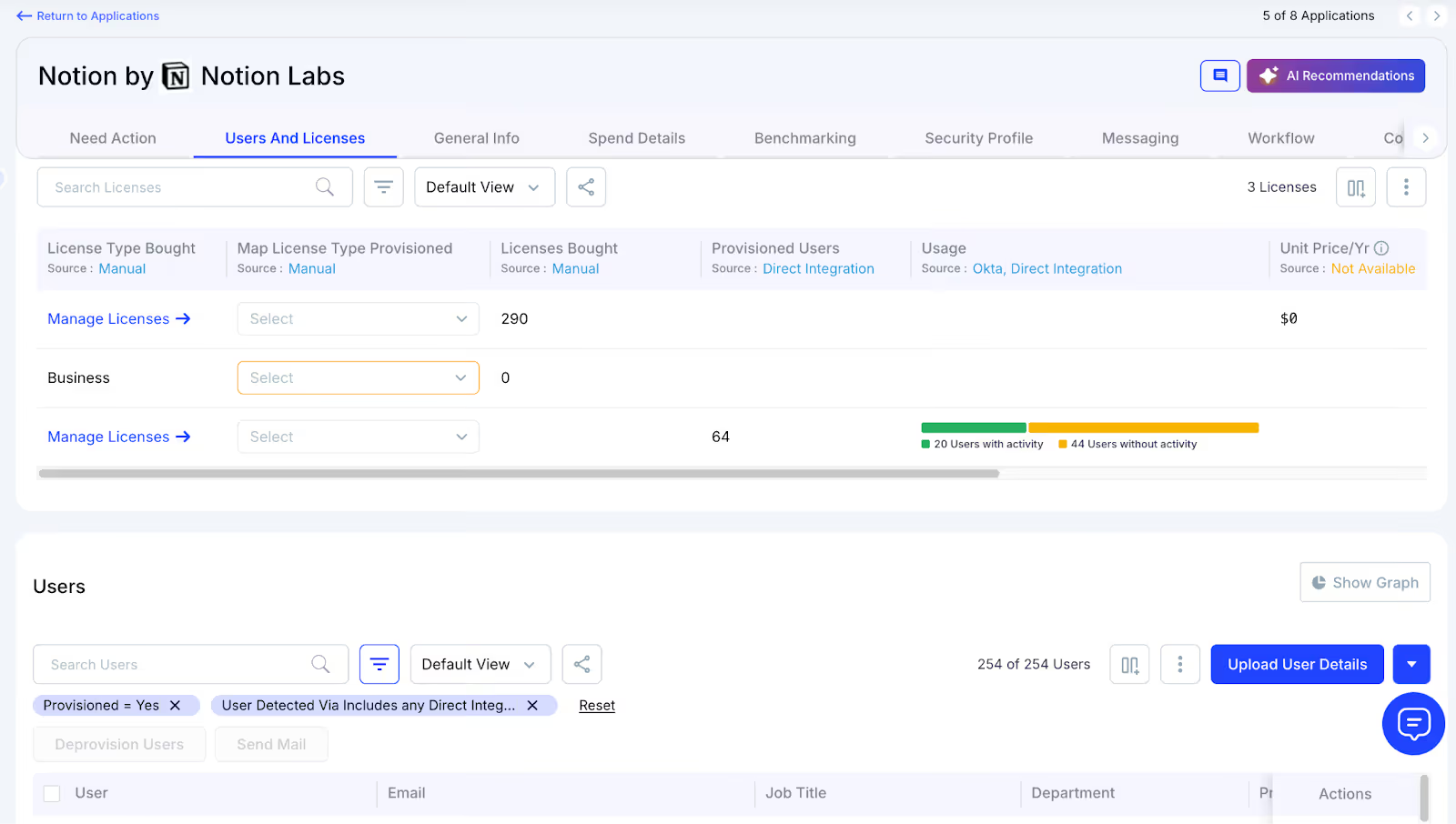
CloudEagle.ai automates license harvesting. Weekly workflows detect inactivity, notify users, and reclaim or downgrade licenses based on usage.

Why We Are Better

Automations run daily or weekly via Okta or Microsoft AD. Licenses are reclaimed instantly, reducing waste, saving time, and maximizing utilization.

E. License Price Benchmarking

CloudEagle.ai’s benchmarking feature enables organizations to secure the best value during license renewals. By comparing contracts against industry standards, enterprises can negotiate competitive rates and avoid overpaying.

Current Process

Procurement teams rely on vendor quotes or outdated deals. Peer comparisons are limited and often fail to reflect real market prices.

Pain Points

Lack of accurate data hinders negotiations, leading to overpayment or unfavorable contract terms.

How We Do It

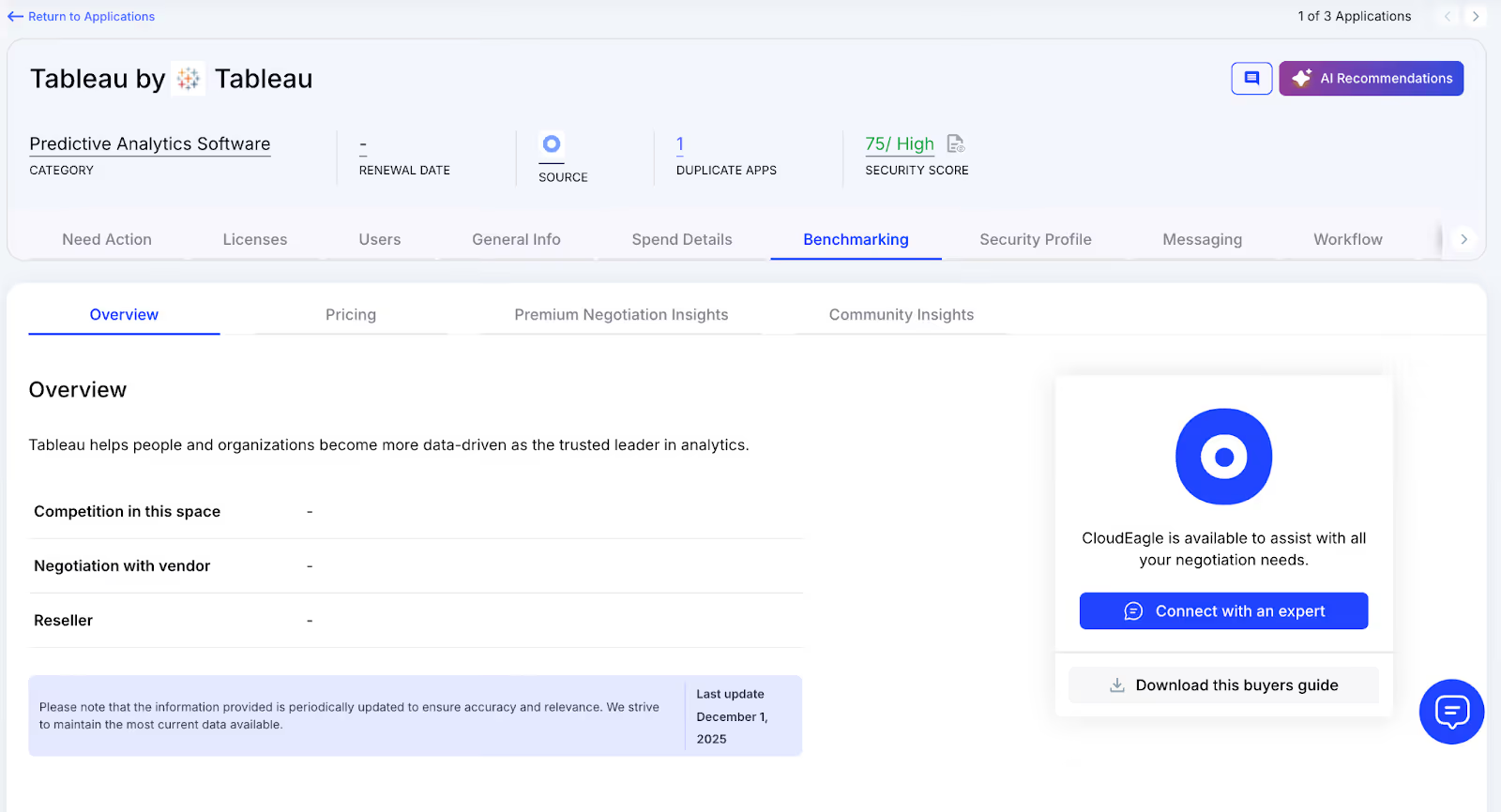
CloudEagle.ai provides real-time price benchmarks, historical trends, and Tableau pricing guide to support informed, data-driven negotiation strategies.
Why We Are Better

Tableau pricing is detailed by SKU, license tier, and quantity, alongside key negotiation levers, ensuring renewals reflect actual market value.

F. Proactive Renewal Management

CloudEagle.ai supports renewal management with automated workflows triggered by contract dates. From approvals to adjusting Tableau licensing counts, it prevents accidental auto-renewals and streamlines the process.

Current Process

Renewals are tracked through spreadsheets and long email chains. Approvals are slow, and auto-renewals are often overlooked.
How We Do It

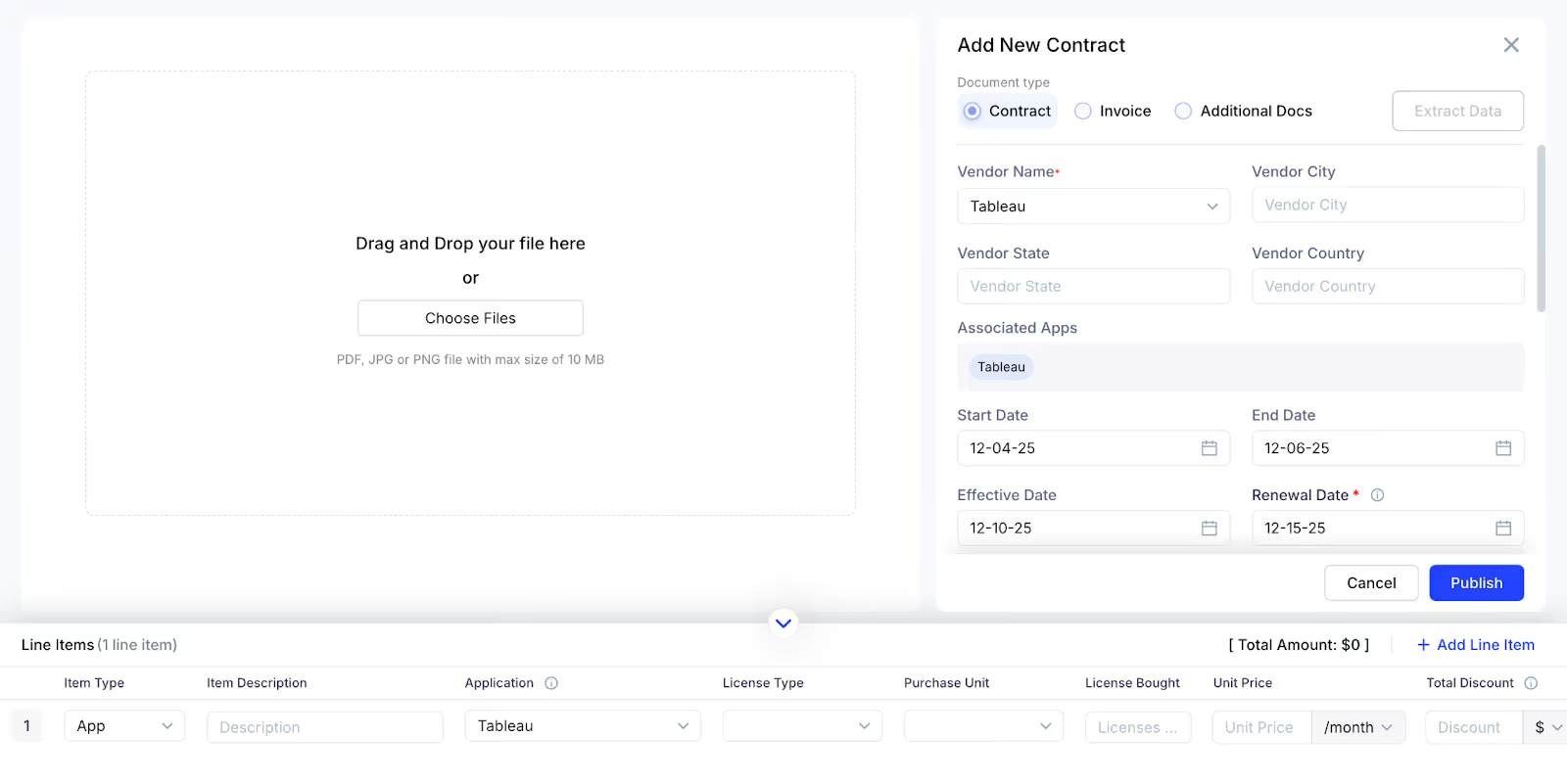
CloudEagle.ai generates a renewal calendar using AI-extracted metadata or integrates with CLMs like Ironclad, Tableau, or Zip. Renewal workflows trigger 90 days before the notice period, assigning tasks to finance, legal, and business owners.

Why We Are Better

Teams receive alerts with usage insights, price benchmarks, and alternative options. Approvals are tracked automatically, preventing missed renewals and unnecessary spending.

G. Leverage Vendor Dashboards

CloudEagle.ai provides vendor dashboards for a complete view of Tableau subscription data. Teams can track Tableau licensing usage, renewal dates, and spending patterns to make data-driven decisions.
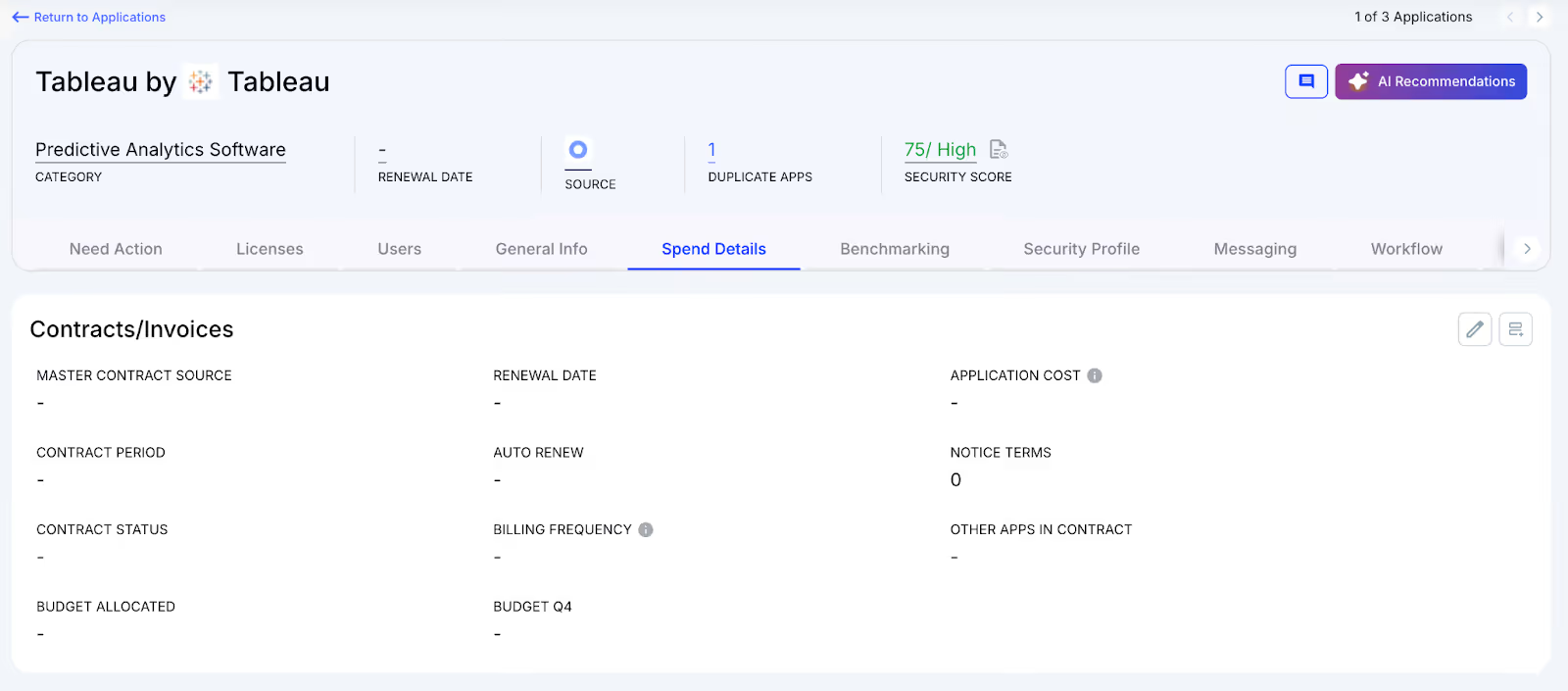
These dashboards highlight overspending and unused licenses, simplifying reclamation. They also reveal usage trends, helping organizations proactively adjust subscriptions and optimize Tableau license costs.

H. Simplified App Access Management

CloudEagle.ai streamlines Tableau access by allowing employees to request licenses directly through the platform or Slack, eliminating long email chains and manual steps. Managers can review and approve requests in real time, ensuring prompt access.
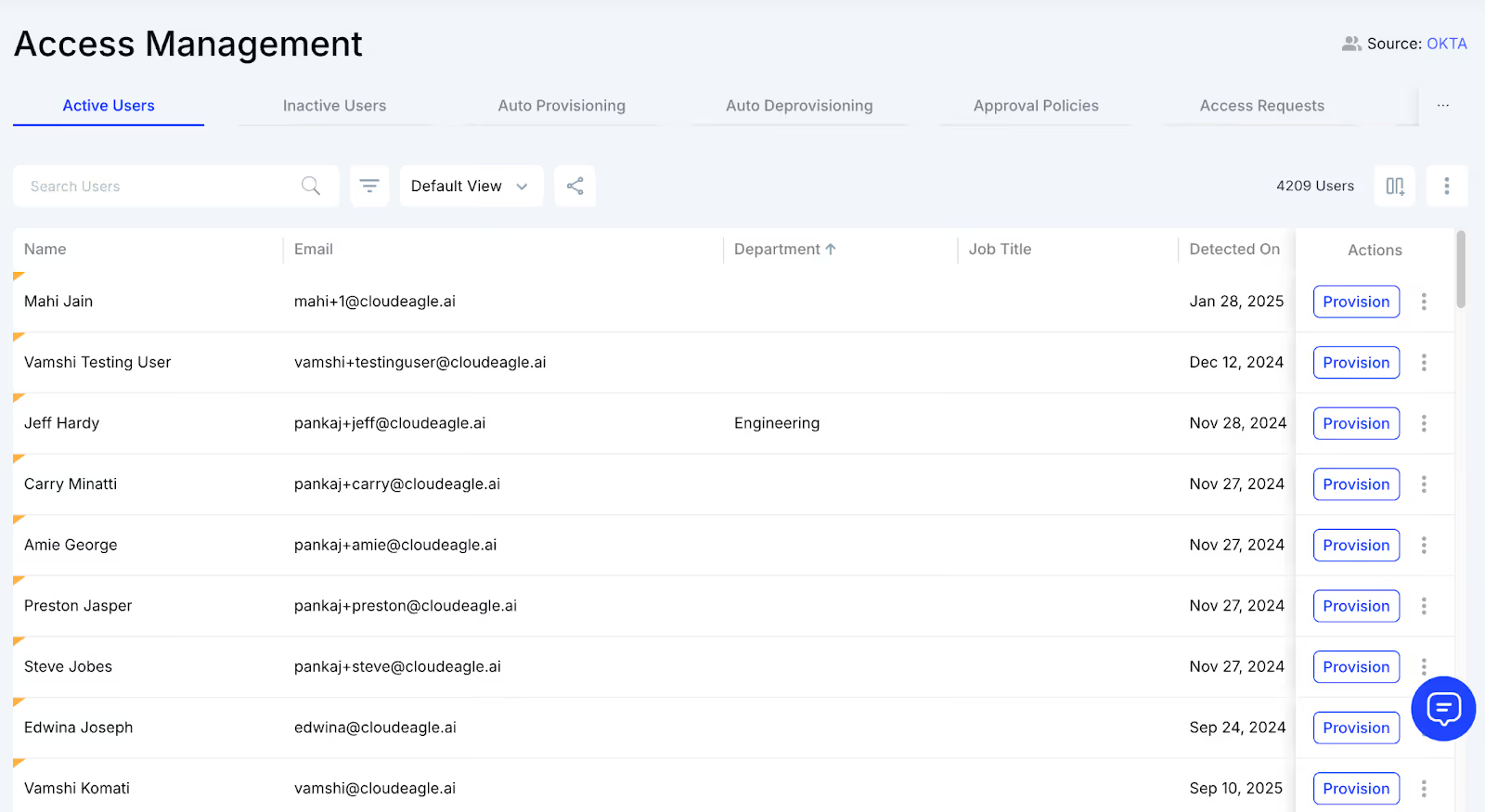
This method guarantees employees receive correct licenses without delays and removes approval bottlenecks. Each request is logged for transparency and compliance, making access management efficient while reducing administrative workload.

5. When Does Tableau Finally Feel Under Control?

You don’t realize how slippery Tableau licensing is until you try tightening it. One dashboard cleanup leads to ten more. One downgraded Creator uncovers three more who shouldn’t have had editing rights in the first place.

  • When logins match real usage: not inflated metrics from shared accounts or once-a-month users.
  • When Creator seats go to creators, not whoever shouted loudest during project week.
  • When dashboards get archived, not refreshed forever in quiet corners of your server.
  • When usage data actually tells the truth, not the optimistic version.

And slowly, not dramatically, not overnight, the pattern shifts. You stop seeing dashboards with zero views. The high-tier licenses finally sit with the people who build, not the people who browse.

  • Tableau license cost​ flatten instead of drifting month after month.
  • Inactive seats pop up instantly rather than during an annual scramble.
  • Permissions begin to reflect reality, not legacy projects.

Eventually, Tableau stops feeling like a storm you’re chasing and more like a system that responds when you nudge it. And that’s the moment you realize, it was the visibility. CloudEagle.ai just brings the lights back on.

6. Conclusion

Tableau doesn’t get messy because people misuse it. Dashboards multiply, projects stack up, permissions get copied instead of assigned, and licenses follow the path of least resistance.

The real struggle isn’t Tableau’s complexity. Creators who barely create, Viewers holding premium seats, dormant dashboards consuming refresh cycles, and inactive users blending into the environment… it all adds up long before anyone notices the drift.

CloudEagle.ai bridges that gap. By showing exactly who’s using what, reclaiming idle seats, and aligning license tiers with real behavior, it turns Tableau from a moving target into a system you can actually manage.

7. FAQs

1. How do Tableau licenses work?

Tableau licenses are assigned per user as Creator, Explorer, or Viewer. Each tier unlocks different capabilities, from building dashboards to simply viewing them.

2. How do I check the status of my Tableau license?

Go to the Tableau Admin Portal or Server Admin view. You’ll see active users, license types, expiration dates, and available seats.

3. How to reassign a Tableau license?

In the Admin Portal, remove the license from the current user, then assign it to the new user. Changes take effect immediately.

4. Where can I find Tableau licenses?

You can view all licenses in the Tableau Online or Server Admin area under “Users” or “Licenses.” It shows seat counts, usage, and roles.

5. Do Tableau licenses expire?

Yes. Tableau licenses renew on an annual or multi-year basis. If not renewed, users lose access to premium features tied to their roles.

Advertisement for a SaaS Subscription Tracking Template with a call-to-action button to download and a partial graphic of a tablet showing charts.Banner promoting a SaaS Agreement Checklist to streamline SaaS management and avoid budget waste with a call-to-action button labeled Download checklist.Blue banner with text 'The Ultimate Employee Offboarding Checklist!' and a black button labeled 'Download checklist' alongside partial views of checklist documents from cloudeagle.ai.Digital ad for download checklist titled 'The Ultimate Checklist for IT Leaders to Optimize SaaS Operations' by cloudeagle.ai, showing checklist pages.Slack Buyer's Guide offer with text 'Unlock insider insights to get the best deal on Slack!' and a button labeled 'Get Your Copy', accompanied by a preview of the guide featuring Slack's logo.Monday Pricing Guide by cloudeagle.ai offering exclusive pricing secrets to maximize investment with a call-to-action button labeled Get Your Copy and an image of the guide's cover.Blue banner for Canva Pricing Guide by cloudeagle.ai offering a guide to Canva costs, features, and alternatives with a call-to-action button saying Get Your Copy.Blue banner with white text reading 'Little-Known Negotiation Hacks to Get the Best Deal on Slack' and a white button labeled 'Get Your Copy'.Blue banner with text 'Little-Known Negotiation Hacks to Get the Best Deal on Monday.com' and a white button labeled 'Get Your Copy'.Blue banner with text 'Little-Known Negotiation Hacks to Get the Best Deal on Canva' and a white button labeled 'Get Your Copy'.Banner with text 'Slack Buyer's Guide' and a 'Download Now' button next to images of a guide titled 'Slack Buyer’s Guide: Features, Pricing & Best Practices'.Digital cover of Monday Pricing Guide with a button labeled Get Your Copy on a blue background.Canva Pricing Guide cover with a button labeled Get Your Copy on a blue gradient background.

Enter your email to
unlock the report

Oops! Something went wrong while submitting the form.
License Count
Benchmark
Per User/Per Year

Enter your email to
unlock the report

Oops! Something went wrong while submitting the form.
License Count
Benchmark
Per User/Per Year

Enter your email to
unlock the report

Oops! Something went wrong while submitting the form.
Notion Plus
License Count
Benchmark
Per User/Per Year
100-500
$67.20 - $78.72
500-1000
$59.52 - $72.00
1000+
$51.84 - $57.60
Canva Pro
License Count
Benchmark
Per User/Per Year
100-500
$74.33-$88.71
500-1000
$64.74-$80.32
1000+
$55.14-$62.34

Enter your email to
unlock the report

Oops! Something went wrong while submitting the form.

Enter your email to
unlock the report

Oops! Something went wrong while submitting the form.
Zoom Business
License Count
Benchmark
Per User/Per Year
100-500
$216.00 - $264.00
500-1000
$180.00 - $216.00
1000+
$156.00 - $180.00

Enter your email to
unlock the report

Oops! Something went wrong while submitting the form.

Get the Right Security Platform To Secure Your Cloud Infrastructure

Please enter a business email
Thank you!
The 2023 SaaS report has been sent to your email. Check your promotional or spam folder.
Oops! Something went wrong while submitting the form.

Access full report

Please enter a business email
Thank you!
The 2023 SaaS report has been sent to your email. Check your promotional or spam folder.
Oops! Something went wrong while submitting the form.

Optimize Tableau License Usage

Learn how to identify inactive users and reclaim paid seats to reduce Tableau spending.

Download the License Guide
CTA Thumbnail

You know that moment when you open Tableau and think, “We’ve got this data thing figured out”. Until the finance team opens the invoice and asks, “Wait, how much are we paying for visualization again?”. The Tableau license complexity makes it easy to lose track. 

Before you know it, half your seats belong to users who log in once a quarter. And according to Forbes, enterprises waste up to 30% of their analytics tools spent on unused or inactive licenses.

That’s where CloudEagle.ai makes the difference. It reveals which dashboards drive insights and and which just drive tableau license pricing​. By tracking feature-level usage, reclaiming idle seats, and surfacing real utilization data, it helps you cut waste.

TL;DR

  • Tableau licenses drift out of control fast, with Creator and Explorer seats piling up quietly and rarely matching actual usage.
  • Up to 30% of analytics spend is wasted on inactive users, abandoned dashboards, and high-tier licenses held by monthly or quarterly visitors.
  • Shared logins and stale projects hide true engagement, making dashboards look “active” when most usage is superficial or outdated.
  • CloudEagle.ai automates the entire license lifecycle, revealing real usage, detecting shadow IT, reclaiming idle seats, benchmarking pricing, and preventing renewal surprises.
  • Tableau finally stabilizes when usage aligns with licensing, letting teams keep only the seats they need while stopping silent cost creep for good.

Improve Visibility Across Your SaaS Stack

Use these best practices to manage Tableau and other tools with better cost control and governance.

Get the Best Practices
CTA Thumbnail

1. When Did Your Tableau Licenses Start Costing More?

You don’t notice it at first. A few Creators added for a project, an Explorer upgrade “just for this quarter,” and a handful of Viewers who somehow ended up with full application access

Individually, these decisions feel harmless. But somewhere along the way, your Tableau bill stopped matching your actual analytics usage.

  • Creator seats multiply quietly when teams request edit access for a single dashboard.
  • Explorers get over-assigned because “it’s easier than changing permissions later.”
  • Viewers hold premium features even though they only check reports in Monday meetings.
  • Old project teams keep licenses long after the project has been archived

And then one day, finance asks why the analytics budget grew without any new hires. IT checks the admin console and realizes half the “active users” haven’t logged in since the last product launch.

  • Usage logs expose a huge gap between what’s licensed and what’s actually touched.
  • Team reshuffles leave orphan seats assigned to users no one remembers onboarding.
  • Add-on permissions linger because nobody wants to risk breaking a dashboard

And that’s when it becomes clear: the tableau pricing​ didn’t spike overnight. It grew in the background, the same way dashboards do. One layer at a time, until the whole thing looks nothing like what you originally designed.

Streamline Tableau Operations

Follow this checklist to improve license hygiene, reduce waste, and strengthen operational control.

Download the Checklist
CTA Thumbnail

2. Why Are You Still Paying For Tableau Access No One Actually Uses?

Tableau looks healthy the entire time. Dashboards load, workbooks refresh, permissions don’t break. Meanwhile, half your licensed users only log in to check a quarterly report, and Creators haven’t published anything since last year.

A. Dashboards Sitting Abandoned For Entire Quarters

You’d expect dashboards to be seamless. But many of them peak during launch week and then quietly slip into retirement. And yet, the Creator licenses tied to those dashboards? They stay very much alive on your invoice.

  • The Forgotten Favorite: Dashboards that once made big decisions possible but haven’t been opened since last quarter’s performance review.
  • The Former Contributor Seat: Creator licenses still assigned to employees who designed one dashboard months ago and never built another.

A 2023 Forbes enterprise analytics study found that roughly 40% of dashboards remain untouched for 90+ days. That means almost half your Tableau “activity” is happening entirely in the dark.

And once you dig in, the pattern becomes clearer:

  • Stale dashboards continue consuming compute and storage, draining tableau pricing​ without delivering value.
  • Old project workspaces never get archived, leaving pricey licenses tied to dormant assets

What you’re really paying for isn’t insight but inertia. And inertia, in analytics, is expensive.

B. Shared Logins Masking True Engagement Levels

Shared Tableau logins always feel like a shortcut. But that shortcut quietly destroys every trace of who’s actually using the platform. You can’t see engagement, you can’t track adoption, and you definitely can’t justify the license tier.

  • The Blended Identity Problem: Multiple users sharing one Viewer or Explorer seat makes usage logs meaningless.
  • The Invisible Power User: Someone using advanced features through a shared login, masking the fact they need a Creator license.
  • The False Activity Trail: Login spikes look healthy, but you can’t tell if it’s one person or ten people cycling through.

When everyone’s usage is merged into a single identity, your analytics health looks better than it is. The dashboards show activity, but not accountability.

C. Users Logging In Once a Month Holding High-Tier Licenses

You can usually spot it during a routine audit, the handful of users who show up in the logs just once every few weeks. They’re not building dashboards, not exploring data, not editing workbooks… yet they’re holding Creator or Explorer licenses like they’re power analysts.

  • The Monthly Tourist: Logs in to view a single report their manager sends, then disappears for 30 days.
  • The Accidental Creator: Was upgraded during a project last year and never downgraded afterward.
  • The Calendar-Driven User: Only checks dashboards at month-end or quarter-close — nowhere close to daily use.
  • The Inflated Activity Signal: Their rare logins make the usage chart look stable, even though they barely touch the platform.

So the admin console tells you one story “user active”, but the real story is that you’re funding premium access for the digital equivalent of someone poking their head into the office once a month.

3. Who’s Watching All the Inactive Users Hiding Inside Your Tableau Environment?

You run a routine check in the Tableau admin console and stumble on a list of users you barely remember. Some haven’t logged in since the last product launch. A few were contractors from two projects ago. Others have “active” licenses but zero activity.

IT Thinks:

IT assumes the business still needs those seats. No outages, no access requests, no angry Slack messages. So the user list stays untouched. Removing a license always feels riskier than leaving it alone, especially when no one remembers whether someone still “might” need access.

Finance Thinks:

Finance sees a very different picture. They’re staring at a renewal that jumped 15%, with no matching increase in headcount. They ask, “Are all these users still active?” and get an answer nobody loves: “We’re… not entirely sure.”

Inactive users don’t trigger alerts. They don’t break dashboards. They don’t raise red flags. They just quietly absorb 12 months of license fees, blending into the environment like digital wallpaper.

4. How CloudEagle.ai Puts Tableau License Management on Autopilot

Managing Tableau licenses across multiple SSO logs, usage reports, and invoices often turns chaotic. Spreadsheets may track only a few core applications, leaving many others completely unmonitored.

This fragmented method results in unnecessary spending, compliance risks, and missed opportunities for optimization.

CloudEagle.ai delivers a centralized, real-time overview of all Tableau licensing and spending. It automates tracking, usage analytics, and renewals, transforming a fragmented, manual process into a structured, data-driven workflow.

A. Seamless Tableau Admin Console Integration

Manually handling Tableau licenses is slow, error-prone, and frustrating. Building spreadsheets can take weeks, and by the time they’re ready, data is often outdated, leaving IT teams with incomplete insights on subscriptions, usage, and Tableau pricing plans.

Current Process

Organizations often depend on spreadsheets and disconnected systems to track renewals, license counts, and user activity. This approach fragments data, and updates frequently become outdated before review.

Pain Points

Manual entry and delayed updates lead to errors and blind spots in software spend visibility. IT and finance teams lack accurate, real-time insights.

How We Do It

CloudEagle.ai aggregates vendor spend, usage data, and AI metadata extraction from all connected systems in real time. Renewal dates, tableau pricing​, and usage are displayed side by side for easy analysis.

Why We Are Better

Onboarding takes only a few days. With over 500 integrations and AI-driven metadata extraction, CloudEagle.ai centralizes all license data, ensuring it remains accurate, reliable, and up to date.

B. Real-Time Usage Analytics & Shadow IT Detection

Without centralized oversight, Tableau license management and duplicate apps can spiral out of control. Shadow IT often goes unnoticed, making it difficult for IT teams to spot redundant applications.

Current Process

Teams sometimes purchase duplicate applications through credit cards or free trials, which quietly convert into paid subscriptions. Detecting these overlaps manually is challenging.

Pain Points

Shadow IT leads to untracked Tableau pricing and potential security issues. Manually identifying duplicates is labor-intensive and often misses overlapping applications.

How We Do It

CloudEagle.ai uses AI to automatically detect duplicate and overlapping applications while tracking feature-level usage. Shadow apps are flagged instantly.

Why We Are Better

Our AI evaluates functionality, not just app names. IT teams can automatically email users, trigger workflows, or create ITSM tickets to reclaim licenses and reduce risks.

C. Centralized License Management

Managing Tableau licenses across multiple teams can feel overwhelming. Many enterprises rely on spreadsheets to track top applications while manually consolidating SSO logs, usage, and contract data.

Current Process

Most organizations manage only core apps in spreadsheets, combining SSO logs, feature usage, and contracts manually, slowing updates and accuracy.

Pain Points

Unmonitored applications waste budgets, and license reassignment rarely happens. Renewal tracking is inconsistent, resulting in missed tableau license pricing​ savings.

How We Do It

CloudEagle.ai centralizes license management on a single platform. Nightly syncs consolidate IDP, contract, and connector data, offering real-time visibility into usage.

Why We Are Better

Automatic updates correlate purchased licenses, users, and feature usage across all apps. Teams can filter by license type and make fast, data-backed decisions.

D. Automated License Harvesting

Unused Tableau licenses silently inflate tableau pricing​, yet IT teams often lack a systematic way to reclaim them. Manually tracking usage and sending weekly emails to hundreds of users is tedious, error-prone, and time-consuming.

Current Process

IT teams email inactive users manually and update spreadsheets, making the process slow, repetitive, and often skipped.

Pain Points

Inactive licenses remain active, draining budgets and increasing SaaS security risks. Manual reclamation does not scale efficiently.

How We Do It

CloudEagle.ai automates license harvesting. Weekly workflows detect inactivity, notify users, and reclaim or downgrade licenses based on usage.

Why We Are Better

Automations run daily or weekly via Okta or Microsoft AD. Licenses are reclaimed instantly, reducing waste, saving time, and maximizing utilization.

E. License Price Benchmarking

CloudEagle.ai’s benchmarking feature enables organizations to secure the best value during license renewals. By comparing contracts against industry standards, enterprises can negotiate competitive rates and avoid overpaying.

Current Process

Procurement teams rely on vendor quotes or outdated deals. Peer comparisons are limited and often fail to reflect real market prices.

Pain Points

Lack of accurate data hinders negotiations, leading to overpayment or unfavorable contract terms.

How We Do It

CloudEagle.ai provides real-time price benchmarks, historical trends, and Tableau pricing guide to support informed, data-driven negotiation strategies.

Why We Are Better

Tableau pricing is detailed by SKU, license tier, and quantity, alongside key negotiation levers, ensuring renewals reflect actual market value.

F. Proactive Renewal Management

CloudEagle.ai supports renewal management with automated workflows triggered by contract dates. From approvals to adjusting Tableau licensing counts, it prevents accidental auto-renewals and streamlines the process.

Current Process

Renewals are tracked through spreadsheets and long email chains. Approvals are slow, and auto-renewals are often overlooked.

How We Do It

CloudEagle.ai generates a renewal calendar using AI-extracted metadata or integrates with CLMs like Ironclad, Tableau, or Zip. Renewal workflows trigger 90 days before the notice period, assigning tasks to finance, legal, and business owners.

Why We Are Better

Teams receive alerts with usage insights, price benchmarks, and alternative options. Approvals are tracked automatically, preventing missed renewals and unnecessary spending.

G. Leverage Vendor Dashboards

CloudEagle.ai provides vendor dashboards for a complete view of Tableau subscription data. Teams can track Tableau licensing usage, renewal dates, and spending patterns to make data-driven decisions.

These dashboards highlight overspending and unused licenses, simplifying reclamation. They also reveal usage trends, helping organizations proactively adjust subscriptions and optimize Tableau license costs.

H. Simplified App Access Management

CloudEagle.ai streamlines Tableau access by allowing employees to request licenses directly through the platform or Slack, eliminating long email chains and manual steps. Managers can review and approve requests in real time, ensuring prompt access.

This method guarantees employees receive correct licenses without delays and removes approval bottlenecks. Each request is logged for transparency and compliance, making access management efficient while reducing administrative workload.

5. When Does Tableau Finally Feel Under Control?

You don’t realize how slippery Tableau licensing is until you try tightening it. One dashboard cleanup leads to ten more. One downgraded Creator uncovers three more who shouldn’t have had editing rights in the first place.

  • When logins match real usage: not inflated metrics from shared accounts or once-a-month users.
  • When Creator seats go to creators, not whoever shouted loudest during project week.
  • When dashboards get archived, not refreshed forever in quiet corners of your server.
  • When usage data actually tells the truth, not the optimistic version.

And slowly, not dramatically, not overnight, the pattern shifts. You stop seeing dashboards with zero views. The high-tier licenses finally sit with the people who build, not the people who browse.

  • Tableau license cost​ flatten instead of drifting month after month.
  • Inactive seats pop up instantly rather than during an annual scramble.
  • Permissions begin to reflect reality, not legacy projects.

Eventually, Tableau stops feeling like a storm you’re chasing and more like a system that responds when you nudge it. And that’s the moment you realize, it was the visibility. CloudEagle.ai just brings the lights back on.

6. Conclusion

Tableau doesn’t get messy because people misuse it. Dashboards multiply, projects stack up, permissions get copied instead of assigned, and licenses follow the path of least resistance.

The real struggle isn’t Tableau’s complexity. Creators who barely create, Viewers holding premium seats, dormant dashboards consuming refresh cycles, and inactive users blending into the environment… it all adds up long before anyone notices the drift.

CloudEagle.ai bridges that gap. By showing exactly who’s using what, reclaiming idle seats, and aligning license tiers with real behavior, it turns Tableau from a moving target into a system you can actually manage.

7. FAQs

1. How do Tableau licenses work?

Tableau licenses are assigned per user as Creator, Explorer, or Viewer. Each tier unlocks different capabilities, from building dashboards to simply viewing them.

2. How do I check the status of my Tableau license?

Go to the Tableau Admin Portal or Server Admin view. You’ll see active users, license types, expiration dates, and available seats.

3. How to reassign a Tableau license?

In the Admin Portal, remove the license from the current user, then assign it to the new user. Changes take effect immediately.

4. Where can I find Tableau licenses?

You can view all licenses in the Tableau Online or Server Admin area under “Users” or “Licenses.” It shows seat counts, usage, and roles.

5. Do Tableau licenses expire?

Yes. Tableau licenses renew on an annual or multi-year basis. If not renewed, users lose access to premium features tied to their roles.

CloudEagle.ai recognized in the 2025 Gartner® Magic Quadrant™ for SaaS Management Platforms
Download now
gartner chart
5x
Faster employee
onboarding
80%
Reduction in time for
user access reviews
30k
Workflows
automated
$15Bn
Analyzed in
contract spend
$2Bn
Saved in
SaaS spend

Recognized as an Industry leader for our AI

CloudEagle.ai is Recognized in the 2024 Gartner® Magic Quadrant™ for SaaS Management Platforms

Recognition highlights CloudEagle’s innovation and leadership in the rapidly evolving SaaS management and procurement space.
Read More
Gartner Magic Quadrant for SaaS Management Platforms showing a chart divided into Challengers and Leaders quadrants with various companies plotted as dots.

CloudEagle.ai Recognized in the GigaOm Radar for SaaS Management Platforms

CloudEagle named a Leader and Outperformer in GigaOm Radar Report, validating its impact in the SaaS management platform landscape.
Read More
gigaom

Everest Group Positions CloudEagle.ai as a Trailblazer in SaaS Management Platforms

CloudEagle recognized as a Trailblazer by Everest Group, showcasing its rapid growth and innovation in SaaS spend and operations management.
Read More
qks

CloudEagle.ai is Recognized in the 2024 Gartner® Magic Quadrant™ for SaaS Management Platforms

Recognition highlights CloudEagle’s innovation and leadership in the rapidly evolving SaaS management and procurement space.
Read More
gartner

Streamline SaaS governance and save 10-30%

Book a Demo with Expert
CTA image
One platform to Manage
all SaaS Products
Learn More