You need to enable JavaScript in order to use the AI chatbot tool powered by ChatBot

What Is Access Management? A Complete Guide for IT and Security Teams in 2026

Share via:
blog-cms-banner-bg
Little-Known Negotiation Hacks to Get the Best Deal on Slack
cta-bg-blogDownload Your Copy

HIPAA Compliance Checklist for 2025

Download PDF

A 2024 survey by Cybersecurity Insiders found that 84% of organizations consider identity and access management a critical component of their cybersecurity strategy.

Yet most enterprises are still managing access the same way they did five years ago. Spreadsheets. Email chains. Manual provisioning. IT teams are logging into 30 apps whenever someone joins or leaves.

That gap between how important access management is and how poorly most teams actually execute it is exactly where breaches happen, compliance audits go sideways, and SaaS spend balloons quietly.

This guide covers everything you need to know about access management in 2026: how it works, why it matters, the methodologies behind it, and how modern teams are using automation to finally get it right.

TL;DR

  • Access management defines, controls, and monitors who can access organizational resources, with 84% of organizations calling it essential to their security strategy
  • The Three A's (Authentication, Authorization, and Accounting) form the operational backbone of every access management system
  • Core methodologies include RBAC, ABAC, Principle of Least Privilege, and Zero Trust, which together minimize risk while keeping access practical
  • In SaaS-heavy environments, manual access management creates security gaps, compliance debt, and wasted spend at every joiner, mover, and leaver event
  • CloudEagle.ai automates the full identity lifecycle through a self-service app catalog, zero-touch onboarding and offboarding, and structured access request workflows

1. What Is Access Management?

Access management is how you define, control, and monitor who can access your organization's resources. It ensures only authorized users or systems can interact with SaaS apps, data, or systems critical to your operations.

Think of it as the answer to three questions your IT and security teams should be able to answer at any moment:

  • Who has access to what right now?
  • Why do they have that access?
  • Should they still have it?

Through authentication, you verify identities. Through authorization, you determine what level of access is appropriate. Through continuous monitoring, you ensure nothing drifts.

The goal is simple in theory: the right people get the right access at the right time. In practice, getting there requires clear policies, the right tooling, and consistent enforcement, especially as your SaaS stack grows.

2. Why Access Management Is Critical for Every Organization

1. Protecting Sensitive Data and Systems

Without proper controls, unauthorized users can exploit vulnerabilities quietly. A disgruntled employee. A compromised credential. A contractor who still has access three months after their contract ended.

Strict access protocols ensure only trusted individuals interact with critical resources. AI-powered security tools are now enhancing these protocols by continuously monitoring access patterns and detecting anomalies in real time, adding a layer of defense that manual processes simply cannot provide.

2. Ensuring Users Have the Right Access and Permissions

Imagine a marketing team member accidentally stumbling into your financial systems because permissions were never scoped correctly. It sounds unlikely. It happens more often than most IT teams would admit.

The Principle of Least Privilege (PoLP) ensures users are granted only the minimum access needed for their specific role. A marketing manager sees campaign tools. An IT admin sees infrastructure. Finance sees financial systems. Nobody sees more than they need.

This limits the attack surface and prevents the accidental errors that lead to data leaks and system misconfigurations.

3. Preventing Unauthorized Access and Data Breaches

Strong access management creates multiple layers of defense. MFA verifies identities. Authorization policies restrict what verified users can do. Regular monitoring flags suspicious activity before it escalates.

Organizations with mature access management processes experience 80% fewer security incidents related to inappropriate access, according to Enterprise Strategy Group research. Sequoialegal

4. Supporting Compliance With GDPR, HIPAA, and SOX

Regulators do not just want good intentions. They want documented evidence. Who accessed what, when, and why.

Robust access management implements the controls these regulations require, restricts access to sensitive data based on roles, and generates the audit trails that turn a compliance audit from a nightmare into a structured process.

5. Enabling Secure Remote Work

When your team is spread across home offices, coffee shops, and offices in three time zones, perimeter-based security is meaningless.

Access management verifies identities regardless of location, ensures remote employees connect only to authorized resources, and limits over-privileged access that creates vulnerabilities in distributed environments.

8 Access Risks Most Teams Miss

The IAM gaps usually show up only after an audit, breach, or access review.
Show Me the Risks

3. Why Access Management Breaks Down in SaaS-Heavy Environments

This is how access management quietly breaks in most SaaS-heavy companies.

A new employee joins. IT provisions the major apps through Okta, but a few tools still need manual access. Some get missed.

Later, the employee changes teams. New permissions are added, old ones stay.

When they leave, core accounts get disabled fast, but access to smaller SaaS tools, vendor portals, and cloud platforms often stays active for days or weeks.

None of this is unusual. It is what happens when identity lifecycle management is still manual in an environment with hundreds of SaaS apps.

The numbers back it up:

Gap Impact
Employees requesting apps via email and Slack No visibility, no audit trail, shadow IT proliferates
IT is chasing approvals manually Resolution takes days, and new hires lose productivity from day one
Offboarding done manually across 30+ apps Ex-employee access persists for weeks after departure
Temporary access never revoked Contractors hold standing access long after work is done
Fragmented approval trails Compliance audits become a manual evidence-gathering scramble

The challenge is not that IT teams are not trying. It is that manual access management at scale is structurally impossible to do consistently.

4. The Three A's: How Access Management Actually Works

1. Authentication

Authentication is the first step. Before anyone gets access to anything, you need to verify they are who they say they are.

Authentication relies on three main categories:

  • Something you know: passwords, PINs, or security questions
  • Something you have: security tokens or one-time passcodes sent to a trusted device
  • Something you are: biometric identifiers like fingerprints or facial recognition

Multi-factor authentication combines at least two of these, making it significantly harder for attackers to get in, even if they steal a password.

2. Authorization

Once identity is verified, authorization determines what that user can actually do. Which files can they view? Which apps can they access? Can they modify data or only read it?

Authorization relies on predefined policies that define user roles and permissions. RBAC and ABAC are the two most common frameworks for implementing granular control here, which we cover in the next section.

This is where the principle of least privilege comes to life in practice.

3. Accounting and Access Control

The third A is often overlooked, and it is critically important. Accounting refers to tracking and logging what users do once they have access.

Without robust accounting, you have no visibility into whether someone is using their access appropriately, accessing data outside their usual scope, or performing actions that should trigger an alert.

It is also your audit trail. When a compliance auditor asks who accessed a sensitive system on a specific date, your accounting logs are the only defensible answer.

5. Access Management Methodologies You Need to Know

1. Role-Based Access Control (RBAC)

RBAC assigns access permissions based on a user's role rather than to individuals directly. Engineering sees engineering tools. Finance sees financial systems. Sales sees CRM.

When users are assigned to roles, they automatically inherit the permissions associated with that role. It is scalable, consistent, and directly supports the principle of least privilege.

Role Access Granted
Marketing Manager Campaign tools, analytics, and content platforms
IT Administrator Infrastructure, system dashboards, security tools
Finance Analyst Financial systems, reporting tools, expense platforms
Sales Representative CRM, prospecting tools, and communication platforms

2. Attribute-Based Access Control (ABAC)

ABAC takes a more flexible approach. Access decisions are based on specific attributes of the user, the resource, and the context.

For example, access to certain data might only be granted if the user is logged in during business hours, using a company-approved device, and is located in an approved region.

ABAC is ideal when your access management strategy needs to account for multiple variables that a simple role structure cannot capture.

3. Principle of Least Privilege (PoLP)

PoLP is a principle, not a technology. It means every user gets the minimum access necessary to do their job, nothing more.

An employee who only needs to view certain files should not be able to modify or delete them. An IT admin who needs infrastructure access does not need access to HR data.

When PoLP is consistently applied, the blast radius of any security incident shrinks dramatically. A compromised credential can only reach what that user was allowed to access.

4. Zero Trust Access

Zero Trust operates on one core principle: never trust, always verify.

No user or device is trusted by default, regardless of whether they are inside or outside the corporate network. Every access request is verified, authenticated, and authorized every single time.

In a Zero Trust framework, even someone who gained access to your internal network cannot move freely. They hit a verification checkpoint at every resource they try to reach.

5. Dynamic Access Controls

Dynamic controls adjust access permissions in real time based on context. The same user might get full access from a trusted device during business hours, but limited access if they are logging in from a new location on a personal device.

This contextual layer adds significant protection without creating friction for legitimate users in normal circumstances.

6. Where Access Management Is Heading in 2026

AI-Driven Access Management

AI is moving from a supporting role to a central one in access management software. Machine learning models analyze user behavior patterns continuously, flagging anomalies like logins outside typical hours or from unfamiliar locations.

When something looks wrong, the system adjusts access levels or triggers an alert automatically, without waiting for a human to notice.

Adaptive Access Based on Behavior Analytics

Rather than static rules, behavior analytics creates a baseline of what "normal" looks like for each user. When someone deviates significantly from that baseline, the system adapts. Maybe it triggers MFA. Maybe it limits access temporarily. Maybe it flags the session for review.

This is significantly harder for attackers to evade than rule-based systems because the baseline is individual, not generic.

Biometric Authentication Advances

Biometric authentication is faster, more accurate, and more widely deployed than ever. Facial recognition works reliably in low-light conditions. Voice recognition detects subtle differences in speech patterns.

For organizations looking to eliminate passwords entirely, biometrics are becoming the primary alternative.

Deeper Integration With SaaS and ITSM Tools

As enterprises run more of their operations on SaaS, access management software that only governs on-premises systems is incomplete. The 2026 standard is integration across HRIS, IdP, finance systems, and SaaS applications, with access rights updating automatically as people join, move between teams, or leave.

Non-Human Identity Governance

Modern IAM platforms must also manage non-human identities, including service accounts, machine tokens, API keys, and increasingly, the AI agents that operate autonomously inside enterprise systems. Thefinanceweekly

In 2026, any access management strategy that only accounts for human users is incomplete.

Is Your SaaS Access Posture Actually Secure?

10 access controls every enterprise needs before SaaS sprawl turns into risk.
Audit My SaaS Access

7. How CloudEagle.ai Puts Identity Governance on Autopilot

Most access management problems are not policy problems. The policies already exist. The problem is execution.

Someone joins, and IT is still provisioning apps days later. Someone leaves, and their SaaS access stays active for weeks. Contractors keep temporary permissions long after projects end because nobody tracked expiration dates.

CloudEagle.ai is an AI-powered SaaS Management, Security, and Identity Governance platform that gives enterprises a unified command center to discover, secure, govern, and optimize both human and non-human identities across their entire SaaS and AI ecosystem.

Trusted by enterprises like RingCentral, Bloom & Wild, Wefunder, and Rec Room, CloudEagle governs identity lifecycles across 500+ direct integrations without expensive IdP dependencies.

As Sam Middleton put it, “Provisioning and deprovisioning took hours and created security gaps. CloudEagle.ai's automated workflows now deliver Day 1 access for new hires and instant offboarding.”

Self-Service App Catalog

Employees requesting access through email or Slack is where shadow IT starts. Approvals scatter across inboxes, requests get lost, and IT has no structured way to govern app access.
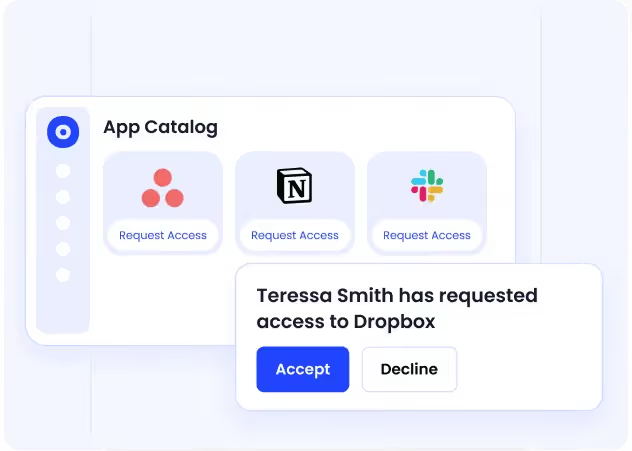
CloudEagle replaces that process with a curated, role-based employee app catalog. Employees only see apps approved for their team or department, while access requests move through automated approval workflows with complete audit trails.

How it helps

  • Role-based app catalogs eliminate ad-hoc access requests and reduce shadow IT
  • Automated approval workflows remove email chains and Slack follow-ups
  • Every request and approval is logged for audit-ready access reviews
  • Employees get a fast, structured path to approved applications

Outcome

IT reduces access request resolution time by up to 80%, while governance becomes consistent and audit-ready.

Employee Onboarding and Offboarding

Manual onboarding creates delays immediately. IT teams still provision apps one-by-one across SaaS tools, while offboarding often leaves orphaned accounts and active licenses behind.
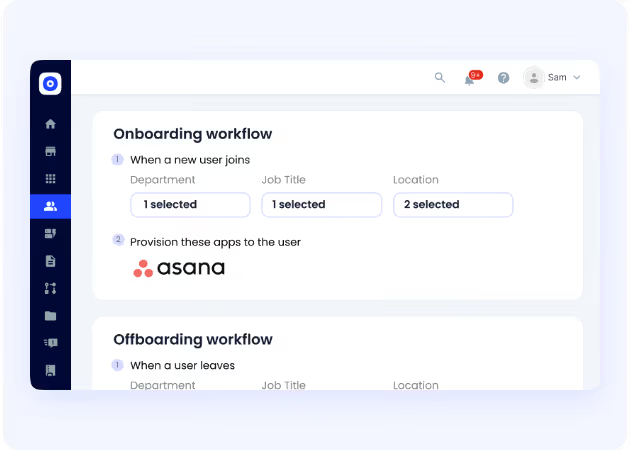
CloudEagle automates zero-touch onboarding and offboarding across both IdP-connected and non-SSO applications. Role-based provisioning is triggered automatically through HRMS and IdP integrations, while deprovisioning removes access the moment an employee leaves.
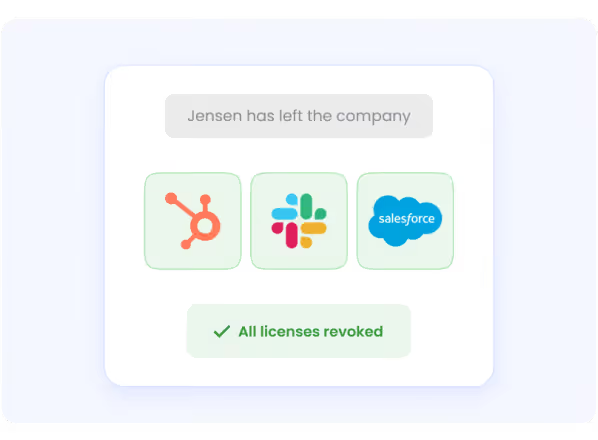
How it helps

  • Zero-touch onboarding provisions access automatically based on role and department
  • Deprovisioning runs across all connected apps from a single workflow
  • Licenses are reclaimed instantly during offboarding
  • Access adjusts automatically when employees change teams or roles

Outcome

New hires get Day 1 access, ex-employee access is removed immediately, and IT eliminates repetitive provisioning work.

Automated App Access Requests

Employees constantly need temporary or project-based access, but most requests still flow through tickets, emails, and Slack threads that are slow to approve and difficult to track.
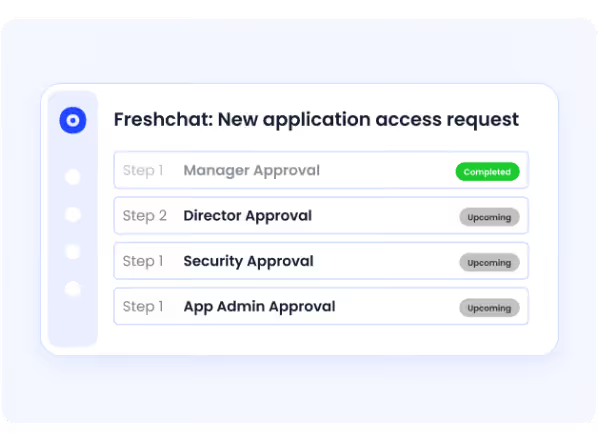
CloudEagle turns app access into a structured workflow with automated approvals, escalation paths, and just-in-time access controls.

How it helps

  • Employees request access only from approved applications
  • Stakeholders approve requests directly through Slack or email
  • Every request, approval, and provisioning action is fully audit-ready
  • Just-in-time access automatically expires for contractors and temporary projects

Outcome

Access gets approved faster, temporary permissions do not become permanent, and every access decision remains fully traceable.

Just-in-Time Access 

Temporary or elevated access often stays active long after the work is done, creating privilege creep and unnecessary security exposure.
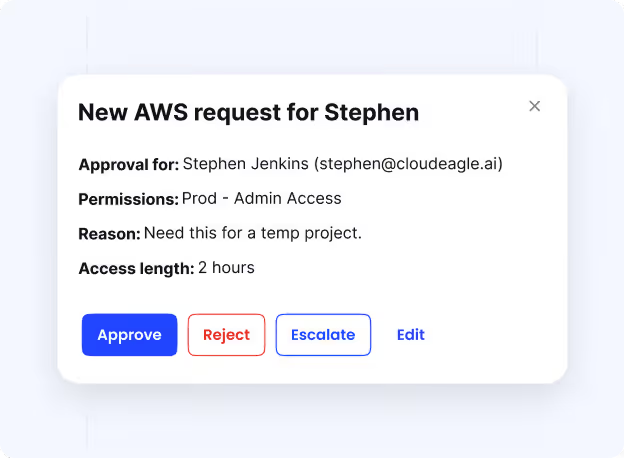
How it helps

  • Access for contractors, projects, or sensitive tasks is automatically revoked when the approved period ends
  • Just-in-time access enforces least-privilege controls without manual intervention
  • Governance stays intact without IT tracking temporary permissions manually
  • Dormant and unnecessary access is removed continuously to keep environments clean

Outcome

Temporary access stays temporary, excess permissions are reduced automatically, and IT avoids manual cleanup work.

8. Is Your Organization Managing Access or Just Hoping for the Best?

Most IT teams believe their access management is reasonably under control. Then an auditor asks a specific question, and the answer requires pulling records from three different systems, two Slack threads, and an email from six months ago.

That is not access management. That is hope.

If your team cannot answer these questions confidently right now, your access posture has gaps worth closing before an auditor or attacker finds them first:

  • Do you know exactly which applications every current employee has access to?
  • Are any former employees still holding active access to SaaS tools they used in their role?
  • When a new hire joins, does access provisioning complete on day one or take days?
  • Can you generate a complete access audit trail for any employee without a manual search?
  • Are any contractors or temporary workers holding access that was originally granted as temporary?

The organizations that get access management right in 2026 are the ones that have stopped treating it as a manual IT task and started treating it as an automated governance function. CloudEagle.ai is built to make that shift practical, not theoretical.

Conclusion

Access management is not just a security checkbox. It is the operational foundation that determines whether your organization can scale securely, stay compliant, and move fast without creating risk.

The principles behind it, authentication, authorization, least privilege, and Zero Trust, are well established. The challenge in 2026 is execution at scale across a SaaS environment where manual processes simply cannot keep up.

CloudEagle.ai closes that gap by automating the full identity lifecycle: a self-service app catalog that eliminates shadow IT at the source, zero-touch onboarding and offboarding that works across every app, including those outside your IdP, and structured access request workflows that keep IT in control without creating bottlenecks.

Ready to move from reactive access management to proactive identity governance? Book a demo with CloudEagle.ai today.

FAQs

  1. What is access management? 

Access management is the process of defining, controlling, and monitoring who can access an organization's systems, applications, and data. It ensures the right users have the right access at the right time through authentication, authorization, and continuous monitoring.

  1. What is access management software? 

Access management software automates the policies and processes that govern who can access organizational resources. Modern platforms handle identity lifecycle management from onboarding through offboarding, enforce least-privilege access, and generate audit-ready compliance documentation automatically.

  1. What is privileged access management? 

Privileged access management (PAM) is a specialized subset of access management focused on controlling and monitoring accounts with elevated permissions to critical systems. PAM ensures that only authorized individuals can access high-risk environments like AWS, NetSuite, or financial databases, and that all privileged sessions are logged for audit purposes.

  1. What is the difference between access management and identity management? 

Identity management focuses on creating, maintaining, and deleting digital identities. Access management focuses on what those identities are permitted to do and which resources they can access. In practice, modern platforms handle both functions together as part of an integrated identity and access management strategy.

  1. How does Zero Trust relate to access management? 

Zero Trust is a security model that assumes no user or device should be trusted by default. In access management, this means every access request is verified and authorized continuously rather than once at login. It significantly limits the damage an attacker can do, even if they obtain valid credentials.

  1. Why does access management matter more in SaaS environments? 

In SaaS environments, employees access dozens or hundreds of applications, many of which exist outside the corporate network and identity provider. Manual access management processes cannot keep pace with the scale of joiner, mover, and leaver events across this many applications, creating security gaps, wasted spend, and compliance risk that automated identity governance platforms are specifically designed to address.

Advertisement for a SaaS Subscription Tracking Template with a call-to-action button to download and a partial graphic of a tablet showing charts.Banner promoting a SaaS Agreement Checklist to streamline SaaS management and avoid budget waste with a call-to-action button labeled Download checklist.Blue banner with text 'The Ultimate Employee Offboarding Checklist!' and a black button labeled 'Download checklist' alongside partial views of checklist documents from cloudeagle.ai.Digital ad for download checklist titled 'The Ultimate Checklist for IT Leaders to Optimize SaaS Operations' by cloudeagle.ai, showing checklist pages.Slack Buyer's Guide offer with text 'Unlock insider insights to get the best deal on Slack!' and a button labeled 'Get Your Copy', accompanied by a preview of the guide featuring Slack's logo.Monday Pricing Guide by cloudeagle.ai offering exclusive pricing secrets to maximize investment with a call-to-action button labeled Get Your Copy and an image of the guide's cover.Blue banner for Canva Pricing Guide by cloudeagle.ai offering a guide to Canva costs, features, and alternatives with a call-to-action button saying Get Your Copy.Blue banner with white text reading 'Little-Known Negotiation Hacks to Get the Best Deal on Slack' and a white button labeled 'Get Your Copy'.Blue banner with text 'Little-Known Negotiation Hacks to Get the Best Deal on Monday.com' and a white button labeled 'Get Your Copy'.Blue banner with text 'Little-Known Negotiation Hacks to Get the Best Deal on Canva' and a white button labeled 'Get Your Copy'.Banner with text 'Slack Buyer's Guide' and a 'Download Now' button next to images of a guide titled 'Slack Buyer’s Guide: Features, Pricing & Best Practices'.Digital cover of Monday Pricing Guide with a button labeled Get Your Copy on a blue background.Canva Pricing Guide cover with a button labeled Get Your Copy on a blue gradient background.

Enter your email to
unlock the report

Oops! Something went wrong while submitting the form.
License Count
Benchmark
Per User/Per Year

Enter your email to
unlock the report

Oops! Something went wrong while submitting the form.
License Count
Benchmark
Per User/Per Year

Enter your email to
unlock the report

Oops! Something went wrong while submitting the form.
Notion Plus
License Count
Benchmark
Per User/Per Year
100-500
$67.20 - $78.72
500-1000
$59.52 - $72.00
1000+
$51.84 - $57.60
Canva Pro
License Count
Benchmark
Per User/Per Year
100-500
$74.33-$88.71
500-1000
$64.74-$80.32
1000+
$55.14-$62.34

Enter your email to
unlock the report

Oops! Something went wrong while submitting the form.

Enter your email to
unlock the report

Oops! Something went wrong while submitting the form.
Zoom Business
License Count
Benchmark
Per User/Per Year
100-500
$216.00 - $264.00
500-1000
$180.00 - $216.00
1000+
$156.00 - $180.00

Enter your email to
unlock the report

Oops! Something went wrong while submitting the form.

Get the Right Security Platform To Secure Your Cloud Infrastructure

Please enter a business email
Thank you!
The 2023 SaaS report has been sent to your email. Check your promotional or spam folder.
Oops! Something went wrong while submitting the form.

Access full report

Please enter a business email
Thank you!
The 2023 SaaS report has been sent to your email. Check your promotional or spam folder.
Oops! Something went wrong while submitting the form.

A 2024 survey by Cybersecurity Insiders found that 84% of organizations consider identity and access management a critical component of their cybersecurity strategy.

Yet most enterprises are still managing access the same way they did five years ago. Spreadsheets. Email chains. Manual provisioning. IT teams are logging into 30 apps whenever someone joins or leaves.

That gap between how important access management is and how poorly most teams actually execute it is exactly where breaches happen, compliance audits go sideways, and SaaS spend balloons quietly.

This guide covers everything you need to know about access management in 2026: how it works, why it matters, the methodologies behind it, and how modern teams are using automation to finally get it right.

TL;DR

  • Access management defines, controls, and monitors who can access organizational resources, with 84% of organizations calling it essential to their security strategy
  • The Three A's (Authentication, Authorization, and Accounting) form the operational backbone of every access management system
  • Core methodologies include RBAC, ABAC, Principle of Least Privilege, and Zero Trust, which together minimize risk while keeping access practical
  • In SaaS-heavy environments, manual access management creates security gaps, compliance debt, and wasted spend at every joiner, mover, and leaver event
  • CloudEagle.ai automates the full identity lifecycle through a self-service app catalog, zero-touch onboarding and offboarding, and structured access request workflows

1. What Is Access Management?

Access management is how you define, control, and monitor who can access your organization's resources. It ensures only authorized users or systems can interact with SaaS apps, data, or systems critical to your operations.

Think of it as the answer to three questions your IT and security teams should be able to answer at any moment:

  • Who has access to what right now?
  • Why do they have that access?
  • Should they still have it?

Through authentication, you verify identities. Through authorization, you determine what level of access is appropriate. Through continuous monitoring, you ensure nothing drifts.

The goal is simple in theory: the right people get the right access at the right time. In practice, getting there requires clear policies, the right tooling, and consistent enforcement, especially as your SaaS stack grows.

2. Why Access Management Is Critical for Every Organization

1. Protecting Sensitive Data and Systems

Without proper controls, unauthorized users can exploit vulnerabilities quietly. A disgruntled employee. A compromised credential. A contractor who still has access three months after their contract ended.

Strict access protocols ensure only trusted individuals interact with critical resources. AI-powered security tools are now enhancing these protocols by continuously monitoring access patterns and detecting anomalies in real time, adding a layer of defense that manual processes simply cannot provide.

2. Ensuring Users Have the Right Access and Permissions

Imagine a marketing team member accidentally stumbling into your financial systems because permissions were never scoped correctly. It sounds unlikely. It happens more often than most IT teams would admit.

The Principle of Least Privilege (PoLP) ensures users are granted only the minimum access needed for their specific role. A marketing manager sees campaign tools. An IT admin sees infrastructure. Finance sees financial systems. Nobody sees more than they need.

This limits the attack surface and prevents the accidental errors that lead to data leaks and system misconfigurations.

3. Preventing Unauthorized Access and Data Breaches

Strong access management creates multiple layers of defense. MFA verifies identities. Authorization policies restrict what verified users can do. Regular monitoring flags suspicious activity before it escalates.

Organizations with mature access management processes experience 80% fewer security incidents related to inappropriate access, according to Enterprise Strategy Group research. Sequoialegal

4. Supporting Compliance With GDPR, HIPAA, and SOX

Regulators do not just want good intentions. They want documented evidence. Who accessed what, when, and why.

Robust access management implements the controls these regulations require, restricts access to sensitive data based on roles, and generates the audit trails that turn a compliance audit from a nightmare into a structured process.

5. Enabling Secure Remote Work

When your team is spread across home offices, coffee shops, and offices in three time zones, perimeter-based security is meaningless.

Access management verifies identities regardless of location, ensures remote employees connect only to authorized resources, and limits over-privileged access that creates vulnerabilities in distributed environments.

8 Access Risks Most Teams Miss

The IAM gaps usually show up only after an audit, breach, or access review.
Show Me the Risks

3. Why Access Management Breaks Down in SaaS-Heavy Environments

This is how access management quietly breaks in most SaaS-heavy companies.

A new employee joins. IT provisions the major apps through Okta, but a few tools still need manual access. Some get missed.

Later, the employee changes teams. New permissions are added, old ones stay.

When they leave, core accounts get disabled fast, but access to smaller SaaS tools, vendor portals, and cloud platforms often stays active for days or weeks.

None of this is unusual. It is what happens when identity lifecycle management is still manual in an environment with hundreds of SaaS apps.

The numbers back it up:

Gap Impact
Employees requesting apps via email and Slack No visibility, no audit trail, shadow IT proliferates
IT is chasing approvals manually Resolution takes days, and new hires lose productivity from day one
Offboarding done manually across 30+ apps Ex-employee access persists for weeks after departure
Temporary access never revoked Contractors hold standing access long after work is done
Fragmented approval trails Compliance audits become a manual evidence-gathering scramble

The challenge is not that IT teams are not trying. It is that manual access management at scale is structurally impossible to do consistently.

4. The Three A's: How Access Management Actually Works

1. Authentication

Authentication is the first step. Before anyone gets access to anything, you need to verify they are who they say they are.

Authentication relies on three main categories:

  • Something you know: passwords, PINs, or security questions
  • Something you have: security tokens or one-time passcodes sent to a trusted device
  • Something you are: biometric identifiers like fingerprints or facial recognition

Multi-factor authentication combines at least two of these, making it significantly harder for attackers to get in, even if they steal a password.

2. Authorization

Once identity is verified, authorization determines what that user can actually do. Which files can they view? Which apps can they access? Can they modify data or only read it?

Authorization relies on predefined policies that define user roles and permissions. RBAC and ABAC are the two most common frameworks for implementing granular control here, which we cover in the next section.

This is where the principle of least privilege comes to life in practice.

3. Accounting and Access Control

The third A is often overlooked, and it is critically important. Accounting refers to tracking and logging what users do once they have access.

Without robust accounting, you have no visibility into whether someone is using their access appropriately, accessing data outside their usual scope, or performing actions that should trigger an alert.

It is also your audit trail. When a compliance auditor asks who accessed a sensitive system on a specific date, your accounting logs are the only defensible answer.

5. Access Management Methodologies You Need to Know

1. Role-Based Access Control (RBAC)

RBAC assigns access permissions based on a user's role rather than to individuals directly. Engineering sees engineering tools. Finance sees financial systems. Sales sees CRM.

When users are assigned to roles, they automatically inherit the permissions associated with that role. It is scalable, consistent, and directly supports the principle of least privilege.

Role Access Granted
Marketing Manager Campaign tools, analytics, and content platforms
IT Administrator Infrastructure, system dashboards, security tools
Finance Analyst Financial systems, reporting tools, expense platforms
Sales Representative CRM, prospecting tools, and communication platforms

2. Attribute-Based Access Control (ABAC)

ABAC takes a more flexible approach. Access decisions are based on specific attributes of the user, the resource, and the context.

For example, access to certain data might only be granted if the user is logged in during business hours, using a company-approved device, and is located in an approved region.

ABAC is ideal when your access management strategy needs to account for multiple variables that a simple role structure cannot capture.

3. Principle of Least Privilege (PoLP)

PoLP is a principle, not a technology. It means every user gets the minimum access necessary to do their job, nothing more.

An employee who only needs to view certain files should not be able to modify or delete them. An IT admin who needs infrastructure access does not need access to HR data.

When PoLP is consistently applied, the blast radius of any security incident shrinks dramatically. A compromised credential can only reach what that user was allowed to access.

4. Zero Trust Access

Zero Trust operates on one core principle: never trust, always verify.

No user or device is trusted by default, regardless of whether they are inside or outside the corporate network. Every access request is verified, authenticated, and authorized every single time.

In a Zero Trust framework, even someone who gained access to your internal network cannot move freely. They hit a verification checkpoint at every resource they try to reach.

5. Dynamic Access Controls

Dynamic controls adjust access permissions in real time based on context. The same user might get full access from a trusted device during business hours, but limited access if they are logging in from a new location on a personal device.

This contextual layer adds significant protection without creating friction for legitimate users in normal circumstances.

6. Where Access Management Is Heading in 2026

AI-Driven Access Management

AI is moving from a supporting role to a central one in access management software. Machine learning models analyze user behavior patterns continuously, flagging anomalies like logins outside typical hours or from unfamiliar locations.

When something looks wrong, the system adjusts access levels or triggers an alert automatically, without waiting for a human to notice.

Adaptive Access Based on Behavior Analytics

Rather than static rules, behavior analytics creates a baseline of what "normal" looks like for each user. When someone deviates significantly from that baseline, the system adapts. Maybe it triggers MFA. Maybe it limits access temporarily. Maybe it flags the session for review.

This is significantly harder for attackers to evade than rule-based systems because the baseline is individual, not generic.

Biometric Authentication Advances

Biometric authentication is faster, more accurate, and more widely deployed than ever. Facial recognition works reliably in low-light conditions. Voice recognition detects subtle differences in speech patterns.

For organizations looking to eliminate passwords entirely, biometrics are becoming the primary alternative.

Deeper Integration With SaaS and ITSM Tools

As enterprises run more of their operations on SaaS, access management software that only governs on-premises systems is incomplete. The 2026 standard is integration across HRIS, IdP, finance systems, and SaaS applications, with access rights updating automatically as people join, move between teams, or leave.

Non-Human Identity Governance

Modern IAM platforms must also manage non-human identities, including service accounts, machine tokens, API keys, and increasingly, the AI agents that operate autonomously inside enterprise systems. Thefinanceweekly

In 2026, any access management strategy that only accounts for human users is incomplete.

Is Your SaaS Access Posture Actually Secure?

10 access controls every enterprise needs before SaaS sprawl turns into risk.
Audit My SaaS Access

7. How CloudEagle.ai Puts Identity Governance on Autopilot

Most access management problems are not policy problems. The policies already exist. The problem is execution.

Someone joins, and IT is still provisioning apps days later. Someone leaves, and their SaaS access stays active for weeks. Contractors keep temporary permissions long after projects end because nobody tracked expiration dates.

CloudEagle.ai is an AI-powered SaaS Management, Security, and Identity Governance platform that gives enterprises a unified command center to discover, secure, govern, and optimize both human and non-human identities across their entire SaaS and AI ecosystem.

Trusted by enterprises like RingCentral, Bloom & Wild, Wefunder, and Rec Room, CloudEagle governs identity lifecycles across 500+ direct integrations without expensive IdP dependencies.

As Sam Middleton put it, “Provisioning and deprovisioning took hours and created security gaps. CloudEagle.ai's automated workflows now deliver Day 1 access for new hires and instant offboarding.”

Self-Service App Catalog

Employees requesting access through email or Slack is where shadow IT starts. Approvals scatter across inboxes, requests get lost, and IT has no structured way to govern app access.

CloudEagle replaces that process with a curated, role-based employee app catalog. Employees only see apps approved for their team or department, while access requests move through automated approval workflows with complete audit trails.

How it helps

  • Role-based app catalogs eliminate ad-hoc access requests and reduce shadow IT
  • Automated approval workflows remove email chains and Slack follow-ups
  • Every request and approval is logged for audit-ready access reviews
  • Employees get a fast, structured path to approved applications

Outcome

IT reduces access request resolution time by up to 80%, while governance becomes consistent and audit-ready.

Employee Onboarding and Offboarding

Manual onboarding creates delays immediately. IT teams still provision apps one-by-one across SaaS tools, while offboarding often leaves orphaned accounts and active licenses behind.

CloudEagle automates zero-touch onboarding and offboarding across both IdP-connected and non-SSO applications. Role-based provisioning is triggered automatically through HRMS and IdP integrations, while deprovisioning removes access the moment an employee leaves.

How it helps

  • Zero-touch onboarding provisions access automatically based on role and department
  • Deprovisioning runs across all connected apps from a single workflow
  • Licenses are reclaimed instantly during offboarding
  • Access adjusts automatically when employees change teams or roles

Outcome

New hires get Day 1 access, ex-employee access is removed immediately, and IT eliminates repetitive provisioning work.

Automated App Access Requests

Employees constantly need temporary or project-based access, but most requests still flow through tickets, emails, and Slack threads that are slow to approve and difficult to track.

CloudEagle turns app access into a structured workflow with automated approvals, escalation paths, and just-in-time access controls.

How it helps

  • Employees request access only from approved applications
  • Stakeholders approve requests directly through Slack or email
  • Every request, approval, and provisioning action is fully audit-ready
  • Just-in-time access automatically expires for contractors and temporary projects

Outcome

Access gets approved faster, temporary permissions do not become permanent, and every access decision remains fully traceable.

Just-in-Time Access 

Temporary or elevated access often stays active long after the work is done, creating privilege creep and unnecessary security exposure.

How it helps

  • Access for contractors, projects, or sensitive tasks is automatically revoked when the approved period ends
  • Just-in-time access enforces least-privilege controls without manual intervention
  • Governance stays intact without IT tracking temporary permissions manually
  • Dormant and unnecessary access is removed continuously to keep environments clean

Outcome

Temporary access stays temporary, excess permissions are reduced automatically, and IT avoids manual cleanup work.

8. Is Your Organization Managing Access or Just Hoping for the Best?

Most IT teams believe their access management is reasonably under control. Then an auditor asks a specific question, and the answer requires pulling records from three different systems, two Slack threads, and an email from six months ago.

That is not access management. That is hope.

If your team cannot answer these questions confidently right now, your access posture has gaps worth closing before an auditor or attacker finds them first:

  • Do you know exactly which applications every current employee has access to?
  • Are any former employees still holding active access to SaaS tools they used in their role?
  • When a new hire joins, does access provisioning complete on day one or take days?
  • Can you generate a complete access audit trail for any employee without a manual search?
  • Are any contractors or temporary workers holding access that was originally granted as temporary?

The organizations that get access management right in 2026 are the ones that have stopped treating it as a manual IT task and started treating it as an automated governance function. CloudEagle.ai is built to make that shift practical, not theoretical.

Conclusion

Access management is not just a security checkbox. It is the operational foundation that determines whether your organization can scale securely, stay compliant, and move fast without creating risk.

The principles behind it, authentication, authorization, least privilege, and Zero Trust, are well established. The challenge in 2026 is execution at scale across a SaaS environment where manual processes simply cannot keep up.

CloudEagle.ai closes that gap by automating the full identity lifecycle: a self-service app catalog that eliminates shadow IT at the source, zero-touch onboarding and offboarding that works across every app, including those outside your IdP, and structured access request workflows that keep IT in control without creating bottlenecks.

Ready to move from reactive access management to proactive identity governance? Book a demo with CloudEagle.ai today.

FAQs

  1. What is access management? 

Access management is the process of defining, controlling, and monitoring who can access an organization's systems, applications, and data. It ensures the right users have the right access at the right time through authentication, authorization, and continuous monitoring.

  1. What is access management software? 

Access management software automates the policies and processes that govern who can access organizational resources. Modern platforms handle identity lifecycle management from onboarding through offboarding, enforce least-privilege access, and generate audit-ready compliance documentation automatically.

  1. What is privileged access management? 

Privileged access management (PAM) is a specialized subset of access management focused on controlling and monitoring accounts with elevated permissions to critical systems. PAM ensures that only authorized individuals can access high-risk environments like AWS, NetSuite, or financial databases, and that all privileged sessions are logged for audit purposes.

  1. What is the difference between access management and identity management? 

Identity management focuses on creating, maintaining, and deleting digital identities. Access management focuses on what those identities are permitted to do and which resources they can access. In practice, modern platforms handle both functions together as part of an integrated identity and access management strategy.

  1. How does Zero Trust relate to access management? 

Zero Trust is a security model that assumes no user or device should be trusted by default. In access management, this means every access request is verified and authorized continuously rather than once at login. It significantly limits the damage an attacker can do, even if they obtain valid credentials.

  1. Why does access management matter more in SaaS environments? 

In SaaS environments, employees access dozens or hundreds of applications, many of which exist outside the corporate network and identity provider. Manual access management processes cannot keep pace with the scale of joiner, mover, and leaver events across this many applications, creating security gaps, wasted spend, and compliance risk that automated identity governance platforms are specifically designed to address.

CloudEagle.ai recognized in the 2025 Gartner® Magic Quadrant™ for SaaS Management Platforms
Download now
gartner chart
5x
Faster employee
onboarding
80%
Reduction in time for
user access reviews
30k
Workflows
automated
$15Bn
Analyzed in
contract spend
$2Bn
Saved in
SaaS spend

Streamline SaaS governance and save 10-30%

Book a Demo with Expert
CTA image
One platform to Manage
all SaaS Products
Learn More