
%201.svg)


HIPAA Compliance Checklist for 2025

Nearly 39% of audits are flagged for control or evidence deficiencies, according to a recent PCAOB report, indicating persistent gaps in ITGC testing even among large, well-resourced organizations. An IT general controls audit (ITGC audit) exists to close those gaps, ensuring the tech stack is secure, compliant, and reliable before auditors arrive.
These audits review core ITGC controls like access management, change management, and data backups. Strong ITGC compliance prevents financial misstatements, regulatory fines, and security risks. Weak controls can quickly erode confidence.
Let's explore what ITGC is, how ITGC testing works, and the steps to achieve compliance.
TL;DR
- An ITGC audit reviews core IT controls such as access, change management, backups, and operations to ensure systems are secure, reliable, and compliant.
- Strong ITGC controls reduce fraud, errors, and compliance risks. Weak controls can result in fines, reputational damage, and failed certifications.
- Audits follow structured steps, including scoping, risk assessment, control identification, testing, reporting, and remediation to verify control effectiveness.
- ITGC audits protect financial data, strengthen security, build investor trust, and confirm compliance with SOX, SOC 2, ISO 27001, and GDPR.
- CloudEagle.ai automates access reviews, centralizes evidence, and enables continuous monitoring, cutting audit time from weeks to hours while ensuring compliance year-round.
1. What is an ITGC Audit?
An ITGC audit is a formal review of the foundational IT controls that support a company's financial reporting and compliance obligations. These audits evaluate whether systems and processes around access management, change management, data backup, and IT operations are operating effectively.
Strong ITGC controls reduce risks of fraud, data breaches, and reporting errors, while weak controls can expose an organization to fines, reputational damage, or failed certifications.
2. What Makes Up an ITGC? The Five Core Components
ITGC components fall into five interconnected layers, each producing specific artifacts that auditors test.
One important nuance: superficial signals like login timestamps only confirm authentication. Auditors want deeper proof: what the access was used for, whether it was approved, and what changed as a result.
For SaaS environments specifically, feature-level usage data is stronger evidence than raw IdP logs, since an "active" user may still hold an idle license or retain elevated permissions after a role change.
All five components must connect: governance sets ownership, policies define expectations, workflows enforce them, configurations automate controls, and evidence management proves it holds under scrutiny.
3. Why is ITGC Audit Important for Enterprises?
An ITGC audit is not just about passing a compliance checklist. An ITGC audit protects systems, financial data, and reputation by strengthening resilience and reducing enterprise risks.
Here’s why it’s important:
1. Strengthening Security and Data Integrity
ITGC audits confirm that controls around system access, backups, and changes are working effectively. This prevents accidental errors or malicious activities from corrupting data and ensures decision-makers can rely on accurate reports.
2. Reducing Fraud and Unauthorized Access Risks
Weak access controls are one of the top causes of fraud and cyberattacks. ITGC testing verifies whether user permissions, role assignments, and approval workflows are enforced properly. By closing these gaps, enterprises reduce the likelihood of insider threats and unauthorized access.
3. Ensuring Compliance With Regulatory Mandates
Frameworks like ISO 27001, SOC 2 Type II, GDPR require strong ITGC controls. An audit confirms compliance with these mandates, helping enterprises avoid financial penalties, lawsuits, and reputational damage. For regulated industries such as finance and healthcare, this is especially critical.
4. Building Trust With Investors and Auditors
Investors and external auditors want proof that governance standards are in place. Independent ITGC certification demonstrates that an enterprise is managing IT risks responsibly. This builds investor confidence, smooths financial audits, and strengthens market credibility.
4. What are the Core ITGC Domains to Audit
An ITGC audit reviews core IT governance areas that impact security, compliance, and business continuity. It helps identify weaknesses that may cause errors, penalties, or security risks, ensuring the IT environment stays resilient and trustworthy.
a) Access Controls: Auditors review how enterprises manage user identities. Strong role-based access and multi-factor authentication prevent unauthorized privilege escalation and fraud.
b) Change Management: This area examines how system updates and patches are tracked and tested before implementation to prevent operational disruptions and vulnerabilities.
c) Backup and Recovery: Audits verify that data is consistently backed up and recoverable, ensuring data integrity and business continuity during disasters.
d) IT Operations: Ongoing monitoring and incident response processes are assessed to detect risks early and minimize disruptions.
e) Third-Party Risks: Since SaaS risks are prevalent, audits ensure external partners meet security standards and compliance obligations.
f) Documentation: Proper record-keeping proves control efficacy, accelerating audit readiness and optimizing compliance costs.

5. What are the Types of ITGC Audit
Type 1: Internal ITGC Audit
An internal ITGC audit is conducted by an organization's own audit or IT team to assess the effectiveness of IT general controls before an external review.
It identifies control gaps in areas like access management and change management, enabling teams to remediate weaknesses proactively and maintain continuous compliance readiness.
When is it conducted? Typically, before the external audit cycle begins.
Most organizations run internal assessments quarterly or annually, with additional reviews triggered by new system deployments, mergers, acquisitions, or major regulatory updates.
The goal is to catch weaknesses early, so they don't surface as findings during a formal external review.
Type 2: External ITGC Audit
An external ITGC audit is conducted by independent third-party auditors who assess IT general controls without internal bias.
These audits are often required for regulatory compliance, such as SOX or SOC 2, and provide stakeholders with an objective evaluation of control effectiveness, data security, and system integrity across the organization.
When is it conducted? Annually, in most cases, it is tied to the compliance framework in scope.
External audits can also be triggered by investor requirements, customer due diligence requests, or following a significant security incident.
6. A Step-by-Step ITGC Audit Process
An ITGC audit follows a structured approach to test whether IT general controls are effective, reliable, and compliant with regulations. Here’s how you can implement it:
1. Planning and Scoping the Audit
The first step is defining the audit scope. Auditors work with IT and compliance leaders to decide which systems, applications, and business processes to review. High-risk systems, like financial reporting tools or HR platforms with sensitive data, get the most attention.
This stage also includes aligning with regulatory requirements such as ISO 27001, SOC 2 Type II, GDPR, and others depending on industry and geography. A well-scoped audit avoids wasted resources on low-risk systems and ensures compliance obligations are addressed directly.
2. Identifying Key ITGC Controls to Test
Next, auditors identify the specific ITGC controls that need evaluation. These include access management, change management, backup and recovery, and IT operations monitoring. The purpose is to confirm that each control area supports accurate reporting and secure operations.
For example, auditors check access controls to ensure former employees lose system access. They also review change management to confirm updates are approved and tested. Focusing on the right controls helps protect business continuity and compliance.
3. Gathering Evidence and Documentation
Auditors then collect documentation to verify whether policies and controls are formally defined and consistently followed. This may include IT policies, system configuration records, audit logs, approval workflows, or backup schedules.
Strong documentation makes compliance easier to prove. Enterprises that maintain evidence proactively reduce audit delays and disputes with external auditors. This stage highlights the importance of governance maturity, clear evidence builds investor and regulator trust.
4. Testing Control Effectiveness
At this stage, ITGC testing is performed to confirm whether controls operate as intended. Testing may involve sampling system access requests, reviewing logs of system changes, or verifying data recovery from backup systems.
For example, auditors may check if administrator access requests were properly approved or if backup files can be restored without errors. Failures here pose risks to compliance and security. Regular testing helps enterprises find weaknesses before regulators or attackers do.
5. Reporting Audit Findings and Recommendations
Once testing is complete, findings are compiled into an audit report. This document outlines strengths, weaknesses, and areas of non-compliance. Risks are typically classified by severity, helping leadership understand which issues require immediate remediation.
Recommendations are then provided, guiding enterprises on how to strengthen weak controls, align processes with compliance frameworks, and improve operational efficiency. For executives, this report becomes a roadmap to enhance IT governance while protecting shareholder value.
6. Continuous Monitoring and Remediation
An audit is not a one-time exercise. Enterprises must act on findings, remediate gaps, and implement continuous monitoring practices to maintain strong controls year-round. This includes automating control checks, using monitoring dashboards, and scheduling interim reviews.
By improving IT operations continuously, enterprises reduce repeat audit issues and show resilience to regulators. This leads to fewer audit surprises and stronger confidence that compliance and governance risks are managed well.
7. How CloudEagle.ai Helps With ITGC Compliance
Traditional ITGC audits are slowed by manual reviews, scattered documentation, and poor visibility. CloudEagle.ai solves these issues with automation, centralized governance, and AI-driven insights; helping enterprises achieve audit readiness in hours, not weeks.
Unlike legacy platforms that take months to deploy, CloudEagle.ai is fully operational in just 30 minutes. See how Rec Room was fully onboarded in just 30 minutes with CloudEagle.ai, proving that compliance and efficiency don’t have to wait.
Enterprises can start governing SaaS usage, improving compliance, and saving money right away. Let's explore all these capabilities in detail:
1. Complete Access Discovery
CloudEagle.ai integrates with over 500 SaaS applications and identity providers to give enterprises full visibility into accounts, entitlements, and permissions. Hidden or abandoned accounts, which are a frequent cause of failed ITGC audits, are surfaced immediately.
CIOs and CISOs no longer need to rely on fragmented reports; instead, they gain a single, consolidated dashboard that provides actionable insights on access governance across SaaS, AI apps, and IT systems. This visibility ensures compliance risks are detected before they escalate.
2. Automated User Access Reviews
These processes are slow, error-prone, and costly. CloudEagle.ai transforms this by automating the entire access review process. Within minutes, IT leaders can view role-based permissions, terminated employee accounts, and risky entitlements across the enterprise.

Customers have reported an 80% reduction in review time, shrinking cycles that once took weeks into hours. This not only reduces audit fatigue but also provides audit-ready reports on demand, cutting costs while improving accuracy.
Learn how Dezerv automated its app access review process with CloudEagle.ai, reducing manual work and strengthening compliance.
3. Continuous Monitoring and Alerts
Static, point-in-time audits leave enterprises vulnerable to ongoing risks. CloudEagle.ai enables continuous monitoring of user activity across SaaS and IT systems, detecting anomalies like ex-employees retaining access.

Real-time alerts allow IT and audit teams to close compliance gaps immediately, reducing fraud, insider risk, and regulatory exposure. In one case, a customer used the platform to deprovision 30+ ex-employees, optimize 75 apps, and save 1,354 hours annually.
4. Automated Onboarding and Offboarding
Employee lifecycle management is a critical ITGC domain, and manual onboarding/offboarding processes are error-prone and costly. CloudEagle.ai provisions all approved apps within 30 minutes of a new hire’s start date, ensuring productivity from day one.

When employees leave, access is revoked, licenses are reclaimed, and costs are reduced automatically. By automating these workflows, CloudEagle.ai ensures no gaps exist between HR systems, IT operations, and compliance mandates.
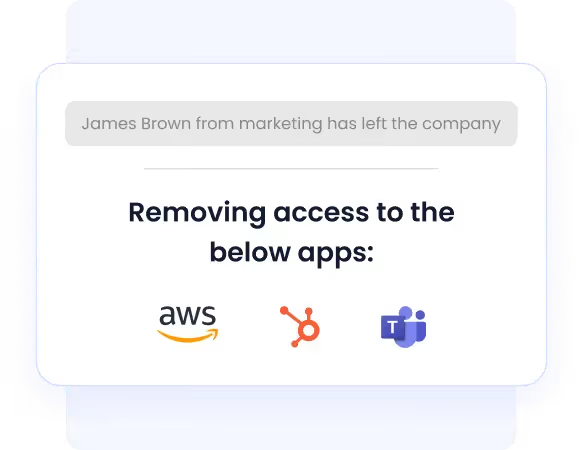
Know how JoVe streamlined employee onboarding and offboarding with CloudEagle.ai, saving countless hours while boosting productivity and compliance.
See how Alice Park from Remediant describes the impact of streamlining employee onboarding and offboarding with CloudEagle.ai. She explains how automation saved significant time while keeping their SaaS ecosystem secure.
5. AI-Powered Identity Governance (IGA)
Legacy IAM and IGA platforms are rigid and costly, often requiring additional enterprise add-ons like SAML. CloudEagle.ai’s Gen AI engine, Eagle Eye (Ai-powered ChatBot), modernizes identity governance by recommending least-privilege access, detecting redundant licenses, and enforcing time-based entitlements.
6. Just-in-Time (JIT) Access
In many enterprises, IT teams issue perpetual licenses for tasks that should only require temporary access. Even after the assignment ends, the access often stays active, leading to unnecessary license costs and compliance risks. According to CloudEagle.ai’s IGA report, only 10% of enterprises have implemented JIT controls.
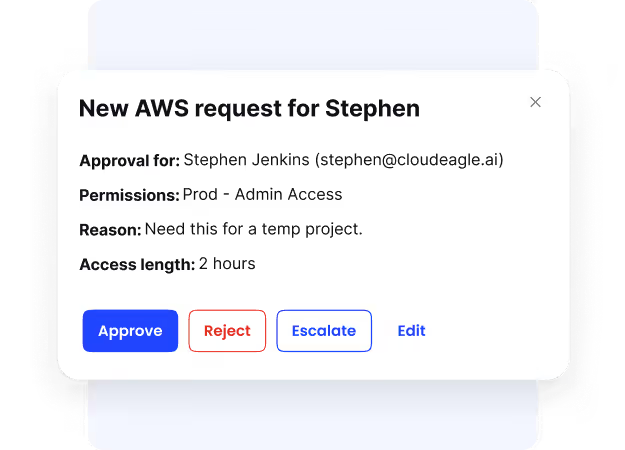
CloudEagle.ai solves this with just-in-time (JIT) access, granting elevated permissions only when needed and for a fixed duration. This eliminates permanent high-risk entitlements, reduces insider threats, and ensures that every privileged action is time-bound, traceable, and audit-ready by default.
7. Attribute-Based Access Control (ABAC)
CloudEagle.ai further enhances governance with attribute-based access control (ABAC). Policies can be applied dynamically based on user role, department, geography, or project context, ensuring employees receive only the access they truly need.
This fine-grained control helps global enterprises maintain compliance across diverse teams and jurisdictions. ABAC enforces least-privilege principles automatically, making ITGC audits smoother and more defensible.
8. Centralized Evidence and Audit Trails
In most enterprises, audit evidence is scattered across spreadsheets, email chains, and ticketing systems, making audits lengthy and painful. CloudEagle.ai consolidates policies, logs, and approvals into a centralized evidence repository.
This reduces the effort required to gather documentation, often cutting hundreds of hours from audit preparation. For CIOs and CISOs, this means less time chasing evidence and more time focusing on proactive compliance strategies.
Atul Tulshibagwale, Cloud Identity Pioneer, advises:
“Dynamic enforcement ensures every access decision is logged, justified, and auditable in real-time—this not only strengthens security but also transforms compliance management.”
9. Self-Service App Catalog
Uncontrolled app requests often lead to shadow IT and audit failures. CloudEagle.ai eliminates this with a governed self-service app catalog where employees can request approved apps. Approvals are routed through Slack or directly within the platform, ensuring every request follows proper chains of command.
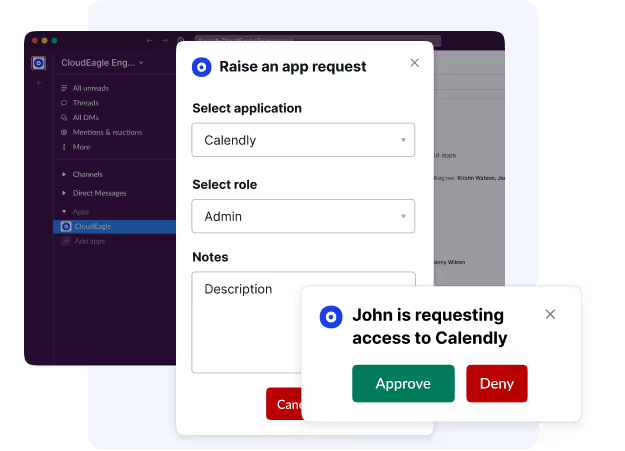
Every transaction is logged automatically, creating audit-proof records that strengthen ITGC compliance. This balances productivity and governance, employees get faster access while IT teams retain full oversight.
Cut Audit Prep From Weeks to Hours.


8. ITGC Audit Checklist: Verify These 6 Controls Before Auditors Do
Use this checklist to self-assess ITGC readiness before auditors arrive. For each domain, confirm evidence is timestamped, approvals are documented, and recurring checks are automated.
Teams that want every control broken into test steps can work from the full IT general controls audit checklist, which goes deeper on each domain below.
9. How Do IT General Controls Affect the Audit Outcome?
ITGCs don't just support the audit; they determine its scope, depth, and cost.
Three areas feel this most directly:
a) Scope and testing depth Strong ITGCs let auditors place reliance on automated controls and clean evidence trails.
Weak controls force manual testing of compensating controls, broadening scope and driving up audit hours.
b) Financial reporting reliability. External auditors use ITGC effectiveness as a proxy for data integrity. Weak access controls or undocumented change management mean auditors can't trust financial outputs regardless of how clean the numbers look.
ITGC failures rarely stay contained within IT; they surface in financial audit opinions.
c) Audit cycle time: Enterprises with mature ITGCs compress audit prep from months to days. Those relying on manual processes spend weeks gathering evidence that should already exist.
The PCAOB reports that nearly 39% of audits are flagged for control or evidence deficiencies, even among large, well-resourced organizations.
The bottom line: ITGCs are the primary signal auditors use to decide how deeply they need to look.
10. Common ITGC Audit Challenges
Even large enterprises face obstacles during an ITGC audit. These challenges often come from fragmented processes, complex systems, or limited resources. Left unaddressed, they can delay compliance, increase costs, and expose the business to security or regulatory risks.
Here are the challenges you must stay aware of:
1. Lack of Centralized Control Documentation
A major ITGC challenge is poor documentation. Policies, procedures, and evidence are often scattered across teams, making it difficult for auditors to confirm if controls work effectively. This slows audits, drives up costs, and raises concerns about governance maturity.
2. Complex IT Environments With Multiple Systems
Most enterprises run many systems, from ERP and HR tools to SaaS apps. Each requires proper ITGC controls, but complexity makes full coverage difficult. Missing even one high-risk system can cause audit gaps. Mergers, acquisitions, or rapid tech adoption add to the challenge, making audits more resource-heavy.
3. Insufficient User Access Reviews
User access reviews are among the most common points of failure in ITGC testing. If terminated employees retain access, or if role changes are not updated promptly, the enterprise risks unauthorized activity or fraud. Regulators often cite this as a leading compliance weakness.
According to reports, 95% of enterprises still rely on manual access reviews.
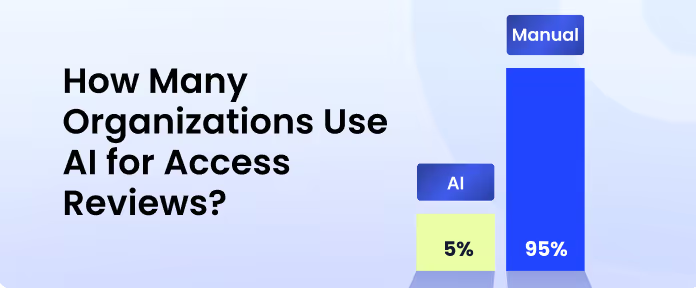
Beyond compliance, poor access reviews create real business risk. Insider threats, data leakage, and operational disruption all stem from weak access governance. Regular, automated access reviews are essential to avoid repeat findings in audits.
4. Ineffective Change Management Processes
Enterprises regularly apply patches, updates, and system changes. Without structured approvals and testing, these changes may go live unchecked, causing downtime, data corruption, or security risks. Weak change management is a serious compliance issue since auditors expect clear approvals and testing records.
5. Resource Constraints and Manual Testing
ITGC audits need skilled IT, audit, and compliance teams to gather evidence and test controls. Many enterprises lack resources and rely on manual processes that are slow and error-prone. This extends audit timelines, raises costs, and lowers accuracy. Without automation, enterprises face recurring audit gaps and higher compliance risks.
Best Practices for a Successful ITGC Audit
Preparing for an ITGC audit can be complex, but following best practices makes the process smoother and more effective. Here's how you can achieve a successful ITGC audit:
1. Automate User Access Reviews and Monitoring
Manual access checks are slow and prone to errors. Automation makes sure former employees lose access quickly and that permissions always match job roles. Continuous monitoring tools flag unusual activity early, reducing risk. For auditors, automated logs prove that ITGC controls work effectively, cutting delays and building trust.
2. Standardize Change Management Procedures
Uncontrolled system changes often cause audit failures. Standardizing updates, patches, and configuration changes ensures every change is approved, tested, and reviewed before going live. This reduces errors, prevents downtime, and shows auditors that strong IT audit general controls are in place. A consistent process also avoids surprises during testing.
3. Maintain Strong Evidence and Audit Trails
Auditors rely on clear evidence to confirm compliance. Enterprises should keep updated policies, approval records, and system logs in one centralized location. Strong audit trails prove that processes were followed consistently. This not only speeds up the audit but also demonstrates maturity in governance, making it easier to achieve ITGC certification.
4. Perform Regular Internal ITGC Assessments
Waiting for the annual audit increases the risk of surprises. Regular internal reviews help detect gaps early, giving teams time to fix issues before external auditors arrive. These proactive assessments show regulators and investors that the enterprise takes ITGC compliance seriously and maintains strong oversight year-round.
5. Leverage Technology Platforms for Compliance
Managing controls through spreadsheets and emails is inefficient. Modern compliance and SaaS management platforms automate monitoring, centralize evidence, and simplify reporting. This means fewer manual errors, lower audit costs, and stronger assurance that ITGC testing and compliance are handled consistently throughout the year.
How to Choose an ITGC Auditing Platform
All platforms are not built for audit depth. Here's what to evaluate:
Speed to visibility: The platform should surface access entitlements, control gaps, and compliance risks within days, not months of configuration.
Deep integrations: Bi-directional connections with your IdP (Okta), ticketing system (Jira), and procurement tools (Coupa) are non-negotiable. Evidence from disconnected systems creates gaps auditors will flag.
Continuous monitoring: Point-in-time snapshots leave you exposed between audit cycles. Look for real-time alerts on access drift, role changes, and orphaned accounts.
Least-privilege enforcement: JIT access that auto-revokes permissions after a defined period directly reduces the attack surface that auditors examine most closely.
Internal Audit vs External Audit: When to Conduct?
When is an internal ITGC audit conducted?
An internal ITGC audit is typically conducted before an external audit cycle begins, giving IT and compliance teams time to identify and remediate control gaps without external scrutiny.
Most organizations run internal assessments quarterly or at least annually, with additional reviews triggered by significant changes such as new system deployments, mergers, acquisitions, or major regulatory updates.
The goal is to catch weaknesses early, so they don't surface as findings during a formal external review.
When is an external ITGC audit conducted?
An external ITGC audit is conducted when independent, third-party validation of IT controls is required, most commonly as part of SOX compliance for publicly traded companies, SOC 2 Type II certification, or other regulatory mandates specific to the organization's industry.
These audits typically follow an annual cycle, though the timing depends on the compliance framework in scope and any contractual or regulatory deadlines the organization must meet.
External audits may also be triggered by investor requirements, customer due diligence requests, or following a significant security incident.
ITGC vs SOX Controls: What's the Difference?
ITGCs are one category of controls inside a SOX control environment. SOX controls cover everything that protects the accuracy of financial reporting, while ITGCs cover only the IT layer those financial systems run on: access, change management, and IT operations.
Section 404 of the Sarbanes-Oxley Act requires public companies to assess their internal control over financial reporting (ICFR) every year. Auditors test that environment in layers: entity-level controls, business process controls (including automated application controls), and IT general controls underneath both.
The dependency runs one way. If ITGCs fail, auditors cannot rely on the automated application controls built on top of them, so they fall back to manual testing and a larger sample size.
Conclusion
An ITGC audit protects your systems, financial data, and reputation. It lowers risks, keeps you compliant, and builds trust with regulators and investors. In today's fast-changing environment, strong ITGC controls are a must for every enterprise.
With CloudEagle.ai, audits become easier and faster. The platform automates access reviews, streamlines access management, and centralizes audit evidence. This means fewer surprises, lower costs, and continuous compliance all year long.
Are you ready to streamline your ITGC audit?
Schedule a demo with CloudEagle.ai and see how easily you can simplify ITGC compliance.
15. FAQs
1. What are the 4 domains of ITGC?
The four core domains are access controls, change management, backup and recovery, and IT operations. These areas cover who can access systems, how updates are managed, how data is protected, and how daily IT processes are monitored.
2. What is the scope of an ITGC audit?
The scope includes all systems and processes that affect financial reporting, compliance, and security. This often covers user access, system changes, data backup, IT monitoring, and sometimes vendor and third-party services.
3. What is the difference between ISO 27001 and ITGC?
ISO 27001 is a broad information security standard covering an organization’s entire security management system. ITGC audits, on the other hand, focus specifically on IT controls that support financial reporting and compliance with regulations like SOX or SOC 2.
4. What is an ITGC audit program?
An ITGC audit program is the documented plan auditors follow to test IT general controls. It lists the in-scope systems, the control objective for each domain, the test procedure and sample size for each control, and the evidence needed to pass. Internal audit teams usually refresh it every year as systems and regulations change.
5. What are the five steps of the ITGC process?
The five steps are planning and scoping, identifying the key controls to test, gathering evidence, testing control effectiveness, and reporting findings with a remediation plan. Many teams add continuous monitoring as a sixth step, because remediation and control checks carry on after the audit report is issued.
6. What are general IT controls?
General IT controls, the same thing as IT general controls, are the baseline controls that govern an organization's whole IT environment rather than one application. They cover access to programs and data, program changes, program development, and computer operations such as backups and job scheduling. Application-level controls can only be trusted when these hold.
7. When is an ITGC audit applicable?
An ITGC audit applies whenever a company has to prove its systems produce reliable financial data or protect sensitive data. Public companies under SOX Section 404 test ITGCs every year. Service providers pursuing SOC 2 Type II and organizations certifying to ISO 27001 have comparable IT controls tested. Scope covers any system that touches financial reporting or regulated data.
8. What does audit-ready ITGC documentation include?
Audit-ready ITGC documentation lets an auditor trace every control to evidence without follow-up requests. It usually includes current, approved policies, access review sign-offs, provisioning and deprovisioning tickets, change approvals with test results, backup and restore test logs, and exception records. Everything should be timestamped and kept in one central repository.
Audit Prep Shouldn't Take Weeks


.avif)


.avif)
.avif)




.png)






.png)
.avif)
.avif)
.avif)


