You need to enable JavaScript in order to use the AI chatbot tool powered by ChatBot

Why Continuous Compliance Beats Annual Audits in 2026

Share via:
blog-cms-banner-bg
Little-Known Negotiation Hacks to Get the Best Deal on Slack
cta-bg-blogDownload Your Copy

HIPAA Compliance Checklist for 2025

Download PDF

Annual audits fail because they rely on reconstructing past activity instead of proving what happened in real time. 

For example, an auditor asks, “Show which users had admin access in Google Workspace on March 15 and whether that access was approved.” often need hours to pull logs, approvals, and screenshots from different systems.

The issue is not missing IT asset audits. It is missing immediate, verifiable evidence like access logs, approval timestamps, and change history across tools such as Salesforce.

Continuous compliance monitoring solves this by tracking access, changes, and approvals in real time. In this article, we will explain why annual audits break down, how continuous compliance outperforms, and the role of CloudEagle.ai.

TL;DR

  • Annual audits fail because they rely on reconstructing past activity instead of real-time evidence.
  • Continuous compliance tracks access, changes, and approvals in real time, ensuring audit readiness anytime.
  • It captures risks instantly, reducing detection time and preventing hidden compliance gaps.
  • Continuous monitoring eliminates audit surprises by keeping evidence always available and validated.
  • CloudEagle.ai enables continuous compliance with real-time tracking, automation, and audit-ready visibility.

1. What is Continuous Compliance?

Continuous compliance means tracking access, changes, and approvals in real time so audit evidence is always available. Instead of collecting logs during audits, systems continuously record who did what and when.

  • Real-Time Access Tracking: Monitor who has access to systems like Google Workspace and update permissions instantly.
  • Continuous Logging Of System Activity: Record user actions, such as data changes or permission updates, with timestamps.
  • Always Audit-Ready Evidence: Access reviews, approvals, and logs are stored and retrievable at any time.

Continuous compliance ensures enterprises can answer audit questions immediately without reconstructing past activity. The role of continuous monitoring in privacy compliance​ will always help in audit readiness. 

Your Compliance Isn’t Complete

Important checks often slip through unnoticed.
See SaaS Compliance Best Practices

2. Where Do Annual Audit Models Break Down in Modern SaaS Environments?

Annual audit models break down because they depend on point-in-time evidence, while SaaS environments change daily. Access, roles, and data movement shift continuously, but audits only check snapshots.

  • Access Changes Between Audit Cycles: A user may gain admin access in Google Workspace in April and lose it in June, but annual audits may never capture that window.
  • Delayed Offboarding Leaves Active Accounts: Employees who leave may retain access to tools like Salesforce for days or weeks before removal.
  • Data Movement Across Multiple SaaS Tools: Files copied between apps are not tracked in a single audit trail.

These gaps occur because audits look backward, not at real-time activity. And that is a problematic situation when comparing it with continuous compliance monitoring.

  • Logs Are Reconstructed Instead Of Captured Continuously: Teams export data months later instead of tracking it live.
  • Temporary Access Is Rarely Reviewed: Ephemeral access granted during projects often go unverified.
  • No Visibility Between Audit Windows: Risks that occur mid-year are often invisible to auditors.

As Gene Kim, Chief Technology Officer of Tripwire, said,

“Complex systems fail in complex ways.”

Annual audits miss those failures because they only examine static snapshots in environments that change every day.

Also Read: Top 10 SOC 2 Type 2 Compliance Platforms

3. What Does Continuous Compliance Actually Look Like in Practice?

Continuous compliance means tracking access, changes, and approvals in real time, so evidence is always available. Instead of preparing for audits, systems continuously generate audit-ready data.

Real-Time Access Monitoring

Track who has admin or privileged access in tools like Google Workspace and update permissions immediately when roles change.

Automated Access Reviews With Logged Approvals

Managers review access through workflows that record timestamps and approvals automatically.

Continuous Change Tracking Across Systems

Monitor who modified data in platforms like Salesforce, including what changed and when.

These practices eliminate the need to reconstruct evidence later. According to JEET Business Technology, enterprises using continuous monitoring detect security and compliance within hours or minutes. 

Continuous compliance automation works because it replaces periodic checks with ongoing visibility. The role of continuous monitoring in privacy compliance​ can show exactly what is happening now.

Compliance Fine Or Just Lucky?

Most teams miss steps until regulators take a closer look.
See How to Get GDPR Compliant

4. Why Does Continuous Compliance Outperform Annual Audits?

Continuous compliance outperforms annual audits because it captures every access change, access request, and system action as it happens. 

For instance, a user gains admin access in Google Workspace for two weeks and then loses it. Continuous systems record that entire timeline. Annual audits often miss it because they only review a snapshot.

A. Captures Risk As It Happens, Not Months Later

Continuous compliance captures access changes and risky activity the moment they occur, instead of discovering them during audits months later. This reduces the gap between when a SaaS security risk happens and when it is detected.

Immediate Detection Of Access Changes

When a user gains admin access in Google Workspace, it is logged and visible instantly.

Real-Time Alerts For Risky Activity

Unusual actions, like bulk data exports or permission changes, trigger alerts as they happen.

No Dependency On Historical Reconstruction

Teams don’t rely on logs pulled months later to understand what happened.

This timing difference is critical. According to the IBM Cost of a Data Breach Report, it takes organizations an average of over 200 days to identify a breach.

Capturing risk in real time reduces that delay, allowing teams to act immediately instead of uncovering issues long after they occurred.

B. Reflects Real-Time Access and System Behavior

A finance analyst is given time-based access to the admin profile to update reporting workflows. The access is meant to last two days.

IT Perspective:

The access is granted in Google Workspace and later removed, but no one tracks how long it remained active or what actions were performed.

Audit Perspective:

During an annual audit, only the current access state is reviewed. There is no visibility into whether the analyst had elevated permissions during the reporting period.

Nothing appears incorrect in the system at audit time. The user no longer has admin access. But the actual risk occurred earlier. For two days, the user had elevated permissions.

Continuous compliance captures this full timeline, when access was granted, what actions were taken, and when it was removed.

Must Read: What are the Risks of Poor Access Controls?

C. Reduces Audit Surprises and Last-Minute Fixes

Continuous compliance reduces audit surprises by ensuring evidence is always available and controls are validated continuously. Teams don’t discover gaps only when auditors start testing.

  • Access Reviews Already Completed And Logged: Review records in systems like Salesforce are available with timestamps and approvals.
  • No Missing Evidence During Sampling: When auditors select users or transactions, logs and approvals can be retrieved immediately.
  • Control Failures Identified Earlier: Issues like delayed offboarding or missing approvals are detected before audits.

These continuous compliance monitoring practices eliminate last-minute audit preparation.

  • No Manual Evidence Reconstruction: Teams don’t need to export logs or compile reports under time pressure.
  • Fewer Unexpected Control Failures: Continuous validation ensures controls are working before audits begin.

By removing uncertainty and preparation delays, continuous compliance turns audits into validation exercises instead of discovery processes.

D. Scales With SaaS and Organizational Change

Continuous compliance scales because it tracks access and activity automatically as systems and teams grow. Annual audits struggle when new apps, users, and roles are added throughout the year.

  • New SaaS Apps Automatically Included: Tools like Slack or Notion are monitored as soon as they are adopted.
  • Role Changes Tracked In Real Time: When employees move teams, access updates are logged and validated immediately.
  • Consistent Controls Across Systems: Policies apply uniformly across applications instead of being reviewed manually per tool.

As enterprises expand their SaaS stack, continuous compliance automation ensures controls evolve alongside growth instead of falling behind.

5. How Does CloudEagle.ai Support Continuous Compliance Across SaaS?

Compliance can no longer rely on quarterly reviews or annual audits. In modern SaaS environments, access changes daily, new applications appear without approval, and AI tools slip past IT.

CloudEagle.ai is one of the best tools for continuous compliance monitoring​. It monitors applications, access, and user behavior in real time while automating governance workflows.

With the right continuous compliance tools​, you don’t need to worry about any security risks. 

A: Eliminating Blind Spots with AI & SaaS Apps Discovery

CloudEagle.ai ensures every SaaS application visibility while governed, including shadow and AI tools.

Current Process

Teams rely on expense reports and manual audits to identify SaaS applications.

Pain Points

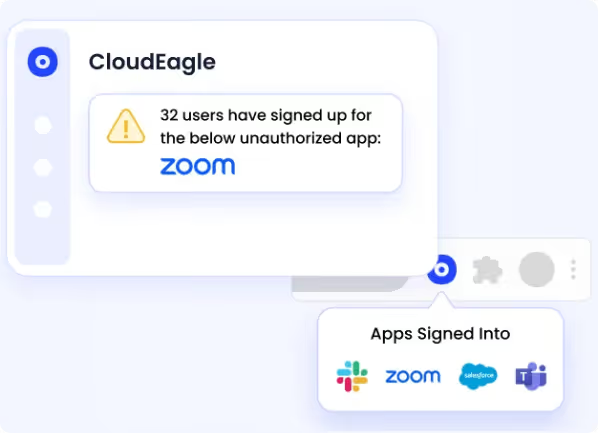
Shadow IT and AI tools remain undetected, creating compliance and security risks.
How We Do It

CloudEagle.ai detects applications using SSO, finance data, and browser activity, building a centralized inventory.

Why We Are Better

Organizations gain real-time visibility into all applications, eliminating compliance blind spots.

B: Extending Compliance to AI Applications and Shadow AI

CloudEagle.ai for continuous compliance monitoring​ brings AI tools under the same shadow AI  governance framework as SaaS applications.

Current Process

AI adoption happens without oversight. IT teams lack visibility into AI usage and access.

Pain Points

Sensitive data may be shared with unapproved AI tools. Enterprises cannot track AI risk or spend.

How We Do It

CloudEagle.ai maps AI applications, tracks usage across systems, and enforces AI governance through real-time controls.

Why We Are Better

Enterprises manage AI adoption safely, with visibility into usage, risk, and compliance.

Struggling with risky access, compliance gaps, or rising SaaS costs? Watch SaaS Risk and Compliance Management webinar to learn how to reduce spend and stay audit-ready without manual tracking.

C: Automating Continuous User Access Reviews

CloudEagle.ai replaces periodic user access reviews with automated, ongoing certification workflows.

Current Process

Access reviews are conducted quarterly using spreadsheets and manual processes.

Pain Points

Reviews are delayed and inaccurate. Risky or inactive users retain access longer than necessary.

How We Do It

CloudEagle.ai continuously evaluates user access and triggers automated review and remediation workflows.

Why We Are Better

Access remains accurate at all times, reducing compliance gaps and audit risk.

D: Enforcing Access Controls Through Identity Lifecycle Automation

CloudEagle.ai ensures access is provisioned and revoked correctly as employees join, change roles, or leave.

Current Process

Provisioning and deprovisioning are handled manually across multiple systems.

Pain Points

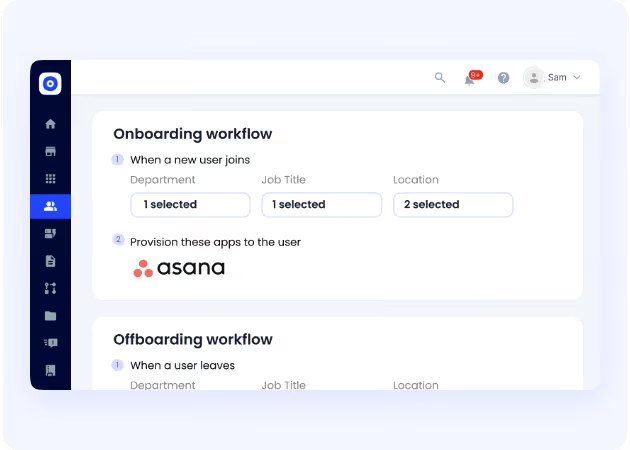
Ex-employees may retain access. Inconsistent provisioning creates security and compliance risks.
How We Do It

CloudEagle.ai automates onboarding, offboarding, and role-based access across SaaS applications.

Why We Are Better

Access stays aligned with roles, ensuring compliance and reducing manual effort.

E. Maintaining Audit-Ready Evidence at All Times

CloudEagle.ai ensures compliance evidence is always complete, consistent, and readily available.

Current Process

Teams gather audit evidence manually before audits using multiple systems.

Pain Points

Audit preparation is time-consuming and prone to missing documentation.
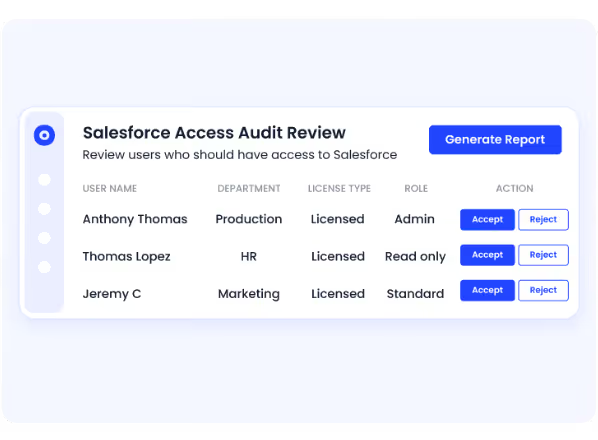
How We Do It

CloudEagle.ai automatically logs access changes, approvals, and system activity across SaaS apps.

Why We Are Better

Audit readiness becomes continuous, eliminating last-minute preparation and reducing SaaS security risks.

6. Conclusion

Continuous compliance wins because it replaces reconstruction with real-time proof. Instead of answering auditor questions weeks later, teams can immediately show who had access, what changed, and when it was approved.

This is where best tools for continuous compliance monitoring​ like CloudEagle become critical. It helps enterprises track SaaS access, monitor permission changes, automate access reviews, and maintain audit-ready logs across systems.

When continuous compliance tools​ are being used, audits stop being stressful events and become simple validation checks of controls that are already working.

7. FAQs

1. What are the three types of compliance?

The three main types are regulatory compliance, corporate compliance, and data compliance. Regulatory covers laws like Sarbanes-Oxley Act, corporate focuses on internal policies, and data compliance covers protection of sensitive information.

2. What are the 4 stages of compliance?

The four stages are identify requirements, implement controls, monitor continuously, and audit or validate. These stages ensure compliance is not just implemented but maintained over time.

3. What are the 3 C's of compliance?

The 3 C’s are compliance, consistency, and control. Organizations must follow rules, apply them consistently, and enforce controls to ensure adherence.=

4. What does "compliance" mean?

Compliance means following laws, regulations, and internal policies while being able to prove that required controls are working through logs, approvals, and documented evidence.

Advertisement for a SaaS Subscription Tracking Template with a call-to-action button to download and a partial graphic of a tablet showing charts.Banner promoting a SaaS Agreement Checklist to streamline SaaS management and avoid budget waste with a call-to-action button labeled Download checklist.Blue banner with text 'The Ultimate Employee Offboarding Checklist!' and a black button labeled 'Download checklist' alongside partial views of checklist documents from cloudeagle.ai.Digital ad for download checklist titled 'The Ultimate Checklist for IT Leaders to Optimize SaaS Operations' by cloudeagle.ai, showing checklist pages.Slack Buyer's Guide offer with text 'Unlock insider insights to get the best deal on Slack!' and a button labeled 'Get Your Copy', accompanied by a preview of the guide featuring Slack's logo.Monday Pricing Guide by cloudeagle.ai offering exclusive pricing secrets to maximize investment with a call-to-action button labeled Get Your Copy and an image of the guide's cover.Blue banner for Canva Pricing Guide by cloudeagle.ai offering a guide to Canva costs, features, and alternatives with a call-to-action button saying Get Your Copy.Blue banner with white text reading 'Little-Known Negotiation Hacks to Get the Best Deal on Slack' and a white button labeled 'Get Your Copy'.Blue banner with text 'Little-Known Negotiation Hacks to Get the Best Deal on Monday.com' and a white button labeled 'Get Your Copy'.Blue banner with text 'Little-Known Negotiation Hacks to Get the Best Deal on Canva' and a white button labeled 'Get Your Copy'.Banner with text 'Slack Buyer's Guide' and a 'Download Now' button next to images of a guide titled 'Slack Buyer’s Guide: Features, Pricing & Best Practices'.Digital cover of Monday Pricing Guide with a button labeled Get Your Copy on a blue background.Canva Pricing Guide cover with a button labeled Get Your Copy on a blue gradient background.

Enter your email to
unlock the report

Oops! Something went wrong while submitting the form.
License Count
Benchmark
Per User/Per Year

Enter your email to
unlock the report

Oops! Something went wrong while submitting the form.
License Count
Benchmark
Per User/Per Year

Enter your email to
unlock the report

Oops! Something went wrong while submitting the form.
Notion Plus
License Count
Benchmark
Per User/Per Year
100-500
$67.20 - $78.72
500-1000
$59.52 - $72.00
1000+
$51.84 - $57.60
Canva Pro
License Count
Benchmark
Per User/Per Year
100-500
$74.33-$88.71
500-1000
$64.74-$80.32
1000+
$55.14-$62.34

Enter your email to
unlock the report

Oops! Something went wrong while submitting the form.

Enter your email to
unlock the report

Oops! Something went wrong while submitting the form.
Zoom Business
License Count
Benchmark
Per User/Per Year
100-500
$216.00 - $264.00
500-1000
$180.00 - $216.00
1000+
$156.00 - $180.00

Enter your email to
unlock the report

Oops! Something went wrong while submitting the form.

Get the Right Security Platform To Secure Your Cloud Infrastructure

Please enter a business email
Thank you!
The 2023 SaaS report has been sent to your email. Check your promotional or spam folder.
Oops! Something went wrong while submitting the form.

Access full report

Please enter a business email
Thank you!
The 2023 SaaS report has been sent to your email. Check your promotional or spam folder.
Oops! Something went wrong while submitting the form.

Annual audits fail because they rely on reconstructing past activity instead of proving what happened in real time. 

For example, an auditor asks, “Show which users had admin access in Google Workspace on March 15 and whether that access was approved.” often need hours to pull logs, approvals, and screenshots from different systems.

The issue is not missing IT asset audits. It is missing immediate, verifiable evidence like access logs, approval timestamps, and change history across tools such as Salesforce.

Continuous compliance monitoring solves this by tracking access, changes, and approvals in real time. In this article, we will explain why annual audits break down, how continuous compliance outperforms, and the role of CloudEagle.ai.

TL;DR

  • Annual audits fail because they rely on reconstructing past activity instead of real-time evidence.
  • Continuous compliance tracks access, changes, and approvals in real time, ensuring audit readiness anytime.
  • It captures risks instantly, reducing detection time and preventing hidden compliance gaps.
  • Continuous monitoring eliminates audit surprises by keeping evidence always available and validated.
  • CloudEagle.ai enables continuous compliance with real-time tracking, automation, and audit-ready visibility.

1. What is Continuous Compliance?

Continuous compliance means tracking access, changes, and approvals in real time so audit evidence is always available. Instead of collecting logs during audits, systems continuously record who did what and when.

  • Real-Time Access Tracking: Monitor who has access to systems like Google Workspace and update permissions instantly.
  • Continuous Logging Of System Activity: Record user actions, such as data changes or permission updates, with timestamps.
  • Always Audit-Ready Evidence: Access reviews, approvals, and logs are stored and retrievable at any time.

Continuous compliance ensures enterprises can answer audit questions immediately without reconstructing past activity. The role of continuous monitoring in privacy compliance​ will always help in audit readiness. 

Your Compliance Isn’t Complete

Important checks often slip through unnoticed.
See SaaS Compliance Best Practices

2. Where Do Annual Audit Models Break Down in Modern SaaS Environments?

Annual audit models break down because they depend on point-in-time evidence, while SaaS environments change daily. Access, roles, and data movement shift continuously, but audits only check snapshots.

  • Access Changes Between Audit Cycles: A user may gain admin access in Google Workspace in April and lose it in June, but annual audits may never capture that window.
  • Delayed Offboarding Leaves Active Accounts: Employees who leave may retain access to tools like Salesforce for days or weeks before removal.
  • Data Movement Across Multiple SaaS Tools: Files copied between apps are not tracked in a single audit trail.

These gaps occur because audits look backward, not at real-time activity. And that is a problematic situation when comparing it with continuous compliance monitoring.

  • Logs Are Reconstructed Instead Of Captured Continuously: Teams export data months later instead of tracking it live.
  • Temporary Access Is Rarely Reviewed: Ephemeral access granted during projects often go unverified.
  • No Visibility Between Audit Windows: Risks that occur mid-year are often invisible to auditors.

As Gene Kim, Chief Technology Officer of Tripwire, said,

“Complex systems fail in complex ways.”

Annual audits miss those failures because they only examine static snapshots in environments that change every day.

Also Read: Top 10 SOC 2 Type 2 Compliance Platforms

3. What Does Continuous Compliance Actually Look Like in Practice?

Continuous compliance means tracking access, changes, and approvals in real time, so evidence is always available. Instead of preparing for audits, systems continuously generate audit-ready data.

Real-Time Access Monitoring

Track who has admin or privileged access in tools like Google Workspace and update permissions immediately when roles change.

Automated Access Reviews With Logged Approvals

Managers review access through workflows that record timestamps and approvals automatically.

Continuous Change Tracking Across Systems

Monitor who modified data in platforms like Salesforce, including what changed and when.

These practices eliminate the need to reconstruct evidence later. According to JEET Business Technology, enterprises using continuous monitoring detect security and compliance within hours or minutes. 

Continuous compliance automation works because it replaces periodic checks with ongoing visibility. The role of continuous monitoring in privacy compliance​ can show exactly what is happening now.

Compliance Fine Or Just Lucky?

Most teams miss steps until regulators take a closer look.
See How to Get GDPR Compliant

4. Why Does Continuous Compliance Outperform Annual Audits?

Continuous compliance outperforms annual audits because it captures every access change, access request, and system action as it happens. 

For instance, a user gains admin access in Google Workspace for two weeks and then loses it. Continuous systems record that entire timeline. Annual audits often miss it because they only review a snapshot.

A. Captures Risk As It Happens, Not Months Later

Continuous compliance captures access changes and risky activity the moment they occur, instead of discovering them during audits months later. This reduces the gap between when a SaaS security risk happens and when it is detected.

Immediate Detection Of Access Changes

When a user gains admin access in Google Workspace, it is logged and visible instantly.

Real-Time Alerts For Risky Activity

Unusual actions, like bulk data exports or permission changes, trigger alerts as they happen.

No Dependency On Historical Reconstruction

Teams don’t rely on logs pulled months later to understand what happened.

This timing difference is critical. According to the IBM Cost of a Data Breach Report, it takes organizations an average of over 200 days to identify a breach.

Capturing risk in real time reduces that delay, allowing teams to act immediately instead of uncovering issues long after they occurred.

B. Reflects Real-Time Access and System Behavior

A finance analyst is given time-based access to the admin profile to update reporting workflows. The access is meant to last two days.

IT Perspective:

The access is granted in Google Workspace and later removed, but no one tracks how long it remained active or what actions were performed.

Audit Perspective:

During an annual audit, only the current access state is reviewed. There is no visibility into whether the analyst had elevated permissions during the reporting period.

Nothing appears incorrect in the system at audit time. The user no longer has admin access. But the actual risk occurred earlier. For two days, the user had elevated permissions.

Continuous compliance captures this full timeline, when access was granted, what actions were taken, and when it was removed.

Must Read: What are the Risks of Poor Access Controls?

C. Reduces Audit Surprises and Last-Minute Fixes

Continuous compliance reduces audit surprises by ensuring evidence is always available and controls are validated continuously. Teams don’t discover gaps only when auditors start testing.

  • Access Reviews Already Completed And Logged: Review records in systems like Salesforce are available with timestamps and approvals.
  • No Missing Evidence During Sampling: When auditors select users or transactions, logs and approvals can be retrieved immediately.
  • Control Failures Identified Earlier: Issues like delayed offboarding or missing approvals are detected before audits.

These continuous compliance monitoring practices eliminate last-minute audit preparation.

  • No Manual Evidence Reconstruction: Teams don’t need to export logs or compile reports under time pressure.
  • Fewer Unexpected Control Failures: Continuous validation ensures controls are working before audits begin.

By removing uncertainty and preparation delays, continuous compliance turns audits into validation exercises instead of discovery processes.

D. Scales With SaaS and Organizational Change

Continuous compliance scales because it tracks access and activity automatically as systems and teams grow. Annual audits struggle when new apps, users, and roles are added throughout the year.

  • New SaaS Apps Automatically Included: Tools like Slack or Notion are monitored as soon as they are adopted.
  • Role Changes Tracked In Real Time: When employees move teams, access updates are logged and validated immediately.
  • Consistent Controls Across Systems: Policies apply uniformly across applications instead of being reviewed manually per tool.

As enterprises expand their SaaS stack, continuous compliance automation ensures controls evolve alongside growth instead of falling behind.

5. How Does CloudEagle.ai Support Continuous Compliance Across SaaS?

Compliance can no longer rely on quarterly reviews or annual audits. In modern SaaS environments, access changes daily, new applications appear without approval, and AI tools slip past IT.

CloudEagle.ai is one of the best tools for continuous compliance monitoring​. It monitors applications, access, and user behavior in real time while automating governance workflows.

With the right continuous compliance tools​, you don’t need to worry about any security risks. 

A: Eliminating Blind Spots with AI & SaaS Apps Discovery

CloudEagle.ai ensures every SaaS application visibility while governed, including shadow and AI tools.

Current Process

Teams rely on expense reports and manual audits to identify SaaS applications.

Pain Points

Shadow IT and AI tools remain undetected, creating compliance and security risks.

How We Do It

CloudEagle.ai detects applications using SSO, finance data, and browser activity, building a centralized inventory.

Why We Are Better

Organizations gain real-time visibility into all applications, eliminating compliance blind spots.

B: Extending Compliance to AI Applications and Shadow AI

CloudEagle.ai for continuous compliance monitoring​ brings AI tools under the same shadow AI  governance framework as SaaS applications.

Current Process

AI adoption happens without oversight. IT teams lack visibility into AI usage and access.

Pain Points

Sensitive data may be shared with unapproved AI tools. Enterprises cannot track AI risk or spend.

How We Do It

CloudEagle.ai maps AI applications, tracks usage across systems, and enforces AI governance through real-time controls.

Why We Are Better

Enterprises manage AI adoption safely, with visibility into usage, risk, and compliance.

Struggling with risky access, compliance gaps, or rising SaaS costs? Watch SaaS Risk and Compliance Management webinar to learn how to reduce spend and stay audit-ready without manual tracking.

C: Automating Continuous User Access Reviews

CloudEagle.ai replaces periodic user access reviews with automated, ongoing certification workflows.

Current Process

Access reviews are conducted quarterly using spreadsheets and manual processes.

Pain Points

Reviews are delayed and inaccurate. Risky or inactive users retain access longer than necessary.

How We Do It

CloudEagle.ai continuously evaluates user access and triggers automated review and remediation workflows.

Why We Are Better

Access remains accurate at all times, reducing compliance gaps and audit risk.

D: Enforcing Access Controls Through Identity Lifecycle Automation

CloudEagle.ai ensures access is provisioned and revoked correctly as employees join, change roles, or leave.

Current Process

Provisioning and deprovisioning are handled manually across multiple systems.

Pain Points

Ex-employees may retain access. Inconsistent provisioning creates security and compliance risks.

How We Do It

CloudEagle.ai automates onboarding, offboarding, and role-based access across SaaS applications.

Why We Are Better

Access stays aligned with roles, ensuring compliance and reducing manual effort.

E. Maintaining Audit-Ready Evidence at All Times

CloudEagle.ai ensures compliance evidence is always complete, consistent, and readily available.

Current Process

Teams gather audit evidence manually before audits using multiple systems.

Pain Points

Audit preparation is time-consuming and prone to missing documentation.

How We Do It

CloudEagle.ai automatically logs access changes, approvals, and system activity across SaaS apps.

Why We Are Better

Audit readiness becomes continuous, eliminating last-minute preparation and reducing SaaS security risks.

6. Conclusion

Continuous compliance wins because it replaces reconstruction with real-time proof. Instead of answering auditor questions weeks later, teams can immediately show who had access, what changed, and when it was approved.

This is where best tools for continuous compliance monitoring​ like CloudEagle become critical. It helps enterprises track SaaS access, monitor permission changes, automate access reviews, and maintain audit-ready logs across systems.

When continuous compliance tools​ are being used, audits stop being stressful events and become simple validation checks of controls that are already working.

7. FAQs

1. What are the three types of compliance?

The three main types are regulatory compliance, corporate compliance, and data compliance. Regulatory covers laws like Sarbanes-Oxley Act, corporate focuses on internal policies, and data compliance covers protection of sensitive information.

2. What are the 4 stages of compliance?

The four stages are identify requirements, implement controls, monitor continuously, and audit or validate. These stages ensure compliance is not just implemented but maintained over time.

3. What are the 3 C's of compliance?

The 3 C’s are compliance, consistency, and control. Organizations must follow rules, apply them consistently, and enforce controls to ensure adherence.=

4. What does "compliance" mean?

Compliance means following laws, regulations, and internal policies while being able to prove that required controls are working through logs, approvals, and documented evidence.

CloudEagle.ai recognized in the 2025 Gartner® Magic Quadrant™ for SaaS Management Platforms
Download now
gartner chart
5x
Faster employee
onboarding
80%
Reduction in time for
user access reviews
30k
Workflows
automated
$15Bn
Analyzed in
contract spend
$2Bn
Saved in
SaaS spend

Streamline SaaS governance and save 10-30%

Book a Demo with Expert
CTA image
One platform to Manage
all SaaS Products
Learn More