You need to enable JavaScript in order to use the AI chatbot tool powered by ChatBot

How to Prepare for SOC 2 Type II When Your SaaS Stack Has 200+ Apps and a Dozen AI Tools

Share via:
blog-cms-banner-bg
Little-Known Negotiation Hacks to Get the Best Deal on Slack
cta-bg-blogDownload Your Copy

HIPAA Compliance Checklist for 2025

Download PDF

Your SOC 2 Type II audit window opens in 60 days. Someone asks if you can pull access evidence for all 200+ SaaS apps in scope. Your team goes quiet.

SOC 2 Type II tests a 6 to 12-month observation period. Somewhere inside that window, an ex-employee kept access six weeks too long, a developer started using an unapproved AI tool, and a quarterly access review got rubber-stamped by a manager too busy to actually check.

Manual reviews break at this scale for a structural reason. 

IT teams pull data from ticketing systems, log into apps one by one, and try to verify who should have access and what permissions they need.

At 200+ apps, that process doesn't scale, and SOC 2 Type II auditors know exactly where it breaks.

So preparation has to work as a continuous governance layer, producing audit evidence every day of the observation period instead of the week the auditor shows up.

TL;DR

  • SOC 2 Type II covers a full observation period. Point-in-time access reviews and manual evidence gathering don't hold up against a rigorous auditor.
  • AI tools create a gap most SOC 2 programs haven't closed yet: unsanctioned AI access, AI-specific data handling, and orphaned API tokens sit outside most current control frameworks.
  • CloudEagle.ai reduces the user access review process from months to days across every SaaS and AI app. That includes the apps sitting outside your IDP, the ones manual reviews usually miss entirely.
  • The result is continuous access governance, automated evidence collection, and an audit-ready posture that holds on every day of the observation period.

1. How to Prepare for SOC 2 Type II at This Scale: 4 Steps

Manual prep breaks down past roughly 200 apps for a structural reason: nobody can manually review that many systems fast enough to keep evidence current across a 6 to 12 month observation period. 
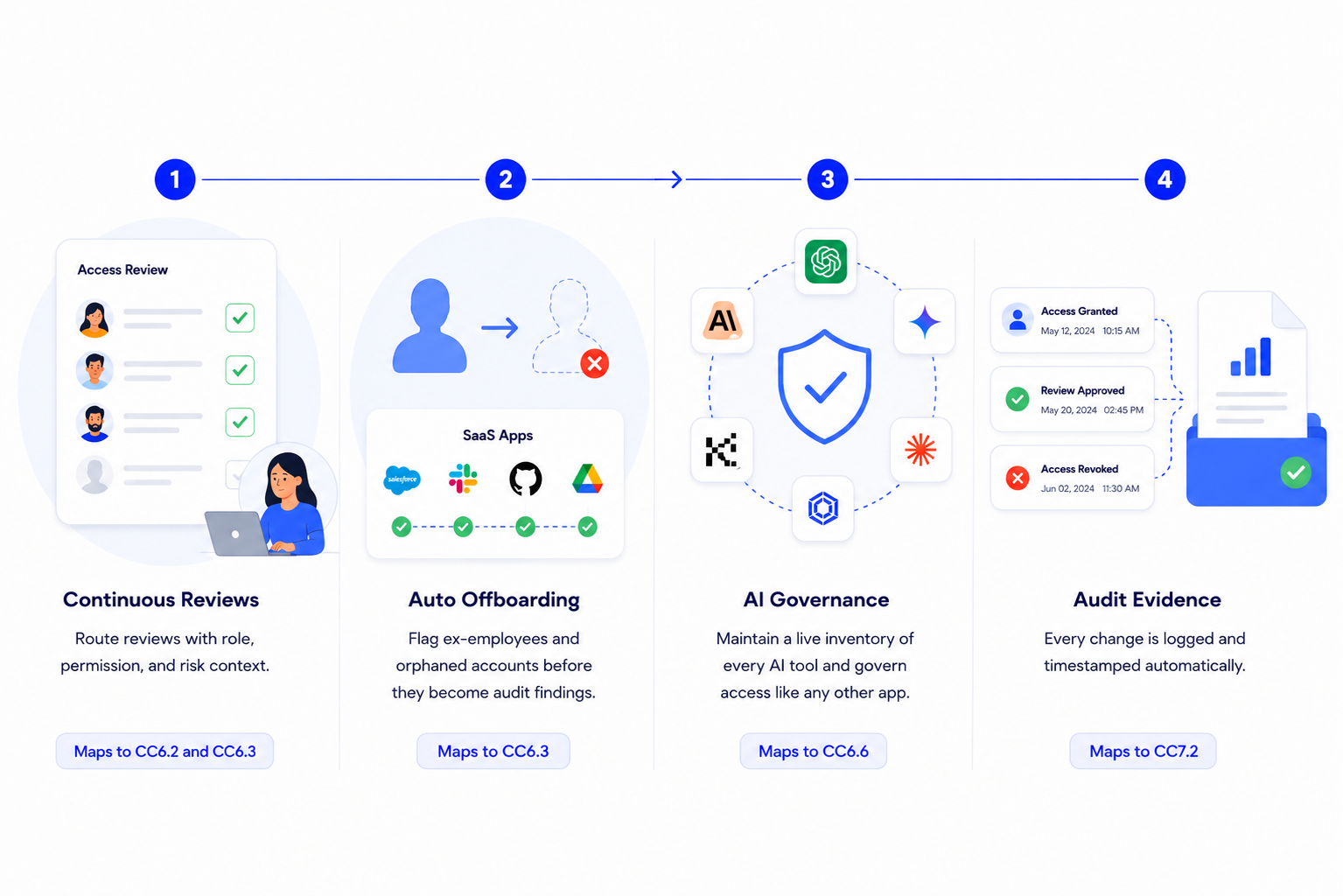
SOC 2 compliance workflow showing continuous access reviews, automated user offboarding, AI governance, and audit evidence collection to strengthen identity security and simplify compliance.

Here's what preparation actually looks like once you stop trying to do it by hand: 

Step 1: Move Access Reviews From Periodic to Continuous

A manager handed forty unfamiliar names tends to rubber-stamp the whole batch, and that doesn't survive Type II scrutiny. 

Route reviews to the right manager with role, permission, and risk context attached, on a continuous cadence instead of a quarterly one. Maps to CC6.2 and CC6.3.

Step 2: Close the Ex-Employee and Orphaned Identity Gap

CloudEagle's own survey found 48% of former employees still had application access months after leaving. 

Flag ex-employees and orphaned accounts the moment access goes stale, across apps both behind and outside the IDP, before the auditor finds them first. Maps to CC6.3.

Step 3: Bring AI Tools Into the Same Governance Model as Everything Else

Most offboarding isn't AI-specific, so API tokens and AI tool logins can outlive SSO access by months. 

Keep a live inventory of every AI tool in use, sanctioned and shadow alike, with approval status attached, and route AI access through the same offboarding workflow as everything else. Maps to CC6.6.

Step 4: Make Evidence a Byproduct of Governance, Not a Sprint

Every access change, review decision, and deprovisioning event needs to be logged and timestamped as it happens, not reconstructed from Jira tickets after the fact. 

That's the difference between two weeks of pre-audit scrambling and one day of export.

48% of Ex-Employees Still Have Access When the Auditor Shows Up

Close that gap before your observation period ends.
Download Checklist

2. How CloudEagle.ai Helps You Prepare for SOC 2 Type II Across 200+ Apps and a Dozen AI Tools

The shift that matters here is simple to state and hard to execute manually: evidence gets produced continuously as a byproduct of governance, instead of being assembled retroactively in the weeks before the audit window closes.
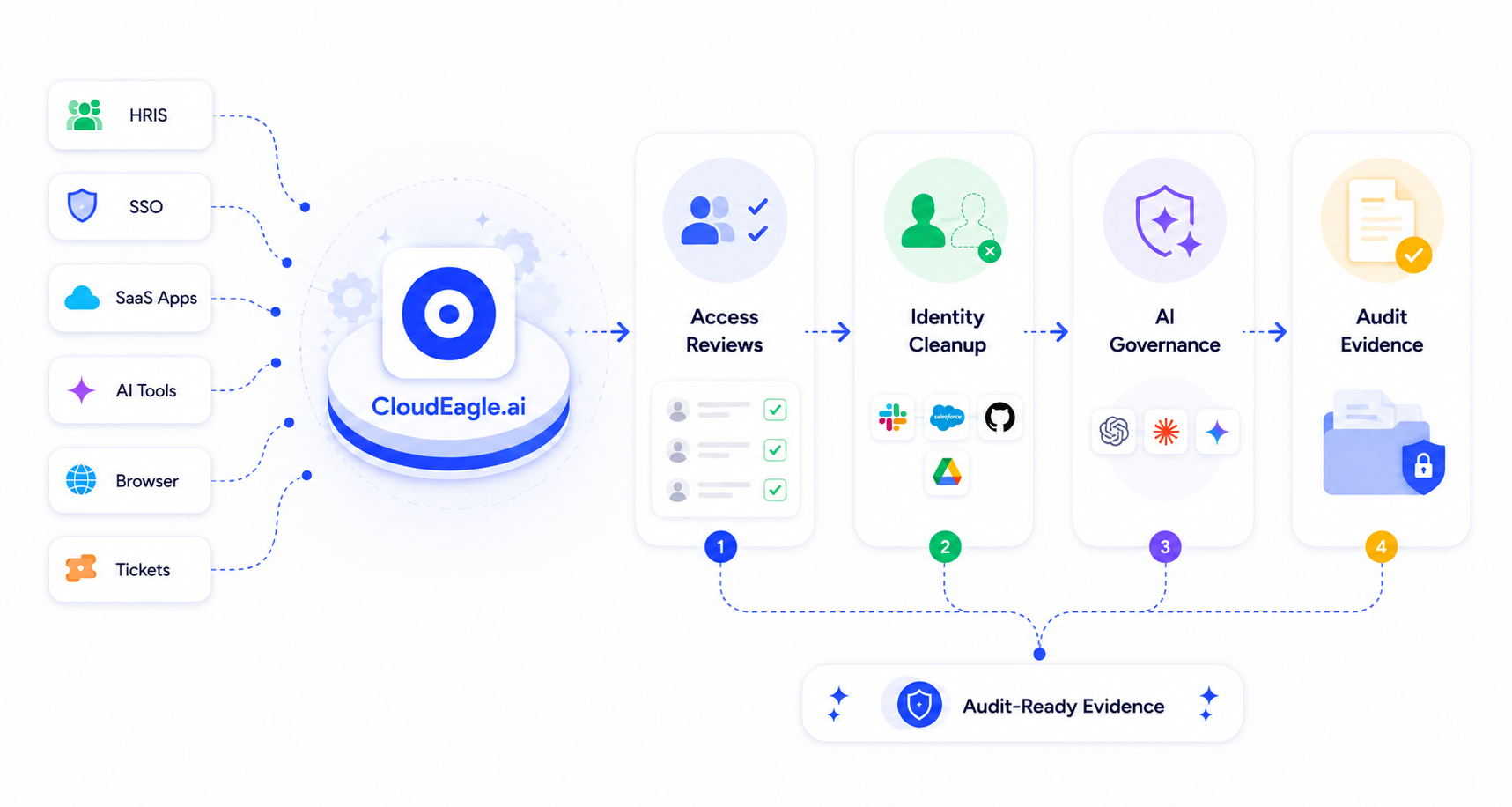
CloudEagle.ai identity governance workflow that connects HRIS, SSO, SaaS apps, AI tools, browsers, and tickets to automate access reviews, identity cleanup, AI governance, and audit-ready evidence.

Here's the mechanism behind each of the four steps above.

1. Automated Access Reviews at Scale

Manual access reviews fail less because teams are careless and more because the mechanics don't scale past a couple of dozen apps. 

Pulling user lists, emailing managers, and chasing sign-offs is a process built for ten systems. It buckles fast once that number hits two hundred.

What CloudEagle.ai does:

  • Automates the end-to-end review cycle: assigning users to the right reviewer, offboarding rejected users, attaching evidence, and generating the compliance report auditors receive, across every in-scope app rather than the subset IT has time to check by hand.

Expanded access review displaying application-level review status, pending users, reviewers, administrators, source integrations, and review actions for streamlined access certification.

  • Fetches each user's roles, permissions, SSO, and HRIS status, and privilege level, so reviewers see risky and over-privileged users first instead of scrolling through an undifferentiated list.
  • Routes reviews to the correct manager automatically with reminders, which is the same mechanism that helped one healthcare technology company push 3x more access reviews through per quarter once automation replaced manual email follow-up.
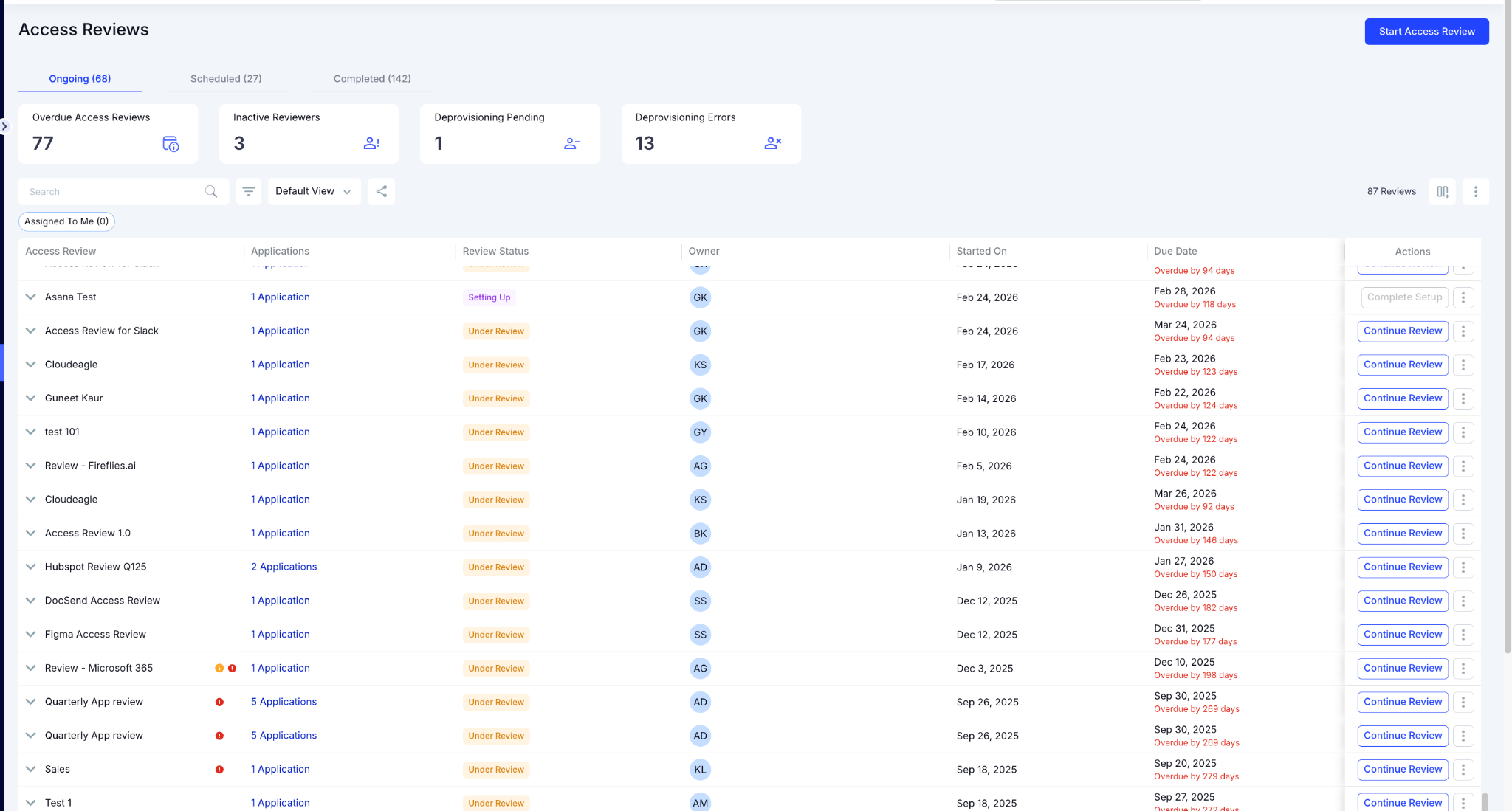
Access Reviews dashboard providing visibility into ongoing, scheduled, and completed reviews, overdue certifications, inactive reviewers, deprovisioning issues, and review progress.

That last point isn't theoretical. A healthcare technology platform under SOC 2 Type II requirements used to spend two weeks per audit cycle pulling access lists by hand and chasing manager sign-offs.

After automating the review cycle, the same company cut audit prep from two weeks to one day and eliminated more than 220 excessive admin privileges in the process.

"Every SOC 2 cycle, we spent two weeks pulling access evidence manually, exporting lists, chasing managers for sign-offs, and reconciling spreadsheets.

CloudEagle.ai automated the reviews and produced the evidence packets in a day. Our last audit had zero access-related findings. That had never happened before."


- Pedro Sors, Chief Operating Officer, Lapzo

2. Continuous Ex-Employee and Orphaned Identity Detection

The most common SOC 2 finding isn't exotic. It's an account that should have been deactivated and wasn't. A CloudEagle survey of enterprise CIOs and CISOs found that 48% of former employees still had application access months after leaving, a gap that sits squarely inside the SOC 2 Type II observation window.

What CloudEagle.ai does:

  • Automatically flags high-risk users and ex-employees, then streamlines deprovisioning so access removal doesn't depend on someone remembering to file a ticket.
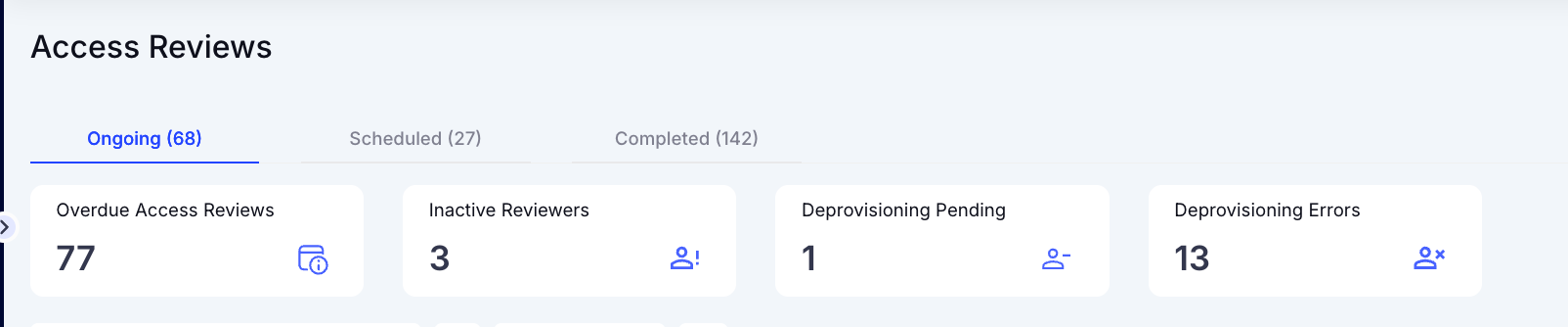
Access Reviews dashboard summarizing overdue access reviews, inactive reviewers, pending deprovisioning tasks, and deprovisioning errors to help administrators prioritize governance actions.

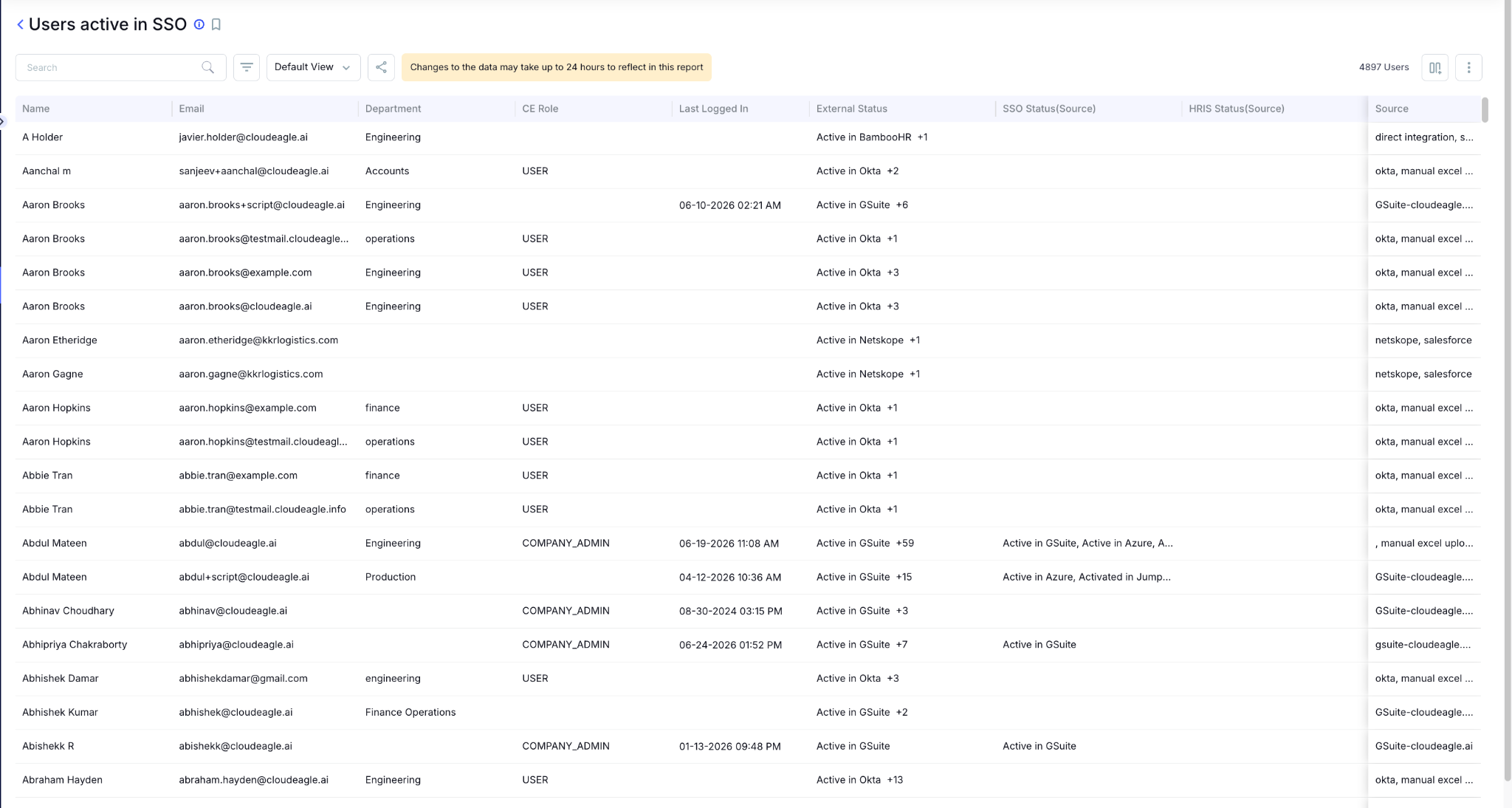
SSO user inventory showing employee identities, departments, roles, login activity, HRIS status, SSO status, and identity sources for centralized user lifecycle management.

  • Reduces access review fatigue by surfacing risk context up front, which is part of why reviewers can move through more reviews without rubber-stamping out of exhaustion.

3. AI Tool Access Governance

This is the layer most SOC 2 programs are still missing, and it's what auditors are starting to ask about first. 

They want to know which AI tools are in use, whether they were approved, what data employees submitted to them, and whether former employees still have active AI access after their SSO credentials were revoked.

The honest answer most enterprises give right now is that they don't know. 

Shadow AI proliferates quietly across departments long before anyone notices, which is exactly why this evidence is hard to produce on demand.

What CloudEagle.ai does:

  • Surfaces every AI tool in use, sanctioned and shadow alike, with approval status, data access scope, and an owner attached to each one.
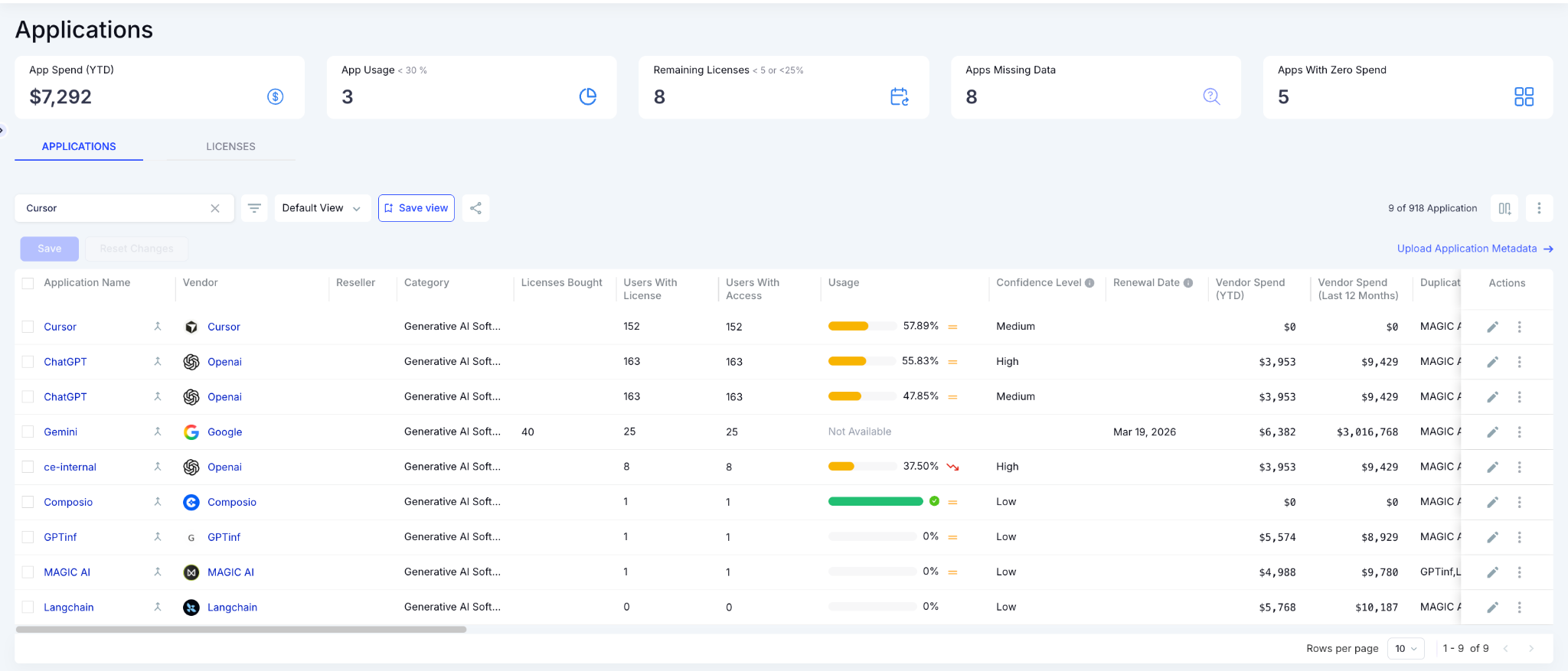
AI application inventory showing discovered AI tools, user adoption, license allocation, utilization, renewal dates, vendor spend, and confidence levels for centralized AI governance.

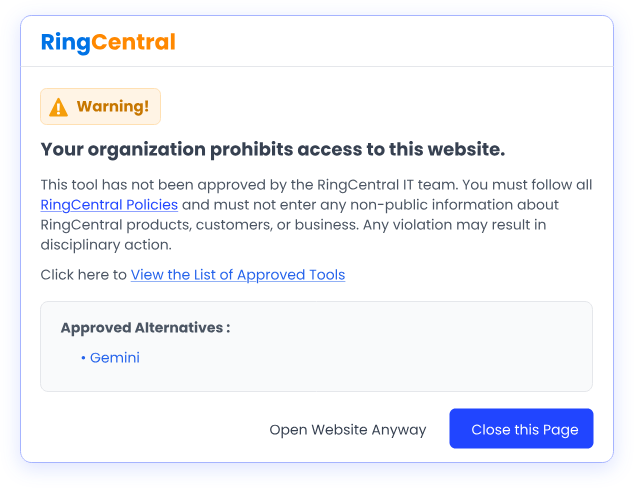
Enterprise browser warning screen notifying users that access to an unapproved website is restricted, displaying compliance requirements, approved alternatives, and governance controls for AI tool usage.

  • Brings AI tool access into the same offboarding workflow as every other app, so a departing employee's AI logins and API tokens get revoked alongside their SSO access instead of lingering as an orphaned credential.

That approval status, data access scope, and usage history are the exact evidence package AI-specific audit questions require. 

For a deeper look at how shadow AI creates governance gaps in the first place, The Shadow AI Governance Gap breaks down why most enterprises still have no formal policy at all.

A Fortune 500 financial services firm used exactly this layer to move from having no answer on AI exposure to full visibility into AI spend, risky applications, and sensitive data exposure across its environment.

“We realized AI couldn’t be managed like traditional SaaS. The risks and cost dynamics were different.

CloudEagle.ai gave us the control plane we needed to govern AI across spend, access, and data in one place. It also helped us identify high-risk applications and assign risk scores, so we could take action before exposure turned into incidents.”

~ Head of IT Security, Fortune 500 Financial Services Firm

4. Automatic Evidence Attachment

Auditors don't just want to know a review happened. They want a timestamped record showing who reviewed what, what they decided, and what changed as a result.

What CloudEagle.ai does:

  • Attaches deprovisioning proof automatically, so admins aren't manually pulling screenshots from Jira or other ticketing tools to reconstruct what happened weeks later.
  • Logs and timestamps every access change, review completion, and deprovisioning event, exportable on demand rather than compiled by hand when the auditor asks.
  • Produces the audit evidence package as a continuous byproduct of governance activity. That's the core difference between point-in-time compliance and what SOC 2 Type II actually holds organizations to.

Completed access review displaying approved user certifications, reviewers, administrators, application status, and one-click report generation for audit documentation.

Put together, these four capabilities are why CloudEagle.ai can compress the user access review process from months to days across an entire SaaS and AI portfolio. That includes systems sitting well outside a single IDP, which is exactly where manual reviews tend to lose track first.

3. The Full CC6 Picture: Where SaaS Sprawl Creates Findings

The steps above touch CC6.2, CC6.3, and CC6.6. 

Here's the complete control mapping GRC teams actually get tested against, including the one most manual processes miss entirely.

CC6.1 (Logical access controls)

Auditors test whether access is genuinely restricted to authorized users. 

At 200+ apps with manual provisioning, there are always exceptions, and exceptions are what auditors are trained to find.

CC6.2 (Access provisioning)

This control tests whether new access was properly authorized before it was granted. 

Approval evidence scattered across Slack threads and email doesn't hold up once an auditor asks for a documented trail.

CC6.3 (Access removal)

This is where most SOC 2 findings actually originate. 

IT teams often have to log into each application individually to verify and remove access, and at scale, that manual step gets skipped or delayed more often than anyone wants to admit.

CC6.6 (Unauthorized access prevention)

Auditors are increasingly asking about AI tool access specifically under this control. An unsanctioned AI tool with no approval record on file is a direct, easy-to-document finding.

Each of these controls maps to a specific piece of evidence: review completion records, provisioning logs, deprovisioning timestamps, and an AI tool inventory with approval status attached. The CloudEagle.ai capabilities above produce that evidence as a matter of course. Nobody is assembling it after the fact.

If your team is still untangling how these controls interact with broader IT general controls testing, the ITGC testing guide for SOC 2 and SOX walks through control documentation and testing cadence in more depth.

CC6.6 Is the Control Most Teams Don't Even Know They're Failing

Find every unapproved AI tool before your auditor does.
Download Checklist

4. Building the Audit Evidence Package Without a Manual Sprint

SOC 2 Type II auditors consistently request three categories of evidence: access review completion records with documented reasoning, provisioning and deprovisioning logs with timestamps, and a current access inventory showing exactly who has what across every in-scope app.

CloudEagle's dashboard gives admins a single view of which managers have completed their reviews and which haven't, turning audit prep from a manual assembly project into something closer to a one-click export.

The point worth repeating is the continuous governance angle. 

Evidence gets produced every day of the observation period as reviews happen and access changes in real time, well before anyone is scrambling in the panic week before the auditor arrives.

5. FAQs

1. How long does SOC 2 Type II preparation take with 200+ SaaS apps? 

Manual prep often takes weeks per cycle. Automated continuous review can cut audit-ready evidence production to a single day, based on documented customer outcomes.

2. Do SOC 2 Type II auditors specifically ask about AI tools? 

Increasingly, yes. Auditors now ask which AI tools are approved, what data was submitted, and whether ex-employees still have AI tool access.

3. What's the biggest SOC 2 Type II finding caused by SaaS sprawl? 

Delayed or missed access removal under CC6.3. Manual deprovisioning across 200+ apps creates gaps auditors consistently catch.

4. Can rubber-stamped access reviews still pass a SOC 2 Type II audit? 

No. Auditors test whether reviewers had enough context to make a real decision, and batch approvals without risk context typically fail that test.

SOC 2 Type II doesn't grade you on audit week. It grades you on every week of the observation period, and that's the layer CloudEagle is built to keep you ready on.

See CloudEagle's Compliance Automation in Action

Advertisement for a SaaS Subscription Tracking Template with a call-to-action button to download and a partial graphic of a tablet showing charts.Banner promoting a SaaS Agreement Checklist to streamline SaaS management and avoid budget waste with a call-to-action button labeled Download checklist.Blue banner with text 'The Ultimate Employee Offboarding Checklist!' and a black button labeled 'Download checklist' alongside partial views of checklist documents from cloudeagle.ai.Digital ad for download checklist titled 'The Ultimate Checklist for IT Leaders to Optimize SaaS Operations' by cloudeagle.ai, showing checklist pages.Slack Buyer's Guide offer with text 'Unlock insider insights to get the best deal on Slack!' and a button labeled 'Get Your Copy', accompanied by a preview of the guide featuring Slack's logo.Monday Pricing Guide by cloudeagle.ai offering exclusive pricing secrets to maximize investment with a call-to-action button labeled Get Your Copy and an image of the guide's cover.Blue banner for Canva Pricing Guide by cloudeagle.ai offering a guide to Canva costs, features, and alternatives with a call-to-action button saying Get Your Copy.Blue banner with white text reading 'Little-Known Negotiation Hacks to Get the Best Deal on Slack' and a white button labeled 'Get Your Copy'.Blue banner with text 'Little-Known Negotiation Hacks to Get the Best Deal on Monday.com' and a white button labeled 'Get Your Copy'.Blue banner with text 'Little-Known Negotiation Hacks to Get the Best Deal on Canva' and a white button labeled 'Get Your Copy'.Banner with text 'Slack Buyer's Guide' and a 'Download Now' button next to images of a guide titled 'Slack Buyer’s Guide: Features, Pricing & Best Practices'.Digital cover of Monday Pricing Guide with a button labeled Get Your Copy on a blue background.Canva Pricing Guide cover with a button labeled Get Your Copy on a blue gradient background.

Enter your email to
unlock the report

Oops! Something went wrong while submitting the form.
License Count
Benchmark
Per User/Per Year

Enter your email to
unlock the report

Oops! Something went wrong while submitting the form.
License Count
Benchmark
Per User/Per Year

Enter your email to
unlock the report

Oops! Something went wrong while submitting the form.
Notion Plus
License Count
Benchmark
Per User/Per Year
100-500
$67.20 - $78.72
500-1000
$59.52 - $72.00
1000+
$51.84 - $57.60
Canva Pro
License Count
Benchmark
Per User/Per Year
100-500
$74.33-$88.71
500-1000
$64.74-$80.32
1000+
$55.14-$62.34

Enter your email to
unlock the report

Oops! Something went wrong while submitting the form.

Enter your email to
unlock the report

Oops! Something went wrong while submitting the form.
Zoom Business
License Count
Benchmark
Per User/Per Year
100-500
$216.00 - $264.00
500-1000
$180.00 - $216.00
1000+
$156.00 - $180.00

Enter your email to
unlock the report

Oops! Something went wrong while submitting the form.

Get the Right Security Platform To Secure Your Cloud Infrastructure

Please enter a business email
Thank you!
The 2023 SaaS report has been sent to your email. Check your promotional or spam folder.
Oops! Something went wrong while submitting the form.

Access full report

Please enter a business email
Thank you!
The 2023 SaaS report has been sent to your email. Check your promotional or spam folder.
Oops! Something went wrong while submitting the form.

Your SOC 2 Type II audit window opens in 60 days. Someone asks if you can pull access evidence for all 200+ SaaS apps in scope. Your team goes quiet.

SOC 2 Type II tests a 6 to 12-month observation period. Somewhere inside that window, an ex-employee kept access six weeks too long, a developer started using an unapproved AI tool, and a quarterly access review got rubber-stamped by a manager too busy to actually check.

Manual reviews break at this scale for a structural reason. 

IT teams pull data from ticketing systems, log into apps one by one, and try to verify who should have access and what permissions they need.

At 200+ apps, that process doesn't scale, and SOC 2 Type II auditors know exactly where it breaks.

So preparation has to work as a continuous governance layer, producing audit evidence every day of the observation period instead of the week the auditor shows up.

TL;DR

  • SOC 2 Type II covers a full observation period. Point-in-time access reviews and manual evidence gathering don't hold up against a rigorous auditor.
  • AI tools create a gap most SOC 2 programs haven't closed yet: unsanctioned AI access, AI-specific data handling, and orphaned API tokens sit outside most current control frameworks.
  • CloudEagle.ai reduces the user access review process from months to days across every SaaS and AI app. That includes the apps sitting outside your IDP, the ones manual reviews usually miss entirely.
  • The result is continuous access governance, automated evidence collection, and an audit-ready posture that holds on every day of the observation period.

1. How to Prepare for SOC 2 Type II at This Scale: 4 Steps

Manual prep breaks down past roughly 200 apps for a structural reason: nobody can manually review that many systems fast enough to keep evidence current across a 6 to 12 month observation period. 

SOC 2 compliance workflow showing continuous access reviews, automated user offboarding, AI governance, and audit evidence collection to strengthen identity security and simplify compliance.

Here's what preparation actually looks like once you stop trying to do it by hand: 

Step 1: Move Access Reviews From Periodic to Continuous

A manager handed forty unfamiliar names tends to rubber-stamp the whole batch, and that doesn't survive Type II scrutiny. 

Route reviews to the right manager with role, permission, and risk context attached, on a continuous cadence instead of a quarterly one. Maps to CC6.2 and CC6.3.

Step 2: Close the Ex-Employee and Orphaned Identity Gap

CloudEagle's own survey found 48% of former employees still had application access months after leaving. 

Flag ex-employees and orphaned accounts the moment access goes stale, across apps both behind and outside the IDP, before the auditor finds them first. Maps to CC6.3.

Step 3: Bring AI Tools Into the Same Governance Model as Everything Else

Most offboarding isn't AI-specific, so API tokens and AI tool logins can outlive SSO access by months. 

Keep a live inventory of every AI tool in use, sanctioned and shadow alike, with approval status attached, and route AI access through the same offboarding workflow as everything else. Maps to CC6.6.

Step 4: Make Evidence a Byproduct of Governance, Not a Sprint

Every access change, review decision, and deprovisioning event needs to be logged and timestamped as it happens, not reconstructed from Jira tickets after the fact. 

That's the difference between two weeks of pre-audit scrambling and one day of export.

48% of Ex-Employees Still Have Access When the Auditor Shows Up

Close that gap before your observation period ends.
Download Checklist

2. How CloudEagle.ai Helps You Prepare for SOC 2 Type II Across 200+ Apps and a Dozen AI Tools

The shift that matters here is simple to state and hard to execute manually: evidence gets produced continuously as a byproduct of governance, instead of being assembled retroactively in the weeks before the audit window closes.

CloudEagle.ai identity governance workflow that connects HRIS, SSO, SaaS apps, AI tools, browsers, and tickets to automate access reviews, identity cleanup, AI governance, and audit-ready evidence.

Here's the mechanism behind each of the four steps above.

1. Automated Access Reviews at Scale

Manual access reviews fail less because teams are careless and more because the mechanics don't scale past a couple of dozen apps. 

Pulling user lists, emailing managers, and chasing sign-offs is a process built for ten systems. It buckles fast once that number hits two hundred.

What CloudEagle.ai does:

  • Automates the end-to-end review cycle: assigning users to the right reviewer, offboarding rejected users, attaching evidence, and generating the compliance report auditors receive, across every in-scope app rather than the subset IT has time to check by hand.

Expanded access review displaying application-level review status, pending users, reviewers, administrators, source integrations, and review actions for streamlined access certification.

  • Fetches each user's roles, permissions, SSO, and HRIS status, and privilege level, so reviewers see risky and over-privileged users first instead of scrolling through an undifferentiated list.
  • Routes reviews to the correct manager automatically with reminders, which is the same mechanism that helped one healthcare technology company push 3x more access reviews through per quarter once automation replaced manual email follow-up.

Access Reviews dashboard providing visibility into ongoing, scheduled, and completed reviews, overdue certifications, inactive reviewers, deprovisioning issues, and review progress.

That last point isn't theoretical. A healthcare technology platform under SOC 2 Type II requirements used to spend two weeks per audit cycle pulling access lists by hand and chasing manager sign-offs.

After automating the review cycle, the same company cut audit prep from two weeks to one day and eliminated more than 220 excessive admin privileges in the process.

"Every SOC 2 cycle, we spent two weeks pulling access evidence manually, exporting lists, chasing managers for sign-offs, and reconciling spreadsheets.

CloudEagle.ai automated the reviews and produced the evidence packets in a day. Our last audit had zero access-related findings. That had never happened before."


- Pedro Sors, Chief Operating Officer, Lapzo

2. Continuous Ex-Employee and Orphaned Identity Detection

The most common SOC 2 finding isn't exotic. It's an account that should have been deactivated and wasn't. A CloudEagle survey of enterprise CIOs and CISOs found that 48% of former employees still had application access months after leaving, a gap that sits squarely inside the SOC 2 Type II observation window.

What CloudEagle.ai does:

  • Automatically flags high-risk users and ex-employees, then streamlines deprovisioning so access removal doesn't depend on someone remembering to file a ticket.

Access Reviews dashboard summarizing overdue access reviews, inactive reviewers, pending deprovisioning tasks, and deprovisioning errors to help administrators prioritize governance actions.

SSO user inventory showing employee identities, departments, roles, login activity, HRIS status, SSO status, and identity sources for centralized user lifecycle management.

  • Reduces access review fatigue by surfacing risk context up front, which is part of why reviewers can move through more reviews without rubber-stamping out of exhaustion.

3. AI Tool Access Governance

This is the layer most SOC 2 programs are still missing, and it's what auditors are starting to ask about first. 

They want to know which AI tools are in use, whether they were approved, what data employees submitted to them, and whether former employees still have active AI access after their SSO credentials were revoked.

The honest answer most enterprises give right now is that they don't know. 

Shadow AI proliferates quietly across departments long before anyone notices, which is exactly why this evidence is hard to produce on demand.

What CloudEagle.ai does:

  • Surfaces every AI tool in use, sanctioned and shadow alike, with approval status, data access scope, and an owner attached to each one.

AI application inventory showing discovered AI tools, user adoption, license allocation, utilization, renewal dates, vendor spend, and confidence levels for centralized AI governance.

Enterprise browser warning screen notifying users that access to an unapproved website is restricted, displaying compliance requirements, approved alternatives, and governance controls for AI tool usage.

  • Brings AI tool access into the same offboarding workflow as every other app, so a departing employee's AI logins and API tokens get revoked alongside their SSO access instead of lingering as an orphaned credential.

That approval status, data access scope, and usage history are the exact evidence package AI-specific audit questions require. 

For a deeper look at how shadow AI creates governance gaps in the first place, The Shadow AI Governance Gap breaks down why most enterprises still have no formal policy at all.

A Fortune 500 financial services firm used exactly this layer to move from having no answer on AI exposure to full visibility into AI spend, risky applications, and sensitive data exposure across its environment.

“We realized AI couldn’t be managed like traditional SaaS. The risks and cost dynamics were different.

CloudEagle.ai gave us the control plane we needed to govern AI across spend, access, and data in one place. It also helped us identify high-risk applications and assign risk scores, so we could take action before exposure turned into incidents.”

~ Head of IT Security, Fortune 500 Financial Services Firm

4. Automatic Evidence Attachment

Auditors don't just want to know a review happened. They want a timestamped record showing who reviewed what, what they decided, and what changed as a result.

What CloudEagle.ai does:

  • Attaches deprovisioning proof automatically, so admins aren't manually pulling screenshots from Jira or other ticketing tools to reconstruct what happened weeks later.
  • Logs and timestamps every access change, review completion, and deprovisioning event, exportable on demand rather than compiled by hand when the auditor asks.
  • Produces the audit evidence package as a continuous byproduct of governance activity. That's the core difference between point-in-time compliance and what SOC 2 Type II actually holds organizations to.

Completed access review displaying approved user certifications, reviewers, administrators, application status, and one-click report generation for audit documentation.

Put together, these four capabilities are why CloudEagle.ai can compress the user access review process from months to days across an entire SaaS and AI portfolio. That includes systems sitting well outside a single IDP, which is exactly where manual reviews tend to lose track first.

3. The Full CC6 Picture: Where SaaS Sprawl Creates Findings

The steps above touch CC6.2, CC6.3, and CC6.6. 

Here's the complete control mapping GRC teams actually get tested against, including the one most manual processes miss entirely.

CC6.1 (Logical access controls)

Auditors test whether access is genuinely restricted to authorized users. 

At 200+ apps with manual provisioning, there are always exceptions, and exceptions are what auditors are trained to find.

CC6.2 (Access provisioning)

This control tests whether new access was properly authorized before it was granted. 

Approval evidence scattered across Slack threads and email doesn't hold up once an auditor asks for a documented trail.

CC6.3 (Access removal)

This is where most SOC 2 findings actually originate. 

IT teams often have to log into each application individually to verify and remove access, and at scale, that manual step gets skipped or delayed more often than anyone wants to admit.

CC6.6 (Unauthorized access prevention)

Auditors are increasingly asking about AI tool access specifically under this control. An unsanctioned AI tool with no approval record on file is a direct, easy-to-document finding.

Each of these controls maps to a specific piece of evidence: review completion records, provisioning logs, deprovisioning timestamps, and an AI tool inventory with approval status attached. The CloudEagle.ai capabilities above produce that evidence as a matter of course. Nobody is assembling it after the fact.

If your team is still untangling how these controls interact with broader IT general controls testing, the ITGC testing guide for SOC 2 and SOX walks through control documentation and testing cadence in more depth.

CC6.6 Is the Control Most Teams Don't Even Know They're Failing

Find every unapproved AI tool before your auditor does.
Download Checklist

4. Building the Audit Evidence Package Without a Manual Sprint

SOC 2 Type II auditors consistently request three categories of evidence: access review completion records with documented reasoning, provisioning and deprovisioning logs with timestamps, and a current access inventory showing exactly who has what across every in-scope app.

CloudEagle's dashboard gives admins a single view of which managers have completed their reviews and which haven't, turning audit prep from a manual assembly project into something closer to a one-click export.

The point worth repeating is the continuous governance angle. 

Evidence gets produced every day of the observation period as reviews happen and access changes in real time, well before anyone is scrambling in the panic week before the auditor arrives.

5. FAQs

1. How long does SOC 2 Type II preparation take with 200+ SaaS apps? 

Manual prep often takes weeks per cycle. Automated continuous review can cut audit-ready evidence production to a single day, based on documented customer outcomes.

2. Do SOC 2 Type II auditors specifically ask about AI tools? 

Increasingly, yes. Auditors now ask which AI tools are approved, what data was submitted, and whether ex-employees still have AI tool access.

3. What's the biggest SOC 2 Type II finding caused by SaaS sprawl? 

Delayed or missed access removal under CC6.3. Manual deprovisioning across 200+ apps creates gaps auditors consistently catch.

4. Can rubber-stamped access reviews still pass a SOC 2 Type II audit? 

No. Auditors test whether reviewers had enough context to make a real decision, and batch approvals without risk context typically fail that test.

SOC 2 Type II doesn't grade you on audit week. It grades you on every week of the observation period, and that's the layer CloudEagle is built to keep you ready on.

See CloudEagle's Compliance Automation in Action

CloudEagle.ai recognized in the 2025 Gartner® Magic Quadrant™ for SaaS Management Platforms
Download now
gartner chart
5x
Faster employee
onboarding
80%
Reduction in time for
user access reviews
30k
Workflows
automated
$15Bn
Analyzed in
contract spend
$2Bn
Saved in
SaaS spend

Streamline SaaS governance and save 10-30%

Book a Demo with Expert
CTA image