You need to enable JavaScript in order to use the AI chatbot tool powered by ChatBot

ITGC Testing: How to Run IT General Controls Testing for SOC 2/SOX

Share via:
blog-cms-banner-bg
Little-Known Negotiation Hacks to Get the Best Deal on Slack
cta-bg-blogDownload Your Copy

HIPAA Compliance Checklist for 2025

Download PDF

If your controls are designed correctly, why do auditors keep finding gaps?

Because design and execution are two different things, and most ITGC testing programs only verify one of them. A 2024 PCAOB review found nearly 39% of audits flagged for evidence or control deficiencies. The controls existed. The proof didn't.

This article covers the four ITGC domains auditors test, a five-step process to run testing that holds up, and what continuous audit readiness actually looks like in practice.

TL;DR

  • Most audit failures trace back to three gaps: access reviews that run inconsistently, change management evidence with missing approvals, and evidence reconstructed after the fact.
  • ITGC testing covers four domains: access controls, change management, computer operations, and SDLC.
  • SOX and SOC 2 use the same testing process. What differs is who sees the result and what they do with it.
  • The five steps: scope to financial risk, run walkthroughs, sample from full populations, test design not just execution, and document deficiencies with named ownership.
  • Teams that pass cleanly aren't the ones with the most controls. They're the ones whose evidence exists before the auditor asks for it.

1. Why Enterprises With Strong Controls Still Fail ITGC Audits

Auditors routinely walk into companies with 90-page control matrices, dedicated compliance teams, and well-written policies, and still issue three findings in fieldwork.

The problem is rarely the control design. It's the gap between when a control was supposed to run and when it actually ran, and whether anyone can prove the difference.

Most failures trace back to three patterns:

Access reviews that exist on paper but run inconsistently. Policy says quarterly. Evidence shows February and November. May and August: missing. A terminated employee's access stays open for four months because no cycle caught it.

Change management with critical evidence gaps. The ticket was logged. The rollback plan wasn't. The second approver signed off verbally. Auditors don't accept verbal.

Evidence reconstructed after the fact. Someone pulls the current system states and presents them as point-in-time records. Auditors are good at identifying this.

2. The 4 Domains IT General Controls Testing Covers

For SOC 2 and SOX, ITGC testing concentrates on four domains. Know these before you scope anything.

a) Access Controls

Who can access which systems, how access is provisioned, whether reviews run on schedule, and whether access is revoked when someone leaves. Auditors sample your offboarding SLA against actual deprovisioning timestamps. The gap between policy and execution is where findings live.

b) Change Management Controls: 

Every change to a financially significant system needs a trail: request, independent approval, testing evidence, rollback plan. One developer pushing to production without a second sign-off is a finding. Full stop.

c) Computer Operations Controls: 

Backup completion logs, job scheduling exception reports, and incident logs. Auditors aren't checking that backups are scheduled. They're checking they can actually be restored.

d) SDLC Controls: 

How applications get built, tested, and released. Development and production environments must be segregated. Code reviews must be documented. Pre-production testing must leave a retrievable record.

Auditors Will Test All Four Domains. Are You Ready?

Use this checklist before they show up.
Download Checklist

3. SOC 2 vs SOX: Same Domains, Different Stakes

The four domains above apply to both frameworks, but the consequences of getting ITGC testing wrong are different.

SOX is mandatory for US public companies. ITGC deficiencies become material weaknesses that require public disclosure, affect stock price, and sit on your auditor's PCAOB filing. There is no opting out and no negotiating the scope.

SOC 2 is voluntary, but the stakes are commercial. A qualified opinion or failed control means your customers and prospects see it. For SaaS companies going through vendor security reviews, a SOC 2 report with exceptions is a sales problem, not just a compliance one.

The testing process is the same. The urgency of getting evidence right is the same. What differs is who sees the result and what they do with it.

4. 5 Steps to Run ITGC Testing That Survives Scrutiny

Step 1: Scope to Financial Risk, Not System Count

SOX doesn't hand you a list of required controls. It requires you to identify and monitor controls appropriate to your environment. Your first move in ITGC testing is mapping systems to financial reporting processes.

In scope: ERP, billing system, payroll platform, anything that touches financial data. 
Out of scope: Customer support tools, marketing platforms, anything with no financial reporting connection.

Before scoping systems, establish who owns the program. In most enterprises, ITGC testing is led by internal audit, with IT security owning the access control and operations evidence, and the GRC or compliance team coordinating with the external auditor. 

Without a named owner per domain, evidence collection defaults to whoever the auditor emails first, which is how gaps appear.

On timing: For SOX, testing needs to cover the full annual period before your external auditor begins fieldwork, usually 6 to 8 weeks before year-end. For SOC 2, the observation window is agreed with your auditor upfront, commonly 6 or 12 months. 

Start scoping at least a quarter before that window opens.

Step 2: Walk Through Controls Before You Pull Samples

A walkthrough is a live trace of a transaction through a control, with the control owner present. You're confirming the control operates as documented, not that the documentation reads well.

Example: Your change management control requires dual approval, but your ticketing system only captures the final approver. You want that finding at 9 am in a walkthrough, not at 4 pm in an auditor debrief.

Step 3: Sample From the Full Population, Not a Convenient Subset

Always pull the full population first, then sample:

Control Type Population Typical Sample Size
Access controls Every provisioning event in the period 25-60 items, adjusted for volume
Change management Every change ticket in the period Based on the total change volume

When the same process runs identically across business units, one proportional sample covers all of them. Separating samples per unit for identical processes produces inconsistent results and wastes time.

Step 4: Test the Design, Not Just the Execution

Teams confirm a control run. They rarely confirm it ran correctly.

A screenshot showing the review completed is not sufficient evidence. Date, reviewer role, scope, and exception disposition all need to be present. Auditors check all four. Missing any one is a finding.

For an access review, that means verifying:

  • Ran within the required window
  • Covered the right user population
  • Performed by someone with the authority to certify it
  • Resulted in documented remediation of every exception found

Step 5: Document Deficiencies Before the Auditor Finds Them

Every ITGC testing cycle surfaces something. The audit risk isn't the deficiency. It's an undocumented one, or one with no owner and no timeline.

Classify what you find:

  • Control deficiency: No required disclosure. Remediate internally.
  • Significant deficiency: Report to the audit committee and external auditor. No public disclosure required.
  • Material weakness: Public disclosure in the annual report under Section 404. This is what affects stock prices and triggers investor scrutiny.

Most audit failures are documentation failures, not control failures. Assign a named owner to every finding, set a remediation date, and document the compensating control if the primary one won't be fixed before the period closes.

5. ITGC Audit Evidence Checklist: What Auditors Will Ask You to Produce

Control Domain What Auditors Ask For
Access Controls Provisioning tied to HR events, review timestamps with reviewer identity, privileged account inventory, offboarding SLA vs. actual deprovisioning date
Change Management Formal request records, independent approval evidence, testing sign-offs, and rollback documentation
Computer Operations Backup completion logs, job scheduling exception reports, and incident logs with resolution timestamps
SDLC Dev/prod segregation evidence, code review documentation, pre-production testing records
Logical Security MFA enforcement logs, password policy configs, failed login monitoring

Most Audit Failures Are Access Review Failures.

This checklist closes the gaps auditors find every time.
Download Checklist

6. ISO 27001 vs ITGC: Not the Same Audit

ISO 27001 covers your entire information security management system. ITGC testing covers the specific controls that protect financial reporting integrity, as required under SOC 2/SOX.

You can hold ISO 27001 and still fail an ITGC audit. They have different scopes, different evidence requirements, and different audiences. If you're SOX-registered or pursuing SOC 2 Type II, ITGC testing is mandatory regardless of what other certifications you hold.

7. How CloudEagle.ai Closes the Access Control Evidence Gap

The orchestration problem in ITGC testing is real: chasing reviewers, pulling logs from six systems, reconciling timestamps, and assembling evidence packets that are already stale when the auditor arrives.

CloudEagle.ai addresses access controls, where most deficiencies originate.

  • Automated access reviews: Scheduled reviews run across your SaaS stack, capture reviewer responses, and store timestamped evidence. No manual chase before every audit cycle.

CloudEagle Access Reviews dashboard showing 8 ongoing reviews with overdue status for quarterly app and sales reviews started in February 2026

  • Real-time provisioning logs: Every access event is recorded at the moment it happens. Auditors get a clean, complete population to sample from, not a reconstruction.

  • Automated offboarding: When an employee is terminated, CloudEagle revokes access across connected applications immediately, closing the gap that generates the most frequent access control findings.

CloudEagle automated offboarding workflow showing all licenses revoked across HubSpot, Slack, and Salesforce after an employee departure
  • Continuous evidence accumulation: Evidence builds throughout the year. When audit season arrives, the question isn't "where is everything?" It's "how much do you need?"
CloudEagle interface showing automated Netsuite usage report with user access logs including last login dates and active/inactive status, generated in response to a SOX audit request

ICEYE, a satellite technology company, reduced manual access reviews by 90% and saved 1,500+ hours a year after centralizing its access review process on CloudEagle.ai. Audit evidence that previously required ad hoc preparation became available on demand. Read the full case study.

8. FAQs

What are the 4 domains of ITGC? 

Access controls, change management, computer operations, and SDLC.

How are ITGCs tested? 

Walkthroughs, documentation review, sample-based testing against a full population, and evidence inspection across all attributes of control design. Auditors check that controls ran correctly, on time, by the right people, with documented outcomes.

What are the 5 steps of the ITGC testing process? 

Scope to financial risk, walkthroughs with control owners, sampling from full populations, design testing, and deficiency documentation with named ownership.

What is the difference between ISO 27001 and ITGC? 

ISO 27001 is a broad information security standard. ITGC covers controls specifically tied to financial reporting accuracy under SOC 2/SOX. One does not substitute for the other.

9. The Teams That Pass Without Drama

They're not the ones with the most controls. They're the ones whose access reviews ran when they were supposed to, whose evidence exists before the auditor asks for it, and whose deficiencies were documented and owned before anyone external saw them.

ITGC testing done well is invisible. Audit season becomes a formality. If your ITGC testing program still depends on manual pulls and reconstructed records, that's the gap.

See how CloudEagle.ai makes access control evidence continuous. Book a demo.

Advertisement for a SaaS Subscription Tracking Template with a call-to-action button to download and a partial graphic of a tablet showing charts.Banner promoting a SaaS Agreement Checklist to streamline SaaS management and avoid budget waste with a call-to-action button labeled Download checklist.Blue banner with text 'The Ultimate Employee Offboarding Checklist!' and a black button labeled 'Download checklist' alongside partial views of checklist documents from cloudeagle.ai.Digital ad for download checklist titled 'The Ultimate Checklist for IT Leaders to Optimize SaaS Operations' by cloudeagle.ai, showing checklist pages.Slack Buyer's Guide offer with text 'Unlock insider insights to get the best deal on Slack!' and a button labeled 'Get Your Copy', accompanied by a preview of the guide featuring Slack's logo.Monday Pricing Guide by cloudeagle.ai offering exclusive pricing secrets to maximize investment with a call-to-action button labeled Get Your Copy and an image of the guide's cover.Blue banner for Canva Pricing Guide by cloudeagle.ai offering a guide to Canva costs, features, and alternatives with a call-to-action button saying Get Your Copy.Blue banner with white text reading 'Little-Known Negotiation Hacks to Get the Best Deal on Slack' and a white button labeled 'Get Your Copy'.Blue banner with text 'Little-Known Negotiation Hacks to Get the Best Deal on Monday.com' and a white button labeled 'Get Your Copy'.Blue banner with text 'Little-Known Negotiation Hacks to Get the Best Deal on Canva' and a white button labeled 'Get Your Copy'.Banner with text 'Slack Buyer's Guide' and a 'Download Now' button next to images of a guide titled 'Slack Buyer’s Guide: Features, Pricing & Best Practices'.Digital cover of Monday Pricing Guide with a button labeled Get Your Copy on a blue background.Canva Pricing Guide cover with a button labeled Get Your Copy on a blue gradient background.

Enter your email to
unlock the report

Oops! Something went wrong while submitting the form.
License Count
Benchmark
Per User/Per Year

Enter your email to
unlock the report

Oops! Something went wrong while submitting the form.
License Count
Benchmark
Per User/Per Year

Enter your email to
unlock the report

Oops! Something went wrong while submitting the form.
Notion Plus
License Count
Benchmark
Per User/Per Year
100-500
$67.20 - $78.72
500-1000
$59.52 - $72.00
1000+
$51.84 - $57.60
Canva Pro
License Count
Benchmark
Per User/Per Year
100-500
$74.33-$88.71
500-1000
$64.74-$80.32
1000+
$55.14-$62.34

Enter your email to
unlock the report

Oops! Something went wrong while submitting the form.

Enter your email to
unlock the report

Oops! Something went wrong while submitting the form.
Zoom Business
License Count
Benchmark
Per User/Per Year
100-500
$216.00 - $264.00
500-1000
$180.00 - $216.00
1000+
$156.00 - $180.00

Enter your email to
unlock the report

Oops! Something went wrong while submitting the form.

Get the Right Security Platform To Secure Your Cloud Infrastructure

Please enter a business email
Thank you!
The 2023 SaaS report has been sent to your email. Check your promotional or spam folder.
Oops! Something went wrong while submitting the form.

Access full report

Please enter a business email
Thank you!
The 2023 SaaS report has been sent to your email. Check your promotional or spam folder.
Oops! Something went wrong while submitting the form.

If your controls are designed correctly, why do auditors keep finding gaps?

Because design and execution are two different things, and most ITGC testing programs only verify one of them. A 2024 PCAOB review found nearly 39% of audits flagged for evidence or control deficiencies. The controls existed. The proof didn't.

This article covers the four ITGC domains auditors test, a five-step process to run testing that holds up, and what continuous audit readiness actually looks like in practice.

TL;DR

  • Most audit failures trace back to three gaps: access reviews that run inconsistently, change management evidence with missing approvals, and evidence reconstructed after the fact.
  • ITGC testing covers four domains: access controls, change management, computer operations, and SDLC.
  • SOX and SOC 2 use the same testing process. What differs is who sees the result and what they do with it.
  • The five steps: scope to financial risk, run walkthroughs, sample from full populations, test design not just execution, and document deficiencies with named ownership.
  • Teams that pass cleanly aren't the ones with the most controls. They're the ones whose evidence exists before the auditor asks for it.

1. Why Enterprises With Strong Controls Still Fail ITGC Audits

Auditors routinely walk into companies with 90-page control matrices, dedicated compliance teams, and well-written policies, and still issue three findings in fieldwork.

The problem is rarely the control design. It's the gap between when a control was supposed to run and when it actually ran, and whether anyone can prove the difference.

Most failures trace back to three patterns:

Access reviews that exist on paper but run inconsistently. Policy says quarterly. Evidence shows February and November. May and August: missing. A terminated employee's access stays open for four months because no cycle caught it.

Change management with critical evidence gaps. The ticket was logged. The rollback plan wasn't. The second approver signed off verbally. Auditors don't accept verbal.

Evidence reconstructed after the fact. Someone pulls the current system states and presents them as point-in-time records. Auditors are good at identifying this.

2. The 4 Domains IT General Controls Testing Covers

For SOC 2 and SOX, ITGC testing concentrates on four domains. Know these before you scope anything.

a) Access Controls

Who can access which systems, how access is provisioned, whether reviews run on schedule, and whether access is revoked when someone leaves. Auditors sample your offboarding SLA against actual deprovisioning timestamps. The gap between policy and execution is where findings live.

b) Change Management Controls: 

Every change to a financially significant system needs a trail: request, independent approval, testing evidence, rollback plan. One developer pushing to production without a second sign-off is a finding. Full stop.

c) Computer Operations Controls: 

Backup completion logs, job scheduling exception reports, and incident logs. Auditors aren't checking that backups are scheduled. They're checking they can actually be restored.

d) SDLC Controls: 

How applications get built, tested, and released. Development and production environments must be segregated. Code reviews must be documented. Pre-production testing must leave a retrievable record.

Auditors Will Test All Four Domains. Are You Ready?

Use this checklist before they show up.
Download Checklist

3. SOC 2 vs SOX: Same Domains, Different Stakes

The four domains above apply to both frameworks, but the consequences of getting ITGC testing wrong are different.

SOX is mandatory for US public companies. ITGC deficiencies become material weaknesses that require public disclosure, affect stock price, and sit on your auditor's PCAOB filing. There is no opting out and no negotiating the scope.

SOC 2 is voluntary, but the stakes are commercial. A qualified opinion or failed control means your customers and prospects see it. For SaaS companies going through vendor security reviews, a SOC 2 report with exceptions is a sales problem, not just a compliance one.

The testing process is the same. The urgency of getting evidence right is the same. What differs is who sees the result and what they do with it.

4. 5 Steps to Run ITGC Testing That Survives Scrutiny

Step 1: Scope to Financial Risk, Not System Count

SOX doesn't hand you a list of required controls. It requires you to identify and monitor controls appropriate to your environment. Your first move in ITGC testing is mapping systems to financial reporting processes.

In scope: ERP, billing system, payroll platform, anything that touches financial data. 
Out of scope: Customer support tools, marketing platforms, anything with no financial reporting connection.

Before scoping systems, establish who owns the program. In most enterprises, ITGC testing is led by internal audit, with IT security owning the access control and operations evidence, and the GRC or compliance team coordinating with the external auditor. 

Without a named owner per domain, evidence collection defaults to whoever the auditor emails first, which is how gaps appear.

On timing: For SOX, testing needs to cover the full annual period before your external auditor begins fieldwork, usually 6 to 8 weeks before year-end. For SOC 2, the observation window is agreed with your auditor upfront, commonly 6 or 12 months. 

Start scoping at least a quarter before that window opens.

Step 2: Walk Through Controls Before You Pull Samples

A walkthrough is a live trace of a transaction through a control, with the control owner present. You're confirming the control operates as documented, not that the documentation reads well.

Example: Your change management control requires dual approval, but your ticketing system only captures the final approver. You want that finding at 9 am in a walkthrough, not at 4 pm in an auditor debrief.

Step 3: Sample From the Full Population, Not a Convenient Subset

Always pull the full population first, then sample:

Control Type Population Typical Sample Size
Access controls Every provisioning event in the period 25-60 items, adjusted for volume
Change management Every change ticket in the period Based on the total change volume

When the same process runs identically across business units, one proportional sample covers all of them. Separating samples per unit for identical processes produces inconsistent results and wastes time.

Step 4: Test the Design, Not Just the Execution

Teams confirm a control run. They rarely confirm it ran correctly.

A screenshot showing the review completed is not sufficient evidence. Date, reviewer role, scope, and exception disposition all need to be present. Auditors check all four. Missing any one is a finding.

For an access review, that means verifying:

  • Ran within the required window
  • Covered the right user population
  • Performed by someone with the authority to certify it
  • Resulted in documented remediation of every exception found

Step 5: Document Deficiencies Before the Auditor Finds Them

Every ITGC testing cycle surfaces something. The audit risk isn't the deficiency. It's an undocumented one, or one with no owner and no timeline.

Classify what you find:

  • Control deficiency: No required disclosure. Remediate internally.
  • Significant deficiency: Report to the audit committee and external auditor. No public disclosure required.
  • Material weakness: Public disclosure in the annual report under Section 404. This is what affects stock prices and triggers investor scrutiny.

Most audit failures are documentation failures, not control failures. Assign a named owner to every finding, set a remediation date, and document the compensating control if the primary one won't be fixed before the period closes.

5. ITGC Audit Evidence Checklist: What Auditors Will Ask You to Produce

Control Domain What Auditors Ask For
Access Controls Provisioning tied to HR events, review timestamps with reviewer identity, privileged account inventory, offboarding SLA vs. actual deprovisioning date
Change Management Formal request records, independent approval evidence, testing sign-offs, and rollback documentation
Computer Operations Backup completion logs, job scheduling exception reports, and incident logs with resolution timestamps
SDLC Dev/prod segregation evidence, code review documentation, pre-production testing records
Logical Security MFA enforcement logs, password policy configs, failed login monitoring

Most Audit Failures Are Access Review Failures.

This checklist closes the gaps auditors find every time.
Download Checklist

6. ISO 27001 vs ITGC: Not the Same Audit

ISO 27001 covers your entire information security management system. ITGC testing covers the specific controls that protect financial reporting integrity, as required under SOC 2/SOX.

You can hold ISO 27001 and still fail an ITGC audit. They have different scopes, different evidence requirements, and different audiences. If you're SOX-registered or pursuing SOC 2 Type II, ITGC testing is mandatory regardless of what other certifications you hold.

7. How CloudEagle.ai Closes the Access Control Evidence Gap

The orchestration problem in ITGC testing is real: chasing reviewers, pulling logs from six systems, reconciling timestamps, and assembling evidence packets that are already stale when the auditor arrives.

CloudEagle.ai addresses access controls, where most deficiencies originate.

  • Automated access reviews: Scheduled reviews run across your SaaS stack, capture reviewer responses, and store timestamped evidence. No manual chase before every audit cycle.

CloudEagle Access Reviews dashboard showing 8 ongoing reviews with overdue status for quarterly app and sales reviews started in February 2026

  • Real-time provisioning logs: Every access event is recorded at the moment it happens. Auditors get a clean, complete population to sample from, not a reconstruction.

  • Automated offboarding: When an employee is terminated, CloudEagle revokes access across connected applications immediately, closing the gap that generates the most frequent access control findings.

CloudEagle automated offboarding workflow showing all licenses revoked across HubSpot, Slack, and Salesforce after an employee departure
  • Continuous evidence accumulation: Evidence builds throughout the year. When audit season arrives, the question isn't "where is everything?" It's "how much do you need?"

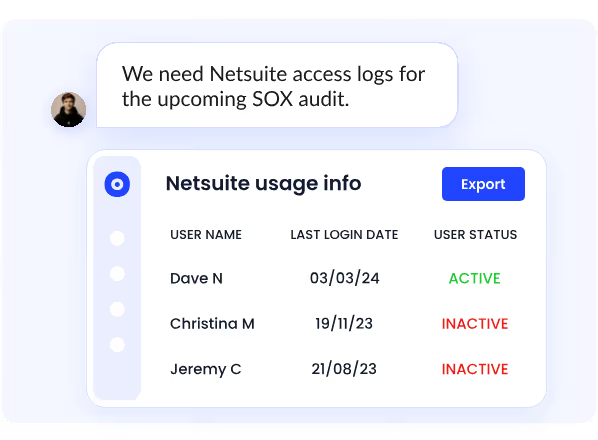
CloudEagle interface showing automated Netsuite usage report with user access logs including last login dates and active/inactive status, generated in response to a SOX audit request

ICEYE, a satellite technology company, reduced manual access reviews by 90% and saved 1,500+ hours a year after centralizing its access review process on CloudEagle.ai. Audit evidence that previously required ad hoc preparation became available on demand. Read the full case study.

8. FAQs

What are the 4 domains of ITGC? 

Access controls, change management, computer operations, and SDLC.

How are ITGCs tested? 

Walkthroughs, documentation review, sample-based testing against a full population, and evidence inspection across all attributes of control design. Auditors check that controls ran correctly, on time, by the right people, with documented outcomes.

What are the 5 steps of the ITGC testing process? 

Scope to financial risk, walkthroughs with control owners, sampling from full populations, design testing, and deficiency documentation with named ownership.

What is the difference between ISO 27001 and ITGC? 

ISO 27001 is a broad information security standard. ITGC covers controls specifically tied to financial reporting accuracy under SOC 2/SOX. One does not substitute for the other.

9. The Teams That Pass Without Drama

They're not the ones with the most controls. They're the ones whose access reviews ran when they were supposed to, whose evidence exists before the auditor asks for it, and whose deficiencies were documented and owned before anyone external saw them.

ITGC testing done well is invisible. Audit season becomes a formality. If your ITGC testing program still depends on manual pulls and reconstructed records, that's the gap.

See how CloudEagle.ai makes access control evidence continuous. Book a demo.

CloudEagle.ai recognized in the 2025 Gartner® Magic Quadrant™ for SaaS Management Platforms
Download now
gartner chart
5x
Faster employee
onboarding
80%
Reduction in time for
user access reviews
30k
Workflows
automated
$15Bn
Analyzed in
contract spend
$2Bn
Saved in
SaaS spend

Streamline SaaS governance and save 10-30%

Book a Demo with Expert
CTA image
One platform to Manage
all SaaS Products
Learn More