You need to enable JavaScript in order to use the AI chatbot tool powered by ChatBot

SOX 404 Control: A Practical Guide for IT Compliance and Teams

Share via:
blog-cms-banner-bg
Little-Known Negotiation Hacks to Get the Best Deal on Slack
cta-bg-blogDownload Your Copy

HIPAA Compliance Checklist for 2025

Download PDF

An auditor reviewing SOX 404 controls will ask: “Show evidence that your financial controls actually worked over the last 12 months.” Not just policies, but logs, approvals, and test results that prove controls operated consistently.

SOX 404 compliance requires enterprises to prove the effectiveness of internal controls over financial reporting. For IT teams, this means demonstrating that access to financial systems is restricted and controls are tested.

This is where many teams struggle. Controls may exist, but evidence is scattered across systems like Oracle NetSuite, SAP ERP, and identity platforms. When auditors ask for proof, teams often need to reconstruct everything. 

In this article, we will break down what SOX 404 is and how IT teams can prepare SOX 404 compliance cycles without last-minute audit readiness.

TL;DR

  • SOX 404 requires proving that financial controls worked consistently with real evidence over time.
  • Auditors test controls using real samples, not policies, making execution and documentation critical.
  • Common failures include weak access controls, broken segregation of duties, and inconsistent audit logs.
  • IT teams must validate controls, simulate audits, and fix gaps before actual testing begins.
  • CloudEagle.ai ensures continuous monitoring, strong controls, and audit-ready evidence for SOX 404 compliance.

1. What is SOX 404?

SOX 404 is about proving that financial controls actually worked throughout the year, not just that they were defined. Auditors will test this by sampling real activity such as checking whether access reviews happened on time.

  • Control Testing Over Time: Auditors sample users and verify access reviews occurred within the required period.
  • Evidence Of Control Execution: Teams must show timestamps, approvals, and logs proving controls were actually executed.
  • Failure Detection And Remediation: Teams must document missed controls and show how issues were identified and fixed.

SOX Section 404 is resource-intensive because it requires continuous validation. According to GAO, compliance costs are 35% higher for larger companies, with control testing and remediation driving a large portion of that effort.

SOX Section 404 is not about defining controls. It is about proving, with sampled evidence, that controls worked throughout the reporting period.

Compliance Looks Fine. It’s Not.

Gaps hide where visibility ends.
See SaaS Compliance Best Practices

2. What Makes SOX 404 Different From Other Compliance Requirements?

SOX 404 is different because auditors don’t just check if controls exist. SOX 404 compliance tests whether SaaS compliance controls actually worked using real data samples over time.

Controls Are Sample-Tested, Not Just Reviewed

Auditors select users or transactions and verify controls were executed correctly.

Failure Requires Evidence And Remediation Proof

If a control fails, teams must show when it happened and how it was fixed.

Focus On Financial Reporting Systems

Controls are tied directly to systems like Oracle NetSuite and SAP ERP.

This makes SOX sec 404 more rigorous than most data privacy frameworks.

  • Continuous Effectiveness Over One-Time Checks: Controls must work throughout the year, not just during audits.
  • External Auditor Validation Required: Independent auditors verify control effectiveness using actual system evidence.

As Paul Sarbanes said,

“Strong corporate governance and accountability are essential to restoring trust.”

SOX 404 enforces that accountability by requiring proof that financial controls are not only designed, but tested and working continuously.

3. How Should IT Teams Prepare for SOX 404 Testing Cycles?

IT teams should prepare by ensuring that every access control can be proven with evidence before auditors start testing. This means having access logs, review records, and change history ready for sampling, not collected after requests.

During SOX 404 compliance testing, auditors don’t review everything. They select samples, such as specific users in Oracle NetSuite or changes in SAP ERP, and verify whether controls were executed correctly.

A. Validating Controls Before Auditors Start Testing

Before auditors begin testing, IT teams must verify that controls are working and evidence is complete. This avoids failures when auditors select samples.

Pre-Check Access Reviews For Completeness

Verify all required access reviews in Oracle NetSuite are completed and approved.

Validate Audit Logs For Required Fields

Ensure logs include user, action, timestamp, and system for every change.

Confirm Evidence Is Easily Retrievable

Test pulling reports quickly for sampled users, roles, or transactions.

Early validation ensures that when auditors test controls, IT teams can provide evidence immediately.

B. Running Internal Control Testing Simulations

SOX 404 readiness improves when teams simulate how auditors will test controls before the actual IT audit management. This helps identify missing evidence and weak controls early.

  • Simulate Auditor Sampling: Select random users or transactions in systems like Oracle NetSuite and verify control execution.
  • Test Evidence Retrieval Speed: Attempt to pull logs, approvals, and reports within minutes, not hours.
  • Validate Control Consistency Over Time: Check whether controls worked across different months, not just recent periods.

Simulations reveal gaps that are easy to miss during routine operations.

  • Missing Approval Records: Some access reviews may be completed but not properly documented.
  • Incomplete Audit Logs: Certain actions may lack timestamps or user identification.
  • Delayed Evidence Collection: Teams may rely on manual compilation instead of real-time availability.

Internal testing simulations ensure that when auditors ask for data, IT teams already know exactly where it is and how to produce it.

C. Identifying and Fixing Exceptions Early

SOX 404 testing fails when exceptions are discovered during audits instead of beforehand. IT teams should identify control gaps early and document how they were resolved.

  • Detect Missed Access Reviews Quickly: Identify users in SAP ERP whose access was not reviewed on time.
  • Flag Unauthorized Or Unapproved Changes: Monitor changes without approvals and investigate the cause immediately.
  • Document Remediation Actions With Evidence: Record what was fixed, when it was resolved, and who approved the fix.

As per Exabeam, SOX 404 compliance failures can lead up to $5 million in fines. So, catching exceptions early ensures auditors see resolved issues instead of active control failures.

Where Will Your Audit Break?

Compliance fails where visibility ends.
See How to Get SOC 2 Compliant

3. Which IT Controls Are Most Likely to Fail Under SOX 404 Testing?

The controls in SOX sec 404 that fail most often are the ones that depend on manual execution or incomplete evidence. Auditors don’t fail controls because policies are missing. They fail them because execution cannot be proven.

For example, when auditors sample users in Oracle NetSuite, they may not find approval records for specific users. Similarly, change management may exist, but logs in SAP ERP may not be transparent.

A. Access Controls That Don’t Reflect Real User Behavior

Access controls in SOX 404 fail when assigned permissions don’t match what users actually do in financial systems. Auditors detect this by comparing user roles with real activity logs.

  • Users With Excess Permissions: Employees may have edit access in SAP but only perform read-only tasks.
  • Inactive Users Still Holding Access: Accounts remain active even when users haven’t logged in for extended periods.
  • Temporary Access Not Revoked: Permissions granted for projects continue long after the work is completed.

These gaps are common. According to the Verizon Data Breach Investigations Report, 74% of breaches involve the human element, often linked to misuse of legitimate access.

When access controls don’t reflect actual user behavior, auditors flag them as ineffective because permissions exceed what is required for the role.

B. Segregation of Duties That Break During Role Changes

Segregation of Duties (SoD) fails when a single user can perform conflicting financial actions. Auditors test this by checking if role changes created overlapping permissions.

  • Conflicting Permissions Assigned Together: A user can create vendors and approve payments in SAP ERP.
  • Role Changes Without SoD Revalidation: Promotions or transfers add new access without removing conflicting permissions.
  • Temporary Elevated Access Not Removed: Short-term admin rights remain after audits, migrations, or month-end close.

These breaks often occur during routine changes, not initial setup.

Multiple Roles Accumulated Over Time

Users inherit permissions from past roles across systems.

No Automated SoD Conflict Checks

Teams rely on manual reviews instead of role-based conflict detection.

When SoD breaks, auditors flag a high risk because one user can initiate and approve the same financial transaction.

C. Inconsistent Logging Across Systems

An auditor selects a sample transaction and asks: “Show who changed this financial record and when.” The IT team retrieves logs from one system but cannot find matching records in another.

IT Team Perspective:

Logs exist in Oracle NetSuite, but supporting systems like reporting or integrations don’t capture the same level of detail.

Audit Perspective:

Without consistent logs across systems, auditors cannot trace the full user lifecycle management of a transaction or verify control execution.

Nothing appears broken during daily operations. Systems function normally, and users can perform their tasks.

But during testing, gaps become visible. Some systems log user actions with timestamps, while others miss key details like approvals or changes.

4. How Does CloudEagle.ai Help Ensure SOX 404 Controls Hold Up Under Audit?

Auditors test access controls and evidence trails to ensure that financial systems cannot be misused or manipulated. However, many enterprises still rely on manual reviews, inconsistent logs, and fragmented systems.

CloudEagle.ai is one of the best platforms for automating SOX 404 control evidence​ by continuously enforcing AI usage controls, monitoring access behavior, and maintaining complete, audit-ready evidence.

A. Strengthening Access Controls Across Financial Systems

CloudEagle.ai ensures that access controls are not only defined but actively enforced access across all critical SaaS applications.

Current Process

Access controls are configured within individual applications and reviewed periodically through manual processes.

Pain Points

Controls may exist on paper but fail in practice. Unauthorized or excessive access can persist undetected.

How We Do It

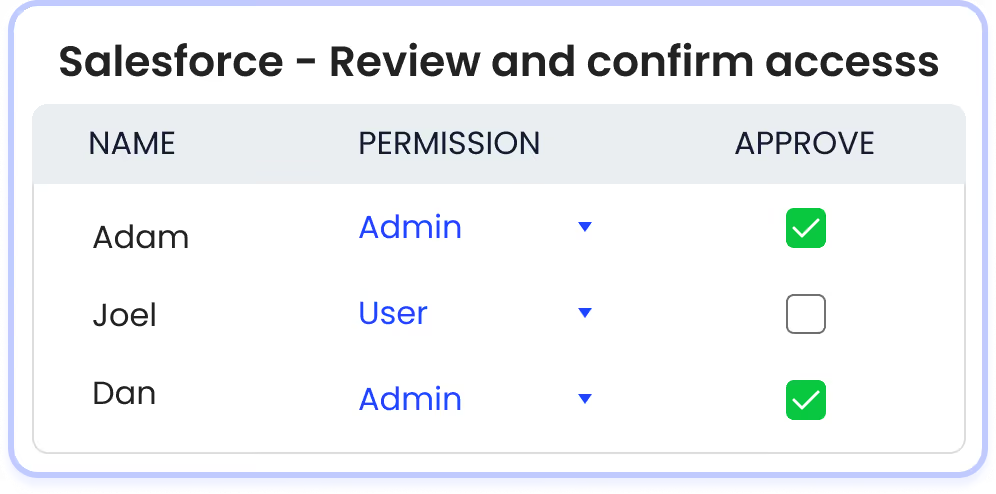
CloudEagle.ai continuously monitors user access and enforces least-privilege principles across SaaS systems.

Why We Are Better

Access controls are validated in real time, ensuring they function as intended under audit testing.

B. Continuous Control Monitoring Instead of Periodic Checks

CloudEagle.ai ensures internal controls are tested continuously, not just during audit cycles.

Current Process

Control testing is performed periodically, often just before audits.

Pain Points

Control failures between review cycles remain undetected, increasing audit risk.
How We Do It

CloudEagle.ai monitors access changes, privilege escalations, and user activity in real time.

Why We Are Better

Controls are validated continuously, ensuring consistent SaaS compliance throughout the year.

C. Complete Audit Trails for Control Testing

CloudEagle.ai provides auditors with clear, structured evidence that controls are functioning properly.

Current Process

Audit evidence is collected manually from logs, emails, and ticketing systems.

Pain Points

Incomplete or inconsistent evidence makes it difficult to prove control effectiveness.
How We Do It

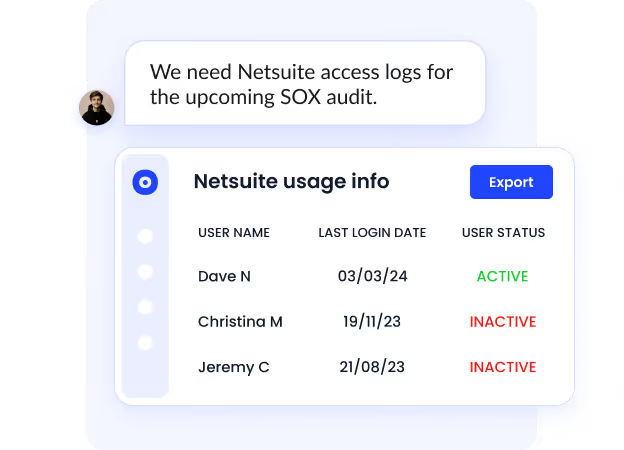
CloudEagle.ai automatically logs all access changes, approvals, and control activities across systems.

Why We Are Better

Audit-ready logs provide a complete, tamper-proof record of control execution.

5. Conclusion

SOX 404 control is not about defining processes. It is about proving, with sampled evidence, that those processes worked every time they were supposed to.

This is where CloudEagle becomes critical. This platform for SOX section 404 compliance​ helps IT teams centralize access visibility, track user permissions across systems, monitor changes, and maintain consistent audit logs. 

Instead of reconstructing evidence during audits, teams can present real-time, audit-ready data. When controls are continuously validated, logged, and enforced, SOX 404 stops being a yearly testing exercise.

6. FAQs

What is the difference between SOX and SOX 404?

Sarbanes-Oxley Act (SOX) is the overall law governing financial reporting and corporate accountability. Sarbanes-Oxley Act Section 404 is a specific part that requires companies to test and prove their internal controls over financial reporting.

What is the main purpose of Section 404 of SOX?

The main purpose is to ensure that companies have effective internal controls and can prove those controls worked consistently. Auditors verify this by testing access controls, change logs, and approval records in financial systems.

What is the full form of SOX 404?

SOX 404 stands for Section 404 of the Sarbanes-Oxley Act. It focuses on internal control over financial reporting (ICFR) and requires both management and auditors to assess control effectiveness.

What is the SOX 404 control test?

A SOX 404 control test involves auditors selecting samples, such as users or transactions, and verifying whether controls were executed correctly. For example, checking if a user’s access in Oracle NetSuite was reviewed and approved within the required timeframe.

Advertisement for a SaaS Subscription Tracking Template with a call-to-action button to download and a partial graphic of a tablet showing charts.Banner promoting a SaaS Agreement Checklist to streamline SaaS management and avoid budget waste with a call-to-action button labeled Download checklist.Blue banner with text 'The Ultimate Employee Offboarding Checklist!' and a black button labeled 'Download checklist' alongside partial views of checklist documents from cloudeagle.ai.Digital ad for download checklist titled 'The Ultimate Checklist for IT Leaders to Optimize SaaS Operations' by cloudeagle.ai, showing checklist pages.Slack Buyer's Guide offer with text 'Unlock insider insights to get the best deal on Slack!' and a button labeled 'Get Your Copy', accompanied by a preview of the guide featuring Slack's logo.Monday Pricing Guide by cloudeagle.ai offering exclusive pricing secrets to maximize investment with a call-to-action button labeled Get Your Copy and an image of the guide's cover.Blue banner for Canva Pricing Guide by cloudeagle.ai offering a guide to Canva costs, features, and alternatives with a call-to-action button saying Get Your Copy.Blue banner with white text reading 'Little-Known Negotiation Hacks to Get the Best Deal on Slack' and a white button labeled 'Get Your Copy'.Blue banner with text 'Little-Known Negotiation Hacks to Get the Best Deal on Monday.com' and a white button labeled 'Get Your Copy'.Blue banner with text 'Little-Known Negotiation Hacks to Get the Best Deal on Canva' and a white button labeled 'Get Your Copy'.Banner with text 'Slack Buyer's Guide' and a 'Download Now' button next to images of a guide titled 'Slack Buyer’s Guide: Features, Pricing & Best Practices'.Digital cover of Monday Pricing Guide with a button labeled Get Your Copy on a blue background.Canva Pricing Guide cover with a button labeled Get Your Copy on a blue gradient background.

Enter your email to
unlock the report

Oops! Something went wrong while submitting the form.
License Count
Benchmark
Per User/Per Year

Enter your email to
unlock the report

Oops! Something went wrong while submitting the form.
License Count
Benchmark
Per User/Per Year

Enter your email to
unlock the report

Oops! Something went wrong while submitting the form.
Notion Plus
License Count
Benchmark
Per User/Per Year
100-500
$67.20 - $78.72
500-1000
$59.52 - $72.00
1000+
$51.84 - $57.60
Canva Pro
License Count
Benchmark
Per User/Per Year
100-500
$74.33-$88.71
500-1000
$64.74-$80.32
1000+
$55.14-$62.34

Enter your email to
unlock the report

Oops! Something went wrong while submitting the form.

Enter your email to
unlock the report

Oops! Something went wrong while submitting the form.
Zoom Business
License Count
Benchmark
Per User/Per Year
100-500
$216.00 - $264.00
500-1000
$180.00 - $216.00
1000+
$156.00 - $180.00

Enter your email to
unlock the report

Oops! Something went wrong while submitting the form.

Get the Right Security Platform To Secure Your Cloud Infrastructure

Please enter a business email
Thank you!
The 2023 SaaS report has been sent to your email. Check your promotional or spam folder.
Oops! Something went wrong while submitting the form.

Access full report

Please enter a business email
Thank you!
The 2023 SaaS report has been sent to your email. Check your promotional or spam folder.
Oops! Something went wrong while submitting the form.

An auditor reviewing SOX 404 controls will ask: “Show evidence that your financial controls actually worked over the last 12 months.” Not just policies, but logs, approvals, and test results that prove controls operated consistently.

SOX 404 compliance requires enterprises to prove the effectiveness of internal controls over financial reporting. For IT teams, this means demonstrating that access to financial systems is restricted and controls are tested.

This is where many teams struggle. Controls may exist, but evidence is scattered across systems like Oracle NetSuite, SAP ERP, and identity platforms. When auditors ask for proof, teams often need to reconstruct everything. 

In this article, we will break down what SOX 404 is and how IT teams can prepare SOX 404 compliance cycles without last-minute audit readiness.

TL;DR

  • SOX 404 requires proving that financial controls worked consistently with real evidence over time.
  • Auditors test controls using real samples, not policies, making execution and documentation critical.
  • Common failures include weak access controls, broken segregation of duties, and inconsistent audit logs.
  • IT teams must validate controls, simulate audits, and fix gaps before actual testing begins.
  • CloudEagle.ai ensures continuous monitoring, strong controls, and audit-ready evidence for SOX 404 compliance.

1. What is SOX 404?

SOX 404 is about proving that financial controls actually worked throughout the year, not just that they were defined. Auditors will test this by sampling real activity such as checking whether access reviews happened on time.

  • Control Testing Over Time: Auditors sample users and verify access reviews occurred within the required period.
  • Evidence Of Control Execution: Teams must show timestamps, approvals, and logs proving controls were actually executed.
  • Failure Detection And Remediation: Teams must document missed controls and show how issues were identified and fixed.

SOX Section 404 is resource-intensive because it requires continuous validation. According to GAO, compliance costs are 35% higher for larger companies, with control testing and remediation driving a large portion of that effort.

SOX Section 404 is not about defining controls. It is about proving, with sampled evidence, that controls worked throughout the reporting period.

Compliance Looks Fine. It’s Not.

Gaps hide where visibility ends.
See SaaS Compliance Best Practices

2. What Makes SOX 404 Different From Other Compliance Requirements?

SOX 404 is different because auditors don’t just check if controls exist. SOX 404 compliance tests whether SaaS compliance controls actually worked using real data samples over time.

Controls Are Sample-Tested, Not Just Reviewed

Auditors select users or transactions and verify controls were executed correctly.

Failure Requires Evidence And Remediation Proof

If a control fails, teams must show when it happened and how it was fixed.

Focus On Financial Reporting Systems

Controls are tied directly to systems like Oracle NetSuite and SAP ERP.

This makes SOX sec 404 more rigorous than most data privacy frameworks.

  • Continuous Effectiveness Over One-Time Checks: Controls must work throughout the year, not just during audits.
  • External Auditor Validation Required: Independent auditors verify control effectiveness using actual system evidence.

As Paul Sarbanes said,

“Strong corporate governance and accountability are essential to restoring trust.”

SOX 404 enforces that accountability by requiring proof that financial controls are not only designed, but tested and working continuously.

3. How Should IT Teams Prepare for SOX 404 Testing Cycles?

IT teams should prepare by ensuring that every access control can be proven with evidence before auditors start testing. This means having access logs, review records, and change history ready for sampling, not collected after requests.

During SOX 404 compliance testing, auditors don’t review everything. They select samples, such as specific users in Oracle NetSuite or changes in SAP ERP, and verify whether controls were executed correctly.

A. Validating Controls Before Auditors Start Testing

Before auditors begin testing, IT teams must verify that controls are working and evidence is complete. This avoids failures when auditors select samples.

Pre-Check Access Reviews For Completeness

Verify all required access reviews in Oracle NetSuite are completed and approved.

Validate Audit Logs For Required Fields

Ensure logs include user, action, timestamp, and system for every change.

Confirm Evidence Is Easily Retrievable

Test pulling reports quickly for sampled users, roles, or transactions.

Early validation ensures that when auditors test controls, IT teams can provide evidence immediately.

B. Running Internal Control Testing Simulations

SOX 404 readiness improves when teams simulate how auditors will test controls before the actual IT audit management. This helps identify missing evidence and weak controls early.

  • Simulate Auditor Sampling: Select random users or transactions in systems like Oracle NetSuite and verify control execution.
  • Test Evidence Retrieval Speed: Attempt to pull logs, approvals, and reports within minutes, not hours.
  • Validate Control Consistency Over Time: Check whether controls worked across different months, not just recent periods.

Simulations reveal gaps that are easy to miss during routine operations.

  • Missing Approval Records: Some access reviews may be completed but not properly documented.
  • Incomplete Audit Logs: Certain actions may lack timestamps or user identification.
  • Delayed Evidence Collection: Teams may rely on manual compilation instead of real-time availability.

Internal testing simulations ensure that when auditors ask for data, IT teams already know exactly where it is and how to produce it.

C. Identifying and Fixing Exceptions Early

SOX 404 testing fails when exceptions are discovered during audits instead of beforehand. IT teams should identify control gaps early and document how they were resolved.

  • Detect Missed Access Reviews Quickly: Identify users in SAP ERP whose access was not reviewed on time.
  • Flag Unauthorized Or Unapproved Changes: Monitor changes without approvals and investigate the cause immediately.
  • Document Remediation Actions With Evidence: Record what was fixed, when it was resolved, and who approved the fix.

As per Exabeam, SOX 404 compliance failures can lead up to $5 million in fines. So, catching exceptions early ensures auditors see resolved issues instead of active control failures.

Where Will Your Audit Break?

Compliance fails where visibility ends.
See How to Get SOC 2 Compliant

3. Which IT Controls Are Most Likely to Fail Under SOX 404 Testing?

The controls in SOX sec 404 that fail most often are the ones that depend on manual execution or incomplete evidence. Auditors don’t fail controls because policies are missing. They fail them because execution cannot be proven.

For example, when auditors sample users in Oracle NetSuite, they may not find approval records for specific users. Similarly, change management may exist, but logs in SAP ERP may not be transparent.

A. Access Controls That Don’t Reflect Real User Behavior

Access controls in SOX 404 fail when assigned permissions don’t match what users actually do in financial systems. Auditors detect this by comparing user roles with real activity logs.

  • Users With Excess Permissions: Employees may have edit access in SAP but only perform read-only tasks.
  • Inactive Users Still Holding Access: Accounts remain active even when users haven’t logged in for extended periods.
  • Temporary Access Not Revoked: Permissions granted for projects continue long after the work is completed.

These gaps are common. According to the Verizon Data Breach Investigations Report, 74% of breaches involve the human element, often linked to misuse of legitimate access.

When access controls don’t reflect actual user behavior, auditors flag them as ineffective because permissions exceed what is required for the role.

B. Segregation of Duties That Break During Role Changes

Segregation of Duties (SoD) fails when a single user can perform conflicting financial actions. Auditors test this by checking if role changes created overlapping permissions.

  • Conflicting Permissions Assigned Together: A user can create vendors and approve payments in SAP ERP.
  • Role Changes Without SoD Revalidation: Promotions or transfers add new access without removing conflicting permissions.
  • Temporary Elevated Access Not Removed: Short-term admin rights remain after audits, migrations, or month-end close.

These breaks often occur during routine changes, not initial setup.

Multiple Roles Accumulated Over Time

Users inherit permissions from past roles across systems.

No Automated SoD Conflict Checks

Teams rely on manual reviews instead of role-based conflict detection.

When SoD breaks, auditors flag a high risk because one user can initiate and approve the same financial transaction.

C. Inconsistent Logging Across Systems

An auditor selects a sample transaction and asks: “Show who changed this financial record and when.” The IT team retrieves logs from one system but cannot find matching records in another.

IT Team Perspective:

Logs exist in Oracle NetSuite, but supporting systems like reporting or integrations don’t capture the same level of detail.

Audit Perspective:

Without consistent logs across systems, auditors cannot trace the full user lifecycle management of a transaction or verify control execution.

Nothing appears broken during daily operations. Systems function normally, and users can perform their tasks.

But during testing, gaps become visible. Some systems log user actions with timestamps, while others miss key details like approvals or changes.

4. How Does CloudEagle.ai Help Ensure SOX 404 Controls Hold Up Under Audit?

Auditors test access controls and evidence trails to ensure that financial systems cannot be misused or manipulated. However, many enterprises still rely on manual reviews, inconsistent logs, and fragmented systems.

CloudEagle.ai is one of the best platforms for automating SOX 404 control evidence​ by continuously enforcing AI usage controls, monitoring access behavior, and maintaining complete, audit-ready evidence.

A. Strengthening Access Controls Across Financial Systems

CloudEagle.ai ensures that access controls are not only defined but actively enforced access across all critical SaaS applications.

Current Process

Access controls are configured within individual applications and reviewed periodically through manual processes.

Pain Points

Controls may exist on paper but fail in practice. Unauthorized or excessive access can persist undetected.

How We Do It

CloudEagle.ai continuously monitors user access and enforces least-privilege principles across SaaS systems.

Why We Are Better

Access controls are validated in real time, ensuring they function as intended under audit testing.

B. Continuous Control Monitoring Instead of Periodic Checks

CloudEagle.ai ensures internal controls are tested continuously, not just during audit cycles.

Current Process

Control testing is performed periodically, often just before audits.

Pain Points

Control failures between review cycles remain undetected, increasing audit risk.

How We Do It

CloudEagle.ai monitors access changes, privilege escalations, and user activity in real time.

Why We Are Better

Controls are validated continuously, ensuring consistent SaaS compliance throughout the year.

C. Complete Audit Trails for Control Testing

CloudEagle.ai provides auditors with clear, structured evidence that controls are functioning properly.

Current Process

Audit evidence is collected manually from logs, emails, and ticketing systems.

Pain Points

Incomplete or inconsistent evidence makes it difficult to prove control effectiveness.

How We Do It

CloudEagle.ai automatically logs all access changes, approvals, and control activities across systems.

Why We Are Better

Audit-ready logs provide a complete, tamper-proof record of control execution.

5. Conclusion

SOX 404 control is not about defining processes. It is about proving, with sampled evidence, that those processes worked every time they were supposed to.

This is where CloudEagle becomes critical. This platform for SOX section 404 compliance​ helps IT teams centralize access visibility, track user permissions across systems, monitor changes, and maintain consistent audit logs. 

Instead of reconstructing evidence during audits, teams can present real-time, audit-ready data. When controls are continuously validated, logged, and enforced, SOX 404 stops being a yearly testing exercise.

6. FAQs

What is the difference between SOX and SOX 404?

Sarbanes-Oxley Act (SOX) is the overall law governing financial reporting and corporate accountability. Sarbanes-Oxley Act Section 404 is a specific part that requires companies to test and prove their internal controls over financial reporting.

What is the main purpose of Section 404 of SOX?

The main purpose is to ensure that companies have effective internal controls and can prove those controls worked consistently. Auditors verify this by testing access controls, change logs, and approval records in financial systems.

What is the full form of SOX 404?

SOX 404 stands for Section 404 of the Sarbanes-Oxley Act. It focuses on internal control over financial reporting (ICFR) and requires both management and auditors to assess control effectiveness.

What is the SOX 404 control test?

A SOX 404 control test involves auditors selecting samples, such as users or transactions, and verifying whether controls were executed correctly. For example, checking if a user’s access in Oracle NetSuite was reviewed and approved within the required timeframe.

CloudEagle.ai recognized in the 2025 Gartner® Magic Quadrant™ for SaaS Management Platforms
Download now
gartner chart
5x
Faster employee
onboarding
80%
Reduction in time for
user access reviews
30k
Workflows
automated
$15Bn
Analyzed in
contract spend
$2Bn
Saved in
SaaS spend

Streamline SaaS governance and save 10-30%

Book a Demo with Expert
CTA image
One platform to Manage
all SaaS Products
Learn More