You need to enable JavaScript in order to use the AI chatbot tool powered by ChatBot

10 Ways to Prevent Excessive Privileged Access For Security

Share via:
blog-cms-banner-bg
Little-Known Negotiation Hacks to Get the Best Deal on Slack
cta-bg-blogDownload Your Copy

HIPAA Compliance Checklist for 2025

Download PDF

One of the most critical vulnerabilities that attackers exploit is excessive privileged access. That’s why it’s essential to prevent excessive privileged access through strategic controls and best practices.

According to recent cybersecurity reports from Verizon, 81% of data breaches involve compromised privileged credentials, making privileged access management a top priority for security teams worldwide.

Enterprises that fail to prevent excessive privileged access through robust privileged access controls expose themselves to risks, regulatory penalties, and irreparable damage to their reputation.

This comprehensive guide explores ten strategies to prevent excessive privileged access and fortify your enterprise's security posture.

TL;DR

  1. PAM and PIM are critical for security – They work together to control, monitor, and limit privileged access to sensitive systems.
  2. Excessive privileged access is a major risk – Without proper controls, it can lead to data breaches, compliance failures, and insider threats.
  3. Enforcing least privilege is foundational – Grant users only the access they need, for only as long as needed, using just-in-time and approval-based controls.
  4. A layered PAM strategy improves resilience – Combining access policies, session monitoring, and automation strengthens your overall security posture.
  5. Proactive PAM boosts compliance and agility – Enterprises with strong privileged access controls are better prepared to meet regulatory requirements and adapt to evolving threats.

What is Privileged Access?

Privileged access refers to the elevated permissions and rights granted to specific users, accounts, or applications that allow them to perform actions beyond those of standard users. These actions often involve sensitive operations like modifying system settings, accessing critical data, or installing software.

What is Privileged Access management?

Privileged Access Management (PAM) is a cybersecurity discipline focused on controlling, monitoring, and securing access to sensitive resources within an Enterprise's IT environment.

These privileges enable users to perform sensitive operations, access critical data, and manage system configurations, making them crucial for maintaining the security and functionality of IT infrastructure. 

Effective privileged access management reduces the risk of internal misuse and credential theft.

Best practices for privileged access management

Privileged Access Management (PAM) best practices involve a combination of strategies to secure and manage access to sensitive resources. These include implementing the principle of least privilege, enforcing strong authentication methods like MFA, regularly rotating and expiring passwords, monitoring and auditing privileged activity, and establishing strong password policies.

  • Enforce the Principle of Least Privilege (PoLP): Grant users only the minimum access necessary to perform their tasks.
  • Implement Multi-Factor Authentication (MFA): Add an extra layer of verification to secure privileged accounts.
  • Rotate and Expire Privileged Credentials Regularly: Prevent long-term misuse by frequently updating passwords and keys.
  • Monitor and Audit Privileged Sessions: Log all privileged activities to detect anomalies and support compliance.
  • Use Just-in-Time (JIT) Access: Provide temporary privileged access when needed and revoke it automatically after use.
  • Apply Strong Password Policies: Ensure high-entropy, unique passwords are used for all privileged accounts.

The Four Pillars of Privileged Access Management

Effective privileged access management in modern SaaS and cloud environments relies on foundational pillars working together. These pillars prevent excessive privileged access and maintain strong security posture.

  • Discovery & Visibility: Identifies all privileged accounts and access patterns across your infrastructure.
  • Access Control & Least Privilege: Enforces role-based access controls and just-in-time provisioning.
  • Monitoring & Analytics: Detects anomalies and risky access patterns through continuous monitoring.
  • Governance & Compliance: Automates access reviews, policy enforcement, and audit documentation.
  • Platform Automation: Scales with enterprise growth through intelligent workflows and centralized visibility.

Why Do You Need to Protect Privileged Access?

Privileged accounts are prime targets for attackers because they grant elevated permissions to sensitive systems and data. When compromised, these accounts can lead to devastating security breaches, significant financial losses, and regulatory compliance violations.

  • Breach Statistics: 74% of data breaches involve access to privileged accounts.
  • Financial Impact: The average cost of a data breach reached $4.45 million in 2023.
  • Security Controls: Robust privileged access management practices prevent excessive permissions and unauthorized activity.
  • Risk Mitigation: Implementing PAM reduces the likelihood of exploitation and system disruptions.
  • Privilege Creep Prevention: Prevent privilege creep through automated access reviews, role-based controls, regular audits, and formal approval processes.

Understanding Privileged Account Security Threats

Privileged accounts face complex security threats across SaaS and cloud environments. Organizations must address both external attacks and internal access control failures to protect critical systems.

  • External Attacks: Credential theft campaigns and phishing exploits target admin credentials for immediate system access.
  • Insider Threats: Malicious insiders and unintentional privilege misuse create significant security risks.
  • Privilege Creep: Employees accumulate excessive permissions over time through role changes and project assignments.
  • Configuration Gaps: Shadow admins, stale service accounts, and overbroad roles grant unnecessary elevated access.
  • Amplified Impact: Compromised privileged accounts enable lateral movement across multiple systems and critical configurations.

Strategies for Securing Privileged Access Across Your SaaS Stack

Protecting your SaaS environment from excessive privileged access requires a strategic, multi-layered security approach. Success depends on establishing comprehensive visibility, automated governance, and continuous monitoring across all cloud services.

  • Complete Visibility: Discover and monitor all privileged accounts across your entire SaaS stack.
  • Shadow IT Detection: Identify unauthorized applications and excessive permissions before they become vulnerabilities.
  • Automated Governance: Deploy role-based access controls with just-in-time provisioning and automatic expiration.
  • Lifecycle Management: Automate employee onboarding and offboarding with integrated approval workflows.
  • Continuous Monitoring: Track anomalous privileged activity and enforce consistent access policies across all teams.

The Risks of Overprivileged User Accounts

Overprivileged accounts in SaaS and cloud environments create exponentially greater security exposure, enabling rapid lateral movement after credential compromise. These excessive permissions allow attackers to traverse multiple interconnected systems, access sensitive data across platforms, and maintain persistent access even after initial breach detection.

  • Credential Theft Amplification: Compromised overprivileged accounts enable attackers to move freely between applications and access sensitive customer data.
  • Multi-Application Data Breaches: Security incidents rapidly escalate across interconnected SaaS platforms when privileged access lacks proper restrictions.
  • Configuration Drift Vulnerabilities: Unchecked elevated permissions weaken the organization-wide security posture through systematic policy degradation.
  • Compliance Audit Failures: Excessive privileged access results in regulatory penalties when organizations cannot demonstrate proper access controls.
  • Automated Governance Prevention: Proactive access governance through continuous monitoring proves far more effective than reactive credential security alone.

How to Secure Different Types of Privileged User Accounts

Managing privileged access across SaaS environments requires tailored security strategies for each account type. Different privileged accounts demand specific controls to prevent organization-wide security exposure.

  • Global Administrator Controls: Implement strict role scoping with multi-layered approval workflows and continuous monitoring.
  • Time-Bound Access Management: Deploy automated deprovisioning after task completion for app-specific administrators.
  • Service Account Security: Enable automated credential rotation and usage tracking to eliminate standing privileges.
  • Emergency Access Protocols: Establish just-in-time elevation with comprehensive logging for break-glass accounts.
  • Automated Governance Platforms: Utilize centralized discovery to identify excessive permissions and streamline access reviews.

10 Ways to Prevent Excessive Privileged Access

From data breaches to insider threats, misuse of privileged access is one of the leading causes of security incidents. According to Forrester, 80% of breaches involve privileged credentials. And with the rise of cloud and SaaS platforms, managing privileged identities has become even more complex and urgent.

1. Enforce the Principle of Least Privilege (PoLP)

To prevent excessive privileged access, the Principle of Least Privilege (PoLP) ensures users and systems only get access required for their tasks, nothing more. It minimizes the attack surface and reduces insider threats.

Start with a full audit of all current privileges, including human users, apps, and service accounts. Clean up excessive rights.

Best Practices:

  • Grant permissions aligned strictly with job roles.
  • Replace blanket admin access with task-specific permissions.
  • Use automated tools to find unused or excessive privileges.
  • Schedule access reviews quarterly or semi-annually.

2. Use Role-Based Access Control (RBAC)

Role-Based Access Control organizes user permissions into roles, simplifying access control. Instead of assigning permissions individually, users inherit access based on their role.

It helps scale permission management across departments, especially with frequent team changes.

Best Practices:

  • Define clear roles with business teams (e.g., HR, Finance).
  • Map roles to only required access levels.
  • Implement temporary privilege elevation via workflows.
  • Regularly update roles to prevent permission sprawl.

How to Implement Least Privilege Security in Practice

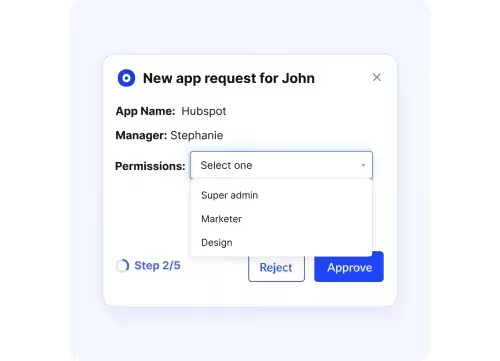
Implementing least privilege requires a systematic approach that transforms theoretical principles into operational security controls. Organizations must establish automated user access governance to ensure the right employees have the right access at the right time while minimizing security risks.

  1. Map roles to specific permissions: Configure granular visibility and license types for each employee role, ensuring users only see relevant applications based on their department and responsibilities.
  2. Deploy automated approval workflows: Implement centralized request systems that route access requests through appropriate business owners with documented approval trails.
  3. Configure time-bound access: Set automatic deprovisioning limits so user access expires after predetermined periods (7-30 days), eliminating unused licenses and reducing security exposure.
  4. Schedule continuous access reviews: Use centralized dashboards to view user permissions and roles, enabling IT teams to schedule regular reviews that identify and remove excessive privileges.
  5. Automate enforcement: Establish role-based rules that automatically provision appropriate access for new employees and revoke access when they leave, regardless of whether applications are behind identity providers.

3. Conduct Regular Access Reviews

Access reviews cloudeagle.ai

Access reviews prevent outdated or unnecessary privileges from piling up. Over time, employees collect excessive rights, leading to “privilege creep.”

These reviews help align access reviews with job responsibilities and maintain compliance.

Best Practices:

  • Perform reviews quarterly or based on risk level.
  • Include business heads and IT admins in the process.
  • Use automated tools to flag inactive or excessive accounts.
  • Keep documentation for audits and compliance checks.

4. Implement Just-in-Time (JIT) Access

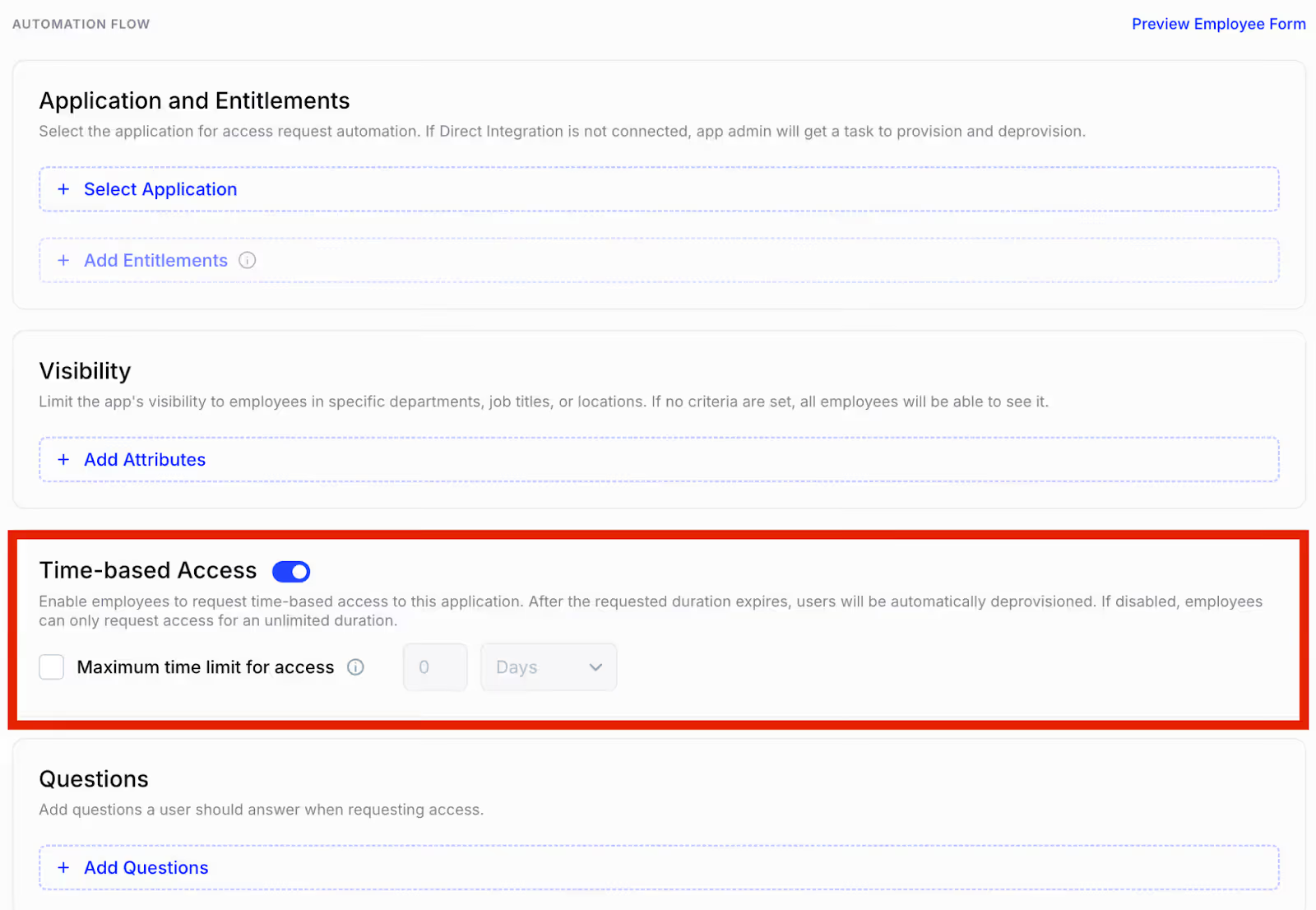
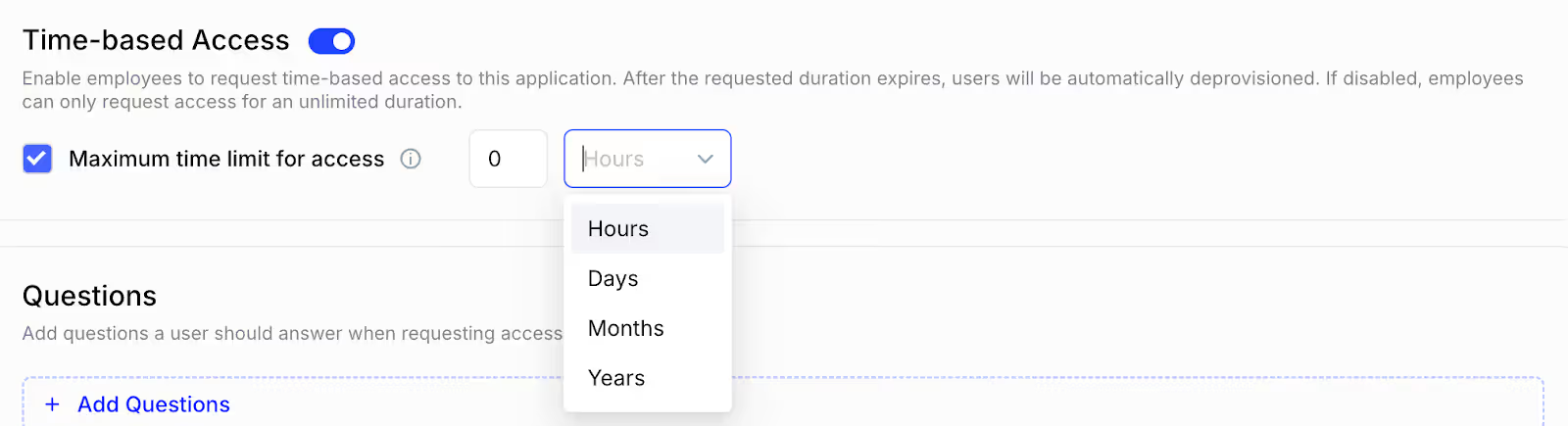
Just-in-time is a powerful method to prevent excessive privileged access by ensuring, it provides privileges only when needed and revokes them immediately after use. It drastically reduces exposure to credential misuse.
Just in time CloudEagle.ai

Just-in-time (JIT) privileged access management (PAM) is a security practice that grants users temporary access to privileged accounts and resources only when they need it, and for the duration required to complete a specific task.
Just-in-time CloudEagle.ai

Best Practices:

  • Integrate JIT with ticketing or IAM systems.
  • Use risk-based rules to approve or deny access dynamically.
  • Track every access instance with logs and reports.
  • Educate users on JIT workflows for seamless adoption.

5. Monitor Privileged Sessions

Privileged session monitoring captures user activity during elevated access,every click, command, and screen change. It helps detect and respond to risky behavior in real-time.

This isn’t just logging, it’s deep visibility into what privileged users do.

Best Practices:

  • Record keystrokes, screen content, and actions.
  • Set alerts for sensitive operations (e.g., config changes).
  • Integrate with SIEM tools for advanced threat detection.
  • Notify users about monitoring to ensure transparency.

6. Automate Provisioning and Deprovisioning

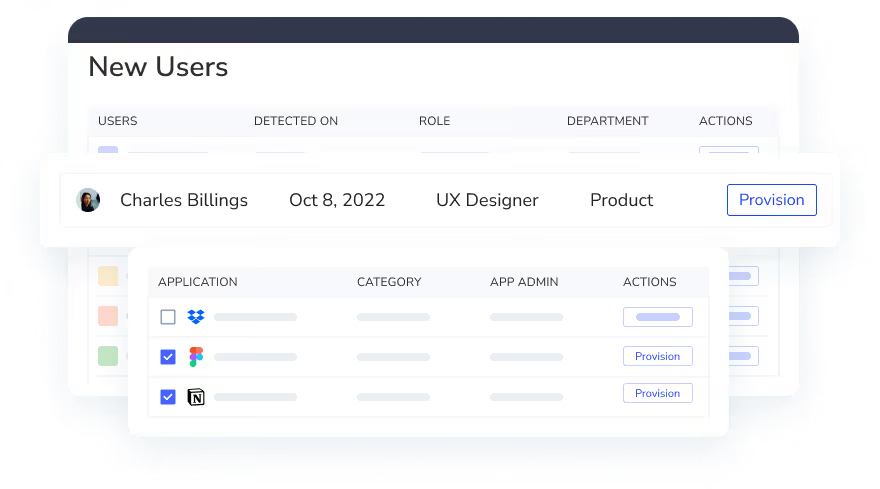
Manual user provisioning leads to delays, errors, and orphaned accounts. Automation ensures users receive and lose access exactly when needed.
 Provisioning and Deprovisioning CloudEagle.ai

It maintains access hygiene, especially during onboarding, transfers, or exits.

Best Practices:

  • Connect IAM to HR systems for real-time updates
  • Automatically revoke access during exits or role changes.
  • Handle contractors and vendors with temporary access policies.
  • Regularly audit automation workflows to prevent errors.

7. Use Multi-Factor Authentication (MFA) for Privileged Accounts

MFA is a key control to prevent excessive privileged access through compromised credentials. MFA adds a critical layer of security, blocking attackers even if credentials are leaked.

Privileged password management (PPM) focuses on the secure storage, access, and management of passwords for accounts with elevated permissions, such as administrators or service accounts.

It’s a must-have for all admin, root, and service accounts.

Best Practices:

  • Avoid SMS-based MFA; prefer authentication methods, apps or biometrics.
  • Use risk-based MFA triggers (e.g., location, device).
  • Ensure backup methods are secure and documented.
  • Train users on how to use MFA efficiently without friction.

8. Segment and Isolate Privileged Accounts

Privileged users should not operate in the same network or systems as regular users. Segmentation reduces the blast radius of a potential breach.
This approach contains lateral movement and isolates sensitive environments.

Best Practices:

  • Use dedicated admin workstations (PAWs).
  • Create isolated network zones for admin tasks.
  • Deploy hardened jump servers with restricted access.
  • Implement password vaults to isolate credential access.

9. Audit and Log All Privileged Access

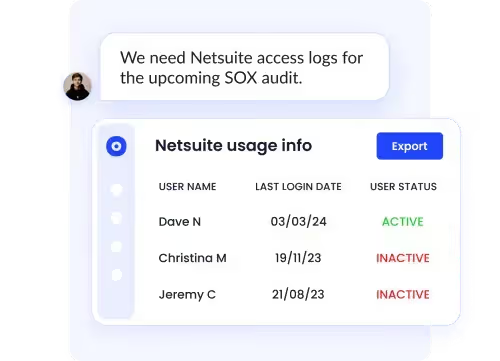
Auditing is a key pillar of any privileged access management strategy. IT Audit trails help investigate security incidents, prove compliance, and monitor for suspicious behavior. Without logs, there’s no accountability.
Audit CloudEagle.ai

Make logging detailed, centralized, and tamper-proof.

Best Practices:

  • Log user identity, time, IP address, and activity.
  • Store logs securely with integrity checks.
  • Use real-time analysis to catch anomalies (e.g., after-hours access).
  • Retain logs as per your compliance requirements (HIPAA, SOX, ISO).

10. Educate Employees on Access Hygiene

Even the best tools can’t stop threats caused by human error. Privileged users must understand the risks and responsibilities of elevated access.

Security is as much about culture as it is about control.

Best Practices:

  • Train on least privilege, MFA, phishing, and role limits.
  • Tailor training to different roles (admins, DBAs, app owners).
  • Send regular updates on new threats and policy changes.
  • Run simulations like phishing tests to reinforce training.

What is the Importance of Privileged Identity Management?

Without a robust privileged identity management strategy, Enterprises leave critical systems vulnerable. So, Privileged Identity Management (PIM) is a foundational layer of modern cybersecurity. It provides centralized control over privileged accounts, ensuring access is granted only when necessary and monitored thoroughly.

It goes beyond basic access control to include compliance enforcement, risk mitigation, and operational efficiency.

Why It Matters:

  • Centralized Control: PIM allows Enterprises to manage all privileged access from a single platform.
  • Hybrid Environment Support: Covers on-premises, cloud, and SaaS systems uniformly.
  • Audit Readiness: Maintains audit trails and automates compliance reporting for regulations like GDPR, SOX, HIPAA, and ISO 27001.
  • Automation at Scale: Automates access requests, approval workflows, and policy enforcement without manual overhead.
  • Reduced Risk Exposure: Helps detect anomalies, insider threats, and credential misuse in real time.

By implementing a PIM system like CloudEagle.ai, Enterprises gain visibility, governance, and peace of mind over their most sensitive accounts.

Managing Access Privileges Across Your Multi-Cloud Environments

Multi-cloud environments create dangerous fragmentation of privileged access across cloud providers and applications. Organizations need centralized governance to eliminate blind spots and prevent excessive privilege accumulation.

  • Fragmented Access: Identities and permissions scatter across dozens of cloud providers without centralized oversight.
  • Centralized Visibility: Best access control platforms for reducing excessive permissions must discover privileged accounts across all environments.
  • Standardized Roles: Organizations should implement consistent permission models and role definitions across clouds.
  • Time-Based Controls: Deploy automated provisioning that grants privileges based on business need rather than perpetual assignments.
  • Automated Workflows: Solutions that detect excessive access rights help maintain security while enabling business agility.

What are the Consequences of Poor Privileged Access Management?

Weak privileged access controls can have catastrophic consequences, financially, operationally, and reputationally.  

According to IBM's Cost of a Data Breach Report 2023, the average cost of a data breach reached $4.45 million, with privileged access-related breaches often exceeding this average due to their potential for widespread damage. 

These accounts hold the keys to your kingdom, and if compromised, the fallout can be devastating.

Key Consequences:

  • Massive Financial Losses - According to IBM’s 2023 report, the average cost of a data breach is $4.45 million. Breaches involving privileged access often exceed this due to the deep reach attackers gain.
  • Operational Downtime - Attackers can disable critical systems, delete data, or sabotage infrastructure, leading to extended downtime and recovery costs.
  • Regulatory Fines - Non-compliance with frameworks like GDPR or HIPAA can result in fines as high as 4% of annual revenue.
  • Reputational Damage - Trust is hard to build and easy to lose. Public security breaches erode customer confidence, harm brand reputation, and can impact future business deals.
  • Insider Threats - Without proper oversight, internal users may abuse elevated privileges, intentionally or accidentally, leading to data exposure or manipulation.

Challenges of Implementing Privileged Access Management

Managing privileged access across fragmented SaaS environments creates visibility gaps, administrative friction, and security risks. Strategic automation combined with analytics transforms these challenges into scalable security advantages.

  • Centralized Visibility: Unified dashboards reveal all privileged accounts across hundreds of applications.
  • Automated Workflows: No-code solutions eliminate complexity and reduce extensive training requirements.
  • Intelligent Discovery: The best access control platforms for reducing excessive permissions automatically identify unused privileges through continuous monitoring.
  • Privilege Revocation: Solutions that discover and revoke excessive IAM privileges eliminate manual oversight and security gaps.
  • Scalable Governance: Policy-driven access reviews and automated deprovisioning enable least-privilege principles that grow with your organization.

How to Improve Privileged Management Practices?

Improving your privileged access management (PAM) is not just about deploying tools, it's about adopting a holistic approach across people, processes, and technology.

Invest in a privileged access management platform that offers JIT, MFA, and session recording. Start with a full audit of current access levels and risks, then roll out improvements in structured phases.

Step-by-Step Improvements:

  1. Assess Your Environment
    • Inventory all privileged accounts (human and non-human).
    • Identify misconfigurations, excess permissions, and shadow admins.

  2. Deploy the Right Tools

    • Use a PAM platform with JIT access, MFA, session monitoring, and automated workflows.
    • Ensure it integrates with your HR systems and identity providers.

  3. Strengthen Processes
    • Define clear roles, approval workflows, and ownership for access decisions.
    • Use policy-based automation to handle routine access provisioning.

  4. Establish Governance Frameworks

    • Set rules for role creation, access expiry, emergency access, and compliance logging.
    • Conduct periodic audits and formal reviews of privileged policies.

  5. Invest in Training & Awareness
    • Educate employees and admins on best practices, threats, and proper usage.
    • Use phishing simulations and real-world scenarios to reinforce learning.

  6. Embed Continuous Improvement
    • Track metrics like number of standing privileged accounts, JIT requests, and review completion rate.
    • Use KPIs to fine-tune your PAM maturity and demonstrate ROI to leadership.

Conclusion

Implementing robust Privileged Identity Management is essential to prevent excessive privileged access, protect sensitive assets, it’s critical for protecting sensitive assets and reducing security risks. A strong privileged identity management framework helps enforce least privilege, reduce insider threats and continuous monitoring. Enterprises create a layered defense that balances security with efficiency. 

Prioritizing privileged identity management not only strengthens compliance but also supports long-term business resilience in today’s evolving threat landscape.

Use a solution like CloudEagle.ai as your trusted privileged identity management system to gain visibility.

FAQs

1. What are some of the ways of preventing privilege escalation? 

To prevent privilege escalation, implement a layered security approach. This includes enforcing the principle of least privilege, using robust authentication methods, regularly patching systems, and monitoring for suspicious activity.

2. How can you protect your privileged account? 

To protect privileged accounts, implement a comprehensive strategy focusing on strong authentication, least privilege, secure credential management, and continuous monitoring.

3. What are the two types of privilege escalation? 

The two main types of privilege escalation in cybersecurity are vertical privilege escalation and horizontal privilege escalation. 

4. What is an example of a PAM?

A good example of a Privileged Access Management (PAM) solution is CyberArk Privileged Access Manager, according to CyberArk. This solution focuses on securing and managing privileged accounts, which have elevated permissions within an Enterprise's IT infrastructure.

5. Which PAM tool is best?

The "best" PAM tool depends on your specific needs and environment, but some of the top contenders include CyberArk, Delinea, BeyondTrust, and HashiCorp Vault. 

Advertisement for a SaaS Subscription Tracking Template with a call-to-action button to download and a partial graphic of a tablet showing charts.Banner promoting a SaaS Agreement Checklist to streamline SaaS management and avoid budget waste with a call-to-action button labeled Download checklist.Blue banner with text 'The Ultimate Employee Offboarding Checklist!' and a black button labeled 'Download checklist' alongside partial views of checklist documents from cloudeagle.ai.Digital ad for download checklist titled 'The Ultimate Checklist for IT Leaders to Optimize SaaS Operations' by cloudeagle.ai, showing checklist pages.Slack Buyer's Guide offer with text 'Unlock insider insights to get the best deal on Slack!' and a button labeled 'Get Your Copy', accompanied by a preview of the guide featuring Slack's logo.Monday Pricing Guide by cloudeagle.ai offering exclusive pricing secrets to maximize investment with a call-to-action button labeled Get Your Copy and an image of the guide's cover.Blue banner for Canva Pricing Guide by cloudeagle.ai offering a guide to Canva costs, features, and alternatives with a call-to-action button saying Get Your Copy.Blue banner with white text reading 'Little-Known Negotiation Hacks to Get the Best Deal on Slack' and a white button labeled 'Get Your Copy'.Blue banner with text 'Little-Known Negotiation Hacks to Get the Best Deal on Monday.com' and a white button labeled 'Get Your Copy'.Blue banner with text 'Little-Known Negotiation Hacks to Get the Best Deal on Canva' and a white button labeled 'Get Your Copy'.Banner with text 'Slack Buyer's Guide' and a 'Download Now' button next to images of a guide titled 'Slack Buyer’s Guide: Features, Pricing & Best Practices'.Digital cover of Monday Pricing Guide with a button labeled Get Your Copy on a blue background.Canva Pricing Guide cover with a button labeled Get Your Copy on a blue gradient background.

Enter your email to
unlock the report

Oops! Something went wrong while submitting the form.
License Count
Benchmark
Per User/Per Year

Enter your email to
unlock the report

Oops! Something went wrong while submitting the form.
License Count
Benchmark
Per User/Per Year

Enter your email to
unlock the report

Oops! Something went wrong while submitting the form.
Notion Plus
License Count
Benchmark
Per User/Per Year
100-500
$67.20 - $78.72
500-1000
$59.52 - $72.00
1000+
$51.84 - $57.60
Canva Pro
License Count
Benchmark
Per User/Per Year
100-500
$74.33-$88.71
500-1000
$64.74-$80.32
1000+
$55.14-$62.34

Enter your email to
unlock the report

Oops! Something went wrong while submitting the form.

Enter your email to
unlock the report

Oops! Something went wrong while submitting the form.
Zoom Business
License Count
Benchmark
Per User/Per Year
100-500
$216.00 - $264.00
500-1000
$180.00 - $216.00
1000+
$156.00 - $180.00

Enter your email to
unlock the report

Oops! Something went wrong while submitting the form.

Get the Right Security Platform To Secure Your Cloud Infrastructure

Please enter a business email
Thank you!
The 2023 SaaS report has been sent to your email. Check your promotional or spam folder.
Oops! Something went wrong while submitting the form.

Access full report

Please enter a business email
Thank you!
The 2023 SaaS report has been sent to your email. Check your promotional or spam folder.
Oops! Something went wrong while submitting the form.

One of the most critical vulnerabilities that attackers exploit is excessive privileged access. That’s why it’s essential to prevent excessive privileged access through strategic controls and best practices.

According to recent cybersecurity reports from Verizon, 81% of data breaches involve compromised privileged credentials, making privileged access management a top priority for security teams worldwide.

Enterprises that fail to prevent excessive privileged access through robust privileged access controls expose themselves to risks, regulatory penalties, and irreparable damage to their reputation.

This comprehensive guide explores ten strategies to prevent excessive privileged access and fortify your enterprise's security posture.

TL;DR

  1. PAM and PIM are critical for security – They work together to control, monitor, and limit privileged access to sensitive systems.
  2. Excessive privileged access is a major risk – Without proper controls, it can lead to data breaches, compliance failures, and insider threats.
  3. Enforcing least privilege is foundational – Grant users only the access they need, for only as long as needed, using just-in-time and approval-based controls.
  4. A layered PAM strategy improves resilience – Combining access policies, session monitoring, and automation strengthens your overall security posture.
  5. Proactive PAM boosts compliance and agility – Enterprises with strong privileged access controls are better prepared to meet regulatory requirements and adapt to evolving threats.

What is Privileged Access?

Privileged access refers to the elevated permissions and rights granted to specific users, accounts, or applications that allow them to perform actions beyond those of standard users. These actions often involve sensitive operations like modifying system settings, accessing critical data, or installing software.

What is Privileged Access management?

Privileged Access Management (PAM) is a cybersecurity discipline focused on controlling, monitoring, and securing access to sensitive resources within an Enterprise's IT environment.

These privileges enable users to perform sensitive operations, access critical data, and manage system configurations, making them crucial for maintaining the security and functionality of IT infrastructure. 

Effective privileged access management reduces the risk of internal misuse and credential theft.

Best practices for privileged access management

Privileged Access Management (PAM) best practices involve a combination of strategies to secure and manage access to sensitive resources. These include implementing the principle of least privilege, enforcing strong authentication methods like MFA, regularly rotating and expiring passwords, monitoring and auditing privileged activity, and establishing strong password policies.

  • Enforce the Principle of Least Privilege (PoLP): Grant users only the minimum access necessary to perform their tasks.
  • Implement Multi-Factor Authentication (MFA): Add an extra layer of verification to secure privileged accounts.
  • Rotate and Expire Privileged Credentials Regularly: Prevent long-term misuse by frequently updating passwords and keys.
  • Monitor and Audit Privileged Sessions: Log all privileged activities to detect anomalies and support compliance.
  • Use Just-in-Time (JIT) Access: Provide temporary privileged access when needed and revoke it automatically after use.
  • Apply Strong Password Policies: Ensure high-entropy, unique passwords are used for all privileged accounts.

The Four Pillars of Privileged Access Management

Effective privileged access management in modern SaaS and cloud environments relies on foundational pillars working together. These pillars prevent excessive privileged access and maintain strong security posture.

  • Discovery & Visibility: Identifies all privileged accounts and access patterns across your infrastructure.
  • Access Control & Least Privilege: Enforces role-based access controls and just-in-time provisioning.
  • Monitoring & Analytics: Detects anomalies and risky access patterns through continuous monitoring.
  • Governance & Compliance: Automates access reviews, policy enforcement, and audit documentation.
  • Platform Automation: Scales with enterprise growth through intelligent workflows and centralized visibility.

Why Do You Need to Protect Privileged Access?

Privileged accounts are prime targets for attackers because they grant elevated permissions to sensitive systems and data. When compromised, these accounts can lead to devastating security breaches, significant financial losses, and regulatory compliance violations.

  • Breach Statistics: 74% of data breaches involve access to privileged accounts.
  • Financial Impact: The average cost of a data breach reached $4.45 million in 2023.
  • Security Controls: Robust privileged access management practices prevent excessive permissions and unauthorized activity.
  • Risk Mitigation: Implementing PAM reduces the likelihood of exploitation and system disruptions.
  • Privilege Creep Prevention: Prevent privilege creep through automated access reviews, role-based controls, regular audits, and formal approval processes.

Understanding Privileged Account Security Threats

Privileged accounts face complex security threats across SaaS and cloud environments. Organizations must address both external attacks and internal access control failures to protect critical systems.

  • External Attacks: Credential theft campaigns and phishing exploits target admin credentials for immediate system access.
  • Insider Threats: Malicious insiders and unintentional privilege misuse create significant security risks.
  • Privilege Creep: Employees accumulate excessive permissions over time through role changes and project assignments.
  • Configuration Gaps: Shadow admins, stale service accounts, and overbroad roles grant unnecessary elevated access.
  • Amplified Impact: Compromised privileged accounts enable lateral movement across multiple systems and critical configurations.

Strategies for Securing Privileged Access Across Your SaaS Stack

Protecting your SaaS environment from excessive privileged access requires a strategic, multi-layered security approach. Success depends on establishing comprehensive visibility, automated governance, and continuous monitoring across all cloud services.

  • Complete Visibility: Discover and monitor all privileged accounts across your entire SaaS stack.
  • Shadow IT Detection: Identify unauthorized applications and excessive permissions before they become vulnerabilities.
  • Automated Governance: Deploy role-based access controls with just-in-time provisioning and automatic expiration.
  • Lifecycle Management: Automate employee onboarding and offboarding with integrated approval workflows.
  • Continuous Monitoring: Track anomalous privileged activity and enforce consistent access policies across all teams.

The Risks of Overprivileged User Accounts

Overprivileged accounts in SaaS and cloud environments create exponentially greater security exposure, enabling rapid lateral movement after credential compromise. These excessive permissions allow attackers to traverse multiple interconnected systems, access sensitive data across platforms, and maintain persistent access even after initial breach detection.

  • Credential Theft Amplification: Compromised overprivileged accounts enable attackers to move freely between applications and access sensitive customer data.
  • Multi-Application Data Breaches: Security incidents rapidly escalate across interconnected SaaS platforms when privileged access lacks proper restrictions.
  • Configuration Drift Vulnerabilities: Unchecked elevated permissions weaken the organization-wide security posture through systematic policy degradation.
  • Compliance Audit Failures: Excessive privileged access results in regulatory penalties when organizations cannot demonstrate proper access controls.
  • Automated Governance Prevention: Proactive access governance through continuous monitoring proves far more effective than reactive credential security alone.

How to Secure Different Types of Privileged User Accounts

Managing privileged access across SaaS environments requires tailored security strategies for each account type. Different privileged accounts demand specific controls to prevent organization-wide security exposure.

  • Global Administrator Controls: Implement strict role scoping with multi-layered approval workflows and continuous monitoring.
  • Time-Bound Access Management: Deploy automated deprovisioning after task completion for app-specific administrators.
  • Service Account Security: Enable automated credential rotation and usage tracking to eliminate standing privileges.
  • Emergency Access Protocols: Establish just-in-time elevation with comprehensive logging for break-glass accounts.
  • Automated Governance Platforms: Utilize centralized discovery to identify excessive permissions and streamline access reviews.

10 Ways to Prevent Excessive Privileged Access

From data breaches to insider threats, misuse of privileged access is one of the leading causes of security incidents. According to Forrester, 80% of breaches involve privileged credentials. And with the rise of cloud and SaaS platforms, managing privileged identities has become even more complex and urgent.

1. Enforce the Principle of Least Privilege (PoLP)

To prevent excessive privileged access, the Principle of Least Privilege (PoLP) ensures users and systems only get access required for their tasks, nothing more. It minimizes the attack surface and reduces insider threats.

Start with a full audit of all current privileges, including human users, apps, and service accounts. Clean up excessive rights.

Best Practices:

  • Grant permissions aligned strictly with job roles.
  • Replace blanket admin access with task-specific permissions.
  • Use automated tools to find unused or excessive privileges.
  • Schedule access reviews quarterly or semi-annually.

2. Use Role-Based Access Control (RBAC)

Role-Based Access Control organizes user permissions into roles, simplifying access control. Instead of assigning permissions individually, users inherit access based on their role.

It helps scale permission management across departments, especially with frequent team changes.

Best Practices:

  • Define clear roles with business teams (e.g., HR, Finance).
  • Map roles to only required access levels.
  • Implement temporary privilege elevation via workflows.
  • Regularly update roles to prevent permission sprawl.

How to Implement Least Privilege Security in Practice

Implementing least privilege requires a systematic approach that transforms theoretical principles into operational security controls. Organizations must establish automated user access governance to ensure the right employees have the right access at the right time while minimizing security risks.

  1. Map roles to specific permissions: Configure granular visibility and license types for each employee role, ensuring users only see relevant applications based on their department and responsibilities.
  2. Deploy automated approval workflows: Implement centralized request systems that route access requests through appropriate business owners with documented approval trails.
  3. Configure time-bound access: Set automatic deprovisioning limits so user access expires after predetermined periods (7-30 days), eliminating unused licenses and reducing security exposure.
  4. Schedule continuous access reviews: Use centralized dashboards to view user permissions and roles, enabling IT teams to schedule regular reviews that identify and remove excessive privileges.
  5. Automate enforcement: Establish role-based rules that automatically provision appropriate access for new employees and revoke access when they leave, regardless of whether applications are behind identity providers.

3. Conduct Regular Access Reviews

Access reviews cloudeagle.ai

Access reviews prevent outdated or unnecessary privileges from piling up. Over time, employees collect excessive rights, leading to “privilege creep.”

These reviews help align access reviews with job responsibilities and maintain compliance.

Best Practices:

  • Perform reviews quarterly or based on risk level.
  • Include business heads and IT admins in the process.
  • Use automated tools to flag inactive or excessive accounts.
  • Keep documentation for audits and compliance checks.

4. Implement Just-in-Time (JIT) Access

Just-in-time is a powerful method to prevent excessive privileged access by ensuring, it provides privileges only when needed and revokes them immediately after use. It drastically reduces exposure to credential misuse.

Just in time CloudEagle.ai

Just-in-time (JIT) privileged access management (PAM) is a security practice that grants users temporary access to privileged accounts and resources only when they need it, and for the duration required to complete a specific task.

Just-in-time CloudEagle.ai

Best Practices:

  • Integrate JIT with ticketing or IAM systems.
  • Use risk-based rules to approve or deny access dynamically.
  • Track every access instance with logs and reports.
  • Educate users on JIT workflows for seamless adoption.

5. Monitor Privileged Sessions

Privileged session monitoring captures user activity during elevated access,every click, command, and screen change. It helps detect and respond to risky behavior in real-time.

This isn’t just logging, it’s deep visibility into what privileged users do.

Best Practices:

  • Record keystrokes, screen content, and actions.
  • Set alerts for sensitive operations (e.g., config changes).
  • Integrate with SIEM tools for advanced threat detection.
  • Notify users about monitoring to ensure transparency.

6. Automate Provisioning and Deprovisioning

Manual user provisioning leads to delays, errors, and orphaned accounts. Automation ensures users receive and lose access exactly when needed.

 Provisioning and Deprovisioning CloudEagle.ai

It maintains access hygiene, especially during onboarding, transfers, or exits.

Best Practices:

  • Connect IAM to HR systems for real-time updates
  • Automatically revoke access during exits or role changes.
  • Handle contractors and vendors with temporary access policies.
  • Regularly audit automation workflows to prevent errors.

7. Use Multi-Factor Authentication (MFA) for Privileged Accounts

MFA is a key control to prevent excessive privileged access through compromised credentials. MFA adds a critical layer of security, blocking attackers even if credentials are leaked.

Privileged password management (PPM) focuses on the secure storage, access, and management of passwords for accounts with elevated permissions, such as administrators or service accounts.

It’s a must-have for all admin, root, and service accounts.

Best Practices:

  • Avoid SMS-based MFA; prefer authentication methods, apps or biometrics.
  • Use risk-based MFA triggers (e.g., location, device).
  • Ensure backup methods are secure and documented.
  • Train users on how to use MFA efficiently without friction.

8. Segment and Isolate Privileged Accounts

Privileged users should not operate in the same network or systems as regular users. Segmentation reduces the blast radius of a potential breach.

This approach contains lateral movement and isolates sensitive environments.

Best Practices:

  • Use dedicated admin workstations (PAWs).
  • Create isolated network zones for admin tasks.
  • Deploy hardened jump servers with restricted access.
  • Implement password vaults to isolate credential access.

9. Audit and Log All Privileged Access

Auditing is a key pillar of any privileged access management strategy. IT Audit trails help investigate security incidents, prove compliance, and monitor for suspicious behavior. Without logs, there’s no accountability.

Audit CloudEagle.ai

Make logging detailed, centralized, and tamper-proof.

Best Practices:

  • Log user identity, time, IP address, and activity.
  • Store logs securely with integrity checks.
  • Use real-time analysis to catch anomalies (e.g., after-hours access).
  • Retain logs as per your compliance requirements (HIPAA, SOX, ISO).

10. Educate Employees on Access Hygiene

Even the best tools can’t stop threats caused by human error. Privileged users must understand the risks and responsibilities of elevated access.

Security is as much about culture as it is about control.

Best Practices:

  • Train on least privilege, MFA, phishing, and role limits.
  • Tailor training to different roles (admins, DBAs, app owners).
  • Send regular updates on new threats and policy changes.
  • Run simulations like phishing tests to reinforce training.

What is the Importance of Privileged Identity Management?

Without a robust privileged identity management strategy, Enterprises leave critical systems vulnerable. So, Privileged Identity Management (PIM) is a foundational layer of modern cybersecurity. It provides centralized control over privileged accounts, ensuring access is granted only when necessary and monitored thoroughly.

It goes beyond basic access control to include compliance enforcement, risk mitigation, and operational efficiency.

Why It Matters:

  • Centralized Control: PIM allows Enterprises to manage all privileged access from a single platform.
  • Hybrid Environment Support: Covers on-premises, cloud, and SaaS systems uniformly.
  • Audit Readiness: Maintains audit trails and automates compliance reporting for regulations like GDPR, SOX, HIPAA, and ISO 27001.
  • Automation at Scale: Automates access requests, approval workflows, and policy enforcement without manual overhead.
  • Reduced Risk Exposure: Helps detect anomalies, insider threats, and credential misuse in real time.

By implementing a PIM system like CloudEagle.ai, Enterprises gain visibility, governance, and peace of mind over their most sensitive accounts.

Managing Access Privileges Across Your Multi-Cloud Environments

Multi-cloud environments create dangerous fragmentation of privileged access across cloud providers and applications. Organizations need centralized governance to eliminate blind spots and prevent excessive privilege accumulation.

  • Fragmented Access: Identities and permissions scatter across dozens of cloud providers without centralized oversight.
  • Centralized Visibility: Best access control platforms for reducing excessive permissions must discover privileged accounts across all environments.
  • Standardized Roles: Organizations should implement consistent permission models and role definitions across clouds.
  • Time-Based Controls: Deploy automated provisioning that grants privileges based on business need rather than perpetual assignments.
  • Automated Workflows: Solutions that detect excessive access rights help maintain security while enabling business agility.

What are the Consequences of Poor Privileged Access Management?

Weak privileged access controls can have catastrophic consequences, financially, operationally, and reputationally.  

According to IBM's Cost of a Data Breach Report 2023, the average cost of a data breach reached $4.45 million, with privileged access-related breaches often exceeding this average due to their potential for widespread damage. 

These accounts hold the keys to your kingdom, and if compromised, the fallout can be devastating.

Key Consequences:

  • Massive Financial Losses - According to IBM’s 2023 report, the average cost of a data breach is $4.45 million. Breaches involving privileged access often exceed this due to the deep reach attackers gain.
  • Operational Downtime - Attackers can disable critical systems, delete data, or sabotage infrastructure, leading to extended downtime and recovery costs.
  • Regulatory Fines - Non-compliance with frameworks like GDPR or HIPAA can result in fines as high as 4% of annual revenue.
  • Reputational Damage - Trust is hard to build and easy to lose. Public security breaches erode customer confidence, harm brand reputation, and can impact future business deals.
  • Insider Threats - Without proper oversight, internal users may abuse elevated privileges, intentionally or accidentally, leading to data exposure or manipulation.

Challenges of Implementing Privileged Access Management

Managing privileged access across fragmented SaaS environments creates visibility gaps, administrative friction, and security risks. Strategic automation combined with analytics transforms these challenges into scalable security advantages.

  • Centralized Visibility: Unified dashboards reveal all privileged accounts across hundreds of applications.
  • Automated Workflows: No-code solutions eliminate complexity and reduce extensive training requirements.
  • Intelligent Discovery: The best access control platforms for reducing excessive permissions automatically identify unused privileges through continuous monitoring.
  • Privilege Revocation: Solutions that discover and revoke excessive IAM privileges eliminate manual oversight and security gaps.
  • Scalable Governance: Policy-driven access reviews and automated deprovisioning enable least-privilege principles that grow with your organization.

How to Improve Privileged Management Practices?

Improving your privileged access management (PAM) is not just about deploying tools, it's about adopting a holistic approach across people, processes, and technology.

Invest in a privileged access management platform that offers JIT, MFA, and session recording. Start with a full audit of current access levels and risks, then roll out improvements in structured phases.

Step-by-Step Improvements:

  1. Assess Your Environment
    • Inventory all privileged accounts (human and non-human).
    • Identify misconfigurations, excess permissions, and shadow admins.

  2. Deploy the Right Tools

    • Use a PAM platform with JIT access, MFA, session monitoring, and automated workflows.
    • Ensure it integrates with your HR systems and identity providers.

  3. Strengthen Processes
    • Define clear roles, approval workflows, and ownership for access decisions.
    • Use policy-based automation to handle routine access provisioning.

  4. Establish Governance Frameworks

    • Set rules for role creation, access expiry, emergency access, and compliance logging.
    • Conduct periodic audits and formal reviews of privileged policies.

  5. Invest in Training & Awareness
    • Educate employees and admins on best practices, threats, and proper usage.
    • Use phishing simulations and real-world scenarios to reinforce learning.

  6. Embed Continuous Improvement
    • Track metrics like number of standing privileged accounts, JIT requests, and review completion rate.
    • Use KPIs to fine-tune your PAM maturity and demonstrate ROI to leadership.

Conclusion

Implementing robust Privileged Identity Management is essential to prevent excessive privileged access, protect sensitive assets, it’s critical for protecting sensitive assets and reducing security risks. A strong privileged identity management framework helps enforce least privilege, reduce insider threats and continuous monitoring. Enterprises create a layered defense that balances security with efficiency. 

Prioritizing privileged identity management not only strengthens compliance but also supports long-term business resilience in today’s evolving threat landscape.

Use a solution like CloudEagle.ai as your trusted privileged identity management system to gain visibility.

FAQs

1. What are some of the ways of preventing privilege escalation? 

To prevent privilege escalation, implement a layered security approach. This includes enforcing the principle of least privilege, using robust authentication methods, regularly patching systems, and monitoring for suspicious activity.

2. How can you protect your privileged account? 

To protect privileged accounts, implement a comprehensive strategy focusing on strong authentication, least privilege, secure credential management, and continuous monitoring.

3. What are the two types of privilege escalation? 

The two main types of privilege escalation in cybersecurity are vertical privilege escalation and horizontal privilege escalation. 

4. What is an example of a PAM?

A good example of a Privileged Access Management (PAM) solution is CyberArk Privileged Access Manager, according to CyberArk. This solution focuses on securing and managing privileged accounts, which have elevated permissions within an Enterprise's IT infrastructure.

5. Which PAM tool is best?

The "best" PAM tool depends on your specific needs and environment, but some of the top contenders include CyberArk, Delinea, BeyondTrust, and HashiCorp Vault. 

CloudEagle.ai recognized in the 2025 Gartner® Magic Quadrant™ for SaaS Management Platforms
Download now
gartner chart
5x
Faster employee
onboarding
80%
Reduction in time for
user access reviews
30k
Workflows
automated
$15Bn
Analyzed in
contract spend
$2Bn
Saved in
SaaS spend

Recognized as an Industry leader for our AI

CloudEagle.ai is Recognized in the 2024 Gartner® Magic Quadrant™ for SaaS Management Platforms

Recognition highlights CloudEagle’s innovation and leadership in the rapidly evolving SaaS management and procurement space.
Read More
Gartner Magic Quadrant for SaaS Management Platforms showing a chart divided into Challengers and Leaders quadrants with various companies plotted as dots.

CloudEagle.ai Recognized in the GigaOm Radar for SaaS Management Platforms

CloudEagle named a Leader and Outperformer in GigaOm Radar Report, validating its impact in the SaaS management platform landscape.
Read More
gigaom

Everest Group Positions CloudEagle.ai as a Trailblazer in SaaS Management Platforms

CloudEagle recognized as a Trailblazer by Everest Group, showcasing its rapid growth and innovation in SaaS spend and operations management.
Read More
qks

CloudEagle.ai is Recognized in the 2024 Gartner® Magic Quadrant™ for SaaS Management Platforms

Recognition highlights CloudEagle’s innovation and leadership in the rapidly evolving SaaS management and procurement space.
Read More
gartner

Streamline SaaS governance and save 10-30%

Book a Demo with Expert
CTA image
One platform to Manage
all SaaS Products
Learn More