You need to enable JavaScript in order to use the AI chatbot tool powered by ChatBot

A Quick Guide on AI Governance Policies and Controls

Share via:
blog-cms-banner-bg
Little-Known Negotiation Hacks to Get the Best Deal on Slack
cta-bg-blogDownload Your Copy

HIPAA Compliance Checklist for 2025

Download PDF

Artificial intelligence isn’t “emerging” anymore — it’s everywhere.

Every team is experimenting with GenAI tools; every SaaS product is shipping new AI features overnight; every workflow now has an AI plugin, copilot, or built-in assistant.

Employees use unapproved AI tools without IT knowing. Shadow AI grows faster than official AI adoption. Vendors embed AI features without announcing them.

This is why AI governance is suddenly becoming a board-level priority. Companies need clarity. They need consistency. They need a safe, secure, and responsible way to use AI — without slowing teams down.

This guide breaks down, in simple language, what AI governance is, why policies matter, what controls you need, and how to start building governance within 30 days.

TL;DR

  • AI governance policies define how AI should be used responsibly across your organization.
  • AI controls are the enforcement mechanisms that convert policies into real-world actions.
  • A basic governance setup includes rules on data input, access, usage, and output review
  • Companies need visibility into all AI tools in use, especially shadow AI and embedded AI assistants.
  • A simple, lightweight governance model can drastically reduce security, compliance, and AI risk exposure

Aiming to improve Identity & Access Management?

Our eBook outlines eight key areas and solutions to enhance access security and maintain compliance.

Download Resource
CTA Thumbnail

1. What Is AI Governance?

AI governance refers to the frameworks, rules, and operational guardrails that decide how AI should be used inside a company. But more importantly, it answers the questions every team is secretly asking:

  • What tools are okay to use?
  • What data can we upload or not upload?
  • Who is responsible for reviewing outputs?
  • How do we reduce risk without killing innovation?

Think of AI governance as the system that brings order to a chaotic, fast-changing environment. As more employees adopt AI tools informally, often without telling IT or security, the organization becomes exposed to hidden risks.

Good AI governance does three important things:

  1. Reduces organizational risk by defining acceptable behavior.
  2. Educates teams on how to use AI safely.
  3. Enables innovation much faster because everyone knows the rules.

And here’s the part most companies misunderstand:

AI governance is not about restricting or blocking AI. It’s about enabling safe, confident, scalable AI usage, without surprises.

When governance works, teams innovate faster because they have clarity, not confusion.

2. Why AI Governance Policies Are Becoming Essential

Just three years ago, AI usage in enterprises was limited to data teams and research groups. Today, companies are dealing with an explosion of GenAI tools, embedded AI assistants, and shadow AI, often introduced without any formal approval.

The Explosion of GenAI Tools Across Teams

From marketing content to engineering code suggestions, AI is now baked into daily workflows. But this leads to fragmentation:

  • Sales uses an AI email writer.
  • Support teams use AI summarizers.
  • HR uses AI interview tools.
  • Engineering uses AI pair programmers.

Without governance, each team develops its own informal “AI rules,” leading to inconsistencies and unseen risks.

The Rise of Shadow AI

Shadow AI is becoming the biggest concern for IT and security teams. Employees sign up for AI tools using personal accounts. Teams experiment with unapproved models. SaaS platforms quietly roll out AI features like Notion AI, Figma AI, Salesforce Einstein, and HubSpot AI — without notifying admins.

This creates an environment where AI usage is happening everywhere, but visibility is almost zero.

Growing Regulatory Pressure

Governments and regulators worldwide are catching up to AI adoption. Enterprises now face pressure from frameworks like:

Even companies outside regulated industries must align with these expectations to avoid future penalties.

Risks: Data Leakage, Bias, and Model Unpredictability

AI tools can unintentionally store submitted data, generate incorrect or biased outputs, or even create harmful recommendations. Employees rarely know whether a tool retains input data or uses it for model training.

Without governance, these risks stay invisible until something goes wrong.

The Need for Consistent Decision-Making

If every department uses AI differently, the enterprise ends up with conflicting practices, unclear responsibilities, and unpredictable outcomes.

AI governance policies solve that by establishing a unified, enterprise-wide framework.

3. Key Components of Effective AI Governance Policies

AI governance policies are the “rules of the road.” They help employees understand what’s safe, what’s not, and how to use AI responsibly. A strong AI policy set should cover the following areas:

Defining Acceptable and Unacceptable AI Use Cases

The most foundational part of an AI policy is clarity on what AI can and cannot be used for.

Examples of acceptable usage:

  • Drafting internal summaries
  • Brainstorming content
  • Code suggestions
  • Internal productivity workflows

Examples of high-risk or unacceptable usage:

  • Uploading customer data
  • Generating legal or financial statements
  • HR decision-making
  • Using AI outputs without human review

These categories give employees confidence and reduce accidental misuse.

Guardrails on Data Input

This is where most incidents occur. Employees paste confidential data into AI tools without realizing the implications.

Your policies must specify:

  • Which data types are strictly prohibited
  • Which data requires anonymization
  • How to use internal datasets safely
  • Restrictions around regulated data (PII, PHI, financial, customer info)

The more examples you provide, the safer teams will be.

Output Review Requirements

AI hallucinations are not just inconvenient, they’re risky.

Policies should require human review for:

  • Any content shared outside the company
  • Customer-facing communications
  • Legal, HR, or financial outputs
  • Sensitive operational decisions

This ensures no AI-generated content escapes without validation.

Who Is Allowed to Use AI Tools

Instead of opening AI to everyone with no structure, define:

  • Which roles have access
  • What permissions do they have
  • What level of monitoring applies
  • Whether training is required before access

Role-based usage helps limit risk without limiting innovation.

Approval Processes for New AI Tools

A policy should also define how new AI tools get evaluated:

  • IT for technical fit
  • Security for compliance
  • Legal for data rights
  • Procurement for pricing and contractual risk

This prevents the spread of unsafe or redundant tools.

Vendor AI Risk Scoring

Not every AI tool is equally safe. Your policy should require that each vendor undergoes rigorous evaluation, including:

  • Model transparency
  • Data storage & retention
  • API usage
  • Training data policies
  • Compliance certifications
  • Ability to disable logging
  • Security controls

A simplified vendor risk score helps teams make informed decisions quickly.

Logging and Monitoring Requirements

AI usage must be traceable.

Your policies should require logging of:

  • Prompts
  • Tool activity
  • User actions
  • High-risk events
  • AI assistant activations inside SaaS apps

Logs form the foundation of audit trails and investigations.

Reporting Misuse and Incident Handling

When something goes wrong — accidental leak, harmful output, or misuse — employees must know exactly what to do.

Policies should outline:

  • Whom to notify
  • What to report
  • How incidents are escalated
  • Remediation steps
  • Follow-up reviews

This builds a culture of safety and transparency.

Concerned about undetected SaaS security gaps?

Our checklist enables your team to identify vulnerabilities and implement measures to protect sensitive data effectively

Download Resource
CTA Thumbnail

4. What Are AI Controls?

If policies are the rules, AI controls are the systems that enforce them.

Controls make governance real.
They create measurable, repeatable, enforceable mechanisms to ensure that policies aren’t just written words but operational practices.

For example:

  • A policy may say, “Don’t paste PII into AI tools.”
  • A control enforces this through a DLP block.

Policies guide people. Controls automate the guardrails.

The relationship is simple:

  • AI Policies = What should happen
  • AI Controls = How it is enforced consistently

Controls ensure compliance, visibility, and accountability.

5. Types of AI Controls Every Organization Should Start With

Every company, regardless of size, should begin with foundational AI controls that cover data, access, usage, and incident response.

Data Input Restrictions

Control systems prevent users from pasting sensitive content into AI tools. These safeguard confidential data, even if employees forget policy rules.

DLP (Data Loss Prevention) Scanning

DLP tools evaluate every prompt in real time, scanning for sensitive information such as PII, financial records, customer identifiers, health data, or any content governed by regulatory frameworks. As users type or submit a prompt, the system classifies the data, checks it against predefined policies, and determines whether it’s safe to proceed. 

Blocking Unapproved AI Tools

Shadow AI creates unexpected risk. App-level blocking ensures employees cannot use unapproved or high-risk AI tools that IT hasn’t vetted.

Shadow AI Detection

Even with blocking, some tools slip in. Controls should detect:

  • New AI websites
  • AI browser extensions
  • AI assistants built into SaaS
  • Tools accessed via personal accounts

This restores visibility.

Monitoring AI Usage

Monitoring shows how AI is used across teams:

  • High-volume query patterns
  • Suspicious behavior
  • Sensitive prompts
  • High-risk activities
  • Tool popularity

This informs governance decisions.

Log Auditing

Audit logs help investigate incidents by showing:

  • Who used which tool
  • What inputs were submitted
  • What outputs were generated
  • Whether policies were violated

Logs are essential for compliance.

Incident Response Workflow

Controls activate automatic workflows when:

  • Data leaks occur
  • Harmful outputs are detected
  • Bias-related incidents emerge
  • Access misuse is identified

This keeps problems contained.

Access Revocation and Permission Management

If an employee violates policies, controls allow immediate removal of AI access — protecting the organization while enabling safe reinstatement later.

Updating Risk Ratings and Tool Policies

AI vendors evolve quickly. Controls must dynamically update risk ratings as vendors add features or change data practices.

Contextual, Tool-Specific Governance

Different tools require different controls. For example:

  • ChatGPT may require strict data rules
  • GitHub Copilot may require code auditing
  • Salesforce Einstein requires CRM-specific safeguards

Controls ensure governance adapts to context.

6. How CloudEagle.ai Helps You Enforce AI Governance Policies and Controls

CloudEagle.ai is purpose-built for real-world AI governance. As AI tools explode across departments, CloudEagle.ai empowers IT, security, and procurement teams with automation, visibility, and control to mitigate risk, enforce policies, and stay compliant, without slowing down innovation.

Shadow AI Discovery — Find What’s Hidden Before It Becomes Risk

CloudEagle.ai automatically discovers all AI tools in use across your organization, including those operating outside IT’s oversight. It detects:
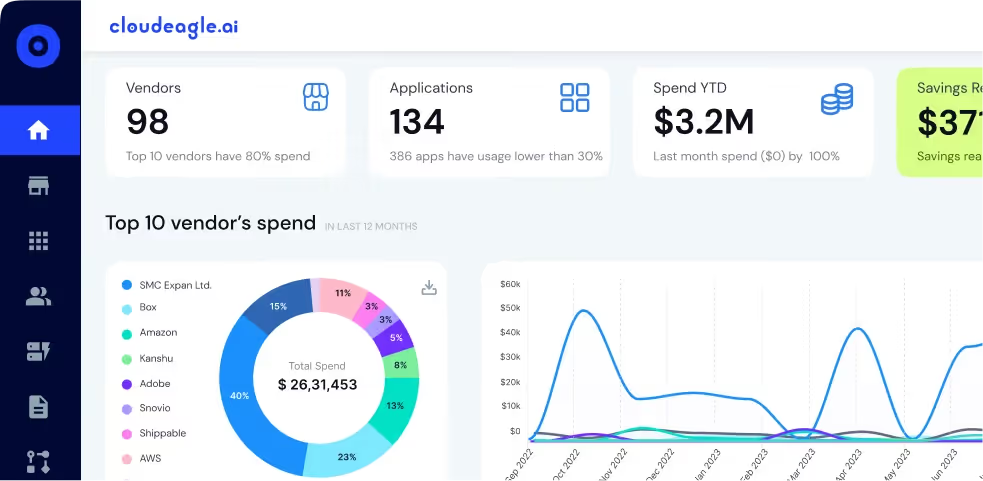
  • Unapproved AI websites and browser usage
  • Embedded AI features in SaaS tools (e.g., Notion AI, HubSpot AI, Salesforce Einstein)
  • Tools accessed using personal or unmanaged email accounts
  • Employee-purchased or trialed AI tools using credit cards

With AI-assisted detection and real-time usage signals (login + spend + browser behavior), CloudEagle.ai eliminates AI and SaaS blind spots instantly—ensuring nothing slips through the cracks.

Policy Enforcement — From Static Rules to Automated Guardrails

Turn your AI and SaaS governance policies into action. CloudEagle.ai enforces:

  • AI-specific data use restrictions and policy triggers
  • Automated approval workflows for high-risk tools
  • Role-based access controls that evolve with org structure
  • Just-in-time access for temporary or contractor use
  • Time-bound and usage-triggered access settings

No more scattered approvals or loose admin rights, CloudEagle.ai operationalizes your governance framework with AI-powered workflows.

Vendor Risk Checks — Know the AI Tools You're Letting In

CloudEagle.ai evaluates every AI vendor through a risk-aware lens, applying AI-specific risk checks across:

  • Compliance certifications (e.g., SOC2, GDPR)
  • Model transparency and usage disclosures
  • Data residency, retention, and training practices
  • Access scopes and API-level permissions

You get a dynamic AI risk score for each tool, helping you triage, block, or sandbox high-risk AI applications proactively.

Continuous Monitoring — Real-Time AI Governance, Not Just Periodic Reviews
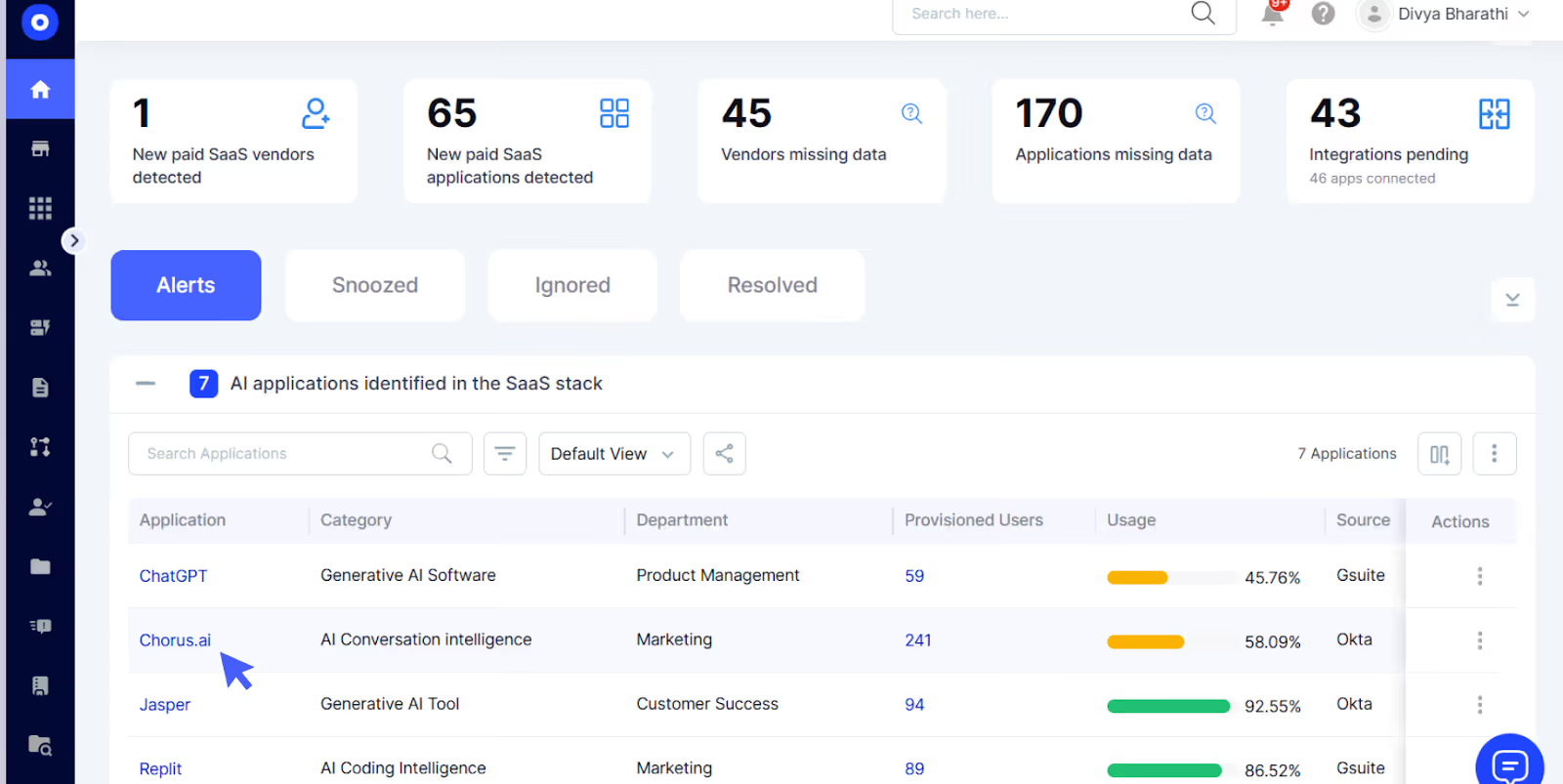
CloudEagle.ai gives you a live dashboard of AI activity across teams, featuring:

  • Real-time alerts for unapproved usage or risky patterns
  • Team-level and user-level visibility into AI interactions
  • Shadow AI trends by department (e.g., marketing, engineering)
  • Detection of new AI-enabled features inside existing SaaS tools
  • Anomaly detection for overuse, admin privilege escalation, or noncompliance

With SOC2-ready audit logs and automated access reviews, governance becomes continuous, not quarterly.

Built for the Modern Enterprise
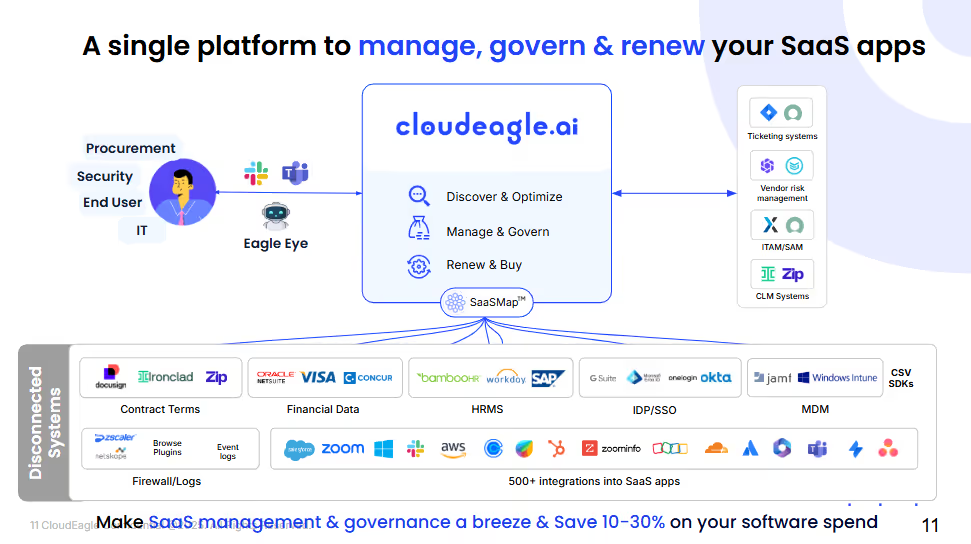
CloudEagle.ai supports 500+ integrations and works even outside your IDP (e.g., Okta, Azure AD), giving you visibility into unmanaged and free-tier apps. It’s the only platform that combines license management, access governance, AI policy enforcement, and procurement automation into a single pane of glass.

Results you can expect:

  • 10–30% SaaS + AI cost reduction in Year 1
  • 80% less time on access reviews
  • Immediate visibility into Shadow AI risks from Day 1

Want to ensure robust SaaS contracts?

Our checklist guides you to review key terms like renewals and security for complete confidence

Download Resource
CTA Thumbnail

7. How to Get Started With Basic AI Governance in 30 Days

Building a governance foundation doesn’t have to be a long, complex project. You can create a functional, compliant AI governance layer in just 30 days.

Step 1 — Build a Simple AI Inventory

Start by listing all AI tools currently in use, including:

  • Approved tools
  • Unapproved tools
  • Personal accounts
  • Embedded AI features inside SaaS

This alone reveals the true scope of enterprise AI usage.

Step 2 — Create Lightweight AI Policies

Draft a simple, 1–2-page policy document written in plain English. It should outline:

  • Allowed tasks
  • Prohibited data
  • Review expectations
  • Access rules
  • Incident reporting steps

No jargon. No complexity. Just clarity.

Step 3 — Implement Minimum Viable Controls

Focus on the essentials:

  • Data restrictions
  • Access management
  • Usage monitoring
  • Shadow AI detection
  • Basic logs

These controls cover most AI risk.

Step 4 — Train Employees With Simple, Role-Based Guidance

Hold short, role-specific training sessions explaining:

  • What AI can and cannot do
  • Examples of good vs unsafe usage
  • How to avoid data leaks
  • What tools are approved

Education turns governance into a habit.

Step 5 — Monthly Review and Continuous Improvement

AI evolves weekly. Your governance must evolve too.

Review:

  • New tools
  • Policy violations
  • User feedback
  • Updated regulations
  • Vendor changes

This ensures the framework stays relevant and flexible.

8. Conclusion

AI governance doesn’t need to be heavy or complicated. It only needs to be clear, consistent, and enforceable. Start with simple policies, add essential controls, and improve continuously as your AI adoption grows.

With CloudEagle.ai, organizations can enforce AI governance from Day 1,discovering shadow AI, monitoring usage, evaluating vendor risk, and automating policy enforcement across the entire SaaS ecosystem. If you’re ready to take control of your AI landscape and eliminate blind spots for good, read the full guide and see how CloudEagle.ai can transform your governance strategy into a scalable, automated, and audit-ready system from the start.

Frequently Asked Questions

1. What is an AI governance policy?

An AI governance policy is a set of rules defining how AI should be used responsibly across an organization. It covers acceptable use, data handling, review steps, and risk controls to ensure safe, compliant, and ethical AI adoption.

2. What is the difference between AI policies and AI controls?

AI policies describe the guidelines — what teams should or shouldn’t do. AI controls are the enforcement mechanisms that monitor, restrict, or automate those rules to ensure consistent, measurable AI governance.

3. Why do companies need AI governance?

Companies need AI governance to manage AI risk, prevent data leakage, reduce shadow AI, ensure compliance, and maintain consistent decision-making. Governance enables safer, faster innovation without slowing teams down.

4. What are the first controls every company should implement?

Start with basic AI controls: data input restrictions, DLP checks, AI usage monitoring, shadow AI detection, access management, and simple incident workflows. These core controls reduce most enterprise AI risk quickly.

5. How does Shadow AI impact governance efforts?

Shadow AI creates hidden risk by enabling employees to use unapproved AI tools or embedded assistants. Without visibility, policies can’t be enforced. Detecting shadow AI is essential for AI compliance and effective governance.

Advertisement for a SaaS Subscription Tracking Template with a call-to-action button to download and a partial graphic of a tablet showing charts.Banner promoting a SaaS Agreement Checklist to streamline SaaS management and avoid budget waste with a call-to-action button labeled Download checklist.Blue banner with text 'The Ultimate Employee Offboarding Checklist!' and a black button labeled 'Download checklist' alongside partial views of checklist documents from cloudeagle.ai.Digital ad for download checklist titled 'The Ultimate Checklist for IT Leaders to Optimize SaaS Operations' by cloudeagle.ai, showing checklist pages.Slack Buyer's Guide offer with text 'Unlock insider insights to get the best deal on Slack!' and a button labeled 'Get Your Copy', accompanied by a preview of the guide featuring Slack's logo.Monday Pricing Guide by cloudeagle.ai offering exclusive pricing secrets to maximize investment with a call-to-action button labeled Get Your Copy and an image of the guide's cover.Blue banner for Canva Pricing Guide by cloudeagle.ai offering a guide to Canva costs, features, and alternatives with a call-to-action button saying Get Your Copy.Blue banner with white text reading 'Little-Known Negotiation Hacks to Get the Best Deal on Slack' and a white button labeled 'Get Your Copy'.Blue banner with text 'Little-Known Negotiation Hacks to Get the Best Deal on Monday.com' and a white button labeled 'Get Your Copy'.Blue banner with text 'Little-Known Negotiation Hacks to Get the Best Deal on Canva' and a white button labeled 'Get Your Copy'.Banner with text 'Slack Buyer's Guide' and a 'Download Now' button next to images of a guide titled 'Slack Buyer’s Guide: Features, Pricing & Best Practices'.Digital cover of Monday Pricing Guide with a button labeled Get Your Copy on a blue background.Canva Pricing Guide cover with a button labeled Get Your Copy on a blue gradient background.

Enter your email to
unlock the report

Oops! Something went wrong while submitting the form.
License Count
Benchmark
Per User/Per Year

Enter your email to
unlock the report

Oops! Something went wrong while submitting the form.
License Count
Benchmark
Per User/Per Year

Enter your email to
unlock the report

Oops! Something went wrong while submitting the form.
Notion Plus
License Count
Benchmark
Per User/Per Year
100-500
$67.20 - $78.72
500-1000
$59.52 - $72.00
1000+
$51.84 - $57.60
Canva Pro
License Count
Benchmark
Per User/Per Year
100-500
$74.33-$88.71
500-1000
$64.74-$80.32
1000+
$55.14-$62.34

Enter your email to
unlock the report

Oops! Something went wrong while submitting the form.

Enter your email to
unlock the report

Oops! Something went wrong while submitting the form.
Zoom Business
License Count
Benchmark
Per User/Per Year
100-500
$216.00 - $264.00
500-1000
$180.00 - $216.00
1000+
$156.00 - $180.00

Enter your email to
unlock the report

Oops! Something went wrong while submitting the form.

Get the Right Security Platform To Secure Your Cloud Infrastructure

Please enter a business email
Thank you!
The 2023 SaaS report has been sent to your email. Check your promotional or spam folder.
Oops! Something went wrong while submitting the form.

Access full report

Please enter a business email
Thank you!
The 2023 SaaS report has been sent to your email. Check your promotional or spam folder.
Oops! Something went wrong while submitting the form.

Artificial intelligence isn’t “emerging” anymore — it’s everywhere.

Every team is experimenting with GenAI tools; every SaaS product is shipping new AI features overnight; every workflow now has an AI plugin, copilot, or built-in assistant.

Employees use unapproved AI tools without IT knowing. Shadow AI grows faster than official AI adoption. Vendors embed AI features without announcing them.

This is why AI governance is suddenly becoming a board-level priority. Companies need clarity. They need consistency. They need a safe, secure, and responsible way to use AI — without slowing teams down.

This guide breaks down, in simple language, what AI governance is, why policies matter, what controls you need, and how to start building governance within 30 days.

TL;DR

  • AI governance policies define how AI should be used responsibly across your organization.
  • AI controls are the enforcement mechanisms that convert policies into real-world actions.
  • A basic governance setup includes rules on data input, access, usage, and output review
  • Companies need visibility into all AI tools in use, especially shadow AI and embedded AI assistants.
  • A simple, lightweight governance model can drastically reduce security, compliance, and AI risk exposure

Aiming to improve Identity & Access Management?

Our eBook outlines eight key areas and solutions to enhance access security and maintain compliance.

Download Resource
CTA Thumbnail

1. What Is AI Governance?

AI governance refers to the frameworks, rules, and operational guardrails that decide how AI should be used inside a company. But more importantly, it answers the questions every team is secretly asking:

  • What tools are okay to use?
  • What data can we upload or not upload?
  • Who is responsible for reviewing outputs?
  • How do we reduce risk without killing innovation?

Think of AI governance as the system that brings order to a chaotic, fast-changing environment. As more employees adopt AI tools informally, often without telling IT or security, the organization becomes exposed to hidden risks.

Good AI governance does three important things:

  1. Reduces organizational risk by defining acceptable behavior.
  2. Educates teams on how to use AI safely.
  3. Enables innovation much faster because everyone knows the rules.

And here’s the part most companies misunderstand:

AI governance is not about restricting or blocking AI. It’s about enabling safe, confident, scalable AI usage, without surprises.

When governance works, teams innovate faster because they have clarity, not confusion.

2. Why AI Governance Policies Are Becoming Essential

Just three years ago, AI usage in enterprises was limited to data teams and research groups. Today, companies are dealing with an explosion of GenAI tools, embedded AI assistants, and shadow AI, often introduced without any formal approval.

The Explosion of GenAI Tools Across Teams

From marketing content to engineering code suggestions, AI is now baked into daily workflows. But this leads to fragmentation:

  • Sales uses an AI email writer.
  • Support teams use AI summarizers.
  • HR uses AI interview tools.
  • Engineering uses AI pair programmers.

Without governance, each team develops its own informal “AI rules,” leading to inconsistencies and unseen risks.

The Rise of Shadow AI

Shadow AI is becoming the biggest concern for IT and security teams. Employees sign up for AI tools using personal accounts. Teams experiment with unapproved models. SaaS platforms quietly roll out AI features like Notion AI, Figma AI, Salesforce Einstein, and HubSpot AI — without notifying admins.

This creates an environment where AI usage is happening everywhere, but visibility is almost zero.

Growing Regulatory Pressure

Governments and regulators worldwide are catching up to AI adoption. Enterprises now face pressure from frameworks like:

Even companies outside regulated industries must align with these expectations to avoid future penalties.

Risks: Data Leakage, Bias, and Model Unpredictability

AI tools can unintentionally store submitted data, generate incorrect or biased outputs, or even create harmful recommendations. Employees rarely know whether a tool retains input data or uses it for model training.

Without governance, these risks stay invisible until something goes wrong.

The Need for Consistent Decision-Making

If every department uses AI differently, the enterprise ends up with conflicting practices, unclear responsibilities, and unpredictable outcomes.

AI governance policies solve that by establishing a unified, enterprise-wide framework.

3. Key Components of Effective AI Governance Policies

AI governance policies are the “rules of the road.” They help employees understand what’s safe, what’s not, and how to use AI responsibly. A strong AI policy set should cover the following areas:

Defining Acceptable and Unacceptable AI Use Cases

The most foundational part of an AI policy is clarity on what AI can and cannot be used for.

Examples of acceptable usage:

  • Drafting internal summaries
  • Brainstorming content
  • Code suggestions
  • Internal productivity workflows

Examples of high-risk or unacceptable usage:

  • Uploading customer data
  • Generating legal or financial statements
  • HR decision-making
  • Using AI outputs without human review

These categories give employees confidence and reduce accidental misuse.

Guardrails on Data Input

This is where most incidents occur. Employees paste confidential data into AI tools without realizing the implications.

Your policies must specify:

  • Which data types are strictly prohibited
  • Which data requires anonymization
  • How to use internal datasets safely
  • Restrictions around regulated data (PII, PHI, financial, customer info)

The more examples you provide, the safer teams will be.

Output Review Requirements

AI hallucinations are not just inconvenient, they’re risky.

Policies should require human review for:

  • Any content shared outside the company
  • Customer-facing communications
  • Legal, HR, or financial outputs
  • Sensitive operational decisions

This ensures no AI-generated content escapes without validation.

Who Is Allowed to Use AI Tools

Instead of opening AI to everyone with no structure, define:

  • Which roles have access
  • What permissions do they have
  • What level of monitoring applies
  • Whether training is required before access

Role-based usage helps limit risk without limiting innovation.

Approval Processes for New AI Tools

A policy should also define how new AI tools get evaluated:

  • IT for technical fit
  • Security for compliance
  • Legal for data rights
  • Procurement for pricing and contractual risk

This prevents the spread of unsafe or redundant tools.

Vendor AI Risk Scoring

Not every AI tool is equally safe. Your policy should require that each vendor undergoes rigorous evaluation, including:

  • Model transparency
  • Data storage & retention
  • API usage
  • Training data policies
  • Compliance certifications
  • Ability to disable logging
  • Security controls

A simplified vendor risk score helps teams make informed decisions quickly.

Logging and Monitoring Requirements

AI usage must be traceable.

Your policies should require logging of:

  • Prompts
  • Tool activity
  • User actions
  • High-risk events
  • AI assistant activations inside SaaS apps

Logs form the foundation of audit trails and investigations.

Reporting Misuse and Incident Handling

When something goes wrong — accidental leak, harmful output, or misuse — employees must know exactly what to do.

Policies should outline:

  • Whom to notify
  • What to report
  • How incidents are escalated
  • Remediation steps
  • Follow-up reviews

This builds a culture of safety and transparency.

Concerned about undetected SaaS security gaps?

Our checklist enables your team to identify vulnerabilities and implement measures to protect sensitive data effectively

Download Resource
CTA Thumbnail

4. What Are AI Controls?

If policies are the rules, AI controls are the systems that enforce them.

Controls make governance real.
They create measurable, repeatable, enforceable mechanisms to ensure that policies aren’t just written words but operational practices.

For example:

  • A policy may say, “Don’t paste PII into AI tools.”
  • A control enforces this through a DLP block.

Policies guide people. Controls automate the guardrails.

The relationship is simple:

  • AI Policies = What should happen
  • AI Controls = How it is enforced consistently

Controls ensure compliance, visibility, and accountability.

5. Types of AI Controls Every Organization Should Start With

Every company, regardless of size, should begin with foundational AI controls that cover data, access, usage, and incident response.

Data Input Restrictions

Control systems prevent users from pasting sensitive content into AI tools. These safeguard confidential data, even if employees forget policy rules.

DLP (Data Loss Prevention) Scanning

DLP tools evaluate every prompt in real time, scanning for sensitive information such as PII, financial records, customer identifiers, health data, or any content governed by regulatory frameworks. As users type or submit a prompt, the system classifies the data, checks it against predefined policies, and determines whether it’s safe to proceed. 

Blocking Unapproved AI Tools

Shadow AI creates unexpected risk. App-level blocking ensures employees cannot use unapproved or high-risk AI tools that IT hasn’t vetted.

Shadow AI Detection

Even with blocking, some tools slip in. Controls should detect:

  • New AI websites
  • AI browser extensions
  • AI assistants built into SaaS
  • Tools accessed via personal accounts

This restores visibility.

Monitoring AI Usage

Monitoring shows how AI is used across teams:

  • High-volume query patterns
  • Suspicious behavior
  • Sensitive prompts
  • High-risk activities
  • Tool popularity

This informs governance decisions.

Log Auditing

Audit logs help investigate incidents by showing:

  • Who used which tool
  • What inputs were submitted
  • What outputs were generated
  • Whether policies were violated

Logs are essential for compliance.

Incident Response Workflow

Controls activate automatic workflows when:

  • Data leaks occur
  • Harmful outputs are detected
  • Bias-related incidents emerge
  • Access misuse is identified

This keeps problems contained.

Access Revocation and Permission Management

If an employee violates policies, controls allow immediate removal of AI access — protecting the organization while enabling safe reinstatement later.

Updating Risk Ratings and Tool Policies

AI vendors evolve quickly. Controls must dynamically update risk ratings as vendors add features or change data practices.

Contextual, Tool-Specific Governance

Different tools require different controls. For example:

  • ChatGPT may require strict data rules
  • GitHub Copilot may require code auditing
  • Salesforce Einstein requires CRM-specific safeguards

Controls ensure governance adapts to context.

6. How CloudEagle.ai Helps You Enforce AI Governance Policies and Controls

CloudEagle.ai is purpose-built for real-world AI governance. As AI tools explode across departments, CloudEagle.ai empowers IT, security, and procurement teams with automation, visibility, and control to mitigate risk, enforce policies, and stay compliant, without slowing down innovation.

Shadow AI Discovery — Find What’s Hidden Before It Becomes Risk

CloudEagle.ai automatically discovers all AI tools in use across your organization, including those operating outside IT’s oversight. It detects:

  • Unapproved AI websites and browser usage
  • Embedded AI features in SaaS tools (e.g., Notion AI, HubSpot AI, Salesforce Einstein)
  • Tools accessed using personal or unmanaged email accounts
  • Employee-purchased or trialed AI tools using credit cards

With AI-assisted detection and real-time usage signals (login + spend + browser behavior), CloudEagle.ai eliminates AI and SaaS blind spots instantly—ensuring nothing slips through the cracks.

Policy Enforcement — From Static Rules to Automated Guardrails

Turn your AI and SaaS governance policies into action. CloudEagle.ai enforces:

  • AI-specific data use restrictions and policy triggers
  • Automated approval workflows for high-risk tools
  • Role-based access controls that evolve with org structure
  • Just-in-time access for temporary or contractor use
  • Time-bound and usage-triggered access settings

No more scattered approvals or loose admin rights, CloudEagle.ai operationalizes your governance framework with AI-powered workflows.

Vendor Risk Checks — Know the AI Tools You're Letting In

CloudEagle.ai evaluates every AI vendor through a risk-aware lens, applying AI-specific risk checks across:

  • Compliance certifications (e.g., SOC2, GDPR)
  • Model transparency and usage disclosures
  • Data residency, retention, and training practices
  • Access scopes and API-level permissions

You get a dynamic AI risk score for each tool, helping you triage, block, or sandbox high-risk AI applications proactively.

Continuous Monitoring — Real-Time AI Governance, Not Just Periodic Reviews

CloudEagle.ai gives you a live dashboard of AI activity across teams, featuring:

  • Real-time alerts for unapproved usage or risky patterns
  • Team-level and user-level visibility into AI interactions
  • Shadow AI trends by department (e.g., marketing, engineering)
  • Detection of new AI-enabled features inside existing SaaS tools
  • Anomaly detection for overuse, admin privilege escalation, or noncompliance

With SOC2-ready audit logs and automated access reviews, governance becomes continuous, not quarterly.

Built for the Modern Enterprise

CloudEagle.ai supports 500+ integrations and works even outside your IDP (e.g., Okta, Azure AD), giving you visibility into unmanaged and free-tier apps. It’s the only platform that combines license management, access governance, AI policy enforcement, and procurement automation into a single pane of glass.

Results you can expect:

  • 10–30% SaaS + AI cost reduction in Year 1
  • 80% less time on access reviews
  • Immediate visibility into Shadow AI risks from Day 1

Want to ensure robust SaaS contracts?

Our checklist guides you to review key terms like renewals and security for complete confidence

Download Resource
CTA Thumbnail

7. How to Get Started With Basic AI Governance in 30 Days

Building a governance foundation doesn’t have to be a long, complex project. You can create a functional, compliant AI governance layer in just 30 days.

Step 1 — Build a Simple AI Inventory

Start by listing all AI tools currently in use, including:

  • Approved tools
  • Unapproved tools
  • Personal accounts
  • Embedded AI features inside SaaS

This alone reveals the true scope of enterprise AI usage.

Step 2 — Create Lightweight AI Policies

Draft a simple, 1–2-page policy document written in plain English. It should outline:

  • Allowed tasks
  • Prohibited data
  • Review expectations
  • Access rules
  • Incident reporting steps

No jargon. No complexity. Just clarity.

Step 3 — Implement Minimum Viable Controls

Focus on the essentials:

  • Data restrictions
  • Access management
  • Usage monitoring
  • Shadow AI detection
  • Basic logs

These controls cover most AI risk.

Step 4 — Train Employees With Simple, Role-Based Guidance

Hold short, role-specific training sessions explaining:

  • What AI can and cannot do
  • Examples of good vs unsafe usage
  • How to avoid data leaks
  • What tools are approved

Education turns governance into a habit.

Step 5 — Monthly Review and Continuous Improvement

AI evolves weekly. Your governance must evolve too.

Review:

  • New tools
  • Policy violations
  • User feedback
  • Updated regulations
  • Vendor changes

This ensures the framework stays relevant and flexible.

8. Conclusion

AI governance doesn’t need to be heavy or complicated. It only needs to be clear, consistent, and enforceable. Start with simple policies, add essential controls, and improve continuously as your AI adoption grows.

With CloudEagle.ai, organizations can enforce AI governance from Day 1,discovering shadow AI, monitoring usage, evaluating vendor risk, and automating policy enforcement across the entire SaaS ecosystem. If you’re ready to take control of your AI landscape and eliminate blind spots for good, read the full guide and see how CloudEagle.ai can transform your governance strategy into a scalable, automated, and audit-ready system from the start.

Frequently Asked Questions

1. What is an AI governance policy?

An AI governance policy is a set of rules defining how AI should be used responsibly across an organization. It covers acceptable use, data handling, review steps, and risk controls to ensure safe, compliant, and ethical AI adoption.

2. What is the difference between AI policies and AI controls?

AI policies describe the guidelines — what teams should or shouldn’t do. AI controls are the enforcement mechanisms that monitor, restrict, or automate those rules to ensure consistent, measurable AI governance.

3. Why do companies need AI governance?

Companies need AI governance to manage AI risk, prevent data leakage, reduce shadow AI, ensure compliance, and maintain consistent decision-making. Governance enables safer, faster innovation without slowing teams down.

4. What are the first controls every company should implement?

Start with basic AI controls: data input restrictions, DLP checks, AI usage monitoring, shadow AI detection, access management, and simple incident workflows. These core controls reduce most enterprise AI risk quickly.

5. How does Shadow AI impact governance efforts?

Shadow AI creates hidden risk by enabling employees to use unapproved AI tools or embedded assistants. Without visibility, policies can’t be enforced. Detecting shadow AI is essential for AI compliance and effective governance.

CloudEagle.ai recognized in the 2025 Gartner® Magic Quadrant™ for SaaS Management Platforms
Download now
gartner chart
5x
Faster employee
onboarding
80%
Reduction in time for
user access reviews
30k
Workflows
automated
$15Bn
Analyzed in
contract spend
$2Bn
Saved in
SaaS spend

Recognized as an Industry leader for our AI

CloudEagle.ai is Recognized in the 2024 Gartner® Magic Quadrant™ for SaaS Management Platforms

Recognition highlights CloudEagle’s innovation and leadership in the rapidly evolving SaaS management and procurement space.
Read More
Gartner Magic Quadrant for SaaS Management Platforms showing a chart divided into Challengers and Leaders quadrants with various companies plotted as dots.

CloudEagle.ai Recognized in the GigaOm Radar for SaaS Management Platforms

CloudEagle named a Leader and Outperformer in GigaOm Radar Report, validating its impact in the SaaS management platform landscape.
Read More
gigaom

Everest Group Positions CloudEagle.ai as a Trailblazer in SaaS Management Platforms

CloudEagle recognized as a Trailblazer by Everest Group, showcasing its rapid growth and innovation in SaaS spend and operations management.
Read More
qks

CloudEagle.ai is Recognized in the 2024 Gartner® Magic Quadrant™ for SaaS Management Platforms

Recognition highlights CloudEagle’s innovation and leadership in the rapidly evolving SaaS management and procurement space.
Read More
gartner

Streamline SaaS governance and save 10-30%

Book a Demo with Expert
CTA image
One platform to Manage
all SaaS Products
Learn More