AI Tools

How AI Tools Are Slipping Past IT – And What To Do About It?

Share via:
Written by:
CloudEagle.ai Team
Reviewed by
Nidhi Jain
Last Updated:
July 24, 2025
blog-cms-banner-bg
Little-Known Negotiation Hacks to Get the Best Deal on Slack
cta-bg-blogDownload Your Copy

HIPAA Compliance Checklist for 2025

Download PDF

‍

AI tools have exploded across every corner of the enterprise, turbocharging productivity and innovation, but they’re also slipping past IT’s watchful eyes.

This “Shadow AI” phenomenon is no longer a fringe issue: over half of employees use AI tools without IT approval, and nearly 40% admit to sharing sensitive data with unsanctioned platforms.

Understanding how to prevent shadow AI adoption starts with visibility, the first step in regaining control over unauthorized AI tool use.

Why? Because AI is fast, easy, and fills urgent gaps that official systems can’t keep up with. But this convenience comes with a hidden cost. Sensitive data can leak in seconds, compliance risks multiply, and unchecked AI outputs may introduce costly errors or bias.

The real challenge: a single unauthorized upload of proprietary or customer data can lead to severe regulatory penalties and damage your brand’s reputation.

To address this challenge, enterprises must go beyond simply blocking AI websites or issuing warnings. They need effective AI governance strategies that balance innovation with control, and that starts with visibility powered by advanced AI detection tools.

Let’s explore how enterprises can implement effective AI governance strategies that balance innovation with control.

‍

Why AI Tools Are Slipping Past IT Controls?

According to a recent ManageEngine report, 60% of employees are using unapproved AI tools more than last year, while 63% of IT leaders cite data leakage as the top risk. The following are the key reasons why AI tools are slipping past IT controls:

Proliferation of Freemium AI Tools

Free tiers skip procurement because there is nothing to buy. IDC's Global Employee Survey found that 39% of EMEA employees use free AI tools at work,and another 17% use AI tools they pay for privately.
‍

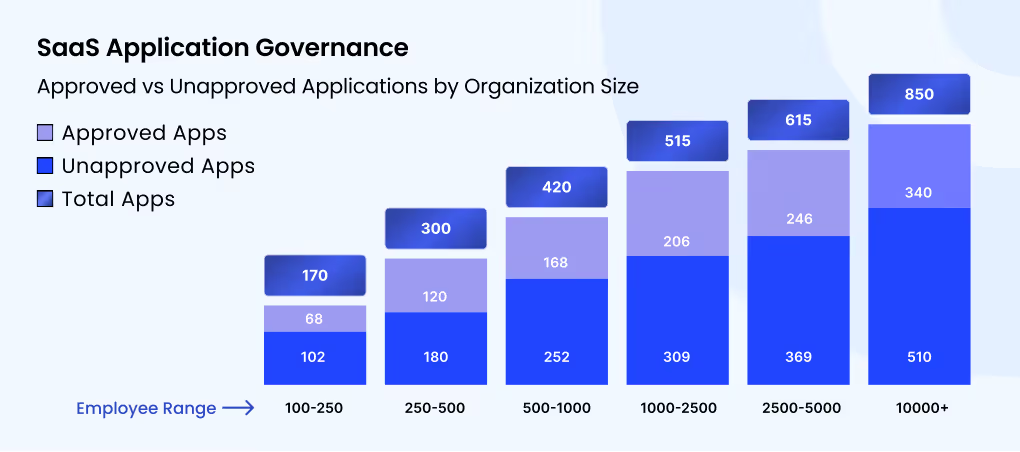
Bar chart comparing approved, unapproved, and total SaaS applications across six organization sizes, from 100–250 employees to 10,000+ employees.

‍

This democratization accelerates innovation but also fuels Shadow AI growth, as employees bypass official channels for speed and convenience.

Lack of Centralized Visibility

The identity team sees SSO logins, finance sees paid subscriptions and security sees network traffic, but nobody sees all three together. An AI tool used on a personal account shows up in none of them, and AI features switched on inside approved SaaS apps are just as easy to miss.

Bring Your Own AI (BYOAI)

Employees bring their own AI accounts to work, often a personal ChatGPT or Claude login on the same domain the company has approved. These are unmanaged AI tools with no SSO, no admin console and consumer data terms, and network tools usually cannot tell them apart from the corporate account.

Siloed Procurement & Shadow Purchasing

Departments buy AI tools on corporate cards and expense them, which skips security review. By the time the charge shows up, the tool has been in use for a full billing cycle.

Gaps in Traditional DLP or SaaS Security Policies

Traditional DLP was built to inspect files and email, and text pasted into an AI prompt in the browser often passes through without matching a rule. SaaS security policies written before AI tools spread rarely cover AI features, browser extensions or agents.

‍

Free Tiers Skip Procurement Every Time

Find every unsanctioned tool, personal account, and AI feature in one scan.
Download Checklist

‍

How CloudEagle.ai Can Help You Control Shadow AI? 

CloudEagle.ai is an AI Governance platform that finds every AI tool your employees use and enforces your AI policy at the point of use. Setup takes about 30 minutes, and from there the AI governance platform works in the order below.

Connect Your Identity, Finance and Browser Sources

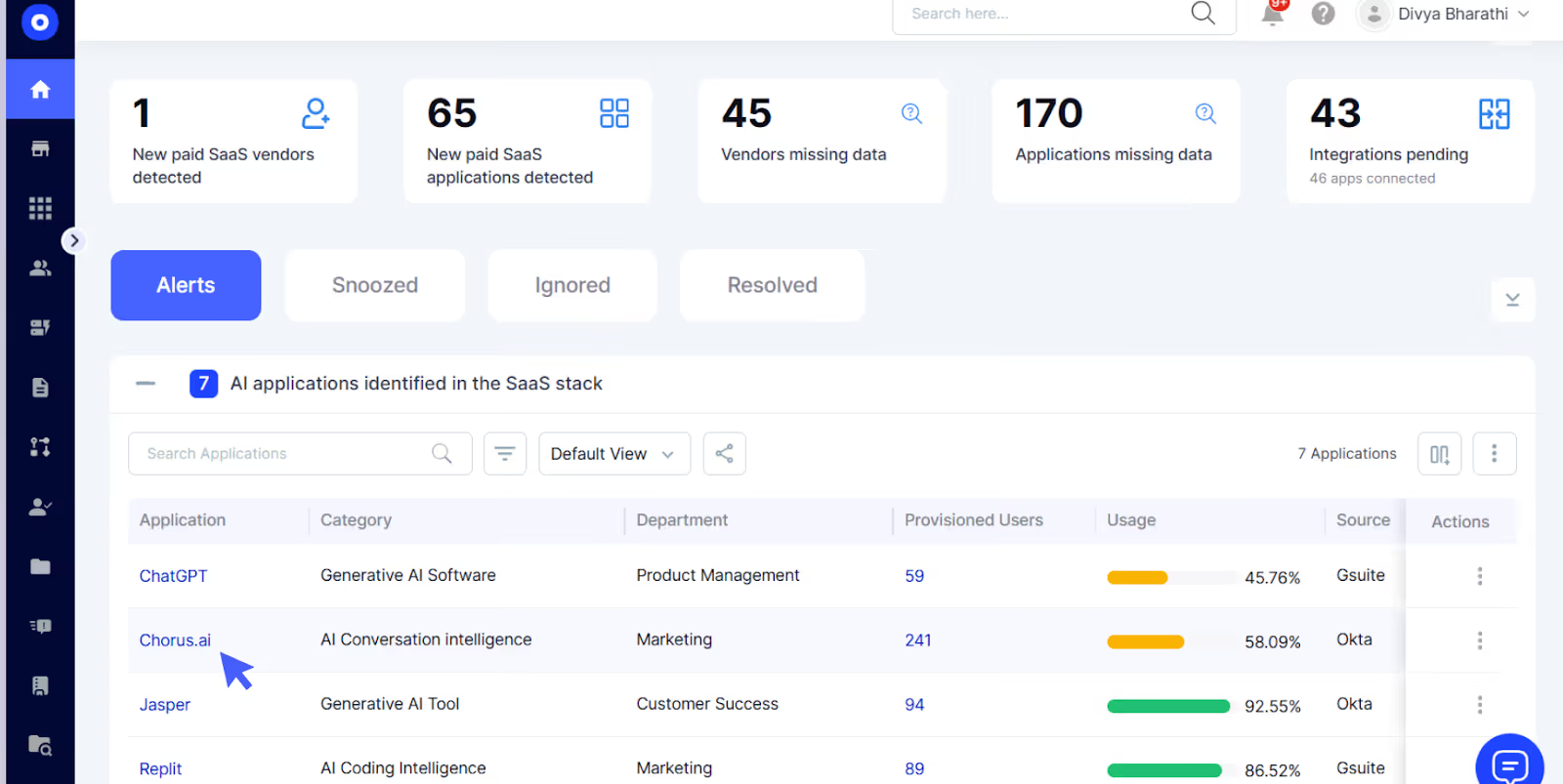
Shadow AI stays hidden when you look at one data source, so the first step is connecting several. CloudEagle.ai plugs into your identity provider, finance systems and corporate cards, firewall logs, MDM and a browser extension.
‍

CloudEagle.ai dashboard showing newly detected paid SaaS vendors and applications, missing vendor and application data, pending integrations, and an inventory of AI applications with usage and provisioning details.

‍

There are 500+ direct integrations, so most of your stack connects without custom work. Nothing changes for employees at this stage.

See Every AI App, Agent and MCP Server, Including Personal Accounts

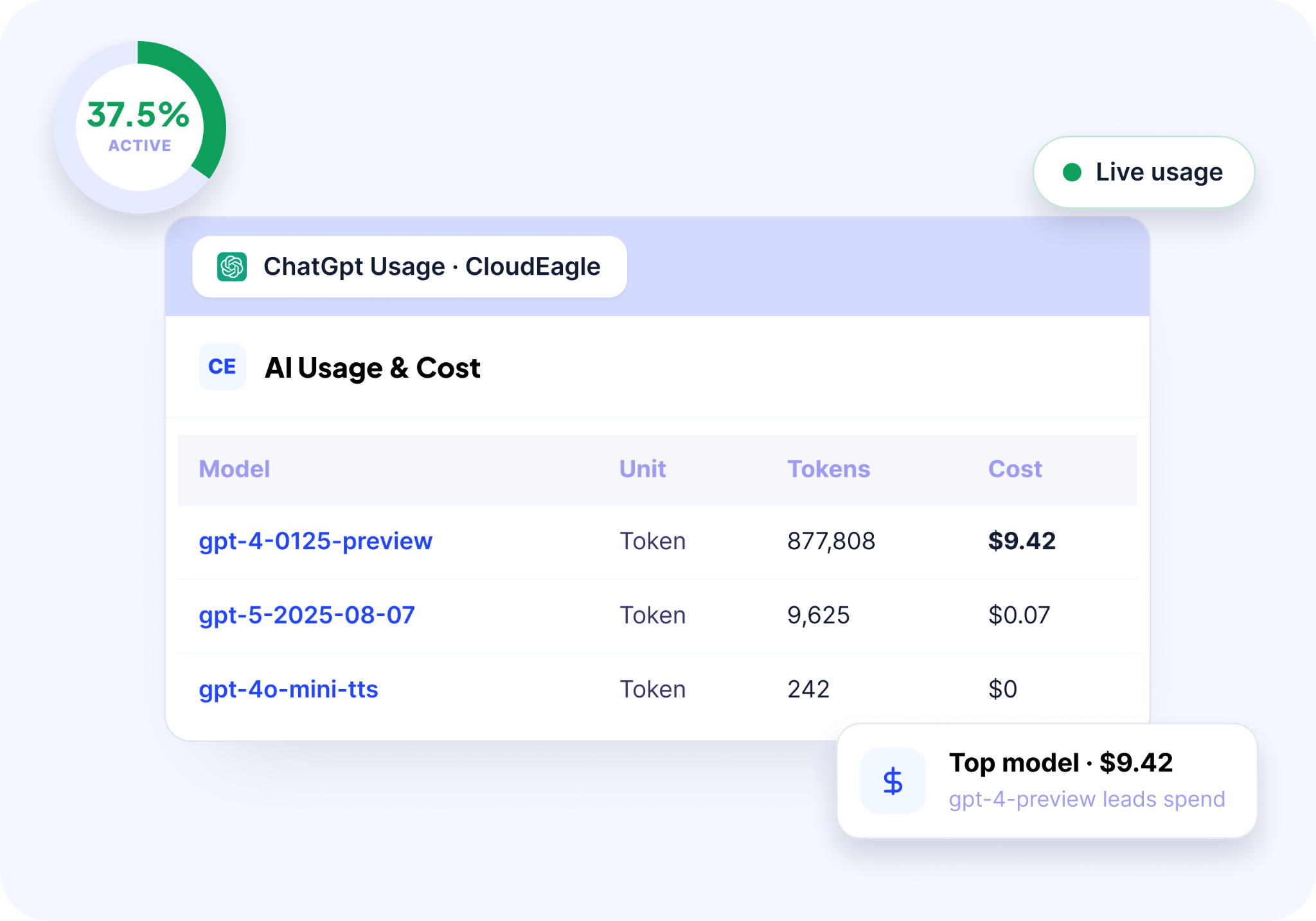
Once the sources are connected, you get one inventory of every AI tool in use. CloudEagle.ai matches the signals against a database of 150,000+ applications, which is how it picks up tools that never went through SSO or procurement.
‍

CloudEagle.ai dashboard displaying ChatGPT activity, a 37.5% active usage indicator, model-level token consumption, and costs for GPT-4, GPT-5, and GPT-4o mini.

‍

The inventory includes free tiers, personal AI accounts used for work, and GenAI features switched on inside SaaS apps you already approved. For each tool you can see who uses it and whether they are on a corporate or a personal account.

This is the shadow AI discovery step, and everything after it depends on this list being complete.

Risk-Score Each AI Tool Before You Decide

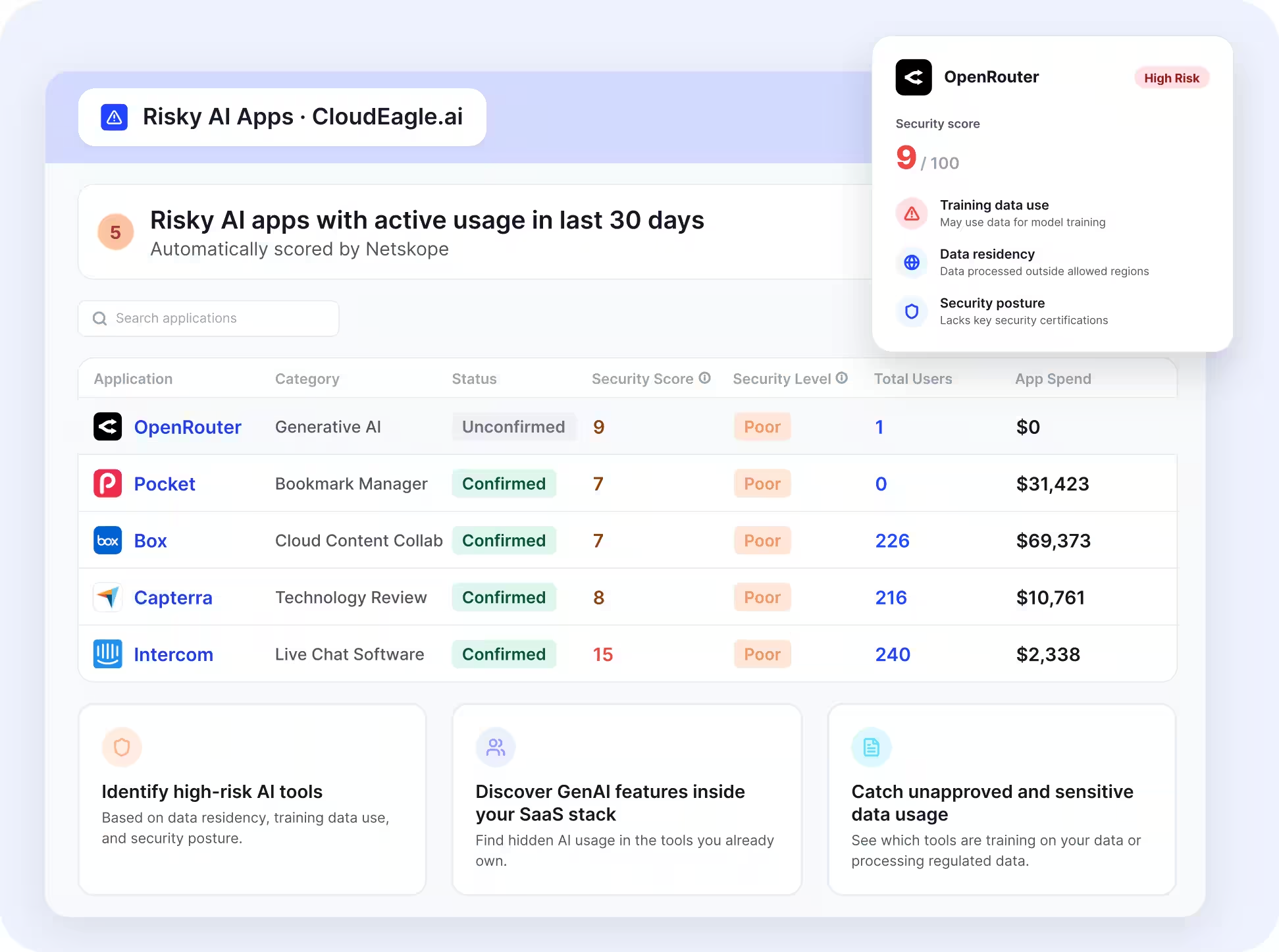
A full inventory can run to hundreds of AI tools, so the next step is sorting them. Each vendor gets a risk score powered by Netskope, based on data residency, training data use and security posture.
‍

CloudEagle.ai interface highlighting risky AI and SaaS applications, security scores, training data usage, data residency, security posture, user counts, and application spend.

‍

Admins get an alert when a new unapproved tool shows up. Each tool is then routed to IT for review, where it is approved, restricted or blocked.

Enforce AI Policy in the Browser, Before Data Is Submitted

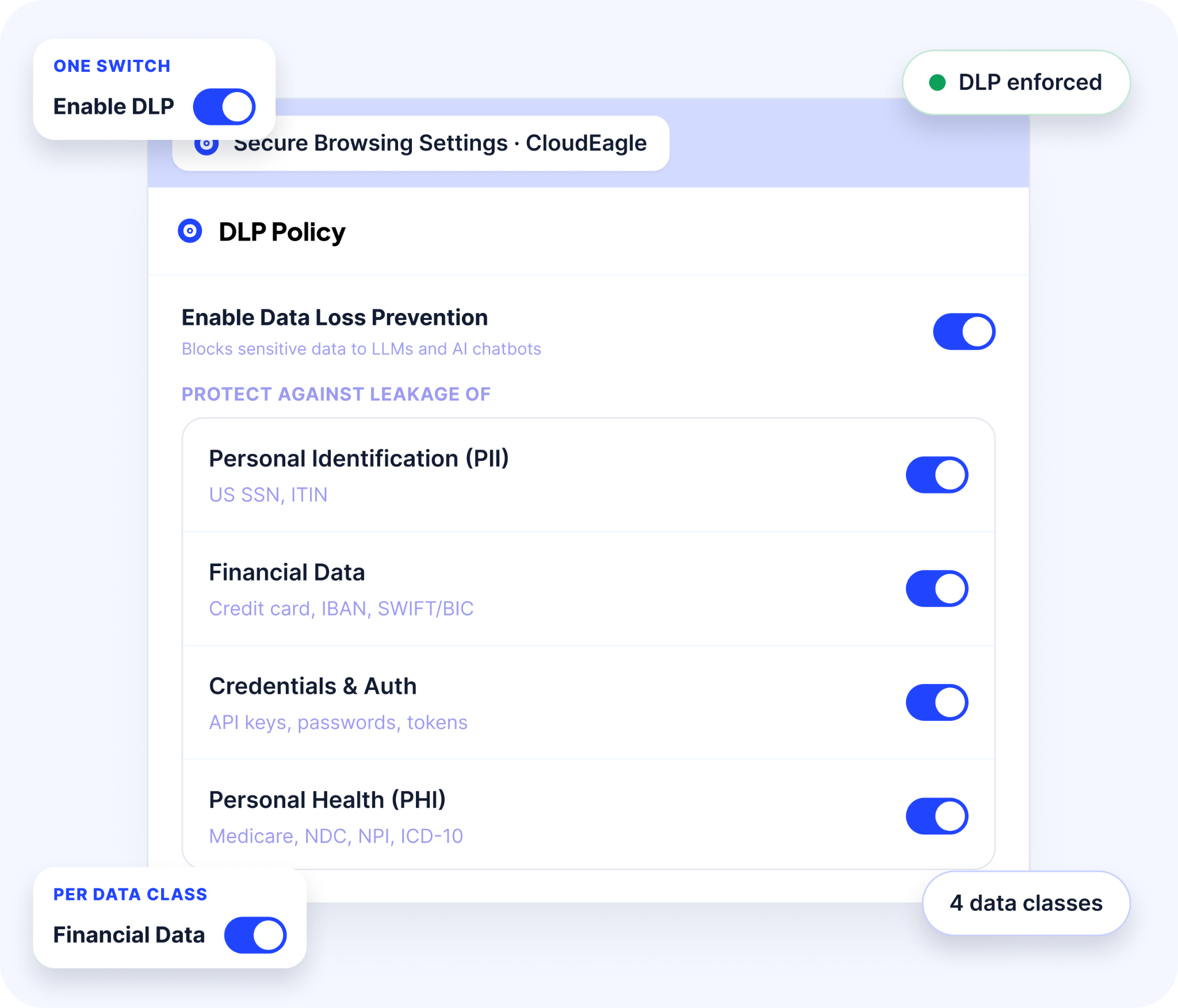
With decisions made, the browser extension enforces them where the work happens. When an employee opens an unapproved AI tool, a flash page appears and redirects them to the approved alternative before any prompt is entered.
‍

CloudEagle.ai interface showing data loss prevention controls for blocking sensitive information, with configurable protection for personal identification information, financial data, credentials, and personal health information.

‍

For tools that are allowed, AI policy enforcement can monitor or block sensitive content such as PII, PHI and credentials before it is submitted. It also flags when someone logs into a personal AI account in place of the corporate one.

Give Employees an Approved Route Through the App Catalog

Enforcement works better when employees have somewhere to go. The self-service app catalog lists every approved AI and SaaS tool, and employees request access from there.

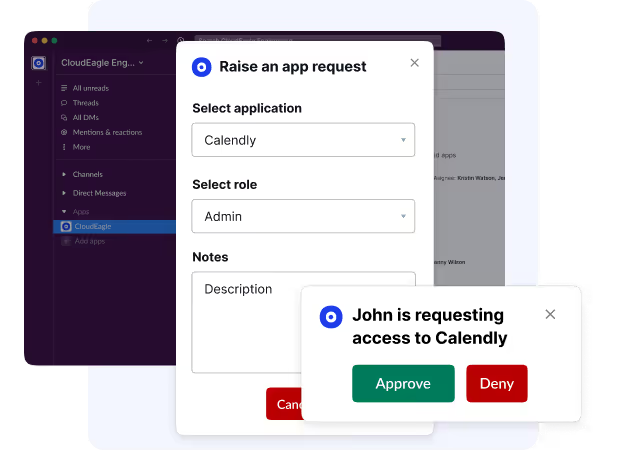
An employee who hits a flash page can also request approval for that tool through Slack or Teams. Requests route to the right approver, so a decision takes hours and the free tier stops being the faster option.
‍

Slack interface displaying an application access request for Calendly, with role selection, request notes, and options to approve or deny access.

‍

Keep Shadow AI in Your Access Reviews and Audit Evidence

The last step is keeping it under control after the first cleanup. Every warning, block and override is logged, and logins to personal AI accounts show up in access reviews alongside the rest of your SaaS access.

CloudEagle built-in audit log interface showing tamper-proof timestamped access review records for SOC 2, GDPR, and ISO compliance exported to Jira and ITSM tools

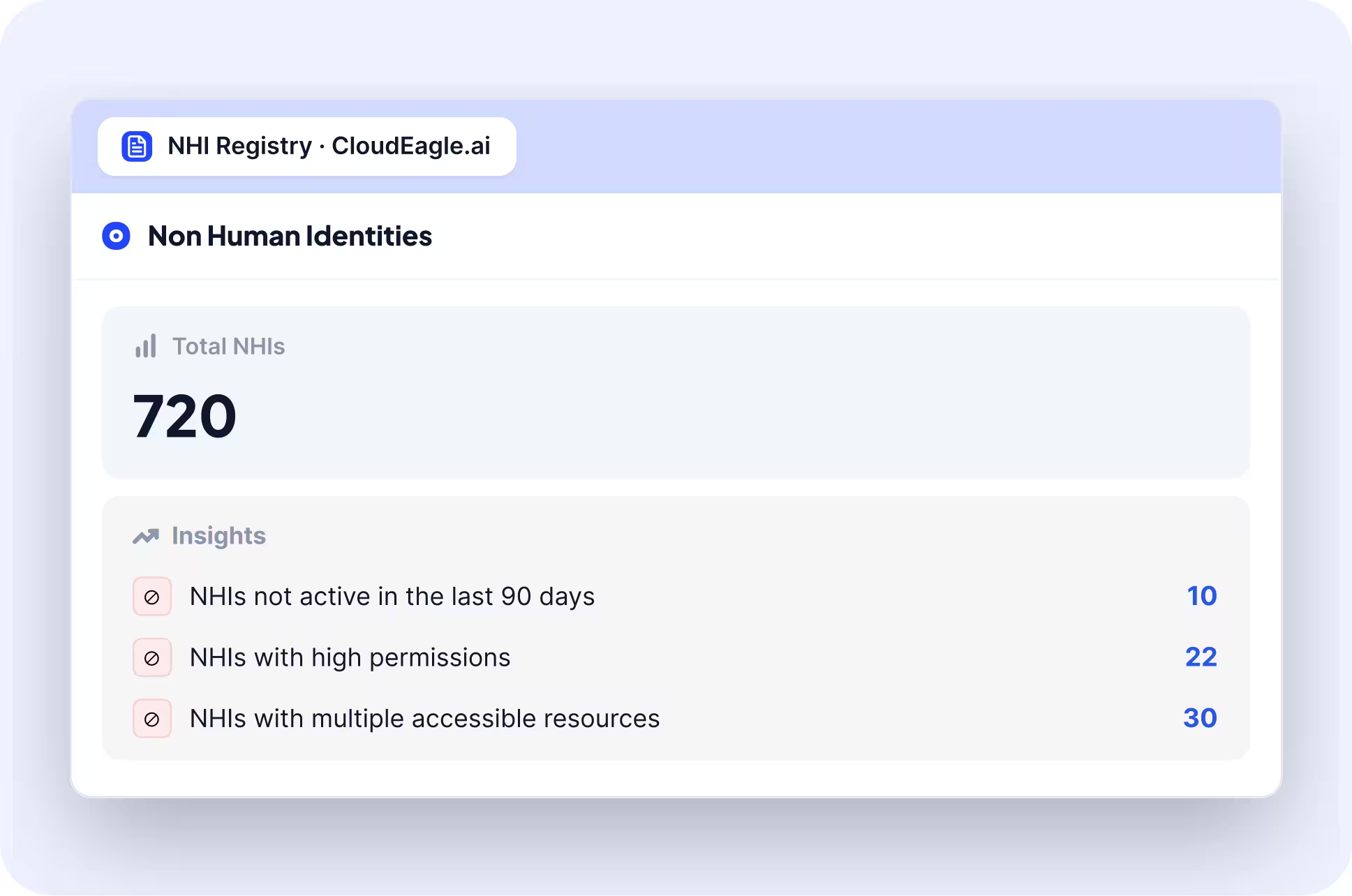
The same applies to non-human identities. API keys, service accounts and AI agents created for AI tools get an owner and go through review like any employee account.
‍

CloudEagle.ai dashboard summarizing 720 non-human identities (NHIs), including identities inactive for 90 days, identities with high permissions, and identities with access to multiple resources.

‍

IT, Security and Finance work from one dashboard, so the AI inventory, the policy actions and the audit evidence stay in the same place.

‍

AI Tools Need Access Reviews Too

Add every agent, API key, and personal account to your next review cycle.
Download Checklist

‍

Conclusion

AI tools slip past IT through free tiers, personal accounts, card purchases and gaps in DLP, and the controls built for SaaS were never designed to catch them. Blocking AI sites only moves the usage somewhere IT cannot see.

The fix is to find every AI tool, decide which ones to allow, and enforce that decision in the browser before data leaves the device. Book a demo to see how CloudEagle.ai does this across your AI and SaaS stack.

‍

FAQs  

1. What tools can detect shadow AI usage before prompts leave employee devices?

Tools that run in the browser or on the endpoint can, because they act before anything is sent. Network tools such as CASBs and gateways only see traffic after submission. CloudEagle.ai's browser extension detects unapproved AI tools as they open and checks sensitive data before it is submitted.

2. Is there a way to see AI tool usage before credentials get exposed outside our network?

Yes. A browser-level control can check what a user is about to enter into an AI site and block credentials before submission. Pair it with discovery across SSO, finance and browser signals so you know which AI tools are in use in the first place.

3. What tools can block risky AI queries without shutting down productivity?

Look for tools that offer warn and redirect actions alongside block. Blocking a whole AI domain stops legitimate work, while blocking only sensitive data or redirecting to an approved tool keeps people productive.

4. What security tools can detect when employees bypass approved AI systems with personal accounts?

Browser-based controls can, since they see which account is logged in. Domain-level tools usually cannot, because a personal and a corporate session on the same AI domain look identical on the network. CloudEagle.ai flags logins to personal and non-corporate AI accounts.

5. Our team is adopting AI tools without IT approval. How do we manage it?

Start with discovery to see what is in use, then risk-score each tool and approve the safe ones quickly. Publish an approved list, set a short turnaround for new requests, and enforce the policy in the browser. Banning everything tends to hide the usage without reducing it.

6. How do I govern employee use of AI tools and SaaS apps?

Use one inventory and one approval process for both. AI tools and SaaS apps share the same discovery sources, access controls, and owners, so governing them separately creates duplicate work and gaps.

7. What tools discover which AI vendors employees have signed up for without approval?

Tools that combine identity, finance, and browser signals do this best, because a single source misses most signups. SSO logs miss personal emails, and expense data misses free tiers. CloudEagle.ai correlates all of them into one list of unauthorized AI tools and the people using them.

‍

Advertisement for a SaaS Subscription Tracking Template with a call-to-action button to download and a partial graphic of a tablet showing charts.Banner promoting a SaaS Agreement Checklist to streamline SaaS management and avoid budget waste with a call-to-action button labeled Download checklist.Blue banner with text 'The Ultimate Employee Offboarding Checklist!' and a black button labeled 'Download checklist' alongside partial views of checklist documents from cloudeagle.ai.Digital ad for download checklist titled 'The Ultimate Checklist for IT Leaders to Optimize SaaS Operations' by cloudeagle.ai, showing checklist pages.Slack Buyer's Guide offer with text 'Unlock insider insights to get the best deal on Slack!' and a button labeled 'Get Your Copy', accompanied by a preview of the guide featuring Slack's logo.Monday Pricing Guide by cloudeagle.ai offering exclusive pricing secrets to maximize investment with a call-to-action button labeled Get Your Copy and an image of the guide's cover.Blue banner for Canva Pricing Guide by cloudeagle.ai offering a guide to Canva costs, features, and alternatives with a call-to-action button saying Get Your Copy.Blue banner with white text reading 'Little-Known Negotiation Hacks to Get the Best Deal on Slack' and a white button labeled 'Get Your Copy'.Blue banner with text 'Little-Known Negotiation Hacks to Get the Best Deal on Monday.com' and a white button labeled 'Get Your Copy'.Blue banner with text 'Little-Known Negotiation Hacks to Get the Best Deal on Canva' and a white button labeled 'Get Your Copy'.Banner with text 'Slack Buyer's Guide' and a 'Download Now' button next to images of a guide titled 'Slack Buyer’s Guide: Features, Pricing & Best Practices'.Digital cover of Monday Pricing Guide with a button labeled Get Your Copy on a blue background.Canva Pricing Guide cover with a button labeled Get Your Copy on a blue gradient background.

Enter your email to
unlock the report

Oops! Something went wrong while submitting the form.
License Count
Benchmark
Per User/Per Year

Enter your email to
unlock the report

Oops! Something went wrong while submitting the form.
License Count
Benchmark
Per User/Per Year

Enter your email to
unlock the report

Oops! Something went wrong while submitting the form.
Notion Plus
License Count
Benchmark
Per User/Per Year
100-500
$67.20 - $78.72
500-1000
$59.52 - $72.00
1000+
$51.84 - $57.60
Canva Pro
License Count
Benchmark
Per User/Per Year
100-500
$74.33-$88.71
500-1000
$64.74-$80.32
1000+
$55.14-$62.34

Enter your email to
unlock the report

Oops! Something went wrong while submitting the form.

Enter your email to
unlock the report

Oops! Something went wrong while submitting the form.
Zoom Business
License Count
Benchmark
Per User/Per Year
100-500
$216.00 - $264.00
500-1000
$180.00 - $216.00
1000+
$156.00 - $180.00

Enter your email to
unlock the report

Oops! Something went wrong while submitting the form.

Get the Right Security Platform To Secure Your Cloud Infrastructure

Please enter a business email
Thank you!
The 2023 SaaS report has been sent to your email. Check your promotional or spam folder.
Oops! Something went wrong while submitting the form.

Access full report

Please enter a business email
Thank you!
The 2023 SaaS report has been sent to your email. Check your promotional or spam folder.
Oops! Something went wrong while submitting the form.

TL;DR

  • AI tools get past IT through free tiers, personal accounts, card purchases and AI features switched on inside approved SaaS apps.
  • SSO logs, expense data and traditional DLP each see only part of this, so unauthorized AI tools stay hidden.
  • CloudEagle.ai connects identity, finance, firewall and browser signals to find every AI tool, including personal accounts.
  • It risk-scores each tool, enforces AI policy in the browser before sensitive data is submitted, and gives employees an approved route.

‍

‍

AI tools have exploded across every corner of the enterprise, turbocharging productivity and innovation, but they’re also slipping past IT’s watchful eyes.

This “Shadow AI” phenomenon is no longer a fringe issue: over half of employees use AI tools without IT approval, and nearly 40% admit to sharing sensitive data with unsanctioned platforms.

Understanding how to prevent shadow AI adoption starts with visibility, the first step in regaining control over unauthorized AI tool use.

Why? Because AI is fast, easy, and fills urgent gaps that official systems can’t keep up with. But this convenience comes with a hidden cost. Sensitive data can leak in seconds, compliance risks multiply, and unchecked AI outputs may introduce costly errors or bias.

The real challenge: a single unauthorized upload of proprietary or customer data can lead to severe regulatory penalties and damage your brand’s reputation.

To address this challenge, enterprises must go beyond simply blocking AI websites or issuing warnings. They need effective AI governance strategies that balance innovation with control, and that starts with visibility powered by advanced AI detection tools.

Let’s explore how enterprises can implement effective AI governance strategies that balance innovation with control.

‍

Why AI Tools Are Slipping Past IT Controls?

According to a recent ManageEngine report, 60% of employees are using unapproved AI tools more than last year, while 63% of IT leaders cite data leakage as the top risk. The following are the key reasons why AI tools are slipping past IT controls:

Proliferation of Freemium AI Tools

Free tiers skip procurement because there is nothing to buy. IDC's Global Employee Survey found that 39% of EMEA employees use free AI tools at work,and another 17% use AI tools they pay for privately.

‍

Bar chart comparing approved, unapproved, and total SaaS applications across six organization sizes, from 100–250 employees to 10,000+ employees.

‍

This democratization accelerates innovation but also fuels Shadow AI growth, as employees bypass official channels for speed and convenience.

Lack of Centralized Visibility

The identity team sees SSO logins, finance sees paid subscriptions and security sees network traffic, but nobody sees all three together. An AI tool used on a personal account shows up in none of them, and AI features switched on inside approved SaaS apps are just as easy to miss.

Bring Your Own AI (BYOAI)

Employees bring their own AI accounts to work, often a personal ChatGPT or Claude login on the same domain the company has approved. These are unmanaged AI tools with no SSO, no admin console and consumer data terms, and network tools usually cannot tell them apart from the corporate account.

Siloed Procurement & Shadow Purchasing

Departments buy AI tools on corporate cards and expense them, which skips security review. By the time the charge shows up, the tool has been in use for a full billing cycle.

Gaps in Traditional DLP or SaaS Security Policies

Traditional DLP was built to inspect files and email, and text pasted into an AI prompt in the browser often passes through without matching a rule. SaaS security policies written before AI tools spread rarely cover AI features, browser extensions or agents.

‍

Free Tiers Skip Procurement Every Time

Find every unsanctioned tool, personal account, and AI feature in one scan.
Download Checklist

‍

How CloudEagle.ai Can Help You Control Shadow AI? 

CloudEagle.ai is an AI Governance platform that finds every AI tool your employees use and enforces your AI policy at the point of use. Setup takes about 30 minutes, and from there the AI governance platform works in the order below.

Connect Your Identity, Finance and Browser Sources

Shadow AI stays hidden when you look at one data source, so the first step is connecting several. CloudEagle.ai plugs into your identity provider, finance systems and corporate cards, firewall logs, MDM and a browser extension.

‍

CloudEagle.ai dashboard showing newly detected paid SaaS vendors and applications, missing vendor and application data, pending integrations, and an inventory of AI applications with usage and provisioning details.

‍

There are 500+ direct integrations, so most of your stack connects without custom work. Nothing changes for employees at this stage.

See Every AI App, Agent and MCP Server, Including Personal Accounts

Once the sources are connected, you get one inventory of every AI tool in use. CloudEagle.ai matches the signals against a database of 150,000+ applications, which is how it picks up tools that never went through SSO or procurement.

‍

CloudEagle.ai dashboard displaying ChatGPT activity, a 37.5% active usage indicator, model-level token consumption, and costs for GPT-4, GPT-5, and GPT-4o mini.

‍

The inventory includes free tiers, personal AI accounts used for work, and GenAI features switched on inside SaaS apps you already approved. For each tool you can see who uses it and whether they are on a corporate or a personal account.

This is the shadow AI discovery step, and everything after it depends on this list being complete.

Risk-Score Each AI Tool Before You Decide

A full inventory can run to hundreds of AI tools, so the next step is sorting them. Each vendor gets a risk score powered by Netskope, based on data residency, training data use and security posture.

‍

CloudEagle.ai interface highlighting risky AI and SaaS applications, security scores, training data usage, data residency, security posture, user counts, and application spend.

‍

Admins get an alert when a new unapproved tool shows up. Each tool is then routed to IT for review, where it is approved, restricted or blocked.

Enforce AI Policy in the Browser, Before Data Is Submitted

With decisions made, the browser extension enforces them where the work happens. When an employee opens an unapproved AI tool, a flash page appears and redirects them to the approved alternative before any prompt is entered.

‍

CloudEagle.ai interface showing data loss prevention controls for blocking sensitive information, with configurable protection for personal identification information, financial data, credentials, and personal health information.

‍

For tools that are allowed, AI policy enforcement can monitor or block sensitive content such as PII, PHI and credentials before it is submitted. It also flags when someone logs into a personal AI account in place of the corporate one.

Give Employees an Approved Route Through the App Catalog

Enforcement works better when employees have somewhere to go. The self-service app catalog lists every approved AI and SaaS tool, and employees request access from there.

An employee who hits a flash page can also request approval for that tool through Slack or Teams. Requests route to the right approver, so a decision takes hours and the free tier stops being the faster option.

‍

Slack interface displaying an application access request for Calendly, with role selection, request notes, and options to approve or deny access.

‍

Keep Shadow AI in Your Access Reviews and Audit Evidence

The last step is keeping it under control after the first cleanup. Every warning, block and override is logged, and logins to personal AI accounts show up in access reviews alongside the rest of your SaaS access.

CloudEagle built-in audit log interface showing tamper-proof timestamped access review records for SOC 2, GDPR, and ISO compliance exported to Jira and ITSM tools

The same applies to non-human identities. API keys, service accounts and AI agents created for AI tools get an owner and go through review like any employee account.

‍

CloudEagle.ai dashboard summarizing 720 non-human identities (NHIs), including identities inactive for 90 days, identities with high permissions, and identities with access to multiple resources.

‍

IT, Security and Finance work from one dashboard, so the AI inventory, the policy actions and the audit evidence stay in the same place.

‍

AI Tools Need Access Reviews Too

Add every agent, API key, and personal account to your next review cycle.
Download Checklist

‍

Conclusion

AI tools slip past IT through free tiers, personal accounts, card purchases and gaps in DLP, and the controls built for SaaS were never designed to catch them. Blocking AI sites only moves the usage somewhere IT cannot see.

The fix is to find every AI tool, decide which ones to allow, and enforce that decision in the browser before data leaves the device. Book a demo to see how CloudEagle.ai does this across your AI and SaaS stack.

‍

FAQs  

1. What tools can detect shadow AI usage before prompts leave employee devices?

Tools that run in the browser or on the endpoint can, because they act before anything is sent. Network tools such as CASBs and gateways only see traffic after submission. CloudEagle.ai's browser extension detects unapproved AI tools as they open and checks sensitive data before it is submitted.

2. Is there a way to see AI tool usage before credentials get exposed outside our network?

Yes. A browser-level control can check what a user is about to enter into an AI site and block credentials before submission. Pair it with discovery across SSO, finance and browser signals so you know which AI tools are in use in the first place.

3. What tools can block risky AI queries without shutting down productivity?

Look for tools that offer warn and redirect actions alongside block. Blocking a whole AI domain stops legitimate work, while blocking only sensitive data or redirecting to an approved tool keeps people productive.

4. What security tools can detect when employees bypass approved AI systems with personal accounts?

Browser-based controls can, since they see which account is logged in. Domain-level tools usually cannot, because a personal and a corporate session on the same AI domain look identical on the network. CloudEagle.ai flags logins to personal and non-corporate AI accounts.

5. Our team is adopting AI tools without IT approval. How do we manage it?

Start with discovery to see what is in use, then risk-score each tool and approve the safe ones quickly. Publish an approved list, set a short turnaround for new requests, and enforce the policy in the browser. Banning everything tends to hide the usage without reducing it.

6. How do I govern employee use of AI tools and SaaS apps?

Use one inventory and one approval process for both. AI tools and SaaS apps share the same discovery sources, access controls, and owners, so governing them separately creates duplicate work and gaps.

7. What tools discover which AI vendors employees have signed up for without approval?

Tools that combine identity, finance, and browser signals do this best, because a single source misses most signups. SSO logs miss personal emails, and expense data misses free tiers. CloudEagle.ai correlates all of them into one list of unauthorized AI tools and the people using them.

‍

CloudEagle.ai recognized in the 2025 Gartner® Magic Quadrant™ for SaaS Management Platforms
Download now
gartner chart
5x
Faster employee
onboarding
80%
Reduction in time for
user access reviews
30k
Workflows
automated
$15Bn
Analyzed in
contract spend
$2Bn
Saved in
SaaS spend

Streamline SaaS governance and save 10-30%

Book a Demo with Expert
CTA image