You need to enable JavaScript in order to use the AI chatbot tool powered by ChatBot

How to Find Out Which AI Tools Your Team Actually Uses & Cut the Ones That Overlap

Share via:
blog-cms-banner-bg
Little-Known Negotiation Hacks to Get the Best Deal on Slack
cta-bg-blogDownload Your Copy

HIPAA Compliance Checklist for 2025

Download PDF

Ask most IT leaders how many AI tools their company uses and you'll usually get a confident answer. Three. Maybe five. Then someone pulls the corporate card statements.

Now you find ChatGPT, Claude, Gemini, Cursor, GitHub Copilot, and several more tools nobody mentioned because nobody remembered they were still running.

One Finance Manager we spoke to said: "If one team is using Claude and another team is also paying for another package, it’s subscribing to the same thing but twice. We want to manage all these things."

He thought he had a handful of AI tools. Mid-conversation, he named eight. There were more he couldn't recall. The surprise isn't that people are using AI. The surprise is how often teams are paying twice for duplicate apps.

Nobody planned the overlap. It accumulated through one auto-renewal at a time. 

The good news is that finding these tools is usually easier than people expect. Every AI application leaves a trail in SSO, browser activity, finance systems, and expense reports. 

CloudEagle.ai brings these signals together so IT and Finance teams can see exactly which AI tools are running, where capabilities overlap, and which subscriptions can be consolidated before the next renewal cycle.

In this article, we'll show you how to build a complete picture of every AI tool running across your organization and identify where you're paying twice for the same capability. 

TL;DR

  • Most organizations underestimate how many AI tools they use because purchases happen outside procurement and IT oversight.
  • Duplicate AI spending often comes from overlapping tools, bundled AI features, team purchases, and unmanaged API usage.
  • CloudEagle.ai combines SSO, finance, browser, and security signals to create a complete AI inventory.
  • Teams can identify duplicate AI apps, track active users, assess risk, and uncover consolidation opportunities.
  • CloudEagle.ai helps IT, Finance, and Procurement optimize AI spend before unnecessary renewals and duplicate purchases occur

1. What IT Approved and What Your Team Is Actually Using Are Two Different Lists

The AI tools IT approved are usually the ones that went through procurement. The tools employees actually use include team purchases, corporate card subscriptions, and AI features bundled inside products.

This gap is bigger than most companies realize.
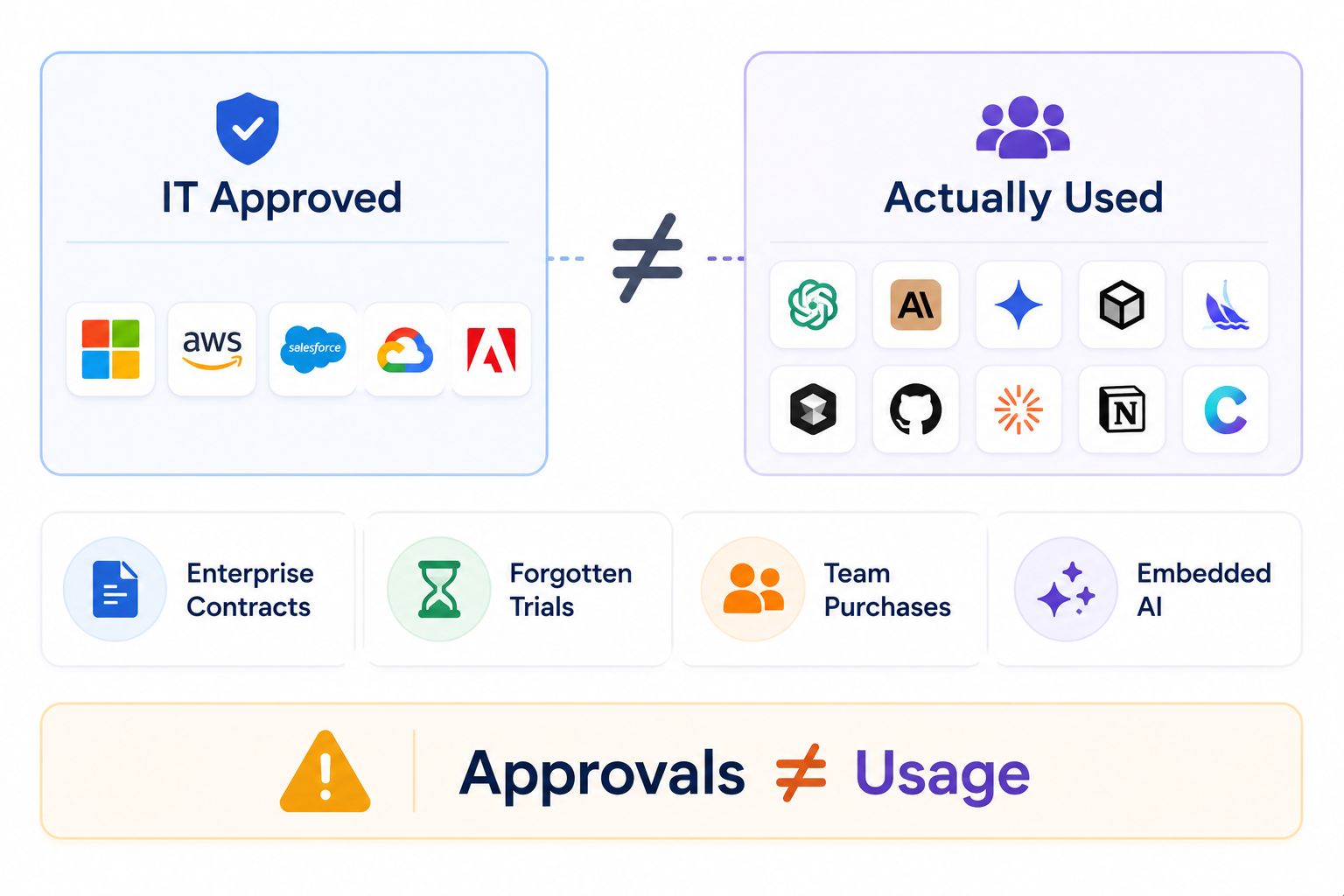
A finance leader we spoke to recently started by mentioning Claude and OpenAI. A few minutes later, he casually added Cursor, GitHub Copilot, Gemini, Luma AI, Freepik, and several others.

The interesting part wasn't the number of tools. It was that nobody had a complete list.

  • Enterprise Contracts Only Show Part of the Picture: Procurement captures approved purchases but not the subscriptions employees set up independently on corporate cards.
  • Trials Quietly Become Paid Accounts: A two-week experiment becomes a recurring charge six months later with no active owner and no one watching the invoice.
  • Teams Buy Independently Without Checking What's Already Live: Engineering, marketing, and design often buy the same tools because nobody told them the other team already had one.
  • AI is Embedded Inside Platforms You Already Own: Notion AI, Canva AI, Zapier AI, and Salesforce Einstein are active, but rarely counted as AI spend, rarely governed as AI tools.

The list IT thinks exists is based on approvals. The list that actually exists is based on how people work. And those are rarely the same thing.

The Riskiest AI Tool Is Invisible

That's why nobody questions it.
Expose It

2. How CloudEagle.ai Finds Which AI Tools Your Enterprise Uses in First Place?

AI providers only show usage and billing but not who is using the tools, which teams are spending the most, or whether the tools were approved. 

Employees often start using AI tools without IT knowing, through browser sign-ups, API keys, and expense reports that never went through procurement. CloudEagle.ai compensates for this through two layers: direct integrations and external telemetry.

Direct Integrations:
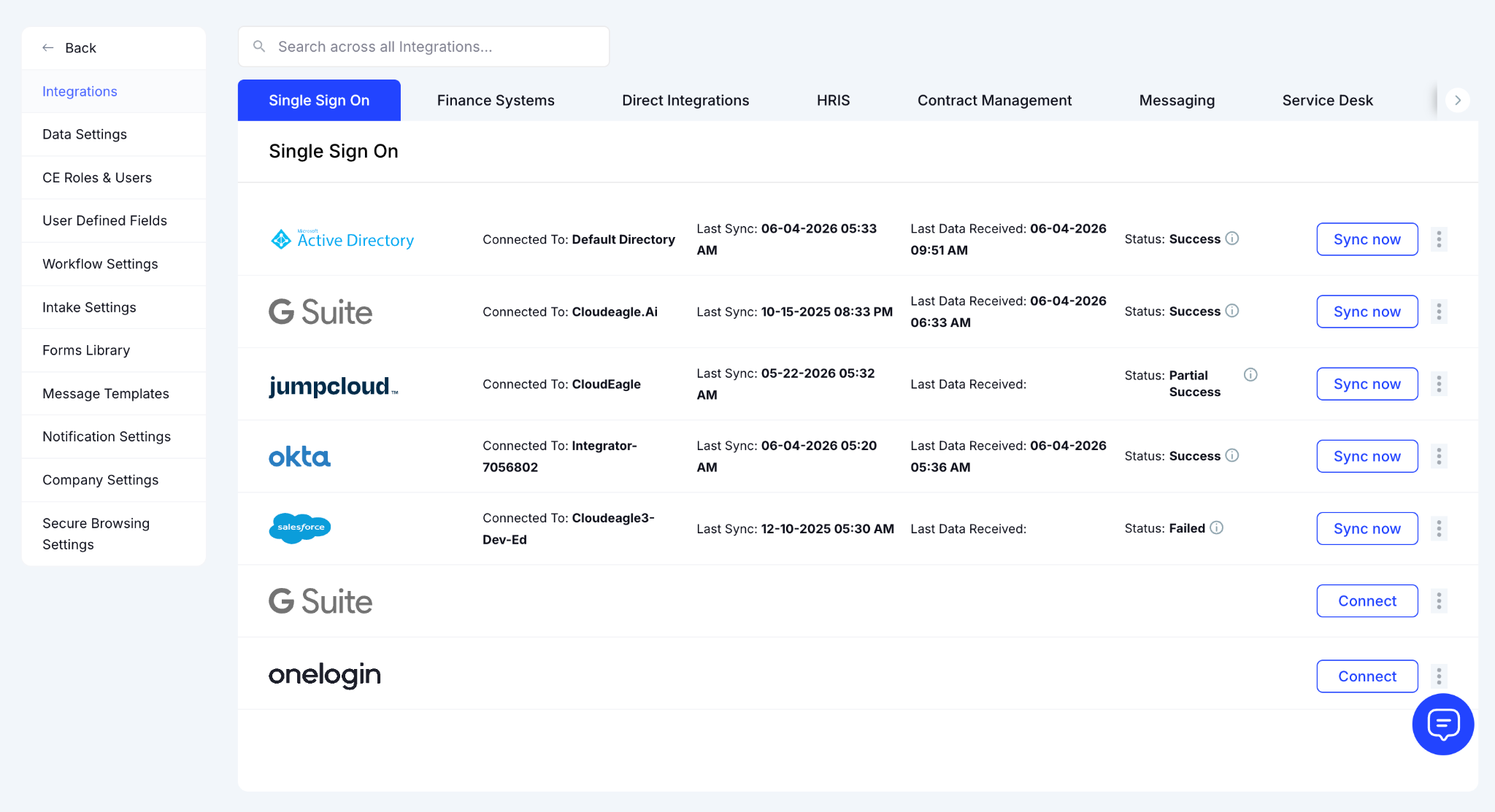
CloudEagle.ai connects to your SSO, HRIS, finance systems, and SaaS vendors directly to pull usage, license, and spend data from every source that tracks AI tool activity.

External Telemetry: 
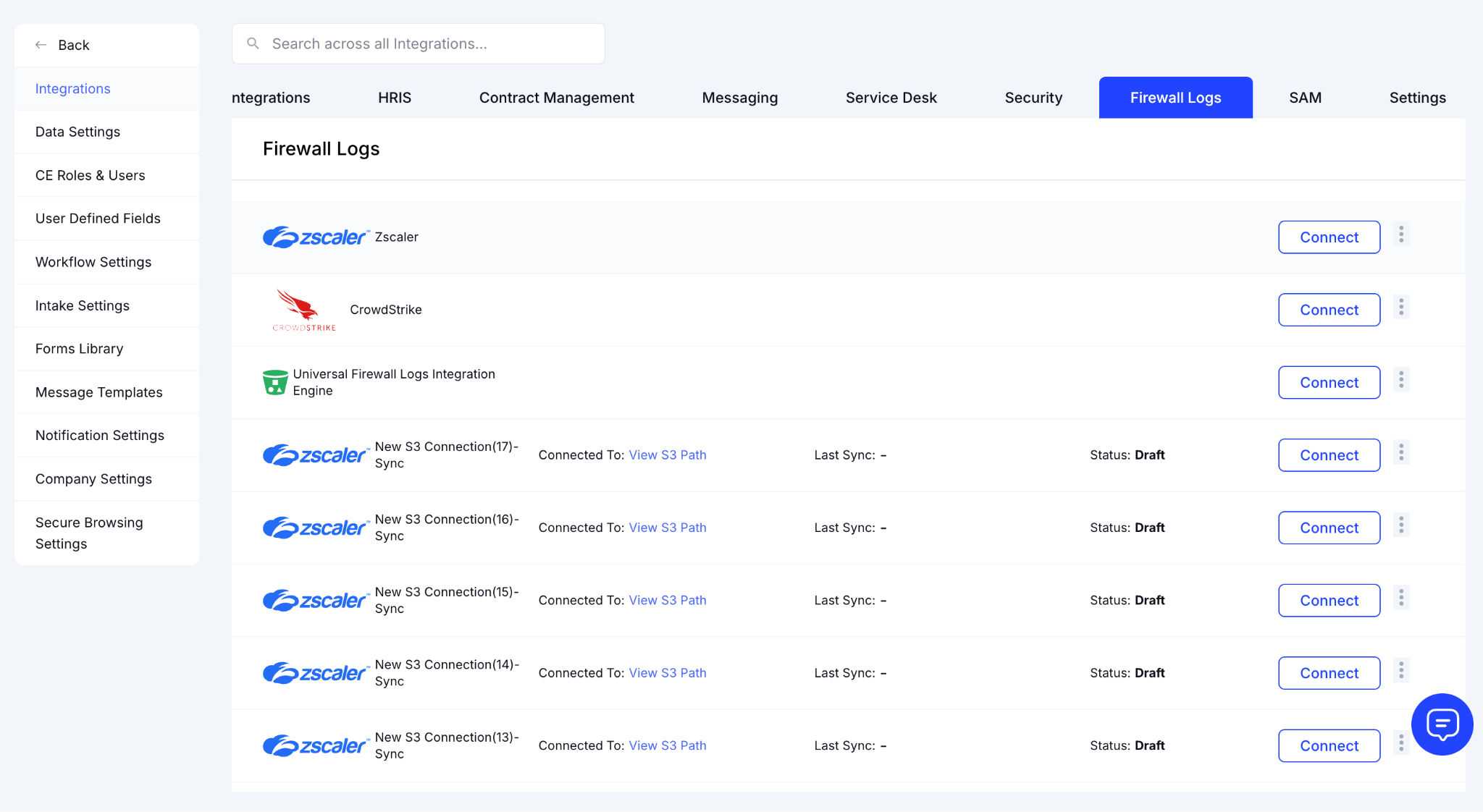
For tools that don't have a direct integration or weren't approved through IT, CloudEagle.ai ingests signals from browser activity, Zscaler, CrowdStrike, and expense reports to surface shadow AI tools that wouldn't appear in any single system on its own.

The result is a single governance view that closes the gap between what your AI providers tell you and what your Finance, IT, and Security teams actually need to know.

3. How to Find Out Which AI Tools Your Team Uses with CloudEagle.ai

Most companies don't have a single place to see every AI tool in use. CloudEagle.ai changes that surfacing AI applications across your entire environment.

Here’s how CloudEagle.ai surfaces all the AI tools used by your teams to review, manage, and rationalize what's actually running before the next renewal cycle. 

A. Open the AI Apps Found on Dashboard

From the CloudEagle.ai dashboard, click on AI Apps Found. This opens a consolidated view of every AI application detected across your environment. 
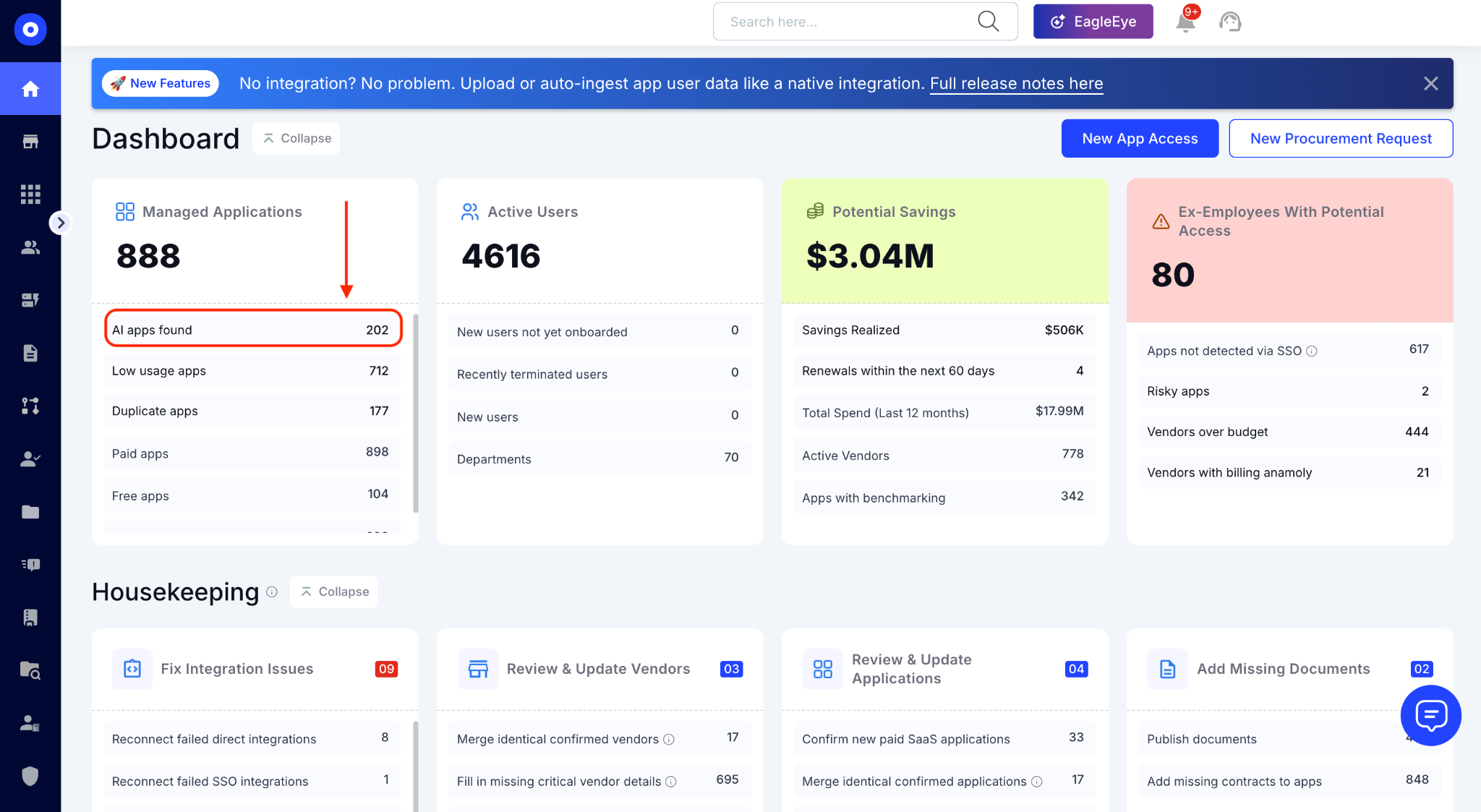
Not just what IT approved, but everything surfaced across your connected discovery sources.

B. Review the Full AI App Inventory

The inventory shows every AI application found. For example, in the below image you can see there are 202 AI applications. Each app comes with Confirmed or Unconfirmed status.
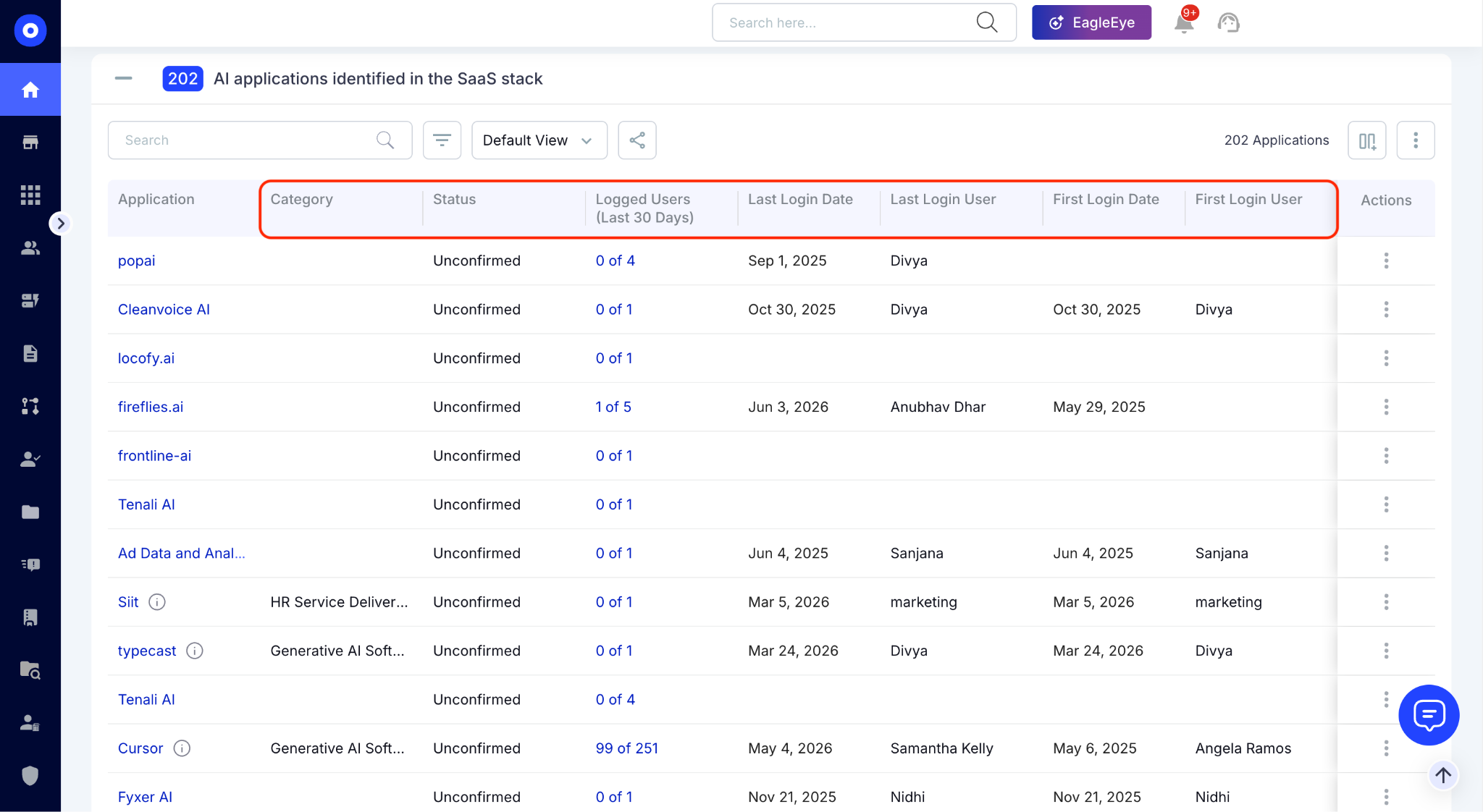
Confirmed means the app is recognized through your SSO integration. Unconfirmed means it was detected through another signal finance, browser, or firewall but hasn't been formally reviewed yet. 

You can also check Category, Logged Users, Last Login Date, Last Login User, First Login Date, etc. This shows whether the tool is actively used or sitting idle. 

C. Know Users for Any Specific App

Click on Logged Users for any application to see exactly who is using it. The format, 1 of 5, for example, tells you one user is active out of five who have access. This is where zombie licenses become visible: five seats paid, one used.
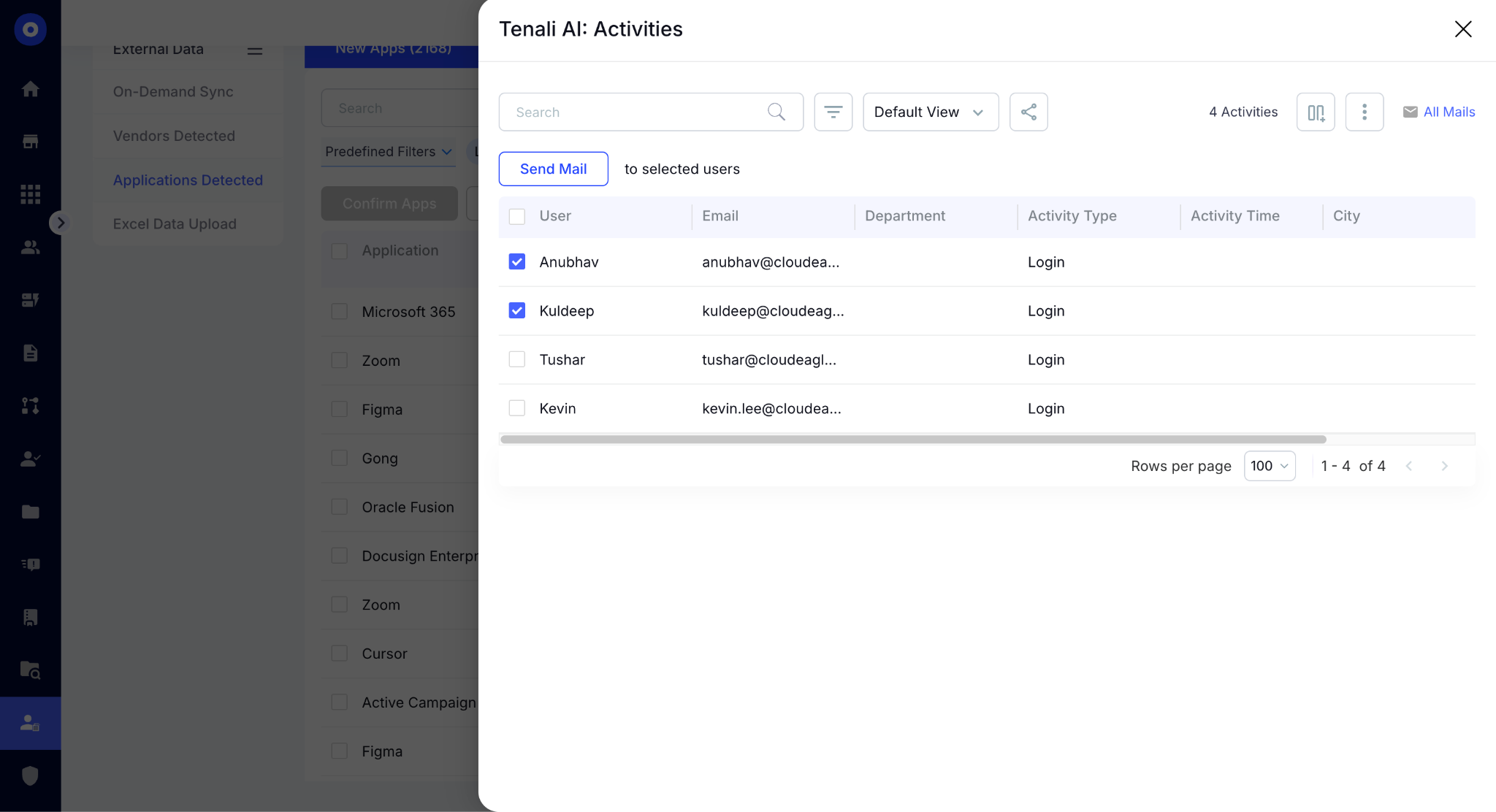
Clicking on the Logged Users will open a page with all user lists. Select the users whose logins you want to review. 

D. Identify Duplicate AI Apps

From the dashboard, click on Duplicate Apps directly under AI Apps Found. This opens a table grouping all duplicate applications by category. Clicking any category expands it to show every duplicate AI app within that group.
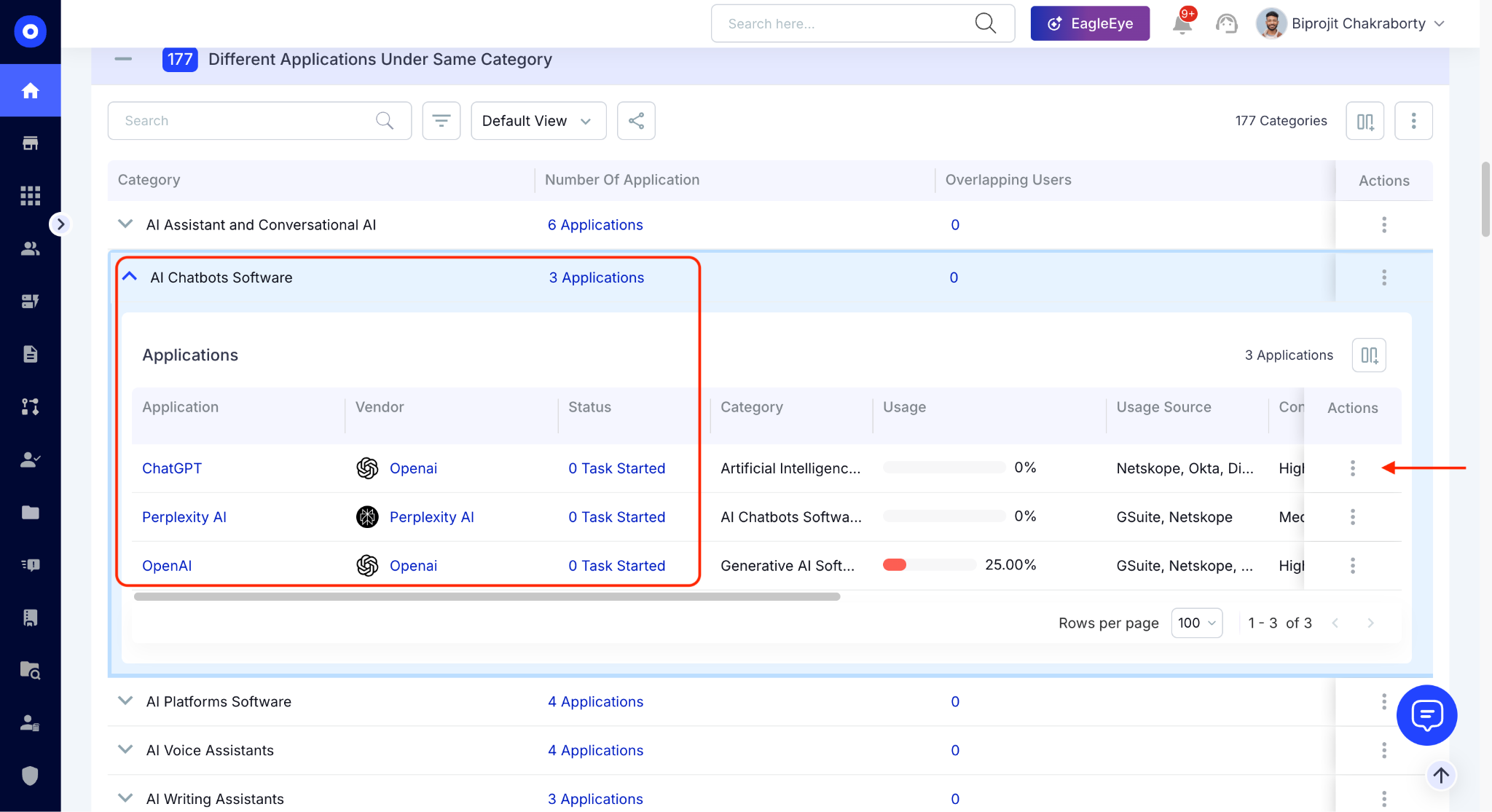
For each app you can review usage, confidence level, number of licensed users, users with access, app spend, and vendor spend. You'll have everything needed to compare overlapping tools side by side.

When you find a duplicate worth acting on, click the Action button to trigger a consolidation or review workflow directly.

E. Review GenAI Risk and Compliance Scores

Not every vendor discloses whether they use GenAI or store customer data. CloudEagle.ai surfaces this automatically. 
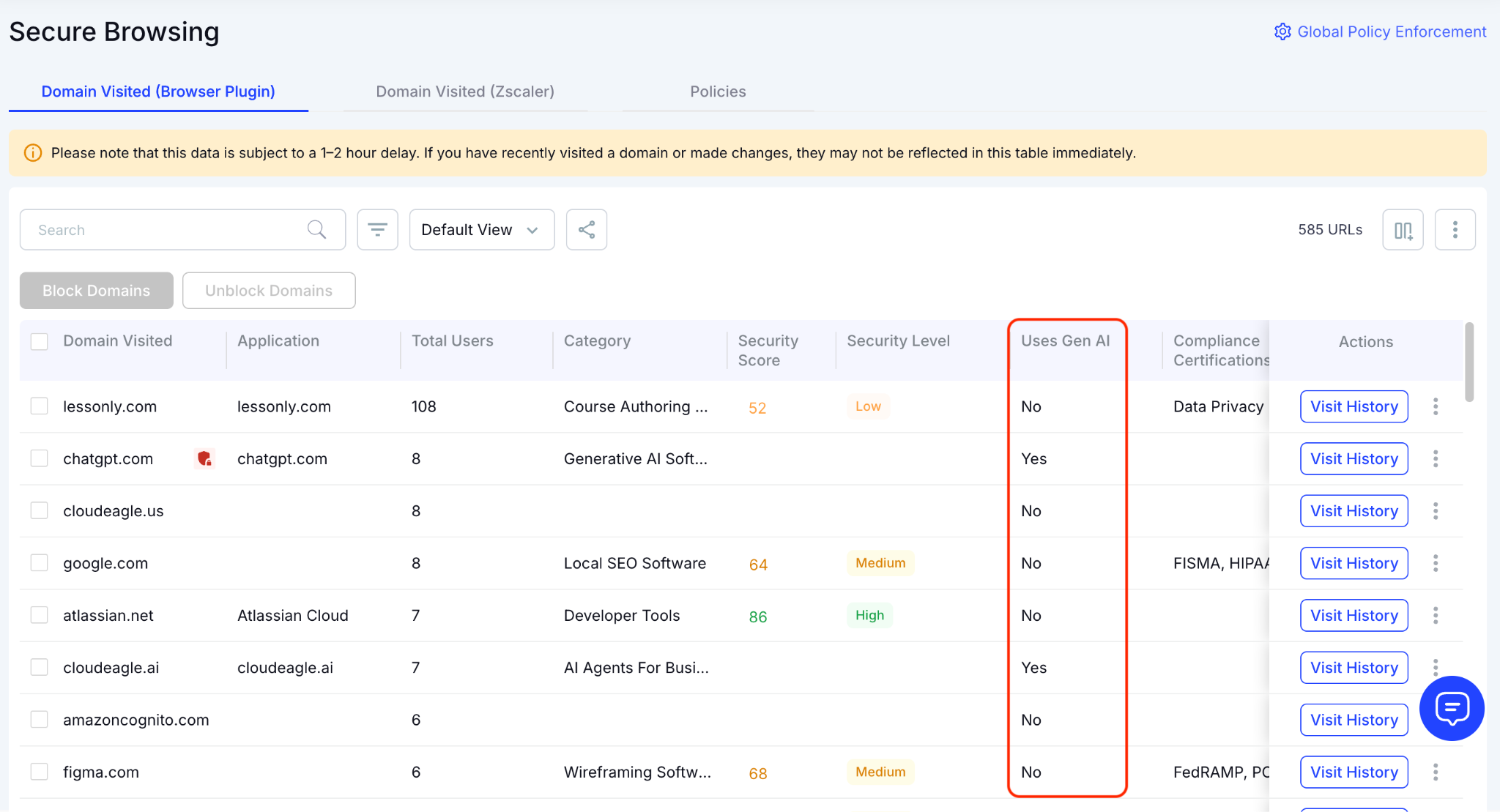
Go to Secure Browsing from the Dashboard and you’ll find the GenAI section in the column. you can see which apps across your stack use GenAI, with security score, security level, compliance certifications, and data center standards.

F. Set Secure Browsing Policies

From the Policies section, click Create New Policy. Add the domain you want to govern by choosing from the list or searching by name. 
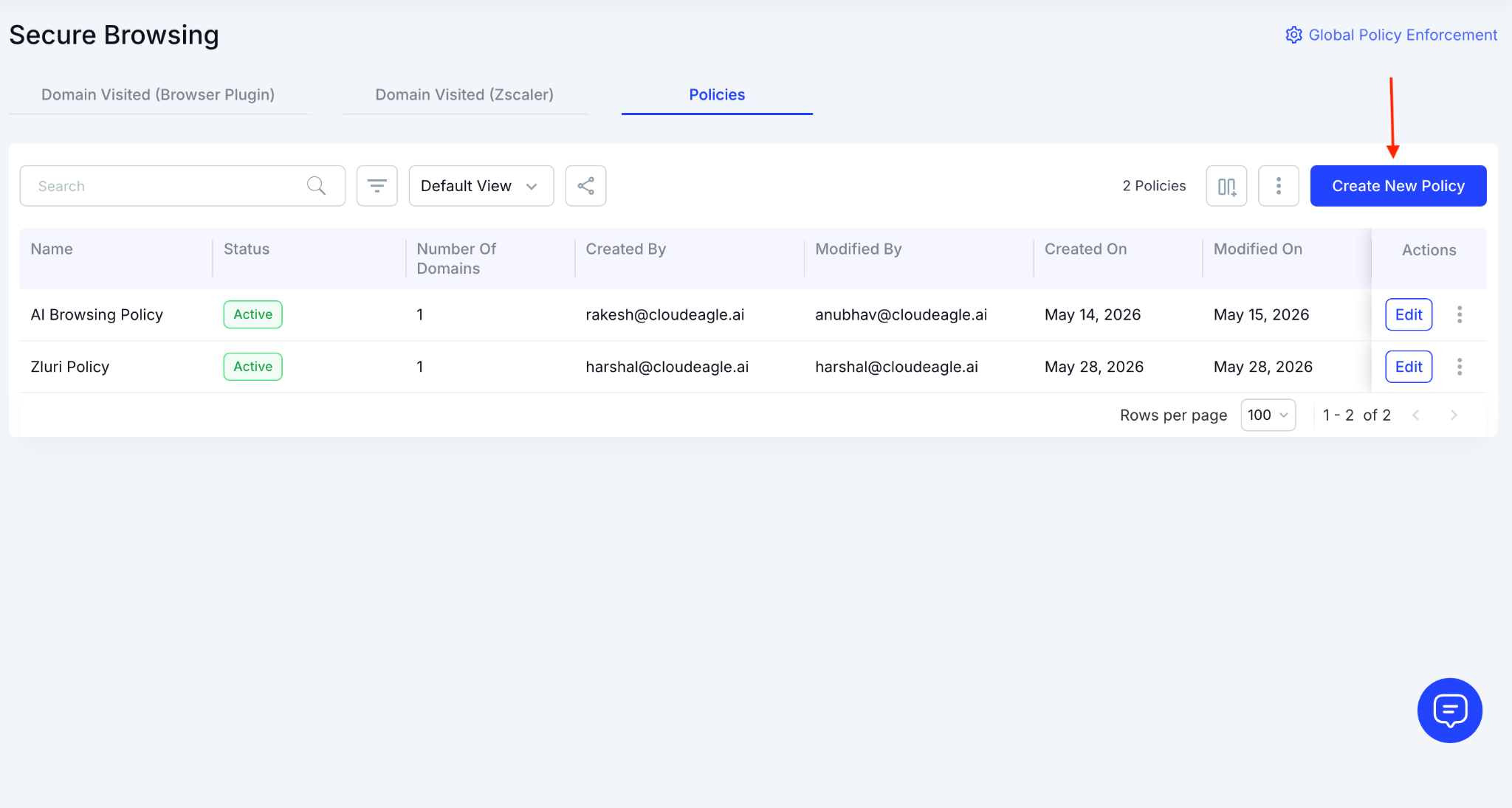
You can enable data loss prevention to block sensitive or confidential data from being transmitted to LLMs and AI chatbots. 
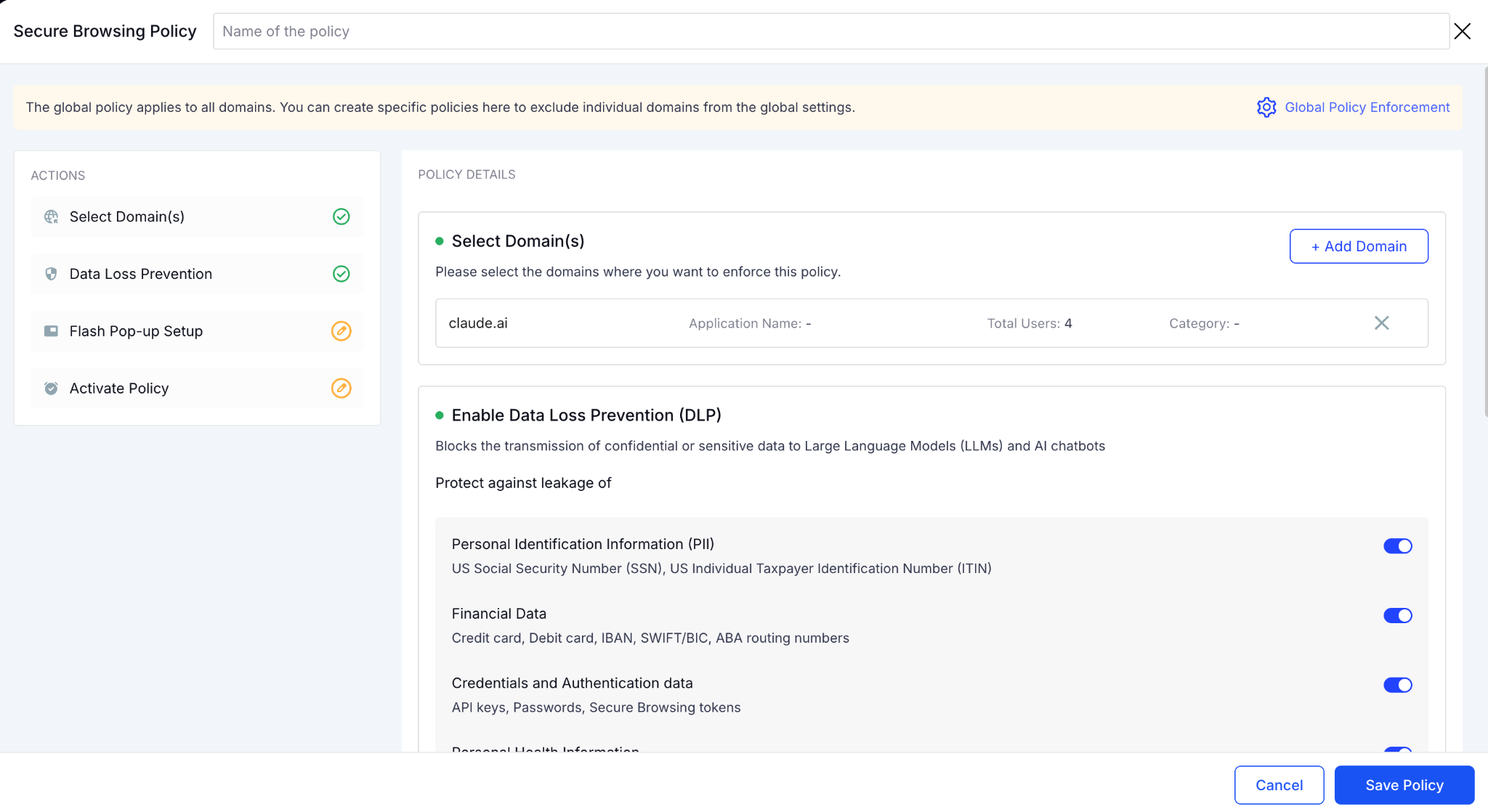
You can also redirect policies to show a flash page when someone tries to access a restricted site or subscribe to a duplicate app, guiding them to an approved alternative instead.
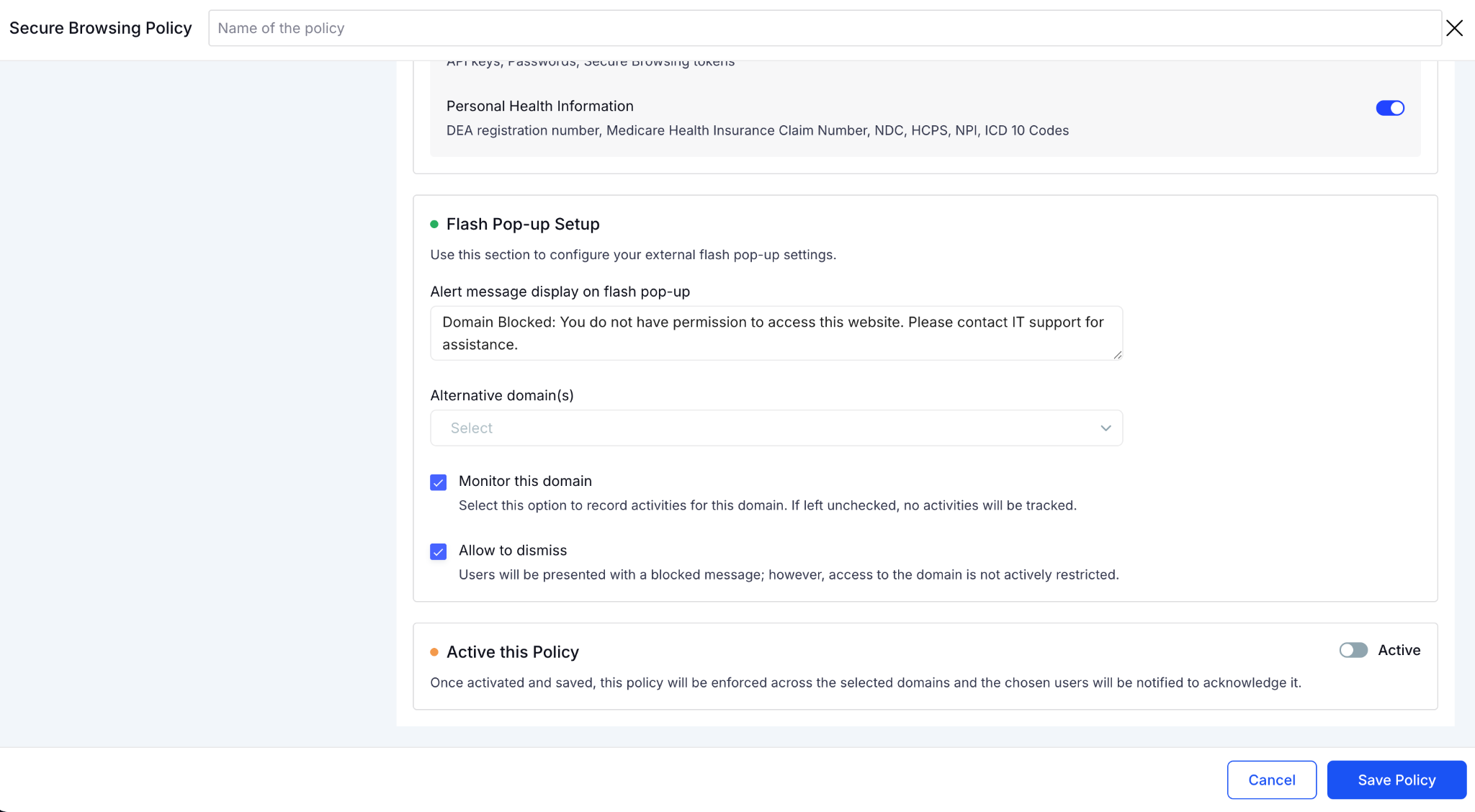
You can customize the display size and guide them to an alternative domain. After that, click on Save Policy and your secure browsing policies will start working. 

4. The Four Places AI Tool Spend Is Hiding

If you're trying to find duplicate AI tools, start with this assumption: the spend isn't hiding in one place.

Aman Yadav from Varahe Analytics tracked 160 subscriptions in a spreadsheet yet missed half its AI footprint, because the purchases didn't go through procurement. 

That's why a company can believe it has three AI tools while actively paying for twelve.

A. Individual Credit Card Autopay

An employee signs up for ChatGPT or Claude using a corporate card. The subscription works, nobody thinks about it again, and the monthly charge keeps renewing.
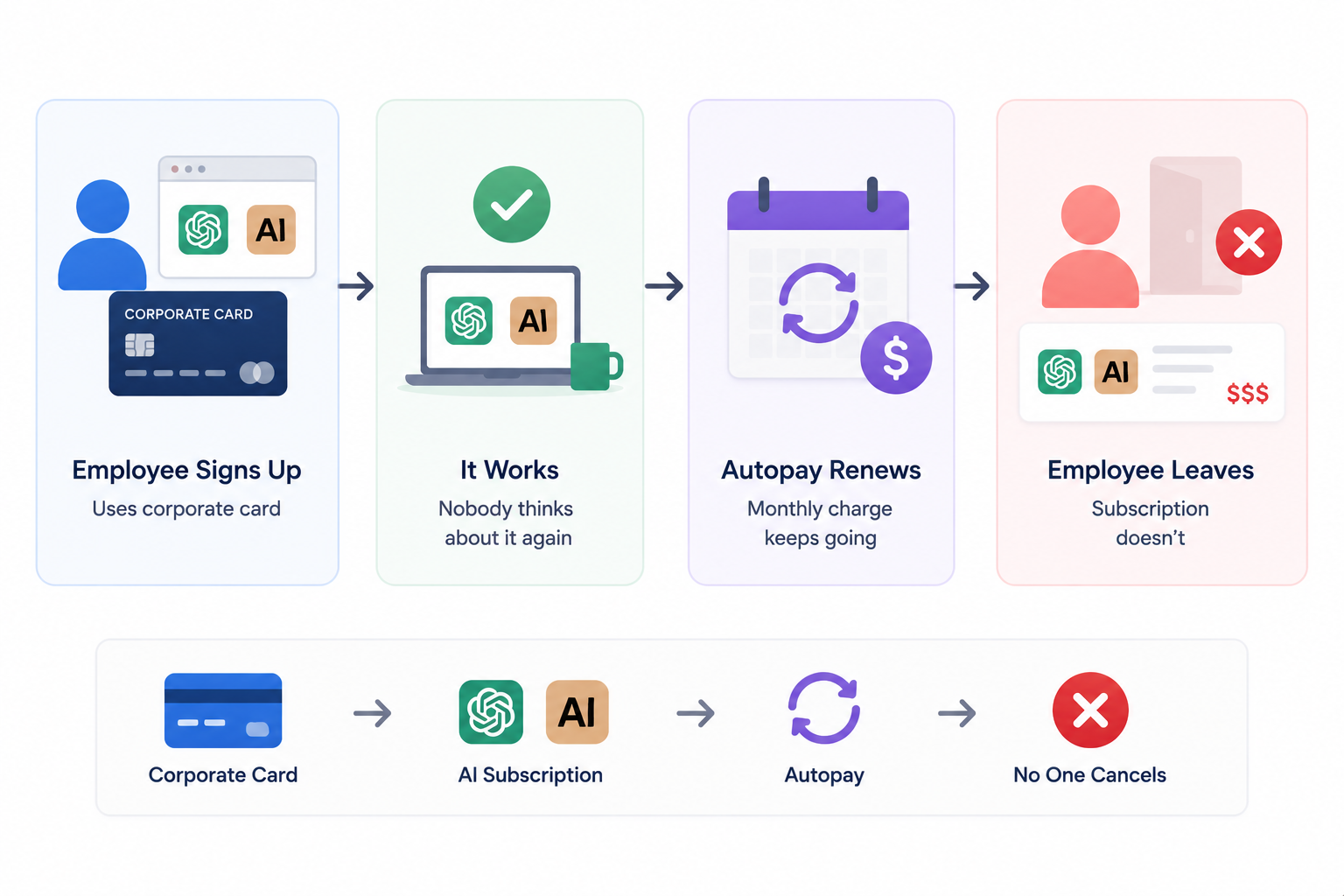
Sometimes the employee changes roles. Sometimes they leave the company. The subscription doesn't.

B. Team-Level Subscriptions Outside Procurement

Marketing buys ChatGPT Teams because they need content support. Engineering adopts Cursor for development workflows. Both purchases make sense locally. 

The problem is that nobody checks whether another team already purchased a similar tool or whether the company has an enterprise contract that covers both use cases already.

C. AI Features Bundled Into Existing SaaS Contracts

Some of the largest AI costs don't appear as standalone AI vendors. They're embedded inside products the company already uses like Salesforce Einstein, Notion AI, HubSpot Breeze, Zapier AI. 

Because these features arrive through existing contracts, they're excluded from AI inventories even though they consume budget and frequently overlap with dedicated AI tools teams are paying for separately.

4. API Key Usage

A developer creates an API key with OpenAI to test a project. Another team builds an internal workflow powered by ChatGPT. The AI usage is real. But the billing sits on the individual department budget that procurement never reviews.

By the time finance sees the charges, multiple teams may already be paying different providers for the same underlying capability.

Once you know where the spend is hiding, the next step is pulling it into one place. And that requires looking across all four layers at the same time.

The Next Shadow Tool Is Already Here

Nobody's reported it yet.
Find It

5. How to Use AI Usage Data to Make Smarter Renewal Decisions

Once you know where AI spend is hiding, the next step is deciding what to do with it before the next renewal cycle arrives. For every AI tool you uncover, four questions determine whether it stays, gets right-sized, or gets cut.

A. Pull Active Users, Not Assigned Seats

Ignore the license count. Look at who actually logged in over the last 30 to 90 days. A 100-seat ChatGPT subscription with 40 active users is a right-sizing opportunity. Start here for every tool before the renewal conversation begins.

B. Flag Tools Serving the Same Function for the Same Team

Group your AI tools by category like general-purpose LLMs, code completion, meeting summaries, image generation.

If two tools sit in the same category and serve the same team, check the usage split. One will almost always dominate. The other is your consolidation candidate.
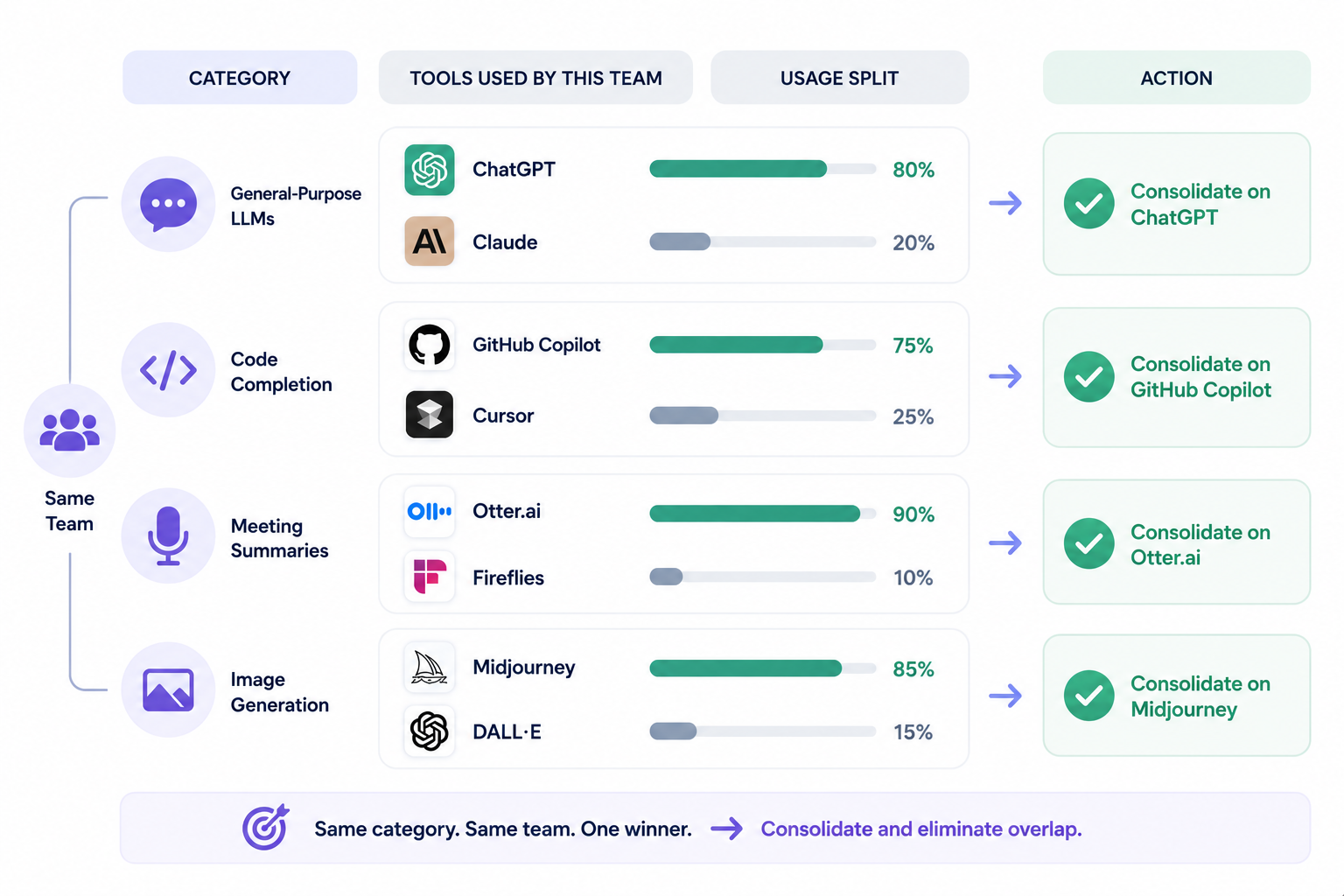
One team we spoke to was running Claude and ChatGPT simultaneously for the same writing workflows. Another had both Cursor and GitHub Copilot active across the same engineering team. The overlap just accumulated.

C. Calculate Cost per Active User for Every Tool

Take the total annual contract value and divide it by active users. This single number tells you more than any other metric going into a renewal.

It's also the number that changes a vendor conversation from "we want to renew" to "we need to right-size first."

D. Separate Intentional Overlap From Accidental Overlap

Not every duplicate is worth eliminating. Some teams run two LLMs because different models perform better on different tasks. This is intentional diversification. 

But two departments independently buying the same tool without knowing the other had it is always a consolidation opportunity.

When seven independent business units each manage their own AI stack with no shared view, the overlap becomes an AI governance challenge that no single team can see without a consolidated picture. 

E. Use Consolidation As Negotiation Leverage

When the data supports consolidating to one vendor or one tier, use it before the renewal, not after. consolidated volume commitment is negotiable. Seven separate departmental subscriptions on autopay are not.

6. Conclusion

Most companies don't have an AI tool problem. They have a visibility problem.

By the time finance notices, one team is paying for Claude, another has ChatGPT, engineering is running Cursor, and someone else is expensing API usage on a separate card. The problem is nobody knows about the rest.

The first step isn't cutting tools. It's finding them. Once you have a complete inventory, usage data makes the next decision obvious like what's load-bearing, what overlaps, and what's been renewing on autopay.

CloudEagle.ai surfaces every AI tool across your stack and gives IT, Finance, and Procurement the usage data to make smarter decisions before the next renewal fires.

7. FAQs

1. Can CloudEagle.ai detect AI features activating silently inside tools we already own?

CloudEagle.ai’s SaaSMap engine surfaces embedded GenAI features like Salesforce Einstein, Notion AI, and HubSpot Breeze as separate entries in the AI inventory, so they don't get buried inside a broader SaaS contract line item.

2. Can CloudEagle.ai track AI tool overlap across business units managing their own stacks independently?

CloudEagle.ai consolidates usage, spend, and overlap data from separate business units into a single view, so duplicate AI purchases across entities become visible without each unit running its own audit.

3. Can CloudEagle.ai alert us before AI spend exceeds a threshold?

Configurable spend thresholds per AI vendor and per team trigger alerts before the invoice arrives, which is particularly useful for consumption-based tools like Claude, ChatGPT Enterprise, and Gemini.

4. What happens when CloudEagle.ai surfaces an AI tool with no assigned owner?

Ownerless applications are flagged and an ownership assignment workflow is triggered automatically. The tool stays visible in the inventory until an owner is confirmed.

5. Does CloudEagle.ai track individual API key usage for tools like Anthropic or OpenAI?

CloudEagle.ai integrates directly with major AI providers and attributes API consumption back to the team or individual generating it, surfacing usage that wouldn't appear in a standard SSO or finance review.

Advertisement for a SaaS Subscription Tracking Template with a call-to-action button to download and a partial graphic of a tablet showing charts.Banner promoting a SaaS Agreement Checklist to streamline SaaS management and avoid budget waste with a call-to-action button labeled Download checklist.Blue banner with text 'The Ultimate Employee Offboarding Checklist!' and a black button labeled 'Download checklist' alongside partial views of checklist documents from cloudeagle.ai.Digital ad for download checklist titled 'The Ultimate Checklist for IT Leaders to Optimize SaaS Operations' by cloudeagle.ai, showing checklist pages.Slack Buyer's Guide offer with text 'Unlock insider insights to get the best deal on Slack!' and a button labeled 'Get Your Copy', accompanied by a preview of the guide featuring Slack's logo.Monday Pricing Guide by cloudeagle.ai offering exclusive pricing secrets to maximize investment with a call-to-action button labeled Get Your Copy and an image of the guide's cover.Blue banner for Canva Pricing Guide by cloudeagle.ai offering a guide to Canva costs, features, and alternatives with a call-to-action button saying Get Your Copy.Blue banner with white text reading 'Little-Known Negotiation Hacks to Get the Best Deal on Slack' and a white button labeled 'Get Your Copy'.Blue banner with text 'Little-Known Negotiation Hacks to Get the Best Deal on Monday.com' and a white button labeled 'Get Your Copy'.Blue banner with text 'Little-Known Negotiation Hacks to Get the Best Deal on Canva' and a white button labeled 'Get Your Copy'.Banner with text 'Slack Buyer's Guide' and a 'Download Now' button next to images of a guide titled 'Slack Buyer’s Guide: Features, Pricing & Best Practices'.Digital cover of Monday Pricing Guide with a button labeled Get Your Copy on a blue background.Canva Pricing Guide cover with a button labeled Get Your Copy on a blue gradient background.

Enter your email to
unlock the report

Oops! Something went wrong while submitting the form.
License Count
Benchmark
Per User/Per Year

Enter your email to
unlock the report

Oops! Something went wrong while submitting the form.
License Count
Benchmark
Per User/Per Year

Enter your email to
unlock the report

Oops! Something went wrong while submitting the form.
Notion Plus
License Count
Benchmark
Per User/Per Year
100-500
$67.20 - $78.72
500-1000
$59.52 - $72.00
1000+
$51.84 - $57.60
Canva Pro
License Count
Benchmark
Per User/Per Year
100-500
$74.33-$88.71
500-1000
$64.74-$80.32
1000+
$55.14-$62.34

Enter your email to
unlock the report

Oops! Something went wrong while submitting the form.

Enter your email to
unlock the report

Oops! Something went wrong while submitting the form.
Zoom Business
License Count
Benchmark
Per User/Per Year
100-500
$216.00 - $264.00
500-1000
$180.00 - $216.00
1000+
$156.00 - $180.00

Enter your email to
unlock the report

Oops! Something went wrong while submitting the form.

Get the Right Security Platform To Secure Your Cloud Infrastructure

Please enter a business email
Thank you!
The 2023 SaaS report has been sent to your email. Check your promotional or spam folder.
Oops! Something went wrong while submitting the form.

Access full report

Please enter a business email
Thank you!
The 2023 SaaS report has been sent to your email. Check your promotional or spam folder.
Oops! Something went wrong while submitting the form.

Ask most IT leaders how many AI tools their company uses and you'll usually get a confident answer. Three. Maybe five. Then someone pulls the corporate card statements.

Now you find ChatGPT, Claude, Gemini, Cursor, GitHub Copilot, and several more tools nobody mentioned because nobody remembered they were still running.

One Finance Manager we spoke to said: "If one team is using Claude and another team is also paying for another package, it’s subscribing to the same thing but twice. We want to manage all these things."

He thought he had a handful of AI tools. Mid-conversation, he named eight. There were more he couldn't recall. The surprise isn't that people are using AI. The surprise is how often teams are paying twice for duplicate apps.

Nobody planned the overlap. It accumulated through one auto-renewal at a time. 

The good news is that finding these tools is usually easier than people expect. Every AI application leaves a trail in SSO, browser activity, finance systems, and expense reports. 

CloudEagle.ai brings these signals together so IT and Finance teams can see exactly which AI tools are running, where capabilities overlap, and which subscriptions can be consolidated before the next renewal cycle.

In this article, we'll show you how to build a complete picture of every AI tool running across your organization and identify where you're paying twice for the same capability. 

TL;DR

  • Most organizations underestimate how many AI tools they use because purchases happen outside procurement and IT oversight.
  • Duplicate AI spending often comes from overlapping tools, bundled AI features, team purchases, and unmanaged API usage.
  • CloudEagle.ai combines SSO, finance, browser, and security signals to create a complete AI inventory.
  • Teams can identify duplicate AI apps, track active users, assess risk, and uncover consolidation opportunities.
  • CloudEagle.ai helps IT, Finance, and Procurement optimize AI spend before unnecessary renewals and duplicate purchases occur

1. What IT Approved and What Your Team Is Actually Using Are Two Different Lists

The AI tools IT approved are usually the ones that went through procurement. The tools employees actually use include team purchases, corporate card subscriptions, and AI features bundled inside products.

This gap is bigger than most companies realize.

A finance leader we spoke to recently started by mentioning Claude and OpenAI. A few minutes later, he casually added Cursor, GitHub Copilot, Gemini, Luma AI, Freepik, and several others.

The interesting part wasn't the number of tools. It was that nobody had a complete list.

  • Enterprise Contracts Only Show Part of the Picture: Procurement captures approved purchases but not the subscriptions employees set up independently on corporate cards.
  • Trials Quietly Become Paid Accounts: A two-week experiment becomes a recurring charge six months later with no active owner and no one watching the invoice.
  • Teams Buy Independently Without Checking What's Already Live: Engineering, marketing, and design often buy the same tools because nobody told them the other team already had one.
  • AI is Embedded Inside Platforms You Already Own: Notion AI, Canva AI, Zapier AI, and Salesforce Einstein are active, but rarely counted as AI spend, rarely governed as AI tools.

The list IT thinks exists is based on approvals. The list that actually exists is based on how people work. And those are rarely the same thing.

The Riskiest AI Tool Is Invisible

That's why nobody questions it.
Expose It

2. How CloudEagle.ai Finds Which AI Tools Your Enterprise Uses in First Place?

AI providers only show usage and billing but not who is using the tools, which teams are spending the most, or whether the tools were approved. 

Employees often start using AI tools without IT knowing, through browser sign-ups, API keys, and expense reports that never went through procurement. CloudEagle.ai compensates for this through two layers: direct integrations and external telemetry.

Direct Integrations:

CloudEagle.ai connects to your SSO, HRIS, finance systems, and SaaS vendors directly to pull usage, license, and spend data from every source that tracks AI tool activity.

External Telemetry: 

For tools that don't have a direct integration or weren't approved through IT, CloudEagle.ai ingests signals from browser activity, Zscaler, CrowdStrike, and expense reports to surface shadow AI tools that wouldn't appear in any single system on its own.

The result is a single governance view that closes the gap between what your AI providers tell you and what your Finance, IT, and Security teams actually need to know.

3. How to Find Out Which AI Tools Your Team Uses with CloudEagle.ai

Most companies don't have a single place to see every AI tool in use. CloudEagle.ai changes that surfacing AI applications across your entire environment.

Here’s how CloudEagle.ai surfaces all the AI tools used by your teams to review, manage, and rationalize what's actually running before the next renewal cycle. 

A. Open the AI Apps Found on Dashboard

From the CloudEagle.ai dashboard, click on AI Apps Found. This opens a consolidated view of every AI application detected across your environment. 

Not just what IT approved, but everything surfaced across your connected discovery sources.

B. Review the Full AI App Inventory

The inventory shows every AI application found. For example, in the below image you can see there are 202 AI applications. Each app comes with Confirmed or Unconfirmed status.

Confirmed means the app is recognized through your SSO integration. Unconfirmed means it was detected through another signal finance, browser, or firewall but hasn't been formally reviewed yet. 

You can also check Category, Logged Users, Last Login Date, Last Login User, First Login Date, etc. This shows whether the tool is actively used or sitting idle. 

C. Know Users for Any Specific App

Click on Logged Users for any application to see exactly who is using it. The format, 1 of 5, for example, tells you one user is active out of five who have access. This is where zombie licenses become visible: five seats paid, one used.

Clicking on the Logged Users will open a page with all user lists. Select the users whose logins you want to review. 

D. Identify Duplicate AI Apps

From the dashboard, click on Duplicate Apps directly under AI Apps Found. This opens a table grouping all duplicate applications by category. Clicking any category expands it to show every duplicate AI app within that group.

For each app you can review usage, confidence level, number of licensed users, users with access, app spend, and vendor spend. You'll have everything needed to compare overlapping tools side by side.

When you find a duplicate worth acting on, click the Action button to trigger a consolidation or review workflow directly.

E. Review GenAI Risk and Compliance Scores

Not every vendor discloses whether they use GenAI or store customer data. CloudEagle.ai surfaces this automatically. 

Go to Secure Browsing from the Dashboard and you’ll find the GenAI section in the column. you can see which apps across your stack use GenAI, with security score, security level, compliance certifications, and data center standards.

F. Set Secure Browsing Policies

From the Policies section, click Create New Policy. Add the domain you want to govern by choosing from the list or searching by name. 

You can enable data loss prevention to block sensitive or confidential data from being transmitted to LLMs and AI chatbots. 

You can also redirect policies to show a flash page when someone tries to access a restricted site or subscribe to a duplicate app, guiding them to an approved alternative instead.

You can customize the display size and guide them to an alternative domain. After that, click on Save Policy and your secure browsing policies will start working. 

4. The Four Places AI Tool Spend Is Hiding

If you're trying to find duplicate AI tools, start with this assumption: the spend isn't hiding in one place.

Aman Yadav from Varahe Analytics tracked 160 subscriptions in a spreadsheet yet missed half its AI footprint, because the purchases didn't go through procurement. 

That's why a company can believe it has three AI tools while actively paying for twelve.

A. Individual Credit Card Autopay

An employee signs up for ChatGPT or Claude using a corporate card. The subscription works, nobody thinks about it again, and the monthly charge keeps renewing.

Sometimes the employee changes roles. Sometimes they leave the company. The subscription doesn't.

B. Team-Level Subscriptions Outside Procurement

Marketing buys ChatGPT Teams because they need content support. Engineering adopts Cursor for development workflows. Both purchases make sense locally. 

The problem is that nobody checks whether another team already purchased a similar tool or whether the company has an enterprise contract that covers both use cases already.

C. AI Features Bundled Into Existing SaaS Contracts

Some of the largest AI costs don't appear as standalone AI vendors. They're embedded inside products the company already uses like Salesforce Einstein, Notion AI, HubSpot Breeze, Zapier AI. 

Because these features arrive through existing contracts, they're excluded from AI inventories even though they consume budget and frequently overlap with dedicated AI tools teams are paying for separately.

4. API Key Usage

A developer creates an API key with OpenAI to test a project. Another team builds an internal workflow powered by ChatGPT. The AI usage is real. But the billing sits on the individual department budget that procurement never reviews.

By the time finance sees the charges, multiple teams may already be paying different providers for the same underlying capability.

Once you know where the spend is hiding, the next step is pulling it into one place. And that requires looking across all four layers at the same time.

The Next Shadow Tool Is Already Here

Nobody's reported it yet.
Find It

5. How to Use AI Usage Data to Make Smarter Renewal Decisions

Once you know where AI spend is hiding, the next step is deciding what to do with it before the next renewal cycle arrives. For every AI tool you uncover, four questions determine whether it stays, gets right-sized, or gets cut.

A. Pull Active Users, Not Assigned Seats

Ignore the license count. Look at who actually logged in over the last 30 to 90 days. A 100-seat ChatGPT subscription with 40 active users is a right-sizing opportunity. Start here for every tool before the renewal conversation begins.

B. Flag Tools Serving the Same Function for the Same Team

Group your AI tools by category like general-purpose LLMs, code completion, meeting summaries, image generation.

If two tools sit in the same category and serve the same team, check the usage split. One will almost always dominate. The other is your consolidation candidate.

One team we spoke to was running Claude and ChatGPT simultaneously for the same writing workflows. Another had both Cursor and GitHub Copilot active across the same engineering team. The overlap just accumulated.

C. Calculate Cost per Active User for Every Tool

Take the total annual contract value and divide it by active users. This single number tells you more than any other metric going into a renewal.

It's also the number that changes a vendor conversation from "we want to renew" to "we need to right-size first."

D. Separate Intentional Overlap From Accidental Overlap

Not every duplicate is worth eliminating. Some teams run two LLMs because different models perform better on different tasks. This is intentional diversification. 

But two departments independently buying the same tool without knowing the other had it is always a consolidation opportunity.

When seven independent business units each manage their own AI stack with no shared view, the overlap becomes an AI governance challenge that no single team can see without a consolidated picture. 

E. Use Consolidation As Negotiation Leverage

When the data supports consolidating to one vendor or one tier, use it before the renewal, not after. consolidated volume commitment is negotiable. Seven separate departmental subscriptions on autopay are not.

6. Conclusion

Most companies don't have an AI tool problem. They have a visibility problem.

By the time finance notices, one team is paying for Claude, another has ChatGPT, engineering is running Cursor, and someone else is expensing API usage on a separate card. The problem is nobody knows about the rest.

The first step isn't cutting tools. It's finding them. Once you have a complete inventory, usage data makes the next decision obvious like what's load-bearing, what overlaps, and what's been renewing on autopay.

CloudEagle.ai surfaces every AI tool across your stack and gives IT, Finance, and Procurement the usage data to make smarter decisions before the next renewal fires.

7. FAQs

1. Can CloudEagle.ai detect AI features activating silently inside tools we already own?

CloudEagle.ai’s SaaSMap engine surfaces embedded GenAI features like Salesforce Einstein, Notion AI, and HubSpot Breeze as separate entries in the AI inventory, so they don't get buried inside a broader SaaS contract line item.

2. Can CloudEagle.ai track AI tool overlap across business units managing their own stacks independently?

CloudEagle.ai consolidates usage, spend, and overlap data from separate business units into a single view, so duplicate AI purchases across entities become visible without each unit running its own audit.

3. Can CloudEagle.ai alert us before AI spend exceeds a threshold?

Configurable spend thresholds per AI vendor and per team trigger alerts before the invoice arrives, which is particularly useful for consumption-based tools like Claude, ChatGPT Enterprise, and Gemini.

4. What happens when CloudEagle.ai surfaces an AI tool with no assigned owner?

Ownerless applications are flagged and an ownership assignment workflow is triggered automatically. The tool stays visible in the inventory until an owner is confirmed.

5. Does CloudEagle.ai track individual API key usage for tools like Anthropic or OpenAI?

CloudEagle.ai integrates directly with major AI providers and attributes API consumption back to the team or individual generating it, surfacing usage that wouldn't appear in a standard SSO or finance review.

CloudEagle.ai recognized in the 2025 Gartner® Magic Quadrant™ for SaaS Management Platforms
Download now
gartner chart
5x
Faster employee
onboarding
80%
Reduction in time for
user access reviews
30k
Workflows
automated
$15Bn
Analyzed in
contract spend
$2Bn
Saved in
SaaS spend

Streamline SaaS governance and save 10-30%

Book a Demo with Expert
CTA image




