You need to enable JavaScript in order to use the AI chatbot tool powered by ChatBot

Your Employees Are Using Personal AI Accounts to Bypass Your Enterprise Token Limits

Share via:
blog-cms-banner-bg
Little-Known Negotiation Hacks to Get the Best Deal on Slack
cta-bg-blogDownload Your Copy

HIPAA Compliance Checklist for 2025

Download PDF

Your company buys an enterprise plan for Claude or ChatGPT and sets a token budget. Then some of your heaviest users hit the limit. So they open personal AI accounts. 

Now they're pasting code and internal documents into sessions that aren't covered by your DLP controls and won't show up in any access review you run this quarter. The tricky part is that you might now know it's happening.

Your Anthropic portal shows aggregate enterprise consumption. It doesn't show the engineer who signed up for Claude Pro with a work email last month. This isn't a behavior problem. It's a visibility gap.

CloudEagle.ai closes that gap by correlating signals across SSO, browser activity, CASB logs, and finance systems simultaneously. It surfaces personal AI accounts, orphaned non-human identities, and shadow AI sessions. 

In this article, we'll show you why enterprise token limits create this bypass incentive, what your current tools can't see, and what governance actually looks like when the full picture is visible.

TL;DR

  • Employees often bypass enterprise AI token limits by creating personal AI accounts to maintain productivity.
  • Personal AI accounts create major visibility gaps because they operate outside enterprise governance and DLP controls.
  • CloudEagle.ai detects personal AI usage by correlating browser, network, endpoint, and finance signals.
  • Cross-source visibility helps uncover shadow AI sessions, personal subscriptions, and ungoverned AI activity.
  • CloudEagle.ai strengthens AI governance by enforcing policies, protecting sensitive data, and redirecting users to approved AI platforms

1. Why Employees Bypass Enterprise AI Limits in the First Place

Most employees don't create personal AI accounts to bypass policy. They do it because it's the fastest way to keep working.

When an enterprise AI pricing hits a token limit, rate limit, or usage cap, the user has two options: wait for IT to fix it or spend $20 on a personal subscription. In most cases, the second option wins.

  • Personal accounts remove usage restrictions: The employee keeps working without waiting for approvals or quota increases and IT never sees a ticket because there was never a problem to report.
  • The tool is already familiar: They're not switching vendors. They're switching accounts, which means no learning curve, no friction, and no reason to think twice about it.
  • Consumer plans are easy to purchase: A personal ChatGPT Plus or Claude Pro subscription takes minutes to set up, often with a work email, outside any procurement.
  • Productivity feels more important than process: Employees are focused on completing work. Governance requirements aren't visible at the moment of decision but the token limit is.

This is why it’s different from shadow IT.  Traditional shadow IT means an employee adopting an unauthorized tool. This is shadow usage on an authorized tool. The work product is the same. The governance is zero.

You approved the AI vendor. You didn't approve the 14 personal accounts running alongside it.

Shadow AI Doesn't Raise Tickets

It just shows up.
Expose It

2. How CloudEagle.ai Surfaces Personal AI Accounts Across Every Detection Layer

An employee logging into a personal Claude.ai or ChatGPT account doesn't generate an SSO event, doesn't appear in your Anthropic portal, and doesn't file an IT ticket. You cannot allocate costs you cannot attribute. You cannot govern tools you cannot see.

CloudEagle closes that gap by correlating four detection layers simultaneously, each mapped against SaaSMap, CloudEagle's proprietary AI application inventory built specifically for enterprise discovery.

Here's how CloudEagle.ai surfaces personal AI accounts in your stack:

A. Browser Plugin: Catching Personal Accounts on Managed Browsers

When an employee opens a managed browser and logs into a personal Claude.ai or ChatGPT account, CloudEagle's browser plugin catches it immediately. The plugin deploys across managed devices via MDM, centrally, without requiring individual employee action.

In CloudEagle's Secure Browser module, you can see every AI tool accessed via browser in real time, including personal accounts flagged against SaaSMap:
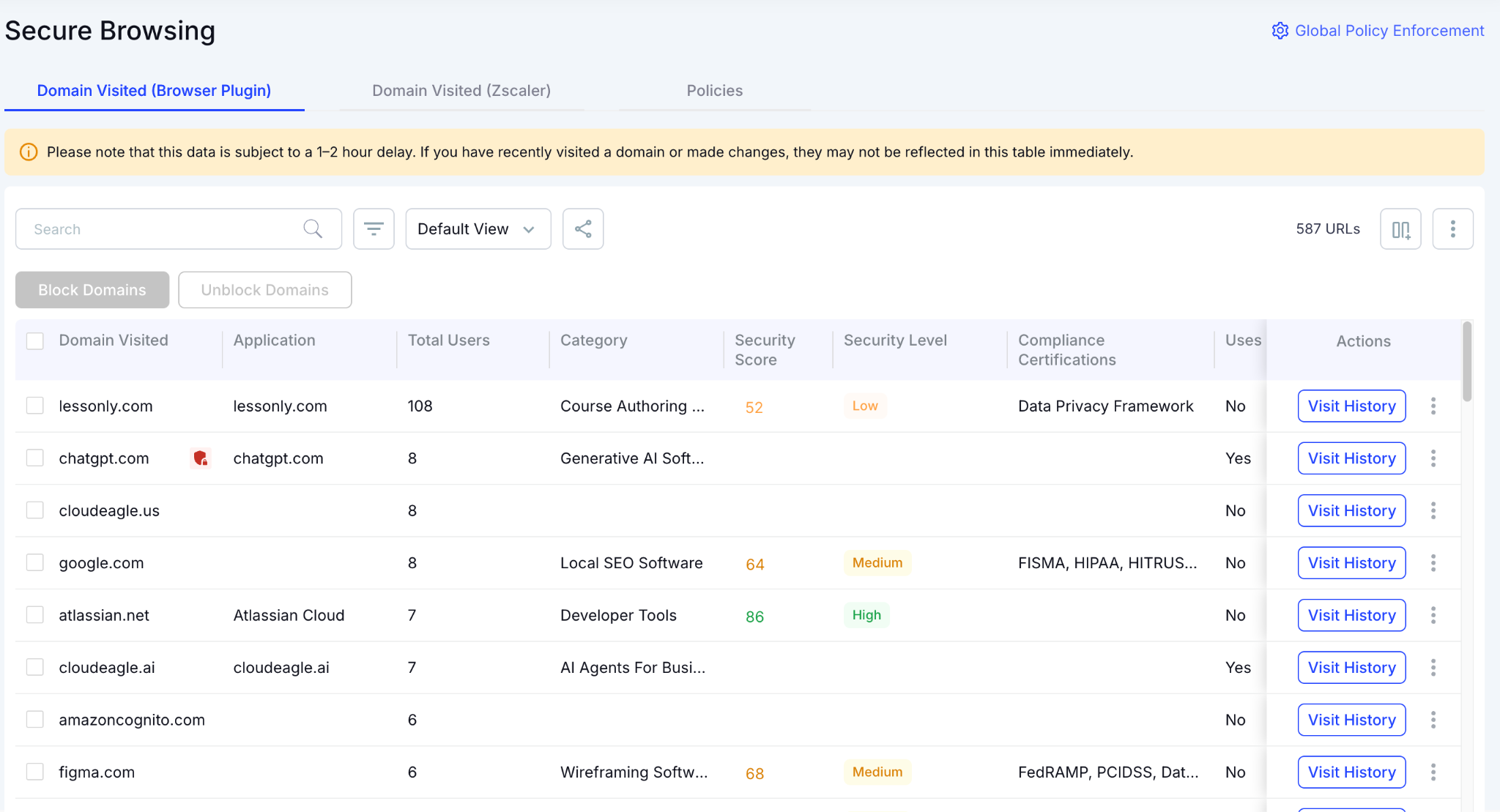
Personal accounts on sanctioned AI domains appear as Unconfirmed, meaning they were detected through browser telemetry but haven't been formally reviewed. Same claude.ai URL, different account tier, visible at the session level.
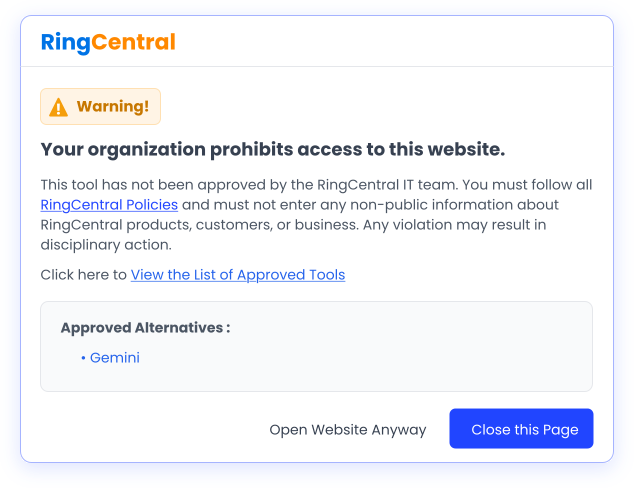
When a personal account is detected, CloudEagle doesn't just log it. A flash page steps in before any company data is entered, redirecting the employee to the approved enterprise alternative automatically.

B. Zscaler Integration: Catching Personal Accounts On Network Level

Not every employee uses a managed browser. Some switch to a personal browser or use incognito mode to avoid corporate monitoring. Even if the employee changed browsers, the traffic still routes through the corporate network. 

CloudEagle's Zscaler integration ingests that outbound network traffic and maps every AI destination against SaaSMap.

In CloudEagle's Zscaler integration view, you can see every AI endpoint detected across outbound network traffic, including tools that never touched your managed browser. Here’s how Zscaler integration looks:
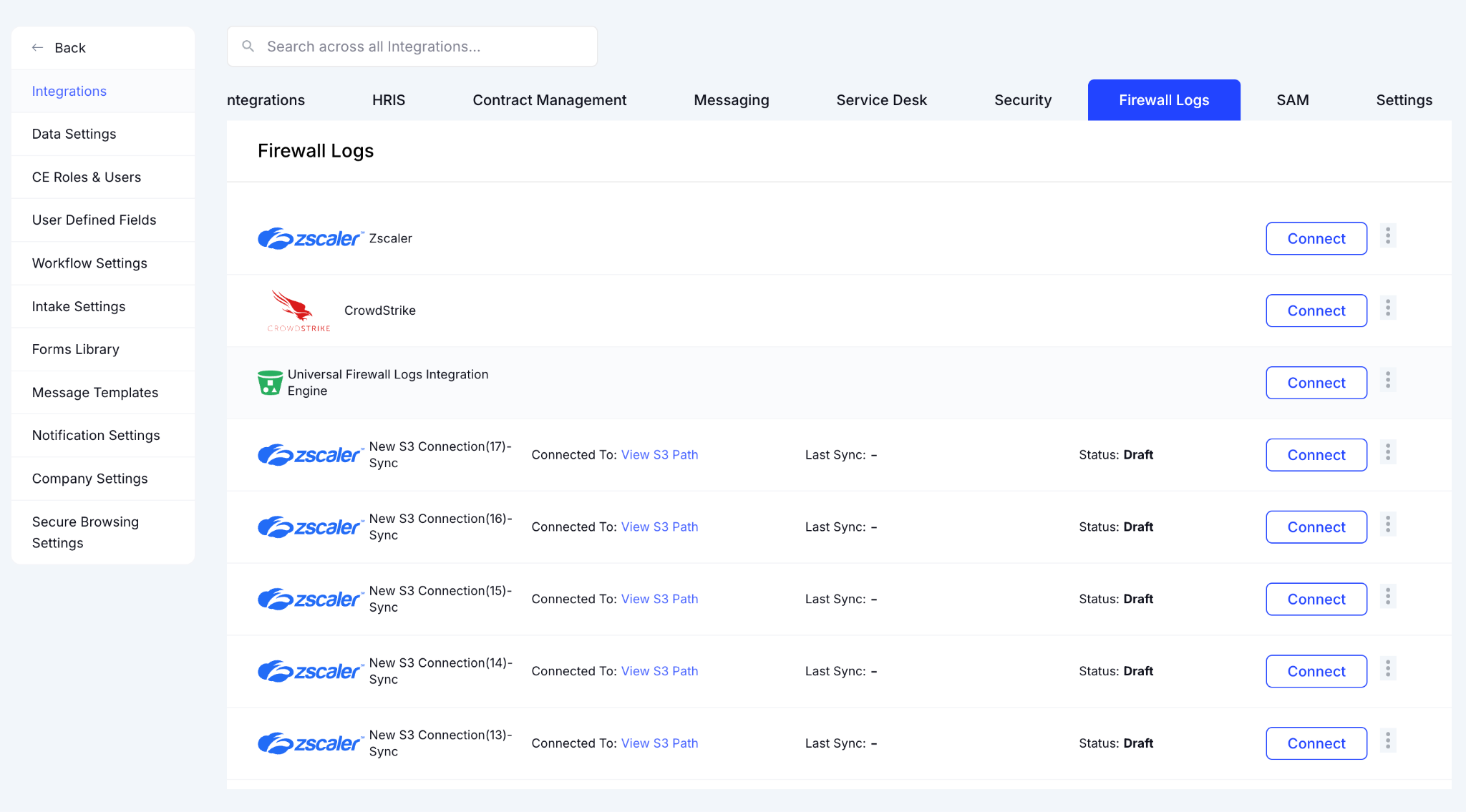
When a new AI endpoint appears in traffic for the first time, a model endpoint your team has never used before, CloudEagle.ai fires a proactive alert. Your security team knows before the tool is embedded in a workflow. 
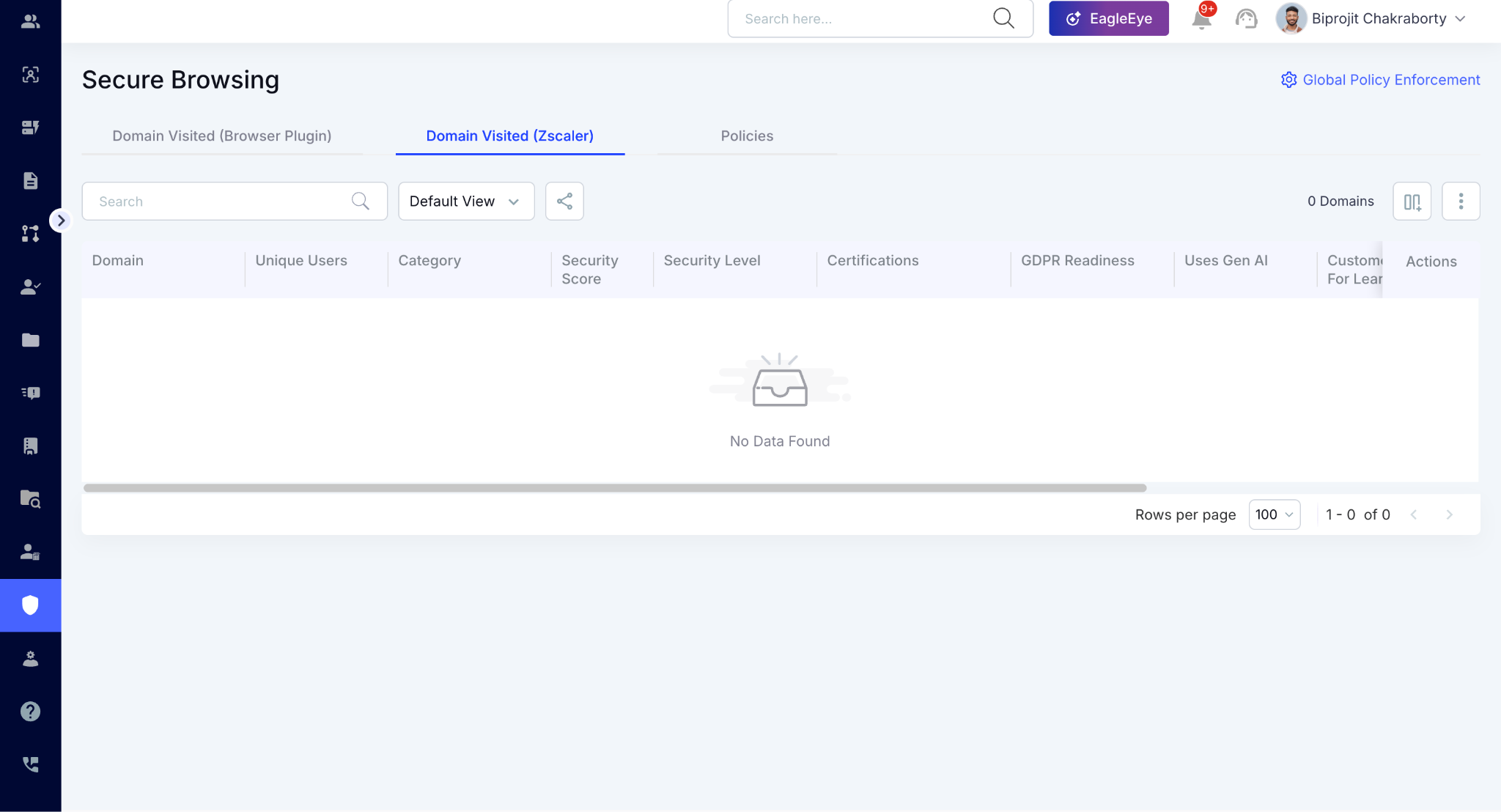
This layer also catches API key access: a developer running a script that hits the OpenAI API a thousand times a day will never appear in your identity logs. They will appear in your network logs.

C. CrowdStrike Integration: Catching Local AI Installs

Developer tools like Claude Code and locally installed AI clients run directly on the laptop, no browser tab, no external endpoint, nothing for Zscaler to see regardless of which browser the employee uses.

CloudEagle's CrowdStrike integration lets you see AI applications detected at the endpoint level, including locally installed tools and encrypted traffic that bypasses every other telemetry layer.

D. Finance Integration: Catching Corporate Card Purchases

Some AI tools bypass every telemetry layer entirely because employees purchased them on a corporate card before any approval. These AI tools still show up in expense reports.

CloudEagle.ai integrates with finance systems so you can see every AI related charge from corporate card transactions mapped back to the employee and tool involved through SaaSMap:
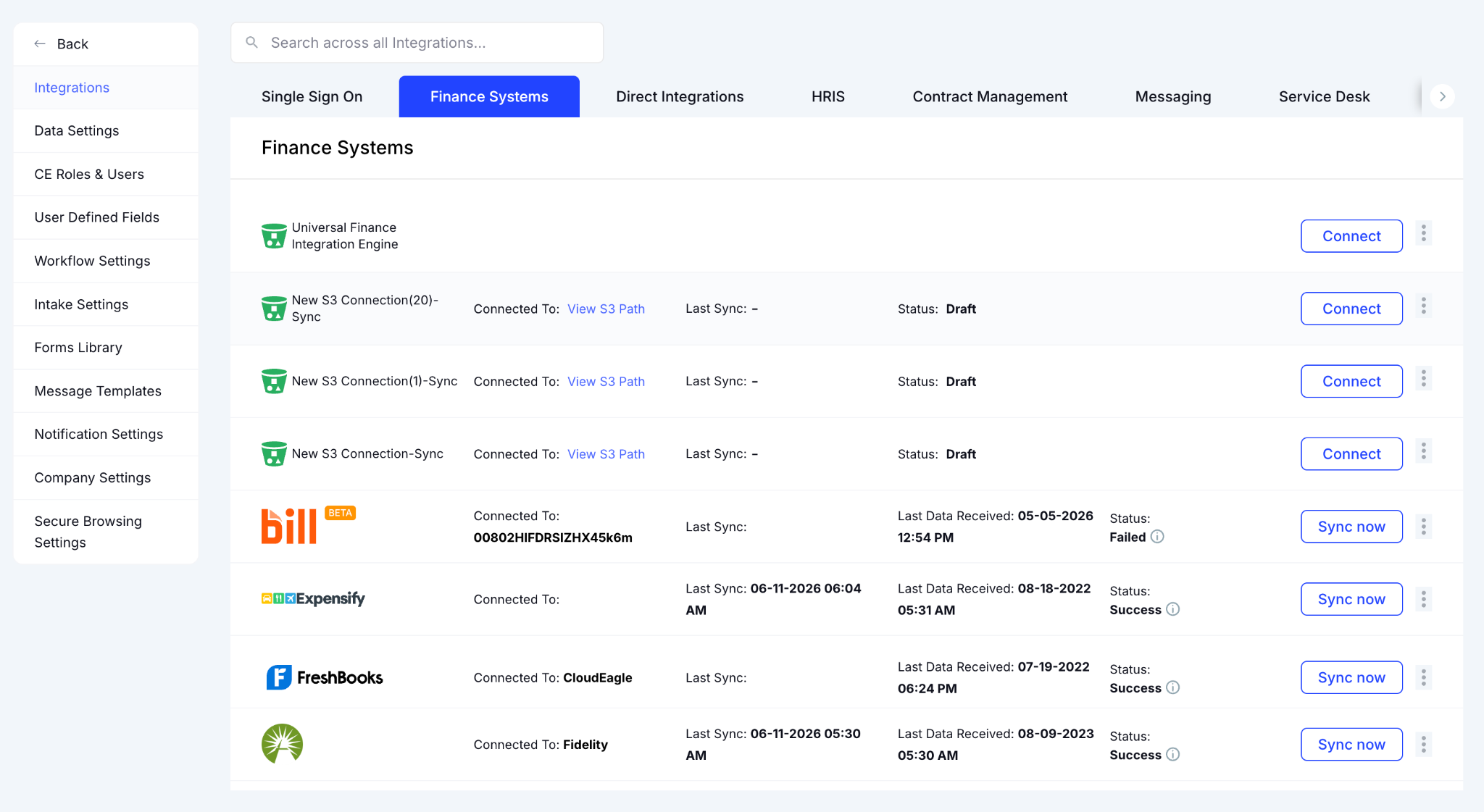
CloudEagle.ai shows if a subscription purchased outside procurement shows up here, even if it never touched SSO, Zscaler, or a managed device.

3. Why Personal Account Problem Is Harder to Close

Most organizations assume personal AI usage can be solved with SSO policies or a vendor dashboard setting. But the problem is structural and looking at only one source means seeing only part of the picture.

A. The SSO Blind Spot

SSO governs enterprise identities. Personal AI accounts sit outside that boundary.

  • SSO only sees federated logins: Accounts created directly on AI platforms using a work email without going through your IdP, are invisible to SSO by design.
  • CASB sees domains, not account types: It can see an employee visited claude.ai. It can't tell whether that session was your enterprise workspace or a personal account on the same domain.
  • The gap is architectural: A CASB or SSO configuration change won't close a gap that exists by design, not misconfiguration.

B. The $20 Problem Nobody Reports

The most difficult AI spend to govern is often the cheapest.

  • Personal plans bypass procurement: A $20 ChatGPT Plus or Claude Pro subscription takes minutes to set up with no IT ticket and no visibility.
  • Small charges avoid scrutiny: $20 accumulates invisibly across dozens of employees before finance notices.
  • Visibility arrives too late: One mid-market financial services company discovered their AI spend visibility was broken only after bills came in far higher than estimated.

C. Why One Source Is Never Enough

  • SSO shows enterprise access but misses personal accounts created directly on AI platforms
  • CASB shows AI platform activity but can't distinguish enterprise from personal sessions on the same domain
  • Finance systems show purchases, only if they went through a corporate card
  • Browser data reveals actual usage, including sessions that bypassed every other layer

CloudEagle.ai correlates all four simultaneously, the continuous cross-source verification that Zero Trust requires. That's what vendor portals and spreadsheets can't provide on their own.

4. Token Governance: Not Just a Cost Problem, But a Data Exposure Problem

Most discussions about personal AI accounts start with budget leakage. The bigger risk is what happens to the data and regulators, boards, and auditors are starting to ask direct questions about it.

When an employee pastes source code or internal documents into a personal Claude or ChatGPT session, that interaction sits outside your governance controls. Your retention policies and approval workflows no longer apply.

  • Sensitive Data Leaves The Enterprise Boundary
    Information is processed under the AI provider's policies, not your organization's.
  • Security Teams Lose Visibility
    Personal AI sessions typically don't appear in enterprise reporting and audit trails.
  • Compliance Questions Become Harder To Answer
    Auditors increasingly want to know how AI tools are being used and what data they access.
  • Risk Increases As AI Adoption Grows
    More users, more prompts, and more personal accounts create more opportunities for exposure.

CloudEagle.ai helps organizations detect sensitive data shared with AI tools, redirect users toward approved AI platforms through flash pages, and enforce safe AI usage policies before data leaves approved environments.

Ungoverned token usage isn't just a budget problem. It's a provenance problem. Can you answer, right now, what company data has touched a personal AI session this quarter?

Your Biggest Risks Aren't Visible

Yet they're everywhere.
Expose Them

5. Conclusion

Most organizations think they're governing AI because they've purchased enterprise licenses and approved AI vendors. The reality is often more complicated.

When employees hit token limits, many don't stop using AI. They switch accounts. The work continues, but the visibility disappears.

That's why personal AI accounts have become one of the biggest blind spots in enterprise AI governance. 

CloudEagle.ai surfaces every AI session across your environment, sanctioned and personal, and gives IT and security teams the visibility to govern all of it from one place.

6. FAQs

1. Can CloudEagle.ai detect personal AI accounts created with a personal email rather than a work email?

CloudEagle.ai correlates browser activity, CASB logs, and finance signals simultaneously. Personal accounts created under a non-work email are surfaced through browser and CASB telemetry when accessed on a corporate device or network.

2. Does CloudEagle.ai integrate with existing DLP tools or does it replace them?

CloudEagle.ai complements existing DLP tools by adding the AI-specific governance layer they weren't built for such as per-user token attribution, personal account detection, and AI usage policy enforcement.

3. Can CloudEagle.ai enforce different AI access policies for different teams or departments?

Policies are configurable at the team, department, and role level. Engineering can be permitted Cursor while restricted from consumer ChatGPT. Finance can have stricter DLP rules applied to AI sessions involving financial data. Each policy set is independent and auditable.

4. How does CloudEagle.ai handle AI governance for remote or BYOD employees not on a corporate network?

The browser extension captures AI activity on corporate devices regardless of network location. For BYOD environments, governance relies on CASB integration and finance signal correlation to surface personal account usage.

5. Does CloudEagle.ai provide audit-ready reports for AI governance reviews?

CloudEagle.ai generates exportable, timestamped reports covering AI tool inventory, per-user access history, policy enforcement actions, and sensitive data detection events in a format suitable for internal audits, board reviews, and regulatory inquiries.

Advertisement for a SaaS Subscription Tracking Template with a call-to-action button to download and a partial graphic of a tablet showing charts.Banner promoting a SaaS Agreement Checklist to streamline SaaS management and avoid budget waste with a call-to-action button labeled Download checklist.Blue banner with text 'The Ultimate Employee Offboarding Checklist!' and a black button labeled 'Download checklist' alongside partial views of checklist documents from cloudeagle.ai.Digital ad for download checklist titled 'The Ultimate Checklist for IT Leaders to Optimize SaaS Operations' by cloudeagle.ai, showing checklist pages.Slack Buyer's Guide offer with text 'Unlock insider insights to get the best deal on Slack!' and a button labeled 'Get Your Copy', accompanied by a preview of the guide featuring Slack's logo.Monday Pricing Guide by cloudeagle.ai offering exclusive pricing secrets to maximize investment with a call-to-action button labeled Get Your Copy and an image of the guide's cover.Blue banner for Canva Pricing Guide by cloudeagle.ai offering a guide to Canva costs, features, and alternatives with a call-to-action button saying Get Your Copy.Blue banner with white text reading 'Little-Known Negotiation Hacks to Get the Best Deal on Slack' and a white button labeled 'Get Your Copy'.Blue banner with text 'Little-Known Negotiation Hacks to Get the Best Deal on Monday.com' and a white button labeled 'Get Your Copy'.Blue banner with text 'Little-Known Negotiation Hacks to Get the Best Deal on Canva' and a white button labeled 'Get Your Copy'.Banner with text 'Slack Buyer's Guide' and a 'Download Now' button next to images of a guide titled 'Slack Buyer’s Guide: Features, Pricing & Best Practices'.Digital cover of Monday Pricing Guide with a button labeled Get Your Copy on a blue background.Canva Pricing Guide cover with a button labeled Get Your Copy on a blue gradient background.

Enter your email to
unlock the report

Oops! Something went wrong while submitting the form.
License Count
Benchmark
Per User/Per Year

Enter your email to
unlock the report

Oops! Something went wrong while submitting the form.
License Count
Benchmark
Per User/Per Year

Enter your email to
unlock the report

Oops! Something went wrong while submitting the form.
Notion Plus
License Count
Benchmark
Per User/Per Year
100-500
$67.20 - $78.72
500-1000
$59.52 - $72.00
1000+
$51.84 - $57.60
Canva Pro
License Count
Benchmark
Per User/Per Year
100-500
$74.33-$88.71
500-1000
$64.74-$80.32
1000+
$55.14-$62.34

Enter your email to
unlock the report

Oops! Something went wrong while submitting the form.

Enter your email to
unlock the report

Oops! Something went wrong while submitting the form.
Zoom Business
License Count
Benchmark
Per User/Per Year
100-500
$216.00 - $264.00
500-1000
$180.00 - $216.00
1000+
$156.00 - $180.00

Enter your email to
unlock the report

Oops! Something went wrong while submitting the form.

Get the Right Security Platform To Secure Your Cloud Infrastructure

Please enter a business email
Thank you!
The 2023 SaaS report has been sent to your email. Check your promotional or spam folder.
Oops! Something went wrong while submitting the form.

Access full report

Please enter a business email
Thank you!
The 2023 SaaS report has been sent to your email. Check your promotional or spam folder.
Oops! Something went wrong while submitting the form.

Your company buys an enterprise plan for Claude or ChatGPT and sets a token budget. Then some of your heaviest users hit the limit. So they open personal AI accounts. 

Now they're pasting code and internal documents into sessions that aren't covered by your DLP controls and won't show up in any access review you run this quarter. The tricky part is that you might now know it's happening.

Your Anthropic portal shows aggregate enterprise consumption. It doesn't show the engineer who signed up for Claude Pro with a work email last month. This isn't a behavior problem. It's a visibility gap.

CloudEagle.ai closes that gap by correlating signals across SSO, browser activity, CASB logs, and finance systems simultaneously. It surfaces personal AI accounts, orphaned non-human identities, and shadow AI sessions. 

In this article, we'll show you why enterprise token limits create this bypass incentive, what your current tools can't see, and what governance actually looks like when the full picture is visible.

TL;DR

  • Employees often bypass enterprise AI token limits by creating personal AI accounts to maintain productivity.
  • Personal AI accounts create major visibility gaps because they operate outside enterprise governance and DLP controls.
  • CloudEagle.ai detects personal AI usage by correlating browser, network, endpoint, and finance signals.
  • Cross-source visibility helps uncover shadow AI sessions, personal subscriptions, and ungoverned AI activity.
  • CloudEagle.ai strengthens AI governance by enforcing policies, protecting sensitive data, and redirecting users to approved AI platforms

1. Why Employees Bypass Enterprise AI Limits in the First Place

Most employees don't create personal AI accounts to bypass policy. They do it because it's the fastest way to keep working.

When an enterprise AI pricing hits a token limit, rate limit, or usage cap, the user has two options: wait for IT to fix it or spend $20 on a personal subscription. In most cases, the second option wins.

  • Personal accounts remove usage restrictions: The employee keeps working without waiting for approvals or quota increases and IT never sees a ticket because there was never a problem to report.
  • The tool is already familiar: They're not switching vendors. They're switching accounts, which means no learning curve, no friction, and no reason to think twice about it.
  • Consumer plans are easy to purchase: A personal ChatGPT Plus or Claude Pro subscription takes minutes to set up, often with a work email, outside any procurement.
  • Productivity feels more important than process: Employees are focused on completing work. Governance requirements aren't visible at the moment of decision but the token limit is.

This is why it’s different from shadow IT.  Traditional shadow IT means an employee adopting an unauthorized tool. This is shadow usage on an authorized tool. The work product is the same. The governance is zero.

You approved the AI vendor. You didn't approve the 14 personal accounts running alongside it.

Shadow AI Doesn't Raise Tickets

It just shows up.
Expose It

2. How CloudEagle.ai Surfaces Personal AI Accounts Across Every Detection Layer

An employee logging into a personal Claude.ai or ChatGPT account doesn't generate an SSO event, doesn't appear in your Anthropic portal, and doesn't file an IT ticket. You cannot allocate costs you cannot attribute. You cannot govern tools you cannot see.

CloudEagle closes that gap by correlating four detection layers simultaneously, each mapped against SaaSMap, CloudEagle's proprietary AI application inventory built specifically for enterprise discovery.

Here's how CloudEagle.ai surfaces personal AI accounts in your stack:

A. Browser Plugin: Catching Personal Accounts on Managed Browsers

When an employee opens a managed browser and logs into a personal Claude.ai or ChatGPT account, CloudEagle's browser plugin catches it immediately. The plugin deploys across managed devices via MDM, centrally, without requiring individual employee action.

In CloudEagle's Secure Browser module, you can see every AI tool accessed via browser in real time, including personal accounts flagged against SaaSMap:

Personal accounts on sanctioned AI domains appear as Unconfirmed, meaning they were detected through browser telemetry but haven't been formally reviewed. Same claude.ai URL, different account tier, visible at the session level.

When a personal account is detected, CloudEagle doesn't just log it. A flash page steps in before any company data is entered, redirecting the employee to the approved enterprise alternative automatically.

B. Zscaler Integration: Catching Personal Accounts On Network Level

Not every employee uses a managed browser. Some switch to a personal browser or use incognito mode to avoid corporate monitoring. Even if the employee changed browsers, the traffic still routes through the corporate network. 

CloudEagle's Zscaler integration ingests that outbound network traffic and maps every AI destination against SaaSMap.

In CloudEagle's Zscaler integration view, you can see every AI endpoint detected across outbound network traffic, including tools that never touched your managed browser. Here’s how Zscaler integration looks:

When a new AI endpoint appears in traffic for the first time, a model endpoint your team has never used before, CloudEagle.ai fires a proactive alert. Your security team knows before the tool is embedded in a workflow. 

This layer also catches API key access: a developer running a script that hits the OpenAI API a thousand times a day will never appear in your identity logs. They will appear in your network logs.

C. CrowdStrike Integration: Catching Local AI Installs

Developer tools like Claude Code and locally installed AI clients run directly on the laptop, no browser tab, no external endpoint, nothing for Zscaler to see regardless of which browser the employee uses.

CloudEagle's CrowdStrike integration lets you see AI applications detected at the endpoint level, including locally installed tools and encrypted traffic that bypasses every other telemetry layer.

D. Finance Integration: Catching Corporate Card Purchases

Some AI tools bypass every telemetry layer entirely because employees purchased them on a corporate card before any approval. These AI tools still show up in expense reports.

CloudEagle.ai integrates with finance systems so you can see every AI related charge from corporate card transactions mapped back to the employee and tool involved through SaaSMap:

CloudEagle.ai shows if a subscription purchased outside procurement shows up here, even if it never touched SSO, Zscaler, or a managed device.

3. Why Personal Account Problem Is Harder to Close

Most organizations assume personal AI usage can be solved with SSO policies or a vendor dashboard setting. But the problem is structural and looking at only one source means seeing only part of the picture.

A. The SSO Blind Spot

SSO governs enterprise identities. Personal AI accounts sit outside that boundary.

  • SSO only sees federated logins: Accounts created directly on AI platforms using a work email without going through your IdP, are invisible to SSO by design.
  • CASB sees domains, not account types: It can see an employee visited claude.ai. It can't tell whether that session was your enterprise workspace or a personal account on the same domain.
  • The gap is architectural: A CASB or SSO configuration change won't close a gap that exists by design, not misconfiguration.

B. The $20 Problem Nobody Reports

The most difficult AI spend to govern is often the cheapest.

  • Personal plans bypass procurement: A $20 ChatGPT Plus or Claude Pro subscription takes minutes to set up with no IT ticket and no visibility.
  • Small charges avoid scrutiny: $20 accumulates invisibly across dozens of employees before finance notices.
  • Visibility arrives too late: One mid-market financial services company discovered their AI spend visibility was broken only after bills came in far higher than estimated.

C. Why One Source Is Never Enough

  • SSO shows enterprise access but misses personal accounts created directly on AI platforms
  • CASB shows AI platform activity but can't distinguish enterprise from personal sessions on the same domain
  • Finance systems show purchases, only if they went through a corporate card
  • Browser data reveals actual usage, including sessions that bypassed every other layer

CloudEagle.ai correlates all four simultaneously, the continuous cross-source verification that Zero Trust requires. That's what vendor portals and spreadsheets can't provide on their own.

4. Token Governance: Not Just a Cost Problem, But a Data Exposure Problem

Most discussions about personal AI accounts start with budget leakage. The bigger risk is what happens to the data and regulators, boards, and auditors are starting to ask direct questions about it.

When an employee pastes source code or internal documents into a personal Claude or ChatGPT session, that interaction sits outside your governance controls. Your retention policies and approval workflows no longer apply.

  • Sensitive Data Leaves The Enterprise Boundary
    Information is processed under the AI provider's policies, not your organization's.
  • Security Teams Lose Visibility
    Personal AI sessions typically don't appear in enterprise reporting and audit trails.
  • Compliance Questions Become Harder To Answer
    Auditors increasingly want to know how AI tools are being used and what data they access.
  • Risk Increases As AI Adoption Grows
    More users, more prompts, and more personal accounts create more opportunities for exposure.

CloudEagle.ai helps organizations detect sensitive data shared with AI tools, redirect users toward approved AI platforms through flash pages, and enforce safe AI usage policies before data leaves approved environments.

Ungoverned token usage isn't just a budget problem. It's a provenance problem. Can you answer, right now, what company data has touched a personal AI session this quarter?

Your Biggest Risks Aren't Visible

Yet they're everywhere.
Expose Them

5. Conclusion

Most organizations think they're governing AI because they've purchased enterprise licenses and approved AI vendors. The reality is often more complicated.

When employees hit token limits, many don't stop using AI. They switch accounts. The work continues, but the visibility disappears.

That's why personal AI accounts have become one of the biggest blind spots in enterprise AI governance. 

CloudEagle.ai surfaces every AI session across your environment, sanctioned and personal, and gives IT and security teams the visibility to govern all of it from one place.

6. FAQs

1. Can CloudEagle.ai detect personal AI accounts created with a personal email rather than a work email?

CloudEagle.ai correlates browser activity, CASB logs, and finance signals simultaneously. Personal accounts created under a non-work email are surfaced through browser and CASB telemetry when accessed on a corporate device or network.

2. Does CloudEagle.ai integrate with existing DLP tools or does it replace them?

CloudEagle.ai complements existing DLP tools by adding the AI-specific governance layer they weren't built for such as per-user token attribution, personal account detection, and AI usage policy enforcement.

3. Can CloudEagle.ai enforce different AI access policies for different teams or departments?

Policies are configurable at the team, department, and role level. Engineering can be permitted Cursor while restricted from consumer ChatGPT. Finance can have stricter DLP rules applied to AI sessions involving financial data. Each policy set is independent and auditable.

4. How does CloudEagle.ai handle AI governance for remote or BYOD employees not on a corporate network?

The browser extension captures AI activity on corporate devices regardless of network location. For BYOD environments, governance relies on CASB integration and finance signal correlation to surface personal account usage.

5. Does CloudEagle.ai provide audit-ready reports for AI governance reviews?

CloudEagle.ai generates exportable, timestamped reports covering AI tool inventory, per-user access history, policy enforcement actions, and sensitive data detection events in a format suitable for internal audits, board reviews, and regulatory inquiries.

CloudEagle.ai recognized in the 2025 Gartner® Magic Quadrant™ for SaaS Management Platforms
Download now
gartner chart
5x
Faster employee
onboarding
80%
Reduction in time for
user access reviews
30k
Workflows
automated
$15Bn
Analyzed in
contract spend
$2Bn
Saved in
SaaS spend

Streamline SaaS governance and save 10-30%

Book a Demo with Expert
CTA image