You need to enable JavaScript in order to use the AI chatbot tool powered by ChatBot

How CloudEagle.ai Connects to Finance Systems to Surface Hidden SaaS Spend

Share via:
blog-cms-banner-bg
Little-Known Negotiation Hacks to Get the Best Deal on Slack
cta-bg-blogDownload Your Copy

HIPAA Compliance Checklist for 2025

Download PDF

Most organizations discover hidden SaaS spend the hard way. A vendor auto-renews before anyone noticed the deadline, or a duplicate tool surfaces during a budget review that nobody knew existed.

The data is there. It's just split across systems that don't talk to each other. Finance sees invoices. IT sees applications. Procurement is working off a spreadsheet that's already two renewals out of date.

CloudEagle.ai connects to your finance systems (NetSuite, QuickBooks, Expensify, Coupa, and others) to pull SaaS spend, application usage, and renewal timelines into one place. 

In this article, we'll show how CloudEagle.ai connects to your finance systems to surface hidden SaaS spend, eliminate waste, and give your team the visibility it needs to make smarter procurement decisions.

TL;DR

  • Hidden SaaS spend grows when finance, IT, and procurement data stay disconnected across systems.
  • CloudEagle.ai connects finance systems to surface shadow SaaS purchases, renewals, and duplicate tools.
  • Teams gain visibility into spend, license usage, department-level costs, and AI billing trends.
  • Automated workflows help prevent missed renewals, optimize negotiations, and eliminate unnecessary SaaS waste.
  • CloudEagle.ai centralizes finance, usage, and procurement insights to deliver proactive SaaS cost control.

1. Why Hidden SaaS Spend Becomes Difficult to Track?

Hidden SaaS spend doesn't arrive as one large budget problem. The initial is often quiet, until procurement is managing vendor sprawl across hundreds of applications it didn't fully approve and can't fully see. 

Sound familiar? Here's how it actually happens:

A. Shadow SaaS is Already Ahead of Your Procurement Process

By the time an invoice hits finance, the tool is already in use. And sometimes two departments bought the same thing without knowing it.

B. Renewals Arrive Before Anyone's Had a Chance to Review Usage

You know the renewal date. What you don't know is whether anyone's actually using the tool, or whether you're paying above market rate for it.

C. Getting Approvals Means Chasing People Across Slack and Email

No structured workflow means decisions get delayed, deadlines pass, and auto-renewals fire before the right stakeholders even saw the request.

If any of this sounds like your current renewal cycle, you're not alone. And truth be told, the fix isn't another spreadsheet.

Everyone Uses SaaS. No One Owns The Spend.

That’s exactly how budgets spiral.
Fix The Drift

2. How CloudEagle.ai Connects to Finance Systems to Surface SaaS Spend

CloudEagle.ai integrates directly to your finance systems such as Oracle NetSuite, Tipalti, Workday, Ramp, and others. 

The platform correlates transaction data with application usage, SSO signals, and HRIS records to show you exactly where software spend is coming from. 

Thus, your team gets a single, continuously updated view of spend, usage, and renewal status across every vendor in your stack. Here’s how CloudEagle.ai surface hidden SaaS spend through integrations:

A. Automatically Discover Hidden SaaS Purchases

CloudEagle.ai connects to your finance systems and correlates transaction data across corporate cards, invoices, SSO signals, and browser activity

It surfaces every SaaS and AI purchase across your organization, including the ones that never went through procurement. CloudEagle.ai shows you everything including:

  • Corporate Card and Expense Transactions: Software purchases made outside approved workflows are identified automatically as they appear in connected finance systems.
  • Invoice and Subscription Discovery: Recurring subscriptions buried across vendor invoices are surfaced and mapped to the applications and teams using them.
  • Shadow SaaS and Shadow AI Detection: Tools that adopted outside IT's catalog, including AI applications, are pulled into the spend inventory automatically.
  • Billing Anomaly Detection: Spend Intelligence flags duplicate charges, billing errors, and mismatched contract terms before they appear as a surprise on the next invoice.

When JoVe connected CloudEagle.ai to their finance systems, their spreadsheets were only covering a third of their actual SaaS footprint. 

Spend Intelligence then caught a vendor billing them both annually and monthly for the same application, which was completely undetected. The result: $800K+ in savings and 1,530 hours per year back, with SaaS management time dropping by 70%.

B. Correlate Spend With Applications and Usage

CloudEagle.ai connects every vendor charge to the application behind it, the licenses tied to it, and the users actually using it. Your team can go into every renewal conversation knowing exactly what they're paying for. 

  • Spend Intelligence: Generates reports by app, vendor, department, and cost per license using real usage telemetry. If a license hasn't been touched in 90 days, it shows up as underutilized license.
  • License Management & Harvesting: Surfaces unused and underutilized licenses across the full SaaS stack so right-sizing decisions are backed by data.
  • Department-Level Spend Allocation: Breaks spend down by team so finance can see exactly which departments are driving SaaS costs and where budget is being wasted.
  • Cost-Per-License Visibility: Shows the actual cost of each license tied to real usage data, giving procurement the numbers they need to right-size at renewal instead of renewing at status quo. 

That's the difference between knowing what you're spending and knowing whether it's worth it.

C. Rationalize Duplicate and Redundant SaaS Applications

CloudEagle.ai surfaces application rationalization opportunities by connecting spend, usage, and ownership data across every department. 

Duplicate tools get identified before they auto-renew for another year. The pattern shows up more often than most teams realize:

  • Duplicate Tool Detection: CloudEagle.ai maps applications by functional category and flags tools with overlapping capabilities across departments.
  • Low-Usage, High-Spend Flagging: Applications with significant spend but minimal active usage are surfaced automatically, giving procurement a data-backed case for cancellation at renewal. 
  • AI Sprawl Identification: As teams independently adopt AI tools, CloudEagle.ai maps the full AI tool footprint and identifies where teams are paying for duplicate capabilities.
  • Consolidation Recommendations: Once duplicates are identified, CloudEagle.ai provides vendor research and usage data to support consolidation decisions. 

D. Surface Ungoverned AI Tool Spend and Usage-Based Billing

Once CloudEagle.ai surfaces your full AI tool footprint, the next problem becomes clear: AI pricing doesn't work like traditional SaaS. A seat-based Figma license costs the same whether someone uses it daily or not. 

A usage-based ChatGPT Enterprise or Microsoft Copilot subscription scales with every prompt, every upload, every active user. Without monitoring, that bill grows quietly until it shows up as a budget surprise at month-end.

Here’s how CloudEagle.ai tackles that:

  • AI Vendor & Contract Management: Tracks consumption-based charges across AI platforms and flags spend scaling beyond expected thresholds.
  • AI Usage Policy Enforcement: CloudEagle.ai flags tools accessing sensitive data, tools with high GenAI risk scores, or subscriptions that scaled beyond their original scope.
  • Spend Intelligence for AI: Breaks down AI vendor costs by department and user, so procurement knows exactly which teams are driving AI spend and whether that spend is tied to governed.

An AI subscription scaling across 200 users without a contract cap is a financial risk. A tool accessing sensitive data without an approved policy is a compliance risk. CloudEagle.ai governs both.

E. Prevent Missed Renewals and Auto-Renewals at Unfavorable Terms

CloudEagle.ai starts renewal workflows 90 days before every contract date. It won’t start a week before, when all the negotiating leverage is already gone.

The moment a finance integration surfaces a vendor contract, CloudEagle's contract metadata extraction automatically pulls the renewal date, notice period, and auto-renewal clauses from the document.

That information feeds directly into the Renewal Calendar, so procurement knows how long they have before the window closes. From there, CloudEagle's Procurement Workflow Orchestration takes over:

  • 90-Day Renewal Workflows: Automated reminders fire at 90, 60, and 30 days before each renewal. Procurement teams can review usage, pull benchmarking data, and negotiate easily.
  • Auto-Renewal Risk Flagging: Contracts set to auto-renew are flagged immediately, with the notice period clearly visible.
  • Usage-Informed Renewal Decisions: Each renewal alert surfaces the application's current usage data alongside the contract value. 
  • Stakeholder Workflow Routing: Renewal approvals route automatically to the right contract owner, eliminating the Slack-and-email chase that causes deadlines to slip.

Sapphire Ventures eliminated 100% of their auto-renewals after connecting CloudEagle.ai. They $1.3M in annual savings and $3M+ in lifetime savings, including catching a vendor's 60-day cancellation window in time. 

F. Benchmark SaaS Pricing and Strengthen Vendor Negotiations

CloudEagle.ai's Price Benchmarking & Buying Guides give procurement teams something most vendors don't want them to have: data on what other companies are actually paying for the same software.

Knowing that you're paying 40% above market rate for a tool your team uses at 60% capacity. CloudEagle combines usage data from your own environment with its SaaS benchmarking dataset.

  • Market Price Benchmarking: CloudEagle.ai surfaces what peer organizations are paying for the same vendor, tier, and contract size.
  • Usage-to-Price Ratio Analysis: Combines actual license utilization with current contract value to identify tools where you're overpaying relative to what your team actually uses.
  • Buying Guides: CloudEagle.ai provides vendor-specific buying guidance covering pricing tiers, negotiation levers, and contract terms competitors have successfully pushed back on.
  • Negotiation Timing Signals: Surfaces the optimal window to engage a vendor: when their quarter is closing, when usage data supports a downgrade, or when there’s a better alternative.

Organizations using CloudEagle.ai's benchmarking data consistently reduce SaaS and AI spend by 10-30%. They don’t achieve this by cutting tools, but by paying closer to market rate for the ones they keep.

Procurement Isn’t Broken. It’s Blind.

No visibility means no control over cost.
See Everything

3. Steps to Connect Finance Systems in CloudEagle.ai

Connecting your finance system takes under 30 minutes. Here are the steps you can follow to connect finance systems in CloudEagle.ai.

A. Go to Admin Portal in CloudEagle.ai Dashboard

When you open the CloudEagle.ai dashboard, go to the Admin panel from the bottom. It will allow you to access the integrations tab. 

B. Go to Finance Systems

The integration tab consists of SSO, Finance, Direct Integrations, HRIS, Contract Management, and many more. Click on the Finance Systems integration. 

C. Choose the Finance Systems
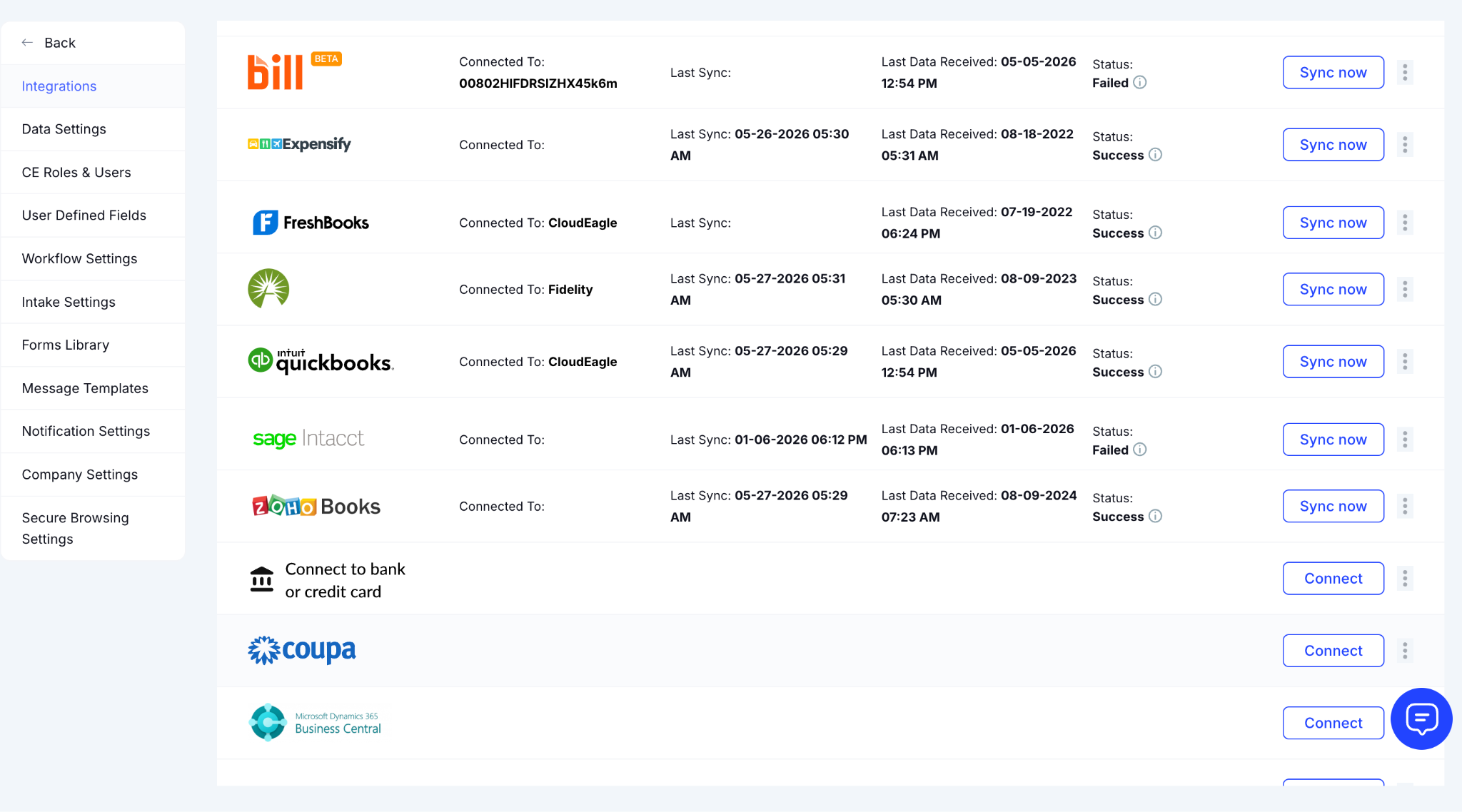
You’ll see the available Finance systems such as Bill, Expensify, FreshBooks, Quickbooks, Zoho, Coupa, and many more. Click Connect on the integration you want to set up. 

D. Enter Your Credentials

A setup popup will appear with step-by-step connection instructions. From the right side, enter the required API keys or account credentials and click Connect.

E. Invite App Admin
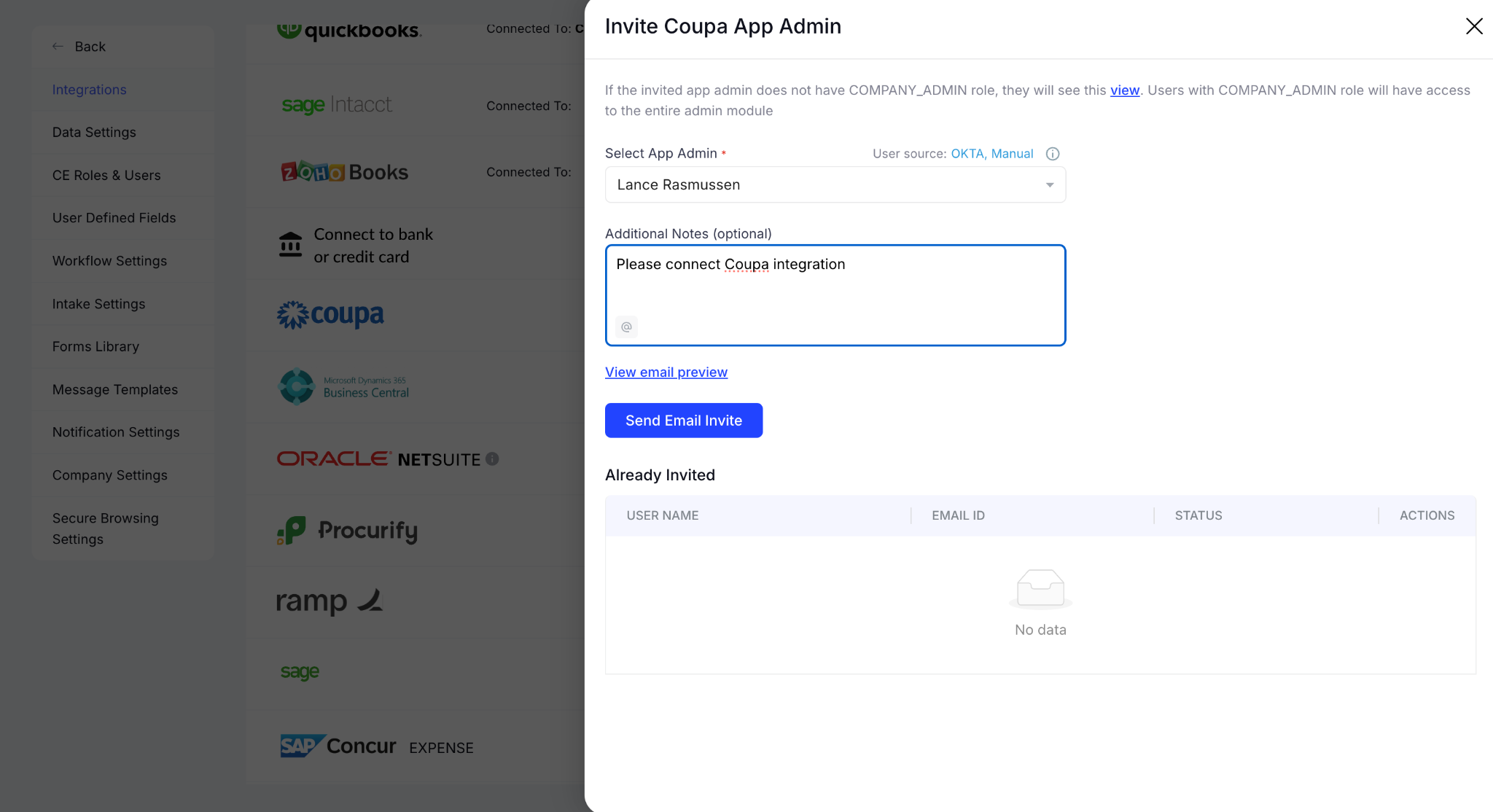
If you're not the system admin, click the three dots next to the Connect option to open an invite portal. Select the relevant app admin and send them an email invite You can also add new users.

Once connected, CloudEagle.ai begins pulling transaction data from your finance system. You can know SaaS purchases, recurring subscriptions, and spend patterns across every vendor in your stack.

4. Steps to Import S3 Finance Logs with CloudEagle.ai

If your ERP or finance system doesn't have a native CloudEagle.ai integration, the Universal Finance Integration Engine handles it through an S3-based connection. 

No finance data source gets left outside your spend visibility layer. Here are the steps of how to import S3 finance logs in CloudEagle.ai.

A. Open the Universal Finance Integration Engine

From the Finance Systems tab under Integrations, find the Universal Finance Integration Engine and click Connect. This opens the S3 connection workflow.

B. Create a Connection Name and Generate S3 Credentials
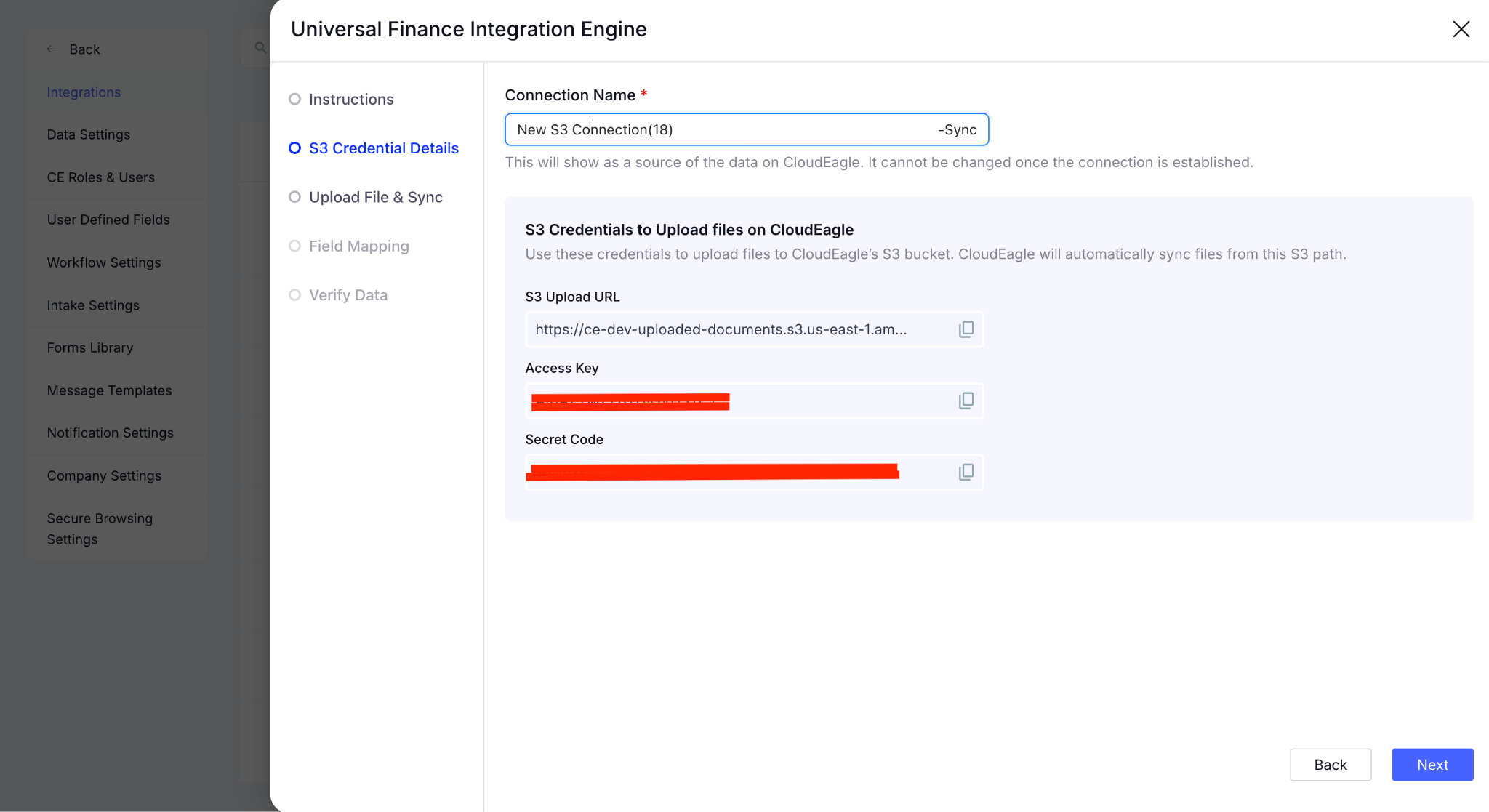
Enter a connection name. This will appear as the data source label inside CloudEagle.ai and cannot be changed after the connection is established, so choose it carefully.

Once named, CloudEagle.ai automatically generates your S3 Upload URL, Access Key, and Secret Code. Save these credentials as you'll need them to upload your CSV files. Click Next to continue.

C. Upload a Sample CSV File and Sync
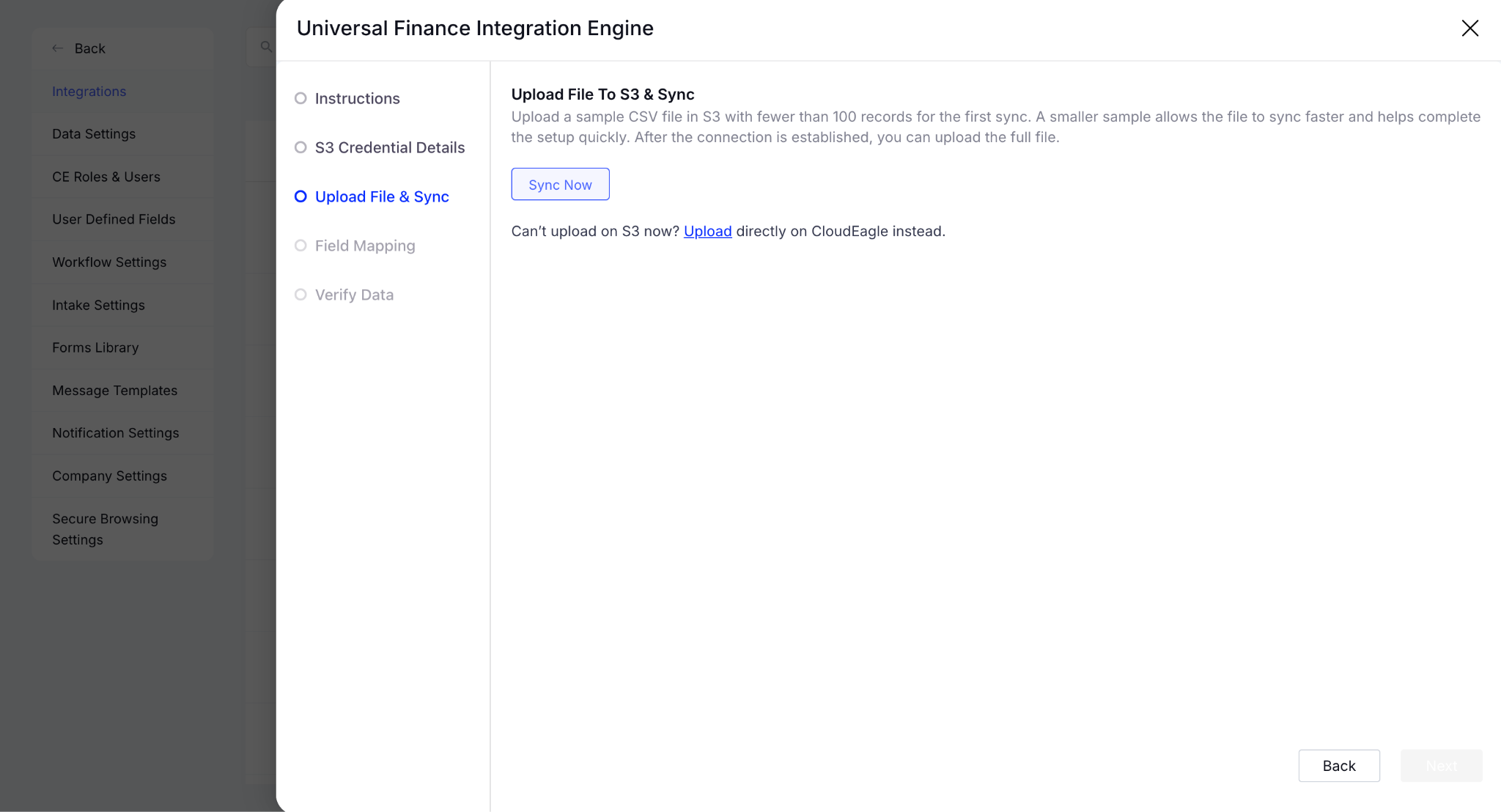
Upload a sample CSV file to S3. CloudEagle.ai recommends files with fewer than 100 records for the initial sync to validate the connection before uploading your full dataset.

If you can't upload directly to S3, you can upload the file directly in CloudEagle.ai instead. Once uploaded, click Sync Now.

D. Complete Field Mapping
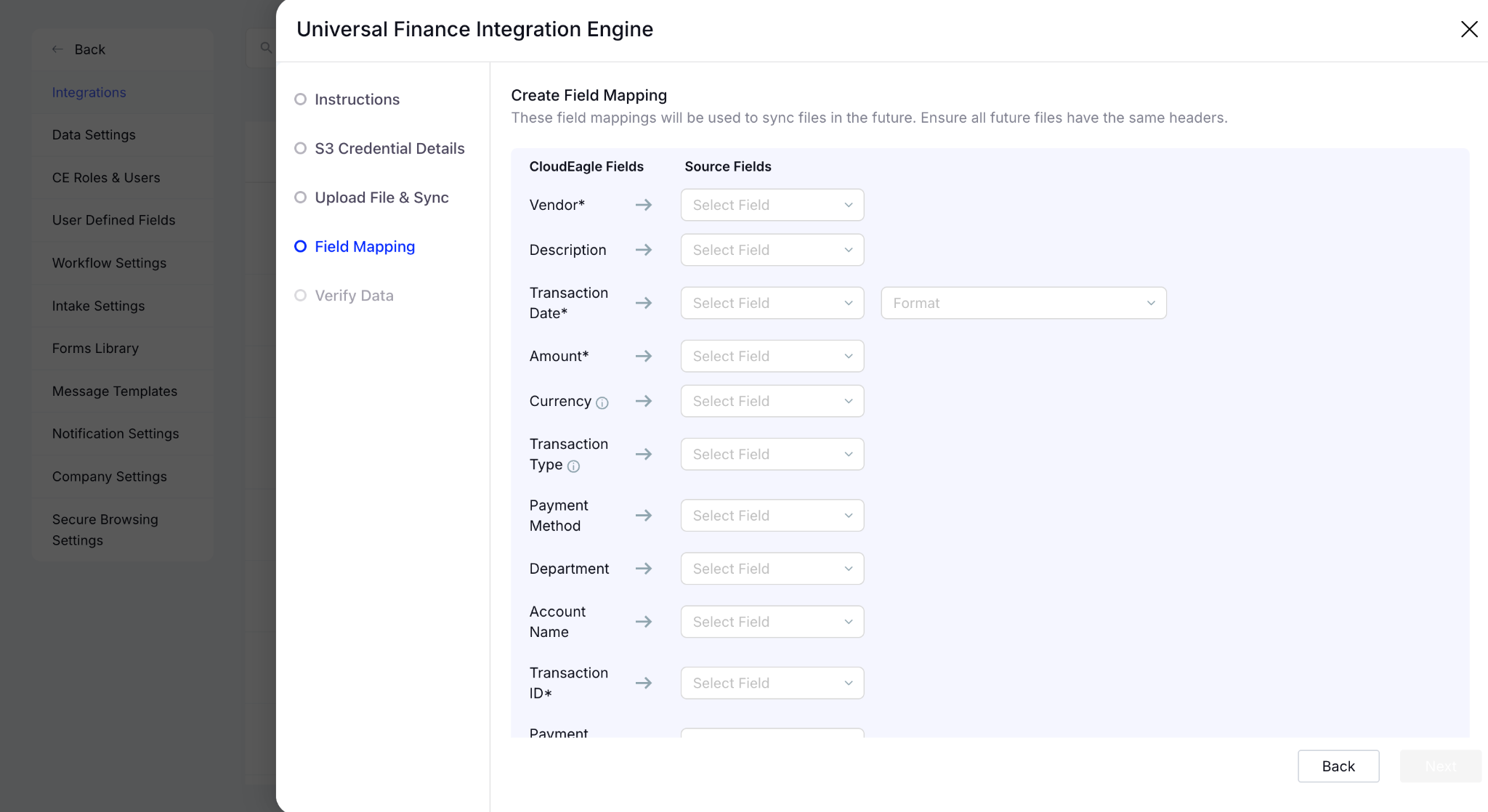
Map your CSV fields to CloudEagle.ai's data structure. Fields marked with a star are required. These mappings will be applied automatically to all future file syncs, so you only need to configure them once.

E. Verify the Data and Finish Setup
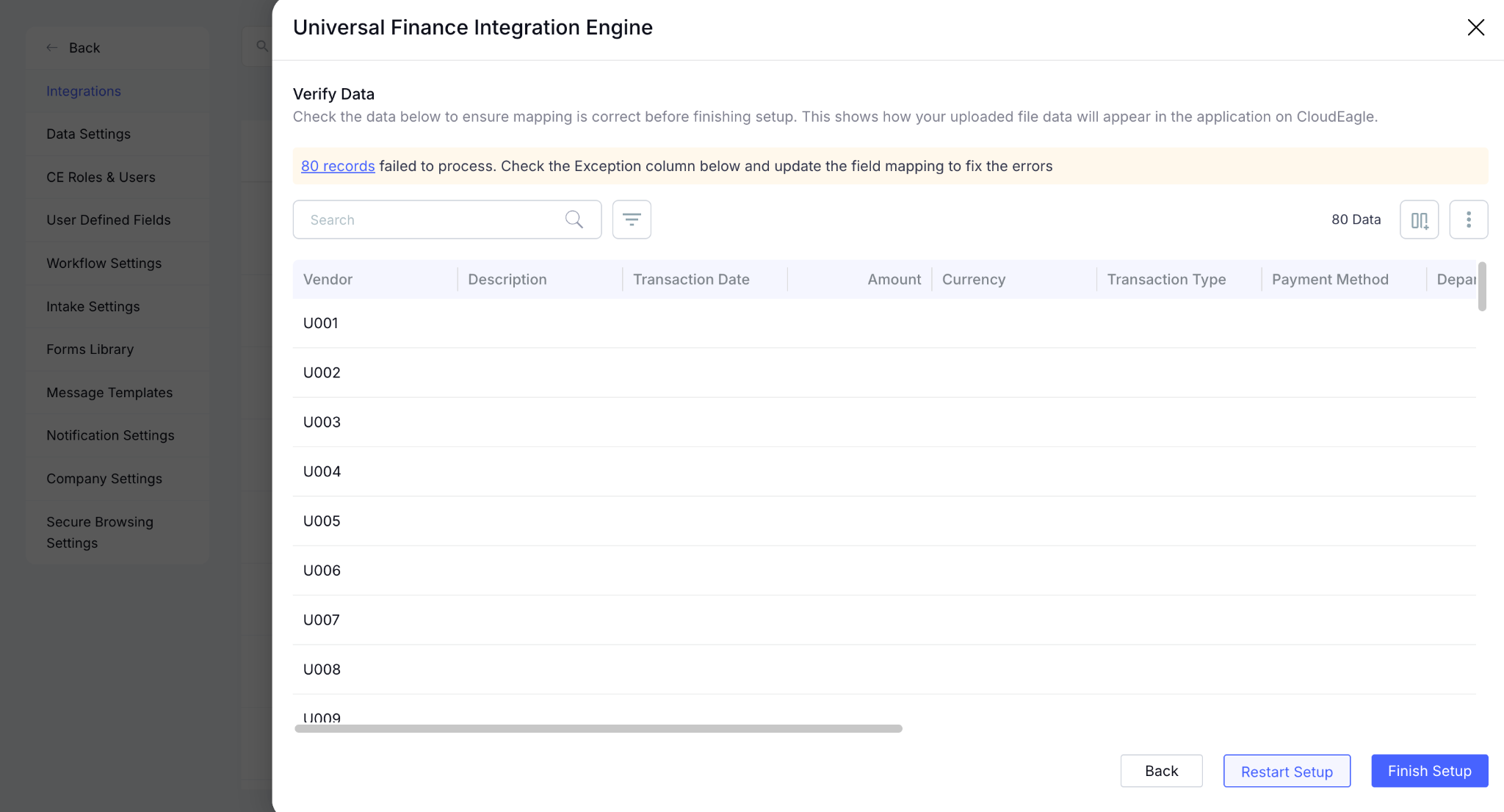
Review the mapped data to confirm everything looks correct. Once verified, click Finish Setup.

Once the connection is live, CloudEagle.ai begins processing your finance data immediately. It starts surfacing SaaS purchases, recurring vendor spend, and previously invisible subscriptions from the imported records.

5. Conclusion

Hidden SaaS spend doesn't fix itself. Shadow SaaS accumulates with every departmental purchase that bypasses procurement. License waste compounds with every renewal that happens without usage data. 

CloudEagle.ai connects directly to your finance systems and gives IT, finance, and procurement teams a single, continuously updated view of every dollar leaving the organization for SaaS and AI tools.

With $20B+ in spend processed, $2B+ in savings delivered, and organizations consistently reducing software costs by 10-30%, the gap between your finance systems and your SaaS stack is already costing you more than the fix.

6. FAQs

1. How does CloudEagle.ai handle data security when connecting to finance systems?

CloudEagle.ai connects to finance systems using read-only API access, meaning it pulls transaction data without the ability to modify records. All data is encrypted in transit and at rest, and CloudEagle.ai is SOC 2 Type II certified, GDPR compliant, and ISO 27001 certified.

2. How long does it take before spend data becomes actionable after connecting a finance system?

Most organizations see their first spend insights within hours of connecting. CloudEagle.ai begins processing transaction data immediately after the integration is live, surfacing hidden purchases, recurring subscriptions, and vendor spend patterns without a manual data preparation step.

3. Can CloudEagle.ai connect to multiple finance systems simultaneously for organizations running separate ERP instances after a merger or acquisition?

Yes. CloudEagle.ai supports multiple simultaneous finance integrations, consolidating transaction data from separate systems into a single spend view. This is particularly useful post-merger, where two entities may run different ERPs but share overlapping SaaS vendors.

4. What if our finance data contains duplicate transactions or categorization errors? Will that affect spend reporting?

CloudEagle.ai's Spend Intelligence layer normalizes and deduplicates transaction data during ingestion. Vendors appearing under multiple names or billing formats are consolidated automatically, so spend reports reflect actual vendor relationships rather than raw transaction noise.

5. Does CloudEagle.ai support purchase order and procurement workflow data beyond invoices and card transactions?

Yes. Beyond invoices and expense data, CloudEagle.ai connects to procurement systems like Coupa and SAP Ariba to pull PO data into the spend layer. This gives procurement teams a complete picture that includes committed spend from open POs alongside actual invoiced amounts

Advertisement for a SaaS Subscription Tracking Template with a call-to-action button to download and a partial graphic of a tablet showing charts.Banner promoting a SaaS Agreement Checklist to streamline SaaS management and avoid budget waste with a call-to-action button labeled Download checklist.Blue banner with text 'The Ultimate Employee Offboarding Checklist!' and a black button labeled 'Download checklist' alongside partial views of checklist documents from cloudeagle.ai.Digital ad for download checklist titled 'The Ultimate Checklist for IT Leaders to Optimize SaaS Operations' by cloudeagle.ai, showing checklist pages.Slack Buyer's Guide offer with text 'Unlock insider insights to get the best deal on Slack!' and a button labeled 'Get Your Copy', accompanied by a preview of the guide featuring Slack's logo.Monday Pricing Guide by cloudeagle.ai offering exclusive pricing secrets to maximize investment with a call-to-action button labeled Get Your Copy and an image of the guide's cover.Blue banner for Canva Pricing Guide by cloudeagle.ai offering a guide to Canva costs, features, and alternatives with a call-to-action button saying Get Your Copy.Blue banner with white text reading 'Little-Known Negotiation Hacks to Get the Best Deal on Slack' and a white button labeled 'Get Your Copy'.Blue banner with text 'Little-Known Negotiation Hacks to Get the Best Deal on Monday.com' and a white button labeled 'Get Your Copy'.Blue banner with text 'Little-Known Negotiation Hacks to Get the Best Deal on Canva' and a white button labeled 'Get Your Copy'.Banner with text 'Slack Buyer's Guide' and a 'Download Now' button next to images of a guide titled 'Slack Buyer’s Guide: Features, Pricing & Best Practices'.Digital cover of Monday Pricing Guide with a button labeled Get Your Copy on a blue background.Canva Pricing Guide cover with a button labeled Get Your Copy on a blue gradient background.

Enter your email to
unlock the report

Oops! Something went wrong while submitting the form.
License Count
Benchmark
Per User/Per Year

Enter your email to
unlock the report

Oops! Something went wrong while submitting the form.
License Count
Benchmark
Per User/Per Year

Enter your email to
unlock the report

Oops! Something went wrong while submitting the form.
Notion Plus
License Count
Benchmark
Per User/Per Year
100-500
$67.20 - $78.72
500-1000
$59.52 - $72.00
1000+
$51.84 - $57.60
Canva Pro
License Count
Benchmark
Per User/Per Year
100-500
$74.33-$88.71
500-1000
$64.74-$80.32
1000+
$55.14-$62.34

Enter your email to
unlock the report

Oops! Something went wrong while submitting the form.

Enter your email to
unlock the report

Oops! Something went wrong while submitting the form.
Zoom Business
License Count
Benchmark
Per User/Per Year
100-500
$216.00 - $264.00
500-1000
$180.00 - $216.00
1000+
$156.00 - $180.00

Enter your email to
unlock the report

Oops! Something went wrong while submitting the form.

Get the Right Security Platform To Secure Your Cloud Infrastructure

Please enter a business email
Thank you!
The 2023 SaaS report has been sent to your email. Check your promotional or spam folder.
Oops! Something went wrong while submitting the form.

Access full report

Please enter a business email
Thank you!
The 2023 SaaS report has been sent to your email. Check your promotional or spam folder.
Oops! Something went wrong while submitting the form.

Most organizations discover hidden SaaS spend the hard way. A vendor auto-renews before anyone noticed the deadline, or a duplicate tool surfaces during a budget review that nobody knew existed.

The data is there. It's just split across systems that don't talk to each other. Finance sees invoices. IT sees applications. Procurement is working off a spreadsheet that's already two renewals out of date.

CloudEagle.ai connects to your finance systems (NetSuite, QuickBooks, Expensify, Coupa, and others) to pull SaaS spend, application usage, and renewal timelines into one place. 

In this article, we'll show how CloudEagle.ai connects to your finance systems to surface hidden SaaS spend, eliminate waste, and give your team the visibility it needs to make smarter procurement decisions.

TL;DR

  • Hidden SaaS spend grows when finance, IT, and procurement data stay disconnected across systems.
  • CloudEagle.ai connects finance systems to surface shadow SaaS purchases, renewals, and duplicate tools.
  • Teams gain visibility into spend, license usage, department-level costs, and AI billing trends.
  • Automated workflows help prevent missed renewals, optimize negotiations, and eliminate unnecessary SaaS waste.
  • CloudEagle.ai centralizes finance, usage, and procurement insights to deliver proactive SaaS cost control.

1. Why Hidden SaaS Spend Becomes Difficult to Track?

Hidden SaaS spend doesn't arrive as one large budget problem. The initial is often quiet, until procurement is managing vendor sprawl across hundreds of applications it didn't fully approve and can't fully see. 

Sound familiar? Here's how it actually happens:

A. Shadow SaaS is Already Ahead of Your Procurement Process

By the time an invoice hits finance, the tool is already in use. And sometimes two departments bought the same thing without knowing it.

B. Renewals Arrive Before Anyone's Had a Chance to Review Usage

You know the renewal date. What you don't know is whether anyone's actually using the tool, or whether you're paying above market rate for it.

C. Getting Approvals Means Chasing People Across Slack and Email

No structured workflow means decisions get delayed, deadlines pass, and auto-renewals fire before the right stakeholders even saw the request.

If any of this sounds like your current renewal cycle, you're not alone. And truth be told, the fix isn't another spreadsheet.

Everyone Uses SaaS. No One Owns The Spend.

That’s exactly how budgets spiral.
Fix The Drift

2. How CloudEagle.ai Connects to Finance Systems to Surface SaaS Spend

CloudEagle.ai integrates directly to your finance systems such as Oracle NetSuite, Tipalti, Workday, Ramp, and others. 

The platform correlates transaction data with application usage, SSO signals, and HRIS records to show you exactly where software spend is coming from. 

Thus, your team gets a single, continuously updated view of spend, usage, and renewal status across every vendor in your stack. Here’s how CloudEagle.ai surface hidden SaaS spend through integrations:

A. Automatically Discover Hidden SaaS Purchases

CloudEagle.ai connects to your finance systems and correlates transaction data across corporate cards, invoices, SSO signals, and browser activity

It surfaces every SaaS and AI purchase across your organization, including the ones that never went through procurement. CloudEagle.ai shows you everything including:

  • Corporate Card and Expense Transactions: Software purchases made outside approved workflows are identified automatically as they appear in connected finance systems.
  • Invoice and Subscription Discovery: Recurring subscriptions buried across vendor invoices are surfaced and mapped to the applications and teams using them.
  • Shadow SaaS and Shadow AI Detection: Tools that adopted outside IT's catalog, including AI applications, are pulled into the spend inventory automatically.
  • Billing Anomaly Detection: Spend Intelligence flags duplicate charges, billing errors, and mismatched contract terms before they appear as a surprise on the next invoice.

When JoVe connected CloudEagle.ai to their finance systems, their spreadsheets were only covering a third of their actual SaaS footprint. 

Spend Intelligence then caught a vendor billing them both annually and monthly for the same application, which was completely undetected. The result: $800K+ in savings and 1,530 hours per year back, with SaaS management time dropping by 70%.

B. Correlate Spend With Applications and Usage

CloudEagle.ai connects every vendor charge to the application behind it, the licenses tied to it, and the users actually using it. Your team can go into every renewal conversation knowing exactly what they're paying for. 

  • Spend Intelligence: Generates reports by app, vendor, department, and cost per license using real usage telemetry. If a license hasn't been touched in 90 days, it shows up as underutilized license.
  • License Management & Harvesting: Surfaces unused and underutilized licenses across the full SaaS stack so right-sizing decisions are backed by data.
  • Department-Level Spend Allocation: Breaks spend down by team so finance can see exactly which departments are driving SaaS costs and where budget is being wasted.
  • Cost-Per-License Visibility: Shows the actual cost of each license tied to real usage data, giving procurement the numbers they need to right-size at renewal instead of renewing at status quo. 

That's the difference between knowing what you're spending and knowing whether it's worth it.

C. Rationalize Duplicate and Redundant SaaS Applications

CloudEagle.ai surfaces application rationalization opportunities by connecting spend, usage, and ownership data across every department. 

Duplicate tools get identified before they auto-renew for another year. The pattern shows up more often than most teams realize:

  • Duplicate Tool Detection: CloudEagle.ai maps applications by functional category and flags tools with overlapping capabilities across departments.
  • Low-Usage, High-Spend Flagging: Applications with significant spend but minimal active usage are surfaced automatically, giving procurement a data-backed case for cancellation at renewal. 
  • AI Sprawl Identification: As teams independently adopt AI tools, CloudEagle.ai maps the full AI tool footprint and identifies where teams are paying for duplicate capabilities.
  • Consolidation Recommendations: Once duplicates are identified, CloudEagle.ai provides vendor research and usage data to support consolidation decisions. 

D. Surface Ungoverned AI Tool Spend and Usage-Based Billing

Once CloudEagle.ai surfaces your full AI tool footprint, the next problem becomes clear: AI pricing doesn't work like traditional SaaS. A seat-based Figma license costs the same whether someone uses it daily or not. 

A usage-based ChatGPT Enterprise or Microsoft Copilot subscription scales with every prompt, every upload, every active user. Without monitoring, that bill grows quietly until it shows up as a budget surprise at month-end.

Here’s how CloudEagle.ai tackles that:

  • AI Vendor & Contract Management: Tracks consumption-based charges across AI platforms and flags spend scaling beyond expected thresholds.
  • AI Usage Policy Enforcement: CloudEagle.ai flags tools accessing sensitive data, tools with high GenAI risk scores, or subscriptions that scaled beyond their original scope.
  • Spend Intelligence for AI: Breaks down AI vendor costs by department and user, so procurement knows exactly which teams are driving AI spend and whether that spend is tied to governed.

An AI subscription scaling across 200 users without a contract cap is a financial risk. A tool accessing sensitive data without an approved policy is a compliance risk. CloudEagle.ai governs both.

E. Prevent Missed Renewals and Auto-Renewals at Unfavorable Terms

CloudEagle.ai starts renewal workflows 90 days before every contract date. It won’t start a week before, when all the negotiating leverage is already gone.

The moment a finance integration surfaces a vendor contract, CloudEagle's contract metadata extraction automatically pulls the renewal date, notice period, and auto-renewal clauses from the document.

That information feeds directly into the Renewal Calendar, so procurement knows how long they have before the window closes. From there, CloudEagle's Procurement Workflow Orchestration takes over:

  • 90-Day Renewal Workflows: Automated reminders fire at 90, 60, and 30 days before each renewal. Procurement teams can review usage, pull benchmarking data, and negotiate easily.
  • Auto-Renewal Risk Flagging: Contracts set to auto-renew are flagged immediately, with the notice period clearly visible.
  • Usage-Informed Renewal Decisions: Each renewal alert surfaces the application's current usage data alongside the contract value. 
  • Stakeholder Workflow Routing: Renewal approvals route automatically to the right contract owner, eliminating the Slack-and-email chase that causes deadlines to slip.

Sapphire Ventures eliminated 100% of their auto-renewals after connecting CloudEagle.ai. They $1.3M in annual savings and $3M+ in lifetime savings, including catching a vendor's 60-day cancellation window in time. 

F. Benchmark SaaS Pricing and Strengthen Vendor Negotiations

CloudEagle.ai's Price Benchmarking & Buying Guides give procurement teams something most vendors don't want them to have: data on what other companies are actually paying for the same software.

Knowing that you're paying 40% above market rate for a tool your team uses at 60% capacity. CloudEagle combines usage data from your own environment with its SaaS benchmarking dataset.

  • Market Price Benchmarking: CloudEagle.ai surfaces what peer organizations are paying for the same vendor, tier, and contract size.
  • Usage-to-Price Ratio Analysis: Combines actual license utilization with current contract value to identify tools where you're overpaying relative to what your team actually uses.
  • Buying Guides: CloudEagle.ai provides vendor-specific buying guidance covering pricing tiers, negotiation levers, and contract terms competitors have successfully pushed back on.
  • Negotiation Timing Signals: Surfaces the optimal window to engage a vendor: when their quarter is closing, when usage data supports a downgrade, or when there’s a better alternative.

Organizations using CloudEagle.ai's benchmarking data consistently reduce SaaS and AI spend by 10-30%. They don’t achieve this by cutting tools, but by paying closer to market rate for the ones they keep.

Procurement Isn’t Broken. It’s Blind.

No visibility means no control over cost.
See Everything

3. Steps to Connect Finance Systems in CloudEagle.ai

Connecting your finance system takes under 30 minutes. Here are the steps you can follow to connect finance systems in CloudEagle.ai.

A. Go to Admin Portal in CloudEagle.ai Dashboard

When you open the CloudEagle.ai dashboard, go to the Admin panel from the bottom. It will allow you to access the integrations tab. 

B. Go to Finance Systems

The integration tab consists of SSO, Finance, Direct Integrations, HRIS, Contract Management, and many more. Click on the Finance Systems integration. 

C. Choose the Finance Systems

You’ll see the available Finance systems such as Bill, Expensify, FreshBooks, Quickbooks, Zoho, Coupa, and many more. Click Connect on the integration you want to set up. 

D. Enter Your Credentials

A setup popup will appear with step-by-step connection instructions. From the right side, enter the required API keys or account credentials and click Connect.

E. Invite App Admin

If you're not the system admin, click the three dots next to the Connect option to open an invite portal. Select the relevant app admin and send them an email invite You can also add new users.

Once connected, CloudEagle.ai begins pulling transaction data from your finance system. You can know SaaS purchases, recurring subscriptions, and spend patterns across every vendor in your stack.

4. Steps to Import S3 Finance Logs with CloudEagle.ai

If your ERP or finance system doesn't have a native CloudEagle.ai integration, the Universal Finance Integration Engine handles it through an S3-based connection. 

No finance data source gets left outside your spend visibility layer. Here are the steps of how to import S3 finance logs in CloudEagle.ai.

A. Open the Universal Finance Integration Engine

From the Finance Systems tab under Integrations, find the Universal Finance Integration Engine and click Connect. This opens the S3 connection workflow.

B. Create a Connection Name and Generate S3 Credentials

Enter a connection name. This will appear as the data source label inside CloudEagle.ai and cannot be changed after the connection is established, so choose it carefully.

Once named, CloudEagle.ai automatically generates your S3 Upload URL, Access Key, and Secret Code. Save these credentials as you'll need them to upload your CSV files. Click Next to continue.

C. Upload a Sample CSV File and Sync

Upload a sample CSV file to S3. CloudEagle.ai recommends files with fewer than 100 records for the initial sync to validate the connection before uploading your full dataset.

If you can't upload directly to S3, you can upload the file directly in CloudEagle.ai instead. Once uploaded, click Sync Now.

D. Complete Field Mapping

Map your CSV fields to CloudEagle.ai's data structure. Fields marked with a star are required. These mappings will be applied automatically to all future file syncs, so you only need to configure them once.

E. Verify the Data and Finish Setup

Review the mapped data to confirm everything looks correct. Once verified, click Finish Setup.

Once the connection is live, CloudEagle.ai begins processing your finance data immediately. It starts surfacing SaaS purchases, recurring vendor spend, and previously invisible subscriptions from the imported records.

5. Conclusion

Hidden SaaS spend doesn't fix itself. Shadow SaaS accumulates with every departmental purchase that bypasses procurement. License waste compounds with every renewal that happens without usage data. 

CloudEagle.ai connects directly to your finance systems and gives IT, finance, and procurement teams a single, continuously updated view of every dollar leaving the organization for SaaS and AI tools.

With $20B+ in spend processed, $2B+ in savings delivered, and organizations consistently reducing software costs by 10-30%, the gap between your finance systems and your SaaS stack is already costing you more than the fix.

6. FAQs

1. How does CloudEagle.ai handle data security when connecting to finance systems?

CloudEagle.ai connects to finance systems using read-only API access, meaning it pulls transaction data without the ability to modify records. All data is encrypted in transit and at rest, and CloudEagle.ai is SOC 2 Type II certified, GDPR compliant, and ISO 27001 certified.

2. How long does it take before spend data becomes actionable after connecting a finance system?

Most organizations see their first spend insights within hours of connecting. CloudEagle.ai begins processing transaction data immediately after the integration is live, surfacing hidden purchases, recurring subscriptions, and vendor spend patterns without a manual data preparation step.

3. Can CloudEagle.ai connect to multiple finance systems simultaneously for organizations running separate ERP instances after a merger or acquisition?

Yes. CloudEagle.ai supports multiple simultaneous finance integrations, consolidating transaction data from separate systems into a single spend view. This is particularly useful post-merger, where two entities may run different ERPs but share overlapping SaaS vendors.

4. What if our finance data contains duplicate transactions or categorization errors? Will that affect spend reporting?

CloudEagle.ai's Spend Intelligence layer normalizes and deduplicates transaction data during ingestion. Vendors appearing under multiple names or billing formats are consolidated automatically, so spend reports reflect actual vendor relationships rather than raw transaction noise.

5. Does CloudEagle.ai support purchase order and procurement workflow data beyond invoices and card transactions?

Yes. Beyond invoices and expense data, CloudEagle.ai connects to procurement systems like Coupa and SAP Ariba to pull PO data into the spend layer. This gives procurement teams a complete picture that includes committed spend from open POs alongside actual invoiced amounts

CloudEagle.ai recognized in the 2025 Gartner® Magic Quadrant™ for SaaS Management Platforms
Download now
gartner chart
5x
Faster employee
onboarding
80%
Reduction in time for
user access reviews
30k
Workflows
automated
$15Bn
Analyzed in
contract spend
$2Bn
Saved in
SaaS spend

Streamline SaaS governance and save 10-30%

Book a Demo with Expert
CTA image
One platform to Manage
all SaaS Products
Learn More