You need to enable JavaScript in order to use the AI chatbot tool powered by ChatBot

Why DLP, CASB, and LLM Gateways All Miss the Same Gap: Browser-Level AI Prompt Activity

Share via:
blog-cms-banner-bg
Little-Known Negotiation Hacks to Get the Best Deal on Slack
cta-bg-blogDownload Your Copy

HIPAA Compliance Checklist for 2025

Download PDF

DLP, CASB, and LLM gateways are doing exactly what they were built to do. That is the problem.

Each tool was designed around a specific control point: data in motion, sanctioned app traffic, or API-routed model access. None of them were built to operate inside a browser session. 

And that is precisely where employees are accessing AI tools today: opening a tab, logging in with personal credentials, and pasting sensitive data into a prompt field that sits outside every layer you have deployed.

The gap is not in how you configured these tools. It is where they stop.

TL;DR

  • DLP scans data after it moves. It cannot see what is being typed into a browser prompt in real time
  • CASB governs OAuth-connected apps. Direct personal-credential logins generate no event for it to intercept
  • LLM gateways govern API traffic. Browser-based web UI sessions never touch the gateway
  • All three miss the same layer: the browser session, at the point of input, before anything is transmitted
  • CloudEagle's browser plugin deploys via MDM, operates inside the browser session, and blocks or redirects before data is submitted

1. What Gap Are DLP, CASB, and LLM Gateways All Missing?

The gap is the browser session.

Tool What it controls Where it stops
DLP Data in motion across sanctioned channels Cannot inspect content typed into a browser prompt
CASB OAuth-connected cloud app traffic Cannot see logins that bypass the identity layer
LLM Gateway API-routed model traffic Cannot govern browser-based web UI sessions

When an employee opens an AI tool in a tab, logs in with personal credentials, and types sensitive data into a prompt field, no event fires in any of them. The exposure happens at the point of input, and none of these tools were built to operate there.

Your Entire Security Stack Has the Same Blind Spot.

Find every AI tool slipping through it right now.
Download Checklist

2. Why Does DLP Miss It?

DLP was built to detect sensitive data moving through known channels: email, file transfers, and cloud uploads. It looks for patterns in data that is already in motion.

A prompt typed into a browser-based AI tool does not match any of those conditions:

  • It is not a file
  • It does not move through a monitored channel
  • It is created inside an HTTPS session and transmitted in a single request. DLP has no mechanism to inspect

Security teams with full DLP stacks still can't answer basic AI governance questions

Teams running complete DLP deployments, including data classification, alerts, and access governance, still report that AI usage visibility is entirely manual. Exports every two weeks. Pivot tables.

The reason: DLP answers one question. Did sensitive data leave a sanctioned system? It does not answer:

  • Which AI tools are employees using?
  • What are they entering into those tools?
  • When did they first start?

Those are different questions. DLP was never built to answer them.

3. Why Does CASB Miss It?

CASB intercepts traffic between users and cloud applications by sitting in the identity layer. It sees OAuth grants, SSO events, and federation tokens. When an employee accesses a sanctioned application through your identity provider, CASB can enforce policy on that session.

Browser-based AI tools do not require enterprise authentication. An employee can open Claude.ai, ChatGPT, or Gemini with a personal Gmail account. When that happens:

  • No OAuth token is generated
  • No SSO event fires
  • CASB sees an HTTPS connection to a domain, nothing more
  • It does not see a login, a session, a user identity, or anything being entered

A direct login generates no event for CASB to act on

Even in tightly controlled environments with thousands of app registrations in SSO, direct email and password logins to AI tools surface no alert in CASB. The browser plugin catches them immediately. SSO sees nothing.

This is not a CASB configuration gap. CASB was not designed to intercept logins that bypass the identity layer entirely.

There is also a subtler problem. CASB reads traffic at the domain level. It cannot distinguish:

  • A corporate tenant URL from a personal account URL on the same domain
  • A first-access event from an employee who has been using a tool for months
  • A sanctioned session from an unsanctioned one on the same provider

Both URLs look identical at the network layer. Only a tool reading the exact URL from inside the browser session can tell them apart.

4. Why Does an LLM Gateway Miss It?

An LLM gateway governs AI model traffic routed through it. It logs prompts, enforces content policy, controls which models are accessible, and tracks usage by API key. For the traffic it can see, it does the job well.

The structural limit is in what gets routed through it. In most enterprise AI deployments:

  • The gateway sits in the API path
  • A controlled group of developers and admins holds API tokens and sends requests programmatically
  • The gateway governs them, and only them

Most users access AI through the browser, not the API

The majority of employees are not using the API. They are logging into Claude.ai, ChatGPT, or Gemini through a browser tab using a corporate or personal account. Those sessions never touch the gateway.

Teams with enterprise contracts across every major AI vendor still report the same gap:

  • No granular usage data at the individual level
  • No visibility into how consumption is ramping over time
  • Reporting to leadership is still manual

The gateway covers the API path. It does not cover the browser sessions where most of the actual usage happens.

Your Compliance Controls Don't Cover Where AI Actually Happens.

Get the practices that close every gap your stack is missing.
Download Checklist

6. How Does CloudEagle.ai Close the Gap?

CloudEagle.ai deploys a browser plugin across managed devices via your existing MDM. No new endpoint agent, no proxy reconfiguration, no changes to your existing stack. Here is what it surfaces that DLP, CASB, and LLM gateways cannot.

a) "Anytime you log into a different URL, the report flags it"

What it surfaces is that your existing stack doesn't: Direct logins that never generate an SSO event, and corporate vs. personal account access on the same domain. Two governance cases that look identical at the network layer.

In a live deployment, a single browser plugin surfaced both in minutes: an employee logging into a tool with personal email and password credentials outside the SSO registry, and the same employee accessing a personal training URL under a vendor domain alongside the corporate tenant URL. SSO saw nothing. CASB saw one domain. The browser plugin flagged both as separate access events with different policy implications.

How CloudEagle.ai helps:

  • Every AI tool accessed via browser is detected in real time at the moment of first access
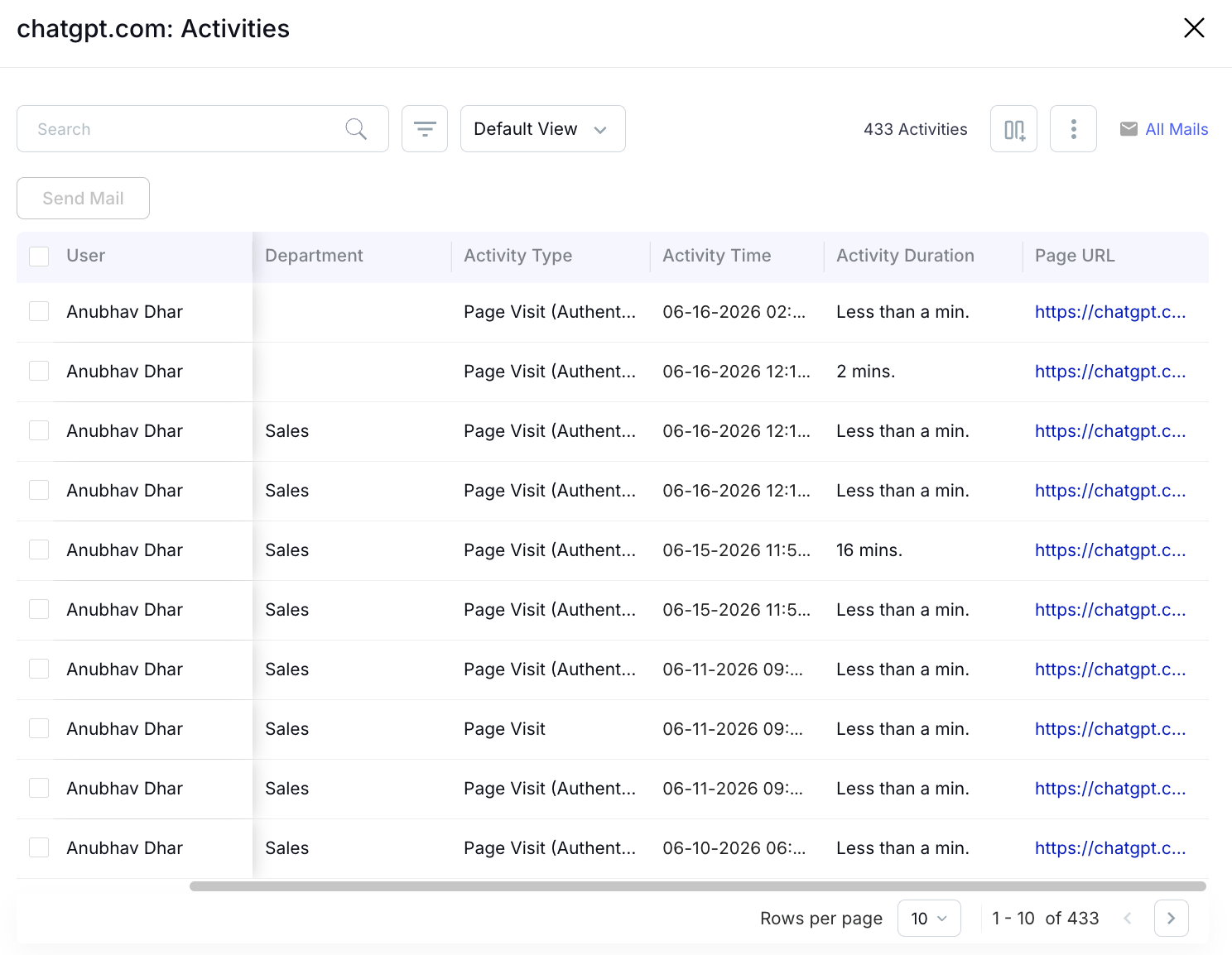
User activity dashboard displaying ChatGPT usage analytics, including employee activity logs, visit timestamps, session duration, department information, and page-level engagement tracking for AI governance and compliance monitoring.
  • Each access event is cross-referenced against SaaSMap, CloudEagle's proprietary AI application inventory
  • The report shows the tool name, user, first access date, and sanctioned or unsanctioned status
  • Direct-credential logins that bypass SSO are surfaced automatically, no manual cataloging required

b) "You want them to go on Claude, so it'll do a soft block"

Unsanctioned AI tool access before any data is entered. That is the intervention point that DLP, CASB, and LLM gateways all miss.

DLP alerts after data moves. CASB blocks at the token layer. An LLM gateway logs after the API call. None of them acts before the employee opens the session.

How CloudEagle.ai helps:

  • When an employee accesses an unsanctioned AI tool, a flash page surfaces before the session opens
  • The flash page shows approved alternatives and blocks access before any data is entered
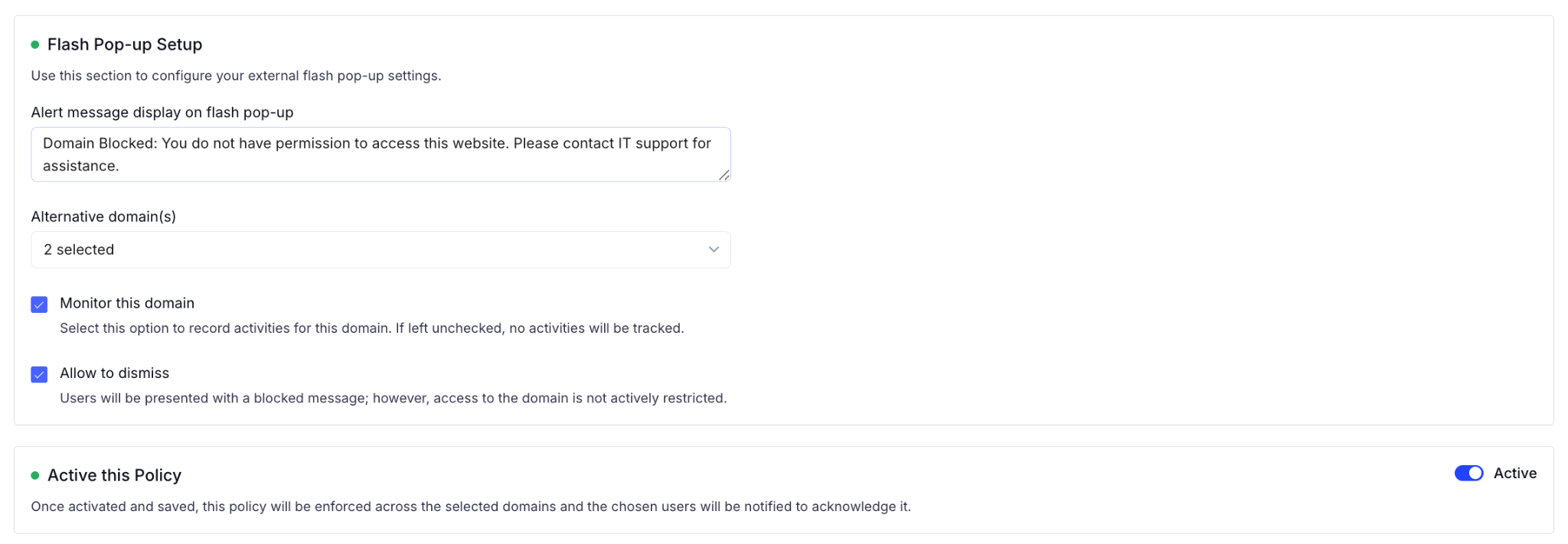
AI governance policy configuration screen showing customizable browser warning messages, approved alternative domains, activity monitoring controls, user dismissal settings, and policy activation options for managing access to restricted websites.

  • Users are redirected to sanctioned tools in the same flow, reducing friction while enforcing policy
  • The intervention happens at the point of intent, before any prompt is typed or pasted

c) "Everything I do every two weeks is very automated exports into Excel. I don't have time for that"

What it surfaces is that your existing stack doesn't

A continuous, auditable record of AI tool access at the browser level. It is the record that compliance teams are starting to require, and that no DLP, CASB, or LLM gateway produces.

Security teams running complete stacks across Purview, SharePoint, and Entra still have no visibility into which AI tools employees are accessing through the browser, what is being entered, or when it started. That is not a DLP configuration problem. It is a layer that was never there.

How CloudEagle.ai helps

  • Every browser-layer access attempt is logged continuously, timestamped, and attributed to a user
  • The log captures: tool accessed, sanctioned or unsanctioned status, device, flash page trigger, and PII or sensitive content detected before submission
  • The audit record exists in real time and is available for compliance review without additional effort
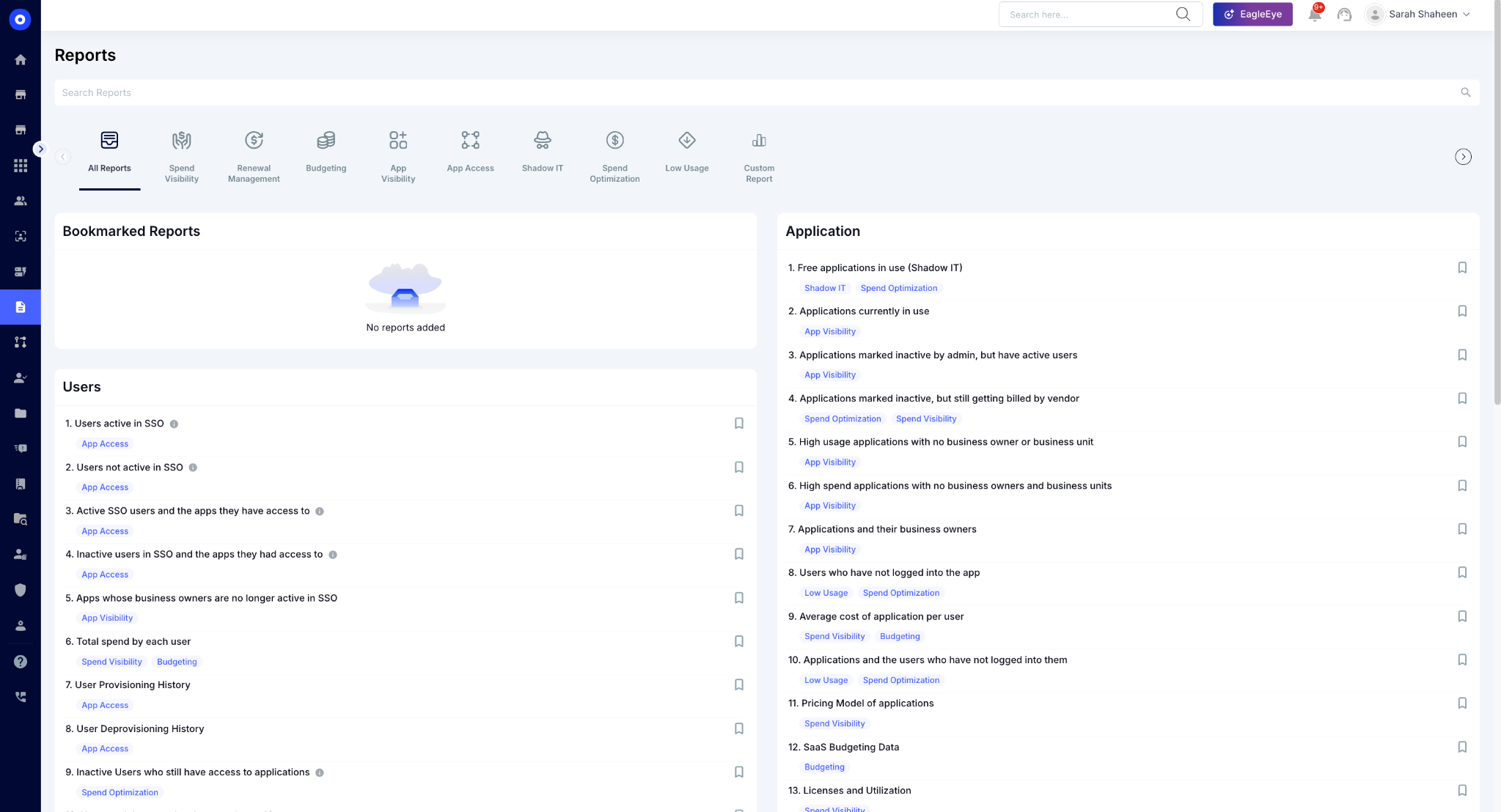
Centralized reporting dashboard providing prebuilt SaaS management reports across spend visibility, renewals, budgeting, application usage, shadow IT detection, access governance, spend optimization, and license utilization.

7. The Gap Was Always There. AI Just Made It Visible.

DLP, CASB, and LLM gateways were not built for browser-based AI access because browser-based AI access did not exist when they were designed. The control model assumed that sensitive tools would route through identity systems, that data would move through managed channels, and that model access would be API-mediated and centrally governed.

None of those assumptions holds for consumer-grade AI tools accessed through a browser tab with a personal account.

The gap is not a flaw in your stack. It is a structural blind spot that every enterprise running these tools has, whether they have identified it or not. The teams that find it earliest are the ones that added a browser layer before an incident made it visible.

8. FAQs

1. Can DLP rules be extended to cover browser-based AI tools? 

DLP can block known AI domains at the network level but cannot inspect content being typed into a browser prompt in real time. Prompt-level control requires a browser-layer tool.

2. Does CASB cover AI tools if employees use corporate email to sign up? 

Only if the login goes through SSO. A direct email and password signup, even with a corporate email address, generates no OAuth event and remains invisible to CASB.

3. What is the difference between an LLM gateway and browser-layer governance? 

An LLM gateway governs API traffic. A browser plugin governs the browser session. Most employee AI usage happens in the browser, not through the API.

4. Does a browser plugin replace DLP, CASB, or an LLM gateway? 

No. It closes the gap that all three leave open. Each tool continues to cover its existing surface. The browser plugin adds the layer that none of them were built to cover.

See how CloudEagle's browser plugin closes the gap your existing stack leaves open. Book a demo.

Advertisement for a SaaS Subscription Tracking Template with a call-to-action button to download and a partial graphic of a tablet showing charts.Banner promoting a SaaS Agreement Checklist to streamline SaaS management and avoid budget waste with a call-to-action button labeled Download checklist.Blue banner with text 'The Ultimate Employee Offboarding Checklist!' and a black button labeled 'Download checklist' alongside partial views of checklist documents from cloudeagle.ai.Digital ad for download checklist titled 'The Ultimate Checklist for IT Leaders to Optimize SaaS Operations' by cloudeagle.ai, showing checklist pages.Slack Buyer's Guide offer with text 'Unlock insider insights to get the best deal on Slack!' and a button labeled 'Get Your Copy', accompanied by a preview of the guide featuring Slack's logo.Monday Pricing Guide by cloudeagle.ai offering exclusive pricing secrets to maximize investment with a call-to-action button labeled Get Your Copy and an image of the guide's cover.Blue banner for Canva Pricing Guide by cloudeagle.ai offering a guide to Canva costs, features, and alternatives with a call-to-action button saying Get Your Copy.Blue banner with white text reading 'Little-Known Negotiation Hacks to Get the Best Deal on Slack' and a white button labeled 'Get Your Copy'.Blue banner with text 'Little-Known Negotiation Hacks to Get the Best Deal on Monday.com' and a white button labeled 'Get Your Copy'.Blue banner with text 'Little-Known Negotiation Hacks to Get the Best Deal on Canva' and a white button labeled 'Get Your Copy'.Banner with text 'Slack Buyer's Guide' and a 'Download Now' button next to images of a guide titled 'Slack Buyer’s Guide: Features, Pricing & Best Practices'.Digital cover of Monday Pricing Guide with a button labeled Get Your Copy on a blue background.Canva Pricing Guide cover with a button labeled Get Your Copy on a blue gradient background.

Enter your email to
unlock the report

Oops! Something went wrong while submitting the form.
License Count
Benchmark
Per User/Per Year

Enter your email to
unlock the report

Oops! Something went wrong while submitting the form.
License Count
Benchmark
Per User/Per Year

Enter your email to
unlock the report

Oops! Something went wrong while submitting the form.
Notion Plus
License Count
Benchmark
Per User/Per Year
100-500
$67.20 - $78.72
500-1000
$59.52 - $72.00
1000+
$51.84 - $57.60
Canva Pro
License Count
Benchmark
Per User/Per Year
100-500
$74.33-$88.71
500-1000
$64.74-$80.32
1000+
$55.14-$62.34

Enter your email to
unlock the report

Oops! Something went wrong while submitting the form.

Enter your email to
unlock the report

Oops! Something went wrong while submitting the form.
Zoom Business
License Count
Benchmark
Per User/Per Year
100-500
$216.00 - $264.00
500-1000
$180.00 - $216.00
1000+
$156.00 - $180.00

Enter your email to
unlock the report

Oops! Something went wrong while submitting the form.

Get the Right Security Platform To Secure Your Cloud Infrastructure

Please enter a business email
Thank you!
The 2023 SaaS report has been sent to your email. Check your promotional or spam folder.
Oops! Something went wrong while submitting the form.

Access full report

Please enter a business email
Thank you!
The 2023 SaaS report has been sent to your email. Check your promotional or spam folder.
Oops! Something went wrong while submitting the form.

DLP, CASB, and LLM gateways are doing exactly what they were built to do. That is the problem.

Each tool was designed around a specific control point: data in motion, sanctioned app traffic, or API-routed model access. None of them were built to operate inside a browser session. 

And that is precisely where employees are accessing AI tools today: opening a tab, logging in with personal credentials, and pasting sensitive data into a prompt field that sits outside every layer you have deployed.

The gap is not in how you configured these tools. It is where they stop.

TL;DR

  • DLP scans data after it moves. It cannot see what is being typed into a browser prompt in real time
  • CASB governs OAuth-connected apps. Direct personal-credential logins generate no event for it to intercept
  • LLM gateways govern API traffic. Browser-based web UI sessions never touch the gateway
  • All three miss the same layer: the browser session, at the point of input, before anything is transmitted
  • CloudEagle's browser plugin deploys via MDM, operates inside the browser session, and blocks or redirects before data is submitted

1. What Gap Are DLP, CASB, and LLM Gateways All Missing?

The gap is the browser session.

Tool What it controls Where it stops
DLP Data in motion across sanctioned channels Cannot inspect content typed into a browser prompt
CASB OAuth-connected cloud app traffic Cannot see logins that bypass the identity layer
LLM Gateway API-routed model traffic Cannot govern browser-based web UI sessions

When an employee opens an AI tool in a tab, logs in with personal credentials, and types sensitive data into a prompt field, no event fires in any of them. The exposure happens at the point of input, and none of these tools were built to operate there.

Your Entire Security Stack Has the Same Blind Spot.

Find every AI tool slipping through it right now.
Download Checklist

2. Why Does DLP Miss It?

DLP was built to detect sensitive data moving through known channels: email, file transfers, and cloud uploads. It looks for patterns in data that is already in motion.

A prompt typed into a browser-based AI tool does not match any of those conditions:

  • It is not a file
  • It does not move through a monitored channel
  • It is created inside an HTTPS session and transmitted in a single request. DLP has no mechanism to inspect

Security teams with full DLP stacks still can't answer basic AI governance questions

Teams running complete DLP deployments, including data classification, alerts, and access governance, still report that AI usage visibility is entirely manual. Exports every two weeks. Pivot tables.

The reason: DLP answers one question. Did sensitive data leave a sanctioned system? It does not answer:

  • Which AI tools are employees using?
  • What are they entering into those tools?
  • When did they first start?

Those are different questions. DLP was never built to answer them.

3. Why Does CASB Miss It?

CASB intercepts traffic between users and cloud applications by sitting in the identity layer. It sees OAuth grants, SSO events, and federation tokens. When an employee accesses a sanctioned application through your identity provider, CASB can enforce policy on that session.

Browser-based AI tools do not require enterprise authentication. An employee can open Claude.ai, ChatGPT, or Gemini with a personal Gmail account. When that happens:

  • No OAuth token is generated
  • No SSO event fires
  • CASB sees an HTTPS connection to a domain, nothing more
  • It does not see a login, a session, a user identity, or anything being entered

A direct login generates no event for CASB to act on

Even in tightly controlled environments with thousands of app registrations in SSO, direct email and password logins to AI tools surface no alert in CASB. The browser plugin catches them immediately. SSO sees nothing.

This is not a CASB configuration gap. CASB was not designed to intercept logins that bypass the identity layer entirely.

There is also a subtler problem. CASB reads traffic at the domain level. It cannot distinguish:

  • A corporate tenant URL from a personal account URL on the same domain
  • A first-access event from an employee who has been using a tool for months
  • A sanctioned session from an unsanctioned one on the same provider

Both URLs look identical at the network layer. Only a tool reading the exact URL from inside the browser session can tell them apart.

4. Why Does an LLM Gateway Miss It?

An LLM gateway governs AI model traffic routed through it. It logs prompts, enforces content policy, controls which models are accessible, and tracks usage by API key. For the traffic it can see, it does the job well.

The structural limit is in what gets routed through it. In most enterprise AI deployments:

  • The gateway sits in the API path
  • A controlled group of developers and admins holds API tokens and sends requests programmatically
  • The gateway governs them, and only them

Most users access AI through the browser, not the API

The majority of employees are not using the API. They are logging into Claude.ai, ChatGPT, or Gemini through a browser tab using a corporate or personal account. Those sessions never touch the gateway.

Teams with enterprise contracts across every major AI vendor still report the same gap:

  • No granular usage data at the individual level
  • No visibility into how consumption is ramping over time
  • Reporting to leadership is still manual

The gateway covers the API path. It does not cover the browser sessions where most of the actual usage happens.

Your Compliance Controls Don't Cover Where AI Actually Happens.

Get the practices that close every gap your stack is missing.
Download Checklist

6. How Does CloudEagle.ai Close the Gap?

CloudEagle.ai deploys a browser plugin across managed devices via your existing MDM. No new endpoint agent, no proxy reconfiguration, no changes to your existing stack. Here is what it surfaces that DLP, CASB, and LLM gateways cannot.

a) "Anytime you log into a different URL, the report flags it"

What it surfaces is that your existing stack doesn't: Direct logins that never generate an SSO event, and corporate vs. personal account access on the same domain. Two governance cases that look identical at the network layer.

In a live deployment, a single browser plugin surfaced both in minutes: an employee logging into a tool with personal email and password credentials outside the SSO registry, and the same employee accessing a personal training URL under a vendor domain alongside the corporate tenant URL. SSO saw nothing. CASB saw one domain. The browser plugin flagged both as separate access events with different policy implications.

How CloudEagle.ai helps:

  • Every AI tool accessed via browser is detected in real time at the moment of first access

User activity dashboard displaying ChatGPT usage analytics, including employee activity logs, visit timestamps, session duration, department information, and page-level engagement tracking for AI governance and compliance monitoring.
  • Each access event is cross-referenced against SaaSMap, CloudEagle's proprietary AI application inventory
  • The report shows the tool name, user, first access date, and sanctioned or unsanctioned status
  • Direct-credential logins that bypass SSO are surfaced automatically, no manual cataloging required

b) "You want them to go on Claude, so it'll do a soft block"

Unsanctioned AI tool access before any data is entered. That is the intervention point that DLP, CASB, and LLM gateways all miss.

DLP alerts after data moves. CASB blocks at the token layer. An LLM gateway logs after the API call. None of them acts before the employee opens the session.

How CloudEagle.ai helps:

  • When an employee accesses an unsanctioned AI tool, a flash page surfaces before the session opens
  • The flash page shows approved alternatives and blocks access before any data is entered

AI governance policy configuration screen showing customizable browser warning messages, approved alternative domains, activity monitoring controls, user dismissal settings, and policy activation options for managing access to restricted websites.

  • Users are redirected to sanctioned tools in the same flow, reducing friction while enforcing policy
  • The intervention happens at the point of intent, before any prompt is typed or pasted

c) "Everything I do every two weeks is very automated exports into Excel. I don't have time for that"

What it surfaces is that your existing stack doesn't

A continuous, auditable record of AI tool access at the browser level. It is the record that compliance teams are starting to require, and that no DLP, CASB, or LLM gateway produces.

Security teams running complete stacks across Purview, SharePoint, and Entra still have no visibility into which AI tools employees are accessing through the browser, what is being entered, or when it started. That is not a DLP configuration problem. It is a layer that was never there.

How CloudEagle.ai helps

  • Every browser-layer access attempt is logged continuously, timestamped, and attributed to a user
  • The log captures: tool accessed, sanctioned or unsanctioned status, device, flash page trigger, and PII or sensitive content detected before submission
  • The audit record exists in real time and is available for compliance review without additional effort

Centralized reporting dashboard providing prebuilt SaaS management reports across spend visibility, renewals, budgeting, application usage, shadow IT detection, access governance, spend optimization, and license utilization.

7. The Gap Was Always There. AI Just Made It Visible.

DLP, CASB, and LLM gateways were not built for browser-based AI access because browser-based AI access did not exist when they were designed. The control model assumed that sensitive tools would route through identity systems, that data would move through managed channels, and that model access would be API-mediated and centrally governed.

None of those assumptions holds for consumer-grade AI tools accessed through a browser tab with a personal account.

The gap is not a flaw in your stack. It is a structural blind spot that every enterprise running these tools has, whether they have identified it or not. The teams that find it earliest are the ones that added a browser layer before an incident made it visible.

8. FAQs

1. Can DLP rules be extended to cover browser-based AI tools? 

DLP can block known AI domains at the network level but cannot inspect content being typed into a browser prompt in real time. Prompt-level control requires a browser-layer tool.

2. Does CASB cover AI tools if employees use corporate email to sign up? 

Only if the login goes through SSO. A direct email and password signup, even with a corporate email address, generates no OAuth event and remains invisible to CASB.

3. What is the difference between an LLM gateway and browser-layer governance? 

An LLM gateway governs API traffic. A browser plugin governs the browser session. Most employee AI usage happens in the browser, not through the API.

4. Does a browser plugin replace DLP, CASB, or an LLM gateway? 

No. It closes the gap that all three leave open. Each tool continues to cover its existing surface. The browser plugin adds the layer that none of them were built to cover.

See how CloudEagle's browser plugin closes the gap your existing stack leaves open. Book a demo.

CloudEagle.ai recognized in the 2025 Gartner® Magic Quadrant™ for SaaS Management Platforms
Download now
gartner chart
5x
Faster employee
onboarding
80%
Reduction in time for
user access reviews
30k
Workflows
automated
$15Bn
Analyzed in
contract spend
$2Bn
Saved in
SaaS spend

Streamline SaaS governance and save 10-30%

Book a Demo with Expert
CTA image