.avif)
%201.svg)


HIPAA Compliance Checklist for 2025

You're in a meeting about AI governance when someone says, "We already blocked unauthorized AI apps."
Then the harder question comes up: What about the AI features inside the SaaS apps you already approved?
Then you realize:
- You don't know which of your approved apps shipped an AI feature in the last 90 days (Salesforce? Slack? Notion? All of them?)
- You don't know which of those features are turned on by default (most are)
- You don't know what data they're processing or where the prompts go
- You definitely don't know whether your DPA covers the new AI processing basis
This is the part nobody warned you about. Your shadow AI problem is not a list of unauthorized apps. It's the AI quietly switched on inside the apps you already approved last year.
A Gartner survey of 302 cybersecurity leaders found that 69% of organizations suspect or have evidence that employees are using prohibited GenAI tools, and the analyst predicts more than 40% of enterprises will face shadow AI security or compliance incidents by 2030.
The harder problem sits one layer deeper: the AI features your sanctioned vendors switched on this quarter. Your domain blocklist can't see them. Your CASB barely sees them. Your DLP wasn't built for them.
Here's the reality: your first attempt to detect shadow AI doesn't need to be perfect. It needs to start. This guide is the start.
TL;DR
- 70% of employee AI interactions now happen inside sanctioned SaaS apps, which makes domain blocking ineffective
- Embedded AI hides in six predictable places, from vendor-shipped features to OAuth plugins to AI browser extensions
- A 5-step framework helps you detect shadow AI inside approved tools: inventory AI features, audit OAuth grants, monitor prompt-level data flows, score vendors on AI risk, and tie findings to identity
- Mitigation works only when approved alternatives are faster than the workaround
- CloudEagle.ai surfaces every AI feature inside every vendor in your stack with a GenAI risk score, so you can detect shadow AI in SaaS before it shows up in an audit finding
1. The 6 Places Shadow AI Hides Inside Sanctioned SaaS
To detect shadow AI inside sanctioned apps, you have to know where it lives. There are six patterns, each with a different detection method. Here's the quick overview before the deep dive:
- Vendor-added AI features in apps you already approved
- OAuth-connected AI plugins running inside sanctioned platforms
- AI-powered browser extensions operating across approved web apps
- AI agents and copilots inheriting user permissions
- In-product AI assistants enabled by admins or end users
- Third-party AI integrations through marketplace installs
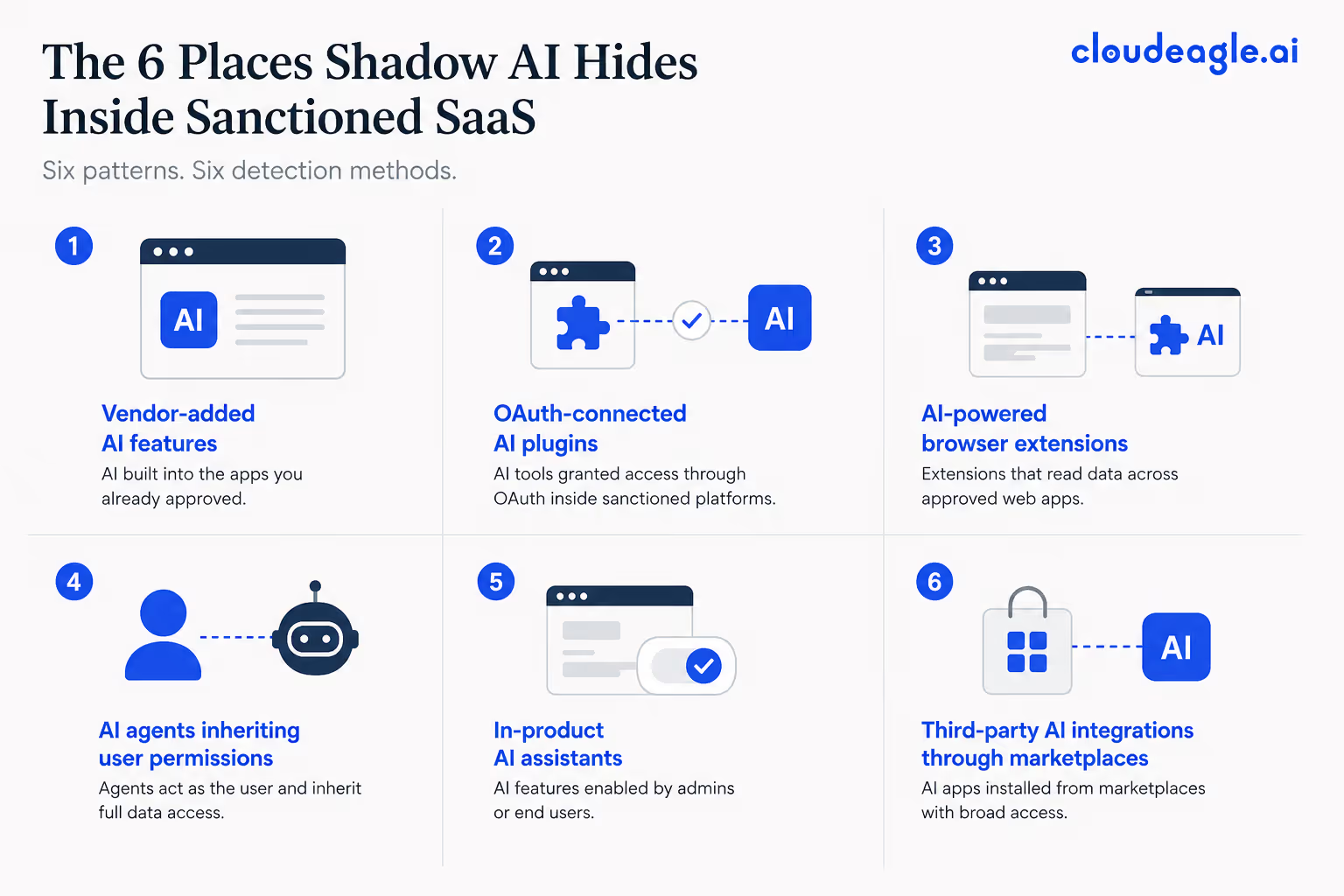
Now the detail.
1. Vendor-added AI features: The hardest category to track. Microsoft 365 Copilot. Salesforce Einstein. Notion AI. Slack AI. Zoom AI Companion. All ship inside platforms you already use. Many are activated by default at the tenant level. Procurement never saw a new contract. Security never saw a new DPA.
2. OAuth-connected AI plugins: Employees grant AI tools access to sanctioned platforms through OAuth: a meeting note-taker connected to Google Calendar, an AI assistant connected to Gmail. The host app is sanctioned. The plugin reads every email.
3. AI browser extensions: Extensions that inject AI into the rendered DOM of sanctioned web apps. They read what's on screen. A user installs an AI rewriter, and an unvetted model reads every Salesforce record and every internal wiki page that the user opens.
4. AI agents inheriting user permissions: Agentic AI tools authenticate as the user. Whatever the user can see, the agent can see. The audit log shows the user took the action. The user did not.
5. Admin-enabled in-product assistants: A workspace admin in Confluence or Notion enables an AI feature for productivity. End users have no idea it's on. Sensitive content gets processed by the vendor's AI model. The toggle was one click.
6. Marketplace integrations: Salesforce AppExchange. Slack App Directory. Microsoft Marketplace. AI-powered apps installed by line-of-business users with broad scopes and no security review. The platform stays sanctioned. The marketplace install becomes the data exit point.
Each channel needs a different signal to detect shadow AI. Treating them as one problem is why most programs miss most of the surface.
A discovery solution that covers all six channels is the difference between catching embedded AI and missing it.

2. How CloudEagle.ai Helps You Detect Shadow AI Inside Apps You Already Trust
CloudEagle.ai is built for this exact problem: AI you can't see, inside SaaS you already own. The platform connects discovery, AI risk scoring, and identity context in one workflow, so embedded AI stops being invisible to your security program.
a) Every vendor gets a GenAI Risk Score before it gets a contract
Most procurement teams approve SaaS vendors without ever asking the AI questions that matter: does this vendor train on your data, can you disable AI features, does the DPA cover AI processing, and what certifications are in place?
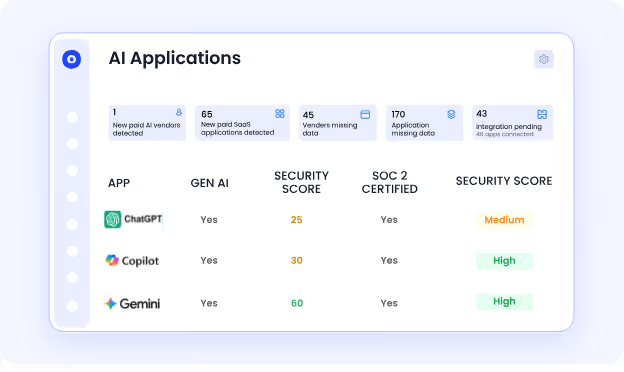
CloudEagle.ai assigns every vendor in your stack a GenAI Risk Score that answers those questions in a single view. The score plugs directly into intake-to-procure workflows, so high-risk vendors trigger security review before contract signature instead of surfacing in an audit twelve months later.
b) Multi-source discovery catches the AI plugins that your CASB doesn't
OAuth grants to AI plugins inside Microsoft 365, Google Workspace, Slack, and Salesforce are invisible to most CASB and SSO tools.
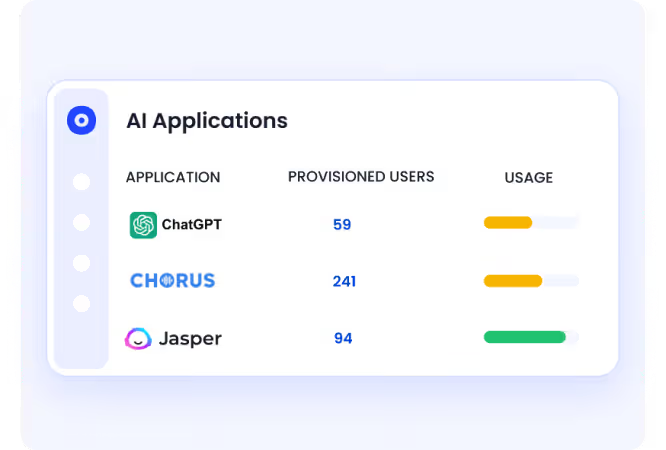
CloudEagle.ai discovers connected apps through SSO, finance systems, browser agents, HRMS, and direct API integrations at the same time.
When a sales rep grants a meeting-note AI tool access to Google Calendar or a marketer connects an AI summarizer to Confluence, it shows up in days, not at audit time. The same discovery layer that surfaces shadow SaaS surfaces the AI plugins running inside it.
c) Identity context turns findings into remediation cases
A dashboard full of AI features no one owns is not detection; it's an alert queue.
CloudEagle.ai ties every AI feature back to the user who invoked it, the role that user holds, and the sensitivity of the data that user can access. A Copilot prompt from a finance analyst with access to revenue data routes differently from the same prompt fired by a marketing intern.
The finding lands with the right owner, with a recommended action, instead of sitting in a report nobody reads.
RingCentral cut SaaS waste and reclaimed unused licenses across its stack using CloudEagle.ai's discovery and governance workflows, documented in the case study. The same discovery foundation that found those unused licenses is what surfaces embedded AI features procurement never knew shipped.
If you want to detect shadow AI inside sanctioned apps without stacking three more tools to do it, CloudEagle.ai consolidates discovery, AI risk scoring, OAuth visibility, and identity governance in one place.
70% of AI Interactions Happen Inside Apps You Already Trust.


3. A 5-Step Framework to Detect Shadow AI Inside Sanctioned Apps
Detection is the foundation. Without it, every governance policy is a press release. Here's the sequence that works:
- Build an AI inventory across sanctioned SaaS apps
- Audit OAuth tokens and SaaS-to-SaaS AI connections
- Monitor prompt-level AI data flows and audit logs
- Score vendors on AI governance and data risk
- Tie AI activity back to identity and access context
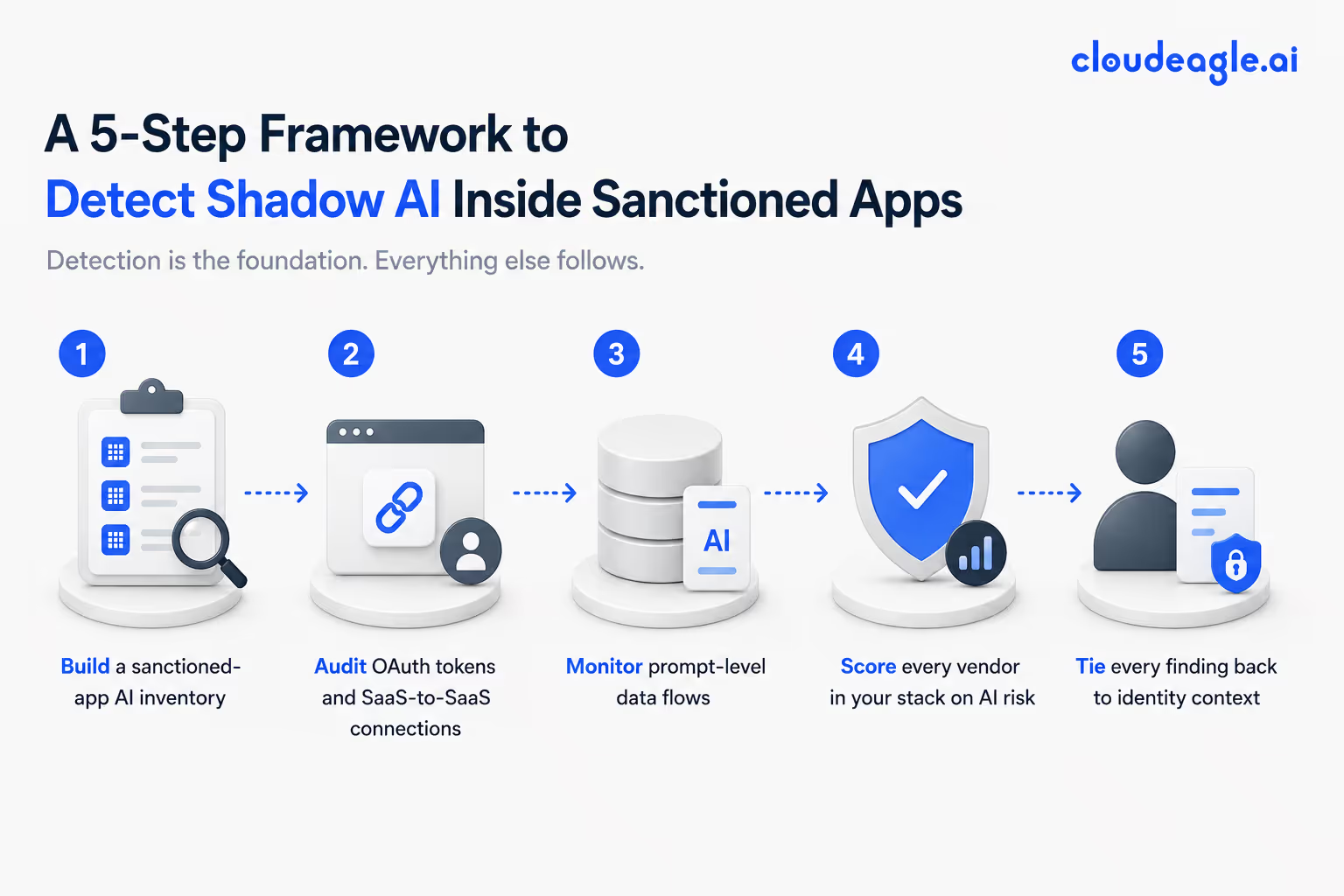
Most shadow AI doesn't enter through unsanctioned apps. It enters through approved platforms where AI features were enabled quietly, connected broadly, and never governed properly.
Step 1: Build a sanctioned-app AI inventory
For every app in your approved stack, document whether AI features exist, whether they're enabled at the tenant level, and what data they can access. The output is a column added to your existing app catalog. Start with your top 20 highest-data apps. Most teams find AI features in 60%-plus of them.
Step 2: Audit OAuth tokens and SaaS-to-SaaS connections
Every sanctioned platform with OAuth has a tenant-level view of every third-party app users have authorized. Pull those lists.
Filter for anything that touches AI, summarization, transcription, or LLMs. Cross-reference against your approved vendor list. The gap is your OAuth shadow AI surface. You will detect shadow AI here that no other method finds.
Step 3: Monitor prompt-level data flows
For sanctioned platforms that publish AI audit logs, turn them on. Microsoft Purview for Copilot. Google Workspace audit for Gemini. Salesforce Trust for Einstein. This is the only way to detect shadow AI in SaaS at the data layer rather than the application layer.
Step 4: Score every vendor in your stack on AI risk
Vendor AI risk is a separate dimension from vendor risk.
The questions:
- Does this vendor train on your data?
- Can you disable it?
- Does the vendor hold relevant certifications (SOC 2, ISO 42001)?
- What's the data residency for AI processing?
Most vendor questionnaires miss all of this.
Also Read: If you want to see how vendor-level AI scoring works in practice, CloudEagle.ai's GenAI Risk Score for SaaS vendors covers the exact data points auditors will ask about in 2026.
Step 5: Tie every finding back to the identity context.
A list of AI features is not actionable. A list of AI features tied to which users invoked them and what data those users can access is. The bridge from detection to remediation is the identity behind the event.
These five steps work whether your stack is 30 apps or 300. The framework is the same. Your tooling determines speed.
4. How to Mitigate Shadow AI Once You've Found It
You can't mitigate shadow AI by banning it. Gartner is consistent on this: blanket bans drive AI underground, where you can't see it at all. Mitigation works when approved alternatives are faster than the workaround.
Four moves that move the needle:
- Publish a sanctioned AI catalog with one-click access. If your approved list is shorter and slower than the marketplace, users route around you. Make the sanctioned path the path of least resistance.
- Enforce least-privilege OAuth. Audit existing OAuth grants quarterly. Revoke broad scopes. Require security review for new AI plugin authorizations on top-tier apps.
- Add AI-aware DLP. Update DLP rules to inspect content going into AI prompts. Pay particular attention to embedded AI features in your top 10 sanctioned apps.
- Score vendors before contract signature. Require an AI risk score on every vendor at procurement. Tie it to AI training, disable controls, and the DPA scope.
Also Read: If you don't have a written AI policy yet, the shadow AI governance gap walks through the 63% of enterprises with no shadow AI policy and the controls that close the gap.
5. FAQs
1. How to detect shadow AI?
Start with a sanctioned-app AI inventory, audit OAuth grants for AI plugins, monitor prompt-level audit logs where vendors publish them, and score every vendor on AI risk.
2. What are the most advanced tools for detecting shadow AI risks?
The strongest tools combine OAuth and SaaS discovery with vendor-level AI risk scoring, prompt-level visibility, and identity context. Platforms covering only one layer leave the embedded-AI surface unmonitored.
3. Is shadow AI the approved and monitored use of AI tools within a company? True or false?
False. Shadow AI means using AI tools, features, or agents without IT or security approval, including AI features activated inside sanctioned SaaS apps without governance review.
4. How to mitigate shadow AI?
Publish a fast, sanctioned AI catalog, enforce least-privilege OAuth, add AI-aware DLP rules, and require an AI risk score on every vendor before contract signature.
6. Shadow AI Inside Sanctioned SaaS is the Visibility Problem of the Next 12 Months
Every SaaS vendor in your stack will ship an AI feature this year. Most already have. Your program either treats embedded AI as a first-class problem or it doesn't, and that decision shows up in your next audit, your next breach post-mortem, or both.
The teams that get ahead of this are not the ones with the strictest policies. They're the ones with the clearest inventory and the fastest sanctioned alternatives.
The fastest way to detect shadow AI in SaaS is to start with one app, one OAuth audit, one vendor risk score, today.
See how CloudEagle.ai helps you detect shadow AI inside every sanctioned app in your stack →
Your Approved Apps Are Already Running AI You Didn't Approve


.avif)


.avif)
.avif)




.png)





_.png)

.avif)
.avif)
.avif)


