You need to enable JavaScript in order to use the AI chatbot tool powered by ChatBot

How to Build an Auditable AI App Inventory Before Your Next Security Review (No Agent Install Required)

Share via:
blog-cms-banner-bg
Little-Known Negotiation Hacks to Get the Best Deal on Slack
cta-bg-blogDownload Your Copy

HIPAA Compliance Checklist for 2025

Download PDF

Building an auditable AI app inventory means layering four signals you already have: IDP, finance, network telemetry, and endpoint data, each one catching what the others miss.

Most teams start and stop at the IDP. They pull what's behind SSO, add whatever's in the app catalog, and call it done. But the tools most likely to create audit findings like browser-based AI signups, API-key model calls, and locally installed coding assistants don't generate a single identity event. They're invisible to the IDP by design.

The result is an inventory that reflects what IT approved. When an auditor asks for point-in-time evidence that a specific user was offboarded from every AI tool they accessed, a list of SSO-connected apps doesn't answer the question.

This post walks through each discovery layer, what it catches, what fields your inventory needs to include to survive a review, and how to build it without a new agent rollout across every endpoint.

TL;DR

  • Most AI tools never show up in SSO; they enter through browsers, expense reports, and direct API calls that bypass your identity provider entirely
  • Building an auditable AI app inventory starts with the signals you already have: IDP, finance, network telemetry, and endpoint data
  • A security review requires five fields per tool: name, approval status, data access scope, owner, and last active date. Most manual approaches leave three of them blank
  • CloudEagle.ai correlates all four discovery layers to surface every AI tool, sanctioned and shadow, in 30 minutes.

1. Why Your Current AI Inventory Won't Survive a Security Review

Before a security review, every auditor asks three questions that are harder than they look:

  • What applications does your team use?
  • Who has access to each of them?
  • For this specific user who left on this specific date, show me the evidence that they were offboarded from all downstream systems.

Most IT teams can answer question one incompletely. They struggle with question two. Question three breaks them entirely.

Producing that evidence today means pulling logs from Active Directory, cross-referencing each SaaS application individually, and stitching everything together manually, showing the auditor: yes, this user was deactivated at this time, by this process. That is forensic reconstruction under deadline pressure. That is not a defensible AI app inventory.

The AI tool explosion has made this structurally worse: 

Three years ago Today
Purchases went through procurement 60% of tools are employee-procured
Tools got behind SSO and showed up in IDP AI tools are credit-card-purchased, individually subscribed
App catalog reflected what was running Most AI tools are not behind any identity provider
Sanctioned vs. unsanctioned was defined Many organizations haven't defined the designation at all

Many security teams are trying to govern tools they haven't classified yet. Any inventory built on IDP data alone is incomplete before it's finished.

An auditor doesn't want to know what IT approved. They want to know what's actually running.

Your AI Inventory Is Incomplete Before It's Finished.

Use this checklist to find every tool auditors will ask about.
Download Checklist

2. How to Build an Auditable AI App Inventory (Step by Step)

Start with the signals you already have, layered in order of coverage speed. The goal is a complete enough picture to defend in front of an auditor, built from infrastructure you already run.

Step 1: Connect your IDP

Your identity provider covers every tool that went through proper procurement and SSO onboarding. It won't catch browser signups, credit-card purchases, or API-key-based access, but it establishes your sanctioned baseline and the access-user mapping auditors need first. 

This is the fastest signal to activate and the logical starting point.

Step 2: Connect your finance or ERP system

AI tools expensed outside IT approval workflows surface here. The ChatGPT Team subscription on the engineering card, the Jasper seat on the marketing card, and finance sees the charge; IT has no record.

Pulling expense data into your AI app inventory closes this blind spot and typically surfaces the largest category of ungoverned AI tools in the organization.

Step 3: Connect Zscaler or your network firewall

API-key-based model calls: a developer hitting Claude or OpenAI directly generates no SSO event and no OAuth grant. They show up only at the network layer. 

Connecting IDP and Zscaler together covers 90 to 95% of use cases and establishes a defensible baseline, even before full endpoint coverage is in place. For organizations with partial Zscaler coverage, this combination is the minimum viable governance baseline.

Step 4: Connect your endpoint tool

Locally installed AI tools, such as coding assistants, local LLMs, and desktop AI clients, are invisible to both SSO and CASB. They install on the endpoint, process code that may include proprietary logic or credentials, and generate no network authentication event. 

CrowdStrike or equivalent endpoint data is the only signal that catches them. This matters more than most teams realize because a developer running a local coding assistant on a laptop processing production code is sharing that code with an external model, with no IT record that the interaction ever happened.

Step 5: Define sanctioned versus unsanctioned

This step gets skipped more often than any other, and it's the one that makes the inventory defensible. Without a working definition of what counts as approved, your inventory has no classification layer, and audit findings become a matter of interpretation. 

Establish the designation criteria before the review. Even a simple binary approved tools list versus everything else is enough to start.

Completing these five steps gives you a layered, multi-source AI app inventory that covers the entry paths auditors probe. Each layer adds coverage that a single-source approach cannot provide.

If you're still running manual SaaS discovery, this checklist closes the gap before you connect the first integration: A Step-by-Step SaaS Discovery Runbook Checklist

3. How CloudEagle.ai Builds This Without a New Agent Rollout

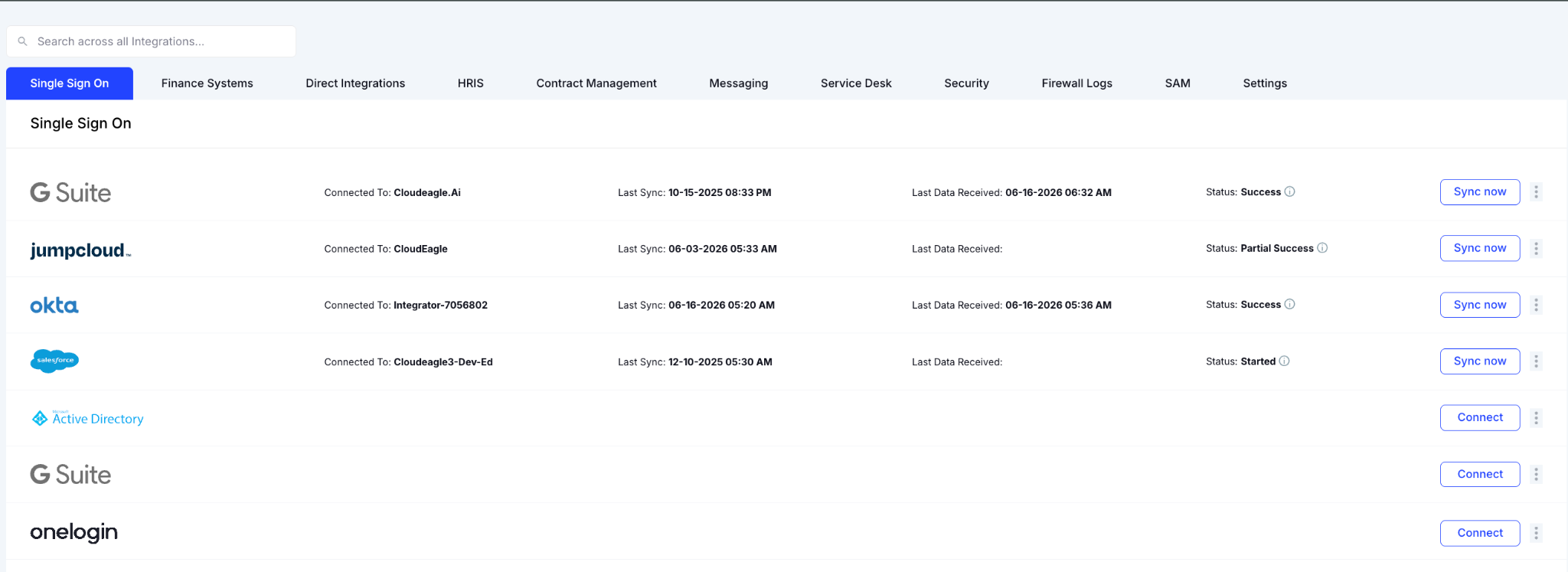
CloudEagle.ai executes those five steps in 30 minutes by correlating four discovery layers through 500+ direct integrations

CloudEagle Integrations dashboard displaying connected enterprise applications and identity providers. The page includes integration categories such as Single Sign On, Finance Systems, HRIS, Security, and Service Desk, with integrations including Google Workspace, JumpCloud, Okta, Salesforce, and Active Directory. Each integration shows connection status, last sync date, data receipt status, and synchronization controls.

There’s no new agent deployment required across every endpoint, or waiting for full CASB coverage before usable visibility begins.

a) Browser Plugin via MDM

The browser plugin deploys through your existing MDM. The moment an employee logs into an AI tool for the first time, a record is created: tool name, user, timestamp, and data category. 

For security teams that want a lighter path to visibility before committing to full network coverage, this is the fastest signal to activate. It catches the entire long tail of browser-based AI signups that produce no SSO event and no IDP trace.

b) Finance and ERP Integration

AI tools expensed outside IT approval workflows surface here with spend data already attached: the ChatGPT Team subscription on the engineering card. 

The Jasper seat is on the marketing card. Every tool that enters through the finance layer gets pulled into the AI app inventory with cost and owner context pre-populated. 

This is the signal most teams skip, and it's often where the largest cluster of ungoverned AI tools is hiding.

c) Zscaler and Network Telemetry

API-key access that bypasses SSO entirely shows up at the network layer. A developer calling an AI model API directly never generates an IDP event, but that traffic passes through Zscaler.

CloudEagle.ai correlates the network log against its proprietary SaaSMap to identify the tool, the user context where available, and the data category. For organizations with partial Zscaler coverage, connecting IDP and Zscaler already covers 90 to 95% of use cases and establishes a defensible baseline before endpoint coverage is complete.

d) CrowdStrike and Endpoint Data

Locally installed AI tools such as Claude Code, Cursor, and GitHub Copilot desktop are invisible to both SSO and CASB. They live on the endpoint, process code that may include proprietary logic or credentials, and generate no network authentication event. 

CloudEagle.ai correlates CrowdStrike logs against the SaaSMap to surface them, map them to the user and device, and bring them into the same governance layer as every other tool in the inventory.

The output is a unified AI app inventory: every tool discovered, its discovery source, approval status, owner, spend, and risk classification. One dashboard. Your AI app inventory is audit-ready from day one.
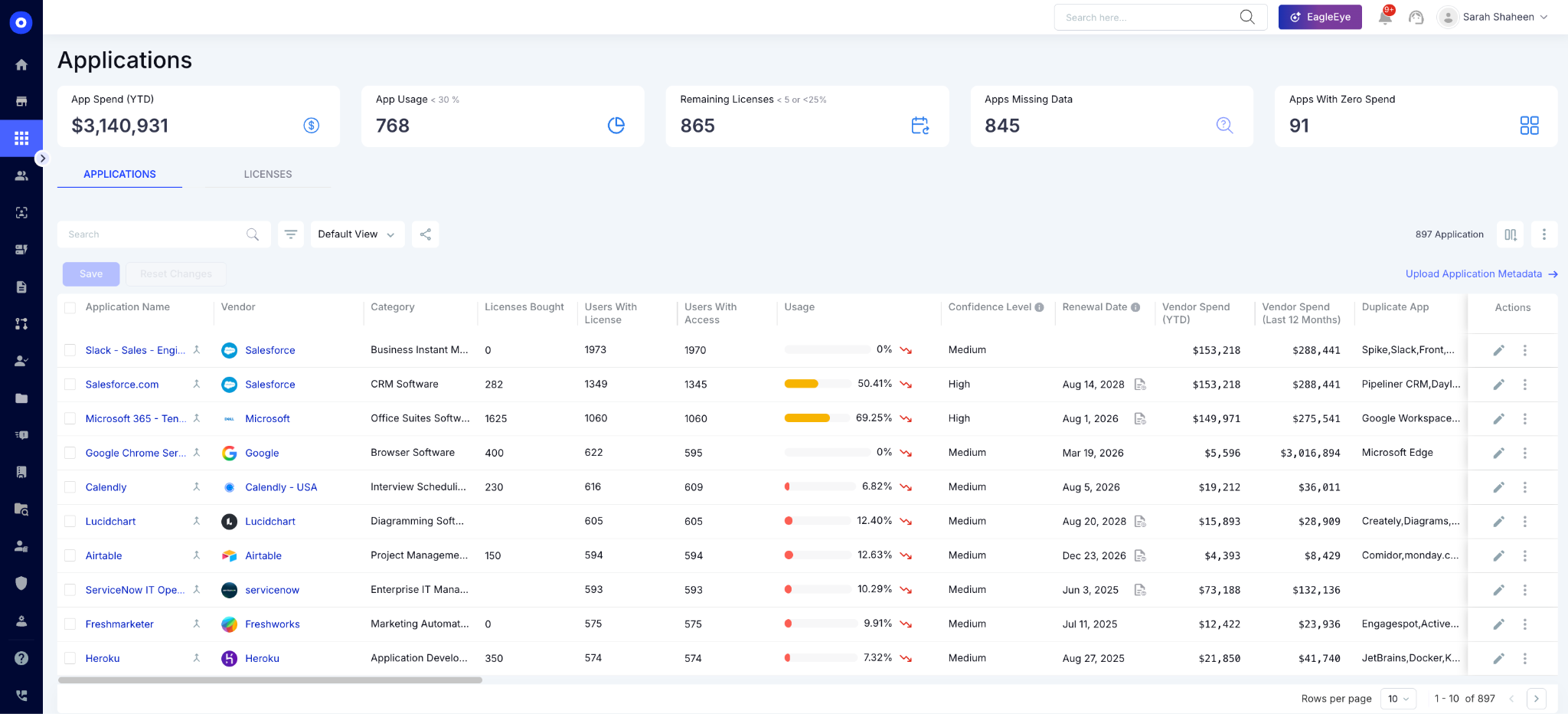
CloudEagle Application Inventory dashboard showing a centralized list of SaaS applications across the organization. The page includes summary metrics for app spend, usage, remaining licenses, missing data, and zero-spend applications. A detailed inventory table displays application names, vendors, categories, license counts, user access, usage rates, renewal dates, vendor spend, duplicate applications, and management actions.

4. What the Inventory Needs to Include to Actually Pass a Security Review

An AI app inventory that survives a security review has five fields. Most manual approaches leave at least three of them blank.

1. Tool name and discovery source

The name is obvious. The discovery source is what makes the inventory defensible. An auditor who sees "discovered via browser plugin on [date]" has a chain of custody. A manually maintained spreadsheet has no detection methodology and no chain of custody; it's a document.

2. Approval status

Sanctioned or unsanctioned, with the date the designation was made. At enterprise scale: managing thousands of app-user combinations across quarterly review cycles, apps constantly enter and leave scope. 

Without a live approval status field, every scope change becomes a manual reconciliation project that touches multiple systems simultaneously.

3. Data access scope

What data can this tool reach? OAuth grants, file permissions, API scopes. An AI tool with read access to the company's Google Drive has a materially different risk profile from one that only processes text inputs. 

This field is almost always blank in manual inventories and is almost always the first thing an auditor asks to see. Research found that 90% of organizations claim visibility into their AI footprint, yet 59% confirm, or suspect, that shadow AI exists in their environment. That contradiction lives in this field: they know the tool name, they don't know what it can reach.

4. Owner and accountable team 

Without an assigned owner, there is no one to notify when the tool's risk profile changes and no clear accountability when something goes wrong.

5. Last active date

Stale access is a primary audit finding. An employee who left the company and still has an active session in an ungoverned AI tool is an access control failure. 

Point-in-time offboarding evidence, "show me that this user was removed from all systems on this date," requires this field to be populated automatically, not reconstructed from raw logs the week before the review.

What the manual baseline actually looks like in practice: Most security teams today run a biweekly export into Excel, run VLOOKUPs and pivot tables against usage data, and send a manually assembled report to stakeholders every fortnight. 

There's no chain of custody, live classification layer, and no way to produce point-in-time evidence without starting over from raw logs. CloudEagle.ai auto-populates all five fields from the discovery layer from day one.

Auditors Will Ask What Your AI Tools Can Access. Can You Answer?

This checklist maps every data access scope before they ask.
Download Checklist

Frequently Asked Questions

1. What is an AI app inventory? 

A complete record of every AI tool in use across the organization, including approval status, owner, data access scope, and last active date, used for security reviews and access governance.

2. How do AI tools bypass SSO and avoid appearing in an inventory? 

Tools accessed via direct browser signup, expensed outside procurement, or called via API key generate no SSO event. Catching them requires correlating browser, finance, network, and endpoint signals.

3. What is the fastest way to build an AI app inventory without a full agent rollout?

Connect your IDP and a browser plugin via MDM first. Adding Zscaler gets you to 90 to 95% coverage. CloudEagle surfaces full inventory visibility in 30 minutes from those signals alone.

4. What do auditors ask for when reviewing AI tool access? 

Auditors ask for point-in-time evidence: which tools were in use on a given date, who had access, and whether offboarding from all systems happened at the correct time.

5. How is shadow AI different from shadow IT in a security review? 

Shadow AI carries a higher data risk because AI tools actively process and transmit business data to external models, creating data exposure that standard unsanctioned SaaS typically does not. It also moves faster: AI tool proliferation grew by over 50% year-over-year in 2025 alone.

CloudEagle turns a 60-day-old spreadsheet into a defensible, audit-ready AI app inventory using signals you already have, without touching your existing security stack.

Advertisement for a SaaS Subscription Tracking Template with a call-to-action button to download and a partial graphic of a tablet showing charts.Banner promoting a SaaS Agreement Checklist to streamline SaaS management and avoid budget waste with a call-to-action button labeled Download checklist.Blue banner with text 'The Ultimate Employee Offboarding Checklist!' and a black button labeled 'Download checklist' alongside partial views of checklist documents from cloudeagle.ai.Digital ad for download checklist titled 'The Ultimate Checklist for IT Leaders to Optimize SaaS Operations' by cloudeagle.ai, showing checklist pages.Slack Buyer's Guide offer with text 'Unlock insider insights to get the best deal on Slack!' and a button labeled 'Get Your Copy', accompanied by a preview of the guide featuring Slack's logo.Monday Pricing Guide by cloudeagle.ai offering exclusive pricing secrets to maximize investment with a call-to-action button labeled Get Your Copy and an image of the guide's cover.Blue banner for Canva Pricing Guide by cloudeagle.ai offering a guide to Canva costs, features, and alternatives with a call-to-action button saying Get Your Copy.Blue banner with white text reading 'Little-Known Negotiation Hacks to Get the Best Deal on Slack' and a white button labeled 'Get Your Copy'.Blue banner with text 'Little-Known Negotiation Hacks to Get the Best Deal on Monday.com' and a white button labeled 'Get Your Copy'.Blue banner with text 'Little-Known Negotiation Hacks to Get the Best Deal on Canva' and a white button labeled 'Get Your Copy'.Banner with text 'Slack Buyer's Guide' and a 'Download Now' button next to images of a guide titled 'Slack Buyer’s Guide: Features, Pricing & Best Practices'.Digital cover of Monday Pricing Guide with a button labeled Get Your Copy on a blue background.Canva Pricing Guide cover with a button labeled Get Your Copy on a blue gradient background.

Enter your email to
unlock the report

Oops! Something went wrong while submitting the form.
License Count
Benchmark
Per User/Per Year

Enter your email to
unlock the report

Oops! Something went wrong while submitting the form.
License Count
Benchmark
Per User/Per Year

Enter your email to
unlock the report

Oops! Something went wrong while submitting the form.
Notion Plus
License Count
Benchmark
Per User/Per Year
100-500
$67.20 - $78.72
500-1000
$59.52 - $72.00
1000+
$51.84 - $57.60
Canva Pro
License Count
Benchmark
Per User/Per Year
100-500
$74.33-$88.71
500-1000
$64.74-$80.32
1000+
$55.14-$62.34

Enter your email to
unlock the report

Oops! Something went wrong while submitting the form.

Enter your email to
unlock the report

Oops! Something went wrong while submitting the form.
Zoom Business
License Count
Benchmark
Per User/Per Year
100-500
$216.00 - $264.00
500-1000
$180.00 - $216.00
1000+
$156.00 - $180.00

Enter your email to
unlock the report

Oops! Something went wrong while submitting the form.

Get the Right Security Platform To Secure Your Cloud Infrastructure

Please enter a business email
Thank you!
The 2023 SaaS report has been sent to your email. Check your promotional or spam folder.
Oops! Something went wrong while submitting the form.

Access full report

Please enter a business email
Thank you!
The 2023 SaaS report has been sent to your email. Check your promotional or spam folder.
Oops! Something went wrong while submitting the form.

Building an auditable AI app inventory means layering four signals you already have: IDP, finance, network telemetry, and endpoint data, each one catching what the others miss.

Most teams start and stop at the IDP. They pull what's behind SSO, add whatever's in the app catalog, and call it done. But the tools most likely to create audit findings like browser-based AI signups, API-key model calls, and locally installed coding assistants don't generate a single identity event. They're invisible to the IDP by design.

The result is an inventory that reflects what IT approved. When an auditor asks for point-in-time evidence that a specific user was offboarded from every AI tool they accessed, a list of SSO-connected apps doesn't answer the question.

This post walks through each discovery layer, what it catches, what fields your inventory needs to include to survive a review, and how to build it without a new agent rollout across every endpoint.

TL;DR

  • Most AI tools never show up in SSO; they enter through browsers, expense reports, and direct API calls that bypass your identity provider entirely
  • Building an auditable AI app inventory starts with the signals you already have: IDP, finance, network telemetry, and endpoint data
  • A security review requires five fields per tool: name, approval status, data access scope, owner, and last active date. Most manual approaches leave three of them blank
  • CloudEagle.ai correlates all four discovery layers to surface every AI tool, sanctioned and shadow, in 30 minutes.

1. Why Your Current AI Inventory Won't Survive a Security Review

Before a security review, every auditor asks three questions that are harder than they look:

  • What applications does your team use?
  • Who has access to each of them?
  • For this specific user who left on this specific date, show me the evidence that they were offboarded from all downstream systems.

Most IT teams can answer question one incompletely. They struggle with question two. Question three breaks them entirely.

Producing that evidence today means pulling logs from Active Directory, cross-referencing each SaaS application individually, and stitching everything together manually, showing the auditor: yes, this user was deactivated at this time, by this process. That is forensic reconstruction under deadline pressure. That is not a defensible AI app inventory.

The AI tool explosion has made this structurally worse: 

Three years ago Today
Purchases went through procurement 60% of tools are employee-procured
Tools got behind SSO and showed up in IDP AI tools are credit-card-purchased, individually subscribed
App catalog reflected what was running Most AI tools are not behind any identity provider
Sanctioned vs. unsanctioned was defined Many organizations haven't defined the designation at all

Many security teams are trying to govern tools they haven't classified yet. Any inventory built on IDP data alone is incomplete before it's finished.

An auditor doesn't want to know what IT approved. They want to know what's actually running.

Your AI Inventory Is Incomplete Before It's Finished.

Use this checklist to find every tool auditors will ask about.
Download Checklist

2. How to Build an Auditable AI App Inventory (Step by Step)

Start with the signals you already have, layered in order of coverage speed. The goal is a complete enough picture to defend in front of an auditor, built from infrastructure you already run.

Step 1: Connect your IDP

Your identity provider covers every tool that went through proper procurement and SSO onboarding. It won't catch browser signups, credit-card purchases, or API-key-based access, but it establishes your sanctioned baseline and the access-user mapping auditors need first. 

This is the fastest signal to activate and the logical starting point.

Step 2: Connect your finance or ERP system

AI tools expensed outside IT approval workflows surface here. The ChatGPT Team subscription on the engineering card, the Jasper seat on the marketing card, and finance sees the charge; IT has no record.

Pulling expense data into your AI app inventory closes this blind spot and typically surfaces the largest category of ungoverned AI tools in the organization.

Step 3: Connect Zscaler or your network firewall

API-key-based model calls: a developer hitting Claude or OpenAI directly generates no SSO event and no OAuth grant. They show up only at the network layer. 

Connecting IDP and Zscaler together covers 90 to 95% of use cases and establishes a defensible baseline, even before full endpoint coverage is in place. For organizations with partial Zscaler coverage, this combination is the minimum viable governance baseline.

Step 4: Connect your endpoint tool

Locally installed AI tools, such as coding assistants, local LLMs, and desktop AI clients, are invisible to both SSO and CASB. They install on the endpoint, process code that may include proprietary logic or credentials, and generate no network authentication event. 

CrowdStrike or equivalent endpoint data is the only signal that catches them. This matters more than most teams realize because a developer running a local coding assistant on a laptop processing production code is sharing that code with an external model, with no IT record that the interaction ever happened.

Step 5: Define sanctioned versus unsanctioned

This step gets skipped more often than any other, and it's the one that makes the inventory defensible. Without a working definition of what counts as approved, your inventory has no classification layer, and audit findings become a matter of interpretation. 

Establish the designation criteria before the review. Even a simple binary approved tools list versus everything else is enough to start.

Completing these five steps gives you a layered, multi-source AI app inventory that covers the entry paths auditors probe. Each layer adds coverage that a single-source approach cannot provide.

If you're still running manual SaaS discovery, this checklist closes the gap before you connect the first integration: A Step-by-Step SaaS Discovery Runbook Checklist

3. How CloudEagle.ai Builds This Without a New Agent Rollout

CloudEagle.ai executes those five steps in 30 minutes by correlating four discovery layers through 500+ direct integrations

CloudEagle Integrations dashboard displaying connected enterprise applications and identity providers. The page includes integration categories such as Single Sign On, Finance Systems, HRIS, Security, and Service Desk, with integrations including Google Workspace, JumpCloud, Okta, Salesforce, and Active Directory. Each integration shows connection status, last sync date, data receipt status, and synchronization controls.

There’s no new agent deployment required across every endpoint, or waiting for full CASB coverage before usable visibility begins.

a) Browser Plugin via MDM

The browser plugin deploys through your existing MDM. The moment an employee logs into an AI tool for the first time, a record is created: tool name, user, timestamp, and data category. 

For security teams that want a lighter path to visibility before committing to full network coverage, this is the fastest signal to activate. It catches the entire long tail of browser-based AI signups that produce no SSO event and no IDP trace.

b) Finance and ERP Integration

AI tools expensed outside IT approval workflows surface here with spend data already attached: the ChatGPT Team subscription on the engineering card. 

The Jasper seat is on the marketing card. Every tool that enters through the finance layer gets pulled into the AI app inventory with cost and owner context pre-populated. 

This is the signal most teams skip, and it's often where the largest cluster of ungoverned AI tools is hiding.

c) Zscaler and Network Telemetry

API-key access that bypasses SSO entirely shows up at the network layer. A developer calling an AI model API directly never generates an IDP event, but that traffic passes through Zscaler.

CloudEagle.ai correlates the network log against its proprietary SaaSMap to identify the tool, the user context where available, and the data category. For organizations with partial Zscaler coverage, connecting IDP and Zscaler already covers 90 to 95% of use cases and establishes a defensible baseline before endpoint coverage is complete.

d) CrowdStrike and Endpoint Data

Locally installed AI tools such as Claude Code, Cursor, and GitHub Copilot desktop are invisible to both SSO and CASB. They live on the endpoint, process code that may include proprietary logic or credentials, and generate no network authentication event. 

CloudEagle.ai correlates CrowdStrike logs against the SaaSMap to surface them, map them to the user and device, and bring them into the same governance layer as every other tool in the inventory.

The output is a unified AI app inventory: every tool discovered, its discovery source, approval status, owner, spend, and risk classification. One dashboard. Your AI app inventory is audit-ready from day one.

CloudEagle Application Inventory dashboard showing a centralized list of SaaS applications across the organization. The page includes summary metrics for app spend, usage, remaining licenses, missing data, and zero-spend applications. A detailed inventory table displays application names, vendors, categories, license counts, user access, usage rates, renewal dates, vendor spend, duplicate applications, and management actions.

4. What the Inventory Needs to Include to Actually Pass a Security Review

An AI app inventory that survives a security review has five fields. Most manual approaches leave at least three of them blank.

1. Tool name and discovery source

The name is obvious. The discovery source is what makes the inventory defensible. An auditor who sees "discovered via browser plugin on [date]" has a chain of custody. A manually maintained spreadsheet has no detection methodology and no chain of custody; it's a document.

2. Approval status

Sanctioned or unsanctioned, with the date the designation was made. At enterprise scale: managing thousands of app-user combinations across quarterly review cycles, apps constantly enter and leave scope. 

Without a live approval status field, every scope change becomes a manual reconciliation project that touches multiple systems simultaneously.

3. Data access scope

What data can this tool reach? OAuth grants, file permissions, API scopes. An AI tool with read access to the company's Google Drive has a materially different risk profile from one that only processes text inputs. 

This field is almost always blank in manual inventories and is almost always the first thing an auditor asks to see. Research found that 90% of organizations claim visibility into their AI footprint, yet 59% confirm, or suspect, that shadow AI exists in their environment. That contradiction lives in this field: they know the tool name, they don't know what it can reach.

4. Owner and accountable team 

Without an assigned owner, there is no one to notify when the tool's risk profile changes and no clear accountability when something goes wrong.

5. Last active date

Stale access is a primary audit finding. An employee who left the company and still has an active session in an ungoverned AI tool is an access control failure. 

Point-in-time offboarding evidence, "show me that this user was removed from all systems on this date," requires this field to be populated automatically, not reconstructed from raw logs the week before the review.

What the manual baseline actually looks like in practice: Most security teams today run a biweekly export into Excel, run VLOOKUPs and pivot tables against usage data, and send a manually assembled report to stakeholders every fortnight. 

There's no chain of custody, live classification layer, and no way to produce point-in-time evidence without starting over from raw logs. CloudEagle.ai auto-populates all five fields from the discovery layer from day one.

Auditors Will Ask What Your AI Tools Can Access. Can You Answer?

This checklist maps every data access scope before they ask.
Download Checklist

Frequently Asked Questions

1. What is an AI app inventory? 

A complete record of every AI tool in use across the organization, including approval status, owner, data access scope, and last active date, used for security reviews and access governance.

2. How do AI tools bypass SSO and avoid appearing in an inventory? 

Tools accessed via direct browser signup, expensed outside procurement, or called via API key generate no SSO event. Catching them requires correlating browser, finance, network, and endpoint signals.

3. What is the fastest way to build an AI app inventory without a full agent rollout?

Connect your IDP and a browser plugin via MDM first. Adding Zscaler gets you to 90 to 95% coverage. CloudEagle surfaces full inventory visibility in 30 minutes from those signals alone.

4. What do auditors ask for when reviewing AI tool access? 

Auditors ask for point-in-time evidence: which tools were in use on a given date, who had access, and whether offboarding from all systems happened at the correct time.

5. How is shadow AI different from shadow IT in a security review? 

Shadow AI carries a higher data risk because AI tools actively process and transmit business data to external models, creating data exposure that standard unsanctioned SaaS typically does not. It also moves faster: AI tool proliferation grew by over 50% year-over-year in 2025 alone.

CloudEagle turns a 60-day-old spreadsheet into a defensible, audit-ready AI app inventory using signals you already have, without touching your existing security stack.

CloudEagle.ai recognized in the 2025 Gartner® Magic Quadrant™ for SaaS Management Platforms
Download now
gartner chart
5x
Faster employee
onboarding
80%
Reduction in time for
user access reviews
30k
Workflows
automated
$15Bn
Analyzed in
contract spend
$2Bn
Saved in
SaaS spend

Streamline SaaS governance and save 10-30%

Book a Demo with Expert
CTA image