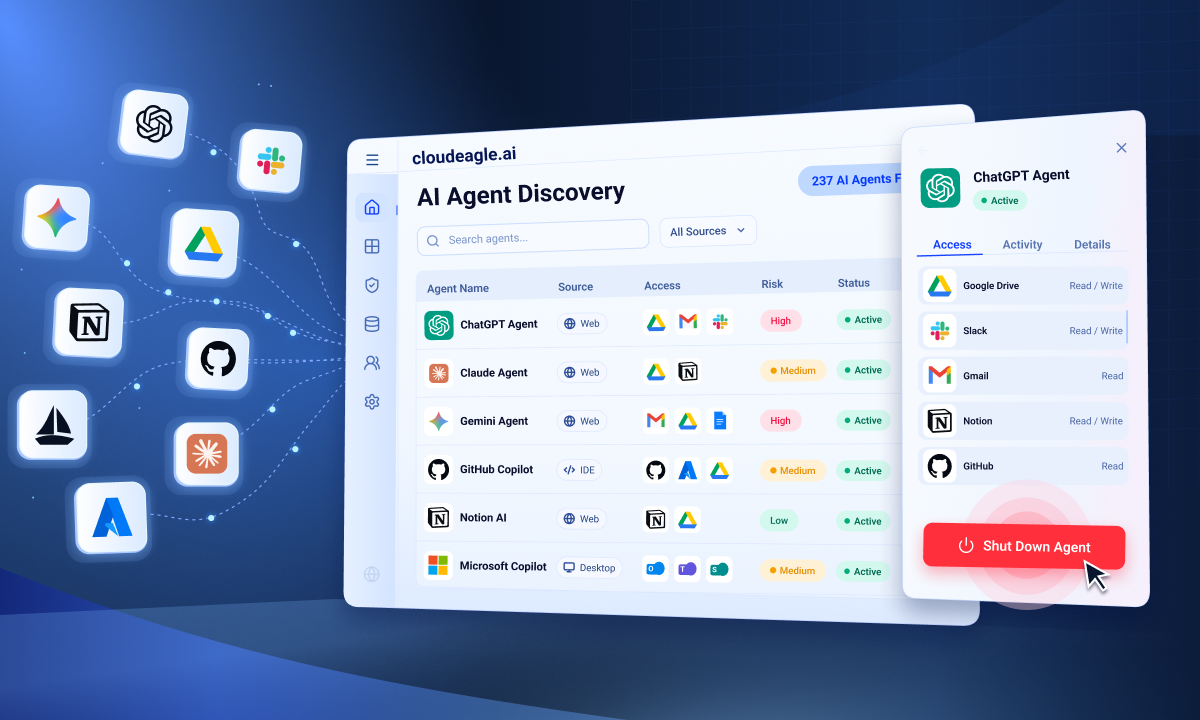
You need to enable JavaScript in order to use the AI chatbot tool powered by ChatBot

How to Enforce AI Usage Policies and Guardrails to Prevent Uncontrolled AI Spending at Scale

Share via:
blog-cms-banner-bg
Little-Known Negotiation Hacks to Get the Best Deal on Slack
cta-bg-blogDownload Your Copy

HIPAA Compliance Checklist for 2025

Download PDF

AI adoption inside most enterprises is moving faster than IT can govern it. Employees are using tools that nobody approved. Finance is receiving invoices that nobody budgeted for. Sensitive data is entering models that nobody reviewed.

The typical response is a better policy document. That changes nothing. A policy is not a technical control.

What works is real-time enforcement at the point of behavior, combined with preventive guardrails set before problems occur. This blog covers both.

TL;DR 

  1. Most enterprise AI spending becomes uncontrolled because employees use unapproved tools, token usage lacks visibility, and policies are not enforced in real time.
  2. Effective AI governance requires browser-level enforcement that detects shadow AI, redirects employees to approved tools, and blocks sensitive data before it reaches AI models.
  3. CloudEagle helps teams control AI spend with token thresholds, budget alerts, duplicate subscription detection, and per-user usage visibility.
  4. The platform also covers AI tools without native APIs through automated usage ingestion and centralized monitoring.
  5. IT, Finance, and Security teams all operate from the same real-time AI inventory, usage data, and risk insights instead of disconnected tools and dashboards.

1. What Causes Uncontrolled AI Spending?

Before you fix it, you need to know what is breaking.

No Visibility Into What Employees Are Using 

IT knows what is behind the identity provider. Beyond that, AI features embedded inside approved SaaS tools, coding assistants installed without tickets, and browser extensions used on company devices, there is no picture. You cannot govern tools you do not know exist.

No Enforcement at the Point of Behavior 

Policies exist, but nothing happens when an employee opens an unapproved tool. The acceptable use document is evidence that a rule existed. It is not a control.

No Per-User Spend Attribution 

Finance receives a consolidated invoice with no breakdown by team or person. Token consumption compounds in ways seat licenses never did. One developer on an approved Claude account with no usage cap can run up thousands in a week. Nobody finds out until the bill arrives.

No Controls on What Enters AI Prompts 

Employees paste sensitive data into AI tools without thinking about it. Client contracts, financial records, credentials, and entering models the organization may never have evaluated for data handling compliance.

Shadow AI Is Already in Your Stack.

Most teams don’t see it until the damage is done.
Find Shadow AI

2. How to Enforce AI Usage Policies at Scale?

Enforcement means controls that fire in real time when the wrong thing happens.

1. Build a Live AI Application Inventory First

You cannot enforce a policy on a tool you do not know exists. Before you set any guardrail, you need visibility into every AI application employees are using, not just the ones IT approved.

This includes:

  • Browser extensions employees installed themselves
  • Personal accounts are used to access tools like ChatGPT
  • AI features quietly switching on inside existing SaaS tools

CloudEagle's SaaSMap detects AI tool usage through:

  • Browser plugin activity, even off-network
  • Firewall log ingestion through Zscaler and CrowdStrike
  • 500+ direct integrations for API-level usage data

Every detected tool receives a risk score based on factors like MFA support, GDPR compliance, and breach history. The result is a live inventory that updates continuously instead of a quarterly audit.

2. Enforce Your Approved Tool List in the Browser

Knowing which tools employees use is very different from controlling which ones they actually access.

Admins configure an approved AI tool list inside CloudEagle and map each unapproved tool to an approved alternative. When an employee opens an unapproved tool, the browser plugin triggers a flash page:
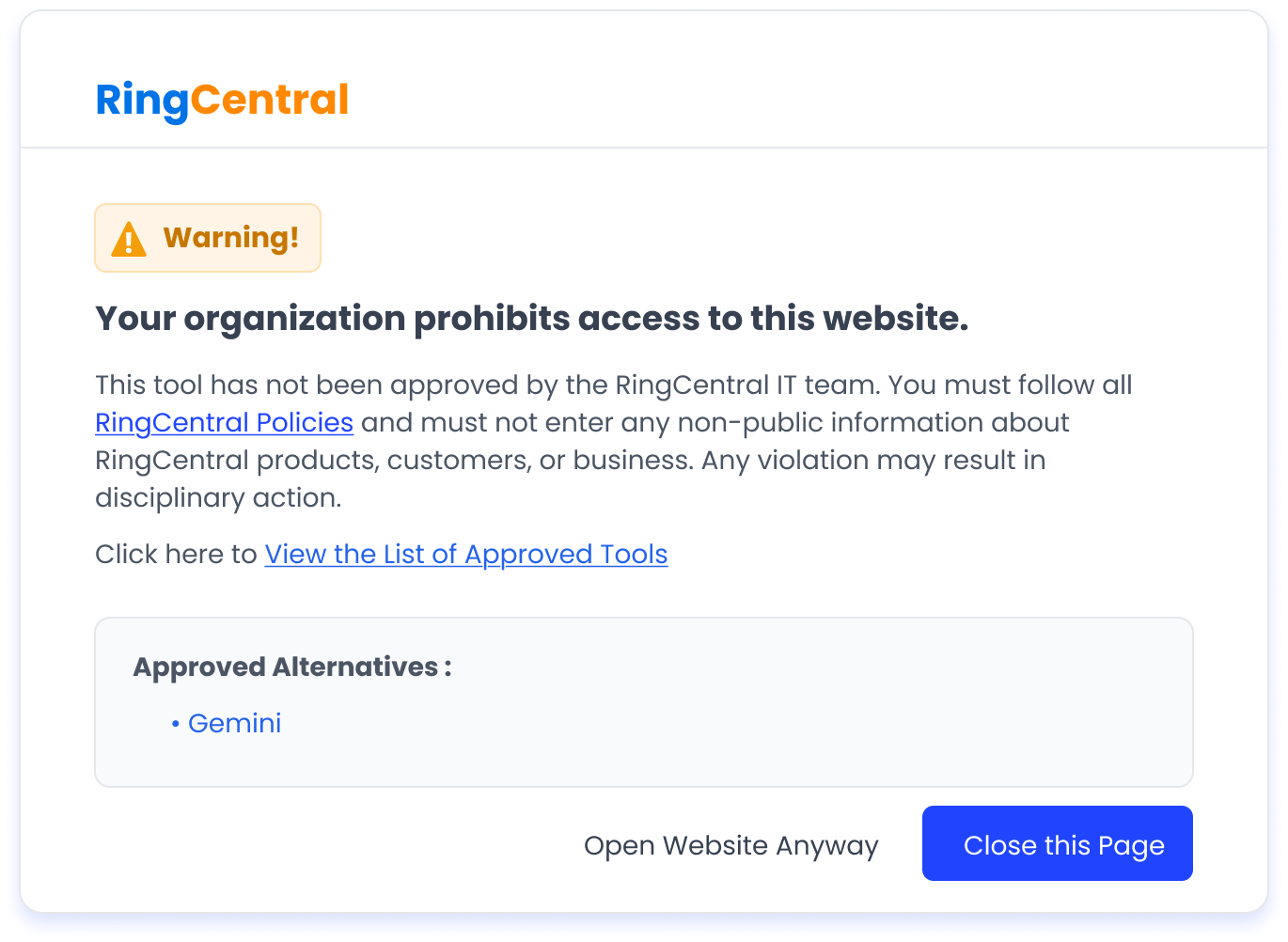
Secure Browser

"This app is not approved by your IT team."

The employee is redirected to the approved tool in seconds without being blocked from work.

By default, this works as a soft block. Employees can dismiss the warning, and the activity is still logged. For organizations that need stricter enforcement, CloudEagle also integrates with Palo Alto Networks for firewall-level blocking.

3. Stop Sensitive Data Before It Reaches the Model

Getting employees onto approved tools does not stop them from pasting the wrong data into those tools.
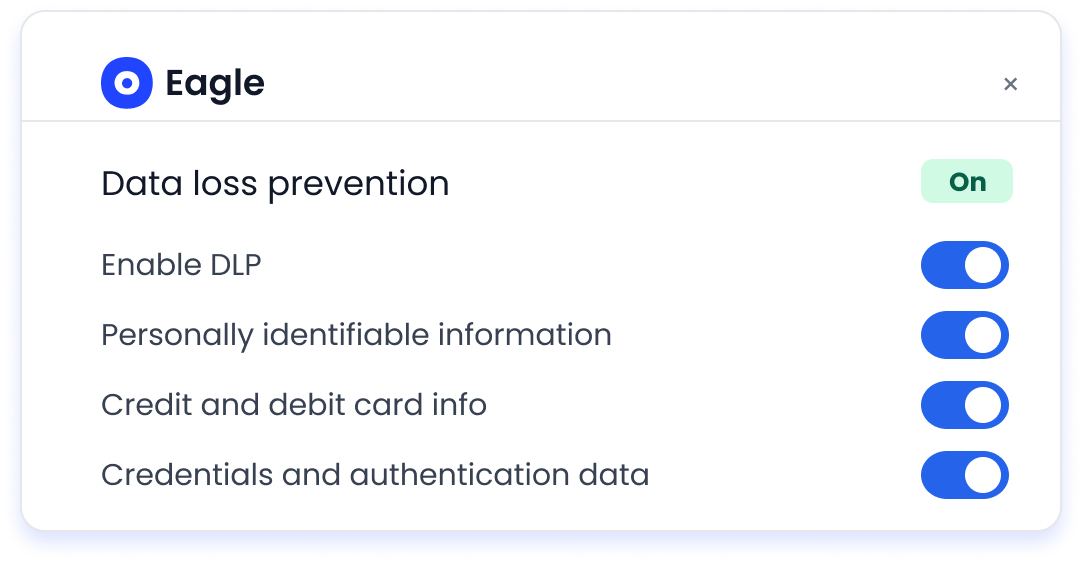
Data Loss Prevention

CloudEagle's soft DLP layer monitors what employees type into AI interfaces through the same browser plugin. If content matches a configured classification, such as:

  • PII
  • Financial data
  • Credentials
  • Healthcare records

A flash page appears before the content is submitted to the model.

The intervention happens before data leaves the organization. Every trigger is logged automatically for compliance tracking.

This works directly at the prompt layer, which is where most traditional DLP tools have limited visibility.
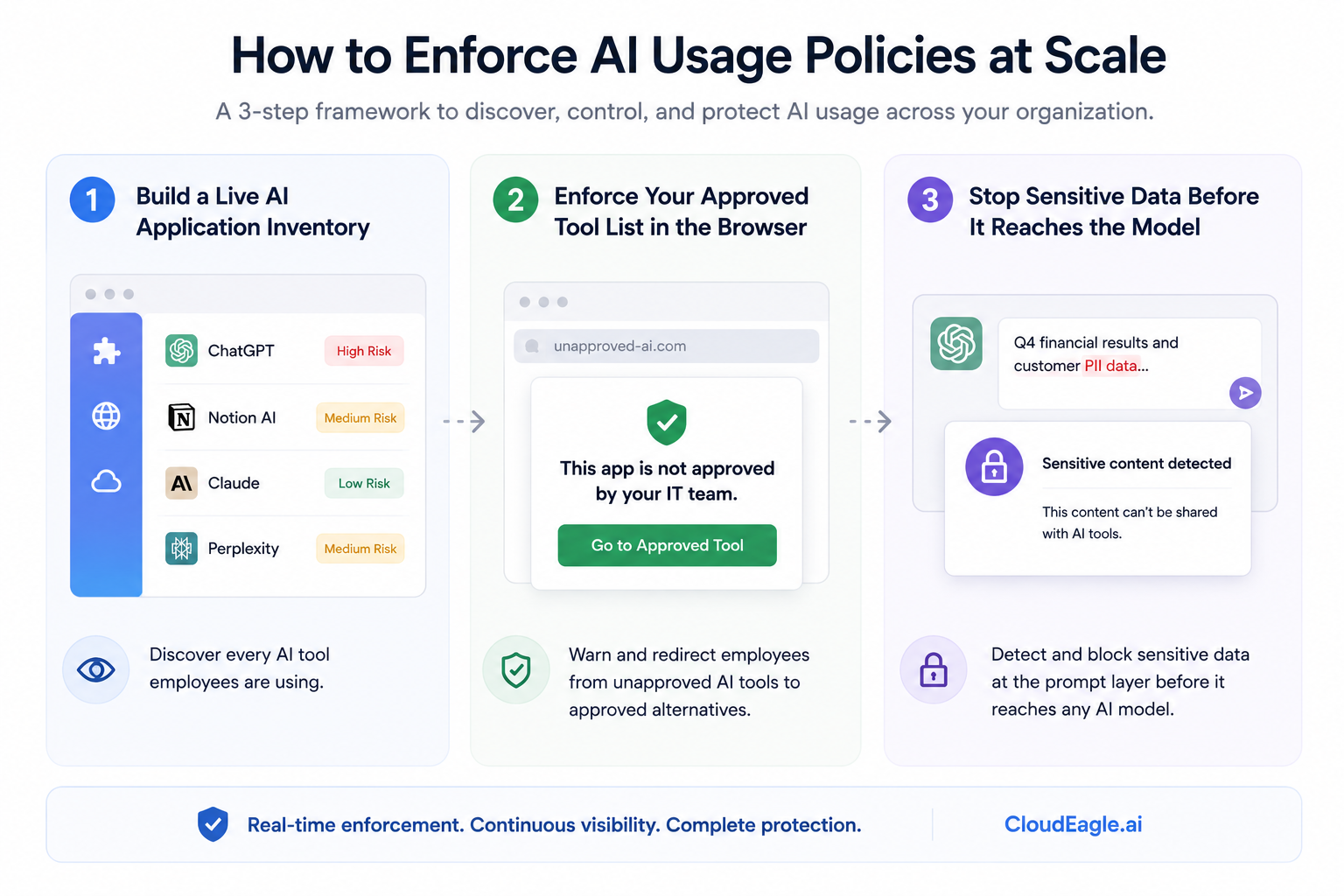
How to Enforce AI Usage Policies

3. How to Build Guardrails That Actually Work?

Enforcement stops bad behavior in real time. Guardrails prevent the conditions that cause it.

1. Set Token and Spend Thresholds Per User and Team

Configure spend or token limits inside CloudEagle for Claude, ChatGPT, Cursor, Gemini, and GitHub Copilot, per user, per team, or per tool.
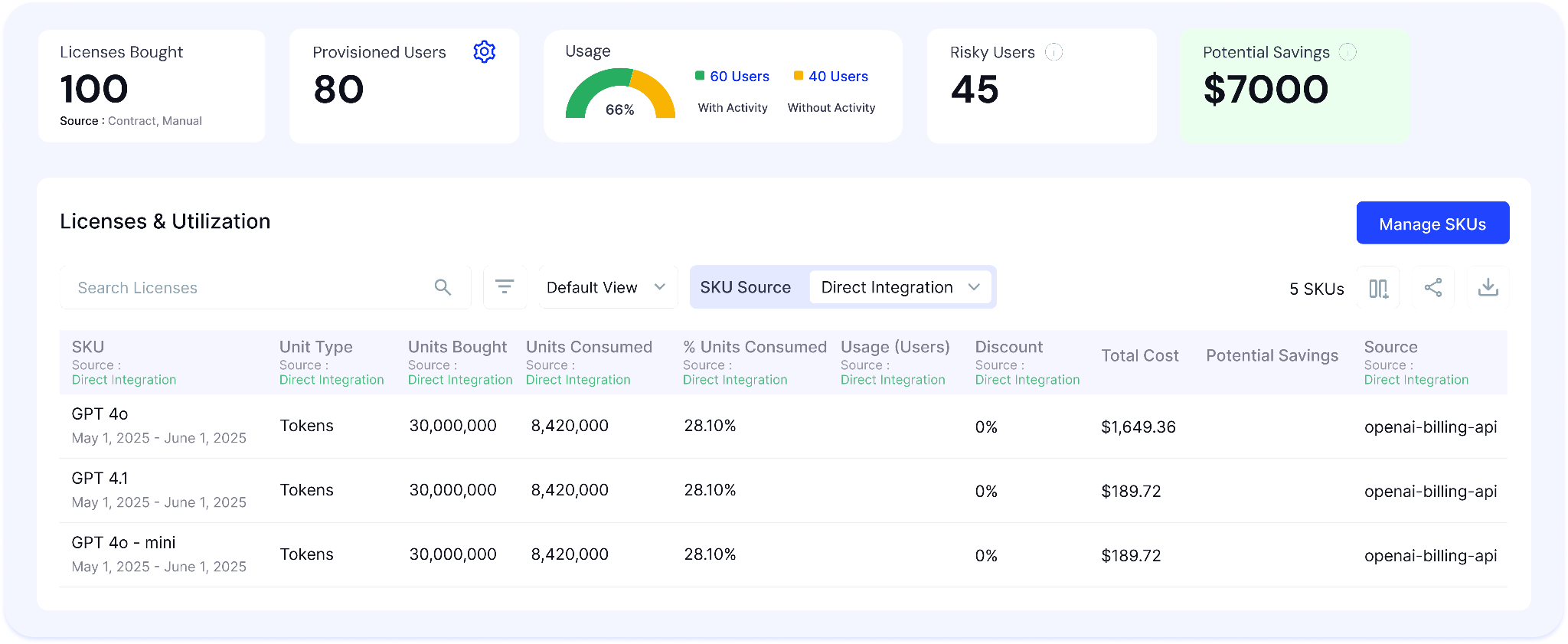
AI Spend and Visibility Dashboard

When consumption hits 75% of the configured limit, an automated alert fires. The email goes to the right person before the budget runs out, not after. The workflow is configured once and runs without manual oversight. No end-of-month surprises.

2. Eliminate Duplicate AI Subscriptions

CloudEagle surfaces users with active paid subscriptions in two tools doing the same job. Claude and ChatGPT overlap is the most common scenario.

When detected, an automated email goes to each affected user: choose one tool, and CloudEagle will deprovision the other. At scale across a large workforce, eliminating this overlap cuts a meaningful renewal cost in half, with no IT ticket and no manual audit.

3. Cover Tools That Have No Native API

Many AI tools, sales intelligence platforms, niche assistants, and vertical applications expose no usage API. Their consumption is invisible to everything built above.

CloudEagle's Universal Connector handles this:

  • A Python script extracts usage data from the tool's admin export on a schedule
  • The data is dropped into an S3 bucket and ingested automatically by CloudEagle
  • No manual reporting. No stale data
  • Teams can query token consumption, users over allocation, and credit burn rates in plain language through CloudEagle's MCP server
  • The same threshold alert logic applies even if the tool has no native integration

AI Spend Gets Expensive Fast.

See how much token sprawl and duplicate AI tools may be costing you.
Run Calculator

4. How to Prevent Uncontrolled AI Spending?

When enforcement and guardrails are running together, AI governance stops being reactive. IT, Finance, and Security finally get a shared view of what is happening across the environment, who is using which tools, what risks exist, and where AI spend is going.

  • IT teams: Get a live inventory of every AI tool in use, approved status, risk scores, browser activity, policy violations, and sensitive data entry attempts.
  • Finance teams: Track token and API spend by user, team, and department instead of relying on vendor-level invoices. Budget alerts, utilization data, and renewal insights help eliminate wasted AI spend before contracts renew.
  • Security teams: Detect shadow AI as it appears, monitor vendor risk posture continuously, and apply prompt-level DLP controls before sensitive data reaches AI models.

5. Why Building This Yourself Doesn't Close the Gap?

The DIY version, LLM gateway, enterprise DLP, FinOps tool, and security layer sounds complete. It is not.

  • An LLM gateway covers API calls, not browser sessions
  • Enterprise DLP covers email and endpoint traffic, not AI prompts
  • FinOps tools track cloud infrastructure, not per-user AI tool consumption
  • None of these systems shares the same data model

IT teams end up checking multiple dashboards and still cannot answer a single question about what employees are doing inside browser-based AI tools.

CloudEagle.ai covers all of it from one browser plugin deployment. The same component that fires the flash page also monitors prompt content, tracks token spend, and surfaces shadow AI in the discovery inventory. One deployment. One data source across IT, Finance, and Security.

Conclusion

Most companies already have an AI usage policy. The problem is that policies alone do not control what employees actually use, what data gets shared, or how AI spending scales over time.

Real AI governance requires enforcement and guardrails working together. Enforcement controls unapproved tools and prevents sensitive data exposure in real time. Guardrails help teams manage token usage, eliminate duplicate subscriptions, and keep AI spend from growing without visibility.

When discovery, enforcement, spend management, and risk monitoring operate from the same system, IT, Finance, and Security stop working from disconnected data and start operating with a shared view of AI across the organization.

See how CloudEagle.ai helps enterprises govern AI usage and spend at scale → Book a demo

Frequently Asked Questions

1. What is the difference between an AI policy and AI enforcement?

A policy defines the rules. Enforcement is the technical control that makes the rules hold, intercepting behavior at the browser before it becomes a problem.

2. Does the browser plugin work when employees are off the corporate network?

Yes. The plugin is device-level and operates independently of network connection. Firewall logs only capture on-network activity. The browser plugin captures everything regardless of where the device is.

3. What AI tools does CloudEagle track for token consumption?

Claude, ChatGPT, Cursor, Gemini, and GitHub Copilot. These were built first based on direct customer demand. Additional tools can be prioritized based on your usage volume.

4. How is CloudEagle's soft DLP different from an enterprise DLP tool?

Enterprise DLP operates at the network packet layer. CloudEagle's soft DLP operates at the prompt entry layer, catching what is typed into an AI interface before it is submitted. The two are complementary. CloudEagle covers the gap enterprise DLP misses.

5. What happens with AI tools that don't have a native usage API?

CloudEagle's Universal Connector handles them through S3 ingestion and Python automation. Usage data is extracted from the admin export on a schedule, ingested automatically, and made queryable through the same MCP interface as natively integrated tools.

Advertisement for a SaaS Subscription Tracking Template with a call-to-action button to download and a partial graphic of a tablet showing charts.Banner promoting a SaaS Agreement Checklist to streamline SaaS management and avoid budget waste with a call-to-action button labeled Download checklist.Blue banner with text 'The Ultimate Employee Offboarding Checklist!' and a black button labeled 'Download checklist' alongside partial views of checklist documents from cloudeagle.ai.Digital ad for download checklist titled 'The Ultimate Checklist for IT Leaders to Optimize SaaS Operations' by cloudeagle.ai, showing checklist pages.Slack Buyer's Guide offer with text 'Unlock insider insights to get the best deal on Slack!' and a button labeled 'Get Your Copy', accompanied by a preview of the guide featuring Slack's logo.Monday Pricing Guide by cloudeagle.ai offering exclusive pricing secrets to maximize investment with a call-to-action button labeled Get Your Copy and an image of the guide's cover.Blue banner for Canva Pricing Guide by cloudeagle.ai offering a guide to Canva costs, features, and alternatives with a call-to-action button saying Get Your Copy.Blue banner with white text reading 'Little-Known Negotiation Hacks to Get the Best Deal on Slack' and a white button labeled 'Get Your Copy'.Blue banner with text 'Little-Known Negotiation Hacks to Get the Best Deal on Monday.com' and a white button labeled 'Get Your Copy'.Blue banner with text 'Little-Known Negotiation Hacks to Get the Best Deal on Canva' and a white button labeled 'Get Your Copy'.Banner with text 'Slack Buyer's Guide' and a 'Download Now' button next to images of a guide titled 'Slack Buyer’s Guide: Features, Pricing & Best Practices'.Digital cover of Monday Pricing Guide with a button labeled Get Your Copy on a blue background.Canva Pricing Guide cover with a button labeled Get Your Copy on a blue gradient background.

Enter your email to
unlock the report

Oops! Something went wrong while submitting the form.
License Count
Benchmark
Per User/Per Year

Enter your email to
unlock the report

Oops! Something went wrong while submitting the form.
License Count
Benchmark
Per User/Per Year

Enter your email to
unlock the report

Oops! Something went wrong while submitting the form.
Notion Plus
License Count
Benchmark
Per User/Per Year
100-500
$67.20 - $78.72
500-1000
$59.52 - $72.00
1000+
$51.84 - $57.60
Canva Pro
License Count
Benchmark
Per User/Per Year
100-500
$74.33-$88.71
500-1000
$64.74-$80.32
1000+
$55.14-$62.34

Enter your email to
unlock the report

Oops! Something went wrong while submitting the form.

Enter your email to
unlock the report

Oops! Something went wrong while submitting the form.
Zoom Business
License Count
Benchmark
Per User/Per Year
100-500
$216.00 - $264.00
500-1000
$180.00 - $216.00
1000+
$156.00 - $180.00

Enter your email to
unlock the report

Oops! Something went wrong while submitting the form.

Get the Right Security Platform To Secure Your Cloud Infrastructure

Please enter a business email
Thank you!
The 2023 SaaS report has been sent to your email. Check your promotional or spam folder.
Oops! Something went wrong while submitting the form.

Access full report

Please enter a business email
Thank you!
The 2023 SaaS report has been sent to your email. Check your promotional or spam folder.
Oops! Something went wrong while submitting the form.

AI adoption inside most enterprises is moving faster than IT can govern it. Employees are using tools that nobody approved. Finance is receiving invoices that nobody budgeted for. Sensitive data is entering models that nobody reviewed.

The typical response is a better policy document. That changes nothing. A policy is not a technical control.

What works is real-time enforcement at the point of behavior, combined with preventive guardrails set before problems occur. This blog covers both.

TL;DR 

  1. Most enterprise AI spending becomes uncontrolled because employees use unapproved tools, token usage lacks visibility, and policies are not enforced in real time.
  2. Effective AI governance requires browser-level enforcement that detects shadow AI, redirects employees to approved tools, and blocks sensitive data before it reaches AI models.
  3. CloudEagle helps teams control AI spend with token thresholds, budget alerts, duplicate subscription detection, and per-user usage visibility.
  4. The platform also covers AI tools without native APIs through automated usage ingestion and centralized monitoring.
  5. IT, Finance, and Security teams all operate from the same real-time AI inventory, usage data, and risk insights instead of disconnected tools and dashboards.

1. What Causes Uncontrolled AI Spending?

Before you fix it, you need to know what is breaking.

No Visibility Into What Employees Are Using 

IT knows what is behind the identity provider. Beyond that, AI features embedded inside approved SaaS tools, coding assistants installed without tickets, and browser extensions used on company devices, there is no picture. You cannot govern tools you do not know exist.

No Enforcement at the Point of Behavior 

Policies exist, but nothing happens when an employee opens an unapproved tool. The acceptable use document is evidence that a rule existed. It is not a control.

No Per-User Spend Attribution 

Finance receives a consolidated invoice with no breakdown by team or person. Token consumption compounds in ways seat licenses never did. One developer on an approved Claude account with no usage cap can run up thousands in a week. Nobody finds out until the bill arrives.

No Controls on What Enters AI Prompts 

Employees paste sensitive data into AI tools without thinking about it. Client contracts, financial records, credentials, and entering models the organization may never have evaluated for data handling compliance.

Shadow AI Is Already in Your Stack.

Most teams don’t see it until the damage is done.
Find Shadow AI

2. How to Enforce AI Usage Policies at Scale?

Enforcement means controls that fire in real time when the wrong thing happens.

1. Build a Live AI Application Inventory First

You cannot enforce a policy on a tool you do not know exists. Before you set any guardrail, you need visibility into every AI application employees are using, not just the ones IT approved.

This includes:

  • Browser extensions employees installed themselves
  • Personal accounts are used to access tools like ChatGPT
  • AI features quietly switching on inside existing SaaS tools

CloudEagle's SaaSMap detects AI tool usage through:

  • Browser plugin activity, even off-network
  • Firewall log ingestion through Zscaler and CrowdStrike
  • 500+ direct integrations for API-level usage data

Every detected tool receives a risk score based on factors like MFA support, GDPR compliance, and breach history. The result is a live inventory that updates continuously instead of a quarterly audit.

2. Enforce Your Approved Tool List in the Browser

Knowing which tools employees use is very different from controlling which ones they actually access.

Admins configure an approved AI tool list inside CloudEagle and map each unapproved tool to an approved alternative. When an employee opens an unapproved tool, the browser plugin triggers a flash page:

Secure Browser

"This app is not approved by your IT team."

The employee is redirected to the approved tool in seconds without being blocked from work.

By default, this works as a soft block. Employees can dismiss the warning, and the activity is still logged. For organizations that need stricter enforcement, CloudEagle also integrates with Palo Alto Networks for firewall-level blocking.

3. Stop Sensitive Data Before It Reaches the Model

Getting employees onto approved tools does not stop them from pasting the wrong data into those tools.

Data Loss Prevention

CloudEagle's soft DLP layer monitors what employees type into AI interfaces through the same browser plugin. If content matches a configured classification, such as:

  • PII
  • Financial data
  • Credentials
  • Healthcare records

A flash page appears before the content is submitted to the model.

The intervention happens before data leaves the organization. Every trigger is logged automatically for compliance tracking.

This works directly at the prompt layer, which is where most traditional DLP tools have limited visibility.

How to Enforce AI Usage Policies

3. How to Build Guardrails That Actually Work?

Enforcement stops bad behavior in real time. Guardrails prevent the conditions that cause it.

1. Set Token and Spend Thresholds Per User and Team

Configure spend or token limits inside CloudEagle for Claude, ChatGPT, Cursor, Gemini, and GitHub Copilot, per user, per team, or per tool.

AI Spend and Visibility Dashboard

When consumption hits 75% of the configured limit, an automated alert fires. The email goes to the right person before the budget runs out, not after. The workflow is configured once and runs without manual oversight. No end-of-month surprises.

2. Eliminate Duplicate AI Subscriptions

CloudEagle surfaces users with active paid subscriptions in two tools doing the same job. Claude and ChatGPT overlap is the most common scenario.

When detected, an automated email goes to each affected user: choose one tool, and CloudEagle will deprovision the other. At scale across a large workforce, eliminating this overlap cuts a meaningful renewal cost in half, with no IT ticket and no manual audit.

3. Cover Tools That Have No Native API

Many AI tools, sales intelligence platforms, niche assistants, and vertical applications expose no usage API. Their consumption is invisible to everything built above.

CloudEagle's Universal Connector handles this:

  • A Python script extracts usage data from the tool's admin export on a schedule
  • The data is dropped into an S3 bucket and ingested automatically by CloudEagle
  • No manual reporting. No stale data
  • Teams can query token consumption, users over allocation, and credit burn rates in plain language through CloudEagle's MCP server
  • The same threshold alert logic applies even if the tool has no native integration

AI Spend Gets Expensive Fast.

See how much token sprawl and duplicate AI tools may be costing you.
Run Calculator

4. How to Prevent Uncontrolled AI Spending?

When enforcement and guardrails are running together, AI governance stops being reactive. IT, Finance, and Security finally get a shared view of what is happening across the environment, who is using which tools, what risks exist, and where AI spend is going.

  • IT teams: Get a live inventory of every AI tool in use, approved status, risk scores, browser activity, policy violations, and sensitive data entry attempts.
  • Finance teams: Track token and API spend by user, team, and department instead of relying on vendor-level invoices. Budget alerts, utilization data, and renewal insights help eliminate wasted AI spend before contracts renew.
  • Security teams: Detect shadow AI as it appears, monitor vendor risk posture continuously, and apply prompt-level DLP controls before sensitive data reaches AI models.

5. Why Building This Yourself Doesn't Close the Gap?

The DIY version, LLM gateway, enterprise DLP, FinOps tool, and security layer sounds complete. It is not.

  • An LLM gateway covers API calls, not browser sessions
  • Enterprise DLP covers email and endpoint traffic, not AI prompts
  • FinOps tools track cloud infrastructure, not per-user AI tool consumption
  • None of these systems shares the same data model

IT teams end up checking multiple dashboards and still cannot answer a single question about what employees are doing inside browser-based AI tools.

CloudEagle.ai covers all of it from one browser plugin deployment. The same component that fires the flash page also monitors prompt content, tracks token spend, and surfaces shadow AI in the discovery inventory. One deployment. One data source across IT, Finance, and Security.

Conclusion

Most companies already have an AI usage policy. The problem is that policies alone do not control what employees actually use, what data gets shared, or how AI spending scales over time.

Real AI governance requires enforcement and guardrails working together. Enforcement controls unapproved tools and prevents sensitive data exposure in real time. Guardrails help teams manage token usage, eliminate duplicate subscriptions, and keep AI spend from growing without visibility.

When discovery, enforcement, spend management, and risk monitoring operate from the same system, IT, Finance, and Security stop working from disconnected data and start operating with a shared view of AI across the organization.

See how CloudEagle.ai helps enterprises govern AI usage and spend at scale → Book a demo

Frequently Asked Questions

1. What is the difference between an AI policy and AI enforcement?

A policy defines the rules. Enforcement is the technical control that makes the rules hold, intercepting behavior at the browser before it becomes a problem.

2. Does the browser plugin work when employees are off the corporate network?

Yes. The plugin is device-level and operates independently of network connection. Firewall logs only capture on-network activity. The browser plugin captures everything regardless of where the device is.

3. What AI tools does CloudEagle track for token consumption?

Claude, ChatGPT, Cursor, Gemini, and GitHub Copilot. These were built first based on direct customer demand. Additional tools can be prioritized based on your usage volume.

4. How is CloudEagle's soft DLP different from an enterprise DLP tool?

Enterprise DLP operates at the network packet layer. CloudEagle's soft DLP operates at the prompt entry layer, catching what is typed into an AI interface before it is submitted. The two are complementary. CloudEagle covers the gap enterprise DLP misses.

5. What happens with AI tools that don't have a native usage API?

CloudEagle's Universal Connector handles them through S3 ingestion and Python automation. Usage data is extracted from the admin export on a schedule, ingested automatically, and made queryable through the same MCP interface as natively integrated tools.

CloudEagle.ai recognized in the 2025 Gartner® Magic Quadrant™ for SaaS Management Platforms
Download now
gartner chart
5x
Faster employee
onboarding
80%
Reduction in time for
user access reviews
30k
Workflows
automated
$15Bn
Analyzed in
contract spend
$2Bn
Saved in
SaaS spend

Streamline SaaS governance and save 10-30%

Book a Demo with Expert
CTA image
One platform to Manage
all SaaS Products
Learn More