
%201.svg)


HIPAA Compliance Checklist for 2025

ChatGPT is already inside your organization. The question is not whether your employees are using it. It is whether you have any visibility or control over how they are using it.
Over 80% of Fortune 500 companies have registered ChatGPT accounts. Most of those organizations do not have a formal AI acceptable use policy. Many have employees using personal ChatGPT accounts for work tasks that involve sensitive company data, client information, and internal source code.
ChatGPT enterprise security is not about whether OpenAI's infrastructure is secure. It largely is. The real problem is the unclassified, unmonitored data that flows into it every single day from employees who are just trying to get their work done faster.
This guide covers what ChatGPT Enterprise actually protects, what it does not, and exactly how to govern it before the gap becomes an incident.
TL;DR
1. Your Employees Are Already Using ChatGPT. The Question Is Whether You Control It
How ChatGPT became a default work interface before IT had a policy?
ChatGPT reached 100 million users in two months, faster than any consumer app in history. By the time IT and security teams started drafting policies, employees were already using it daily.
Writing emails, summarizing documents, debugging code, and drafting contracts. Often, with sensitive data like PII, source code, client records, and business strategy.
The real ChatGPT Enterprise Security risk is not where the tool runs, but how it is used. The gap between adoption and governance is where the problem begins.
Why a blanket ban fails and what to do instead?
Samsung banned ChatGPT company-wide after engineers pasted proprietary semiconductor code into it during debugging sessions. The ban did not stop AI adoption. It pushed it further underground, making the governance problem worse rather than better.
A blanket ban tells employees that IT does not have a workable answer. They find workarounds. Personal accounts, alternative AI tools, browser extensions. All of it outside your visibility, all of it carrying the same data exposure risk.
The better approach is a governed rollout:
- Deploy ChatGPT Enterprise under corporate SSO so all usage flows through managed accounts
- Define an acceptable use policy that specifies what data categories are off limits in prompts
- Discover what AI tools employees are already using before writing the policy
- Build controls that make the approved path easier than the unsanctioned one

2. Is ChatGPT Enterprise Secure? What the Built-In Protections Actually Cover
Encryption, SOC 2, and data retention: what OpenAI guarantees
ChatGPT Enterprise comes with a meaningful set of infrastructure-level protections that are worth understanding clearly.
What OpenAI provides out of the box:
- AES-256 encryption at rest and TLS 1.2 or higher in transit
- SOC 2 Type II certification covering Security, Availability, Confidentiality, and Privacy
- ISO/IEC 27001, 27017, 27018, and 27701 certifications
- No model training on your organization's data by default
- Enterprise Key Management (EKM) allows customers to control their own encryption keys
- Configurable data retention policies, including zero data retention options
- Data residency options across the US, Europe, UK, Japan, Canada, Singapore, Australia, India, and the UAE
- SAML SSO, domain verification, and role-based access controls via admin console
These are genuinely strong infrastructure protections. The SOC 2 report covers the period January to June 2025 and was independently audited.
What ChatGPT Enterprise does not protect against by default
The protections above cover OpenAI's infrastructure. They do not govern what your employees put into prompts.
What is not covered:
- Sensitive data that employees type or paste into prompts
- Personal ChatGPT accounts used for work tasks outside IT visibility
- Custom GPTs built by employees that connect to internal data sources
- Third-party plugins and connectors that expand the data exposure surface
- Prompt injection attacks via connected tools or external content
- Agentic features that can act on files, emails, and calendar data with broad permissions
Free vs. Business vs. Enterprise: where the security line actually sits
The line is clear. Free accounts lack the governance controls enterprise security requires. If employees use personal ChatGPT accounts for work, your ChatGPT Enterprise Security controls are bypassed.
This is why visibility into shadow AI matters first. Personal AI usage is one of the most common and least monitored gaps in ChatGPT for Enterprise environments today.
Worth a Read: Your employees are already using Claude, Cursor, and Gemini alongside ChatGPT. Here is how enterprises are tracking real-time AI tool usage and spend before it becomes a compliance problem. 👉 How Enterprises Can Track Claude, Cursor, and Gemini Spend in One Place
3. The Real Risks of ChatGPT in Enterprise Workflows
Sensitive data exposure through prompts: the Samsung problem
In 2023, Samsung engineers pasted proprietary semiconductor code into ChatGPT while debugging. Internal notes and strategy documents followed. The response was a company-wide ban.
This is not a Samsung-specific issue. It is an architecture problem.
ChatGPT speeds up work, so employees naturally paste code, documents, and contracts into prompts. Without controls at the prompt layer, that behavior turns into a data exposure risk, raising questions like Is ChatGPT Enterprise Secure in real-world use.
Common sensitive data types that end up in ChatGPT prompts:
- Source code and API keys
- Client contracts and NDA content
- Internal financial data and forecasts
- HR records and employee PII
- Healthcare information covered by HIPAA
Prompt injection and indirect manipulation via connected tools
Prompt injection is an attack where malicious instructions are hidden in content that ChatGPT processes, like webpages, documents, or emails.
These instructions can alter behavior, manipulate outputs, or trigger data exfiltration without the user realizing it. As ChatGPT for Enterprise expands to act on files, emails, and connected systems, the attack surface grows with it.
Shadow AI: when employees use personal ChatGPT accounts for work
This is the most common and least visible ChatGPT Enterprise Security gap. Employees use personal ChatGPT accounts for work because it is fast and accessible.
IT has no visibility. No SSO, no audit logs, no data controls.
According to CloudEagle’s 2025 IGA report, 60% of SaaS and AI apps operate outside IT visibility, and ChatGPT personal accounts are a major part of that risk.
New attack surface: meeting recordings, Drive connectors, and agentic features
ChatGPT's newer capabilities introduce risks that most security policies have not yet addressed:
- Memory features retain information across sessions that employees may not realize is being stored
- Drive and document connectors give ChatGPT access to file repositories with permissions that may be broader than intended
- Meeting recording integrations can expose confidential discussions
- Agentic workflows allow ChatGPT to take actions across connected systems with minimal human oversight
The way CIOs and CTOs are approaching AI governance has changed significantly in the past 12 months. This podcast covers what a practical governance blueprint actually looks like.
Podcast: How AI-Driven Innovation Meets Real-World Governance: A Blueprint for CIOs and CTOs. A 20-minute conversation on building governance programs that work in practice, not just on paper. 👉 Listen now
4. Best Practices for Securing ChatGPT in Enterprise Workflows
1. Enforce Zero-Trust Access with SAML SSO and MFA
Start by identifying that every employee using ChatGPT for work should be accessing it through a corporate-managed account, not a personal one.
- Deploy ChatGPT Enterprise under SAML SSO so all accounts are tied to your identity provider
- Enforce MFA for all ChatGPT Enterprise access
- Disable or restrict access to free ChatGPT accounts from corporate devices and networks
- Use your SSO provider to enforce session policies and access revocation
2. Define an Acceptable Use Policy Before Rolling Out ChatGPT
An AI AUP is not your standard IT policy. It must clearly define what data employees cannot enter into prompts, regardless of the tool.
Your AUP should cover:
- Restricted data types: PII, source code, contracts, financial data, HIPAA information
- Approved use cases and AI tools
- Guidelines for handling sensitive data in ChatGPT
- Governance for custom GPTs and connectors
3. Classify Sensitive Data and Apply DLP Controls at the Prompt Layer
Traditional DLP tools monitor files and emails, not AI prompts.
Prompt-level DLP scans what employees type or paste before it reaches ChatGPT. It detects sensitive data like PII, financial records, and source code, then blocks or alerts in real time.
- Automatically classify sensitive data before use
- Monitor prompts to catch risks early
- Set real-time alerts for high-risk activity
- Review logs to refine policies over time
4. Audit and Govern ChatGPT Connectors and Third-Party Integrations
Every connector, Google Drive, Slack, Teams, and email, creates a new data flow that must be governed.
- Maintain an approved connector list
- Enforce least-privilege access for each integration
- Log all connector activity in your audit system
- Review access when roles change or employees leave
5. Discover and Assess Every Custom GPT That Employees Are Building or Using
Custom GPTs can connect to internal data, making them a major blind spot without visibility.
- Require IT approval for all custom GPTs
- Review connected data sources and permissions
- Include GPTs in regular access reviews
- Apply the same controls as any SaaS integration
6. Log and Monitor Usage Continuously for Anomalous Behavior
One-time audits are not enough. Best Practices for Securing ChatGPT in Enterprise Workflows require continuous monitoring.
- Enable audit logging in ChatGPT Enterprise
- Track anomalies like unusual prompts or access times
- Integrate logs with your SIEM
- Set automated alerts for policy violations
7. Train Employees on What Not to Put in a Prompt
Technology reduces risk. Behavior completes the gap.
Employees should understand:
- What data is off-limits in prompts
- When not to use ChatGPT
- What to do after accidental exposure
- Why personal AI use creates compliance risk
Training should be scenario-based and practical. Generic AI training does not change behavior.
Most enterprises discover their ChatGPT governance gaps after something has already gone wrong. This case study shows what getting ahead of it actually looks like.
Case Study RingCentral needed full visibility into its SaaS stack and a way to stop managing software usage manually. CloudEagle gave them both. See how they did it. 👉 Read the full case study
5. Where CloudEagle.ai Fits in Your ChatGPT Security Stack?
ChatGPT Enterprise’s native controls are a starting point. They govern approved usage, but they don’t see personal accounts, shadow AI tools, or connect to your broader access and compliance systems.
CloudEagle.ai closes those gaps by bringing visibility, control, and continuous governance across your entire AI stack.
Discover Shadow AI and ChatGPT Usage
CloudEagle gives you full visibility into every AI tool in use, including personal ChatGPT accounts.
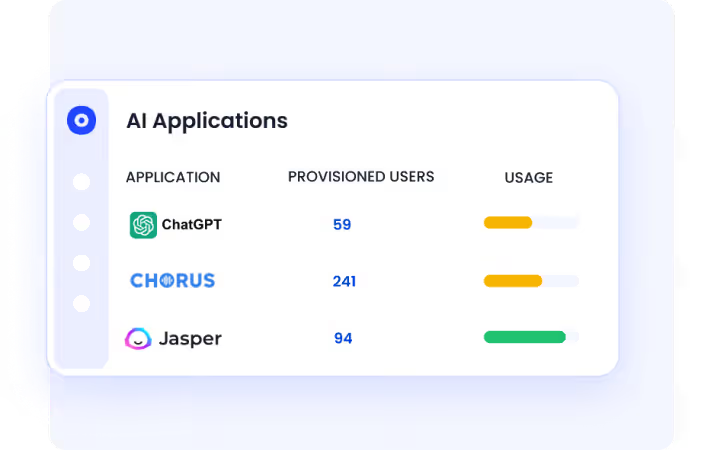
- Discover AI usage across browsers, SSO, and financial signals
- Identify unsanctioned tools before they become a risk
- Map AI adoption by team, user, and department
Enforce Access Governance for AI Tools
Every approved AI tool follows structured access controls, just like your SaaS stack.
- Provision access based on role and policy
- Automate access reviews and offboarding
- Apply least-privilege access across all AI tools
Control AI Usage in Real Time
Policies are enforced at the moment behavior happens, not after.
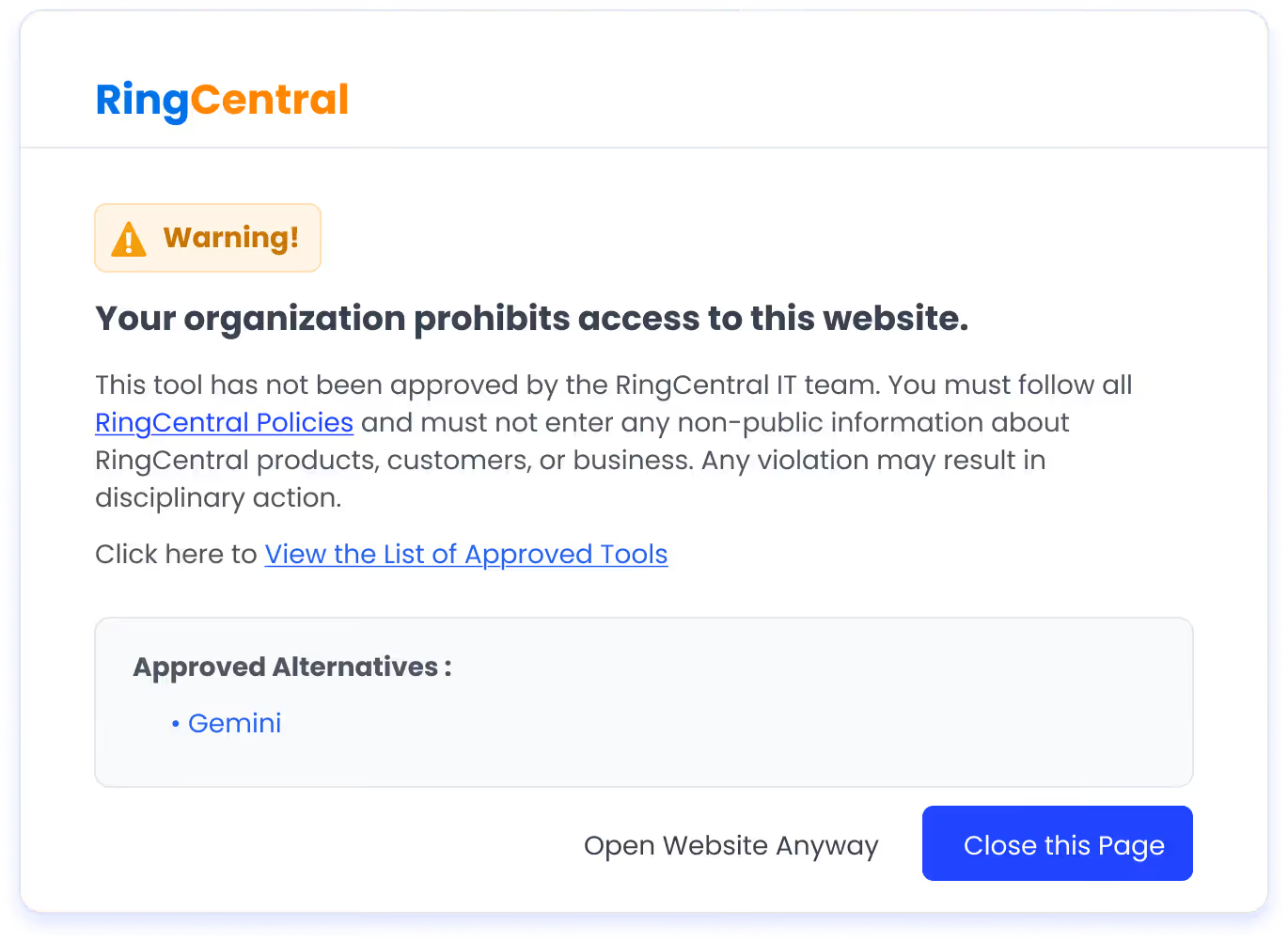
- Redirect users from unapproved AI tools to approved ones via real-time flash pages
- Enforce AI usage policies at the point of access
- Guide users without blocking productivity
Continuously Monitor and Detect Risk
CloudEagle tracks AI usage continuously, not just during audits.
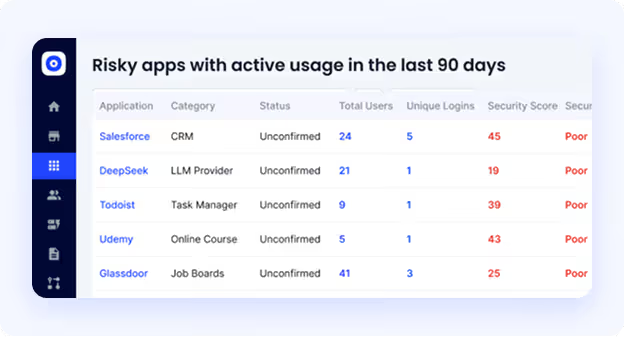
- Detect risky usage patterns like unusual access or sensitive data exposure
- Surface new and unapproved AI tools instantly
- Trigger real-time alerts for policy violations
- Maintain audit-ready logs automatically
Map AI Usage to Compliance Frameworks
AI usage creates obligations across multiple frameworks. CloudEagle keeps you aligned.
- Map controls to GDPR, HIPAA, SOC 2, and the EU AI Act
- Keep AI governance within your compliance boundary
- Automate evidence collection for audits
ChatGPT Is Already in Your Stack. Now Govern It.


6. Is ChatGPT Secure Enough for Your Business? A Decision Framework
Questions to answer before approving ChatGPT enterprise-wide
Before you roll out ChatGPT for enterprise across your organization, work through these questions with your security and compliance teams:
- Have you discovered what AI tools employees are already using before writing your policy?
- Do you have DLP controls that operate at the prompt layer, not just at the file transfer layer?
- Can you demonstrate to an auditor where ChatGPT fits within your SOC 2, GDPR, or HIPAA compliance boundary?
- Do you have a process for discovering, reviewing, and approving custom GPTs?
- Are all employee accounts tied to corporate SSO, or are personal accounts in use?
- Do you have continuous monitoring for ChatGPT usage or only point-in-time audits?
If the answer to most of these is no, you have a governance gap that needs to be closed before you scale adoption.
When to use ChatGPT Enterprise vs. a private deployment vs. a third-party AI governance layer?
Final Thoughts
Is ChatGPT Enterprise Secure? At the infrastructure level, yes. OpenAI has strong encryption, access controls, audit logs, and compliance certifications. The platform itself is not the problem.
The risk sits around it. Personal accounts outside IT visibility. Sensitive data in prompts. Custom GPTs and connectors accessing internal systems without oversight.
Is ChatGPT Enterprise Secure for business use? It can be, with the right governance layer. That means SSO, prompt-level DLP, continuous monitoring, shadow AI discovery, and AI-specific compliance controls.
Best Practices for Securing ChatGPT in Enterprise Workflows are not complex, but they require a mindset shift. Treat ChatGPT as an enterprise application, not a consumer tool.
CloudEagle.ai adds the visibility and governance layer that native controls miss. If you want to see your real AI risk surface, this is where you start.
Frequently Asked Questions
- How secure is ChatGPT Enterprise?
ChatGPT Enterprise is secure at the infrastructure level, with encryption, access controls, audit logging, and compliance certifications. However, real-world security depends on how it is used and governed within your organization.
- What is the difference between ChatGPT and enterprise ChatGPT?
ChatGPT Enterprise offers enhanced security, privacy, admin controls, SSO, and audit logs. Standard ChatGPT lacks these enterprise-grade governance and compliance features.
- Can ChatGPT be used for enterprise?
Yes, ChatGPT can be used in enterprises for tasks like content creation, coding, and analysis. But it requires proper governance, including access controls, data protection, and monitoring, to be used securely.
- Can my company see my ChatGPT history?
If you are using ChatGPT Enterprise, admins may have visibility into usage and logs depending on configuration. If you are using a personal account, your company typically cannot see your history directly.
- Is ChatGPT really private?
ChatGPT Enterprise offers stronger privacy controls and does not use your data for training by default. However, privacy ultimately depends on how the tool is configured and how employees use it.
ChatGPT Is Already in Your Stack. Now Govern It.


.avif)


.avif)
.avif)




.png)







.avif)
.avif)
.avif)


