You need to enable JavaScript in order to use the AI chatbot tool powered by ChatBot

Writing AI Policy for Companies in 2026: The 7 Things It Must Cover

Share via:
blog-cms-banner-bg
Little-Known Negotiation Hacks to Get the Best Deal on Slack
cta-bg-blogDownload Your Copy

HIPAA Compliance Checklist for 2025

Download PDF

An employee pastes a customer contract into ChatGPT to summarize key clauses. Another developer shares production code with Claude to debug an issue. Both actions happen without approval, logging, or clear policy.

This is why AI policy for companies is a must in 2026. Not to define AI but to control what data is shared, who can use AI tools, and how outputs are validated. 

An effective AI company policy answers specific questions: Can employees paste customer data into AI tools? Which tools are approved? Who reviews AI-generated code before deployment?

Without these answers, AI usage becomes inconsistent and risky. In this article, we will break down the 7 critical areas every AI policy must cover in 2026. 

TL;DR

  • AI policies are essential in 2026 to control data sharing, tool usage, and output validation.
  • Without policies, AI usage becomes untracked, inconsistent, and risky across teams.
  • Effective policies must cover data restrictions, access control, approved tools, and audit logging.
  • Governance also requires aligning AI with security, compliance, and incident response processes.
  • CloudEagle.ai enforces AI policies with real-time visibility, access control, and audit-ready tracking.

1. What is Corporate AI Policy?

A corporate AI policy example defines what AI tools employees can use, what data they can share, and how AI outputs must be reviewed before use. AI policy for companies sets enforceable rules for real workflows.

  • Approved AI Tools And Use Cases: Define which tools like ChatGPT or Claude are allowed and for what tasks.
  • Data Sharing And Prompt Controls: Specify what data (e.g., customer info, code, financial data) can or cannot be entered into AI tools.
  • Output Validation And Review Requirements: Require human review before using AI-generated content, code, or decisions.

These policies are necessary because AI adoption is already widespread. According to the AICPA & CIMA Economic Outlook Survey, 30% of business executives are experimenting with Gen AI in business applications.

A corporate AI policy example ensures that as AI usage grows, it remains controlled, consistent, and aligned with security and compliance requirements.

Who’s Using AI Behind Your Back?

Your data might already be in tools you don’t track.
See Everything

2. Why is Company AI Policy a Must in 2026?

AI policy for companies is essential in 2026 because employees are already using AI tools without consistent controls. Without company AI policy, enterprises cannot track usage, control data exposure, or validate AI-generated outputs.

  • Uncontrolled Data Sharing Across AI Tools: Employees may input sensitive data into ChatGPT or Claude without restrictions.
  • No Standard For Validating AI Outputs: AI-generated code or content may be used without review, increasing risk.
  • Lack Of Visibility Into AI Usage: Enterprises cannot see who is using AI, for what purpose, or with what data.

These gaps in AI policy for companies create operational and SaaS compliance risks.

  • Inconsistent Usage Across Teams: Different teams use AI tools with no unified guidelines.
  • No Enforcement Of Security Controls: Existing policies do not extend to AI workflows.
  • Difficult To Prove Compliance: Without logs or policies, organizations cannot demonstrate control during audits.

AI policy for companies ensures that AI usage is governed, visible, and aligned with business and security requirements.

3. Which 7 Things AI Policy for Companies Should Cover?

An AI policy template should define specific rules that control how AI is used in real workflows. It must clearly state what data can be shared. For example, a policy should answer: Can developers paste production code into Claude?

The following sections break down the 7 critical areas every AI policy for companies must cover. This way enterprises can ensure AI usage is controlled, auditable, and aligned with security and compliance requirements.

A. Data Usage and Input Restrictions

A sales executive pastes a customer contract into ChatGPT to generate a summary.

Business Perspective:

The task is completed faster, and the output looks accurate. No immediate issue is visible.

Security Perspective:

The contract contains sensitive clauses and customer data that were shared with an external AI system without approval or logging.

Now consider a developer debugging code without any AI policy template. 

Engineering Perspective:

They paste a production error and related code into Claude to find the issue quickly.

Compliance Perspective:

That code may include internal logic, API endpoints, or configuration details that should not leave controlled environments.

Nothing appears broken at the moment. The work gets done faster. But in both scenarios, sensitive data leaves the organization without defined rules, visibility, or control.

This is why AI policy for companies must clearly define what data can be shared, what must be blocked, and how inputs should be handled. Without input restrictions, AI usage becomes a direct path for uncontrolled data exposure.

B. Access Control and User Permissions

In this AI policy for companies, you should define exactly who can use AI tools, what they can access, and what actions they can perform. Without access control, any employee can use AI tools with sensitive data.

  • Role-Based Access To AI Tools: Restrict usage based on roles like developers, analysts, or support teams.
  • Repository And Data-Level Restrictions: Ensure users only access data and code relevant to their role.
  • Separate Permissions For Usage And Approval: Some users can generate outputs, while others approve them before use.

C. Approved AI Tools and Vendor Governance

AI policy for companies must define which tools are approved and how vendors are evaluated before use. Without this, employees adopt tools like ChatGPT or Claude without security or compliance checks.

  • Approved AI Tool List: Maintain a list of sanctioned AI tools that meet security and compliance requirements.
  • Vendor Risk Assessment Requirements: Evaluate how vendors handle data, storage, and model training before approval.
  • Restrictions On Unsanctioned Tools: Block or monitor usage of AI tools that are not approved by IT or security teams.

These controls are critical because unapproved tools introduce unknown risks.

No Visibility Into Data Handling

Organizations cannot verify how external AI vendors process or store data.

Inconsistent Security Standards Across Tools

Different AI tools may follow different security practices.

Uncontrolled Expansion Of AI Usage Policy

Employees adopt new tools without centralized AI governance.

According to Business Think, a significant percentage of enterprise AI usage occurs outside formal governance frameworks. Defining approved tools and governing vendors ensures that AI adoption remains controlled, secure, and compliant.

D. Monitoring and Audit Requirements

Monitoring and SaaS audit requirements mean capturing who used AI, what data was shared, and what outputs were generated. This is one of the most important AI policy for companies.

An auditor may ask: “Show what data was shared with AI tools last month and who accessed it.” If logs don’t exist, that activity cannot be verified.

  • Track AI Usage Across Teams: Identify which teams are using tools like ChatGPT and Claude.
  • Log Prompts, Inputs, and Outputs: Capture what data is entered into AI tools and what responses are generated.
  • Enable Audit-Ready Reporting: Generate reports showing usage patterns, access, and data exposure risks.

Without monitoring and audit trails, AI usage cannot be governed or controlled effectively.

E. Security and Compliance Alignment

Security and compliance alignment in AI policy for companies means ensuring AI usage policy follows the same controls applied to systems handling sensitive data.

  • Map AI Usage To Compliance Standards: Align AI workflows with requirements like Sarbanes-Oxley Act or SOC 2 controls.
  • Integrate With Identity And Access Systems: Enforce authentication and access policies through tools like Okta.
  • Apply Existing Data Protection Controls: Extend encryption, data classification, and access restrictions to AI interactions.

When AI usage is aligned with existing controls, it becomes measurable, enforceable, and auditable within current security frameworks.

F. Risk Management and Incident Response

Risk management and incident response means detecting AI-related risks early and having a defined process to investigate them. AI policy for companies ensures issues are handled like any other security incident.

Define AI-Specific Risk Scenarios

Identify risks like sensitive data exposure, prompt injection, or unreviewed AI-generated code.

Set Incident Response Playbooks

Define steps for investigating incidents involving tools like ChatGPT or Claude.

Enable Real-Time Detection And Alerts

Trigger alerts when risky activity occurs, such as sharing restricted data in prompts.

Document And Report Incidents

Maintain records of what happened, how it was resolved, and corrective actions taken.

When AI risks are treated as standard security breaches, enterprises can respond quickly. Moreover, the limit impact instead of reacting after damage occurs.

G. Employee Training and Acceptable Use Guidelines

Employee training ensures users understand what they can do with AI, what they must avoid, and how their actions are monitored. Acceptable use guidelines turn AI policy for companies into everyday behavior.

  • Define Clear Do’s and Don’ts for AI Usage: Employees should know whether they can paste code into Claude or share documents in ChatGPT.
  • Train Teams on Real Risk Scenarios: Show examples like exposing API keys, sharing customer data, or using unverified AI outputs.
  • Require Acknowledgment of AI Usage Policies: Employees should formally acknowledge guidelines before using AI tools.

These steps reduce misuse caused by lack of awareness. Training and clear guidelines ensure employees use AI tools responsibly while aligning with organizational policies.

You Can’t Block What You Can’t See

Shadow IT and AI are already inside
Reveal It

4. How Does CloudEagle.ai Help Enforce Enterprise AI Policies?

Most enterprises already have AI policies defined. The real challenge is enforcement. AI policy for companies often live in documents or training decks. But they are not applied when employees actually use AI tools.

As a result, identity and access governance breaks down at the point of behavior. CloudEagle.ai bridges this gap by enforcing AI policies in real time across users, applications, and workflows.

A: Discovering Every AI Tool Before Policies Can Be Enforced

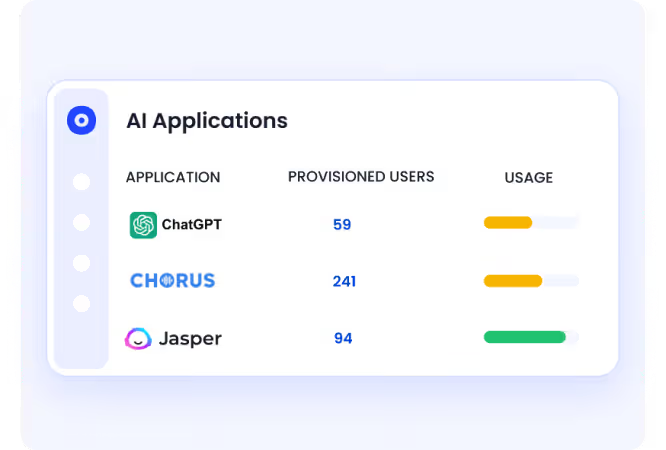
CloudEagle.ai ensures AI policy for companies enforcement starts with complete visibility into all AI applications in use.

Current Process

AI usage policy is tracked through fragmented logs across browser tools, SSO, and security systems.

Pain Points

Organizations cannot enforce policies without knowing which AI tools are being used.
How We Do It

CloudEagle.ai correlates browser, SSO, and security data with its proprietary self service app catalog.

Why We Are Better

Every AI tool,sanctioned or shadow, is visible, forming the foundation for enforceable governance.

B. Guiding Employees Toward Approved AI Tools

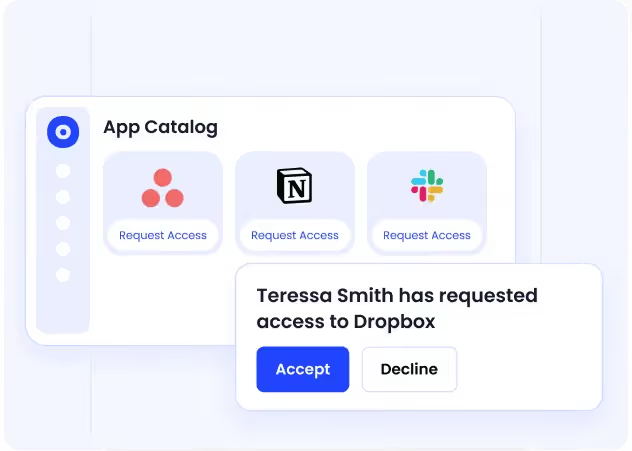
CloudEagle.ai reduces AI policy for companies violations by making the right tools easy to access.

Current Process

Employees request tools through Slack or email, or adopt tools independently.

Pain Points

Delays and lack of visibility lead to shadow AI and inconsistent policy adherence.
How We Do It

CloudEagle.ai provides a centralized app catalog with approved AI tools and automated approvals.

Why We Are Better

Employees naturally follow policy because approved options are clear, accessible, and fast.

C. Enforcing Time-Bound Access to Reduce AI Risk

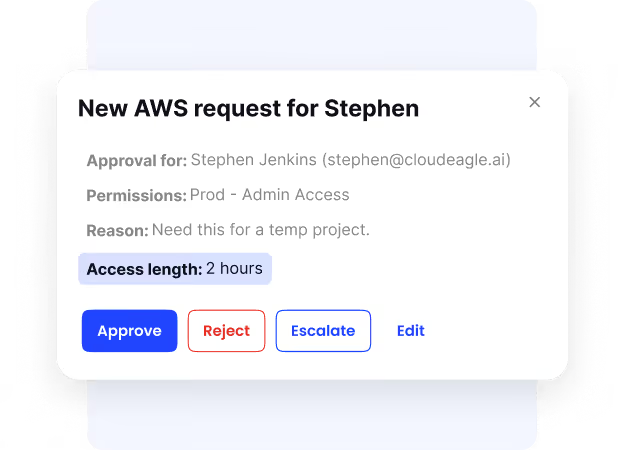
CloudEagle.ai ensures AI access aligns with actual usage needs and policy guidelines.

Current Process

Users receive permanent access, even for short-term AI usage policy.

Pain Points

Excess access increases security risks and creates unnecessary license costs.
How We Do It

CloudEagle.ai enables time-based access, automatically revoking permissions after defined periods.

Why We Are Better

Access is continuously right-sized, reducing risk without limiting productivity.

D. Creating Audit-Ready Evidence for AI Policy Enforcement

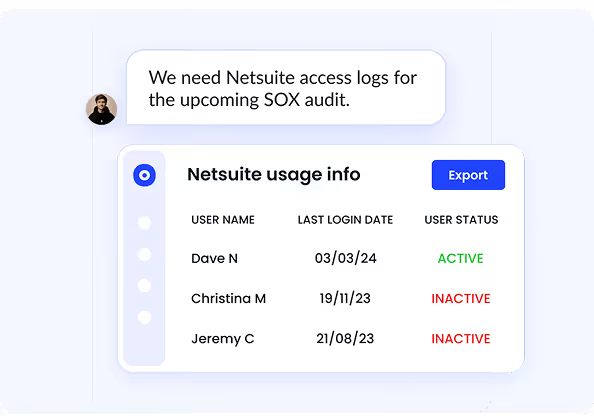
CloudEagle.ai ensures every policy action is logged and ready for audits.

Current Process

Organizations manually collect evidence across emails, tickets, and logs.

Pain Points

Proving AI governance during audits is time-consuming and incomplete.
How We Do It

CloudEagle.ai automatically logs AI usage, approvals, and enforcement actions.

Why We Are Better

Organizations can demonstrate policy enforcement clearly, reducing audit risk and effort.

5. Conclusion

An effective AI policy in 2026 is not about defining principles. It is about controlling how AI is actually used across workflows, data, and decisions.

Without these controls, AI usage becomes fragmented and difficult to track. Employees adopt tools independently, data flows outside approved boundaries, and outputs are used without validation.

This is where CloudEagle.ai becomes critical. It helps enterprises discover AI usage, enforce access controls, monitor data sharing, and maintain audit-ready visibility across AI tools. 

Instead of static AI policy for companies, teams can implement governance that works in real time. When AI policies are defined with clear rules and visibility, enterprises can scale AI adoption without losing control.

6. FAQs

Do companies need an AI policy?

Yes, companies need an AI policy to control how employees use tools like ChatGPT and Claude, especially when handling sensitive data. Without a policy, organizations cannot track usage, enforce rules, or prove compliance.

What is the 30% rule for AI?

The 30% rule suggests that a significant portion of AI-generated output requires human review and correction. Teams should validate AI outputs before using them in production or decision-making.

What are the 5 rules of AI?

Common AI rules include defining approved use cases, restricting sensitive data sharing, enforcing access controls, validating outputs, and maintaining audit logs. These rules ensure AI usage is controlled and accountable.

What are the 4 laws of AI?

The “4 laws of AI” are not standardized but often refer to principles like transparency, accountability, fairness, and security. Organizations adapt these into policies based on their compliance and risk requirements.

Advertisement for a SaaS Subscription Tracking Template with a call-to-action button to download and a partial graphic of a tablet showing charts.Banner promoting a SaaS Agreement Checklist to streamline SaaS management and avoid budget waste with a call-to-action button labeled Download checklist.Blue banner with text 'The Ultimate Employee Offboarding Checklist!' and a black button labeled 'Download checklist' alongside partial views of checklist documents from cloudeagle.ai.Digital ad for download checklist titled 'The Ultimate Checklist for IT Leaders to Optimize SaaS Operations' by cloudeagle.ai, showing checklist pages.Slack Buyer's Guide offer with text 'Unlock insider insights to get the best deal on Slack!' and a button labeled 'Get Your Copy', accompanied by a preview of the guide featuring Slack's logo.Monday Pricing Guide by cloudeagle.ai offering exclusive pricing secrets to maximize investment with a call-to-action button labeled Get Your Copy and an image of the guide's cover.Blue banner for Canva Pricing Guide by cloudeagle.ai offering a guide to Canva costs, features, and alternatives with a call-to-action button saying Get Your Copy.Blue banner with white text reading 'Little-Known Negotiation Hacks to Get the Best Deal on Slack' and a white button labeled 'Get Your Copy'.Blue banner with text 'Little-Known Negotiation Hacks to Get the Best Deal on Monday.com' and a white button labeled 'Get Your Copy'.Blue banner with text 'Little-Known Negotiation Hacks to Get the Best Deal on Canva' and a white button labeled 'Get Your Copy'.Banner with text 'Slack Buyer's Guide' and a 'Download Now' button next to images of a guide titled 'Slack Buyer’s Guide: Features, Pricing & Best Practices'.Digital cover of Monday Pricing Guide with a button labeled Get Your Copy on a blue background.Canva Pricing Guide cover with a button labeled Get Your Copy on a blue gradient background.

Enter your email to
unlock the report

Oops! Something went wrong while submitting the form.
License Count
Benchmark
Per User/Per Year

Enter your email to
unlock the report

Oops! Something went wrong while submitting the form.
License Count
Benchmark
Per User/Per Year

Enter your email to
unlock the report

Oops! Something went wrong while submitting the form.
Notion Plus
License Count
Benchmark
Per User/Per Year
100-500
$67.20 - $78.72
500-1000
$59.52 - $72.00
1000+
$51.84 - $57.60
Canva Pro
License Count
Benchmark
Per User/Per Year
100-500
$74.33-$88.71
500-1000
$64.74-$80.32
1000+
$55.14-$62.34

Enter your email to
unlock the report

Oops! Something went wrong while submitting the form.

Enter your email to
unlock the report

Oops! Something went wrong while submitting the form.
Zoom Business
License Count
Benchmark
Per User/Per Year
100-500
$216.00 - $264.00
500-1000
$180.00 - $216.00
1000+
$156.00 - $180.00

Enter your email to
unlock the report

Oops! Something went wrong while submitting the form.

Get the Right Security Platform To Secure Your Cloud Infrastructure

Please enter a business email
Thank you!
The 2023 SaaS report has been sent to your email. Check your promotional or spam folder.
Oops! Something went wrong while submitting the form.

Access full report

Please enter a business email
Thank you!
The 2023 SaaS report has been sent to your email. Check your promotional or spam folder.
Oops! Something went wrong while submitting the form.

An employee pastes a customer contract into ChatGPT to summarize key clauses. Another developer shares production code with Claude to debug an issue. Both actions happen without approval, logging, or clear policy.

This is why AI policy for companies is a must in 2026. Not to define AI but to control what data is shared, who can use AI tools, and how outputs are validated. 

An effective AI company policy answers specific questions: Can employees paste customer data into AI tools? Which tools are approved? Who reviews AI-generated code before deployment?

Without these answers, AI usage becomes inconsistent and risky. In this article, we will break down the 7 critical areas every AI policy must cover in 2026. 

TL;DR

  • AI policies are essential in 2026 to control data sharing, tool usage, and output validation.
  • Without policies, AI usage becomes untracked, inconsistent, and risky across teams.
  • Effective policies must cover data restrictions, access control, approved tools, and audit logging.
  • Governance also requires aligning AI with security, compliance, and incident response processes.
  • CloudEagle.ai enforces AI policies with real-time visibility, access control, and audit-ready tracking.

1. What is Corporate AI Policy?

A corporate AI policy example defines what AI tools employees can use, what data they can share, and how AI outputs must be reviewed before use. AI policy for companies sets enforceable rules for real workflows.

  • Approved AI Tools And Use Cases: Define which tools like ChatGPT or Claude are allowed and for what tasks.
  • Data Sharing And Prompt Controls: Specify what data (e.g., customer info, code, financial data) can or cannot be entered into AI tools.
  • Output Validation And Review Requirements: Require human review before using AI-generated content, code, or decisions.

These policies are necessary because AI adoption is already widespread. According to the AICPA & CIMA Economic Outlook Survey, 30% of business executives are experimenting with Gen AI in business applications.

A corporate AI policy example ensures that as AI usage grows, it remains controlled, consistent, and aligned with security and compliance requirements.

Who’s Using AI Behind Your Back?

Your data might already be in tools you don’t track.
See Everything

2. Why is Company AI Policy a Must in 2026?

AI policy for companies is essential in 2026 because employees are already using AI tools without consistent controls. Without company AI policy, enterprises cannot track usage, control data exposure, or validate AI-generated outputs.

  • Uncontrolled Data Sharing Across AI Tools: Employees may input sensitive data into ChatGPT or Claude without restrictions.
  • No Standard For Validating AI Outputs: AI-generated code or content may be used without review, increasing risk.
  • Lack Of Visibility Into AI Usage: Enterprises cannot see who is using AI, for what purpose, or with what data.

These gaps in AI policy for companies create operational and SaaS compliance risks.

  • Inconsistent Usage Across Teams: Different teams use AI tools with no unified guidelines.
  • No Enforcement Of Security Controls: Existing policies do not extend to AI workflows.
  • Difficult To Prove Compliance: Without logs or policies, organizations cannot demonstrate control during audits.

AI policy for companies ensures that AI usage is governed, visible, and aligned with business and security requirements.

3. Which 7 Things AI Policy for Companies Should Cover?

An AI policy template should define specific rules that control how AI is used in real workflows. It must clearly state what data can be shared. For example, a policy should answer: Can developers paste production code into Claude?

The following sections break down the 7 critical areas every AI policy for companies must cover. This way enterprises can ensure AI usage is controlled, auditable, and aligned with security and compliance requirements.

A. Data Usage and Input Restrictions

A sales executive pastes a customer contract into ChatGPT to generate a summary.

Business Perspective:

The task is completed faster, and the output looks accurate. No immediate issue is visible.

Security Perspective:

The contract contains sensitive clauses and customer data that were shared with an external AI system without approval or logging.

Now consider a developer debugging code without any AI policy template. 

Engineering Perspective:

They paste a production error and related code into Claude to find the issue quickly.

Compliance Perspective:

That code may include internal logic, API endpoints, or configuration details that should not leave controlled environments.

Nothing appears broken at the moment. The work gets done faster. But in both scenarios, sensitive data leaves the organization without defined rules, visibility, or control.

This is why AI policy for companies must clearly define what data can be shared, what must be blocked, and how inputs should be handled. Without input restrictions, AI usage becomes a direct path for uncontrolled data exposure.

B. Access Control and User Permissions

In this AI policy for companies, you should define exactly who can use AI tools, what they can access, and what actions they can perform. Without access control, any employee can use AI tools with sensitive data.

  • Role-Based Access To AI Tools: Restrict usage based on roles like developers, analysts, or support teams.
  • Repository And Data-Level Restrictions: Ensure users only access data and code relevant to their role.
  • Separate Permissions For Usage And Approval: Some users can generate outputs, while others approve them before use.

C. Approved AI Tools and Vendor Governance

AI policy for companies must define which tools are approved and how vendors are evaluated before use. Without this, employees adopt tools like ChatGPT or Claude without security or compliance checks.

  • Approved AI Tool List: Maintain a list of sanctioned AI tools that meet security and compliance requirements.
  • Vendor Risk Assessment Requirements: Evaluate how vendors handle data, storage, and model training before approval.
  • Restrictions On Unsanctioned Tools: Block or monitor usage of AI tools that are not approved by IT or security teams.

These controls are critical because unapproved tools introduce unknown risks.

No Visibility Into Data Handling

Organizations cannot verify how external AI vendors process or store data.

Inconsistent Security Standards Across Tools

Different AI tools may follow different security practices.

Uncontrolled Expansion Of AI Usage Policy

Employees adopt new tools without centralized AI governance.

According to Business Think, a significant percentage of enterprise AI usage occurs outside formal governance frameworks. Defining approved tools and governing vendors ensures that AI adoption remains controlled, secure, and compliant.

D. Monitoring and Audit Requirements

Monitoring and SaaS audit requirements mean capturing who used AI, what data was shared, and what outputs were generated. This is one of the most important AI policy for companies.

An auditor may ask: “Show what data was shared with AI tools last month and who accessed it.” If logs don’t exist, that activity cannot be verified.

  • Track AI Usage Across Teams: Identify which teams are using tools like ChatGPT and Claude.
  • Log Prompts, Inputs, and Outputs: Capture what data is entered into AI tools and what responses are generated.
  • Enable Audit-Ready Reporting: Generate reports showing usage patterns, access, and data exposure risks.

Without monitoring and audit trails, AI usage cannot be governed or controlled effectively.

E. Security and Compliance Alignment

Security and compliance alignment in AI policy for companies means ensuring AI usage policy follows the same controls applied to systems handling sensitive data.

  • Map AI Usage To Compliance Standards: Align AI workflows with requirements like Sarbanes-Oxley Act or SOC 2 controls.
  • Integrate With Identity And Access Systems: Enforce authentication and access policies through tools like Okta.
  • Apply Existing Data Protection Controls: Extend encryption, data classification, and access restrictions to AI interactions.

When AI usage is aligned with existing controls, it becomes measurable, enforceable, and auditable within current security frameworks.

F. Risk Management and Incident Response

Risk management and incident response means detecting AI-related risks early and having a defined process to investigate them. AI policy for companies ensures issues are handled like any other security incident.

Define AI-Specific Risk Scenarios

Identify risks like sensitive data exposure, prompt injection, or unreviewed AI-generated code.

Set Incident Response Playbooks

Define steps for investigating incidents involving tools like ChatGPT or Claude.

Enable Real-Time Detection And Alerts

Trigger alerts when risky activity occurs, such as sharing restricted data in prompts.

Document And Report Incidents

Maintain records of what happened, how it was resolved, and corrective actions taken.

When AI risks are treated as standard security breaches, enterprises can respond quickly. Moreover, the limit impact instead of reacting after damage occurs.

G. Employee Training and Acceptable Use Guidelines

Employee training ensures users understand what they can do with AI, what they must avoid, and how their actions are monitored. Acceptable use guidelines turn AI policy for companies into everyday behavior.

  • Define Clear Do’s and Don’ts for AI Usage: Employees should know whether they can paste code into Claude or share documents in ChatGPT.
  • Train Teams on Real Risk Scenarios: Show examples like exposing API keys, sharing customer data, or using unverified AI outputs.
  • Require Acknowledgment of AI Usage Policies: Employees should formally acknowledge guidelines before using AI tools.

These steps reduce misuse caused by lack of awareness. Training and clear guidelines ensure employees use AI tools responsibly while aligning with organizational policies.

You Can’t Block What You Can’t See

Shadow IT and AI are already inside
Reveal It

4. How Does CloudEagle.ai Help Enforce Enterprise AI Policies?

Most enterprises already have AI policies defined. The real challenge is enforcement. AI policy for companies often live in documents or training decks. But they are not applied when employees actually use AI tools.

As a result, identity and access governance breaks down at the point of behavior. CloudEagle.ai bridges this gap by enforcing AI policies in real time across users, applications, and workflows.

A: Discovering Every AI Tool Before Policies Can Be Enforced

CloudEagle.ai ensures AI policy for companies enforcement starts with complete visibility into all AI applications in use.

Current Process

AI usage policy is tracked through fragmented logs across browser tools, SSO, and security systems.

Pain Points

Organizations cannot enforce policies without knowing which AI tools are being used.

How We Do It

CloudEagle.ai correlates browser, SSO, and security data with its proprietary self service app catalog.

Why We Are Better

Every AI tool,sanctioned or shadow, is visible, forming the foundation for enforceable governance.

B. Guiding Employees Toward Approved AI Tools

CloudEagle.ai reduces AI policy for companies violations by making the right tools easy to access.

Current Process

Employees request tools through Slack or email, or adopt tools independently.

Pain Points

Delays and lack of visibility lead to shadow AI and inconsistent policy adherence.

How We Do It

CloudEagle.ai provides a centralized app catalog with approved AI tools and automated approvals.

Why We Are Better

Employees naturally follow policy because approved options are clear, accessible, and fast.

C. Enforcing Time-Bound Access to Reduce AI Risk

CloudEagle.ai ensures AI access aligns with actual usage needs and policy guidelines.

Current Process

Users receive permanent access, even for short-term AI usage policy.

Pain Points

Excess access increases security risks and creates unnecessary license costs.

How We Do It

CloudEagle.ai enables time-based access, automatically revoking permissions after defined periods.

Why We Are Better

Access is continuously right-sized, reducing risk without limiting productivity.

D. Creating Audit-Ready Evidence for AI Policy Enforcement

CloudEagle.ai ensures every policy action is logged and ready for audits.

Current Process

Organizations manually collect evidence across emails, tickets, and logs.

Pain Points

Proving AI governance during audits is time-consuming and incomplete.

How We Do It

CloudEagle.ai automatically logs AI usage, approvals, and enforcement actions.

Why We Are Better

Organizations can demonstrate policy enforcement clearly, reducing audit risk and effort.

5. Conclusion

An effective AI policy in 2026 is not about defining principles. It is about controlling how AI is actually used across workflows, data, and decisions.

Without these controls, AI usage becomes fragmented and difficult to track. Employees adopt tools independently, data flows outside approved boundaries, and outputs are used without validation.

This is where CloudEagle.ai becomes critical. It helps enterprises discover AI usage, enforce access controls, monitor data sharing, and maintain audit-ready visibility across AI tools. 

Instead of static AI policy for companies, teams can implement governance that works in real time. When AI policies are defined with clear rules and visibility, enterprises can scale AI adoption without losing control.

6. FAQs

Do companies need an AI policy?

Yes, companies need an AI policy to control how employees use tools like ChatGPT and Claude, especially when handling sensitive data. Without a policy, organizations cannot track usage, enforce rules, or prove compliance.

What is the 30% rule for AI?

The 30% rule suggests that a significant portion of AI-generated output requires human review and correction. Teams should validate AI outputs before using them in production or decision-making.

What are the 5 rules of AI?

Common AI rules include defining approved use cases, restricting sensitive data sharing, enforcing access controls, validating outputs, and maintaining audit logs. These rules ensure AI usage is controlled and accountable.

What are the 4 laws of AI?

The “4 laws of AI” are not standardized but often refer to principles like transparency, accountability, fairness, and security. Organizations adapt these into policies based on their compliance and risk requirements.

CloudEagle.ai recognized in the 2025 Gartner® Magic Quadrant™ for SaaS Management Platforms
Download now
gartner chart
5x
Faster employee
onboarding
80%
Reduction in time for
user access reviews
30k
Workflows
automated
$15Bn
Analyzed in
contract spend
$2Bn
Saved in
SaaS spend

Streamline SaaS governance and save 10-30%

Book a Demo with Expert
CTA image
One platform to Manage
all SaaS Products
Learn More





