AI Governance

7 AI Security Tools: How Enterprises Are Securing AI in 2026

Share via:
Written by:
CloudEagle.ai Team
Reviewed by
Nidhi Jain
Last Updated:
April 30, 2026
blog-cms-banner-bg
Little-Known Negotiation Hacks to Get the Best Deal on Slack
cta-bg-blogDownload Your Copy

HIPAA Compliance Checklist for 2025

Download PDF

‍81% of organizations have no visibility into the AI tools their employees are actively using. That is not a gap in awareness. That is a governance failure waiting to become a breach.

The best AI security software combines AI discovery, risk assessment, data protection, usage monitoring, and governance controls. However, platforms differ significantly in the AI environments they cover and the security capabilities they provide.

This guide compares 7 AI security tools based on their key features, security capabilities, use cases, and approach to AI governance. 

Whether you need an AI security solution for shadow AI discovery, data protection, AI risk management, or enterprise AI governance, this comparison can help you evaluate the available options

‍

TL;DR

  • AI security tools fall into two categories: AI for Security (threat detection, SOC automation) and Security for AI (shadow AI discovery, governance, compliance)
  • Most enterprises invest heavily in Category 1 and almost nothing in Category 2, where the real ungoverned risk lives
  • 81% of organizations lack visibility into AI usage across their environments, per Cycode's 2026 report
  • CISOs need tools that cover both threat detection and AI governance, not just one side of the equation
  • CloudEagle.ai is the only tool on this list built specifically to govern enterprise AI adoption end-to-end

‍

1. What are AI Security Tools?

AI security tools are software solutions that help organizations identify, monitor, protect, and govern AI applications, models, data, and usage across their environments. 

AI security platforms can detect unauthorized AI tools, assess AI-related risks, protect sensitive information, and enforce security policies.

Artificial intelligence security tools can help security teams manage several areas of AI security:

  • AI applications: Discover approved and unauthorized AI tools being used across the organization.
  • Sensitive data: Detect and prevent confidential information from being entered into AI applications.
  • AI usage: Monitor how employees and teams interact with AI tools and identify potentially risky activity.
  • AI access: Control which users can access specific AI applications, features, or capabilities.
  • AI risks: Identify security, privacy, compliance, and third-party risks associated with AI applications.

2. Two Types of AI Security Tools CISOs Need to Know

Before evaluating any ai-powered security platform​, it helps to understand what type of problem it actually solves. Most vendors blur this line deliberately.

‍

Category What It Does Risk It Addresses
AI for Security Uses AI to detect threats, automate SOC, and analyze anomalies External attacks, malware, and insider threats
Security for AI Governs AI usage, discovers shadow AI, and enforces policies Data exposure, compliance gaps, ungoverned adoption

‍

Category 1: AI for Security

These AI security tools make your security operations faster and smarter using machine learning:

  • AI-powered threat detection and behavioral anomaly detection
  • SOC automation and alert triage
  • AI-driven threat intelligence and incident response
  • Endpoint, network, and cloud monitoring

Category 2: Security for AI

These artificial intelligence security tools govern the AI itself, not just protect against external threats:

  • Shadow AI discovery across sanctioned and unsanctioned apps
  • AI usage monitoring and policy enforcement at the point of behavior
  • LLM data leakage prevention
  • AI compliance tracking against GDPR, EU AI Act, SOC 2
  • AI vendor risk management and spend governance

Most competitors cover Category 1 well. Almost none address Category 2 with real depth. This guide covers both.

‍

How Many AI Tools Are Running Without Approval?

Most teams are surprised by what shows up. Find hidden AI tools before they become a security problem.
Find Shadow AI

‍

2. How We Evaluated These AI Security Tools

Every AI security solution was assessed against criteria that matter for real enterprise security programs:

‍

Criteria What We Looked For
AI threat detection Accuracy, speed, and alert noise reduction
Governance and policy controls Ability to enforce what AI tools employees can and cannot use
Data security integration Protection for data flowing through AI tools, not just external threats
Visibility into AI usage Ability to surface unsanctioned tools, not just known ones
Compliance alignment Mapping to GDPR, EU AI Act, SOC 2, HIPAA
Enterprise scalability Works at 500 users and at 50,000
Integration depth Connects to existing security and identity stack

‍

3. 7 Best AI Security Tools for CISOs in 2026

The 7 AI security platforms​ below are evaluated based on their core AI security capabilities, enterprise use cases, governance features, and ability to help security teams manage AI risks at scale.

1. CloudEagle.ai

CloudEagle.ai addresses the AI governance gaps. It surfaces ungoverned AI tools to block sensitive data, scoring risky applications, and tracking exactly who is consuming what across every AI tool in the stack.

A. Shadow AI Discovery: Surface Every Tool Before You Govern It

CloudEagle.ai detects Shadow AI through browser extensions, firewall logs, Zscaler, CrowdStrike, and finance signals simultaneously, building a single source of truth across every AI tool in use, sanctioned or not.

Here's how multi-signal Shadow AI discovery is designed to work:
‍

‍

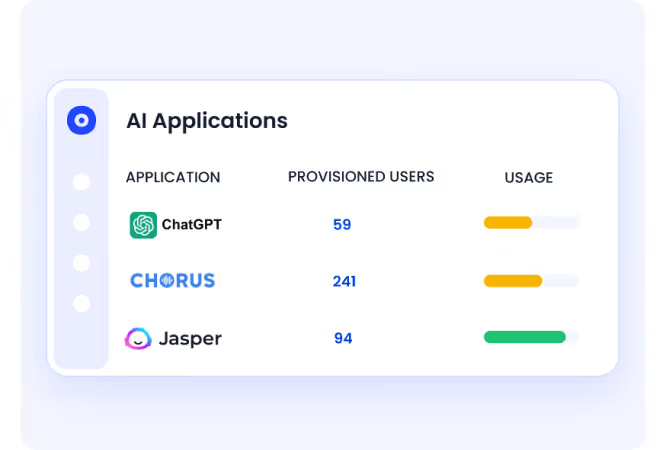
In CloudEagle.ai's AI application inventory, every tool appears with adoption by team and department. 

‍

‍

It surfaces whether it was sanctioned or discovered through external signals, and whether it carries GenAI capabilities that were never part of the original procurement decision.

B. AI Usage Control: See Who Is Using AI and How

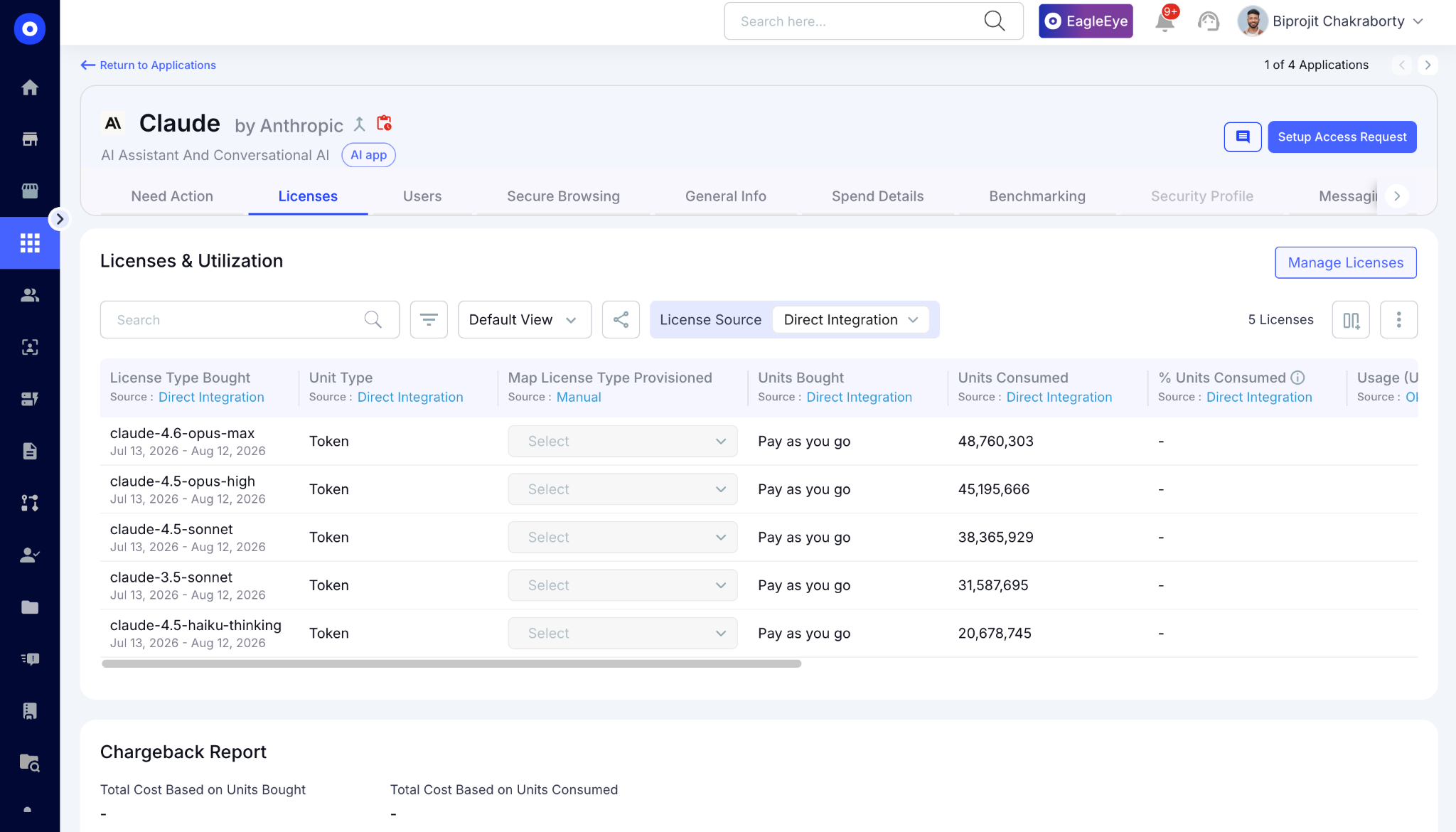
CloudEagle.ai combines SSO data with browser extensions, firewall logs, and finance integrations to build a centralized, real-time inventory of Claude code usage.
‍

‍

The platform identifies AI tools, duplicate copilots, underutilized licenses, orphaned accounts, and renewal exposure, giving teams visibility into adoption and potential waste.
‍

‍

Engineering and security teams can use this visibility to understand where AI tools are being adopted and whether usage aligns with actual business value.

C. Secure Browser and Flash Page: Redirect Before Data Enters an Unapproved Session

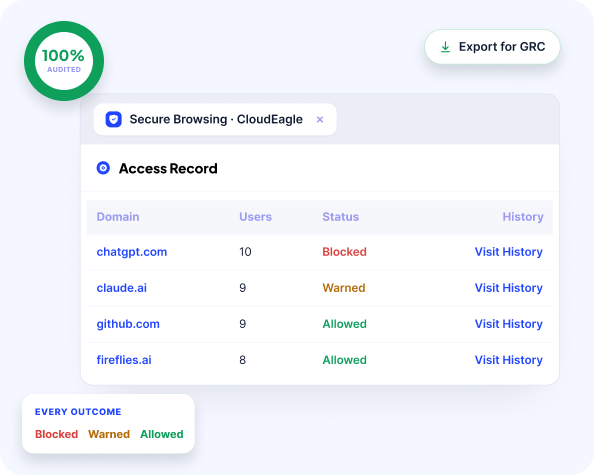
CloudEagle.ai's browser plugin catches what CASB, DLP, and LLM gateways all miss, the moment an employee opens an unapproved AI tool in a browser tab. Here’s how the browser plugin works:
‍

‍

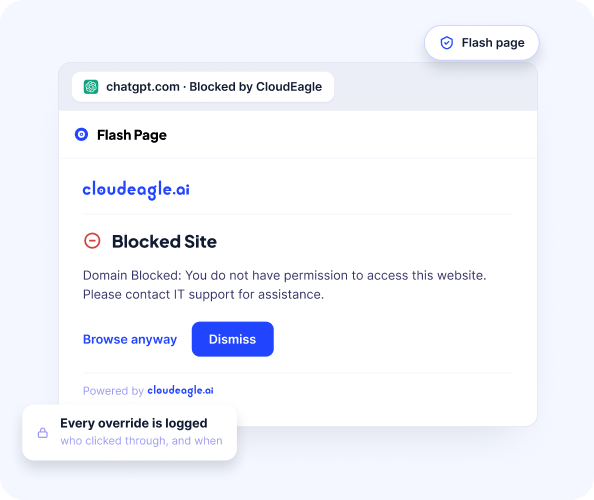
When that happens, a real-time flash page steps in before any company data is entered, redirecting the employee to the approved alternative automatically.
‍

‍

In CloudEagle.ai's Secure Browser policy view, flash page rules are configurable by team, department, and tool so Engineering can be permitted Cursor while redirected away from consumer ChatGPT.

‍

‍

Every redirect is logged automatically, tool accessed, sanctioned status, flash page triggered, and timestamp. The audit record exists in real time without additional effort.

D. Data Loss Prevention: Block Sensitive Data Before It Reaches the Model

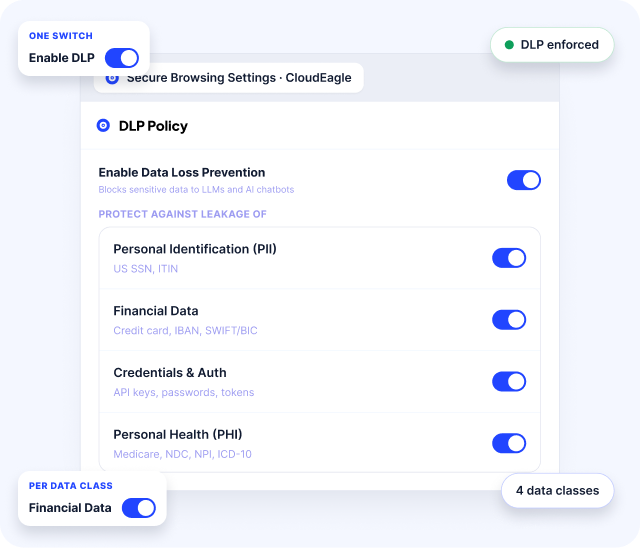
CloudEagle.ai’s DLP operates at the prompt entry layer, catching what is typed into an AI interface before it is submitted to the model. 

When an employee attempts to paste sensitive content like PII, PHI, financial data, proprietary code, into an AI tool, CloudEagle.ai fires before the content leaves the browser.
‍

‍

In CloudEagle.ai's DLP policy view, sensitive content categories are configurable. Credit card numbers, PHI, source code, and proprietary data each carry their own enforcement rules.

E. GenAI Risk Scoring: Prioritize the Riskiest Apps First

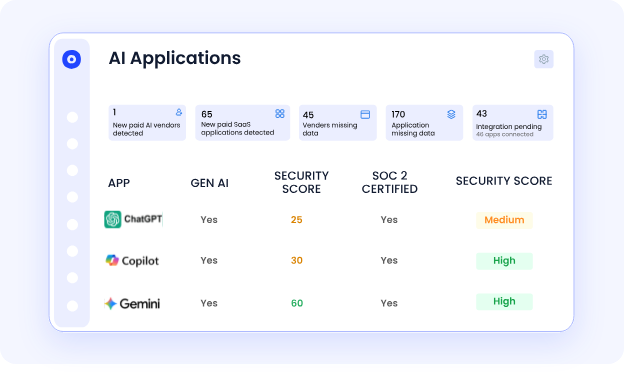
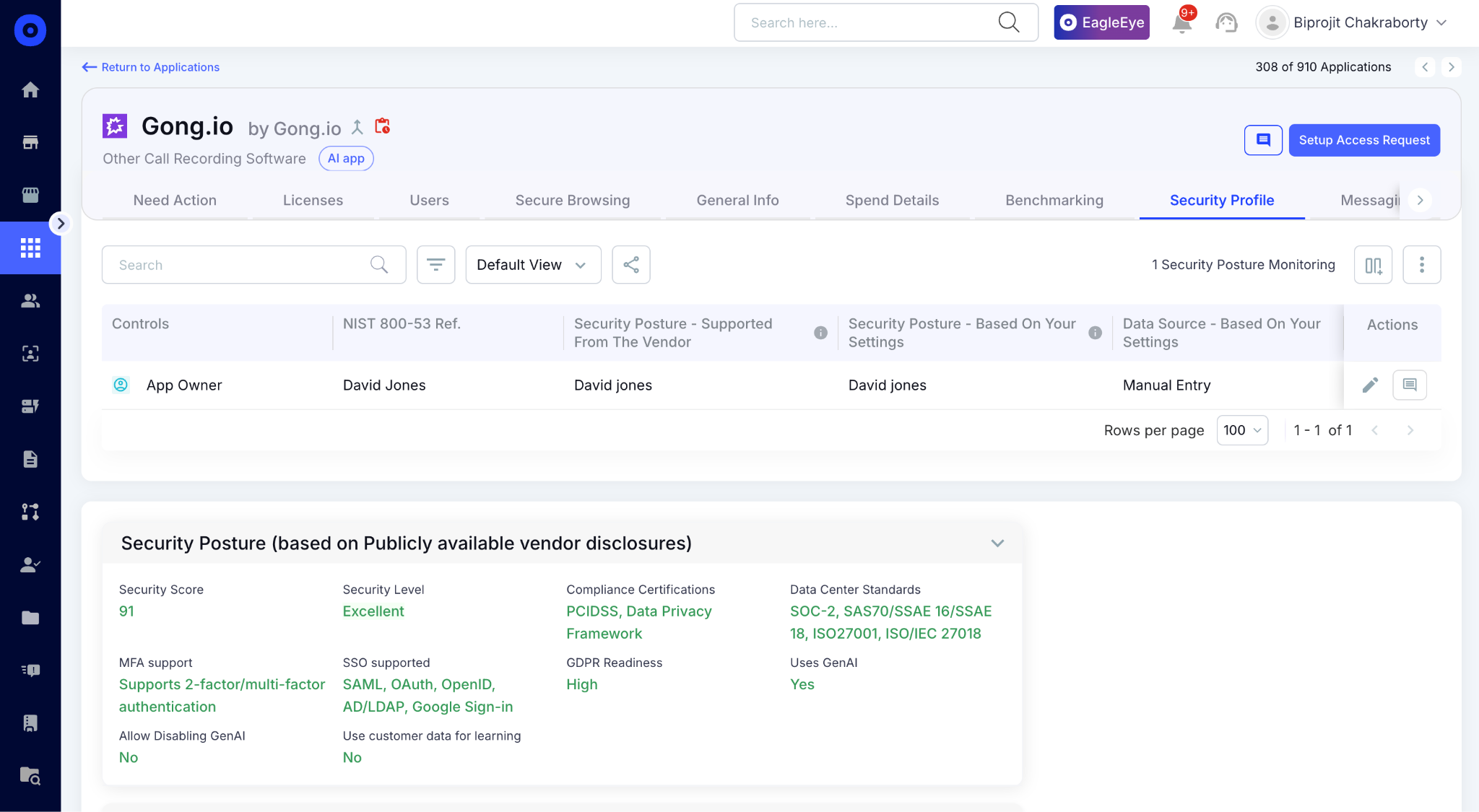
CloudEagle.ai automatically assigns a GenAI risk score to every AI tool and feature in the environment, powered by Netskope's Cloud Confidence Index.
‍

‍

Every tool is scored on data residency, training data use, security posture, and compliance alignment, so security teams have a prioritized remediation list, not a flat inventory of 200 tools with no indication of where to start.
‍

‍

In CloudEagle.ai's risk scoring view, every AI vendor appears with its risk level, whether it trains on company data, and whether it processes regulated data without a formal agreement in place.

F. AI Usage and Token Consumption Tracking: See Who Is Using What and at What Scale

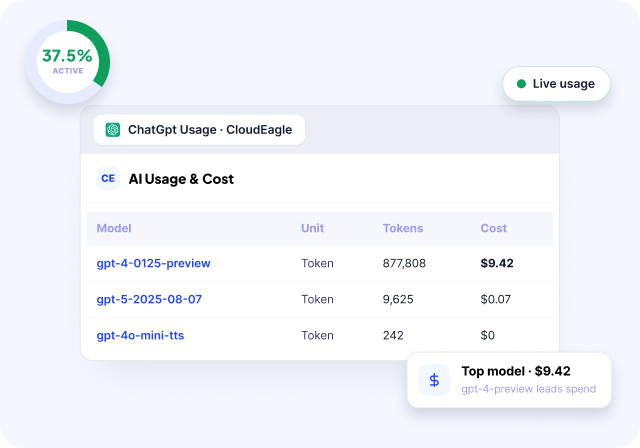
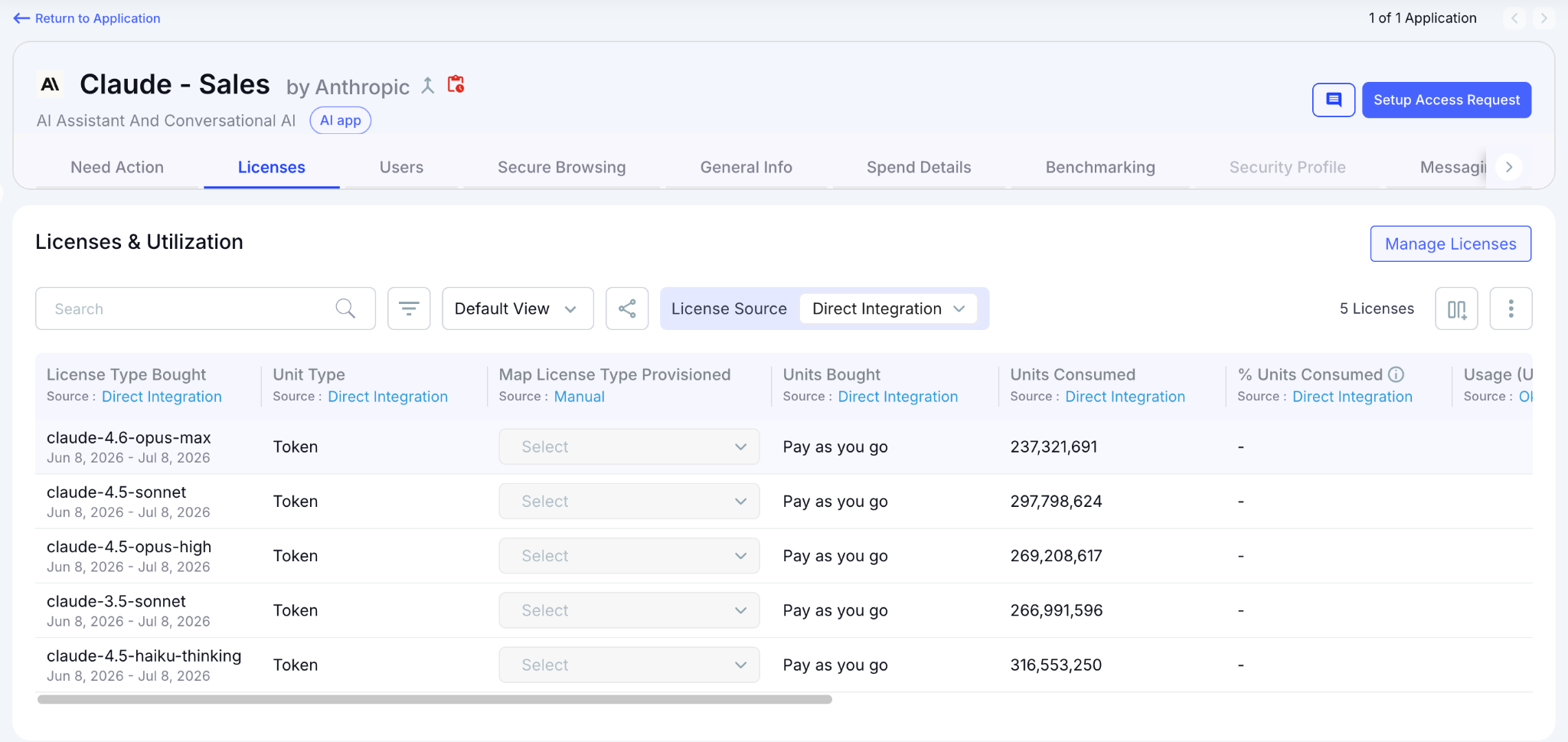
CloudEagle.ai tracks token consumption and API spend for Claude, ChatGPT, Cursor, Gemini, and GitHub Copilot, on per user, per team, per department basis.

This matters for blast radius because unusual token consumption is often the first behavioral signal that something is wrong. Here's how per-user AI usage tracking is designed:

‍

‍

In CloudEagle.ai's AI usage dashboard, every user's consumption is visible by model tier and time period. 
‍

‍

Security teams identify anomalies and Finance gets the chargeback data needed to enforce budget accountability.

G. NHI Dashboard: Inventory and Risk in One View

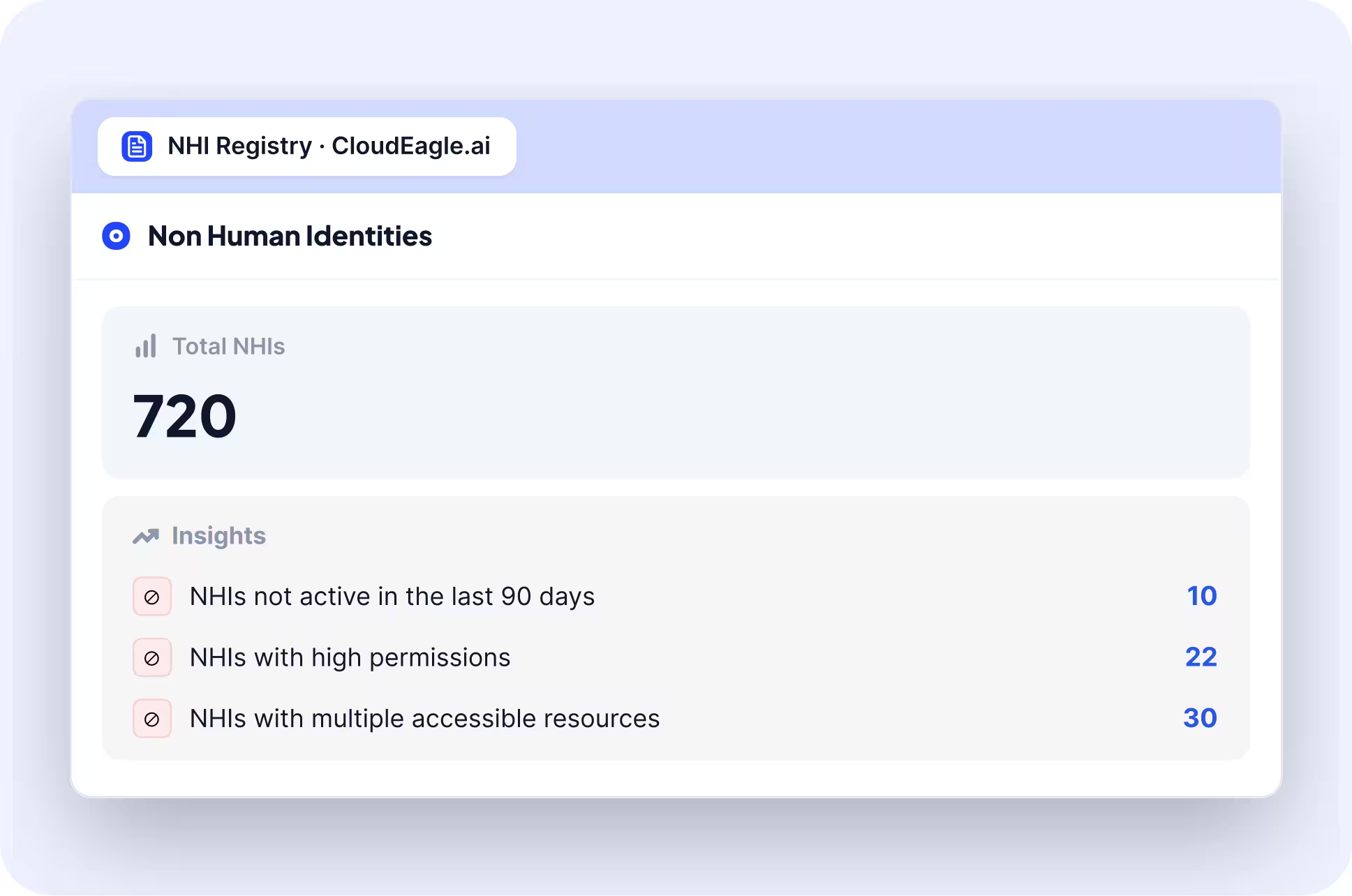
The moment CloudEagle.ai connects to your environment, the NHI dashboard surfaces total NHIs, environment breakdown, identity type split, and a risk-prioritized insights panel that tells your security team exactly where to start.

Here's how the NHI dashboard surfaces inventory and risk simultaneously:
‍

‍

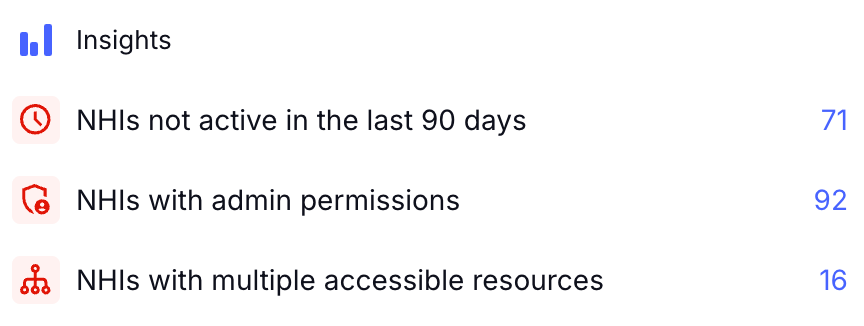
In CloudEagle.ai's NHI dashboard, the insights panel flags the three highest-priority risk categories immediately: NHIs not active in the last 90 days, NHIs with admin permissions, and NHIs with multiple accessible resources:
‍

‍

In the Freshworks deployment, this view was live in production the moment Azure AD was connected without separate data collection exercise and manual export. 

AWS and GCP are confirmed on the roadmap, expanding the same inventory and risk layer to cloud infrastructure NHIs in phase two.

H. NHI Inventory: Every Identity, Credential Type, and Owner in One Table

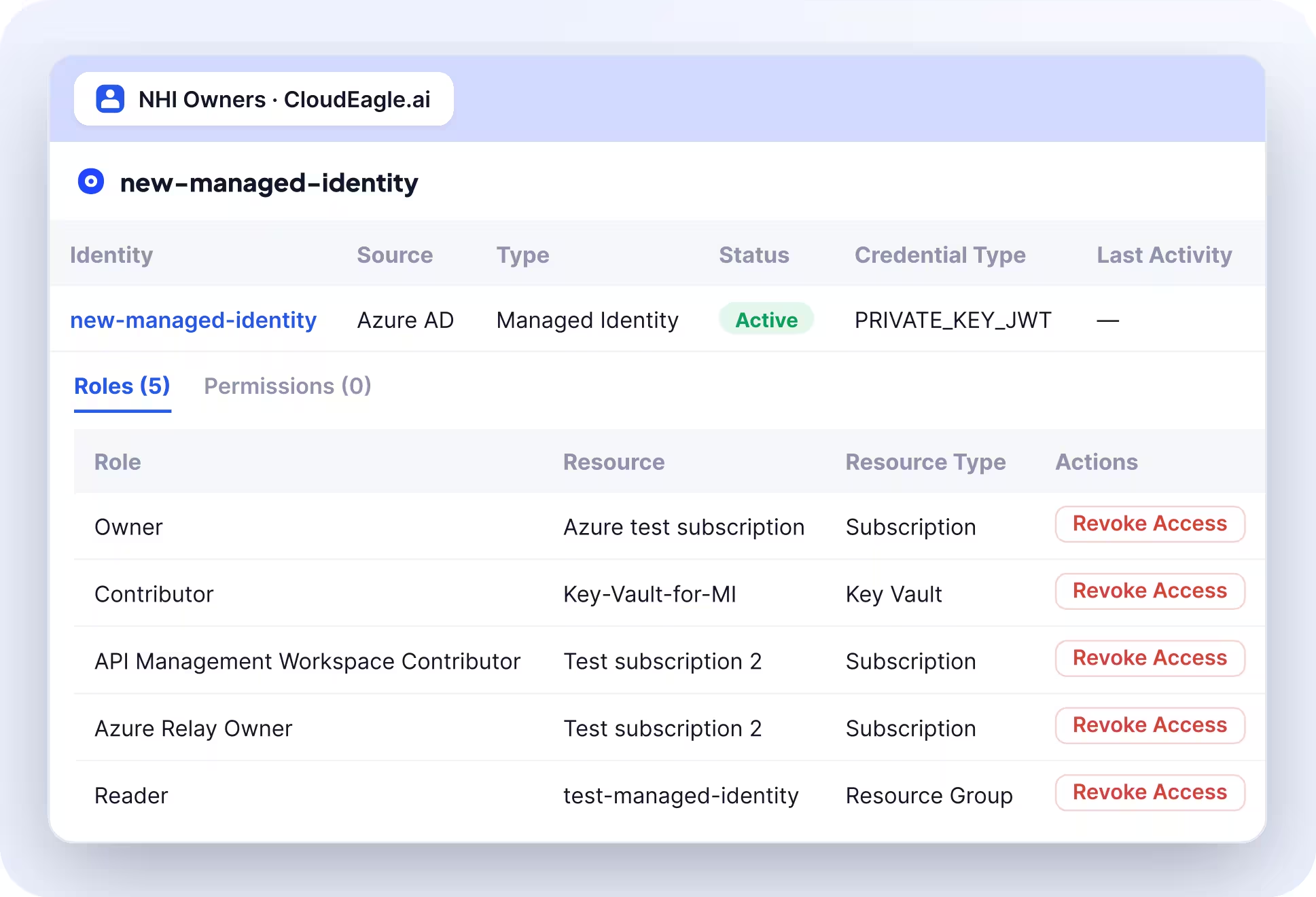
The full NHI inventory delivers the detailed per-identity view the program requires, credential type, last activity date, source environment, and owner status visible in a single table without opening a separate system.

Here's how the NHI inventory surfaces the full per-identity picture:
‍

‍

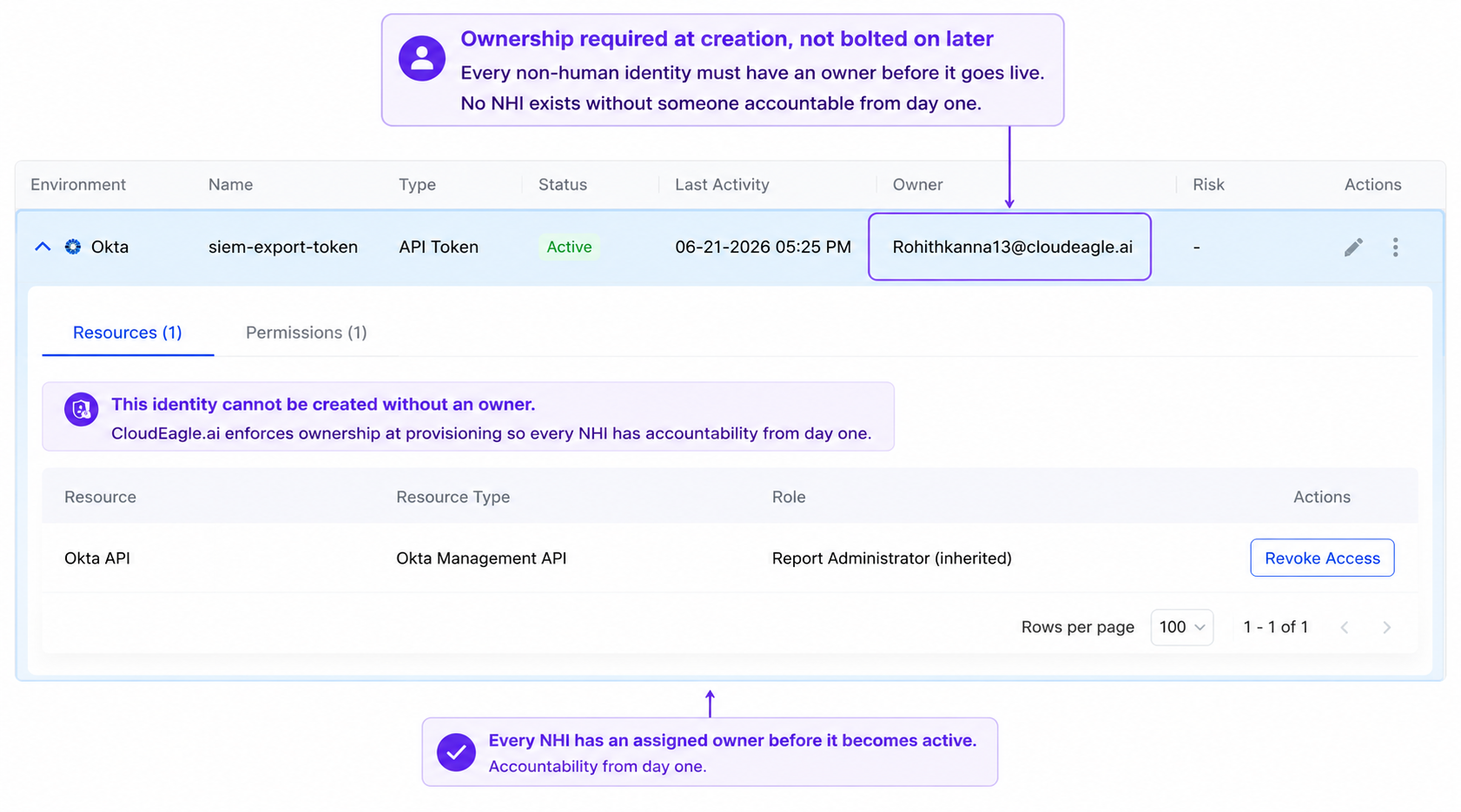
In CloudEagle.ai's NHI inventory, every identity appears with its source, type, active status, credential type, last activity date, and assigned owner. Every NHI with a missing owner is immediately visible:
‍

‍

Expanding any row surfaces the role and permission drill-down, the exact view an access review requires to answer whether the permission scope is still appropriate. 

‍

‍

2. CrowdStrike Falcon

CrowdStrike uses AI and behavioral analysis to detect threats across endpoints, cloud workloads, and identities in real time. Its Threat Graph processes trillions of security events weekly to surface attack patterns that signature-based tools miss.

Key features:

  • AI-driven behavioral endpoint detection and response
  • Threat intelligence correlation across the CrowdStrike customer base
  • Identity threat protection and privileged access monitoring
  • Cloud workload security and container protection

Limitations:

  • Expensive at enterprise scale
  • Primarily focused on threat detection, not AI governance or shadow AI discovery

Pricing: Starts at approximately $15/endpoint/month for Falcon Go. Enterprise plans vary based on the modules selected.

3. Darktrace

Darktrace uses unsupervised machine learning to build a behavioral baseline for every user, device, and system. It detects deviations in real time without relying on signatures or known threat patterns.

Key features:

  • Self-learning AI that adapts to your specific environment
  • Autonomous response capabilities that contain threats without human intervention
  • Email security with AI-powered phishing and impersonation detection
  • OT and IoT security coverage

Limitations:

  • High false positive rate during the initial learning period
  • Limited visibility into AI tool usage and shadow AI

Pricing: Custom pricing based on organization size and deployment scope. Typically starts around $30,000/year for smaller deployments.

4. Palo Alto Cortex XSIAM

Cortex XSIAM combines SIEM, SOAR, EDR, and threat intelligence into one AI-powered platform. It uses machine learning to correlate alerts, prioritize threats, and automate response playbooks.

Key features:

  • Unified AI-driven alert correlation across the entire security stack
  • Automated threat response and playbook execution
  • Identity analytics and behavioral threat detection
  • Cloud and endpoint coverage in a single platform

Limitations:

  • Complex implementation, especially in hybrid environments
  • High cost, particularly for smaller security teams
  • Not designed to govern AI tool usage or detect internal shadow AI

Pricing: Custom enterprise pricing. Typically starts at $100,000+ annually for enterprise deployments.

5. Microsoft Security Copilot

Security Copilot uses GPT-4 combined with Microsoft's threat intelligence to help security analysts investigate incidents, summarize alerts, and generate response guidance in natural language.

Key features:

  • Natural language interface for security investigation and triage
  • Integration with Microsoft Sentinel, Defender, Entra, and Purview
  • Automated incident summary and remediation guidance
  • Threat intelligence synthesis from Microsoft's global signal network

Limitations:

  • Deep Microsoft ecosystem dependency, limited value outside that stack
  • Does not address shadow AI governance or internal AI tool usage policies

Pricing: $4/security compute unit (SCU) per hour. Minimum 1 SCU provisioned. Costs vary significantly based on usage volume.

6. Lakera Guard

Lakera Guard sits as a protection layer between users and LLM applications, detecting and blocking adversarial inputs in real time. It maintains an extensive database of prompt injection techniques and jailbreak patterns.

Key features:

  • Real-time prompt injection and jailbreak detection
  • Sensitive data leakage prevention at the LLM input and output layer
  • Policy enforcement for LLM-based applications
  • Integration with major LLM providers and APIs

Limitations:

  • Focused on applications being built with LLMs, not on governing employee usage of existing AI tools like ChatGPT or Copilot
  • Limited enterprise-wide AI governance capabilities

Pricing: Free tier available for development use. Paid plans start at $500/month. Enterprise pricing on request.

7. HiddenLayer

HiddenLayer focuses on protecting machine learning models from threats like model inversion, data poisoning, and adversarial inputs. It monitors model behavior continuously without requiring access to training data or source code.

Key features:

  • ML model behavioral monitoring and anomaly detection
  • Protection against adversarial attacks and model evasion
  • Supply chain risk detection for third-party AI models
  • Compliance reporting for AI model governance\

Limitations:

  • Narrow use case focused on ML model protection
  • Limited relevance for organizations primarily consuming commercial AI tools rather than building their own

Pricing: Custom pricing based on the number of models monitored and deployment scope. Contact HiddenLayer for quotes.

‍

4. AI Security Risks CISOs Cannot Ignore in 2026

These are the risks that traditional security controls were not designed to catch:

‍

Risk What It Means Real Example
Prompt injection Attackers embed malicious instructions in content processed by an LLM Claudy Day vulnerability 2026: silent data exfiltration via crafted Claude.ai URL
Model poisoning Training data manipulation is causing AI to behave incorrectly in attacker-controlled scenarios Particularly relevant for orgs fine-tuning foundation models on internal data
LLM data exfiltration Employees pasting sensitive data into public AI tools with no audit trail 23% of employees have shared financial statements with unsanctioned AI tools, per BlackFog
Shadow AI procurement Teams adopting AI tools through credit cards and personal accounts Creates ungoverned access with no security review and no offboarding process
Vendor AI opacity SaaS vendors activating AI features inside already-approved products No new procurement review triggered, no new data processing consent collected
Autonomous agent misuse AI agents are taking actions across systems without human review GTG-1002: first documented AI-orchestrated cyberattack at scale, 2025

‍

Before the next board presentation, it helps to understand how AI governance is increasingly becoming a board-level requirement, not just a security team concern.

‍

📖 Worth a Read: AI governance is now showing up in M&A due diligence, board reporting, and regulatory inquiries. Here is how organizations are building defensible governance programs before auditors ask for evidence. 👉 AI Governance During M&A: What Enterprises Should Focus On

‍

Most AI Security Gaps Start With Access.

See the IAM risks that create exposure long before a breach happens.
Get the Risk Guide

‍

5. AI Governance vs Traditional Security: What Actually Changes

Traditional security was built around perimeters, applications, and known threats. AI security requires a different model entirely.

‍

Dimension Traditional Security AI Security
Focus Perimeter and applications Models, usage, and behavior
Controls Static rules and signatures Continuous monitoring and behavioral baselines
Threat origin Primarily external Internal adoption, external attacks, and AI-specific vectors
Visibility Known apps and endpoints Sanctioned and unsanctioned AI, including shadow tools
Compliance evidence Access logs and policy documents AI usage logs, governance records, and tool inventories
Review cadence Periodic audits Continuous governance

‍

The most important shift: traditional security assumes you know what tools are in your environment. AI security starts from the assumption that you probably do not.

‍

6. Conclusion

The best AI security tools in 2026 fall into two categories, and most security programs only cover one of them.

But the AI risk most organizations are underestimating is internal. Shadow AI tools, ungoverned LLM usage, unsanctioned copilots, and AI features activating silently inside approved SaaS products are creating data exposure, compliance gaps, and audit liabilities.

CloudEagle.ai closes that gap. It gives CISOs real-time visibility into every AI security software risk that lives inside the organization, enforces policies at the point of behavior, and delivers the defensible AI governance that regulators, boards, and auditors are now demanding. ‍

‍

7. FAQs

1. Doesn't a threat detection stack like CrowdStrike already cover AI risk?

CloudEagle.ai covers the AI risk that threat detection tools weren't built for: how employees adopt and use AI internally. It works alongside your existing stack, correlating browser signals, Zscaler logs, CrowdStrike data, and finance integrations to discover every AI tool in use.

2. Can't SaaS vendors switch on AI features inside approved apps without a new review?

CloudEagle.ai identifies AI features that switch on inside SaaS products you've already approved. Your team sees when a trusted tool starts using AI, so it can trigger a security and data processing review instead of finding out after the data has moved.

3. Won't blocking unapproved AI tools just frustrate employees?

CloudEagle.ai redirects employees instead of simply blocking them. When someone opens an unapproved AI tool, a flash page explains your AI usage policy and points them to the approved alternative before any data is shared. Productivity continues, and so does governance.

4. Isn't it impossible to tell which shadow AI tools are actually risky?

CloudEagle.ai assigns a risk score to every AI tool it discovers, using security profiles powered by a native Netskope integration. It flags which tools are sanctioned, which are unreviewed, and which need immediate action, so your team knows where to focus first.

5. Don't former employees and old API tokens keep AI access long after they should?

CloudEagle.ai surfaces that access automatically. It identifies orphaned accounts belonging to departed employees, active API tokens connected to AI systems that were never reviewed, and service accounts or bots with AI tool access. Monitoring is continuous, so these are caught before the next audit.

‍

Advertisement for a SaaS Subscription Tracking Template with a call-to-action button to download and a partial graphic of a tablet showing charts.Banner promoting a SaaS Agreement Checklist to streamline SaaS management and avoid budget waste with a call-to-action button labeled Download checklist.Blue banner with text 'The Ultimate Employee Offboarding Checklist!' and a black button labeled 'Download checklist' alongside partial views of checklist documents from cloudeagle.ai.Digital ad for download checklist titled 'The Ultimate Checklist for IT Leaders to Optimize SaaS Operations' by cloudeagle.ai, showing checklist pages.Slack Buyer's Guide offer with text 'Unlock insider insights to get the best deal on Slack!' and a button labeled 'Get Your Copy', accompanied by a preview of the guide featuring Slack's logo.Monday Pricing Guide by cloudeagle.ai offering exclusive pricing secrets to maximize investment with a call-to-action button labeled Get Your Copy and an image of the guide's cover.Blue banner for Canva Pricing Guide by cloudeagle.ai offering a guide to Canva costs, features, and alternatives with a call-to-action button saying Get Your Copy.Blue banner with white text reading 'Little-Known Negotiation Hacks to Get the Best Deal on Slack' and a white button labeled 'Get Your Copy'.Blue banner with text 'Little-Known Negotiation Hacks to Get the Best Deal on Monday.com' and a white button labeled 'Get Your Copy'.Blue banner with text 'Little-Known Negotiation Hacks to Get the Best Deal on Canva' and a white button labeled 'Get Your Copy'.Banner with text 'Slack Buyer's Guide' and a 'Download Now' button next to images of a guide titled 'Slack Buyer’s Guide: Features, Pricing & Best Practices'.Digital cover of Monday Pricing Guide with a button labeled Get Your Copy on a blue background.Canva Pricing Guide cover with a button labeled Get Your Copy on a blue gradient background.

Enter your email to
unlock the report

Oops! Something went wrong while submitting the form.
License Count
Benchmark
Per User/Per Year

Enter your email to
unlock the report

Oops! Something went wrong while submitting the form.
License Count
Benchmark
Per User/Per Year

Enter your email to
unlock the report

Oops! Something went wrong while submitting the form.
Notion Plus
License Count
Benchmark
Per User/Per Year
100-500
$67.20 - $78.72
500-1000
$59.52 - $72.00
1000+
$51.84 - $57.60
Canva Pro
License Count
Benchmark
Per User/Per Year
100-500
$74.33-$88.71
500-1000
$64.74-$80.32
1000+
$55.14-$62.34

Enter your email to
unlock the report

Oops! Something went wrong while submitting the form.

Enter your email to
unlock the report

Oops! Something went wrong while submitting the form.
Zoom Business
License Count
Benchmark
Per User/Per Year
100-500
$216.00 - $264.00
500-1000
$180.00 - $216.00
1000+
$156.00 - $180.00

Enter your email to
unlock the report

Oops! Something went wrong while submitting the form.

Get the Right Security Platform To Secure Your Cloud Infrastructure

Please enter a business email
Thank you!
The 2023 SaaS report has been sent to your email. Check your promotional or spam folder.
Oops! Something went wrong while submitting the form.

Access full report

Please enter a business email
Thank you!
The 2023 SaaS report has been sent to your email. Check your promotional or spam folder.
Oops! Something went wrong while submitting the form.
  • AI security tools fall into two categories: AI for Security (threat detection, SOC automation) and Security for AI (shadow AI discovery, governance, compliance)
  • Most enterprises invest heavily in Category 1 and almost nothing in Category 2, where the real ungoverned risk lives
  • 81% of organizations lack visibility into AI usage across their environments, per Cycode's 2026 report
  • CISOs need tools that cover both threat detection and AI governance, not just one side of the equation
  • CloudEagle.ai is the only tool on this list built specifically to govern enterprise AI adoption end-to-end

‍81% of organizations have no visibility into the AI tools their employees are actively using. That is not a gap in awareness. That is a governance failure waiting to become a breach.

The best AI security software combines AI discovery, risk assessment, data protection, usage monitoring, and governance controls. However, platforms differ significantly in the AI environments they cover and the security capabilities they provide.

This guide compares 7 AI security tools based on their key features, security capabilities, use cases, and approach to AI governance. 

Whether you need an AI security solution for shadow AI discovery, data protection, AI risk management, or enterprise AI governance, this comparison can help you evaluate the available options

‍

TL;DR

  • AI security tools fall into two categories: AI for Security (threat detection, SOC automation) and Security for AI (shadow AI discovery, governance, compliance)
  • Most enterprises invest heavily in Category 1 and almost nothing in Category 2, where the real ungoverned risk lives
  • 81% of organizations lack visibility into AI usage across their environments, per Cycode's 2026 report
  • CISOs need tools that cover both threat detection and AI governance, not just one side of the equation
  • CloudEagle.ai is the only tool on this list built specifically to govern enterprise AI adoption end-to-end

‍

1. What are AI Security Tools?

AI security tools are software solutions that help organizations identify, monitor, protect, and govern AI applications, models, data, and usage across their environments. 

AI security platforms can detect unauthorized AI tools, assess AI-related risks, protect sensitive information, and enforce security policies.

Artificial intelligence security tools can help security teams manage several areas of AI security:

  • AI applications: Discover approved and unauthorized AI tools being used across the organization.
  • Sensitive data: Detect and prevent confidential information from being entered into AI applications.
  • AI usage: Monitor how employees and teams interact with AI tools and identify potentially risky activity.
  • AI access: Control which users can access specific AI applications, features, or capabilities.
  • AI risks: Identify security, privacy, compliance, and third-party risks associated with AI applications.

2. Two Types of AI Security Tools CISOs Need to Know

Before evaluating any ai-powered security platform​, it helps to understand what type of problem it actually solves. Most vendors blur this line deliberately.

‍

Category What It Does Risk It Addresses
AI for Security Uses AI to detect threats, automate SOC, and analyze anomalies External attacks, malware, and insider threats
Security for AI Governs AI usage, discovers shadow AI, and enforces policies Data exposure, compliance gaps, ungoverned adoption

‍

Category 1: AI for Security

These AI security tools make your security operations faster and smarter using machine learning:

  • AI-powered threat detection and behavioral anomaly detection
  • SOC automation and alert triage
  • AI-driven threat intelligence and incident response
  • Endpoint, network, and cloud monitoring

Category 2: Security for AI

These artificial intelligence security tools govern the AI itself, not just protect against external threats:

  • Shadow AI discovery across sanctioned and unsanctioned apps
  • AI usage monitoring and policy enforcement at the point of behavior
  • LLM data leakage prevention
  • AI compliance tracking against GDPR, EU AI Act, SOC 2
  • AI vendor risk management and spend governance

Most competitors cover Category 1 well. Almost none address Category 2 with real depth. This guide covers both.

‍

How Many AI Tools Are Running Without Approval?

Most teams are surprised by what shows up. Find hidden AI tools before they become a security problem.
Find Shadow AI

‍

2. How We Evaluated These AI Security Tools

Every AI security solution was assessed against criteria that matter for real enterprise security programs:

‍

Criteria What We Looked For
AI threat detection Accuracy, speed, and alert noise reduction
Governance and policy controls Ability to enforce what AI tools employees can and cannot use
Data security integration Protection for data flowing through AI tools, not just external threats
Visibility into AI usage Ability to surface unsanctioned tools, not just known ones
Compliance alignment Mapping to GDPR, EU AI Act, SOC 2, HIPAA
Enterprise scalability Works at 500 users and at 50,000
Integration depth Connects to existing security and identity stack

‍

3. 7 Best AI Security Tools for CISOs in 2026

The 7 AI security platforms​ below are evaluated based on their core AI security capabilities, enterprise use cases, governance features, and ability to help security teams manage AI risks at scale.

1. CloudEagle.ai

CloudEagle.ai addresses the AI governance gaps. It surfaces ungoverned AI tools to block sensitive data, scoring risky applications, and tracking exactly who is consuming what across every AI tool in the stack.

A. Shadow AI Discovery: Surface Every Tool Before You Govern It

CloudEagle.ai detects Shadow AI through browser extensions, firewall logs, Zscaler, CrowdStrike, and finance signals simultaneously, building a single source of truth across every AI tool in use, sanctioned or not.

Here's how multi-signal Shadow AI discovery is designed to work:

‍

‍

In CloudEagle.ai's AI application inventory, every tool appears with adoption by team and department. 

‍

‍

It surfaces whether it was sanctioned or discovered through external signals, and whether it carries GenAI capabilities that were never part of the original procurement decision.

B. AI Usage Control: See Who Is Using AI and How

CloudEagle.ai combines SSO data with browser extensions, firewall logs, and finance integrations to build a centralized, real-time inventory of Claude code usage.

‍

‍

The platform identifies AI tools, duplicate copilots, underutilized licenses, orphaned accounts, and renewal exposure, giving teams visibility into adoption and potential waste.

‍

‍

Engineering and security teams can use this visibility to understand where AI tools are being adopted and whether usage aligns with actual business value.

C. Secure Browser and Flash Page: Redirect Before Data Enters an Unapproved Session

CloudEagle.ai's browser plugin catches what CASB, DLP, and LLM gateways all miss, the moment an employee opens an unapproved AI tool in a browser tab. Here’s how the browser plugin works:

‍

‍

When that happens, a real-time flash page steps in before any company data is entered, redirecting the employee to the approved alternative automatically.

‍

‍

In CloudEagle.ai's Secure Browser policy view, flash page rules are configurable by team, department, and tool so Engineering can be permitted Cursor while redirected away from consumer ChatGPT.

‍

‍

Every redirect is logged automatically, tool accessed, sanctioned status, flash page triggered, and timestamp. The audit record exists in real time without additional effort.

D. Data Loss Prevention: Block Sensitive Data Before It Reaches the Model

CloudEagle.ai’s DLP operates at the prompt entry layer, catching what is typed into an AI interface before it is submitted to the model. 

When an employee attempts to paste sensitive content like PII, PHI, financial data, proprietary code, into an AI tool, CloudEagle.ai fires before the content leaves the browser.

‍

‍

In CloudEagle.ai's DLP policy view, sensitive content categories are configurable. Credit card numbers, PHI, source code, and proprietary data each carry their own enforcement rules.

E. GenAI Risk Scoring: Prioritize the Riskiest Apps First

CloudEagle.ai automatically assigns a GenAI risk score to every AI tool and feature in the environment, powered by Netskope's Cloud Confidence Index.

‍

‍

Every tool is scored on data residency, training data use, security posture, and compliance alignment, so security teams have a prioritized remediation list, not a flat inventory of 200 tools with no indication of where to start.

‍

‍

In CloudEagle.ai's risk scoring view, every AI vendor appears with its risk level, whether it trains on company data, and whether it processes regulated data without a formal agreement in place.

F. AI Usage and Token Consumption Tracking: See Who Is Using What and at What Scale

CloudEagle.ai tracks token consumption and API spend for Claude, ChatGPT, Cursor, Gemini, and GitHub Copilot, on per user, per team, per department basis.

This matters for blast radius because unusual token consumption is often the first behavioral signal that something is wrong. Here's how per-user AI usage tracking is designed:

‍

‍

In CloudEagle.ai's AI usage dashboard, every user's consumption is visible by model tier and time period. 

‍

‍

Security teams identify anomalies and Finance gets the chargeback data needed to enforce budget accountability.

G. NHI Dashboard: Inventory and Risk in One View

The moment CloudEagle.ai connects to your environment, the NHI dashboard surfaces total NHIs, environment breakdown, identity type split, and a risk-prioritized insights panel that tells your security team exactly where to start.

Here's how the NHI dashboard surfaces inventory and risk simultaneously:

‍

‍

In CloudEagle.ai's NHI dashboard, the insights panel flags the three highest-priority risk categories immediately: NHIs not active in the last 90 days, NHIs with admin permissions, and NHIs with multiple accessible resources:

‍

‍

In the Freshworks deployment, this view was live in production the moment Azure AD was connected without separate data collection exercise and manual export. 

AWS and GCP are confirmed on the roadmap, expanding the same inventory and risk layer to cloud infrastructure NHIs in phase two.

H. NHI Inventory: Every Identity, Credential Type, and Owner in One Table

The full NHI inventory delivers the detailed per-identity view the program requires, credential type, last activity date, source environment, and owner status visible in a single table without opening a separate system.

Here's how the NHI inventory surfaces the full per-identity picture:

‍

‍

In CloudEagle.ai's NHI inventory, every identity appears with its source, type, active status, credential type, last activity date, and assigned owner. Every NHI with a missing owner is immediately visible:

‍

‍

Expanding any row surfaces the role and permission drill-down, the exact view an access review requires to answer whether the permission scope is still appropriate. 

‍

‍

2. CrowdStrike Falcon

CrowdStrike uses AI and behavioral analysis to detect threats across endpoints, cloud workloads, and identities in real time. Its Threat Graph processes trillions of security events weekly to surface attack patterns that signature-based tools miss.

Key features:

  • AI-driven behavioral endpoint detection and response
  • Threat intelligence correlation across the CrowdStrike customer base
  • Identity threat protection and privileged access monitoring
  • Cloud workload security and container protection

Limitations:

  • Expensive at enterprise scale
  • Primarily focused on threat detection, not AI governance or shadow AI discovery

Pricing: Starts at approximately $15/endpoint/month for Falcon Go. Enterprise plans vary based on the modules selected.

3. Darktrace

Darktrace uses unsupervised machine learning to build a behavioral baseline for every user, device, and system. It detects deviations in real time without relying on signatures or known threat patterns.

Key features:

  • Self-learning AI that adapts to your specific environment
  • Autonomous response capabilities that contain threats without human intervention
  • Email security with AI-powered phishing and impersonation detection
  • OT and IoT security coverage

Limitations:

  • High false positive rate during the initial learning period
  • Limited visibility into AI tool usage and shadow AI

Pricing: Custom pricing based on organization size and deployment scope. Typically starts around $30,000/year for smaller deployments.

4. Palo Alto Cortex XSIAM

Cortex XSIAM combines SIEM, SOAR, EDR, and threat intelligence into one AI-powered platform. It uses machine learning to correlate alerts, prioritize threats, and automate response playbooks.

Key features:

  • Unified AI-driven alert correlation across the entire security stack
  • Automated threat response and playbook execution
  • Identity analytics and behavioral threat detection
  • Cloud and endpoint coverage in a single platform

Limitations:

  • Complex implementation, especially in hybrid environments
  • High cost, particularly for smaller security teams
  • Not designed to govern AI tool usage or detect internal shadow AI

Pricing: Custom enterprise pricing. Typically starts at $100,000+ annually for enterprise deployments.

5. Microsoft Security Copilot

Security Copilot uses GPT-4 combined with Microsoft's threat intelligence to help security analysts investigate incidents, summarize alerts, and generate response guidance in natural language.

Key features:

  • Natural language interface for security investigation and triage
  • Integration with Microsoft Sentinel, Defender, Entra, and Purview
  • Automated incident summary and remediation guidance
  • Threat intelligence synthesis from Microsoft's global signal network

Limitations:

  • Deep Microsoft ecosystem dependency, limited value outside that stack
  • Does not address shadow AI governance or internal AI tool usage policies

Pricing: $4/security compute unit (SCU) per hour. Minimum 1 SCU provisioned. Costs vary significantly based on usage volume.

6. Lakera Guard

Lakera Guard sits as a protection layer between users and LLM applications, detecting and blocking adversarial inputs in real time. It maintains an extensive database of prompt injection techniques and jailbreak patterns.

Key features:

  • Real-time prompt injection and jailbreak detection
  • Sensitive data leakage prevention at the LLM input and output layer
  • Policy enforcement for LLM-based applications
  • Integration with major LLM providers and APIs

Limitations:

  • Focused on applications being built with LLMs, not on governing employee usage of existing AI tools like ChatGPT or Copilot
  • Limited enterprise-wide AI governance capabilities

Pricing: Free tier available for development use. Paid plans start at $500/month. Enterprise pricing on request.

7. HiddenLayer

HiddenLayer focuses on protecting machine learning models from threats like model inversion, data poisoning, and adversarial inputs. It monitors model behavior continuously without requiring access to training data or source code.

Key features:

  • ML model behavioral monitoring and anomaly detection
  • Protection against adversarial attacks and model evasion
  • Supply chain risk detection for third-party AI models
  • Compliance reporting for AI model governance\

Limitations:

  • Narrow use case focused on ML model protection
  • Limited relevance for organizations primarily consuming commercial AI tools rather than building their own

Pricing: Custom pricing based on the number of models monitored and deployment scope. Contact HiddenLayer for quotes.

‍

4. AI Security Risks CISOs Cannot Ignore in 2026

These are the risks that traditional security controls were not designed to catch:

‍

Risk What It Means Real Example
Prompt injection Attackers embed malicious instructions in content processed by an LLM Claudy Day vulnerability 2026: silent data exfiltration via crafted Claude.ai URL
Model poisoning Training data manipulation is causing AI to behave incorrectly in attacker-controlled scenarios Particularly relevant for orgs fine-tuning foundation models on internal data
LLM data exfiltration Employees pasting sensitive data into public AI tools with no audit trail 23% of employees have shared financial statements with unsanctioned AI tools, per BlackFog
Shadow AI procurement Teams adopting AI tools through credit cards and personal accounts Creates ungoverned access with no security review and no offboarding process
Vendor AI opacity SaaS vendors activating AI features inside already-approved products No new procurement review triggered, no new data processing consent collected
Autonomous agent misuse AI agents are taking actions across systems without human review GTG-1002: first documented AI-orchestrated cyberattack at scale, 2025

‍

Before the next board presentation, it helps to understand how AI governance is increasingly becoming a board-level requirement, not just a security team concern.

‍

📖 Worth a Read: AI governance is now showing up in M&A due diligence, board reporting, and regulatory inquiries. Here is how organizations are building defensible governance programs before auditors ask for evidence. 👉 AI Governance During M&A: What Enterprises Should Focus On

‍

Most AI Security Gaps Start With Access.

See the IAM risks that create exposure long before a breach happens.
Get the Risk Guide

‍

5. AI Governance vs Traditional Security: What Actually Changes

Traditional security was built around perimeters, applications, and known threats. AI security requires a different model entirely.

‍

Dimension Traditional Security AI Security
Focus Perimeter and applications Models, usage, and behavior
Controls Static rules and signatures Continuous monitoring and behavioral baselines
Threat origin Primarily external Internal adoption, external attacks, and AI-specific vectors
Visibility Known apps and endpoints Sanctioned and unsanctioned AI, including shadow tools
Compliance evidence Access logs and policy documents AI usage logs, governance records, and tool inventories
Review cadence Periodic audits Continuous governance

‍

The most important shift: traditional security assumes you know what tools are in your environment. AI security starts from the assumption that you probably do not.

‍

6. Conclusion

The best AI security tools in 2026 fall into two categories, and most security programs only cover one of them.

But the AI risk most organizations are underestimating is internal. Shadow AI tools, ungoverned LLM usage, unsanctioned copilots, and AI features activating silently inside approved SaaS products are creating data exposure, compliance gaps, and audit liabilities.

CloudEagle.ai closes that gap. It gives CISOs real-time visibility into every AI security software risk that lives inside the organization, enforces policies at the point of behavior, and delivers the defensible AI governance that regulators, boards, and auditors are now demanding. ‍

‍

7. FAQs

1. Doesn't a threat detection stack like CrowdStrike already cover AI risk?

CloudEagle.ai covers the AI risk that threat detection tools weren't built for: how employees adopt and use AI internally. It works alongside your existing stack, correlating browser signals, Zscaler logs, CrowdStrike data, and finance integrations to discover every AI tool in use.

2. Can't SaaS vendors switch on AI features inside approved apps without a new review?

CloudEagle.ai identifies AI features that switch on inside SaaS products you've already approved. Your team sees when a trusted tool starts using AI, so it can trigger a security and data processing review instead of finding out after the data has moved.

3. Won't blocking unapproved AI tools just frustrate employees?

CloudEagle.ai redirects employees instead of simply blocking them. When someone opens an unapproved AI tool, a flash page explains your AI usage policy and points them to the approved alternative before any data is shared. Productivity continues, and so does governance.

4. Isn't it impossible to tell which shadow AI tools are actually risky?

CloudEagle.ai assigns a risk score to every AI tool it discovers, using security profiles powered by a native Netskope integration. It flags which tools are sanctioned, which are unreviewed, and which need immediate action, so your team knows where to focus first.

5. Don't former employees and old API tokens keep AI access long after they should?

CloudEagle.ai surfaces that access automatically. It identifies orphaned accounts belonging to departed employees, active API tokens connected to AI systems that were never reviewed, and service accounts or bots with AI tool access. Monitoring is continuous, so these are caught before the next audit.

‍

CloudEagle.ai recognized in the 2025 Gartner® Magic Quadrant™ for SaaS Management Platforms
Download now
gartner chart
5x
Faster employee
onboarding
80%
Reduction in time for
user access reviews
30k
Workflows
automated
$15Bn
Analyzed in
contract spend
$2Bn
Saved in
SaaS spend

Streamline SaaS governance and save 10-30%

Book a Demo with Expert
CTA image