HIPAA Compliance Checklist for 2025

Here’s the reality many CIOs and CISOs are facing.
Microsoft Copilot rolls out fast. Licenses are assigned widely. AI access now sits across Word, Teams, Outlook, and SharePoint. At the same time, employees continue using personal ChatGPT accounts and browser AI tools outside IT visibility.
That’s not just license waste. That’s Shadow AI expanding inside and outside your Microsoft tenant.
Without structured Microsoft 365 Copilot license optimization and access governance, you don’t just overspend. You lose control of where your data flows.
This blog breaks down the risk and how CloudEagle.ai brings Microsoft Copilot back under governance.
1. Your Copilot Rollout Is Growing. But Is Your Investment Paying Off?
An enterprise rolls out Microsoft 365 Copilot across several departments. Employees begin using it for meeting summaries, document creation, and everyday productivity tasks. Leadership sees growing adoption and starts considering whether more licenses are needed.
But adoption isn't uniform. Some employees rely on Copilot regularly, while others rarely use their assigned licenses. Meanwhile, teams experimenting with other AI tools may introduce additional spending outside the original rollout.
The organization now faces two competing risks: paying for Copilot access that employees don't need and losing visibility into AI spending beyond the approved deployment. Expanding the rollout without understanding either problem could increase costs without delivering proportional value.

2. Why Copilot License Reviews Alone Won't Control Enterprise AI Costs
Reviewing Copilot utilization helps identify licenses that may be reclaimed, but it doesn't explain every source of AI expenditure. Employees may use other AI tools, developers may generate API costs, and consumption-based workloads can increase spending independently of assigned license counts.
These costs require different decisions. An inactive Copilot license may be reclaimed, while rising token consumption may need spending limits or budget adjustments. Unapproved AI usage may require investigation before the organization can assess its financial and governance implications.
IT and finance therefore need to connect license utilization with AI consumption, spending controls, and departmental budgets. That gives them a clearer basis for deciding what to retain, where to intervene, and whether additional investment is justified.
3. How to Optimize Microsoft 365 Copilot License Waste and Shadow AI Risks with CloudEagle.ai
Microsoft 365 Copilot adoption can create two different cost challenges: organizations may pay for licenses employees rarely use, while consumption-based AI workloads can generate spending that grows with usage.
Managing these costs requires more than tracking invoices. IT and finance need to know what the organization has purchased, how much employees actually use, where spending is heading, and which resources can be recovered.
CloudEagle.ai helps teams connect usage visibility with spending controls, budget planning, and license optimization to manage AI costs using actual utilization rather than assumptions.
A. Identify Purchased Copilot Licenses and AI Capacity
Microsoft 365 Copilot licenses represent assigned product access, while token-based AI services and API workloads may have separate consumption and spending models
CloudEagle.ai helps teams centralize SaaS license and spending visibility. For supported AI integrations, it also tracks token consumption and API spend, helping teams understand purchased resources alongside their usage.
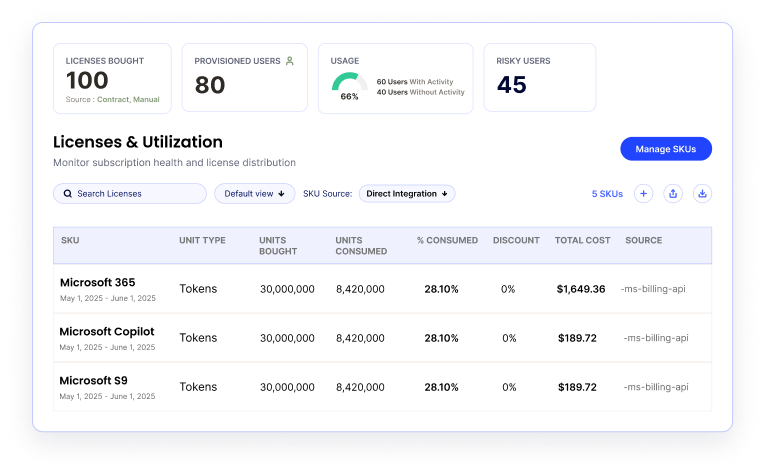
This visibility establishes the baseline for optimization. It also helps teams investigate AI activity outside approved processes, where unmanaged tools or accounts may create additional spending and governance gaps.
B. Analyze Copilot Usage to Find Waste
Knowing how many licenses or how much AI capacity the organization has purchased is only the starting point. The next step is comparing that investment with actual usage.
CloudEagle.ai brings usage and spending data into a centralized view, helping IT examine utilization and identify where costs need attention.
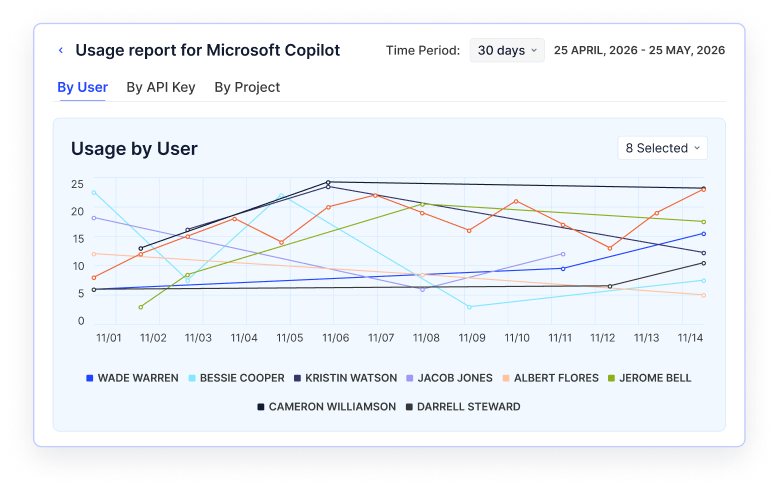
For supported AI tools, teams can review token consumption and associated costs across users, teams, and projects.
C. Set Spend Limits to Control AI Consumption
Once teams understand their usage patterns, they can establish boundaries around consumption. Without defined limits, token-based workloads can continue generating costs as usage grows.
CloudEagle.ai allows administrators to configure token or spend limits at supported levels. Teams can also receive alerts as consumption approaches configured thresholds and route requests for higher limits through an approval process.
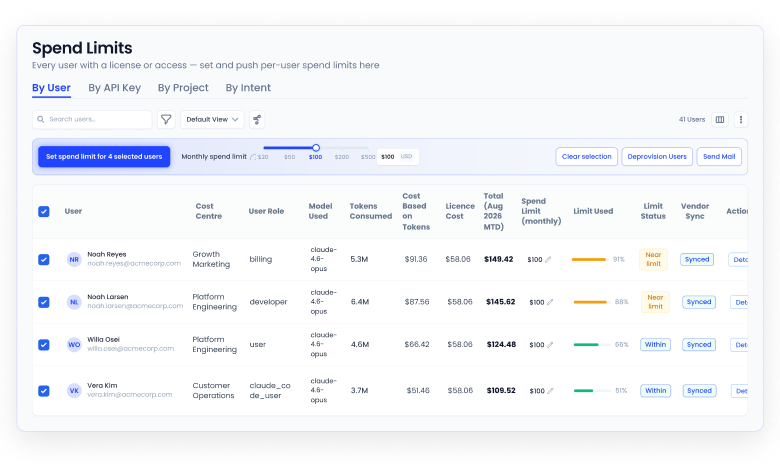
These controls help teams manage consumption without automatically restricting legitimate work. They also create a clear process for reviewing requests when users or projects need additional capacity.
Spend limits address consumption at defined boundaries. Budgets provide the broader financial framework for deciding how much each team or project should be able to spend.
D. Set AI Budgets Before Teams Exhaust Their Allocation
A spending limit controls consumption against a defined threshold, but budget planning helps organizations allocate funds across teams and anticipate future demand.
CloudEagle.ai supports SaaS budgeting and reporting, including visibility into spending by department and user, budget alerts, and forecasting based on available spend and license data.
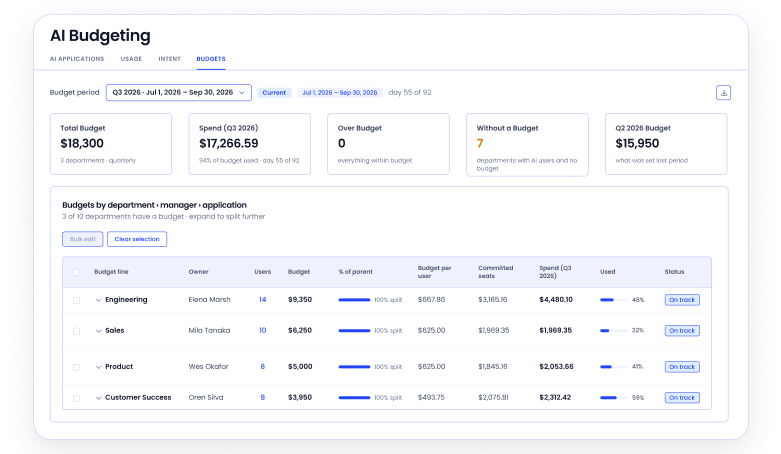
Teams can use this information to set allocations, monitor spending against budgets, and review trends before costs exceed expectations.
E. Allocate Copilot Spend to the Teams Using It
Once inactive access and shadow usage are visible, Finance needs to understand where Copilot spending is actually going.
CloudEagle.ai provides chargeback reports that attribute Microsoft Copilot spending to departments and teams, including purchased and consumed license costs.
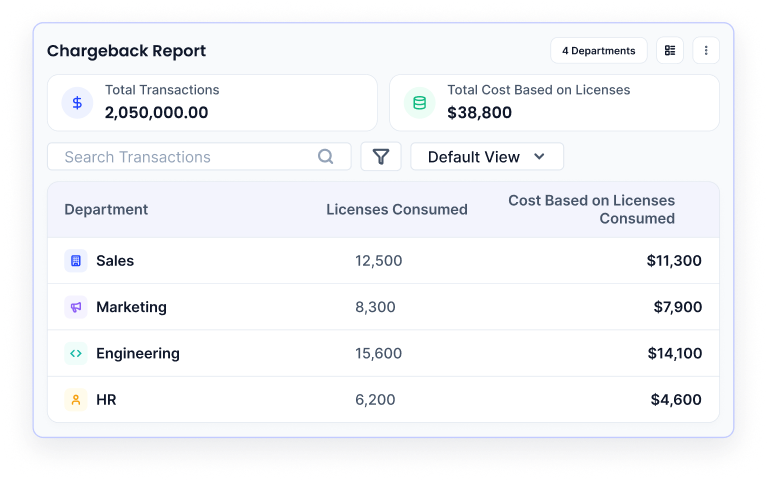
That gives Finance and IT a clearer connection between adoption and cost. A department with low utilization can be reviewed differently from one actively consuming its Copilot allocation.
It also gives budget owners the context they need before deciding whether more licenses should be purchased.
E. Reclaim Unused Copilot Licenses Automatically
CloudEagle.ai turns the unused-license list into an ongoing workflow.
Teams can select Microsoft Copilot, define inactivity thresholds such as 30, 60, 90, 120, or 180 days, schedule the workflow, and configure the actions taken when inactive licenses are identified.
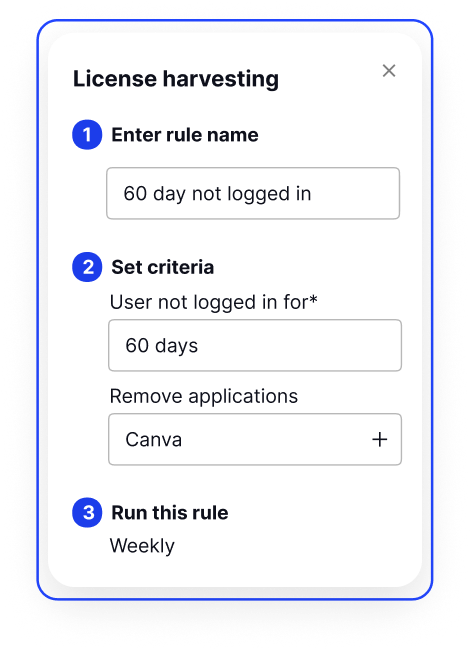
CloudEagle.ai then continuously monitors usage and tracks deprovisioning activity through workflow logs.
AI Without Governance Is Risk.


4. What Is Microsoft 365 Copilot License and Access Governance?
Microsoft Copilot license governance is more than tracking who has a seat. It's the full practice of:
- Knowing exactly who has a Microsoft Copilot license assigned and whether they're using it
- Ensuring access is based on role and actual need, not bulk assignment
- Controlling how Microsoft Copilot interacts with your org data (SharePoint, Teams, Exchange)
- Monitoring for unsanctioned AI tools running in parallel
That last point is where Microsoft Copilot Shadow AI enters.
When employees don't get value from Copilot, they don't stop using AI; they go off-platform. ChatGPT, Gemini, Perplexity. All on personal accounts, all handling company data, all invisible to IT.
A. Why Microsoft Copilot Governance Is Different From Other M365 Licenses?
Microsoft Copilot isn't just another add-on. It has deep Graph API access, and it reads emails, documents, Teams conversations, and calendar data. That means:
- Every unmanaged license isn't just a budget line; it's a data access control decision
- Every unsanctioned AI tool running in parallel is a potential data leakage vector
- Microsoft 365 Copilot access governance sits at the intersection of cost management, identity governance, and AI risk; it most certainly cannot be managed through a spreadsheet
5. Understanding the Current Microsoft Copilot Rollout in Enterprises
The gap between intention and reality with Microsoft Copilot is significant. Here's where enterprises actually stand.
According to an October 2024 CNBC Technology Executive Council survey, 50% of technology leaders said it was still too soon to know whether Microsoft Copilot had been worth the $30/month cost, and equal numbers said yes and no.
A. The Typical Enterprise Rollout Pattern
- Phase 1 — A pilot group of 50–200 users gets licenses. Usage is inconsistent, and feedback is mixed.
- Phase 2 — Leadership pushes for broader rollout. Licenses get assigned to hundreds of users in bulk.
- Phase 3 — No one measures adoption. Licenses sit idle. Finance starts asking questions.
- Phase 4 — IT scrambles to justify spend before renewal. Too late to reclaim meaningful savings.
The problem isn't Microsoft Copilot itself. It's that organizations are treating it like a standard software rollout when it requires an entirely different governance model.
B. The Shadow AI Layer Nobody Talks About
While IT manages the official Microsoft Copilot rollout, employees are making their own decisions. When Microsoft Copilot underdelivers, they open a new browser tab, and that's where Microsoft Copilot Shadow AI takes hold.
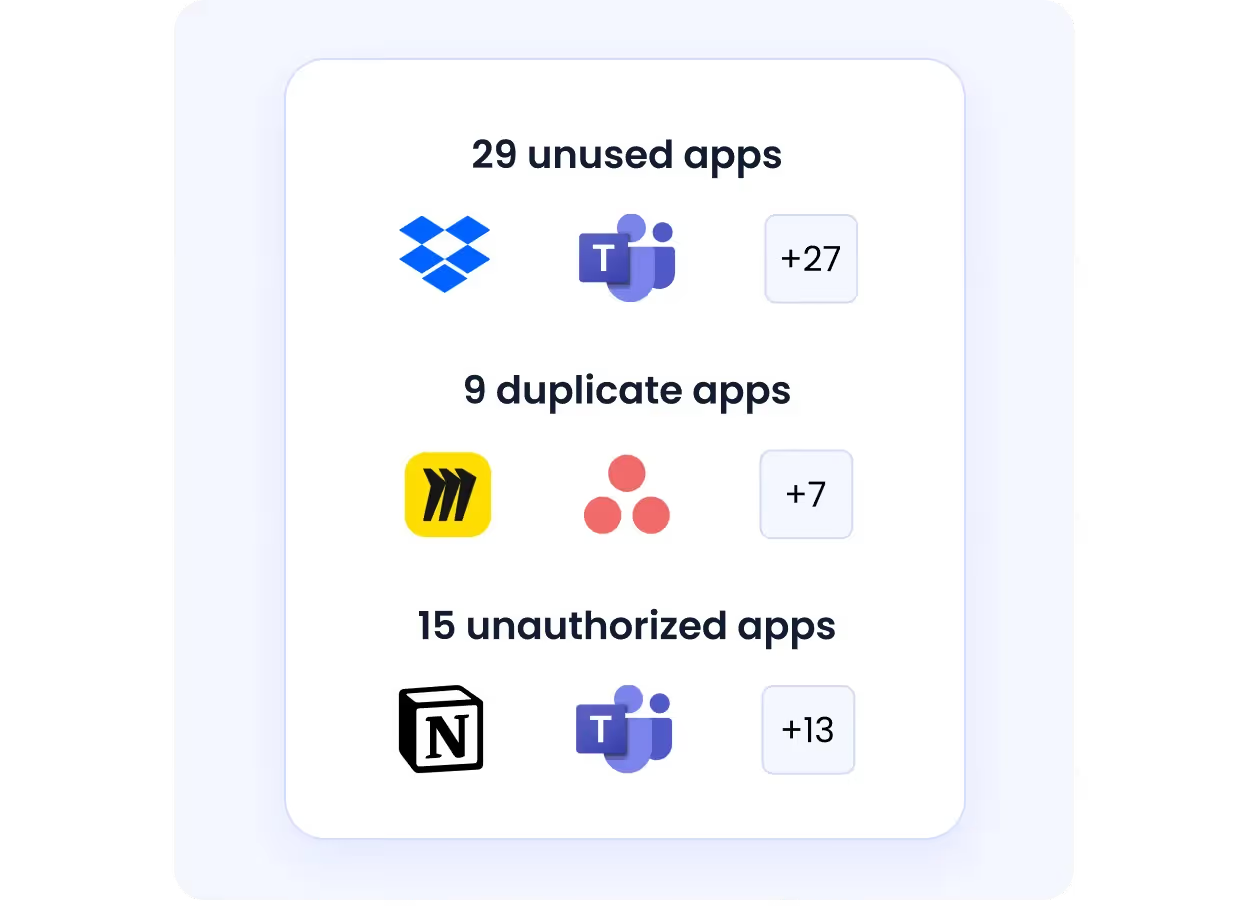
- ChatGPT, Gemini, and Claude are running on personal accounts
- Company data is being fed into public LLMs with no enterprise data protection
- No audit trail, no compliance visibility, no IT oversight
CloudEagle's IGA Report found that over 60% of SaaS and AI tools operate completely outside IT's visibility, meaning for every sanctioned Microsoft Copilot license being managed, there are likely multiple unsanctioned AI tools running in parallel.
6. The Pain Points of Managing Microsoft Copilot Manually
Trying to manage Microsoft 365 Copilot license optimization with native tools and manual processes means dealing with these realities every day.
A. No Real-Time Usage Visibility
Microsoft's admin center shows enabled vs. active users, but data refreshes only weekly, with a 180-day lookback and no activity counts. That's not actionable for a $30/user/month license.
What you're left with:
- No picture of which users are actually getting value from Copilot
- No feature-level data (who's using Microsoft Copilot in Word vs. Teams vs. Outlook)
- No alerts when users go inactive
- No automated workflow to reclaim dormant licenses
B. Bulk Assignment Without Role Validation
Most rollouts assign licenses by department or seniority, not actual need. A finance analyst spending 90% of their day in an ERP system doesn't need a $30/month AI writing assistant. But they have one.
A full Microsoft 365 Copilot rollout for a 10,000-employee company costs $3.6 million annually, making usage-based Microsoft Copilot license governance financially critical, not optional.
C. Shadow AI Fills the Gaps
When Microsoft Copilot underdelivers, employees don't file a support ticket; they go off-platform. The risks this creates:
- Proprietary data entered into public LLMs with no enterprise data protection
- No audit trail for AI-assisted work
- Compliance violations in regulated industries (healthcare, finance, legal)
- IP leakage through AI training data policies on free-tier tools
D. Offboarding Gaps Leave Licenses and Access Active
Microsoft Copilot licenses don't get reclaimed automatically when employees leave. An ex-employee's seat keeps billing, and their Graph API access to your organizational data stays technically unrevoked until IT catches it manually. That's both a budget problem and a security problem.
7. Conclusion
Microsoft 365 Copilot is one of the most expensive per-seat AI commitments an enterprise can make right now, and most organizations are flying blind on whether it's paying off.
Microsoft 365 Copilot license optimization is not a one-time audit. It's a continuous practice that requires real usage data, automated governance, and visibility into the AI tools employees are actually using, not just the ones IT approved.
CloudEagle.ai gives IT and finance leaders exactly that. Because in 2026 and beyond, Microsoft Copilot, access governanc,e and SaaS license management aren't separate conversations; they're the same one.
If your Microsoft Copilot rollout has more questions than answers right now, that's exactly the problem CloudEagle.ai is built to solve.
Your AI Spend Has Two Blind Spots.