You need to enable JavaScript in order to use the AI chatbot tool powered by ChatBot

How CloudEagle.ai Streamlines Access Reviews and License Audits for Better Governance

Share via:
blog-cms-banner-bg
Little-Known Negotiation Hacks to Get the Best Deal on Slack
cta-bg-blogDownload Your Copy

HIPAA Compliance Checklist for 2025

Download PDF

Strengthen Your IAM Foundation

Learn the core principles of identity and access management to build stronger, audit-ready governance processes.

Get the IAM Guide
CTA Thumbnail

Access reviews always sound simple until you actually run one. According to Deloitte, 47% of organizations admit they lack real-time visibility into user permissions and entitlements.

And that’s the real issue: the systems meant to create order often introduce their own chaos. Reviews pile up. Audits become stressful. Permissions drift. Licenses multiply. Meanwhile, everyone assumes someone else is keeping track.

CloudEagle.ai flips that completely. Instead of chasing old data, it gives you real-time visibility, automates the access review process, and lets you audit all your licenses. 

TL;DR

  • Quarterly access reviews fail because permissions change constantly, creating drift, blind spots, and audit stress.
  • License audits expose forgotten decisions, like temporary access that became permanent, duplicate tools, and unused premium licenses.
  • CloudEagle.ai creates a single source of truth by unifying SSO, HRIS, and app data in real time.
  • Access reviews run continuously, not quarterly, with automated workflows that finish in days instead of months.
  • High-risk users are prioritized automatically, reducing reviewer fatigue and eliminating rubber-stamp approvals.

Prevent Access Review Failures

Use this checklist to ensure employees lose access at the right time, reducing audit gaps and governance risks.

Get Best Practices
CTA Thumbnail

1. What If Your Access Reviews Didn’t Feel Like A Quarterly Hassle?

Picture the usual quarterly review routine: spreadsheets flying around and managers approving access they barely remember assigning. It’s a seasonal event complete with stress, guesswork, and a sprint to meet audit deadlines.

Managers:

They’re asked to verify dozens of access rights months after the fact. Half the roles have changed, projects have ended, and contractors have cycled out. Without context, the safest option becomes the laziest: approve everything.

Security & Compliance:

They see the other side of the coin: a neat paper trail masking inconsistent permissions. Drifted roles. Temporary exceptions that never expired. Accounts that still exist even though their owners don’t.

As cybersecurity expert Gene Spafford famously said,

“The only truly secure system is one that is powered off.”

Quarterly reviews try to secure systems while they’re constantly changing, which is exactly why gaps keep sneaking through. Thus, permissions age. Risk grows in the silence between reviews. And when audit time arrives, everyone is surprised.

Identify Hidden Access Risks<

Uncover the IAM vulnerabilities that lead to audit failures, unauthorized access, and governance breakdowns.

Get the IAM Guide
CTA Thumbnail

2. Why Do License Audits Always Reveal Things You Wish You’d Caught Earlier?

License management has a talent for showing you the version of your environment you didn’t know existed. On the surface, user access review software looks orderly. But the moment an audit begins, all the quiet oversights become transparent.

A. Seats Assigned “Temporarily” That Became Permanent

Let’s assume someone needs a license “just for a week.” Maybe it’s a contractor jumping into a project or an employee helping another team. Nobody thinks twice as it’s temporary. Except temporary access has a funny habit of sticking around long.

  • The Forgotten Contractor Seat: A short-term worker leaves, but their seat stays active through multiple billing cycles.
  • The Project-Only Upgrade: Someone gets a premium license for a specific task… and keeps it because no one revisits the assignment.
  • The Access Shortcut: Teams assign full licenses because it’s faster than figuring out the right tier for a one-off need.

By the time the audit rolls around, these accidental long-term licenses appear as overspending, misuse, or compliance drift.

And that’s the kicker: the biggest license problems don’t come from bad decisions but from temporary ones nobody remembers to undo.

B. Duplicate Tools Across Departments Inflating Spend

Duplicate user access review don’t show up as big red flags. Sales wants better dashboards, so they grab another. Ops wants cleaner workflows, so they subscribe to a third. Each team solves its own problem. Thus, the company ends up paying three times for the same capability.

  • The Feature Overlap Problem: Tools that do 80% of the same job, each justified as “slightly better” for one team.
  • The Silo Upgrade: A department upgrades its license tier while another team uses a cheaper option for the same purpose.
  • The Lone Renewal: One subscription quietly renews because finance doesn’t know it duplicates another app under a different owner.

During an audit, these duplicates finally surface. Suddenly, the enterprise realizes it’s paying multiple vendors for the same outcome, with none of the cumulative leverage that comes from consolidation.

C. Users Holding Premium Access for Basic Work

Premium licenses usually get assigned with good intentions. Fast-forward a few months, and that same user is doing routine tasks that never touch the premium features… yet the organization keeps paying top-tier prices.

And these misalignments add up fast. According to Forbes, 53% of enterprises admit they consistently overpay for higher-tier licenses that users don’t actually need.

  • The Mismatched Role Change: An employee shifts into a lighter workflow, but their expensive license never downgrades with them.
  • The “Just In Case” Upgrade: Teams assign higher tiers preemptively because it feels safer than reassigning later.
  • The Forgotten Pilot User: A person added during a feature trial remains on the premium tier long after the pilot ended.

Audits bring these mismatches into the light, not because they’re malicious, but because they’re invisible during day-to-day operations. Most teams don’t track who uses which feature deeply enough to justify the tier.

3. How Does CloudEagle.ai Create A Single Source Of Truth?

User access reviews often stretch across months, requiring manual checks across SSO logs, HR systems, and individual apps. That complexity leads to blind spots, delays, and elevated access remaining far longer than intended.

CloudEagle.ai replaces this fragmented workflow with continuous monitoring, automated reviews, and precise risk detection. 

With one system orchestrating reviews, proof collection, and deprovisioning, enterprises can use this user access review software to eliminate guesswork and complete audits in days instead of months.

A: Continuous User Access Reviews Without Manual Work

CloudEagle.ai ensures identity and access stays accurate every day, not once a quarter, giving teams reliable control over permissions while cutting the manual effort behind traditional reviews.

Current Process

IT pulls data from multiple systems and logs into apps manually to check user roles. Teams verify access need by hand and remove or downgrade users one by one.

Pain Points

Quarterly reviews miss risky users. Ex-employees retain access longer, and manual checks delay compliance work.

How We Do It

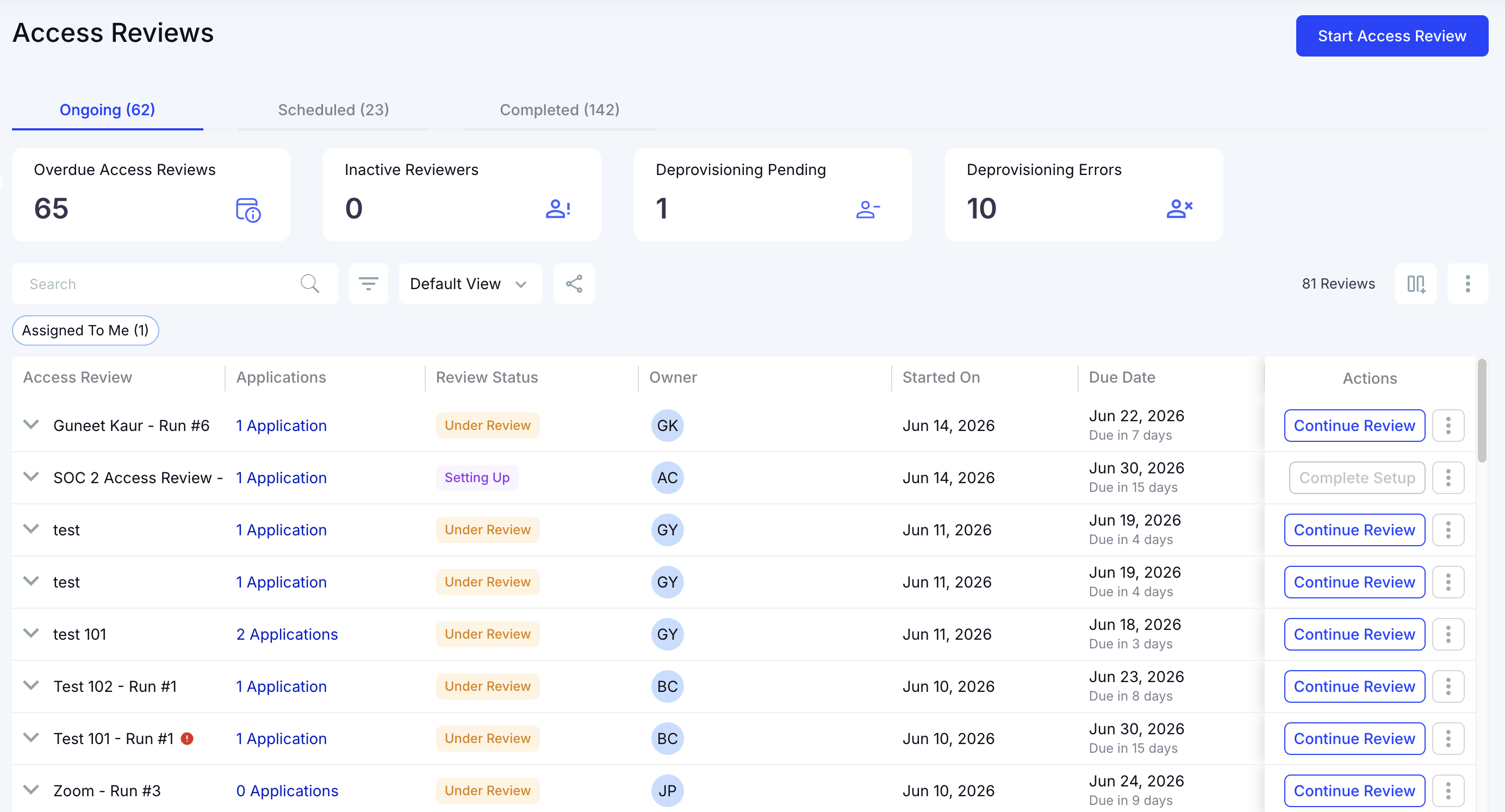
CloudEagle.ai schedules automated access reviews for SaaS. App admins see roles and permissions in one dashboard, making reviews quick and structured.

Why We Are Better

CloudEagle.ai integrates SSO, HRIS, and app data, giving reviewers complete context. Reviews finish quickly and continuously, reducing compliance delays.

B: Reducing Reviewer Fatigue and Prioritizing High-Risk Users

CloudEagle.ai eliminates “rubber-stamping” by helping reviewers focus only on meaningful decisions. Instead of scanning hundreds of accounts, reviewers see exactly where risk exists.

Current Process

Managers certify access without full context. They often approve everything because reviews take too long and lack insight.

Pain Points

Reviewer fatigue creates risk. High-privilege accounts slip through reviews without scrutiny.

How We Do It

CloudEagle.ai flags high-risk users, ex-employees, and elevated roles automatically. Reviewers focus only on users who need deeper evaluation.

Why We Are Better

CloudEagle.ai uses AI to filter out low-risk accounts. Teams spend time where it matters, increasing accuracy and reducing fatigue.

C: Automated Evidence, Deprovisioning and End-to-End Compliance Reporting

CloudEagle.ai closes the loop by handling everything from identifying improper access management strategy to removing it, capturing evidence, and preparing audit-ready reports automatically.

Current Process

IT manually removes users, downgrades roles, and attaches proof in JIRA or ticketing systems. Gathering evidence for audits takes days.

Pain Points

Deprovisioning is slow, inconsistent, and hard to track. Audit evidence is scattered, causing delays and rework.

How We Do It

CloudEagle.ai offboards rejected users automatically, attaches evidence, and logs everything in JIRA or any ITSM tool.

Why We Are Better

CloudEagle.ai automates the full workflow, from assigning reviewers to generating SaaS compliance reports, allowing teams to finish reviews in days.

D: Identifying Privileged Users Across Every App

CloudEagle.ai centralizes visibility into admin and elevated roles, helping organizations quickly identify sensitive access and confirm that privileges remain appropriate.

Current Process

Teams log into each app separately to confirm admin roles and then cross-check SSO and HRIS data manually.

Pain Points

Privilege data is scattered across apps. IT can’t easily confirm if elevated users are still active or should retain access.

How We Do It

CloudEagle.ai correlates app roles, SSO status, and HRIS data. Elevated permissions appear clearly in one unified view.

Why We Are Better

CloudEagle.ai places all privilege insights on a single page, making high-risk access easy to spot, review, and correct.

E: Employee App Catalog and Time-Based Access Control

CloudEagle.ai accelerates access provisioning while ensuring that permissions stay temporary, controlled, and aligned with compliance standards.

Current Process

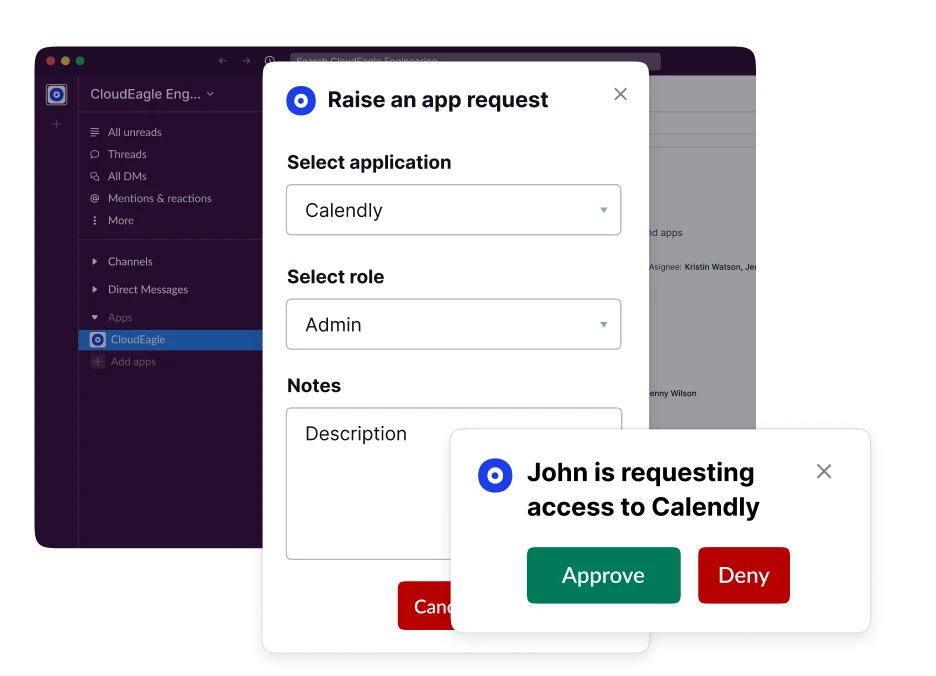
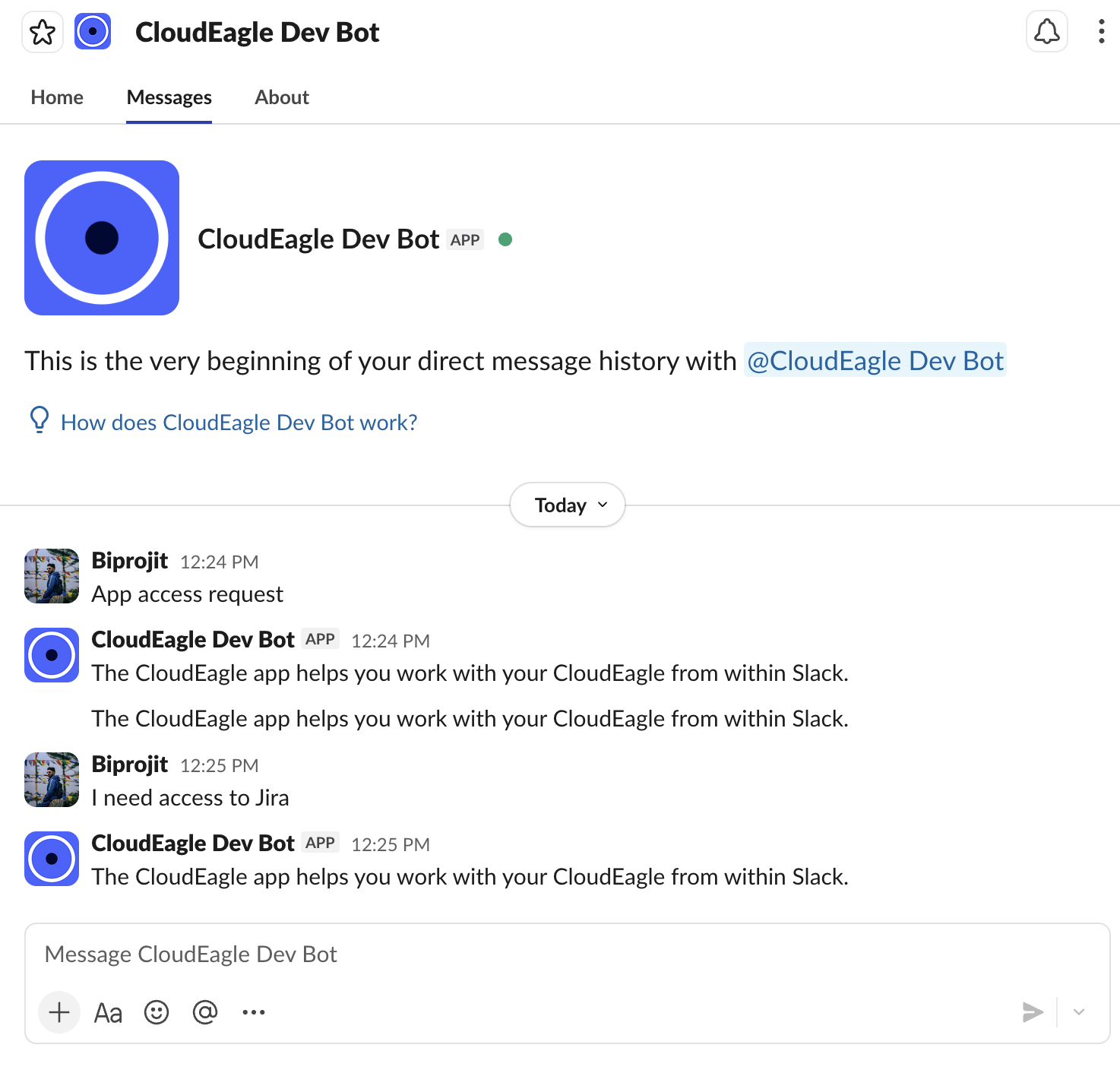
Employees request apps via email or Slack. IT verifies manually, chases approvals, and updates systems by hand. Ticketing tools lack role- or department-based visibility.

Pain Points

Requests pile up. Approvals stall. IT lacks control and visibility into who should see which apps.

How We Do It

CloudEagle.ai offers a centralized app catalog with role-based visibility. Approvals route automatically, and time-based access removes unused permissions on schedule.

Why We Are Better

CloudEagle.ai prevents shadow IT by showing employees only approved apps. Access stays compliant, documented, and easy to audit.

4. What Changes When Reviews And Audits Happen Continuously?

When reviews and audits shift from quarterly events to ongoing processes, everything about governance starts to feel lighter. Instead of teams scrambling to remember decisions made months ago, corrections happen in the same moment the access or license change occurs.

  • Managers get clearer context: They approve or revoke access based on current activity, not half-forgotten decisions from the last quarter.
  • Audits become predictable: Continuous documentation makes reviews feel like a confirmation step, not a discovery mission.
  • Budget accuracy strengthens: Real-time license visibility prevents waste before it lands on an invoice.

Continuous oversight shifts governance from reactive cleanup to a steady rhythm that teams barely feel.

  • Compliance becomes proactive because gaps never have time to widen.
  • Security posture improves as risky access doesn’t linger unnoticed.
  • Operational friction drops since reviews become small daily nudges rather than massive quarterly tasks.

And the biggest shift? Audits stop being stressful revelations and start looking like validations of work you’ve already handled.

5. Conclusion

Access reviews and license audits don’t become painful because everything builds up between cycles. Temporary access becomes permanent. And by the time quarterly reviews arrive, teams are left sorting through months of decisions.

CloudEagle.ai is what makes that possible. It monitors access as it changes, flags license issues before they become expensive, and automates the cleanup so teams don’t spend cycles chasing spreadsheets. Compliance stops being a quarterly scramble.

6. FAQs

1. What are access reviews?

Access reviews verify whether users still need the permissions they have. They help prevent excessive access, reduce risk, and keep systems compliant.

2. Who can create access reviews?

Usually IT, security, or identity governance teams create them. In some tools, managers or app owners can trigger reviews for their specific teams.

3. What are the risks of user access review?

If done infrequently or inaccurately, access creep builds up, former employees retain permissions, privileged roles expand, and compliance gaps grow unnoticed.

4. How to conduct an access review?

List all users, map their current permissions, validate access with managers, remove unnecessary roles, and document each approval or revocation for audit readiness.

5. How to conduct an access review?

The process stays the same: gather user entitlements, verify them with owners, adjust access as needed, and record decisions for compliance.

Advertisement for a SaaS Subscription Tracking Template with a call-to-action button to download and a partial graphic of a tablet showing charts.Banner promoting a SaaS Agreement Checklist to streamline SaaS management and avoid budget waste with a call-to-action button labeled Download checklist.Blue banner with text 'The Ultimate Employee Offboarding Checklist!' and a black button labeled 'Download checklist' alongside partial views of checklist documents from cloudeagle.ai.Digital ad for download checklist titled 'The Ultimate Checklist for IT Leaders to Optimize SaaS Operations' by cloudeagle.ai, showing checklist pages.Slack Buyer's Guide offer with text 'Unlock insider insights to get the best deal on Slack!' and a button labeled 'Get Your Copy', accompanied by a preview of the guide featuring Slack's logo.Monday Pricing Guide by cloudeagle.ai offering exclusive pricing secrets to maximize investment with a call-to-action button labeled Get Your Copy and an image of the guide's cover.Blue banner for Canva Pricing Guide by cloudeagle.ai offering a guide to Canva costs, features, and alternatives with a call-to-action button saying Get Your Copy.Blue banner with white text reading 'Little-Known Negotiation Hacks to Get the Best Deal on Slack' and a white button labeled 'Get Your Copy'.Blue banner with text 'Little-Known Negotiation Hacks to Get the Best Deal on Monday.com' and a white button labeled 'Get Your Copy'.Blue banner with text 'Little-Known Negotiation Hacks to Get the Best Deal on Canva' and a white button labeled 'Get Your Copy'.Banner with text 'Slack Buyer's Guide' and a 'Download Now' button next to images of a guide titled 'Slack Buyer’s Guide: Features, Pricing & Best Practices'.Digital cover of Monday Pricing Guide with a button labeled Get Your Copy on a blue background.Canva Pricing Guide cover with a button labeled Get Your Copy on a blue gradient background.

Enter your email to
unlock the report

Oops! Something went wrong while submitting the form.
License Count
Benchmark
Per User/Per Year

Enter your email to
unlock the report

Oops! Something went wrong while submitting the form.
License Count
Benchmark
Per User/Per Year

Enter your email to
unlock the report

Oops! Something went wrong while submitting the form.
Notion Plus
License Count
Benchmark
Per User/Per Year
100-500
$67.20 - $78.72
500-1000
$59.52 - $72.00
1000+
$51.84 - $57.60
Canva Pro
License Count
Benchmark
Per User/Per Year
100-500
$74.33-$88.71
500-1000
$64.74-$80.32
1000+
$55.14-$62.34

Enter your email to
unlock the report

Oops! Something went wrong while submitting the form.

Enter your email to
unlock the report

Oops! Something went wrong while submitting the form.
Zoom Business
License Count
Benchmark
Per User/Per Year
100-500
$216.00 - $264.00
500-1000
$180.00 - $216.00
1000+
$156.00 - $180.00

Enter your email to
unlock the report

Oops! Something went wrong while submitting the form.

Get the Right Security Platform To Secure Your Cloud Infrastructure

Please enter a business email
Thank you!
The 2023 SaaS report has been sent to your email. Check your promotional or spam folder.
Oops! Something went wrong while submitting the form.

Access full report

Please enter a business email
Thank you!
The 2023 SaaS report has been sent to your email. Check your promotional or spam folder.
Oops! Something went wrong while submitting the form.

Strengthen Your IAM Foundation

Learn the core principles of identity and access management to build stronger, audit-ready governance processes.

Get the IAM Guide
CTA Thumbnail

Access reviews always sound simple until you actually run one. According to Deloitte, 47% of organizations admit they lack real-time visibility into user permissions and entitlements.

And that’s the real issue: the systems meant to create order often introduce their own chaos. Reviews pile up. Audits become stressful. Permissions drift. Licenses multiply. Meanwhile, everyone assumes someone else is keeping track.

CloudEagle.ai flips that completely. Instead of chasing old data, it gives you real-time visibility, automates the access review process, and lets you audit all your licenses. 

TL;DR

  • Quarterly access reviews fail because permissions change constantly, creating drift, blind spots, and audit stress.
  • License audits expose forgotten decisions, like temporary access that became permanent, duplicate tools, and unused premium licenses.
  • CloudEagle.ai creates a single source of truth by unifying SSO, HRIS, and app data in real time.
  • Access reviews run continuously, not quarterly, with automated workflows that finish in days instead of months.
  • High-risk users are prioritized automatically, reducing reviewer fatigue and eliminating rubber-stamp approvals.

Prevent Access Review Failures

Use this checklist to ensure employees lose access at the right time, reducing audit gaps and governance risks.

Get Best Practices
CTA Thumbnail

1. What If Your Access Reviews Didn’t Feel Like A Quarterly Hassle?

Picture the usual quarterly review routine: spreadsheets flying around and managers approving access they barely remember assigning. It’s a seasonal event complete with stress, guesswork, and a sprint to meet audit deadlines.

Managers:

They’re asked to verify dozens of access rights months after the fact. Half the roles have changed, projects have ended, and contractors have cycled out. Without context, the safest option becomes the laziest: approve everything.

Security & Compliance:

They see the other side of the coin: a neat paper trail masking inconsistent permissions. Drifted roles. Temporary exceptions that never expired. Accounts that still exist even though their owners don’t.

As cybersecurity expert Gene Spafford famously said,

“The only truly secure system is one that is powered off.”

Quarterly reviews try to secure systems while they’re constantly changing, which is exactly why gaps keep sneaking through. Thus, permissions age. Risk grows in the silence between reviews. And when audit time arrives, everyone is surprised.

Identify Hidden Access Risks<

Uncover the IAM vulnerabilities that lead to audit failures, unauthorized access, and governance breakdowns.

Get the IAM Guide
CTA Thumbnail

2. Why Do License Audits Always Reveal Things You Wish You’d Caught Earlier?

License management has a talent for showing you the version of your environment you didn’t know existed. On the surface, user access review software looks orderly. But the moment an audit begins, all the quiet oversights become transparent.

A. Seats Assigned “Temporarily” That Became Permanent

Let’s assume someone needs a license “just for a week.” Maybe it’s a contractor jumping into a project or an employee helping another team. Nobody thinks twice as it’s temporary. Except temporary access has a funny habit of sticking around long.

  • The Forgotten Contractor Seat: A short-term worker leaves, but their seat stays active through multiple billing cycles.
  • The Project-Only Upgrade: Someone gets a premium license for a specific task… and keeps it because no one revisits the assignment.
  • The Access Shortcut: Teams assign full licenses because it’s faster than figuring out the right tier for a one-off need.

By the time the audit rolls around, these accidental long-term licenses appear as overspending, misuse, or compliance drift.

And that’s the kicker: the biggest license problems don’t come from bad decisions but from temporary ones nobody remembers to undo.

B. Duplicate Tools Across Departments Inflating Spend

Duplicate user access review don’t show up as big red flags. Sales wants better dashboards, so they grab another. Ops wants cleaner workflows, so they subscribe to a third. Each team solves its own problem. Thus, the company ends up paying three times for the same capability.

  • The Feature Overlap Problem: Tools that do 80% of the same job, each justified as “slightly better” for one team.
  • The Silo Upgrade: A department upgrades its license tier while another team uses a cheaper option for the same purpose.
  • The Lone Renewal: One subscription quietly renews because finance doesn’t know it duplicates another app under a different owner.

During an audit, these duplicates finally surface. Suddenly, the enterprise realizes it’s paying multiple vendors for the same outcome, with none of the cumulative leverage that comes from consolidation.

C. Users Holding Premium Access for Basic Work

Premium licenses usually get assigned with good intentions. Fast-forward a few months, and that same user is doing routine tasks that never touch the premium features… yet the organization keeps paying top-tier prices.

And these misalignments add up fast. According to Forbes, 53% of enterprises admit they consistently overpay for higher-tier licenses that users don’t actually need.

  • The Mismatched Role Change: An employee shifts into a lighter workflow, but their expensive license never downgrades with them.
  • The “Just In Case” Upgrade: Teams assign higher tiers preemptively because it feels safer than reassigning later.
  • The Forgotten Pilot User: A person added during a feature trial remains on the premium tier long after the pilot ended.

Audits bring these mismatches into the light, not because they’re malicious, but because they’re invisible during day-to-day operations. Most teams don’t track who uses which feature deeply enough to justify the tier.

3. How Does CloudEagle.ai Create A Single Source Of Truth?

User access reviews often stretch across months, requiring manual checks across SSO logs, HR systems, and individual apps. That complexity leads to blind spots, delays, and elevated access remaining far longer than intended.

CloudEagle.ai replaces this fragmented workflow with continuous monitoring, automated reviews, and precise risk detection. 

With one system orchestrating reviews, proof collection, and deprovisioning, enterprises can use this user access review software to eliminate guesswork and complete audits in days instead of months.

A: Continuous User Access Reviews Without Manual Work

CloudEagle.ai ensures identity and access stays accurate every day, not once a quarter, giving teams reliable control over permissions while cutting the manual effort behind traditional reviews.

Current Process

IT pulls data from multiple systems and logs into apps manually to check user roles. Teams verify access need by hand and remove or downgrade users one by one.

Pain Points

Quarterly reviews miss risky users. Ex-employees retain access longer, and manual checks delay compliance work.

How We Do It

CloudEagle.ai schedules automated access reviews for SaaS. App admins see roles and permissions in one dashboard, making reviews quick and structured.

Why We Are Better

CloudEagle.ai integrates SSO, HRIS, and app data, giving reviewers complete context. Reviews finish quickly and continuously, reducing compliance delays.

B: Reducing Reviewer Fatigue and Prioritizing High-Risk Users

CloudEagle.ai eliminates “rubber-stamping” by helping reviewers focus only on meaningful decisions. Instead of scanning hundreds of accounts, reviewers see exactly where risk exists.

Current Process

Managers certify access without full context. They often approve everything because reviews take too long and lack insight.

Pain Points

Reviewer fatigue creates risk. High-privilege accounts slip through reviews without scrutiny.

How We Do It

CloudEagle.ai flags high-risk users, ex-employees, and elevated roles automatically. Reviewers focus only on users who need deeper evaluation.

Why We Are Better

CloudEagle.ai uses AI to filter out low-risk accounts. Teams spend time where it matters, increasing accuracy and reducing fatigue.

C: Automated Evidence, Deprovisioning and End-to-End Compliance Reporting

CloudEagle.ai closes the loop by handling everything from identifying improper access management strategy to removing it, capturing evidence, and preparing audit-ready reports automatically.

Current Process

IT manually removes users, downgrades roles, and attaches proof in JIRA or ticketing systems. Gathering evidence for audits takes days.

Pain Points

Deprovisioning is slow, inconsistent, and hard to track. Audit evidence is scattered, causing delays and rework.

How We Do It

CloudEagle.ai offboards rejected users automatically, attaches evidence, and logs everything in JIRA or any ITSM tool.

Why We Are Better

CloudEagle.ai automates the full workflow, from assigning reviewers to generating SaaS compliance reports, allowing teams to finish reviews in days.

D: Identifying Privileged Users Across Every App

CloudEagle.ai centralizes visibility into admin and elevated roles, helping organizations quickly identify sensitive access and confirm that privileges remain appropriate.

Current Process

Teams log into each app separately to confirm admin roles and then cross-check SSO and HRIS data manually.

Pain Points

Privilege data is scattered across apps. IT can’t easily confirm if elevated users are still active or should retain access.

How We Do It

CloudEagle.ai correlates app roles, SSO status, and HRIS data. Elevated permissions appear clearly in one unified view.

Why We Are Better

CloudEagle.ai places all privilege insights on a single page, making high-risk access easy to spot, review, and correct.

E: Employee App Catalog and Time-Based Access Control

CloudEagle.ai accelerates access provisioning while ensuring that permissions stay temporary, controlled, and aligned with compliance standards.

Current Process

Employees request apps via email or Slack. IT verifies manually, chases approvals, and updates systems by hand. Ticketing tools lack role- or department-based visibility.

Pain Points

Requests pile up. Approvals stall. IT lacks control and visibility into who should see which apps.

How We Do It

CloudEagle.ai offers a centralized app catalog with role-based visibility. Approvals route automatically, and time-based access removes unused permissions on schedule.

Why We Are Better

CloudEagle.ai prevents shadow IT by showing employees only approved apps. Access stays compliant, documented, and easy to audit.

4. What Changes When Reviews And Audits Happen Continuously?

When reviews and audits shift from quarterly events to ongoing processes, everything about governance starts to feel lighter. Instead of teams scrambling to remember decisions made months ago, corrections happen in the same moment the access or license change occurs.

  • Managers get clearer context: They approve or revoke access based on current activity, not half-forgotten decisions from the last quarter.
  • Audits become predictable: Continuous documentation makes reviews feel like a confirmation step, not a discovery mission.
  • Budget accuracy strengthens: Real-time license visibility prevents waste before it lands on an invoice.

Continuous oversight shifts governance from reactive cleanup to a steady rhythm that teams barely feel.

  • Compliance becomes proactive because gaps never have time to widen.
  • Security posture improves as risky access doesn’t linger unnoticed.
  • Operational friction drops since reviews become small daily nudges rather than massive quarterly tasks.

And the biggest shift? Audits stop being stressful revelations and start looking like validations of work you’ve already handled.

5. Conclusion

Access reviews and license audits don’t become painful because everything builds up between cycles. Temporary access becomes permanent. And by the time quarterly reviews arrive, teams are left sorting through months of decisions.

CloudEagle.ai is what makes that possible. It monitors access as it changes, flags license issues before they become expensive, and automates the cleanup so teams don’t spend cycles chasing spreadsheets. Compliance stops being a quarterly scramble.

6. FAQs

1. What are access reviews?

Access reviews verify whether users still need the permissions they have. They help prevent excessive access, reduce risk, and keep systems compliant.

2. Who can create access reviews?

Usually IT, security, or identity governance teams create them. In some tools, managers or app owners can trigger reviews for their specific teams.

3. What are the risks of user access review?

If done infrequently or inaccurately, access creep builds up, former employees retain permissions, privileged roles expand, and compliance gaps grow unnoticed.

4. How to conduct an access review?

List all users, map their current permissions, validate access with managers, remove unnecessary roles, and document each approval or revocation for audit readiness.

5. How to conduct an access review?

The process stays the same: gather user entitlements, verify them with owners, adjust access as needed, and record decisions for compliance.

CloudEagle.ai recognized in the 2025 Gartner® Magic Quadrant™ for SaaS Management Platforms
Download now
gartner chart
5x
Faster employee
onboarding
80%
Reduction in time for
user access reviews
30k
Workflows
automated
$15Bn
Analyzed in
contract spend
$2Bn
Saved in
SaaS spend

Recognized as an Industry leader for our AI

CloudEagle.ai is Recognized in the 2024 Gartner® Magic Quadrant™ for SaaS Management Platforms

Recognition highlights CloudEagle’s innovation and leadership in the rapidly evolving SaaS management and procurement space.
Read More
Gartner Magic Quadrant for SaaS Management Platforms showing a chart divided into Challengers and Leaders quadrants with various companies plotted as dots.

CloudEagle.ai Recognized in the GigaOm Radar for SaaS Management Platforms

CloudEagle named a Leader and Outperformer in GigaOm Radar Report, validating its impact in the SaaS management platform landscape.
Read More
gigaom

Everest Group Positions CloudEagle.ai as a Trailblazer in SaaS Management Platforms

CloudEagle recognized as a Trailblazer by Everest Group, showcasing its rapid growth and innovation in SaaS spend and operations management.
Read More
qks

CloudEagle.ai is Recognized in the 2024 Gartner® Magic Quadrant™ for SaaS Management Platforms

Recognition highlights CloudEagle’s innovation and leadership in the rapidly evolving SaaS management and procurement space.
Read More
gartner

Streamline SaaS governance and save 10-30%

Book a Demo with Expert
CTA image
One platform to Manage
all SaaS Products
Learn More