SaaS Management

How CloudEagle.ai Detects Shadow IT Beyond Okta and SSO

Share via:
Written by:
CloudEagle.ai Team
Reviewed by
Nidhi Jain
Last Updated:
November 25, 2025
blog-cms-banner-bg
Little-Known Negotiation Hacks to Get the Best Deal on Slack
cta-bg-blogDownload Your Copy

HIPAA Compliance Checklist for 2025

Download PDF

‍

Most teams rely on Okta and SSO logs as their source of truth for SaaS activity. The real picture, however, is far messier. Industry reports show that 60% of organizations don’t include Shadow IT in their threat assessments, even though a significant share of cyber incidents in the last two years traced back to unsanctioned app usage.

If you’ve ever wondered what your SSO isn’t catching and why those blind spots keep growing, you’re in the right place. This article breaks down how SaaS is identified today, where SSO misses critical activity, and how CloudEagle detects Shadow IT far beyond identity systems.

‍

Where Okta and SSO Miss Shadow IT Activity?

Identity tools like Okta centralize authentication, but they were never designed to reveal the full SaaS footprint. They show what’s formally connected, not what employees actually adopt, purchase, or use. This creates blind spots across usage, spend, and governance, exactly where Shadow IT takes hold.

What Okta and SSO doesn’t show you:

  • Apps never integrated with Okta or any SSO provider
  • Direct logins through vendor websites, personal accounts, or unapproved paths
  • Mobile or desktop client logins that bypass the SSO flow
  • Purchases made via corporate cards, reimbursements, or trial sign-ups
  • Duplicate applications are adopted across different teams
  • Unused or underutilized licenses contribute to silent budget waste
  • Who is inactive, oversized, or using redundant tools
  • Usage depth, feature adoption, and whether the app adds real business value
  • Contract details, invoices, SKUs, or renewal timelines
  • Any unified picture combining spend, access, and usage in one place

‍

“By its very nature, shadow IT exists to circumvent IT governance and security controls by employees believing they’re doing something beneficial for the company. The painful truth is that shadow IT is one of the leading causes of insider data threats across any organization." ~ Rick Orloff, Vice President and Chief Security Officer at Code42.

‍

SSO only tracks the authentication path and not the tool itself, the spend behind it, or the risk it introduces.

And they don’t support

  • Detection of SaaS apps authenticated outside Okta or SSO
  • Governance or offboarding workflows for non-SSO apps
  • Access reviews with full visibility across all apps
  • Risk scoring for unsanctioned or unknown tools
  • Identification of duplicates across teams or departments
  • Continuous monitoring of unmanaged or high-risk vendors

These limitations create a fragmented discovery model where identity tools see only what is routed through them and nothing else.

As a result, teams believe they’re looking at a complete SaaS inventory, but huge portions operate outside of Okta and SSO. Finance sees one number. IT sees another. Security can’t assess what it can’t see. And Shadow IT grows precisely in the gaps, such as direct logins, unmanaged purchases, personal accounts, free tools, and redundant apps that never surface in identity workflows.

This is where spend leakage builds, visibility breaks down, and operational risk begins.

‍

2. How to Detect Shadow IT Beyond Okta and SSO with CloudEagle.ai

Okta tells you who logged in through Okta. Everything else, the card charge for a design tool, the free AI note-taker, the personal ChatGPT account, leaves its trail in finance, expense, browser, or the app's own logs.

CloudEagle.ai is an AI-powered SaaS Management, AI Governance, and SaaS Security platform that starts by collecting those trails. It then surfaces the paid and free apps that never touched SSO, scores the risk on each one, routes it to an approval decision, and keeps a running record for audits.

A. Connect Every Discovery Source, Not Just SSO

SSO logs only see the apps routed through Okta or Google Workspace. To find the rest, you need the systems where shadow IT actually leaves evidence.

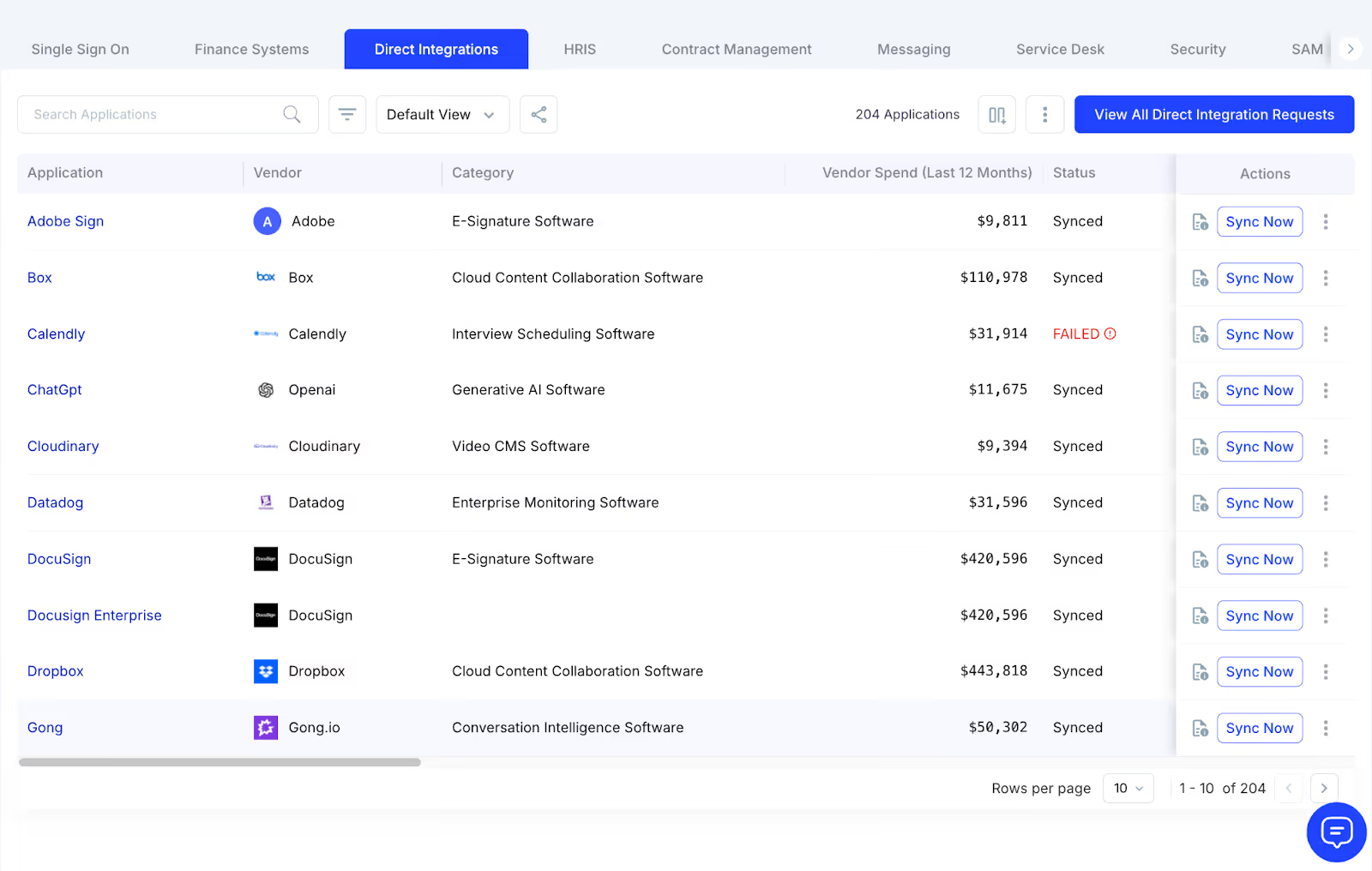
CloudEagle.ai connects to your identity provider alongside finance and ERP, corporate cards, expense tools, HRIS, MDM, browser and firewall signals, and direct app APIs across 500+ integrations. EagleIQ, our context graph, correlates all of it, so a charge with no matching login, or a login with no matching charge, gets flagged as an app operating outside approval.
‍

CloudEagle.ai Direct Integrations dashboard displaying connected applications, vendors, categories, annual vendor spend, sync status, and options to synchronize integrations.

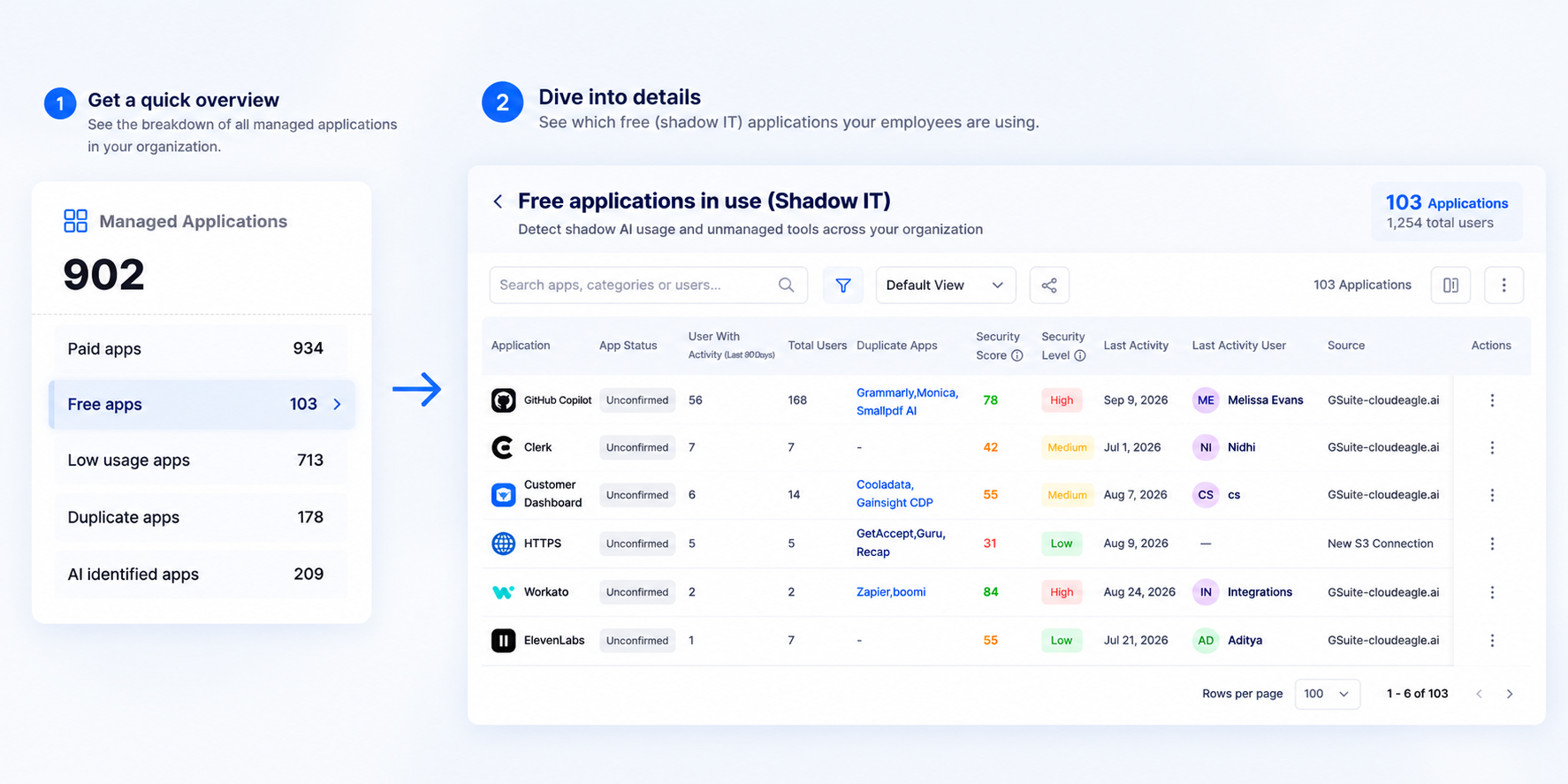
Once connected, the Managed Applications card on the dashboard splits your stack into paid apps, free apps, low-usage apps, duplicates, and AI-identified apps. When one customer connected Workday as a discovery source, it surfaced far more apps than the team expected.

The Free Apps Users Are Logging Into in the Last 30 Days widget lists tools with active logins and zero dollars attached, still unconfirmed. Because AI-identified apps sit in the same view, you can manage shadow AI apps alongside the rest of your shadow IT.

Free apps cost nothing. Paid shadow IT leaves a receipt, so that's the next place to look.

B. Catch Apps Bought on Credit Cards in the Last 30 Days

Someone expenses a tool or puts it on a team card, and it never goes through procurement or SSO.

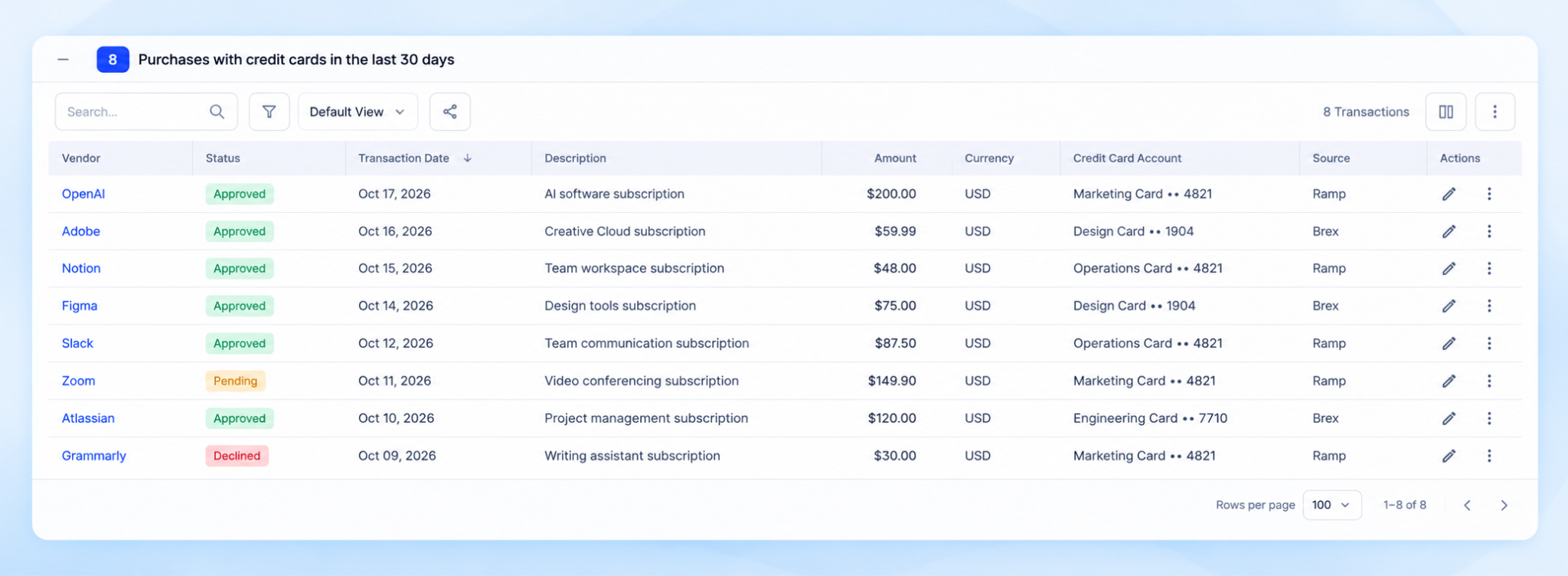
The Purchases With Credit Cards widget on the main dashboard lists every card transaction from the last 30 days, with vendor, amount, card account, source, and whether the app is confirmed or unconfirmed.
‍

Dashboard showing credit card purchases over the last 30 days, including vendors, transaction dates, amounts, approval statuses, card accounts, and payment sources.

‍

From here you can catch shadow purchases early, reach the buyer, and either add the app to the sanctioned list or plan its removal.

The dashboard covers the last 30 to 90 days. For anything older, go to Reports.

C. Pull the Full Shadow IT Report

A tool billed monthly from five different cards is easy to miss one month at a time.

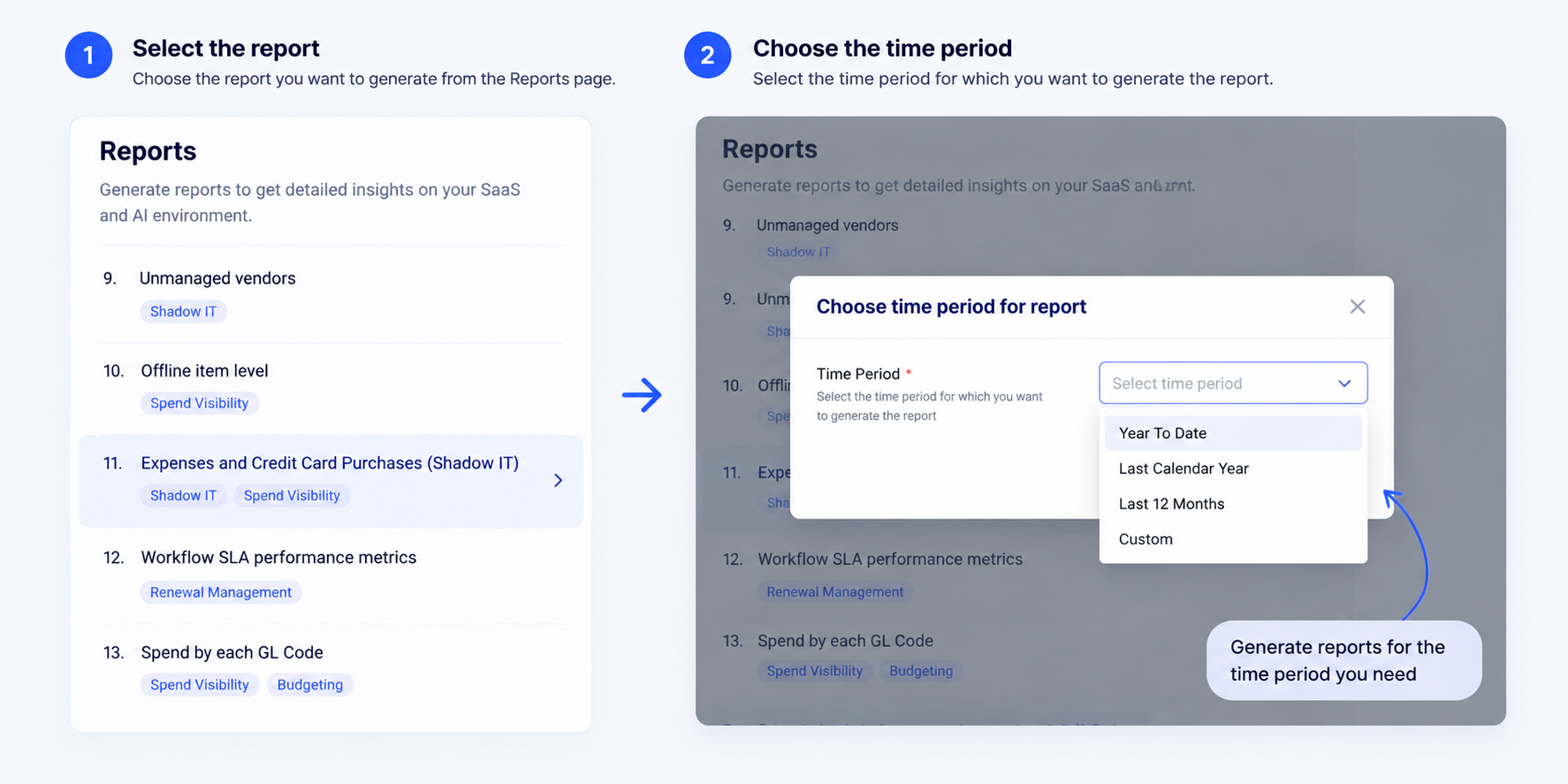
In Reports, the Shadow IT section breaks this out into separate views: Free Apps in Use, Expenses and Credit Card Purchases, and Apps Purchased with Corporate Credit Cards. Set any of them to the last 12 months or a custom range.
‍

CloudEagle.ai dashboard illustrating managed applications and Shadow IT discovery, with application counts, user activity, duplicate apps, security scores, and risk levels.

‍

Laid out over a year, a vendor that keeps charging from different accounts becomes obvious. Finance gets a real number to budget against, and auditors get a complete trail.

Knowing an app exists answers half the question. The other half is who is using it.

D. See Who Is Actively Using Each Free App

A free app with one login and a free app with 40 active users need different conversations.

The Free Apps with Active Usage view shows each unconfirmed free app with users active in the last 90 days against total assigned users, down to the people using it. You know exactly who to talk to before deciding to approve, replace, or retire the tool.

‍

Dashboard showing credit card transactions for software subscriptions, including vendors, transaction statuses, dates, amounts, card accounts, and payment sources.

D. Score the Risk of Every App You Discover

Not every unsanctioned app carries the same risk. A free whiteboard tool and an AI app with access to your shared drive don't deserve the same response.

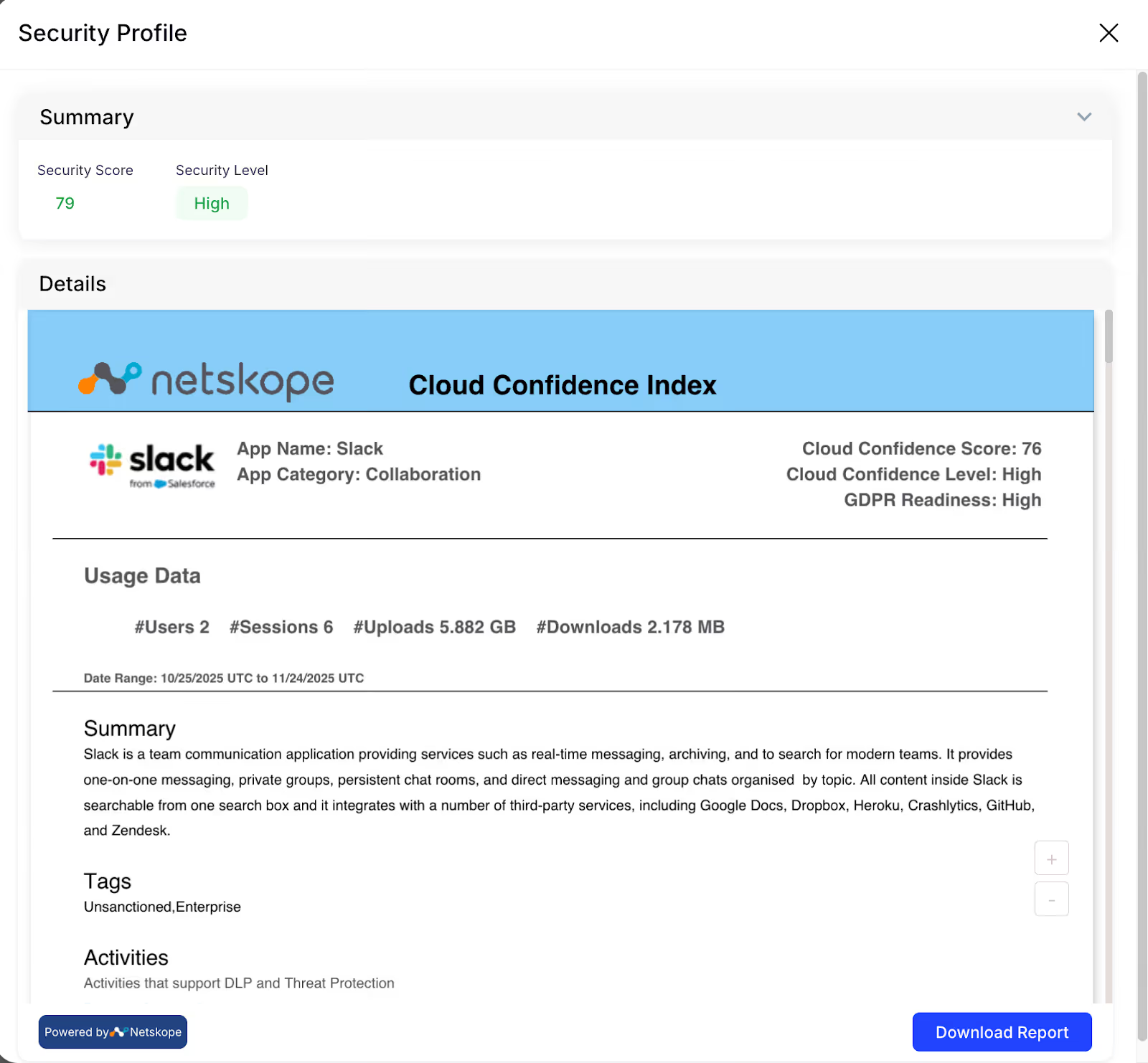
Every discovered app gets a security score and rating powered by the Netskope Cloud Confidence Index. HRIS and identity context add who uses it, which department they sit in, and whether access came through SSO or a bypass path.
‍

CloudEagle.ai security profile powered by Netskope, displaying an application's security score, confidence level, GDPR readiness, usage statistics, summary, and security tags.

‍

You can work the handful of high-risk tools first, without sending a vendor security questionnaire for every app on the list.

‍

Once you know what's risky, the next step is deciding what happens to each app.

E. Route Every Discovered App Through an Approval Workflow

Most teams find shadow IT and then lose weeks chasing owners over email.

CloudEagle.ai's no-code workflows send each discovered app to the right approver in Slack or email, to sanction it, restrict access by role, or retire it. Users get nudged to confirm whether they still need the tool or to request it properly through the app catalog.
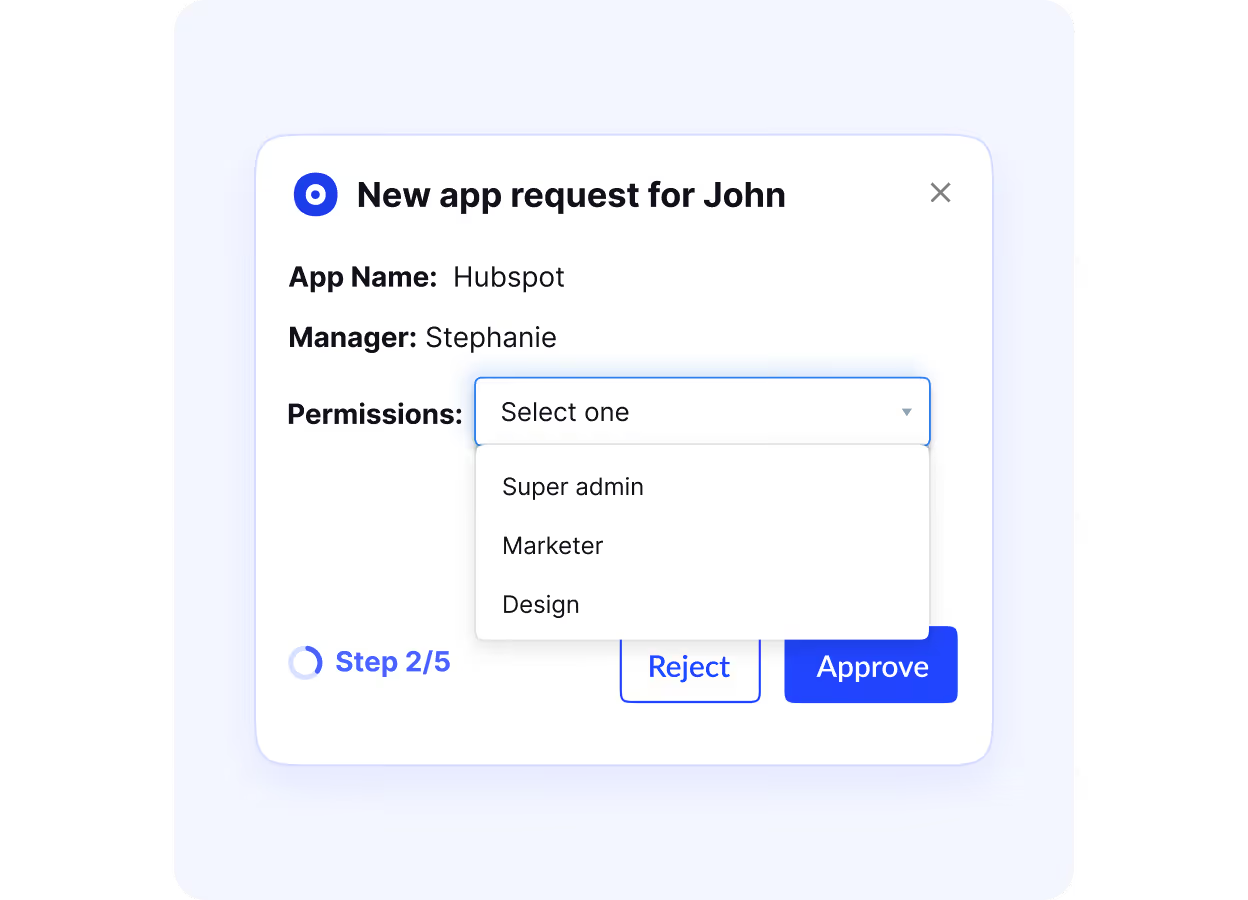
CloudEagle.ai application access request modal showing a new HubSpot app request, manager details, permission options, and approval or rejection actions.

‍

F. Track Shadow IT Over Time for Audits and Renewals

The dashboard widgets show the last 30 or 90 days. Audits and budget planning need a longer view.

In Reports, the Expenses and Credit Card Purchases (Shadow IT) tab can be set to the last 12 months or any custom range. It shows every transaction with vendor, status, amount, and account.
‍

CloudEagle.ai report generation workflow showing how to select a report and configure a reporting period, including year-to-date, last calendar year, last 12 months, and custom date ranges.

‍

A tool billed monthly from five different cards is easy to miss one month at a time and obvious in a 12-month table. Auditors get a complete trail, and finance gets a real number to budget against.

‍

Shadow IT Ends Where CloudEagle.ai Begins

Shadow IT isn’t hiding inside Okta; it’s living in the gaps between spend, usage, and access. Now you know how those blind spots form and why identity tools alone can’t close them.

CloudEagle brings the missing visibility layer: real usage, real spend, real access, all in one place so you can control the apps you actually have, not just the ones routed through SSO.

If you're ready to eliminate surprises, stop duplicate spend, and stay ahead of risky tools, CloudEagle.ai is the natural next step.

‍

Frequently Asked Questions 

1. Can CloudEagle.ai manage shadow AI apps that never go through SSO?

Yes. CloudEagle.ai finds AI apps through card and expense data, browser signals, and direct logins, then lists them as AI-identified apps on the same dashboard as the rest of your shadow IT. To go deeper on governing them once found, see how to manage shadow AI and shadow IT across the full lifecycle.

2. We already run Okta. Do we need separate IT management software for shadow AI?

No. CloudEagle.ai sits alongside Okta, reads its logs as one source, and fills in what Okta can't see from finance, browser, HRIS, and app data.

3. Can we eliminate shadow AI by blocking AI tools?

Blocking tends to push employees to personal accounts, which makes usage harder to see. A better outcome is visibility plus a redirect: CloudEagle.ai surfaces the AI apps in use and can show a flash page steering users to the approved tool.

4. Can we control shadow IT with low-code workflows instead of scripts?

Yes. CloudEagle.ai's workflows are built with a no-code, drag-and-drop builder, and approvals run in Slack or email.

5. How does IT management catch shadow AI that employees pay for themselves?

Personal subscriptions often show up as reimbursements or as logins with no matching company charge. EagleIQ correlates those signals and flags the app as operating outside approval.

‍

Advertisement for a SaaS Subscription Tracking Template with a call-to-action button to download and a partial graphic of a tablet showing charts.Banner promoting a SaaS Agreement Checklist to streamline SaaS management and avoid budget waste with a call-to-action button labeled Download checklist.Blue banner with text 'The Ultimate Employee Offboarding Checklist!' and a black button labeled 'Download checklist' alongside partial views of checklist documents from cloudeagle.ai.Digital ad for download checklist titled 'The Ultimate Checklist for IT Leaders to Optimize SaaS Operations' by cloudeagle.ai, showing checklist pages.Slack Buyer's Guide offer with text 'Unlock insider insights to get the best deal on Slack!' and a button labeled 'Get Your Copy', accompanied by a preview of the guide featuring Slack's logo.Monday Pricing Guide by cloudeagle.ai offering exclusive pricing secrets to maximize investment with a call-to-action button labeled Get Your Copy and an image of the guide's cover.Blue banner for Canva Pricing Guide by cloudeagle.ai offering a guide to Canva costs, features, and alternatives with a call-to-action button saying Get Your Copy.Blue banner with white text reading 'Little-Known Negotiation Hacks to Get the Best Deal on Slack' and a white button labeled 'Get Your Copy'.Blue banner with text 'Little-Known Negotiation Hacks to Get the Best Deal on Monday.com' and a white button labeled 'Get Your Copy'.Blue banner with text 'Little-Known Negotiation Hacks to Get the Best Deal on Canva' and a white button labeled 'Get Your Copy'.Banner with text 'Slack Buyer's Guide' and a 'Download Now' button next to images of a guide titled 'Slack Buyer’s Guide: Features, Pricing & Best Practices'.Digital cover of Monday Pricing Guide with a button labeled Get Your Copy on a blue background.Canva Pricing Guide cover with a button labeled Get Your Copy on a blue gradient background.

Enter your email to
unlock the report

Oops! Something went wrong while submitting the form.
License Count
Benchmark
Per User/Per Year

Enter your email to
unlock the report

Oops! Something went wrong while submitting the form.
License Count
Benchmark
Per User/Per Year

Enter your email to
unlock the report

Oops! Something went wrong while submitting the form.
Notion Plus
License Count
Benchmark
Per User/Per Year
100-500
$67.20 - $78.72
500-1000
$59.52 - $72.00
1000+
$51.84 - $57.60
Canva Pro
License Count
Benchmark
Per User/Per Year
100-500
$74.33-$88.71
500-1000
$64.74-$80.32
1000+
$55.14-$62.34

Enter your email to
unlock the report

Oops! Something went wrong while submitting the form.

Enter your email to
unlock the report

Oops! Something went wrong while submitting the form.
Zoom Business
License Count
Benchmark
Per User/Per Year
100-500
$216.00 - $264.00
500-1000
$180.00 - $216.00
1000+
$156.00 - $180.00

Enter your email to
unlock the report

Oops! Something went wrong while submitting the form.

Get the Right Security Platform To Secure Your Cloud Infrastructure

Please enter a business email
Thank you!
The 2023 SaaS report has been sent to your email. Check your promotional or spam folder.
Oops! Something went wrong while submitting the form.

Access full report

Please enter a business email
Thank you!
The 2023 SaaS report has been sent to your email. Check your promotional or spam folder.
Oops! Something went wrong while submitting the form.

TL;DR

  • Okta and SSO only show the apps routed through them, leaving hundreds of direct logins, free tools, trials, and card-based purchases completely invisible.
  • Shadow IT grows in those blind spots, creating unmanaged spend, duplicate tools, compliance gaps, and high-risk access you can’t review or offboard.
  • CloudEagle rebuilds the entire SaaS map by combining finance data, contracts, direct usage APIs, HRIS context, browser signals, and identity logs into one accurate view.
  • This multi-source visibility identifies every approved or unapproved app while surfacing risks, duplicate vendors, usage gaps, and spending trends in real time.
  • With workflows, alerts, and automated nudges, CloudEagle helps teams act immediately, reduce risk, and stop Shadow IT before it becomes a security or cost problem.

‍

‍

Most teams rely on Okta and SSO logs as their source of truth for SaaS activity. The real picture, however, is far messier. Industry reports show that 60% of organizations don’t include Shadow IT in their threat assessments, even though a significant share of cyber incidents in the last two years traced back to unsanctioned app usage.

If you’ve ever wondered what your SSO isn’t catching and why those blind spots keep growing, you’re in the right place. This article breaks down how SaaS is identified today, where SSO misses critical activity, and how CloudEagle detects Shadow IT far beyond identity systems.

‍

Where Okta and SSO Miss Shadow IT Activity?

Identity tools like Okta centralize authentication, but they were never designed to reveal the full SaaS footprint. They show what’s formally connected, not what employees actually adopt, purchase, or use. This creates blind spots across usage, spend, and governance, exactly where Shadow IT takes hold.

What Okta and SSO doesn’t show you:

  • Apps never integrated with Okta or any SSO provider
  • Direct logins through vendor websites, personal accounts, or unapproved paths
  • Mobile or desktop client logins that bypass the SSO flow
  • Purchases made via corporate cards, reimbursements, or trial sign-ups
  • Duplicate applications are adopted across different teams
  • Unused or underutilized licenses contribute to silent budget waste
  • Who is inactive, oversized, or using redundant tools
  • Usage depth, feature adoption, and whether the app adds real business value
  • Contract details, invoices, SKUs, or renewal timelines
  • Any unified picture combining spend, access, and usage in one place

‍

“By its very nature, shadow IT exists to circumvent IT governance and security controls by employees believing they’re doing something beneficial for the company. The painful truth is that shadow IT is one of the leading causes of insider data threats across any organization." ~ Rick Orloff, Vice President and Chief Security Officer at Code42.

‍

SSO only tracks the authentication path and not the tool itself, the spend behind it, or the risk it introduces.

And they don’t support

  • Detection of SaaS apps authenticated outside Okta or SSO
  • Governance or offboarding workflows for non-SSO apps
  • Access reviews with full visibility across all apps
  • Risk scoring for unsanctioned or unknown tools
  • Identification of duplicates across teams or departments
  • Continuous monitoring of unmanaged or high-risk vendors

These limitations create a fragmented discovery model where identity tools see only what is routed through them and nothing else.

As a result, teams believe they’re looking at a complete SaaS inventory, but huge portions operate outside of Okta and SSO. Finance sees one number. IT sees another. Security can’t assess what it can’t see. And Shadow IT grows precisely in the gaps, such as direct logins, unmanaged purchases, personal accounts, free tools, and redundant apps that never surface in identity workflows.

This is where spend leakage builds, visibility breaks down, and operational risk begins.

‍

2. How to Detect Shadow IT Beyond Okta and SSO with CloudEagle.ai

Okta tells you who logged in through Okta. Everything else, the card charge for a design tool, the free AI note-taker, the personal ChatGPT account, leaves its trail in finance, expense, browser, or the app's own logs.

CloudEagle.ai is an AI-powered SaaS Management, AI Governance, and SaaS Security platform that starts by collecting those trails. It then surfaces the paid and free apps that never touched SSO, scores the risk on each one, routes it to an approval decision, and keeps a running record for audits.

A. Connect Every Discovery Source, Not Just SSO

SSO logs only see the apps routed through Okta or Google Workspace. To find the rest, you need the systems where shadow IT actually leaves evidence.

CloudEagle.ai connects to your identity provider alongside finance and ERP, corporate cards, expense tools, HRIS, MDM, browser and firewall signals, and direct app APIs across 500+ integrations. EagleIQ, our context graph, correlates all of it, so a charge with no matching login, or a login with no matching charge, gets flagged as an app operating outside approval.

‍

CloudEagle.ai Direct Integrations dashboard displaying connected applications, vendors, categories, annual vendor spend, sync status, and options to synchronize integrations.

Once connected, the Managed Applications card on the dashboard splits your stack into paid apps, free apps, low-usage apps, duplicates, and AI-identified apps. When one customer connected Workday as a discovery source, it surfaced far more apps than the team expected.

The Free Apps Users Are Logging Into in the Last 30 Days widget lists tools with active logins and zero dollars attached, still unconfirmed. Because AI-identified apps sit in the same view, you can manage shadow AI apps alongside the rest of your shadow IT.

Free apps cost nothing. Paid shadow IT leaves a receipt, so that's the next place to look.

B. Catch Apps Bought on Credit Cards in the Last 30 Days

Someone expenses a tool or puts it on a team card, and it never goes through procurement or SSO.

The Purchases With Credit Cards widget on the main dashboard lists every card transaction from the last 30 days, with vendor, amount, card account, source, and whether the app is confirmed or unconfirmed.

‍

Dashboard showing credit card purchases over the last 30 days, including vendors, transaction dates, amounts, approval statuses, card accounts, and payment sources.

‍

From here you can catch shadow purchases early, reach the buyer, and either add the app to the sanctioned list or plan its removal.

The dashboard covers the last 30 to 90 days. For anything older, go to Reports.

C. Pull the Full Shadow IT Report

A tool billed monthly from five different cards is easy to miss one month at a time.

In Reports, the Shadow IT section breaks this out into separate views: Free Apps in Use, Expenses and Credit Card Purchases, and Apps Purchased with Corporate Credit Cards. Set any of them to the last 12 months or a custom range.

‍

CloudEagle.ai dashboard illustrating managed applications and Shadow IT discovery, with application counts, user activity, duplicate apps, security scores, and risk levels.

‍

Laid out over a year, a vendor that keeps charging from different accounts becomes obvious. Finance gets a real number to budget against, and auditors get a complete trail.

Knowing an app exists answers half the question. The other half is who is using it.

D. See Who Is Actively Using Each Free App

A free app with one login and a free app with 40 active users need different conversations.

The Free Apps with Active Usage view shows each unconfirmed free app with users active in the last 90 days against total assigned users, down to the people using it. You know exactly who to talk to before deciding to approve, replace, or retire the tool.

‍

Dashboard showing credit card transactions for software subscriptions, including vendors, transaction statuses, dates, amounts, card accounts, and payment sources.

D. Score the Risk of Every App You Discover

Not every unsanctioned app carries the same risk. A free whiteboard tool and an AI app with access to your shared drive don't deserve the same response.

Every discovered app gets a security score and rating powered by the Netskope Cloud Confidence Index. HRIS and identity context add who uses it, which department they sit in, and whether access came through SSO or a bypass path.

‍

CloudEagle.ai security profile powered by Netskope, displaying an application's security score, confidence level, GDPR readiness, usage statistics, summary, and security tags.

‍

You can work the handful of high-risk tools first, without sending a vendor security questionnaire for every app on the list.

‍

Once you know what's risky, the next step is deciding what happens to each app.

E. Route Every Discovered App Through an Approval Workflow

Most teams find shadow IT and then lose weeks chasing owners over email.

CloudEagle.ai's no-code workflows send each discovered app to the right approver in Slack or email, to sanction it, restrict access by role, or retire it. Users get nudged to confirm whether they still need the tool or to request it properly through the app catalog.

CloudEagle.ai application access request modal showing a new HubSpot app request, manager details, permission options, and approval or rejection actions.

‍

F. Track Shadow IT Over Time for Audits and Renewals

The dashboard widgets show the last 30 or 90 days. Audits and budget planning need a longer view.

In Reports, the Expenses and Credit Card Purchases (Shadow IT) tab can be set to the last 12 months or any custom range. It shows every transaction with vendor, status, amount, and account.

‍

CloudEagle.ai report generation workflow showing how to select a report and configure a reporting period, including year-to-date, last calendar year, last 12 months, and custom date ranges.

‍

A tool billed monthly from five different cards is easy to miss one month at a time and obvious in a 12-month table. Auditors get a complete trail, and finance gets a real number to budget against.

‍

Shadow IT Ends Where CloudEagle.ai Begins

Shadow IT isn’t hiding inside Okta; it’s living in the gaps between spend, usage, and access. Now you know how those blind spots form and why identity tools alone can’t close them.

CloudEagle brings the missing visibility layer: real usage, real spend, real access, all in one place so you can control the apps you actually have, not just the ones routed through SSO.

If you're ready to eliminate surprises, stop duplicate spend, and stay ahead of risky tools, CloudEagle.ai is the natural next step.

‍

Frequently Asked Questions 

1. Can CloudEagle.ai manage shadow AI apps that never go through SSO?

Yes. CloudEagle.ai finds AI apps through card and expense data, browser signals, and direct logins, then lists them as AI-identified apps on the same dashboard as the rest of your shadow IT. To go deeper on governing them once found, see how to manage shadow AI and shadow IT across the full lifecycle.

2. We already run Okta. Do we need separate IT management software for shadow AI?

No. CloudEagle.ai sits alongside Okta, reads its logs as one source, and fills in what Okta can't see from finance, browser, HRIS, and app data.

3. Can we eliminate shadow AI by blocking AI tools?

Blocking tends to push employees to personal accounts, which makes usage harder to see. A better outcome is visibility plus a redirect: CloudEagle.ai surfaces the AI apps in use and can show a flash page steering users to the approved tool.

4. Can we control shadow IT with low-code workflows instead of scripts?

Yes. CloudEagle.ai's workflows are built with a no-code, drag-and-drop builder, and approvals run in Slack or email.

5. How does IT management catch shadow AI that employees pay for themselves?

Personal subscriptions often show up as reimbursements or as logins with no matching company charge. EagleIQ correlates those signals and flags the app as operating outside approval.

‍

CloudEagle.ai recognized in the 2025 Gartner® Magic Quadrant™ for SaaS Management Platforms
Download now
gartner chart
5x
Faster employee
onboarding
80%
Reduction in time for
user access reviews
30k
Workflows
automated
$15Bn
Analyzed in
contract spend
$2Bn
Saved in
SaaS spend

Streamline SaaS governance and save 10-30%

Book a Demo with Expert
CTA image