You need to enable JavaScript in order to use the AI chatbot tool powered by ChatBot

SAP License Optimization: How CloudEagle Delivers 35% Savings Without the Chaos

Share via:
blog-cms-banner-bg
Little-Known Negotiation Hacks to Get the Best Deal on Slack
cta-bg-blogDownload Your Copy

HIPAA Compliance Checklist for 2025

Download PDF

It's two months before your SAP renewal. 

Your CFO asks: "Are we actually using everything we're paying for?"

You say you'll find out.

Three weeks later, you've pulled exports from Okta, chased down four team leads, reconciled two versions of a spreadsheet, and still can't say with confidence who's actively using what. You renew at roughly the same cost. Same roles. Same assumptions. Same lingering doubt.

And this cycle repeats. Every. Single. Year.

The problem isn't how hard you're negotiating. It's that you're walking into a renewal with stale data, incomplete access records, and no visibility into how SAP is used day to day. Organizations that close that visibility gap, correlating real user activity, identity changes, and AI data movement across their SAP environment, consistently uncover 20-35 percent in recoverable spend.

The savings aren't coming from getting a better deal. They're coming from knowing what's really happening before the conversation starts.

TL;DR 

  • SAP overspend builds quietly through role creep, unused entitlements, contractor access, integrations, and renewals made without real usage data
  • Shadow AI tools consuming SAP exports increase both cost and security exposure, and most teams have no visibility into it
  • Traditional SAM tools track ownership, not behavior, which means they miss the signals that actually drive waste
  • Behavior-based visibility into usage, identity events, and AI activity is what makes 20-35% savings sustainable
  • When licenses match real work, audits simplify, renewals strengthen, and SAP stops feeling unpredictable

Why SAP Costs Keep Climbing When Nothing Obviously Changed

Ask most IT leaders why their SAP bill went up, and they'll pause. No new modules. Headcount stayed flat, and yet the renewal came in higher.

The answer is almost always drift.

Here's how it actually accumulates:

  • An employee moves from Finance to Operations. Their old SAP roles stay. New ones get added. Nobody removes the originals.
  • A contractor finishes their engagement. IT removes them from Okta. The SAP license is assigned for another six months.
  • An integration with your analytics platform starts pulling data through a service account. That account looks like an active named user to the license counter.
  • Finance starts exporting SAP reports into AI tools for faster analysis. Usage patterns shift. The license model doesn't reflect it.

None of these events triggers an alert or shows up in a renewal dashboard. They just accumulate quietly until the contract comes up for review and the number is higher than expected.

This is the environment SAP optimization has to work in. And it's why most optimization efforts stall.

What Traditional SAM Tools Actually Miss

Standard software asset management tools were built for a simpler era: count licenses, track contract terms, flag assigned entitlements. That approach works when SAP usage is static and integrations are few.

Modern SAP environments are neither.

A typical enterprise SAP deployment touches HR, finance, procurement, operations, and increasingly, AI-driven forecasting tools. Users change roles quarterly. Contractors cycle in and out. APIs and bots interact with SAP data through service accounts that look like legitimate usage to a license counter.

What traditional SAM tools can tell you:

What they can't tell you:

  • Whether assigned licenses are actually being used
  • Whether a "user" is a human or an integration bot
  • Which AI tools are pulling SAP data downstream
  • Whether a role still matches someone's actual job
  • Which contractor accounts survived offboarding

Renewals built on this data inherit every gap in it. You're negotiating with a snapshot that's already months out of date, and the vendor knows it.

License Assignments Aren't the Same as License Usage.

Implement the best practices that close the gap between what's assigned and what's used.
Download the Guide

Where the 20-35% Spend Actually Hides

The recoverable spend doesn't come from one big bucket. It comes from five specific patterns that appear in nearly every large SAP environment.

Role inflation and entitlement creep

When employees change teams or take on temporary projects, SAP roles stack rather than replace. A user who moved from AP to FP&A two years ago may still carry three premium roles from their previous assignment, none of which they touch. Multiply that across a 2,000-seat deployment, and the waste becomes significant fast.

Contractor and shared account sprawl

Contractors frequently hold named licenses well past their engagement end date. Shared service accounts used by integrations often count as high-tier users because their interaction patterns look like active usage. Without an identity context, there's no way to distinguish a legitimate active user from lingering overhead.

Indirect access from integrations

SAP environments don't operate alone. Analytics platforms, e-commerce systems, middleware layers, and bots interact with SAP data continuously, sometimes through service accounts, sometimes through APIs that trigger usage signals that look like named-user activity. These interactions inflate consumption metrics and, during an audit, surface as unexpected indirect access exposure.

Shadow AI usage

This one is newer, but accelerating fast.

Finance teams use AI tools to analyze SAP exports. HR teams feed workforce data into AI forecasting tools. Procurement teams build dashboards outside SAP using exported data. Each of these behaviors changes how SAP is actually used and, in some cases, how usage is reported without appearing anywhere in standard license tracking.

It also introduces data exposure risk that security teams typically only learn about during an incident review. Or an audit. Or worse.

Renewal assumptions anchored to last year

When usage is invisible, procurement defaults to renewing what was previously purchased. This locks inefficiencies forward into multi-year terms and removes any negotiating leverage before the conversation even begins. You're not starting a negotiation. You're just saying yes again.

What an Unmanaged SAP Environment Actually Looks Like

This is what quietly happens across a 12-month cycle when visibility is missing:

Month 1-2: Three employees change departments. Their old SAP roles remain active alongside their new ones. Nobody flags it because there's no trigger to do so.

Month 3-4: A project team of eight contractors wraps up. Okta access is removed. SAP licenses? Still assigned. IT doesn't know what they don't check.

Month 5-6: Finance starts using an AI tool to summarize SAP cash flow exports weekly. The tool isn't sanctioned. IT has no visibility into the data movement.

Month 7-8: A new analytics integration goes live. The service account it uses is provisioned with enterprise-level SAP access "to make sure it works." Nobody revisits the permission level afterward.

Month 9-10: Procurement begins renewal preparation. They pull last year's contract and headcount numbers. No usage data is available. The working assumption is that everything is needed.

Month 11-12: Renewal signed. Slightly higher than last year. The team moves on.

The next cycle begins with the same blind spots, a slightly higher base, and no one quite sure why costs keep creeping up.

How CloudEagle.ai Gives You the Visibility to Break That Cycle

Most SAP optimization projects fail at the same step: they start with the license count and try to work backward to behavior. CloudEagle starts with behavior and works forward to the license decision.

The platform pulls data from your identity provider, HR system, finance tools, browser signals, and firewall logs and correlates them into a continuous, current picture of how SAP is actually being used, not how it appears based on assignment records.

Here's what that looks like in practice across the areas that matter most:

Actual Usage vs. Assigned Roles

The most common form of SAP waste is roles that outlive the work they were assigned for. Nobody committed fraud, nor anybody was negligent. A role was added for a project and never removed when the project ended.

CloudEagle maps real user activity against license type. What surfaces:

  • Users who haven't touched premium functionality in 90+ days

Get surface-level insights from CloudEagle's dashboard

  • Temporary role upgrades that were never rolled back
  • Employees whose SAP access no longer reflects their current job function
  • Service accounts counted as named users but operating as bots

The result isn't a list of names to cut arbitrarily. It's a defensible, evidence-based case for right-sizing, one that IT, Finance, and Security can all stand behind.

Shadow AI and Data Flow Detection

CloudEagle.ai maintains a proprietary inventory of AI applications through SaaSMap. When an employee logs into an unsanctioned AI tool using data pulled from SAP – a financial export, a workforce report, or an operational dataset, that activity becomes visible.

CloudEagle unified AI usage dashboard correlating browser activity, Zscaler, CrowdStrike, SSO, and finance signals to surface unauthorized AI tool adoption

Security and IT see it in the same place; they're reviewing license consumption. That matters because the conversation usually splits across two teams: IT handles the licensing side, Security handles the exposure side. By the time both teams get involved, months have passed.

With CloudEagle.ai, both signals surface together. The exposure gets addressed at the same time as the spend impact, not six months later during a security review.

Identity Lifecycle Governance for SAP Roles

Contractor offboarding. Role changes. Department transfers. These events happen constantly, and in most organizations, SAP entitlements don't automatically reflect them.

CloudEagle.ai correlates identity events with SAP access:

The access drift that builds up silently over months gets caught continuously instead of discovered during a pre-renewal scramble.

Renewal Intelligence Built on Real Consumption

Walking into an SAP renewal with actual usage data changes the dynamic entirely.

With traditional SAM tools, procurement shows up with last year's contract and a vague sense that "we should probably be using more of this." With CloudEagle.ai, they show up with:

  • Trend data showing which license tiers are consistently underutilized
  • Evidence of which roles could be downgraded without operational impact
  • A clear picture of which seats are tied to active users, integrations, or dormant accounts
  • Benchmarking context for where the current contract stands relative to market rates
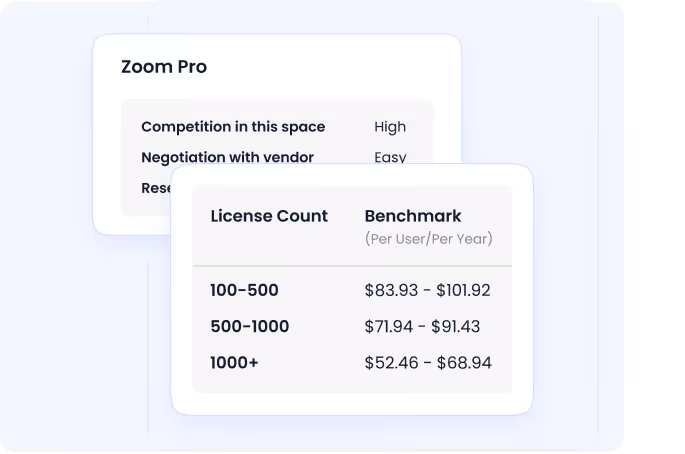
CloudEagle SaaS price benchmarking dashboard showing real-time market pricing data across 150,000+ vendors powered by 1B+ transactions

That data exists before the renewal window closes, not as a reactive scramble, but as a continuous output of how the system is being used.

Why the CIO, CFO, and CISO Are All in This Together

SAP optimization stalls when cost, risk, and operations are treated as separate workstreams.

The CIO is looking at IT efficiency reports. 

The CISO is reviewing security findings from the last audit. 

The CFO is staring at last year's contract. 

When these conversations happen in separate rooms, they take longer, produce different conclusions, and create friction at the renewal table. 

Here's what each stakeholder actually cares about and how shared SAP visibility changes the conversation for each of them:

Stakeholder What they’re worried about What changes with shared insight
CIO Tool sprawl, operational complexity, scaling without headcount Usage data replaces guesswork: access and performance scale without over-provisioning
CFO Unpredictable spend, weak renewal leverage License decisions tie to real consumption, not historical contracts
CISO Data exposure, access drift, audit risk Shadow AI usage and excessive privileges surface before they become incidents

When SAP usage, access, and data movement are visible in one place, the renewal stops being a negotiation between departments about who has to give something up. It becomes a joint decision backed by shared evidence.

Five Places SAP Spend Hides (And How to Get It Back)

The savings don't come from a single line item. They come from correcting drift across five areas simultaneously:

  • Dormant and underused licenses reclaimed: Users who haven't logged in, temporary role upgrades that never rolled back, and premium entitlements with minimal activity get identified and right-sized. This typically represents the largest single category of recoverable spend.
  • Role right-sizing in high-accumulation teams: Finance, operations, and shared service teams tend to accumulate the most access over time. Aligning roles with current responsibilities reduces over-provisioning at the tier that costs the most.
  • Contractor and shared account cleanup: Removing lingering contractor access and correctly identifying shared IDs reveals true usage patterns and eliminates inflated license counts that have been rolling forward through renewals unchallenged.
  • Indirect access and integration clarity: Understanding how service accounts and integrations actually consume SAP resources prevents the over-licensing that results from misunderstood activity patterns and eliminates audit exposure in the same move.
  • Renewal leverage from behavioral data: Entering the renewal with usage trends, downgrade candidates, and evidence of underutilization creates room to renegotiate terms that have been on autopilot for years.

Together, these adjustments typically add up to 20-35% in reduced SAP spend over a contract cycle. The key distinction: no capability gets cut, nor any team loses access to what they actually need. The audit trail documenting each decision is already built.

Before vs After: What Controlled SAP Governance Actually Looks Like 

Before After
Access accumulates through one-off requests and emergency grants that never expire Access aligns with actual responsibilities, continuously reviewed against real usage data
License counts reflect org structures from 12+ months ago License assignments reflect current behavior, updated as identity events occur
Shadow AI usage is invisible to IT and security teams AI tool interactions with SAP data are detected and surfaced in the same dashboard
Contractors and service accounts stay active long past their purpose Non-employee and shared access is continuously reviewed and reclaimed
Renewals are built on last year's contract, not this year's usage Renewals are informed by consumption trends, usage evidence, and benchmarking data
Audits are time-consuming, reactive, and stressful Access decisions are logged, traceable, and ready to present

Why This Matters Even More in the AI Era

SAP is no longer a system that records activity. It shapes decisions through embedded analytics, AI-assisted forecasting, and workflow automation that acts across modules without human sign-off on every step.

As AI becomes more embedded in how finance, HR, and procurement teams operate, the governance around SAP access becomes more consequential. Weak governance in a traditional SAP environment means inefficiency and overpayment. Weak governance in an AI-enabled environment means all of that, plus:

  • AI models operating on incomplete or ungoverned data
  • Autonomous workflows running with unchecked permissions
  • Faster decisions, made on a foundation that was already fragile

The case for cleaning up SAP access and usage isn't just financial. It's structural. A well-governed SAP environment is a better input to AI. The mess you tolerated before gets amplified at scale.

AI Is Already Pulling Data From Your SAP Environment.

Use this checklist to find every unsanctioned tool before it becomes a liability.
Download Checklist

Getting to Controlled Instead of Chaotic

SAP doesn't have to be a system that expands on its own and surprises you at renewal. It can be predictable, governed, and something you actually feel confident presenting to your board.

CloudEagle.ai connects SAP usage data, identity events, AI activity, and renewal timelines in a single view and keeps it current continuously, not once a year. With 500+ direct integrations, 30-minute onboarding, and a platform that has processed over $20B in software spend and delivered over $2B in savings, the path from visibility to action doesn't require a transformation project.

If SAP has started to feel bigger, riskier, or harder to justify than it should, the answer is better data to better optimize licenses and spending.  

FAQs

1. How can SAP license optimization reduce costs by 20–35%?

The savings come from correcting drift, not cutting capability. When real usage is mapped to roles, organizations identify dormant users, unused premium entitlements, lingering contractor access, and inflated counts caused by shared IDs or service accounts. Combined with renewal timing and usage trend data, these adjustments typically unlock 20–35% in recoverable spend over a contract cycle.

2. How does shadow AI affect SAP licensing and security?

AI tools often consume SAP exports for analysis, forecasting, or automation without formal IT approval. This increases data exposure while also shifting usage patterns that licensing teams never see, which means renewal decisions get made on assumptions that no longer reflect how the system is actually being used.

3. What data is actually needed to optimize SAP licenses effectively?

License inventories alone aren't sufficient. Effective optimization requires user-level activity data, role assignments, identity lifecycle events, integration activity patterns, and renewal timelines – all correlated together so that decisions reflect current behavior rather than historical records.

4. Can SAP license optimization help with compliance audits?

Aligning access with actual job responsibilities reduces excessive privileges and undocumented access paths. When access decisions are logged against real identity events, audits become a reporting exercise rather than an investigation.

5. How often should enterprises review SAP licenses?

Continuously, not annually. Usage and access change throughout the year as teams evolve, projects start and end, and integrations grow. An annual review will always be working from data that's already months out of date by the time decisions get made.

Advertisement for a SaaS Subscription Tracking Template with a call-to-action button to download and a partial graphic of a tablet showing charts.Banner promoting a SaaS Agreement Checklist to streamline SaaS management and avoid budget waste with a call-to-action button labeled Download checklist.Blue banner with text 'The Ultimate Employee Offboarding Checklist!' and a black button labeled 'Download checklist' alongside partial views of checklist documents from cloudeagle.ai.Digital ad for download checklist titled 'The Ultimate Checklist for IT Leaders to Optimize SaaS Operations' by cloudeagle.ai, showing checklist pages.Slack Buyer's Guide offer with text 'Unlock insider insights to get the best deal on Slack!' and a button labeled 'Get Your Copy', accompanied by a preview of the guide featuring Slack's logo.Monday Pricing Guide by cloudeagle.ai offering exclusive pricing secrets to maximize investment with a call-to-action button labeled Get Your Copy and an image of the guide's cover.Blue banner for Canva Pricing Guide by cloudeagle.ai offering a guide to Canva costs, features, and alternatives with a call-to-action button saying Get Your Copy.Blue banner with white text reading 'Little-Known Negotiation Hacks to Get the Best Deal on Slack' and a white button labeled 'Get Your Copy'.Blue banner with text 'Little-Known Negotiation Hacks to Get the Best Deal on Monday.com' and a white button labeled 'Get Your Copy'.Blue banner with text 'Little-Known Negotiation Hacks to Get the Best Deal on Canva' and a white button labeled 'Get Your Copy'.Banner with text 'Slack Buyer's Guide' and a 'Download Now' button next to images of a guide titled 'Slack Buyer’s Guide: Features, Pricing & Best Practices'.Digital cover of Monday Pricing Guide with a button labeled Get Your Copy on a blue background.Canva Pricing Guide cover with a button labeled Get Your Copy on a blue gradient background.

Enter your email to
unlock the report

Oops! Something went wrong while submitting the form.
License Count
Benchmark
Per User/Per Year

Enter your email to
unlock the report

Oops! Something went wrong while submitting the form.
License Count
Benchmark
Per User/Per Year

Enter your email to
unlock the report

Oops! Something went wrong while submitting the form.
Notion Plus
License Count
Benchmark
Per User/Per Year
100-500
$67.20 - $78.72
500-1000
$59.52 - $72.00
1000+
$51.84 - $57.60
Canva Pro
License Count
Benchmark
Per User/Per Year
100-500
$74.33-$88.71
500-1000
$64.74-$80.32
1000+
$55.14-$62.34

Enter your email to
unlock the report

Oops! Something went wrong while submitting the form.

Enter your email to
unlock the report

Oops! Something went wrong while submitting the form.
Zoom Business
License Count
Benchmark
Per User/Per Year
100-500
$216.00 - $264.00
500-1000
$180.00 - $216.00
1000+
$156.00 - $180.00

Enter your email to
unlock the report

Oops! Something went wrong while submitting the form.

Get the Right Security Platform To Secure Your Cloud Infrastructure

Please enter a business email
Thank you!
The 2023 SaaS report has been sent to your email. Check your promotional or spam folder.
Oops! Something went wrong while submitting the form.

Access full report

Please enter a business email
Thank you!
The 2023 SaaS report has been sent to your email. Check your promotional or spam folder.
Oops! Something went wrong while submitting the form.

It's two months before your SAP renewal. 

Your CFO asks: "Are we actually using everything we're paying for?"

You say you'll find out.

Three weeks later, you've pulled exports from Okta, chased down four team leads, reconciled two versions of a spreadsheet, and still can't say with confidence who's actively using what. You renew at roughly the same cost. Same roles. Same assumptions. Same lingering doubt.

And this cycle repeats. Every. Single. Year.

The problem isn't how hard you're negotiating. It's that you're walking into a renewal with stale data, incomplete access records, and no visibility into how SAP is used day to day. Organizations that close that visibility gap, correlating real user activity, identity changes, and AI data movement across their SAP environment, consistently uncover 20-35 percent in recoverable spend.

The savings aren't coming from getting a better deal. They're coming from knowing what's really happening before the conversation starts.

TL;DR 

  • SAP overspend builds quietly through role creep, unused entitlements, contractor access, integrations, and renewals made without real usage data
  • Shadow AI tools consuming SAP exports increase both cost and security exposure, and most teams have no visibility into it
  • Traditional SAM tools track ownership, not behavior, which means they miss the signals that actually drive waste
  • Behavior-based visibility into usage, identity events, and AI activity is what makes 20-35% savings sustainable
  • When licenses match real work, audits simplify, renewals strengthen, and SAP stops feeling unpredictable

Why SAP Costs Keep Climbing When Nothing Obviously Changed

Ask most IT leaders why their SAP bill went up, and they'll pause. No new modules. Headcount stayed flat, and yet the renewal came in higher.

The answer is almost always drift.

Here's how it actually accumulates:

  • An employee moves from Finance to Operations. Their old SAP roles stay. New ones get added. Nobody removes the originals.
  • A contractor finishes their engagement. IT removes them from Okta. The SAP license is assigned for another six months.
  • An integration with your analytics platform starts pulling data through a service account. That account looks like an active named user to the license counter.
  • Finance starts exporting SAP reports into AI tools for faster analysis. Usage patterns shift. The license model doesn't reflect it.

None of these events triggers an alert or shows up in a renewal dashboard. They just accumulate quietly until the contract comes up for review and the number is higher than expected.

This is the environment SAP optimization has to work in. And it's why most optimization efforts stall.

What Traditional SAM Tools Actually Miss

Standard software asset management tools were built for a simpler era: count licenses, track contract terms, flag assigned entitlements. That approach works when SAP usage is static and integrations are few.

Modern SAP environments are neither.

A typical enterprise SAP deployment touches HR, finance, procurement, operations, and increasingly, AI-driven forecasting tools. Users change roles quarterly. Contractors cycle in and out. APIs and bots interact with SAP data through service accounts that look like legitimate usage to a license counter.

What traditional SAM tools can tell you:

What they can't tell you:

  • Whether assigned licenses are actually being used
  • Whether a "user" is a human or an integration bot
  • Which AI tools are pulling SAP data downstream
  • Whether a role still matches someone's actual job
  • Which contractor accounts survived offboarding

Renewals built on this data inherit every gap in it. You're negotiating with a snapshot that's already months out of date, and the vendor knows it.

License Assignments Aren't the Same as License Usage.

Implement the best practices that close the gap between what's assigned and what's used.
Download the Guide

Where the 20-35% Spend Actually Hides

The recoverable spend doesn't come from one big bucket. It comes from five specific patterns that appear in nearly every large SAP environment.

Role inflation and entitlement creep

When employees change teams or take on temporary projects, SAP roles stack rather than replace. A user who moved from AP to FP&A two years ago may still carry three premium roles from their previous assignment, none of which they touch. Multiply that across a 2,000-seat deployment, and the waste becomes significant fast.

Contractor and shared account sprawl

Contractors frequently hold named licenses well past their engagement end date. Shared service accounts used by integrations often count as high-tier users because their interaction patterns look like active usage. Without an identity context, there's no way to distinguish a legitimate active user from lingering overhead.

Indirect access from integrations

SAP environments don't operate alone. Analytics platforms, e-commerce systems, middleware layers, and bots interact with SAP data continuously, sometimes through service accounts, sometimes through APIs that trigger usage signals that look like named-user activity. These interactions inflate consumption metrics and, during an audit, surface as unexpected indirect access exposure.

Shadow AI usage

This one is newer, but accelerating fast.

Finance teams use AI tools to analyze SAP exports. HR teams feed workforce data into AI forecasting tools. Procurement teams build dashboards outside SAP using exported data. Each of these behaviors changes how SAP is actually used and, in some cases, how usage is reported without appearing anywhere in standard license tracking.

It also introduces data exposure risk that security teams typically only learn about during an incident review. Or an audit. Or worse.

Renewal assumptions anchored to last year

When usage is invisible, procurement defaults to renewing what was previously purchased. This locks inefficiencies forward into multi-year terms and removes any negotiating leverage before the conversation even begins. You're not starting a negotiation. You're just saying yes again.

What an Unmanaged SAP Environment Actually Looks Like

This is what quietly happens across a 12-month cycle when visibility is missing:

Month 1-2: Three employees change departments. Their old SAP roles remain active alongside their new ones. Nobody flags it because there's no trigger to do so.

Month 3-4: A project team of eight contractors wraps up. Okta access is removed. SAP licenses? Still assigned. IT doesn't know what they don't check.

Month 5-6: Finance starts using an AI tool to summarize SAP cash flow exports weekly. The tool isn't sanctioned. IT has no visibility into the data movement.

Month 7-8: A new analytics integration goes live. The service account it uses is provisioned with enterprise-level SAP access "to make sure it works." Nobody revisits the permission level afterward.

Month 9-10: Procurement begins renewal preparation. They pull last year's contract and headcount numbers. No usage data is available. The working assumption is that everything is needed.

Month 11-12: Renewal signed. Slightly higher than last year. The team moves on.

The next cycle begins with the same blind spots, a slightly higher base, and no one quite sure why costs keep creeping up.

How CloudEagle.ai Gives You the Visibility to Break That Cycle

Most SAP optimization projects fail at the same step: they start with the license count and try to work backward to behavior. CloudEagle starts with behavior and works forward to the license decision.

The platform pulls data from your identity provider, HR system, finance tools, browser signals, and firewall logs and correlates them into a continuous, current picture of how SAP is actually being used, not how it appears based on assignment records.

Here's what that looks like in practice across the areas that matter most:

Actual Usage vs. Assigned Roles

The most common form of SAP waste is roles that outlive the work they were assigned for. Nobody committed fraud, nor anybody was negligent. A role was added for a project and never removed when the project ended.

CloudEagle maps real user activity against license type. What surfaces:

  • Users who haven't touched premium functionality in 90+ days

Get surface-level insights from CloudEagle's dashboard

  • Temporary role upgrades that were never rolled back
  • Employees whose SAP access no longer reflects their current job function
  • Service accounts counted as named users but operating as bots

The result isn't a list of names to cut arbitrarily. It's a defensible, evidence-based case for right-sizing, one that IT, Finance, and Security can all stand behind.

Shadow AI and Data Flow Detection

CloudEagle.ai maintains a proprietary inventory of AI applications through SaaSMap. When an employee logs into an unsanctioned AI tool using data pulled from SAP – a financial export, a workforce report, or an operational dataset, that activity becomes visible.

CloudEagle unified AI usage dashboard correlating browser activity, Zscaler, CrowdStrike, SSO, and finance signals to surface unauthorized AI tool adoption

Security and IT see it in the same place; they're reviewing license consumption. That matters because the conversation usually splits across two teams: IT handles the licensing side, Security handles the exposure side. By the time both teams get involved, months have passed.

With CloudEagle.ai, both signals surface together. The exposure gets addressed at the same time as the spend impact, not six months later during a security review.

Identity Lifecycle Governance for SAP Roles

Contractor offboarding. Role changes. Department transfers. These events happen constantly, and in most organizations, SAP entitlements don't automatically reflect them.

CloudEagle.ai correlates identity events with SAP access:

The access drift that builds up silently over months gets caught continuously instead of discovered during a pre-renewal scramble.

Renewal Intelligence Built on Real Consumption

Walking into an SAP renewal with actual usage data changes the dynamic entirely.

With traditional SAM tools, procurement shows up with last year's contract and a vague sense that "we should probably be using more of this." With CloudEagle.ai, they show up with:

  • Trend data showing which license tiers are consistently underutilized
  • Evidence of which roles could be downgraded without operational impact
  • A clear picture of which seats are tied to active users, integrations, or dormant accounts
  • Benchmarking context for where the current contract stands relative to market rates

CloudEagle SaaS price benchmarking dashboard showing real-time market pricing data across 150,000+ vendors powered by 1B+ transactions

That data exists before the renewal window closes, not as a reactive scramble, but as a continuous output of how the system is being used.

Why the CIO, CFO, and CISO Are All in This Together

SAP optimization stalls when cost, risk, and operations are treated as separate workstreams.

The CIO is looking at IT efficiency reports. 

The CISO is reviewing security findings from the last audit. 

The CFO is staring at last year's contract. 

When these conversations happen in separate rooms, they take longer, produce different conclusions, and create friction at the renewal table. 

Here's what each stakeholder actually cares about and how shared SAP visibility changes the conversation for each of them:

Stakeholder What they’re worried about What changes with shared insight
CIO Tool sprawl, operational complexity, scaling without headcount Usage data replaces guesswork: access and performance scale without over-provisioning
CFO Unpredictable spend, weak renewal leverage License decisions tie to real consumption, not historical contracts
CISO Data exposure, access drift, audit risk Shadow AI usage and excessive privileges surface before they become incidents

When SAP usage, access, and data movement are visible in one place, the renewal stops being a negotiation between departments about who has to give something up. It becomes a joint decision backed by shared evidence.

Five Places SAP Spend Hides (And How to Get It Back)

The savings don't come from a single line item. They come from correcting drift across five areas simultaneously:

  • Dormant and underused licenses reclaimed: Users who haven't logged in, temporary role upgrades that never rolled back, and premium entitlements with minimal activity get identified and right-sized. This typically represents the largest single category of recoverable spend.
  • Role right-sizing in high-accumulation teams: Finance, operations, and shared service teams tend to accumulate the most access over time. Aligning roles with current responsibilities reduces over-provisioning at the tier that costs the most.
  • Contractor and shared account cleanup: Removing lingering contractor access and correctly identifying shared IDs reveals true usage patterns and eliminates inflated license counts that have been rolling forward through renewals unchallenged.
  • Indirect access and integration clarity: Understanding how service accounts and integrations actually consume SAP resources prevents the over-licensing that results from misunderstood activity patterns and eliminates audit exposure in the same move.
  • Renewal leverage from behavioral data: Entering the renewal with usage trends, downgrade candidates, and evidence of underutilization creates room to renegotiate terms that have been on autopilot for years.

Together, these adjustments typically add up to 20-35% in reduced SAP spend over a contract cycle. The key distinction: no capability gets cut, nor any team loses access to what they actually need. The audit trail documenting each decision is already built.

Before vs After: What Controlled SAP Governance Actually Looks Like 

Before After
Access accumulates through one-off requests and emergency grants that never expire Access aligns with actual responsibilities, continuously reviewed against real usage data
License counts reflect org structures from 12+ months ago License assignments reflect current behavior, updated as identity events occur
Shadow AI usage is invisible to IT and security teams AI tool interactions with SAP data are detected and surfaced in the same dashboard
Contractors and service accounts stay active long past their purpose Non-employee and shared access is continuously reviewed and reclaimed
Renewals are built on last year's contract, not this year's usage Renewals are informed by consumption trends, usage evidence, and benchmarking data
Audits are time-consuming, reactive, and stressful Access decisions are logged, traceable, and ready to present

Why This Matters Even More in the AI Era

SAP is no longer a system that records activity. It shapes decisions through embedded analytics, AI-assisted forecasting, and workflow automation that acts across modules without human sign-off on every step.

As AI becomes more embedded in how finance, HR, and procurement teams operate, the governance around SAP access becomes more consequential. Weak governance in a traditional SAP environment means inefficiency and overpayment. Weak governance in an AI-enabled environment means all of that, plus:

  • AI models operating on incomplete or ungoverned data
  • Autonomous workflows running with unchecked permissions
  • Faster decisions, made on a foundation that was already fragile

The case for cleaning up SAP access and usage isn't just financial. It's structural. A well-governed SAP environment is a better input to AI. The mess you tolerated before gets amplified at scale.

AI Is Already Pulling Data From Your SAP Environment.

Use this checklist to find every unsanctioned tool before it becomes a liability.
Download Checklist

Getting to Controlled Instead of Chaotic

SAP doesn't have to be a system that expands on its own and surprises you at renewal. It can be predictable, governed, and something you actually feel confident presenting to your board.

CloudEagle.ai connects SAP usage data, identity events, AI activity, and renewal timelines in a single view and keeps it current continuously, not once a year. With 500+ direct integrations, 30-minute onboarding, and a platform that has processed over $20B in software spend and delivered over $2B in savings, the path from visibility to action doesn't require a transformation project.

If SAP has started to feel bigger, riskier, or harder to justify than it should, the answer is better data to better optimize licenses and spending.  

FAQs

1. How can SAP license optimization reduce costs by 20–35%?

The savings come from correcting drift, not cutting capability. When real usage is mapped to roles, organizations identify dormant users, unused premium entitlements, lingering contractor access, and inflated counts caused by shared IDs or service accounts. Combined with renewal timing and usage trend data, these adjustments typically unlock 20–35% in recoverable spend over a contract cycle.

2. How does shadow AI affect SAP licensing and security?

AI tools often consume SAP exports for analysis, forecasting, or automation without formal IT approval. This increases data exposure while also shifting usage patterns that licensing teams never see, which means renewal decisions get made on assumptions that no longer reflect how the system is actually being used.

3. What data is actually needed to optimize SAP licenses effectively?

License inventories alone aren't sufficient. Effective optimization requires user-level activity data, role assignments, identity lifecycle events, integration activity patterns, and renewal timelines – all correlated together so that decisions reflect current behavior rather than historical records.

4. Can SAP license optimization help with compliance audits?

Aligning access with actual job responsibilities reduces excessive privileges and undocumented access paths. When access decisions are logged against real identity events, audits become a reporting exercise rather than an investigation.

5. How often should enterprises review SAP licenses?

Continuously, not annually. Usage and access change throughout the year as teams evolve, projects start and end, and integrations grow. An annual review will always be working from data that's already months out of date by the time decisions get made.

CloudEagle.ai recognized in the 2025 Gartner® Magic Quadrant™ for SaaS Management Platforms
Download now
gartner chart
5x
Faster employee
onboarding
80%
Reduction in time for
user access reviews
30k
Workflows
automated
$15Bn
Analyzed in
contract spend
$2Bn
Saved in
SaaS spend

Recognized as an Industry leader for our AI

CloudEagle.ai is Recognized in the 2024 Gartner® Magic Quadrant™ for SaaS Management Platforms

Recognition highlights CloudEagle’s innovation and leadership in the rapidly evolving SaaS management and procurement space.
Read More
Gartner Magic Quadrant for SaaS Management Platforms showing a chart divided into Challengers and Leaders quadrants with various companies plotted as dots.

CloudEagle.ai Recognized in the GigaOm Radar for SaaS Management Platforms

CloudEagle named a Leader and Outperformer in GigaOm Radar Report, validating its impact in the SaaS management platform landscape.
Read More
gigaom

Everest Group Positions CloudEagle.ai as a Trailblazer in SaaS Management Platforms

CloudEagle recognized as a Trailblazer by Everest Group, showcasing its rapid growth and innovation in SaaS spend and operations management.
Read More
qks

CloudEagle.ai is Recognized in the 2024 Gartner® Magic Quadrant™ for SaaS Management Platforms

Recognition highlights CloudEagle’s innovation and leadership in the rapidly evolving SaaS management and procurement space.
Read More
gartner

Streamline SaaS governance and save 10-30%

Book a Demo with Expert
CTA image
One platform to Manage
all SaaS Products
Learn More