Asset Management

Top 10 SaaS License Tracking Tools to Eliminate License Waste

Share via:
Written by:
CloudEagle.ai Team
Reviewed by
Nidhi Jain
Last Updated:
May 27, 2025
blog-cms-banner-bg
Little-Known Negotiation Hacks to Get the Best Deal on Slack
cta-bg-blogDownload Your Copy

HIPAA Compliance Checklist for 2025

Download PDF

Organizations manage hundreds of SaaS applications, making it difficult to track license usage, control renewals, and identify unnecessary spending. 

Without reliable SaaS license tracking tools, businesses can keep paying for unused seats while overlooking licensing gaps and compliance risks.

Research cited by Nexthink found that nearly half of the software installed across the environments it analyzed went unused. This highlights why organizations need visibility into which licenses employees actually use.

SaaS license tracking tools help IT and procurement teams monitor usage, identify unused licenses, track renewals, and make informed purchasing decisions. This guide compares 10 software license tracking tools and their capabilities to help you find the right fit for your organization

‍

1. What Are SaaS License Tracking Tools and How Do They Work?

SaaS license tracking tools help enterprises monitor purchased licenses, track user assignments, analyze application usage, and manage subscription renewals. 

They give IT, procurement, and finance teams visibility into license utilization, costs, and access across SaaS applications.

These SaaS license tracking tools typically work by connecting to SaaS applications and business systems to collect license and usage data. Teams can use that information to:

  • Track License Assignments: Identify which employees have licenses and how to manage SaaS licenses the enterprise has purchased. 
  • Monitor Usage: Find inactive accounts, underused subscriptions, and licenses that may be reclaimed or reassigned.
  • Manage Renewals: Track contract dates and receive alerts before subscriptions renew.
  • Control Spending: Compare license usage with purchased capacity to identify unnecessary costs and avoid duplicate purchases.
  • Support Compliance: Review license assignments and usage against vendor agreements to identify discrepancies.

‍

You’re Paying For Software No One Uses

Unused seats adds up faster
Cut The Waste

‍

2. 10 Best SaaS License Tracking Tools for IT and Procurement Teams

If you are looking to save money and make managing your SaaS licenses easier, Here are the top SaaS license tracking tools for 2026, including CloudEagle.ai, Zluri, Torii, Zylo, and more. These tools help businesses keep full control of their software and costs.

A. CloudEagle.ai
‍

‍

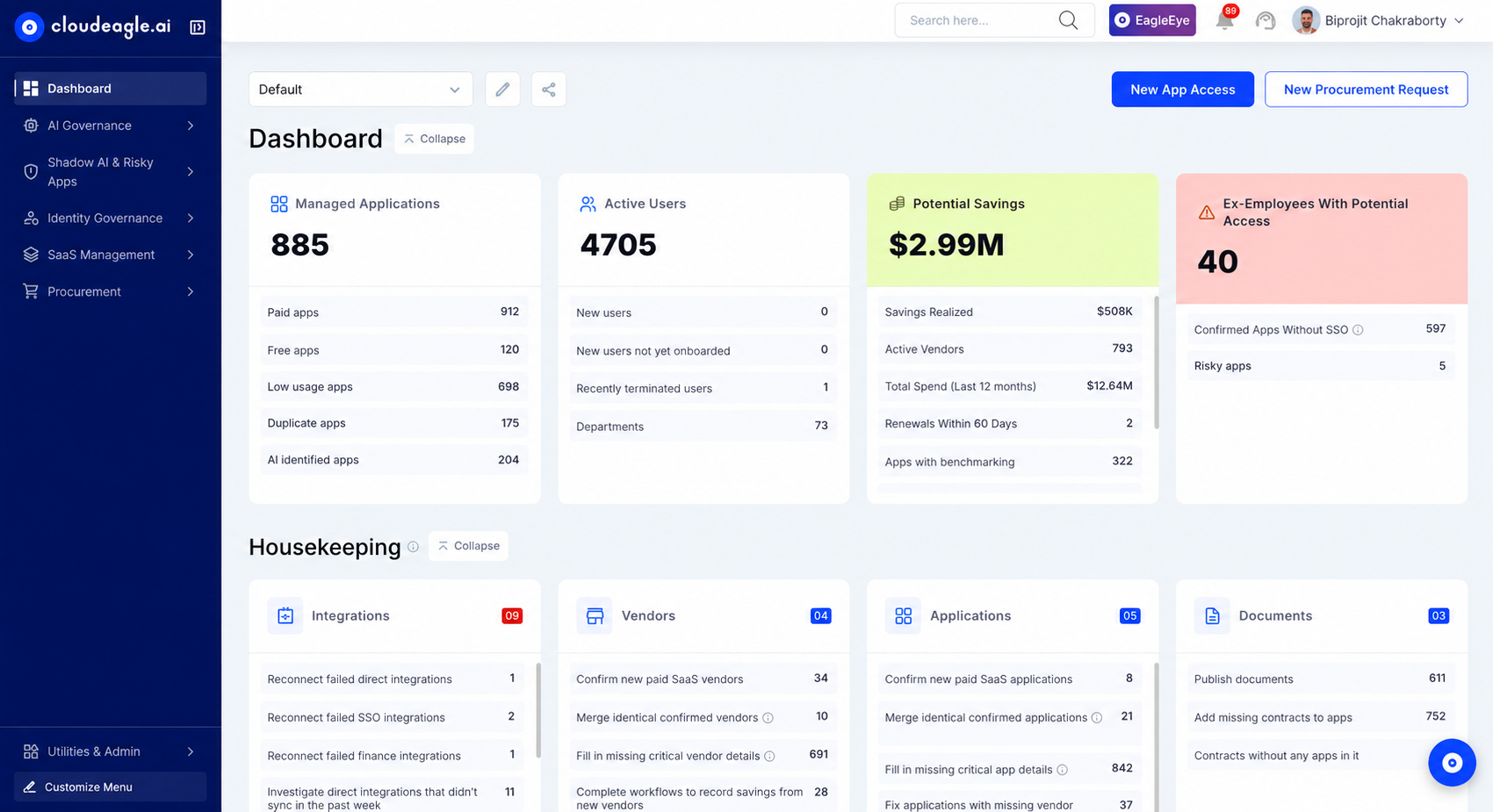
Managing software licenses involves more than knowing how many seats an organization has purchased. IT needs to track utilization, reclaim unused access, prepare for renewals, and negotiate better pricing. 

CloudEagle.ai brings license utilization, contract information, AI discovery, and software spending into a connected management process.

A. Track License Assignments and Utilization Across Applications

When license records sit across spreadsheets, IT struggles to compare purchased capacity with actual usage. Employees may retain access they no longer need, while other teams request additional licenses.

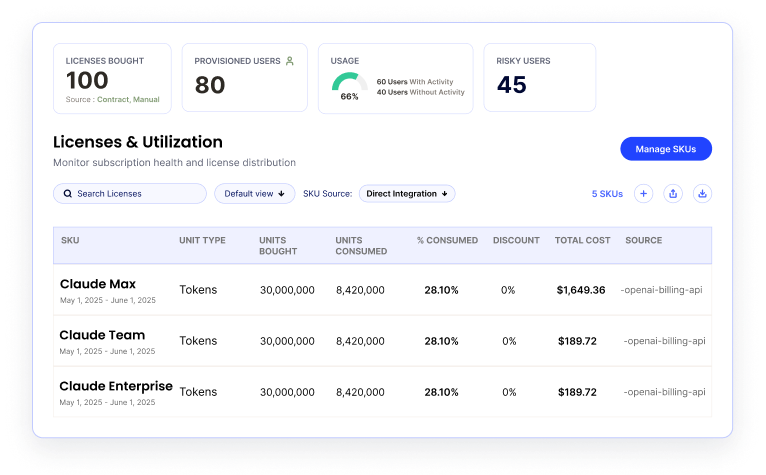
CloudEagle.ai provides real-time license utilization tracking across applications and identifies inactive, underutilized, and redundant licenses. Teams can review assignments and understand usage patterns.
‍

‍

This gives IT a clearer picture of where licenses are being used and where capacity may be wasted. Those findings also provide the starting point for recovering resources that no longer serve a business need.

B. Reclaim Unused Licenses Instead of Paying for Idle Access

Identifying an unused license does not automatically recover its value. IT still needs to determine whether access is necessary, follow up with users, and ensure reclaimed licenses return to the available pool.

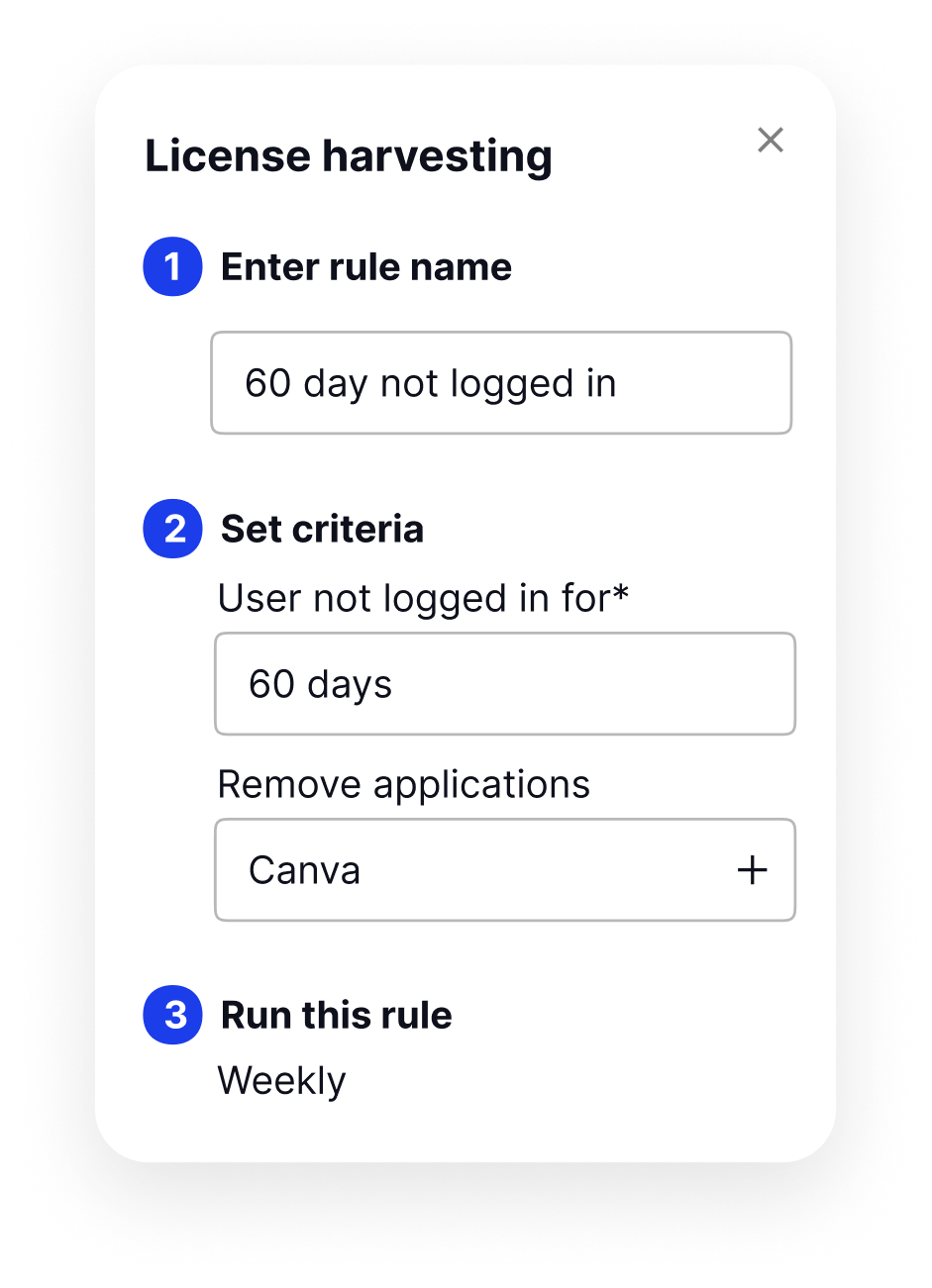
CloudEagle.ai automates license harvesting by identifying unused or underutilized assignments, supporting outreach to users, tracking non-responders, and facilitating deprovisioning. 
‍

‍

Depending on the application and usage patterns, teams can also right-size or downgrade licenses where appropriate.

Recovered licenses can then be made available for employees who need them. This reduces unnecessary purchases and helps IT manage existing capacity before requesting more budget.

C. Extract Contract Details Without Manual Review

Contract terms determine what the organization has agreed to pay. Renewal dates, opt-out periods, and pricing terms can be difficult to track when contracts remain scattered across emails and shared drives.

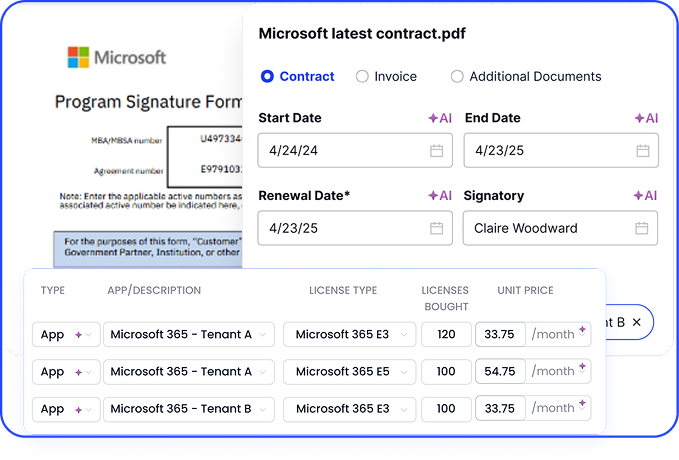
CloudEagle.ai uses AI-powered metadata extraction to capture key details from uploaded contracts, including renewal dates, opt-out periods, pricing terms, and auto-renewal clauses. 
‍

‍

It also centralizes contracts in a searchable repository, making relevant information easier to retrieve.

D. Prepare for Renewals Before Deadlines Arrive

A renewal is an opportunity to reassess software needs, not simply continue an existing agreement. Without advance notice, teams may miss opt-out windows or renew licenses before cross checking.

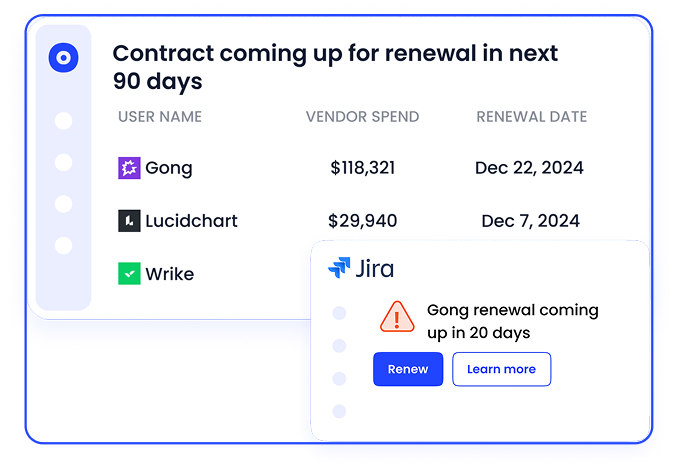
CloudEagle.ai's renewal calendar uses contract metadata to track important dates and send proactive reminders. 
‍

‍

Renewal workflows can start ahead of deadlines, giving stakeholders time to review utilization, pricing, and potential alternatives. This allows procurement to approach vendors with better information.

E. Discover Shadow AI and Shadow IT Outside Approved Systems

Traditional license tracking only covers the applications an organization knows to manage. Employees may independently adopt software or AI tools using personal accounts or sign-ups outside IT's knowledge.

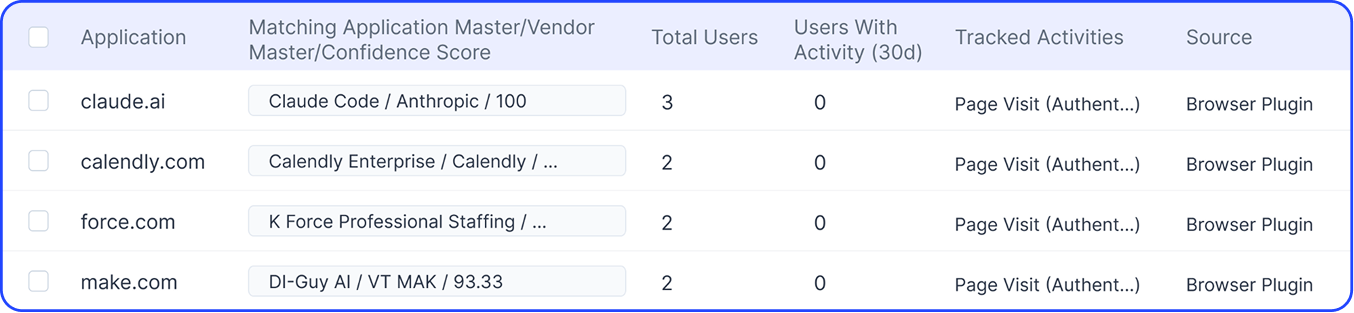
CloudEagle.ai correlates signals such as SSO data, finance records, social logins, firewall logs, and browser activity to discover shadow IT and shadow AI. It also provides risk scoring to help teams prioritize applications that require further review.
‍

‍

This extends visibility beyond the approved application inventory. Security and IT can identify tools that need governance, while procurement can investigate duplicate purchases and spending that may otherwise remain outside formal oversight.

F. Track AI Token Consumption Beyond Traditional Licenses

Not every AI cost comes from a fixed license. Some tools charge based on token consumption or API usage, so spending can increase even when the number of users stays the same.

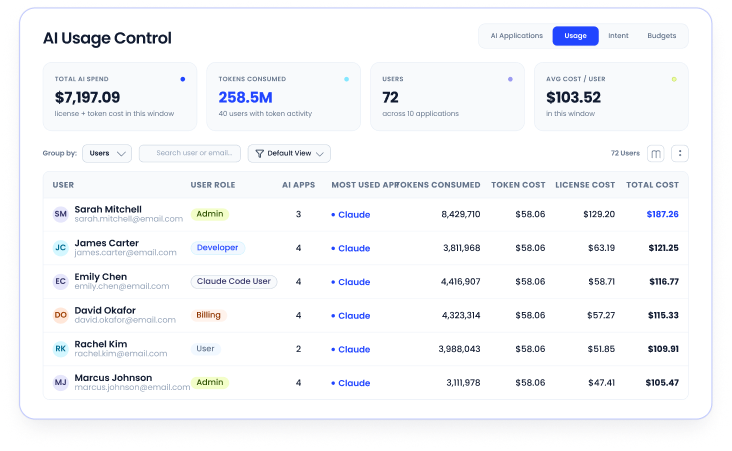
CloudEagle.ai tracks token consumption and API spend across supported AI tools, with breakdowns by user, team, and department. 
‍

‍

Teams can examine usage and associated costs to identify high-consumption workloads and understand where spending is concentrated.

IT and finance can assess license utilization and token spending separately, helping them choose the right controls for each cost model.

G. Compare Software Prices Before Negotiating Renewals

Usage and contract data help teams determine what they need to renew. The next challenge is deciding whether the proposed price represents a competitive deal.

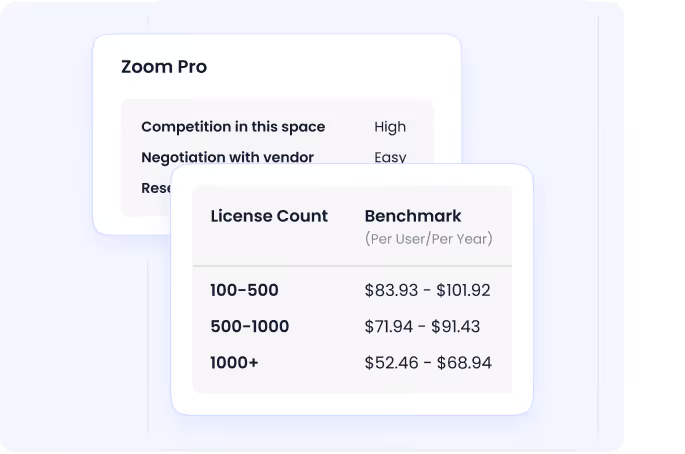
CloudEagle.ai provides price benchmarking, historical pricing trends, and buying guides to support informed purchasing decisions. 
‍

‍

Teams can compare vendor quotes against available benchmarks and identify negotiation points beyond the quoted price, including relevant terms and commercial considerations.

Procurement gets a stronger basis for negotiating renewals and new purchases. Combined with utilization and contract data, price benchmarking helps teams assess both whether a product is needed and whether its cost is justified.

Pricing

Schedule a demo with the experts and they will provide a customized quote according to your needs. 

‍

‍

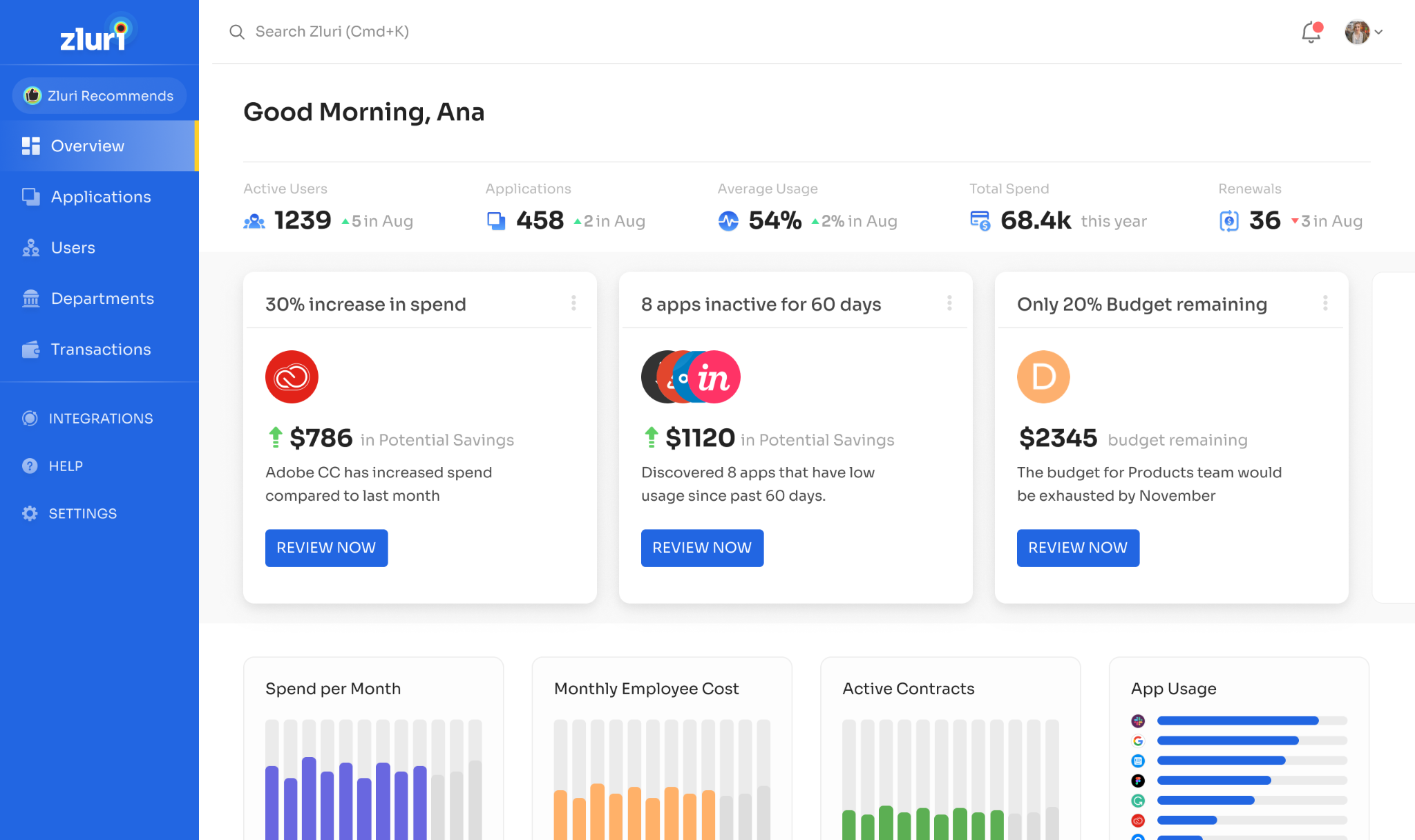
B. Zluri

‍

‍

‍

Zluri has moved well beyond its roots as a SaaS discovery tool. It now sells four packages: Identity Visibility & Intelligence, Identity Governance & Administration, Identity Security Posture Management, and SaaS Management Platform. 

License tracking lives in the SaaS Management package, which pairs utilization analytics and optimization opportunities with renewal calendars and spend forecasting.

Key Features

  • Multi-Source Discovery: Finds sanctioned and shadow apps through SSO, HR and finance integrations plus browser and desktop agents.
  • License Optimization: Inactive-user views and optimization reports show where seats can be reclaimed, with custom dashboards for AI and critical applications.
  • No-Code Automation: A policy builder drives license assignment, access revocation, and renewal alerts. 
  • AI-Powered Integrations: Connects browser-based apps that don’t offer APIs. 

Pros

  • Wide Connector Catalog: Offers 300+ out-of-the-box connectors, plus an SDK for custom or internal apps.
  • Responsive Support: Gartner Peer Insights reviewers repeatedly highlight the team’s responsiveness.
  • SaaS Plus Identity: Access reviews and lifecycle workflows sit alongside license data. 

Cons

  • Identity-First Packaging: SaaS management is one of four packages, so teams that only want license tracking may be buying a broader platform than they need.
  • Uneven Provisioning Depth: One Gartner reviewer reports a limited number of API integrations, which makes provisioning and deprovisioning inconsistent across apps. 

Pricing & Plans

Zluri doesn’t publish prices. All four packages are quote-based, and scope depends on employee count, app count, and modules

C. Torii
‍

‍

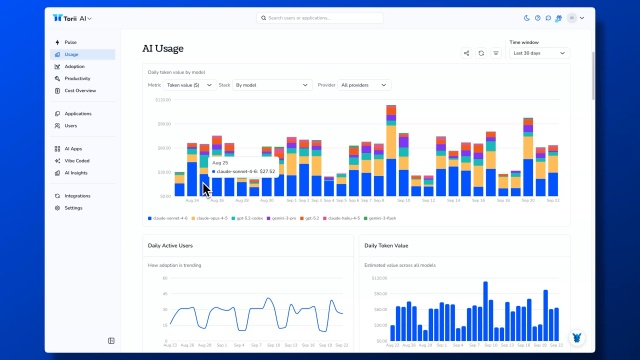
Torii is a SaaS management platform built around discovery, license optimization, and workflow automation. 

Its pricing page now splits the product into three offerings: SaaS Management, Identity Governance, and a new AI Management line. 

One caveat: Freshworks signed a definitive agreement on October 12, 2026 to acquire Torii, and the two companies operate separately until closing. 

Key Features

  • Multi-Signal Discovery: Uses identity, expense, and contract signals, plus browser and MDM discovery for unmanaged SaaS, AI tools, and desktop apps. 
  • License Optimization: Inactivity policies, owner outreach, and automated reclaim, downgrade, and deprovision workflows. 
  • Renewal Management: Tracks contracts, spend, usage, owners, renewal dates, cancellation windows, and forecasts in one process. 
  • AI Management: Tracks token consumption and AI spend by department. 

Pros

  • Strong Automation: No-code workflows cover onboarding, offboarding, renewals, and license reclaim. 
  • Fast Rollout: Torii says there are no agents to deploy and no implementation fee. 
  • Reviewer Praise: A Gartner reviewer calls it a powerful platform with strong innovation. 

Cons

  • Acquisition In Progress: Customers who run Torii alongside ServiceNow or Jira have no written continuity promise from Freshworks yet. 
  • Quote-Only Pricing: Third-party sites still cite a $2.50 per employee per month Basic plan, but Torii’s current pricing page lists no prices. 

Pricing & Plans

Torii prices to your environment across its three products. You get a tailored quote rather than published tiers.

D. Zylo
‍

‍

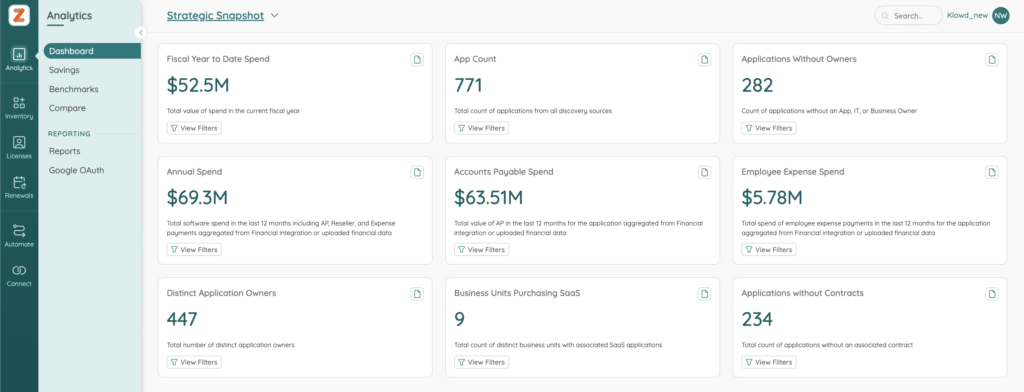
Zylo is an enterprise SaaS and AI spend management platform. Zylo says its discovery engine is anchored by a dataset of more than $75B in SaaS and cloud invoices. 

Key Features

  • AI-Powered App Discovery: The Core package includes continuous spend visibility, usage data connections, direct integrations, automated alerts, and app comparisons. 
  • Consumption Cost Management: Brings visibility to AI-driven and usage-based spend across platforms like Anthropic, OpenAI, and Databricks.
  • Clarity AI And MCP Server: A conversational interface, plus an MCP Server that extends SaaS management workflows into AI assistants.
  • Workflow And Cost Tools: Premium adds portfolio and pricing benchmarks, Okta or Entra actions, Jira automations, a full API, and cost allocation.

Pros

  • Published Packaging: Three clear packages: Core, Premium, and Enterprise.
  • Benchmark Depth: Pricing benchmarks and a large invoice dataset support renewal negotiations.
  • Strong Ratings: Rated 4.5 on Gartner Peer Insights from 67 ratings.

Cons

  • Feature Gating: Benchmarks, IAM actions, Jira automations, the full API, and cost allocation require Premium or above.
  • Enterprise Orientation: The top tier covers multiple business units, M&A, and sandbox environments, which is more than many mid-size teams need.
  • Contract Support: One Gartner reviewer found customization and app tracking simple but contract support lacking.

Pricing & Plans

Zylo is quote-only across Core, Premium, and Enterprise

E. InvGate Asset Management
‍

‍

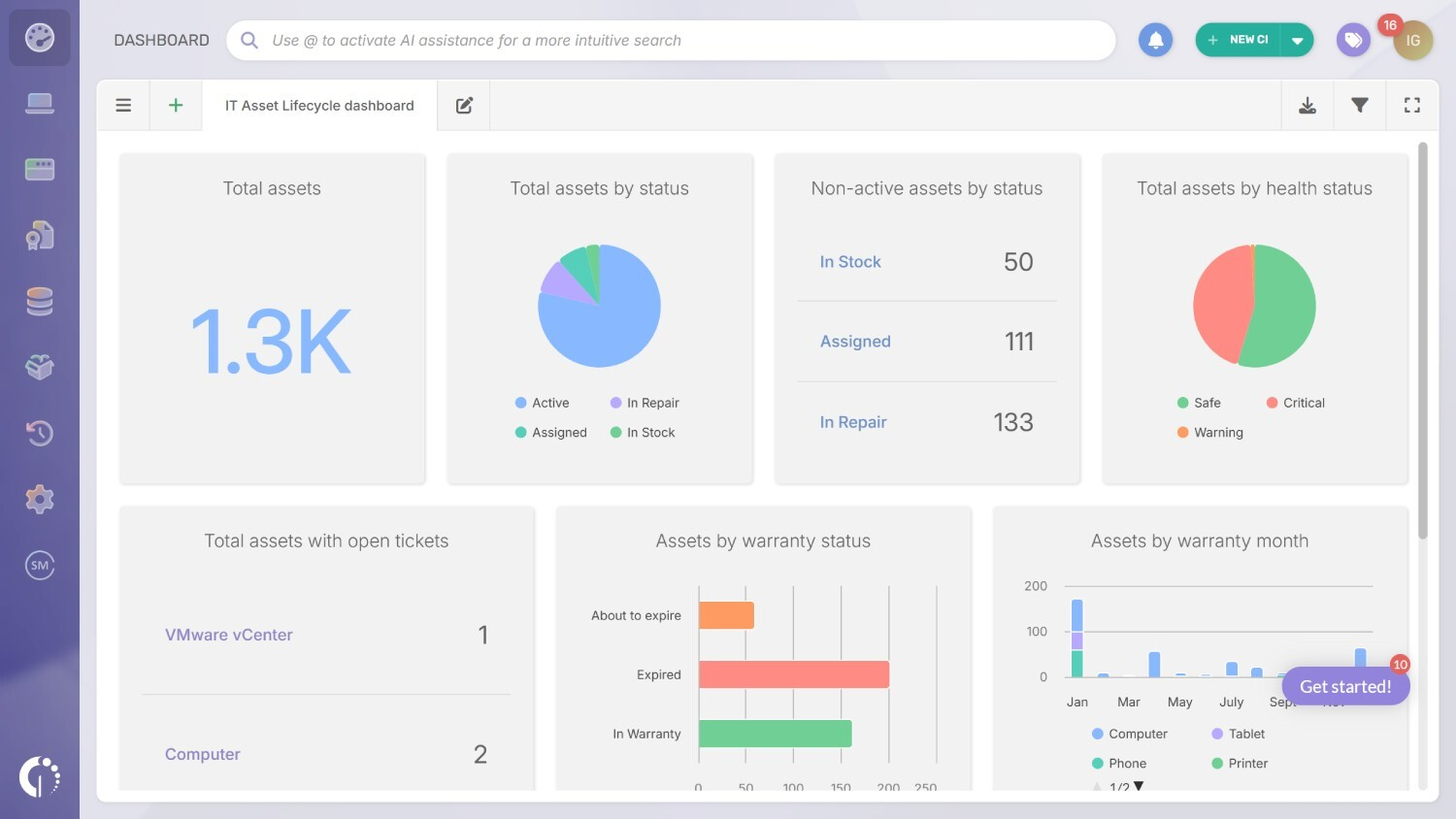
InvGate Asset Management is an IT asset platform that tracks software licenses alongside devices. It isn’t a SaaS-native discovery tool. 

It collects data through agents, network scans, MDM tools like Jamf and Intune, cloud providers, and Entra ID or Google Workspace sync. 

Key Features

  • License Contract Management: Tracks software licenses, contracts, renewal dates, and compliance. 
  • Software Metering: Shows how often installed software is actually used. 
  • AI Hub: Smart search, auto-enrichment, and recommendations are included on every plan, with some still in beta. 
  • Service Desk Integrations: Native link to InvGate Service Management, plus Jira, ServiceNow, and Zendesk on Pro and above. 

Pros

  • Transparent Pricing: Starter and Pro prices are published, and Enterprise shows a starting price. 
  • Good Early Ratings: 4.7 on G2, though from only 11 reviews. 
  • Security Credentials: InvGate recently renewed its SOC 2 Type II certification. 

Cons

  • Plan Gating: License contract management and software metering start at Pro, not Starter. 
  • Device-Centric Design: Plans are sized by IP devices, and the published data sources center on devices, MDM, cloud, and directories. SaaS discovery relies on directory sync rather than expense or browser signals. 
  • Beta Features: Atlas and Smart Recommendations are still labeled beta. 

Pricing & Plans

Asset Management is priced per year. Starter is $1,499 for 500 IP devices. Pro is $5 per IP device, starting at $2,500, for 500 to 5,000 devices. Enterprise is custom, starting at $12,000.

F. Ivanti License Optimizer
‍

‍

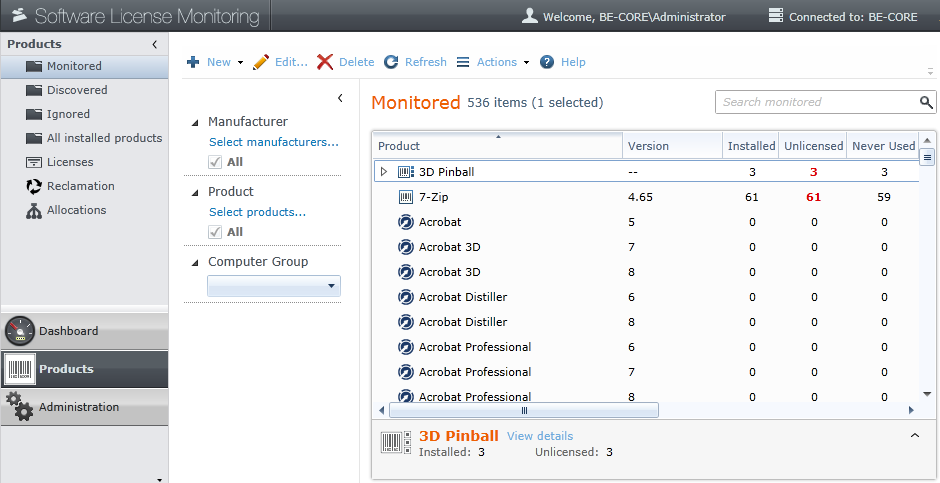
Ivanti License Optimizer is no longer the current product. Gartner Peer Insights lists it as legacy, with Ivanti Neurons for ITAM as the current offering. Neurons for ITAM gives visibility into IT and non-IT assets and aims to cut software spend by reclaiming unused software. 

Key Features

  • Discovery And Inventory: Periodic asset scans plus software and hardware inventory.
  • License Management And Metering: Software license management, software metering, and real-time inventory alerts.
  • Lifecycle Coverage: Spans procurement, inventory and CMDB, license optimization, and retirement.
  • Ivanti Integrations: Connects to Ivanti Neurons for Discovery and Neurons for ITSM.

Pros

  • Strong Inside The Ivanti Stack: One reviewer says it works well alongside Ivanti ITSM and endpoint tools.
  • Single Repository: Manages lifecycle status, contracts, costs, and inventory in one place.
  • Software Recognition: Info-Tech users score its software recognition library and software inventory management among its highest-rated features.

Cons

  • Not SaaS-Native: It’s built around asset lifecycle and endpoint inventory, not SaaS discovery.
  • Standalone Caveat: The same reviewer wouldn’t recommend it as a standalone product.
  • Catch-Up Pressure: One user says Ivanti has heavy catching up to do against ServiceNow. 

Pricing & Plans

Pricing is available on request only.

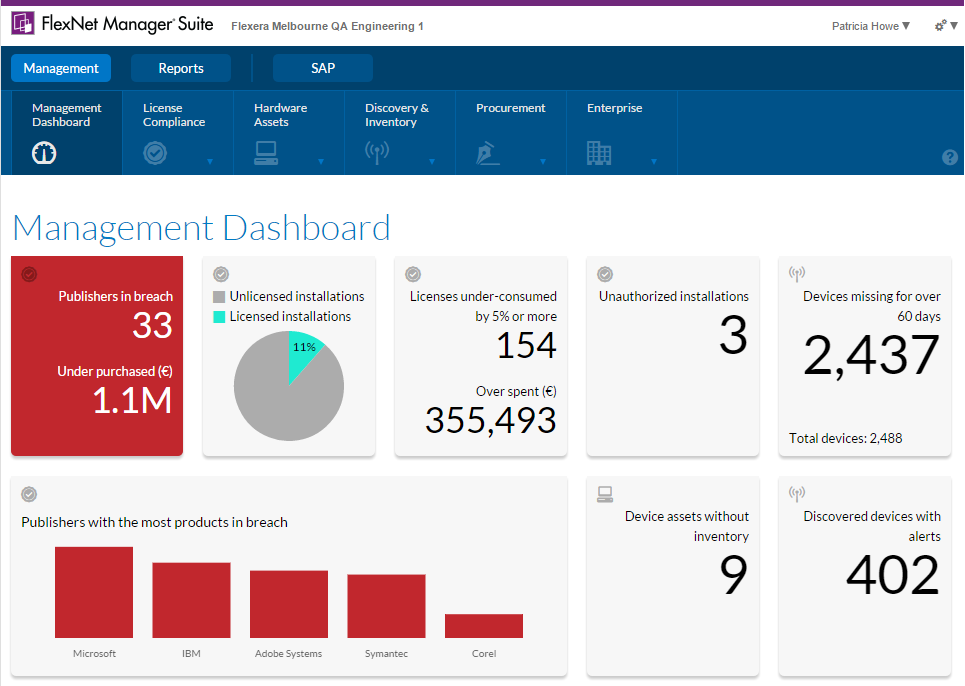
G. Flexera FlexNet Manager
‍

‍

Flexera’s SaaS product is now Flexera One SaaS Management. It is built on capabilities from both Flexera and Snow Software. FlexNet Manager Suite remains Flexera’s on-premises SAM product. 

Key Features

  • Broad Discovery: Flexera says it delivers the broadest discovery coverage in the market.
  • AI-Driven Cost Management: Flexera cites advanced AI-driven cost management alongside comprehensive SaaS discovery. 
  • Optimization Tools: Optimization tools integrate with enterprise-wide IT asset management. 
  • Unified Platform: Flexera One brings SAM, ITAM, cloud cost management, and SaaS management into one interface. 

Pros

  • Enterprise Scale: Supports deployment at enterprise scale. 
  • Hybrid Coverage: SaaS sits next to on-premises and cloud license management.
  • Analyst Recognition: Gartner Magic Quadrant Leader two years running. 

Cons

  • Setup Effort: One Gartner reviewer says it improves software visibility but needs careful setup. 
  • Packaging Complexity: Four editions (IT Visibility, IT Asset Management, SaaS Management, FinOps) mean SaaS-only teams must navigate a broader catalog. 
  • No Free Tier: Flexera One has no free plan. 

Pricing & Plans

Pricing is custom for every edition, so you need to contact sales for a quote.

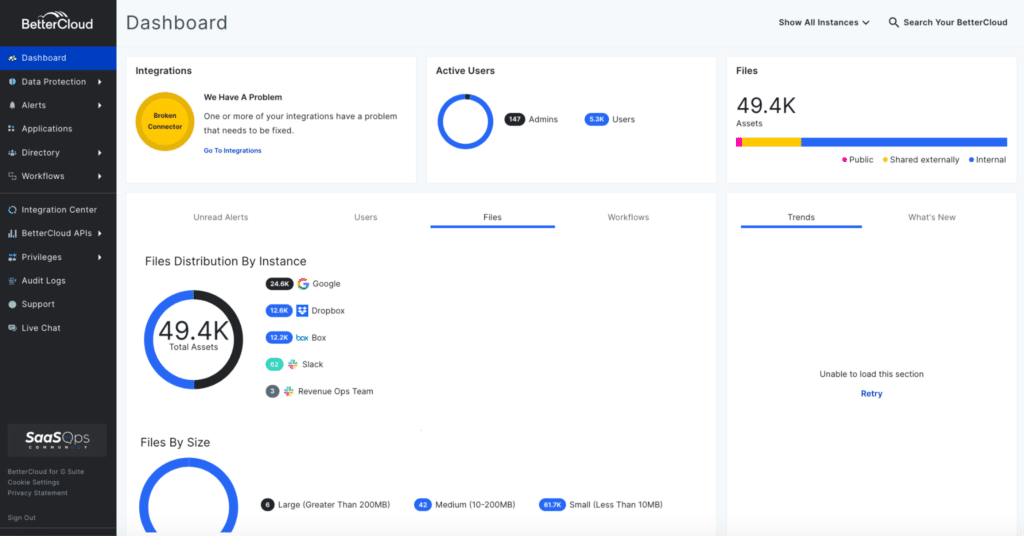
H. BetterCloud
‍

‍

BetterCloud is now a CoreStack company. CoreStack announced the acquisition on March 31, 2026. The platform is sold as three modules: User Automation, Spend Optimization, and Workspace Management for Google. 

Key Features

  • No-Code User Automation: A no-code workflow builder with unlimited actions. 
  • Spend Optimization: An action inbox brings together transaction mapping, app mapping, and contract renewals. 
  • Contract Benchmarking: Compares your software contracts against industry pricing benchmarks. 
  • Workspace Management For Google: Granular controls, lifecycle automation, and shared drive security. 

Pros

  • Automation-First: Lifecycle workflows reduce manual IT work.
  • Free Entry Point: Spend Optimization Basic is listed at $0 per month. 
  • Google Workspace Depth: Purpose-built controls for Google admins.

Cons

  • Ownership Change: One buyer guide says the CoreStack deal creates short-term uncertainty about roadmap, packaging, and support continuity. 
  • Lighter Spend Layer: One review roundup says license reclamation works, but strategic spend visibility is secondary to automation.
  • Module-Based Cost: Price depends on license count, connected apps, chosen modules, and add-ons such as Data Loss Prevention. 

Pricing & Plans

Pricing is quote-based and reflects license count, connected apps, modules, and add-ons

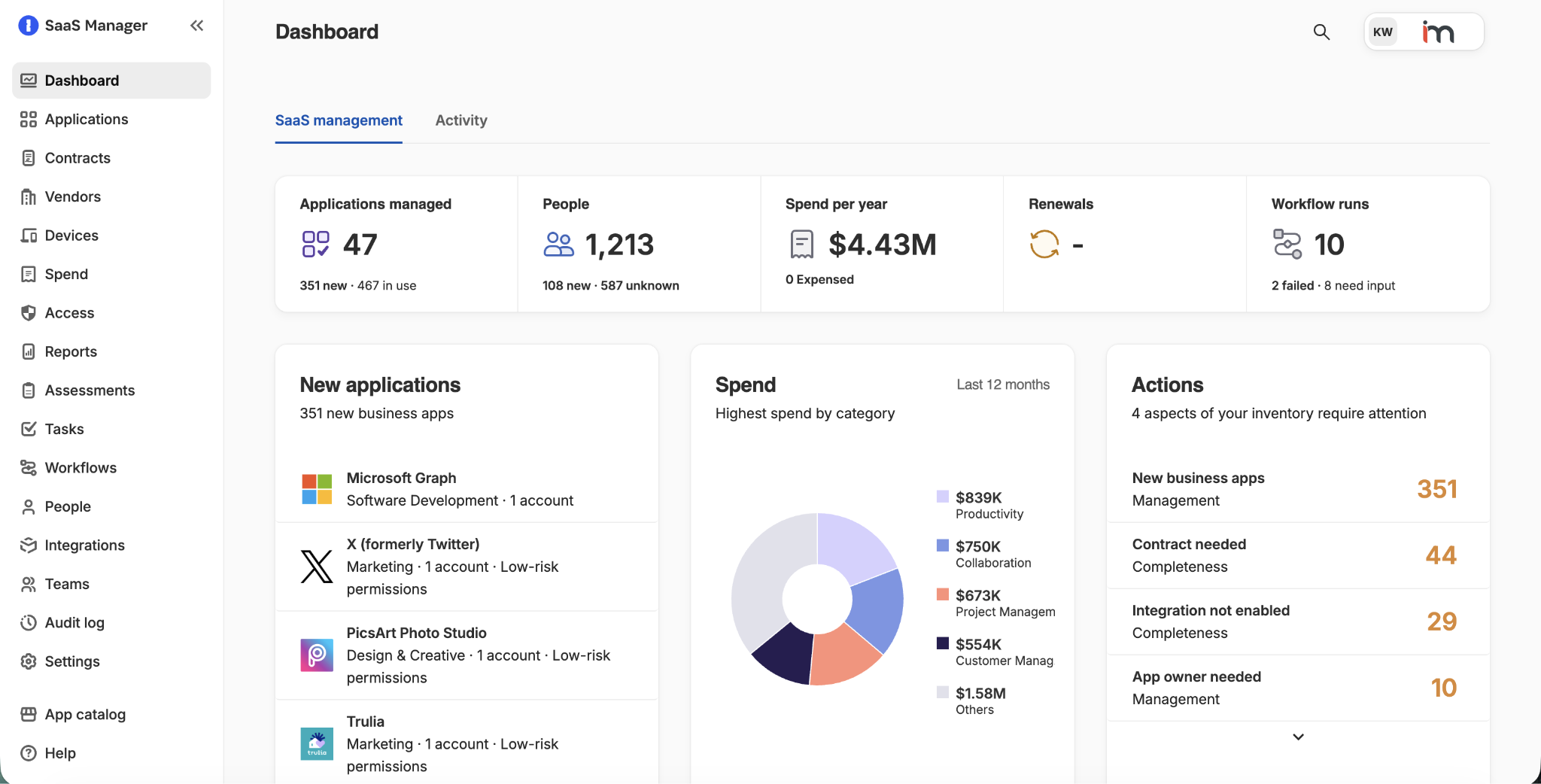
I. 1Password SaaS Manager (Formerly Trelica)
‍

‍

Trelica was renamed 1Password SaaS Manager on January 14, 2026, after 1Password’s acquisition. It supports 400+ integrations across identity, finance, device, and browser sources. 

Key Features

  • AI And SaaS Discovery: Unifies AI and SaaS discovery with access governance. 
  • License And Spend Optimization: Token and license spend optimization sit in the same product. 
  • Access Governance: Includes access reviews alongside discovery and spend tools. 
  • AI Spend Forecasting: Forecasts usage and allocates AI spend by team and project. 

Pros

  • Analyst Recognition: Gartner Magic Quadrant Leader in 2026.
  • Broad Integrations: 400+ integrations across identity, finance, device, and browser sources.
  • Identity Security Backing: Access governance and discovery come from an identity security vendor.

Cons

  • Quote-Only Pricing: Pricing is quote only. 
  • Recent Rename: Older Trelica reviews and docs use the previous name, and trelica.com now redirects to 1Password. 
  • Broader Scope: The product is pitched around AI and SaaS discovery, access governance, and spend, so license tracking is one capability among several.

Pricing & Plans

There are no public tiers. Pricing is by quote

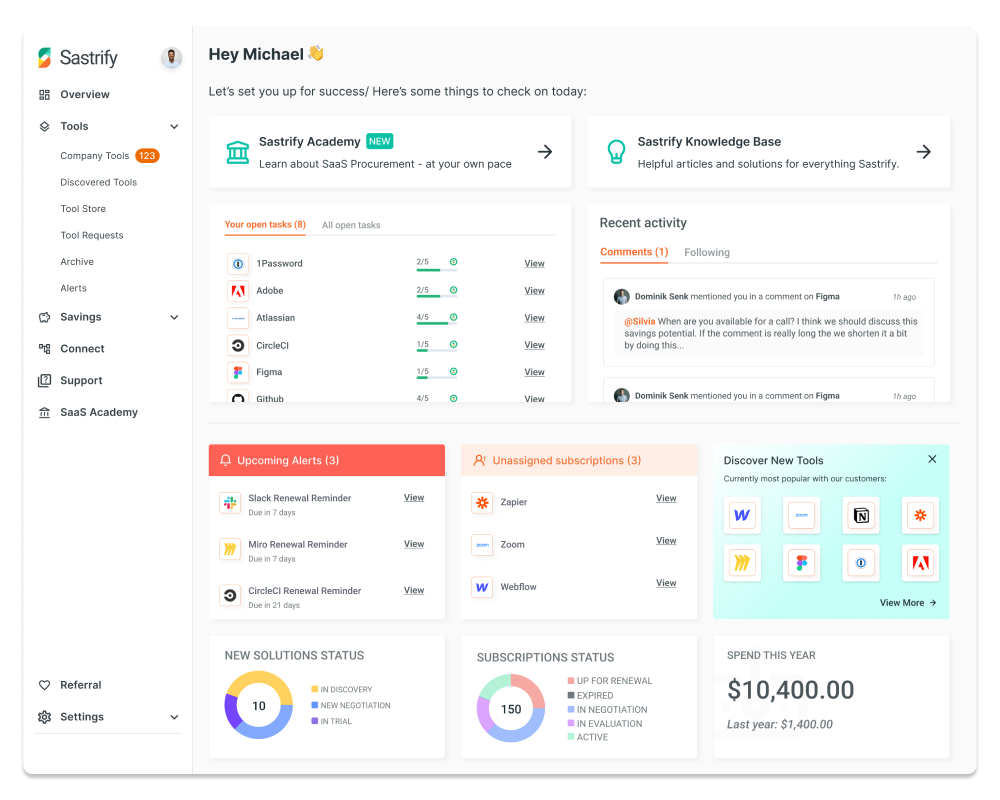
J. Sastrify
‍

‍

Sastrify is a Cologne-based SaaS procurement and management platform. Deel announced the acquisition on May 5, 2026. The deal extends Deel IT into software management, bringing license purchasing, renewal management, and spend optimization together. 

Key Features

  • Usage Intelligence: Shows what software you buy, what you actually use, and what it costs. 
  • Pricing Benchmarks: Built on a database of more than $2 billion in benchmarked SaaS contracts. 
  • Purchasing And Renewals: Centralizes license purchasing and renewal management. 
  • Deel IT Bundle: Sastrify covers the software side, and Deel IT now covers devices too. 

Pros

  • Negotiation Data: Benchmarks give procurement real leverage at renewal.
  • Buying Plus Tracking: Procurement, usage, and renewal data live in one place.
  • Recognizable Customers: Spendesk, Usercentrics, and Capchase are named customers. 

Cons

  • Ownership Change: Deel is folding Sastrify into Deel IT, so confirm standalone packaging and roadmap before buying. 
  • Procurement-Led Focus: Sastrify describes itself as a procurement and management platform, so check seat-level usage analytics depth if that is your main need. 

Pricing & Plans

Review sites list plans from about €750 per month on a flat rate. Expect packaging to change as the product folds into Deel IT.

‍

3. What Problems Do SaaS License Tracking Tools Solve?

SaaS license tracking tools help organizations identify unused licenses, control subscription spending, manage employee access, track renewals, and improve software purchasing decisions. 

The right SaaS license management software gives IT, procurement, and finance teams the data needed to manage licenses across applications and departments.

A. How Do SaaS License Tracking Tools Reduce Unused License Costs?

SaaS license tracking tools identify inactive accounts, underused subscriptions, and excess license capacity. 

Employees may change roles or leave, while their licenses remain assigned. By flagging these licenses, tracking tools help teams reclaim or reassign seats before purchasing additional subscriptions.

B. How Do License Tracking Tools Improve Security and Compliance?

License tracking tools help organizations review software assignments, identify unnecessary access, and compare license usage with vendor agreement terms. 

When integrated with identity and access management systems, they can support access removal during offboarding and help teams detect licensing discrepancies before audits.

C. How Do License Tracking Tools Simplify Employee Onboarding and Offboarding?

SaaS license tracking tools help coordinate software access with employee lifecycle changes. 

Integrations with HRIS can trigger license provisioning for new hires, adjust access when employees change roles, and support license removal when employees leave.

D. How Do License Tracking Tools Support Budgeting and Vendor Renewals?

Software license tracking tools provide data on subscription costs, license utilization, and upcoming renewal dates. 

Procurement and finance teams can use these insights to forecast spending, review seat requirements, compare vendor terms, and negotiate renewals based on actual usage.

E. How Do License Tracking Tools Improve IT and Procurement Decisions?

SaaS license tracking tools give IT and procurement teams a consolidated view of application usage, license assignments, and subscription spending. 

Teams can identify overlapping applications, redistribute available licenses, and evaluate new purchases against existing capacity. These insights support better software allocation and more informed SaaS portfolio decisions.

‍

4. How Do Organizations Manage SaaS Licenses Without Tracking Tools?

Without dedicated SaaS License Tracking Tools, organizations often manage software licenses through spreadsheets, disconnected systems, and manual approval processes. 

This makes it harder for IT, finance, and procurement teams to track usage, control spending, and manage renewals. A SaaS license management tracker helps centralize this information and reveal gaps in license allocation.

  • Manual Tracking Creates Inefficiencies: Teams use spreadsheets, emails, and chat messages to manage license requests, assignments, and renewals.
  • Shadow IT Increases Software Costs: Employees may purchase SaaS applications without IT or procurement approval. These untracked subscriptions can duplicate existing tools, increase spending, and create security and compliance risks.
  • Disconnected Systems Limit Visibility: Single sign-on platforms provide visibility into applications connected to them, but may not cover every SaaS tool.
  • Scattered Renewal Data Weakens Negotiations: Contract terms, renewal dates, and usage records may sit across different teams and systems. Without consolidated data, procurement teams can struggle to validate license requirements and negotiate renewals effectively.
  • Fragmented Records Increase Financial and Compliance Risks: When organizations cannot compare purchased licenses with assigned users and actual usage, they may continue paying for unnecessary seats or overlook licensing discrepancies.

‍

5. What License Tracking Problems Do SaaS License Tracking Tools Solve?

SaaS license tracking tools address gaps in license visibility, usage monitoring, renewal tracking, and license allocation.

Without centralized tracking, enterprises may pay for unused seats, miss renewal deadlines, and struggle to verify who has access to each application.

  • Incomplete License Visibility: Consolidated license records help teams identify unused seats, duplicate subscriptions, and excess capacity.
  • Manual License Tracking Errors: Automated tracking reduces outdated records, overlooked inactive accounts, and unnecessary license purchases.
  • Missed Renewals and Poor Contract Visibility: Centralized renewal calendars and alerts help teams avoid missed cancellation windows and excess renewals.
  • Untracked Applications and License Assignments: Centralized inventories reveal unapproved applications, duplicate tools, subscription costs, and access assignments.
  • Limited Reporting for Cost and Compliance Reviews: Accurate license reports help teams measure utilization, verify entitlements, and prepare audit evidence

‍

6. The Risks of Poor SaaS License Management

Inadequate SaaS license management exposes organizations to cascading security, financial, and operational risks. Without centralized visibility and automated controls, companies face unauthorized access, budget overruns, and inefficient processes that drain IT resources and delay employee productivity.

  • Security & Compliance Vulnerabilities: Lack of visibility into SaaS usage leads to unauthorized app access, data breaches, and compliance violations across the organization.
  • Financial Waste & Budget Overruns: Delayed license reclamation, unfavorable auto-renewals, and duplicate app purchases create unnecessary expenses and budget overruns.
  • Manual Onboarding/Offboarding Inefficiencies: Slow, inconsistent access management processes increase security risks while wasting valuable IT team resources.
  • Shadow IT Proliferation: Employees purchase unauthorized tools independently to avoid access delays, compounding security and spend management challenges.
  • Operational Bottlenecks: Time-consuming manual tracking, missed renewal deadlines, and lack of centralized data prevent strategic vendor negotiations and audit preparation.

‍

7. How to Choose the Right SaaS License Tracking Software

The right SaaS license tracking software helps organizations discover applications, monitor license usage, track renewals, and identify unused subscriptions. 

Evaluate each SaaS license tracking tool based on its data accuracy, integration coverage, reporting capabilities, and ability to support your organization's license tracking needs.

  • Application Discovery and Integrations: Look for SaaS discovery and integrations with SSO, HR, finance, and IT systems.
  • License Usage Tracking: Choose tools that track assigned and unused licenses, monitor utilization, and alert teams about upcoming renewals.
  • Reporting and Compliance: Prioritize usage reports, license records, and audit trails to support compliance reviews.
  • Business Goals: Select features that match your priorities, whether cost optimization, license visibility, or compliance.
  • Scalability and Usability: Ensure the software supports your application portfolio and simplifies tracking for IT, finance, and procurement.
  • Proof-of-Concept Testing: Test discovery accuracy, usage data, renewal alerts, and the ability to identify unused licenses before committing.

‍

8. Conclusion

Managing SaaS licenses well is very important to optimize resources, stay compliant, and get the most from your IT investments. Without the right license management tool, you may end up paying for licenses you don’t use, miss renewal dates, and face compliance problems.

However, with SaaS license tracking tools, you get a clear view of all your software licenses in one place. If you’re looking for a reliable SaaS license tracking tool, CloudEagle.ai stands out. It gives real-time usage details and shows who owns each license, making it simple to manage licenses and save resources.

Schedule a demo with CloudEagle.ai and discover how you can track and manage your licenses better.

‍

9. FAQs

1. Can’t CloudEagle.ai only track licenses for apps connected to SSO?

No. CloudEagle.ai discovers every SaaS app in use, including shadow IT that never went through SSO. Its 500+ integrations span SaaS tools, SSO platforms, finance systems, and ITSM tools, so licenses bought on a credit card or expensed by a team still show up.

2. Doesn’t CloudEagle.ai just flag unused licenses and leave the cleanup to IT?

CloudEagle.ai does the cleanup too. It identifies unused and underused licenses, then reclaims and reallocates them through automated license reclamation workflows, so IT doesn’t chase each seat by hand. RingCentral used CloudEagle.ai to save time and cost on license harvesting.

3. Won’t renewals still slip through with CloudEagle.ai if contracts are scattered across teams?

CloudEagle.ai pulls scattered contracts into one place. AI extracts renewal dates, payment terms, SLAs, and cancellation clauses automatically, and reminders go out well before each deadline. Falkonry used CloudEagle.ai’s centralized contract management to optimize its SaaS renewals.

4. Doesn’t CloudEagle.ai only show who has a license, not whether it’s worth paying for?

CloudEagle.ai shows both. It combines data from contracts, invoices, and access logs to show who is using each app, how often, and whether the spend is justified. That gives teams a clear basis for right-sizing license tiers instead of renewing at the same count.

5. Doesn’t negotiating renewals with CloudEagle.ai still mean going in without market pricing?

CloudEagle.ai backs negotiations with market benchmarks. Teams go into renewal conversations with their actual usage data and comparable market pricing, so they can push back on unneeded seats and unfavorable terms instead of accepting the vendor’s first quote.

‍

Advertisement for a SaaS Subscription Tracking Template with a call-to-action button to download and a partial graphic of a tablet showing charts.Banner promoting a SaaS Agreement Checklist to streamline SaaS management and avoid budget waste with a call-to-action button labeled Download checklist.Blue banner with text 'The Ultimate Employee Offboarding Checklist!' and a black button labeled 'Download checklist' alongside partial views of checklist documents from cloudeagle.ai.Digital ad for download checklist titled 'The Ultimate Checklist for IT Leaders to Optimize SaaS Operations' by cloudeagle.ai, showing checklist pages.Slack Buyer's Guide offer with text 'Unlock insider insights to get the best deal on Slack!' and a button labeled 'Get Your Copy', accompanied by a preview of the guide featuring Slack's logo.Monday Pricing Guide by cloudeagle.ai offering exclusive pricing secrets to maximize investment with a call-to-action button labeled Get Your Copy and an image of the guide's cover.Blue banner for Canva Pricing Guide by cloudeagle.ai offering a guide to Canva costs, features, and alternatives with a call-to-action button saying Get Your Copy.Blue banner with white text reading 'Little-Known Negotiation Hacks to Get the Best Deal on Slack' and a white button labeled 'Get Your Copy'.Blue banner with text 'Little-Known Negotiation Hacks to Get the Best Deal on Monday.com' and a white button labeled 'Get Your Copy'.Blue banner with text 'Little-Known Negotiation Hacks to Get the Best Deal on Canva' and a white button labeled 'Get Your Copy'.Banner with text 'Slack Buyer's Guide' and a 'Download Now' button next to images of a guide titled 'Slack Buyer’s Guide: Features, Pricing & Best Practices'.Digital cover of Monday Pricing Guide with a button labeled Get Your Copy on a blue background.Canva Pricing Guide cover with a button labeled Get Your Copy on a blue gradient background.

Enter your email to
unlock the report

Oops! Something went wrong while submitting the form.
License Count
Benchmark
Per User/Per Year

Enter your email to
unlock the report

Oops! Something went wrong while submitting the form.
License Count
Benchmark
Per User/Per Year

Enter your email to
unlock the report

Oops! Something went wrong while submitting the form.
Notion Plus
License Count
Benchmark
Per User/Per Year
100-500
$67.20 - $78.72
500-1000
$59.52 - $72.00
1000+
$51.84 - $57.60
Canva Pro
License Count
Benchmark
Per User/Per Year
100-500
$74.33-$88.71
500-1000
$64.74-$80.32
1000+
$55.14-$62.34

Enter your email to
unlock the report

Oops! Something went wrong while submitting the form.

Enter your email to
unlock the report

Oops! Something went wrong while submitting the form.
Zoom Business
License Count
Benchmark
Per User/Per Year
100-500
$216.00 - $264.00
500-1000
$180.00 - $216.00
1000+
$156.00 - $180.00

Enter your email to
unlock the report

Oops! Something went wrong while submitting the form.

Get the Right Security Platform To Secure Your Cloud Infrastructure

Please enter a business email
Thank you!
The 2023 SaaS report has been sent to your email. Check your promotional or spam folder.
Oops! Something went wrong while submitting the form.

Access full report

Please enter a business email
Thank you!
The 2023 SaaS report has been sent to your email. Check your promotional or spam folder.
Oops! Something went wrong while submitting the form.
  • SaaS license tracking tools help organizations monitor usage, identify unused licenses, manage renewals, and reduce unnecessary software spending.
  • Key selection criteria include application discovery, usage tracking, integrations, reporting, compliance support, and scalability.
  • Common challenges include shadow IT, manual tracking, missed renewals, duplicate subscriptions, and poor license visibility.
  • Effective license management combines automated reclamation, renewal alerts, centralized contracts, usage-based optimization, and audit trails.
  • CloudEagle.ai provides SaaS discovery, license harvesting, spend intelligence, AI-driven optimization, and automated renewal management across 500+ integrations.

Organizations manage hundreds of SaaS applications, making it difficult to track license usage, control renewals, and identify unnecessary spending. 

Without reliable SaaS license tracking tools, businesses can keep paying for unused seats while overlooking licensing gaps and compliance risks.

Research cited by Nexthink found that nearly half of the software installed across the environments it analyzed went unused. This highlights why organizations need visibility into which licenses employees actually use.

SaaS license tracking tools help IT and procurement teams monitor usage, identify unused licenses, track renewals, and make informed purchasing decisions. This guide compares 10 software license tracking tools and their capabilities to help you find the right fit for your organization

‍

1. What Are SaaS License Tracking Tools and How Do They Work?

SaaS license tracking tools help enterprises monitor purchased licenses, track user assignments, analyze application usage, and manage subscription renewals. 

They give IT, procurement, and finance teams visibility into license utilization, costs, and access across SaaS applications.

These SaaS license tracking tools typically work by connecting to SaaS applications and business systems to collect license and usage data. Teams can use that information to:

  • Track License Assignments: Identify which employees have licenses and how to manage SaaS licenses the enterprise has purchased. 
  • Monitor Usage: Find inactive accounts, underused subscriptions, and licenses that may be reclaimed or reassigned.
  • Manage Renewals: Track contract dates and receive alerts before subscriptions renew.
  • Control Spending: Compare license usage with purchased capacity to identify unnecessary costs and avoid duplicate purchases.
  • Support Compliance: Review license assignments and usage against vendor agreements to identify discrepancies.

‍

You’re Paying For Software No One Uses

Unused seats adds up faster
Cut The Waste

‍

2. 10 Best SaaS License Tracking Tools for IT and Procurement Teams

If you are looking to save money and make managing your SaaS licenses easier, Here are the top SaaS license tracking tools for 2026, including CloudEagle.ai, Zluri, Torii, Zylo, and more. These tools help businesses keep full control of their software and costs.

A. CloudEagle.ai

‍

‍

Managing software licenses involves more than knowing how many seats an organization has purchased. IT needs to track utilization, reclaim unused access, prepare for renewals, and negotiate better pricing. 

CloudEagle.ai brings license utilization, contract information, AI discovery, and software spending into a connected management process.

A. Track License Assignments and Utilization Across Applications

When license records sit across spreadsheets, IT struggles to compare purchased capacity with actual usage. Employees may retain access they no longer need, while other teams request additional licenses.

CloudEagle.ai provides real-time license utilization tracking across applications and identifies inactive, underutilized, and redundant licenses. Teams can review assignments and understand usage patterns.

‍

‍

This gives IT a clearer picture of where licenses are being used and where capacity may be wasted. Those findings also provide the starting point for recovering resources that no longer serve a business need.

B. Reclaim Unused Licenses Instead of Paying for Idle Access

Identifying an unused license does not automatically recover its value. IT still needs to determine whether access is necessary, follow up with users, and ensure reclaimed licenses return to the available pool.

CloudEagle.ai automates license harvesting by identifying unused or underutilized assignments, supporting outreach to users, tracking non-responders, and facilitating deprovisioning. 

‍

‍

Depending on the application and usage patterns, teams can also right-size or downgrade licenses where appropriate.

Recovered licenses can then be made available for employees who need them. This reduces unnecessary purchases and helps IT manage existing capacity before requesting more budget.

C. Extract Contract Details Without Manual Review

Contract terms determine what the organization has agreed to pay. Renewal dates, opt-out periods, and pricing terms can be difficult to track when contracts remain scattered across emails and shared drives.

CloudEagle.ai uses AI-powered metadata extraction to capture key details from uploaded contracts, including renewal dates, opt-out periods, pricing terms, and auto-renewal clauses. 

‍

‍

It also centralizes contracts in a searchable repository, making relevant information easier to retrieve.

D. Prepare for Renewals Before Deadlines Arrive

A renewal is an opportunity to reassess software needs, not simply continue an existing agreement. Without advance notice, teams may miss opt-out windows or renew licenses before cross checking.

CloudEagle.ai's renewal calendar uses contract metadata to track important dates and send proactive reminders. 

‍

‍

Renewal workflows can start ahead of deadlines, giving stakeholders time to review utilization, pricing, and potential alternatives. This allows procurement to approach vendors with better information.

E. Discover Shadow AI and Shadow IT Outside Approved Systems

Traditional license tracking only covers the applications an organization knows to manage. Employees may independently adopt software or AI tools using personal accounts or sign-ups outside IT's knowledge.

CloudEagle.ai correlates signals such as SSO data, finance records, social logins, firewall logs, and browser activity to discover shadow IT and shadow AI. It also provides risk scoring to help teams prioritize applications that require further review.

‍

‍

This extends visibility beyond the approved application inventory. Security and IT can identify tools that need governance, while procurement can investigate duplicate purchases and spending that may otherwise remain outside formal oversight.

F. Track AI Token Consumption Beyond Traditional Licenses

Not every AI cost comes from a fixed license. Some tools charge based on token consumption or API usage, so spending can increase even when the number of users stays the same.

CloudEagle.ai tracks token consumption and API spend across supported AI tools, with breakdowns by user, team, and department. 

‍

‍

Teams can examine usage and associated costs to identify high-consumption workloads and understand where spending is concentrated.

IT and finance can assess license utilization and token spending separately, helping them choose the right controls for each cost model.

G. Compare Software Prices Before Negotiating Renewals

Usage and contract data help teams determine what they need to renew. The next challenge is deciding whether the proposed price represents a competitive deal.

CloudEagle.ai provides price benchmarking, historical pricing trends, and buying guides to support informed purchasing decisions. 

‍

‍

Teams can compare vendor quotes against available benchmarks and identify negotiation points beyond the quoted price, including relevant terms and commercial considerations.

Procurement gets a stronger basis for negotiating renewals and new purchases. Combined with utilization and contract data, price benchmarking helps teams assess both whether a product is needed and whether its cost is justified.

Pricing

Schedule a demo with the experts and they will provide a customized quote according to your needs. 

‍

‍

B. Zluri

‍

‍

‍

Zluri has moved well beyond its roots as a SaaS discovery tool. It now sells four packages: Identity Visibility & Intelligence, Identity Governance & Administration, Identity Security Posture Management, and SaaS Management Platform. 

License tracking lives in the SaaS Management package, which pairs utilization analytics and optimization opportunities with renewal calendars and spend forecasting.

Key Features

  • Multi-Source Discovery: Finds sanctioned and shadow apps through SSO, HR and finance integrations plus browser and desktop agents.
  • License Optimization: Inactive-user views and optimization reports show where seats can be reclaimed, with custom dashboards for AI and critical applications.
  • No-Code Automation: A policy builder drives license assignment, access revocation, and renewal alerts. 
  • AI-Powered Integrations: Connects browser-based apps that don’t offer APIs. 

Pros

  • Wide Connector Catalog: Offers 300+ out-of-the-box connectors, plus an SDK for custom or internal apps.
  • Responsive Support: Gartner Peer Insights reviewers repeatedly highlight the team’s responsiveness.
  • SaaS Plus Identity: Access reviews and lifecycle workflows sit alongside license data. 

Cons

  • Identity-First Packaging: SaaS management is one of four packages, so teams that only want license tracking may be buying a broader platform than they need.
  • Uneven Provisioning Depth: One Gartner reviewer reports a limited number of API integrations, which makes provisioning and deprovisioning inconsistent across apps. 

Pricing & Plans

Zluri doesn’t publish prices. All four packages are quote-based, and scope depends on employee count, app count, and modules

C. Torii

‍

‍

Torii is a SaaS management platform built around discovery, license optimization, and workflow automation. 

Its pricing page now splits the product into three offerings: SaaS Management, Identity Governance, and a new AI Management line. 

One caveat: Freshworks signed a definitive agreement on October 12, 2026 to acquire Torii, and the two companies operate separately until closing. 

Key Features

  • Multi-Signal Discovery: Uses identity, expense, and contract signals, plus browser and MDM discovery for unmanaged SaaS, AI tools, and desktop apps. 
  • License Optimization: Inactivity policies, owner outreach, and automated reclaim, downgrade, and deprovision workflows. 
  • Renewal Management: Tracks contracts, spend, usage, owners, renewal dates, cancellation windows, and forecasts in one process. 
  • AI Management: Tracks token consumption and AI spend by department. 

Pros

  • Strong Automation: No-code workflows cover onboarding, offboarding, renewals, and license reclaim. 
  • Fast Rollout: Torii says there are no agents to deploy and no implementation fee. 
  • Reviewer Praise: A Gartner reviewer calls it a powerful platform with strong innovation. 

Cons

  • Acquisition In Progress: Customers who run Torii alongside ServiceNow or Jira have no written continuity promise from Freshworks yet. 
  • Quote-Only Pricing: Third-party sites still cite a $2.50 per employee per month Basic plan, but Torii’s current pricing page lists no prices. 

Pricing & Plans

Torii prices to your environment across its three products. You get a tailored quote rather than published tiers.

D. Zylo

‍

‍

Zylo is an enterprise SaaS and AI spend management platform. Zylo says its discovery engine is anchored by a dataset of more than $75B in SaaS and cloud invoices. 

Key Features

  • AI-Powered App Discovery: The Core package includes continuous spend visibility, usage data connections, direct integrations, automated alerts, and app comparisons. 
  • Consumption Cost Management: Brings visibility to AI-driven and usage-based spend across platforms like Anthropic, OpenAI, and Databricks.
  • Clarity AI And MCP Server: A conversational interface, plus an MCP Server that extends SaaS management workflows into AI assistants.
  • Workflow And Cost Tools: Premium adds portfolio and pricing benchmarks, Okta or Entra actions, Jira automations, a full API, and cost allocation.

Pros

  • Published Packaging: Three clear packages: Core, Premium, and Enterprise.
  • Benchmark Depth: Pricing benchmarks and a large invoice dataset support renewal negotiations.
  • Strong Ratings: Rated 4.5 on Gartner Peer Insights from 67 ratings.

Cons

  • Feature Gating: Benchmarks, IAM actions, Jira automations, the full API, and cost allocation require Premium or above.
  • Enterprise Orientation: The top tier covers multiple business units, M&A, and sandbox environments, which is more than many mid-size teams need.
  • Contract Support: One Gartner reviewer found customization and app tracking simple but contract support lacking.

Pricing & Plans

Zylo is quote-only across Core, Premium, and Enterprise

E. InvGate Asset Management

‍

‍

InvGate Asset Management is an IT asset platform that tracks software licenses alongside devices. It isn’t a SaaS-native discovery tool. 

It collects data through agents, network scans, MDM tools like Jamf and Intune, cloud providers, and Entra ID or Google Workspace sync. 

Key Features

  • License Contract Management: Tracks software licenses, contracts, renewal dates, and compliance. 
  • Software Metering: Shows how often installed software is actually used. 
  • AI Hub: Smart search, auto-enrichment, and recommendations are included on every plan, with some still in beta. 
  • Service Desk Integrations: Native link to InvGate Service Management, plus Jira, ServiceNow, and Zendesk on Pro and above. 

Pros

  • Transparent Pricing: Starter and Pro prices are published, and Enterprise shows a starting price. 
  • Good Early Ratings: 4.7 on G2, though from only 11 reviews. 
  • Security Credentials: InvGate recently renewed its SOC 2 Type II certification. 

Cons

  • Plan Gating: License contract management and software metering start at Pro, not Starter. 
  • Device-Centric Design: Plans are sized by IP devices, and the published data sources center on devices, MDM, cloud, and directories. SaaS discovery relies on directory sync rather than expense or browser signals. 
  • Beta Features: Atlas and Smart Recommendations are still labeled beta. 

Pricing & Plans

Asset Management is priced per year. Starter is $1,499 for 500 IP devices. Pro is $5 per IP device, starting at $2,500, for 500 to 5,000 devices. Enterprise is custom, starting at $12,000.

F. Ivanti License Optimizer

‍

‍

Ivanti License Optimizer is no longer the current product. Gartner Peer Insights lists it as legacy, with Ivanti Neurons for ITAM as the current offering. Neurons for ITAM gives visibility into IT and non-IT assets and aims to cut software spend by reclaiming unused software. 

Key Features

  • Discovery And Inventory: Periodic asset scans plus software and hardware inventory.
  • License Management And Metering: Software license management, software metering, and real-time inventory alerts.
  • Lifecycle Coverage: Spans procurement, inventory and CMDB, license optimization, and retirement.
  • Ivanti Integrations: Connects to Ivanti Neurons for Discovery and Neurons for ITSM.

Pros

  • Strong Inside The Ivanti Stack: One reviewer says it works well alongside Ivanti ITSM and endpoint tools.
  • Single Repository: Manages lifecycle status, contracts, costs, and inventory in one place.
  • Software Recognition: Info-Tech users score its software recognition library and software inventory management among its highest-rated features.

Cons

  • Not SaaS-Native: It’s built around asset lifecycle and endpoint inventory, not SaaS discovery.
  • Standalone Caveat: The same reviewer wouldn’t recommend it as a standalone product.
  • Catch-Up Pressure: One user says Ivanti has heavy catching up to do against ServiceNow. 

Pricing & Plans

Pricing is available on request only.

G. Flexera FlexNet Manager

‍

‍

Flexera’s SaaS product is now Flexera One SaaS Management. It is built on capabilities from both Flexera and Snow Software. FlexNet Manager Suite remains Flexera’s on-premises SAM product. 

Key Features

  • Broad Discovery: Flexera says it delivers the broadest discovery coverage in the market.
  • AI-Driven Cost Management: Flexera cites advanced AI-driven cost management alongside comprehensive SaaS discovery. 
  • Optimization Tools: Optimization tools integrate with enterprise-wide IT asset management. 
  • Unified Platform: Flexera One brings SAM, ITAM, cloud cost management, and SaaS management into one interface. 

Pros

  • Enterprise Scale: Supports deployment at enterprise scale. 
  • Hybrid Coverage: SaaS sits next to on-premises and cloud license management.
  • Analyst Recognition: Gartner Magic Quadrant Leader two years running. 

Cons

  • Setup Effort: One Gartner reviewer says it improves software visibility but needs careful setup. 
  • Packaging Complexity: Four editions (IT Visibility, IT Asset Management, SaaS Management, FinOps) mean SaaS-only teams must navigate a broader catalog. 
  • No Free Tier: Flexera One has no free plan. 

Pricing & Plans

Pricing is custom for every edition, so you need to contact sales for a quote.

H. BetterCloud

‍

‍

BetterCloud is now a CoreStack company. CoreStack announced the acquisition on March 31, 2026. The platform is sold as three modules: User Automation, Spend Optimization, and Workspace Management for Google. 

Key Features

  • No-Code User Automation: A no-code workflow builder with unlimited actions. 
  • Spend Optimization: An action inbox brings together transaction mapping, app mapping, and contract renewals. 
  • Contract Benchmarking: Compares your software contracts against industry pricing benchmarks. 
  • Workspace Management For Google: Granular controls, lifecycle automation, and shared drive security. 

Pros

  • Automation-First: Lifecycle workflows reduce manual IT work.
  • Free Entry Point: Spend Optimization Basic is listed at $0 per month. 
  • Google Workspace Depth: Purpose-built controls for Google admins.

Cons

  • Ownership Change: One buyer guide says the CoreStack deal creates short-term uncertainty about roadmap, packaging, and support continuity. 
  • Lighter Spend Layer: One review roundup says license reclamation works, but strategic spend visibility is secondary to automation.
  • Module-Based Cost: Price depends on license count, connected apps, chosen modules, and add-ons such as Data Loss Prevention. 

Pricing & Plans

Pricing is quote-based and reflects license count, connected apps, modules, and add-ons

I. 1Password SaaS Manager (Formerly Trelica)

‍

‍

Trelica was renamed 1Password SaaS Manager on January 14, 2026, after 1Password’s acquisition. It supports 400+ integrations across identity, finance, device, and browser sources. 

Key Features

  • AI And SaaS Discovery: Unifies AI and SaaS discovery with access governance. 
  • License And Spend Optimization: Token and license spend optimization sit in the same product. 
  • Access Governance: Includes access reviews alongside discovery and spend tools. 
  • AI Spend Forecasting: Forecasts usage and allocates AI spend by team and project. 

Pros

  • Analyst Recognition: Gartner Magic Quadrant Leader in 2026.
  • Broad Integrations: 400+ integrations across identity, finance, device, and browser sources.
  • Identity Security Backing: Access governance and discovery come from an identity security vendor.

Cons

  • Quote-Only Pricing: Pricing is quote only. 
  • Recent Rename: Older Trelica reviews and docs use the previous name, and trelica.com now redirects to 1Password. 
  • Broader Scope: The product is pitched around AI and SaaS discovery, access governance, and spend, so license tracking is one capability among several.

Pricing & Plans

There are no public tiers. Pricing is by quote

J. Sastrify

‍

‍

Sastrify is a Cologne-based SaaS procurement and management platform. Deel announced the acquisition on May 5, 2026. The deal extends Deel IT into software management, bringing license purchasing, renewal management, and spend optimization together. 

Key Features

  • Usage Intelligence: Shows what software you buy, what you actually use, and what it costs. 
  • Pricing Benchmarks: Built on a database of more than $2 billion in benchmarked SaaS contracts. 
  • Purchasing And Renewals: Centralizes license purchasing and renewal management. 
  • Deel IT Bundle: Sastrify covers the software side, and Deel IT now covers devices too. 

Pros

  • Negotiation Data: Benchmarks give procurement real leverage at renewal.
  • Buying Plus Tracking: Procurement, usage, and renewal data live in one place.
  • Recognizable Customers: Spendesk, Usercentrics, and Capchase are named customers. 

Cons

  • Ownership Change: Deel is folding Sastrify into Deel IT, so confirm standalone packaging and roadmap before buying. 
  • Procurement-Led Focus: Sastrify describes itself as a procurement and management platform, so check seat-level usage analytics depth if that is your main need. 

Pricing & Plans

Review sites list plans from about €750 per month on a flat rate. Expect packaging to change as the product folds into Deel IT.

‍

3. What Problems Do SaaS License Tracking Tools Solve?

SaaS license tracking tools help organizations identify unused licenses, control subscription spending, manage employee access, track renewals, and improve software purchasing decisions. 

The right SaaS license management software gives IT, procurement, and finance teams the data needed to manage licenses across applications and departments.

A. How Do SaaS License Tracking Tools Reduce Unused License Costs?

SaaS license tracking tools identify inactive accounts, underused subscriptions, and excess license capacity. 

Employees may change roles or leave, while their licenses remain assigned. By flagging these licenses, tracking tools help teams reclaim or reassign seats before purchasing additional subscriptions.

B. How Do License Tracking Tools Improve Security and Compliance?

License tracking tools help organizations review software assignments, identify unnecessary access, and compare license usage with vendor agreement terms. 

When integrated with identity and access management systems, they can support access removal during offboarding and help teams detect licensing discrepancies before audits.

C. How Do License Tracking Tools Simplify Employee Onboarding and Offboarding?

SaaS license tracking tools help coordinate software access with employee lifecycle changes. 

Integrations with HRIS can trigger license provisioning for new hires, adjust access when employees change roles, and support license removal when employees leave.

D. How Do License Tracking Tools Support Budgeting and Vendor Renewals?

Software license tracking tools provide data on subscription costs, license utilization, and upcoming renewal dates. 

Procurement and finance teams can use these insights to forecast spending, review seat requirements, compare vendor terms, and negotiate renewals based on actual usage.

E. How Do License Tracking Tools Improve IT and Procurement Decisions?

SaaS license tracking tools give IT and procurement teams a consolidated view of application usage, license assignments, and subscription spending. 

Teams can identify overlapping applications, redistribute available licenses, and evaluate new purchases against existing capacity. These insights support better software allocation and more informed SaaS portfolio decisions.

‍

4. How Do Organizations Manage SaaS Licenses Without Tracking Tools?

Without dedicated SaaS License Tracking Tools, organizations often manage software licenses through spreadsheets, disconnected systems, and manual approval processes. 

This makes it harder for IT, finance, and procurement teams to track usage, control spending, and manage renewals. A SaaS license management tracker helps centralize this information and reveal gaps in license allocation.

  • Manual Tracking Creates Inefficiencies: Teams use spreadsheets, emails, and chat messages to manage license requests, assignments, and renewals.
  • Shadow IT Increases Software Costs: Employees may purchase SaaS applications without IT or procurement approval. These untracked subscriptions can duplicate existing tools, increase spending, and create security and compliance risks.
  • Disconnected Systems Limit Visibility: Single sign-on platforms provide visibility into applications connected to them, but may not cover every SaaS tool.
  • Scattered Renewal Data Weakens Negotiations: Contract terms, renewal dates, and usage records may sit across different teams and systems. Without consolidated data, procurement teams can struggle to validate license requirements and negotiate renewals effectively.
  • Fragmented Records Increase Financial and Compliance Risks: When organizations cannot compare purchased licenses with assigned users and actual usage, they may continue paying for unnecessary seats or overlook licensing discrepancies.

‍

5. What License Tracking Problems Do SaaS License Tracking Tools Solve?

SaaS license tracking tools address gaps in license visibility, usage monitoring, renewal tracking, and license allocation.

Without centralized tracking, enterprises may pay for unused seats, miss renewal deadlines, and struggle to verify who has access to each application.

  • Incomplete License Visibility: Consolidated license records help teams identify unused seats, duplicate subscriptions, and excess capacity.
  • Manual License Tracking Errors: Automated tracking reduces outdated records, overlooked inactive accounts, and unnecessary license purchases.
  • Missed Renewals and Poor Contract Visibility: Centralized renewal calendars and alerts help teams avoid missed cancellation windows and excess renewals.
  • Untracked Applications and License Assignments: Centralized inventories reveal unapproved applications, duplicate tools, subscription costs, and access assignments.
  • Limited Reporting for Cost and Compliance Reviews: Accurate license reports help teams measure utilization, verify entitlements, and prepare audit evidence

‍

6. The Risks of Poor SaaS License Management

Inadequate SaaS license management exposes organizations to cascading security, financial, and operational risks. Without centralized visibility and automated controls, companies face unauthorized access, budget overruns, and inefficient processes that drain IT resources and delay employee productivity.

  • Security & Compliance Vulnerabilities: Lack of visibility into SaaS usage leads to unauthorized app access, data breaches, and compliance violations across the organization.
  • Financial Waste & Budget Overruns: Delayed license reclamation, unfavorable auto-renewals, and duplicate app purchases create unnecessary expenses and budget overruns.
  • Manual Onboarding/Offboarding Inefficiencies: Slow, inconsistent access management processes increase security risks while wasting valuable IT team resources.
  • Shadow IT Proliferation: Employees purchase unauthorized tools independently to avoid access delays, compounding security and spend management challenges.
  • Operational Bottlenecks: Time-consuming manual tracking, missed renewal deadlines, and lack of centralized data prevent strategic vendor negotiations and audit preparation.

‍

7. How to Choose the Right SaaS License Tracking Software

The right SaaS license tracking software helps organizations discover applications, monitor license usage, track renewals, and identify unused subscriptions. 

Evaluate each SaaS license tracking tool based on its data accuracy, integration coverage, reporting capabilities, and ability to support your organization's license tracking needs.

  • Application Discovery and Integrations: Look for SaaS discovery and integrations with SSO, HR, finance, and IT systems.
  • License Usage Tracking: Choose tools that track assigned and unused licenses, monitor utilization, and alert teams about upcoming renewals.
  • Reporting and Compliance: Prioritize usage reports, license records, and audit trails to support compliance reviews.
  • Business Goals: Select features that match your priorities, whether cost optimization, license visibility, or compliance.
  • Scalability and Usability: Ensure the software supports your application portfolio and simplifies tracking for IT, finance, and procurement.
  • Proof-of-Concept Testing: Test discovery accuracy, usage data, renewal alerts, and the ability to identify unused licenses before committing.

‍

8. Conclusion

Managing SaaS licenses well is very important to optimize resources, stay compliant, and get the most from your IT investments. Without the right license management tool, you may end up paying for licenses you don’t use, miss renewal dates, and face compliance problems.

However, with SaaS license tracking tools, you get a clear view of all your software licenses in one place. If you’re looking for a reliable SaaS license tracking tool, CloudEagle.ai stands out. It gives real-time usage details and shows who owns each license, making it simple to manage licenses and save resources.

Schedule a demo with CloudEagle.ai and discover how you can track and manage your licenses better.

‍

9. FAQs

1. Can’t CloudEagle.ai only track licenses for apps connected to SSO?

No. CloudEagle.ai discovers every SaaS app in use, including shadow IT that never went through SSO. Its 500+ integrations span SaaS tools, SSO platforms, finance systems, and ITSM tools, so licenses bought on a credit card or expensed by a team still show up.

2. Doesn’t CloudEagle.ai just flag unused licenses and leave the cleanup to IT?

CloudEagle.ai does the cleanup too. It identifies unused and underused licenses, then reclaims and reallocates them through automated license reclamation workflows, so IT doesn’t chase each seat by hand. RingCentral used CloudEagle.ai to save time and cost on license harvesting.

3. Won’t renewals still slip through with CloudEagle.ai if contracts are scattered across teams?

CloudEagle.ai pulls scattered contracts into one place. AI extracts renewal dates, payment terms, SLAs, and cancellation clauses automatically, and reminders go out well before each deadline. Falkonry used CloudEagle.ai’s centralized contract management to optimize its SaaS renewals.

4. Doesn’t CloudEagle.ai only show who has a license, not whether it’s worth paying for?

CloudEagle.ai shows both. It combines data from contracts, invoices, and access logs to show who is using each app, how often, and whether the spend is justified. That gives teams a clear basis for right-sizing license tiers instead of renewing at the same count.

5. Doesn’t negotiating renewals with CloudEagle.ai still mean going in without market pricing?

CloudEagle.ai backs negotiations with market benchmarks. Teams go into renewal conversations with their actual usage data and comparable market pricing, so they can push back on unneeded seats and unfavorable terms instead of accepting the vendor’s first quote.

‍

CloudEagle.ai recognized in the 2025 Gartner® Magic Quadrant™ for SaaS Management Platforms
Download now
gartner chart
5x
Faster employee
onboarding
80%
Reduction in time for
user access reviews
30k
Workflows
automated
$15Bn
Analyzed in
contract spend
$2Bn
Saved in
SaaS spend

Streamline SaaS governance and save 10-30%

Book a Demo with Expert
CTA image