You need to enable JavaScript in order to use the AI chatbot tool powered by ChatBot

Top 20 SaaS Management Platforms in 2026

Share via:
blog-cms-banner-bg
Little-Known Negotiation Hacks to Get the Best Deal on Slack
cta-bg-blogDownload Your Copy

HIPAA Compliance Checklist for 2025

Download PDF

Did you know that a company uses 300 SaaS applications on average in 2025? Furthermore, CloudEagle’s SaaS spend report identified that SaaS spend is the third-biggest spend in an organization, next to employee and office lease spend.

These metrics prove the extent of SaaS adoption. You use SaaS applications as they are easier to purchase and are more scalable and flexible than legacy software. But most organizations miss out on a crucial factor: SaaS management.

However, we know you’re aware of the risks of unmanaged SaaS and are looking for the best SaaS management platform to manage your SaaS apps and optimize your spend effectively.

With plenty of available options, finding the right tool can be challenging. This article features 30 of the best SaaS management platforms to help you choose the software that best fits your needs.

1. Is SaaS Management Now a Business Necessity?

SaaS management is the process of overseeing and optimizing all the SaaS (Software as a Service) applications used within an organization. This ensures your company’s SaaS stack is secure, cost-efficient, and compliant with organizational policies and external regulations.

  • Tracks all SaaS apps in use across departments to prevent software sprawl and shadow IT.
  • Monitors spending, identifies unused or duplicate subscriptions, and helps control SaaS costs.
  • Ensures SaaS applications meet security, privacy, and compliance standards.
  • Manages software lifecycles, including onboarding, renewals, and deprovisioning of apps.
  • Brings together IT, security, finance, procurement, and departmental leaders for collaborative decision-making.
  • Uses SaaS management platforms (SMPs) to automate app discovery, cost tracking, usage insights, approval workflows, and policy enforcement.
  • Helps organizations maximize the value of their SaaS investments while minimizing risks and unnecessary expenses.

A. What Problems Does SaaS Management Actually Solve?

a. Shadow IT Visibility and Control

b. Security and Compliance Enhancement

  • Implements automated access governance through continuous monitoring instead of manual audits
  • Identifies and flags risky access patterns while maintaining comprehensive audit trails
  • Automatically revokes employee access across all applications during offboarding

c. Cost Optimization

  • Reduces SaaS spending by 10-30% through intelligent license optimization
  • Identifies and eliminates redundant applications across the organization
  • Manages renewals proactively to prevent costly auto-renewals of unused subscriptions

d. Operational Efficiency

  • Automates time-consuming workflows, including procurement approvals, employee onboarding and offboarding, and access reviews
  • Frees IT and procurement teams from repetitive administrative tasks
  • Enables teams to redirect focus toward strategic initiatives that drive business value

Benchmark Your SaaS Strategy

Download How to Optimize SaaS Spend (5 Proven Tactics) to evaluate platforms based on cost, control, and operational impact.
Download the Spend Guide

2. Do You Actually Need a SaaS Management Platform?

A SaaS management platform is a cloud-based tool that helps organizations monitor and control all their software-as-a-service (SaaS) applications from a single dashboard. 

These platforms allow businesses to track usage, manage subscriptions, optimize SaaS spending, and improve security.

Instead of relying on spreadsheets or outdated tools to keep an inventory of your software, SaaS management platforms provide automated and real-time insights into your entire SaaS stack.

So, without further ado, let’s get started.

A. Step-by-step guide to choosing SaaS management software

  1. Define your objectives: Clarify whether you need visibility, automated governance, cost savings, or all three to guide your evaluation.
  2. Inventory integration requirements: List the systems you must connect—SSO, HRIS, finance tools, ticketing platforms—since integration depth determines data accuracy.
  3. Build a weighted scorecard: Define must-have vs. nice-to-have features (discovery accuracy, workflow automation, license management) and weight them by importance.
  4. Request live data demos: Shortlist vendors and ask them to demo using a sample of your actual app inventory and usage data, not generic examples.
  5. Run a proof of concept: Validate integration quality and automation capabilities with a 30-day trial or pilot before committing.
  6. Evaluate pricing and services: Compare subscription models, benchmarking data access, security certifications, and included support tiers.
  7. Align cross-functional stakeholders: Bring IT, security, procurement, and finance together to review findings and finalize the decision.

3. Top 20 SaaS Management platforms for 2026

1. CloudEagle.ai - AI-powered SaaS Management and Governance

CloudEagle.ai is a recognized leader in SaaS management and governance, leveraging AI-powered capabilities to help enterprises optimize, govern, and renew all their SaaS and cloud applications from a single platform.

With over 500 direct integrations, CloudEagle.ai offers complete visibility into applications, licenses, spend, and vendors, while utilizing no-code Slack workflows to automate critical processes such as employee onboarding, offboarding, and access reviews.

The platform also automates access governance, renewal automation, and cost optimization, eliminating redundant applications. All of this is managed through a centralized dashboard, serving as the single source of truth for your SaaS operations.

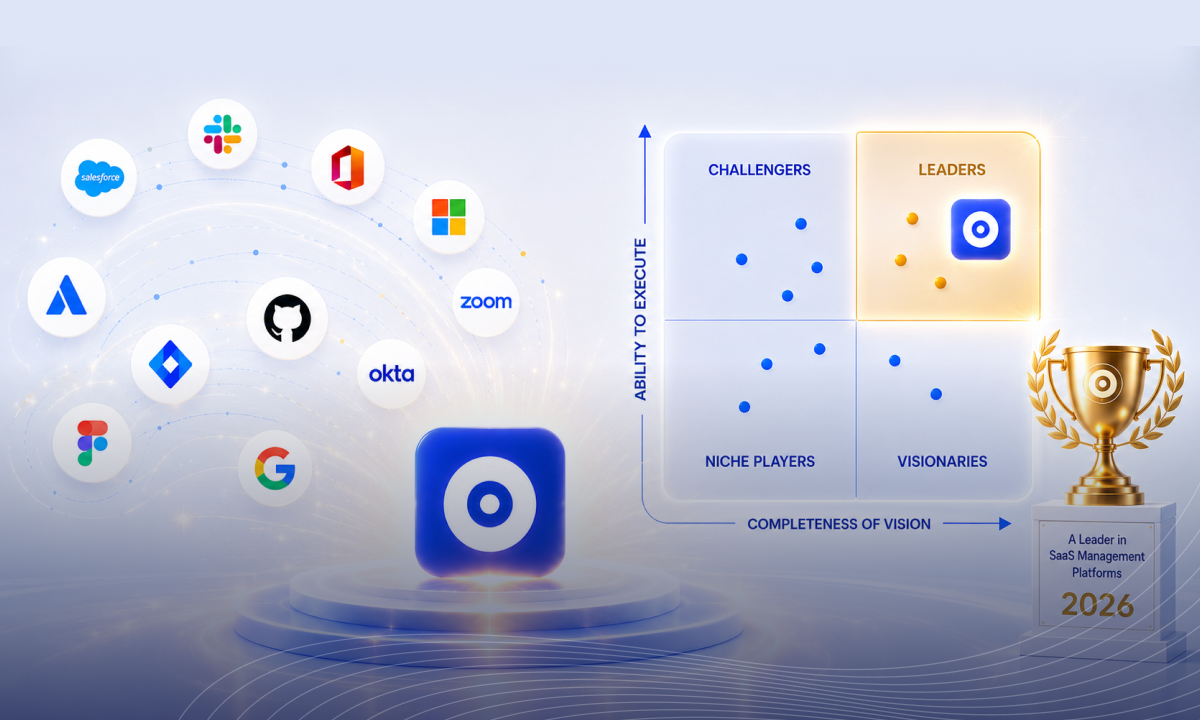
CloudEagle.ai has also been recognized in Gartner’s 2025 Magic Quadrant for SaaS Management Platforms, further validating its position as a trusted leader in the industry

Key Features of CloudEagle.ai

1. App Discovery & Shadow IT Alerts

Provides full visibility across SSO, finance systems, browser extensions, and direct integrations to eliminate blind spots and prevent unauthorized app usage.
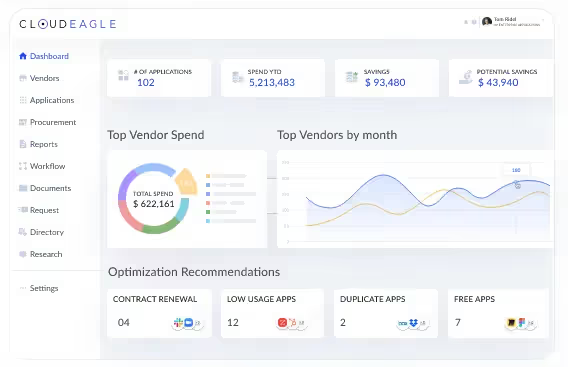
App Discovery

How it Helps:

  • Identifies underused and unauthorized apps.
  • Proactively alerts you about shadow IT to ensure security compliance.
  • Provides complete visibility into your entire software stack.

2. License Management & Reclamation

Identifies underused licenses, automates license harvesting, and right-sizes subscriptions to reduce waste.

License Management

How it Helps:

  • Pinpoints underutilized licenses and reallocates them for better efficiency.
  • Automates license harvesting to reduce waste.
  • Helps businesses avoid paying for unused or duplicate subscriptions.

3. Contract Management & Renewal Monitoring

Extracts contract metadata, tracks renewal timelines, and triggers 30, 60, and 90-day alerts to prevent unwanted auto-renewals.
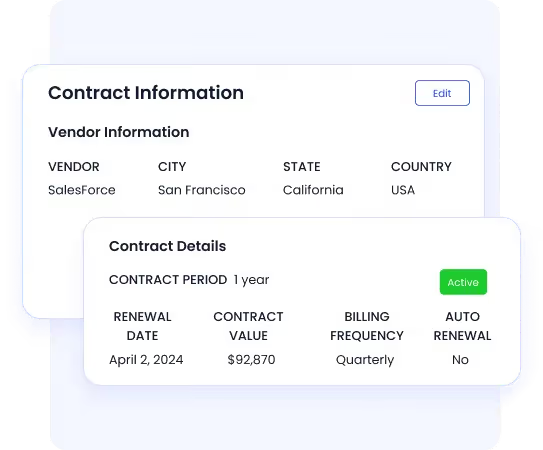
Contract Management

How it Helps:

  • Tracks contracts and renewal dates in one place.
  • Sends alerts in advance, giving you enough time to renegotiate or cancel subscriptions.
  • Streamlines contract management by automating metadata extraction.

4. Spend Optimization & Price Benchmarking

Delivers real-time spend visibility by department and vendor, with benchmarking data to strengthen negotiations.
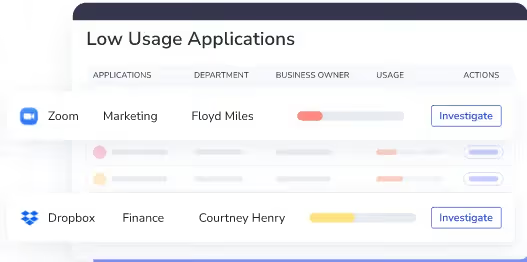
Spend Optimization & Price Benchmarking

How it Helps:

  • Identifies areas of waste and redundant subscriptions.
  • Offers insights on pricing to help you negotiate better deals with vendors.
  • Supports smarter purchasing decisions to keep costs in check.

5. Automated Procurement Workflows

Enables Slack-native intake and approval workflows to streamline purchasing and reduce procurement bottlenecks.
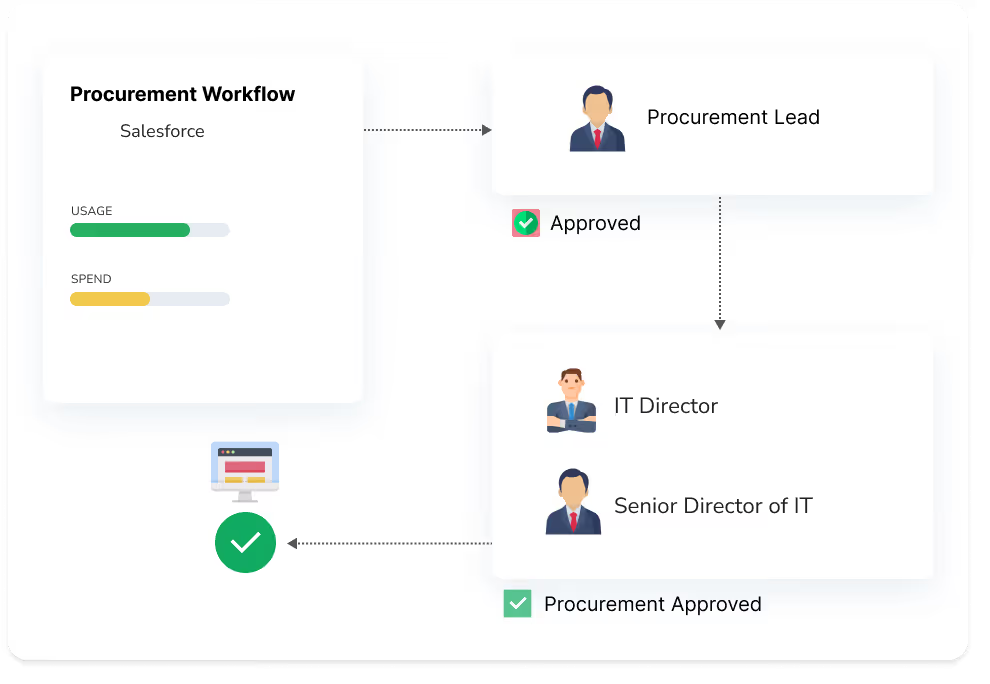
Automated Procurement Workflows

How it Helps:

  • Automates approval workflows for faster procurement cycles.
  • Provides real-time visibility into the status of purchase requests.
  • Integrates with Slack to ensure efficient team collaboration.

6. Access Governance & Automated Reviews

Automates onboarding, offboarding, access reviews, least-privilege enforcement, and Just-in-Time access for stronger security and compliance.
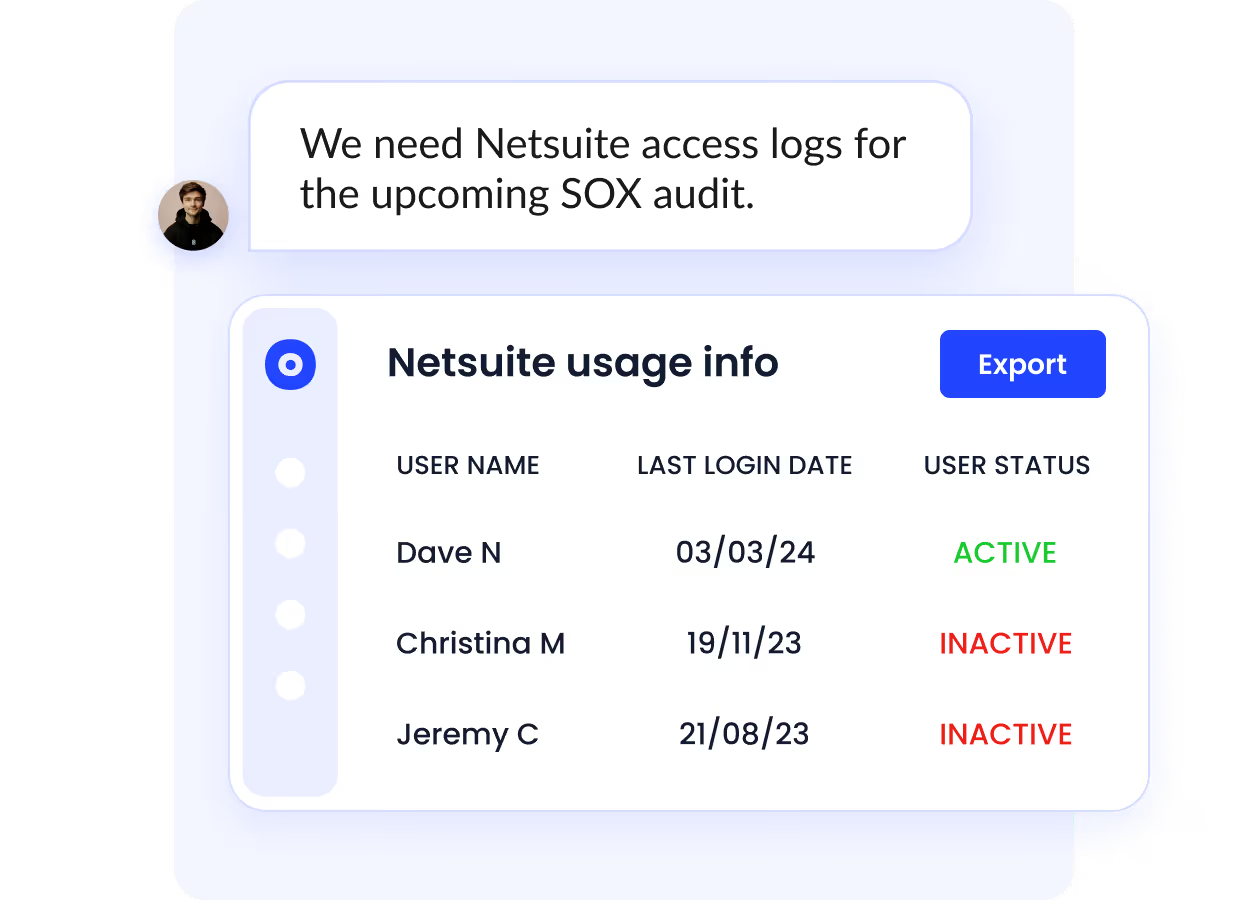
How it Helps:

  • Automates user access reviews to ensure compliance with least privilege policies.
  • Reduces manual intervention, improving efficiency and security.
  • Provides audit-ready reports for compliance and security teams.

7. Automated Onboarding & Offboarding

CloudEagle.ai automates the process of granting and revoking access for employees, allowing you to efficiently manage their access rights as they join or leave the organization.

How it Helps:

  • As new employees join, CloudEagle automatically assigns them the appropriate access based on their role and responsibilities, ensuring they have the tools they need from day one.
  • When an employee leaves, CloudEagle promptly revokes access to all relevant SaaS applications, reducing the risk of unauthorized access or data breaches.
  • All onboarding and offboarding actions are automatically logged, providing an audit trail for compliance purposes and transparency during security reviews.

8. Just-in-Time (JIT) Access

CloudEagle’s Just-in-Time (JIT) Access ensures that employees or contractors are granted access to critical systems only when necessary and for a limited time.

How it Helps:

  • Grants access only for specific tasks, automatically revoking it once completed.
  • Ensures least privilege by limiting access duration, reducing risks of unauthorized access.
  • Tracks and documents all JIT access for auditability and compliance with security standards.

Pricing

CloudEagle's pricing varies based on your pain points, company size, and employee size. Please contact sales to know pricing.

2. Vendr

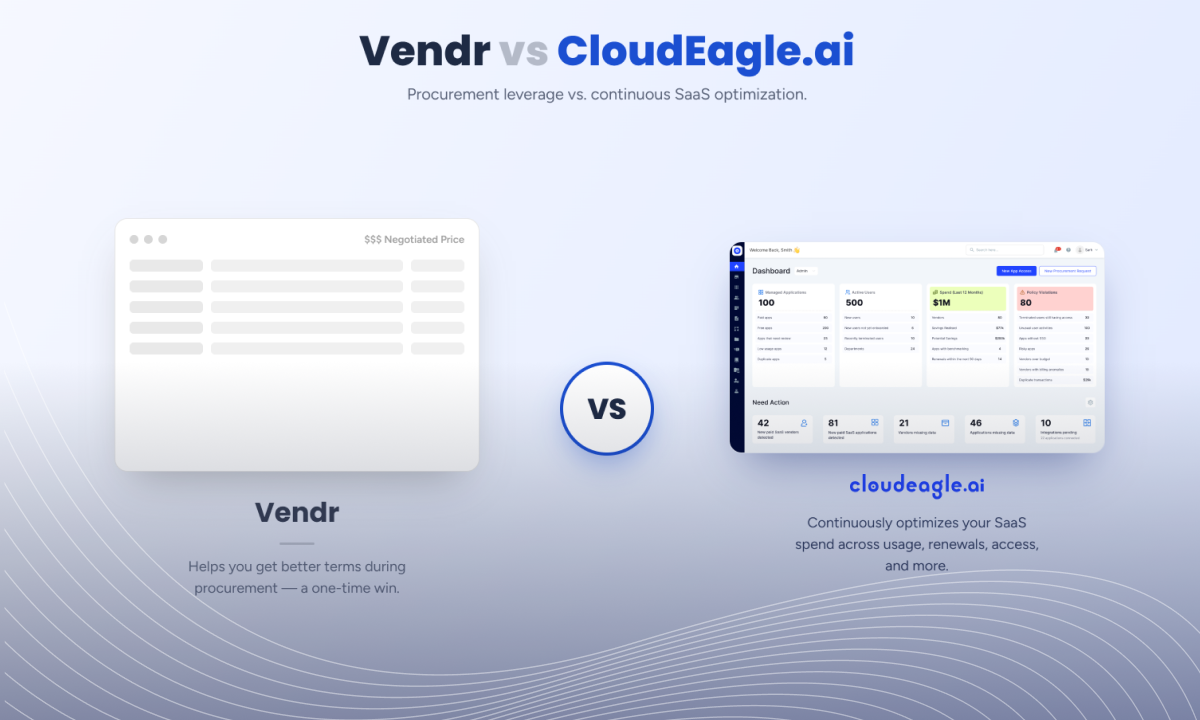
Vendr dashboard

SaaS procurement platform focused on vendor negotiations and buying efficiency.

  • Procurement marketplace with expert negotiators
  • Vendor pricing intelligence from thousands of transactions
  • App discovery and buying workflows
  • Renewal support and negotiation guidance
  • Best for procurement-led teams

Pricing

The starter plan is priced at $36,000 per year.

3. Productiv

Usage-first SaaS intelligence platform for spend optimization.

Banner of a SaaS management platform, Productiv

  • Deep usage analytics beyond login data
  • License optimization and renewal alerts
  • Spend insights by app, vendor, and user
  • Workflow automation for license management
  • Best for data-driven IT and finance teams

Pricing

Schedule a demo to learn more about pricing.

4. Sastrify

Procurement-focused SaaS spend management platform.

Sastrify banner

  • Automated procurement workflows
  • Renewal reminders and contract tracking
  • Vendor negotiation support
  • Claims up to 35 percent cost savings
  • Best for procurement-heavy organizations

Pricing

The starter plan is priced at $2,990 per month and $35,880 per year.

5. Zylo

Enterprise SaaS management with strong benchmarking data.

Zylo banner

  • Large SaaS spend benchmarking dataset
  • License optimization insights
  • Renewal tracking and alerts
  • Spend and usage dashboards
  • Best for large enterprises managing SaaS sprawl

Pricing

Request a customized quote.

6. Spendflo

Procurement automation and SaaS negotiation support.

Logo of a SaaS management platform

  • Vendor negotiation services
  • Renewal management
  • Procurement workflow automation
  • Spend visibility across vendors
  • Best for teams without internal procurement expertise

Pricing

Customizable pricing plans based on your spend.

7. Procurify

Procurement and spend management software.

Banner of procurify which is a SaaS management platform

  • Centralized approval workflows
  • Budget tracking and audit visibility
  • Financial system integrations
  • Spend reporting and vendor oversight
  • Best for finance-driven procurement teams

Pricing

Contact the sales team for pricing details.

8. Torii

Mid-market SaaS management platform.

Torii banner

  • App discovery and contract tracking
  • License recommendations
  • Onboarding and offboarding automation
  • Renewal notifications
  • Best for IT teams seeking lighter governance

Pricing

Contact the team for pricing plans.

9. NachoNacho

SMB-focused SaaS subscription marketplace.

NachoNacho website banner

  • Centralized SaaS subscription tracking
  • Cost optimization insights
  • SaaS marketplace for app purchases
  • Simple feature set
  • Best for small to mid-sized businesses

Pricing

A free trial for one month is available. Pricing starts at $5 per month.

10. BetterCloud

Security-focused SaaS operations platform.

Dashboard of SaaS management platform

  • SaaS app discovery
  • Automated onboarding and offboarding
  • File and access security controls
  • Policy enforcement workflows
  • Best for IT and security teams

Pricing

For pricing, please contact the team.

11. Cledara

SaaS subscription and payment management platform.

Cledara banner

  • Subscription tracking and renewal automation
  • Invoice management
  • Virtual purchase card
  • Spend visibility dashboards
  • Best for SMB finance teams

Pricing

Starts at $104 per month. Pay annually and save 16%.

12. Zluri

SaaS operations and access management platform.

Banner of Zluri

  • SaaS discovery and spend visibility
  • Procurement and onboarding automation
  • License optimization
  • Access governance workflows
  • Best for IT and procurement teams

Pricing

Contact the sales team for pricing details.

13. Coreview

Microsoft 365-focused SaaS management solution.

Logo of a SaaS management platform

  • Microsoft 365 governance and audits
  • License lifecycle management
  • Teams administration
  • Automated monitoring and alerts
  • Best for Microsoft-centric environments

Pricing

Standard pricing starts at $20,000 per year.

14. Ampliphae

SaaS security visibility platform.

Ampliphae banner

  • Shadow IT discovery
  • Connection monitoring
  • SaaSGuard risk detection
  • Compliance oversight
  • Best for security-first teams

Pricing

Contact the team to learn about the pricing plans.

15. Basaas

Workforce-focused SaaS collaboration hub.

Basaas banner and logo

  • Centralized app workspace
  • App switching and task integrations
  • Productivity-focused dashboard
  • Lightweight SaaS management
  • Best for collaboration-driven teams

Pricing

It has a free trial available. The smart pricing plans start at $6.50 per month.

16. Cyclr

API integration platform for SaaS ecosystems.

Logo if Cyclr

  • 400+ native connectors
  • Workflow automation
  • Scalable integration framework
  • Custom API orchestration
  • Best for integration-heavy environments

Pricing

A free trial is available. The pricing starts at $999 per month.

17. Setyl

SaaS and IT asset management platform.

Setly logo and banner

  • License and subscription tracking
  • Real-time spend reporting
  • Vendor management
  • Asset lifecycle oversight
  • Best for SMB IT asset management

Pricing

Starts at $249 per month.

18. Binadox

Cloud cost and SaaS spend optimization tool.

Binadox logo and banner

  • AI-based cost optimization
  • Cloud and SaaS tracking
  • Spend analytics dashboards
  • Contract and license oversight
  • Best for cloud-heavy businesses

Pricing

The starter plan is priced at $99 per month.

19. TropicApp

Procurement-driven SaaS buying platform.

TropicApp banner from website

  • App discovery and approvals
  • Vendor negotiation services
  • Contract management
  • Spend optimization workflows
  • Best for procurement-led enterprises

Pricing

Customizable pricing based on your annual spend.

20. Applogie

Procurement-driven SaaS buying platform.

Applogie banner

  • App discovery and approvals
  • Vendor negotiation services
  • Contract management
  • Spend optimization workflows
  • Best for procurement-led enterprises

Pricing

Starts at $100 per user per month.

4. SaaS Management Platforms: Who Stands Out in 2026?

Selecting the right platform requires Selecting the right SaaS management platform requires evaluating capabilities across discovery, governance, optimization, and renewal orchestration. Below is a quick-reference comparison of leading platforms based on core functional depth, integration ecosystem, and ideal deployment scale. Capabilities across discovery, governance, optimization, and renewal orchestration. Below is a quick-reference comparison of leading platforms based on core functional depth, integration ecosystem, and ideal deployment scale.

Platform Discovery Coverage Integrations (SSO/HRIS/Finance) License Management Renewal Workflows Cost Optimization Access Governance Reporting Ideal Company Size Standout Capabilities
CloudEagle 500+ direct connectors; browser, SSO, finance Deep (SSO, HRIS, ERP, Slack/Teams) Automated harvesting, time-based access, downgrades 90-day advance, auto-escalation, Slack-native Benchmarking data, 10–30% savings, AI recommendations Zero-touch on/offboarding, access reviews, role-based catalog Real-time spend by dept/user, budget alerts, forecasting Mid-market to Enterprise (500+) AI contract extraction; unified procurement + governance; expert-assisted buying
Productiv SaaS Intelligence™; app and usage discovery Moderate (SSO, HRIS) Usage-based recommendations Renewal alerts, manual workflows 35% savings claim; usage insights Basic provisioning automation Dashboard analytics Mid-market to Enterprise SaaS Intelligence™ for deep usage analytics beyond login tracking
Zylo Comprehensive; $21B+ spend data Moderate (SSO, finance) License optimization insights Renewal calendar, alerts Industry benchmarking, duplicate detection Basic access tracking Spend and usage dashboards Enterprise (1,000+) Massive benchmarking dataset; CIO/CFO focus; sprawl management
Vendr App discovery via integrations Moderate (SSO, finance) Manual tracking support Expert-assisted renewals Pre-negotiated discounts, buying guides Limited Procurement pipeline Mid-market to Enterprise Procurement marketplace; expert negotiators; vendor relationships
Torii App discovery; browser and SSO Moderate (SSO, HRIS, Zendesk, Jira) License recommendations Renewal notifications Spend insights, duplicate detection Onboarding/offboarding automation Basic spend and usage reports SMB to Mid-market (500–1,000) Simple, focused feature set; rapid deployment; IT asset integrations
Sastrify Centralized portfolio view Moderate (enterprise systems) Contract-based tracking Automated workflows, reminders 35% savings claim; vendor relationships Basic compliance tracking Spend and contract reports Mid-market (500–2,000) Automated procurement workflows; dedicated specialists; vendor network
BetterCloud SaaS operations focus Deep (Google Workspace, M365) Limited; security-driven Basic renewal tracking Limited; focus on security ROI Advanced (security policies, access controls, file security) Security and compliance dashboards Mid-market to Enterprise Security-first SaaS operations; automated security policies; compliance enforcement

5. SaaS management platforms vs. Spreadsheet-based Manual Tracking

Aspect Manual Spreadsheet Tracking SaaS Management Platforms
Visibility & Discovery Decentralized, prone to inaccuracies and shadow IT Centralized, real-time app discovery across SSO, finance, and HRIS systems
Access Provisioning Slow, often delayed with manual approvals Automated workflows, rapid approval and provisioning
Renewal Management Frequent missed renewals and scattered reminders Automated renewal workflows, centralized calendar, benchmarking data
Shadow IT & Compliance Risks Increased risk due to lack of oversight and employees bypassing controls Policy enforcement, full audit trails, centralized compliance documentation
Onboarding/Offboarding Resource-intensive, can leave access unmanaged Automated and complete, ensuring secure and compliant access changes
Access Reviews Manual, time-consuming, prone to errors and rubber-stamping Streamlined with automated alerts and risk-based assessments
Optimization & Cost Savings Difficult to identify unused licenses and optimize spend Continuous monitoring and recommendations for cost and license optimization

By shifting from manual By shifting from manual tracking to a dedicated SaaS management platform, organizations can move from reactive to proactive governance, gaining a single source of truth for SaaS usage, spend, compliance, and optimization.to a dedicated SaaS management platform, organizations can move from reactive to proactive governance, gaining a single source of truth for SaaS usage, spend, compliance, and optimization.

6. Choosing the right SaaS spend management platform for 2026 (when spend is the #1 KPI)

SaaS spend management platforms focus on cost control, renewals, and procurement efficiency by consolidating ERP, SSO, and finance data. They differ from full SaaS management platforms, which also include governance and access control.

  • Procurement teams driving vendor negotiations
  • Finance teams are optimizing budgets and forecasting

Must-Have Capabilities

  • Automated 60 to 90-day renewal alerts with escalation
  • Intake-to-procure workflows with approval automation
  • Vendor price benchmarking
  • Budget forecasting and anomaly detection
  • License reclamation based on real usage data

Organizations applying these controls consistently unlock 10 to 30 percent savings while reducing renewal risk.

7. How to shortlist SaaS management platform vendors (by Cost, Security, or IT Workload)

Match your shortlist to your primary pain point before evaluating SaaS management platform vendors. Each priority demands specific capabilities and reveals clear vendor weaknesses.

Priority Must-have capabilities Red flags
Cost Discovery across SSO, finance, and browser; feature-level usage (not login timestamps); automated license reclamation; renewal orchestration with contract intelligence; intake-to-procure with duplicate flagging Login-only usage data; siloed procurement; manual renewal tracking
Security Shadow AI detection; access reviews with audit-ready deprovisioning evidence; Zero Trust enforcement via least privilege and Just-in-Time Access; automated offboarding across all connected apps No Shadow IT or AI controls; manual access reviews; no offboarding proof for auditors
IT Workload No-code workflow automation; Slack-native approvals; automated onboarding and offboarding; centralized intake-to-procure portal; renewal alerts with auto-escalation Manual-only workflows; no HRIS integration; ticket-based provisioning without automation

8. Use cases for SaaS management platforms

A SaaS management platform centralizes visibility and control across your stack. The best SaaS management software and modern SaaS operations management software deliver measurable outcomes for IT, finance, and procurement across these core use cases.

Use case IT outcome Finance outcome Procurement outcome
Application discovery & SaaS inventory 100% visibility; ownership mapped Spend by app/user clarified Approved catalog, vendor list
Shadow IT control Detect unsanctioned apps Block wasteful charges Route purchases to policy
License management & harvesting Right-size seats automatically Eliminate idle licenses Negotiate to true need
Spend optimization & forecasting Usage-to-cost insights Accurate budgets and accruals Price benchmarks, savings plans
Renewal management & vendor negotiations Timely renewal alerts Avoid auto-renew penalties Workflow, better terms/discounts
Onboarding/offboarding automation Zero-touch provision/deprovision Reclaim paid seats fast Enforce approved tools
Security & compliance support Access governance, SSO/HRIS Audit-ready records Vendor risk checks
Reporting & analytics Usage KPIs, audit trails Spend by dept/cost center Portfolio and renewal pipeline

9. SaaS management platforms Reviews and Ratings

Validate any SaaS management platform by comparing reviews across trusted sources like G2, Gartner Peer Insights, TrustRadius, and Capterra. Focus on recent reviews with high volume and filter by company size and industry to match your segment.

Do not rely on star ratings alone. Read qualitative feedback to assess data accuracy, integration depth, support responsiveness, and real-world ROI.

What to Evaluate

  • Ease of implementation and time to value
  • Data accuracy across usage and spend
  • Integration depth across SSO, HRIS, and finance systems
  • Measurable ROI from license optimization and renewal savings

Before shortlisting, align reviews with your internal stack, workflows, and compliance requirements. Always validate claims through live demos, reference calls, and a proof of concept.

Assess SaaS Risk Signals

Get 10 Must-Dos To Keep Your SaaS Portfolio Secure to understand how top platforms handle access, misconfigurations, and policy enforcement.
Download Security Checklist

10. How to compare SaaS management platform vendors using reviews, integrations, and proof-of-value?

Star ratings confirm market sentiment but don't validate fit. To evaluate saas management platform vendors rigorously, score each shortlisted platform across four dimensions before committing to a proof of value.

Evaluation Dimension What to Verify Red Flag
Integration depth Bi-directional connectors: Okta/Entra, HRIS, ERP/AP, Jira, Coupa SSO-only discovery; no finance or HRIS sync
Data quality Feature-level usage tracking, not just login timestamps Login-only signals; no module-level engagement data
Automation coverage License reclamation, intake-to-procure, renewal orchestration, and access reviews Dashboard-only; manual workflows for approvals
Security posture Shadow AI controls, Zero Trust enforcement, least privilege, JIT access with audit evidence No deprovisioning proof; no JIT or time-based access

Wrapping up

Reducing SaaS expenses and getting complete control over your SaaS contracts and licenses is necessary to scale your business. You need to use the best SaaS management tool capable of automating repetitive tasks and doing the heavy lifting for you.

Amidst the ocean of SMPs, we wanted to show the best SaaS management platforms that'll bring the transformation your business needs. CloudEagle, Vendor, Zluri, CloudFX, and Zylo are some SaaS app management leaders you can benefit from.  

However, before you select the right SMP, you must understand how to select the right one. here is what you need to know before making a decision.

So, what's it going to be?

Did we miss any comprehensive SaaS management platforms that deserved to be on the list? Let us know.

Frequently asked questions

1. Why do you need a SaaS management platform?

On average, a business uses more than 100 applications to run its business operations. SMPs will give visibility over those applications by tracking app usage data and spend. These data will help the business optimize its SaaS stack, negotiate better and increase its ROI.

2. How many SaaS apps can I use for my business?

There is no limit on the SaaS apps you should be using. Depending on the size of your business, your customer base, your budget, and the needs of your team, you can use as much as the SaaS app you want. But be mindful to keep your SaaS portfolio under control using SaaS management solutions.

3. How can a SaaS management platform help reduce software expenses?

SaaS management platforms provide detailed insights into license utilization, duplicate subscriptions, and underused tools. By identifying these inefficiencies, businesses can eliminate unnecessary costs, negotiate better contracts, and ensure that spending aligns with actual usage, leading to significant cost savings.

4. What security benefits do SaaS management platforms offer?

SaaS management platforms enhance security by giving IT visibility into all connected SaaS applications, monitoring user access, and flagging shadow IT. This centralization reduces risks like data breaches, ensures compliance with company policies, and helps maintain control over sensitive business data.

5. Can SaaS management platforms automate user onboarding and offboarding?

Yes, leading SaaS management platforms streamline user lifecycle management by automating the provisioning and deprovisioning of app access. This reduces manual workload for IT, ensures employees have the right tools from day one, and quickly removes access when users leave, enhancing both productivity and security.

6. How do SaaS management platforms support compliance and auditing?

Many SaaS management solutions include compliance monitoring features that track app usage, data access, and permissions. They generate audit trails and reports, making it easier for businesses to demonstrate regulatory compliance (e.g., GDPR, SOC 2) during audits or security reviews.

Advertisement for a SaaS Subscription Tracking Template with a call-to-action button to download and a partial graphic of a tablet showing charts.Banner promoting a SaaS Agreement Checklist to streamline SaaS management and avoid budget waste with a call-to-action button labeled Download checklist.Blue banner with text 'The Ultimate Employee Offboarding Checklist!' and a black button labeled 'Download checklist' alongside partial views of checklist documents from cloudeagle.ai.Digital ad for download checklist titled 'The Ultimate Checklist for IT Leaders to Optimize SaaS Operations' by cloudeagle.ai, showing checklist pages.Slack Buyer's Guide offer with text 'Unlock insider insights to get the best deal on Slack!' and a button labeled 'Get Your Copy', accompanied by a preview of the guide featuring Slack's logo.Monday Pricing Guide by cloudeagle.ai offering exclusive pricing secrets to maximize investment with a call-to-action button labeled Get Your Copy and an image of the guide's cover.Blue banner for Canva Pricing Guide by cloudeagle.ai offering a guide to Canva costs, features, and alternatives with a call-to-action button saying Get Your Copy.Blue banner with white text reading 'Little-Known Negotiation Hacks to Get the Best Deal on Slack' and a white button labeled 'Get Your Copy'.Blue banner with text 'Little-Known Negotiation Hacks to Get the Best Deal on Monday.com' and a white button labeled 'Get Your Copy'.Blue banner with text 'Little-Known Negotiation Hacks to Get the Best Deal on Canva' and a white button labeled 'Get Your Copy'.Banner with text 'Slack Buyer's Guide' and a 'Download Now' button next to images of a guide titled 'Slack Buyer’s Guide: Features, Pricing & Best Practices'.Digital cover of Monday Pricing Guide with a button labeled Get Your Copy on a blue background.Canva Pricing Guide cover with a button labeled Get Your Copy on a blue gradient background.

Enter your email to
unlock the report

Oops! Something went wrong while submitting the form.
License Count
Benchmark
Per User/Per Year

Enter your email to
unlock the report

Oops! Something went wrong while submitting the form.
License Count
Benchmark
Per User/Per Year

Enter your email to
unlock the report

Oops! Something went wrong while submitting the form.
Notion Plus
License Count
Benchmark
Per User/Per Year
100-500
$67.20 - $78.72
500-1000
$59.52 - $72.00
1000+
$51.84 - $57.60
Canva Pro
License Count
Benchmark
Per User/Per Year
100-500
$74.33-$88.71
500-1000
$64.74-$80.32
1000+
$55.14-$62.34

Enter your email to
unlock the report

Oops! Something went wrong while submitting the form.

Enter your email to
unlock the report

Oops! Something went wrong while submitting the form.
Zoom Business
License Count
Benchmark
Per User/Per Year
100-500
$216.00 - $264.00
500-1000
$180.00 - $216.00
1000+
$156.00 - $180.00

Enter your email to
unlock the report

Oops! Something went wrong while submitting the form.

Get the Right Security Platform To Secure Your Cloud Infrastructure

Please enter a business email
Thank you!
The 2023 SaaS report has been sent to your email. Check your promotional or spam folder.
Oops! Something went wrong while submitting the form.

Access full report

Please enter a business email
Thank you!
The 2023 SaaS report has been sent to your email. Check your promotional or spam folder.
Oops! Something went wrong while submitting the form.

Did you know that a company uses 300 SaaS applications on average in 2025? Furthermore, CloudEagle’s SaaS spend report identified that SaaS spend is the third-biggest spend in an organization, next to employee and office lease spend.

These metrics prove the extent of SaaS adoption. You use SaaS applications as they are easier to purchase and are more scalable and flexible than legacy software. But most organizations miss out on a crucial factor: SaaS management.

However, we know you’re aware of the risks of unmanaged SaaS and are looking for the best SaaS management platform to manage your SaaS apps and optimize your spend effectively.

With plenty of available options, finding the right tool can be challenging. This article features 30 of the best SaaS management platforms to help you choose the software that best fits your needs.

1. Is SaaS Management Now a Business Necessity?

SaaS management is the process of overseeing and optimizing all the SaaS (Software as a Service) applications used within an organization. This ensures your company’s SaaS stack is secure, cost-efficient, and compliant with organizational policies and external regulations.

  • Tracks all SaaS apps in use across departments to prevent software sprawl and shadow IT.
  • Monitors spending, identifies unused or duplicate subscriptions, and helps control SaaS costs.
  • Ensures SaaS applications meet security, privacy, and compliance standards.
  • Manages software lifecycles, including onboarding, renewals, and deprovisioning of apps.
  • Brings together IT, security, finance, procurement, and departmental leaders for collaborative decision-making.
  • Uses SaaS management platforms (SMPs) to automate app discovery, cost tracking, usage insights, approval workflows, and policy enforcement.
  • Helps organizations maximize the value of their SaaS investments while minimizing risks and unnecessary expenses.

A. What Problems Does SaaS Management Actually Solve?

a. Shadow IT Visibility and Control

b. Security and Compliance Enhancement

  • Implements automated access governance through continuous monitoring instead of manual audits
  • Identifies and flags risky access patterns while maintaining comprehensive audit trails
  • Automatically revokes employee access across all applications during offboarding

c. Cost Optimization

  • Reduces SaaS spending by 10-30% through intelligent license optimization
  • Identifies and eliminates redundant applications across the organization
  • Manages renewals proactively to prevent costly auto-renewals of unused subscriptions

d. Operational Efficiency

  • Automates time-consuming workflows, including procurement approvals, employee onboarding and offboarding, and access reviews
  • Frees IT and procurement teams from repetitive administrative tasks
  • Enables teams to redirect focus toward strategic initiatives that drive business value

Benchmark Your SaaS Strategy

Download How to Optimize SaaS Spend (5 Proven Tactics) to evaluate platforms based on cost, control, and operational impact.
Download the Spend Guide

2. Do You Actually Need a SaaS Management Platform?

A SaaS management platform is a cloud-based tool that helps organizations monitor and control all their software-as-a-service (SaaS) applications from a single dashboard. 

These platforms allow businesses to track usage, manage subscriptions, optimize SaaS spending, and improve security.

Instead of relying on spreadsheets or outdated tools to keep an inventory of your software, SaaS management platforms provide automated and real-time insights into your entire SaaS stack.

So, without further ado, let’s get started.

A. Step-by-step guide to choosing SaaS management software

  1. Define your objectives: Clarify whether you need visibility, automated governance, cost savings, or all three to guide your evaluation.
  2. Inventory integration requirements: List the systems you must connect—SSO, HRIS, finance tools, ticketing platforms—since integration depth determines data accuracy.
  3. Build a weighted scorecard: Define must-have vs. nice-to-have features (discovery accuracy, workflow automation, license management) and weight them by importance.
  4. Request live data demos: Shortlist vendors and ask them to demo using a sample of your actual app inventory and usage data, not generic examples.
  5. Run a proof of concept: Validate integration quality and automation capabilities with a 30-day trial or pilot before committing.
  6. Evaluate pricing and services: Compare subscription models, benchmarking data access, security certifications, and included support tiers.
  7. Align cross-functional stakeholders: Bring IT, security, procurement, and finance together to review findings and finalize the decision.

3. Top 20 SaaS Management platforms for 2026

1. CloudEagle.ai - AI-powered SaaS Management and Governance

CloudEagle.ai is a recognized leader in SaaS management and governance, leveraging AI-powered capabilities to help enterprises optimize, govern, and renew all their SaaS and cloud applications from a single platform.

With over 500 direct integrations, CloudEagle.ai offers complete visibility into applications, licenses, spend, and vendors, while utilizing no-code Slack workflows to automate critical processes such as employee onboarding, offboarding, and access reviews.

The platform also automates access governance, renewal automation, and cost optimization, eliminating redundant applications. All of this is managed through a centralized dashboard, serving as the single source of truth for your SaaS operations.

CloudEagle.ai has also been recognized in Gartner’s 2025 Magic Quadrant for SaaS Management Platforms, further validating its position as a trusted leader in the industry

Key Features of CloudEagle.ai

1. App Discovery & Shadow IT Alerts

Provides full visibility across SSO, finance systems, browser extensions, and direct integrations to eliminate blind spots and prevent unauthorized app usage.

App Discovery

How it Helps:

  • Identifies underused and unauthorized apps.
  • Proactively alerts you about shadow IT to ensure security compliance.
  • Provides complete visibility into your entire software stack.

2. License Management & Reclamation

Identifies underused licenses, automates license harvesting, and right-sizes subscriptions to reduce waste.

License Management

How it Helps:

  • Pinpoints underutilized licenses and reallocates them for better efficiency.
  • Automates license harvesting to reduce waste.
  • Helps businesses avoid paying for unused or duplicate subscriptions.

3. Contract Management & Renewal Monitoring

Extracts contract metadata, tracks renewal timelines, and triggers 30, 60, and 90-day alerts to prevent unwanted auto-renewals.

Contract Management

How it Helps:

  • Tracks contracts and renewal dates in one place.
  • Sends alerts in advance, giving you enough time to renegotiate or cancel subscriptions.
  • Streamlines contract management by automating metadata extraction.

4. Spend Optimization & Price Benchmarking

Delivers real-time spend visibility by department and vendor, with benchmarking data to strengthen negotiations.

Spend Optimization & Price Benchmarking

How it Helps:

  • Identifies areas of waste and redundant subscriptions.
  • Offers insights on pricing to help you negotiate better deals with vendors.
  • Supports smarter purchasing decisions to keep costs in check.

5. Automated Procurement Workflows

Enables Slack-native intake and approval workflows to streamline purchasing and reduce procurement bottlenecks.

Automated Procurement Workflows

How it Helps:

  • Automates approval workflows for faster procurement cycles.
  • Provides real-time visibility into the status of purchase requests.
  • Integrates with Slack to ensure efficient team collaboration.

6. Access Governance & Automated Reviews

Automates onboarding, offboarding, access reviews, least-privilege enforcement, and Just-in-Time access for stronger security and compliance.

How it Helps:

  • Automates user access reviews to ensure compliance with least privilege policies.
  • Reduces manual intervention, improving efficiency and security.
  • Provides audit-ready reports for compliance and security teams.

7. Automated Onboarding & Offboarding

CloudEagle.ai automates the process of granting and revoking access for employees, allowing you to efficiently manage their access rights as they join or leave the organization.

How it Helps:

  • As new employees join, CloudEagle automatically assigns them the appropriate access based on their role and responsibilities, ensuring they have the tools they need from day one.
  • When an employee leaves, CloudEagle promptly revokes access to all relevant SaaS applications, reducing the risk of unauthorized access or data breaches.
  • All onboarding and offboarding actions are automatically logged, providing an audit trail for compliance purposes and transparency during security reviews.

8. Just-in-Time (JIT) Access

CloudEagle’s Just-in-Time (JIT) Access ensures that employees or contractors are granted access to critical systems only when necessary and for a limited time.

How it Helps:

  • Grants access only for specific tasks, automatically revoking it once completed.
  • Ensures least privilege by limiting access duration, reducing risks of unauthorized access.
  • Tracks and documents all JIT access for auditability and compliance with security standards.

Pricing

CloudEagle's pricing varies based on your pain points, company size, and employee size. Please contact sales to know pricing.

2. Vendr

Vendr dashboard

SaaS procurement platform focused on vendor negotiations and buying efficiency.

  • Procurement marketplace with expert negotiators
  • Vendor pricing intelligence from thousands of transactions
  • App discovery and buying workflows
  • Renewal support and negotiation guidance
  • Best for procurement-led teams

Pricing

The starter plan is priced at $36,000 per year.

3. Productiv

Usage-first SaaS intelligence platform for spend optimization.

Banner of a SaaS management platform, Productiv

  • Deep usage analytics beyond login data
  • License optimization and renewal alerts
  • Spend insights by app, vendor, and user
  • Workflow automation for license management
  • Best for data-driven IT and finance teams

Pricing

Schedule a demo to learn more about pricing.

4. Sastrify

Procurement-focused SaaS spend management platform.

Sastrify banner

  • Automated procurement workflows
  • Renewal reminders and contract tracking
  • Vendor negotiation support
  • Claims up to 35 percent cost savings
  • Best for procurement-heavy organizations

Pricing

The starter plan is priced at $2,990 per month and $35,880 per year.

5. Zylo

Enterprise SaaS management with strong benchmarking data.

Zylo banner

  • Large SaaS spend benchmarking dataset
  • License optimization insights
  • Renewal tracking and alerts
  • Spend and usage dashboards
  • Best for large enterprises managing SaaS sprawl

Pricing

Request a customized quote.

6. Spendflo

Procurement automation and SaaS negotiation support.

Logo of a SaaS management platform

  • Vendor negotiation services
  • Renewal management
  • Procurement workflow automation
  • Spend visibility across vendors
  • Best for teams without internal procurement expertise

Pricing

Customizable pricing plans based on your spend.

7. Procurify

Procurement and spend management software.

Banner of procurify which is a SaaS management platform

  • Centralized approval workflows
  • Budget tracking and audit visibility
  • Financial system integrations
  • Spend reporting and vendor oversight
  • Best for finance-driven procurement teams

Pricing

Contact the sales team for pricing details.

8. Torii

Mid-market SaaS management platform.

Torii banner

  • App discovery and contract tracking
  • License recommendations
  • Onboarding and offboarding automation
  • Renewal notifications
  • Best for IT teams seeking lighter governance

Pricing

Contact the team for pricing plans.

9. NachoNacho

SMB-focused SaaS subscription marketplace.

NachoNacho website banner

  • Centralized SaaS subscription tracking
  • Cost optimization insights
  • SaaS marketplace for app purchases
  • Simple feature set
  • Best for small to mid-sized businesses

Pricing

A free trial for one month is available. Pricing starts at $5 per month.

10. BetterCloud

Security-focused SaaS operations platform.

Dashboard of SaaS management platform

  • SaaS app discovery
  • Automated onboarding and offboarding
  • File and access security controls
  • Policy enforcement workflows
  • Best for IT and security teams

Pricing

For pricing, please contact the team.

11. Cledara

SaaS subscription and payment management platform.

Cledara banner

  • Subscription tracking and renewal automation
  • Invoice management
  • Virtual purchase card
  • Spend visibility dashboards
  • Best for SMB finance teams

Pricing

Starts at $104 per month. Pay annually and save 16%.

12. Zluri

SaaS operations and access management platform.

Banner of Zluri

  • SaaS discovery and spend visibility
  • Procurement and onboarding automation
  • License optimization
  • Access governance workflows
  • Best for IT and procurement teams

Pricing

Contact the sales team for pricing details.

13. Coreview

Microsoft 365-focused SaaS management solution.

Logo of a SaaS management platform

  • Microsoft 365 governance and audits
  • License lifecycle management
  • Teams administration
  • Automated monitoring and alerts
  • Best for Microsoft-centric environments

Pricing

Standard pricing starts at $20,000 per year.

14. Ampliphae

SaaS security visibility platform.

Ampliphae banner

  • Shadow IT discovery
  • Connection monitoring
  • SaaSGuard risk detection
  • Compliance oversight
  • Best for security-first teams

Pricing

Contact the team to learn about the pricing plans.

15. Basaas

Workforce-focused SaaS collaboration hub.

Basaas banner and logo

  • Centralized app workspace
  • App switching and task integrations
  • Productivity-focused dashboard
  • Lightweight SaaS management
  • Best for collaboration-driven teams

Pricing

It has a free trial available. The smart pricing plans start at $6.50 per month.

16. Cyclr

API integration platform for SaaS ecosystems.

Logo if Cyclr

  • 400+ native connectors
  • Workflow automation
  • Scalable integration framework
  • Custom API orchestration
  • Best for integration-heavy environments

Pricing

A free trial is available. The pricing starts at $999 per month.

17. Setyl

SaaS and IT asset management platform.

Setly logo and banner

  • License and subscription tracking
  • Real-time spend reporting
  • Vendor management
  • Asset lifecycle oversight
  • Best for SMB IT asset management

Pricing

Starts at $249 per month.

18. Binadox

Cloud cost and SaaS spend optimization tool.

Binadox logo and banner

  • AI-based cost optimization
  • Cloud and SaaS tracking
  • Spend analytics dashboards
  • Contract and license oversight
  • Best for cloud-heavy businesses

Pricing

The starter plan is priced at $99 per month.

19. TropicApp

Procurement-driven SaaS buying platform.

TropicApp banner from website

  • App discovery and approvals
  • Vendor negotiation services
  • Contract management
  • Spend optimization workflows
  • Best for procurement-led enterprises

Pricing

Customizable pricing based on your annual spend.

20. Applogie

Procurement-driven SaaS buying platform.

Applogie banner

  • App discovery and approvals
  • Vendor negotiation services
  • Contract management
  • Spend optimization workflows
  • Best for procurement-led enterprises

Pricing

Starts at $100 per user per month.

4. SaaS Management Platforms: Who Stands Out in 2026?

Selecting the right platform requires Selecting the right SaaS management platform requires evaluating capabilities across discovery, governance, optimization, and renewal orchestration. Below is a quick-reference comparison of leading platforms based on core functional depth, integration ecosystem, and ideal deployment scale. Capabilities across discovery, governance, optimization, and renewal orchestration. Below is a quick-reference comparison of leading platforms based on core functional depth, integration ecosystem, and ideal deployment scale.

Platform Discovery Coverage Integrations (SSO/HRIS/Finance) License Management Renewal Workflows Cost Optimization Access Governance Reporting Ideal Company Size Standout Capabilities
CloudEagle 500+ direct connectors; browser, SSO, finance Deep (SSO, HRIS, ERP, Slack/Teams) Automated harvesting, time-based access, downgrades 90-day advance, auto-escalation, Slack-native Benchmarking data, 10–30% savings, AI recommendations Zero-touch on/offboarding, access reviews, role-based catalog Real-time spend by dept/user, budget alerts, forecasting Mid-market to Enterprise (500+) AI contract extraction; unified procurement + governance; expert-assisted buying
Productiv SaaS Intelligence™; app and usage discovery Moderate (SSO, HRIS) Usage-based recommendations Renewal alerts, manual workflows 35% savings claim; usage insights Basic provisioning automation Dashboard analytics Mid-market to Enterprise SaaS Intelligence™ for deep usage analytics beyond login tracking
Zylo Comprehensive; $21B+ spend data Moderate (SSO, finance) License optimization insights Renewal calendar, alerts Industry benchmarking, duplicate detection Basic access tracking Spend and usage dashboards Enterprise (1,000+) Massive benchmarking dataset; CIO/CFO focus; sprawl management
Vendr App discovery via integrations Moderate (SSO, finance) Manual tracking support Expert-assisted renewals Pre-negotiated discounts, buying guides Limited Procurement pipeline Mid-market to Enterprise Procurement marketplace; expert negotiators; vendor relationships
Torii App discovery; browser and SSO Moderate (SSO, HRIS, Zendesk, Jira) License recommendations Renewal notifications Spend insights, duplicate detection Onboarding/offboarding automation Basic spend and usage reports SMB to Mid-market (500–1,000) Simple, focused feature set; rapid deployment; IT asset integrations
Sastrify Centralized portfolio view Moderate (enterprise systems) Contract-based tracking Automated workflows, reminders 35% savings claim; vendor relationships Basic compliance tracking Spend and contract reports Mid-market (500–2,000) Automated procurement workflows; dedicated specialists; vendor network
BetterCloud SaaS operations focus Deep (Google Workspace, M365) Limited; security-driven Basic renewal tracking Limited; focus on security ROI Advanced (security policies, access controls, file security) Security and compliance dashboards Mid-market to Enterprise Security-first SaaS operations; automated security policies; compliance enforcement

5. SaaS management platforms vs. Spreadsheet-based Manual Tracking

Aspect Manual Spreadsheet Tracking SaaS Management Platforms
Visibility & Discovery Decentralized, prone to inaccuracies and shadow IT Centralized, real-time app discovery across SSO, finance, and HRIS systems
Access Provisioning Slow, often delayed with manual approvals Automated workflows, rapid approval and provisioning
Renewal Management Frequent missed renewals and scattered reminders Automated renewal workflows, centralized calendar, benchmarking data
Shadow IT & Compliance Risks Increased risk due to lack of oversight and employees bypassing controls Policy enforcement, full audit trails, centralized compliance documentation
Onboarding/Offboarding Resource-intensive, can leave access unmanaged Automated and complete, ensuring secure and compliant access changes
Access Reviews Manual, time-consuming, prone to errors and rubber-stamping Streamlined with automated alerts and risk-based assessments
Optimization & Cost Savings Difficult to identify unused licenses and optimize spend Continuous monitoring and recommendations for cost and license optimization

By shifting from manual By shifting from manual tracking to a dedicated SaaS management platform, organizations can move from reactive to proactive governance, gaining a single source of truth for SaaS usage, spend, compliance, and optimization.to a dedicated SaaS management platform, organizations can move from reactive to proactive governance, gaining a single source of truth for SaaS usage, spend, compliance, and optimization.

6. Choosing the right SaaS spend management platform for 2026 (when spend is the #1 KPI)

SaaS spend management platforms focus on cost control, renewals, and procurement efficiency by consolidating ERP, SSO, and finance data. They differ from full SaaS management platforms, which also include governance and access control.

  • Procurement teams driving vendor negotiations
  • Finance teams are optimizing budgets and forecasting

Must-Have Capabilities

  • Automated 60 to 90-day renewal alerts with escalation
  • Intake-to-procure workflows with approval automation
  • Vendor price benchmarking
  • Budget forecasting and anomaly detection
  • License reclamation based on real usage data

Organizations applying these controls consistently unlock 10 to 30 percent savings while reducing renewal risk.

7. How to shortlist SaaS management platform vendors (by Cost, Security, or IT Workload)

Match your shortlist to your primary pain point before evaluating SaaS management platform vendors. Each priority demands specific capabilities and reveals clear vendor weaknesses.

Priority Must-have capabilities Red flags
Cost Discovery across SSO, finance, and browser; feature-level usage (not login timestamps); automated license reclamation; renewal orchestration with contract intelligence; intake-to-procure with duplicate flagging Login-only usage data; siloed procurement; manual renewal tracking
Security Shadow AI detection; access reviews with audit-ready deprovisioning evidence; Zero Trust enforcement via least privilege and Just-in-Time Access; automated offboarding across all connected apps No Shadow IT or AI controls; manual access reviews; no offboarding proof for auditors
IT Workload No-code workflow automation; Slack-native approvals; automated onboarding and offboarding; centralized intake-to-procure portal; renewal alerts with auto-escalation Manual-only workflows; no HRIS integration; ticket-based provisioning without automation

8. Use cases for SaaS management platforms

A SaaS management platform centralizes visibility and control across your stack. The best SaaS management software and modern SaaS operations management software deliver measurable outcomes for IT, finance, and procurement across these core use cases.

Use case IT outcome Finance outcome Procurement outcome
Application discovery & SaaS inventory 100% visibility; ownership mapped Spend by app/user clarified Approved catalog, vendor list
Shadow IT control Detect unsanctioned apps Block wasteful charges Route purchases to policy
License management & harvesting Right-size seats automatically Eliminate idle licenses Negotiate to true need
Spend optimization & forecasting Usage-to-cost insights Accurate budgets and accruals Price benchmarks, savings plans
Renewal management & vendor negotiations Timely renewal alerts Avoid auto-renew penalties Workflow, better terms/discounts
Onboarding/offboarding automation Zero-touch provision/deprovision Reclaim paid seats fast Enforce approved tools
Security & compliance support Access governance, SSO/HRIS Audit-ready records Vendor risk checks
Reporting & analytics Usage KPIs, audit trails Spend by dept/cost center Portfolio and renewal pipeline

9. SaaS management platforms Reviews and Ratings

Validate any SaaS management platform by comparing reviews across trusted sources like G2, Gartner Peer Insights, TrustRadius, and Capterra. Focus on recent reviews with high volume and filter by company size and industry to match your segment.

Do not rely on star ratings alone. Read qualitative feedback to assess data accuracy, integration depth, support responsiveness, and real-world ROI.

What to Evaluate

  • Ease of implementation and time to value
  • Data accuracy across usage and spend
  • Integration depth across SSO, HRIS, and finance systems
  • Measurable ROI from license optimization and renewal savings

Before shortlisting, align reviews with your internal stack, workflows, and compliance requirements. Always validate claims through live demos, reference calls, and a proof of concept.

Assess SaaS Risk Signals

Get 10 Must-Dos To Keep Your SaaS Portfolio Secure to understand how top platforms handle access, misconfigurations, and policy enforcement.
Download Security Checklist

10. How to compare SaaS management platform vendors using reviews, integrations, and proof-of-value?

Star ratings confirm market sentiment but don't validate fit. To evaluate saas management platform vendors rigorously, score each shortlisted platform across four dimensions before committing to a proof of value.

Evaluation Dimension What to Verify Red Flag
Integration depth Bi-directional connectors: Okta/Entra, HRIS, ERP/AP, Jira, Coupa SSO-only discovery; no finance or HRIS sync
Data quality Feature-level usage tracking, not just login timestamps Login-only signals; no module-level engagement data
Automation coverage License reclamation, intake-to-procure, renewal orchestration, and access reviews Dashboard-only; manual workflows for approvals
Security posture Shadow AI controls, Zero Trust enforcement, least privilege, JIT access with audit evidence No deprovisioning proof; no JIT or time-based access

Wrapping up

Reducing SaaS expenses and getting complete control over your SaaS contracts and licenses is necessary to scale your business. You need to use the best SaaS management tool capable of automating repetitive tasks and doing the heavy lifting for you.

Amidst the ocean of SMPs, we wanted to show the best SaaS management platforms that'll bring the transformation your business needs. CloudEagle, Vendor, Zluri, CloudFX, and Zylo are some SaaS app management leaders you can benefit from.  

However, before you select the right SMP, you must understand how to select the right one. here is what you need to know before making a decision.

So, what's it going to be?

Did we miss any comprehensive SaaS management platforms that deserved to be on the list? Let us know.

Frequently asked questions

1. Why do you need a SaaS management platform?

On average, a business uses more than 100 applications to run its business operations. SMPs will give visibility over those applications by tracking app usage data and spend. These data will help the business optimize its SaaS stack, negotiate better and increase its ROI.

2. How many SaaS apps can I use for my business?

There is no limit on the SaaS apps you should be using. Depending on the size of your business, your customer base, your budget, and the needs of your team, you can use as much as the SaaS app you want. But be mindful to keep your SaaS portfolio under control using SaaS management solutions.

3. How can a SaaS management platform help reduce software expenses?

SaaS management platforms provide detailed insights into license utilization, duplicate subscriptions, and underused tools. By identifying these inefficiencies, businesses can eliminate unnecessary costs, negotiate better contracts, and ensure that spending aligns with actual usage, leading to significant cost savings.

4. What security benefits do SaaS management platforms offer?

SaaS management platforms enhance security by giving IT visibility into all connected SaaS applications, monitoring user access, and flagging shadow IT. This centralization reduces risks like data breaches, ensures compliance with company policies, and helps maintain control over sensitive business data.

5. Can SaaS management platforms automate user onboarding and offboarding?

Yes, leading SaaS management platforms streamline user lifecycle management by automating the provisioning and deprovisioning of app access. This reduces manual workload for IT, ensures employees have the right tools from day one, and quickly removes access when users leave, enhancing both productivity and security.

6. How do SaaS management platforms support compliance and auditing?

Many SaaS management solutions include compliance monitoring features that track app usage, data access, and permissions. They generate audit trails and reports, making it easier for businesses to demonstrate regulatory compliance (e.g., GDPR, SOC 2) during audits or security reviews.

CloudEagle.ai recognized in the 2025 Gartner® Magic Quadrant™ for SaaS Management Platforms
Download now
gartner chart
5x
Faster employee
onboarding
80%
Reduction in time for
user access reviews
30k
Workflows
automated
$15Bn
Analyzed in
contract spend
$2Bn
Saved in
SaaS spend

Streamline SaaS governance and save 10-30%

Book a Demo with Expert
CTA image
One platform to Manage
all SaaS Products
Learn More