
%201.svg)


HIPAA Compliance Checklist for 2025

Quarterly Access Reviews look great on paper. They sound structured, predictable, responsible. But anyone who’s actually run one knows the truth: by the time the quarter ends, your access data is already three months out of date.
A tool gets added during a sprint rush and sits there unnoticed. And if the review cycle hasn’t arrived yet? All of those changes simply… wait. According to Forrester, over 50% of access-related risks emerge between review cycles.
CloudEagle.ai flips that entire model. Instead of waiting for quarter-end chaos, it monitors access continuously, flags risky permissions the moment they drift, and gives teams real-time visibility so nothing ages into a SaaS compliance headache.
TL;DR
- Quarterly access reviews fall behind instantly because roles, tools, and permissions change weekly, leaving months of unmonitored risk.
- Access creep grows in the gaps, temporary privileges, role changes, and mid-project tools quietly turn into long-term vulnerabilities.
- Reviews feel thorough but lack context, as managers approve outdated permissions without remembering why access was granted.
- CloudEagle.ai replaces snapshots with continuous monitoring, automatically flagging risky drift, surfacing privileged users, and streamlining reviews.
- End-to-end automation closes the loop, handling outreach, evidence, deprovisioning, and reporting so compliance stays accurate every day.
1. What Slips Through The Cracks During Reviews?
Quarterly reviews assume access stays stable for 90 days. However, in most enterprises, 90 days is enough time for teams to reorganize twice, onboard a dozen people, and forget half the permissions they granted along the way.
- Roles That Outgrow Their Permissions: Someone moves teams, but their old access stays because no one remembers everything they once touched.
- Temporary Access Gone Permanent: A “quick fix” permission granted during a late-night deploy lives on long after the emergency ends.
- Tools Added Mid-Project: Apps and modules introduced during sprints never make it onto the user access review checklist.
What you review quarterly isn’t the environment you’re currently running. And that gap in access review keeps widening as teams move faster and adopt user access review software between cycles.
- Critical access goes unnoticed because no one is watching it daily.
- Review decisions become guesswork instead of informed corrections.
- Compliance gaps grow quietly, hidden by the delay between intent and oversight
Quarterly access reviews aren’t failing because they’re bad. But the modern workplace moves in real-time, and quarterly simply can’t keep up.
2. How Many Risks Grow Simply Because of Slow Quarterly Reviews?
Quarterly reviews assume risk grows neatly, but access changes don’t wait for the calendar. They happen in the cracks between projects or when someone gets “just a bit more access” to meet a deadline. And over time, they quietly mature into actual vulnerabilities.
A. Access Creep Expanding Faster Than Controls Catch It
Access creep grows quietly. Someone gets broader permissions “just for the sprint,” another gets temporary admin rights to fix something. None of it feels risky in the moment, but these small exceptions stack faster than quarterly reviews can keep up.
According to IBM’s Cost of a Data Breach Report, 19% of breaches stem from mismanaged access permissions.
- Role Drift: Employees accumulate new permissions without losing old ones, creating hybrid access no one intended.
- Quiet Admin Elevation: Temporary privileges granted for fixes or deployments never get rolled back.
- Cross-Team Overlap: People moving across departments keep privileges that no longer match their responsibilities.
Quarterly user access reviews try to untangle this, but by then the trail is cold. People barely remember why changes were made, and permissions feel “safe” simply because nothing broke.
B. Compliance Gaps That Don’t Appear Until Audit Season
An access control granted during a crunch, a role change no one documented, a module added for one project and never removed. These gaps stay invisible until an auditor asks a question no one is prepared for.
- The Forgotten Exception: Temporary access granted months ago that no one remembered to revoke.
- The Unmapped Role: Users whose job functions changed, but whose permissions never caught up.
- The Quiet Add-On: A user access review software or module introduced mid-project that never entered the official approval path.
- The Duplicate Permission Layer: Overlapping roles assigned “just to be safe,” now impossible to justify.
When audit season arrives, all these quiet mismatches suddenly become visible. Security technologist Bruce Schneier captures the problem well:
“Security is a process, not a product.”
And quarterly reviews alone freeze that process in snapshots, missing everything that changes in-between.
3. Why Do Quarterly Reviews Feel Thorough On Paper But Thin In Reality?
Quarterly user access reviews often look structured, scheduled, and comprehensive. But the moment you look past the paperwork, the reality feels thinner. Access keeps shifting in the background while the review process stays frozen in time.
What Do Managers Think?
They’re asked to verify permissions for dozens of people months after changes happened. Projects ended and half the context is gone. So approvals lean on assumptions. The user access review becomes less about accuracy and more about not breaking anything.
Security & Compliance Issues
They see a different problem: reviews create a clean snapshot, but not a living picture. Permissions drift between cycles, temporary access lingers, and exceptions pile up without visibility.
Quarterly reviews end up preserving old decisions rather than correcting them. They validate what’s already out of date, bless permissions that need adjustment, and leave emerging risks untouched because they aren’t captured in the static snapshot.
4. How Does CloudEagle.ai Make Continuous Compliance Feel Effortless?
Access reviews often stretch across months, requiring manual checks across SSO logs, HR systems, and individual apps. That complexity leads to blind spots, delays, and elevated access remaining far longer than intended.
CloudEagle.ai replaces this fragmented workflow with continuous monitoring, automated reviews, and precise risk detection.
With one system orchestrating reviews, proof collection, and automated deprovisioning, organizations eliminate guesswork and complete audits in days instead of months.
A: Continuous User Access Reviews Without Manual Work
CloudEagle.ai ensures access stays accurate every day, not once a quarter, giving teams reliable control over permissions while cutting the manual effort behind traditional user access reviews.
Current Process
IT pulls data from multiple systems and logs into apps manually to check user roles. Teams verify access need by hand and remove or downgrade users one by one.
Pain Points
Quarterly reviews miss risky users. Ex-employees retain access longer, and manual checks delay compliance work.
How We Do It
CloudEagle.ai schedules automated reviews. App admins see roles and permissions in one dashboard, making reviews quick and structured.
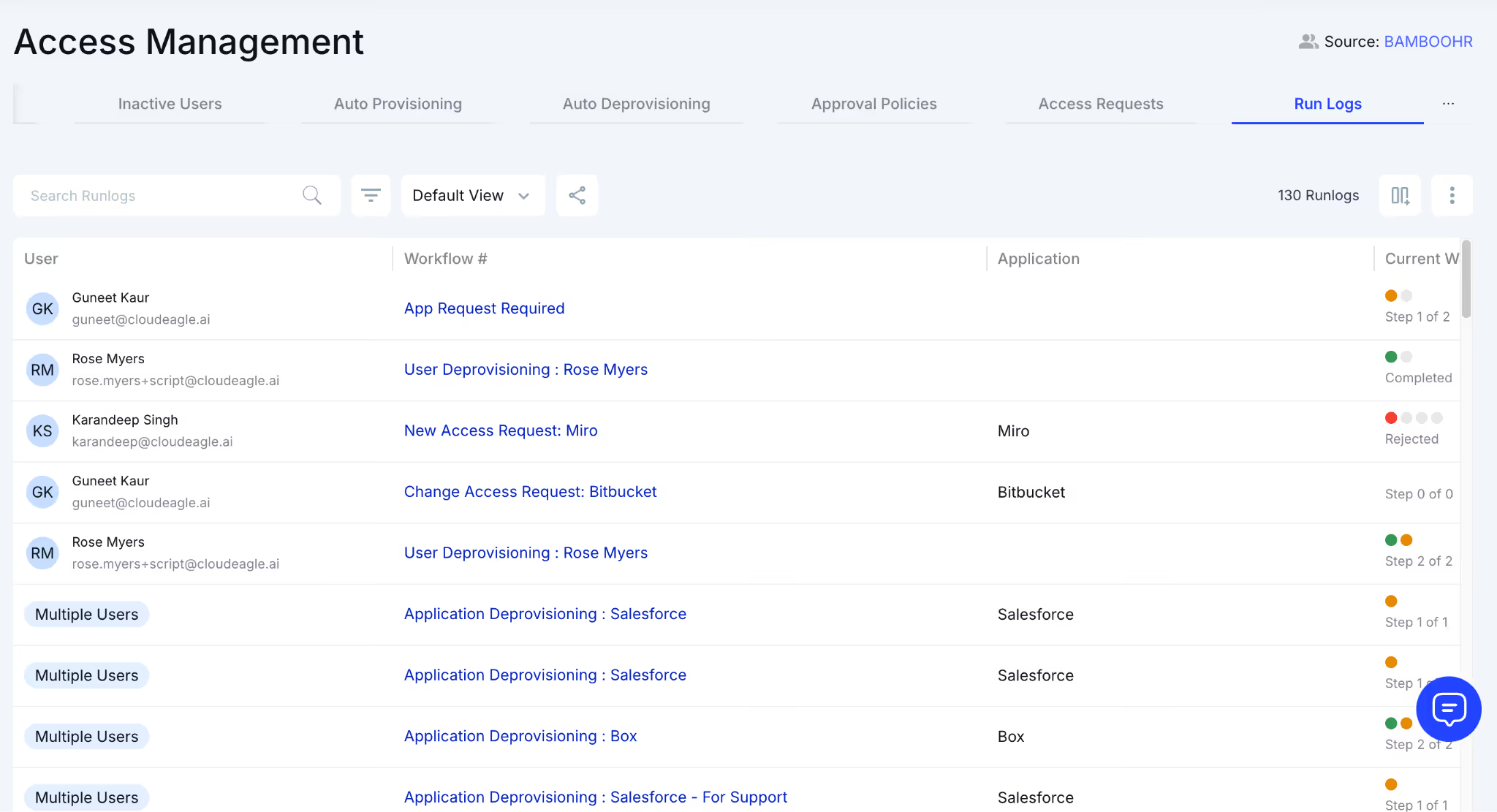
Why We Are Better
CloudEagle.ai integrates SSO, HRIS, and app data, giving reviewers complete context. Reviews finish quickly and continuously, reducing compliance delays.
B: Reducing Reviewer Fatigue and Prioritizing High-Risk Users
CloudEagle.ai eliminates “rubber-stamping” by helping reviewers focus only on meaningful decisions. Instead of scanning hundreds of accounts, reviewers see exactly where SaaS security risk exists.
Current Process
Managers certify access without full context. They often approve everything because reviews take too long and lack insight.
Pain Points
Reviewer fatigue creates risk. High-privilege accounts slip through user access reviews without scrutiny.
How We Do It
CloudEagle.ai flags high-risk users, ex-employees, and elevated roles automatically. Reviewers focus only on users who need deeper evaluation.
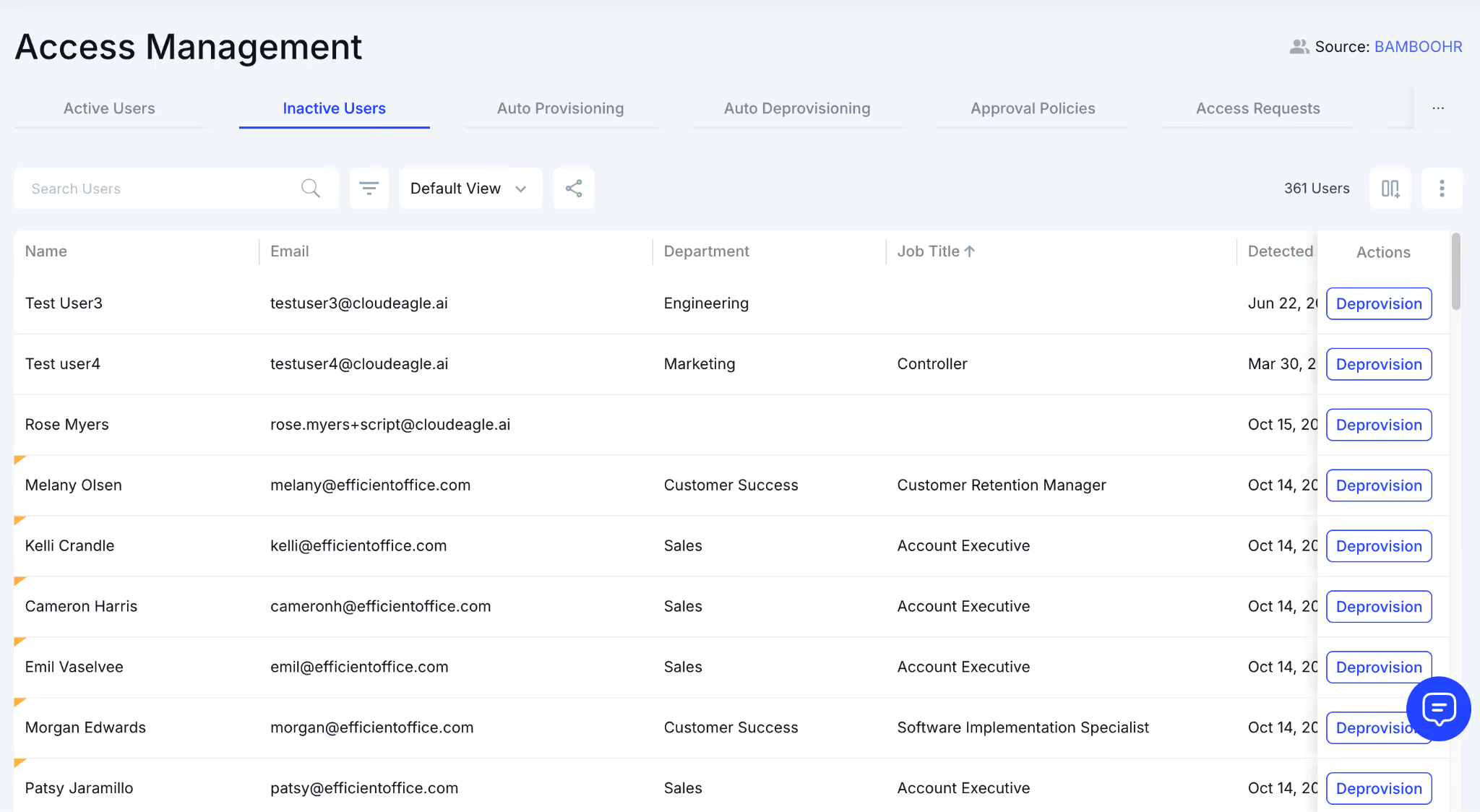
Why We Are Better
CloudEagle.ai uses AI to filter out low-risk accounts. Teams spend time where it matters, increasing accuracy and reducing fatigue.
C: Automated Evidence, Deprovisioning and End-to-End Compliance Reporting
CloudEagle.ai closes the loop by handling everything from identifying improper access to removing it, capturing evidence, and preparing audit-ready reports automatically.
Current Process
IT manually removes users, downgrades roles, and attaches proof in JIRA or ticketing systems. Gathering evidence for audits takes days.
Pain Points
Deprovisioning is slow, inconsistent, and hard to track. Audit evidence is scattered, causing delays and rework.
How We Do It
CloudEagle.ai offboards rejected users automatically, attaches evidence, and logs everything in JIRA or any ITSM tool.
Why We Are Better
CloudEagle.ai automates the full workflow, from assigning reviewers to generating compliance reports, allowing teams to finish user access reviews in days.
D: Identifying Privileged Users Across Every App
CloudEagle.ai centralizes visibility into admin and elevated roles, helping organizations quickly identify sensitive access and confirm that privileged access management remains appropriate.
Current Process
Teams log into each app separately to confirm admin roles and then cross-check SSO and HRIS data manually.
Pain Points
Privilege data is scattered across apps. IT can’t easily confirm if elevated users are still active or should retain access.
How We Do It
CloudEagle.ai correlates app roles, SSO status, and HRIS integration. Elevated permissions appear clearly in one unified view.
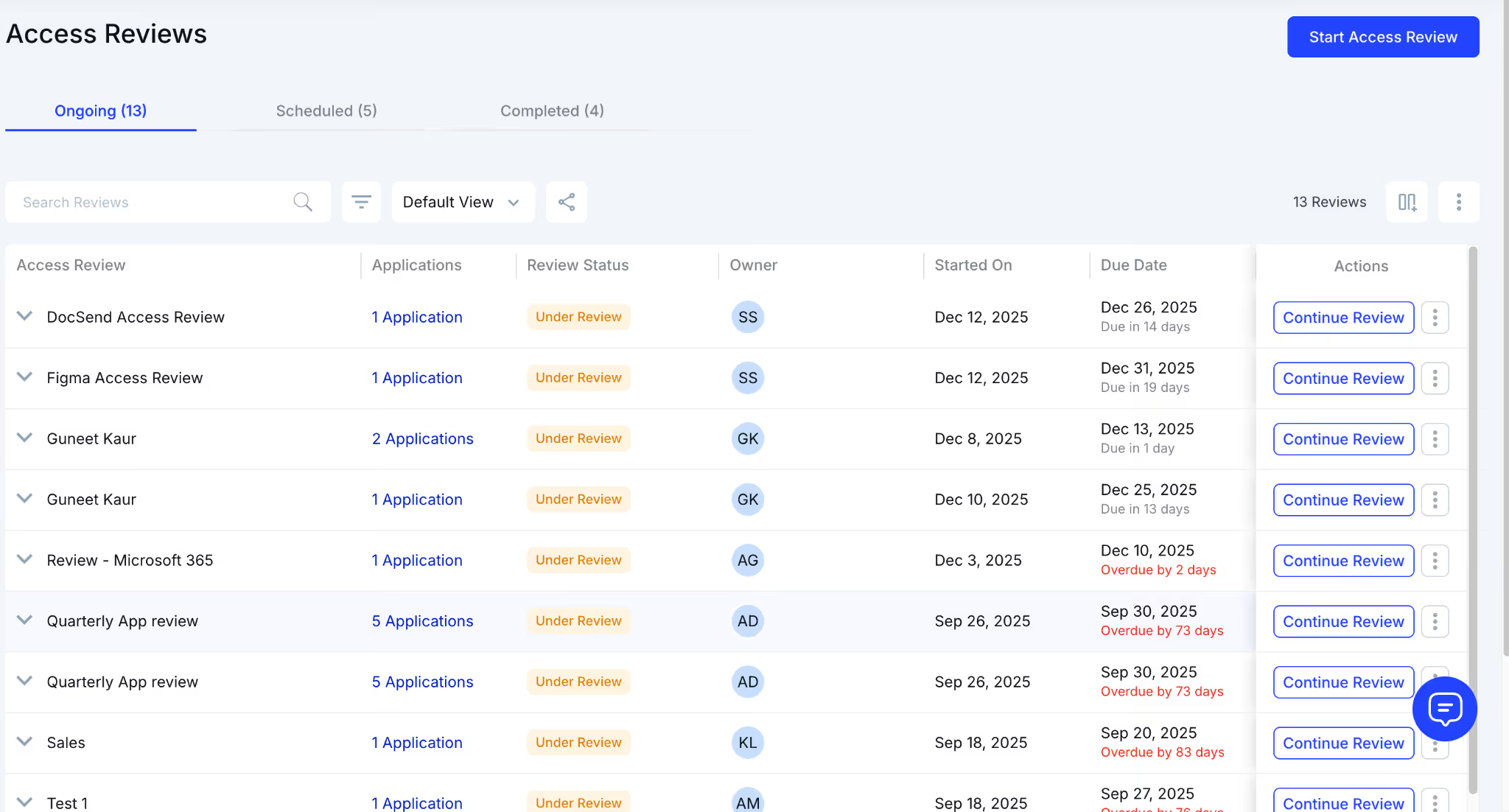
Why We Are Better
CloudEagle.ai places all privilege insights on a single page, making high-risk access easy to spot, user access review, and correct.
E: Employee App Catalog and Time-Based Access Control
CloudEagle.ai accelerates access provisioning while ensuring that permissions stay temporary, controlled, and aligned with compliance standards.
Current Process
Employees request apps via email or Slack. IT verifies manually, chases approvals, and updates systems by hand. Ticketing tools lack role- or department-based visibility.
Pain Points
Requests pile up. Approvals stall. IT lacks control and visibility into who should see which apps.
How We Do It
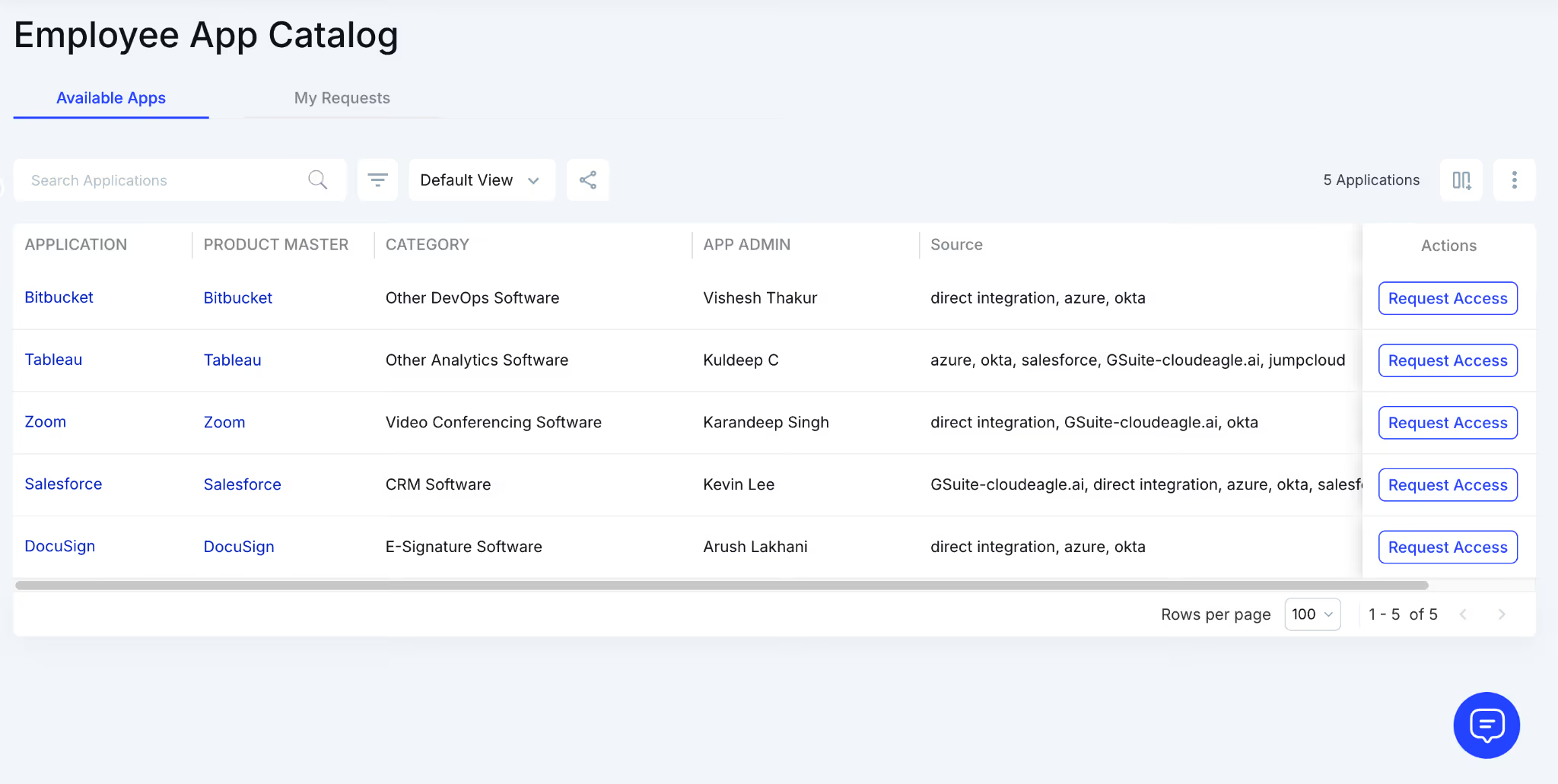
CloudEagle.ai offers a centralized app catalog with role-based visibility. Approvals route automatically, and time-based access removes unused permissions on schedule.
Why We Are Better
CloudEagle.ai prevents shadow IT by showing employees only approved apps. Access stays compliant, documented, and easy to audit.
5. What Does Continuous Access Compliance Actually Look Like?
Continuous compliance doesn’t wait for the quarter to end. And that matters, because a study by Verizon found that 74% of security incidents involve the human element, often tied to overlooked access decisions made between user access review cycles.
- Automated Risk Flags: Suspicious patterns (like admin rights granted too broadly or unused entitlements) get highlighted before they turn into problems.
- Context-Rich Reviews: Managers can make decisions based on fresh activity, not hazy memory from months ago.
- Proactive License Cleanup: Inactive users, expired contractors, and outdated roles are surfaced automatically.
Continuous compliance shifts the dynamic entirely. Instead of cleaning up access creep after it settles in, teams interrupt it as it forms, reducing risk without slowing anyone down.
6. Conclusion
Today, teams move too fast, user access review software changes too quickly, and permissions evolve quietly in ways quarterly check-ins simply can’t keep up with. By the time the review arrives, half the decisions being “verified” are already outdated.
Continuous access compliance fixes the part quarterly reviews were never designed for: the space between them. The role changes. The temporary permissions. The contractors who leave without losing access. The small exceptions that snowball into real risk.
CloudEagle.ai brings that visibility back into the present. It tracks access as it changes, flags drift before it settles in, and gives teams the context they need to correct issues while they’re still small.
7. FAQs
1. What to expect in a quarterly review?
You review who has access to which systems, confirm whether permissions still match job roles, remove outdated access, and document decisions for audit readiness.
2. What are the risks of user access review?
If reviews are slow or incomplete, access creep grows, former employees retain access, privileged roles expand, and compliance gaps appear before anyone notices.
3. What is the purpose of user access review?
To ensure each user’s permissions are appropriate, up-to-date, and aligned with their job responsibilities. It prevents unauthorized access and reduces security risks.
4. What is the UAR process?
It involves listing all users, reviewing their current permissions, validating access with managers, removing unnecessary roles, and documenting the final decisions.
5. What are the three main components of UAC?
Identity verification, permission validation, and ongoing monitoring. Together they ensure the right people have the right access at the right time.


.avif)


.avif)
.avif)




.png)








.avif)
.avif)
.avif)


