
%201.svg)


HIPAA Compliance Checklist for 2025

Microsoft Copilot didn’t arrive quietly. One update, and suddenly AI was embedded into tools teams were already using every day like Word, Excel, Teams, Outlook. What felt like an upgrade quickly turned into a new layer of decision-making.
The challenge isn’t adopting Copilot controlling it. Some teams jump in early, others wait, and before long, rightsizing SaaS licenses become hard across departments with no clear view of usage or value.
That’s where Microsoft 365 Copilot license management becomes critical. Understanding what Copilot is, how it’s licensed, and how to track real usage make the difference between meaningful productivity gains. This article breaks down how Copilot works and how to manage its licenses with clarity and control.
TL;DR
- Microsoft Copilot is an AI layer embedded across Microsoft 365 apps that enhances everyday workflows.
- Microsoft Copilot adoption grows quickly, but its real usage and business value are often hard to measure.
- Unstructured license allocation leads to uneven ROI, with some users overutilizing and others barely using it.
- Effective Microsoft Copilot license management requires tracking feature-level usage, not just access or logins.
- CloudEagle centralizes usage, automates license optimization, and helps teams manage Copilot with clarity and control.

1. What is Microsoft Copilot?
Microsoft Copilot feels less like a new tool and more like a layer added across the tools teams already use. It sits inside Word, Excel, Outlook, and Teams, quietly changing how work gets done without asking users to switch platforms.
- Embedded AI Assistance: Copilot works within Microsoft 365 apps, generating content, summaries, and responses in context.
- Context-Aware Responses: It uses organizational data like emails, documents, and meetings to deliver relevant outputs.
- Workflow Integration: Instead of standalone usage, it becomes part of everyday actions like writing, analyzing, and communicating.
What makes Copilot different isn’t just what it does, but where it lives. Because it operates inside existing workflows, adoption feels natural, but visibility into its actual value becomes harder to measure.
2. Where Does a Copilot Actually Show Up In Your Day-To-Day Work?
Copilot rarely announces itself as a new system to learn. It appears inside everyday workflows, quietly assisting with tasks people already perform, which is why its usage spreads faster than most tools.
- Email And Communication: Drafts replies, summarizes long threads, and adjusts tone directly within Outlook.
- Meetings And Collaboration: Recaps discussions, extracts action items, and answers questions inside Teams.
- Content Creation: Generates documents, rewrites sections, and structures ideas within Word.
- Data Analysis: Interprets trends, builds summaries, and suggests insights inside Excel.
This embedded presence changes how work feels, not just how it’s done. As Satya Nadella put it,
“Copilot is the UI for AI.”
- Always-On Assistance: It’s available in the flow of work, not as a separate destination.
- Invisible Adoption Curve: Users start relying on it without formal onboarding or tracking.
That’s what makes Copilot powerful, but also difficult to manage. When a tool blends into daily work this seamlessly, usage grows quietly, while application visibility and control struggle to keep up.
3. What Happens When Copilot Licenses Are Assigned Without Strategy?
It usually starts with good intent. A few teams request access, leadership wants to encourage AI governance, and licenses get distributed quickly. There’s no resistance because the upside feels obvious.
In one team, MS Copilot becomes a daily companion. They use it to draft content, summarize meetings, and speed up routine work. In another, it sits mostly untouched, opened occasionally but never fully integrated into workflows.
- Heavy usage concentrated in a few roles
- Light or inconsistent usage across the rest
Over time, patterns start to diverge. Some managers justify the cost based on productivity gains, while others quietly question whether their teams need it at all. The same license delivers very different outcomes depending on how it’s used.
By the time renewal arrives, the question isn’t should we keep Copilot, but can we confidently adjust it. And without clear signals, most teams choose the safer path.
4. What Does Smart Copilot License Management Actually Look Like?
Managing Copilot licenses isn’t about tracking seats the way teams handle traditional SaaS. The value doesn’t come from access alone, but from how deeply it’s used. Without that context, SaaS license management drift toward assumptions.
A. Assigning Licenses Based On Role And Real Need
Copilot works best when it’s placed where work is repetitive, content-heavy, or decision-driven. But in many teams, licenses are assigned broadly first, and evaluated later, which blurs the line between real need and assumed value.
- Role-Based Fit: Functions like sales, marketing, and support often extract more value from Copilot-driven workflows.
- Task Relevance: Roles involving writing, analysis, or summarization benefit more than purely operational tasks.
- Access vs. Impact: Giving everyone access doesn’t guarantee meaningful or consistent usage.
The pattern is consistent across SaaS: According to the Saber, most features see only 15–25% adoption among users, meaning a majority never use them meaningfully.
When licenses are assigned without role alignment, Copilot risks becoming another underused layer rather than a daily productivity driver.
B. Monitoring Feature-Level Usage, Not Just Logins
Copilot adoption can look healthy on the surface. Users log in, open apps, and occasionally trigger prompts, which makes activity appear consistent across teams.
- Login Illusion: Accessing an app doesn’t mean Copilot features are being used meaningfully.
- Shallow Interactions: One-off prompts or occasional summaries don’t reflect sustained value.
- Surface-Level Metrics: Active user counts miss how deeply Copilot is embedded into daily workflows.
The difference shows up when you zoom in. Understanding feature usage reveals whether users rely on Copilot for real tasks or just experiment with it occasionally.
Prompt Frequency
How often users actively engage Copilot within their workflow.
Feature Depth
Whether they use advanced capabilities like document generation or analysis.
Workflow Integration
If Copilot is part of repeatable tasks, not just sporadic usage.
This gap is widely observed. As per YouSource, 80% of software features are rarely or never used, highlighting how surface-level activity can hide low real adoption.
C. Reclaiming Licenses From Inactive Or Low-Value Users
Reclaiming Copilot licenses often feels straightforward on paper. If someone isn’t using it, take it back and reassign it. In practice, it’s rarely that clean.
In one case, a user shows low activity, but their manager insists Copilot is “useful occasionally.” In another, a team adopted it early, then slowly stopped using it as priorities shifted. The license stays, not because it’s valuable, but because no one revisits the decision.
- Low usage explained as “future potential”
- Temporary inactivity treated as a reason to wait
Over time, these small decisions accumulate. A few inactive licenses here, a few low-value users there, and suddenly a meaningful portion of spend is tied to uncertain impact. The cost isn’t just financial, it’s the loss of clarity during SaaS renewal management.
As Peter Drucker once said,
“Nothing is less productive than to make more efficient what should not be done at all.”
Strong license management doesn’t rush to reclaim or hesitate indefinitely. It defines clear signals, acts on them consistently, and treats licenses as dynamic, not permanent. That’s what keeps Copilot aligned with real usage instead of past assumptions.
5. How Does CloudEagle Help You Manage Copilot Licenses With Confidence?
Managing Microsoft Copilot licenses scattered across multiple SSO portals, usage dashboards, and billing records can quickly become overwhelming. Traditional spreadsheets may only capture the most visible apps, leaving many licenses untracked and overlooked.
This disjointed approach leads to avoidable overspending, SaaS compliance concerns, and missed chances to optimize usage.
CloudEagle provides a unified, real-time view of every Microsoft Copilot license and related spend. It automates monitoring, usage insights, and renewal workflows, turning a previously manual and inconsistent process into a structured, intelligent, and data-guided system.
Take control of Copilot licenses


A. Direct Microsoft Copilot Admin Console Sync
Manually managing Microsoft Copilot licenses is slow, prone to mistakes, and draining for IT teams. Building tracking spreadsheets can take weeks, and by the time they are assembled, the information is already outdated. This leaves teams without accurate visibility into subscriptions, usage levels, or Microsoft Copilot plan details.
Current Process
Most organizations rely on spreadsheets and scattered tools to monitor renewals, license allocations, and user activity. This creates disconnected data sources, and updates often become stale before anyone evaluates them.
Pain Points
Manual data entry and delayed updates introduce inaccuracies and blind spots in software spend oversight. IT and finance teams are left without dependable, real-time visibility.
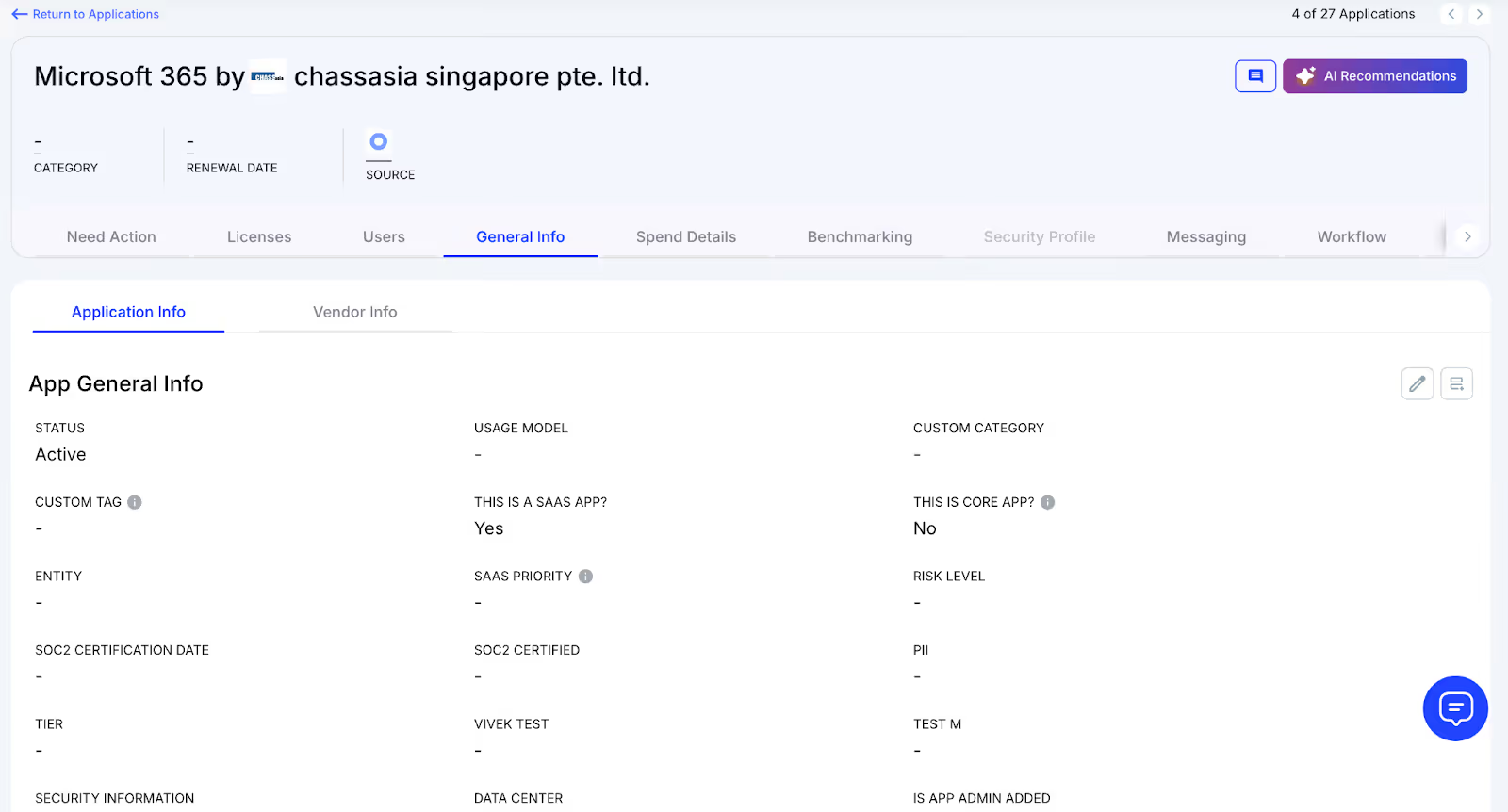
How We Do It
CloudEagle consolidates vendor spend, usage trends, and AI-powered metadata extraction from every connected system in real time. Renewal timelines, cost summaries, and active usage appear together for quick, confident analysis.
Why We Are Better
Implementation requires only a few days. With 500+ native integrations and automated metadata extraction, CloudEagle centralizes all license data in one place, ensuring it stays consistent, trustworthy, and continuously up to date.
B. Live Usage Insights & Shadow IT Visibility
Without centralized governance, Microsoft Copilot license usage and overlapping tools can quickly get out of hand. Shadow IT often slips under the radar, making it difficult for IT teams to identify redundant applications scattered across teams.
Current Process
Teams may purchase duplicate tools through corporate cards or sign up for free trials that later convert into billable subscriptions. Manually uncovering these overlaps across departments is incredibly challenging.
Pain Points
Shadow IT creates unmonitored Microsoft Copilot spend and introduces avoidable SaaS security risks. Trying to locate duplicate applications by hand is time-consuming and often fails to surface all redundancies.
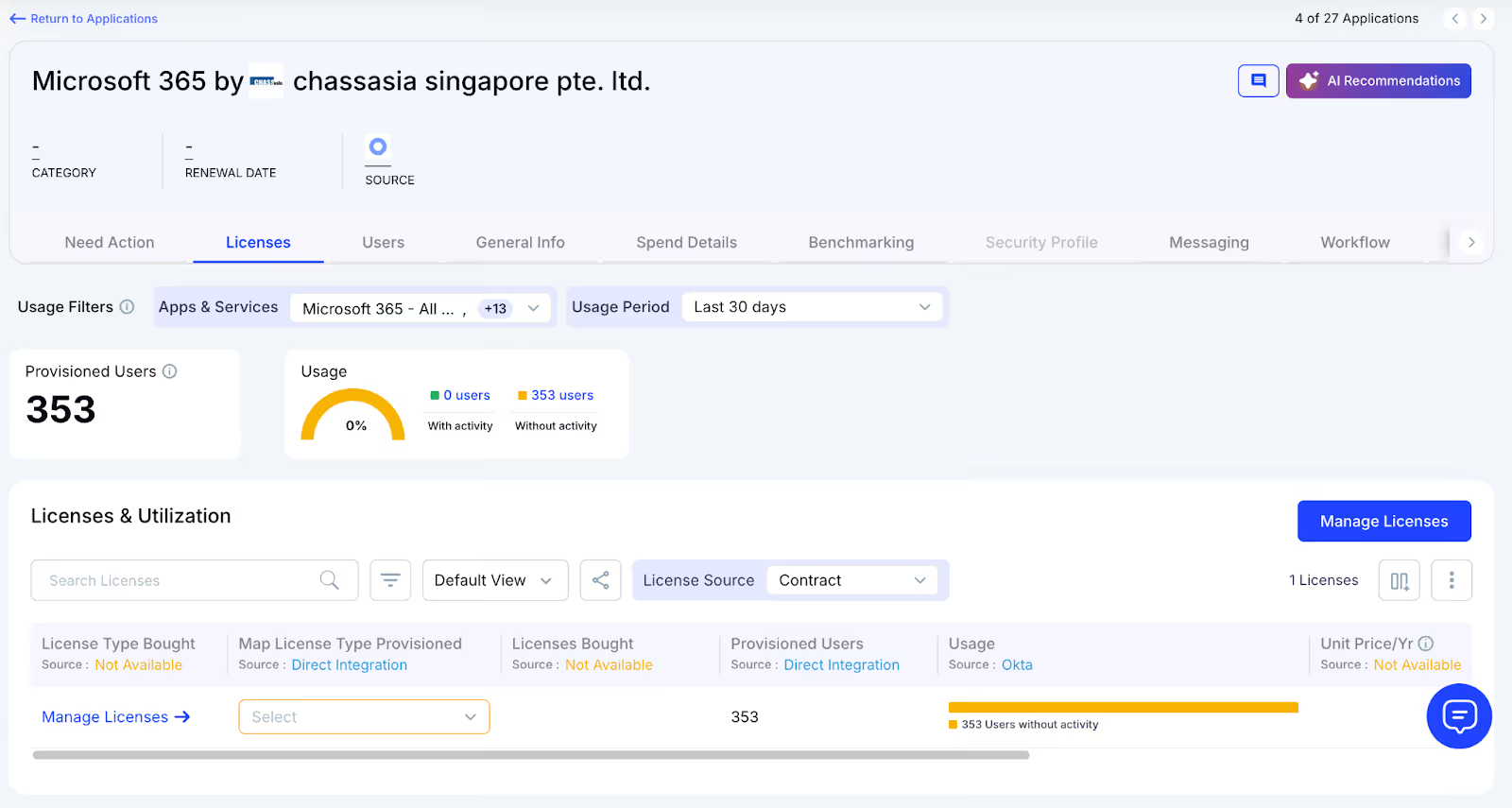
How We Do It
CloudEagle continuously scans for duplicate and overlapping applications using AI, while also monitoring usage at a feature level. Any shadow tool is flagged immediately.
Why We Are Better
Our AI compares applications based on capabilities, not just their names. IT teams can automatically notify users, trigger workflows, or generate ITSM tickets to reclaim underused licenses and reduce risk exposure.
C. Unified License Oversight Across Teams
Handling Microsoft Copilot licenses distributed across various teams can quickly become overwhelming. Many organizations still rely on spreadsheets to track key applications, while manually piecing together SSO data, usage metrics, and contract details.
Current Process
Most companies only track their primary applications in spreadsheets, manually merging identity provider logs, feature usage data, and contract information. This slows updates, reduces accuracy, and creates inconsistent reporting.
Pain Points
Applications that go unmonitored drive avoidable spending, and license reassignments rarely happen at the right time. Renewal tracking often lacks consistency, leading to missed cost-saving opportunities.
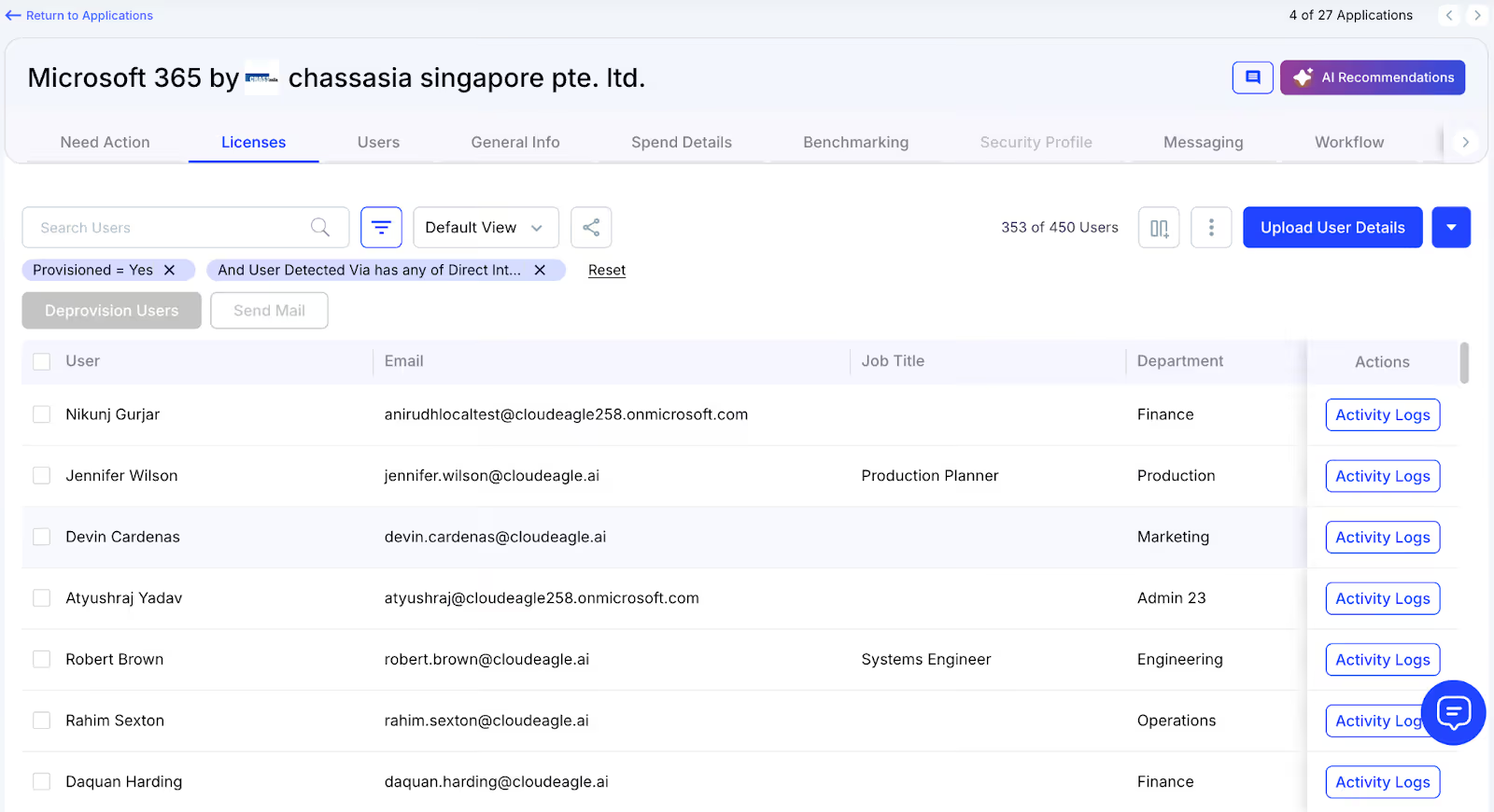
How We Do It
CloudEagle brings all license management into a single, centralized platform. Nightly synchronization merges IDP records, contract data, and connector inputs, providing real-time transparency into license allocation and usage.
Why We Are Better
Automated updates match purchased licenses to active users and feature-level usage across every application. Teams can filter by license tier and instantly make informed, data-backed decisions to SaaS spend optimization and allocation.
D. Automated License Reclamation
Unused Microsoft Copilot licenses can quietly inflate expenses, and most IT teams lack a scalable way to reclaim them. Manually reviewing usage patterns and emailing large groups of users every week is repetitive, error-prone, and consumes valuable time.
Current Process
IT departments often send one-off emails to inactive users and update spreadsheets by hand, making the workflow slow, manual, and frequently deprioritized.
Pain Points
Inactive seats remain assigned, increasing software costs and exposing the organization to unnecessary security and access risks. Manual reclamation processes simply do not scale with growth.
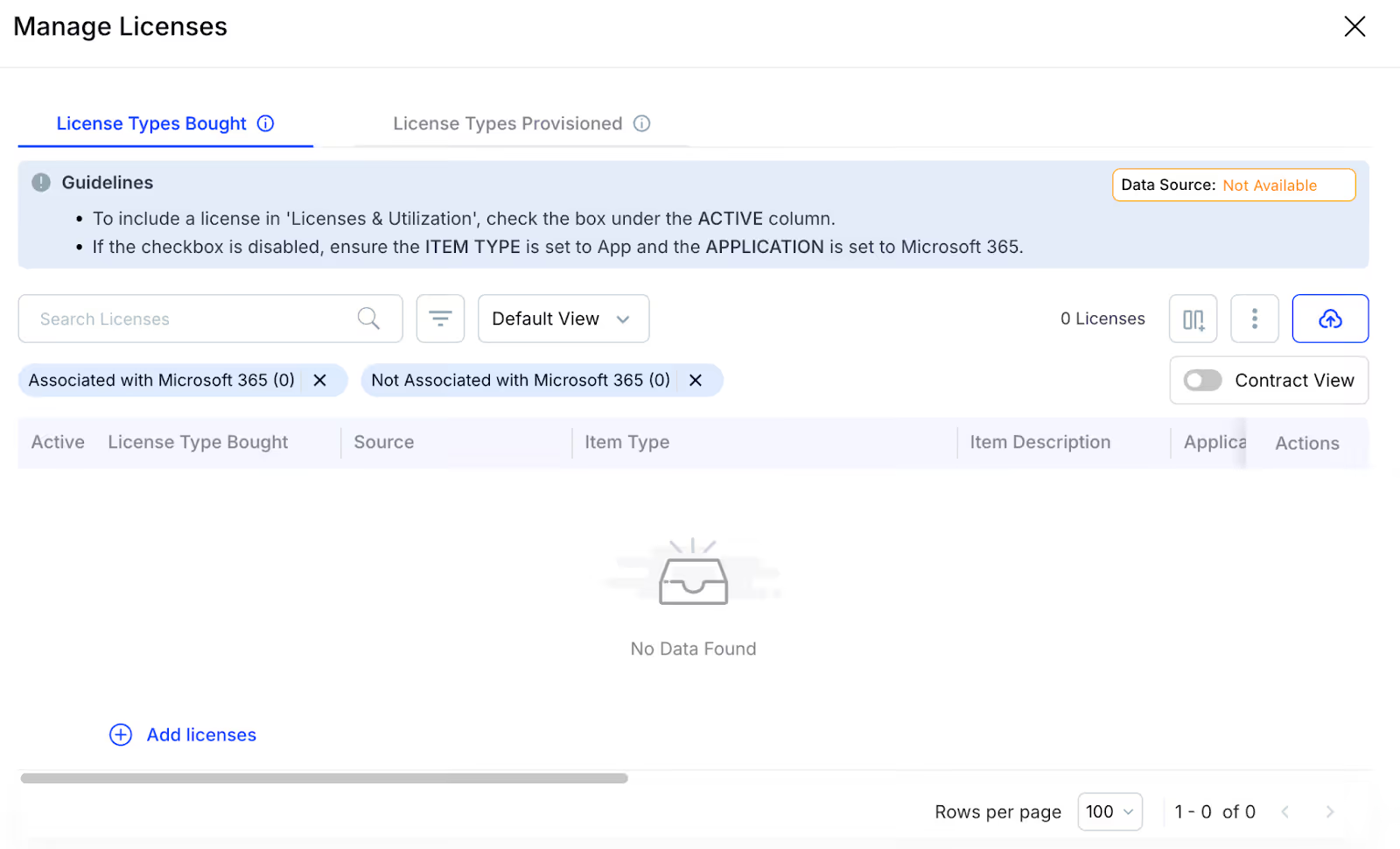
How We Do It
CloudEagle automates the entire license harvesting cycle. Scheduled workflows detect inactivity, notify users, and reclaim or downgrade licenses automatically based on real usage data.
Why We Are Better
Automations can run daily or weekly through Okta or Microsoft AD. Licenses are reclaimed instantly, minimizing waste, saving operational time, and improving overall utilization efficiency.
E. License Cost Benchmarking for Smarter Renewals
CloudEagle’s benchmarking capability helps organizations secure stronger pricing during renewal cycles. By comparing contract terms against current market data, enterprises can negotiate confidently and avoid unnecessary overspending.
Current Process
Procurement teams often depend on vendor-provided quotes or legacy contracts. Peer comparisons are minimal, and available pricing references rarely reflect real, up-to-date market rates.
Pain Points
Insufficient pricing insight weakens negotiation leverage, resulting in higher-than-necessary costs or less favorable renewal terms.
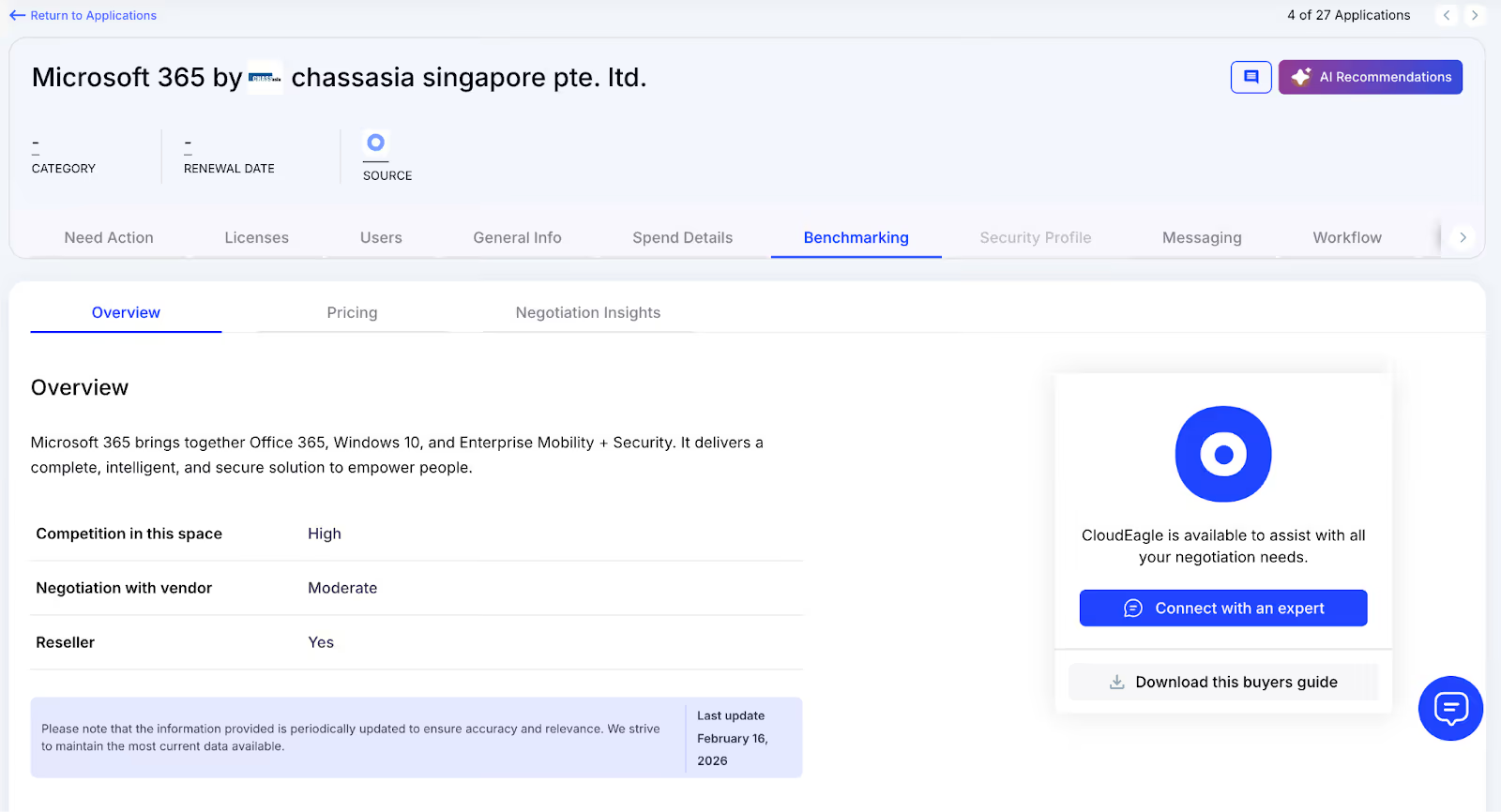
How We Do It
CloudEagle delivers real-time benchmark data, historical pricing patterns, and reveals hidden costs of Microsoft Copilot to empower informed negotiation strategies supported by verifiable data.
Why We Are Better
Pricing insights are broken down by SKU, license tier, and volume, along with recommended negotiation levers, ensuring renewal outcomes align with true market value rather than vendor-driven baselines.
F. Renewal Management, Done Proactively
CloudEagle automates renewal oversight by triggering workflows aligned with contract timelines. From approval routing to adjusting Microsoft Copilot license counts, it helps teams avoid accidental auto-renewals and keeps SaaS renewal management streamlined and predictable.
Current Process
Renewals are typically monitored through spreadsheets and long email threads. Approval cycles slow down, and auto-renewal deadlines often slip past unnoticed.
Pain Points
Missed renewal windows lead to unnecessary spend, and last-minute vendor negotiations reduce leverage to secure better pricing or adjust license counts appropriately.
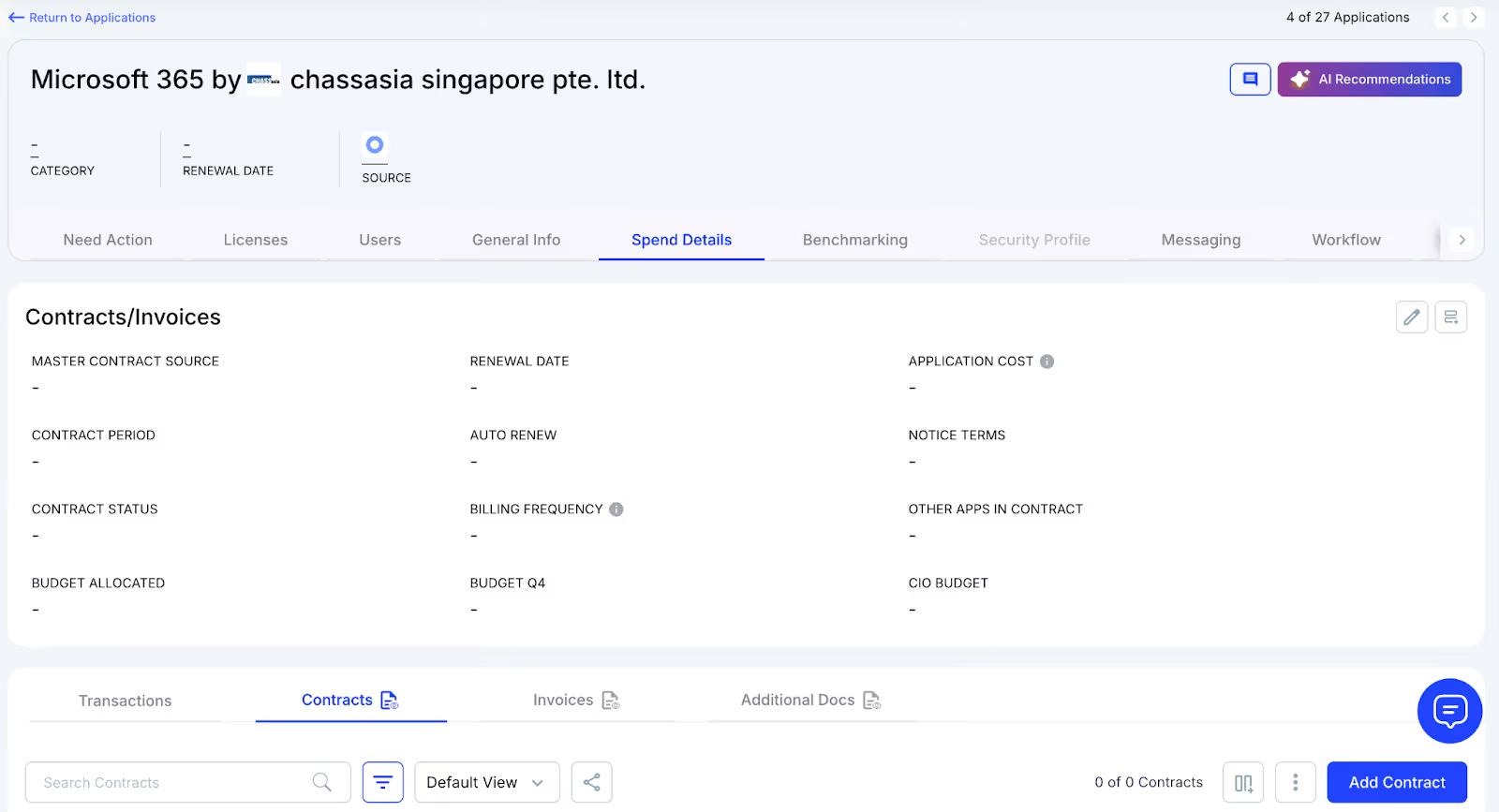
How We Do It
CloudEagle creates an automated renewal calendar using AI-extracted contract data or integrations with CLMs such as Ironclad, Microsoft Copilot, or Zip. Workflows activate 90 days before notice dates, routing tasks to finance, legal, and business stakeholders for coordinated action.
Why We Are Better
Teams receive alerts that include usage trends, pricing benchmarks, and alternative vendor considerations. Approval decisions are tracked automatically, preventing missed renewals, accidental spend commitments, and stalled negotiations.
G. Utilize Centralized Vendor Dashboards
CloudEagle offers vendor-specific dashboards that consolidate all Microsoft Copilot subscription data into one place. Teams gain visibility into license usage, renewal timelines, and spending patterns, enabling more informed, data-backed decisions.
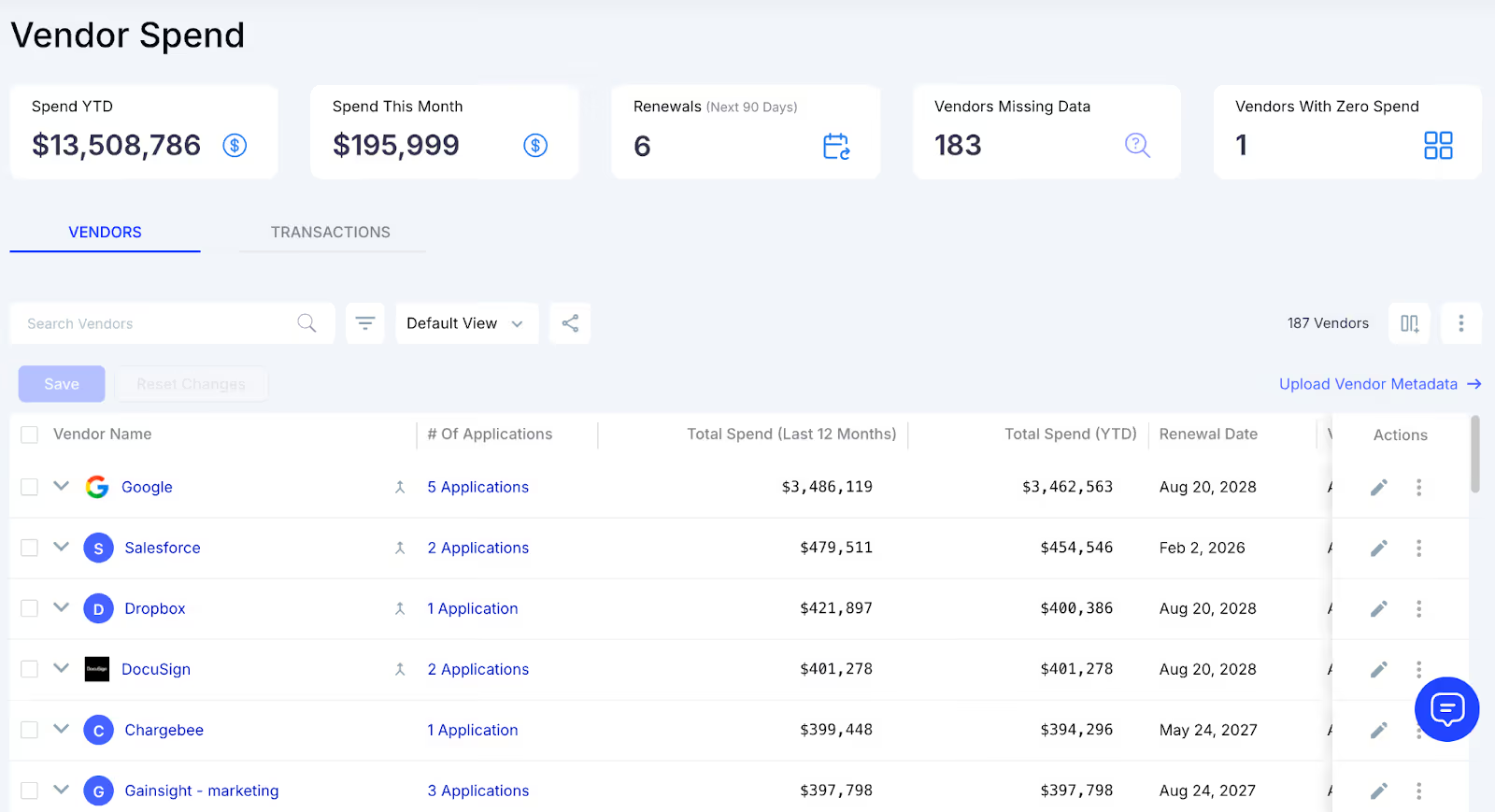
These dashboards surface overspending and identify unused licenses, making reclamation straightforward. They also reveal adoption and usage trends, allowing organizations to proactively adjust license allocations and optimize overall Microsoft Copilot spending.
H. Streamlined Application Access Requests
CloudEagle simplifies Microsoft Copilot access by enabling employees to request licenses directly through the platform or via Slack, removing the need for lengthy email threads and manual coordination. Managers can review and approve these requests in real time, ensuring users get timely access.
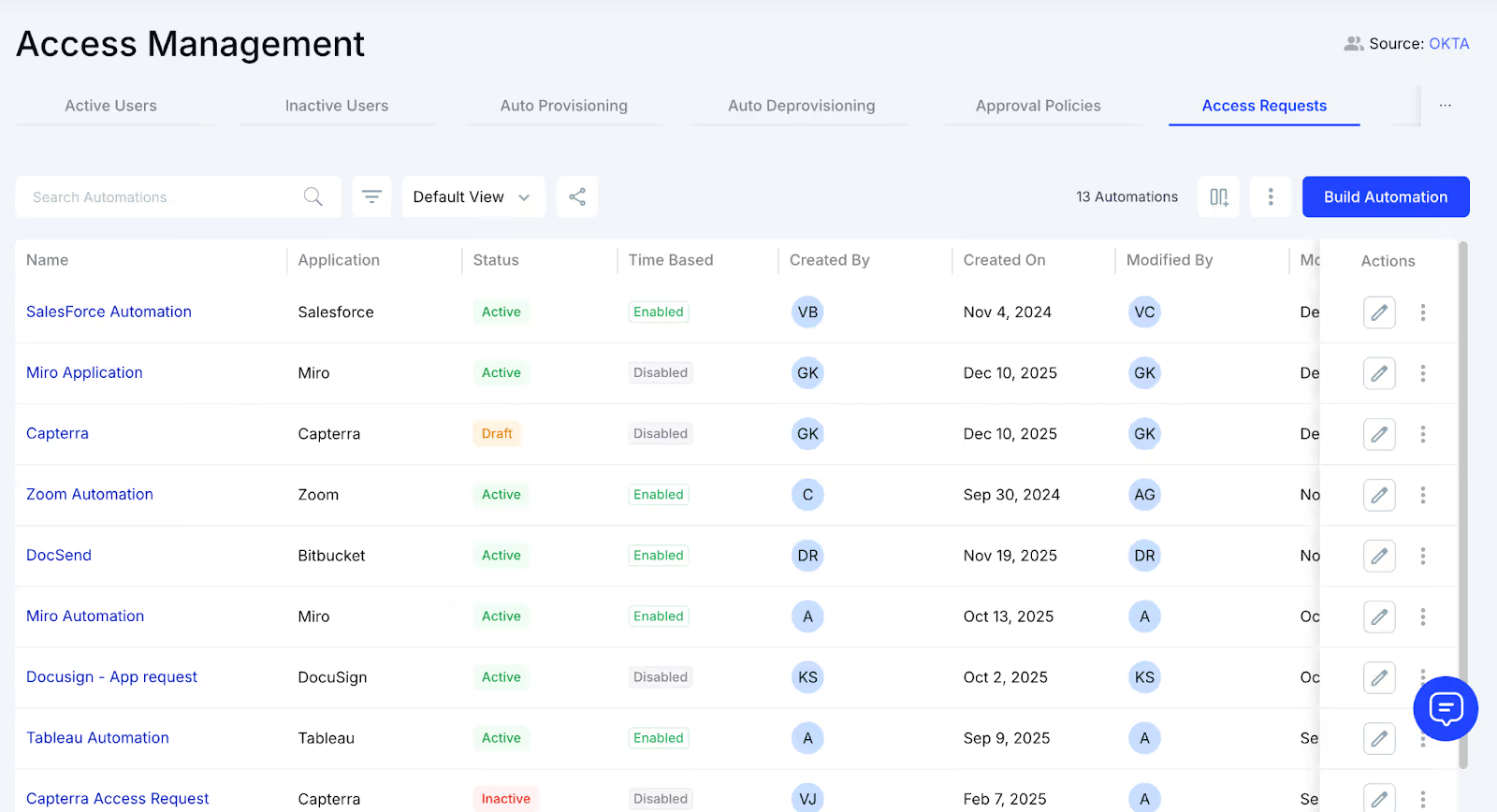
This process ensures employees receive the correct license type without unnecessary delays and eliminates approval bottlenecks. Every request is automatically logged for transparency and compliance, reducing administrative overhead while keeping access management efficient and traceable.
6. Conclusion
Microsoft Copilot changes how work happens, which is exactly why it’s harder to manage than traditional software. It blends into daily workflows, grows quietly, and makes usage look healthier than it actually is.
Managing Copilot licenses effectively means looking beyond access and activity. It requires understanding who truly benefits, how deeply features are used, and where value is sustained over time. That level of clarity is difficult to achieve with fragmented data and manual AI contract tracking alone.
This is where CloudEagle fits naturally into the picture. By bringing together usage signals, license data, and user context, it helps teams identify where Copilot is driving real value and where it isn’t. Instead of guessing during renewals, teams can act on clear signals around reclaims, downgrades, and optimization.
7. FAQs
1. What is Microsoft Copilot and how is it different from other AI tools?
Microsoft Copilot is embedded inside Microsoft 365 apps like Word, Excel, and Teams. It works within existing workflows using organizational data, unlike standalone AI tools.
2. Why is Copilot license management more complex than other SaaS tools?
Copilot value depends on feature usage depth, not just access. This makes it harder to evaluate using traditional license tracking methods.
3. How do you know if Copilot licenses are being underutilized?
Low prompt activity, shallow feature usage, and inconsistent adoption across roles signal underutilization. Login data alone is not enough.
4. When should you review and optimize Copilot licenses?
Reviews should happen continuously, not just before renewal. Regular checks help reclaim unused licenses and reassign them effectively.
5. How does CloudEagle help manage Copilot licenses effectively?
CloudEagle connects usage, spend, and user context in one place. It helps identify low-value licenses, reclaim unused seats, and optimize renewals with clear data.


.avif)


.avif)
.avif)




.png)






.avif)
.avif)
.avif)


