
%201.svg)


HIPAA Compliance Checklist for 2025

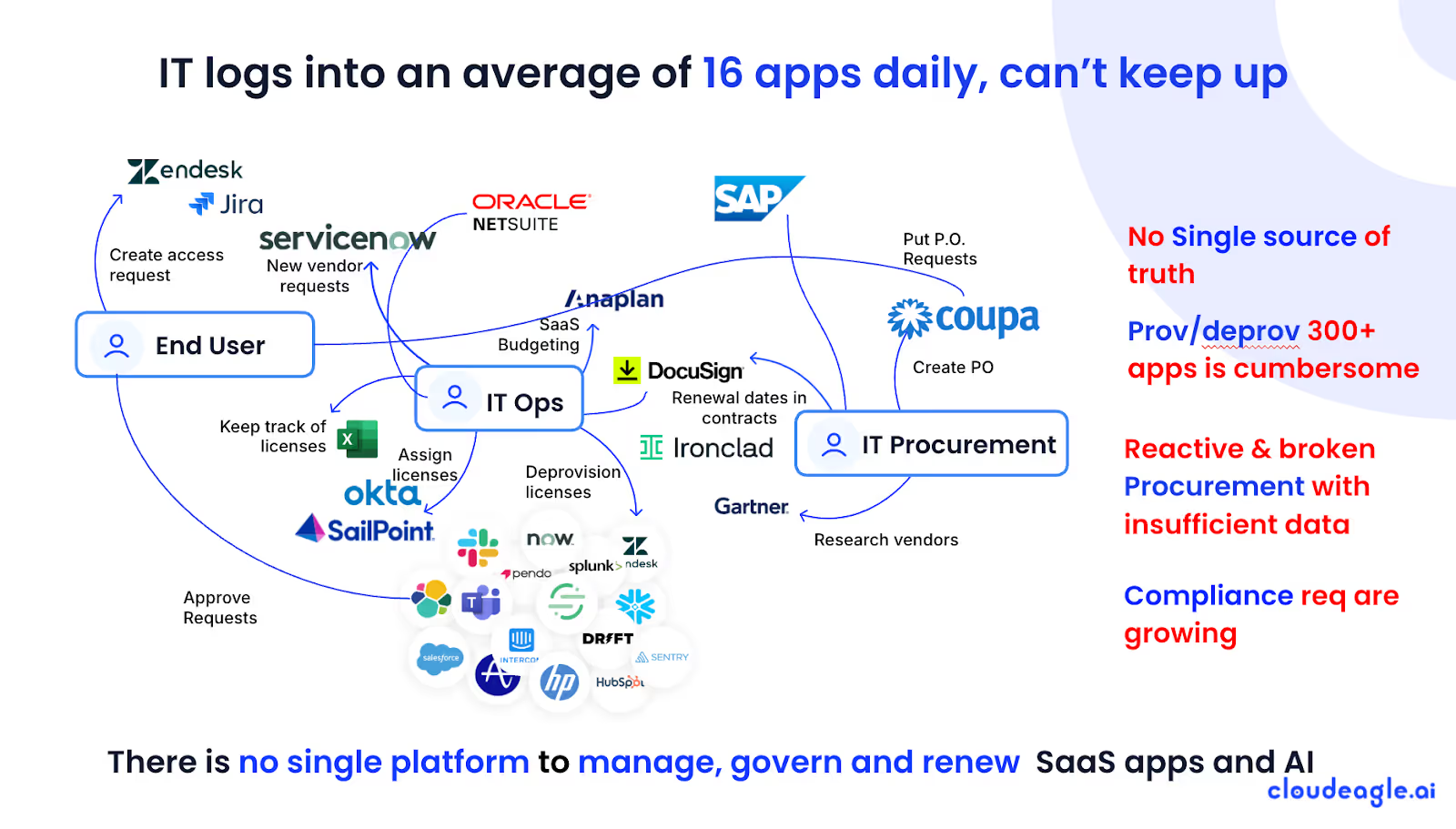
You can usually tell when Shadow IT is creeping into the enterprise. Not because someone reports it, but because a random invoice appears for an app no one remembers approving. Soon enough, the SaaS optimization becomes a garage full of unused apps.
Most teams don’t do it intentionally. They’re just trying to move faster. According to Gartner, nearly 30–40% of SaaS spend happens outside IT’s visibility. And this explains why budgets balloon quietly while dashboards still look “normal.”
CloudEagle.ai helps you find these hidden tools and understand who’s using what, reclaim licenses automatically, and block redundant SaaS applications. It’s about finally seeing the full picture before the costs get loud.
TL;DR
- Shadow IT grows fast when teams install unapproved tools, creating hidden spend, duplicate apps, and licenses nobody tracks.
- Budgets inflate quietly as trials turn into paid renewals and corporate-card purchases stay invisible to IT or finance.
- Reducing Shadow IT starts with better alternatives, modern approved tools, soft usage alerts, and assigning an owner before any app enters the stack.
- CloudEagle.ai detects everything automatically like unused licenses, unsanctioned apps, duplicate tools, and shadow purchases across SSO and finance systems.
- Automation closes the loop with outreach, deprovisioning, downgrades, and alerts that reclaim licenses and eliminate hidden SaaS costs at scale.
1. What is Shadow IT?
A team hits a blocker, finds a tool that solves it faster than a ticket queue, and clicks “Start Free Trial.” No big meeting, no long process, just progress.
And because nothing breaks, that tool quietly becomes part of their daily workflow… without IT ever knowing. According to Help Net Security, 80% of workers admit to using apps not approved by IT.
- The “We Needed It Today” App: A quick signup to meet a deadline, fully outside procurement.
- The Duplicate of Something You Already Own: A tool purchased simply because no one knew you already had one.
- The Hidden Seats Nobody Tracks: Freemium accounts that evolve into paid licenses without warning.
Shadow IT policy doesn’t feel dangerous at the moment. Everyone believes they’re unblocking work, moving faster, or “just testing something.” And that’s exactly why it grows unchecked.
2. Which Hidden Tools Are Draining Your Budget the Most?
Shadow IT doesn’t announce itself with alarms. A $9 automation tool here, a $19 design extension there, a CRM “trial” that quietly became paid after someone forgot to cancel it.
This is where Shadow IT becomes costly: not because individual tools are expensive, but because no one knows they exist until they’ve been renewed for months.
A. Teams Installing Apps Faster Than IT Can Blink
Shadow IT discovery usually begins with a team trying to fix a roadblock right now. They find a tool, install it, start using it, and because it helps them move faster, nobody stops to think, “Should IT even know about this?”
Here’s how that small shortcut becomes a licensed app sitting off the grid:
- The Instant Fix: Someone installs a “quick solution” during a deadline crunch, and the app becomes part of the team’s workflow before anyone notices.
- The Department Hero Move: A manager buys a tool to “boost productivity,” not realizing another department already purchased something identical.
- The One-Click Add-On: Browser extensions or plug-ins installed without review, but often tied to accounts with sensitive data.
The pattern seems harmless until you look at the risks of shadow IT. That one fast decision happens across dozens of teams, each stacking their own tools without coordinating with anyone else.
B. Projects Running On Tools No One Approved
Projects begin with urgency. A team kicks off a new initiative, realizes the existing stack doesn’t have the exact feature they need, and grabs a quick SaaS tool to fill the gap.
But as projects multiply, so do the hidden tools powering them. One team uses a reporting extension, another builds workflows on a niche automation platform, and someone else spins up a trial for analytics that quietly becomes a paid subscription.
According to Cyber Security Drive, 72% of IT leaders say Shadow IT policy has directly increased their SaaS spending. And the worst part? There was no warning.
C. Licenses Purchased on Corporate Cards Without Tracking
Someone needs a feature unlocked today, so they swipe a corporate card, promise they’ll “loop in IT later,” and move on. Except nobody loops anything in. And that one small swipe becomes a quiet line item that renews every month.
- The “Just This Once” Purchase: A team lead buys a tool to unblock work, thinking it’s temporary but never cancels it.
- The Invisible Subscription: Auto-renewal tied to someone’s card, with invoices going to an inbox nobody checks.
By the time finance investigates, the SaaS renewal strategy is scattered across emails, personal dashboards, and credit card statements that don’t match any system of record. And the bigger problem emerges: nobody actually knows who owns these tools.
3. What Actually Works When You Want To Reduce Shadow IT?
Most companies try to fight Shadow IT with policies, warnings, or long approval chains. Not because teams want to hide things, but because the work moves faster. When a deadline hits, people reach for whatever tool gets them unblocked the quickest.
A. Give Teams Approved Tools They’ll Choose First
If the sanctioned tools feel clunky, limited, or slow to adopt, people naturally look elsewhere. The easiest way to reduce Shadow is preferences. Give teams tools they actually want to use, and most of the “quiet installs” stop on their own.
- Priority Picks: Curate a shortlist of officially supported tools that cover the majority of team needs, so people default to them instead of wandering off.
- Feature-Forward Choices: Pick tools that match the way teams already work, not the way the documentation wishes they worked.
- Modern Replacements: Swap outdated internal solutions with intuitive alternatives before frustration drives teams to find their own.
When approved tools feel modern and flexible, the urge to grab something off the internet drops dramatically. Teams stop searching for alternatives because they don’t need alternatives.
- Unapproved apps naturally decline, simply because the official ones are easier.
- Underutilized licenses stop appearing, since teams share what already works rather than buy what’s missing.
- Shadow IT shrinks organically, replaced by tools that IT can track, secure, and actually support.
The real win? Reducing Shadow IT without ever telling anyone “no”, just giving them something they’d say “yes” to first.
B. Use Usage Alerts Instead of Access Blocks
Most Shadow IT problems begin with a team trying to move faster than the approval cycle. Someone installs an app, connects their work email, and keeps going. No alarms, no warnings, nothing that tells them, “Hey, this might create trouble later.”
Team POV:
They’re not trying to bypass IT but trying to meet a deadline, launch a campaign, or test an idea. If the approved tools can’t move fast enough, they grab the nearest workaround.
IT/Security POV:
They don’t want to play gatekeeper. They just need visibility. A soft alert showing who installed what, when, and why gives them context without slowing anyone down.
When teams get alerts instead of barriers, they loop IT in sooner. Tools don’t hide in the shadows. Usage patterns become clearer, and decisions turn proactive rather than reactive.
C. Tie Every App To An Owner Before It’s Installed
Shadow IT grows fastest when tools appear without anyone claiming responsibility. A team installs something, uses it for a few weeks, then abandons it. Assigning ownership before an app enters the stack flips the script entirely.
- Clear Accountability: Someone becomes responsible for SaaS monitoring, renewal decisions, and cleanup when the tool is no longer needed.
- Defined Purpose: Each new app must state why it exists, who needs it, and what problem it solves.
- Automatic Visibility: IT and finance know where the tool sits, who uses it, and how it fits into the workflow.
- Better Offboarding: Owners ensure licenses get removed when people leave or projects end.
When every app has an owner, it stops being a mystery subscription floating in the shadows and becomes part of a traceable system. Teams don’t hoard tools, renewals don’t slip through, and the budget finally stabilizes.
4. What Happens When CloudEagle.ai Makes Shadow IT Impossible To Hide?
CloudEagle.ai helps organizations reclaim unused licenses, curb unnecessary spending, and surface shadow apps before they become costly problems. Teams gain clarity, control, and predictable SaaS spend without manual effort or spreadsheet-heavy workflows.
A: Identifying Unused and Underused Licenses Automatically
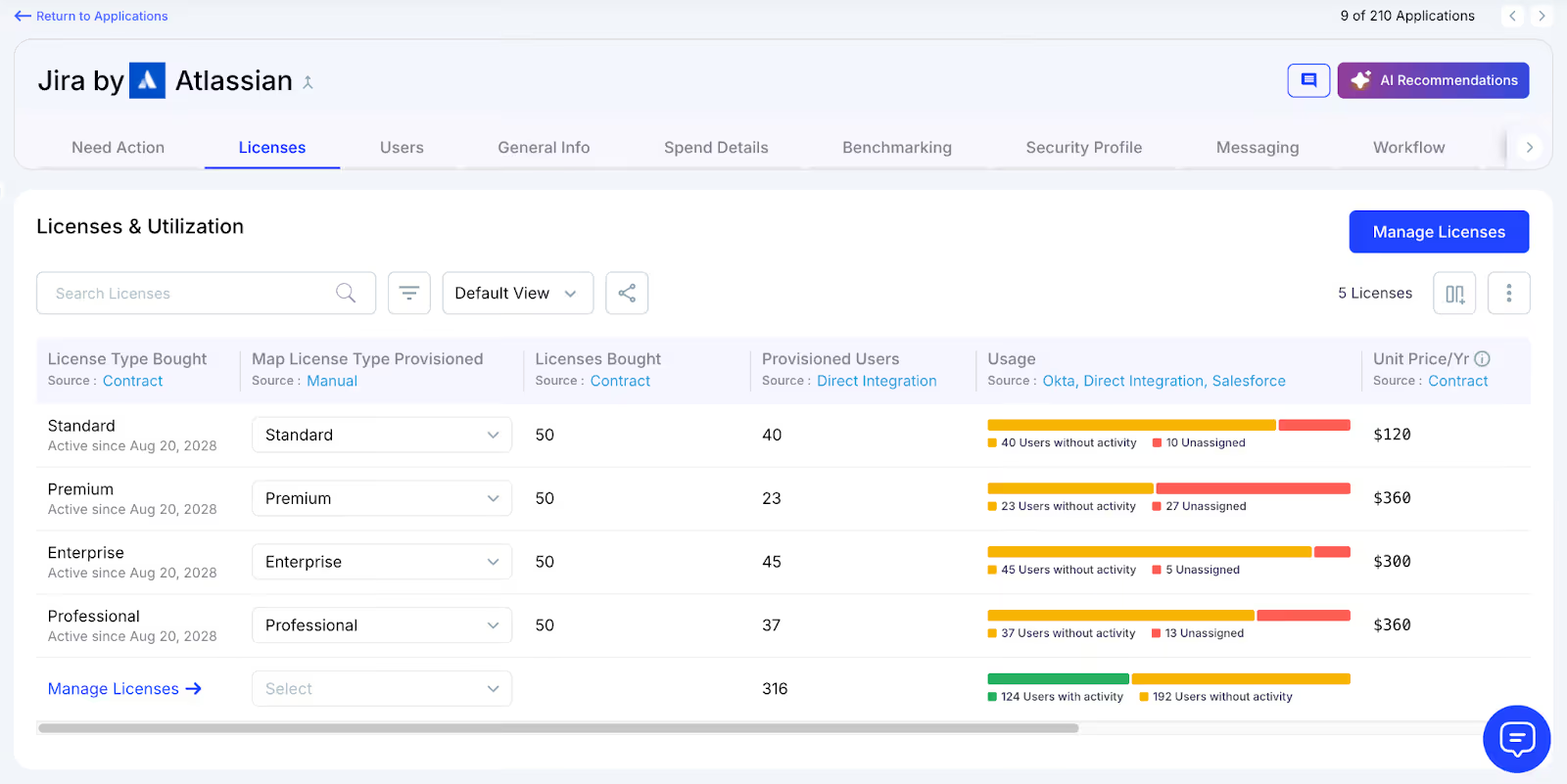
Unused licenses pile up silently, and CloudEagle.ai helps teams catch them early by detecting inactivity across logins and features.
Current Process
IT reviews login logs occasionally and checks spreadsheets to see who used which app or feature. This manual process rarely scales beyond top apps.
Pain Points
Inactivity stays hidden for months. Teams pay for licenses users don’t use and have no dependable way to catch underutilization.
How We Do It
CloudEagle.ai monitors login activity and feature usage weekly. Users with no logins or unused features are flagged automatically.
Why We Are Better
Our detection engine reviews usage across all connected apps, ensuring every inactive seat is visible and ready for recycling.
B: Scalable User Outreach and Automated Notifications
Notifying hundreds of users about inactivity is slow and exhausting, so CloudEagle.ai automates it and keeps communication consistent.
Current Process
IT emails 300–500 users manually, asking if they still need licenses. Tracking responses takes hours and accuracy declines over time.
Pain Points
Users ignore emails, responses get lost, and IT cannot sustain weekly outreach. Inactive licenses stay active without review.
How We Do It
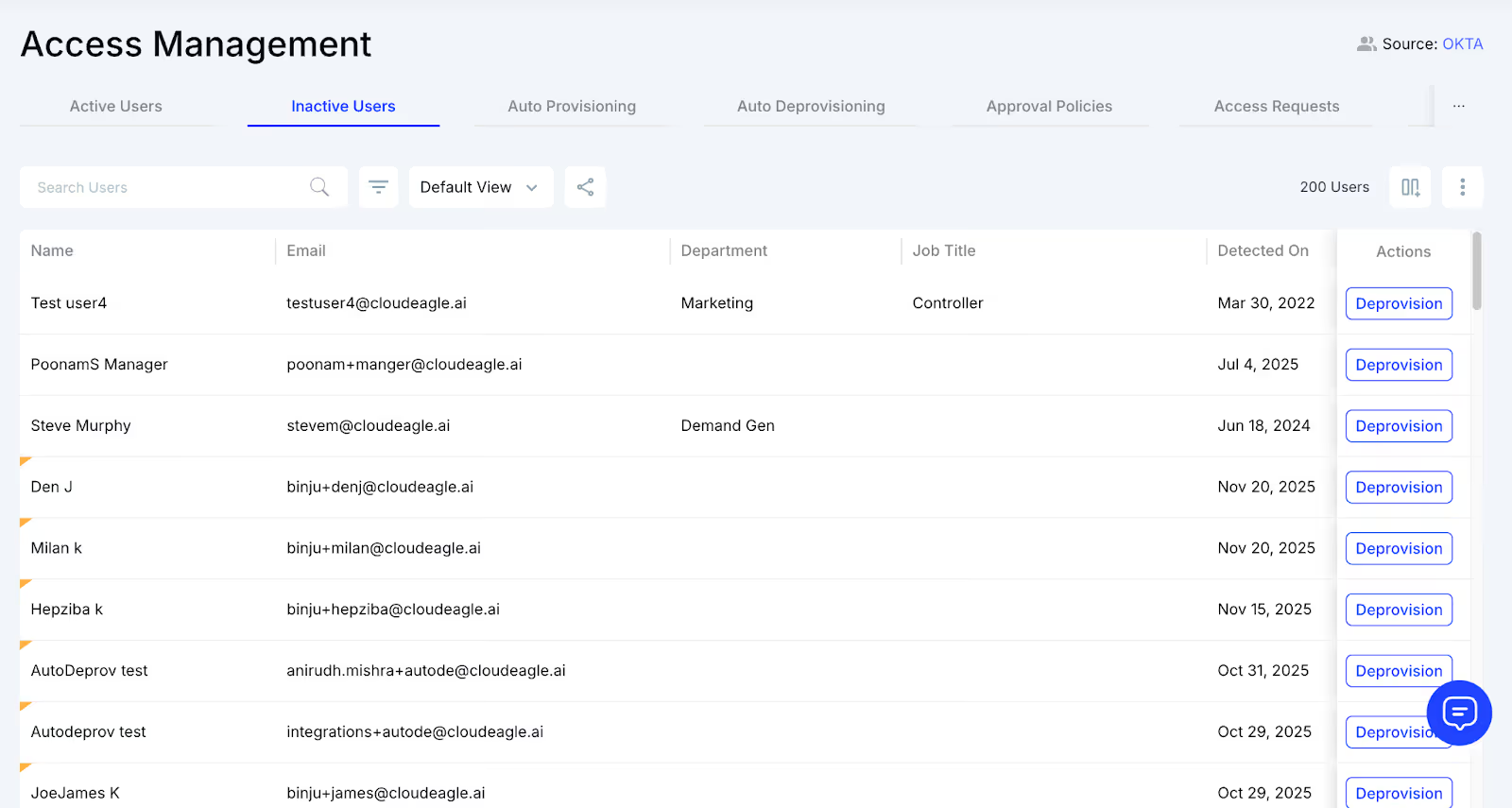
CloudEagle sends automated emails weekly to inactive users. The platform logs responses and triggers next steps without manual tracking.
Why We Are Better
Notifications run on a set schedule, and IT sees every user’s status in one view. Engagement stays high and outreach never stalls.
C: Automated Deprovisioning, Downgrades and License Recycling
CloudEagle.ai ensures every reclaimed license goes back into circulation instead of sitting unused and draining budgets.
Current Process
IT removes users manually and updates spreadsheets by hand. Deprovisioning across apps and IDPs takes time and often gets skipped.
Pain Points
Unused licenses remain active, budgets increase, and teams buy new seats even when existing ones sit idle.
How We Do It
CloudEagle deprovisions inactive users through automated workflows. The system can downgrade, remove, or recycle seats instantly.
Why We Are Better
We integrate directly with Okta and Microsoft AD, reclaiming licenses at scale. Q3 adds automated downgrade logic to refine usage control.
D: Detecting Unsanctioned Apps Through SSO Activity
Shadow apps surface when employees sign into tools IT never approved. CloudEagle.ai uncovers them the moment they appear.
Current Process
Employees try new apps using free accounts or personal logins. IT sees fragments of data from SSO logs but cannot connect activities easily.
Pain Points
Shadow tools go unnoticed until they spread. IT loses visibility, and security teams miss early risk indicators.
How We Do It
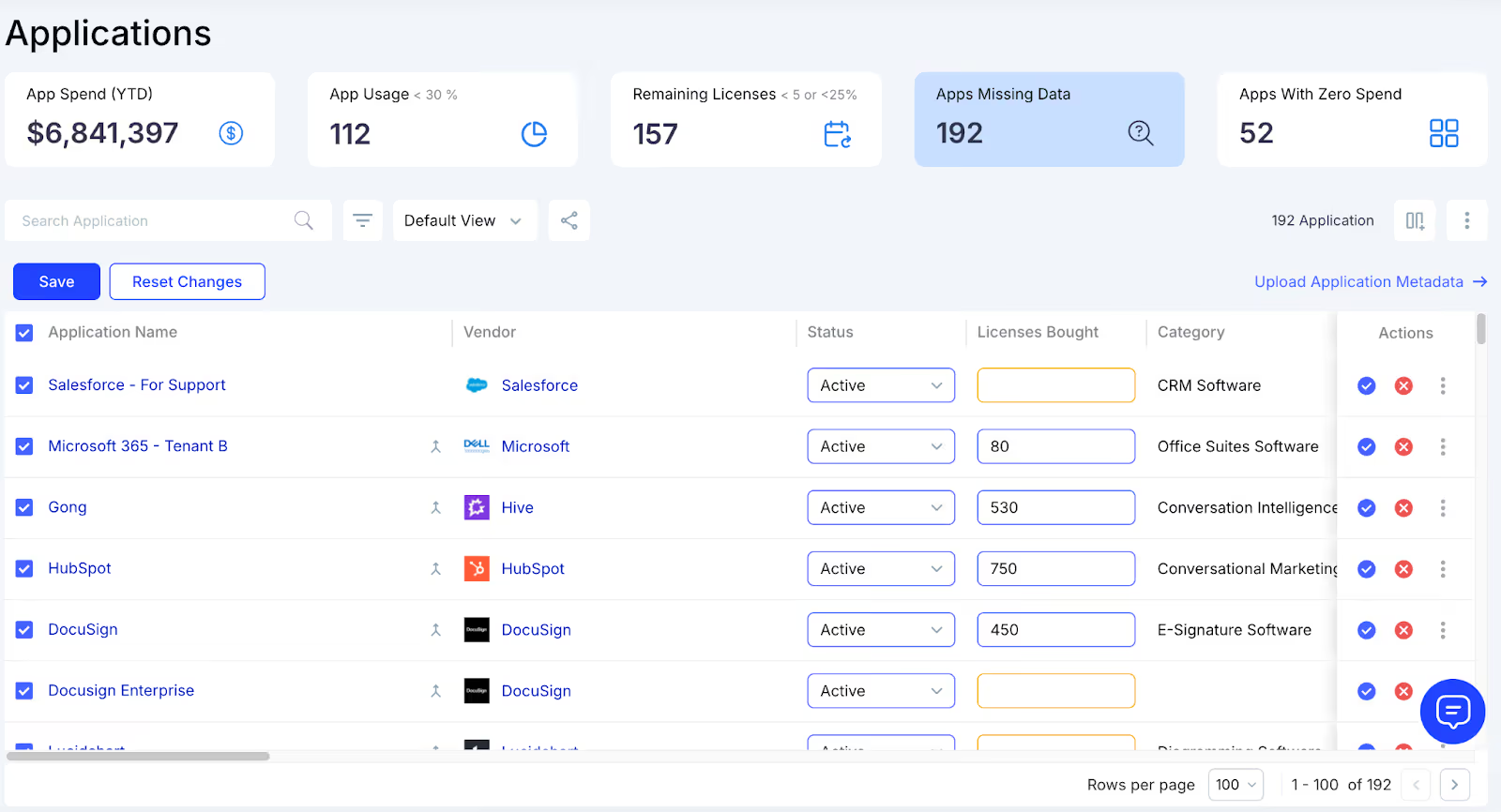
CloudEagle.ai tracks all SSO logins and flags activity for unsanctioned apps or domains that don’t match the approved catalog.
Why We Are Better
Teams gain instant visibility across GSuite, Okta, and IDP activity, turning scattered logs into a clear record of shadow usage.
E: Matching Logins with Finance Data to Surface Shadow Purchases
CloudEagle.ai reveals when employees buy tools on cards or expense apps that IT never approved.
Current Process
IT checks credit card statements once a month or quarter. Software charges mix with non-software items, making recognition difficult.
Pain Points
Purchases remain hidden until too late. Teams commit to tools long before IT can evaluate cost, risk, or overlap.
How We Do It
CloudEagle.ai reconciles SSO logins with finance, card, and expense data. Suspicious transactions are matched with usage patterns.
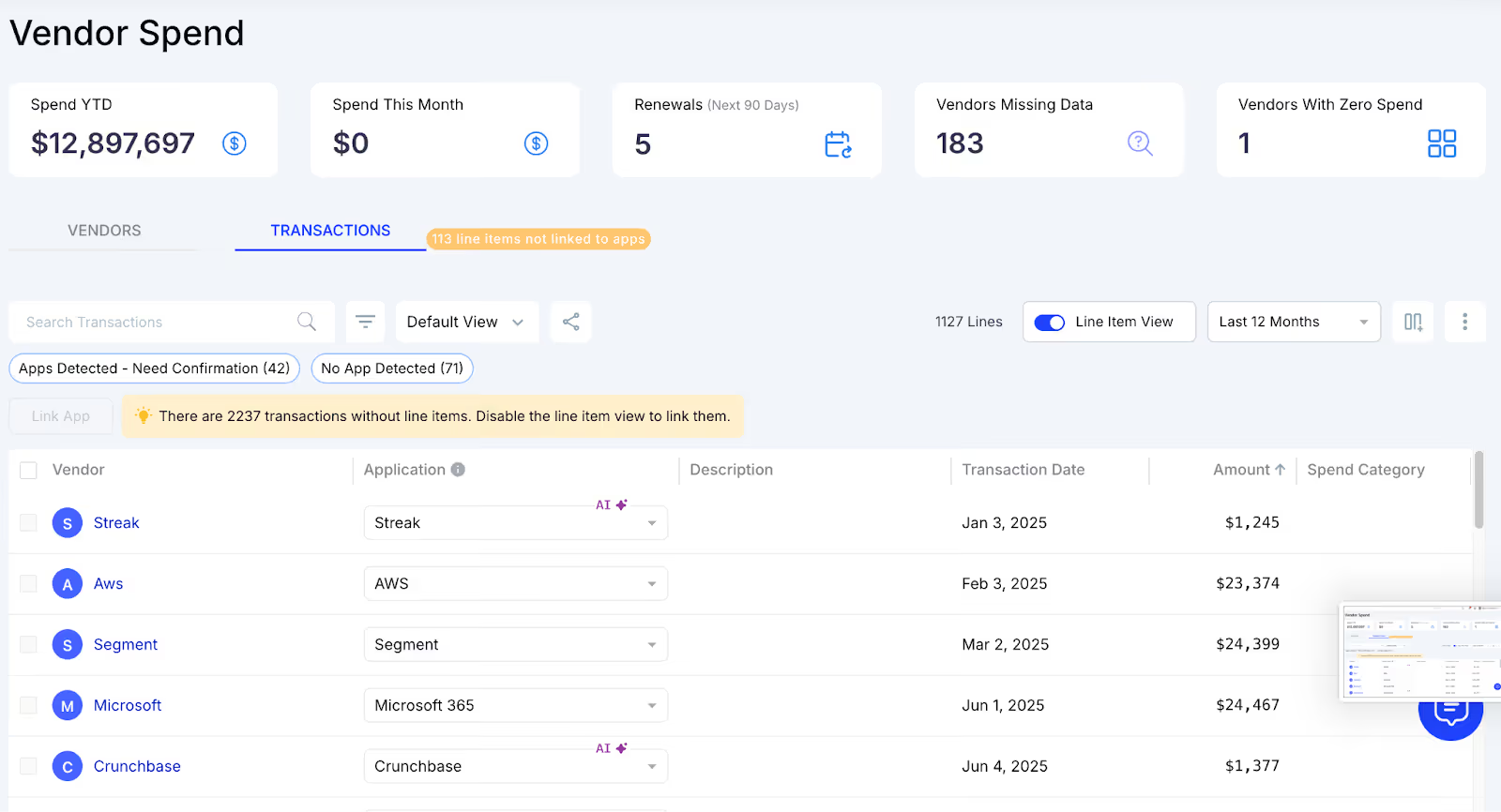
Why We Are Better
Our cross-verification shows both logins and spend signals together, eliminating manual reconciliation and missed purchases.
F: Identifying Duplicate Apps Across Teams
Duplicate tools create unnecessary costs, and CloudEagle.ai helps teams find overlaps before budgets inflate.
Current Process
IT discovers duplicates when teams request renewals or support. There’s no central process to compare app functionality across tools.
Pain Points
Teams buy similar apps without realizing existing options already fulfil the same need. Costs rise and SaaS sprawl accelerates.
How We Do It
CloudEagle.ai compares shadow apps with existing approved tools and highlights functional overlaps across the stack.
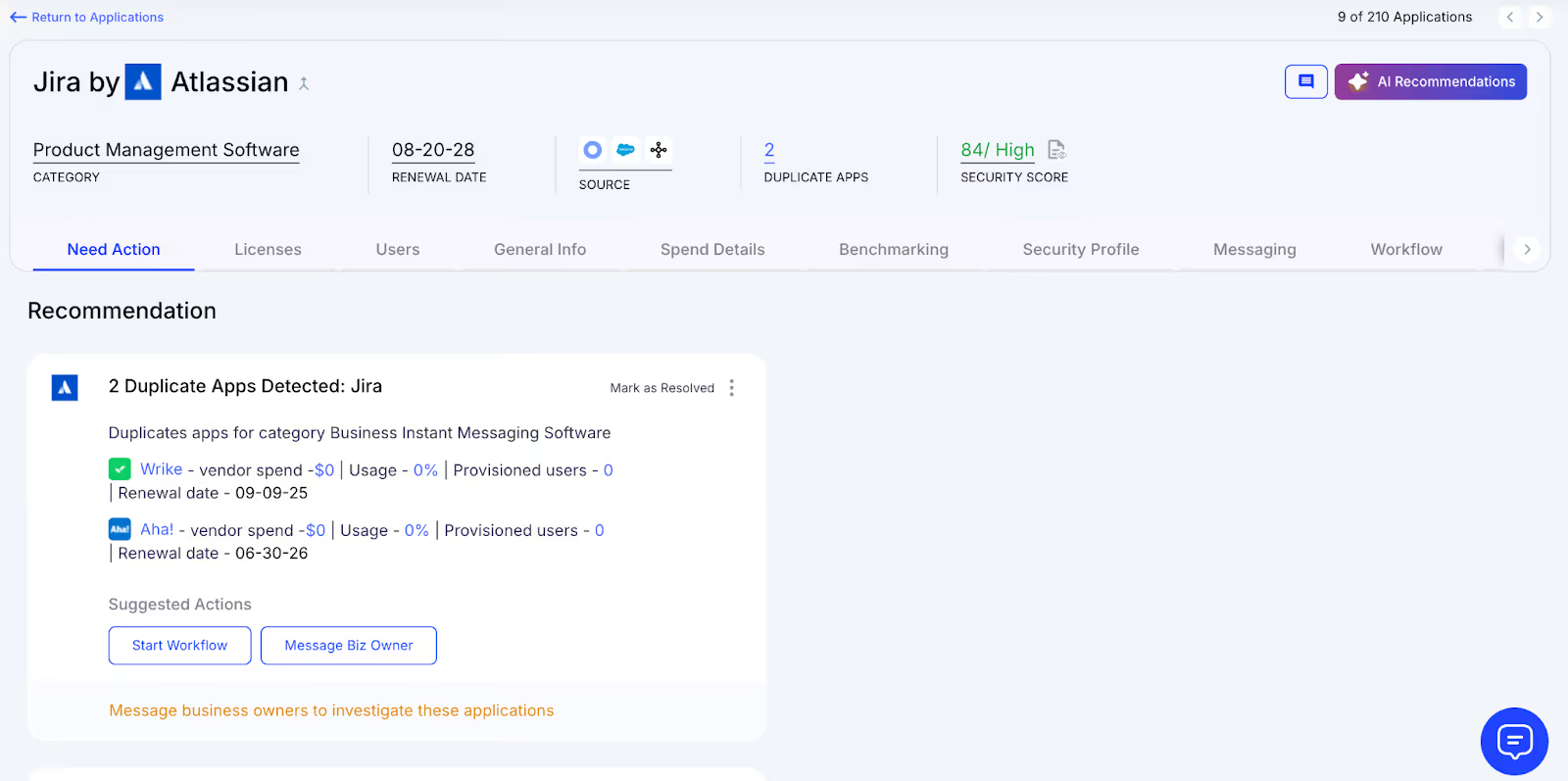
Why We Are Better
Our AI evaluates features, not just names. IT sees which apps do the same job and can guide teams to consolidate spend.
G: Automating Shadow IT Alerts and Remediation
CloudEagle.ai closes the loop by helping IT act quickly when shadow apps appear, keeping risk controlled and spend predictable.
Current Process
IT manually emails users when shadow tools appear, but follow-ups are inconsistent. Remediation depends on bandwidth.
Pain Points
Shadow risks linger. Teams keep using unsanctioned apps and IT struggles to respond at scale.
How We Do It
CloudEagle.ai triggers automated Slack or email alerts to users and generates Shadow IT discoveryreports with actionable insights.
Why We Are Better
Scorecards show risk levels, alerts run automatically, and remediation workflows guide users toward approved tools.
5. Conclusion
In case of shadow IT, one quick install becomes a workflow. One “temporary” subscription becomes a renewal. And before anyone realizes it, the budget is supporting an entire ecosystem of tools the company never officially chose.
That’s exactly where CloudEagle.ai steps in. It surfaces shadow apps the moment they appear, flags overlapping tools, reclaims unused licenses, and assigns ownership so nothing drifts into the anonymous zone again.
6. FAQs
1. How to eliminate shadow IT?
Increase visibility, offer approved tools people actually want, set up usage alerts, and tie every app to an owner so untracked tools can’t slip in unnoticed.
2. What is another term for "shadow IT"?
It’s often called rogue IT, referring to tech or apps adopted outside official IT oversight.
3. What is a shadow IT risk?
It creates hidden security gaps, duplicate spending, data exposure, and compliance issues because IT can’t protect or manage tools it doesn’t know exist.
4. What is an IT shadow silo?
A shadow silo forms when a team uses unapproved tools or stores data outside official systems, creating isolated pockets IT can’t see or control.
5. What risk type arises from shadow IT?
Main risks include security breaches, data loss, compliance violations, and uncontrolled SaaS spend due to untracked licenses and renewals.


.avif)


.avif)
.avif)




.png)






.avif)
.avif)
.avif)


