%201.svg)


HIPAA Compliance Checklist for 2025

Are you sure your employees only have access to the tools they need?
Most enterprises assume their HRIS platform, like Workday, has everything under control, but that's far from the truth. According to reports, up to 30% of SaaS licenses go unused, leading to wasted resources and potential security risks.
Managing access manually can lead to security risks and wasted resources. By integrating CloudEagle.ai with Workday, you automate the process, ensuring access is updated in real-time based on employee roles. This makes SaaS management more efficient and secure.
Let’s explore how this integration not only protects your enterprise but also cuts SaaS waste and accelerates HR and IT operations.
TL;DR
- CloudEagle.ai integrates with Workday to automate SaaS license provisioning, ensuring employees get the right app access during onboarding or role changes.
- Automatic deprovisioning, triggered by role changes or offboarding, ensures that former employees no longer have access, reducing security risks and protecting sensitive data.
- CloudEagle.ai eliminates SaaS waste by tracking license usage and reallocating unused or underutilized licenses, preventing overpayment for unused subscriptions.
- Real-time syncing of employee data keeps access and permissions up-to-date, helping businesses stay compliant with industry regulations and simplifying audits.
- By automating manual tasks, CloudEagle.ai lets HR and IT focus on strategic activities while ensuring employees always have the tools they need.
Why Managing SaaS Access Manually Through HRIS Creates Gaps?
While Workday does a great job of storing employee data, managing access to SaaS applications manually creates several challenges that can affect security, efficiency, and cost management:
1. Manual Provisioning Delays: IT teams need to manually assign access to various tools, which can slow down the process. This means employees may not have the right access when they need it, especially during onboarding or role changes.
2. Tracking Role Changes Is Difficult: When employees switch roles, it’s easy to miss updating their access. This can lead to them having too much or too little access to the tools they actually need, creating security risks.
3. No Insight Into How Saas Tools Are Being Used: HRIS systems don’t track which tools are being used and how often. As a result, enterprises may continue to pay for unused licenses or renew subscriptions for tools that aren’t being fully utilized, leading to wasted money.
4. Offboarding Problems: When an employee leaves, HR and IT must manually revoke access. If this step is missed, former employees might still have access to important systems, which is a major security concern.
5. Shadow IT Risks: Employees sometimes use tools outside of the approved system (Shadow IT), and these can easily go unnoticed. Without tracking all tools, businesses are exposed to security vulnerabilities and duplicate software costs.

6. Difficulty in Managing Access: Managing access across different systems makes it harder to ensure the right people have the right tools at the right time. Without automation, access is inconsistent, which makes it difficult to enforce security rules and track usage.
Pain Points of Role-Based Access Without Automation
Without integrating CloudEagle.ai and Workday, IT and HR teams face several challenges that create inefficiencies, security risks, and wasted resources:
1. Delays in Provisioning: New hires often have to wait for days to get the right access to the tools they need, causing frustration and delays in productivity. This results in employees being less efficient during their early days, impacting overall team performance.
2. Inconsistent Role-Based Access: Employees in similar roles may have different access levels due to manual processes, causing confusion and security risks. This inconsistency makes it hard to ensure everyone has the right tools, increasing the risk of unintentional data breaches.
3. High Chance of Privilege Creep: When employees change roles, they may retain access to tools they no longer need, leading to unnecessary permissions. This buildup of excess access rights over time can create security risks and make it harder to manage, increasing the chances of security breaches.
4. SaaS License Waste: Unused or unnecessary licenses remain assigned because there’s no easy way to track which licenses are being used, leading to wasted spend. This hidden waste can significantly increase SaaS costs, especially as the number of applications grows across the enterprise.
Learn how Remediant effortlessly tracked app usage, licenses, and spend data using CloudEagle.ai.
5. Risky Offboarding: Unused or unnecessary licenses stay assigned because there’s no easy way to track usage, leading to wasted spend. This hidden waste can drive up SaaS costs as the number of applications increases.
Medium Pop-Up CTA: Employee Offboarding
6. No Unified View of Access: Access management is scattered across HR systems, spreadsheets, and IT tools, making it hard to see who has access to what, leading to confusion and mistakes. This lack of centralization creates operational inefficiencies and makes it challenging to perform audits or enforce compliance.
Why CloudEagle.ai Is the Right Solution for Workday-Based License Management?
As businesses grow, managing access to SaaS tools can get complicated. CloudEagle.ai, when integrated with Workday, simplifies this by automating the process. It ensures employees always have the right access based on their role.
Here’s why this integration is the best solution for managing licenses:
1. Full User Lifecycle Automation (ULM)
CloudEagle.ai automates the entire process of managing employee access, from granting access during onboarding to removing it when they leave. This ensures employees always have the right permissions, eliminating delays and errors, and securing your data.
2. Real-time Employee Data Sync
CloudEagle.ai syncs employee data with Workday in real-time, automatically updating SaaS access when roles, departments, or statuses change. This ensures employees always have the correct permissions, eliminating outdated access and preventing over- or under-permissioning.
3. Contextual Insights
CloudEagle.ai offers clear insights into SaaS license usage, highlighting active, underused, and high-cost applications. This helps teams optimize SaaS spending based on real usage, ensuring better value from software investments and reducing overspending.
4. License Harvesting
CloudEagle.ai automatically tracks unused or underused licenses and reclaims them for other teams or employees. This helps companies save money by ensuring they only pay for licenses that are actually being used, reducing unnecessary spending on unused subscriptions.
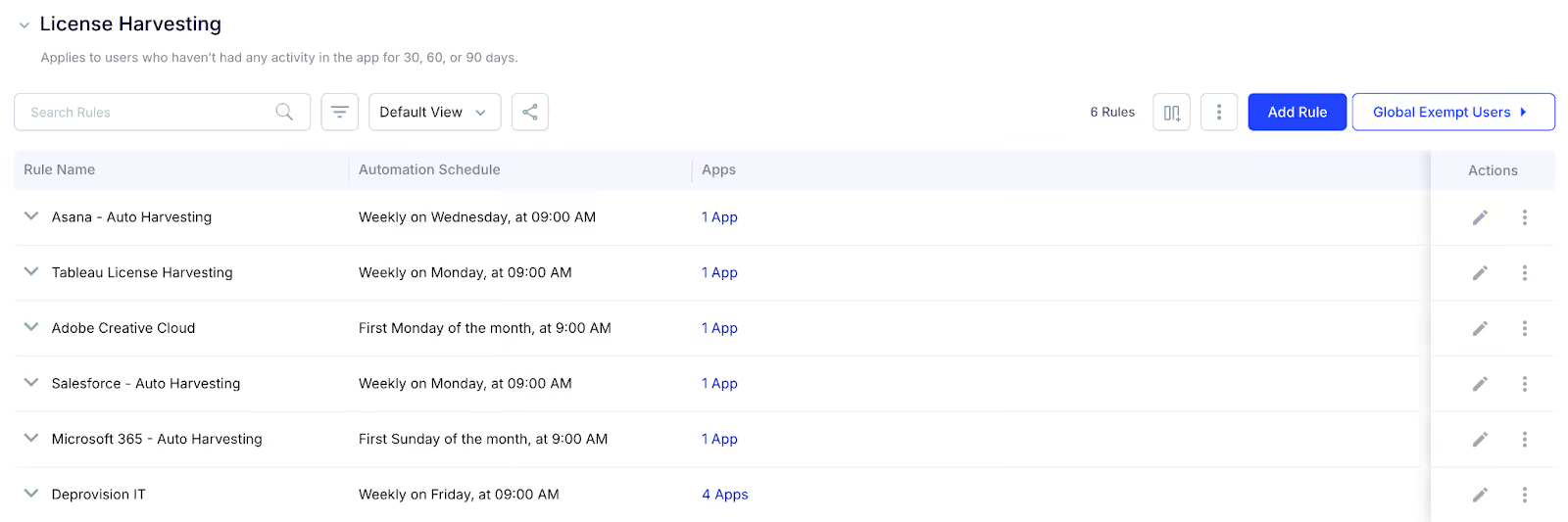
Learn how CloudEagle.ai helped Minute Media by harvesting 35 user licenses, resulting in nearly $20K in savings.
5. AI-Powered Contract Management
CloudEagle.ai uses AI to track contract renewal dates and sends timely reminders. This helps enterprises review usage, decide whether to continue, renegotiate, or cancel contracts, avoiding surprise charges and ensuring only necessary contracts are renewed, saving money.
6. Shadow IT Discovery
CloudEagle.ai helps uncover unauthorized apps in use across your enterprise, giving full visibility over all SaaS tools. This ensures that your security teams know exactly what’s being used, preventing data risks from unapproved apps.
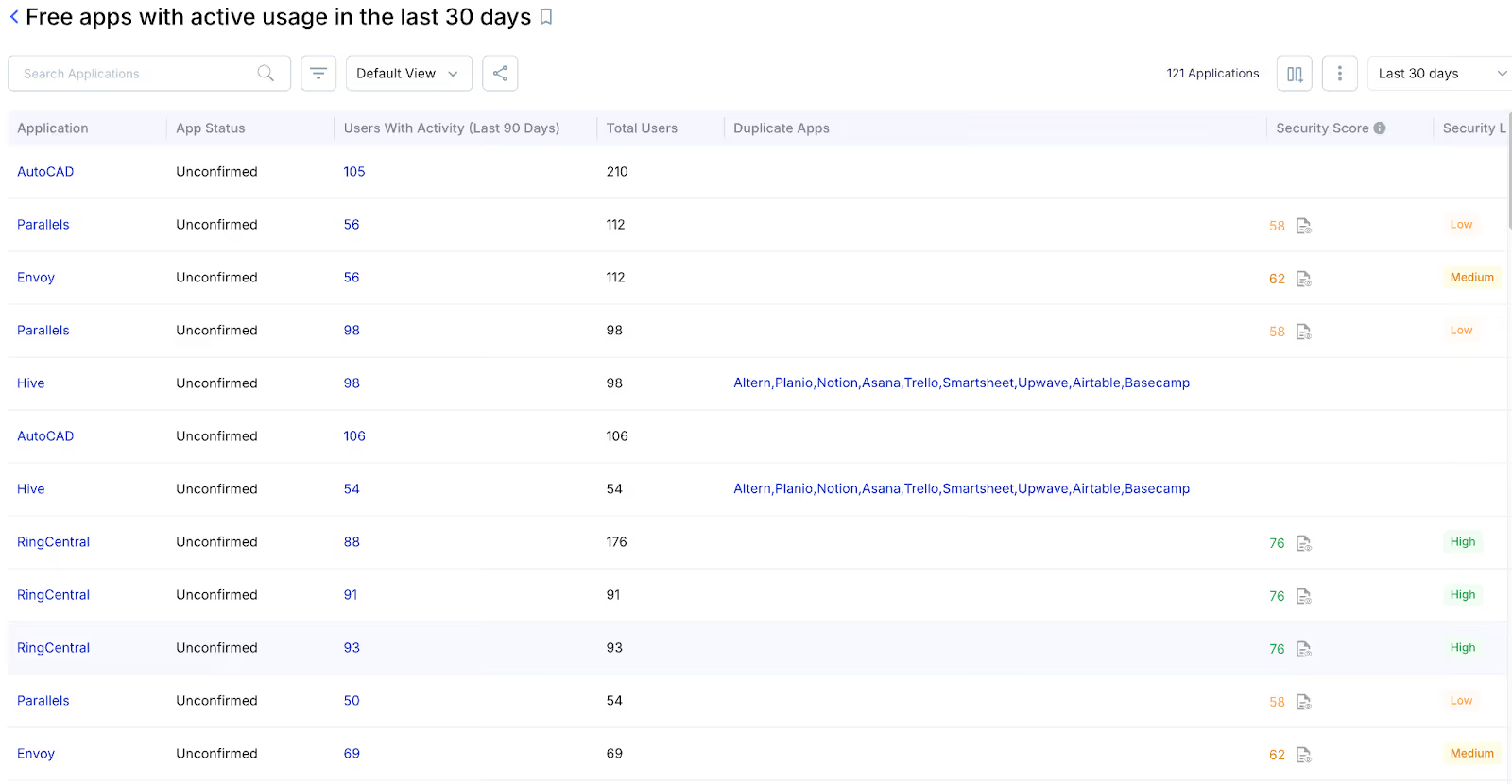
7. AI-driven Recommendations For Least-privilege Access
CloudEagle.ai uses AI to analyze tool usage, ensuring employees only have access to what’s necessary for their role. This minimizes security risks by preventing excessive permissions and enforces least-privilege access, ensuring data security and compliance with policies.
8. Integration Beyond SSO Apps
While most systems manage access only for SSO-connected apps, CloudEagle.ai covers all apps, even those not linked to your SSO. This gives you complete control over all SaaS tools, ensuring every app is efficiently managed, regardless of its integration method.
How CloudEagle.ai Integrates with Workday to Manage SaaS Licenses?
CloudEagle.ai integrates with Workday to automate SaaS license management, ensuring employees get the right access while cutting costs. It simplifies access, boosts security, and reduces wasted licenses.
Here’s how it does:
1. Syncing Employee Profiles & Departments
CloudEagle.ai seamlessly syncs with Workday to automatically update employee profiles, departments, and job roles. This ensures that each employee’s SaaS access is accurately tied to their role and team structure.
How it works:
- CloudEagle.ai continuously syncs employee data from Workday to ensure accuracy.
- It maps employees to their respective departments and roles.
- CloudEagle.ai reflects changes made in Workday (e.g., job title or department move) instantly in the access control system.
- Employee data, including access requirements, is kept up-to-date without any manual input.
- This synchronization eliminates human error, ensuring accurate access control across all SaaS tools.
2. Automating Provisioning Based on Roles
CloudEagle.ai automates the provisioning of SaaS tools based on roles and departments in Workday, ensuring employees get access to the right tools as soon as they are onboarded.
How it works:
- CloudEagle.ai automatically triggers the provisioning of SaaS licenses based on an employee’s role in Workday.
- It assigns access to specific tools that are essential for each role, department, and business function.
- The system ensures that new employees are granted all the necessary access as soon as they are hired.
- Role changes in Workday trigger automatic updates to the employee’s software access.
- CloudEagle.ai streamlines onboarding, so employees are productive on Day 1 without delays in getting the tools they need.
3. Auto-Deprovisioning on Exit or Role Change
CloudEagle.ai automatically revokes access when an employee leaves the company or changes roles, ensuring that there are no lingering permissions or security risks.
How it works:
- When an employee’s status in Workday changes (e.g., termination or role change), CloudEagle.ai automatically triggers deprovisioning.
- CloudEagle.ai immediately revokes access to all relevant applications tied to the employee's role.
- The deprovisioning process happens instantly, ensuring that ex-employees or role-changed employees no longer have access to sensitive data or tools.
- All access permissions are updated in real-time, ensuring no overlap between old and new roles.
- CloudEagle.ai’s deprovisioning works seamlessly across all integrated SaaS applications, even those outside of Single Sign-On (SSO).
Medium Pop-Up CTA: License Management
Key Benefits of CloudEagle.ai + Workday Integration for IT & HR?
Integrating CloudEagle.ai with Workday brings significant benefits for both IT and HR teams. Here’s how it works:
1. Automated Access Management: CloudEagle.ai automatically assigns and revokes SaaS licenses based on role changes in Workday, saving time and reducing errors. Employees always have the right access when they need it, without delays.
2. Optimized License Usage: CloudEagle.ai tracks unused licenses and reassigns them, ensuring companies only pay for what they use. This reduces wasted spend and helps businesses make smarter renewal decisions.
3. Real-Time Data Sync: Employee data is synced instantly between Workday and CloudEagle.ai, ensuring access permissions are always up-to-date. This prevents outdated or incorrect licenses, improving efficiency.
4. License Harvesting: CloudEagle.ai automatically reclaims unused licenses and reallocates them to those who need them. This reduces unnecessary costs by making sure companies only pay for licenses that are actively in use.
5. Proactive Renewal Management: CloudEagle.ai tracks contract renewals and sends reminders, helping businesses review usage before renewing. This prevents auto-renewals for unused tools and helps save on unnecessary charges.
Listen to Paul Lanzi, Co-founder and COO of Remediant, as he talks about how CloudEagle.ai helped them track app usage, licenses, and spend data effortlessly.
Conclusion
Integrating CloudEagle.ai with Workday makes managing SaaS licenses easy. It automatically updates access when employees join, change roles, or leave, saving time and reducing manual work. This helps improve security, cut down on unnecessary spending, and ensure compliance; all while giving IT and HR teams full control.
If you're ready to simplify SaaS licensing management, improve security, and reduce unnecessary software costs, CloudEagle.ai + Workday is the ideal combination.
Want to see how it works in action?
Schedule a demo with CloudEagle.ai to know how you can transform your access management.


.avif)


.avif)
.avif)




.png)





.avif)
.avif)
.avif)


