License management

How CloudEagle.ai Streamline ServiceNow License Management and Control Access Spend

Share via:
Written by:
CloudEagle.ai Team
Reviewed by
Nidhi Jain
Last Updated:
December 23, 2025
blog-cms-banner-bg
Little-Known Negotiation Hacks to Get the Best Deal on Slack
cta-bg-blogDownload Your Copy

HIPAA Compliance Checklist for 2025

Download PDF

‍

ServiceNow has become the backbone of enterprise operations from ITSM and HR workflows to security, procurement, and asset management. But as ServiceNow expands in scope, its licensing model becomes increasingly complex and expensive. 

Large organizations often end up over-provisioned, misaligned, or paying for access levels employees don’t actually need.

The real issue isn’t just the rising cost, it's the lack of visibility. Most enterprises don’t know which users need which licence type, who’s inactive, which modules are underused, and how much budget drains into unnecessary ServiceNow seats every year.

That’s where CloudEagle.ai changes the game. 

By combining deep SaaS visibility, automated license discovery, and AI-powered access governance, CloudEagle.ai helps enterprises control ServiceNow spend, eliminate waste, and optimize license allocation with precision.

‍

1. Is Your Organization Paying for More ServiceNow Licenses Than It Needs?

ServiceNow becomes part of everyday operations as organizations use it for IT service management, employee workflows, and business processes. As teams grow and responsibilities change, administrators assign licenses to accommodate new users and evolving requirements.

But not every assignment remains necessary. Employees move to different roles, projects end, and some users stop interacting with ServiceNow altogether. Their licenses, however, can remain assigned long after the original need disappears.

When renewal approaches, procurement may still be working with the same seat count agreed upon months or years earlier. Without reassessing actual usage, the organization risks carrying unnecessary licenses into another contract period.

‍

Before You Buy More Licenses…

Check what you already own.
Find The Waste

‍

2. Why ServiceNow License Optimization Needs to Start Before Renewal

Finding excess licenses is not as simple as identifying employees who haven't logged in recently. Some users need ServiceNow only for occasional workflows, while others may no longer require their assigned license or could operate with a lower tier.

IT must distinguish these situations before changing access. Procurement then needs to translate those findings into an accurate renewal requirement, while accounting for contract deadlines and vendor pricing.

If this review starts too late, unused seats can become another recurring expense. Organizations need to connect license utilization, reclamation, and contract planning early enough to make informed renewal decisions.

‍

3. How CloudEagle.ai Streamlines ServiceNow License Management

ServiceNow licensing costs can rise when organizations assign more licenses than employees actively use. IT teams may know purchased licenses, but tracking assignments and renewals makes it difficult to identify waste.

CloudEagle.ai helps organizations connect ServiceNow license utilization with reclamation and renewal decisions. 

Instead of relying on spreadsheets and last-minute reviews, IT and procurement can use usage data to right-size licenses before unnecessary costs carry into the next contract.

A. Track Purchased, Assigned, and Actively Used ServiceNow Licenses

Managing ServiceNow licenses starts with understanding the gap between what the organization pays for and what employees actually use. 

Purchased licenses show the contractual commitment, assigned licenses reveal allocation, and active usage helps determine whether that allocation remains justified.

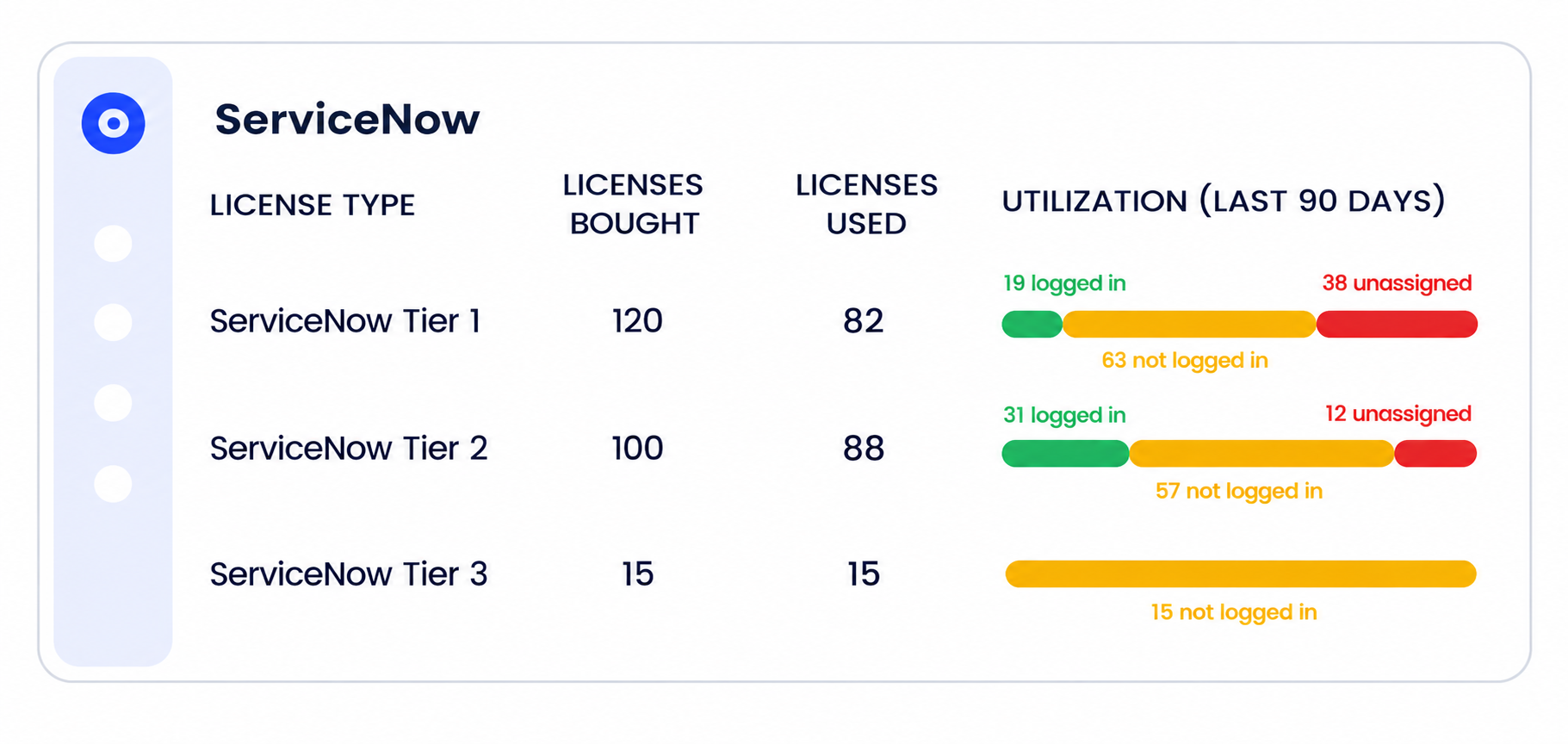
CloudEagle.ai consolidates license data to show purchased, assigned, and actively used licenses side by side. This gives IT teams a clearer view of utilization and helps identify potential over-allocation before renewal discussions begin.
‍

‍

The difference matters when a contract approaches renewal. If the organization is paying for more licenses than employees need, that gap becomes an opportunity to reduce costs rather than repeat the same commitment.

B. Reclaim Unused ServiceNow Licenses Before Renewal

Once IT identifies underused licenses, the next challenge is recovering them. Manually checking activity, contacting users, and updating assignments can delay reclamation, leaving unused licenses in place even when other employees could use them.

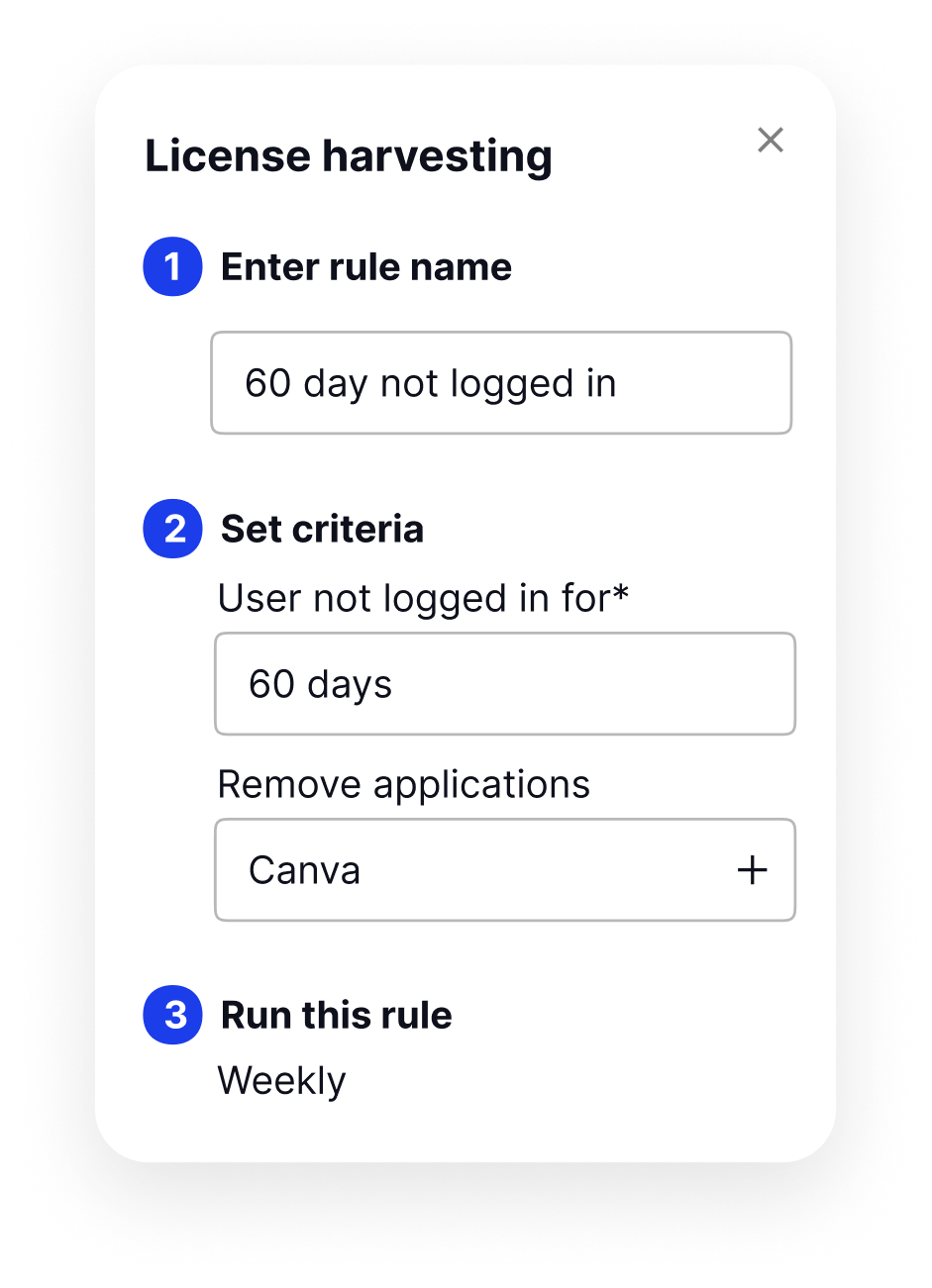
CloudEagle.ai identifies inactive or underutilized licenses and supports automated harvesting workflows. Teams can use inactivity thresholds to flag dormant seats, contact users, and reclaim or downgrade licenses based on usage and business requirements.
‍

‍

Reclaiming these licenses helps establish a more accurate seat count before the next renewal. But reducing the number of licenses is only useful if teams have enough time to act before contractual deadlines lock in another commitment.

C. Surface ServiceNow Contract Terms and Renewal Deadlines

A right-sized license count does not automatically translate into savings. Procurement also needs to know when the contract renews, how much notice the vendor requires, and whether an opt-out deadline could limit its options.

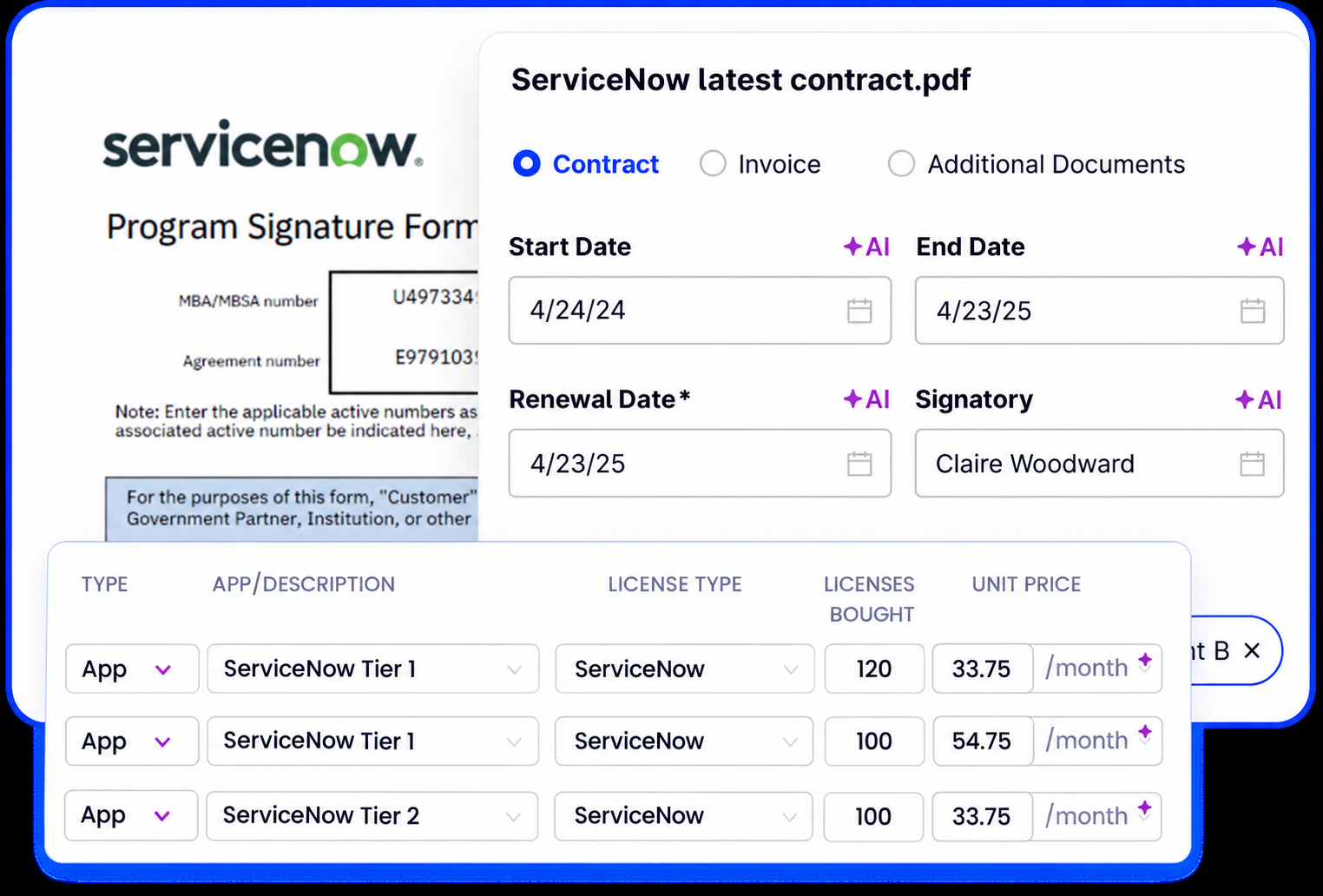
CloudEagle.ai uses AI to extract key contract details, including renewal dates, notice periods, opt-out clauses, and auto-renewal terms from uploaded contracts. This information helps teams maintain visibility into upcoming commitments and avoid relying on manual calendar reminders.
‍

‍

With usage and contract information available together, procurement can start renewal planning before the decision becomes urgent. That creates time to review the required license count, evaluate pricing, and coordinate approvals.

D. Prepare ServiceNow Renewals With Usage and Pricing Data

Renewal negotiations are stronger when procurement knows both how many licenses it needs and what comparable deals cost. 

Negotiating without usage data can preserve unnecessary seats, while negotiating without pricing benchmarks can leave teams with limited leverage over the vendor's quote.

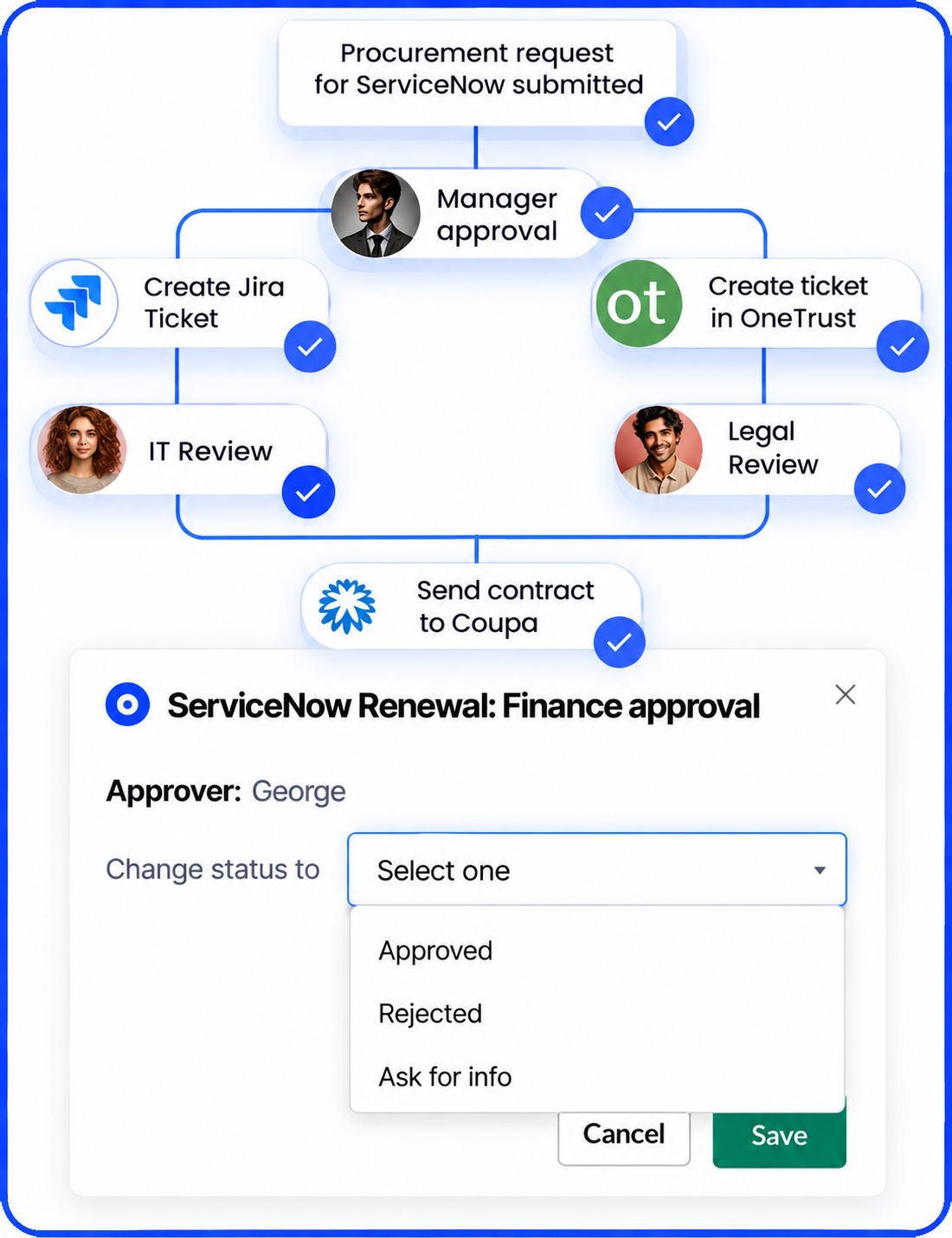
CloudEagle.ai combines license utilization insights with renewal workflows and price benchmarking to support more informed decisions. Teams can review current usage, examine market pricing, and coordinate stakeholders ahead of renewal deadlines.
‍

‍

‍Automated workflows can bring the relevant stakeholders into the process in advance, while pricing intelligence helps procurement assess whether the proposed terms are competitive. 

‍

‍

4. Why Managing ServiceNow Licenses Is So Complex Today

ServiceNow licensing challenges rarely stem from poor intent. They emerge naturally as organizations grow.

Different teams buy different modules over time. Employees change roles, but their access doesn’t change with them. Contractors join and leave. New features are adopted unevenly. Renewals happen annually, while usage changes weekly.

This leads to a few common problems.

Enterprises over-provision licenses “just in case” to avoid workflow disruptions. Inactive users continue consuming premium licenses long after they stop logging in. High-cost fulfiller or admin roles are assigned to users who only need basic requester access. And because data lives across ITSM, IAM, HR, and finance systems, no single team has a complete picture.

Without centralized visibility and governance, ServiceNow licensing becomes reactive, spreadsheet-driven, and renewal-focused instead of value-driven.

CloudEagle.ai brings structure to this chaos through a phased, lifecycle-based approach.

‍

5. Roadmap for Enterprises: What Does a Mature ServiceNow License Strategy Look Like?

CloudEagle.ai helps teams move from chaotic licensing to a predictable, measurable, and collaborative optimization framework.

A. Step-by-Step Framework: Discover → Govern → Optimize → Renew

  1. Discover: Build an accurate inventory and map usage.
  2. Govern: Enforce access controls and automate provisioning.
  3. Renew: Use data to negotiate better deals.
  4. Optimize: Continuously refine and reduce spend.

B. Key Metrics & KPIs Tracked in CloudEagle.ai

  • Active vs inactive users
  • License utilization percentage
  • Cost per user/license
  • Module adoption and usage
  • Potential savings from redistribution
  • Renewal readiness score

C. Unify IT, Procurement & Finance Under One Process

With shared dashboards and workflows, teams collaborate effortlessly reducing duplication, improving governance, and maximizing ROI.

‍

More Software. Same Budget?

Make every dollar count.
Optimize Spend

‍

6. A Mature ServiceNow License Strategy: What Good Looks Like

CloudEagle.ai helps enterprises move from reactive license management to a predictable, measurable optimization framework.

The lifecycle is simple and repeatable.

Discover to build accurate inventory and usage visibility. Govern to enforce access controls and automation. Optimize to continuously right-size and reduce spend. Renew using data-backed insights and confidence.

Key Metrics Tracked in CloudEagle.ai

Active versus inactive users License utilization percentage Cost per user and per license type Module adoption and engagement Potential savings from redistribution Renewal readiness score

With these metrics, teams can track progress, prove ROI, and continuously improve ServiceNow value.

‍

7. Conclusion

ServiceNow is one of the most powerful enterprise platforms, but also one of the most expensive. Without visibility and governance, enterprises overspend, misallocate licenses, and fail to leverage ServiceNow’s full value.

CloudEagle.ai brings order back into the system. It helps enterprises discover their true license posture, govern access intelligently, negotiate better renewals, and optimize spend continuously. The result: lower costs, higher ROI, and complete confidence in your ServiceNow investment.

‍

8. Frequently Asked Questions

1. Doesn’t CloudEagle.ai only count ServiceNow seats, not the license types behind them?

No. CloudEagle.ai pulls in your full ServiceNow license inventory, including requester, fulfiller, ITOM, HRSD, SecOps, and role-based add-ons. It maps each license across users, roles, departments, and business units, so you can see who holds which license type, what it costs, and where it sits.

2. Won’t users keep expensive fulfiller licenses with CloudEagle.ai when they only need requester access?

CloudEagle.ai catches that mismatch. It analyzes how deeply and how often each user actually works in ServiceNow, then recommends downgrades where a cheaper tier fits. Role-based workflows also define which license type each role gets, so expensive licenses go only to users who need them.

3. Doesn’t CloudEagle.ai let teams buy new ServiceNow seats while unused ones sit idle?

CloudEagle.ai puts reclaimed licenses first. It continuously flags inactive and underused ServiceNow licenses and returns them to a central pool. When demand grows, new users are assigned from that pool before any new seats are purchased, which directly cuts unnecessary spend.

4. Can’t ServiceNow access drift when employees change roles, even with CloudEagle.ai?

CloudEagle.ai adjusts ServiceNow access automatically as roles change. It integrates with HRIS, ITSM, and IAM systems, so when someone moves teams their license is updated to match the new role, and when they leave their access is revoked right away. This prevents privilege creep and orphaned licenses.

5. Doesn’t CloudEagle.ai only help with ServiceNow when renewal season comes around?

CloudEagle.ai works year-round. Real-time alerts flag underused high-cost licenses as soon as it happens, and automatic quarterly reports highlight access drift and right-sizing opportunities. By renewal, procurement already has usage trends, module adoption data, and industry benchmarks ready.

‍

Advertisement for a SaaS Subscription Tracking Template with a call-to-action button to download and a partial graphic of a tablet showing charts.Banner promoting a SaaS Agreement Checklist to streamline SaaS management and avoid budget waste with a call-to-action button labeled Download checklist.Blue banner with text 'The Ultimate Employee Offboarding Checklist!' and a black button labeled 'Download checklist' alongside partial views of checklist documents from cloudeagle.ai.Digital ad for download checklist titled 'The Ultimate Checklist for IT Leaders to Optimize SaaS Operations' by cloudeagle.ai, showing checklist pages.Slack Buyer's Guide offer with text 'Unlock insider insights to get the best deal on Slack!' and a button labeled 'Get Your Copy', accompanied by a preview of the guide featuring Slack's logo.Monday Pricing Guide by cloudeagle.ai offering exclusive pricing secrets to maximize investment with a call-to-action button labeled Get Your Copy and an image of the guide's cover.Blue banner for Canva Pricing Guide by cloudeagle.ai offering a guide to Canva costs, features, and alternatives with a call-to-action button saying Get Your Copy.Blue banner with white text reading 'Little-Known Negotiation Hacks to Get the Best Deal on Slack' and a white button labeled 'Get Your Copy'.Blue banner with text 'Little-Known Negotiation Hacks to Get the Best Deal on Monday.com' and a white button labeled 'Get Your Copy'.Blue banner with text 'Little-Known Negotiation Hacks to Get the Best Deal on Canva' and a white button labeled 'Get Your Copy'.Banner with text 'Slack Buyer's Guide' and a 'Download Now' button next to images of a guide titled 'Slack Buyer’s Guide: Features, Pricing & Best Practices'.Digital cover of Monday Pricing Guide with a button labeled Get Your Copy on a blue background.Canva Pricing Guide cover with a button labeled Get Your Copy on a blue gradient background.

Enter your email to
unlock the report

Oops! Something went wrong while submitting the form.
License Count
Benchmark
Per User/Per Year

Enter your email to
unlock the report

Oops! Something went wrong while submitting the form.
License Count
Benchmark
Per User/Per Year

Enter your email to
unlock the report

Oops! Something went wrong while submitting the form.
Notion Plus
License Count
Benchmark
Per User/Per Year
100-500
$67.20 - $78.72
500-1000
$59.52 - $72.00
1000+
$51.84 - $57.60
Canva Pro
License Count
Benchmark
Per User/Per Year
100-500
$74.33-$88.71
500-1000
$64.74-$80.32
1000+
$55.14-$62.34

Enter your email to
unlock the report

Oops! Something went wrong while submitting the form.

Enter your email to
unlock the report

Oops! Something went wrong while submitting the form.
Zoom Business
License Count
Benchmark
Per User/Per Year
100-500
$216.00 - $264.00
500-1000
$180.00 - $216.00
1000+
$156.00 - $180.00

Enter your email to
unlock the report

Oops! Something went wrong while submitting the form.

Get the Right Security Platform To Secure Your Cloud Infrastructure

Please enter a business email
Thank you!
The 2023 SaaS report has been sent to your email. Check your promotional or spam folder.
Oops! Something went wrong while submitting the form.

Access full report

Please enter a business email
Thank you!
The 2023 SaaS report has been sent to your email. Check your promotional or spam folder.
Oops! Something went wrong while submitting the form.
  • ServiceNow costs rise quickly when license types, roles, and access aren’t governed properly across departments.
  • Most enterprises overspend due to inactive users, over-provisioned licences, and low-value modules.
  • CloudEagle.ai provides full visibility into ServiceNow usage, license types, and access patterns through automated discovery.
  • With governance workflows, automated provisioning, and AI-powered monitoring, CloudEagle.ai helps control access and prevent waste.
  • CloudEagle.ai’s renewal insights, harvesting tools, and ongoing optimization give enterprises continuous cost savings and stronger ROI from ServiceNow.

‍

ServiceNow has become the backbone of enterprise operations from ITSM and HR workflows to security, procurement, and asset management. But as ServiceNow expands in scope, its licensing model becomes increasingly complex and expensive. 

Large organizations often end up over-provisioned, misaligned, or paying for access levels employees don’t actually need.

The real issue isn’t just the rising cost, it's the lack of visibility. Most enterprises don’t know which users need which licence type, who’s inactive, which modules are underused, and how much budget drains into unnecessary ServiceNow seats every year.

That’s where CloudEagle.ai changes the game. 

By combining deep SaaS visibility, automated license discovery, and AI-powered access governance, CloudEagle.ai helps enterprises control ServiceNow spend, eliminate waste, and optimize license allocation with precision.

‍

1. Is Your Organization Paying for More ServiceNow Licenses Than It Needs?

ServiceNow becomes part of everyday operations as organizations use it for IT service management, employee workflows, and business processes. As teams grow and responsibilities change, administrators assign licenses to accommodate new users and evolving requirements.

But not every assignment remains necessary. Employees move to different roles, projects end, and some users stop interacting with ServiceNow altogether. Their licenses, however, can remain assigned long after the original need disappears.

When renewal approaches, procurement may still be working with the same seat count agreed upon months or years earlier. Without reassessing actual usage, the organization risks carrying unnecessary licenses into another contract period.

‍

Before You Buy More Licenses…

Check what you already own.
Find The Waste

‍

2. Why ServiceNow License Optimization Needs to Start Before Renewal

Finding excess licenses is not as simple as identifying employees who haven't logged in recently. Some users need ServiceNow only for occasional workflows, while others may no longer require their assigned license or could operate with a lower tier.

IT must distinguish these situations before changing access. Procurement then needs to translate those findings into an accurate renewal requirement, while accounting for contract deadlines and vendor pricing.

If this review starts too late, unused seats can become another recurring expense. Organizations need to connect license utilization, reclamation, and contract planning early enough to make informed renewal decisions.

‍

3. How CloudEagle.ai Streamlines ServiceNow License Management

ServiceNow licensing costs can rise when organizations assign more licenses than employees actively use. IT teams may know purchased licenses, but tracking assignments and renewals makes it difficult to identify waste.

CloudEagle.ai helps organizations connect ServiceNow license utilization with reclamation and renewal decisions. 

Instead of relying on spreadsheets and last-minute reviews, IT and procurement can use usage data to right-size licenses before unnecessary costs carry into the next contract.

A. Track Purchased, Assigned, and Actively Used ServiceNow Licenses

Managing ServiceNow licenses starts with understanding the gap between what the organization pays for and what employees actually use. 

Purchased licenses show the contractual commitment, assigned licenses reveal allocation, and active usage helps determine whether that allocation remains justified.

CloudEagle.ai consolidates license data to show purchased, assigned, and actively used licenses side by side. This gives IT teams a clearer view of utilization and helps identify potential over-allocation before renewal discussions begin.

‍

‍

The difference matters when a contract approaches renewal. If the organization is paying for more licenses than employees need, that gap becomes an opportunity to reduce costs rather than repeat the same commitment.

B. Reclaim Unused ServiceNow Licenses Before Renewal

Once IT identifies underused licenses, the next challenge is recovering them. Manually checking activity, contacting users, and updating assignments can delay reclamation, leaving unused licenses in place even when other employees could use them.

CloudEagle.ai identifies inactive or underutilized licenses and supports automated harvesting workflows. Teams can use inactivity thresholds to flag dormant seats, contact users, and reclaim or downgrade licenses based on usage and business requirements.

‍

‍

Reclaiming these licenses helps establish a more accurate seat count before the next renewal. But reducing the number of licenses is only useful if teams have enough time to act before contractual deadlines lock in another commitment.

C. Surface ServiceNow Contract Terms and Renewal Deadlines

A right-sized license count does not automatically translate into savings. Procurement also needs to know when the contract renews, how much notice the vendor requires, and whether an opt-out deadline could limit its options.

CloudEagle.ai uses AI to extract key contract details, including renewal dates, notice periods, opt-out clauses, and auto-renewal terms from uploaded contracts. This information helps teams maintain visibility into upcoming commitments and avoid relying on manual calendar reminders.

‍

‍

With usage and contract information available together, procurement can start renewal planning before the decision becomes urgent. That creates time to review the required license count, evaluate pricing, and coordinate approvals.

D. Prepare ServiceNow Renewals With Usage and Pricing Data

Renewal negotiations are stronger when procurement knows both how many licenses it needs and what comparable deals cost. 

Negotiating without usage data can preserve unnecessary seats, while negotiating without pricing benchmarks can leave teams with limited leverage over the vendor's quote.

CloudEagle.ai combines license utilization insights with renewal workflows and price benchmarking to support more informed decisions. Teams can review current usage, examine market pricing, and coordinate stakeholders ahead of renewal deadlines.

‍

‍

‍Automated workflows can bring the relevant stakeholders into the process in advance, while pricing intelligence helps procurement assess whether the proposed terms are competitive. 

‍

‍

4. Why Managing ServiceNow Licenses Is So Complex Today

ServiceNow licensing challenges rarely stem from poor intent. They emerge naturally as organizations grow.

Different teams buy different modules over time. Employees change roles, but their access doesn’t change with them. Contractors join and leave. New features are adopted unevenly. Renewals happen annually, while usage changes weekly.

This leads to a few common problems.

Enterprises over-provision licenses “just in case” to avoid workflow disruptions. Inactive users continue consuming premium licenses long after they stop logging in. High-cost fulfiller or admin roles are assigned to users who only need basic requester access. And because data lives across ITSM, IAM, HR, and finance systems, no single team has a complete picture.

Without centralized visibility and governance, ServiceNow licensing becomes reactive, spreadsheet-driven, and renewal-focused instead of value-driven.

CloudEagle.ai brings structure to this chaos through a phased, lifecycle-based approach.

‍

5. Roadmap for Enterprises: What Does a Mature ServiceNow License Strategy Look Like?

CloudEagle.ai helps teams move from chaotic licensing to a predictable, measurable, and collaborative optimization framework.

A. Step-by-Step Framework: Discover → Govern → Optimize → Renew

  1. Discover: Build an accurate inventory and map usage.
  2. Govern: Enforce access controls and automate provisioning.
  3. Renew: Use data to negotiate better deals.
  4. Optimize: Continuously refine and reduce spend.

B. Key Metrics & KPIs Tracked in CloudEagle.ai

  • Active vs inactive users
  • License utilization percentage
  • Cost per user/license
  • Module adoption and usage
  • Potential savings from redistribution
  • Renewal readiness score

C. Unify IT, Procurement & Finance Under One Process

With shared dashboards and workflows, teams collaborate effortlessly reducing duplication, improving governance, and maximizing ROI.

‍

More Software. Same Budget?

Make every dollar count.
Optimize Spend

‍

6. A Mature ServiceNow License Strategy: What Good Looks Like

CloudEagle.ai helps enterprises move from reactive license management to a predictable, measurable optimization framework.

The lifecycle is simple and repeatable.

Discover to build accurate inventory and usage visibility. Govern to enforce access controls and automation. Optimize to continuously right-size and reduce spend. Renew using data-backed insights and confidence.

Key Metrics Tracked in CloudEagle.ai

Active versus inactive users License utilization percentage Cost per user and per license type Module adoption and engagement Potential savings from redistribution Renewal readiness score

With these metrics, teams can track progress, prove ROI, and continuously improve ServiceNow value.

‍

7. Conclusion

ServiceNow is one of the most powerful enterprise platforms, but also one of the most expensive. Without visibility and governance, enterprises overspend, misallocate licenses, and fail to leverage ServiceNow’s full value.

CloudEagle.ai brings order back into the system. It helps enterprises discover their true license posture, govern access intelligently, negotiate better renewals, and optimize spend continuously. The result: lower costs, higher ROI, and complete confidence in your ServiceNow investment.

‍

8. Frequently Asked Questions

1. Doesn’t CloudEagle.ai only count ServiceNow seats, not the license types behind them?

No. CloudEagle.ai pulls in your full ServiceNow license inventory, including requester, fulfiller, ITOM, HRSD, SecOps, and role-based add-ons. It maps each license across users, roles, departments, and business units, so you can see who holds which license type, what it costs, and where it sits.

2. Won’t users keep expensive fulfiller licenses with CloudEagle.ai when they only need requester access?

CloudEagle.ai catches that mismatch. It analyzes how deeply and how often each user actually works in ServiceNow, then recommends downgrades where a cheaper tier fits. Role-based workflows also define which license type each role gets, so expensive licenses go only to users who need them.

3. Doesn’t CloudEagle.ai let teams buy new ServiceNow seats while unused ones sit idle?

CloudEagle.ai puts reclaimed licenses first. It continuously flags inactive and underused ServiceNow licenses and returns them to a central pool. When demand grows, new users are assigned from that pool before any new seats are purchased, which directly cuts unnecessary spend.

4. Can’t ServiceNow access drift when employees change roles, even with CloudEagle.ai?

CloudEagle.ai adjusts ServiceNow access automatically as roles change. It integrates with HRIS, ITSM, and IAM systems, so when someone moves teams their license is updated to match the new role, and when they leave their access is revoked right away. This prevents privilege creep and orphaned licenses.

5. Doesn’t CloudEagle.ai only help with ServiceNow when renewal season comes around?

CloudEagle.ai works year-round. Real-time alerts flag underused high-cost licenses as soon as it happens, and automatic quarterly reports highlight access drift and right-sizing opportunities. By renewal, procurement already has usage trends, module adoption data, and industry benchmarks ready.

‍

CloudEagle.ai recognized in the 2025 Gartner® Magic Quadrant™ for SaaS Management Platforms
Download now
gartner chart
5x
Faster employee
onboarding
80%
Reduction in time for
user access reviews
30k
Workflows
automated
$15Bn
Analyzed in
contract spend
$2Bn
Saved in
SaaS spend

Streamline SaaS governance and save 10-30%

Book a Demo with Expert
CTA image