
%201.svg)


HIPAA Compliance Checklist for 2025

Let’s be honest: passwords are messy business. The more tools your teams use, the longer that password spreadsheet grows. According to Verizon, 74% of data breaches involve human error, often from reused or shared credentials.
Thanks to 1Password login, it’s the vault that promises security and simplicity, but only when licenses are tracked and renewed correctly. For many enterprises, that’s where things start slipping. One extra seat here and suddenly your “secure” setup is quietly draining budgets.
CloudEagle.ai steps in long before chaos takes root. It doesn’t just track your 1Password licenses but redefines how you manage them. From real-time application visibility to automated renewals, it turns 1Password license management from a headache into a streamlined process.
TL;DR
- 1Password is secure, but licensing is messy. Personal, team, and enterprise plans often overlap, causing hidden spend and access sprawl when not centrally tracked.
- Inactive users and ghost vaults quietly inflate costs. Offboarded employees often retain vaults or unused seats, creating both budget drain and lingering security risk.
- Auto-renewals trigger unplanned charges. Scattered ownership and buried renewal alerts lead to surprise invoices and reactive cleanup during renewal cycles.
- Manual provisioning slows IT and increases risk. Without consistent processes or usage visibility, teams overpay for seats and struggle to enforce least-privilege access.
- CloudEagle.ai fixes this end-to-end. It centralizes spend data, automates license harvesting, tracks renewals, benchmarks pricing, and prevents unused 1Password licenses from slipping through the cracks.
So Many 1Password Plans, So Little Clarity
It’s ironic, isn’t it? A tool built to bring order to chaos somehow manages to create its own. 1Password login offers plans for individuals, families, teams, and enterprises, but when it comes to picking the right 1Password pricing plan, clarity often vanishes behind fine print and feature tiers.
- Personal vs. Business: Personal plans sound cheaper, but they often sneak into company accounts when employees expense them individually.
- Teams vs. Enterprise: “Team” looks perfect until you realize it lacks SCIM provisioning and audit logs you actually need.
- Annual vs. Monthly: Discounts tempt you into annual plans, only to find seats left idle for months.
It’s no one’s fault, really. Each department just wants quick access. But without a single source of truth, procurement ends up reconciling multiple invoices, none of which align with actual usage.
- Result: Budgets swell quietly under unused licenses.
- Solution: CloudEagle.ai centralizes all plan data, showing what’s essential and what’s excess, no more guesswork.
Hidden License Waste You Don’t Notice (Until Renewal)
Renewal season has a way of exposing what’s been hiding all year. Those extra 1Password seats or that second billing account IT swore didn’t exist, they all surface when the invoice arrives.
License waste doesn’t shout; it trickles. It hides behind “just-in-case” seats or forgotten shared vaults that no longer serve a purpose. By the time finance spots mistakes in 1Password pricing, the renewal clock is already ticking, and cleanup becomes a guessing game.
1. Inactive Users Still Consuming Licenses
It’s easy to assume every paid seat in 1Password is securing an active user. But behind the dashboards, there are dormant accounts quietly racking up costs month after month.
The Hidden Cost
A report by NPI Financing found that 38% of SaaS licenses go unused in a typical enterprise, many of them belonging to inactive or departed employees.
The Real Risk
These idle 1Password plugin seats don’t just waste money, they keep data access open longer than it should be, creating SSO security risks.
The Pattern
HR offboards users, IT forgets to remove them from 1Password groups, and the finance team keeps paying the bill.
Over time, this cycle compounds, small inefficiencies balloon into thousands of dollars lost each renewal. Smart 1Password license monitoring isn’t about cutting seats, it’s about ensuring the right ones are active, secure, and accounted for.
2. Ghost Vaults Left Behind After Offboarding
When an employee leaves, their 1Password browser extension doesn't always leave with them. Forgotten vaults can linger quietly, holding credentials, access keys, or sensitive notes long after the user has signed off.
As Megan Liu, Security Operations Lead at a SaaS firm, said,
“We discovered over 200 abandoned vaults during an audit. Each was a ticking time bomb, filled with passwords no one owned but everyone could access.”
These ghost vaults are the digital equivalent of leaving your office door unlocked after moving out. They pose a serious SaaS compliance risk and inflate license counts, giving a false sense of security hygiene. It’s not the obvious threats that cost the most but the invisible ones left behind.
3. Missed Renewal Dates That Trigger Auto-Charges
You’d think keeping track of renewal dates is simple until they silently stack across teams, departments, and even regions. One overlooked date, and suddenly your 1Password pricing invoice looks inflated overnight.
- Auto-renew traps: Default auto-charge catches teams unaware, silently spending for seats that may no longer be needed.
- Scattered ownership: Each department manages its own subscriptions, creating overlapping renewals that no single person tracks.
- Buried alerts: Renewal emails get lost in crowded inboxes, ignored until it’s too late.
By the time finance notices, the charge is processed, and the undo window is often closed. These mismanaged SaaS renewal management disrupt planning and make leadership question whether they have control over 1Password spend.
- Lost productivity: Teams scramble to reconcile overlapping invoices, wasting hours better spent on strategic projects.
- Hidden budget drain: Small, unnoticed auto-renewals quietly inflate annual costs, often running into thousands before anyone spots them.
Why 1Password License Management Isn’t as Simple as It Looks
Managing 1Password licenses might sound straightforward. Just assign a seat, pay the bill, and call it a day. In reality, it’s more like juggling invisible keys across a maze of teams, departments, and regions.
1. Manual Provisioning That Slows Down IT
It’s Monday morning, and IT is already juggling a dozen requests. New hires need access, roles have changed, and someone just reported they can’t open a vault. Manual 1Password login suddenly feels less like administration and more like firefighting.
- Time sink: Each account setup can take 10-15 minutes, and delays multiply across dozens of employees.
- Errors creep in: Misassigned permissions or forgotten access create potential SaaS security risks.
- Inconsistent processes: Different admins follow their own steps, making troubleshooting a nightmare.
- Delayed onboarding: New hires wait for access, slowing productivity from day one.
Over time, these small frictions snowball. IT teams spend hours on repetitive tasks instead of strategic projects, while idle seats quietly accumulate. BetterCloud reports that 38% of SaaS licenses go unused annually, showing just how costly these inefficiencies can be.
Result: Productivity stalls, oversight becomes complex, and frustration grows across departments.
2. No Central Alerting for Idle Vaults
Even in a well-managed enterprise, vaults sit idle, sometimes for months, while teams continue to pay for them. Without a central alerting system, these inactive vaults quietly inflate costs and create hidden security risks.
IT admins often only discover them during audits, when the backlog has grown large enough to feel overwhelming. Every unused vault represents both wasted money and potential exposure, a problem that can silently spiral out of control.
According to Ravi Kumar, Head of IT Security at a Fortune 500 company,
“We once found over 150 idle vaults across multiple departments. Each one was a liability we hadn’t even realized we were paying for.”
These blind spots aren’t just financial, they’re operational. Teams waste time tracking down ownership, and management struggles to get a clear view of license usage across the organization.
3. Complicated Billing Across Departments
You’d think 1Password plugin billing would be straightforward, one invoice, one set of charges. In reality, 1Password subscriptions often span multiple teams, regions, and departments, each with their own payment methods and schedules.
- Fragmented invoices: Each department gets its own bill, making consolidation a headache.
- Hidden costs: Extra seats or plan changes can appear unexpectedly.
- Delayed reconciliation: Finance teams spend hours piecing together the real spend.
The result? Budgeting becomes a guessing game, and leadership struggles to understand the true cost of 1Password.
- Forecasting issues: Without a unified view, predicting future license needs is nearly impossible.
- Wasted effort: Teams spend more time reconciling bills than optimizing usage.
How CloudEagle.ai Turns License Chaos Into Security Confidence
Managing 1Password licenses across multiple SSO logs, usage reports, and invoices can quickly become chaotic. Spreadsheets may cover only a handful of core applications, leaving hundreds of others unmonitored.
This fragmented approach leads to unnecessary spending, compliance risks, and missed opportunities for optimization.
CloudEagle.ai provides a centralized, real-time view of all licenses and spending. It automates tracking, usage analysis, and renewals, transforming a disjointed, manual process into an organized, data-driven workflow.
1. Seamless 1Password Admin Console Integration
Manually managing 1Password licenses is slow, error-prone, and frustrating. Creating spreadsheets often takes weeks, and by the time they’re ready, the data may already be outdated, leaving IT teams with an incomplete understanding of subscriptions, usage, and 1Password pricing plans.
Current Process
Organizations typically rely on spreadsheets and siloed systems to track renewals, license counts, and user activity. This approach fragments data, and updates are often outdated before they are reviewed.
Pain Points
Manual entry and delayed updates cause errors and blind spots in visibility of software spend. IT and finance teams lack accurate, real-time insights.
How We Do It
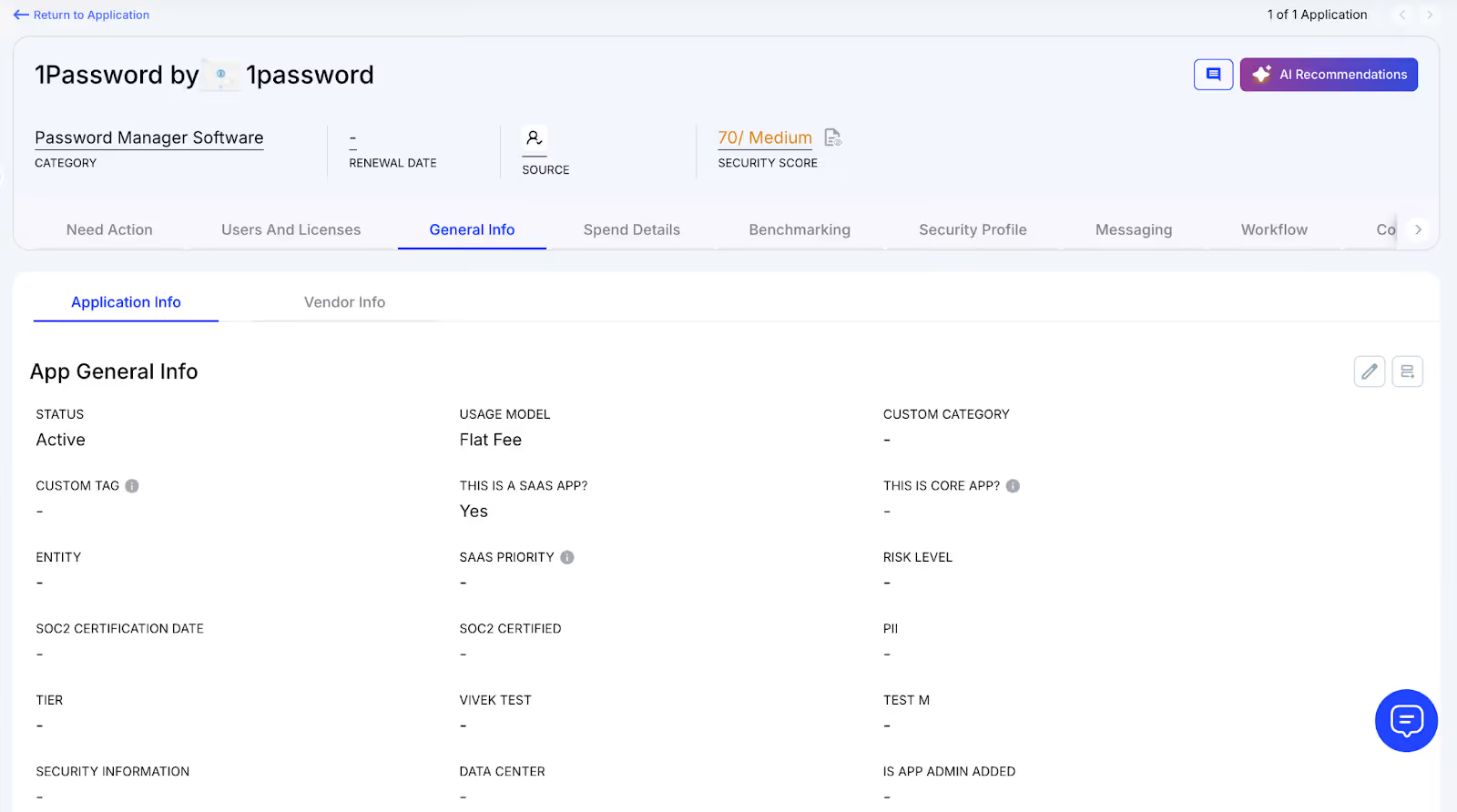
CloudEagle.ai aggregates vendor spend, usage data, and contract metadata from all connected systems in real time. Renewal dates, 1Password costs, and usage are displayed side by side for easy analysis.
Why We Are Better
Onboarding is completed within days. With over 500 integrations and AI-driven metadata extraction, CloudEagle.ai centralizes all license data, keeping it accurate, reliable, and up to date.
2. Real-Time Usage Analytics & Shadow IT Detection
Without centralized oversight, managing 1Password licenses and duplicate apps can become chaotic. Shadow IT often goes unnoticed, and IT teams struggle to identify users accessing redundant applications.
Current Process
Teams sometimes purchase duplicate applications using credit cards or free trials, which quietly convert into paid subscriptions. IT teams face challenges detecting duplicates or hidden usage.
Pain Points
Shadow IT generates untracked 1Password costs and potential security risks. Manually detecting duplicates is time-consuming and often misses overlapping applications.
How We Do It
CloudEagle.ai’s AI automatically identifies duplicate and overlapping applications while tracking feature-level usage. Shadow apps are flagged immediately.
Why We Are Better
Our AI compares functionality, not just app names. IT teams can automatically email users, trigger workflows, or create ITSM tickets to reclaim licenses and reduce risk.
3. Centralized License Management
Monitoring 1Password licenses across teams can become overwhelming. Many organizations rely on spreadsheets for top applications, manually correlating data from SSO logs, feature usage, and contracts.
Current Process
Most enterprises manage only their core applications in spreadsheets. Data from SSO logs, feature usage, and contracts is combined manually, which slows updates.
Pain Points
Unmanaged applications waste budget, and license reassignment rarely occurs. Renewal tracking is inconsistent, often resulting in missed cost savings.
How We Do It
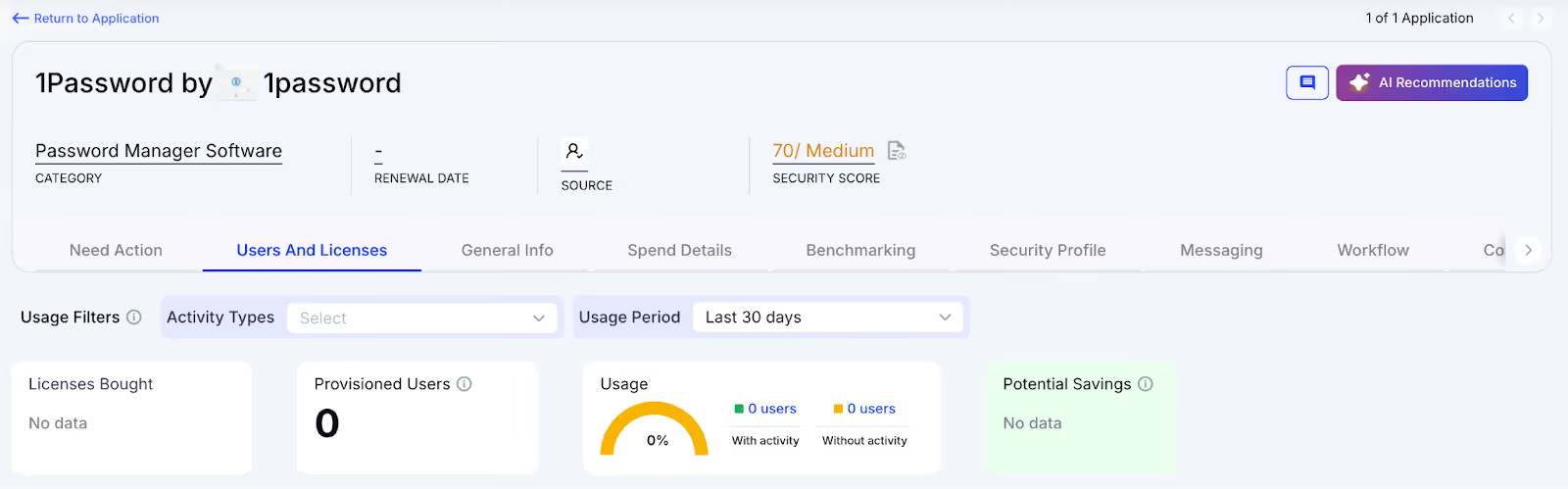
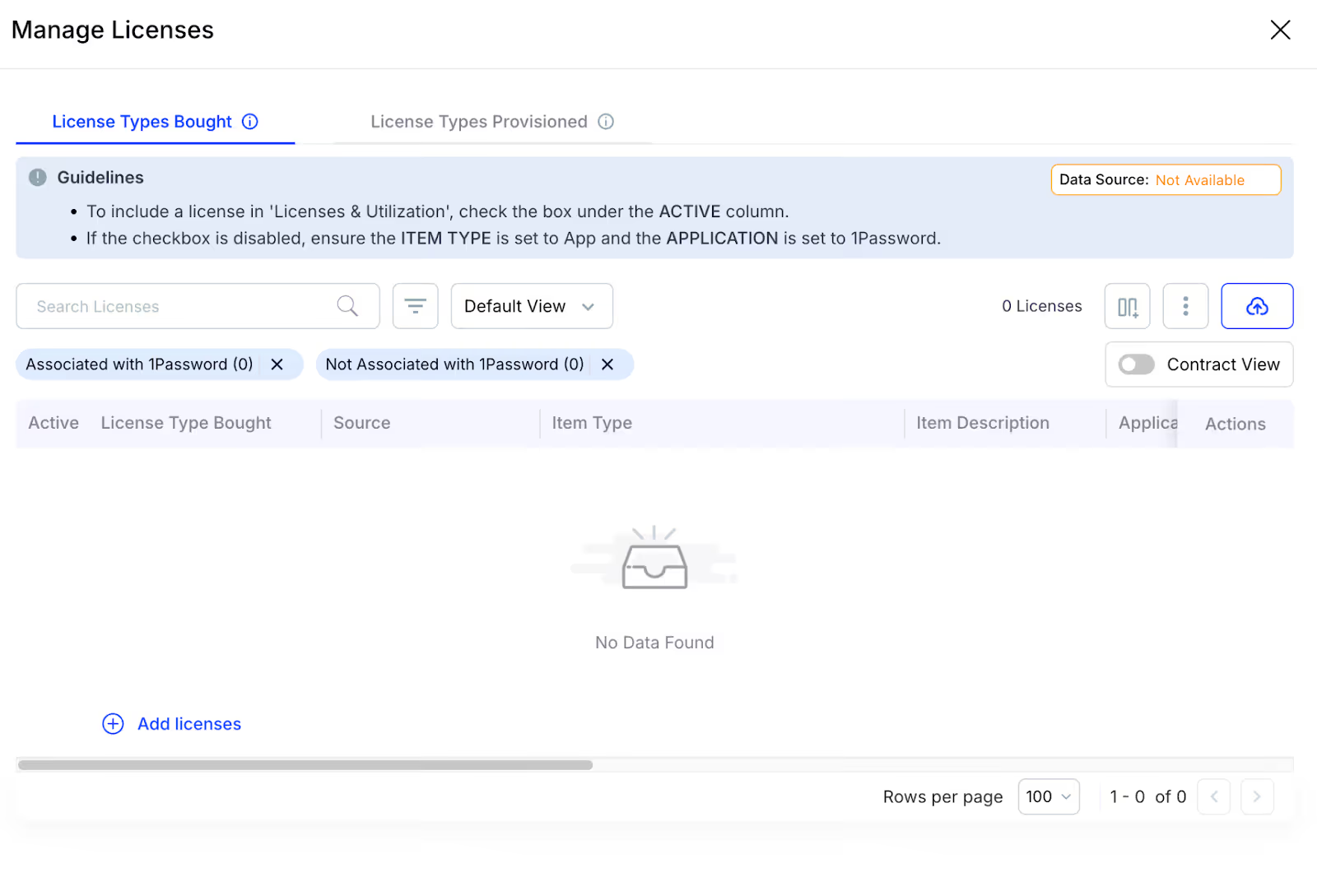
CloudEagle.ai centralizes license management in one platform. Nightly syncs consolidate IDP, contract, and connector data to provide real-time visibility into usage.
Why We Are Better
Automatic updates correlate purchased licenses, users, and feature usage across all applications. Teams can filter by license type and make quick, data-backed decisions.
4. Automated License Harvesting
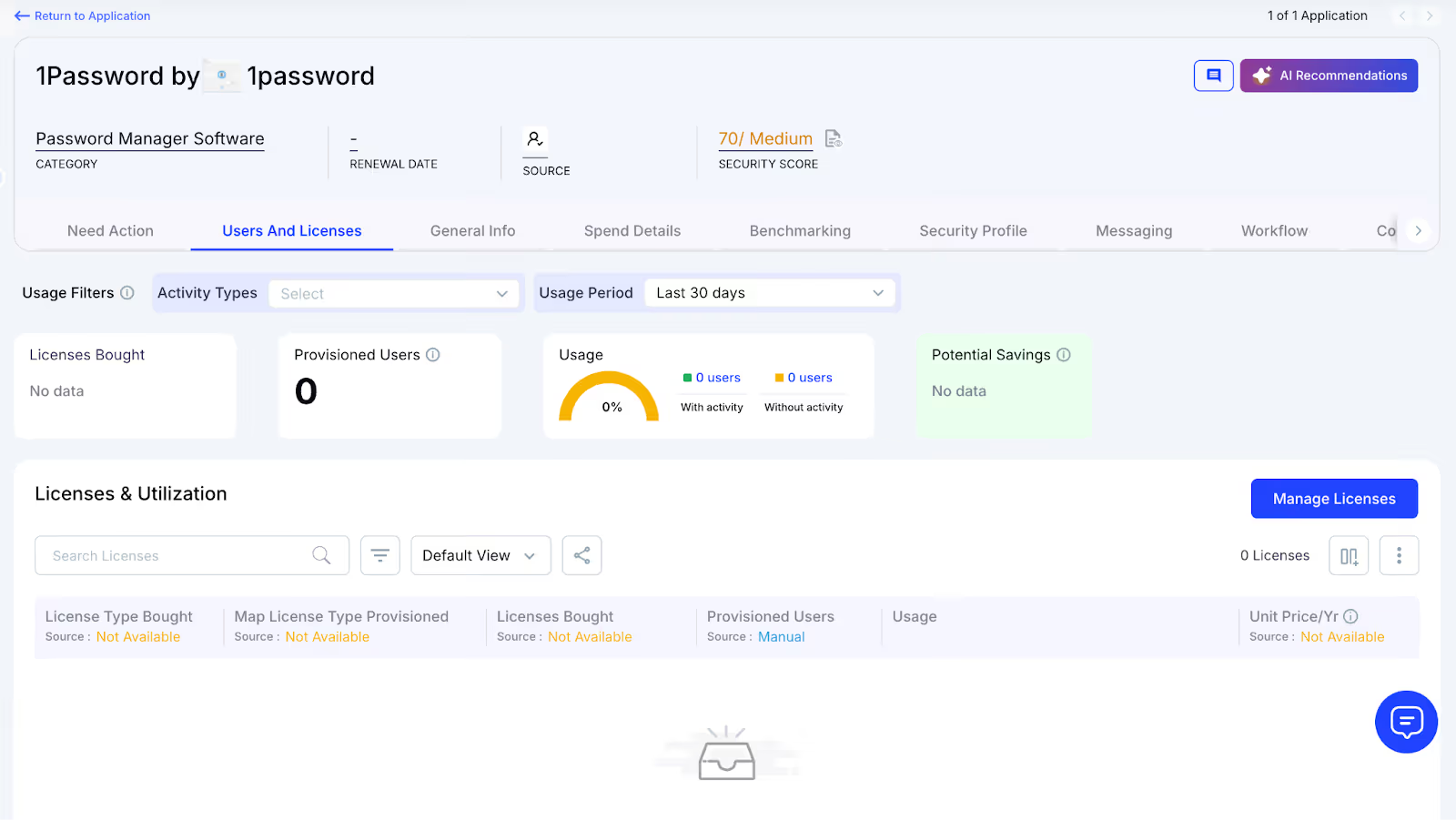
Unused 1Password licenses silently drive up costs, yet IT teams often lack a systematic process to reclaim them. Manually tracking usage and sending weekly emails to hundreds of users is tedious, error-prone, and time-consuming.
Current Process
IT teams manually email inactive users and update spreadsheets, making the process slow, repetitive, and often skipped.
Pain Points
Inactive licenses remain active, draining budgets and increasing risk. Manual reclamation does not scale efficiently.
How We Do It
CloudEagle.ai automates license harvesting. Weekly workflows detect inactivity, notify users, and reclaim or downgrade licenses based on usage.
Why We Are Better
Automations run daily or weekly via Okta or Microsoft AD. Licenses are reclaimed instantly, reducing waste, saving time, and maximizing utilization.
5. License Price Benchmarking
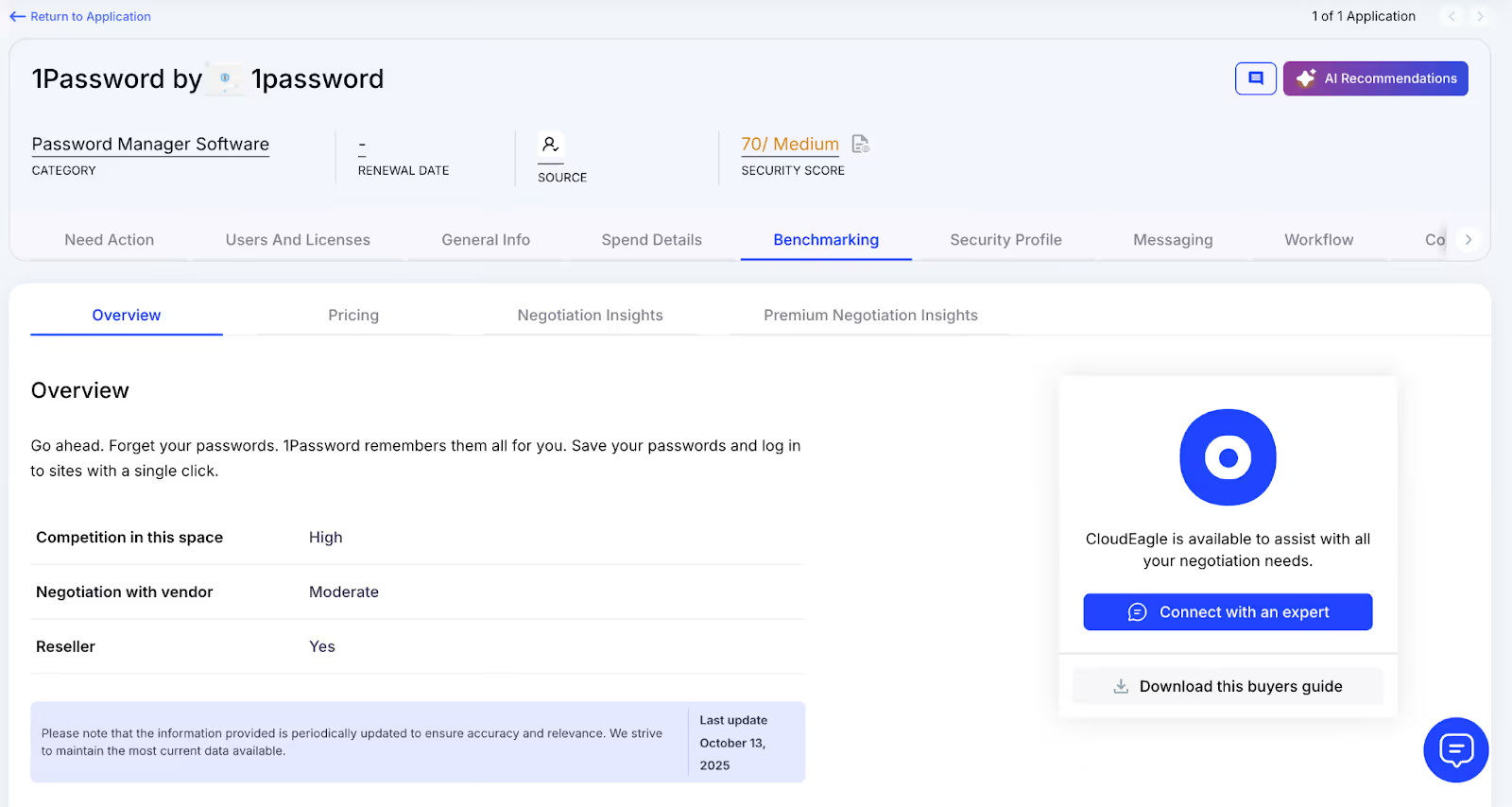
CloudEagle.ai’s price benchmarking feature helps organizations get the most value during license renewals. By comparing contracts against industry standards, enterprises can secure competitive rates and avoid overpaying.
Current Process
Procurement teams rely on vendor quotes or outdated deals. Peer comparisons are limited and often do not reflect real market prices.
Pain Points
Teams lack accurate data for negotiations, which can lead to overpayment or unfavorable contract terms.
How We Do It
CloudEagle.ai delivers real-time price benchmarks, historical trends, and 1Password buying guide to support data-driven negotiation strategies.
Why We Are Better
1Password Pricing is detailed by SKU, license tier, and quantity, alongside key negotiation levers, ensuring renewals reflect actual market value.
6. Proactive Renewal Management
CloudEagle.ai offers renewal management with automated workflows triggered by contract dates. From approvals to adjusting 1Password license counts, it ensures smooth management and prevents accidental auto-renewals.
Current Process
Renewals are tracked via spreadsheets and managed through long email chains. Approvals are slow, and auto-renewals often go unnoticed.
How We Do It
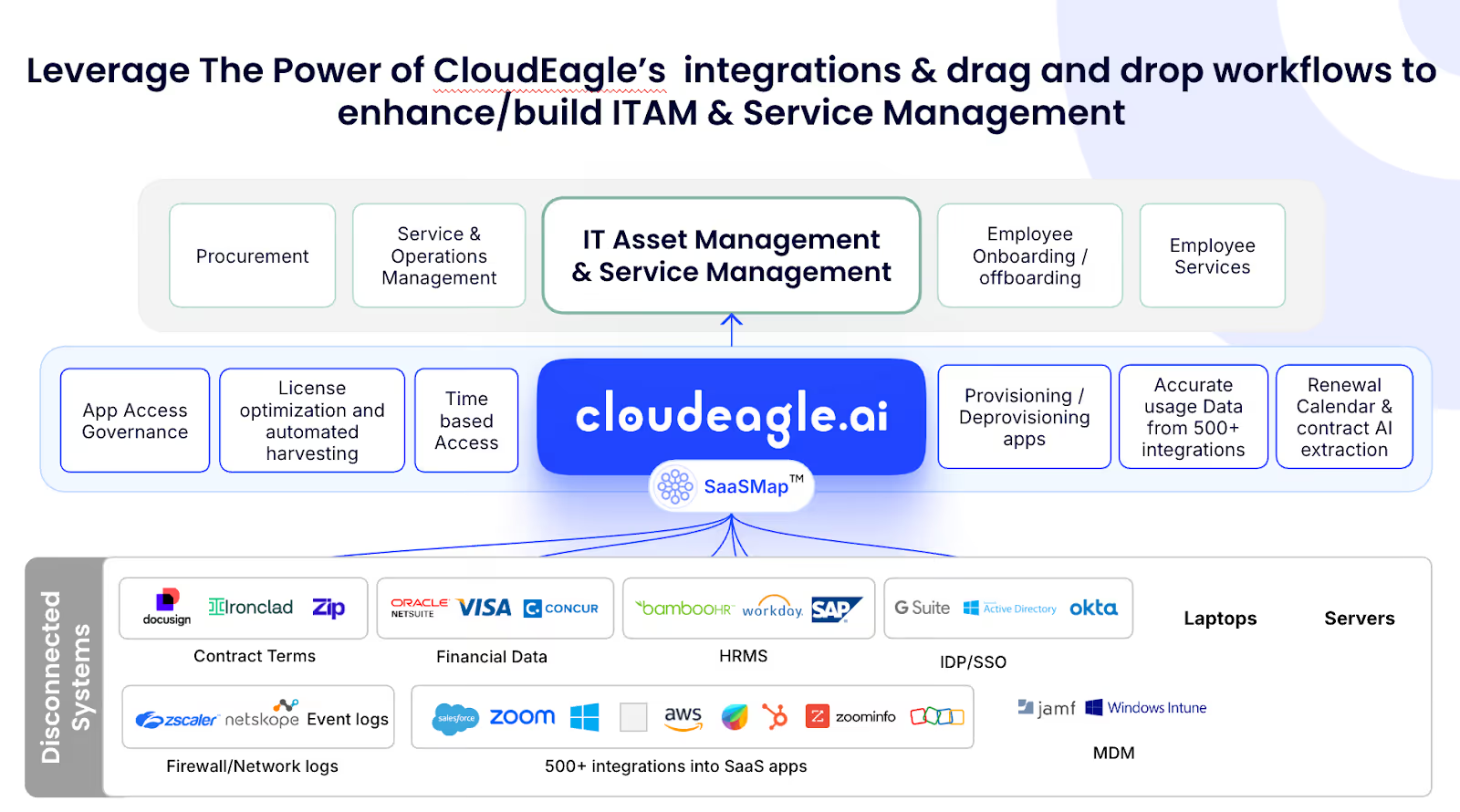
CloudEagle.ai generates a renewal calendar using AI-extracted metadata or integrates with CLMs like Ironclad, 1Password, or Zip. Renewal workflows trigger 90 days before the notice period, assigning tasks to finance, legal, and business owners.
Why We Are Better
Teams receive alerts with usage insights, price benchmarks, and alternative options. Approvals are tracked automatically, preventing missed renewals and unnecessary spend.
7. Leverage Vendor Dashboards
CloudEagle.ai provides vendor dashboards for a complete view of 1Password subscription data. Teams can track license usage, renewal dates, and spending patterns to make informed, data-driven decisions.
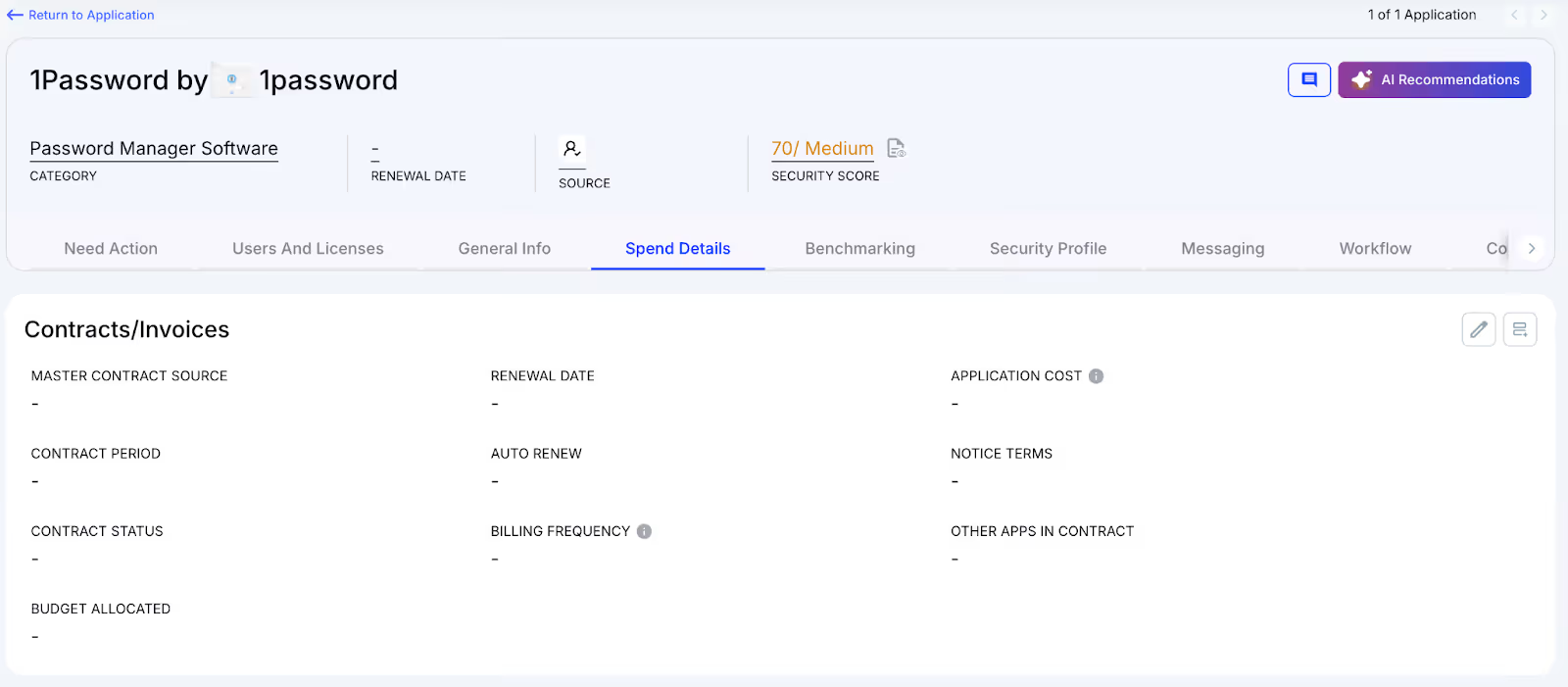
These dashboards reveal overspending and unused licenses, making resource reclamation simple. They also identify usage trends, helping organizations adjust subscriptions proactively and optimize 1Password license costs.
8. Simplified App Access Management
CloudEagle.ai streamlines 1Password access by allowing employees to request licenses directly through the platform or Slack, removing lengthy email chains and manual steps. Managers can review and approve requests in real time, ensuring quick access.
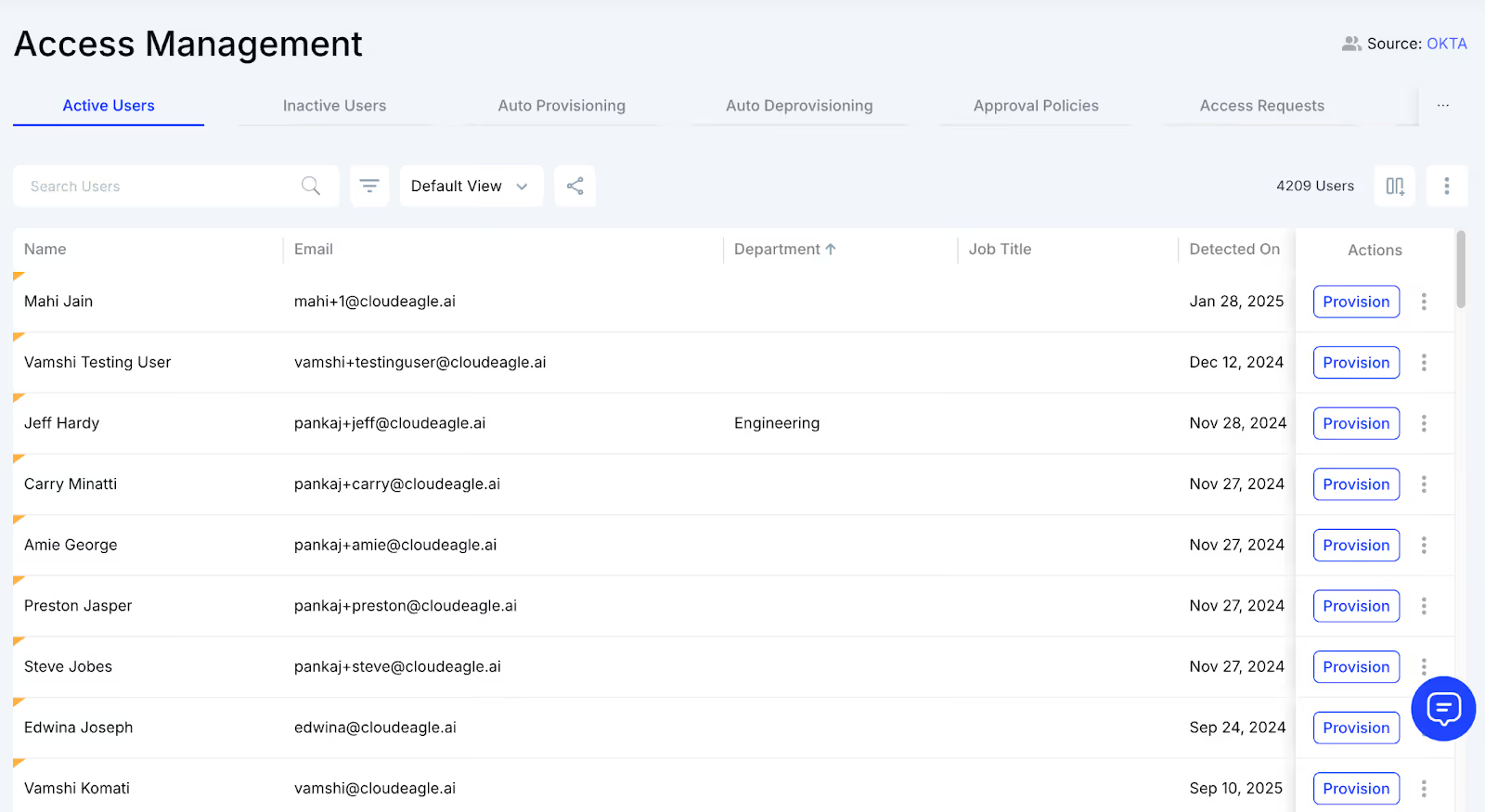
This approach ensures employees receive the correct licenses without delays and eliminates approval bottlenecks. Each access request is logged for transparency and compliance, making app access management efficient while reducing administrative workload.
Conclusion
Managing 1Password licenses isn’t just about assigning seats but keeping your team secure, productive, and cost-efficient. From manual provisioning to idle vaults and scattered billing, overlooked details quietly inflate budgets and create operational headaches.
Smart license management turns chaos into clarity. CloudEagle.ai centralizes oversight, automates provisioning, flags unused accounts, and consolidates billing, giving IT and finance teams a single source of truth. No more guessing, no more silent overspend.
FAQs
1. How do I manage my 1Password subscription?
Log in to your 1Password account online. From the Admin Console, add or remove users, adjust licenses, track usage, and manage billing. Centralized controls simplify oversight and prevent unnecessary costs.
2. How do I manage my 1Password subscription? (duplicate of 1)
Use the Admin Console to assign seats, monitor active users, and handle billing. Regular reviews help reclaim unused licenses and maintain security.
3. Is 1Password Manager free?
1Password offers a free trial, but ongoing use requires a paid plan. Costs vary based on individual, team, or enterprise needs and the number of licenses.
4. Which is better, Google Password Manager or 1Password?
1Password provides advanced features, team sharing, and enterprise-grade security. Google Password Manager is basic and free but lacks centralized management and auditing for teams.
5. Is Apple Password Manager better than 1Password?
Apple’s password manager is convenient for Apple devices, but 1Password offers cross-platform support, team sharing, and deeper security controls, making it better for enterprises.


.avif)


.avif)
.avif)




.png)





.avif)
.avif)
.avif)


