You need to enable JavaScript in order to use the AI chatbot tool powered by ChatBot

The Hidden Cost of Microsoft Copilot: How AI Expense Scales Across Enterprises

Share via:
blog-cms-banner-bg
Little-Known Negotiation Hacks to Get the Best Deal on Slack
cta-bg-blogDownload Your Copy

HIPAA Compliance Checklist for 2025

Download PDF

SaaS Optimization Guide

Learn how enterprises uncover hidden AI costs, optimize Copilot usage, and control spend before expenses scale uncontrollably.

Download Guide
CTA Thumbnail

Microsoft Copilot adoption is skyrocketing, but enterprise cost overruns are quietly exploding behind the scenes.

Gartner reports that AI-related SaaS costs will grow 30–50% annually as companies adopt copilots faster than governance can keep up.

The truth?

What starts as a small investment in generative AI quickly becomes one of the fastest-growing budget items in the enterprise.

This guide breaks down why Copilot pricing expands so quickly, the hidden drivers behind AI overspending, and how organizations can get full control of their AI tool costs.

TL;DR 

  • Copilot adoption is exploding, but spending scales faster than value without governance.

  • Licensing isn’t the only cost; usage-based fees, training, and auto-enabled seats inflate total spend.
  • Hidden drivers like storage growth, Shadow AI, and unmanaged renewals quietly drain budgets.
  • Optimization requires visibility, usage analytics, rightsizing, reclamation, and ROI tracking.
  • CloudEagle.ai turns Copilot oversight into savings, reclaiming waste and ensuring AI spend aligns with actual productivity impact.

1. What Is Microsoft Copilot and Why Enterprises Are Adopting It?

Microsoft Copilot is Microsoft’s generative AI assistant built into Microsoft 365, Windows, Teams, Outlook, and other enterprise apps. 

Enterprises are adopting it rapidly because it promises instant productivity gains and automation across thousands of daily tasks.

a. Promise of productivity and automation

Copilot is marketed as a universal accelerator, offering summaries, drafts, insights, code generation, meeting notes, and workflow automation.

  • Teams expect immediate productivity boosts
  • Execs view Copilot as essential for AI transformation
  • Adoption often becomes a leadership mandate

b. Rapid deployment without usage planning

Most enterprises roll out Copilot across entire departments “just to see who uses it,” which results in:

  • Oversized deployments
  • Little usage benchmarking before purchasing
  • Paying for licenses that never activate

One Forrester study shows that 70% of companies deploy AI tools before defining usage metrics, fueling unnecessary spend.

License Management Guide

Understand how to track Copilot licenses, identify unused access, and prevent unnecessary AI subscription overspend.

Download Guide
CTA Thumbnail

2. Why Copilot Costs Grow Faster Than Expected?

Copilot costs escalate faster than expected because licenses are bundled with mandatory add-ons, usage-based charges introduce unpredictable PAYG billing, and most organizations lack visibility into whether the investment is actually delivering ROI.

a. Per-seat and usage-based licensing

Copilot for Microsoft 365 is $30 per user/month, but new SKUs also add usage-based charges (Compute, AI APIs, premium models).

  • Costs increase with more actions, prompts, and copilots
  • Shared departments (HR, Finance, Ops) see volume spikes
  • High-volume roles trigger compute surcharges

b. Enabled for inactive or low-usage users

Organizations commonly purchase licenses “for everyone,” but only 20–40% use them weekly.
This leads to:

  • Paying full price for near-zero usage
  • Duplicate licenses when users switch teams
  • No automatic reclamation

c. Add-on subscription layers & training expenses

Beyond Copilot, enterprises purchase:

  • Microsoft Copilot Studio
  • Security & Compliance Add-ons
  • Viva Insights
  • Azure AI usage credits

Plus, companies underestimate training costs; IBM reports that up to 35% of AI budgets go toward adoption, training, and productivity enablement.

SaaS Management Best Practices

Explore best practices to govern AI tool adoption, manage renewals, and maintain visibility across enterprise SaaS environments.

Read Best Practices
CTA Thumbnail

3. How CloudEagle.ai Helps Optimize AI Cost and Usage?

Beyond governance, CloudEagle.ai also optimizes cost, harvests waste, and ensures ROI for all AI tools. 

By linking contracts, usage data, and access ownership, it helps enterprises make smarter renewal decisions, negotiate better pricing, and invest only where AI is delivering impact.

1. AI License & Usage Visibility

CloudEagle.ai gives teams application visibility into how AI tools are actually used, not just who has access, but who engages with them, how often, and at what depth.

CloudEagle.ai provides detailed analytics for AI apps:

  • Login activity
  • Real usage frequency
  • Feature utilization
  • Seat-by-seat consumption

2. Identify Unused or Underutilized AI Spend

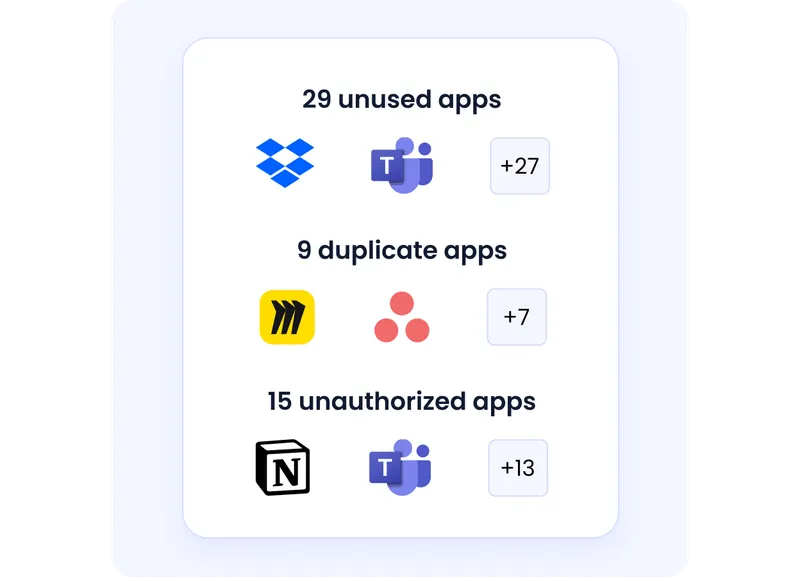
Most enterprises pay for AI licenses that sit idle or are barely used. 

CloudEagle.ai surfaces these blind spots, so teams instantly see waste, unused seats, accidental paid upgrades, redundant apps, and long before renewal time.

CloudEagle.ai flags:

  • AI tools with unused seats
  • Free trials turning into paid subscriptions
  • Redundant AI tools with overlapping use cases
  • Department-level AI overspending

3. AI License Harvesting (Automatic)

Instead of manually chasing users for unused seats, CloudEagle.ai does the heavy lifting. 

It continuously monitors AI usage and automatically reclaims licenses when adoption drops, keeping spend aligned with real need.
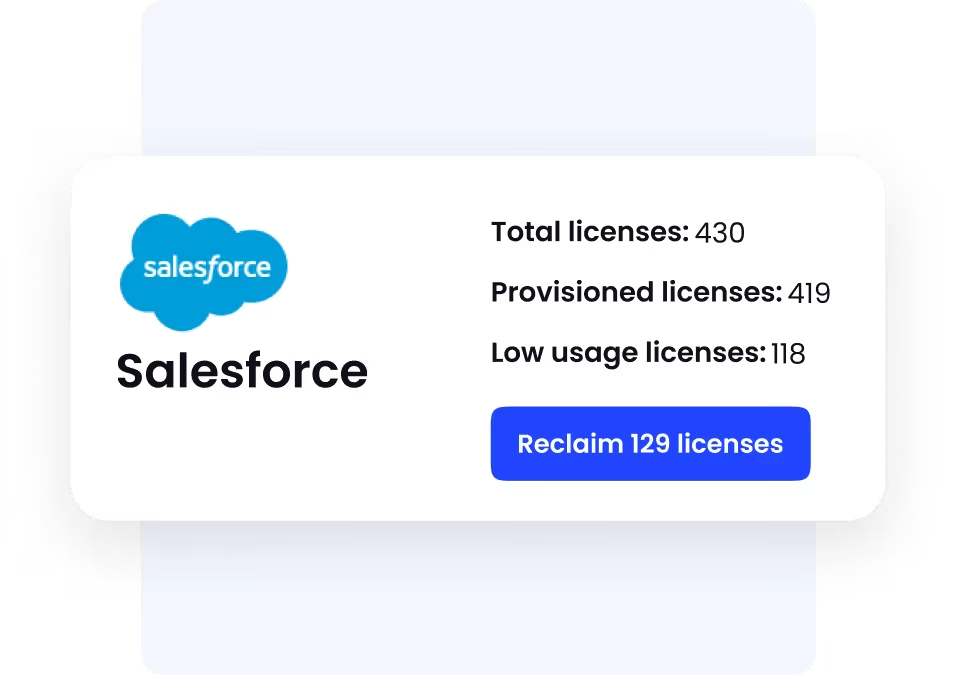
Automated License Harvesting reduces waste and maximizes ROI.

4. Duplicate AI Tool Consolidation

AI sprawl means five teams may unknowingly buy five versions of the same tool. 

CloudEagle.ai spots duplicates, whether functionality, pricing, or purpose, so companies consolidate intelligently and avoid paying twice for the same application.
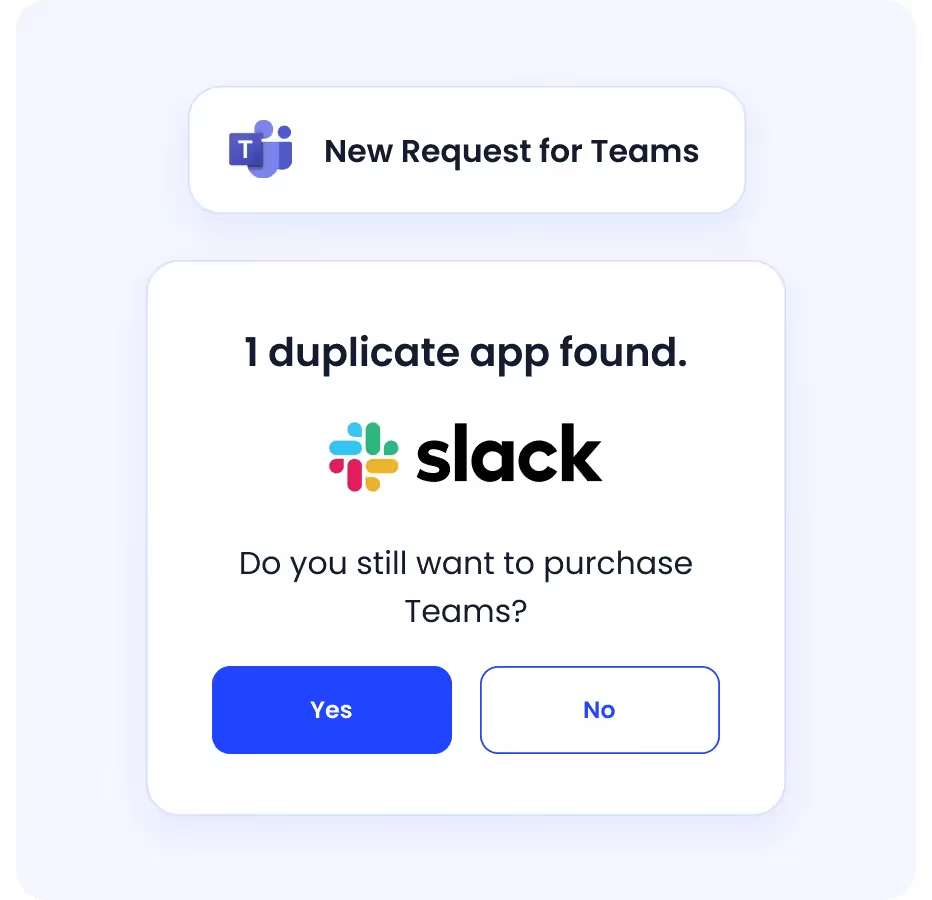
CloudEagle.ai uses its AI classification engine to identify:

  • Duplicate AI tools (e.g., ChatGPT vs. Jasper vs. Writesonic)
  • Duplicate purchases across teams
  • Rogue or redundant AI spend

5. Benchmarking AI Vendor Pricing

AI pricing is volatile and opaque. 

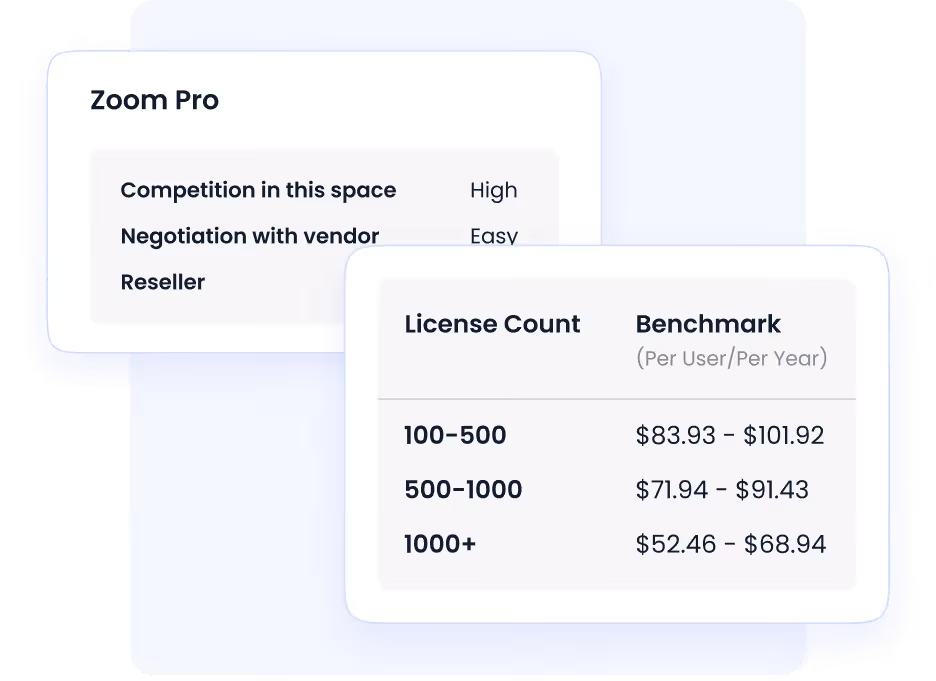
CloudEagle.ai arms procurement teams with pricing benchmarks across leading AI vendors, ensuring renewals and negotiations aren’t guesswork but grounded in market intel and SKU-level insights.

Procurement teams get:

  • Benchmarks for OpenAI, Anthropic, Perplexity, Midjourney, and others
  • Renewal negotiation recommendations
  • SKU-level optimization insights

6. Avoid Surprise AI Renewals

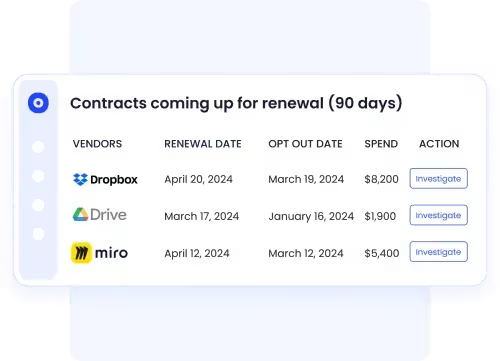
AI tools renew faster and more often than traditional SaaS, meaning costs sneak through unnoticed. CloudEagle.ai tracks every renewal, automates reminders, and prevents auto-renew traps so teams never lose leverage at renegotiation time.

CloudEagle’s renewal workflows eliminate:

  • Missed contract dates
  • Auto-renew traps
  • Last-minute negotiation rush

4. Hidden Cost Drivers Enterprises Often Miss

Enterprises frequently overlook major hidden cost drivers that quietly erode profitability, from inefficiencies in operations and workforce gaps to unmanaged technology sprawl and weak quality controls. 

These expenses rarely appear as obvious budget items; instead, they are buried inside everyday business activity.

a. Compute and storage overhead

AI-generated content increases compute, SharePoint/OneDrive storage, and Teams data usage.

  • AI files consume more storage
  • Additional sync + backup overhead
  • New indexing and retrieval tasks

b. Shadow AI usage from unsanctioned tools

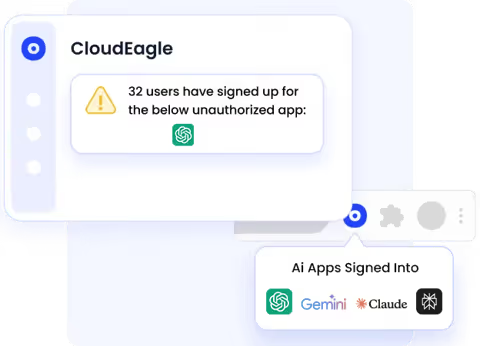
Even with Copilot deployed, employees still use:

  • ChatGPT
  • Claude
  • Jasper
  • Midjourney
  • 3rd-party AI coding tools

Gartner found 41% of enterprise AI usage happens in tools not approved by IT, multiplying cost and compliance risk. 

c. Untracked renewals & cost forecasting gaps

Copilot renewals auto-trigger annually.

When no owner is assigned:

  • IT gets unexpected renewal invoices
  • Finance teams can't forecast AI spend
  • Budgeting becomes inaccurate

Over time, AI spending becomes one of the least predictable cost buckets in SaaS.

5. How to Control and Optimize Copilot Spend?

Optimize Copilot spend by crafting better prompts, batching requests, leveraging Copilot Studio for controlled automation, and actively monitoring usage through admin dashboards to reclaim waste and rightsize licenses for maximum value.

a. License rightsizing & usage analytics

You can’t optimize Copilot without knowing:

  • Who is using it
  • How often
  • What they're generating
  • Which teams benefit most

Rightsizing removes waste and focuses investment on high-value users.

b. Automated reclamation workflows

Reclaiming unused licenses manually doesn’t scale.
Companies need:

This alone cuts Copilot spend by 20–35% in large organizations.

c. Measuring ROI & productivity impact

AI spend is justified only if outcomes are measurable.

Track:

  • Time saved
  • Task automation frequency
  • Reduced manual work
  • Team-level adoption consistency

Microsoft’s own survey shows users save 10+ hours per month on average with Copilot, but only if actively used.

6. Conclusion

Copilot delivers tremendous value, but only when deployed with governance, visibility, and usage intelligence.

Without oversight, enterprises face spiraling licensing costs, unmanaged renewals, Shadow AI adoption, and unpredictable consumption charges.

With structured governance and automated spend optimization, companies can reduce unnecessary Copilot waste, ensure access goes to the right users, and maintain AI budgets that scale responsibly.

CloudEagle.ai makes this practical by turning Copilot oversight into measurable savings. It connects usage insights, license ownership, and renewal intelligence so enterprises can reclaim idle seats, eliminate duplicate tools, and negotiate renewals with real data, not assumptions. 

Book a free demo to see how CloudEagle.ai optimizes AI spend with accountability and precision.

FAQ

1.  Is Copilot better than ChatGPT-4?

Copilot is better if you work inside Microsoft tools like Word, Excel, and Outlook. ChatGPT-4 is stronger for broad use, creativity, research, learning, and reasoning. So neither is universally better; it depends on how and where you plan to use them.

2. What affects the cost of Copilot licensing?

Seat count, usage volume, premium model access, Copilot Studio, security add-ons, and training expenses all impact Copilot licensing costs.

3. Why does AI spending scale quickly in enterprises?

AI costs scale rapidly due to per-seat licensing, unstopped renewals, usage-based compute charges, Shadow AI, and a lack of centralized controls.

4. How can companies reduce AI spend without limiting access?

By rightsizing licenses, reclaiming unused seats automatically, tracking usage, and assigning Copilot only to high-value teams or roles.

5. Is Microsoft Copilot worth the investment?

Yes, but only when usage is tracked, costs are governed, and licenses are assigned strategically. Without oversight, value drops and spend rises quickly.

Advertisement for a SaaS Subscription Tracking Template with a call-to-action button to download and a partial graphic of a tablet showing charts.Banner promoting a SaaS Agreement Checklist to streamline SaaS management and avoid budget waste with a call-to-action button labeled Download checklist.Blue banner with text 'The Ultimate Employee Offboarding Checklist!' and a black button labeled 'Download checklist' alongside partial views of checklist documents from cloudeagle.ai.Digital ad for download checklist titled 'The Ultimate Checklist for IT Leaders to Optimize SaaS Operations' by cloudeagle.ai, showing checklist pages.Slack Buyer's Guide offer with text 'Unlock insider insights to get the best deal on Slack!' and a button labeled 'Get Your Copy', accompanied by a preview of the guide featuring Slack's logo.Monday Pricing Guide by cloudeagle.ai offering exclusive pricing secrets to maximize investment with a call-to-action button labeled Get Your Copy and an image of the guide's cover.Blue banner for Canva Pricing Guide by cloudeagle.ai offering a guide to Canva costs, features, and alternatives with a call-to-action button saying Get Your Copy.Blue banner with white text reading 'Little-Known Negotiation Hacks to Get the Best Deal on Slack' and a white button labeled 'Get Your Copy'.Blue banner with text 'Little-Known Negotiation Hacks to Get the Best Deal on Monday.com' and a white button labeled 'Get Your Copy'.Blue banner with text 'Little-Known Negotiation Hacks to Get the Best Deal on Canva' and a white button labeled 'Get Your Copy'.Banner with text 'Slack Buyer's Guide' and a 'Download Now' button next to images of a guide titled 'Slack Buyer’s Guide: Features, Pricing & Best Practices'.Digital cover of Monday Pricing Guide with a button labeled Get Your Copy on a blue background.Canva Pricing Guide cover with a button labeled Get Your Copy on a blue gradient background.

Enter your email to
unlock the report

Oops! Something went wrong while submitting the form.
License Count
Benchmark
Per User/Per Year

Enter your email to
unlock the report

Oops! Something went wrong while submitting the form.
License Count
Benchmark
Per User/Per Year

Enter your email to
unlock the report

Oops! Something went wrong while submitting the form.
Notion Plus
License Count
Benchmark
Per User/Per Year
100-500
$67.20 - $78.72
500-1000
$59.52 - $72.00
1000+
$51.84 - $57.60
Canva Pro
License Count
Benchmark
Per User/Per Year
100-500
$74.33-$88.71
500-1000
$64.74-$80.32
1000+
$55.14-$62.34

Enter your email to
unlock the report

Oops! Something went wrong while submitting the form.

Enter your email to
unlock the report

Oops! Something went wrong while submitting the form.
Zoom Business
License Count
Benchmark
Per User/Per Year
100-500
$216.00 - $264.00
500-1000
$180.00 - $216.00
1000+
$156.00 - $180.00

Enter your email to
unlock the report

Oops! Something went wrong while submitting the form.

Get the Right Security Platform To Secure Your Cloud Infrastructure

Please enter a business email
Thank you!
The 2023 SaaS report has been sent to your email. Check your promotional or spam folder.
Oops! Something went wrong while submitting the form.

Access full report

Please enter a business email
Thank you!
The 2023 SaaS report has been sent to your email. Check your promotional or spam folder.
Oops! Something went wrong while submitting the form.

SaaS Optimization Guide

Learn how enterprises uncover hidden AI costs, optimize Copilot usage, and control spend before expenses scale uncontrollably.

Download Guide
CTA Thumbnail

Microsoft Copilot adoption is skyrocketing, but enterprise cost overruns are quietly exploding behind the scenes.

Gartner reports that AI-related SaaS costs will grow 30–50% annually as companies adopt copilots faster than governance can keep up.

The truth?

What starts as a small investment in generative AI quickly becomes one of the fastest-growing budget items in the enterprise.

This guide breaks down why Copilot pricing expands so quickly, the hidden drivers behind AI overspending, and how organizations can get full control of their AI tool costs.

TL;DR 

  • Copilot adoption is exploding, but spending scales faster than value without governance.

  • Licensing isn’t the only cost; usage-based fees, training, and auto-enabled seats inflate total spend.
  • Hidden drivers like storage growth, Shadow AI, and unmanaged renewals quietly drain budgets.
  • Optimization requires visibility, usage analytics, rightsizing, reclamation, and ROI tracking.
  • CloudEagle.ai turns Copilot oversight into savings, reclaiming waste and ensuring AI spend aligns with actual productivity impact.

1. What Is Microsoft Copilot and Why Enterprises Are Adopting It?

Microsoft Copilot is Microsoft’s generative AI assistant built into Microsoft 365, Windows, Teams, Outlook, and other enterprise apps. 

Enterprises are adopting it rapidly because it promises instant productivity gains and automation across thousands of daily tasks.

a. Promise of productivity and automation

Copilot is marketed as a universal accelerator, offering summaries, drafts, insights, code generation, meeting notes, and workflow automation.

  • Teams expect immediate productivity boosts
  • Execs view Copilot as essential for AI transformation
  • Adoption often becomes a leadership mandate

b. Rapid deployment without usage planning

Most enterprises roll out Copilot across entire departments “just to see who uses it,” which results in:

  • Oversized deployments
  • Little usage benchmarking before purchasing
  • Paying for licenses that never activate

One Forrester study shows that 70% of companies deploy AI tools before defining usage metrics, fueling unnecessary spend.

License Management Guide

Understand how to track Copilot licenses, identify unused access, and prevent unnecessary AI subscription overspend.

Download Guide
CTA Thumbnail

2. Why Copilot Costs Grow Faster Than Expected?

Copilot costs escalate faster than expected because licenses are bundled with mandatory add-ons, usage-based charges introduce unpredictable PAYG billing, and most organizations lack visibility into whether the investment is actually delivering ROI.

a. Per-seat and usage-based licensing

Copilot for Microsoft 365 is $30 per user/month, but new SKUs also add usage-based charges (Compute, AI APIs, premium models).

  • Costs increase with more actions, prompts, and copilots
  • Shared departments (HR, Finance, Ops) see volume spikes
  • High-volume roles trigger compute surcharges

b. Enabled for inactive or low-usage users

Organizations commonly purchase licenses “for everyone,” but only 20–40% use them weekly.
This leads to:

  • Paying full price for near-zero usage
  • Duplicate licenses when users switch teams
  • No automatic reclamation

c. Add-on subscription layers & training expenses

Beyond Copilot, enterprises purchase:

  • Microsoft Copilot Studio
  • Security & Compliance Add-ons
  • Viva Insights
  • Azure AI usage credits

Plus, companies underestimate training costs; IBM reports that up to 35% of AI budgets go toward adoption, training, and productivity enablement.

SaaS Management Best Practices

Explore best practices to govern AI tool adoption, manage renewals, and maintain visibility across enterprise SaaS environments.

Read Best Practices
CTA Thumbnail

3. How CloudEagle.ai Helps Optimize AI Cost and Usage?

Beyond governance, CloudEagle.ai also optimizes cost, harvests waste, and ensures ROI for all AI tools. 

By linking contracts, usage data, and access ownership, it helps enterprises make smarter renewal decisions, negotiate better pricing, and invest only where AI is delivering impact.

1. AI License & Usage Visibility

CloudEagle.ai gives teams application visibility into how AI tools are actually used, not just who has access, but who engages with them, how often, and at what depth.

CloudEagle.ai provides detailed analytics for AI apps:

  • Login activity
  • Real usage frequency
  • Feature utilization
  • Seat-by-seat consumption

2. Identify Unused or Underutilized AI Spend

Most enterprises pay for AI licenses that sit idle or are barely used. 

CloudEagle.ai surfaces these blind spots, so teams instantly see waste, unused seats, accidental paid upgrades, redundant apps, and long before renewal time.

CloudEagle.ai flags:

  • AI tools with unused seats
  • Free trials turning into paid subscriptions
  • Redundant AI tools with overlapping use cases
  • Department-level AI overspending

3. AI License Harvesting (Automatic)

Instead of manually chasing users for unused seats, CloudEagle.ai does the heavy lifting. 

It continuously monitors AI usage and automatically reclaims licenses when adoption drops, keeping spend aligned with real need.

Automated License Harvesting reduces waste and maximizes ROI.

4. Duplicate AI Tool Consolidation

AI sprawl means five teams may unknowingly buy five versions of the same tool. 

CloudEagle.ai spots duplicates, whether functionality, pricing, or purpose, so companies consolidate intelligently and avoid paying twice for the same application.

CloudEagle.ai uses its AI classification engine to identify:

  • Duplicate AI tools (e.g., ChatGPT vs. Jasper vs. Writesonic)
  • Duplicate purchases across teams
  • Rogue or redundant AI spend

5. Benchmarking AI Vendor Pricing

AI pricing is volatile and opaque. 

CloudEagle.ai arms procurement teams with pricing benchmarks across leading AI vendors, ensuring renewals and negotiations aren’t guesswork but grounded in market intel and SKU-level insights.

Procurement teams get:

  • Benchmarks for OpenAI, Anthropic, Perplexity, Midjourney, and others
  • Renewal negotiation recommendations
  • SKU-level optimization insights

6. Avoid Surprise AI Renewals

AI tools renew faster and more often than traditional SaaS, meaning costs sneak through unnoticed. CloudEagle.ai tracks every renewal, automates reminders, and prevents auto-renew traps so teams never lose leverage at renegotiation time.

CloudEagle’s renewal workflows eliminate:

  • Missed contract dates
  • Auto-renew traps
  • Last-minute negotiation rush

4. Hidden Cost Drivers Enterprises Often Miss

Enterprises frequently overlook major hidden cost drivers that quietly erode profitability, from inefficiencies in operations and workforce gaps to unmanaged technology sprawl and weak quality controls. 

These expenses rarely appear as obvious budget items; instead, they are buried inside everyday business activity.

a. Compute and storage overhead

AI-generated content increases compute, SharePoint/OneDrive storage, and Teams data usage.

  • AI files consume more storage
  • Additional sync + backup overhead
  • New indexing and retrieval tasks

b. Shadow AI usage from unsanctioned tools

Even with Copilot deployed, employees still use:

  • ChatGPT
  • Claude
  • Jasper
  • Midjourney
  • 3rd-party AI coding tools

Gartner found 41% of enterprise AI usage happens in tools not approved by IT, multiplying cost and compliance risk. 

c. Untracked renewals & cost forecasting gaps

Copilot renewals auto-trigger annually.

When no owner is assigned:

  • IT gets unexpected renewal invoices
  • Finance teams can't forecast AI spend
  • Budgeting becomes inaccurate

Over time, AI spending becomes one of the least predictable cost buckets in SaaS.

5. How to Control and Optimize Copilot Spend?

Optimize Copilot spend by crafting better prompts, batching requests, leveraging Copilot Studio for controlled automation, and actively monitoring usage through admin dashboards to reclaim waste and rightsize licenses for maximum value.

a. License rightsizing & usage analytics

You can’t optimize Copilot without knowing:

  • Who is using it
  • How often
  • What they're generating
  • Which teams benefit most

Rightsizing removes waste and focuses investment on high-value users.

b. Automated reclamation workflows

Reclaiming unused licenses manually doesn’t scale.
Companies need:

This alone cuts Copilot spend by 20–35% in large organizations.

c. Measuring ROI & productivity impact

AI spend is justified only if outcomes are measurable.

Track:

  • Time saved
  • Task automation frequency
  • Reduced manual work
  • Team-level adoption consistency

Microsoft’s own survey shows users save 10+ hours per month on average with Copilot, but only if actively used.

6. Conclusion

Copilot delivers tremendous value, but only when deployed with governance, visibility, and usage intelligence.

Without oversight, enterprises face spiraling licensing costs, unmanaged renewals, Shadow AI adoption, and unpredictable consumption charges.

With structured governance and automated spend optimization, companies can reduce unnecessary Copilot waste, ensure access goes to the right users, and maintain AI budgets that scale responsibly.

CloudEagle.ai makes this practical by turning Copilot oversight into measurable savings. It connects usage insights, license ownership, and renewal intelligence so enterprises can reclaim idle seats, eliminate duplicate tools, and negotiate renewals with real data, not assumptions. 

Book a free demo to see how CloudEagle.ai optimizes AI spend with accountability and precision.

FAQ

1.  Is Copilot better than ChatGPT-4?

Copilot is better if you work inside Microsoft tools like Word, Excel, and Outlook. ChatGPT-4 is stronger for broad use, creativity, research, learning, and reasoning. So neither is universally better; it depends on how and where you plan to use them.

2. What affects the cost of Copilot licensing?

Seat count, usage volume, premium model access, Copilot Studio, security add-ons, and training expenses all impact Copilot licensing costs.

3. Why does AI spending scale quickly in enterprises?

AI costs scale rapidly due to per-seat licensing, unstopped renewals, usage-based compute charges, Shadow AI, and a lack of centralized controls.

4. How can companies reduce AI spend without limiting access?

By rightsizing licenses, reclaiming unused seats automatically, tracking usage, and assigning Copilot only to high-value teams or roles.

5. Is Microsoft Copilot worth the investment?

Yes, but only when usage is tracked, costs are governed, and licenses are assigned strategically. Without oversight, value drops and spend rises quickly.

CloudEagle.ai recognized in the 2025 Gartner® Magic Quadrant™ for SaaS Management Platforms
Download now
gartner chart
5x
Faster employee
onboarding
80%
Reduction in time for
user access reviews
30k
Workflows
automated
$15Bn
Analyzed in
contract spend
$2Bn
Saved in
SaaS spend

Recognized as an Industry leader for our AI

CloudEagle.ai is Recognized in the 2024 Gartner® Magic Quadrant™ for SaaS Management Platforms

Recognition highlights CloudEagle’s innovation and leadership in the rapidly evolving SaaS management and procurement space.
Read More
Gartner Magic Quadrant for SaaS Management Platforms showing a chart divided into Challengers and Leaders quadrants with various companies plotted as dots.

CloudEagle.ai Recognized in the GigaOm Radar for SaaS Management Platforms

CloudEagle named a Leader and Outperformer in GigaOm Radar Report, validating its impact in the SaaS management platform landscape.
Read More
gigaom

Everest Group Positions CloudEagle.ai as a Trailblazer in SaaS Management Platforms

CloudEagle recognized as a Trailblazer by Everest Group, showcasing its rapid growth and innovation in SaaS spend and operations management.
Read More
qks

CloudEagle.ai is Recognized in the 2024 Gartner® Magic Quadrant™ for SaaS Management Platforms

Recognition highlights CloudEagle’s innovation and leadership in the rapidly evolving SaaS management and procurement space.
Read More
gartner

Streamline SaaS governance and save 10-30%

Book a Demo with Expert
CTA image
One platform to Manage
all SaaS Products
Learn More