
%201.svg)


HIPAA Compliance Checklist for 2025

Airtable has a funny way of sneaking into a company. One team builds a workflow, another copies it “just to test something,” and a third spins up a base because the first two looked interesting.
That’s when the invoice starts telling a different story. Extra editors who don’t edit. Automations that never fire. According to Gartner, over 25% of SaaS licenses in growing organizations remain completely inactive.
CloudEagle.ai steps in before that drift becomes spend. It identifies unused seats, mismatched license tiers, inactive bases, and quietly-expanding workspaces. The result? Fewer surprises and a tighter license structure.
1. When Did Your Airtable Bases Start Multiplying Faster?
Airtable licenses are a neat way to organize a project, track a campaign, or experiment with a workflow. Then someone duplicates it “just in case,” another team spins up their own version, and a third inherits an old base they don’t want to delete.
Before long, your workspace looks less like a system and more like a greenhouse where everything grows… whether you planted it or not.
- Duplicated project templates that nobody remembers tweaking.
- Old departmental bases still alive because no one is brave enough to archive them.
- One-off experiments that quietly converted into full-blown workspaces.
- Inherited bases passed across teams like digital heirlooms.
And the growth is financial. According to TechRepublic, half of software licenses go unused, wasting around $44 million per month. This is mostly because teams keep creating new spaces instead of reusing existing ones.
2. How Many Airtable Seats Are You Still Paying For?
Every Airtable workspace has a few seats that nobody can quite explain. The tricky part is that Airtable never nudges you when a user goes cold. A seat remains active whether someone builds ten bases a week or hasn’t opened the app since the last reorg.
A. Event Teams That Wrap But Keep Their Workspaces Alive
Event teams are masters of speed as they build fast. But their Airtable workspaces? Those tend to stay right where they are. Nobody closes the workspace because nobody wants to break anything that “might be useful later.”
- The Post-Event Ghost Base: A fully built workspace that served its purpose but still holds paid editors.
- The “Just In Case” Seat: Kept active because the team might run a similar event next quarter.
- The Seasonal Spike That Never Resets: Temporary collaborators added during peak season who linger long after.
It’s the kind of oversight that piles up silently. As Jeff Bezos once said,
“Costs are like fingernails — you have to cut them constantly.”
And Airtable seats tied to wrapped events are the definition of costs that grow when no one trims them. Left untouched, they distort usage data and inflate renewal totals.
B. Temporary Collaborators Who Become Monthly Costs
Temporary collaborators always feel harmless at first. You add them quickly because the work can’t wait. But when the project ends? Their seats stay active, month after month, silently billing your budget as if they never left.
- The “Two-Week Intern” Seat: Added for a sprint, forgotten for a year.
- The Agency Access Pass: Granted during a launch, never removed when the contract ends.
- The One-Time Contributor: Logged in once, still holding an Editor license today.
- The Partner Workspace Drift: External collaborators who stick around longer in Airtable than in your SOW.
And the trend is bigger than most teams realize. According to Ernst & Young’s 2023 Global SaaS Study, nearly 41% of external collaborators keep access to project tools after their engagement ends, simply because no offboarding workflow checks for them.
C. Contractors With Access To Bases No One Monitors
Contractors come in with clear goals, tight timelines, and a burst of momentum. But when the contract ends, the access doesn’t always end with it. Those seats stay active, attached to people who aren’t even part of the organization anymore.
- The Project-Only Workspace: Built for a single deliverable, still holding paid contractors months later.
- The Offboarding Gap: Contractors removed from Slack and email… but still inside Airtable.
And because their access doesn’t trigger alerts, the leftover seats fade into the background until the renewal bill highlights them in bold.
3. How Does CloudEagle.ai Turn Airtable Chaos Into A Clear ROI Story?
Managing Airtable enterprise licenses scattered across multiple SSO portals, usage dashboards, and billing records can quickly become overwhelming. Traditional spreadsheets may only capture the most visible apps, leaving many licenses untracked and overlooked.
This disjointed approach leads to avoidable overspending, SaaS compliance concerns, and missed chances to optimize usage.
CloudEagle.ai provides a unified, real-time view of every Airtable license and related spend. It automates monitoring, usage insights, and renewal workflows, turning a previously manual and inconsistent process into a structured, intelligent, and data-guided system.
A. Direct Airtable Admin Console Sync
Manually managing Airtable licenses is slow, prone to mistakes, and draining for IT teams. Building tracking spreadsheets can take weeks, and by the time they are assembled, the information is already outdated. This leaves teams without accurate visibility into subscriptions, usage levels, or Airtable plan details.
Current Process
Most organizations rely on spreadsheets and scattered tools to monitor renewals, license allocations, and user activity. This creates disconnected data sources, and updates often become stale before anyone evaluates them.
Pain Points
Manual data entry and delayed updates introduce inaccuracies and blind spots in software spend oversight. IT and finance teams are left without dependable, real-time visibility.

How We Do It
CloudEagle.ai consolidates vendor spend, usage trends, and AI-powered metadata extraction from every connected system in real time. Renewal timelines, cost summaries, and active usage appear together for quick, confident analysis.
Why We Are Better
Implementation requires only a few days. With 500+ native integrations and automated metadata extraction, CloudEagle.ai centralizes all license data in one place, ensuring it stays consistent, trustworthy, and continuously up to date.
B. Live Usage Insights & Shadow IT Visibility
Without centralized governance, Airtable license usage and overlapping tools can quickly get out of hand. Shadow IT often slips under the radar, making it difficult for IT teams to identify redundant applications scattered across teams.
Current Process
Teams may purchase duplicate tools through corporate cards or sign up for free trials that later convert into billable subscriptions. Manually uncovering these overlaps across departments is incredibly challenging.
Pain Points
Shadow IT creates unmonitored Airtable spend and introduces avoidable SaaS security risks. Trying to locate duplicate applications by hand is time-consuming and often fails to surface all redundancies.

How We Do It
CloudEagle.ai continuously scans for duplicate and overlapping applications using AI, while also monitoring usage at a feature level. Any shadow tool is flagged immediately.

Why We Are Better
Our AI compares applications based on capabilities, not just their names. IT teams can automatically notify users, trigger workflows, or generate ITSM tickets to reclaim underused licenses and reduce risk exposure.
C. Unified License Oversight Across Teams
Handling Airtable licenses distributed across various teams can quickly become overwhelming. Many organizations still rely on spreadsheets to track key applications, while manually piecing together SSO data, usage metrics, and contract details.
Current Process
Most companies only track their primary applications in spreadsheets, manually merging identity provider logs, feature usage data, and contract information. This slows updates, reduces accuracy, and creates inconsistent reporting.
Pain Points
Applications that go unmonitored drive avoidable spending, and license reassignments rarely happen at the right time. Renewal tracking often lacks consistency, leading to missed cost-saving opportunities.

How We Do It
CloudEagle.ai brings all license management into a single, centralized platform. Nightly synchronization merges IDP records, contract data, and connector inputs, providing real-time transparency into license allocation and usage.
Why We Are Better
Automated updates match purchased licenses to active users and feature-level usage across every application. Teams can filter by license tier and instantly make informed, data-backed decisions to SaaS spend optimization and allocation.
D. Automated License Reclamation
Unused Airtable licenses can quietly inflate expenses, and most IT teams lack a scalable way to reclaim them. Manually reviewing usage patterns and emailing large groups of users every week is repetitive, error-prone, and consumes valuable time.
Current Process
IT departments often send one-off emails to inactive users and update spreadsheets by hand, making the workflow slow, manual, and frequently deprioritized.
Pain Points
Inactive seats remain assigned, increasing software costs and exposing the organization to unnecessary security and access risks. Manual reclamation processes simply do not scale with growth.

How We Do It
CloudEagle.ai automates the entire license harvesting cycle. Scheduled workflows detect inactivity, notify users, and reclaim or downgrade licenses automatically based on real usage data.
Why We Are Better
Automations can run daily or weekly through Okta or Microsoft AD. Licenses are reclaimed instantly, minimizing waste, saving operational time, and improving overall utilization efficiency.
E. License Cost Benchmarking for Smarter Renewals
CloudEagle.ai’s benchmarking capability helps organizations secure stronger pricing during renewal cycles. By comparing contract terms against current market data, enterprises can negotiate confidently and avoid unnecessary overspending.
Current Process
Procurement teams often depend on vendor-provided quotes or legacy contracts. Peer comparisons are minimal, and available pricing references rarely reflect real, up-to-date market rates.
Pain Points
Insufficient pricing insight weakens negotiation leverage, resulting in higher-than-necessary costs or less favorable renewal terms.
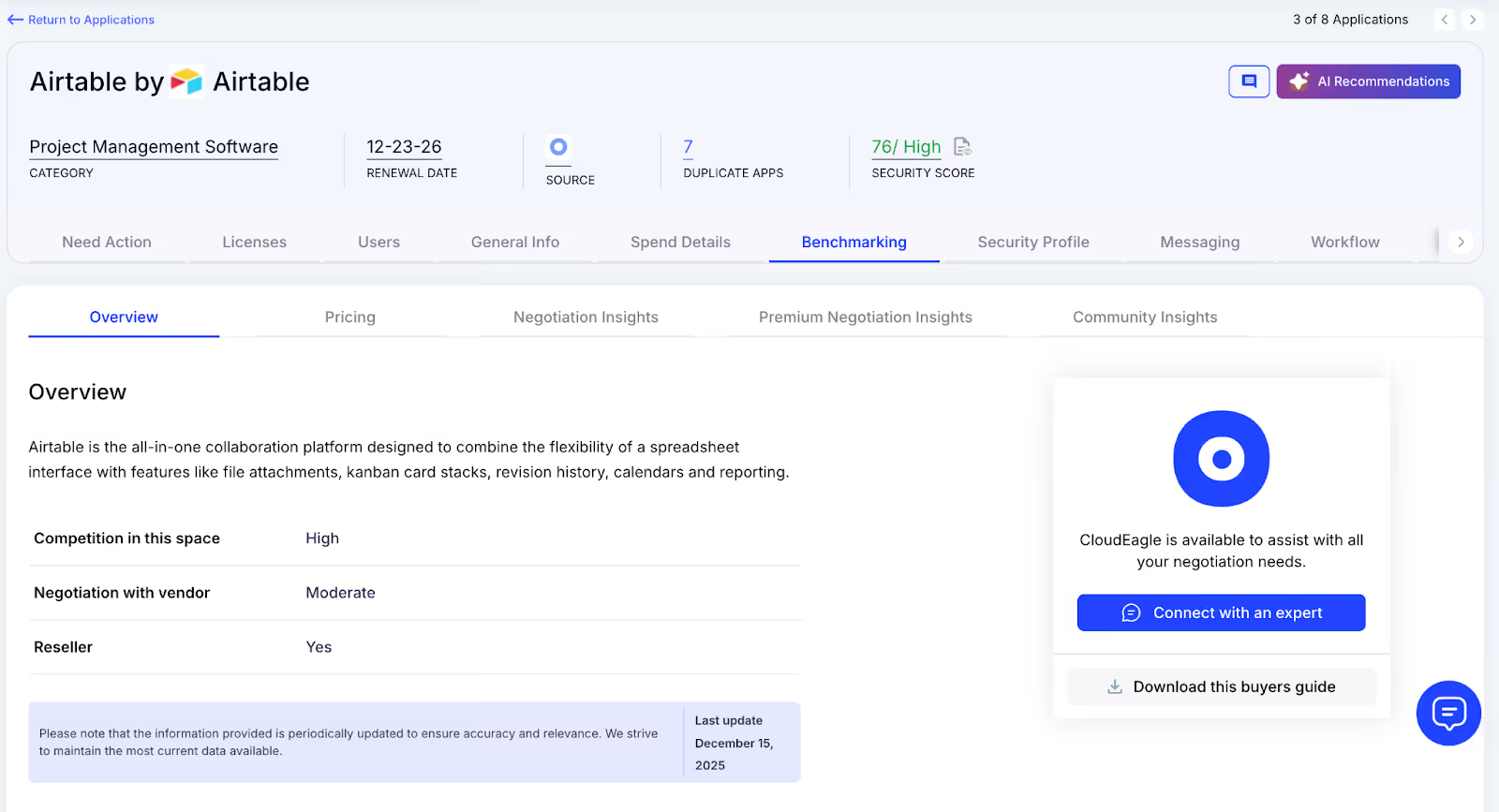
How We Do It
CloudEagle.ai delivers real-time benchmark data, historical pricing patterns, and structured Airtable pricing guide to empower informed negotiation strategies supported by verifiable data.
Why We Are Better
Pricing insights are broken down by SKU, license tier, and volume, along with recommended negotiation levers, ensuring renewal outcomes align with true market value rather than vendor-driven baselines.
F. Renewal Management, Done Proactively
CloudEagle.ai automates renewal oversight by triggering workflows aligned with contract timelines. From approval routing to adjusting Airtable license counts, it helps teams avoid accidental auto-renewals and keeps SaaS renewal management streamlined and predictable.
Current Process
Renewals are typically monitored through spreadsheets and long email threads. Approval cycles slow down, and auto-renewal deadlines often slip past unnoticed.
Pain Points
Missed renewal windows lead to unnecessary spend, and last-minute vendor negotiations reduce leverage to secure better pricing or adjust license counts appropriately.
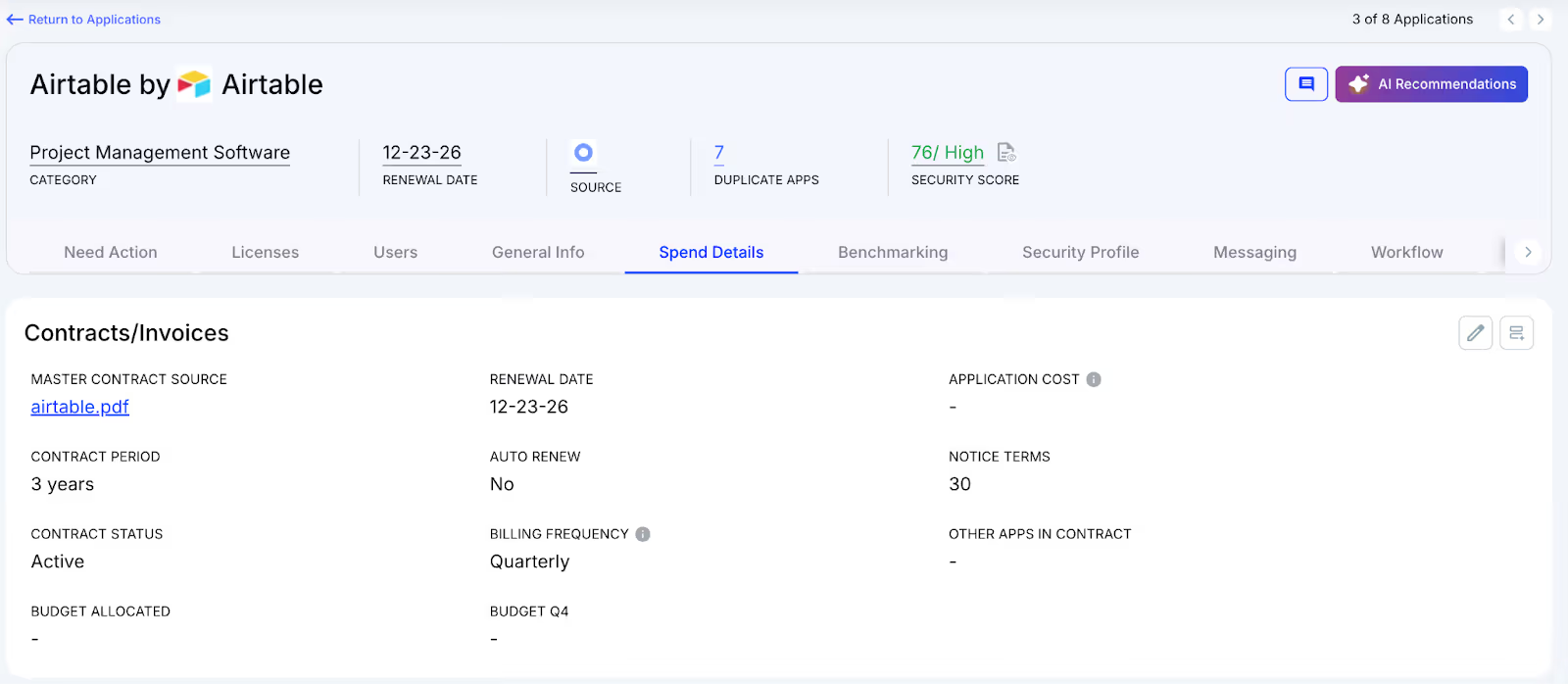
How We Do It
CloudEagle.ai creates an automated renewal calendar using AI-extracted contract data or integrations with CLMs such as Ironclad, Airtable, or Zip. Workflows activate 90 days before notice dates, routing tasks to finance, legal, and business stakeholders for coordinated action.
Why We Are Better
Teams receive alerts that include usage trends, pricing benchmarks, and alternative vendor considerations. Approval decisions are tracked automatically, preventing missed renewals, accidental spend commitments, and stalled negotiations.
G. Utilize Centralized Vendor Dashboards
CloudEagle.ai offers vendor-specific dashboards that consolidate all Airtable subscription data into one place. Teams gain visibility into license usage, renewal timelines, and spending patterns, enabling more informed, data-backed decisions.
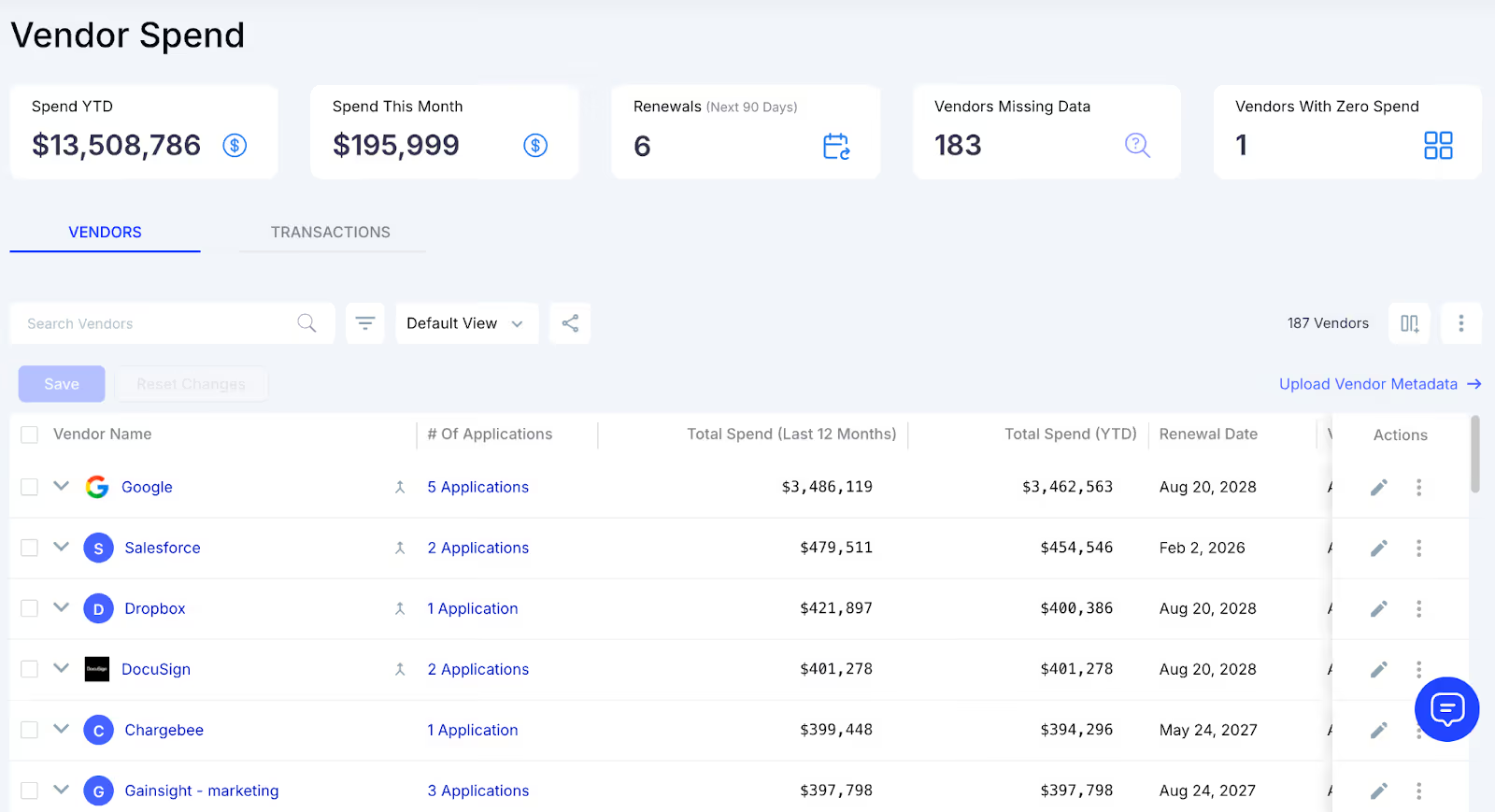
These dashboards surface overspending and identify unused licenses, making reclamation straightforward. They also reveal adoption and usage trends, allowing organizations to proactively adjust license allocations and optimize overall Airtable spending.
H. Streamlined Application Access Requests
CloudEagle.ai simplifies Airtable access by enabling employees to request licenses directly through the platform or via Slack, removing the need for lengthy email threads and manual coordination. Managers can review and approve these requests in real time, ensuring users get timely access.
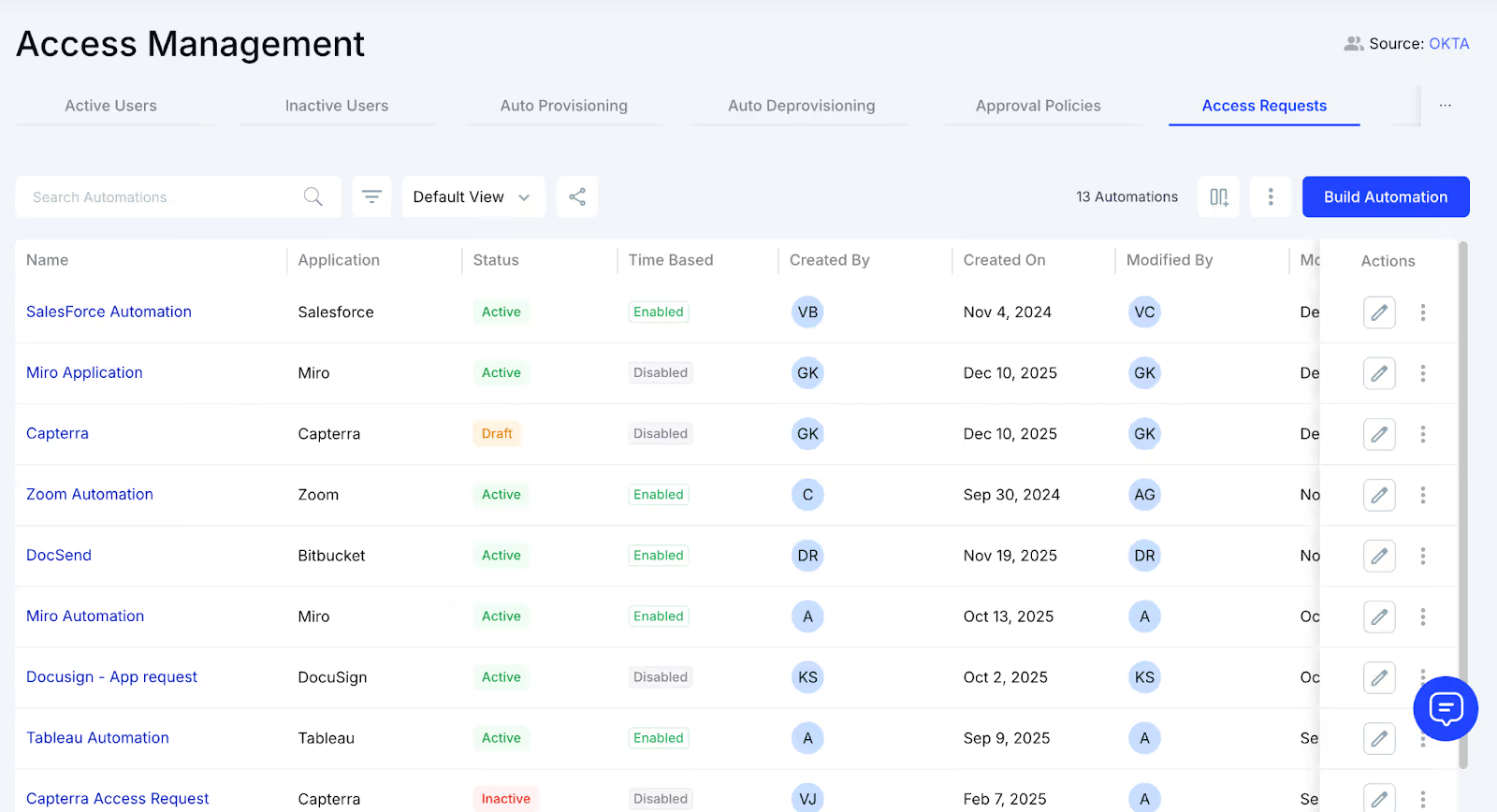
This process ensures employees receive the correct license type without unnecessary delays and eliminates approval bottlenecks. Every request is automatically logged for transparency and compliance, reducing administrative overhead while keeping access management efficient and traceable.
4. What Does Real Airtable License Optimization Look Like for Teams?
Most teams think “license optimization” means cutting seats. But in Airtable, it’s more about understanding how people actually work.
Real optimization isn’t restrictive. It feels like clarity: the right users in the right roles, the right bases powering the right projects, and the right spend supporting real activity instead of historical leftovers.
- Usage patterns become visible, so editors who haven’t touched a base in months no longer hold premium seats.
- Workspaces stop multiplying, because teams finally see what already exists before creating new ones.
- Project-based access resets automatically, preventing temporary collaborators from becoming permanent expenses.
- License tiers match behavior, not assumptions or rushed decisions during busy cycles.
And something interesting happens once this visibility kicks in: Teams stop treating Airtable like a free-for-all and start using it with intention.
They share bases instead of duplicating them. They request upgrades only when needed. They clean up old workspaces because the system shows them what’s outdated.
5. Conclusion
Airtable becomes expensive quietly because the tool makes it so easy to build that nobody notices when licenses drift far from actual usage. Seats stay active long after contributors leave and upgrades made during peak deadlines become permanent.
CloudEagle.ai brings those guardrails back. It shows which seats are active, which bases are stale, who hasn’t logged in for months, and where license tiers don’t match real work. Instead of waiting for renewal season to reveal the gaps, teams get clarity every day.
The result? Lean workspaces. Lower costs. Better visibility. And an Airtable environment that finally supports creativity without the silent budget creep behind it.
6. FAQs
1. Is Airtable free or paid?
Airtable offers both. The free plan includes basic features, while paid tiers unlock more records, advanced permissions, automations, and collaboration controls.
2. How many users can you have on Airtable free?
Unlimited users can join a free workspace, but each base is limited in features, automation runs, and record counts.
3. What is 1000 records per base in Airtable?
On the free plan, each base can store up to 1,000 records total across all tables. Upgrading increases that limit significantly.
4. How long can I use Airtable for free?
You can use the free plan indefinitely. You only need to upgrade if your team outgrows the record, automation, or storage limits.
5. Is Airtable better than Excel?
Airtable is better for collaborative, relational work with automation and views. Excel is stronger for calculations, modeling, and heavy data analysis. It depends on the use case.


.avif)


.avif)
.avif)




.png)





.avif)
.avif)
.avif)


