You need to enable JavaScript in order to use the AI chatbot tool powered by ChatBot

GitHub Pricing Guide: Endpoint Security Costs & Licensing Options

Share via:
blog-cms-banner-bg
Little-Known Negotiation Hacks to Get the Best Deal on Slack
cta-bg-blogDownload Your Copy

HIPAA Compliance Checklist for 2025

Download PDF

SaaS Procurement Guide

Learn how to negotiate contracts, evaluate add-ons, and build cost‐efficient procurement workflows.

Read Procurement Guide
CTA Thumbnail

GitHub is a cloud-based platform that helps you store, manage, and collaborate on code using Git, a version control system. Whether you're working alone or with a team, GitHub makes it easy to track changes, contribute to projects, and keep your code organized.

However, choosing the right GitHub pricing plan can become difficult. Different plans come with different features and advantages. So, without the right plan, all your time and investment will go in vain. 

This GitHub pricing guide will help you know all GitHub plans along with their pricing, features, and drawbacks. You will know some excellent money-saving tips and learn which plan is beneficial for which companies. 

TL;DR

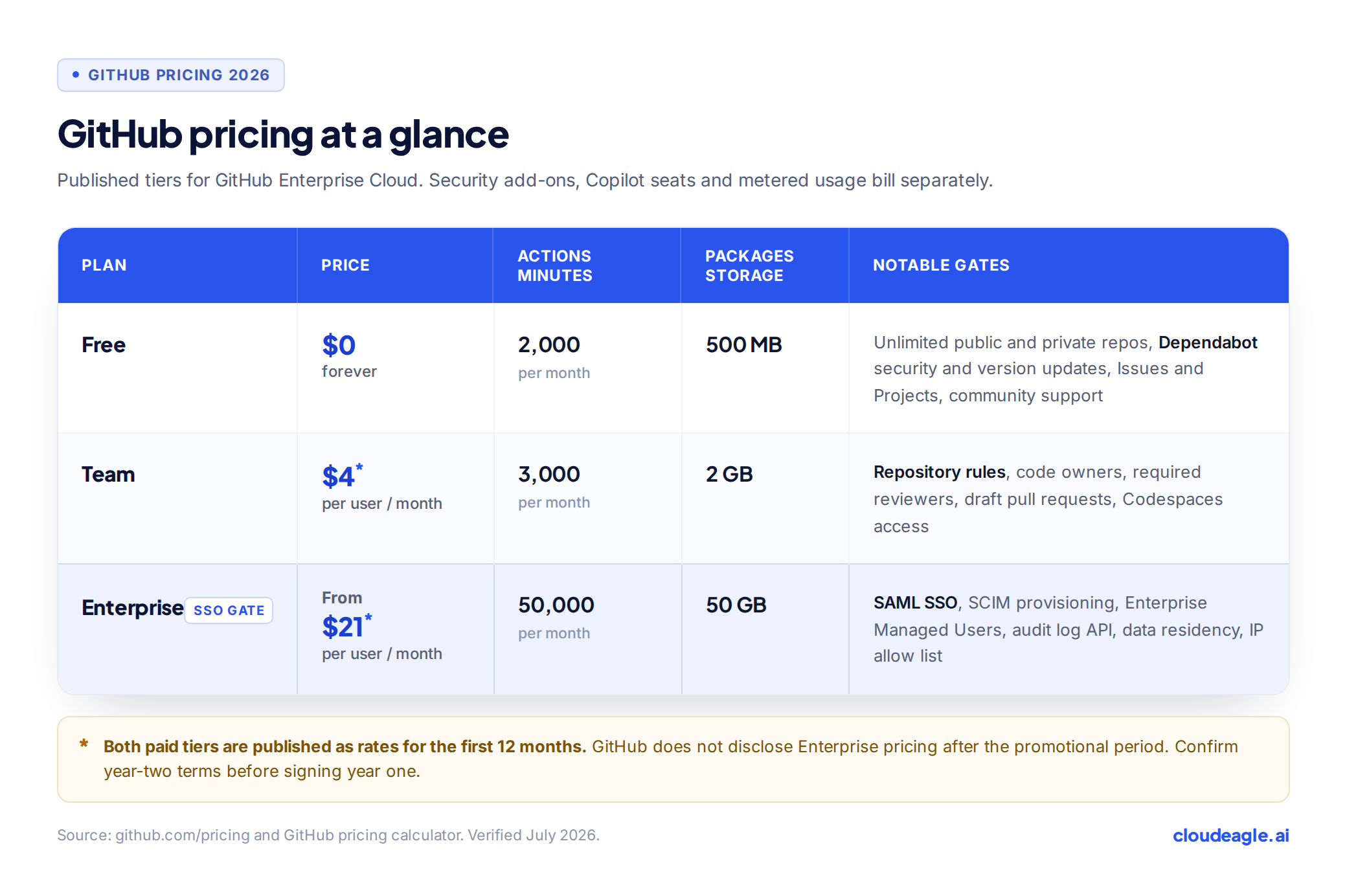
  • GitHub offers Free, Teams ($4/user/month), and Enterprise ($21/user/month) plans. Free accounts provide basic repositories, while paid plans include advanced collaboration, security, and automation tools.
  • Premium plans offer stronger security (Dependabot, secret scanning), better collaboration tools, more CI/CD resources, and priority support, making them ideal for growing teams and enterprises.
  • Platforms like CloudEagle.ai help benchmark pricing, negotiate discounts, and optimize SaaS expenses to avoid overpaying for GitHub plans.
  • Individual developers can use the Free plan, teams benefit from the Teams plan, and enterprises should consider the Enterprise plan for compliance, security, and scalability.
  • If GitHub isn’t the right fit, competitors like GitLab, Bitbucket, AWS CodeCommit, and Gitea offer similar or better features depending on your needs.

1. What is GitHub?

GitHub is a platform where you can store, manage, and collaborate on code. It’s built on Git, a version control system that tracks changes, making it easy to work on projects with others. Whether you're developing software solo or with a team, GitHub helps you organize your code, review updates, and streamline your workflow. Here are the key features of GitHub:

  • Version Control: Keep track of changes in your code and roll back to earlier versions when necessary.
  • Collaboration: Work with others using pull requests and code reviews to improve your code.
  • Repositories: A premium GuitHub pricing plan stores your code and related files in an organized way for easy access and sharing.
  • Branches: Create separate versions of your project to test new features before merging them.
  • Issues & Project Management: Track bugs, feature requests, and workflows efficiently.
  • GitHub Actions: Automate tasks like testing and deployment to streamline your workflow.

Remember that the features you get will depend on the pricing plan you choose. So, making a mistake here will result in missed cost-saving opportunities. With the right GitHub buying guide, you will never have to worry about choosing an incorrect plan.

SaaS Optimization Guide

Understand how to improve ROI, eliminate unused seats, and optimize spend through analysis.

Download Optimization Guide
CTA Thumbnail

2. Should You Pay For GitHub?

GitHub pricing structure is quite transparent and simple. Unlike many other platforms where the pricing structure is way too complicated, you shouldn’t worry about the same thing in GitHub. While there are a few add-ons, they are completely optional. Here are some reasons why a premium plan can be worth it:

  • More Features for Private Repositories: While the free plan includes private repositories, premium plans offer more storage, advanced collaboration tools, and increased automation minutes for CI/CD workflows.
  • Stronger Security: Paid plans come with Dependabot, secret scanning, and code scanning, helping you catch vulnerabilities before they become major problems.
  • Better Collaboration Tools: With protected branches and advanced merge controls, you can maintain high-quality code and streamline teamwork.
  • More CI/CD Resources: If you use GitHub Actions for automation, premium plans give you more execution minutes and larger hosted runners.
  • Priority Support & Uptime Guarantees: Business and enterprise plans offer faster support response times and better uptime guarantees. 

If you’re working on personal projects, the free plan might be enough. But if you need stronger security and better automation, you can go for the paid plans. With the right GitHub pricing guide, you can know which plan to choose. 

3. How Much Does GitHub Cost?

GitHub is super transparent and affordable. You don’t need to worry about paying for any hidden plans. While there are add-ons, they are completely optional. Here is how much you need to pay for GitHub pricing plans:

A. Free

  • Cost: $0
  • Best For: Individual developers and small teams
  • Features: Unlimited public and private repositories, 2,000 CI/CD minutes per month, 500MB of Package storage
  • Drawbacks: Limited collaboration tools and storage

B. Teams

  • Cost: $4/user/month
  • Best For: Growing teams needing advanced collaboration and management features
  • Features: 3,000 CI/CD minutes per month, 2GB of Package storage, web-based support
  • Drawbacks: Additional cost per user

3. Enterprise

  • Cost: $21/user/month
  • Best For: Enterprises that need advanced security, compliance, and support
  • Features: User provisioning through SCIM, 99.9% uptime SLA, advanced auditing capabilities
  • Drawbacks: Higher cost

The right GitHub pricing structure will depend on your unique needs and overall budget. The last thing you want is to choose a pricing plan that affects the overall spending capability of your company. That said, when you pay close attention to a reliable GutHub buying guide, you will know which plan to go for and how much money to save. 

License Management Guide

Learn how to monitor usage trends, reduce waste, and optimize licensing across departments.

Download Guide
CTA Thumbnail

GitHub Enterprise Pricing Overview

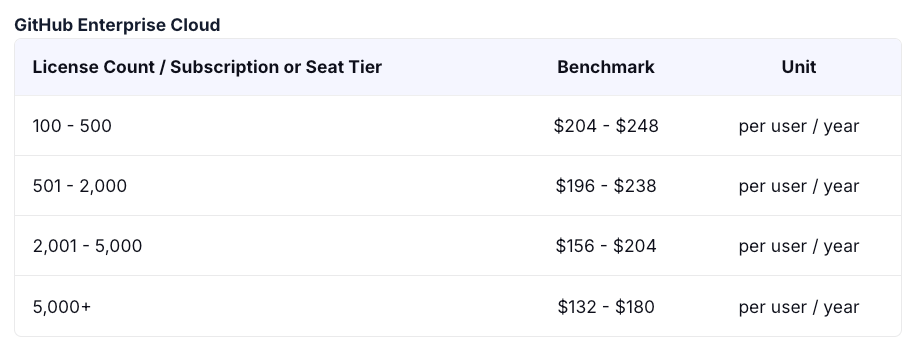
GitHub Enterprise uses a per-user subscription model starting at $21/user/month, typically requiring a 50-100 seat minimum for annual contracts. Enterprise Cloud offers monthly or annual billing, while Enterprise Server involves upfront license fees plus ongoing maintenance. Multi-year contracts can lower pricing, especially as user counts exceed 500.

Both Enterprise plans include core security features like SAML SSO, audit logs, and code scanning. The Advanced Security add-on ($19/user/month) adds secret scanning, vulnerability alerts, and security dashboards—often needed for compliance. Premium support and professional services are additional costs, especially for strict SLA requirements.

Endpoint security and governance needs can significantly increase total costs, as many organizations require Advanced Security to meet regulatory compliance standards. Enterprises managing sensitive codebases may spend 40-60% more when including security add-ons, premium support, and additional Actions/Codespaces usage. Negotiations often focus on bundling security features and lowering minimum commitments for large buyers.

Enterprise Cloud vs Enterprise Server Pricing

GitHub Enterprise pricing differs significantly between Cloud and Server deployments, with Enterprise Cloud starting at $21 per user per month on an annual commitment, while Enterprise Server requires upfront licensing fees plus ongoing infrastructure costs. Enterprise Cloud operates on a straightforward per-seat subscription model with GitHub handling all hosting, maintenance, and updates, whereas Enterprise Server involves purchasing licenses and managing your own infrastructure, resulting in higher total cost of ownership for most organizations.

The key cost drivers extend beyond basic licensing to include infrastructure requirements, maintenance overhead, and operational complexity. Enterprise Server demands dedicated IT resources for server management, security patches, backups, and scaling, while Enterprise Cloud eliminates these operational burdens through GitHub's managed infrastructure.

Choose Enterprise Cloud for teams under 500 users seeking predictable github enterprise pricing per user 2025 costs, rapid deployment, and minimal IT overhead. Enterprise Server suits larger organizations exceeding 1,000 users with specific data residency requirements, existing infrastructure capacity, or regulatory mandates preventing cloud adoption.

4. GitHub Pricing Guide: How Can You Use CloudEagle.ai to Streamline the Purchasing Process?

A. Price Benchmarking Data

CloudEagle.ai connects you with a vast network of seasoned SaaS buyers and real-time benchmarking data from over a billion transactions. These insights let you compare your GitHub pricing against what other companies pay across various plans.

If you're planning to purchase GitHub, this data will be invaluable for making an informed decision. You'll gain a stronger negotiating position and maximize your savings on your GitHub investment.

B Negotiation Tips to Get the Most Relevant GitHub Plan

Securing the best GitHub deal isn’t just about getting a discount. To negotiate effectively, you need to consider other key factors that can make your deal more advantageous. Here are some essential GitHub pricing negotiation tips to keep in mind:

  • Start Early: Initiate negotiations well in advance to establish a cooperative tone and increase flexibility. Keep your budget private to prevent vendors from tailoring offers to it.
  • Leverage Market Research & Benchmarks: Conduct thorough researcto . By using price benchmarks, you can compare GitHub costs with what other companies are paying.
  • Have a Strong Backup Plan: Always prepare a solid alternative (BATNA) in case negotiations don’t go as expected. Never accept the first offer from the vendor.
  • Negotiate Every SLA Detail: Your SaaS service level agreement (SLA) outlines uptime, response times, penalties, billing, and security. Ensure every detail is negotiated to protect your interests.

C. Breaking Down the Data

Wondering how much other companies pay for GitHub plans? Get exclusive insights with our comprehensive GitHub buying guide!  

Download now for in-depth GitHub pricing data, industry benchmarks, and expert negotiation tips to help you secure the best deal.

D. Why Do You Need GitHub Pricing Guide

Using GitHub benchmarking data can help you manage costs and negotiate with vendors. Here’s how it makes a difference:  

  • Real-World Pricing Insights: Know more than the listed rates with actual GitHub pricing data. CloudEagle.ai’s benchmarks provide visibility into real costs and usage trends.  
  • Stronger Negotiation Power: Use industry benchmarks to secure better deals and avoid overpaying.  
  • Smarter Budgeting: Get accurate cost estimates to optimize your SaaS expenses and make the most of your budget.

E. Premium Negotiation Insights

Why spend more when CloudEagle.ai can help you negotiate smarter? With the right insights, you can cut costs, unlock exclusive benefits, and get the most value from your GitHub pricing.  

Don’t overpay! Download our GitHub buying guide now to discover expert negotiation strategies that have saved businesses thousands.

5. Which GitHub Plan Should You Use?

The right GitHub plan will benefit your company and cater to all your needs. When you know which plan is perfect for which companies, you will face no problems choosing the right one. 

  • Free: This plan is best if you're an individual developer or working on small projects. It provides unlimited private and public repositories but with limited collaboration tools.
  • Teams: Ideal for growing teams, this plan includes enhanced collaboration features like protected branches, required pull request reviews, and draft pull requests.
  • Enterprise: This GitHub pricing is made for enterprises and offers advanced security and compliance features, including SAML single sign-on, audit logs, and centralized user management.

6. Who is the Competitor of GitHub?

While GitHub is one of the most popular version control and collaboration platforms, several alternatives offer similar or even better features depending on your needs. In fact, you will some of their pricing more than GitHub pricing plans. Here are five competitors you might consider:

GitLab

If you want an all-in-one DevOps platform, GitLab is a strong alternative. It provides version control, CI/CD pipelines, security features, and project management tools in one platform. Unlike GitHub, GitLab offers self-hosting options, giving you more control over your data and security.

Bitbucket

If you work primarily with Atlassian tools like Jira and Trello, Bitbucket is a great choice. It’s designed for teams using Git and offers built-in integration with Atlassian’s suite. Bitbucket also supports Mercurial repositories, which GitHub does not.

SourceForge

If you're working on open-source projects, SourceForge might be a better fit. It provides hosting for software projects and offers additional tools like download tracking, bug tracking, and project analytics. While it’s not as widely used as GitHub, it remains a reliable alternative.

AWS CodeCommit

If you prefer a fully managed Git repository service that integrates with AWS, CodeCommit is worth considering. It provides scalability, security, and deep integration with other AWS services, making it a great choice for businesses already using Amazon Web Services.

Gitea

If you’re looking for a lightweight, self-hosted Git solution, Gitea is a great alternative. It’s open-source, easy to install, and requires fewer system resources compared to GitLab. If you need a simple and private version control system without relying on a cloud provider, Gitea is a strong option.

7. Conclusion

Choosing the right GitHub plan depends on your needs, whether you're an individual developer, a growing team, or a large enterprise. You can also consider various alternatives that might better suit specific workflows or security requirements.

With CloudEagle.ai, you get access to expert negotiation strategies, real-world pricing insights, and cost-saving recommendations to ensure you’re getting the most value from your GitHub pricing. Instead of overpaying, you can optimize your plan and unlock exclusive benefits tailored to your enterprise.

Download our GitHub pricing guide today to explore proven strategies that have helped businesses save thousands!

8. Frequently Asked Questions

1. Is GitHub free now?

Yes, GitHub offers a free plan with unlimited public and private repositories, but it has limitations on advanced features. For more collaboration tools, security, and storage, paid plans are available.

2. Is GitHub Copilot better than ChatGPT?

GitHub Copilot is better for code completion and in-editor suggestions, while ChatGPT is more versatile for coding explanations, debugging, and broader problem-solving. The best choice depends on your use case.

3. Is GitHub CI CD free?

GitHub Actions (CI/CD) offers free usage with limited minutes per month for public and private repositories. Additional usage requires a paid plan based on consumption.

4. Is GitHub API free?

Yes, GitHub API is free with rate limits, but higher usage, enterprise features, and advanced access require a paid plan.

5. Is GitHub storage unlimited?

No, GitHub provides limited storage. Free accounts get 500MB for GitHub Packages and 1GB for GitHub Actions, with extra storage available on paid plans.

Advertisement for a SaaS Subscription Tracking Template with a call-to-action button to download and a partial graphic of a tablet showing charts.Banner promoting a SaaS Agreement Checklist to streamline SaaS management and avoid budget waste with a call-to-action button labeled Download checklist.Blue banner with text 'The Ultimate Employee Offboarding Checklist!' and a black button labeled 'Download checklist' alongside partial views of checklist documents from cloudeagle.ai.Digital ad for download checklist titled 'The Ultimate Checklist for IT Leaders to Optimize SaaS Operations' by cloudeagle.ai, showing checklist pages.Slack Buyer's Guide offer with text 'Unlock insider insights to get the best deal on Slack!' and a button labeled 'Get Your Copy', accompanied by a preview of the guide featuring Slack's logo.Monday Pricing Guide by cloudeagle.ai offering exclusive pricing secrets to maximize investment with a call-to-action button labeled Get Your Copy and an image of the guide's cover.Blue banner for Canva Pricing Guide by cloudeagle.ai offering a guide to Canva costs, features, and alternatives with a call-to-action button saying Get Your Copy.Blue banner with white text reading 'Little-Known Negotiation Hacks to Get the Best Deal on Slack' and a white button labeled 'Get Your Copy'.Blue banner with text 'Little-Known Negotiation Hacks to Get the Best Deal on Monday.com' and a white button labeled 'Get Your Copy'.Blue banner with text 'Little-Known Negotiation Hacks to Get the Best Deal on Canva' and a white button labeled 'Get Your Copy'.Banner with text 'Slack Buyer's Guide' and a 'Download Now' button next to images of a guide titled 'Slack Buyer’s Guide: Features, Pricing & Best Practices'.Digital cover of Monday Pricing Guide with a button labeled Get Your Copy on a blue background.Canva Pricing Guide cover with a button labeled Get Your Copy on a blue gradient background.
What to consider when buying GitHub
Based on the latest community trends and observations
Admin
Those with Admin access can turn on additional features, which can be billed as on-demand, increasing the cost of your commitment significantly.
Billing
Default billing is Annual Net 30 and customers have not cited payment flexibility.
Free Credits / Months
Customers who are switching from competitors have shared GitHub has offered a generous number of free months to win the business.
Free Product / Trials Considerations
14-day free trial for GitHub Enterprise or Advanced Security and a 30-day free trial for GitHub Copilot.
Plans
Microsoft customers with the Unified Support plan have shared GitHub Premium support is included at no additional cost.
Pricing
GitHub commits to notifying customers of price changes 30 days in advance.
Sales
Sales reps have been less flexible with discounting since the Microsoft acquisition. GitHub Sales reps are on quarterly quotas rather than annual. There are larger incentives for them to sell at the end of each quarter.
Usage / Overages
Customers can set spending limits for metered services, such as, Actions to help manage costs. The settings for these services default to unlimited which can lead to overages.
Other
Customers using GitHub Action Minutes and/or Copilot are commonly billed monthly by usage. Customers have shared if they move to prepayment and the payment is at least $25K, GitHub will grant a 3% discount. $70k is close to 5% and $100k is 7 %. Currently, Copilot cannot be used to secure better pricing and it is best for customers to engage in a monthly plan unless it is over 110 users.

Enter your email to
unlock the report

Oops! Something went wrong while submitting the form.
License Count
Benchmark
Per User/Per Year

Enter your email to
unlock the report

Oops! Something went wrong while submitting the form.
License Count
Benchmark
Per User/Per Year

Enter your email to
unlock the report

Oops! Something went wrong while submitting the form.
Notion Plus
License Count
Benchmark
Per User/Per Year
100-500
$67.20 - $78.72
500-1000
$59.52 - $72.00
1000+
$51.84 - $57.60
Canva Pro
License Count
Benchmark
Per User/Per Year
100-500
$74.33-$88.71
500-1000
$64.74-$80.32
1000+
$55.14-$62.34

Enter your email to
unlock the report

Oops! Something went wrong while submitting the form.

Enter your email to
unlock the report

Oops! Something went wrong while submitting the form.
Zoom Business
License Count
Benchmark
Per User/Per Year
100-500
$216.00 - $264.00
500-1000
$180.00 - $216.00
1000+
$156.00 - $180.00

Enter your email to
unlock the report

Oops! Something went wrong while submitting the form.

Get the Right Security Platform To Secure Your Cloud Infrastructure

Please enter a business email
Thank you!
The 2023 SaaS report has been sent to your email. Check your promotional or spam folder.
Oops! Something went wrong while submitting the form.

Access full report

Please enter a business email
Thank you!
The 2023 SaaS report has been sent to your email. Check your promotional or spam folder.
Oops! Something went wrong while submitting the form.

SaaS Procurement Guide

Learn how to negotiate contracts, evaluate add-ons, and build cost‐efficient procurement workflows.

Read Procurement Guide
CTA Thumbnail

GitHub is a cloud-based platform that helps you store, manage, and collaborate on code using Git, a version control system. Whether you're working alone or with a team, GitHub makes it easy to track changes, contribute to projects, and keep your code organized.

However, choosing the right GitHub pricing plan can become difficult. Different plans come with different features and advantages. So, without the right plan, all your time and investment will go in vain. 

This GitHub pricing guide will help you know all GitHub plans along with their pricing, features, and drawbacks. You will know some excellent money-saving tips and learn which plan is beneficial for which companies. 

TL;DR

  • GitHub offers Free, Teams ($4/user/month), and Enterprise ($21/user/month) plans. Free accounts provide basic repositories, while paid plans include advanced collaboration, security, and automation tools.
  • Premium plans offer stronger security (Dependabot, secret scanning), better collaboration tools, more CI/CD resources, and priority support, making them ideal for growing teams and enterprises.
  • Platforms like CloudEagle.ai help benchmark pricing, negotiate discounts, and optimize SaaS expenses to avoid overpaying for GitHub plans.
  • Individual developers can use the Free plan, teams benefit from the Teams plan, and enterprises should consider the Enterprise plan for compliance, security, and scalability.
  • If GitHub isn’t the right fit, competitors like GitLab, Bitbucket, AWS CodeCommit, and Gitea offer similar or better features depending on your needs.

1. What is GitHub?

GitHub is a platform where you can store, manage, and collaborate on code. It’s built on Git, a version control system that tracks changes, making it easy to work on projects with others. Whether you're developing software solo or with a team, GitHub helps you organize your code, review updates, and streamline your workflow. Here are the key features of GitHub:

  • Version Control: Keep track of changes in your code and roll back to earlier versions when necessary.
  • Collaboration: Work with others using pull requests and code reviews to improve your code.
  • Repositories: A premium GuitHub pricing plan stores your code and related files in an organized way for easy access and sharing.
  • Branches: Create separate versions of your project to test new features before merging them.
  • Issues & Project Management: Track bugs, feature requests, and workflows efficiently.
  • GitHub Actions: Automate tasks like testing and deployment to streamline your workflow.

Remember that the features you get will depend on the pricing plan you choose. So, making a mistake here will result in missed cost-saving opportunities. With the right GitHub buying guide, you will never have to worry about choosing an incorrect plan.

SaaS Optimization Guide

Understand how to improve ROI, eliminate unused seats, and optimize spend through analysis.

Download Optimization Guide
CTA Thumbnail

2. Should You Pay For GitHub?

GitHub pricing structure is quite transparent and simple. Unlike many other platforms where the pricing structure is way too complicated, you shouldn’t worry about the same thing in GitHub. While there are a few add-ons, they are completely optional. Here are some reasons why a premium plan can be worth it:

  • More Features for Private Repositories: While the free plan includes private repositories, premium plans offer more storage, advanced collaboration tools, and increased automation minutes for CI/CD workflows.
  • Stronger Security: Paid plans come with Dependabot, secret scanning, and code scanning, helping you catch vulnerabilities before they become major problems.
  • Better Collaboration Tools: With protected branches and advanced merge controls, you can maintain high-quality code and streamline teamwork.
  • More CI/CD Resources: If you use GitHub Actions for automation, premium plans give you more execution minutes and larger hosted runners.
  • Priority Support & Uptime Guarantees: Business and enterprise plans offer faster support response times and better uptime guarantees. 

If you’re working on personal projects, the free plan might be enough. But if you need stronger security and better automation, you can go for the paid plans. With the right GitHub pricing guide, you can know which plan to choose. 

3. How Much Does GitHub Cost?

GitHub is super transparent and affordable. You don’t need to worry about paying for any hidden plans. While there are add-ons, they are completely optional. Here is how much you need to pay for GitHub pricing plans:

A. Free

  • Cost: $0
  • Best For: Individual developers and small teams
  • Features: Unlimited public and private repositories, 2,000 CI/CD minutes per month, 500MB of Package storage
  • Drawbacks: Limited collaboration tools and storage

B. Teams

  • Cost: $4/user/month
  • Best For: Growing teams needing advanced collaboration and management features
  • Features: 3,000 CI/CD minutes per month, 2GB of Package storage, web-based support
  • Drawbacks: Additional cost per user

3. Enterprise

  • Cost: $21/user/month
  • Best For: Enterprises that need advanced security, compliance, and support
  • Features: User provisioning through SCIM, 99.9% uptime SLA, advanced auditing capabilities
  • Drawbacks: Higher cost

The right GitHub pricing structure will depend on your unique needs and overall budget. The last thing you want is to choose a pricing plan that affects the overall spending capability of your company. That said, when you pay close attention to a reliable GutHub buying guide, you will know which plan to go for and how much money to save. 

License Management Guide

Learn how to monitor usage trends, reduce waste, and optimize licensing across departments.

Download Guide
CTA Thumbnail

GitHub Enterprise Pricing Overview

GitHub Enterprise uses a per-user subscription model starting at $21/user/month, typically requiring a 50-100 seat minimum for annual contracts. Enterprise Cloud offers monthly or annual billing, while Enterprise Server involves upfront license fees plus ongoing maintenance. Multi-year contracts can lower pricing, especially as user counts exceed 500.

Both Enterprise plans include core security features like SAML SSO, audit logs, and code scanning. The Advanced Security add-on ($19/user/month) adds secret scanning, vulnerability alerts, and security dashboards—often needed for compliance. Premium support and professional services are additional costs, especially for strict SLA requirements.

Endpoint security and governance needs can significantly increase total costs, as many organizations require Advanced Security to meet regulatory compliance standards. Enterprises managing sensitive codebases may spend 40-60% more when including security add-ons, premium support, and additional Actions/Codespaces usage. Negotiations often focus on bundling security features and lowering minimum commitments for large buyers.

Enterprise Cloud vs Enterprise Server Pricing

GitHub Enterprise pricing differs significantly between Cloud and Server deployments, with Enterprise Cloud starting at $21 per user per month on an annual commitment, while Enterprise Server requires upfront licensing fees plus ongoing infrastructure costs. Enterprise Cloud operates on a straightforward per-seat subscription model with GitHub handling all hosting, maintenance, and updates, whereas Enterprise Server involves purchasing licenses and managing your own infrastructure, resulting in higher total cost of ownership for most organizations.

The key cost drivers extend beyond basic licensing to include infrastructure requirements, maintenance overhead, and operational complexity. Enterprise Server demands dedicated IT resources for server management, security patches, backups, and scaling, while Enterprise Cloud eliminates these operational burdens through GitHub's managed infrastructure.

Choose Enterprise Cloud for teams under 500 users seeking predictable github enterprise pricing per user 2025 costs, rapid deployment, and minimal IT overhead. Enterprise Server suits larger organizations exceeding 1,000 users with specific data residency requirements, existing infrastructure capacity, or regulatory mandates preventing cloud adoption.

4. GitHub Pricing Guide: How Can You Use CloudEagle.ai to Streamline the Purchasing Process?

A. Price Benchmarking Data

CloudEagle.ai connects you with a vast network of seasoned SaaS buyers and real-time benchmarking data from over a billion transactions. These insights let you compare your GitHub pricing against what other companies pay across various plans.

If you're planning to purchase GitHub, this data will be invaluable for making an informed decision. You'll gain a stronger negotiating position and maximize your savings on your GitHub investment.

B Negotiation Tips to Get the Most Relevant GitHub Plan

Securing the best GitHub deal isn’t just about getting a discount. To negotiate effectively, you need to consider other key factors that can make your deal more advantageous. Here are some essential GitHub pricing negotiation tips to keep in mind:

  • Start Early: Initiate negotiations well in advance to establish a cooperative tone and increase flexibility. Keep your budget private to prevent vendors from tailoring offers to it.
  • Leverage Market Research & Benchmarks: Conduct thorough researcto . By using price benchmarks, you can compare GitHub costs with what other companies are paying.
  • Have a Strong Backup Plan: Always prepare a solid alternative (BATNA) in case negotiations don’t go as expected. Never accept the first offer from the vendor.
  • Negotiate Every SLA Detail: Your SaaS service level agreement (SLA) outlines uptime, response times, penalties, billing, and security. Ensure every detail is negotiated to protect your interests.

C. Breaking Down the Data

Wondering how much other companies pay for GitHub plans? Get exclusive insights with our comprehensive GitHub buying guide!  

Download now for in-depth GitHub pricing data, industry benchmarks, and expert negotiation tips to help you secure the best deal.

D. Why Do You Need GitHub Pricing Guide

Using GitHub benchmarking data can help you manage costs and negotiate with vendors. Here’s how it makes a difference:  

  • Real-World Pricing Insights: Know more than the listed rates with actual GitHub pricing data. CloudEagle.ai’s benchmarks provide visibility into real costs and usage trends.  
  • Stronger Negotiation Power: Use industry benchmarks to secure better deals and avoid overpaying.  
  • Smarter Budgeting: Get accurate cost estimates to optimize your SaaS expenses and make the most of your budget.

E. Premium Negotiation Insights

Why spend more when CloudEagle.ai can help you negotiate smarter? With the right insights, you can cut costs, unlock exclusive benefits, and get the most value from your GitHub pricing.  

Don’t overpay! Download our GitHub buying guide now to discover expert negotiation strategies that have saved businesses thousands.

5. Which GitHub Plan Should You Use?

The right GitHub plan will benefit your company and cater to all your needs. When you know which plan is perfect for which companies, you will face no problems choosing the right one. 

  • Free: This plan is best if you're an individual developer or working on small projects. It provides unlimited private and public repositories but with limited collaboration tools.
  • Teams: Ideal for growing teams, this plan includes enhanced collaboration features like protected branches, required pull request reviews, and draft pull requests.
  • Enterprise: This GitHub pricing is made for enterprises and offers advanced security and compliance features, including SAML single sign-on, audit logs, and centralized user management.

6. Who is the Competitor of GitHub?

While GitHub is one of the most popular version control and collaboration platforms, several alternatives offer similar or even better features depending on your needs. In fact, you will some of their pricing more than GitHub pricing plans. Here are five competitors you might consider:

GitLab

If you want an all-in-one DevOps platform, GitLab is a strong alternative. It provides version control, CI/CD pipelines, security features, and project management tools in one platform. Unlike GitHub, GitLab offers self-hosting options, giving you more control over your data and security.

Bitbucket

If you work primarily with Atlassian tools like Jira and Trello, Bitbucket is a great choice. It’s designed for teams using Git and offers built-in integration with Atlassian’s suite. Bitbucket also supports Mercurial repositories, which GitHub does not.

SourceForge

If you're working on open-source projects, SourceForge might be a better fit. It provides hosting for software projects and offers additional tools like download tracking, bug tracking, and project analytics. While it’s not as widely used as GitHub, it remains a reliable alternative.

AWS CodeCommit

If you prefer a fully managed Git repository service that integrates with AWS, CodeCommit is worth considering. It provides scalability, security, and deep integration with other AWS services, making it a great choice for businesses already using Amazon Web Services.

Gitea

If you’re looking for a lightweight, self-hosted Git solution, Gitea is a great alternative. It’s open-source, easy to install, and requires fewer system resources compared to GitLab. If you need a simple and private version control system without relying on a cloud provider, Gitea is a strong option.

7. Conclusion

Choosing the right GitHub plan depends on your needs, whether you're an individual developer, a growing team, or a large enterprise. You can also consider various alternatives that might better suit specific workflows or security requirements.

With CloudEagle.ai, you get access to expert negotiation strategies, real-world pricing insights, and cost-saving recommendations to ensure you’re getting the most value from your GitHub pricing. Instead of overpaying, you can optimize your plan and unlock exclusive benefits tailored to your enterprise.

Download our GitHub pricing guide today to explore proven strategies that have helped businesses save thousands!

8. Frequently Asked Questions

1. Is GitHub free now?

Yes, GitHub offers a free plan with unlimited public and private repositories, but it has limitations on advanced features. For more collaboration tools, security, and storage, paid plans are available.

2. Is GitHub Copilot better than ChatGPT?

GitHub Copilot is better for code completion and in-editor suggestions, while ChatGPT is more versatile for coding explanations, debugging, and broader problem-solving. The best choice depends on your use case.

3. Is GitHub CI CD free?

GitHub Actions (CI/CD) offers free usage with limited minutes per month for public and private repositories. Additional usage requires a paid plan based on consumption.

4. Is GitHub API free?

Yes, GitHub API is free with rate limits, but higher usage, enterprise features, and advanced access require a paid plan.

5. Is GitHub storage unlimited?

No, GitHub provides limited storage. Free accounts get 500MB for GitHub Packages and 1GB for GitHub Actions, with extra storage available on paid plans.

CloudEagle.ai recognized in the 2025 Gartner® Magic Quadrant™ for SaaS Management Platforms
Download now
gartner chart
5x
Faster employee
onboarding
80%
Reduction in time for
user access reviews
30k
Workflows
automated
$15Bn
Analyzed in
contract spend
$2Bn
Saved in
SaaS spend

Recognized as an Industry leader for our AI

CloudEagle.ai is Recognized in the 2024 Gartner® Magic Quadrant™ for SaaS Management Platforms

Recognition highlights CloudEagle’s innovation and leadership in the rapidly evolving SaaS management and procurement space.
Read More
Gartner Magic Quadrant for SaaS Management Platforms showing a chart divided into Challengers and Leaders quadrants with various companies plotted as dots.

CloudEagle.ai Recognized in the GigaOm Radar for SaaS Management Platforms

CloudEagle named a Leader and Outperformer in GigaOm Radar Report, validating its impact in the SaaS management platform landscape.
Read More
gigaom

Everest Group Positions CloudEagle.ai as a Trailblazer in SaaS Management Platforms

CloudEagle recognized as a Trailblazer by Everest Group, showcasing its rapid growth and innovation in SaaS spend and operations management.
Read More
qks

CloudEagle.ai is Recognized in the 2024 Gartner® Magic Quadrant™ for SaaS Management Platforms

Recognition highlights CloudEagle’s innovation and leadership in the rapidly evolving SaaS management and procurement space.
Read More
gartner

Streamline SaaS governance and save 10-30%

Book a Demo with Expert
CTA image
One platform to Manage
all SaaS Products
Learn More